02チェックリストの進捗カード
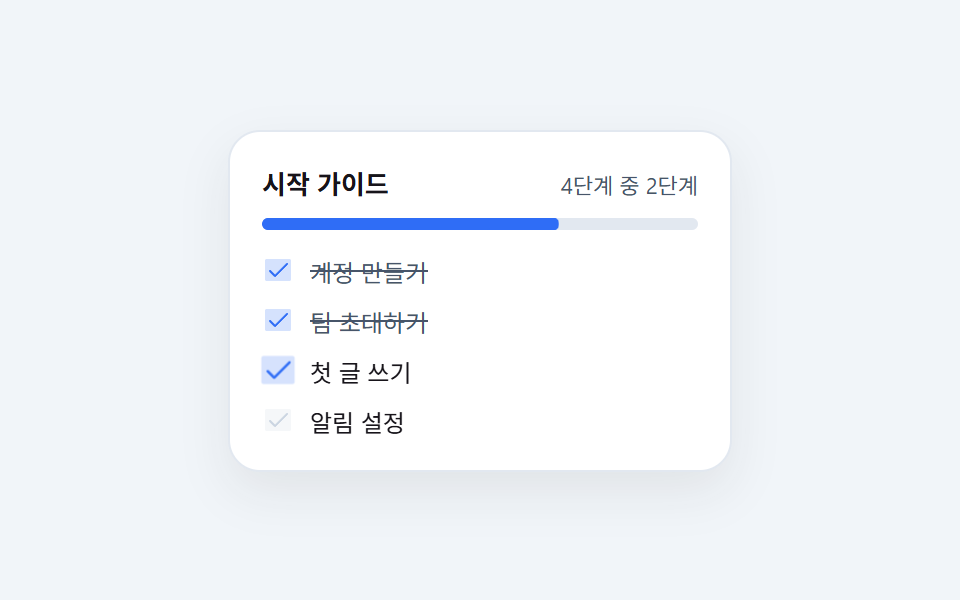
4行のタスクのうち2行が順にチェックされ、ラベルに左から取り消し線が引かれると同時に、カード上部の進捗バーが50%から75%まで同じ拍で伸びます。
使いどころダッシュボード初回訪問時のスタートガイド、アカウント設定の完了率カード
scaleX 취소선50%→75%radius 16
<main class="stage is-demo">
  <div class="card">
    <div class="head">
      <span class="h">スタートガイド</span>
      <span class="p">4件中2件</span>
    </div>
    <div class="bar" aria-hidden="true"><i></i></div>
    <ul class="list" aria-label="スタートガイドのタスク">
      <li class="row is-done">
        <span class="box" aria-hidden="true"><svg xmlns="http://www.w3.org/2000/svg" viewBox="0 0 256 256" fill="currentColor"><path d="M232,56V200a16,16,0,0,1-16,16H40a16,16,0,0,1-16-16V56A16,16,0,0,1,40,40H216A16,16,0,0,1,232,56Z" opacity="0.2"/><path d="M205.66,85.66l-96,96a8,8,0,0,1-11.32,0l-40-40a8,8,0,0,1,11.32-11.32L104,164.69l90.34-90.35a8,8,0,0,1,11.32,11.32Z"/></svg></span>
        <span class="lb">アカウント作成<i class="ln" aria-hidden="true"></i></span>
      </li>
      <li class="row is-done">
        <span class="box" aria-hidden="true"><svg xmlns="http://www.w3.org/2000/svg" viewBox="0 0 256 256" fill="currentColor"><path d="M232,56V200a16,16,0,0,1-16,16H40a16,16,0,0,1-16-16V56A16,16,0,0,1,40,40H216A16,16,0,0,1,232,56Z" opacity="0.2"/><path d="M205.66,85.66l-96,96a8,8,0,0,1-11.32,0l-40-40a8,8,0,0,1,11.32-11.32L104,164.69l90.34-90.35a8,8,0,0,1,11.32,11.32Z"/></svg></span>
        <span class="lb">チームを招待<i class="ln" aria-hidden="true"></i></span>
      </li>
      <li class="row r3">
        <span class="box" aria-hidden="true"><svg xmlns="http://www.w3.org/2000/svg" viewBox="0 0 256 256" fill="currentColor"><path d="M232,56V200a16,16,0,0,1-16,16H40a16,16,0,0,1-16-16V56A16,16,0,0,1,40,40H216A16,16,0,0,1,232,56Z" opacity="0.2"/><path d="M205.66,85.66l-96,96a8,8,0,0,1-11.32,0l-40-40a8,8,0,0,1,11.32-11.32L104,164.69l90.34-90.35a8,8,0,0,1,11.32,11.32Z"/></svg></span>
        <span class="lb">最初の投稿<i class="ln" aria-hidden="true"></i></span>
      </li>
      <li class="row r4">
        <span class="box" aria-hidden="true"><svg xmlns="http://www.w3.org/2000/svg" viewBox="0 0 256 256" fill="currentColor"><path d="M232,56V200a16,16,0,0,1-16,16H40a16,16,0,0,1-16-16V56A16,16,0,0,1,40,40H216A16,16,0,0,1,232,56Z" opacity="0.2"/><path d="M205.66,85.66l-96,96a8,8,0,0,1-11.32,0l-40-40a8,8,0,0,1,11.32-11.32L104,164.69l90.34-90.35a8,8,0,0,1,11.32,11.32Z"/></svg></span>
        <span class="lb">通知の設定<i class="ln" aria-hidden="true"></i></span>
      </li>
    </ul>
  </div>
</main>@use "../../../../site/static/demo-tokens" as *;
// ── 변수 3개 ──────────────────────────────────────────
$duration: $dur-loop; // 2s — 3번째 줄 → 4번째 줄이 차례로 체크되는 한 바퀴
$easing: $ease-spring;
$color: $subject-blue;
@include stage(#f1f5f9);
.card {
box-sizing: border-box;
width: min(100%, 252px);
padding: $sp-4;
border-radius: $r-card;
background: #fff;
border: 1px solid #e2e8f0;
box-shadow: 0 10px 24px rgba(23, 20, 26, .08);
}
.head { display: flex; align-items: baseline; justify-content: space-between; gap: $sp-2; }
.h { font-size: 13px; font-weight: 700; color: $subject-ink; }
.p { font-size: 11px; color: #475569; }
// 진행 막대 — 채움은 scaleX 라 레이아웃을 다시 계산하지 않는다
.bar {
position: relative;
height: 6px;
margin: $sp-2 0 $sp-3;
border-radius: $r-pill;
background: #e2e8f0;
overflow: hidden;
}
.bar i {
position: absolute; inset: 0;
border-radius: $r-pill;
background: $color;
transform: scaleX(.5);
transform-origin: left center; // 규칙8: 진행 막대 왼쪽 채움
}
.stage.is-demo .bar i { animation: fill $duration $easing infinite; }
// 한 겹(진행 막대 잔상) — 2026-09-15 형태 2차
// 막대가 밀려날 때 120ms 늦은 옅은 복제가 트레일로 남는다 (같은 fill keyframes)
.bar::after {
content: "";
position: absolute; inset: 0;
border-radius: $r-pill;
background: $color;
opacity: .3;
transform: scaleX(.5);
transform-origin: left center;
}
.stage.is-demo .bar::after { animation: fill $duration $easing infinite; animation-delay: 120ms; }
.list { margin: 0; padding: 0; list-style: none; display: grid; gap: $sp-2; }
.row { display: flex; align-items: center; gap: $sp-2; }
.box {
display: block;
width: 16px; height: 16px;
flex: 0 0 auto;
color: #cbd5e1;
}
.box svg { width: 100%; height: 100%; display: block; }
.lb {
position: relative;
font-size: 12px;
color: $subject-ink;
}
// 취소선 — width 가 아니라 scaleX. 왼쪽에서 오른쪽으로 그어진다
.ln {
position: absolute; left: 0; right: 0; top: 50%;
height: 1px;
background: #475569;
transform: scaleX(0);
transform-origin: left center; // 규칙8: 취소선 왼쪽 그어짐
}
// 이미 끝난 두 줄은 정지 상태 — 대조군
.is-done .box { color: $color; }
.is-done .lb { color: #475569; }
.is-done .ln { transform: scaleX(1); }
.stage.is-demo .r3 .box {
animation-name: tick, box-pop; // 3차: 감쇠 스프링(transform) 위에 개별 속성(scale:) 탄성을 곱합성
animation-duration: $duration;
animation-timing-function: $easing, $ease-lerp-settle;
animation-iteration-count: infinite;
}
.stage.is-demo .r3 .ln { animation: strike $duration $easing infinite; }
.stage.is-demo .r4 .box {
animation-name: tick, box-pop;
animation-duration: $duration;
animation-timing-function: $easing, $ease-lerp-settle;
animation-iteration-count: infinite;
animation-delay: calc(#{$duration} / 2); // 값 1개는 두 애니메이션에 모두 반복 적용된다
}
.stage.is-demo .r4 .ln { animation: strike $duration $easing infinite; animation-delay: calc(#{$duration} / 2); }
@keyframes fill {
0%, 10% { transform: scaleX(.5); }
40%, 55% { transform: scaleX(.75); }
85%, 100% { transform: scaleX(1); }
}
// 한 겹(체크 감쇠 스프링) — 2026-09-15 형태 2차
// 한 번 커졌다 끝나던 scale 을 감쇠 진동(γ≈.5) 시퀀스로 재설계 —
// 1.22 → .92 → 1.06 → 1 로 튀었다 되돌아오며 정착
@keyframes tick {
0%, 12% { color: #cbd5e1; transform: scale(1); }
20% { color: $color; transform: scale(1.22); }
28% { color: $color; transform: scale(.92); }
34% { color: $color; transform: scale(1.06); }
40%, 100% { color: $color; transform: scale(1); }
}
@keyframes strike {
0%, 18% { transform: scaleX(0); }
44%, 100% { transform: scaleX(1); }
}
// 3차: 체크 순간 상자를 한 번 더 탄성으로 튀긴다 — 개별 속성(scale:)이라
// tick 의 transform: scale(1.22) 과 곱합성 (피크 1.22 * 1.14 = 1.39).
// 시점은 tick 의 피크(20%)에 맞춰 두 진동이 겹쳐 폭발적으로 튀게 한다
@keyframes box-pop {
0%, 16% { scale: 1; }
20% { scale: 1.14; }
28% { scale: .97; }
36% { scale: 1.02; }
42%, 100% { scale: 1; }
}
@media (prefers-reduced-motion: reduce) {
.stage.is-demo .bar i, .stage.is-demo .bar::after,
.stage.is-demo .r3 .box, .stage.is-demo .r3 .ln,
.stage.is-demo .r4 .box, .stage.is-demo .r4 .ln { animation: none; }
.stage.is-demo .bar i { transform: scaleX(1); }
.stage.is-demo .bar::after { opacity: 0; }
.stage.is-demo .r3 .box, .stage.is-demo .r4 .box { color: $color; scale: 1; }
.stage.is-demo .r3 .ln, .stage.is-demo .r4 .ln { transform: scaleX(1); }
}html, body {
margin: 0;
overflow: hidden;
}
.stage {
box-sizing: border-box;
min-height: 100vh;
display: grid;
place-items: center;
margin: 0;
background: #f1f5f9;
font-family: -apple-system, "Segoe UI", "Noto Sans KR", sans-serif;
padding: clamp(8px, 4vw, 24px);
}
.card {
box-sizing: border-box;
width: min(100%, 252px);
padding: 16px;
border-radius: 16px;
background: #fff;
border: 1px solid #e2e8f0;
box-shadow: 0 10px 24px rgba(23, 20, 26, 0.08);
}
.head {
display: flex;
align-items: baseline;
justify-content: space-between;
gap: 8px;
}
.h {
font-size: 13px;
font-weight: 700;
color: #17141a;
}
.p {
font-size: 11px;
color: #475569;
}
.bar {
position: relative;
height: 6px;
margin: 8px 0 12px;
border-radius: 999px;
background: #e2e8f0;
overflow: hidden;
}
.bar i {
position: absolute;
inset: 0;
border-radius: 999px;
background: #2f6df6;
transform: scaleX(0.5);
transform-origin: left center;
}
.stage.is-demo .bar i {
animation: fill 2s cubic-bezier(0.2, 0.8, 0.2, 1) infinite;
}
.bar::after {
content: "";
position: absolute;
inset: 0;
border-radius: 999px;
background: #2f6df6;
opacity: 0.3;
transform: scaleX(0.5);
transform-origin: left center;
}
.stage.is-demo .bar::after {
animation: fill 2s cubic-bezier(0.2, 0.8, 0.2, 1) infinite;
animation-delay: 120ms;
}
.list {
margin: 0;
padding: 0;
list-style: none;
display: grid;
gap: 8px;
}
.row {
display: flex;
align-items: center;
gap: 8px;
}
.box {
display: block;
width: 16px;
height: 16px;
flex: 0 0 auto;
color: #cbd5e1;
}
.box svg {
width: 100%;
height: 100%;
display: block;
}
.lb {
position: relative;
font-size: 12px;
color: #17141a;
}
.ln {
position: absolute;
left: 0;
right: 0;
top: 50%;
height: 1px;
background: #475569;
transform: scaleX(0);
transform-origin: left center;
}
.is-done .box {
color: #2f6df6;
}
.is-done .lb {
color: #475569;
}
.is-done .ln {
transform: scaleX(1);
}
.stage.is-demo .r3 .box {
animation-name: tick, box-pop;
animation-duration: 2s;
animation-timing-function: cubic-bezier(0.2, 0.8, 0.2, 1), linear(0, 0.051, 0.176, 0.341, 0.518, 0.685, 0.831, 0.947, 1.032, 1.087, 1.117, 1.126, 1.121, 1.105, 1.085, 1.062, 1.041, 1.022, 1.008, 0.997, 1);
animation-iteration-count: infinite;
}
.stage.is-demo .r3 .ln {
animation: strike 2s cubic-bezier(0.2, 0.8, 0.2, 1) infinite;
}
.stage.is-demo .r4 .box {
animation-name: tick, box-pop;
animation-duration: 2s;
animation-timing-function: cubic-bezier(0.2, 0.8, 0.2, 1), linear(0, 0.051, 0.176, 0.341, 0.518, 0.685, 0.831, 0.947, 1.032, 1.087, 1.117, 1.126, 1.121, 1.105, 1.085, 1.062, 1.041, 1.022, 1.008, 0.997, 1);
animation-iteration-count: infinite;
animation-delay: calc(2s / 2);
}
.stage.is-demo .r4 .ln {
animation: strike 2s cubic-bezier(0.2, 0.8, 0.2, 1) infinite;
animation-delay: calc(2s / 2);
}
@keyframes fill {
0%, 10% {
transform: scaleX(0.5);
}
40%, 55% {
transform: scaleX(0.75);
}
85%, 100% {
transform: scaleX(1);
}
}
@keyframes tick {
0%, 12% {
color: #cbd5e1;
transform: scale(1);
}
20% {
color: #2f6df6;
transform: scale(1.22);
}
28% {
color: #2f6df6;
transform: scale(0.92);
}
34% {
color: #2f6df6;
transform: scale(1.06);
}
40%, 100% {
color: #2f6df6;
transform: scale(1);
}
}
@keyframes strike {
0%, 18% {
transform: scaleX(0);
}
44%, 100% {
transform: scaleX(1);
}
}
@keyframes box-pop {
0%, 16% {
scale: 1;
}
20% {
scale: 1.14;
}
28% {
scale: 0.97;
}
36% {
scale: 1.02;
}
42%, 100% {
scale: 1;
}
}
@media (prefers-reduced-motion: reduce) {
.stage.is-demo .bar i, .stage.is-demo .bar::after,
.stage.is-demo .r3 .box, .stage.is-demo .r3 .ln,
.stage.is-demo .r4 .box, .stage.is-demo .r4 .ln {
animation: none;
}
.stage.is-demo .bar i {
transform: scaleX(1);
}
.stage.is-demo .bar::after {
opacity: 0;
}
.stage.is-demo .r3 .box, .stage.is-demo .r4 .box {
color: #2f6df6;
scale: 1;
}
.stage.is-demo .r3 .ln, .stage.is-demo .r4 .ln {
transform: scaleX(1);
}
}import type { CSSProperties } from "react";
import styles from "./ChecklistProgressCard.module.scss";
const Check = () => (
<svg xmlns="http://www.w3.org/2000/svg" viewBox="0 0 256 256" fill="currentColor">
<path d="M232,56V200a16,16,0,0,1-16,16H40a16,16,0,0,1-16-16V56A16,16,0,0,1,40,40H216A16,16,0,0,1,232,56Z" opacity="0.2" />
<path d="M205.66,85.66l-96,96a8,8,0,0,1-11.32,0l-40-40a8,8,0,0,1,11.32-11.32L104,164.69l90.34-90.35a8,8,0,0,1,11.32,11.32Z" />
</svg>
);
export type ChecklistProgressCardProps = {
duration?: number;
easing?: string;
color?: string;
title?: string;
caption?: string;
/** 이미 끝난 항목 (정지 상태) */
done?: string[];
/** 이 데모에서 차례로 체크되는 항목 */
running?: string[];
};
export default function ChecklistProgressCard({
duration = 2000,
easing = "cubic-bezier(.2, .8, .2, 1)",
color = "#2f6df6",
title = "Getting started",
caption = "2 of 4 done",
done = ["Create account", "Invite your team"],
running = ["Write first post", "Set up alerts"],
}: ChecklistProgressCardProps) {
const vars: CSSProperties = {
"--duration": `${duration}ms`,
"--easing": easing,
"--color": color,
} as CSSProperties;
return (
<div className={styles.card} style={vars}>
<div className={styles.head}>
<span className={styles.h}>{title}</span>
<span className={styles.p}>{caption}</span>
</div>
<div className={styles.bar} aria-hidden="true"><i /></div>
<ul className={styles.list} aria-label={title}>
{done.map((label) => (
<li key={label} className={`${styles.row} ${styles.isDone}`}>
<span className={styles.box} aria-hidden="true"><Check /></span>
<span className={styles.lb}>{label}<i className={styles.ln} aria-hidden="true" /></span>
</li>
))}
{running.map((label, i) => {
// 줄마다 반 주기씩 늦게 체크된다. 지연은 style 로 — scss 에서 단축 속성을 쓰지 않는 이유
const delay = { animationDelay: `${(duration / 2) * i}ms` } as CSSProperties;
return (
<li key={label} className={styles.row}>
<span className={`${styles.box} ${styles.tick}`} style={delay} aria-hidden="true"><Check /></span>
<span className={styles.lb}>{label}<i className={`${styles.ln} ${styles.strike}`} style={delay} aria-hidden="true" /></span>
</li>
);
})}
</ul>
</div>
);
}02 チェックリストの進捗カード — 計測 累積面積 0.872% · 動いたフレーム 17/23GODRICH オリジナル · SCSS と React は zip に同梱 · チュートリアル UI デザイン9選 — コピペOKのツアー部品
このデモが属する記事
 チュートリアル UI デザイン9選 — コピペOKのツアー部品チュートリアル ui デザインは、登録したばかりの人に「次にどこを押せばいいか」を画面上で直接指し示す部品です。チェックリスト・スポットライト・ステップ式ツールチップなど、形はだいたい決まっているので、選んで貼るだけで済みます。実際に動かし この記事のデモをすべて見る