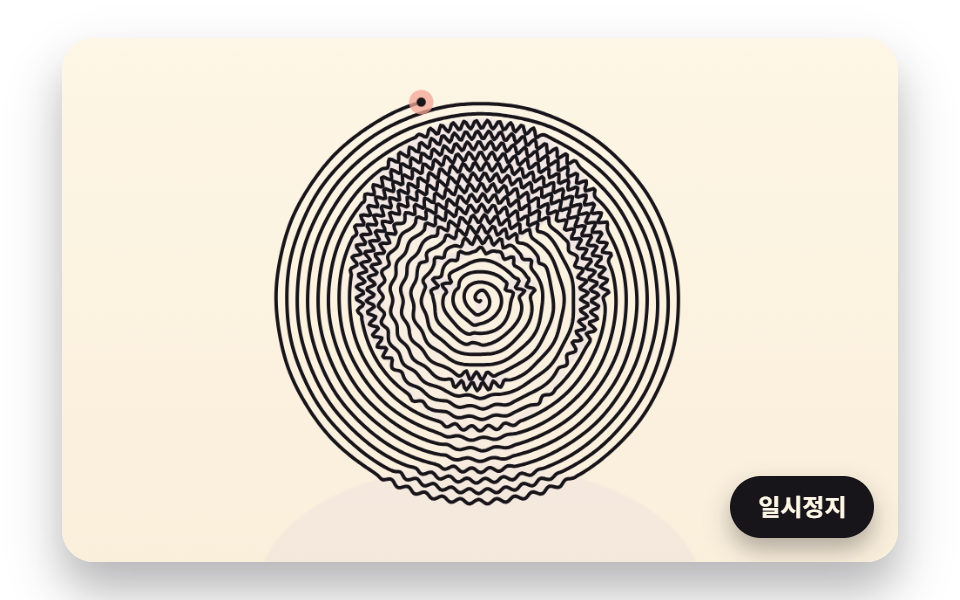
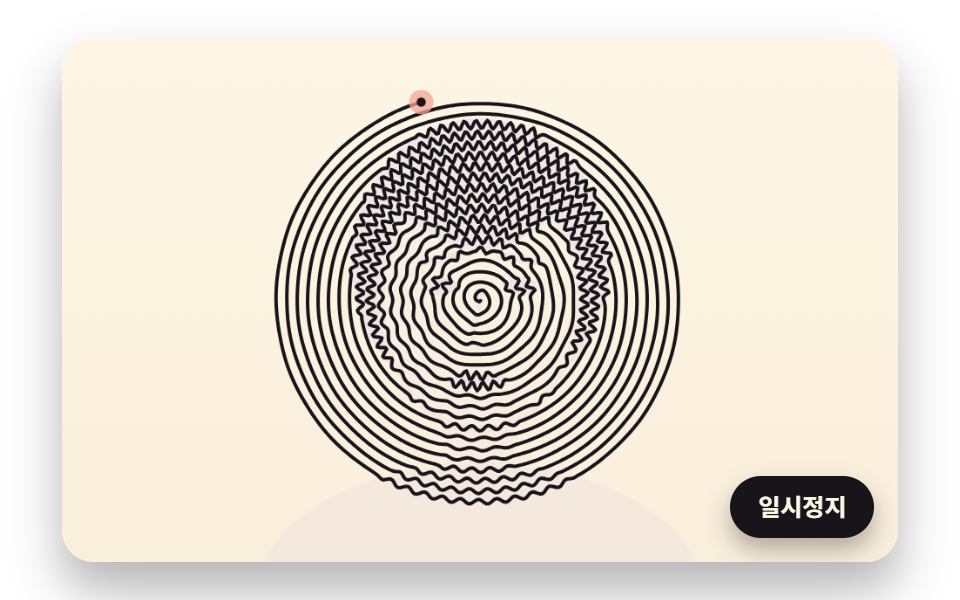
01暗さのぶんだけ揺れて絵が浮かぶ一本の渦巻き
中心から外へ同じ間隔で巻く渦巻きを一本たどり、元の絵の暗いマスを通るほど渦巻きと直角の向きに大きく細かく揺らして、一本の線で顔の輪郭を浮かび上がらせます。
使いどころ写真館の予約ページのファーストビュー
SPIRAL_GAPWOBBLE_AMPWOBBLE_FREQ_DARK
<main class="stage">
<div class="ld is-demo" id="ld">
  <canvas class="ld__canvas" data-role="canvas" width="480" height="300" role="img" aria-label="中心から外へ巻く一本の渦巻きが、暗い所で大きく揺れて顔を描き出す絵。"></canvas>
  <button class="ld__pause" data-role="pause" type="button" aria-pressed="false">一時停止</button>
</div>
</main>
@use "../../../../site/static/demo-tokens" as *;
@include stage($stage-paper);
.ld {
position: relative;
width: min(92vw, calc(160vh - 12.8vw));
aspect-ratio: 480 / 300;
margin: 0 auto;
border-radius: $r-card;
overflow: hidden;
box-shadow: $shadow-raised;
background: $subject-cream;
}
.ld__canvas {
position: absolute;
inset: 0;
display: block;
width: 100%;
height: 100%;
}
.ld__pause {
position: absolute;
right: $sp-3;
bottom: $sp-3;
padding: $sp-1 $sp-3;
border: 2px solid $subject-ink;
border-radius: $r-pill;
background: $subject-ink;
color: $subject-cream;
font-family: inherit;
font-weight: 700;
font-size: 12px;
line-height: 1.6;
cursor: pointer;
box-shadow: $shadow-press;
transition: transform $dur-quick $ease-spring;
}
// 눌린 상태(멈춤) — 바탕과 글자색을 뒤집어 aria-pressed 가 눈에도 보이게
.ld__pause[aria-pressed="true"] {
background: $subject-cream;
color: $subject-ink;
}
.ld__pause:hover {
transform: translateY(-2px);
}
.ld__pause:active {
transform: translateY(1px);
}
.ld__pause:focus-visible {
outline: 3px solid $subject-ink;
outline-offset: 3px;
}
// 상태 줄 — 지금 어떤 행동 중인지 글자로. 시연 중에는 aria-live off, 사람이 처음 손대면 polite
.ld__status {
position: absolute;
left: $sp-3;
top: $sp-3;
margin: 0;
padding: $sp-1 $sp-3;
border-radius: $r-pill;
background: $subject-ink;
color: $subject-cream;
font-weight: 700;
font-size: 12px;
line-height: 1.6;
pointer-events: none;
}
@media (max-width: 340px) {
.ld__pause,
.ld__status { font-size: 11px; padding: $sp-1 $sp-2; }
}
// 동작 줄이기 — 장면은 스크립트가 쉬는 자세 한 장으로 멈춘다. 버튼도 떠오르지 않게
@media (prefers-reduced-motion: reduce) {
.ld__pause { transition: none !important; }
.ld__pause:hover,
.ld__pause:active { transform: none !important; }
}html, body {
margin: 0;
overflow: hidden;
}
.stage {
box-sizing: border-box;
min-height: 100vh;
display: grid;
place-items: center;
margin: 0;
background: #ffffff;
font-family: -apple-system, "Segoe UI", "Noto Sans KR", sans-serif;
padding: clamp(8px, 4vw, 24px);
}
.ld {
position: relative;
width: min(92vw, 160vh - 12.8vw);
aspect-ratio: 480/300;
margin: 0 auto;
border-radius: 16px;
overflow: hidden;
box-shadow: 0 14px 24px rgba(23, 20, 26, 0.32);
background: #fff7e6;
}
.ld__canvas {
position: absolute;
inset: 0;
display: block;
width: 100%;
height: 100%;
}
.ld__pause {
position: absolute;
right: 12px;
bottom: 12px;
padding: 4px 12px;
border: 2px solid #17141a;
border-radius: 999px;
background: #17141a;
color: #fff7e6;
font-family: inherit;
font-weight: 700;
font-size: 12px;
line-height: 1.6;
cursor: pointer;
box-shadow: 0 6px 12px rgba(23, 20, 26, 0.32);
transition: transform 220ms cubic-bezier(0.2, 0.8, 0.2, 1);
}
.ld__pause[aria-pressed=true] {
background: #fff7e6;
color: #17141a;
}
.ld__pause:hover {
transform: translateY(-2px);
}
.ld__pause:active {
transform: translateY(1px);
}
.ld__pause:focus-visible {
outline: 3px solid #17141a;
outline-offset: 3px;
}
.ld__status {
position: absolute;
left: 12px;
top: 12px;
margin: 0;
padding: 4px 12px;
border-radius: 999px;
background: #17141a;
color: #fff7e6;
font-weight: 700;
font-size: 12px;
line-height: 1.6;
pointer-events: none;
}
@media (max-width: 340px) {
.ld__pause,
.ld__status {
font-size: 11px;
padding: 4px 8px;
}
}
@media (prefers-reduced-motion: reduce) {
.ld__pause {
transition: none !important;
}
.ld__pause:hover,
.ld__pause:active {
transform: none !important;
}
}(function () {
const root = document.getElementById("ld");
if (!root) return;
// 판 좌표 — 캔버스 안은 늘 480×300. 화면에 보이는 크기와 상관없이 계산은 이 좌표로 한다
const W = 480;
const H = 300;
const TAU = Math.PI * 2;
function clamp(v, lo, hi) { return v < lo ? lo : (v > hi ? hi : v); }
function lerp(a, b, k) { return a + (b - a) * k; }
function smooth(x) { const c = clamp(x, 0, 1); return c * c * (3 - 2 * c); }
// 시드 고정 난수 — 같은 시드면 같은 점 배치·같은 떨림이 다시 나온다 (32비트 정수 섞기)
function makeRng(seed) {
let s = seed >>> 0;
return function () {
s = (s + 0x6d2b79f5) >>> 0;
let t = s;
t = Math.imul(t ^ (t >>> 15), t | 1);
t ^= t + Math.imul(t ^ (t >>> 7), t | 61);
return ((t ^ (t >>> 14)) >>> 0) / 4294967296;
};
}
// 1차원 값 노이즈 — 정수 자리마다 시드로 정한 값(-1~1)을 두고 사이는 부드러운 보간. 손 떨림에 쓴다
const NOISE_TABLE = new Float32Array(256);
const noiseRng = makeRng(483);
for (let i = 0; i < 256; i += 1) {
NOISE_TABLE[i] = noiseRng() * 2 - 1;
}
function smoothNoise(x) {
const i = Math.floor(x);
const f = x - i;
const u = f * f * (3 - 2 * f);
return lerp(NOISE_TABLE[i & 255], NOISE_TABLE[(i + 1) & 255], u);
}
// 도형 거리 — 타원 안이면 음수, 밖이면 양수(px 에 가까운 근사). 원본 그림을 코드로 그릴 때 쓴다
function ellipseDist(x, y, cx, cy, rx, ry) {
const dx = (x - cx) / rx;
const dy = (y - cy) / ry;
return (Math.sqrt(dx * dx + dy * dy) - 1) * Math.min(rx, ry);
}
// 선분까지의 거리(px)
function segmentDist(x, y, ax, ay, bx, by) {
const vx = bx - ax;
const vy = by - ay;
const k = clamp(((x - ax) * vx + (y - ay) * vy) / Math.max(1e-9, vx * vx + vy * vy), 0, 1);
const ex = x - (ax + vx * k);
const ey = y - (ay + vy * k);
return Math.sqrt(ex * ex + ey * ey);
}
// 거리 → 칠한 정도 0~1. 경계 1px 를 부드럽게 넘긴다
function fillOf(dist) { return clamp(0.5 - dist, 0, 1); }
// 두 점 사이 거리
function dist2(ax, ay, bx, by) {
const dx = ax - bx;
const dy = ay - by;
return Math.sqrt(dx * dx + dy * dy);
}
// 꺾은선 길이 — xs·ys 를 order 순서로 이었을 때(닫지 않음)
function pathLength(xs, ys, order, n) {
let sum = 0;
for (let i = 1; i < n; i += 1) {
sum += dist2(xs[order[i - 1]], ys[order[i - 1]], xs[order[i]], ys[order[i]]);
}
return sum;
}
// 파스텔 팔레트 — 미색 종이 바탕 위에 진한 잉크 선. 잉크·종이는 데모 토큰($subject-ink·$subject-cream)과 같은 값
const PAPER = [255, 247, 230];
const INK = [23, 20, 26];
const CORAL = [244, 166, 150];
const LAVENDER = [192, 176, 236];
const BUTTER = [246, 224, 150];
const SAGE = [164, 208, 172];
const PINK = [244, 182, 204];
const SKY = [164, 206, 236];
function rgba(c, a) {
return 'rgba(' + Math.round(clamp(c[0], 0, 255)) + ',' + Math.round(clamp(c[1], 0, 255)) + ',' + Math.round(clamp(c[2], 0, 255)) + ',' + clamp(a, 0, 1).toFixed(3) + ')';
}
// 한 장면의 순환 — 그리기 → 머묾 → 지움. 지움이 끝나면 처음부터 다시
function cyclePhase(t, drawTime, holdTime) {
// 0~1 은 그리는 중, 1~2 는 머무는 중, 2~3 은 지우는 중
if (t < drawTime) {
return t / drawTime;
}
if (t < drawTime + holdTime) {
return 1 + (t - drawTime) / holdTime;
}
return 2 + (t - drawTime - holdTime) / ERASE_TIME;
}
// 지우기 시간(초) — 모든 장면이 같은 빠르기로 종이색으로 돌아간다
const ERASE_TIME = 1;
// 원본 그림 1 — 코드로 만든 얼굴. 칸마다 어둡기 0(종이)~1(가장 어두움)을 돌려준다. 외부 사진을 읽지 않는다
function faceDark(x, y) {
let d = 0.04;
// 어깨와 목
d = Math.max(d, 0.5 * fillOf(ellipseDist(x, y, 240, 318, 128, 74)));
d = Math.max(d, 0.34 * fillOf(Math.max(Math.abs(x - 240) - 20, Math.abs(y - 238) - 34)));
// 머리카락 — 얼굴 타원보다 큰 타원에서 얼굴을 뺀 자리
const face = ellipseDist(x, y, 240, 150, 58, 76);
const hair = ellipseDist(x, y, 240, 128, 74, 82);
const fringe = y < 108 + 14 * Math.cos((x - 240) / 22);
if (hair < 0 && (face > 0 || fringe)) {
d = Math.max(d, 0.86);
}
// 얼굴 — 왼쪽 볼에 그늘, 윤곽선은 조금 더 어둡게
if (face < 0 && !fringe) {
d = Math.max(d, 0.14 + 0.2 * smooth((246 - x) / 60));
d = Math.max(d, 0.55 * fillOf(-face - 3));
}
// 눈썹·눈·코·입
d = Math.max(d, 0.8 * fillOf(segmentDist(x, y, 206, 128, 228, 125) - 2.5));
d = Math.max(d, 0.8 * fillOf(segmentDist(x, y, 252, 125, 274, 128) - 2.5));
d = Math.max(d, 0.95 * fillOf(ellipseDist(x, y, 217, 142, 10, 5)));
d = Math.max(d, 0.95 * fillOf(ellipseDist(x, y, 263, 142, 10, 5)));
d = Math.max(d, 0.6 * fillOf(segmentDist(x, y, 241, 146, 235, 175) - 2));
d = Math.max(d, 0.5 * fillOf(ellipseDist(x, y, 242, 178, 8, 3)));
d = Math.max(d, 0.9 * fillOf(ellipseDist(x, y, 240, 196, 17, 4.5)));
return d;
}
const canvasEl = root.querySelector('[data-role="canvas"]');
const pauseEl = root.querySelector('[data-role="pause"]');
const statusEl = root.querySelector('[data-role="status"]');
const ctxRaw = canvasEl ? canvasEl.getContext('2d') : null;
if (!canvasEl || !ctxRaw || !pauseEl) {
return;
}
const cv = canvasEl;
const ctx = ctxRaw;
const pauseBtn = pauseEl;
function fitCanvas() {
// 배율은 2 에서 자른다 — 배율 3 기기에서 화소가 2.25배로 늘어 프레임마다 일이 그만큼 커지지 않게
const dpr = Math.min(window.devicePixelRatio || 1, 2);
cv.width = Math.round(W * dpr);
cv.height = Math.round(H * dpr);
ctx.setTransform(dpr, 0, 0, dpr, 0, 0);
}
// 미색 종이 — 위는 조금 밝고 아래는 조금 따뜻하게
function clearPaper() {
const g = ctx.createLinearGradient(0, 0, 0, H);
g.addColorStop(0, rgba(PAPER, 1));
g.addColorStop(1, rgba([250, 238, 216], 1));
ctx.fillStyle = g;
ctx.fillRect(0, 0, W, H);
}
// 상태 줄 — 같은 글자면 DOM 을 건드리지 않는다
let statusText = '';
function setStatus(s) {
if (!statusEl || s === statusText) {
return;
}
statusText = s;
statusEl.textContent = s;
}
// 꺾은선 — xs·ys 의 0 번부터 count 개(소수 부분은 마지막 마디를 그만큼만)를 한 번에 긋는다
function strokeRun(xs, ys, count, width, color, alpha) {
const whole = Math.floor(count);
if (whole < 1) {
return;
}
ctx.beginPath();
ctx.moveTo(xs[0], ys[0]);
const last = Math.min(whole, xs.length - 1);
for (let i = 1; i <= last; i += 1) {
ctx.lineTo(xs[i], ys[i]);
}
const f = count - whole;
if (f > 0 && whole + 1 < xs.length) {
ctx.lineTo(lerp(xs[whole], xs[whole + 1], f), lerp(ys[whole], ys[whole + 1], f));
}
ctx.lineWidth = width;
ctx.lineJoin = 'round';
ctx.lineCap = 'round';
ctx.strokeStyle = rgba(color, alpha);
ctx.stroke();
}
// 꺾은선 한 토막 — from 번째 꼭짓점부터 to 번째까지(to 의 소수 부분은 마지막 마디를 그만큼만)
function strokeSpan(xs, ys, from, to, width, color, alpha) {
const end = Math.min(Math.floor(to), xs.length - 1);
if (end <= from) {
return;
}
ctx.beginPath();
ctx.moveTo(xs[from], ys[from]);
for (let i = from + 1; i <= end; i += 1) {
ctx.lineTo(xs[i], ys[i]);
}
const f = to - Math.floor(to);
if (f > 0 && end + 1 < xs.length) {
ctx.lineTo(lerp(xs[end], xs[end + 1], f), lerp(ys[end], ys[end + 1], f));
}
ctx.lineWidth = width;
ctx.lineJoin = 'round';
ctx.lineCap = 'round';
ctx.strokeStyle = rgba(color, alpha);
ctx.stroke();
}
// 펜촉 — 지금 긋고 있는 자리. 잉크 점 둘레에 파스텔 고리
function drawNib(x, y, ring) {
ctx.beginPath();
ctx.arc(x, y, 7, 0, TAU);
ctx.fillStyle = rgba(ring, 0.75);
ctx.fill();
ctx.beginPath();
ctx.arc(x, y, 2.6, 0, TAU);
ctx.fillStyle = rgba(INK, 1);
ctx.fill();
}
// 원본 그림 판 — 어둡기 함수(0~1)를 칸마다 칠한 화면 밖 캔버스. 펜이 그리기 전에 옅게 깔아 무엇을 따라 그리는지 보인다
function makeSourceLayer(dark, tint) {
const layer = document.createElement('canvas');
layer.width = W;
layer.height = H;
const lc = layer.getContext('2d');
if (!lc) {
return layer;
}
const img = lc.createImageData(W, H);
for (let y = 0; y < H; y += 1) {
for (let x = 0; x < W; x += 1) {
const d = dark(x + 0.5, y + 0.5);
const o = (y * W + x) * 4;
img.data[o] = Math.round(lerp(PAPER[0], tint[0], d));
img.data[o + 1] = Math.round(lerp(PAPER[1], tint[1], d));
img.data[o + 2] = Math.round(lerp(PAPER[2], tint[2], d));
img.data[o + 3] = 255;
}
}
lc.putImageData(img, 0, 0);
return layer;
}
// 지우는 중이면 그림 전체를 종이색으로 덮어 간다 — phase 2~3 에서 덮개 불투명도 0→1
function eraseVeil(phase) {
if (phase <= 2) {
return;
}
ctx.fillStyle = rgba(PAPER, smooth(phase - 2));
ctx.fillRect(0, 0, W, H);
}
// 01 같은 간격으로 감기는 나선 — r = (SPIRAL_GAP / 2π)·θ. 펜이 지나는 칸의 어둡기 d 만큼
// 나선과 직각 방향으로 사인 흔들림을 얹는다 — 폭은 WOBBLE_AMP·d, 빠르기는 d 가 클수록 촘촘하게
const SPIRAL_GAP = 6;
const SPIRAL_RADIUS = 146;
const WOBBLE_AMP = 2.7;
const WOBBLE_FREQ_LIGHT = 0.1;
const WOBBLE_FREQ_DARK = 1.1;
// 꼭짓점 사이 간격(px) — 흔들림 한 주기(가장 촘촘할 때 2π/1.1 ≈ 5.7px)를 네 번 넘게 찍는다
const SAMPLE_STEP = 1.2;
// 어둡기를 길 따라 고르게 — 칸 경계에서 폭이 한 번에 튀지 않게 이 길이(px)로 이동평균
const DARK_SMOOTH = 4;
const DRAW_TIME = 4.6;
const HOLD_TIME = 2;
const CYCLE = DRAW_TIME + HOLD_TIME + ERASE_TIME;
// 첫 화면이 비지 않게 나선이 가운데 몇 바퀴를 감은 자리(1.5초)에서 시작한다 — 순환이 돌면 처음부터 다시 그린다
const START_AT = 1.5;
const FINISH_T = DRAW_TIME + 0.5;
const CX = 240;
const CY = 150;
function buildSpiral(dark) {
const a = SPIRAL_GAP / TAU;
const xs = [];
const ys = [];
let theta = 0.6;
let phase = 0;
let dSmooth = 0;
let maxOffset = 0;
while (a * theta < SPIRAL_RADIUS) {
const r = a * theta;
const c = Math.cos(theta);
const s = Math.sin(theta);
const bx = CX + r * c;
const by = CY + r * s;
// 접선 = d/dθ (r cosθ, r sinθ) = (a cosθ − r sinθ, a sinθ + r cosθ), 법선은 접선을 90° 돌린 것
const tx = a * c - r * s;
const ty = a * s + r * c;
const tl = Math.sqrt(tx * tx + ty * ty);
const nx = -ty / tl;
const ny = tx / tl;
dSmooth = lerp(dSmooth, dark(bx, by), SAMPLE_STEP / DARK_SMOOTH);
phase += lerp(WOBBLE_FREQ_LIGHT, WOBBLE_FREQ_DARK, dSmooth) * SAMPLE_STEP;
const off = WOBBLE_AMP * dSmooth * Math.sin(phase);
maxOffset = Math.max(maxOffset, Math.abs(off));
xs.push(bx + nx * off);
ys.push(by + ny * off);
// 호 길이 ds = √(r² + a²)·dθ 이므로 같은 걸음을 가려면 dθ = ds / √(r² + a²)
theta += SAMPLE_STEP / Math.sqrt(r * r + a * a);
}
return { xs: Float32Array.from(xs), ys: Float32Array.from(ys), turns: theta / TAU, maxOffset: maxOffset };
}
const spiral = buildSpiral(faceDark);
// 그린 꼭짓점 수 — 꼭짓점이 같은 걸음(SAMPLE_STEP)이라 시간에 비례해 늘리면 펜이 같은 빠르기로 간다
let drawn = 0;
function reset() { drawn = 0; }
function update(t, dt) {
drawn = (spiral.xs.length - 1) * Math.min(1, t / DRAW_TIME);
}
// 원본 얼굴 판 — 그리기 시작에는 옅게 보였다가 선이 다 그려질 무렵 사라진다
const source01 = makeSourceLayer(faceDark, LAVENDER);
function draw(t) {
const phase = cyclePhase(t, DRAW_TIME, HOLD_TIME);
clearPaper();
ctx.globalAlpha = 0.85 * (1 - smooth(Math.min(1, phase)));
ctx.drawImage(source01, 0, 0, W, H);
ctx.globalAlpha = 1;
strokeRun(spiral.xs, spiral.ys, drawn, 2, INK, 1);
if (phase < 1) {
const i = Math.floor(drawn);
drawNib(spiral.xs[i], spiral.ys[i], CORAL);
}
eraseVeil(phase);
}
// 한 프레임에 넘기는 시간 상한(초) — 탭을 오래 숨겼다 돌아온 첫 프레임에도 50ms 까지만 계산에 넣는다
const DT_MAX = 0.05;
// 앞당겨 돌리기 걸음(초) — 시작 자리(START_AT)나 완성 판(FINISH_T)까지 1/60초씩 계산만 하고 그리지 않는다
const SKIP_STEP = 1 / 60;
// 장면 시계(초) — 순환 하나 안에서의 자리. CYCLE 을 넘으면 0 으로 돌아가 처음부터 다시 그린다
let cycleT = 0;
let paused = false;
const reduceQuery = window.matchMedia('(prefers-reduced-motion: reduce)');
// 페이지를 연 채 동작 줄이기 설정을 바꿔도 change 리스너가 이 값을 다시 읽는다
let still = reduceQuery.matches;
// 자동 시연 중인가 — 사람이 처음 손대면 시연 표시를 떼고 상태 줄을 polite 로 켠다
let demo = root.classList.contains('is-demo');
// 리스너는 한 묶음으로 달고 정리할 때 한 번에 뗀다
const off = new AbortController();
function wake() {
if (!demo) {
return;
}
demo = false;
root.classList.remove('is-demo');
const live = root.querySelector('[aria-live]');
if (live) {
live.setAttribute('aria-live', 'polite');
}
}
// 시계를 to 초까지 계산만 하고 넘긴다
function skipTo(to) {
while (cycleT + SKIP_STEP <= to) {
cycleT += SKIP_STEP;
update(cycleT, SKIP_STEP);
}
}
function advance(dt) {
cycleT += dt;
if (cycleT >= CYCLE) {
cycleT = 0;
reset();
}
update(cycleT, dt);
}
let rafId = 0;
let lastTs = -1;
function frame(ts) {
if (still || paused) {
rafId = 0;
return;
}
if (lastTs < 0) {
lastTs = ts;
}
const dt = Math.min((ts - lastTs) / 1000, DT_MAX);
lastTs = ts;
if (dt > 0) {
advance(dt);
}
draw(cycleT);
rafId = window.requestAnimationFrame(frame);
}
function startLoop() {
if (rafId) {
return;
}
// 시계 다시 맞추기 — 멈췄던 사이의 시간을 첫 프레임 dt 로 넘기지 않는다
lastTs = -1;
rafId = window.requestAnimationFrame(frame);
}
function stopLoop() {
if (rafId) {
window.cancelAnimationFrame(rafId);
rafId = 0;
}
}
// 동작 줄이기 — 루프를 돌리지 않고 다 그려진 한 장(FINISH_T)만 그린다
function showFinished() {
stopLoop();
cycleT = 0;
reset();
skipTo(FINISH_T);
draw(cycleT);
}
function play() {
cycleT = 0;
reset();
skipTo(START_AT);
draw(cycleT);
if (!paused) {
startLoop();
}
}
pauseBtn.addEventListener('click', function () {
paused = !paused;
pauseBtn.setAttribute('aria-pressed', paused ? 'true' : 'false');
wake();
if (paused) {
stopLoop();
}
else if (!still) {
startLoop();
}
}, { signal: off.signal });
// 탭이 숨으면 루프를 멈추고, 돌아오면 시계를 다시 맞춰 이어 그린다 — 숨은 동안의 몇 초가 한 프레임에 몰리지 않게
document.addEventListener('visibilitychange', function () {
if (document.hidden) {
stopLoop();
}
else if (!paused && !still) {
startLoop();
}
}, { signal: off.signal });
// 설정이 페이지를 연 채 바뀌면 — 켜지면 완성 판으로 멈추고, 꺼지면 시연을 처음부터
reduceQuery.addEventListener('change', function () {
still = reduceQuery.matches;
if (still) {
showFinished();
}
else {
play();
}
}, { signal: off.signal });
window.addEventListener('resize', function () {
fitCanvas();
draw(cycleT);
}, { signal: off.signal });
fitCanvas();
if (still) {
showFinished();
}
else {
play();
}
return function () {
stopLoop();
off.abort();
};
})();// SpiralBrightnessWobble - vanilla 판(01-oneline-spiral-brightness-wobble) 의 React 포트. 같은 계산을 useEffect 안에서 돌린다.
import { useEffect, useRef } from "react";
import styles from "./SpiralBrightnessWobble.module.scss";
const cx = (s: string): string => s.split(" ").map((n) => styles[n] ?? n).join(" ");
export default function SpiralBrightnessWobble() {
const rootRef = useRef<HTMLDivElement | null>(null);
useEffect(() => {
const rootEl = rootRef.current;
if (!rootEl) return;
const root: HTMLElement = rootEl;
type Pt = [number, number];
type RGB = [number, number, number];
// 점 묶음 — 좌표 두 배열과 점 수
type Dots = { xs: Float32Array; ys: Float32Array; n: number };
// 판 좌표 — 캔버스 안은 늘 480×300. 화면에 보이는 크기와 상관없이 계산은 이 좌표로 한다
const W = 480;
const H = 300;
const TAU = Math.PI * 2;
function clamp(v: number, lo: number, hi: number): number { return v < lo ? lo : (v > hi ? hi : v); }
function lerp(a: number, b: number, k: number): number { return a + (b - a) * k; }
function smooth(x: number): number { const c = clamp(x, 0, 1); return c * c * (3 - 2 * c); }
// 시드 고정 난수 — 같은 시드면 같은 점 배치·같은 떨림이 다시 나온다 (32비트 정수 섞기)
function makeRng(seed: number): () => number {
let s = seed >>> 0;
return function (): number {
s = (s + 0x6d2b79f5) >>> 0;
let t = s;
t = Math.imul(t ^ (t >>> 15), t | 1);
t ^= t + Math.imul(t ^ (t >>> 7), t | 61);
return ((t ^ (t >>> 14)) >>> 0) / 4294967296;
};
}
// 1차원 값 노이즈 — 정수 자리마다 시드로 정한 값(-1~1)을 두고 사이는 부드러운 보간. 손 떨림에 쓴다
const NOISE_TABLE = new Float32Array(256);
const noiseRng = makeRng(483);
for (let i = 0; i < 256; i += 1) { NOISE_TABLE[i] = noiseRng() * 2 - 1; }
function smoothNoise(x: number): number {
const i = Math.floor(x);
const f = x - i;
const u = f * f * (3 - 2 * f);
return lerp(NOISE_TABLE[i & 255], NOISE_TABLE[(i + 1) & 255], u);
}
// 도형 거리 — 타원 안이면 음수, 밖이면 양수(px 에 가까운 근사). 원본 그림을 코드로 그릴 때 쓴다
function ellipseDist(x: number, y: number, cx: number, cy: number, rx: number, ry: number): number {
const dx = (x - cx) / rx;
const dy = (y - cy) / ry;
return (Math.sqrt(dx * dx + dy * dy) - 1) * Math.min(rx, ry);
}
// 선분까지의 거리(px)
function segmentDist(x: number, y: number, ax: number, ay: number, bx: number, by: number): number {
const vx = bx - ax;
const vy = by - ay;
const k = clamp(((x - ax) * vx + (y - ay) * vy) / Math.max(1e-9, vx * vx + vy * vy), 0, 1);
const ex = x - (ax + vx * k);
const ey = y - (ay + vy * k);
return Math.sqrt(ex * ex + ey * ey);
}
// 거리 → 칠한 정도 0~1. 경계 1px 를 부드럽게 넘긴다
function fillOf(dist: number): number { return clamp(0.5 - dist, 0, 1); }
// 두 점 사이 거리
function dist2(ax: number, ay: number, bx: number, by: number): number {
const dx = ax - bx;
const dy = ay - by;
return Math.sqrt(dx * dx + dy * dy);
}
// 꺾은선 길이 — xs·ys 를 order 순서로 이었을 때(닫지 않음)
function pathLength(xs: Float32Array, ys: Float32Array, order: Int32Array, n: number): number {
let sum = 0;
for (let i = 1; i < n; i += 1) { sum += dist2(xs[order[i - 1]], ys[order[i - 1]], xs[order[i]], ys[order[i]]); }
return sum;
}
// 파스텔 팔레트 — 미색 종이 바탕 위에 진한 잉크 선. 잉크·종이는 데모 토큰($subject-ink·$subject-cream)과 같은 값
const PAPER: RGB = [255, 247, 230];
const INK: RGB = [23, 20, 26];
const CORAL: RGB = [244, 166, 150];
const LAVENDER: RGB = [192, 176, 236];
const BUTTER: RGB = [246, 224, 150];
const SAGE: RGB = [164, 208, 172];
const PINK: RGB = [244, 182, 204];
const SKY: RGB = [164, 206, 236];
function rgba(c: RGB, a: number): string {
return 'rgba(' + Math.round(clamp(c[0], 0, 255)) + ',' + Math.round(clamp(c[1], 0, 255)) + ',' + Math.round(clamp(c[2], 0, 255)) + ',' + clamp(a, 0, 1).toFixed(3) + ')';
}
// 한 장면의 순환 — 그리기 → 머묾 → 지움. 지움이 끝나면 처음부터 다시
function cyclePhase(t: number, drawTime: number, holdTime: number): number {
// 0~1 은 그리는 중, 1~2 는 머무는 중, 2~3 은 지우는 중
if (t < drawTime) { return t / drawTime; }
if (t < drawTime + holdTime) { return 1 + (t - drawTime) / holdTime; }
return 2 + (t - drawTime - holdTime) / ERASE_TIME;
}
// 지우기 시간(초) — 모든 장면이 같은 빠르기로 종이색으로 돌아간다
const ERASE_TIME = 1;
// 원본 그림 1 — 코드로 만든 얼굴. 칸마다 어둡기 0(종이)~1(가장 어두움)을 돌려준다. 외부 사진을 읽지 않는다
function faceDark(x: number, y: number): number {
let d = 0.04;
// 어깨와 목
d = Math.max(d, 0.5 * fillOf(ellipseDist(x, y, 240, 318, 128, 74)));
d = Math.max(d, 0.34 * fillOf(Math.max(Math.abs(x - 240) - 20, Math.abs(y - 238) - 34)));
// 머리카락 — 얼굴 타원보다 큰 타원에서 얼굴을 뺀 자리
const face = ellipseDist(x, y, 240, 150, 58, 76);
const hair = ellipseDist(x, y, 240, 128, 74, 82);
const fringe = y < 108 + 14 * Math.cos((x - 240) / 22);
if (hair < 0 && (face > 0 || fringe)) { d = Math.max(d, 0.86); }
// 얼굴 — 왼쪽 볼에 그늘, 윤곽선은 조금 더 어둡게
if (face < 0 && !fringe) {
d = Math.max(d, 0.14 + 0.2 * smooth((246 - x) / 60));
d = Math.max(d, 0.55 * fillOf(-face - 3));
}
// 눈썹·눈·코·입
d = Math.max(d, 0.8 * fillOf(segmentDist(x, y, 206, 128, 228, 125) - 2.5));
d = Math.max(d, 0.8 * fillOf(segmentDist(x, y, 252, 125, 274, 128) - 2.5));
d = Math.max(d, 0.95 * fillOf(ellipseDist(x, y, 217, 142, 10, 5)));
d = Math.max(d, 0.95 * fillOf(ellipseDist(x, y, 263, 142, 10, 5)));
d = Math.max(d, 0.6 * fillOf(segmentDist(x, y, 241, 146, 235, 175) - 2));
d = Math.max(d, 0.5 * fillOf(ellipseDist(x, y, 242, 178, 8, 3)));
d = Math.max(d, 0.9 * fillOf(ellipseDist(x, y, 240, 196, 17, 4.5)));
return d;
}
const canvasEl = root.querySelector('[data-role="canvas"]') as HTMLCanvasElement | null;
const pauseEl = root.querySelector('[data-role="pause"]') as HTMLButtonElement | null;
const statusEl = root.querySelector('[data-role="status"]') as HTMLElement | null;
const ctxRaw = canvasEl ? canvasEl.getContext('2d') : null;
if (!canvasEl || !ctxRaw || !pauseEl) { return; }
const cv: HTMLCanvasElement = canvasEl;
const ctx: CanvasRenderingContext2D = ctxRaw;
const pauseBtn: HTMLButtonElement = pauseEl;
function fitCanvas(): void {
// 배율은 2 에서 자른다 — 배율 3 기기에서 화소가 2.25배로 늘어 프레임마다 일이 그만큼 커지지 않게
const dpr = Math.min(window.devicePixelRatio || 1, 2);
cv.width = Math.round(W * dpr);
cv.height = Math.round(H * dpr);
ctx.setTransform(dpr, 0, 0, dpr, 0, 0);
}
// 미색 종이 — 위는 조금 밝고 아래는 조금 따뜻하게
function clearPaper(): void {
const g = ctx.createLinearGradient(0, 0, 0, H);
g.addColorStop(0, rgba(PAPER, 1));
g.addColorStop(1, rgba([250, 238, 216], 1));
ctx.fillStyle = g;
ctx.fillRect(0, 0, W, H);
}
// 상태 줄 — 같은 글자면 DOM 을 건드리지 않는다
let statusText = '';
function setStatus(s: string): void {
if (!statusEl || s === statusText) { return; }
statusText = s;
statusEl.textContent = s;
}
// 꺾은선 — xs·ys 의 0 번부터 count 개(소수 부분은 마지막 마디를 그만큼만)를 한 번에 긋는다
function strokeRun(xs: Float32Array, ys: Float32Array, count: number, width: number, color: RGB, alpha: number): void {
const whole = Math.floor(count);
if (whole < 1) { return; }
ctx.beginPath();
ctx.moveTo(xs[0], ys[0]);
const last = Math.min(whole, xs.length - 1);
for (let i = 1; i <= last; i += 1) { ctx.lineTo(xs[i], ys[i]); }
const f = count - whole;
if (f > 0 && whole + 1 < xs.length) { ctx.lineTo(lerp(xs[whole], xs[whole + 1], f), lerp(ys[whole], ys[whole + 1], f)); }
ctx.lineWidth = width;
ctx.lineJoin = 'round';
ctx.lineCap = 'round';
ctx.strokeStyle = rgba(color, alpha);
ctx.stroke();
}
// 꺾은선 한 토막 — from 번째 꼭짓점부터 to 번째까지(to 의 소수 부분은 마지막 마디를 그만큼만)
function strokeSpan(xs: Float32Array, ys: Float32Array, from: number, to: number, width: number, color: RGB, alpha: number): void {
const end = Math.min(Math.floor(to), xs.length - 1);
if (end <= from) { return; }
ctx.beginPath();
ctx.moveTo(xs[from], ys[from]);
for (let i = from + 1; i <= end; i += 1) { ctx.lineTo(xs[i], ys[i]); }
const f = to - Math.floor(to);
if (f > 0 && end + 1 < xs.length) { ctx.lineTo(lerp(xs[end], xs[end + 1], f), lerp(ys[end], ys[end + 1], f)); }
ctx.lineWidth = width;
ctx.lineJoin = 'round';
ctx.lineCap = 'round';
ctx.strokeStyle = rgba(color, alpha);
ctx.stroke();
}
// 펜촉 — 지금 긋고 있는 자리. 잉크 점 둘레에 파스텔 고리
function drawNib(x: number, y: number, ring: RGB): void {
ctx.beginPath();
ctx.arc(x, y, 7, 0, TAU);
ctx.fillStyle = rgba(ring, 0.75);
ctx.fill();
ctx.beginPath();
ctx.arc(x, y, 2.6, 0, TAU);
ctx.fillStyle = rgba(INK, 1);
ctx.fill();
}
// 원본 그림 판 — 어둡기 함수(0~1)를 칸마다 칠한 화면 밖 캔버스. 펜이 그리기 전에 옅게 깔아 무엇을 따라 그리는지 보인다
function makeSourceLayer(dark: (x: number, y: number) => number, tint: RGB): HTMLCanvasElement {
const layer = document.createElement('canvas');
layer.width = W;
layer.height = H;
const lc = layer.getContext('2d');
if (!lc) { return layer; }
const img = lc.createImageData(W, H);
for (let y = 0; y < H; y += 1) {
for (let x = 0; x < W; x += 1) {
const d = dark(x + 0.5, y + 0.5);
const o = (y * W + x) * 4;
img.data[o] = Math.round(lerp(PAPER[0], tint[0], d));
img.data[o + 1] = Math.round(lerp(PAPER[1], tint[1], d));
img.data[o + 2] = Math.round(lerp(PAPER[2], tint[2], d));
img.data[o + 3] = 255;
}
}
lc.putImageData(img, 0, 0);
return layer;
}
// 지우는 중이면 그림 전체를 종이색으로 덮어 간다 — phase 2~3 에서 덮개 불투명도 0→1
function eraseVeil(phase: number): void {
if (phase <= 2) { return; }
ctx.fillStyle = rgba(PAPER, smooth(phase - 2));
ctx.fillRect(0, 0, W, H);
}
// 01 같은 간격으로 감기는 나선 — r = (SPIRAL_GAP / 2π)·θ. 펜이 지나는 칸의 어둡기 d 만큼
// 나선과 직각 방향으로 사인 흔들림을 얹는다 — 폭은 WOBBLE_AMP·d, 빠르기는 d 가 클수록 촘촘하게
const SPIRAL_GAP = 6;
const SPIRAL_RADIUS = 146;
const WOBBLE_AMP = 2.7;
const WOBBLE_FREQ_LIGHT = 0.1;
const WOBBLE_FREQ_DARK = 1.1;
// 꼭짓점 사이 간격(px) — 흔들림 한 주기(가장 촘촘할 때 2π/1.1 ≈ 5.7px)를 네 번 넘게 찍는다
const SAMPLE_STEP = 1.2;
// 어둡기를 길 따라 고르게 — 칸 경계에서 폭이 한 번에 튀지 않게 이 길이(px)로 이동평균
const DARK_SMOOTH = 4;
const DRAW_TIME = 4.6;
const HOLD_TIME = 2;
const CYCLE = DRAW_TIME + HOLD_TIME + ERASE_TIME;
// 첫 화면이 비지 않게 나선이 가운데 몇 바퀴를 감은 자리(1.5초)에서 시작한다 — 순환이 돌면 처음부터 다시 그린다
const START_AT = 1.5;
const FINISH_T = DRAW_TIME + 0.5;
const CX = 240;
const CY = 150;
type Spiral = { xs: Float32Array; ys: Float32Array; turns: number; maxOffset: number };
function buildSpiral(dark: (x: number, y: number) => number): Spiral {
const a = SPIRAL_GAP / TAU;
const xs: number[] = [];
const ys: number[] = [];
let theta = 0.6;
let phase = 0;
let dSmooth = 0;
let maxOffset = 0;
while (a * theta < SPIRAL_RADIUS) {
const r = a * theta;
const c = Math.cos(theta);
const s = Math.sin(theta);
const bx = CX + r * c;
const by = CY + r * s;
// 접선 = d/dθ (r cosθ, r sinθ) = (a cosθ − r sinθ, a sinθ + r cosθ), 법선은 접선을 90° 돌린 것
const tx = a * c - r * s;
const ty = a * s + r * c;
const tl = Math.sqrt(tx * tx + ty * ty);
const nx = -ty / tl;
const ny = tx / tl;
dSmooth = lerp(dSmooth, dark(bx, by), SAMPLE_STEP / DARK_SMOOTH);
phase += lerp(WOBBLE_FREQ_LIGHT, WOBBLE_FREQ_DARK, dSmooth) * SAMPLE_STEP;
const off = WOBBLE_AMP * dSmooth * Math.sin(phase);
maxOffset = Math.max(maxOffset, Math.abs(off));
xs.push(bx + nx * off);
ys.push(by + ny * off);
// 호 길이 ds = √(r² + a²)·dθ 이므로 같은 걸음을 가려면 dθ = ds / √(r² + a²)
theta += SAMPLE_STEP / Math.sqrt(r * r + a * a);
}
return { xs: Float32Array.from(xs), ys: Float32Array.from(ys), turns: theta / TAU, maxOffset: maxOffset };
}
const spiral: Spiral = buildSpiral(faceDark);
// 그린 꼭짓점 수 — 꼭짓점이 같은 걸음(SAMPLE_STEP)이라 시간에 비례해 늘리면 펜이 같은 빠르기로 간다
let drawn = 0;
function reset(): void { drawn = 0; }
function update(t: number, dt: number): void {
drawn = (spiral.xs.length - 1) * Math.min(1, t / DRAW_TIME);
}
// 원본 얼굴 판 — 그리기 시작에는 옅게 보였다가 선이 다 그려질 무렵 사라진다
const source01 = makeSourceLayer(faceDark, LAVENDER);
function draw(t: number): void {
const phase = cyclePhase(t, DRAW_TIME, HOLD_TIME);
clearPaper();
ctx.globalAlpha = 0.85 * (1 - smooth(Math.min(1, phase)));
ctx.drawImage(source01, 0, 0, W, H);
ctx.globalAlpha = 1;
strokeRun(spiral.xs, spiral.ys, drawn, 2, INK, 1);
if (phase < 1) {
const i = Math.floor(drawn);
drawNib(spiral.xs[i], spiral.ys[i], CORAL);
}
eraseVeil(phase);
}
// 한 프레임에 넘기는 시간 상한(초) — 탭을 오래 숨겼다 돌아온 첫 프레임에도 50ms 까지만 계산에 넣는다
const DT_MAX = 0.05;
// 앞당겨 돌리기 걸음(초) — 시작 자리(START_AT)나 완성 판(FINISH_T)까지 1/60초씩 계산만 하고 그리지 않는다
const SKIP_STEP = 1 / 60;
// 장면 시계(초) — 순환 하나 안에서의 자리. CYCLE 을 넘으면 0 으로 돌아가 처음부터 다시 그린다
let cycleT = 0;
let paused = false;
const reduceQuery = window.matchMedia('(prefers-reduced-motion: reduce)');
// 페이지를 연 채 동작 줄이기 설정을 바꿔도 change 리스너가 이 값을 다시 읽는다
let still = reduceQuery.matches;
// 자동 시연 중인가 — 사람이 처음 손대면 시연 표시를 떼고 상태 줄을 polite 로 켠다
let demo = root.classList.contains('is-demo');
// 리스너는 한 묶음으로 달고 정리할 때 한 번에 뗀다
const off = new AbortController();
function wake(): void {
if (!demo) { return; }
demo = false;
root.classList.remove('is-demo');
const live = root.querySelector('[aria-live]');
if (live) { live.setAttribute('aria-live', 'polite'); }
}
// 시계를 to 초까지 계산만 하고 넘긴다
function skipTo(to: number): void {
while (cycleT + SKIP_STEP <= to) {
cycleT += SKIP_STEP;
update(cycleT, SKIP_STEP);
}
}
function advance(dt: number): void {
cycleT += dt;
if (cycleT >= CYCLE) {
cycleT = 0;
reset();
}
update(cycleT, dt);
}
let rafId = 0;
let lastTs = -1;
function frame(ts: number): void {
if (still || paused) { rafId = 0; return; }
if (lastTs < 0) { lastTs = ts; }
const dt = Math.min((ts - lastTs) / 1000, DT_MAX);
lastTs = ts;
if (dt > 0) { advance(dt); }
draw(cycleT);
rafId = window.requestAnimationFrame(frame);
}
function startLoop(): void {
if (rafId) { return; }
// 시계 다시 맞추기 — 멈췄던 사이의 시간을 첫 프레임 dt 로 넘기지 않는다
lastTs = -1;
rafId = window.requestAnimationFrame(frame);
}
function stopLoop(): void {
if (rafId) { window.cancelAnimationFrame(rafId); rafId = 0; }
}
// 동작 줄이기 — 루프를 돌리지 않고 다 그려진 한 장(FINISH_T)만 그린다
function showFinished(): void {
stopLoop();
cycleT = 0;
reset();
skipTo(FINISH_T);
draw(cycleT);
}
function play(): void {
cycleT = 0;
reset();
skipTo(START_AT);
draw(cycleT);
if (!paused) { startLoop(); }
}
pauseBtn.addEventListener('click', function (): void {
paused = !paused;
pauseBtn.setAttribute('aria-pressed', paused ? 'true' : 'false');
wake();
if (paused) { stopLoop(); } else if (!still) { startLoop(); }
}, { signal: off.signal });
// 탭이 숨으면 루프를 멈추고, 돌아오면 시계를 다시 맞춰 이어 그린다 — 숨은 동안의 몇 초가 한 프레임에 몰리지 않게
document.addEventListener('visibilitychange', function (): void {
if (document.hidden) { stopLoop(); } else if (!paused && !still) { startLoop(); }
}, { signal: off.signal });
// 설정이 페이지를 연 채 바뀌면 — 켜지면 완성 판으로 멈추고, 꺼지면 시연을 처음부터
reduceQuery.addEventListener('change', function (): void {
still = reduceQuery.matches;
if (still) { showFinished(); } else { play(); }
}, { signal: off.signal });
window.addEventListener('resize', function (): void {
fitCanvas();
draw(cycleT);
}, { signal: off.signal });
fitCanvas();
if (still) { showFinished(); } else { play(); }
return function (): void {
stopLoop();
off.abort();
};
}, []);
return (
<div className={cx("ld") + " is-demo"} ref={rootRef}>
<canvas className={cx("ld__canvas")} data-role="canvas" width={480} height={300} role="img" aria-label="가운데서 바깥으로 감기는 나선 한 줄이 어두운 곳에서 크게 흔들리며 얼굴을 그려 내는 그림."></canvas>
<button className={cx("ld__pause")} data-role="pause" type="button" aria-pressed="false">{'일시정지'}</button>
</div>
);
}01 暗さのぶんだけ揺れて絵が浮かぶ一本の渦巻き — 計測 累積面積 23.066% · 動いたフレーム 23/23GODRICH オリジナル · SCSS と React は zip に同梱 · 一筆書き イラスト 9種 — 点の順番と線の長さを計算して描くキャンバス
このデモが属する記事
 一筆書き イラスト 9種 — 点の順番と線の長さを計算して描くキャンバス一筆書き イラストは、紙からペンを一度も離さずに顔や花や名前を一本の線で描いた絵です。いちばん近い点から順につなぐと、線は自分を何度も横切ります。そこで04番は交差した二区間を裏返して線を短くし、03番は点を暗さの重心へ動かし、07番は奇数 この記事のデモをすべて見る