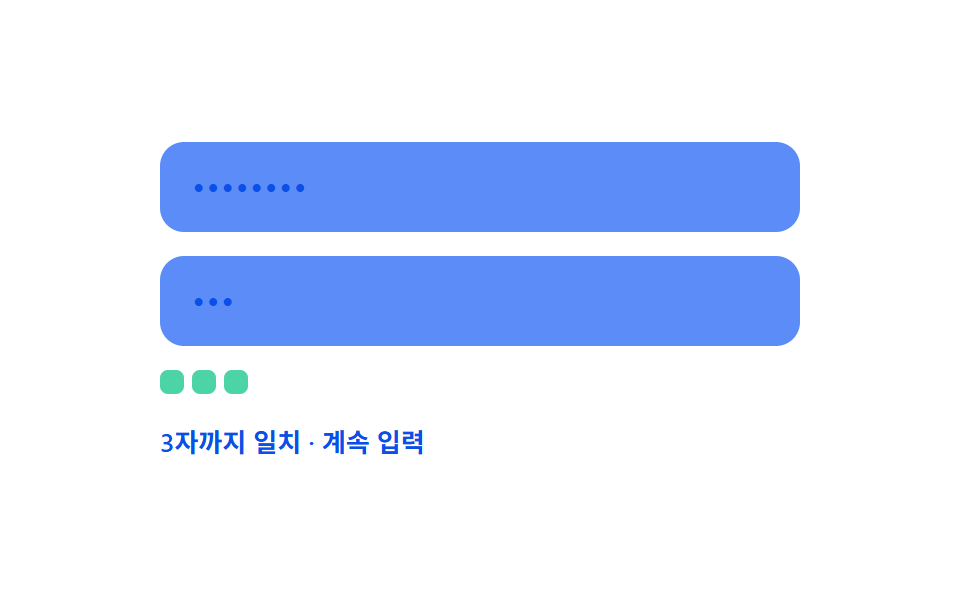
08確認値リアルタイム照合 — 確認入力の値と元の値が食い違い始める位置の値をリアルタイムで見つける方式
確認入力の値と元の値を先頭から1文字ずつ比べ、値が食い違い始める位置の値をリアルタイムで見つけます。
使いどころパスワード確認欄がある登録フォーム、再設定画面の値の一致確認
matchLenOf(a, b).md__chip--bad.md--full
<main class="stage">
<div class="md is-demo" id="md">
  <label class="md__field">
    <input class="md__input" id="mdPw" type="text" autocomplete="off" spellcheck="false" value="">
  </label>
  <label class="md__field">
    <input class="md__input" id="mdConfirm" type="text" autocomplete="off" spellcheck="false" value="">
  </label>
  <div class="md__chips" id="mdChips"></div>
  <div class="md__row">
    <span class="md__status" id="mdStatus">入力待ち</span>
    <span class="md__ok" id="mdOk">
      <svg viewBox="0 0 20 20" width="12" height="12" aria-hidden="true"><path d="M4 10.5l3.5 3.5L16 5.5" fill="none" stroke="currentColor" stroke-width="2.4" stroke-linecap="round" stroke-linejoin="round"/></svg>
      一致
    </span>
  </div>
</div>
</main>
@use "../../../../site/static/demo-tokens" as *;
// 계산 겹: 두 입력값의 앞에서부터 일치하는 글자 수(일치 길이)를 구해, 확인 입력이
// 그 길이를 넘는 순간의 위치를 "처음 어긋난 자리"로 계산해 칩으로 나열한다.
@include stage($stage-paper);
.md {
width: 100%;
max-width: 320px;
display: grid;
gap: $sp-3;
}
.md__field { display: block; }
.md__input {
width: 100%;
box-sizing: border-box;
padding: $sp-3 $sp-4;
border-radius: $r-control;
border: 0;
background: $subject-blue-light;
color: $subject-blue-deep;
font: 500 16px/1.3 -apple-system, "Segoe UI", "Noto Sans KR", sans-serif;
letter-spacing: .04em;
-webkit-text-security: disc;
&:focus { outline: 2px solid $subject-blue-deep; outline-offset: 2px; }
}
.md__chips {
display: flex;
flex-wrap: wrap;
gap: $sp-1;
min-height: $sp-4;
}
.md__chip {
width: $sp-3;
height: $sp-3;
border-radius: $r-xs;
transform: scale(1);
transition: background-color $dur-quick $ease-out, transform $dur-quick $ease-spring;
}
.md__chip--ok { background: $subject-mint; }
.md__chip--bad { background: $error; transform: scale(1.15); }
.md__row {
display: flex;
align-items: center;
justify-content: space-between;
gap: $sp-2;
font: 600 13px/1.2 -apple-system, "Segoe UI", "Noto Sans KR", sans-serif;
color: $subject-blue-deep;
}
.md__ok {
display: flex;
align-items: center;
gap: 4px;
color: $subject-blue-deep;
opacity: 0;
transform: scale(.7);
transition: opacity $dur-base $ease-out, transform $dur-base $ease-spring;
}
.md--full .md__ok { opacity: 1; transform: scale(1); }
@media (max-width: 340px) {
.md { max-width: 260px; }
.md__input { padding: $sp-2 $sp-3; font-size: 14px; }
.md__row { font-size: 11px; }
}
@media (prefers-reduced-motion: reduce) {
.md__chip, .md__ok { transition: none; }
}html, body {
margin: 0;
overflow: hidden;
}
.stage {
box-sizing: border-box;
min-height: 100vh;
display: grid;
place-items: center;
margin: 0;
background: #ffffff;
font-family: -apple-system, "Segoe UI", "Noto Sans KR", sans-serif;
padding: clamp(8px, 4vw, 24px);
}
.md {
width: 100%;
max-width: 320px;
display: grid;
gap: 12px;
}
.md__field {
display: block;
}
.md__input {
width: 100%;
box-sizing: border-box;
padding: 12px 16px;
border-radius: 12px;
border: 0;
background: #5b8cf8;
color: #0a4fe8;
font: 500 16px/1.3 -apple-system, "Segoe UI", "Noto Sans KR", sans-serif;
letter-spacing: 0.04em;
-webkit-text-security: disc;
}
.md__input:focus {
outline: 2px solid #0a4fe8;
outline-offset: 2px;
}
.md__chips {
display: flex;
flex-wrap: wrap;
gap: 4px;
min-height: 16px;
}
.md__chip {
width: 12px;
height: 12px;
border-radius: 4px;
transform: scale(1);
transition: background-color 220ms ease-out, transform 220ms cubic-bezier(0.2, 0.8, 0.2, 1);
}
.md__chip--ok {
background: #4cd4a6;
}
.md__chip--bad {
background: #c2361a;
transform: scale(1.15);
}
.md__row {
display: flex;
align-items: center;
justify-content: space-between;
gap: 8px;
font: 600 13px/1.2 -apple-system, "Segoe UI", "Noto Sans KR", sans-serif;
color: #0a4fe8;
}
.md__ok {
display: flex;
align-items: center;
gap: 4px;
color: #0a4fe8;
opacity: 0;
transform: scale(0.7);
transition: opacity 300ms ease-out, transform 300ms cubic-bezier(0.2, 0.8, 0.2, 1);
}
.md--full .md__ok {
opacity: 1;
transform: scale(1);
}
@media (max-width: 340px) {
.md {
max-width: 260px;
}
.md__input {
padding: 8px 12px;
font-size: 14px;
}
.md__row {
font-size: 11px;
}
}
@media (prefers-reduced-motion: reduce) {
.md__chip, .md__ok {
transition: none;
}
}(function () {
var root = document.getElementById('md');
var pw = document.getElementById('mdPw');
var confirm = document.getElementById('mdConfirm');
var chipsBox = document.getElementById('mdChips');
var statusEl = document.getElementById('mdStatus');
var okEl = document.getElementById('mdOk');
// 계산 겹: 두 값의 앞에서부터 같은 글자가 이어지는 개수(一致 길이)를 구하고,
// 확인 입력이 그 길이를 넘어서면 그 지점이 곧 처음 어긋난 위치다.
function matchLenOf(a, b) {
var n = Math.min(a.length, b.length);
var i = 0;
while (i < n && a[i] === b[i]) i++;
return i;
}
function paint() {
var a = pw.value, b = confirm.value;
var matchLen = matchLenOf(a, b);
var full = b.length > 0 && a.length === b.length && matchLen === a.length;
chipsBox.innerHTML = '';
for (var i = 0; i < b.length; i++) {
var chip = document.createElement('span');
chip.className = 'md__chip ' + (i < matchLen ? 'md__chip--ok' : 'md__chip--bad');
chipsBox.appendChild(chip);
}
if (b.length === 0) statusEl.textContent = '入力待ち';
else if (full) statusEl.textContent = b.length + '文字完全一致';
else if (matchLen === b.length) statusEl.textContent = matchLen + '文字まで一致・入力継続';
else statusEl.textContent = matchLen + '文字まで一致・ ' + (matchLen + 1) + '番目で不一致';
root.classList.toggle('md--full', full);
}
pw.addEventListener('input', function () { root.classList.remove('is-demo'); stopAutoplay(); paint(); });
confirm.addEventListener('input', function () { root.classList.remove('is-demo'); stopAutoplay(); paint(); });
paint();
// 자동 루프: 비밀번호는 고정, 확인 입력만 시드 고정 배열로 오타→정정 과정을 보여준다.
var FIXED_PW = 'abcd1234';
var SEQ = ['', 'a', 'ab', 'abc', 'abcx', 'abcd', 'abcd1', 'abcd12', 'abcd123', 'abcd1234', ''];
var si = 0;
var autoTimer = null;
function autoTick() {
pw.value = FIXED_PW;
confirm.value = SEQ[si];
paint();
si = (si + 1) % SEQ.length;
}
function stopAutoplay() { if (autoTimer) { clearInterval(autoTimer); autoTimer = null; } }
var reduce = window.matchMedia('(prefers-reduced-motion: reduce)').matches;
if (!reduce) { autoTimer = setInterval(autoTick, 380); autoTick(); }
})();import { useEffect, useRef } from "react";
import styles from "./ConfirmMatchLiveDiff.module.scss";
type Box<T> = { current: T };
export default function ConfirmMatchLiveDiff() {
const rootRef = useRef(null) as unknown as Box<HTMLDivElement | null>;
useEffect(() => {
const root = rootRef.current;
if (!root) return;
const pw = root.querySelector(`.${styles.pwInput}`) as HTMLInputElement | null;
const confirm = root.querySelector(`.${styles.confirmInput}`) as HTMLInputElement | null;
const chipsBox = root.querySelector(`.${styles.chips}`) as HTMLElement | null;
const statusEl = root.querySelector(`.${styles.status}`) as HTMLElement | null;
if (!pw || !confirm || !chipsBox || !statusEl) return;
// 계산 겹: 두 값의 앞에서부터 같은 글자가 이어지는 개수(일치 길이)를 구하고,
// 확인 입력이 그 길이를 넘어서면 그 지점이 곧 처음 어긋난 위치다.
function matchLenOf(a: string, b: string) {
const n = Math.min(a.length, b.length);
let i = 0;
while (i < n && a[i] === b[i]) i++;
return i;
}
function paint() {
const a = pw!.value, b = confirm!.value;
const matchLen = matchLenOf(a, b);
const full = b.length > 0 && a.length === b.length && matchLen === a.length;
chipsBox!.innerHTML = "";
for (let i = 0; i < b.length; i++) {
const chip = document.createElement("span");
chip.className = styles.chip + " " + (i < matchLen ? styles["chip--ok"] : styles["chip--bad"]);
chipsBox!.appendChild(chip);
}
if (b.length === 0) statusEl!.textContent = "입력 대기";
else if (full) statusEl!.textContent = b.length + "자 전체 일치";
else if (matchLen === b.length) statusEl!.textContent = matchLen + "자까지 일치 · 계속 입력";
else statusEl!.textContent = matchLen + "자까지 일치 · " + (matchLen + 1) + "번째에서 어긋남";
root!.classList.toggle(styles["md--full"], full);
}
function onInput() { root!.classList.remove(styles["is-demo"]); stopAutoplay(); paint(); }
pw.addEventListener("input", onInput);
confirm.addEventListener("input", onInput);
paint();
// 자동 루프: 비밀번호는 고정, 확인 입력만 시드 고정 배열로 오타→정정 과정을 보여준다.
const FIXED_PW = "abcd1234";
const SEQ = ["", "a", "ab", "abc", "abcx", "abcd", "abcd1", "abcd12", "abcd123", "abcd1234", ""];
let si = 0;
let autoTimer: number | null = null;
function autoTick() {
pw!.value = FIXED_PW;
confirm!.value = SEQ[si];
paint();
si = (si + 1) % SEQ.length;
}
function stopAutoplay() { if (autoTimer !== null) { window.clearInterval(autoTimer); autoTimer = null; } }
const reduce = window.matchMedia("(prefers-reduced-motion: reduce)").matches;
if (!reduce) { autoTimer = window.setInterval(autoTick, 380); autoTick(); }
return () => {
stopAutoplay();
pw.removeEventListener("input", onInput);
confirm.removeEventListener("input", onInput);
};
}, []);
return (
<div ref={rootRef} className={`${styles.stage} ${styles.md} ${styles["is-demo"]}`}>
<label className={styles.field}>
<input className={`${styles.input} ${styles.pwInput}`} type="text" autoComplete="off" spellCheck={false} defaultValue="" />
</label>
<label className={styles.field}>
<input className={`${styles.input} ${styles.confirmInput}`} type="text" autoComplete="off" spellCheck={false} defaultValue="" />
</label>
<div className={styles.chips} />
<div className={styles.row}>
<span className={styles.status}>입력 대기</span>
<span className={styles.ok}>
<svg viewBox="0 0 20 20" width="12" height="12" aria-hidden="true">
<path d="M4 10.5l3.5 3.5L16 5.5" fill="none" stroke="currentColor" strokeWidth="2.4" strokeLinecap="round" strokeLinejoin="round" />
</svg>
일치
</span>
</div>
</div>
);
}08 確認値リアルタイム照合 — 確認入力の値と元の値が食い違い始める位置の値をリアルタイムで見つける方式 — 計測 累積面積 1.86% · 動いたフレーム 7/23GODRICH オリジナル · SCSS と React は zip に同梱 · パスワード強度チェック UI 9選 — 強度の値が計算される仕組み
このデモが属する記事
 パスワード強度チェック UI 9選 — 強度の値が計算される仕組み9つのうち1つは文字種の値がいくつ混ざっているかで強度の値が決まり、1つはよくある値のリストと同じ状態になると強度の値が減り、もう1つは確認入力の値と元の値が食い違い始める位置の値をリアルタイムで見つけます。パスワード強度チェック、9つの作 この記事のデモをすべて見る