05引いた分だけ力がたまる発射バネ
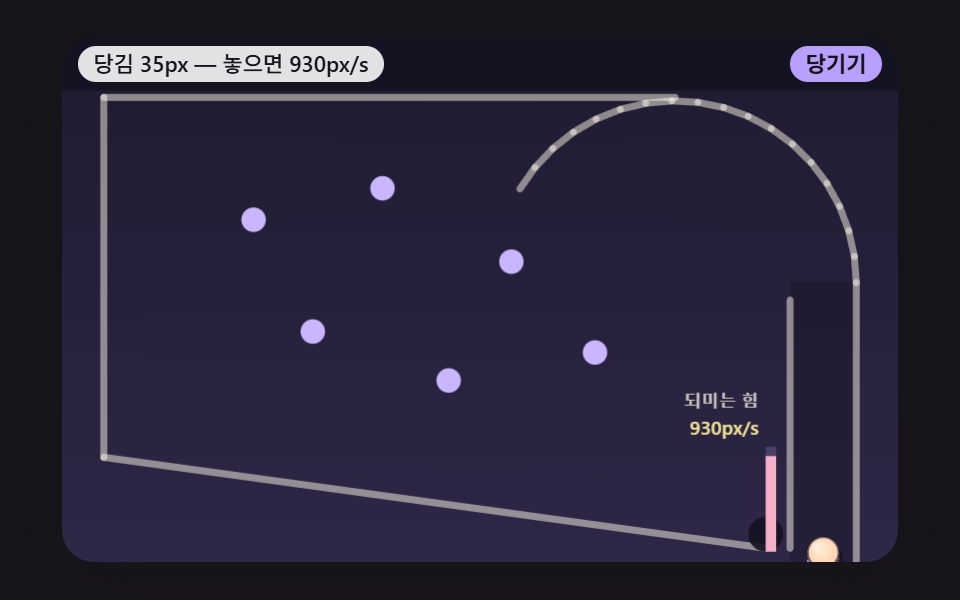
発射バネを引いた長さに比例して押し戻す力が大きくなり、離した瞬間にたまった力をボールの発射速度に変えて曲がった通路に沿って送り出し、バネは揺れながら元の位置に戻る。
使いどころゲーム風の会員登録お祝い画面
PLUNGER_STIFFNESSPLUNGER_MAX_PULLLAUNCH_SCALE
<main class="stage">
<div class="pb is-demo" id="pb">
  <canvas class="pb__canvas" data-role="canvas" width="480" height="300" aria-hidden="true"></canvas>
  <div class="pb__head">
    <p class="pb__status" data-role="status" aria-live="off">発射バネにボールを載せた</p>
    <div class="pb__controls">
      <button type="button" class="pb__btn" data-role="pull" data-hold="1">引く</button>
    </div>
  </div>
</div>
</main>
@use "../../../../site/static/demo-tokens" as *;
@include stage($stage-ink);
.pb {
position: relative;
width: min(92vw, calc(160vh - 12.8vw));
aspect-ratio: 480 / 300;
margin: 0 auto;
border-radius: $r-card;
overflow: hidden;
box-shadow: $shadow-raised;
background: $subject-ink;
}
.pb__canvas {
position: absolute;
inset: 0;
display: block;
width: 100%;
height: 100%;
}
// 머리 줄 — 캔버스 위 머리 띠 자리에 상태 줄(왼쪽)과 버튼(오른쪽)을 겹친다. 상태 줄이 길면 말줄임으로 자르고 버튼 폭은 그대로
.pb__head {
position: absolute;
top: $sp-1;
left: $sp-2;
right: $sp-2;
display: flex;
align-items: center;
justify-content: space-between;
gap: $sp-2;
}
.pb__status {
flex: 0 1 auto;
min-width: 0;
margin: 0;
padding: 0 $sp-2;
border-radius: $r-control;
background: rgba(255, 255, 255, .88);
color: $subject-ink;
font-weight: 500;
font-size: 11px;
line-height: 18px;
white-space: nowrap;
overflow: hidden;
text-overflow: ellipsis;
}
.pb__controls {
flex: 0 0 auto;
display: flex;
gap: $sp-1;
}
// 진짜 버튼 — Tab 으로 들어오고 Enter·Space 로 누른다. 누르고 있는 버튼은 스크립트가 is-held 를 붙인다
.pb__btn {
appearance: none;
margin: 0;
padding: 0 $sp-2;
border: 0;
border-radius: $r-control;
background: $subject-lilac;
color: $subject-ink;
font-family: inherit;
font-weight: 700;
font-size: 11px;
line-height: 18px;
cursor: pointer;
touch-action: manipulation;
user-select: none;
-webkit-user-select: none;
}
.pb__btn:hover {
background: $subject-cream;
}
.pb__btn:active,
.pb__btn.is-held {
background: $subject-pink;
}
.pb__btn:focus-visible {
outline: 2px solid $subject-cream;
outline-offset: 2px;
}
@media (max-width: 340px) {
.pb__head { top: 0; left: $sp-1; right: $sp-1; gap: $sp-1; }
.pb__status, .pb__btn { font-size: 9px; line-height: 16px; padding: 0 $sp-1; }
}
// 동작 줄이기 — 움직임은 스크립트가 멈춘다(같은 시드 판을 끝까지 계산해 마지막 장면만 그린다). 여기서는 버튼 색이 바로 바뀌게만
@media (prefers-reduced-motion: reduce) {
.pb__btn { transition: none !important; }
}html, body {
margin: 0;
overflow: hidden;
}
.stage {
box-sizing: border-box;
min-height: 100vh;
display: grid;
place-items: center;
margin: 0;
background: #17141a;
font-family: -apple-system, "Segoe UI", "Noto Sans KR", sans-serif;
padding: clamp(8px, 4vw, 24px);
}
.pb {
position: relative;
width: min(92vw, 160vh - 12.8vw);
aspect-ratio: 480/300;
margin: 0 auto;
border-radius: 16px;
overflow: hidden;
box-shadow: 0 14px 24px rgba(23, 20, 26, 0.32);
background: #17141a;
}
.pb__canvas {
position: absolute;
inset: 0;
display: block;
width: 100%;
height: 100%;
}
.pb__head {
position: absolute;
top: 4px;
left: 8px;
right: 8px;
display: flex;
align-items: center;
justify-content: space-between;
gap: 8px;
}
.pb__status {
flex: 0 1 auto;
min-width: 0;
margin: 0;
padding: 0 8px;
border-radius: 12px;
background: rgba(255, 255, 255, 0.88);
color: #17141a;
font-weight: 500;
font-size: 11px;
line-height: 18px;
white-space: nowrap;
overflow: hidden;
text-overflow: ellipsis;
}
.pb__controls {
flex: 0 0 auto;
display: flex;
gap: 4px;
}
.pb__btn {
appearance: none;
margin: 0;
padding: 0 8px;
border: 0;
border-radius: 12px;
background: #b9a0ff;
color: #17141a;
font-family: inherit;
font-weight: 700;
font-size: 11px;
line-height: 18px;
cursor: pointer;
touch-action: manipulation;
user-select: none;
-webkit-user-select: none;
}
.pb__btn:hover {
background: #fff7e6;
}
.pb__btn:active,
.pb__btn.is-held {
background: #ff9ebb;
}
.pb__btn:focus-visible {
outline: 2px solid #fff7e6;
outline-offset: 2px;
}
@media (max-width: 340px) {
.pb__head {
top: 0;
left: 4px;
right: 4px;
gap: 4px;
}
.pb__status, .pb__btn {
font-size: 9px;
line-height: 16px;
padding: 0 4px;
}
}
@media (prefers-reduced-motion: reduce) {
.pb__btn {
transition: none !important;
}
}(function () {
const root = document.getElementById("pb");
if (!root) return;
// 논리 무대 — 물리는 화면 폭과 상관없이 이 480×300 좌표에서만 돈다. 화면이 넓든 좁든 그릴 때만 배율을 곱한다
const W = 480;
const H = 300;
// 한 틱 = 16ms 고정. 실제 프레임 간격이 흔들려도 계산은 같은 걸음으로만 나아간다
const FIXED_DT = 16;
const DT = FIXED_DT / 1000;
const TAU = Math.PI * 2;
// 머리 띠 높이(논리 px) — 상태 줄과 버튼이 이 띠 위에 겹친다
const HEADER = 30;
// 시연이 끝난 판을 이만큼(ms) 보여 준 뒤 같은 시드로 처음부터 다시 돈다
const LOOP_HOLD_MS = 1600;
// 파스텔 팔레트 — 어두운 판 위에 밝은 공·핀을 얹어 명도 차로 움직임이 읽힌다
const BG = [30, 27, 48];
const BG_LOW = [46, 39, 70];
const BAND = [20, 18, 32];
const GUIDE = [104, 94, 140];
const CREAM = [255, 248, 234];
const SKY = [146, 208, 255];
const PINK = [255, 172, 200];
const MINT = [144, 232, 202];
const LILAC = [202, 182, 255];
const PEACH = [255, 208, 172];
const LEMON = [250, 234, 156];
const AQUA = [156, 238, 236];
const CORAL = [255, 184, 166];
const INK = [28, 24, 40];
const BALL_COLORS = [PEACH, MINT, SKY, PINK, LILAC, LEMON, AQUA, CORAL, CREAM];
// 공 이름표 — 실제 사람 이름 대신 글자
const LABELS = ['A', 'B', 'C', 'D', 'E', 'F', 'G', 'H', 'I'];
const FONT_FAMILY = '"Segoe UI", "Malgun Gothic", "Hiragino Sans", "Noto Sans KR", sans-serif';
function clamp(v, lo, hi) { return v < lo ? lo : (v > hi ? hi : v); }
function lerp(a, b, k) { return a + (b - a) * k; }
function smooth(x) { const c = clamp(x, 0, 1); return c * c * (3 - 2 * c); }
function rgba(c, a) {
return 'rgba(' + Math.round(clamp(c[0], 0, 255)) + ',' + Math.round(clamp(c[1], 0, 255)) + ',' + Math.round(clamp(c[2], 0, 255)) + ',' + clamp(a, 0, 1).toFixed(3) + ')';
}
function mixRGB(a, b, k) { return [lerp(a[0], b[0], k), lerp(a[1], b[1], k), lerp(a[2], b[2], k)]; }
// 시드 고정 난수 — 같은 시드면 같은 출발 자리·같은 결과가 다시 나온다 (32비트 정수 섞기)
function makeRng(seedValue) {
let s = seedValue >>> 0;
return function () {
s = (s + 0x6d2b79f5) >>> 0;
let t = s;
t = Math.imul(t ^ (t >>> 15), t | 1);
t ^= t + Math.imul(t ^ (t >>> 7), t | 61);
return ((t ^ (t >>> 14)) >>> 0) / 4294967296;
};
}
function makeBall(x, y, r, color, label) {
return { x: x, y: y, vx: 0, vy: 0, r: r, color: color, label: label, trail: [], slow: 0, finishMs: -1, mul: 1, out: false };
}
// 속도를 먼저 갱신하는 적분 — 이번 걸음의 힘(중력)으로 속도를 바꾼 뒤, 그 새 속도로 자리를 옮긴다. h 는 초
function integrate(b, gx, gy, h) {
b.vx += gx * h;
b.vy += gy * h;
b.x += b.vx * h;
b.y += b.vy * h;
}
function capSpeed(b, max) {
const s = Math.hypot(b.vx, b.vy);
if (s > max) {
b.vx *= max / s;
b.vy *= max / s;
}
}
// 마지막 충돌 — 법선(공 쪽을 향함)과 닿은 자리. バンパー·키커가 이 법선 방향으로 덧힘을 준다
const contact = { nx: 0, ny: -1, px: 0, py: 0 };
// 원-원 충돌(움직이지 않는 원: 핀·バンパー) — 겹친 깊이만큼 법선 방향 바깥으로 밀어내고,
// 법선 방향 속도를 되튐 계수 e 만큼 뒤집는다. 돌려주는 값: 안 닿음 -1 · 닿았지만 멀어지는 중 0 · 다가오던 빠르기(px/s)
function hitCircle(b, cx, cy, cr, e) {
const dx = b.x - cx;
const dy = b.y - cy;
const d = Math.hypot(dx, dy);
const overlap = b.r + cr - d;
if (overlap <= 0) {
return -1;
}
// 중심이 정확히 겹치면 방향을 정할 수 없다 — 위로 민다
const nx = d > 1e-9 ? dx / d : 0;
const ny = d > 1e-9 ? dy / d : -1;
b.x += nx * overlap;
b.y += ny * overlap;
contact.nx = nx;
contact.ny = ny;
contact.px = cx + nx * cr;
contact.py = cy + ny * cr;
const vn = b.vx * nx + b.vy * ny;
if (vn >= 0) {
return 0;
}
b.vx -= (1 + e) * vn * nx;
b.vy -= (1 + e) * vn * ny;
return -vn;
}
// 선분 위 가장 가까운 점 — 공 중심에서 선분으로 내린 수선의 발. t 는 0(시작점)~1(끝점)로 자른다
function closestOnSegment(px, py, ax, ay, bx, by) {
const ex = bx - ax;
const ey = by - ay;
const len2 = ex * ex + ey * ey;
const t = len2 > 0 ? clamp(((px - ax) * ex + (py - ay) * ey) / len2, 0, 1) : 0;
return [ax + ex * t, ay + ey * t, t];
}
// 원-선분 충돌 — 가장 가까운 점까지 거리가 (반지름 + 선 두께의 반)보다 짧으면 겹친 만큼 밀어낸다.
// 선분이 움직이면(도는 フリッパー·풍차 막대) 접점의 속도(svx, svy)에 대한 상대 속도로 되튐을 잰다.
// grip 은 이번 걸음에 접선 방향 상대 속도에서 덜어 내는 몫 — 0 이면 미끄럼, 07 구름 마찰은 0 보다 크다
function hitSegment(b, ax, ay, bx, by, half, e, svx, svy, grip) {
const c = closestOnSegment(b.x, b.y, ax, ay, bx, by);
const dx = b.x - c[0];
const dy = b.y - c[1];
const d = Math.hypot(dx, dy);
const overlap = b.r + half - d;
if (overlap <= 0) {
return -1;
}
let nx = 0;
let ny = -1;
if (d > 1e-9) {
nx = dx / d;
ny = dy / d;
}
else {
// 중심이 선 위에 올라탔다 — 선분의 왼쪽 법선으로 민다
const L = Math.hypot(bx - ax, by - ay) || 1;
nx = (by - ay) / L;
ny = -(bx - ax) / L;
}
b.x += nx * overlap;
b.y += ny * overlap;
contact.nx = nx;
contact.ny = ny;
contact.px = c[0];
contact.py = c[1];
const rvx = b.vx - svx;
const rvy = b.vy - svy;
const vn = rvx * nx + rvy * ny;
if (vn >= 0) {
return 0;
}
const tvx = (rvx - vn * nx) * (1 - grip);
const tvy = (rvy - vn * ny) * (1 - grip);
b.vx = svx + tvx - e * vn * nx;
b.vy = svy + tvy - e * vn * ny;
return -vn;
}
// 움직이지 않는 벽 묶음 — 선분 하나하나에 hitSegment
function hitWalls(b, segs, e) {
for (let i = 0; i < segs.length; i += 1) {
const s = segs[i];
hitSegment(b, s[0], s[1], s[2], s[3], 0, e, 0, 0, 0);
}
}
// 공-공 충돌 — 같은 무게. 겹친 깊이를 반씩 나눠 밀어내고, 법선 방향 속도를 되튐 계수만큼 주고받는다
function hitBalls(a, b, e) {
const dx = b.x - a.x;
const dy = b.y - a.y;
const d = Math.hypot(dx, dy);
const overlap = a.r + b.r - d;
if (overlap <= 0) {
return -1;
}
const nx = d > 1e-9 ? dx / d : 1;
const ny = d > 1e-9 ? dy / d : 0;
a.x -= nx * overlap * 0.5;
a.y -= ny * overlap * 0.5;
b.x += nx * overlap * 0.5;
b.y += ny * overlap * 0.5;
const vn = (b.vx - a.vx) * nx + (b.vy - a.vy) * ny;
if (vn >= 0) {
return 0;
}
const j = -(1 + e) * vn * 0.5;
a.vx -= j * nx;
a.vy -= j * ny;
b.vx += j * nx;
b.vy += j * ny;
return -vn;
}
function pushTrail(b, n) {
b.trail.push(b.x, b.y);
while (b.trail.length > n * 2) {
b.trail.splice(0, 2);
}
}
const canvasEl = root.querySelector('[data-role="canvas"]');
const statusEl = root.querySelector('[data-role="status"]');
const ctxRaw = canvasEl ? canvasEl.getContext('2d') : null;
if (!canvasEl || !ctxRaw || !statusEl) {
return;
}
const cv = canvasEl;
const ctx = ctxRaw;
const status = statusEl;
const reduceQuery = window.matchMedia('(prefers-reduced-motion: reduce)');
// 페이지를 연 채 동작 줄이기 설정을 바꿔도 꼬리의 change 리스너가 이 값을 다시 읽는다
let still = reduceQuery.matches;
// 자동 시연 중인가 — 사람이 버튼을 처음 누르는 순간 시연(가상 입력·같은 판 되풀이)을 멈추고 결과를 읽어 주기 시작한다
let demo = root.classList.contains('is-demo');
// 지금 판의 시드와 시각(ms). 시각은 16ms 고정 스텝으로만 는다
let seed = 0;
let clock = 0;
// 화면 배율 — 논리 1px 이 화면 CSS px 몇 개인가. 그릴 때만 쓰고 물리 계산에는 넣지 않는다
let viewScale = 1;
function wake() {
if (!demo) {
return;
}
demo = false;
root.classList.remove('is-demo');
status.setAttribute('aria-live', 'polite');
}
function say(text) {
if (status.textContent !== text) {
status.textContent = text;
}
}
function fitCanvas() {
// 배율은 2 에서 자른다 — 배율 3 기기에서 화소가 2.25배로 늘어 프레임마다 일이 그만큼 커지지 않게
const dpr = Math.min(window.devicePixelRatio || 1, 2);
const cssW = cv.getBoundingClientRect().width || W;
viewScale = cssW / W;
const k = viewScale * dpr;
cv.width = Math.max(1, Math.round(W * k));
cv.height = Math.max(1, Math.round(H * k));
// 그릴 때만 논리 좌표 → 화소 배율을 곱한다
ctx.setTransform(k, 0, 0, k, 0, 0);
}
function clearStage() {
const g = ctx.createLinearGradient(0, 0, 0, H);
g.addColorStop(0, rgba(BG, 1));
g.addColorStop(1, rgba(BG_LOW, 1));
ctx.fillStyle = g;
ctx.fillRect(0, 0, W, H);
}
// 머리 띠 — 상태 줄과 버튼 뒤의 어두운 띠. 판을 다 그린 뒤 맨 위에 덮는다
function drawBand() {
ctx.fillStyle = rgba(BAND, 0.92);
ctx.fillRect(0, 0, W, HEADER);
}
function strokeSeg(s, width, c, a) {
ctx.lineCap = 'round';
ctx.strokeStyle = rgba(c, a);
ctx.lineWidth = width;
ctx.beginPath();
ctx.moveTo(s[0], s[1]);
ctx.lineTo(s[2], s[3]);
ctx.stroke();
}
// 꼬리 — 지나온 자리를 이을수록 굵고 진하게
function drawTrail(b, c, width) {
const t = b.trail;
const n = t.length / 2;
ctx.lineCap = 'round';
for (let i = 1; i < n; i += 1) {
const k = i / n;
ctx.strokeStyle = rgba(c, 0.55 * k);
ctx.lineWidth = width * k;
ctx.beginPath();
ctx.moveTo(t[i * 2 - 2], t[i * 2 - 1]);
ctx.lineTo(t[i * 2], t[i * 2 + 1]);
ctx.stroke();
}
}
// 공 — 바닥 그림자 → 왼쪽 위가 밝은 둥근 몸통 → 진한 테두리 → 이름표 글자
function drawBall(b) {
ctx.fillStyle = 'rgba(0,0,0,0.3)';
ctx.beginPath();
ctx.arc(b.x + 2, b.y + 3, b.r, 0, TAU);
ctx.fill();
const g = ctx.createRadialGradient(b.x - b.r * 0.35, b.y - b.r * 0.4, b.r * 0.1, b.x, b.y, b.r);
g.addColorStop(0, rgba(mixRGB(b.color, CREAM, 0.75), 1));
g.addColorStop(1, rgba(b.color, 1));
ctx.fillStyle = g;
ctx.beginPath();
ctx.arc(b.x, b.y, b.r, 0, TAU);
ctx.fill();
ctx.lineWidth = 1.5;
ctx.strokeStyle = rgba(INK, 0.6);
ctx.stroke();
if (b.label) {
ctx.fillStyle = rgba(INK, 1);
ctx.font = '700 ' + Math.round(b.r * 1.25) + 'px ' + FONT_FAMILY;
ctx.textAlign = 'center';
ctx.textBaseline = 'middle';
ctx.fillText(b.label, b.x, b.y + 0.5);
}
}
function drawText(text, x, y, size, c, a, align) {
ctx.fillStyle = rgba(c, a);
ctx.font = '600 ' + size + 'px ' + FONT_FAMILY;
ctx.textAlign = align;
ctx.textBaseline = 'middle';
ctx.fillText(text, x, y);
}
function makePlunger(x, top, max, stiff, scale, damp) {
return { x: x, top: top, pull: 0, v: 0, max: max, cap: max, stiff: stiff, scale: scale, damp: damp, held: false, free: false, ball: null, releasedPull: 0, lastPull: 0, lastLaunch: 0 };
}
function plungerTipY(p) { return p.top + p.pull; }
// 막대 위에 공 올리기 — 다음 발사까지 공은 막대 끝에 붙어 함께 움직인다
function loadPlunger(p, b) {
p.ball = b;
b.vx = 0;
b.vy = 0;
b.trail = [];
}
// 놓았을 때 막대 끝이 0 을 지나며 낼 빠르기 — 당긴 만큼 되미는 힘이면 √stiff × 당긴 길이
function predictLaunch(p, pull) { return p.scale * Math.sqrt(p.stiff) * pull; }
function movePlunger(p, h, rate) {
if (p.held) {
p.pull = Math.min(p.cap, p.pull + rate * h);
p.v = 0;
// 놓은 뒤 처음 0 을 지날 때까지는 저항 없이 — 당긴 만큼 다 돌려준다
p.free = true;
p.releasedPull = p.pull;
}
else {
const before = p.pull;
const a = -p.stiff * p.pull - (p.free ? 0 : p.damp * p.v);
// 속도를 먼저 갱신하는 적분
p.v += a * h;
p.pull += p.v * h;
if (p.free && before > 0 && p.pull <= 0) {
p.free = false;
if (p.ball) {
const speed = Math.abs(p.v) * p.scale;
p.ball.vx = 0;
p.ball.vy = -speed;
p.lastPull = p.releasedPull;
p.lastLaunch = speed;
p.ball = null;
}
}
// 공 없이 놓았거나 아주 조금 당겼다 놓았으면 그대로 출렁이다 멈춘다
if (p.free && p.releasedPull <= 0) {
p.free = false;
}
}
if (p.ball) {
p.ball.x = p.x;
p.ball.y = plungerTipY(p) - p.ball.r - 3;
p.ball.vx = 0;
p.ball.vy = 0;
}
}
// 막대 그림 — 끝 마개 + 아래로 이어진 용수철(당길수록 촘촘해진다) + 옆의 힘 막대
function drawPlunger(p, gaugeX, bottom) {
const tip = plungerTipY(p);
const coils = 7;
const span = bottom - tip - 6;
ctx.strokeStyle = rgba(LILAC, 0.95);
ctx.lineWidth = 2.5;
ctx.lineJoin = 'round';
ctx.beginPath();
ctx.moveTo(p.x, tip + 6);
for (let i = 1; i <= coils * 2; i += 1) {
const y = tip + 6 + span * i / (coils * 2);
ctx.lineTo(p.x + (i % 2 ? 8 : -8), y);
}
ctx.stroke();
ctx.fillStyle = rgba(CREAM, 1);
ctx.fillRect(p.x - 11, tip, 22, 7);
ctx.fillStyle = rgba(PEACH, 1);
ctx.fillRect(p.x - 11, tip + 5, 22, 2);
// 押し戻す力 막대 — 높이 = stiff × pull 을 최대 힘 대비 몫으로
const k = clamp(p.pull / p.max, 0, 1);
const gh = 60;
ctx.fillStyle = rgba(GUIDE, 0.5);
ctx.fillRect(gaugeX, bottom - gh, 6, gh);
ctx.fillStyle = rgba(mixRGB(MINT, PINK, k), 1);
ctx.fillRect(gaugeX, bottom - gh * k, 6, gh * k);
}
// 굽은 길 — 원호를 n 토막 선분으로. 반지름 r, 각 a0 → a1(라디안)
function makeArc(cx, cy, r, a0, a1, n) {
const out = [];
for (let i = 0; i < n; i += 1) {
const u = a0 + (a1 - a0) * i / n;
const v = a0 + (a1 - a0) * (i + 1) / n;
out.push([cx + Math.cos(u) * r, cy + Math.sin(u) * r, cx + Math.cos(v) * r, cy + Math.sin(v) * r]);
}
return out;
}
// 05 발사 막대 — 당긴 길이에 비례하는 押し戻す力 → 0 을 지나는 순간의 막대 빠르기 × 배율 = 발사 속도
// 되미는 힘의 세기(1/s²) — 가속도 = -PLUNGER_STIFFNESS × 당긴 길이
const PLUNGER_STIFFNESS = 900;
// 최대로 당길 수 있는 길이(px)
const PLUNGER_MAX_PULL = 40;
// 막대 빠르기 → ボール 발사 속도 배율
const LAUNCH_SCALE = 0.85;
// 공을 넘긴 뒤 막대 출렁임의 저항(1/s)
const PLUNGER_DAMPING = 24;
// 쥐고 있을 때 초당 당겨지는 길이(px/s)
const PULL_RATE = 60;
const GRAVITY = 600;
const BALL_R = 9;
const RESTITUTION = 0.5;
const SUBSTEPS = 6;
const MAX_SPEED = 1400;
const LANE_IN = 418;
const LANE_OUT = 456;
const PLUNGER_TOP = 270;
// 시연 — 공이 올라오면 AUTO_WAIT_MS 쉬고, 시드로 정한 길이까지 당겼다가 AUTO_HOLD_MS 뒤 놓는다
const AUTO_WAIT_MS = 200;
const AUTO_HOLD_MS = 120;
const RETURN_MS = 500;
const DEMO_SEED = 4765;
// 동작 줄이기 — 80 틱(1,280ms)까지 계산해 첫 발사 직후(공이 레인을 오르는 장면)와 발사 속도 글자를 보인다
const SETTLE_TICKS = 80;
// 굽은 길 — 레인 바깥 벽 위쪽을 왼쪽으로 감아 공을 판으로 내보낸다
const ARC = makeArc(352, 140, 104, 0, -2.6, 18);
const walls = ARC.concat([
[LANE_OUT, 140, LANE_OUT, 300], [LANE_IN, 150, LANE_IN, 292],
[24, 34, 352, 34], [24, 34, 24, 240],
// 바닥 비탈 — 오른쪽 아래 되돌림 구멍으로 굴려 보낸다
[24, 240, 404, 292]
]);
const posts = [
{ x: 110, y: 104, glow: 0 }, { x: 184, y: 86, glow: 0 }, { x: 258, y: 128, glow: 0 },
{ x: 144, y: 168, glow: 0 }, { x: 222, y: 196, glow: 0 }, { x: 306, y: 180, glow: 0 }
];
const POST_R = 7;
const plunger = makePlunger((LANE_IN + LANE_OUT) / 2, PLUNGER_TOP, PLUNGER_MAX_PULL, PLUNGER_STIFFNESS, LAUNCH_SCALE, PLUNGER_DAMPING);
let rng = makeRng(1);
let ball = makeBall(0, 0, BALL_R, PEACH, '');
let phase = 'wait';
let phaseMs = 0;
let returnMs = 0;
let launches = 0;
function load() {
ball.out = false;
ball.x = plunger.x;
loadPlunger(plunger, ball);
phase = 'wait';
phaseMs = 0;
// 이번에 당길 길이 — 최대의 65~100% 를 시드 난수로
plunger.cap = demo ? PLUNGER_MAX_PULL * (0.65 + 0.35 * rng()) : PLUNGER_MAX_PULL;
}
function onRestart() {
rng = makeRng(seed);
ball = makeBall(plunger.x, PLUNGER_TOP - BALL_R - 3, BALL_R, PEACH, '');
plunger.pull = 0;
plunger.v = 0;
plunger.held = false;
plunger.free = false;
plunger.lastLaunch = 0;
plunger.lastPull = 0;
returnMs = 0;
launches = 0;
load();
}
// 시연 손 — 기다림 → 引く(cap 까지) → 잠깐 멈춤 → 놓기
function autoHand() {
if (!plunger.ball) {
return;
}
phaseMs += FIXED_DT;
if (phase === 'wait' && phaseMs >= AUTO_WAIT_MS) {
plunger.held = true;
phase = 'pull';
phaseMs = 0;
}
else if (phase === 'pull' && plunger.pull >= plunger.cap - 0.01) {
phase = 'hold';
phaseMs = 0;
}
else if (phase === 'hold' && phaseMs >= AUTO_HOLD_MS) {
plunger.held = false;
phase = 'flight';
}
}
function step() {
if (demo) {
autoHand();
}
const hs = DT / SUBSTEPS;
const hadBall = plunger.ball !== null;
for (let s = 0; s < SUBSTEPS; s += 1) {
movePlunger(plunger, hs, PULL_RATE);
if (plunger.ball || ball.out) {
continue;
}
integrate(ball, 0, GRAVITY, hs);
hitWalls(ball, walls, RESTITUTION);
for (let i = 0; i < posts.length; i += 1) {
const vn = hitCircle(ball, posts[i].x, posts[i].y, POST_R, 0.6);
if (vn > 0) {
posts[i].glow = Math.min(1, vn / 400);
}
}
capSpeed(ball, MAX_SPEED);
}
if (hadBall && !plunger.ball) {
launches += 1;
}
if (!ball.out && !plunger.ball) {
pushTrail(ball, 20);
// 힘이 모자라 레인으로 되떨어지면 막대 위에 다시 얹는다
if (ball.x > LANE_IN && ball.y + ball.r > plungerTipY(plunger) - 2 && ball.vy > 0) {
load();
}
// 되돌림 구멍 — 판 오른쪽 아래에 닿으면 잠깐 쉬었다 막대 위로
else if (ball.x > 392 && ball.x < LANE_IN && ball.y > 268) {
ball.out = true;
returnMs = RETURN_MS;
}
}
if (ball.out) {
returnMs -= FIXED_DT;
if (returnMs <= 0) {
load();
}
}
for (let i = 0; i < posts.length; i += 1) {
posts[i].glow *= 0.92;
}
}
function finished() { return false; }
function onControl(role, down) {
if (role === 'pull') {
plunger.cap = PLUNGER_MAX_PULL;
plunger.held = down;
phase = 'hand';
}
}
function draw() {
clearStage();
ctx.fillStyle = rgba(BAND, 0.35);
ctx.fillRect(LANE_IN, 140, LANE_OUT - LANE_IN, H - 140);
for (let i = 0; i < walls.length; i += 1) {
strokeSeg(walls[i], 4, CREAM, 0.5);
}
for (let i = 0; i < posts.length; i += 1) {
const p = posts[i];
if (p.glow > 0.02) {
ctx.fillStyle = rgba(LEMON, 0.45 * p.glow);
ctx.beginPath();
ctx.arc(p.x, p.y, POST_R + 12 * p.glow, 0, TAU);
ctx.fill();
}
ctx.fillStyle = rgba(mixRGB(LILAC, CREAM, p.glow), 1);
ctx.beginPath();
ctx.arc(p.x, p.y, POST_R, 0, TAU);
ctx.fill();
}
// 되돌림 구멍
ctx.fillStyle = rgba(BAND, 0.9);
ctx.beginPath();
ctx.arc(404, 284, 10, 0, TAU);
ctx.fill();
drawPlunger(plunger, LANE_IN - 14, H - 6);
// 놓으면 낼 빠르기 — 당긴 길이에 비례
if (plunger.ball && plunger.pull > 0.5) {
drawText(Math.round(predictLaunch(plunger, plunger.pull)) + 'px/s', LANE_IN - 18, H - 76, 11, LEMON, 0.95, 'right');
drawText('押し戻す力', LANE_IN - 18, H - 92, 10, CREAM, 0.75, 'right');
}
if (!ball.out) {
drawTrail(ball, PEACH, ball.r * 1.3);
drawBall(ball);
}
drawBand();
}
function stateText() {
if (plunger.ball && plunger.pull > 0.5) {
return '引き ' + Math.round(plunger.pull / 5) * 5 + 'px — 離すと ' + Math.round(predictLaunch(plunger, plunger.pull) / 10) * 10 + 'px/s';
}
if (plunger.lastLaunch > 0) {
return '引き ' + Math.round(plunger.lastPull) + 'px → 発射 ' + Math.round(plunger.lastLaunch) + 'px/s';
}
return '発射バネにボールを載せた';
}
// ── 공통 꼬리: 시계·버튼·동작 줄이기·정리 ──
// 결과를 보여 준 시간(ms) — 시연 중 판이 끝나면 LOOP_HOLD_MS 뒤 같은 시드로 다시 돈다
let holdMs = 0;
function restart() {
clock = 0;
holdMs = 0;
onRestart();
}
// 한 틱 — 시뮬레이션 시각을 16ms 올리고 항목 계산(step)을 한 번 돌린다
function tick() {
clock += FIXED_DT;
step();
if (demo && !still && finished()) {
holdMs += FIXED_DT;
if (holdMs >= LOOP_HOLD_MS) {
restart();
}
}
}
function render() {
draw();
say(stateText());
}
// 동작 줄이기 — 같은 시드 판을 화면에 그리지 않고 끝까지(끝이 없는 장면은 SETTLE_TICKS 틱까지) 계산한 뒤 마지막 장면만 그린다
function settle() {
for (let k = 0; k < SETTLE_TICKS; k += 1) {
clock += FIXED_DT;
step();
if (finished()) {
break;
}
}
}
// 입력 한 번 뒤 — 동작 줄이기면 그 입력이 낳은 결과까지 바로 계산해 그린다
function after() {
if (still) {
settle();
}
render();
}
function control(role, down) {
wake();
onControl(role, down);
after();
}
// 리스너는 한 묶음으로 달고 정리할 때 한 번에 뗀다
const off = new AbortController();
// 버튼 — data-role 을 항목의 onControl 에 넘긴다. data-hold 가 있으면 누르고 있는 동안 true, 떼면 false
const buttons = Array.from(root.querySelectorAll('button[data-role]'));
buttons.forEach(function (btn) {
const role = btn.getAttribute('data-role') || '';
if (!btn.hasAttribute('data-hold')) {
// 한 번 누르는 버튼 — 마우스·손가락·Enter·Space 모두 click 하나로 들어온다
btn.addEventListener('click', function () { control(role, true); }, { signal: off.signal });
return;
}
let down = false;
function setHeld(v) {
if (down === v) {
return;
}
down = v;
btn.classList.toggle('is-held', v);
control(role, v);
}
// 누르고 있는 버튼 — 손가락·마우스는 pointerdown·up, 키보드는 Space·Enter 의 keydown·keyup
btn.addEventListener('pointerdown', function (ev) {
if (ev.button !== 0) {
return;
}
btn.setPointerCapture(ev.pointerId);
setHeld(true);
}, { signal: off.signal });
btn.addEventListener('pointerup', function () { setHeld(false); }, { signal: off.signal });
btn.addEventListener('pointercancel', function () { setHeld(false); }, { signal: off.signal });
btn.addEventListener('lostpointercapture', function () { setHeld(false); }, { signal: off.signal });
btn.addEventListener('keydown', function (ev) {
if (ev.key !== ' ' && ev.key !== 'Enter') {
return;
}
ev.preventDefault();
setHeld(true);
}, { signal: off.signal });
btn.addEventListener('keyup', function (ev) {
if (ev.key !== ' ' && ev.key !== 'Enter') {
return;
}
ev.preventDefault();
setHeld(false);
}, { signal: off.signal });
btn.addEventListener('blur', function () { setHeld(false); }, { signal: off.signal });
// 길게 누를 때 뜨는 메뉴를 막는다
btn.addEventListener('contextmenu', function (ev) { ev.preventDefault(); }, { signal: off.signal });
});
function onResize() {
fitCanvas();
render();
}
fitCanvas();
window.addEventListener('resize', onResize, { signal: off.signal });
let rafId = 0;
let lastTs = -1;
let acc = 0;
function frame(ts) {
if (still) {
rafId = 0;
return;
}
if (lastTs < 0) {
lastTs = ts;
}
// 탭이 숨었다 돌아와도 한 번에 100ms 까지만 따라잡는다 — 순간이동 대신 이어서 움직인다
acc += Math.min(ts - lastTs, 100);
lastTs = ts;
let n = 0;
while (acc >= FIXED_DT && n < 6) {
tick();
acc -= FIXED_DT;
n += 1;
}
render();
rafId = window.requestAnimationFrame(frame);
}
function startLoop() {
if (rafId) {
return;
}
lastTs = -1;
acc = 0;
rafId = window.requestAnimationFrame(frame);
}
// 동작 줄이기 설정이 페이지를 연 채 바뀌면 — 켜지면 루프를 멈추고 같은 시드 판의 마지막 장면을, 꺼지면 루프를 다시 돈다
function onMotionPref() {
still = reduceQuery.matches;
if (still) {
if (rafId) {
window.cancelAnimationFrame(rafId);
rafId = 0;
}
if (demo) {
restart();
}
after();
}
else {
startLoop();
}
}
reduceQuery.addEventListener('change', onMotionPref, { signal: off.signal });
seed = DEMO_SEED;
restart();
// probe-hook
if (still) {
settle();
render();
}
else {
render();
startLoop();
}
return function () {
window.cancelAnimationFrame(rafId);
off.abort();
};
})();// PlungerSpringChargeLaunch - vanilla 판(05-pb-plunger-spring-charge-launch) 의 React 포트. 같은 계산을 useEffect 안에서 돌린다.
import { useEffect, useRef } from "react";
import styles from "./PlungerSpringChargeLaunch.module.scss";
const cx = (s: string): string => s.split(" ").map((n) => styles[n] ?? n).join(" ");
export default function PlungerSpringChargeLaunch() {
const rootRef = useRef<HTMLDivElement | null>(null);
useEffect(() => {
const rootEl = rootRef.current;
if (!rootEl) return;
const root: HTMLElement = rootEl;
type RGB = [number, number, number];
type Pt = [number, number];
type Seg = [number, number, number, number];
// 논리 무대 — 물리는 화면 폭과 상관없이 이 480×300 좌표에서만 돈다. 화면이 넓든 좁든 그릴 때만 배율을 곱한다
const W = 480;
const H = 300;
// 한 틱 = 16ms 고정. 실제 프레임 간격이 흔들려도 계산은 같은 걸음으로만 나아간다
const FIXED_DT = 16;
const DT = FIXED_DT / 1000;
const TAU = Math.PI * 2;
// 머리 띠 높이(논리 px) — 상태 줄과 버튼이 이 띠 위에 겹친다
const HEADER = 30;
// 시연이 끝난 판을 이만큼(ms) 보여 준 뒤 같은 시드로 처음부터 다시 돈다
const LOOP_HOLD_MS = 1600;
// 파스텔 팔레트 — 어두운 판 위에 밝은 공·핀을 얹어 명도 차로 움직임이 읽힌다
const BG: RGB = [30, 27, 48];
const BG_LOW: RGB = [46, 39, 70];
const BAND: RGB = [20, 18, 32];
const GUIDE: RGB = [104, 94, 140];
const CREAM: RGB = [255, 248, 234];
const SKY: RGB = [146, 208, 255];
const PINK: RGB = [255, 172, 200];
const MINT: RGB = [144, 232, 202];
const LILAC: RGB = [202, 182, 255];
const PEACH: RGB = [255, 208, 172];
const LEMON: RGB = [250, 234, 156];
const AQUA: RGB = [156, 238, 236];
const CORAL: RGB = [255, 184, 166];
const INK: RGB = [28, 24, 40];
const BALL_COLORS: RGB[] = [PEACH, MINT, SKY, PINK, LILAC, LEMON, AQUA, CORAL, CREAM];
// 공 이름표 — 실제 사람 이름 대신 글자
const LABELS: string[] = ['A', 'B', 'C', 'D', 'E', 'F', 'G', 'H', 'I'];
const FONT_FAMILY = '"Segoe UI", "Malgun Gothic", "Hiragino Sans", "Noto Sans KR", sans-serif';
function clamp(v: number, lo: number, hi: number): number { return v < lo ? lo : (v > hi ? hi : v); }
function lerp(a: number, b: number, k: number): number { return a + (b - a) * k; }
function smooth(x: number): number { const c = clamp(x, 0, 1); return c * c * (3 - 2 * c); }
function rgba(c: RGB, a: number): string {
return 'rgba(' + Math.round(clamp(c[0], 0, 255)) + ',' + Math.round(clamp(c[1], 0, 255)) + ',' + Math.round(clamp(c[2], 0, 255)) + ',' + clamp(a, 0, 1).toFixed(3) + ')';
}
function mixRGB(a: RGB, b: RGB, k: number): RGB { return [lerp(a[0], b[0], k), lerp(a[1], b[1], k), lerp(a[2], b[2], k)]; }
// 시드 고정 난수 — 같은 시드면 같은 출발 자리·같은 결과가 다시 나온다 (32비트 정수 섞기)
function makeRng(seedValue: number): () => number {
let s = seedValue >>> 0;
return function (): number {
s = (s + 0x6d2b79f5) >>> 0;
let t = s;
t = Math.imul(t ^ (t >>> 15), t | 1);
t ^= t + Math.imul(t ^ (t >>> 7), t | 61);
return ((t ^ (t >>> 14)) >>> 0) / 4294967296;
};
}
// 공 — 자리(x, y)·속도(vx, vy, px/s)·반지름. trail 은 지나온 자리(x, y 를 번갈아), slow 는 거의 멈춰 있던 시간(ms),
// finishMs 는 결승선을 지난 시각(ms, 아직이면 -1), mul 은 공마다 다른 계수(07 구름 마찰), out 은 판 밖에서 쉬는 중
type Ball = { x: number; y: number; vx: number; vy: number; r: number; color: RGB; label: string; trail: number[]; slow: number; finishMs: number; mul: number; out: boolean };
function makeBall(x: number, y: number, r: number, color: RGB, label: string): Ball {
return { x: x, y: y, vx: 0, vy: 0, r: r, color: color, label: label, trail: [], slow: 0, finishMs: -1, mul: 1, out: false };
}
// 속도를 먼저 갱신하는 적분 — 이번 걸음의 힘(중력)으로 속도를 바꾼 뒤, 그 새 속도로 자리를 옮긴다. h 는 초
function integrate(b: Ball, gx: number, gy: number, h: number): void {
b.vx += gx * h;
b.vy += gy * h;
b.x += b.vx * h;
b.y += b.vy * h;
}
function capSpeed(b: Ball, max: number): void {
const s = Math.hypot(b.vx, b.vy);
if (s > max) { b.vx *= max / s; b.vy *= max / s; }
}
// 마지막 충돌 — 법선(공 쪽을 향함)과 닿은 자리. 범퍼·키커가 이 법선 방향으로 덧힘을 준다
const contact = { nx: 0, ny: -1, px: 0, py: 0 };
// 원-원 충돌(움직이지 않는 원: 핀·범퍼) — 겹친 깊이만큼 법선 방향 바깥으로 밀어내고,
// 법선 방향 속도를 되튐 계수 e 만큼 뒤집는다. 돌려주는 값: 안 닿음 -1 · 닿았지만 멀어지는 중 0 · 다가오던 빠르기(px/s)
function hitCircle(b: Ball, cx: number, cy: number, cr: number, e: number): number {
const dx = b.x - cx;
const dy = b.y - cy;
const d = Math.hypot(dx, dy);
const overlap = b.r + cr - d;
if (overlap <= 0) { return -1; }
// 중심이 정확히 겹치면 방향을 정할 수 없다 — 위로 민다
const nx = d > 1e-9 ? dx / d : 0;
const ny = d > 1e-9 ? dy / d : -1;
b.x += nx * overlap;
b.y += ny * overlap;
contact.nx = nx;
contact.ny = ny;
contact.px = cx + nx * cr;
contact.py = cy + ny * cr;
const vn = b.vx * nx + b.vy * ny;
if (vn >= 0) { return 0; }
b.vx -= (1 + e) * vn * nx;
b.vy -= (1 + e) * vn * ny;
return -vn;
}
// 선분 위 가장 가까운 점 — 공 중심에서 선분으로 내린 수선의 발. t 는 0(시작점)~1(끝점)로 자른다
function closestOnSegment(px: number, py: number, ax: number, ay: number, bx: number, by: number): [number, number, number] {
const ex = bx - ax;
const ey = by - ay;
const len2 = ex * ex + ey * ey;
const t = len2 > 0 ? clamp(((px - ax) * ex + (py - ay) * ey) / len2, 0, 1) : 0;
return [ax + ex * t, ay + ey * t, t];
}
// 원-선분 충돌 — 가장 가까운 점까지 거리가 (반지름 + 선 두께의 반)보다 짧으면 겹친 만큼 밀어낸다.
// 선분이 움직이면(도는 플리퍼·풍차 막대) 접점의 속도(svx, svy)에 대한 상대 속도로 되튐을 잰다.
// grip 은 이번 걸음에 접선 방향 상대 속도에서 덜어 내는 몫 — 0 이면 미끄럼, 07 구름 마찰은 0 보다 크다
function hitSegment(b: Ball, ax: number, ay: number, bx: number, by: number, half: number, e: number, svx: number, svy: number, grip: number): number {
const c = closestOnSegment(b.x, b.y, ax, ay, bx, by);
const dx = b.x - c[0];
const dy = b.y - c[1];
const d = Math.hypot(dx, dy);
const overlap = b.r + half - d;
if (overlap <= 0) { return -1; }
let nx = 0;
let ny = -1;
if (d > 1e-9) {
nx = dx / d;
ny = dy / d;
} else {
// 중심이 선 위에 올라탔다 — 선분의 왼쪽 법선으로 민다
const L = Math.hypot(bx - ax, by - ay) || 1;
nx = (by - ay) / L;
ny = -(bx - ax) / L;
}
b.x += nx * overlap;
b.y += ny * overlap;
contact.nx = nx;
contact.ny = ny;
contact.px = c[0];
contact.py = c[1];
const rvx = b.vx - svx;
const rvy = b.vy - svy;
const vn = rvx * nx + rvy * ny;
if (vn >= 0) { return 0; }
const tvx = (rvx - vn * nx) * (1 - grip);
const tvy = (rvy - vn * ny) * (1 - grip);
b.vx = svx + tvx - e * vn * nx;
b.vy = svy + tvy - e * vn * ny;
return -vn;
}
// 움직이지 않는 벽 묶음 — 선분 하나하나에 hitSegment
function hitWalls(b: Ball, segs: Seg[], e: number): void {
for (let i = 0; i < segs.length; i += 1) {
const s = segs[i];
hitSegment(b, s[0], s[1], s[2], s[3], 0, e, 0, 0, 0);
}
}
// 공-공 충돌 — 같은 무게. 겹친 깊이를 반씩 나눠 밀어내고, 법선 방향 속도를 되튐 계수만큼 주고받는다
function hitBalls(a: Ball, b: Ball, e: number): number {
const dx = b.x - a.x;
const dy = b.y - a.y;
const d = Math.hypot(dx, dy);
const overlap = a.r + b.r - d;
if (overlap <= 0) { return -1; }
const nx = d > 1e-9 ? dx / d : 1;
const ny = d > 1e-9 ? dy / d : 0;
a.x -= nx * overlap * 0.5;
a.y -= ny * overlap * 0.5;
b.x += nx * overlap * 0.5;
b.y += ny * overlap * 0.5;
const vn = (b.vx - a.vx) * nx + (b.vy - a.vy) * ny;
if (vn >= 0) { return 0; }
const j = -(1 + e) * vn * 0.5;
a.vx -= j * nx;
a.vy -= j * ny;
b.vx += j * nx;
b.vy += j * ny;
return -vn;
}
// 움직이지 않는 둥근 기둥(핀·표적) — glow 는 맞은 뒤 번지는 빛(0~1)
type Peg = { x: number; y: number; glow: number };
function pushTrail(b: Ball, n: number): void {
b.trail.push(b.x, b.y);
while (b.trail.length > n * 2) { b.trail.splice(0, 2); }
}
const canvasEl = root.querySelector('[data-role="canvas"]') as HTMLCanvasElement | null;
const statusEl = root.querySelector('[data-role="status"]') as HTMLElement | null;
const ctxRaw = canvasEl ? canvasEl.getContext('2d') : null;
if (!canvasEl || !ctxRaw || !statusEl) { return; }
const cv: HTMLCanvasElement = canvasEl;
const ctx: CanvasRenderingContext2D = ctxRaw;
const status: HTMLElement = statusEl;
const reduceQuery = window.matchMedia('(prefers-reduced-motion: reduce)');
// 페이지를 연 채 동작 줄이기 설정을 바꿔도 꼬리의 change 리스너가 이 값을 다시 읽는다
let still = reduceQuery.matches;
// 자동 시연 중인가 — 사람이 버튼을 처음 누르는 순간 시연(가상 입력·같은 판 되풀이)을 멈추고 결과를 읽어 주기 시작한다
let demo = root.classList.contains('is-demo');
// 지금 판의 시드와 시각(ms). 시각은 16ms 고정 스텝으로만 는다
let seed = 0;
let clock = 0;
// 화면 배율 — 논리 1px 이 화면 CSS px 몇 개인가. 그릴 때만 쓰고 물리 계산에는 넣지 않는다
let viewScale = 1;
function wake(): void {
if (!demo) { return; }
demo = false;
root.classList.remove('is-demo');
status.setAttribute('aria-live', 'polite');
}
function say(text: string): void {
if (status.textContent !== text) { status.textContent = text; }
}
function fitCanvas(): void {
// 배율은 2 에서 자른다 — 배율 3 기기에서 화소가 2.25배로 늘어 프레임마다 일이 그만큼 커지지 않게
const dpr = Math.min(window.devicePixelRatio || 1, 2);
const cssW = cv.getBoundingClientRect().width || W;
viewScale = cssW / W;
const k = viewScale * dpr;
cv.width = Math.max(1, Math.round(W * k));
cv.height = Math.max(1, Math.round(H * k));
// 그릴 때만 논리 좌표 → 화소 배율을 곱한다
ctx.setTransform(k, 0, 0, k, 0, 0);
}
function clearStage(): void {
const g = ctx.createLinearGradient(0, 0, 0, H);
g.addColorStop(0, rgba(BG, 1));
g.addColorStop(1, rgba(BG_LOW, 1));
ctx.fillStyle = g;
ctx.fillRect(0, 0, W, H);
}
// 머리 띠 — 상태 줄과 버튼 뒤의 어두운 띠. 판을 다 그린 뒤 맨 위에 덮는다
function drawBand(): void {
ctx.fillStyle = rgba(BAND, 0.92);
ctx.fillRect(0, 0, W, HEADER);
}
function strokeSeg(s: Seg, width: number, c: RGB, a: number): void {
ctx.lineCap = 'round';
ctx.strokeStyle = rgba(c, a);
ctx.lineWidth = width;
ctx.beginPath();
ctx.moveTo(s[0], s[1]);
ctx.lineTo(s[2], s[3]);
ctx.stroke();
}
// 꼬리 — 지나온 자리를 이을수록 굵고 진하게
function drawTrail(b: Ball, c: RGB, width: number): void {
const t = b.trail;
const n = t.length / 2;
ctx.lineCap = 'round';
for (let i = 1; i < n; i += 1) {
const k = i / n;
ctx.strokeStyle = rgba(c, 0.55 * k);
ctx.lineWidth = width * k;
ctx.beginPath();
ctx.moveTo(t[i * 2 - 2], t[i * 2 - 1]);
ctx.lineTo(t[i * 2], t[i * 2 + 1]);
ctx.stroke();
}
}
// 공 — 바닥 그림자 → 왼쪽 위가 밝은 둥근 몸통 → 진한 테두리 → 이름표 글자
function drawBall(b: Ball): void {
ctx.fillStyle = 'rgba(0,0,0,0.3)';
ctx.beginPath();
ctx.arc(b.x + 2, b.y + 3, b.r, 0, TAU);
ctx.fill();
const g = ctx.createRadialGradient(b.x - b.r * 0.35, b.y - b.r * 0.4, b.r * 0.1, b.x, b.y, b.r);
g.addColorStop(0, rgba(mixRGB(b.color, CREAM, 0.75), 1));
g.addColorStop(1, rgba(b.color, 1));
ctx.fillStyle = g;
ctx.beginPath();
ctx.arc(b.x, b.y, b.r, 0, TAU);
ctx.fill();
ctx.lineWidth = 1.5;
ctx.strokeStyle = rgba(INK, 0.6);
ctx.stroke();
if (b.label) {
ctx.fillStyle = rgba(INK, 1);
ctx.font = '700 ' + Math.round(b.r * 1.25) + 'px ' + FONT_FAMILY;
ctx.textAlign = 'center';
ctx.textBaseline = 'middle';
ctx.fillText(b.label, b.x, b.y + 0.5);
}
}
function drawText(text: string, x: number, y: number, size: number, c: RGB, a: number, align: CanvasTextAlign): void {
ctx.fillStyle = rgba(c, a);
ctx.font = '600 ' + size + 'px ' + FONT_FAMILY;
ctx.textAlign = align;
ctx.textBaseline = 'middle';
ctx.fillText(text, x, y);
}
// 발사 막대 — pull 은 당긴 길이(px, 아래로 +). 쥐고 있으면 rate(px/s)로 cap 까지 당겨지고,
// 놓으면 당긴 만큼 되미는 힘(가속도 = -stiff × pull)으로 돌아간다. 0 을 지나는 순간 막대 빠르기 × scale 을 공의 발사 속도로 넘긴다
type Plunger = { x: number; top: number; pull: number; v: number; max: number; cap: number; stiff: number; scale: number; damp: number; held: boolean; free: boolean; ball: Ball | null; releasedPull: number; lastPull: number; lastLaunch: number };
function makePlunger(x: number, top: number, max: number, stiff: number, scale: number, damp: number): Plunger {
return { x: x, top: top, pull: 0, v: 0, max: max, cap: max, stiff: stiff, scale: scale, damp: damp, held: false, free: false, ball: null, releasedPull: 0, lastPull: 0, lastLaunch: 0 };
}
function plungerTipY(p: Plunger): number { return p.top + p.pull; }
// 막대 위에 공 올리기 — 다음 발사까지 공은 막대 끝에 붙어 함께 움직인다
function loadPlunger(p: Plunger, b: Ball): void {
p.ball = b;
b.vx = 0;
b.vy = 0;
b.trail = [];
}
// 놓았을 때 막대 끝이 0 을 지나며 낼 빠르기 — 당긴 만큼 되미는 힘이면 √stiff × 당긴 길이
function predictLaunch(p: Plunger, pull: number): number { return p.scale * Math.sqrt(p.stiff) * pull; }
function movePlunger(p: Plunger, h: number, rate: number): void {
if (p.held) {
p.pull = Math.min(p.cap, p.pull + rate * h);
p.v = 0;
// 놓은 뒤 처음 0 을 지날 때까지는 저항 없이 — 당긴 만큼 다 돌려준다
p.free = true;
p.releasedPull = p.pull;
} else {
const before = p.pull;
const a = -p.stiff * p.pull - (p.free ? 0 : p.damp * p.v);
// 속도를 먼저 갱신하는 적분
p.v += a * h;
p.pull += p.v * h;
if (p.free && before > 0 && p.pull <= 0) {
p.free = false;
if (p.ball) {
const speed = Math.abs(p.v) * p.scale;
p.ball.vx = 0;
p.ball.vy = -speed;
p.lastPull = p.releasedPull;
p.lastLaunch = speed;
p.ball = null;
}
}
// 공 없이 놓았거나 아주 조금 당겼다 놓았으면 그대로 출렁이다 멈춘다
if (p.free && p.releasedPull <= 0) { p.free = false; }
}
if (p.ball) {
p.ball.x = p.x;
p.ball.y = plungerTipY(p) - p.ball.r - 3;
p.ball.vx = 0;
p.ball.vy = 0;
}
}
// 막대 그림 — 끝 마개 + 아래로 이어진 용수철(당길수록 촘촘해진다) + 옆의 힘 막대
function drawPlunger(p: Plunger, gaugeX: number, bottom: number): void {
const tip = plungerTipY(p);
const coils = 7;
const span = bottom - tip - 6;
ctx.strokeStyle = rgba(LILAC, 0.95);
ctx.lineWidth = 2.5;
ctx.lineJoin = 'round';
ctx.beginPath();
ctx.moveTo(p.x, tip + 6);
for (let i = 1; i <= coils * 2; i += 1) {
const y = tip + 6 + span * i / (coils * 2);
ctx.lineTo(p.x + (i % 2 ? 8 : -8), y);
}
ctx.stroke();
ctx.fillStyle = rgba(CREAM, 1);
ctx.fillRect(p.x - 11, tip, 22, 7);
ctx.fillStyle = rgba(PEACH, 1);
ctx.fillRect(p.x - 11, tip + 5, 22, 2);
// 되미는 힘 막대 — 높이 = stiff × pull 을 최대 힘 대비 몫으로
const k = clamp(p.pull / p.max, 0, 1);
const gh = 60;
ctx.fillStyle = rgba(GUIDE, 0.5);
ctx.fillRect(gaugeX, bottom - gh, 6, gh);
ctx.fillStyle = rgba(mixRGB(MINT, PINK, k), 1);
ctx.fillRect(gaugeX, bottom - gh * k, 6, gh * k);
}
// 굽은 길 — 원호를 n 토막 선분으로. 반지름 r, 각 a0 → a1(라디안)
function makeArc(cx: number, cy: number, r: number, a0: number, a1: number, n: number): Seg[] {
const out: Seg[] = [];
for (let i = 0; i < n; i += 1) {
const u = a0 + (a1 - a0) * i / n;
const v = a0 + (a1 - a0) * (i + 1) / n;
out.push([cx + Math.cos(u) * r, cy + Math.sin(u) * r, cx + Math.cos(v) * r, cy + Math.sin(v) * r]);
}
return out;
}
// 05 발사 막대 — 당긴 길이에 비례하는 되미는 힘 → 0 을 지나는 순간의 막대 빠르기 × 배율 = 발사 속도
// 되미는 힘의 세기(1/s²) — 가속도 = -PLUNGER_STIFFNESS × 당긴 길이
const PLUNGER_STIFFNESS = 900;
// 최대로 당길 수 있는 길이(px)
const PLUNGER_MAX_PULL = 40;
// 막대 빠르기 → 공 발사 속도 배율
const LAUNCH_SCALE = 0.85;
// 공을 넘긴 뒤 막대 출렁임의 저항(1/s)
const PLUNGER_DAMPING = 24;
// 쥐고 있을 때 초당 당겨지는 길이(px/s)
const PULL_RATE = 60;
const GRAVITY = 600;
const BALL_R = 9;
const RESTITUTION = 0.5;
const SUBSTEPS = 6;
const MAX_SPEED = 1400;
const LANE_IN = 418;
const LANE_OUT = 456;
const PLUNGER_TOP = 270;
// 시연 — 공이 올라오면 AUTO_WAIT_MS 쉬고, 시드로 정한 길이까지 당겼다가 AUTO_HOLD_MS 뒤 놓는다
const AUTO_WAIT_MS = 200;
const AUTO_HOLD_MS = 120;
const RETURN_MS = 500;
const DEMO_SEED = 4765;
// 동작 줄이기 — 80 틱(1,280ms)까지 계산해 첫 발사 직후(공이 레인을 오르는 장면)와 발사 속도 글자를 보인다
const SETTLE_TICKS = 80;
// 굽은 길 — 레인 바깥 벽 위쪽을 왼쪽으로 감아 공을 판으로 내보낸다
const ARC: Seg[] = makeArc(352, 140, 104, 0, -2.6, 18);
const walls: Seg[] = ARC.concat([
[LANE_OUT, 140, LANE_OUT, 300], [LANE_IN, 150, LANE_IN, 292],
[24, 34, 352, 34], [24, 34, 24, 240],
// 바닥 비탈 — 오른쪽 아래 되돌림 구멍으로 굴려 보낸다
[24, 240, 404, 292]
]);
const posts: Peg[] = [
{ x: 110, y: 104, glow: 0 }, { x: 184, y: 86, glow: 0 }, { x: 258, y: 128, glow: 0 },
{ x: 144, y: 168, glow: 0 }, { x: 222, y: 196, glow: 0 }, { x: 306, y: 180, glow: 0 }
];
const POST_R = 7;
const plunger: Plunger = makePlunger((LANE_IN + LANE_OUT) / 2, PLUNGER_TOP, PLUNGER_MAX_PULL, PLUNGER_STIFFNESS, LAUNCH_SCALE, PLUNGER_DAMPING);
let rng = makeRng(1);
let ball: Ball = makeBall(0, 0, BALL_R, PEACH, '');
let phase = 'wait';
let phaseMs = 0;
let returnMs = 0;
let launches = 0;
function load(): void {
ball.out = false;
ball.x = plunger.x;
loadPlunger(plunger, ball);
phase = 'wait';
phaseMs = 0;
// 이번에 당길 길이 — 최대의 65~100% 를 시드 난수로
plunger.cap = demo ? PLUNGER_MAX_PULL * (0.65 + 0.35 * rng()) : PLUNGER_MAX_PULL;
}
function onRestart(): void {
rng = makeRng(seed);
ball = makeBall(plunger.x, PLUNGER_TOP - BALL_R - 3, BALL_R, PEACH, '');
plunger.pull = 0;
plunger.v = 0;
plunger.held = false;
plunger.free = false;
plunger.lastLaunch = 0;
plunger.lastPull = 0;
returnMs = 0;
launches = 0;
load();
}
// 시연 손 — 기다림 → 당기기(cap 까지) → 잠깐 멈춤 → 놓기
function autoHand(): void {
if (!plunger.ball) { return; }
phaseMs += FIXED_DT;
if (phase === 'wait' && phaseMs >= AUTO_WAIT_MS) {
plunger.held = true;
phase = 'pull';
phaseMs = 0;
} else if (phase === 'pull' && plunger.pull >= plunger.cap - 0.01) {
phase = 'hold';
phaseMs = 0;
} else if (phase === 'hold' && phaseMs >= AUTO_HOLD_MS) {
plunger.held = false;
phase = 'flight';
}
}
function step(): void {
if (demo) { autoHand(); }
const hs = DT / SUBSTEPS;
const hadBall = plunger.ball !== null;
for (let s = 0; s < SUBSTEPS; s += 1) {
movePlunger(plunger, hs, PULL_RATE);
if (plunger.ball || ball.out) { continue; }
integrate(ball, 0, GRAVITY, hs);
hitWalls(ball, walls, RESTITUTION);
for (let i = 0; i < posts.length; i += 1) {
const vn = hitCircle(ball, posts[i].x, posts[i].y, POST_R, 0.6);
if (vn > 0) { posts[i].glow = Math.min(1, vn / 400); }
}
capSpeed(ball, MAX_SPEED);
}
if (hadBall && !plunger.ball) { launches += 1; }
if (!ball.out && !plunger.ball) {
pushTrail(ball, 20);
// 힘이 모자라 레인으로 되떨어지면 막대 위에 다시 얹는다
if (ball.x > LANE_IN && ball.y + ball.r > plungerTipY(plunger) - 2 && ball.vy > 0) { load(); }
// 되돌림 구멍 — 판 오른쪽 아래에 닿으면 잠깐 쉬었다 막대 위로
else if (ball.x > 392 && ball.x < LANE_IN && ball.y > 268) {
ball.out = true;
returnMs = RETURN_MS;
}
}
if (ball.out) {
returnMs -= FIXED_DT;
if (returnMs <= 0) { load(); }
}
for (let i = 0; i < posts.length; i += 1) { posts[i].glow *= 0.92; }
}
function finished(): boolean { return false; }
function onControl(role: string, down: boolean): void {
if (role === 'pull') {
plunger.cap = PLUNGER_MAX_PULL;
plunger.held = down;
phase = 'hand';
}
}
function draw(): void {
clearStage();
ctx.fillStyle = rgba(BAND, 0.35);
ctx.fillRect(LANE_IN, 140, LANE_OUT - LANE_IN, H - 140);
for (let i = 0; i < walls.length; i += 1) { strokeSeg(walls[i], 4, CREAM, 0.5); }
for (let i = 0; i < posts.length; i += 1) {
const p = posts[i];
if (p.glow > 0.02) {
ctx.fillStyle = rgba(LEMON, 0.45 * p.glow);
ctx.beginPath();
ctx.arc(p.x, p.y, POST_R + 12 * p.glow, 0, TAU);
ctx.fill();
}
ctx.fillStyle = rgba(mixRGB(LILAC, CREAM, p.glow), 1);
ctx.beginPath();
ctx.arc(p.x, p.y, POST_R, 0, TAU);
ctx.fill();
}
// 되돌림 구멍
ctx.fillStyle = rgba(BAND, 0.9);
ctx.beginPath();
ctx.arc(404, 284, 10, 0, TAU);
ctx.fill();
drawPlunger(plunger, LANE_IN - 14, H - 6);
// 놓으면 낼 빠르기 — 당긴 길이에 비례
if (plunger.ball && plunger.pull > 0.5) {
drawText(Math.round(predictLaunch(plunger, plunger.pull)) + 'px/s', LANE_IN - 18, H - 76, 11, LEMON, 0.95, 'right');
drawText('되미는 힘', LANE_IN - 18, H - 92, 10, CREAM, 0.75, 'right');
}
if (!ball.out) {
drawTrail(ball, PEACH, ball.r * 1.3);
drawBall(ball);
}
drawBand();
}
function stateText(): string {
if (plunger.ball && plunger.pull > 0.5) { return '당김 ' + Math.round(plunger.pull / 5) * 5 + 'px — 놓으면 ' + Math.round(predictLaunch(plunger, plunger.pull) / 10) * 10 + 'px/s'; }
if (plunger.lastLaunch > 0) { return '당김 ' + Math.round(plunger.lastPull) + 'px → 발사 ' + Math.round(plunger.lastLaunch) + 'px/s'; }
return '발사 막대에 공을 올렸다';
}
// ── 공통 꼬리: 시계·버튼·동작 줄이기·정리 ──
// 결과를 보여 준 시간(ms) — 시연 중 판이 끝나면 LOOP_HOLD_MS 뒤 같은 시드로 다시 돈다
let holdMs = 0;
function restart(): void {
clock = 0;
holdMs = 0;
onRestart();
}
// 한 틱 — 시뮬레이션 시각을 16ms 올리고 항목 계산(step)을 한 번 돌린다
function tick(): void {
clock += FIXED_DT;
step();
if (demo && !still && finished()) {
holdMs += FIXED_DT;
if (holdMs >= LOOP_HOLD_MS) { restart(); }
}
}
function render(): void {
draw();
say(stateText());
}
// 동작 줄이기 — 같은 시드 판을 화면에 그리지 않고 끝까지(끝이 없는 장면은 SETTLE_TICKS 틱까지) 계산한 뒤 마지막 장면만 그린다
function settle(): void {
for (let k = 0; k < SETTLE_TICKS; k += 1) {
clock += FIXED_DT;
step();
if (finished()) { break; }
}
}
// 입력 한 번 뒤 — 동작 줄이기면 그 입력이 낳은 결과까지 바로 계산해 그린다
function after(): void {
if (still) { settle(); }
render();
}
function control(role: string, down: boolean): void {
wake();
onControl(role, down);
after();
}
// 리스너는 한 묶음으로 달고 정리할 때 한 번에 뗀다
const off = new AbortController();
// 버튼 — data-role 을 항목의 onControl 에 넘긴다. data-hold 가 있으면 누르고 있는 동안 true, 떼면 false
const buttons: HTMLButtonElement[] = Array.from(root.querySelectorAll<HTMLButtonElement>('button[data-role]'));
buttons.forEach(function (btn: HTMLButtonElement): void {
const role = btn.getAttribute('data-role') || '';
if (!btn.hasAttribute('data-hold')) {
// 한 번 누르는 버튼 — 마우스·손가락·Enter·Space 모두 click 하나로 들어온다
btn.addEventListener('click', function (): void { control(role, true); }, { signal: off.signal });
return;
}
let down = false;
function setHeld(v: boolean): void {
if (down === v) { return; }
down = v;
btn.classList.toggle('is-held', v);
control(role, v);
}
// 누르고 있는 버튼 — 손가락·마우스는 pointerdown·up, 키보드는 Space·Enter 의 keydown·keyup
btn.addEventListener('pointerdown', function (ev: PointerEvent): void {
if (ev.button !== 0) { return; }
btn.setPointerCapture(ev.pointerId);
setHeld(true);
}, { signal: off.signal });
btn.addEventListener('pointerup', function (): void { setHeld(false); }, { signal: off.signal });
btn.addEventListener('pointercancel', function (): void { setHeld(false); }, { signal: off.signal });
btn.addEventListener('lostpointercapture', function (): void { setHeld(false); }, { signal: off.signal });
btn.addEventListener('keydown', function (ev: KeyboardEvent): void {
if (ev.key !== ' ' && ev.key !== 'Enter') { return; }
ev.preventDefault();
setHeld(true);
}, { signal: off.signal });
btn.addEventListener('keyup', function (ev: KeyboardEvent): void {
if (ev.key !== ' ' && ev.key !== 'Enter') { return; }
ev.preventDefault();
setHeld(false);
}, { signal: off.signal });
btn.addEventListener('blur', function (): void { setHeld(false); }, { signal: off.signal });
// 길게 누를 때 뜨는 메뉴를 막는다
btn.addEventListener('contextmenu', function (ev: Event): void { ev.preventDefault(); }, { signal: off.signal });
});
function onResize(): void {
fitCanvas();
render();
}
fitCanvas();
window.addEventListener('resize', onResize, { signal: off.signal });
let rafId = 0;
let lastTs = -1;
let acc = 0;
function frame(ts: number): void {
if (still) { rafId = 0; return; }
if (lastTs < 0) { lastTs = ts; }
// 탭이 숨었다 돌아와도 한 번에 100ms 까지만 따라잡는다 — 순간이동 대신 이어서 움직인다
acc += Math.min(ts - lastTs, 100);
lastTs = ts;
let n = 0;
while (acc >= FIXED_DT && n < 6) {
tick();
acc -= FIXED_DT;
n += 1;
}
render();
rafId = window.requestAnimationFrame(frame);
}
function startLoop(): void {
if (rafId) { return; }
lastTs = -1;
acc = 0;
rafId = window.requestAnimationFrame(frame);
}
// 동작 줄이기 설정이 페이지를 연 채 바뀌면 — 켜지면 루프를 멈추고 같은 시드 판의 마지막 장면을, 꺼지면 루프를 다시 돈다
function onMotionPref(): void {
still = reduceQuery.matches;
if (still) {
if (rafId) { window.cancelAnimationFrame(rafId); rafId = 0; }
if (demo) { restart(); }
after();
} else {
startLoop();
}
}
reduceQuery.addEventListener('change', onMotionPref, { signal: off.signal });
seed = DEMO_SEED;
restart();
// probe-hook
if (still) {
settle();
render();
} else {
render();
startLoop();
}
return function (): void {
window.cancelAnimationFrame(rafId);
off.abort();
};
}, []);
return (
<div className={cx("pb") + " is-demo"} ref={rootRef}>
<canvas className={cx("pb__canvas")} data-role="canvas" width={480} height={300} aria-hidden="true"></canvas>
<div className={cx("pb__head")}>
<p className={cx("pb__status")} data-role="status" aria-live="off">발사 막대에 공을 올렸다</p>
<div className={cx("pb__controls")}>
<button type="button" className={cx("pb__btn")} data-role="pull" data-hold="1">당기기</button>
</div>
</div>
</div>
);
}05 引いた分だけ力がたまる発射バネ — 計測 累積面積 8.451% · 動いたフレーム 23/23GODRICH オリジナル · SCSS と React は zip に同梱 · javascript ピンボール 9種 — 抽選盤・フリッパー・バンパー・ビー玉レース
このデモが属する記事
 javascript ピンボール 9種 — 抽選盤・フリッパー・バンパー・ビー玉レースjavascript ピンボールは、名前を付けたボールをピンや棒やバンパーの間に転がして当選を決める、キャンバスの抽選盤です。ボールを同じ所から落として枠ごとに名前を付けると、なぜ真ん中の名前ばかり当たるのでしょうか。08番は落ちた枠を積ん この記事のデモをすべて見る