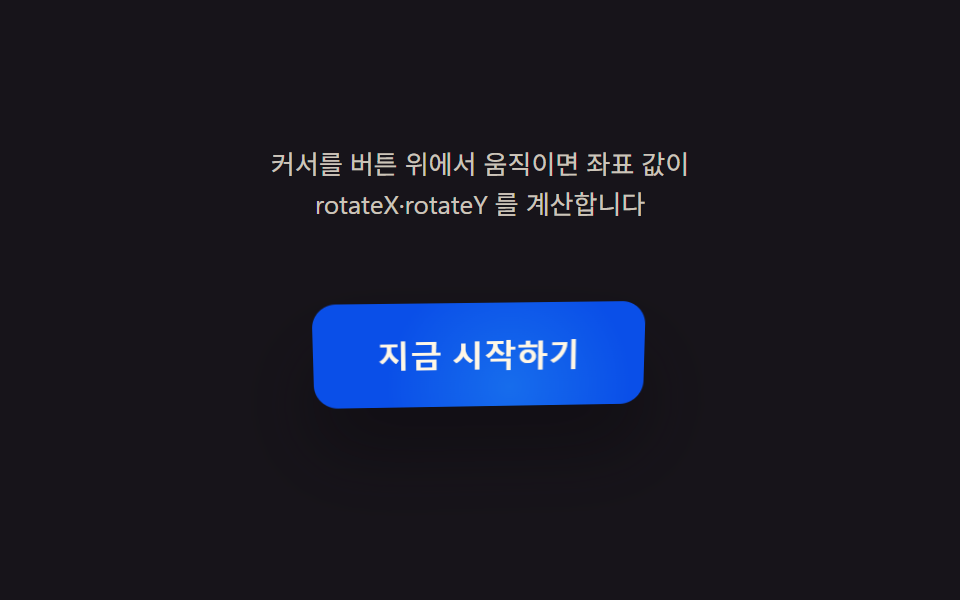
01カーソル座標値が回転させるボタン
ボタン内のカーソルのx・y座標を中心からの比率として計算し、rotateX・rotateY値に変換、カーソルが外れるとその値が0に戻り平らな面に戻る。
使いどころヒーローCTAボタン・カード型リンク
MAX_DEGLERProtateX

<main class="stage">
<div class="cr is-demo" id="cr">
  <p class="cr__hint"><span>ボタン上でカーソルを動かすと座標値がrotateX・rotateYを計算します</span></p>
  <div class="cr__scene" id="scene">
    <button class="cr__btn" id="btn" type="button" aria-label="今すぐ始める — カーソルに沿って傾くボタン">
      <span class="cr__sheen" id="sheen" aria-hidden="true"></span>
      <span class="cr__label">今すぐ始める</span>
    </button>
  </div>
</div>
</main>
@use "../../../../site/static/demo-tokens" as *;
@include stage($stage-ink);
.cr {
display: grid;
gap: $sp-4;
justify-items: center;
}
.cr__hint {
margin: 0;
font-size: 13px;
line-height: 1.5;
text-align: center;
max-width: 260px;
color: rgba($subject-cream, .78);
}
.cr__scene {
perspective: 640px;
padding: $sp-6;
}
.cr__btn {
position: relative;
border: 0;
cursor: pointer;
padding: $sp-4 $sp-8;
border-radius: $r-control;
background: $subject-blue-deep;
color: $subject-cream;
font-size: 16px;
font-weight: 700;
letter-spacing: .01em;
transform-style: preserve-3d;
box-shadow: $shadow-raised;
overflow: hidden;
will-change: transform;
}
.cr__btn:focus-visible {
outline: 2px solid $subject-cream;
outline-offset: 3px;
}
.cr__sheen {
position: absolute;
inset: 0;
pointer-events: none;
mix-blend-mode: soft-light;
}
.cr__label {
position: relative;
z-index: 1;
}
@media (prefers-reduced-motion: reduce) {
.cr__btn { transition: none; }
}html, body {
margin: 0;
overflow: hidden;
}
.stage {
box-sizing: border-box;
min-height: 100vh;
display: grid;
place-items: center;
margin: 0;
background: #17141a;
font-family: -apple-system, "Segoe UI", "Noto Sans KR", sans-serif;
padding: clamp(8px, 4vw, 24px);
}
.cr {
display: grid;
gap: 16px;
justify-items: center;
}
.cr__hint {
margin: 0;
font-size: 13px;
line-height: 1.5;
text-align: center;
max-width: 260px;
color: rgba(255, 247, 230, 0.78);
}
.cr__scene {
perspective: 640px;
padding: 24px;
}
.cr__btn {
position: relative;
border: 0;
cursor: pointer;
padding: 16px 32px;
border-radius: 12px;
background: #0a4fe8;
color: #fff7e6;
font-size: 16px;
font-weight: 700;
letter-spacing: 0.01em;
transform-style: preserve-3d;
box-shadow: 0 14px 24px rgba(23, 20, 26, 0.32);
overflow: hidden;
will-change: transform;
}
.cr__btn:focus-visible {
outline: 2px solid #fff7e6;
outline-offset: 3px;
}
.cr__sheen {
position: absolute;
inset: 0;
pointer-events: none;
mix-blend-mode: soft-light;
}
.cr__label {
position: relative;
z-index: 1;
}
@media (prefers-reduced-motion: reduce) {
.cr__btn {
transition: none;
}
}(function () {
var root = document.getElementById('cr');
var scene = document.getElementById('scene');
var btn = document.getElementById('btn');
var sheen = document.getElementById('sheen');
var reduce = window.matchMedia('(prefers-reduced-motion: reduce)').matches;
var MAX_DEG = 14; // 커서가 버튼 가장자리에 닿았을 때의 최대 회전각
var LERP = 0.16; // 관성 lerp 계수 — 값이 목표를 따라잡는 속도
var targetNX = 0, targetNY = 0;
var curNX = 0, curNY = 0;
var hasPointer = false;
var clickTimer = null;
function clamp(v, lo, hi) { return Math.max(lo, Math.min(hi, v)); }
// 포인터가 없을 때(자동 시연·헤드리스 측정) 같은 계산을 돌리기 위한 합성 좌표 — 두 축의 위상을 어긋낸 리사주 궤적
function syntheticTarget(t) {
return [Math.sin(t * 1.15), Math.sin(t * 0.82 + 1.05)];
}
function render(nx, ny) {
var rotY = nx * MAX_DEG;
var rotX = -ny * MAX_DEG;
btn.style.transform = 'rotateX(' + rotX.toFixed(2) + 'deg) rotateY(' + rotY.toFixed(2) + 'deg)';
var sx = 50 + nx * 34, sy = 50 + ny * 34;
sheen.style.background = 'radial-gradient(circle at ' + sx.toFixed(1) + '% ' + sy.toFixed(1) + '%, rgba(255,247,230,.5), rgba(255,247,230,0) 58%)';
var depth = Math.min(1, Math.sqrt(nx * nx + ny * ny));
btn.style.boxShadow = '0 ' + (10 + depth * 16).toFixed(1) + 'px ' + (18 + depth * 22).toFixed(1) + 'px rgba(8,6,12,' + (0.30 + depth * 0.16).toFixed(2) + ')';
}
var t0 = null;
function loop(now) {
if (t0 === null) { t0 = now; }
var t = (now - t0) / 1000;
if (!hasPointer && !reduce) {
var s = syntheticTarget(t);
targetNX = s[0]; targetNY = s[1];
}
curNX += (targetNX - curNX) * LERP;
curNY += (targetNY - curNY) * LERP;
render(curNX, curNY);
requestAnimationFrame(loop);
}
function pointFromEvent(e) {
var r = scene.getBoundingClientRect();
var nx = ((e.clientX - r.left) / r.width) * 2 - 1;
var ny = ((e.clientY - r.top) / r.height) * 2 - 1;
return [clamp(nx, -1, 1), clamp(ny, -1, 1)];
}
scene.addEventListener('pointermove', function (e) {
hasPointer = true;
root.classList.remove('is-demo');
var p = pointFromEvent(e);
targetNX = p[0]; targetNY = p[1];
});
scene.addEventListener('pointerleave', function () {
hasPointer = false;
targetNX = 0; targetNY = 0;
});
btn.addEventListener('click', function () {
root.classList.remove('is-demo');
hasPointer = true;
targetNX = 0.92; targetNY = -0.62;
if (reduce) { render(targetNX, targetNY); }
clearTimeout(clickTimer);
clickTimer = setTimeout(function () { hasPointer = false; targetNX = 0; targetNY = 0; if (reduce) { render(targetNX, targetNY); } }, 260);
});
btn.addEventListener('keydown', function (e) {
var step = 0.24;
var moves = { ArrowLeft: [-step, 0], ArrowRight: [step, 0], ArrowUp: [0, -step], ArrowDown: [0, step] };
var m = moves[e.key];
if (!m) { return; }
e.preventDefault();
root.classList.remove('is-demo');
hasPointer = true;
targetNX = clamp(targetNX + m[0], -1, 1);
targetNY = clamp(targetNY + m[1], -1, 1);
if (reduce) { render(targetNX, targetNY); }
});
if (reduce) {
render(0.5, -0.34);
} else {
requestAnimationFrame(loop);
}
})();// CursorRotateButton — vanilla 판(run/393/demo/01-pointer-tilt-3d-cursor-rotate/index.html) 의 React 포트.
// 버튼 안 커서 좌표를 -1~1 로 정규화해 목표값(target)을 만들고, 관성 lerp 로 현재값(cur)이 따라간다.
// 포인터가 없을 때(자동 시연)는 위상이 어긋난 두 사인파(리사주 궤적)를 목표값으로 써 같은 계산을 돌린다.
// 값·수치는 vanilla 와 같다.
import { useEffect, useRef, useState } from "react";
import type { PointerEvent as ReactPointerEvent } from "react";
import styles from "./CursorRotateButton.module.scss";
type Box<T> = { current: T };
type KeyEvt = { key: string; preventDefault(): void };
const MAX_DEG = 14;
const LERP = 0.16;
const LABEL = "지금 시작하기 — 커서를 따라 기울어지는 버튼";
function clamp(v: number, lo: number, hi: number): number {
return Math.max(lo, Math.min(hi, v));
}
function syntheticTarget(t: number): [number, number] {
return [Math.sin(t * 1.15), Math.sin(t * 0.82 + 1.05)];
}
export default function CursorRotateButton() {
const sceneRef = useRef<HTMLDivElement | null>(null);
const btnRef = useRef<HTMLButtonElement | null>(null);
const sheenRef = useRef<HTMLSpanElement | null>(null);
const targetXRef = useRef<number>(0) as Box<number>;
const targetYRef = useRef<number>(0) as Box<number>;
const curXRef = useRef<number>(0) as Box<number>;
const curYRef = useRef<number>(0) as Box<number>;
const hasPointerRef = useRef<boolean>(false) as Box<boolean>;
const frameRef = useRef<number>(0) as Box<number>;
const t0Ref = useRef<number>(0) as Box<number>;
const clickTimerRef = useRef<number>(0) as Box<number>;
const [demo, setDemo] = useState(true);
const [reduce, setReduce] = useState(false);
function render(nx: number, ny: number): void {
const btn = btnRef.current;
const sheen = sheenRef.current;
if (!btn || !sheen) return;
const rotY = nx * MAX_DEG;
const rotX = -ny * MAX_DEG;
btn.style.transform = "rotateX(" + rotX.toFixed(2) + "deg) rotateY(" + rotY.toFixed(2) + "deg)";
const sx = 50 + nx * 34;
const sy = 50 + ny * 34;
sheen.style.background =
"radial-gradient(circle at " + sx.toFixed(1) + "% " + sy.toFixed(1) + "%, rgba(255,247,230,.5), rgba(255,247,230,0) 58%)";
const depth = Math.min(1, Math.sqrt(nx * nx + ny * ny));
btn.style.boxShadow =
"0 " + (10 + depth * 16).toFixed(1) + "px " + (18 + depth * 22).toFixed(1) + "px rgba(8,6,12," + (0.3 + depth * 0.16).toFixed(2) + ")";
}
useEffect(() => {
setReduce(window.matchMedia("(prefers-reduced-motion: reduce)").matches);
}, []);
useEffect(() => {
if (reduce) {
render(0.5, -0.34);
return;
}
function loop(now: number): void {
if (t0Ref.current === 0) t0Ref.current = now;
const t = (now - t0Ref.current) / 1000;
if (!hasPointerRef.current) {
const s = syntheticTarget(t);
targetXRef.current = s[0];
targetYRef.current = s[1];
}
curXRef.current += (targetXRef.current - curXRef.current) * LERP;
curYRef.current += (targetYRef.current - curYRef.current) * LERP;
render(curXRef.current, curYRef.current);
frameRef.current = requestAnimationFrame(loop);
}
frameRef.current = requestAnimationFrame(loop);
return () => cancelAnimationFrame(frameRef.current);
}, [reduce]);
function pointFromEvent(event: ReactPointerEvent<HTMLDivElement>): [number, number] {
const scene = sceneRef.current;
if (!scene) return [0, 0];
const r = scene.getBoundingClientRect();
const nx = ((event.clientX - r.left) / r.width) * 2 - 1;
const ny = ((event.clientY - r.top) / r.height) * 2 - 1;
return [clamp(nx, -1, 1), clamp(ny, -1, 1)];
}
function onPointerMove(event: ReactPointerEvent<HTMLDivElement>): void {
hasPointerRef.current = true;
setDemo(false);
const p = pointFromEvent(event);
targetXRef.current = p[0];
targetYRef.current = p[1];
}
function onPointerLeave(): void {
hasPointerRef.current = false;
targetXRef.current = 0;
targetYRef.current = 0;
}
function onClick(): void {
setDemo(false);
hasPointerRef.current = true;
targetXRef.current = 0.92;
targetYRef.current = -0.62;
if (reduce) render(targetXRef.current, targetYRef.current);
window.clearTimeout(clickTimerRef.current);
clickTimerRef.current = window.setTimeout(() => {
hasPointerRef.current = false;
targetXRef.current = 0;
targetYRef.current = 0;
if (reduce) render(targetXRef.current, targetYRef.current);
}, 260);
}
function onKeyDown(event: KeyEvt): void {
const step = 0.24;
const moves: { [key: string]: [number, number] } = {
ArrowLeft: [-step, 0],
ArrowRight: [step, 0],
ArrowUp: [0, -step],
ArrowDown: [0, step],
};
const m = moves[event.key];
if (!m) return;
event.preventDefault();
setDemo(false);
hasPointerRef.current = true;
targetXRef.current = clamp(targetXRef.current + m[0], -1, 1);
targetYRef.current = clamp(targetYRef.current + m[1], -1, 1);
if (reduce) render(targetXRef.current, targetYRef.current);
}
const cls = [styles.cr, demo ? styles.isDemo : ""].filter(Boolean).join(" ");
return (
<main className={styles.stage}>
<div className={cls}>
<p className={styles.hint}>
<span>커서를 버튼 위에서 움직이면 좌표 값이 rotateX·rotateY 를 계산합니다</span>
</p>
<div className={styles.scene} ref={sceneRef} onPointerMove={onPointerMove} onPointerLeave={onPointerLeave}>
<button className={styles.btn} ref={btnRef} type="button" aria-label={LABEL} onClick={onClick} onKeyDown={onKeyDown}>
<span className={styles.sheen} ref={sheenRef} aria-hidden="true" />
<span className={styles.label}>지금 시작하기</span>
</button>
</div>
</div>
</main>
);
}01 カーソル座標値が回転させるボタン — 計測 累積面積 3.144% · 動いたフレーム 23/23GODRICH オリジナル · SCSS と React は zip に同梱 · css ボタン 立体感 9種 — クリックまで再現
このデモが属する記事
 css ボタン 立体感 9種 — クリックまで再現9種のcss ボタン 立体感デモをここに並べた。 カーソルがボタン上のどこにあるかを角度値ひとつに変えると、平らな面はどう立体に見えるのか? 座標値がrotateX・rotateYを決めるボタン、傾きの大きさ値が縁の光の強さを決めるボタン、 この記事のデモをすべて見る