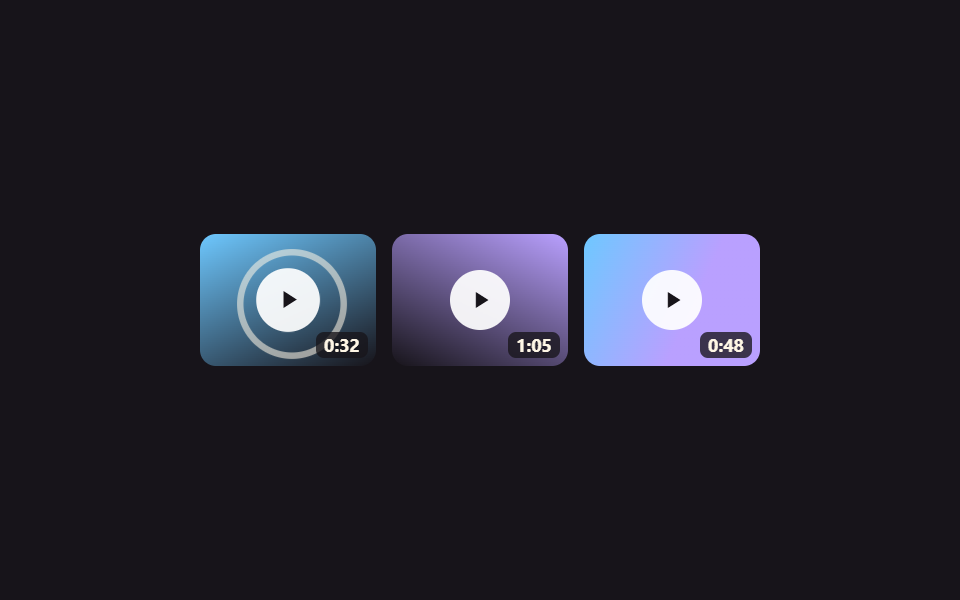
04動画サムネイルグリッド 再生オーバーレイ
動画サムネイルの各マスに中央の再生ボタンがあり、カーソルを乗せるとボタンが拡大しながら波紋リングが一度広がって、再生できる動画だと知らせます。
使いどころYouTube動画をまとめて見せるメディアページ、講座のプレビュー動画を示す一覧グリッド
재생 아이콘 scaleripple 확산 1회재생시간 배지
<main class="stage">
  <ul class="vgallery is-demo" aria-label="動画ギャラリー">
    <li class="vcard">
      <span class="vcard__thumb vcard__thumb--a"></span>
      <span class="vcard__ring" aria-hidden="true"></span>
      <button class="vcard__play" type="button" aria-label="動画を再生">▶</button>
      <span class="vcard__time">0:32</span>
    </li>
    <li class="vcard">
      <span class="vcard__thumb vcard__thumb--b"></span>
      <span class="vcard__ring" aria-hidden="true"></span>
      <button class="vcard__play" type="button" aria-label="動画を再生">▶</button>
      <span class="vcard__time">1:05</span>
    </li>
    <li class="vcard">
      <span class="vcard__thumb vcard__thumb--c"></span>
      <span class="vcard__ring" aria-hidden="true"></span>
      <button class="vcard__play" type="button" aria-label="動画を再生">▶</button>
      <span class="vcard__time">0:48</span>
    </li>
  </ul>
</main>
@use "../../../../site/static/demo-tokens" as *;
$duration: $dur-loop; // 재생버튼·파동 한 주기
$easing: $ease-out;
$color: $subject-sky; // 썸네일 그러데이션 포인트
@include stage($stage-ink);
.vgallery {
display: grid;
grid-template-columns: repeat(3, 1fr);
gap: $sp-2;
list-style: none;
margin: 0;
padding: 0;
width: min(280px, 84vw);
}
.vcard {
position: relative;
aspect-ratio: 4 / 3;
overflow: hidden;
border-radius: $r-sm;
}
.vcard__thumb { position: absolute; inset: 0; }
.vcard__thumb--a { background: linear-gradient(155deg, $color 0%, $stage-ink 100%); }
.vcard__thumb--b { background: linear-gradient(205deg, $subject-lilac 0%, $stage-ink 100%); }
.vcard__thumb--c { background: linear-gradient(115deg, $color 0%, $subject-lilac 60%); }
.vcard__ring {
position: absolute;
left: 50%; top: 50%;
width: 30px; height: 30px;
margin: -15px 0 0 -15px;
border-radius: 50%;
border: 2px solid $subject-cream;
opacity: 0;
}
.vcard__play {
position: absolute;
left: 50%; top: 50%;
transform: translate(-50%, -50%);
width: 30px; height: 30px;
display: grid;
place-items: center;
border: 0;
border-radius: 50%;
background: rgba(255, 255, 255, .92);
color: $stage-ink;
font-size: 10px;
line-height: 1;
text-indent: 2px; // 삼각형 아이콘 시각 중심 보정 (padding 아님 — BD17 격자 대상 밖)
cursor: pointer;
transition: transform $duration $easing;
}
.vcard__time {
position: absolute;
right: $sp-1; bottom: $sp-1;
padding: 0 $sp-1;
background: rgba(23, 20, 26, .78);
color: $subject-cream;
font: 700 9px/1.4 -apple-system, "Segoe UI", "Noto Sans KR", sans-serif;
font-family: inherit;
border-radius: $r-xs;
}
.vcard:hover .vcard__play, .vcard__play:focus-visible { transform: translate(-50%, -50%) scale(1.2); }
.vgallery.is-demo .vcard:nth-child(1) .vcard__play { animation: play-pulse $duration $easing infinite; }
.vgallery.is-demo .vcard:nth-child(1) .vcard__ring { animation: ring-pulse $duration $easing infinite; }
.vgallery.is-demo .vcard:nth-child(2) .vcard__play { animation: play-pulse $duration $easing infinite; animation-delay: -0.67s; }
.vgallery.is-demo .vcard:nth-child(2) .vcard__ring { animation: ring-pulse $duration $easing infinite; animation-delay: -0.67s; }
.vgallery.is-demo .vcard:nth-child(3) .vcard__play { animation: play-pulse $duration $easing infinite; animation-delay: -1.33s; }
.vgallery.is-demo .vcard:nth-child(3) .vcard__ring { animation: ring-pulse $duration $easing infinite; animation-delay: -1.33s; }
@keyframes play-pulse {
0%, 15% { transform: translate(-50%, -50%) scale(1); }
30% { transform: translate(-50%, -50%) scale(1.2); }
45%, 100% { transform: translate(-50%, -50%) scale(1); }
}
@keyframes ring-pulse {
0%, 15% { transform: scale(1); opacity: 0; }
30% { opacity: .9; }
60% { transform: scale(1.9); opacity: 0; }
100% { transform: scale(1); opacity: 0; }
}
@media (prefers-reduced-motion: reduce) {
.vcard__play { transition: none; }
.vgallery.is-demo .vcard__play, .vgallery.is-demo .vcard__ring { animation: none; }
}html, body {
margin: 0;
overflow: hidden;
}
.stage {
box-sizing: border-box;
min-height: 100vh;
display: grid;
place-items: center;
margin: 0;
background: #17141a;
font-family: -apple-system, "Segoe UI", "Noto Sans KR", sans-serif;
padding: clamp(8px, 4vw, 24px);
}
.vgallery {
display: grid;
grid-template-columns: repeat(3, 1fr);
gap: 8px;
list-style: none;
margin: 0;
padding: 0;
width: min(280px, 84vw);
}
.vcard {
position: relative;
aspect-ratio: 4/3;
overflow: hidden;
border-radius: 8px;
}
.vcard__thumb {
position: absolute;
inset: 0;
}
.vcard__thumb--a {
background: linear-gradient(155deg, #6ec8ff 0%, #17141a 100%);
}
.vcard__thumb--b {
background: linear-gradient(205deg, #b9a0ff 0%, #17141a 100%);
}
.vcard__thumb--c {
background: linear-gradient(115deg, #6ec8ff 0%, #b9a0ff 60%);
}
.vcard__ring {
position: absolute;
left: 50%;
top: 50%;
width: 30px;
height: 30px;
margin: -15px 0 0 -15px;
border-radius: 50%;
border: 2px solid #fff7e6;
opacity: 0;
}
.vcard__play {
position: absolute;
left: 50%;
top: 50%;
transform: translate(-50%, -50%);
width: 30px;
height: 30px;
display: grid;
place-items: center;
border: 0;
border-radius: 50%;
background: rgba(255, 255, 255, 0.92);
color: #17141a;
font-size: 10px;
line-height: 1;
text-indent: 2px;
cursor: pointer;
transition: transform 2s ease-out;
}
.vcard__time {
position: absolute;
right: 4px;
bottom: 4px;
padding: 0 4px;
background: rgba(23, 20, 26, 0.78);
color: #fff7e6;
font: 700 9px/1.4 -apple-system, "Segoe UI", "Noto Sans KR", sans-serif;
font-family: inherit;
border-radius: 4px;
}
.vcard:hover .vcard__play, .vcard__play:focus-visible {
transform: translate(-50%, -50%) scale(1.2);
}
.vgallery.is-demo .vcard:nth-child(1) .vcard__play {
animation: play-pulse 2s ease-out infinite;
}
.vgallery.is-demo .vcard:nth-child(1) .vcard__ring {
animation: ring-pulse 2s ease-out infinite;
}
.vgallery.is-demo .vcard:nth-child(2) .vcard__play {
animation: play-pulse 2s ease-out infinite;
animation-delay: -0.67s;
}
.vgallery.is-demo .vcard:nth-child(2) .vcard__ring {
animation: ring-pulse 2s ease-out infinite;
animation-delay: -0.67s;
}
.vgallery.is-demo .vcard:nth-child(3) .vcard__play {
animation: play-pulse 2s ease-out infinite;
animation-delay: -1.33s;
}
.vgallery.is-demo .vcard:nth-child(3) .vcard__ring {
animation: ring-pulse 2s ease-out infinite;
animation-delay: -1.33s;
}
@keyframes play-pulse {
0%, 15% {
transform: translate(-50%, -50%) scale(1);
}
30% {
transform: translate(-50%, -50%) scale(1.2);
}
45%, 100% {
transform: translate(-50%, -50%) scale(1);
}
}
@keyframes ring-pulse {
0%, 15% {
transform: scale(1);
opacity: 0;
}
30% {
opacity: 0.9;
}
60% {
transform: scale(1.9);
opacity: 0;
}
100% {
transform: scale(1);
opacity: 0;
}
}
@media (prefers-reduced-motion: reduce) {
.vcard__play {
transition: none;
}
.vgallery.is-demo .vcard__play, .vgallery.is-demo .vcard__ring {
animation: none;
}
}import type { CSSProperties } from "react";
import styles from "./VideoThumbnailPlayOverlay.module.scss";
export type VideoThumbnailPlayOverlayProps = {
/** 재생버튼·파동 한 주기 (기본 2000ms) */
duration?: number;
easing?: string;
/** 썸네일 그러데이션 포인트 색 */
color?: string;
};
type Vars = CSSProperties & { "--duration"?: string; "--easing"?: string; "--color"?: string };
const CLIPS = [
{ tone: "a", time: "0:32" },
{ tone: "b", time: "1:05" },
{ tone: "c", time: "0:48" },
];
/** 재생 버튼이 커지면서 둘레로 파동 링이 한 번 퍼져 나가 재생 가능한 영상임을 알려준다 */
export default function VideoThumbnailPlayOverlay({
duration = 2000,
easing = "ease-out",
color = "#6ec8ff",
}: VideoThumbnailPlayOverlayProps) {
const vars: Vars = { "--duration": `${duration}ms`, "--easing": easing, "--color": color };
return (
<ul className={styles.gallery} style={vars} aria-label="Video gallery">
{CLIPS.map((c, i) => (
<li key={i} className={styles.card}>
<span className={`${styles.thumb} ${styles["thumb-" + c.tone]}`} />
<span className={styles.ring} aria-hidden="true" style={{ animationDelay: `-${i * (duration / 3)}ms` }} />
<button type="button" className={styles.play} aria-label="Play video" style={{ animationDelay: `-${i * (duration / 3)}ms` }}>▶</button>
<span className={styles.time}>{c.time}</span>
</li>
))}
</ul>
);
}04 動画サムネイルグリッド 再生オーバーレイ — 計測 累積面積 4.782% · 動いたフレーム 23/23GODRICH オリジナル · SCSS と React は zip に同梱 · ポートフォリオ ギャラリー UI 9選 — ドラッグからモーフ切替まで
このデモが属する記事
 ポートフォリオ ギャラリー UI 9選 — ドラッグからモーフ切替までポートフォリオ ギャラリーとは、写真や作品を格子状に並べ、ホバーやクリックで拡大・絞り込み・並び替え・切り替えが起こる画面のことです。Pinterestで保存したあのポートフォリオギャラリーを、9通りの方式に分けてそのままコードでお届けしま この記事のデモをすべて見る