07全幅スライドショー サムネイルストリップ
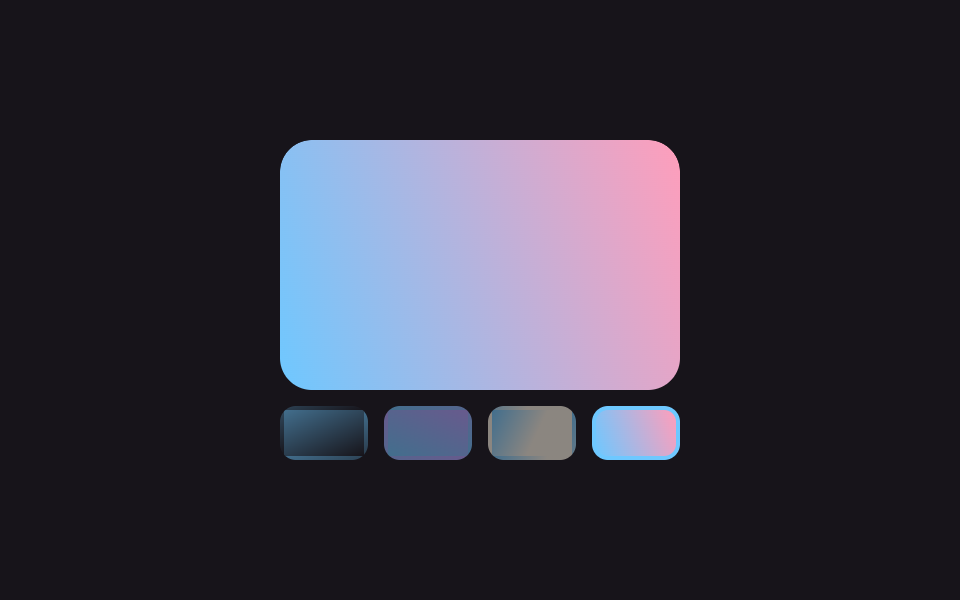
大きな写真1枚が画面幅いっぱいに表示されて自動で切り替わり、下のサムネイル列では今表示中の写真の枠だけが光ります。1枚目に戻る瞬間も継ぎ目は見えません。
使いどころメイン商品写真を大きく見せる詳細ページ、代表作数点を順番にめくるポートフォリオのヒーロー
1번 슬라이드 클론translateX 트랙썸네일 active 테두리
<main class="stage">
  <div class="ss-wrap">
    <div class="ss-viewport" tabindex="0" aria-label="スライドショー、左右矢印キーで移動">
      <ul class="ss-track is-demo">
        <li class="ss-slide ss-slide--a"></li>
        <li class="ss-slide ss-slide--b"></li>
        <li class="ss-slide ss-slide--c"></li>
        <li class="ss-slide ss-slide--d"></li>
        <li class="ss-slide ss-slide--a" aria-hidden="true"></li>
      </ul>
    </div>
    <div class="ss-thumbs is-demo" role="tablist" aria-label="スライドを選ぶ">
      <button class="ss-thumb ss-thumb--a" type="button" role="tab" aria-label="1枚目の写真"></button>
      <button class="ss-thumb ss-thumb--b" type="button" role="tab" aria-label="2枚目の写真"></button>
      <button class="ss-thumb ss-thumb--c" type="button" role="tab" aria-label="3枚目の写真"></button>
      <button class="ss-thumb ss-thumb--d" type="button" role="tab" aria-label="4枚目の写真"></button>
    </div>
  </div>
</main>
@use "../../../../site/static/demo-tokens" as *;
$duration: $dur-loop; // 슬라이드 한 바퀴 도는 시간 (설정 초 값과 일치)
$easing: linear;
$color: $subject-sky; // 활성 썸네일 테두리 색
@include stage($stage-ink);
.ss-wrap { width: min(200px, 78vw); }
.ss-viewport {
overflow: hidden;
border-radius: $r-card;
outline: none;
}
.ss-viewport:focus-visible { outline: 2px solid $color; outline-offset: 2px; }
.ss-track {
display: flex;
list-style: none;
margin: 0 0 $sp-2;
padding: 0;
width: 500%; // 실제 4장 + 1번 클론 = 5칸
}
.ss-slide {
flex: 0 0 20%;
aspect-ratio: 8 / 5;
border-radius: $r-card;
}
.ss-slide--a { background: linear-gradient(155deg, $color 0%, $stage-ink 100%); }
.ss-slide--b { background: linear-gradient(205deg, $subject-lilac 0%, $color 100%); }
.ss-slide--c { background: linear-gradient(115deg, $color 0%, $subject-cream 55%); }
.ss-slide--d { background: linear-gradient(250deg, $subject-pink 0%, $color 100%); }
// 클론(5번째 칸)이 1번째와 픽셀 단위로 같은 그러데이션이라, -80% 에서 한 바퀴가 끝나고
// 다음 순간 0% 로 되돌아가도(1번째 실칸) 이어붙인 자리가 안 보인다 — "1번 슬라이드 클론" 기법
.ss-track.is-demo { animation: slide-loop $duration $easing infinite; }
@keyframes slide-loop {
0%, 18% { transform: translateX(0%); }
20%, 38% { transform: translateX(-20%); }
40%, 58% { transform: translateX(-40%); }
60%, 78% { transform: translateX(-60%); }
80%, 100% { transform: translateX(-80%); }
}
.ss-thumbs {
display: flex;
gap: $sp-2;
list-style: none;
margin: 0;
padding: 0;
}
.ss-thumb {
flex: 1 1 0;
aspect-ratio: 8 / 5;
border: 2px solid transparent;
border-radius: $r-sm;
padding: 0;
cursor: pointer;
opacity: .5;
transition: opacity $duration $easing, border-color $duration $easing;
}
.ss-thumb--a { background: linear-gradient(155deg, $color 0%, $stage-ink 100%); }
.ss-thumb--b { background: linear-gradient(205deg, $subject-lilac 0%, $color 100%); }
.ss-thumb--c { background: linear-gradient(115deg, $color 0%, $subject-cream 55%); }
.ss-thumb--d { background: linear-gradient(250deg, $subject-pink 0%, $color 100%); }
.ss-thumb.is-active, .ss-thumb:focus-visible { opacity: 1; border-color: $color; }
.ss-thumbs.is-demo .ss-thumb--a { animation: thumb-a $duration $easing infinite; }
.ss-thumbs.is-demo .ss-thumb--b { animation: thumb-b $duration $easing infinite; }
.ss-thumbs.is-demo .ss-thumb--c { animation: thumb-c $duration $easing infinite; }
.ss-thumbs.is-demo .ss-thumb--d { animation: thumb-d $duration $easing infinite; }
@keyframes thumb-a {
0%, 18%, 80%, 100% { opacity: 1; border-color: $color; }
20%, 78% { opacity: .5; border-color: transparent; }
}
@keyframes thumb-b {
20%, 38% { opacity: 1; border-color: $color; }
0%, 18%, 40%, 100% { opacity: .5; border-color: transparent; }
}
@keyframes thumb-c {
40%, 58% { opacity: 1; border-color: $color; }
0%, 38%, 60%, 100% { opacity: .5; border-color: transparent; }
}
@keyframes thumb-d {
60%, 78% { opacity: 1; border-color: $color; }
0%, 58%, 80%, 100% { opacity: .5; border-color: transparent; }
}
@media (prefers-reduced-motion: reduce) {
.ss-thumb { transition: none; }
.ss-track.is-demo, .ss-thumbs.is-demo .ss-thumb { animation: none; }
}html, body {
margin: 0;
overflow: hidden;
}
.stage {
box-sizing: border-box;
min-height: 100vh;
display: grid;
place-items: center;
margin: 0;
background: #17141a;
font-family: -apple-system, "Segoe UI", "Noto Sans KR", sans-serif;
padding: clamp(8px, 4vw, 24px);
}
.ss-wrap {
width: min(200px, 78vw);
}
.ss-viewport {
overflow: hidden;
border-radius: 16px;
outline: none;
}
.ss-viewport:focus-visible {
outline: 2px solid #6ec8ff;
outline-offset: 2px;
}
.ss-track {
display: flex;
list-style: none;
margin: 0 0 8px;
padding: 0;
width: 500%;
}
.ss-slide {
flex: 0 0 20%;
aspect-ratio: 8/5;
border-radius: 16px;
}
.ss-slide--a {
background: linear-gradient(155deg, #6ec8ff 0%, #17141a 100%);
}
.ss-slide--b {
background: linear-gradient(205deg, #b9a0ff 0%, #6ec8ff 100%);
}
.ss-slide--c {
background: linear-gradient(115deg, #6ec8ff 0%, #fff7e6 55%);
}
.ss-slide--d {
background: linear-gradient(250deg, #ff9ebb 0%, #6ec8ff 100%);
}
.ss-track.is-demo {
animation: slide-loop 2s linear infinite;
}
@keyframes slide-loop {
0%, 18% {
transform: translateX(0%);
}
20%, 38% {
transform: translateX(-20%);
}
40%, 58% {
transform: translateX(-40%);
}
60%, 78% {
transform: translateX(-60%);
}
80%, 100% {
transform: translateX(-80%);
}
}
.ss-thumbs {
display: flex;
gap: 8px;
list-style: none;
margin: 0;
padding: 0;
}
.ss-thumb {
flex: 1 1 0;
aspect-ratio: 8/5;
border: 2px solid transparent;
border-radius: 8px;
padding: 0;
cursor: pointer;
opacity: 0.5;
transition: opacity 2s linear, border-color 2s linear;
}
.ss-thumb--a {
background: linear-gradient(155deg, #6ec8ff 0%, #17141a 100%);
}
.ss-thumb--b {
background: linear-gradient(205deg, #b9a0ff 0%, #6ec8ff 100%);
}
.ss-thumb--c {
background: linear-gradient(115deg, #6ec8ff 0%, #fff7e6 55%);
}
.ss-thumb--d {
background: linear-gradient(250deg, #ff9ebb 0%, #6ec8ff 100%);
}
.ss-thumb.is-active, .ss-thumb:focus-visible {
opacity: 1;
border-color: #6ec8ff;
}
.ss-thumbs.is-demo .ss-thumb--a {
animation: thumb-a 2s linear infinite;
}
.ss-thumbs.is-demo .ss-thumb--b {
animation: thumb-b 2s linear infinite;
}
.ss-thumbs.is-demo .ss-thumb--c {
animation: thumb-c 2s linear infinite;
}
.ss-thumbs.is-demo .ss-thumb--d {
animation: thumb-d 2s linear infinite;
}
@keyframes thumb-a {
0%, 18%, 80%, 100% {
opacity: 1;
border-color: #6ec8ff;
}
20%, 78% {
opacity: 0.5;
border-color: transparent;
}
}
@keyframes thumb-b {
20%, 38% {
opacity: 1;
border-color: #6ec8ff;
}
0%, 18%, 40%, 100% {
opacity: 0.5;
border-color: transparent;
}
}
@keyframes thumb-c {
40%, 58% {
opacity: 1;
border-color: #6ec8ff;
}
0%, 38%, 60%, 100% {
opacity: 0.5;
border-color: transparent;
}
}
@keyframes thumb-d {
60%, 78% {
opacity: 1;
border-color: #6ec8ff;
}
0%, 58%, 80%, 100% {
opacity: 0.5;
border-color: transparent;
}
}
@media (prefers-reduced-motion: reduce) {
.ss-thumb {
transition: none;
}
.ss-track.is-demo, .ss-thumbs.is-demo .ss-thumb {
animation: none;
}
}(function () {
var viewport = document.querySelector('.ss-viewport');
var track = document.querySelector('.ss-track');
var thumbsWrap = document.querySelector('.ss-thumbs');
var thumbs = document.querySelectorAll('.ss-thumb');
var real = 4, current = 0;
function stop() { track.classList.remove('is-demo'); thumbsWrap.classList.remove('is-demo'); }
function go(i) {
stop();
current = i;
track.style.transform = 'translateX(-' + (i * 20) + '%)';
thumbs.forEach(function (t, idx) { t.setAttribute('aria-selected', idx === i ? 'true' : 'false'); t.classList.toggle('is-active', idx === i); });
}
thumbs.forEach(function (t, i) { t.addEventListener('click', function () { go(i); }); });
viewport.addEventListener('keydown', function (e) {
if (e.key === 'ArrowRight') { go((current + 1) % real); e.preventDefault(); }
else if (e.key === 'ArrowLeft') { go((current - 1 + real) % real); e.preventDefault(); }
});
})();import { useState } from "react";
import type { CSSProperties } from "react";
import styles from "./FullscreenSlideshowThumbnailStrip.module.scss";
type ReactKeyboardEvent<T> = { key: string; preventDefault: () => void; currentTarget: T };
export type FullscreenSlideshowThumbnailStripProps = {
duration?: number;
easing?: string;
/** 활성 썸네일 테두리 색 */
color?: string;
};
type Vars = CSSProperties & { "--duration"?: string; "--easing"?: string; "--color"?: string };
const TONES = ["a", "b", "c", "d"] as const;
/**
* 큰 사진 한 장이 자동으로 넘어가고, 화살표 키나 썸네일 클릭으로도 이동할 수 있다.
* 자동 재생 트랙엔 1번 슬라이드의 클론을 5번째 칸으로 붙여 두어 (vanilla 와 동일한 기법)
* 한 바퀴 끝(80%)이 1번째(0%)와 같은 그림이라 되돌아가는 지점이 안 보인다.
*/
export default function FullscreenSlideshowThumbnailStrip({
duration = 2000,
easing = "linear",
color = "#6ec8ff",
}: FullscreenSlideshowThumbnailStripProps) {
const vars: Vars = { "--duration": `${duration}ms`, "--easing": easing, "--color": color };
const [current, setCurrent] = useState(0);
const [autoplay, setAutoplay] = useState(true);
function goTo(i: number) {
setAutoplay(false);
setCurrent(i);
}
function onKeyDown(e: ReactKeyboardEvent<HTMLDivElement>) {
if (e.key === "ArrowRight") { goTo((current + 1) % TONES.length); e.preventDefault(); }
else if (e.key === "ArrowLeft") { goTo((current - 1 + TONES.length) % TONES.length); e.preventDefault(); }
}
const trackStyle: Vars = autoplay ? vars : { ...vars, transform: `translateX(-${current * 20}%)` };
return (
<div className={styles.wrap} style={vars}>
<div
className={styles.viewport}
tabIndex={0}
aria-label="Slideshow, use the left and right arrow keys to move"
onKeyDown={onKeyDown}
>
<ul className={`${styles.track} ${autoplay ? styles.autoplay : ""}`} style={trackStyle}>
{/* 실제 4장 + 1번째 클론(5번째 칸, aria-hidden) — 자동 루프가 이 5칸을 -80%까지 훑는다 */}
{[...TONES, TONES[0]].map((tone, i) => (
<li key={i} className={`${styles.slide} ${styles["slide-" + tone]}`} aria-hidden={i === TONES.length} />
))}
</ul>
</div>
<div className={styles.thumbs} role="tablist" aria-label="Choose a slide">
{TONES.map((tone, i) => (
<button
key={i}
type="button"
role="tab"
aria-selected={!autoplay && current === i}
aria-label={`Photo ${i + 1}`}
className={[
styles.thumb,
styles["thumb-" + tone],
autoplay ? styles["autoThumb-" + tone] : (current === i ? styles.active : ""),
].join(" ")}
onClick={() => goTo(i)}
/>
))}
</div>
</div>
);
}07 全幅スライドショー サムネイルストリップ — 計測 累積面積 20.474% · 動いたフレーム 6/23GODRICH オリジナル · SCSS と React は zip に同梱 · ポートフォリオ ギャラリー UI 9選 — ドラッグからモーフ切替まで
このデモが属する記事
 ポートフォリオ ギャラリー UI 9選 — ドラッグからモーフ切替までポートフォリオ ギャラリーとは、写真や作品を格子状に並べ、ホバーやクリックで拡大・絞り込み・並び替え・切り替えが起こる画面のことです。Pinterestで保存したあのポートフォリオギャラリーを、9通りの方式に分けてそのままコードでお届けしま この記事のデモをすべて見る