07メンション・ハッシュタグ強調入力欄
@名前や#タグを入力している間、その単語だけ色が付いた状態で残りの文章と一緒に表示されます。
使いどころコミュニティ投稿欄・プロフィール紹介入力
contenteditable실시간 하이라이트커서 위치 유지
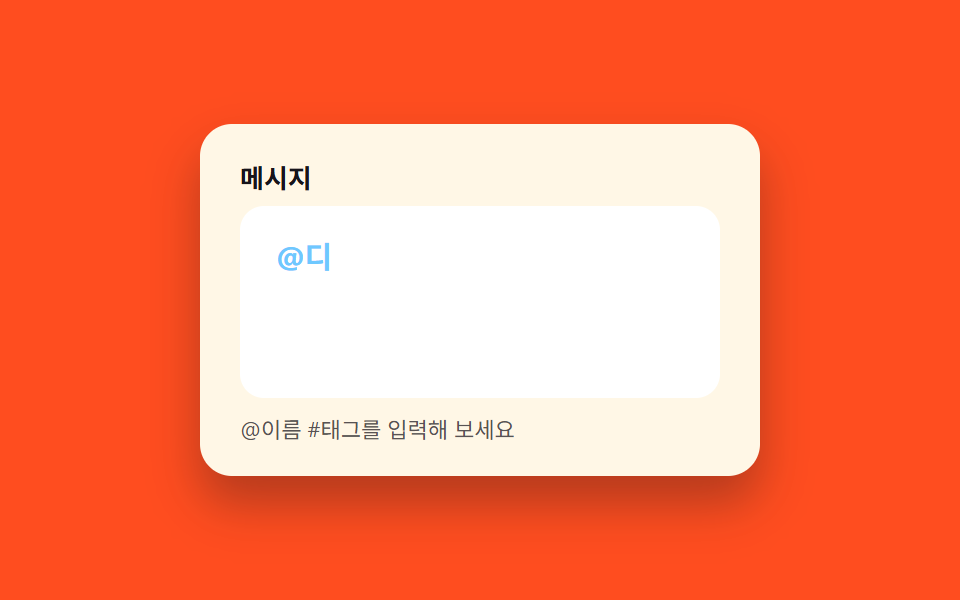
<main class="stage">
  <div class="mh is-demo" id="wrap">
    <label class="mh__label" for="mh-input">メッセージ</label>
    <div class="mh__field">
      <div class="mh__backdrop" id="backdrop" aria-hidden="true"></div>
      <textarea class="mh__input" id="mh-input" rows="3" aria-describedby="mh-hint"></textarea>
    </div>
    <p class="mh__hint" id="mh-hint">@名前 や #タグ を入力してみてください</p>
  </div>
</main>
@use "../../../../site/static/demo-tokens" as *;
// ── 변수 3개 ──────────────────────────────────────────
$duration: $dur-quick; // 포커스 테두리 전환 시간
$easing: $ease-out;
$color: $subject-sky; // 포커스 테두리 · 강조 텍스트 색
// ── 데모 무대 ──────────────────────────────────────────
@include stage($stage-orange);
.mh {
box-sizing: border-box;
width: min(280px, 86vw);
background: $subject-cream;
border-radius: $r-card;
padding: $sp-5 $sp-5 $sp-4;
box-shadow: $shadow-raised;
&__label {
display: block;
margin: 0 0 $sp-2;
font-weight: 700;
font-size: 13px;
line-height: 1;
font-family: inherit;
color: $stage-ink;
}
&__field {
position: relative;
width: 100%;
}
&__backdrop,
&__input {
box-sizing: border-box;
width: 100%;
min-height: 96px;
max-height: 160px;
padding: $sp-3 $sp-4;
border: 2px solid transparent;
border-radius: $r-control;
font-weight: 500;
font-size: clamp(13px, 3.8vw, 15px);
line-height: 1.5;
font-family: inherit;
white-space: pre-wrap;
word-wrap: break-word;
overflow-wrap: break-word;
}
&__backdrop {
position: absolute;
inset: 0;
overflow: hidden;
pointer-events: none;
color: $stage-ink;
background: #fff;
mark {
background: none;
color: $color;
font-weight: 700;
font-family: inherit;
}
}
&__input {
position: relative;
display: block;
resize: none;
overflow-y: auto;
color: transparent;
caret-color: $stage-ink;
background: transparent;
transition: border-color $duration $easing;
&:focus { outline: none; border-color: $color; }
}
&__hint {
margin: $sp-2 0 0;
font-size: 11px;
line-height: 1.4;
font-family: inherit;
color: rgba($stage-ink, .72);
}
}
// 320px 세로(무대 174px)에 맞춘다 — 입력칸을 96px 로 두면 카드가 2px 넘친다 (BD9 실측)
@media (max-width: 340px) {
.mh__backdrop,
.mh__input { min-height: 88px; }
}
@media (prefers-reduced-motion: reduce) {
.mh__input { transition: none; }
}html, body {
margin: 0;
overflow: hidden;
}
.stage {
box-sizing: border-box;
min-height: 100vh;
display: grid;
place-items: center;
margin: 0;
background: #ff4d1f;
font-family: -apple-system, "Segoe UI", "Noto Sans KR", sans-serif;
padding: clamp(8px, 4vw, 24px);
}
.mh {
box-sizing: border-box;
width: min(280px, 86vw);
background: #fff7e6;
border-radius: 16px;
padding: 20px 20px 16px;
box-shadow: 0 14px 24px rgba(23, 20, 26, 0.32);
}
.mh__label {
display: block;
margin: 0 0 8px;
font-weight: 700;
font-size: 13px;
line-height: 1;
font-family: inherit;
color: #17141a;
}
.mh__field {
position: relative;
width: 100%;
}
.mh__backdrop, .mh__input {
box-sizing: border-box;
width: 100%;
min-height: 96px;
max-height: 160px;
padding: 12px 16px;
border: 2px solid transparent;
border-radius: 12px;
font-weight: 500;
font-size: clamp(13px, 3.8vw, 15px);
line-height: 1.5;
font-family: inherit;
white-space: pre-wrap;
word-wrap: break-word;
overflow-wrap: break-word;
}
.mh__backdrop {
position: absolute;
inset: 0;
overflow: hidden;
pointer-events: none;
color: #17141a;
background: #fff;
}
.mh__backdrop mark {
background: none;
color: #6ec8ff;
font-weight: 700;
font-family: inherit;
}
.mh__input {
position: relative;
display: block;
resize: none;
overflow-y: auto;
color: transparent;
caret-color: #17141a;
background: transparent;
transition: border-color 220ms ease-out;
}
.mh__input:focus {
outline: none;
border-color: #6ec8ff;
}
.mh__hint {
margin: 8px 0 0;
font-size: 11px;
line-height: 1.4;
font-family: inherit;
color: rgba(23, 20, 26, 0.72);
}
@media (max-width: 340px) {
.mh__backdrop,
.mh__input {
min-height: 88px;
}
}
@media (prefers-reduced-motion: reduce) {
.mh__input {
transition: none;
}
}(function () {
var wrap = document.getElementById('wrap');
var input = document.getElementById('mh-input');
var backdrop = document.getElementById('backdrop');
function escapeHtml(s) {
return s
.replace(/&/g, '&')
.replace(/</g, '<')
.replace(/>/g, '>')
.replace(/"/g, '"')
.replace(/'/g, ''');
}
function highlight(s) {
return s.replace(/([@#])([\w가-힣]+)/g, function (m) {
return '<mark>' + m + '</mark>';
});
}
function rebuild() {
var v = input.value;
var html = highlight(escapeHtml(v));
backdrop.innerHTML = html + (v.slice(-1) === '\n' ? ' ' : '');
}
input.addEventListener('input', rebuild);
input.addEventListener('scroll', function () {
backdrop.scrollTop = input.scrollTop;
});
function stopDemo() {
if (!wrap.classList.contains('is-demo')) return;
wrap.classList.remove('is-demo');
clearInterval(timer);
}
input.addEventListener('pointerdown', stopDemo);
input.addEventListener('keydown', stopDemo);
var full = '@デザインチーム 新しい#ボタンスタイルどう?';
var i = 0, paused = false;
var timer = setInterval(function () {
if (paused) return;
if (i > full.length) {
paused = true;
setTimeout(function () { input.value = ''; rebuild(); i = 0; paused = false; }, 900);
return;
}
input.value = full.slice(0, i);
rebuild();
i++;
}, 110);
})();import { useRef, useState, type ChangeEvent } from "react";
import styles from "./MentionHighlightInput.module.scss";
export type MentionHighlightInputProps = {
label?: string;
};
function escapeHtml(s: string): string {
return s
.replace(/&/g, "&")
.replace(/</g, "<")
.replace(/>/g, ">")
.replace(/"/g, """)
.replace(/'/g, "'");
}
function highlight(s: string): string {
const escaped = escapeHtml(s);
return escaped.replace(/([@#])([\w가-힣]+)/g, (m) => `<mark>${m}</mark>`);
}
export default function MentionHighlightInput({ label = "메시지" }: MentionHighlightInputProps) {
const [value, setValue] = useState("");
const backdropRef = useRef<HTMLDivElement>(null);
const inputRef = useRef<HTMLTextAreaElement>(null);
const onChange = (e: ChangeEvent<HTMLTextAreaElement>) => setValue(e.target.value);
const onScroll = () => {
if (backdropRef.current && inputRef.current) {
backdropRef.current.scrollTop = inputRef.current.scrollTop;
}
};
const html = highlight(value) + (value.slice(-1) === "\n" ? " " : "");
return (
<div className={styles.mh}>
<label className={styles.label} htmlFor="mh-input-react">
{label}
</label>
<div className={styles.field}>
<div
className={styles.backdrop}
aria-hidden="true"
ref={backdropRef}
dangerouslySetInnerHTML={{ __html: html }}
/>
<textarea
id="mh-input-react"
className={styles.input}
ref={inputRef}
rows={3}
value={value}
onChange={onChange}
onScroll={onScroll}
aria-describedby="mh-hint-react"
/>
</div>
<p className={styles.hint} id="mh-hint-react">
@이름 #태그를 입력해 보세요
</p>
</div>
);
}07 メンション・ハッシュタグ強調入力欄 — 計測 累積面積 1.192% · 動いたフレーム 15/23GODRICH オリジナル · SCSS と React は zip に同梱 · 会員登録 フォーム デザイン 入力欄9選 — キーボード操作対応
このデモが属する記事
 会員登録 フォーム デザイン 入力欄9選 — キーボード操作対応会員登録 フォーム デザインの良し悪しは送信ボタンではなく入力欄で決まります。ここに並べた9つは、登録画面が実際に求める入力欄で、メールアドレス欄からクリアボタンまで、コードを貼ればそのまま動きます。 この記事のデモをすべて見る