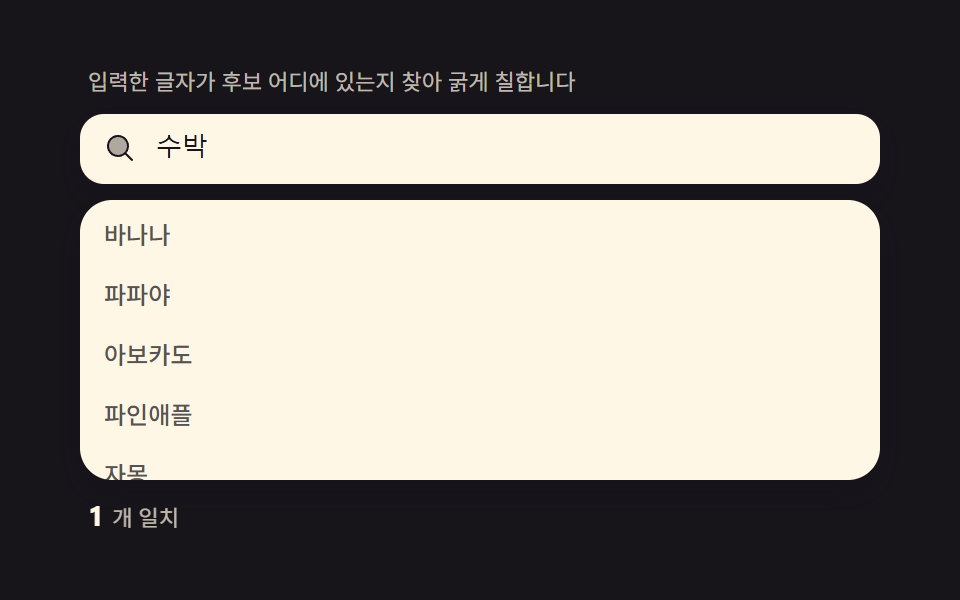
01一致ハイライト — 入力文字が候補のどこにあるか探し太字にする計算
候補文字列から入力語の最初の一致位置をindexOfで探して<mark>で囲むと、ユーザーが「自分の打った文字」を一目で検証できます。toLowerCaseでの大小無視・複数一致の全強調・mark背景色をトークンパレットに揃えることまで一緒に作ります。
使いどころ製品検索、社内wiki
beforeinputCSS custom propertiesaria-expanded

<main class="stage">
<div class="hl" id="hl">
  <p class="hl__hint">入力した文字が候補のどこにあるかを探して太字で示します</p>
  <div class="hl__field" role="combobox" aria-expanded="false" aria-owns="hlList" aria-haspopup="listbox" id="hlField">
    <svg class="hl__ic" viewBox="0 0 256 256" aria-hidden="true"><g fill="currentColor"><path d="M192 112a80 80 0 1 1-80-80a80 80 0 0 1 80 80" opacity=".35"/><path d="m229.66 218.34l-50.06-50.06a88.21 88.21 0 1 0-11.32 11.31l50.06 50.07a8 8 0 0 0 11.32-11.32M40 112a72 72 0 1 1 72 72a72.08 72.08 0 0 1-72-72"/></g></svg>
    <input class="hl__input" id="hlInput" type="text" role="searchbox" aria-autocomplete="list" aria-controls="hlList" aria-label="フルーツ検索" autocomplete="off">
  </div>
  <ul class="hl__list" id="hlList" role="listbox" aria-label="候補リスト"></ul>
  <p class="hl__meta"><b class="hl__tag" id="hlCount">8</b><span class="hl__unit" id="hlUnitText">件</span></p>
</div>
</main>
@use "../../../../site/static/demo-tokens" as *;
$duration: $dur-quick;
$easing: $ease-out;
$color: $subject-blue-deep;
// 파스텔 강조(도구/파스텔.py to_pastel 결과: 채도 .34 · 명도 +.11, $subject-blue 기준)
$p-blue: #93a4ca;
@include stage($stage-ink);
.hl {
width: 100%;
max-width: 400px;
display: flex;
flex-direction: column;
gap: $sp-2;
}
.hl__hint {
margin: 0;
padding: 0 $sp-1;
font-weight: 400;
font-size: 11px;
line-height: 1.4;
color: rgba($subject-cream, .72);
}
.hl__field {
display: flex;
align-items: center;
gap: $sp-2;
background: $subject-cream;
border-radius: $r-control;
padding: $sp-2 $sp-3;
box-shadow: $shadow-press;
}
.hl__ic {
width: 16px;
height: 16px;
flex: 0 0 auto;
color: $subject-ink;
}
.hl__input {
flex: 1 1 auto;
min-width: 0;
border: 0;
outline: 0;
background: transparent;
font-weight: 500;
font-size: 13px;
line-height: 1.3;
color: $subject-ink;
caret-color: $color;
}
.hl__list {
margin: 0;
padding: $sp-1;
list-style: none;
display: flex;
flex-direction: column;
gap: $sp-1;
max-height: 132px;
overflow-y: auto;
background: $subject-cream;
border-radius: $r-card;
box-shadow: $shadow-press;
}
.hl__item {
padding: $sp-1 $sp-2;
border-radius: $r-sm;
background: transparent;
color: rgba($subject-ink, .72);
font-weight: 500;
font-size: 12px;
line-height: 1.5;
transform: scale(1);
transform-origin: center;
transition: transform $duration $easing, background-color $duration $easing, color $duration $easing;
}
.hl__item.is-hit {
background: $color;
color: $subject-cream;
transform: scale(1.02);
}
.hl__mark {
background: $p-blue;
color: $subject-ink;
border-radius: $r-xs;
padding: 0 $sp-1;
}
.hl__meta {
margin: 0;
padding: 0 $sp-1;
display: flex;
align-items: baseline;
gap: $sp-1;
}
.hl__tag {
font-weight: 700;
font-size: 14px;
color: $subject-cream;
}
.hl__unit {
font-weight: 400;
font-size: 11px;
color: rgba($subject-cream, .72);
}
@media (max-width: 340px) {
.hl { max-width: 280px; }
.hl__item { font-size: 11px; }
.hl__list { max-height: 70px; }
}
@media (prefers-reduced-motion: reduce) {
.hl__item {
transition: none;
}
}html, body {
margin: 0;
overflow: hidden;
}
.stage {
box-sizing: border-box;
min-height: 100vh;
display: grid;
place-items: center;
margin: 0;
background: #17141a;
font-family: -apple-system, "Segoe UI", "Noto Sans KR", sans-serif;
padding: clamp(8px, 4vw, 24px);
}
.hl {
width: 100%;
max-width: 400px;
display: flex;
flex-direction: column;
gap: 8px;
}
.hl__hint {
margin: 0;
padding: 0 4px;
font-weight: 400;
font-size: 11px;
line-height: 1.4;
color: rgba(255, 247, 230, 0.72);
}
.hl__field {
display: flex;
align-items: center;
gap: 8px;
background: #fff7e6;
border-radius: 12px;
padding: 8px 12px;
box-shadow: 0 6px 12px rgba(23, 20, 26, 0.32);
}
.hl__ic {
width: 16px;
height: 16px;
flex: 0 0 auto;
color: #17141a;
}
.hl__input {
flex: 1 1 auto;
min-width: 0;
border: 0;
outline: 0;
background: transparent;
font-weight: 500;
font-size: 13px;
line-height: 1.3;
color: #17141a;
caret-color: #0a4fe8;
}
.hl__list {
margin: 0;
padding: 4px;
list-style: none;
display: flex;
flex-direction: column;
gap: 4px;
max-height: 132px;
overflow-y: auto;
background: #fff7e6;
border-radius: 16px;
box-shadow: 0 6px 12px rgba(23, 20, 26, 0.32);
}
.hl__item {
padding: 4px 8px;
border-radius: 8px;
background: transparent;
color: rgba(23, 20, 26, 0.72);
font-weight: 500;
font-size: 12px;
line-height: 1.5;
transform: scale(1);
transform-origin: center;
transition: transform 220ms ease-out, background-color 220ms ease-out, color 220ms ease-out;
}
.hl__item.is-hit {
background: #0a4fe8;
color: #fff7e6;
transform: scale(1.02);
}
.hl__mark {
background: #93a4ca;
color: #17141a;
border-radius: 4px;
padding: 0 4px;
}
.hl__meta {
margin: 0;
padding: 0 4px;
display: flex;
align-items: baseline;
gap: 4px;
}
.hl__tag {
font-weight: 700;
font-size: 14px;
color: #fff7e6;
}
.hl__unit {
font-weight: 400;
font-size: 11px;
color: rgba(255, 247, 230, 0.72);
}
@media (max-width: 340px) {
.hl {
max-width: 280px;
}
.hl__item {
font-size: 11px;
}
.hl__list {
max-height: 70px;
}
}
@media (prefers-reduced-motion: reduce) {
.hl__item {
transition: none;
}
}// 일치 하이라이트(01) — 제안 문자열에서 입력어의 첫 일치 위치를 indexOf 로 찾아
// <mark> 로 감싸고, 그 뒤부터 다시 찾아 모든 일치를 강조한다(다중 일치). 비교는
// toLowerCase 로 통일해 대소문자를 무시한다. 자동 시연은 performance.now() 시계로
// 타이핑 시퀀스를 재생한다(CSS @keyframes 없음).
(function () {
var field = document.getElementById('hlField');
var input = document.getElementById('hlInput');
var list = document.getElementById('hlList');
var countEl = document.getElementById('hlCount');
var unitEl = document.getElementById('hlUnitText');
if (!field || !input || !list || !countEl) return;
var WORDS = ['バナナ', 'パパイヤ', 'アボカド', 'パイナップル', 'グレープフルーツ', 'チェリー', '桃', 'スイカ'];
function escapeHtml(s) {
return s.replace(/[&<>]/g, function (c) { return c === '&' ? '&' : c === '<' ? '<' : '>'; });
}
function highlightAll(text, query) {
if (!query) return escapeHtml(text);
var lowerText = text.toLowerCase();
var lowerQuery = query.toLowerCase();
var out = '', i = 0;
while (i < text.length) {
var idx = lowerText.indexOf(lowerQuery, i);
if (idx === -1) { out += escapeHtml(text.slice(i)); break; }
out += escapeHtml(text.slice(i, idx));
out += '<mark class="hl__mark">' + escapeHtml(text.slice(idx, idx + query.length)) + '</mark>';
i = idx + query.length;
}
return out;
}
function render(query) {
var matched = 0;
var rows = WORDS.map(function (w) {
var hit = query && w.toLowerCase().indexOf(query.toLowerCase()) !== -1;
if (hit) matched++;
return '<li class="hl__item' + (hit ? ' is-hit' : ' is-dim') + '" role="option">' + highlightAll(w, query) + '</li>';
});
list.innerHTML = rows.join('');
countEl.textContent = String(query ? matched : WORDS.length);
unitEl.textContent = query ? '件一致' : '件の候補';
field.setAttribute('aria-expanded', query ? 'true' : 'false');
}
render('');
var reduce = window.matchMedia('(prefers-reduced-motion: reduce)').matches;
var playing = true;
function stop() { playing = false; }
function onUserInput() { stop(); render(input.value); }
input.addEventListener('input', onUserInput);
input.addEventListener('keydown', stop);
input.addEventListener('pointerdown', stop);
var STEPS = [
{ q: '', ms: 220 },
{ q: 'パ', ms: 360 },
{ q: 'パイ', ms: 520 },
{ q: 'パイ', ms: 260 },
{ q: '', ms: 220 },
{ q: 'ス', ms: 360 },
{ q: 'スイカ', ms: 520 }
];
if (reduce) {
input.value = STEPS[2].q;
render(STEPS[2].q);
} else {
var seg = 0, segStart = performance.now();
(function step(now) {
if (playing) {
var elapsed = now - segStart;
if (elapsed >= STEPS[seg].ms) {
seg = (seg + 1) % STEPS.length;
segStart = now;
}
var q = STEPS[seg].q;
if (input.value !== q) { input.value = q; render(q); }
}
requestAnimationFrame(step);
})(segStart);
}
})();// SearchAutocompleteHighlightMatch — vanilla 판(run/335/demo/01-search-autocomplete-highlight-match/index.html)
// 의 React 포트. indexOf 로 입력어의 첫 일치 위치를 찾아 <mark> 로 감싸고, 그 뒤부터 다시
// 찾아 모든 일치를 강조한다(다중 일치). 비교는 toLowerCase 로 통일해 대소문자를 무시한다.
// CSS @keyframes 는 없다 — 자동 시연은 performance.now() 시계로 타이핑 시퀀스를 재생한다.
import { useEffect, useRef } from "react";
import styles from "./SearchAutocompleteHighlightMatch.module.scss";
export type SearchAutocompleteHighlightMatchProps = {
duration?: string;
easing?: string;
color?: string;
};
type Box<T> = { current: T };
const HINT = "입력한 글자가 후보 어디에 있는지 찾아 굵게 칠합니다";
const ARIA_LABEL = "과일 검색";
const ARIA_LIST_LABEL = "후보 목록";
const WORDS = ["바나나", "파파야", "아보카도", "파인애플", "자몽", "체리", "복숭아", "수박"];
type Step = { q: string; ms: number };
const STEPS: Step[] = [
{ q: "", ms: 220 },
{ q: "파", ms: 360 },
{ q: "파야", ms: 520 },
{ q: "파야", ms: 260 },
{ q: "", ms: 220 },
{ q: "수", ms: 360 },
{ q: "수박", ms: 520 }
];
function escapeHtml(s: string): string {
return s.replace(/[&<>]/g, (c) => (c === "&" ? "&" : c === "<" ? "<" : ">"));
}
function highlightAll(text: string, query: string): string {
if (!query) return escapeHtml(text);
const lowerText = text.toLowerCase();
const lowerQuery = query.toLowerCase();
let out = "";
let i = 0;
while (i < text.length) {
const idx = lowerText.indexOf(lowerQuery, i);
if (idx === -1) {
out += escapeHtml(text.slice(i));
break;
}
out += escapeHtml(text.slice(i, idx));
out += '<mark class="' + styles.mark + '">' + escapeHtml(text.slice(idx, idx + query.length)) + "</mark>";
i = idx + query.length;
}
return out;
}
export default function SearchAutocompleteHighlightMatch({
duration = "220ms",
easing = "ease-out",
color = "#0a4fe8"
}: SearchAutocompleteHighlightMatchProps) {
const fieldRef = useRef<HTMLDivElement | null>(null);
const inputRef = useRef<HTMLInputElement | null>(null);
const listRef = useRef<HTMLUListElement | null>(null);
const rafRef = useRef(0) as Box<number>;
useEffect(() => {
const field = fieldRef.current;
const input = inputRef.current;
const list = listRef.current;
if (!field || !input || !list) return;
function render(query: string): void {
const rows = WORDS.map((w) => {
const hit = query !== "" && w.toLowerCase().indexOf(query.toLowerCase()) !== -1;
return '<li class="' + styles.item + (hit ? " " + styles.isHit : "") + '" role="option">' + highlightAll(w, query) + "</li>";
});
list!.innerHTML = rows.join("");
field!.setAttribute("aria-expanded", query ? "true" : "false");
}
render("");
const reduce = window.matchMedia("(prefers-reduced-motion: reduce)").matches;
let playing = true;
function stop(): void {
playing = false;
}
function onUserInput(): void {
stop();
render(input!.value);
}
input.addEventListener("input", onUserInput);
input.addEventListener("keydown", stop);
input.addEventListener("pointerdown", stop);
if (reduce) {
input.value = STEPS[2].q;
render(STEPS[2].q);
} else {
let seg = 0;
let segStart = performance.now();
const step = (now: number): void => {
if (playing) {
const elapsed = now - segStart;
if (elapsed >= STEPS[seg].ms) {
seg = (seg + 1) % STEPS.length;
segStart = now;
}
const q = STEPS[seg].q;
if (input!.value !== q) {
input!.value = q;
render(q);
}
}
rafRef.current = requestAnimationFrame(step);
};
rafRef.current = requestAnimationFrame(step);
}
return () => {
cancelAnimationFrame(rafRef.current);
input.removeEventListener("input", onUserInput);
input.removeEventListener("keydown", stop);
input.removeEventListener("pointerdown", stop);
};
// eslint-disable-next-line react-hooks/exhaustive-deps
}, []);
return (
<main className={styles.stage}>
<div className={styles.hl}>
<p className={styles.hint}>{HINT}</p>
<div
className={styles.field}
ref={fieldRef}
role="combobox"
aria-expanded="false"
aria-owns="hlListReact"
aria-haspopup="listbox"
>
<svg className={styles.ic} viewBox="0 0 256 256" aria-hidden="true">
<g fill="currentColor">
<path d="M192 112a80 80 0 1 1-80-80a80 80 0 0 1 80 80" opacity=".2" />
<path d="m229.66 218.34l-50.06-50.06a88.21 88.21 0 1 0-11.32 11.31l50.06 50.07a8 8 0 0 0 11.32-11.32M40 112a72 72 0 1 1 72 72a72.08 72.08 0 0 1-72-72" />
</g>
</svg>
<input
className={styles.input}
ref={inputRef}
type="text"
role="searchbox"
aria-autocomplete="list"
aria-controls="hlListReact"
aria-label={ARIA_LABEL}
autoComplete="off"
style={{ caretColor: color, transitionDuration: duration, transitionTimingFunction: easing }}
/>
</div>
<ul className={styles.list} id="hlListReact" ref={listRef} role="listbox" aria-label={ARIA_LIST_LABEL} />
</div>
</main>
);
}01 一致ハイライト — 入力文字が候補のどこにあるか探し太字にする計算 — 計測 累積面積 15.731% · 動いたフレーム 6/23GODRICH オリジナル · SCSS と React は zip に同梱 · オートコンプリート 実装 — ハイライト・デバウンス・編集距離を重ねた9種
このデモが属する記事
 オートコンプリート 実装 — ハイライト・デバウンス・編集距離を重ねた9種検索窓のオートコンプリート 実装は文字を打つたびに再計算が走る一枚の層です。入力した文字が候補のどこにあるかを見つけてその部分だけ太字にし、300msのデバウンスでリクエストをまとめ、キーボードでもリストを巡れます。最近の検索・誤字候補・人 この記事のデモをすべて見る