01ドラッグできるウィンドウと最小化
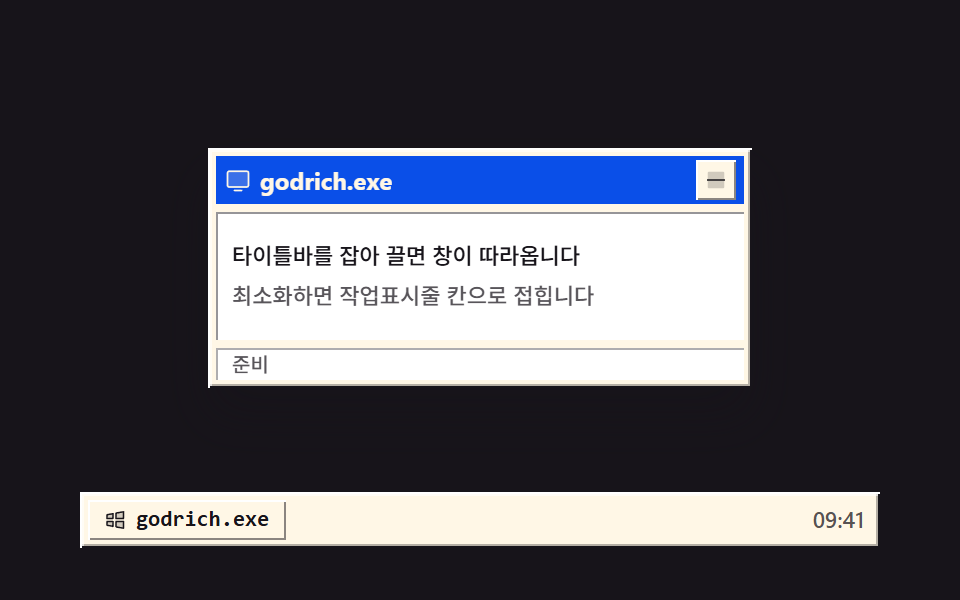
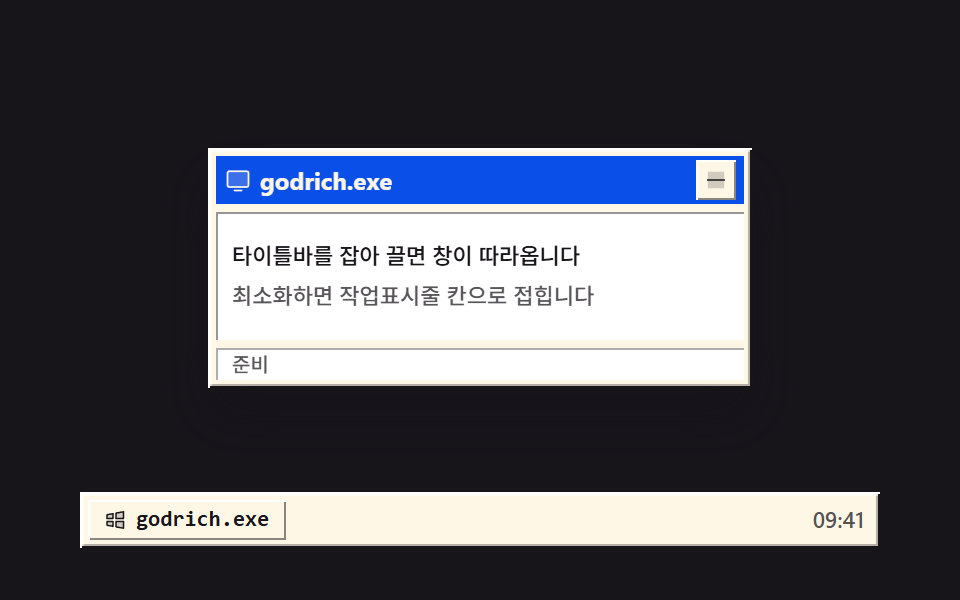
タイトルバーをつかむとウィンドウがポインタに付いてきて、最小化ボタンでタスクバーの枠に畳まれ、もう一度押すと戻ります。外枠は明るい面と暗い面を二重に重ねて出っ張って見せます。
使いどころ複数のウィンドウを重ねる紹介画面
setPointerCapturebox-shadowtranslate
<main class="stage">
<div class="dt is-demo" id="dt">
  <div class="dt__area" id="area">
    <section class="win" id="win" aria-label="サンプル窓">
      <header class="win__bar" id="bar" tabindex="0" aria-label="窓の移動 — ドラッグか方向キーで動かせます">
        <span class="win__ico" aria-hidden="true"><svg xmlns="http://www.w3.org/2000/svg" width="1em" height="1em" viewBox="0 0 256 256"><g fill="currentColor"><path d="M224 64v112a16 16 0 0 1-16 16H48a16 16 0 0 1-16-16V64a16 16 0 0 1 16-16h160a16 16 0 0 1 16 16" opacity=".2"/><path d="M208 40H48a24 24 0 0 0-24 24v112a24 24 0 0 0 24 24h160a24 24 0 0 0 24-24V64a24 24 0 0 0-24-24m8 136a8 8 0 0 1-8 8H48a8 8 0 0 1-8-8V64a8 8 0 0 1 8-8h160a8 8 0 0 1 8 8Zm-48 48a8 8 0 0 1-8 8H96a8 8 0 0 1 0-16h64a8 8 0 0 1 8 8"/></g></svg></span>
        <span class="win__title">godrich.exe</span>
        <button class="win__min" id="minBtn" type="button" aria-label="最小化"><svg xmlns="http://www.w3.org/2000/svg" width="1em" height="1em" viewBox="0 0 256 256"><g fill="currentColor"><path d="M216 56v144a16 16 0 0 1-16 16H56a16 16 0 0 1-16-16V56a16 16 0 0 1 16-16h144a16 16 0 0 1 16 16" opacity=".2"/><path d="M224 128a8 8 0 0 1-8 8H40a8 8 0 0 1 0-16h176a8 8 0 0 1 8 8"/></g></svg></button>
      </header>
      <div class="win__panel">
        <p class="win__line">タイトルバーをつかむと窓が付いてきます</p>
        <p class="win__line win__line--dim">最小化するとタスクバーの枠に畳まれます</p>
      </div>
      <p class="win__status" aria-hidden="true">準備完了</p>
    </section>
  </div>
  <nav class="dt__bar" aria-label="タスクバー">
    <button class="dt__slot" id="slot" type="button" aria-label="窓を元に戻す">
      <span class="dt__slotIco" aria-hidden="true"><svg xmlns="http://www.w3.org/2000/svg" width="1em" height="1em" viewBox="0 0 256 256"><g fill="currentColor"><path d="M128 144h80v72l-80-14.55Zm-96 40l64 11.64V144H32Zm96-129.45V112h80V40ZM32 112h64V60.36L32 72Z" opacity=".2"/><path d="M208 136h-80a8 8 0 0 0-8 8v57.45a8 8 0 0 0 6.57 7.88l80 14.54a7.6 7.6 0 0 0 1.43.13a8 8 0 0 0 8-8v-72a8 8 0 0 0-8-8m-8 70.41l-64-11.63V152h64ZM96 136H32a8 8 0 0 0-8 8v40a8 8 0 0 0 6.57 7.87l64 11.64a8.5 8.5 0 0 0 1.43.13a8 8 0 0 0 8-8V144a8 8 0 0 0-8-8m-8 50.05l-48-8.73V152h48ZM213.13 33.86a8 8 0 0 0-6.56-1.73l-80 14.55a8 8 0 0 0-6.57 7.87V112a8 8 0 0 0 8 8h80a8 8 0 0 0 8-8V40a8 8 0 0 0-2.87-6.14M200 104h-64V61.22l64-11.63Zm-98.87-49.78a8 8 0 0 0-6.56-1.73l-64 11.64A8 8 0 0 0 24 72v40a8 8 0 0 0 8 8h64a8 8 0 0 0 8-8V60.36a8 8 0 0 0-2.87-6.14M88 104H40V78.68L88 70Z"/></g></svg></span>
      <span class="dt__slotTitle">godrich.exe</span>
    </button>
    <span class="dt__clock" aria-hidden="true">09:41</span>
  </nav>
</div>
</main>@use "../../../../site/static/demo-tokens" as *;
// 끌어 옮기는 창과 최소화 — 타이틀바를 setPointerCapture 로 잡아 pointermove 마다 translate 로 옮기고,
// 최소화하면 창이 작업표시줄 칸 중심으로 scale .12 로 접혔다가 칸을 누르면 원래 자리로 돌아온다.
// 바깥 테두리는 밝은 면과 어두운 면을 두 겹 쌓은 box-shadow 로 튀어나온 느낌을 낸다.
// 격자 미리보기(.is-demo)는 오른쪽 아래로 끌었다가 칸으로 접히고 다시 펴지는 컷을 2초에 한 바퀴 돌린다.
$duration: $dur-base;
$easing: $ease-spring;
$color: $subject-blue-deep;
$mono: ui-monospace, SFMono-Regular, "SF Mono", Consolas, "Liberation Mono", monospace;
$bevel-l1: $stage-paper; // 바깥 밝은 면
$bevel-d1: $subject-ink; // 바깥 어두운 면
$bevel-l2: rgba($stage-paper, .6); // 안쪽 밝은 면
$bevel-d2: rgba($subject-ink, .32); // 안쪽 어두운 면
$bevel-raise: inset 1px 1px 0 0 $bevel-l1, inset -1px -1px 0 0 $bevel-d1, inset 2px 2px 0 0 $bevel-l2, inset -2px -2px 0 0 $bevel-d2;
$bevel-btn: inset 1px 1px 0 0 $bevel-l1, inset -1px -1px 0 0 rgba($subject-ink, .5);
$bevel-btn-press: inset 1px 1px 0 0 rgba($subject-ink, .5), inset -1px -1px 0 0 $bevel-l1;
$muted: rgba($subject-ink, .72);
@include stage($stage-ink);
// ── 바탕화면: 창이 다니는 영역(여기서 벗어나면 잘린다)과 작업표시줄
.dt {
display: flex; flex-direction: column; gap: $sp-1;
width: min(100%, 400px); height: 248px;
}
.dt__area {
position: relative; flex: 1 1 auto;
display: grid; place-items: center;
overflow: hidden; // 창이 영역 밖으로 나가면 화면 끝에서 잘린다 — 문서 넘침으로 새지 않는다
}
.dt__bar {
display: flex; align-items: center; gap: $sp-1;
box-sizing: border-box; height: 28px; padding: 0 $sp-1; flex: 0 0 auto;
background: $subject-cream;
box-shadow: $bevel-raise;
}
.dt__slot {
display: inline-flex; align-items: center; gap: $sp-1;
box-sizing: border-box; height: 20px; padding: 0 $sp-2; border: 0;
background: $subject-cream; color: $subject-ink;
font-family: $mono; font-weight: 700; font-size: 11px; line-height: 1.4;
white-space: nowrap; cursor: pointer;
box-shadow: $bevel-btn;
}
.dt__slot:active { box-shadow: $bevel-btn-press; }
// 창이 접혀 있을 때 칸 — 눌린 오목한 면과 파란 배경으로 켜진다
.dt__slot.is-min {
background: $color; color: $subject-cream;
box-shadow: $bevel-btn-press;
}
.dt__slotIco { display: grid; place-items: center; font-size: 12px; }
.dt__slotTitle { white-space: nowrap; }
.dt__clock { margin-left: auto; padding-right: $sp-1; color: $muted; font-weight: 500; font-size: 11px; line-height: 1.4; }
// ── 창 — translate 로만 움직인다(top/left 를 다시 계산하지 않는다)
.win {
position: relative; box-sizing: border-box;
width: min(100%, 272px); height: 120px; padding: $sp-1;
display: flex; flex-direction: column; gap: $sp-1;
background: $subject-cream;
box-shadow: $bevel-raise, $shadow-raised;
}
// 접기/펴기 트랜지션은 이 상태일 때만 — 드래그 중에는 translate 가 즉시 따라와야 한다
.win.is-flying { transition: translate $duration $easing, scale $duration $easing, opacity $duration $easing; }
.win.is-min { opacity: 0; scale: .12; pointer-events: none; }
.win__bar {
display: flex; align-items: center; gap: $sp-1;
height: 24px; padding: 0 $sp-1; flex: 0 0 auto;
background: $color; color: $subject-cream;
cursor: grab; user-select: none; touch-action: none;
}
.win__bar:active { cursor: grabbing; }
.win__bar:focus-visible { outline: 2px solid $stage-paper; outline-offset: -2px; }
.win__ico { display: grid; place-items: center; font-size: 14px; }
.win__title {
flex: 1 1 auto; font-weight: 700; font-size: 12px; line-height: 1.4;
white-space: nowrap; overflow: hidden;
}
.win__min {
display: grid; place-items: center; width: 20px; height: 20px;
box-sizing: border-box; padding: 0; border: 0; flex: 0 0 auto;
background: $subject-cream; color: $subject-ink;
font-size: 12px; line-height: 1; cursor: pointer;
box-shadow: $bevel-btn;
}
.win__min:active { box-shadow: $bevel-btn-press; }
.win__panel {
flex: 1 1 auto; display: flex; flex-direction: column; justify-content: center; gap: $sp-1;
padding: $sp-2; background: $stage-paper;
box-shadow: inset 1px 1px 0 0 rgba($subject-ink, .45), inset -1px -1px 0 0 $stage-paper;
}
.win__line { margin: 0; color: $subject-ink; font-weight: 500; font-size: 11px; line-height: 1.5; }
.win__line--dim { color: $muted; }
.win__status {
margin: 0; flex: 0 0 auto; height: 16px; padding: 0 $sp-2;
display: flex; align-items: center;
background: $stage-paper; color: $muted;
font-weight: 500; font-size: 10px; line-height: 1.4;
box-shadow: inset 1px 1px 0 0 rgba($subject-ink, .35), inset -1px -1px 0 0 $stage-paper;
}
// ── 격자 미리보기 루프 (2초)
// 8% 에 끌기 시작해 30% 까지 오른쪽 아래로 이동, 41% 부터 칸 쪽으로 접혀 51% 에 사라지고,
// 74% 에 다시 펴져 86% 에 제자리로 돌아온다(복귀는 90% 안에 끝난다). 칸 상태는 steps 컷으로 갈아 낀다.
.dt.is-demo .win {
animation-name: winFly;
animation-duration: $dur-loop;
animation-timing-function: $ease-out;
animation-iteration-count: infinite;
animation-fill-mode: backwards;
}
.dt.is-demo .dt__slot {
animation-name: dtSlotCut;
animation-duration: $dur-loop;
animation-timing-function: steps(1, end);
animation-iteration-count: infinite;
animation-fill-mode: backwards;
}
@keyframes winFly {
0%, 8% { translate: 0 0; scale: 1; opacity: 1; }
30%, 41% { translate: 24px 12px; scale: 1; opacity: 1; }
51%, 74% { translate: -104px 64px; scale: .12; opacity: 0; }
86%, 100% { translate: 0 0; scale: 1; opacity: 1; }
}
// 칸의 켜짐 교체 — 배경·글자색이지만 steps(1, end) 컷이라 중간값이 없다(두 번의 이산 전환)
@keyframes dtSlotCut {
0%, 50% {
background: $subject-cream; color: $subject-ink; box-shadow: $bevel-btn;
}
51%, 85% {
background: $color; color: $subject-cream; box-shadow: $bevel-btn-press;
}
86%, 100% {
background: $subject-cream; color: $subject-ink; box-shadow: $bevel-btn;
}
}
// ── 좁은 화면: 창과 표시줄을 줄여 무대 안에 들어온다
@media (max-width: 340px) {
.dt { height: 174px; }
.win { height: 104px; }
.win__bar { height: 20px; }
.win__line { font-size: 10px; }
.win__status { font-size: 9px; }
.dt__slot { height: 18px; font-size: 10px; }
.dt__clock { font-size: 10px; }
}
@media (prefers-reduced-motion: reduce) {
.dt.is-demo .win, .dt.is-demo .dt__slot { animation: none !important; }
.win.is-flying { transition: none !important; }
}html, body {
margin: 0;
overflow: hidden;
}
.stage {
box-sizing: border-box;
min-height: 100vh;
display: grid;
place-items: center;
margin: 0;
background: #17141a;
font-family: -apple-system, "Segoe UI", "Noto Sans KR", sans-serif;
padding: clamp(8px, 4vw, 24px);
}
.dt {
display: flex;
flex-direction: column;
gap: 4px;
width: min(100%, 400px);
height: 248px;
}
.dt__area {
position: relative;
flex: 1 1 auto;
display: grid;
place-items: center;
overflow: hidden;
}
.dt__bar {
display: flex;
align-items: center;
gap: 4px;
box-sizing: border-box;
height: 28px;
padding: 0 4px;
flex: 0 0 auto;
background: #fff7e6;
box-shadow: inset 1px 1px 0 0 #ffffff, inset -1px -1px 0 0 #17141a, inset 2px 2px 0 0 rgba(255, 255, 255, 0.6), inset -2px -2px 0 0 rgba(23, 20, 26, 0.32);
}
.dt__slot {
display: inline-flex;
align-items: center;
gap: 4px;
box-sizing: border-box;
height: 20px;
padding: 0 8px;
border: 0;
background: #fff7e6;
color: #17141a;
font-family: ui-monospace, SFMono-Regular, "SF Mono", Consolas, "Liberation Mono", monospace;
font-weight: 700;
font-size: 11px;
line-height: 1.4;
white-space: nowrap;
cursor: pointer;
box-shadow: inset 1px 1px 0 0 #ffffff, inset -1px -1px 0 0 rgba(23, 20, 26, 0.5);
}
.dt__slot:active {
box-shadow: inset 1px 1px 0 0 rgba(23, 20, 26, 0.5), inset -1px -1px 0 0 #ffffff;
}
.dt__slot.is-min {
background: #0a4fe8;
color: #fff7e6;
box-shadow: inset 1px 1px 0 0 rgba(23, 20, 26, 0.5), inset -1px -1px 0 0 #ffffff;
}
.dt__slotIco {
display: grid;
place-items: center;
font-size: 12px;
}
.dt__slotTitle {
white-space: nowrap;
}
.dt__clock {
margin-left: auto;
padding-right: 4px;
color: rgba(23, 20, 26, 0.72);
font-weight: 500;
font-size: 11px;
line-height: 1.4;
}
.win {
position: relative;
box-sizing: border-box;
width: min(100%, 272px);
height: 120px;
padding: 4px;
display: flex;
flex-direction: column;
gap: 4px;
background: #fff7e6;
box-shadow: inset 1px 1px 0 0 #ffffff, inset -1px -1px 0 0 #17141a, inset 2px 2px 0 0 rgba(255, 255, 255, 0.6), inset -2px -2px 0 0 rgba(23, 20, 26, 0.32), 0 14px 24px rgba(23, 20, 26, 0.32);
}
.win.is-flying {
transition: translate 300ms cubic-bezier(0.2, 0.8, 0.2, 1), scale 300ms cubic-bezier(0.2, 0.8, 0.2, 1), opacity 300ms cubic-bezier(0.2, 0.8, 0.2, 1);
}
.win.is-min {
opacity: 0;
scale: 0.12;
pointer-events: none;
}
.win__bar {
display: flex;
align-items: center;
gap: 4px;
height: 24px;
padding: 0 4px;
flex: 0 0 auto;
background: #0a4fe8;
color: #fff7e6;
cursor: grab;
user-select: none;
touch-action: none;
}
.win__bar:active {
cursor: grabbing;
}
.win__bar:focus-visible {
outline: 2px solid #ffffff;
outline-offset: -2px;
}
.win__ico {
display: grid;
place-items: center;
font-size: 14px;
}
.win__title {
flex: 1 1 auto;
font-weight: 700;
font-size: 12px;
line-height: 1.4;
white-space: nowrap;
overflow: hidden;
}
.win__min {
display: grid;
place-items: center;
width: 20px;
height: 20px;
box-sizing: border-box;
padding: 0;
border: 0;
flex: 0 0 auto;
background: #fff7e6;
color: #17141a;
font-size: 12px;
line-height: 1;
cursor: pointer;
box-shadow: inset 1px 1px 0 0 #ffffff, inset -1px -1px 0 0 rgba(23, 20, 26, 0.5);
}
.win__min:active {
box-shadow: inset 1px 1px 0 0 rgba(23, 20, 26, 0.5), inset -1px -1px 0 0 #ffffff;
}
.win__panel {
flex: 1 1 auto;
display: flex;
flex-direction: column;
justify-content: center;
gap: 4px;
padding: 8px;
background: #ffffff;
box-shadow: inset 1px 1px 0 0 rgba(23, 20, 26, 0.45), inset -1px -1px 0 0 #ffffff;
}
.win__line {
margin: 0;
color: #17141a;
font-weight: 500;
font-size: 11px;
line-height: 1.5;
}
.win__line--dim {
color: rgba(23, 20, 26, 0.72);
}
.win__status {
margin: 0;
flex: 0 0 auto;
height: 16px;
padding: 0 8px;
display: flex;
align-items: center;
background: #ffffff;
color: rgba(23, 20, 26, 0.72);
font-weight: 500;
font-size: 10px;
line-height: 1.4;
box-shadow: inset 1px 1px 0 0 rgba(23, 20, 26, 0.35), inset -1px -1px 0 0 #ffffff;
}
.dt.is-demo .win {
animation-name: winFly;
animation-duration: 2s;
animation-timing-function: ease-out;
animation-iteration-count: infinite;
animation-fill-mode: backwards;
}
.dt.is-demo .dt__slot {
animation-name: dtSlotCut;
animation-duration: 2s;
animation-timing-function: steps(1, end);
animation-iteration-count: infinite;
animation-fill-mode: backwards;
}
@keyframes winFly {
0%, 8% {
translate: 0 0;
scale: 1;
opacity: 1;
}
30%, 41% {
translate: 24px 12px;
scale: 1;
opacity: 1;
}
51%, 74% {
translate: -104px 64px;
scale: 0.12;
opacity: 0;
}
86%, 100% {
translate: 0 0;
scale: 1;
opacity: 1;
}
}
@keyframes dtSlotCut {
0%, 50% {
background: #fff7e6;
color: #17141a;
box-shadow: inset 1px 1px 0 0 #ffffff, inset -1px -1px 0 0 rgba(23, 20, 26, 0.5);
}
51%, 85% {
background: #0a4fe8;
color: #fff7e6;
box-shadow: inset 1px 1px 0 0 rgba(23, 20, 26, 0.5), inset -1px -1px 0 0 #ffffff;
}
86%, 100% {
background: #fff7e6;
color: #17141a;
box-shadow: inset 1px 1px 0 0 #ffffff, inset -1px -1px 0 0 rgba(23, 20, 26, 0.5);
}
}
@media (max-width: 340px) {
.dt {
height: 174px;
}
.win {
height: 104px;
}
.win__bar {
height: 20px;
}
.win__line {
font-size: 10px;
}
.win__status {
font-size: 9px;
}
.dt__slot {
height: 18px;
font-size: 10px;
}
.dt__clock {
font-size: 10px;
}
}
@media (prefers-reduced-motion: reduce) {
.dt.is-demo .win, .dt.is-demo .dt__slot {
animation: none !important;
}
.win.is-flying {
transition: none !important;
}
}var dt = document.getElementById('dt');
var area = document.getElementById('area');
var win = document.getElementById('win');
var bar = document.getElementById('bar');
var minBtn = document.getElementById('minBtn');
var slot = document.getElementById('slot');
var px = 0, py = 0, savedX = 0, savedY = 0, min = false;
function place() { win.style.translate = px + 'px ' + py + 'px'; }
function clampNum(v, lo, hi) { return Math.max(lo, Math.min(hi, v)); }
function dragBounds() {
return {
x: Math.max(0, (area.clientWidth - win.offsetWidth) / 2),
y: Math.max(0, (area.clientHeight - win.offsetHeight) / 2)
};
}
// 접기/펴기 — 접힐 때 칸 중심으로 translate 를 옮기고 scale 을 줄인다. 원래 자리는 saved 에 둔다
function setMin(on) {
min = on;
win.classList.toggle('is-min', on);
slot.classList.toggle('is-min', on);
win.classList.add('is-flying');
if (on) {
savedX = px; savedY = py;
var wr = win.getBoundingClientRect(), sr = slot.getBoundingClientRect();
px += (sr.left + sr.width / 2) - (wr.left + wr.width / 2);
py += (sr.top + sr.height / 2) - (wr.top + wr.height / 2);
} else {
px = savedX; py = savedY;
}
place();
window.setTimeout(function () { win.classList.remove('is-flying'); }, 320);
}
dt.addEventListener('pointerdown', function () { dt.classList.remove('is-demo'); });
bar.addEventListener('pointerdown', function (e) {
if (min || e.target.closest('.win__min')) return;
e.preventDefault();
bar.setPointerCapture(e.pointerId);
var ox = px - e.clientX, oy = py - e.clientY;
function mv(ev) {
var b = dragBounds();
px = clampNum(ev.clientX + ox, -b.x, b.x);
py = clampNum(ev.clientY + oy, -b.y, b.y);
place();
}
bar.addEventListener('pointermove', mv);
bar.addEventListener('pointerup', function () { bar.removeEventListener('pointermove', mv); }, { once: true });
bar.addEventListener('pointercancel', function () { bar.removeEventListener('pointermove', mv); }, { once: true });
});
bar.addEventListener('keydown', function (e) {
if (e.key === 'Escape') { dt.classList.remove('is-demo'); setMin(true); return; }
if (min || e.key.indexOf('Arrow') !== 0) return;
e.preventDefault();
dt.classList.remove('is-demo');
var b = dragBounds(), d = e.shiftKey ? 16 : 4;
if (e.key === 'ArrowLeft') px = clampNum(px - d, -b.x, b.x);
if (e.key === 'ArrowRight') px = clampNum(px + d, -b.x, b.x);
if (e.key === 'ArrowUp') py = clampNum(py - d, -b.y, b.y);
if (e.key === 'ArrowDown') py = clampNum(py + d, -b.y, b.y);
place();
});
minBtn.addEventListener('click', function () { dt.classList.remove('is-demo'); setMin(true); });
slot.addEventListener('click', function () { dt.classList.remove('is-demo'); setMin(false); });// RetroWindow — vanilla 판(run/023/demo/01-os-window-titlebar-minimize/index.html) 의 React 포트.
// 타이틀바를 setPointerCapture 로 잡아 pointermove 마다 translate 로 옮기고, 최소화하면 창이
// 작업표시줄 칸 중심으로 scale .12 로 접혔다가 칸을 누르면 원래 자리로 돌아온다.
// 이동량은 ref 하나가 들고 있고 상태는 미리보기·접힘 두 개뿐이다(드래그마다 재렌더하지 않는다).
import { useRef, useState } from "react";
import type { CSSProperties } from "react";
import styles from "./RetroWindow.module.scss";
export type RetroWindowProps = {
duration?: number;
easing?: string;
color?: string;
};
type Vars = CSSProperties & { "--duration"?: string; "--easing"?: string; "--color"?: string };
// ambient 타입에 React 이벤트 제네릭이 없다 — 쓰는 것만 로컬 타입으로 선언한다
type PtrEvt = {
pointerId: number;
clientX: number;
clientY: number;
target: { closest(sel: string): Element | null };
preventDefault(): void;
};
type KeyEvt = { key: string; shiftKey?: boolean; preventDefault(): void };
// 초기값을 준 useRef 는 실제로 null 이 되지 않는다 — 값 상자(Box)로 좁혀 쓴다
type XY = { x: number; y: number };
type Box<T> = { current: T };
const TITLE = "godrich.exe";
const STATUS = "준비";
const CLOCK = "09:41";
const LINE1 = "타이틀바를 잡아 끌면 창이 따라옵니다";
const LINE2 = "최소화하면 작업표시줄 칸으로 접힙니다";
const ARIA_WIN = "예제 창";
const ARIA_BAR = "창 이동 — 잡아 끌거나 방향키로 옮기세요";
const ARIA_MIN = "최소화";
const ARIA_SLOT = "창 다시 펼치기";
const ARIA_TASKBAR = "작업표시줄";
const ICON_WIN = (
<svg xmlns="http://www.w3.org/2000/svg" width="1em" height="1em" viewBox="0 0 256 256"><g fill="currentColor"><path d="M224 64v112a16 16 0 0 1-16 16H48a16 16 0 0 1-16-16V64a16 16 0 0 1 16-16h160a16 16 0 0 1 16 16" opacity=".2"/><path d="M208 40H48a24 24 0 0 0-24 24v112a24 24 0 0 0 24 24h160a24 24 0 0 0 24-24V64a24 24 0 0 0-24-24m8 136a8 8 0 0 1-8 8H48a8 8 0 0 1-8-8V64a8 8 0 0 1 8-8h160a8 8 0 0 1 8 8Zm-48 48a8 8 0 0 1-8 8H96a8 8 0 0 1 0-16h64a8 8 0 0 1 8 8"/></g></svg>
);
const ICON_MIN = (
<svg xmlns="http://www.w3.org/2000/svg" width="1em" height="1em" viewBox="0 0 256 256"><g fill="currentColor"><path d="M216 56v144a16 16 0 0 1-16 16H56a16 16 0 0 1-16-16V56a16 16 0 0 1 16-16h144a16 16 0 0 1 16 16" opacity=".2"/><path d="M224 128a8 8 0 0 1-8 8H40a8 8 0 0 1 0-16h176a8 8 0 0 1 8 8"/></g></svg>
);
const ICON_LOGO = (
<svg xmlns="http://www.w3.org/2000/svg" width="1em" height="1em" viewBox="0 0 256 256"><g fill="currentColor"><path d="M128 144h80v72l-80-14.55Zm-96 40l64 11.64V144H32Zm96-129.45V112h80V40ZM32 112h64V60.36L32 72Z" opacity=".2"/><path d="M208 136h-80a8 8 0 0 0-8 8v57.45a8 8 0 0 0 6.57 7.88l80 14.54a7.6 7.6 0 0 0 1.43.13a8 8 0 0 0 8-8v-72a8 8 0 0 0-8-8m-8 70.41l-64-11.63V152h64ZM96 136H32a8 8 0 0 0-8 8v40a8 8 0 0 0 6.57 7.87l64 11.64a8.5 8.5 0 0 0 1.43.13a8 8 0 0 0 8-8V144a8 8 0 0 0-8-8m-8 50.05l-48-8.73V152h48ZM213.13 33.86a8 8 0 0 0-6.56-1.73l-80 14.55a8 8 0 0 0-6.57 7.87V112a8 8 0 0 0 8 8h80a8 8 0 0 0 8-8V40a8 8 0 0 0-2.87-6.14M200 104h-64V61.22l64-11.63Zm-98.87-49.78a8 8 0 0 0-6.56-1.73l-64 11.64A8 8 0 0 0 24 72v40a8 8 0 0 0 8 8h64a8 8 0 0 0 8-8V60.36a8 8 0 0 0-2.87-6.14M88 104H40V78.68L88 70Z"/></g></svg>
);
function clampNum(v: number, lo: number, hi: number) {
return Math.max(lo, Math.min(hi, v));
}
export default function RetroWindow(props: RetroWindowProps) {
const duration = props.duration ?? 300;
const easing = props.easing ?? "cubic-bezier(.2, .8, .2, 1)";
const color = props.color ?? "#0a4fe8";
const vars: Vars = { "--duration": duration + "ms", "--easing": easing, "--color": color };
const [preview, setPreview] = useState<boolean>(true);
const [min, setMin] = useState<boolean>(false);
const [flying, setFlying] = useState<boolean>(false);
const pos = useRef<XY>({ x: 0, y: 0 }) as Box<XY>;
const saved = useRef<XY>({ x: 0, y: 0 }) as Box<XY>;
const areaRef = useRef<HTMLDivElement>(null);
const winRef = useRef<HTMLElement>(null);
const barRef = useRef<HTMLElement>(null);
const slotRef = useRef<HTMLButtonElement>(null);
const flyTimer = useRef<number | null>(null);
const place = () => {
const win = winRef.current;
if (win) win.style.translate = pos.current.x + "px " + pos.current.y + "px";
};
const dragBounds = () => {
const area = areaRef.current;
const win = winRef.current;
if (!area || !win) return { x: 0, y: 0 };
return {
x: Math.max(0, (area.clientWidth - win.offsetWidth) / 2),
y: Math.max(0, (area.clientHeight - win.offsetHeight) / 2)
};
};
// 접기/펴기 — 접힐 때 칸 중심으로 translate 를 옮기고 scale 을 줄인다. 원래 자리는 saved 에 둔다
const setMinState = (on: boolean) => {
const win = winRef.current;
const slot = slotRef.current;
setMin(on);
setFlying(true);
if (on) {
saved.current = { ...pos.current };
if (win && slot) {
const wr = win.getBoundingClientRect();
const sr = slot.getBoundingClientRect();
pos.current.x += sr.left + sr.width / 2 - (wr.left + wr.width / 2);
pos.current.y += sr.top + sr.height / 2 - (wr.top + wr.height / 2);
}
} else {
pos.current = { ...saved.current };
}
place();
if (flyTimer.current !== null) window.clearTimeout(flyTimer.current);
flyTimer.current = window.setTimeout(() => setFlying(false), duration + 20);
};
const onBarDown = (e: PtrEvt) => {
setPreview(false);
if (min || e.target.closest("." + (styles.winMin || "winMin"))) return;
e.preventDefault();
const bar = barRef.current;
if (!bar) return;
bar.setPointerCapture(e.pointerId);
const ox = pos.current.x - e.clientX;
const oy = pos.current.y - e.clientY;
// 여기서부터는 React 합성 이벤트가 아니라 DOM 이 직접 주는 PointerEvent 다
const mv = (ev: PointerEvent) => {
const b = dragBounds();
pos.current.x = clampNum(ev.clientX + ox, -b.x, b.x);
pos.current.y = clampNum(ev.clientY + oy, -b.y, b.y);
place();
};
bar.addEventListener("pointermove", mv);
bar.addEventListener(
"pointerup",
() => bar.removeEventListener("pointermove", mv),
{ once: true } as AddEventListenerOptions
);
bar.addEventListener(
"pointercancel",
() => bar.removeEventListener("pointermove", mv),
{ once: true } as AddEventListenerOptions
);
};
const onBarKey = (e: KeyEvt) => {
if (e.key === "Escape") {
setPreview(false);
setMinState(true);
return;
}
if (min || e.key.indexOf("Arrow") !== 0) return;
e.preventDefault();
setPreview(false);
const b = dragBounds();
const d = e.shiftKey ? 16 : 4;
if (e.key === "ArrowLeft") pos.current.x = clampNum(pos.current.x - d, -b.x, b.x);
if (e.key === "ArrowRight") pos.current.x = clampNum(pos.current.x + d, -b.x, b.x);
if (e.key === "ArrowUp") pos.current.y = clampNum(pos.current.y - d, -b.y, b.y);
if (e.key === "ArrowDown") pos.current.y = clampNum(pos.current.y + d, -b.y, b.y);
place();
};
return (
<main className={styles.stage}>
<div
className={styles.dt + (preview ? " " + styles.isDemo : "")}
style={vars}
onPointerDown={() => setPreview(false)}
>
<div className={styles.area} ref={areaRef}>
<section
className={
styles.win + (min ? " " + styles.isMin : "") + (flying ? " " + styles.isFlying : "")
}
ref={winRef}
aria-label={ARIA_WIN}
>
<header
className={styles.bar}
ref={barRef}
tabIndex={0}
aria-label={ARIA_BAR}
onPointerDown={onBarDown}
onKeyDown={onBarKey}
>
<span className={styles.ico} aria-hidden="true">{ICON_WIN}</span>
<span className={styles.title}>{TITLE}</span>
<button
className={styles.winMin}
type="button"
aria-label={ARIA_MIN}
onClick={() => {
setPreview(false);
setMinState(true);
}}
>
{ICON_MIN}
</button>
</header>
<div className={styles.panel}>
<p className={styles.line}>{LINE1}</p>
<p className={styles.lineDim}>{LINE2}</p>
</div>
<p className={styles.status} aria-hidden="true">{STATUS}</p>
</section>
</div>
<nav className={styles.taskbar} aria-label={ARIA_TASKBAR}>
<button
className={styles.slot + (min ? " " + styles.slotOn : "")}
ref={slotRef}
type="button"
aria-label={ARIA_SLOT}
onClick={() => {
setPreview(false);
setMinState(false);
}}
>
<span className={styles.slotIco} aria-hidden="true">{ICON_LOGO}</span>
<span className={styles.slotTitle}>{TITLE}</span>
</button>
<span className={styles.clock} aria-hidden="true">{CLOCK}</span>
</nav>
</div>
</main>
);
}01 ドラッグできるウィンドウと最小化 — 計測 累積面積 28.026% · 動いたフレーム 15/23GODRICH オリジナル · SCSS と React は zip に同梱 · css crt effect 9選 — レトロOS UI をコピペで
このデモが属する記事
 css crt effect 9選 — レトロOS UI をコピペでcss crt effect は、Windows 98 の画面を HTML・SCSS・JS だけで組み直すレトロ UI の定番です。ここに並べた9つの部品はあの頃の机の上をそのまま再現していて、ウィンドウは本当に動いて最小化します。走査線の この記事のデモをすべて見る