02固定背景を通るキャプション
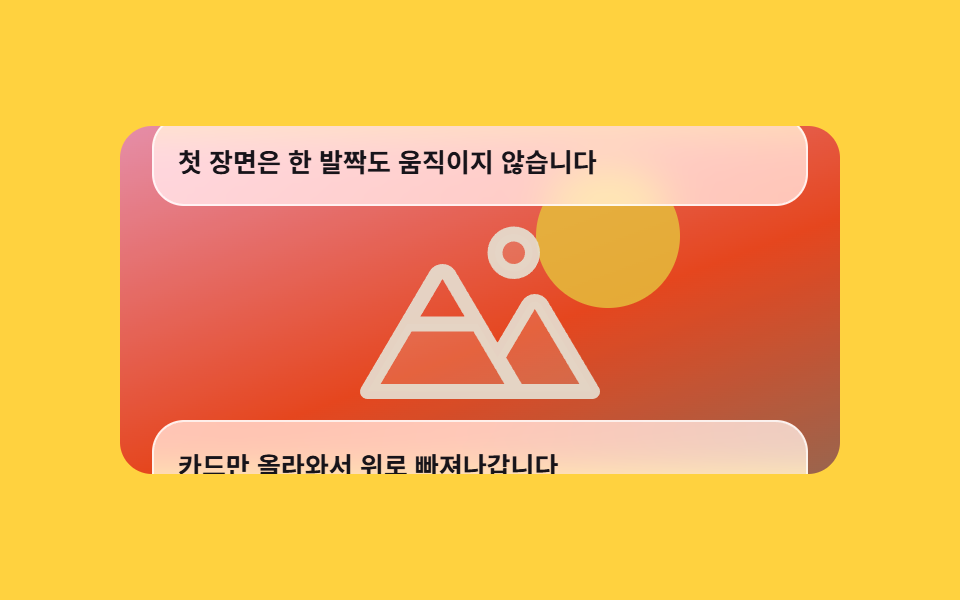
背景の場面は一歩も動かず、半透明のキャプションカードだけが下から上がって上へ抜けていき、カードに覆われるほど背景が少しずつ暗くなります。
使いどころ1枚の写真やイラストを背景に敷いて文章を順に重ねるブランド紹介・キャンペーンの冒頭画面
position: stickybackdrop-filtertranslateY
<main class="stage">
  <div class="cb is-demo">
    <div class="cb__scroller">
      <div class="cb__bg">
        <div class="cb__scene" aria-hidden="true">
          <span class="cb__sun"></span>
          <svg class="cb__peaks" viewBox="0 0 256 256" width="120" height="120" aria-hidden="true"><g fill="currentColor"><path d="M144 52a20 20 0 1 1 20 20a20 20 0 0 1-20-20m49.44 55.92a8 8 0 0 0-13.77 0l-33 55.75l-21-35.67H50.35L8 200h240Z" opacity=".2"/><path d="M164 80a28 28 0 1 0-28-28a28 28 0 0 0 28 28m0-40a12 12 0 1 1-12 12a12 12 0 0 1 12-12m90.88 155.92l-54.56-92.08A15.87 15.87 0 0 0 186.55 96a15.85 15.85 0 0 0-13.76 7.84L146.63 148l-44.84-76.1a16 16 0 0 0-27.58 0L1.11 195.94A8 8 0 0 0 8 208h240a8 8 0 0 0 6.88-12.08M88 80l23.57 40H64.43ZM22 192l33-56h66l33 56Zm150.57 0l-16.66-28.28L186.55 112L234 192Z"/></g></svg>
        </div>
        <div class="cb__dim" aria-hidden="true"></div>
      </div>
      <div class="cb__caps">
        <p class="cb__cap">最初の場面は一歩も動きません。</p>
        <p class="cb__cap">カードだけが上がって上へ抜けていきます。</p>
        <p class="cb__cap">覆われるほど背景が少しずつ暗くなります。</p>
      </div>
    </div>
  </div>
</main>
@use "../../../../site/static/demo-tokens" as *;
// ── 변수 3개 ──────────────────────────────────────────
$duration: 1s; // alternate 라 한 바퀴는 2s
$easing: linear;
$color: $subject-ink;
@include stage($stage-yellow);
.cb {
--h: clamp(148px, 58vh, 176px);
width: min(360px, 92vw);
}
// ⚠ 타임라인에 이름을 붙여 둔다. scroll(nearest) 는 `overflow: hidden` 인 상자도
// 스크롤 컨테이너로 쳐서, 배경 상자 안의 요소가 **절대 안 움직이는** 타임라인에 묶인다 (실측)
.cb__scroller {
height: var(--h);
overflow-y: auto;
scroll-timeline-name: --cb-scroll;
scroll-timeline-axis: block;
border-radius: $r-card;
scrollbar-width: none;
&::-webkit-scrollbar { display: none; }
}
// ── 실제 동작 ① 배경 장면은 스크롤 상자 안에 붙어 제자리에 남는다 ──
.cb__bg {
position: sticky;
top: 0;
height: var(--h);
overflow: hidden;
}
.cb__scene {
display: grid;
place-items: center;
height: 100%;
background: linear-gradient(160deg, $subject-pink 0%, $stage-orange 58%, #aa6f54 100%);
color: rgba(255, 247, 230, .92);
}
.cb__sun {
grid-area: 1 / 1;
width: 72px;
height: 72px;
border-radius: 50%;
background: rgba($stage-yellow, .85);
transform: translate(64px, -32px);
}
.cb__peaks { grid-area: 1 / 1; transform: translateY(12px); }
// ── 실제 동작 ② 가려진 만큼 어두워진다 — 스크롤 진행이 곧 불투명도 ──
.cb__dim {
position: absolute;
inset: 0;
background: $color;
opacity: 0;
animation-name: cb-dim;
animation-duration: 1s;
animation-timing-function: linear;
animation-fill-mode: both;
animation-timeline: --cb-scroll;
}
@keyframes cb-dim {
from { opacity: 0; }
to { opacity: .46; }
}
// 캡션 줄은 배경 위로 올라탄다 — 음수 margin 이 배경 한 판을 통째로 덮는다
.cb__caps {
position: relative;
display: grid;
gap: calc(var(--h) * .62);
margin-top: calc(var(--h) * -1);
padding: calc(var(--h) * .44) $sp-4 calc(var(--h) * .5);
}
.cb__cap {
margin: 0;
padding: $sp-3;
border: 1px solid rgba(255, 255, 255, .72);
border-radius: $r-card;
// ⚠ 반투명 흰 판을 어두워지는 배경 위에 올리면 합성색이 같이 어두워져 먹색 글자 대비가 떨어진다.
// .34 로 뒀더니 마지막 카드가 읽히지 않아 .70 까지 올렸다 (실측)
background: rgba(255, 255, 255, .7);
backdrop-filter: blur(10px) saturate(150%);
-webkit-backdrop-filter: blur(10px) saturate(150%);
color: $color;
font-size: 13px;
line-height: 19px;
font-weight: 700;
}
// ── 격자 미리보기 루프 ────────────────────────────────
// 트랙(.cb__caps)만 민다. 스크롤 상자 자체에 transform 을 걸면 내용이 날아간다(051 실측)
.cb.is-demo .cb__caps {
animation-name: cb-scrub;
animation-duration: $duration;
animation-timing-function: $easing;
animation-direction: alternate;
animation-iteration-count: infinite;
animation-fill-mode: both;
}
.cb.is-demo .cb__dim {
animation-duration: $duration;
animation-direction: alternate;
animation-iteration-count: infinite;
animation-timeline: auto;
}
@keyframes cb-scrub {
from { transform: translateY(0); }
to { transform: translateY(-328px); }
}
@media (prefers-reduced-motion: reduce) {
.cb__dim { animation: none !important; opacity: .3; }
.cb.is-demo .cb__caps { animation: none !important; transform: none; }
}html, body {
margin: 0;
overflow: hidden;
}
.stage {
box-sizing: border-box;
min-height: 100vh;
display: grid;
place-items: center;
margin: 0;
background: #ffd23f;
font-family: -apple-system, "Segoe UI", "Noto Sans KR", sans-serif;
padding: clamp(8px, 4vw, 24px);
}
.cb {
--h: clamp(148px, 58vh, 176px);
width: min(360px, 92vw);
}
.cb__scroller {
height: var(--h);
overflow-y: auto;
scroll-timeline-name: --cb-scroll;
scroll-timeline-axis: block;
border-radius: 16px;
scrollbar-width: none;
}
.cb__scroller::-webkit-scrollbar {
display: none;
}
.cb__bg {
position: sticky;
top: 0;
height: var(--h);
overflow: hidden;
}
.cb__scene {
display: grid;
place-items: center;
height: 100%;
background: linear-gradient(160deg, #ff9ebb 0%, #ff4d1f 58%, #aa6f54 100%);
color: rgba(255, 247, 230, 0.92);
}
.cb__sun {
grid-area: 1/1;
width: 72px;
height: 72px;
border-radius: 50%;
background: rgba(255, 210, 63, 0.85);
transform: translate(64px, -32px);
}
.cb__peaks {
grid-area: 1/1;
transform: translateY(12px);
}
.cb__dim {
position: absolute;
inset: 0;
background: #17141a;
opacity: 0;
animation-name: cb-dim;
animation-duration: 1s;
animation-timing-function: linear;
animation-fill-mode: both;
animation-timeline: --cb-scroll;
}
@keyframes cb-dim {
from {
opacity: 0;
}
to {
opacity: 0.46;
}
}
.cb__caps {
position: relative;
display: grid;
gap: calc(var(--h) * 0.62);
margin-top: calc(var(--h) * -1);
padding: calc(var(--h) * 0.44) 16px calc(var(--h) * 0.5);
}
.cb__cap {
margin: 0;
padding: 12px;
border: 1px solid rgba(255, 255, 255, 0.72);
border-radius: 16px;
background: rgba(255, 255, 255, 0.7);
backdrop-filter: blur(10px) saturate(150%);
-webkit-backdrop-filter: blur(10px) saturate(150%);
color: #17141a;
font-size: 13px;
line-height: 19px;
font-weight: 700;
}
.cb.is-demo .cb__caps {
animation-name: cb-scrub;
animation-duration: 1s;
animation-timing-function: linear;
animation-direction: alternate;
animation-iteration-count: infinite;
animation-fill-mode: both;
}
.cb.is-demo .cb__dim {
animation-duration: 1s;
animation-direction: alternate;
animation-iteration-count: infinite;
animation-timeline: auto;
}
@keyframes cb-scrub {
from {
transform: translateY(0);
}
to {
transform: translateY(-328px);
}
}
@media (prefers-reduced-motion: reduce) {
.cb__dim {
animation: none !important;
opacity: 0.3;
}
.cb.is-demo .cb__caps {
animation: none !important;
transform: none;
}
}// 실제 동작은 CSS 만: 배경은 position: sticky, 어두워지는 정도는 animation-timeline: scroll().
var r = document.querySelector('.cb');
var s = r.querySelector('.cb__scroller');
function stopDemo(){ r.classList.remove('is-demo'); }
r.addEventListener('pointerdown', stopDemo);
s.addEventListener('scroll', stopDemo, { passive: true });import type { CSSProperties, ReactNode } from "react";
import styles from "./CaptionOverPinnedBg.module.scss";
export type CaptionOverPinnedBgProps = {
captions?: string[];
preview?: boolean;
duration?: number;
easing?: string;
color?: string;
};
type Vars = CSSProperties & { "--duration"?: string; "--easing"?: string; "--color"?: string };
const IconPeaks = (): ReactNode => (
<svg className={styles.peaks} viewBox="0 0 256 256" width="120" height="120" aria-hidden="true"><g fill="currentColor"><path d="M144 52a20 20 0 1 1 20 20a20 20 0 0 1-20-20m49.44 55.92a8 8 0 0 0-13.77 0l-33 55.75l-21-35.67H50.35L8 200h240Z" opacity=".2"/><path d="M164 80a28 28 0 1 0-28-28a28 28 0 0 0 28 28m0-40a12 12 0 1 1-12 12a12 12 0 0 1 12-12m90.88 155.92l-54.56-92.08A15.87 15.87 0 0 0 186.55 96a15.85 15.85 0 0 0-13.76 7.84L146.63 148l-44.84-76.1a16 16 0 0 0-27.58 0L1.11 195.94A8 8 0 0 0 8 208h240a8 8 0 0 0 6.88-12.08M88 80l23.57 40H64.43ZM22 192l33-56h66l33 56Zm150.57 0l-16.66-28.28L186.55 112L234 192Z"/></g></svg>
);
export default function CaptionOverPinnedBg({
captions = [
"The first scene never moves an inch.",
"Only the cards rise and leave through the top.",
"The more it is covered, the darker the backdrop gets.",
],
preview = true,
duration = 1000,
easing = "linear",
color = "#17141a",
}: CaptionOverPinnedBgProps): ReactNode {
const vars: Vars = { "--duration": `${duration}ms`, "--easing": easing, "--color": color };
const cls = preview ? `${styles.cb} ${styles.isDemo}` : styles.cb;
return (
<div className={cls} style={vars}>
<div className={styles.scroller}>
<div className={styles.bg}>
<div className={styles.scene} aria-hidden="true">
<span className={styles.sun} />
<IconPeaks />
</div>
<div className={styles.dim} aria-hidden="true" />
</div>
<div className={styles.caps}>
{captions.map((c: string): ReactNode => (
<p className={styles.cap} key={c}>{c}</p>
))}
</div>
</div>
</div>
);
}02 固定背景を通るキャプション — 計測 累積面積 43.372% · 動いたフレーム 23/23GODRICH オリジナル · SCSS と React は zip に同梱 · スクロールテリング 作り方 9選 — コピペOKのCSS
このデモが属する記事
 スクロールテリング 作り方 9選 — コピペOKのCSSスクロールテリングとは、スクロール位置を時計の代わりに使い、ひとつの区間の中で場面を順番に切り替える組み立て方です。ここにある9つは効果の違いではなく、場面の組み立て方そのものが違います。 この記事のデモをすべて見る