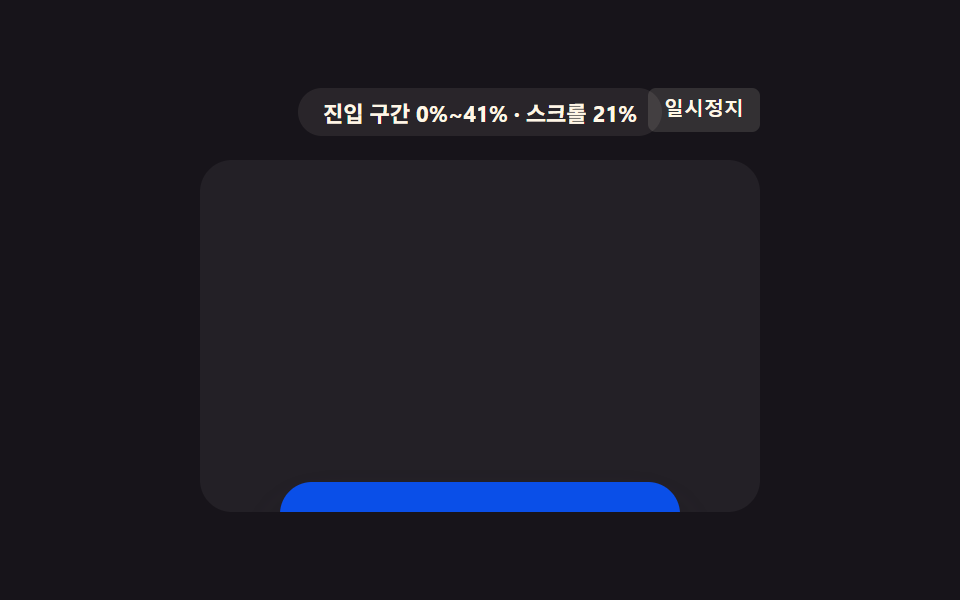
04区間値に沿ってピントが外れたり合ったりするカード
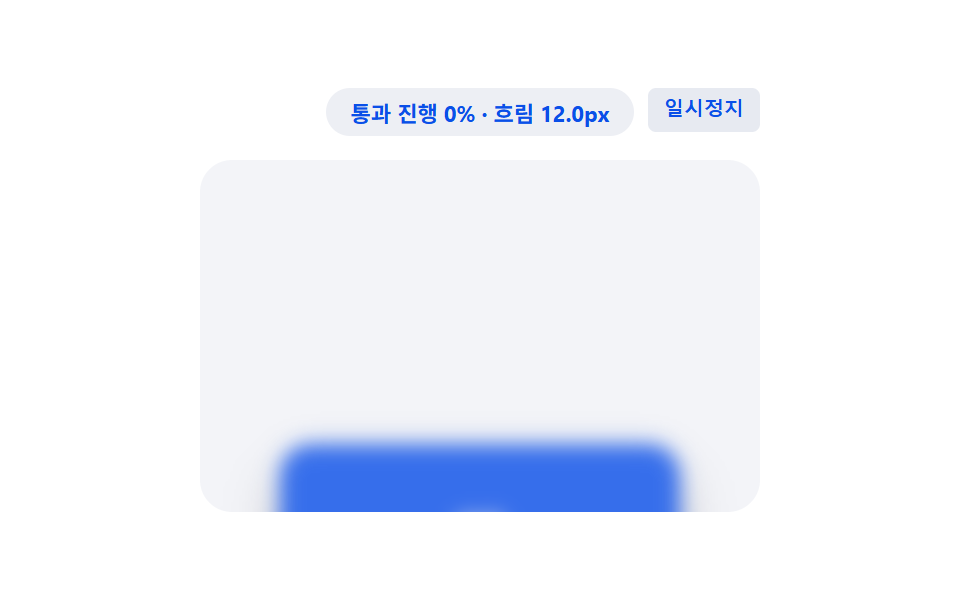
要素が画面を通過する区間の値に応じてぼかしの値が大きくなったり小さくなったりを繰り返し、入るときと出るときそれぞれピントが外れたり合ったりする。
使いどころプロダクト紹介セクションのピント切り替え
animation-range: coverfilter: blurhump
<main class="stage">
<div class="bfs is-demo" id="bfsRoot">
  <div class="bfs__badge" id="bfsBadge">通過区間 0%~100%</div>
  <button class="bfs__ctrl" id="bfsCtrl" type="button">一時停止</button>
  <div class="bfs__view" id="bfsView">
    <div class="bfs__track" id="bfsTrack">
      <div class="bfs__spacer bfs__spacer--top"></div>
      <div class="bfs__card" id="bfsCard">
        <span class="bfs__label">製品</span>
      </div>
      <div class="bfs__spacer bfs__spacer--bottom"></div>
    </div>
  </div>
</div>
</main>
@use "../../../../site/static/demo-tokens" as *;
// 핵심: animation-timeline: view() + animation-range: cover 로 요소가 뷰포트를
// 통과하는 전체 구간 값(0~1)에 흐림 정도를 묶는다 — 시작·끝에서 흐리고 중간에서
// 또렷해진다(초점이 풀렸다 맞는다). 미지원 환경은 스크롤 위치로 같은 통과 진행 값을
// 직접 계산해 동일한 흐림 값을 그린다.
$duration: $dur-loop;
$easing: linear;
$color: $subject-blue-deep;
@include stage($stage-paper);
.bfs {
position: relative;
width: min(100%, 280px);
display: flex;
flex-direction: column;
align-items: center;
gap: $sp-3;
}
.bfs__badge {
padding: $sp-1 $sp-3;
border-radius: $r-pill;
background: rgba(20, 45, 120, .08);
color: $subject-blue-deep;
font-weight: 700;
font-size: 11px;
font-variant-numeric: tabular-nums;
}
.bfs__ctrl {
position: absolute;
top: 0;
right: 0;
border: 0;
border-radius: $r-xs;
padding: $sp-1 $sp-2;
background: rgba(20, 45, 120, .10);
color: $subject-blue-deep;
font-weight: 600;
font-size: 10px;
line-height: 1.4;
cursor: pointer;
}
.bfs__ctrl:focus-visible { outline: 2px solid $subject-blue-deep; outline-offset: 2px; }
.bfs__view {
box-sizing: border-box;
width: 100%;
height: 176px;
overflow-y: auto;
overflow-x: hidden;
border-radius: $r-card;
background: rgba(20, 45, 120, .05);
scrollbar-width: thin;
}
.bfs__track {
display: flex;
flex-direction: column;
align-items: center;
}
.bfs__spacer--top { height: 200px; flex: 0 0 auto; }
.bfs__spacer--bottom { height: 200px; flex: 0 0 auto; }
.bfs__card {
flex: 0 0 auto;
box-sizing: border-box;
width: 200px;
height: 84px;
display: grid;
place-items: center;
border-radius: $r-card;
background: $color;
box-shadow: $shadow-raised;
filter: blur(var(--blur-max, 12px));
}
.bfs__label {
color: $subject-cream;
font-weight: 700;
font-size: 14px;
}
.supports-vt .bfs__card {
animation-name: bfsFocus;
animation-duration: 1s;
animation-timing-function: linear;
animation-fill-mode: both;
animation-timeline: view();
animation-range: cover;
}
@keyframes bfsFocus {
0% { filter: blur(var(--blur-max, 12px)); opacity: .55; }
50% { filter: blur(0px); opacity: 1; }
100% { filter: blur(var(--blur-max, 12px)); opacity: .55; }
}
@media (max-width: 340px) {
.bfs { gap: $sp-2; }
.bfs__view { height: 130px; }
.bfs__spacer--top { height: 150px; }
.bfs__spacer--bottom { height: 150px; }
.bfs__card { width: 168px; height: 68px; }
}
@media (prefers-reduced-motion: reduce) {
.bfs__card { animation: none !important; filter: blur(0px) !important; opacity: 1 !important; }
}html, body {
margin: 0;
overflow: hidden;
}
.stage {
box-sizing: border-box;
min-height: 100vh;
display: grid;
place-items: center;
margin: 0;
background: #ffffff;
font-family: -apple-system, "Segoe UI", "Noto Sans KR", sans-serif;
padding: clamp(8px, 4vw, 24px);
}
.bfs {
position: relative;
width: min(100%, 280px);
display: flex;
flex-direction: column;
align-items: center;
gap: 12px;
}
.bfs__badge {
padding: 4px 12px;
border-radius: 999px;
background: rgba(20, 45, 120, 0.08);
color: #0a4fe8;
font-weight: 700;
font-size: 11px;
font-variant-numeric: tabular-nums;
}
.bfs__ctrl {
position: absolute;
top: 0;
right: 0;
border: 0;
border-radius: 4px;
padding: 4px 8px;
background: rgba(20, 45, 120, 0.1);
color: #0a4fe8;
font-weight: 600;
font-size: 10px;
line-height: 1.4;
cursor: pointer;
}
.bfs__ctrl:focus-visible {
outline: 2px solid #0a4fe8;
outline-offset: 2px;
}
.bfs__view {
box-sizing: border-box;
width: 100%;
height: 176px;
overflow-y: auto;
overflow-x: hidden;
border-radius: 16px;
background: rgba(20, 45, 120, 0.05);
scrollbar-width: thin;
}
.bfs__track {
display: flex;
flex-direction: column;
align-items: center;
}
.bfs__spacer--top {
height: 200px;
flex: 0 0 auto;
}
.bfs__spacer--bottom {
height: 200px;
flex: 0 0 auto;
}
.bfs__card {
flex: 0 0 auto;
box-sizing: border-box;
width: 200px;
height: 84px;
display: grid;
place-items: center;
border-radius: 16px;
background: #0a4fe8;
box-shadow: 0 14px 24px rgba(23, 20, 26, 0.32);
filter: blur(var(--blur-max, 12px));
}
.bfs__label {
color: #fff7e6;
font-weight: 700;
font-size: 14px;
}
.supports-vt .bfs__card {
animation-name: bfsFocus;
animation-duration: 1s;
animation-timing-function: linear;
animation-fill-mode: both;
animation-timeline: view();
animation-range: cover;
}
@keyframes bfsFocus {
0% {
filter: blur(var(--blur-max, 12px));
opacity: 0.55;
}
50% {
filter: blur(0px);
opacity: 1;
}
100% {
filter: blur(var(--blur-max, 12px));
opacity: 0.55;
}
}
@media (max-width: 340px) {
.bfs {
gap: 8px;
}
.bfs__view {
height: 130px;
}
.bfs__spacer--top {
height: 150px;
}
.bfs__spacer--bottom {
height: 150px;
}
.bfs__card {
width: 168px;
height: 68px;
}
}
@media (prefers-reduced-motion: reduce) {
.bfs__card {
animation: none !important;
filter: blur(0px) !important;
opacity: 1 !important;
}
}(function () {
// VIEWTL_BLUR_MAX_PX — 변형 2: 12 → 24 로 늘리면 들어오고 나갈 때 초점이 풀리는 정도가 더 뚜렷해진다.
var VIEWTL_BLUR_MAX_PX = 12;
document.documentElement.style.setProperty('--blur-max', VIEWTL_BLUR_MAX_PX + 'px');
var supportsVt = CSS.supports('animation-timeline: view()');
var root = document.getElementById('bfsRoot');
var view = document.getElementById('bfsView');
var card = document.getElementById('bfsCard');
var badge = document.getElementById('bfsBadge');
var ctrl = document.getElementById('bfsCtrl');
root.classList.add(supportsVt ? 'supports-vt' : 'no-vt');
// 계산 한 겹: 요소가 뷰포트를 완전히 통과하는 구간(cover) 진행 값을 요소 높이·뷰포트
// 높이·스크롤 위치로 직접 계산한다 (교차 비율이 아니라 통과 위치 값).
function coverProgress() {
var elTop = card.offsetTop;
var elH = card.offsetHeight;
var viewH = view.clientHeight;
var raw = (view.scrollTop - elTop + viewH) / (elH + viewH);
return Math.min(1, Math.max(0, raw));
}
function render(cov) {
var hump = 1 - Math.abs(cov * 2 - 1);
var blurPx = VIEWTL_BLUR_MAX_PX * (1 - hump);
if (!supportsVt) {
card.style.filter = 'blur(' + blurPx.toFixed(1) + 'px)';
card.style.opacity = String(0.55 + 0.45 * hump);
}
badge.textContent = '通過進行 ' + Math.round(cov * 100) + '% · ぼかし ' + blurPx.toFixed(1) + 'px';
}
view.addEventListener('scroll', function () {
render(coverProgress());
}, { passive: true });
render(coverProgress());
// 자동 시연: rAF 로 프레임을 누적해 컨테이너를 왕복 스크롤한다.
var playing = true;
var frame = 0;
var PERIOD = 80;
function tick() {
if (playing) {
frame += 1;
var max = view.scrollHeight - view.clientHeight;
var t = frame % (PERIOD * 2);
var f = t < PERIOD ? (t / PERIOD) : ((PERIOD * 2 - t) / PERIOD);
view.scrollTop = f * max;
render(coverProgress());
}
requestAnimationFrame(tick);
}
requestAnimationFrame(tick);
function stopAuto() {
if (root.classList.contains('is-demo')) { root.classList.remove('is-demo'); }
playing = false;
ctrl.textContent = '再生';
}
view.addEventListener('wheel', stopAuto, { passive: true });
view.addEventListener('touchstart', stopAuto, { passive: true });
ctrl.addEventListener('click', function () {
playing = !playing;
ctrl.textContent = playing ? '一時停止' : '再生';
if (playing) { root.classList.add('is-demo'); }
render(coverProgress());
});
ctrl.addEventListener('keydown', function (e) {
if (e.key === 'r' || e.key === 'R') {
frame = 0;
view.scrollTop = 0;
playing = true;
root.classList.add('is-demo');
ctrl.textContent = '一時停止';
render(coverProgress());
}
});
window.addEventListener('resize', function () {
render(coverProgress());
});
var reduce = window.matchMedia('(prefers-reduced-motion: reduce)').matches;
if (reduce) {
playing = false;
root.classList.remove('is-demo');
card.style.filter = 'blur(0px)';
card.style.opacity = '1';
badge.textContent = '通過進行 50% · ぼかし 0.0px';
}
})();import { useEffect, useRef, useState } from "react";
import styles from "./BlurFocusStack.module.scss";
// 핵심: animation-timeline: view() + animation-range: cover 로 요소가 뷰포트를
// 통과하는 전체 구간 값(0~1)에 흐림 정도를 묶는다 — 시작·끝에서 흐리고 중간에서
// 또렷해진다. 미지원 환경은 스크롤 위치로 같은 통과 진행 값을 직접 계산한다.
// VIEWTL_BLUR_MAX_PX — 변형 2: 12 → 24 로 늘리면 흐려지는 정도가 더 뚜렷해진다.
const VIEWTL_BLUR_MAX_PX = 12;
export default function BlurFocusStack() {
const rootRef = useRef<HTMLDivElement>(null);
const viewRef = useRef<HTMLDivElement>(null);
const cardRef = useRef<HTMLDivElement>(null);
const [badge, setBadge] = useState("통과 구간 0%~100%");
const [demo, setDemo] = useState(true);
const [supportsVt, setSupportsVt] = useState(false);
useEffect(() => {
const view = viewRef.current;
const card = cardRef.current;
const root = rootRef.current;
if (!view || !card || !root) { return; }
card.style.setProperty("--blur-max", VIEWTL_BLUR_MAX_PX + "px");
const vt = CSS.supports("animation-timeline: view()");
setSupportsVt(vt);
function coverProgress() {
const elTop = card!.offsetTop;
const elH = card!.offsetHeight;
const viewH = view!.clientHeight;
const raw = (view!.scrollTop - elTop + viewH) / (elH + viewH);
return Math.min(1, Math.max(0, raw));
}
function render(cov: number) {
const hump = 1 - Math.abs(cov * 2 - 1);
const blurPx = VIEWTL_BLUR_MAX_PX * (1 - hump);
if (!vt) {
card!.style.filter = "blur(" + blurPx.toFixed(1) + "px)";
card!.style.opacity = String(0.55 + 0.45 * hump);
}
setBadge("통과 진행 " + Math.round(cov * 100) + "% · 흐림 " + blurPx.toFixed(1) + "px");
}
function onScroll() { render(coverProgress()); }
view.addEventListener("scroll", onScroll, { passive: true });
render(coverProgress());
let playing = true;
let frame = 0;
const PERIOD = 80;
let rafId = 0;
function tick() {
if (playing) {
frame += 1;
const max = view!.scrollHeight - view!.clientHeight;
const t = frame % (PERIOD * 2);
const f = t < PERIOD ? (t / PERIOD) : ((PERIOD * 2 - t) / PERIOD);
view!.scrollTop = f * max;
render(coverProgress());
}
rafId = requestAnimationFrame(tick);
}
rafId = requestAnimationFrame(tick);
function stopAuto() {
setDemo(false);
playing = false;
}
view.addEventListener("wheel", stopAuto, { passive: true });
view.addEventListener("touchstart", stopAuto, { passive: true });
function onClick() {
playing = !playing;
setDemo(playing);
render(coverProgress());
}
function onKeyDown(e: KeyboardEvent) {
if (e.key === "r" || e.key === "R") {
frame = 0;
view!.scrollTop = 0;
playing = true;
setDemo(true);
render(coverProgress());
}
}
root.addEventListener("keydown", onKeyDown);
function onResize() { render(coverProgress()); }
window.addEventListener("resize", onResize);
const reduce = window.matchMedia("(prefers-reduced-motion: reduce)").matches;
if (reduce) {
playing = false;
setDemo(false);
card.style.filter = "blur(0px)";
card.style.opacity = "1";
setBadge("통과 진행 50% · 흐림 0.0px");
}
const ctrl = root.querySelector("button");
ctrl?.addEventListener("click", onClick);
return () => {
cancelAnimationFrame(rafId);
view.removeEventListener("scroll", onScroll);
view.removeEventListener("wheel", stopAuto);
view.removeEventListener("touchstart", stopAuto);
root.removeEventListener("keydown", onKeyDown);
window.removeEventListener("resize", onResize);
ctrl?.removeEventListener("click", onClick);
};
// eslint-disable-next-line react-hooks/exhaustive-deps
}, []);
return (
<main className={styles.stage}>
<div ref={rootRef} className={`${styles.bfs} ${demo ? styles["is-demo"] : ""} ${supportsVt ? styles["supports-vt"] : styles["no-vt"]}`}>
<div className={styles["bfs__badge"]}>{badge}</div>
<button className={styles["bfs__ctrl"]} type="button">{demo ? "일시정지" : "재생"}</button>
<div ref={viewRef} className={styles["bfs__view"]}>
<div className={styles["bfs__track"]}>
<div className={`${styles["bfs__spacer"]} ${styles["bfs__spacer--top"]}`} />
<div ref={cardRef} className={styles["bfs__card"]}>
<span className={styles["bfs__label"]}>제품</span>
</div>
<div className={`${styles["bfs__spacer"]} ${styles["bfs__spacer--bottom"]}`} />
</div>
</div>
</div>
</main>
);
}04 区間値に沿ってピントが外れたり合ったりするカード — 計測 累積面積 28.216% · 動いたフレーム 23/23GODRICH オリジナル · SCSS と React は zip に同梱 · css スクロール アニメーション 9選 — 区間値で切り替える
このデモが属する記事
 css スクロール アニメーション 9選 — 区間値で切り替えるcss スクロール アニメーション の9パターンです。画面を下げるとカードが一枚ぼやけたまま浮かび、通り過ぎるうちに次第にはっきりしてくる。そのぼかしの度合いはスクロール位置ではなく、その要素が画面を通過する区間の値ひとつで決まる。4番はこ この記事のデモをすべて見る