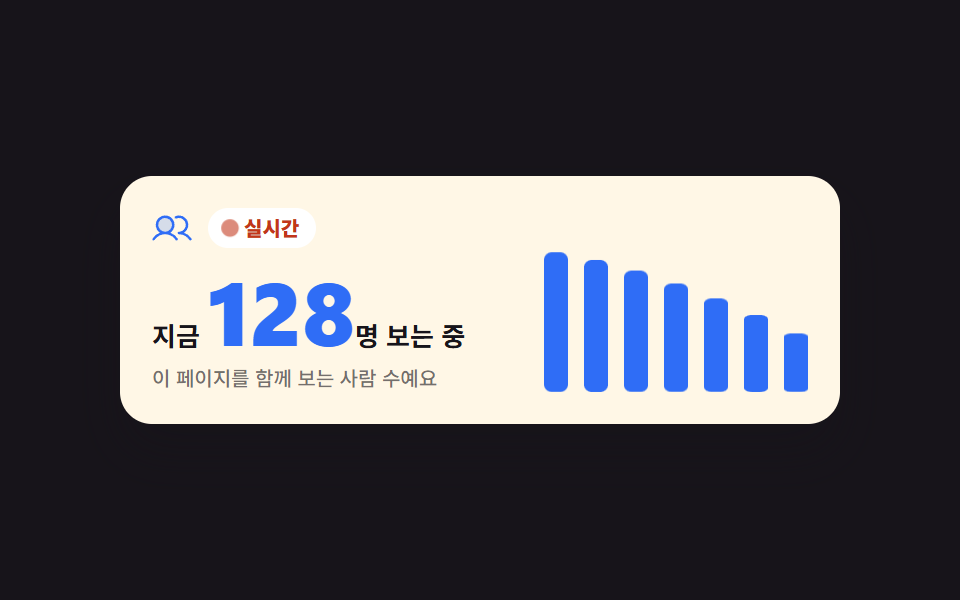
01リアルタイム視聴カウンター
「いまn人が視聴中」の数字が1.2秒ごとに増減し、横の七本のバーが高さを追います。画面を見られない人には要約文が伝わります。
使いどころ
setIntervalscaleYaria-live

<main class="stage is-demo">
  <section class="lv" aria-label="リアルタイム視聴者数">
    <div class="lv__left">
      <p class="lv__head">
        <span class="lv__ic" aria-hidden="true"><svg viewBox="0 0 256 256" width="20" height="20"><g fill="currentColor"><path d="M136 108a52 52 0 1 1-52-52a52 52 0 0 1 52 52" opacity=".2"/><path d="M117.25 157.92a60 60 0 1 0-66.5 0a95.83 95.83 0 0 0-47.22 37.71a8 8 0 1 0 13.4 8.74a80 80 0 0 1 134.14 0a8 8 0 0 0 13.4-8.74a95.83 95.83 0 0 0-47.22-37.71M40 108a44 44 0 1 1 44 44a44.05 44.05 0 0 1-44-44m210.14 98.7a8 8 0 0 1-11.07-2.33A79.83 79.83 0 0 0 172 168a8 8 0 0 1 0-16a44 44 0 1 0-16.34-84.87a8 8 0 1 1-5.94-14.85a60 60 0 0 1 55.53 105.64a95.83 95.83 0 0 1 47.22 37.71a8 8 0 0 1-2.33 11.07"/></g></svg></span>
        <span class="lv__live"><span class="lv__dot" aria-hidden="true"></span>ライブ</span>
      </p>
      <p class="lv__count">いま <b class="lv__n" id="lv-n">128</b>人が視聴中</p>
      <p class="lv__st" id="lv-st" role="status" aria-live="polite">このページを同時に見ている人数です</p>
    </div>
    <div class="lv__bars" aria-hidden="true">
      <span class="lv__bar" style="--i:0;--v:.42"><i></i></span>
      <span class="lv__bar" style="--i:1;--v:.60"><i></i></span>
      <span class="lv__bar" style="--i:2;--v:.48"><i></i></span>
      <span class="lv__bar" style="--i:3;--v:.82"><i></i></span>
      <span class="lv__bar" style="--i:4;--v:.55"><i></i></span>
      <span class="lv__bar" style="--i:5;--v:.70"><i></i></span>
      <span class="lv__bar" style="--i:6;--v:.92"><i></i></span>
    </div>
  </section>
</main>
@use "../../../../site/static/demo-tokens" as *;
// ── 변수 3개 ──────────────────────────────────────────
$duration: $dur-loop;
$easing: $ease-pop;
$color: $subject-blue;
@include stage($stage-ink);
.lv {
box-sizing: border-box; width: min(360px, 94vw);
display: flex; align-items: flex-end; gap: $sp-5;
background: $subject-cream; color: $subject-ink;
border-radius: $r-card; padding: $sp-4; box-shadow: $shadow-raised;
}
.lv__left { flex: 1 1 auto; min-width: 0; }
.lv__head { display: flex; align-items: center; gap: $sp-2; margin: 0; }
.lv__ic { display: inline-flex; color: $color; }
.lv__live {
display: inline-flex; align-items: center; gap: $sp-1;
padding: $sp-1 $sp-2; border-radius: $r-pill;
background: $stage-paper; color: $error; // 크림 카드 위 붉은 틴트 면은 4.31:1 — 페이퍼 면 위 $error 5.47:1
font-weight: 800; font-size: 10px; line-height: 1.2;
}
.lv__dot {
width: 6px; height: 6px; border-radius: 50%; background: $error;
animation-name: lv-pulse; animation-duration: $duration; animation-timing-function: $ease-out;
animation-iteration-count: infinite;
}
@keyframes lv-pulse {
0%, 100% { transform: scale(1); opacity: 1; }
50% { transform: scale(1.6); opacity: .45; }
}
.lv__count { margin: $sp-2 0 0; font-weight: 700; font-size: 13px; line-height: 1.2; }
.lv__n {
font-weight: 800; font-size: 44px; line-height: 1.05;
font-variant-numeric: tabular-nums; color: $color;
}
.lv__st { margin: $sp-1 0 0; font-weight: 500; font-size: 10px; line-height: 1.3; color: rgba(23, 20, 26, .6); }
// 막대 7칸 — 폭은 grid 가 균등 분배하고(BD19 오탐 회피), 높이는 scaleY 배율만 바꾼다
.lv__bars {
flex: 0 0 auto; display: grid; grid-template-columns: repeat(7, 1fr);
gap: $sp-2; width: 132px; height: 72px;
}
.lv__bar { display: flex; align-items: flex-end; justify-content: center; }
.lv__bar i {
display: block; width: 12px; height: 100%; border-radius: $r-xs; background: $color;
transform: scaleY(var(--v, .5)); transform-origin: bottom; // 규칙8: 아래서 차오름
transition: transform $dur-base $ease-out;
}
// ── 측정용 자동 루프 ────────────────────────────────
// 손대기 전에도 막대가 물결치게 — 사람이 누르거나 키를 치면 JS 가 .is-demo 를 뗀다
.stage.is-demo .lv__bar i {
animation-name: lv-wave;
animation-duration: $duration;
animation-timing-function: $ease-out;
animation-iteration-count: infinite;
animation-fill-mode: backwards;
animation-delay: calc(var(--i) * 90ms);
}
@keyframes lv-wave {
0%, 100% { transform: scaleY(.34); }
35% { transform: scaleY(1); }
70% { transform: scaleY(.58); }
}
// ── 접근성 ──────────────────────────────────────────
@media (prefers-reduced-motion: reduce) {
.lv__dot, .stage.is-demo .lv__bar i, .lv__bar i {
animation: none !important;
transition: none !important;
}
.stage.is-demo .lv__bar i { transform: scaleY(var(--v, .5)) !important; }
}
// ── 반응형(320×200) ──────────────────────────────────
@media (max-width: 340px), (max-height: 220px) {
.lv { width: min(292px, 92vw); gap: $sp-3; padding: $sp-3; }
.lv__head { gap: $sp-1; }
.lv__ic svg { width: 14px; height: 14px; }
.lv__live { padding: 0 $sp-1; font-size: 9px; }
.lv__count { margin-top: $sp-1; font-size: 11px; }
.lv__n { font-size: 28px; }
.lv__st { margin-top: 0; font-size: 9px; }
.lv__bars { gap: $sp-1; width: 80px; height: 46px; }
.lv__bar i { width: 8px; }
}html, body {
margin: 0;
overflow: hidden;
}
.stage {
box-sizing: border-box;
min-height: 100vh;
display: grid;
place-items: center;
margin: 0;
background: #17141a;
font-family: -apple-system, "Segoe UI", "Noto Sans KR", sans-serif;
padding: clamp(8px, 4vw, 24px);
}
.lv {
box-sizing: border-box;
width: min(360px, 94vw);
display: flex;
align-items: flex-end;
gap: 20px;
background: #fff7e6;
color: #17141a;
border-radius: 16px;
padding: 16px;
box-shadow: 0 14px 24px rgba(23, 20, 26, 0.32);
}
.lv__left {
flex: 1 1 auto;
min-width: 0;
}
.lv__head {
display: flex;
align-items: center;
gap: 8px;
margin: 0;
}
.lv__ic {
display: inline-flex;
color: #2f6df6;
}
.lv__live {
display: inline-flex;
align-items: center;
gap: 4px;
padding: 4px 8px;
border-radius: 999px;
background: #ffffff;
color: #c2361a;
font-weight: 800;
font-size: 10px;
line-height: 1.2;
}
.lv__dot {
width: 6px;
height: 6px;
border-radius: 50%;
background: #c2361a;
animation-name: lv-pulse;
animation-duration: 2s;
animation-timing-function: ease-out;
animation-iteration-count: infinite;
}
@keyframes lv-pulse {
0%, 100% {
transform: scale(1);
opacity: 1;
}
50% {
transform: scale(1.6);
opacity: 0.45;
}
}
.lv__count {
margin: 8px 0 0;
font-weight: 700;
font-size: 13px;
line-height: 1.2;
}
.lv__n {
font-weight: 800;
font-size: 44px;
line-height: 1.05;
font-variant-numeric: tabular-nums;
color: #2f6df6;
}
.lv__st {
margin: 4px 0 0;
font-weight: 500;
font-size: 10px;
line-height: 1.3;
color: rgba(23, 20, 26, 0.6);
}
.lv__bars {
flex: 0 0 auto;
display: grid;
grid-template-columns: repeat(7, 1fr);
gap: 8px;
width: 132px;
height: 72px;
}
.lv__bar {
display: flex;
align-items: flex-end;
justify-content: center;
}
.lv__bar i {
display: block;
width: 12px;
height: 100%;
border-radius: 4px;
background: #2f6df6;
transform: scaleY(var(--v, 0.5));
transform-origin: bottom;
transition: transform 300ms ease-out;
}
.stage.is-demo .lv__bar i {
animation-name: lv-wave;
animation-duration: 2s;
animation-timing-function: ease-out;
animation-iteration-count: infinite;
animation-fill-mode: backwards;
animation-delay: calc(var(--i) * 90ms);
}
@keyframes lv-wave {
0%, 100% {
transform: scaleY(0.34);
}
35% {
transform: scaleY(1);
}
70% {
transform: scaleY(0.58);
}
}
@media (prefers-reduced-motion: reduce) {
.lv__dot, .stage.is-demo .lv__bar i, .lv__bar i {
animation: none !important;
transition: none !important;
}
.stage.is-demo .lv__bar i {
transform: scaleY(var(--v, 0.5)) !important;
}
}
@media (max-width: 340px), (max-height: 220px) {
.lv {
width: min(292px, 92vw);
gap: 12px;
padding: 12px;
}
.lv__head {
gap: 4px;
}
.lv__ic svg {
width: 14px;
height: 14px;
}
.lv__live {
padding: 0 4px;
font-size: 9px;
}
.lv__count {
margin-top: 4px;
font-size: 11px;
}
.lv__n {
font-size: 28px;
}
.lv__st {
margin-top: 0;
font-size: 9px;
}
.lv__bars {
gap: 4px;
width: 80px;
height: 46px;
}
.lv__bar i {
width: 8px;
}
}// 실제 동작: setInterval 이 1.2초마다 시청자 수를 ±1~6 랜덤 워크(96~168)로 옮기고, 그 값을 막대 7칸의
// --v(=scaleY 배율)에 큐처럼 밀어 넣는다. 읽어 주는 문장은 5번에 한 번만 갱신해 화면낭독기가 쉴 새 없이 떠들지 않게 한다.
var stage = document.querySelector('.stage');
var count = document.getElementById('lv-n');
var msg = document.getElementById('lv-st');
var bars = [].slice.call(document.querySelectorAll('.lv__bar'));
var n = 128, ticks = 0;
var history = [.42, .60, .48, .82, .55, .70, .92];
function paint() {
count.textContent = n;
for (var i = 0; i < bars.length; i++) bars[i].style.setProperty('--v', history[i].toFixed(2));
}
function step() {
var d = Math.floor(Math.random() * 6) + 1;
if (Math.random() < .5) d = -d;
n = Math.max(96, Math.min(168, n + d));
history.push(Math.max(.28, Math.min(1, (n - 88) / 84)));
history.shift();
paint();
ticks++;
if (ticks % 5 === 0) msg.textContent = 'いま ' + n + '人がこのページを見ています';
}
setInterval(step, 1200);
function human() { stage.classList.remove('is-demo'); }
stage.addEventListener('pointerdown', human, { once: true });
window.addEventListener('keydown', human, { once: true });import { useEffect, useState } from "react";
import type { CSSProperties } from "react";
import styles from "./LiveViewerCounter.module.scss";
export type LiveViewerCounterProps = {
/** 격자 미리보기용 루프 길이(ms) */
duration?: number;
easing?: string;
color?: string;
};
type Vars = CSSProperties & { "--duration"?: string; "--easing"?: string; "--color"?: string };
type BarVars = CSSProperties & { "--i"?: number; "--v"?: number };
const initialBars = [0.42, 0.6, 0.48, 0.82, 0.55, 0.7, 0.92];
function Users() {
return (
<svg viewBox="0 0 256 256" width="20" height="20" aria-hidden="true">
<g fill="currentColor">
<path d="M136 108a52 52 0 1 1-52-52a52 52 0 0 1 52 52" opacity=".2" />
<path d="M117.25 157.92a60 60 0 1 0-66.5 0a95.83 95.83 0 0 0-47.22 37.71a8 8 0 1 0 13.4 8.74a80 80 0 0 1 134.14 0a8 8 0 0 0 13.4-8.74a95.83 95.83 0 0 0-47.22-37.71M40 108a44 44 0 1 1 44 44a44.05 44.05 0 0 1-44-44m210.14 98.7a8 8 0 0 1-11.07-2.33A79.83 79.83 0 0 0 172 168a8 8 0 0 1 0-16a44 44 0 1 0-16.34-84.87a8 8 0 1 1-5.94-14.85a60 60 0 0 1 55.53 105.64a95.83 95.83 0 0 1 47.22 37.71a8 8 0 0 1-2.33 11.07" />
</g>
</svg>
);
}
export default function LiveViewerCounter({
duration = 2000,
easing = "cubic-bezier(.2,1.4,.4,1)",
color = "#2f6df6",
}: LiveViewerCounterProps) {
const [n, setN] = useState(128);
const [bars, setBars] = useState<number[]>(initialBars);
const [msg, setMsg] = useState("이 페이지를 함께 보는 사람 수예요");
const [loop, setLoop] = useState(true);
// setInterval 이 1.2초마다 값을 ±1~6 옮기고(96~168), 그 값을 막대 7칸의 --v(=scaleY 배율)로 밀어 넣는다.
// 읽어 주는 문장은 5번에 한 번만 갱신해 화면낭독기가 쉴 새 없이 떠들지 않게 한다.
useEffect(() => {
let count = 128;
let tick = 0;
let history = initialBars.slice();
const id = setInterval(() => {
let d = Math.floor(Math.random() * 6) + 1;
if (Math.random() < 0.5) d = -d;
count = Math.max(96, Math.min(168, count + d));
history = history.slice(1).concat(Math.max(0.28, Math.min(1, (count - 88) / 84)));
tick += 1;
setN(count);
setBars(history);
if (tick % 5 === 0) setMsg(`지금 ${count}명이 이 페이지를 보고 있어요`);
}, 1200);
return () => clearInterval(id);
}, []);
const vars: Vars = { "--duration": `${duration}ms`, "--easing": easing, "--color": color };
const cls = [styles.lv, loop ? styles["is-demo"] : ""].filter(Boolean).join(" ");
return (
<section
className={cls}
style={vars}
aria-label="실시간 시청자 수"
onPointerDown={() => setLoop(false)}
onKeyDown={() => setLoop(false)}
>
<div className={styles.lv__left}>
<p className={styles.lv__head}>
<span className={styles.lv__ic} aria-hidden="true"><Users /></span>
<span className={styles.lv__live}>
<span className={styles.lv__dot} aria-hidden="true" />
실시간
</span>
</p>
<p className={styles.lv__count}>
지금 <b className={styles.lv__n}>{n}</b>명 보는 중
</p>
<p className={styles.lv__st} role="status" aria-live="polite">{msg}</p>
</div>
<div className={styles.lv__bars} aria-hidden="true">
{bars.map((v, i) => {
const bv: BarVars = { "--i": i, "--v": v };
return (
<span key={i} className={styles.lv__bar} style={bv}>
<i />
</span>
);
})}
</div>
</section>
);
}01 リアルタイム視聴カウンター — 計測 累積面積 3.017% · 動いたフレーム 23/23GODRICH オリジナル · SCSS と React は zip に同梱 · ランディングページ 改善に直結するセクション9選
このデモが属する記事
 ランディングページ 改善に直結するセクション9選ランディングページ 改善とは、訪問者がメールアドレスを残す・予約する・購入するという形で目的地まで進む割合を上げる作業です。この記事はその転換を直接受けるセクションを9つ、コードごと配ります。離脱しかけを引き留めるクーポンポップアップから、 この記事のデモをすべて見る