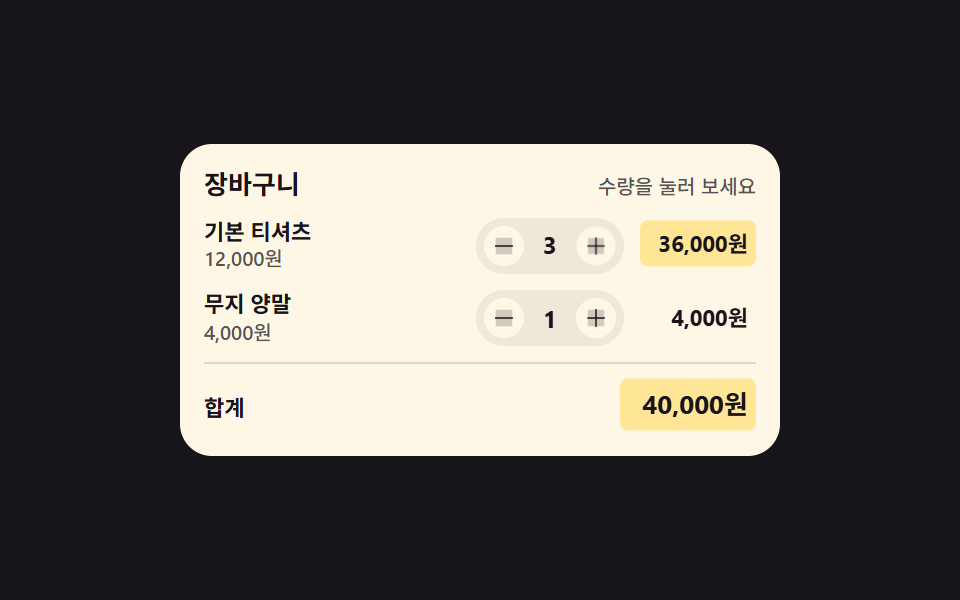
01数量を変えると小計と合計が一緒に染まる行
数量の値を変えると行の小計と下の合計が同じ瞬間に計算し直され、変わった数字のセル二つだけ背景が薄く染まって冷めていきます。
使いどころショッピングカートの明細行、予約人数を変える画面
background-colortransitiontabular-nums

<main class="stage">
  <section class="qs is-demo" id="qs" aria-label="カートの数量と合計">
    <header class="qs__head">
      <p class="qs__title">カート</p>
      <p class="qs__hint">数量を押してみて</p>
    </header>
    <ul class="qs__list">
      <li class="qs__row" data-qty="2">
        <span class="qs__info">
          <span class="qs__name">ベーシックTシャツ</span>
          <span class="qs__unit">12,000ウォン</span>
        </span>
        <span class="qs__step">
          <button class="qs__b qs__b--down" type="button" data-step="-1" aria-label="ベーシックTシャツの数量を減らす"><svg viewBox="0 0 256 256" width="12" height="12" fill="currentColor" aria-hidden="true"><path d="M216,56V200a16,16,0,0,1-16,16H56a16,16,0,0,1-16-16V56A16,16,0,0,1,56,40H200A16,16,0,0,1,216,56Z" opacity="0.2"/><path d="M224,128a8,8,0,0,1-8,8H40a8,8,0,0,1,0-16H216A8,8,0,0,1,224,128Z"/></svg></button>
          <output class="qs__q qs__swap"><span class="qs__v">2</span><span class="qs__alt" aria-hidden="true">3</span></output>
          <button class="qs__b qs__b--up" type="button" data-step="1" aria-label="ベーシックTシャツの数量を増やす"><svg viewBox="0 0 256 256" width="12" height="12" fill="currentColor" aria-hidden="true"><path d="M216,56V200a16,16,0,0,1-16,16H56a16,16,0,0,1-16-16V56A16,16,0,0,1,56,40H200A16,16,0,0,1,216,56Z" opacity="0.2"/><path d="M224,128a8,8,0,0,1-8,8H136v80a8,8,0,0,1-16,0V136H40a8,8,0,0,1,0-16h80V40a8,8,0,0,1,16,0v80h80A8,8,0,0,1,224,128Z"/></svg></button>
        </span>
        <span class="qs__sum qs__swap"><span class="qs__v qs__money">24,000ウォン</span><span class="qs__alt" aria-hidden="true">36,000ウォン</span></span>
      </li>
      <li class="qs__row" data-qty="1">
        <span class="qs__info">
          <span class="qs__name">無地の靴下</span>
          <span class="qs__unit">4,000ウォン</span>
        </span>
        <span class="qs__step">
          <button class="qs__b qs__b--down" type="button" data-step="-1" aria-label="無地の靴下の数量を減らす"><svg viewBox="0 0 256 256" width="12" height="12" fill="currentColor" aria-hidden="true"><path d="M216,56V200a16,16,0,0,1-16,16H56a16,16,0,0,1-16-16V56A16,16,0,0,1,56,40H200A16,16,0,0,1,216,56Z" opacity="0.2"/><path d="M224,128a8,8,0,0,1-8,8H40a8,8,0,0,1,0-16H216A8,8,0,0,1,224,128Z"/></svg></button>
          <output class="qs__q"><span class="qs__v">1</span></output>
          <button class="qs__b qs__b--up" type="button" data-step="1" aria-label="無地の靴下の数量を増やす"><svg viewBox="0 0 256 256" width="12" height="12" fill="currentColor" aria-hidden="true"><path d="M216,56V200a16,16,0,0,1-16,16H56a16,16,0,0,1-16-16V56A16,16,0,0,1,56,40H200A16,16,0,0,1,216,56Z" opacity="0.2"/><path d="M224,128a8,8,0,0,1-8,8H136v80a8,8,0,0,1-16,0V136H40a8,8,0,0,1,0-16h80V40a8,8,0,0,1,16,0v80h80A8,8,0,0,1,224,128Z"/></svg></button>
        </span>
        <span class="qs__sum"><span class="qs__v qs__money">4,000ウォン</span></span>
      </li>
    </ul>
    <p class="qs__total">
      <span class="qs__tlabel">合計</span>
      <output class="qs__sum qs__sum--grand qs__swap" id="qs-grand"><span class="qs__v" id="qs-grandv">28,000ウォン</span><span class="qs__alt" aria-hidden="true">40,000ウォン</span></output>
    </p>
  </section>
</main>@use "../../../../site/static/demo-tokens" as *;
// 수량을 바꾸면 그 줄 소계와 아래 합계가 같은 순간에 다시 계산되고,
// 바뀐 숫자 칸 두 곳만 background-color 가 켜졌다 transition 으로 식는다.
// 숫자는 font-variant-numeric: tabular-nums 라 자릿수가 늘어도 칸이 흔들리지 않는다.
$duration: $dur-loop;
$easing: $ease-spring;
$color: $stage-yellow;
@include stage($stage-ink);
.qs {
box-sizing: border-box;
width: min(300px, 92vw);
padding: $sp-3;
border-radius: $r-card;
background: $subject-cream;
color: $subject-ink;
font-family: -apple-system, "Segoe UI", "Noto Sans KR", sans-serif;
}
.qs * { box-sizing: border-box; }
.qs__head {
display: flex;
align-items: baseline;
justify-content: space-between;
gap: $sp-2;
}
.qs__title {
margin: 0;
font-size: 13px;
font-weight: 700;
line-height: 1.3;
}
.qs__hint {
margin: 0;
font-size: 10px;
font-weight: 500;
line-height: 1.3;
color: rgba($subject-ink, .72);
}
.qs__list {
display: grid;
gap: $sp-2;
margin: $sp-2 0 0;
padding: 0;
list-style: none;
}
.qs__row {
display: grid;
grid-template-columns: 1fr auto auto;
align-items: center;
gap: $sp-2;
}
.qs__info {
display: grid;
min-width: 0;
}
.qs__name {
font-size: 11px;
font-weight: 700;
line-height: 1.35;
white-space: nowrap;
overflow: hidden;
text-overflow: ellipsis;
}
.qs__unit {
font-size: 10px;
font-weight: 500;
line-height: 1.35;
color: rgba($subject-ink, .72);
font-variant-numeric: tabular-nums;
}
.qs__step {
display: inline-flex;
align-items: center;
gap: $sp-1;
padding: $sp-1;
border-radius: $r-pill;
background: rgba(23, 20, 26, .07);
}
.qs__b {
display: inline-grid;
place-items: center;
width: 20px;
height: 20px;
padding: 0;
margin: 0;
border: 0;
border-radius: 50%;
background: $subject-cream;
color: $subject-ink;
cursor: pointer;
&:focus-visible { outline: 2px solid $subject-blue; outline-offset: 2px; }
}
// 숫자 칸 — 자릿수가 바뀌어도 폭이 흔들리지 않게 tabular-nums + min-width
.qs__q {
position: relative;
min-width: 18px;
text-align: center;
font-size: 12px;
font-weight: 700;
line-height: 1.4;
font-variant-numeric: tabular-nums;
}
.qs__sum {
position: relative;
justify-self: end;
min-width: 58px;
padding: $sp-1;
border-radius: $r-xs;
text-align: right;
font-size: 11px;
font-weight: 700;
line-height: 1.4;
font-variant-numeric: tabular-nums;
// 실제 클릭 경로: 배경을 한 번 켜고(transition: none) 클래스를 떼면 이 transition 이 식힌다
background-color: rgba($stage-yellow, 0);
transition: background-color $dur-enter $ease-out;
&.is-hot {
background-color: rgba($stage-yellow, .62);
transition: none;
}
}
// 미리보기 루프에서만 쓰는 두 번째 숫자 — 정적 경로에서는 자리를 차지하지 않고 보이지도 않는다
.qs__alt {
position: absolute;
inset: 0;
display: grid;
place-items: center;
opacity: 0;
}
.qs__sum .qs__alt {
place-items: center end;
padding: $sp-1;
}
.qs__total {
display: flex;
align-items: center;
justify-content: space-between;
gap: $sp-2;
margin: $sp-2 0 0;
padding: $sp-2 0 0;
border-top: 1px solid rgba(23, 20, 26, .14);
}
.qs__tlabel {
font-size: 11px;
font-weight: 700;
line-height: 1.4;
}
.qs__sum--grand {
min-width: 68px;
font-size: 13px;
}
// ── 격자 미리보기 루프 (2초) ──
// 숫자 교체는 steps(1, end) 컷이다 — 크로스페이드로 겹치면 대표 이미지에 두 숫자가 반투명하게 겹친다.
// 컷만으로는 움직인 프레임이 모자라니 칸이 살짝 솟았다 내려오는 translateY 를 곁들인다.
@keyframes qs-a {
0%, 24% { opacity: 1; }
25%, 62% { opacity: 0; }
63%, 100% { opacity: 1; }
}
@keyframes qs-b {
0%, 24% { opacity: 0; }
25%, 62% { opacity: 1; }
63%, 100% { opacity: 0; }
}
@keyframes qs-tint {
0%, 24% { background-color: rgba($stage-yellow, 0); }
25% { background-color: rgba($stage-yellow, .62); }
54% { background-color: rgba($stage-yellow, 0); }
62% { background-color: rgba($stage-yellow, 0); }
63% { background-color: rgba($stage-yellow, .62); }
88%, 100% { background-color: rgba($stage-yellow, 0); }
}
@keyframes qs-pop {
0%, 24% { transform: translateY(0); }
25% { transform: translateY(-4px); }
40% { transform: translateY(0); }
62% { transform: translateY(0); }
63% { transform: translateY(-4px); }
78%, 100% { transform: translateY(0); }
}
@keyframes qs-press-up {
0%, 21% { transform: scale(1); }
25% { transform: scale(.78); }
37%, 100% { transform: scale(1); }
}
@keyframes qs-press-down {
0%, 59% { transform: scale(1); }
63% { transform: scale(.78); }
75%, 100% { transform: scale(1); }
}
.qs.is-demo {
.qs__swap .qs__v { animation-name: qs-a; }
.qs__swap .qs__alt { animation-name: qs-b; }
.qs__swap .qs__v,
.qs__swap .qs__alt {
animation-duration: $duration;
animation-timing-function: steps(1, end);
animation-iteration-count: infinite;
animation-fill-mode: backwards;
}
.qs__sum.qs__swap {
animation-name: qs-tint, qs-pop;
animation-duration: $duration, $duration;
animation-timing-function: $ease-out, $easing;
animation-iteration-count: infinite, infinite;
animation-fill-mode: backwards, backwards;
}
.qs__row:first-child .qs__b--up { animation-name: qs-press-up; }
.qs__row:first-child .qs__b--down { animation-name: qs-press-down; }
.qs__row:first-child .qs__b {
animation-duration: $duration;
animation-timing-function: $easing;
animation-iteration-count: infinite;
animation-fill-mode: backwards;
}
}
@media (max-width: 340px) {
.qs { padding: $sp-2; }
.qs__sum { min-width: 52px; }
.qs__sum--grand { min-width: 60px; }
.qs__b { width: 18px; height: 18px; }
}
@media (prefers-reduced-motion: reduce) {
.qs.is-demo .qs__v,
.qs.is-demo .qs__b,
.qs.is-demo .qs__sum {
animation: none !important;
transform: none !important;
}
.qs.is-demo .qs__v { opacity: 1 !important; }
// 정지 상태에서도 값은 보인다 — 겹쳐 둔 두 번째 숫자만 계속 감춘다
.qs.is-demo .qs__alt { animation: none !important; opacity: 0 !important; }
.qs.is-demo .qs__sum { background-color: rgba($stage-yellow, 0) !important; }
.qs__sum { transition: none !important; }
}html, body {
margin: 0;
overflow: hidden;
}
.stage {
box-sizing: border-box;
min-height: 100vh;
display: grid;
place-items: center;
margin: 0;
background: #17141a;
font-family: -apple-system, "Segoe UI", "Noto Sans KR", sans-serif;
padding: clamp(8px, 4vw, 24px);
}
.qs {
box-sizing: border-box;
width: min(300px, 92vw);
padding: 12px;
border-radius: 16px;
background: #fff7e6;
color: #17141a;
font-family: -apple-system, "Segoe UI", "Noto Sans KR", sans-serif;
}
.qs * {
box-sizing: border-box;
}
.qs__head {
display: flex;
align-items: baseline;
justify-content: space-between;
gap: 8px;
}
.qs__title {
margin: 0;
font-size: 13px;
font-weight: 700;
line-height: 1.3;
}
.qs__hint {
margin: 0;
font-size: 10px;
font-weight: 500;
line-height: 1.3;
color: rgba(23, 20, 26, 0.72);
}
.qs__list {
display: grid;
gap: 8px;
margin: 8px 0 0;
padding: 0;
list-style: none;
}
.qs__row {
display: grid;
grid-template-columns: 1fr auto auto;
align-items: center;
gap: 8px;
}
.qs__info {
display: grid;
min-width: 0;
}
.qs__name {
font-size: 11px;
font-weight: 700;
line-height: 1.35;
white-space: nowrap;
overflow: hidden;
text-overflow: ellipsis;
}
.qs__unit {
font-size: 10px;
font-weight: 500;
line-height: 1.35;
color: rgba(23, 20, 26, 0.72);
font-variant-numeric: tabular-nums;
}
.qs__step {
display: inline-flex;
align-items: center;
gap: 4px;
padding: 4px;
border-radius: 999px;
background: rgba(23, 20, 26, 0.07);
}
.qs__b {
display: inline-grid;
place-items: center;
width: 20px;
height: 20px;
padding: 0;
margin: 0;
border: 0;
border-radius: 50%;
background: #fff7e6;
color: #17141a;
cursor: pointer;
}
.qs__b:focus-visible {
outline: 2px solid #2f6df6;
outline-offset: 2px;
}
.qs__q {
position: relative;
min-width: 18px;
text-align: center;
font-size: 12px;
font-weight: 700;
line-height: 1.4;
font-variant-numeric: tabular-nums;
}
.qs__sum {
position: relative;
justify-self: end;
min-width: 58px;
padding: 4px;
border-radius: 4px;
text-align: right;
font-size: 11px;
font-weight: 700;
line-height: 1.4;
font-variant-numeric: tabular-nums;
background-color: rgba(255, 210, 63, 0);
transition: background-color 600ms ease-out;
}
.qs__sum.is-hot {
background-color: rgba(255, 210, 63, 0.62);
transition: none;
}
.qs__alt {
position: absolute;
inset: 0;
display: grid;
place-items: center;
opacity: 0;
}
.qs__sum .qs__alt {
place-items: center end;
padding: 4px;
}
.qs__total {
display: flex;
align-items: center;
justify-content: space-between;
gap: 8px;
margin: 8px 0 0;
padding: 8px 0 0;
border-top: 1px solid rgba(23, 20, 26, 0.14);
}
.qs__tlabel {
font-size: 11px;
font-weight: 700;
line-height: 1.4;
}
.qs__sum--grand {
min-width: 68px;
font-size: 13px;
}
@keyframes qs-a {
0%, 24% {
opacity: 1;
}
25%, 62% {
opacity: 0;
}
63%, 100% {
opacity: 1;
}
}
@keyframes qs-b {
0%, 24% {
opacity: 0;
}
25%, 62% {
opacity: 1;
}
63%, 100% {
opacity: 0;
}
}
@keyframes qs-tint {
0%, 24% {
background-color: rgba(255, 210, 63, 0);
}
25% {
background-color: rgba(255, 210, 63, 0.62);
}
54% {
background-color: rgba(255, 210, 63, 0);
}
62% {
background-color: rgba(255, 210, 63, 0);
}
63% {
background-color: rgba(255, 210, 63, 0.62);
}
88%, 100% {
background-color: rgba(255, 210, 63, 0);
}
}
@keyframes qs-pop {
0%, 24% {
transform: translateY(0);
}
25% {
transform: translateY(-4px);
}
40% {
transform: translateY(0);
}
62% {
transform: translateY(0);
}
63% {
transform: translateY(-4px);
}
78%, 100% {
transform: translateY(0);
}
}
@keyframes qs-press-up {
0%, 21% {
transform: scale(1);
}
25% {
transform: scale(0.78);
}
37%, 100% {
transform: scale(1);
}
}
@keyframes qs-press-down {
0%, 59% {
transform: scale(1);
}
63% {
transform: scale(0.78);
}
75%, 100% {
transform: scale(1);
}
}
.qs.is-demo .qs__swap .qs__v {
animation-name: qs-a;
}
.qs.is-demo .qs__swap .qs__alt {
animation-name: qs-b;
}
.qs.is-demo .qs__swap .qs__v,
.qs.is-demo .qs__swap .qs__alt {
animation-duration: 2s;
animation-timing-function: steps(1, end);
animation-iteration-count: infinite;
animation-fill-mode: backwards;
}
.qs.is-demo .qs__sum.qs__swap {
animation-name: qs-tint, qs-pop;
animation-duration: 2s, 2s;
animation-timing-function: ease-out, cubic-bezier(0.2, 0.8, 0.2, 1);
animation-iteration-count: infinite, infinite;
animation-fill-mode: backwards, backwards;
}
.qs.is-demo .qs__row:first-child .qs__b--up {
animation-name: qs-press-up;
}
.qs.is-demo .qs__row:first-child .qs__b--down {
animation-name: qs-press-down;
}
.qs.is-demo .qs__row:first-child .qs__b {
animation-duration: 2s;
animation-timing-function: cubic-bezier(0.2, 0.8, 0.2, 1);
animation-iteration-count: infinite;
animation-fill-mode: backwards;
}
@media (max-width: 340px) {
.qs {
padding: 8px;
}
.qs__sum {
min-width: 52px;
}
.qs__sum--grand {
min-width: 60px;
}
.qs__b {
width: 18px;
height: 18px;
}
}
@media (prefers-reduced-motion: reduce) {
.qs.is-demo .qs__v,
.qs.is-demo .qs__b,
.qs.is-demo .qs__sum {
animation: none !important;
transform: none !important;
}
.qs.is-demo .qs__v {
opacity: 1 !important;
}
.qs.is-demo .qs__alt {
animation: none !important;
opacity: 0 !important;
}
.qs.is-demo .qs__sum {
background-color: rgba(255, 210, 63, 0) !important;
}
.qs__sum {
transition: none !important;
}
}// 수량을 바꾸면 그 줄 소계와 아래 합계를 같은 순간에 다시 계산한다.
// 금액 서식은 화면에 이미 있는 단가 글자에서 뽑는다 — 언어팩이 바꿔 둔 통화 표기를 그대로 따라간다
var qsRoot = document.getElementById('qs');
var qsRows = qsRoot.querySelectorAll('.qs__row');
var qsGrand = document.getElementById('qs-grand');
var qsGrandValue = document.getElementById('qs-grandv');
function qsComma(n) { return String(n).replace(/\B(?=(\d{3})+$)/g, ','); }
function qsUnitText(row) { return row.querySelector('.qs__unit').textContent.trim(); }
function qsAmount(text) { return Number(text.replace(/[^\d]/g, '')); }
function qsMoney(row, n) { return qsUnitText(row).replace(/[\d,]+/, qsComma(n)); }
function qsPaint(row) {
var qty = Number(row.getAttribute('data-qty'));
row.querySelector('.qs__q .qs__v').textContent = String(qty);
row.querySelector('.qs__money').textContent = qsMoney(row, qty * qsAmount(qsUnitText(row)));
}
function qsTotal() {
var sum = 0;
for (var i = 0; i < qsRows.length; i++) {
sum += Number(qsRows[i].getAttribute('data-qty')) * qsAmount(qsUnitText(qsRows[i]));
}
qsGrandValue.textContent = qsMoney(qsRows[0], sum);
}
// 물들었다 식는다 — 배경만 한 번 켜고 transition 이 되돌린다
function qsTint(cell) {
cell.classList.add('is-hot');
setTimeout(function () { cell.classList.remove('is-hot'); }, 80);
}
function qsBump(row, step) {
qsRoot.classList.remove('is-demo');
var qty = Math.min(9, Math.max(1, Number(row.getAttribute('data-qty')) + step));
row.setAttribute('data-qty', String(qty));
qsPaint(row);
qsTotal();
qsTint(row.querySelector('.qs__sum'));
qsTint(qsGrand);
}
qsRoot.addEventListener('click', function (e) {
var btn = e.target.closest('.qs__b');
if (btn) { qsBump(btn.closest('.qs__row'), Number(btn.getAttribute('data-step'))); }
});import { useState } from "react";
import type { CSSProperties } from "react";
import styles from "./CartQtySubtotalSync.module.scss";
export type CartQtyLine = {
id: string;
name: string;
/** 단가 글자 그대로 — 금액 서식(통화 기호·자릿점)을 여기서 뽑아 쓴다 */
unit: string;
qty: number;
downLabel: string;
upLabel: string;
};
export type CartQtySubtotalSyncProps = {
title?: string;
hint?: string;
totalLabel?: string;
groupLabel?: string;
lines?: CartQtyLine[];
/** 격자 미리보기용 2초 자동 루프. 사람이 손대면 꺼진다 */
demo?: boolean;
duration?: number;
easing?: string;
color?: string;
};
type Vars = CSSProperties & { "--duration"?: string; "--easing"?: string; "--color"?: string };
const DEFAULT_LINES: CartQtyLine[] = [
{ id: "tee", name: "기본 티셔츠", unit: "12,000원", qty: 2, downLabel: "기본 티셔츠 수량 줄이기", upLabel: "기본 티셔츠 수량 늘리기" },
{ id: "socks", name: "무지 양말", unit: "4,000원", qty: 1, downLabel: "무지 양말 수량 줄이기", upLabel: "무지 양말 수량 늘리기" },
];
function comma(n: number): string {
return String(n).replace(/\B(?=(\d{3})+$)/g, ",");
}
function amount(text: string): number {
return Number(text.replace(/[^\d]/g, ""));
}
// 금액 서식은 단가 글자를 그대로 본떠 만든다 — 언어팩이 바꿔 둔 통화 표기를 따라간다
function money(unit: string, n: number): string {
return unit.replace(/[\d,]+/, comma(n));
}
function MinusIcon() {
return (
<svg viewBox="0 0 256 256" width="12" height="12" fill="currentColor" aria-hidden="true"><path d="M216,56V200a16,16,0,0,1-16,16H56a16,16,0,0,1-16-16V56A16,16,0,0,1,56,40H200A16,16,0,0,1,216,56Z" opacity="0.2"/><path d="M224,128a8,8,0,0,1-8,8H40a8,8,0,0,1,0-16H216A8,8,0,0,1,224,128Z"/></svg>
);
}
function PlusIcon() {
return (
<svg viewBox="0 0 256 256" width="12" height="12" fill="currentColor" aria-hidden="true"><path d="M216,56V200a16,16,0,0,1-16,16H56a16,16,0,0,1-16-16V56A16,16,0,0,1,56,40H200A16,16,0,0,1,216,56Z" opacity="0.2"/><path d="M224,128a8,8,0,0,1-8,8H136v80a8,8,0,0,1-16,0V136H40a8,8,0,0,1,0-16h80V40a8,8,0,0,1,16,0v80h80A8,8,0,0,1,224,128Z"/></svg>
);
}
export default function CartQtySubtotalSync({
title = "장바구니",
hint = "수량을 눌러 보세요",
totalLabel = "합계",
groupLabel = "장바구니 수량과 합계",
lines = DEFAULT_LINES,
demo = true,
duration = 2000,
easing = "cubic-bezier(.2,.8,.2,1)",
color = "#ffd23f",
}: CartQtySubtotalSyncProps) {
const [qty, setQty] = useState<number[]>(lines.map((l) => l.qty));
const [hot, setHot] = useState<string[]>([]);
const [live, setLive] = useState(demo);
const vars: Vars = { "--duration": `${duration}ms`, "--easing": easing, "--color": color };
const grand = lines.reduce((sum, l, i) => sum + qty[i] * amount(l.unit), 0);
// 미리보기 루프가 컷으로 갈아 끼우는 두 번째 값 — 첫 줄 수량이 하나 늘었을 때의 숫자
const altQty = lines[0].qty + 1;
const altGrand = lines.reduce((sum, l, i) => sum + (i === 0 ? altQty : l.qty) * amount(l.unit), 0);
// 수량·소계·합계를 같은 순간에 다시 계산하고, 바뀐 숫자 칸 두 곳만 배경을 한 번 켠다
function bump(index: number, step: number) {
setLive(false);
setQty((prev: number[]) => prev.map((q, k) => (k === index ? Math.min(9, Math.max(1, q + step)) : q)));
setHot([lines[index].id, "grand"]);
setTimeout(() => setHot([]), 80);
}
const cls = [styles.qs, live ? styles.isDemo : ""].filter(Boolean).join(" ");
const grandCls = [styles.sum, styles.grand, styles.swap, hot.indexOf("grand") >= 0 ? styles.isHot : ""].filter(Boolean).join(" ");
return (
<section className={cls} style={vars} aria-label={groupLabel}>
<header className={styles.head}>
<p className={styles.title}>{title}</p>
<p className={styles.hint}>{hint}</p>
</header>
<ul className={styles.list}>
{lines.map((line, i) => {
const swap = i === 0;
const sumCls = [styles.sum, swap ? styles.swap : "", hot.indexOf(line.id) >= 0 ? styles.isHot : ""].filter(Boolean).join(" ");
return (
<li className={styles.row} key={line.id}>
<span className={styles.info}>
<span className={styles.name}>{line.name}</span>
<span className={styles.unit}>{line.unit}</span>
</span>
<span className={styles.step}>
<button className={`${styles.btn} ${styles.btnDown}`} type="button" onClick={() => bump(i, -1)} aria-label={line.downLabel}><MinusIcon /></button>
<output className={`${styles.qty} ${swap ? styles.swap : ""}`}>
<span className={styles.value}>{qty[i]}</span>
{swap && live ? <span className={styles.alt} aria-hidden="true">{altQty}</span> : null}
</output>
<button className={`${styles.btn} ${styles.btnUp}`} type="button" onClick={() => bump(i, 1)} aria-label={line.upLabel}><PlusIcon /></button>
</span>
<span className={sumCls}>
<span className={styles.value}>{money(line.unit, qty[i] * amount(line.unit))}</span>
{swap && live ? <span className={styles.alt} aria-hidden="true">{money(line.unit, altQty * amount(line.unit))}</span> : null}
</span>
</li>
);
})}
</ul>
<p className={styles.total}>
<span className={styles.tlabel}>{totalLabel}</span>
<output className={grandCls}>
<span className={styles.value}>{money(lines[0].unit, grand)}</span>
{live ? <span className={styles.alt} aria-hidden="true">{money(lines[0].unit, altGrand)}</span> : null}
</output>
</p>
</section>
);
}01 数量を変えると小計と合計が一緒に染まる行 — 計測 累積面積 2.699% · 動いたフレーム 11/23GODRICH オリジナル · SCSS と React は zip に同梱 · 決済画面 デザイン 9選 — カートから支払いまでコピペOK
このデモが属する記事
 決済画面 デザイン 9選 — カートから支払いまでコピペOK決済画面 デザインとは、買い物かごに入れた人を「これが欲しい」から支払いボタンの手前まで案内する一連の画面のことです。数量を変えると合計が追いかける行、クーポンで割り込む割引行、選んだ支払い方法の下に開く詳細枠。九つともHTML・SCSS・ この記事のデモをすべて見る