03内訳の間に割り込む割引行
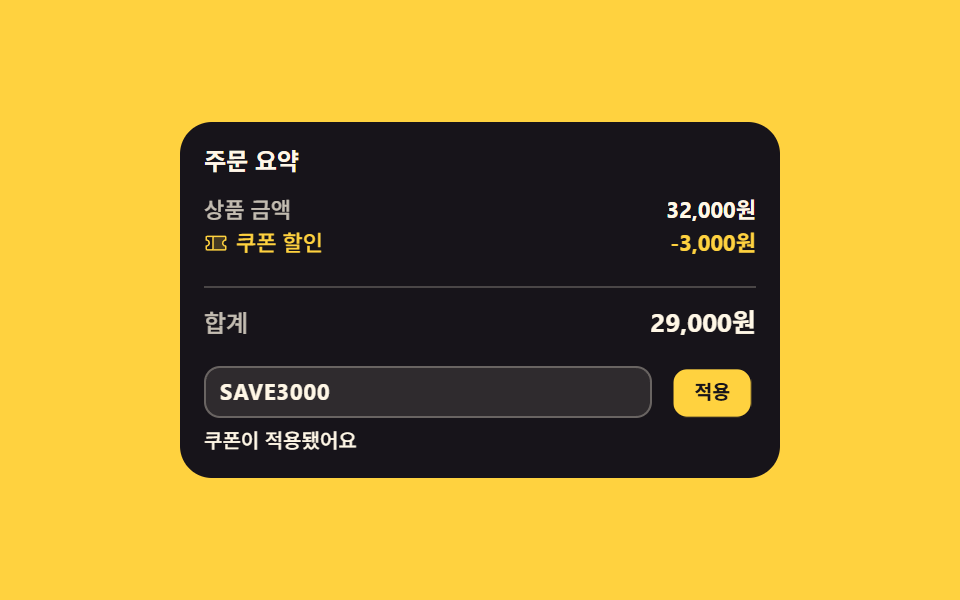
クーポンコードを入れて適用すると、商品金額と合計の間に割引行が高さ0から開いて割り込み、下の行がその分だけ押し下がります。
使いどころクーポン・プロモコード入力欄のある決済の内訳
grid-template-rowsaria-liveopacity
<main class="stage">
  <section class="cp is-demo" id="cp" aria-label="クーポンコードと注文の内訳">
    <p class="cp__title">注文の内訳</p>
    <div class="cp__sum">
      <p class="cp__line">
        <span class="cp__k">商品金額</span>
        <span class="cp__v" id="cp-items">32,000ウォン</span>
      </p>
      <div class="cp__disc">
        <div class="cp__box">
          <p class="cp__line cp__line--disc">
            <span class="cp__k"><svg viewBox="0 0 256 256" width="12" height="12" fill="currentColor" aria-hidden="true"><path d="M200,128a32,32,0,0,0,32,32v32a8,8,0,0,1-8,8H96V56H224a8,8,0,0,1,8,8V96A32,32,0,0,0,200,128Z" opacity="0.2"/><path d="M232,104a8,8,0,0,0,8-8V64a16,16,0,0,0-16-16H32A16,16,0,0,0,16,64V96a8,8,0,0,0,8,8,24,24,0,0,1,0,48,8,8,0,0,0-8,8v32a16,16,0,0,0,16,16H224a16,16,0,0,0,16-16V160a8,8,0,0,0-8-8,24,24,0,0,1,0-48ZM32,167.2a40,40,0,0,0,0-78.4V64H88V192H32Zm192,0V192H104V64H224V88.8a40,40,0,0,0,0,78.4Z"/></svg>クーポン割引</span>
            <span class="cp__v cp__v--off" id="cp-off">-3,000ウォン</span>
          </p>
        </div>
      </div>
      <p class="cp__line cp__line--total">
        <span class="cp__k">合計</span>
        <span class="cp__v cp__v--total cp__swap"><span class="cp__t" id="cp-totalv">32,000ウォン</span><span class="cp__alt" aria-hidden="true">29,000ウォン</span></span>
      </p>
    </div>
    <form class="cp__form" id="cp-form">
      <span class="cp__field">
        <input class="cp__code" id="cp-code" type="text" placeholder="クーポンコード" aria-label="クーポンコード" autocomplete="off">
        <span class="cp__ghost" aria-hidden="true">SAVE3000</span>
      </span>
      <button class="cp__go" type="submit">適用</button>
    </form>
    <p class="cp__msg" aria-live="polite"><span class="cp__msg-t" id="cp-msg"></span><span class="cp__msg-d" aria-hidden="true">クーポンを適用しました</span></p>
  </section>
</main>@use "../../../../site/static/demo-tokens" as *;
// 쿠폰을 적용하면 상품 금액과 합계 사이의 칸이 grid-template-rows: 0fr → 1fr 로 펴지며
// 할인 줄이 끼어들고 아래 줄이 밀려 내려간다. 결과 문구는 aria-live 영역으로 읽힌다.
$duration: $dur-loop;
$easing: $ease-spring;
$color: $stage-yellow;
@include stage($stage-yellow);
.cp {
box-sizing: border-box;
width: min(300px, 92vw);
padding: $sp-3;
border-radius: $r-card;
background: $subject-ink;
color: $subject-cream;
font-family: -apple-system, "Segoe UI", "Noto Sans KR", sans-serif;
}
.cp * { box-sizing: border-box; }
.cp__title {
margin: 0 0 $sp-1;
font-size: 12px;
font-weight: 700;
line-height: 1.3;
}
.cp__sum { display: grid; }
.cp__line {
display: flex;
align-items: center;
justify-content: space-between;
gap: $sp-2;
margin: 0;
padding: $sp-1 0;
font-size: 11px;
line-height: 1.4;
}
.cp__k {
display: inline-flex;
align-items: center;
gap: $sp-1;
font-weight: 500;
opacity: .74;
}
.cp__v {
font-weight: 700;
font-variant-numeric: tabular-nums;
}
.cp__v--off { color: $color; }
.cp__line--disc .cp__k {
color: $color;
opacity: 1;
}
.cp__line--total {
margin-top: $sp-1;
padding-top: $sp-2;
border-top: 1px solid rgba($subject-cream, .22);
font-size: 12px;
}
.cp__v--total {
position: relative;
font-size: 13px;
}
// 미리보기 루프에서만 쓰는 두 번째 숫자 — 자리를 차지하지 않고 정적 경로에서는 보이지 않는다
.cp__alt {
position: absolute;
inset: 0;
display: grid;
place-items: center end;
opacity: 0;
}
// 끼어드는 할인 줄. 실제 클릭 경로는 transition 으로 부드럽게 펴진다
.cp__disc {
display: grid;
grid-template-rows: 0fr;
transition: grid-template-rows $dur-base $easing;
}
.cp.is-on .cp__disc { grid-template-rows: 1fr; }
// 접히는 칸에는 패딩을 두지 않는다 — 0fr 이 되어도 세로 패딩은 그대로 남는다
.cp__box {
min-height: 0;
overflow: hidden;
}
.cp__form {
display: grid;
grid-template-columns: 1fr auto;
gap: $sp-2;
margin-top: $sp-2;
}
.cp__field {
position: relative;
display: grid;
}
.cp__code {
width: 100%;
padding: $sp-1 $sp-2;
border: 1px solid rgba($subject-cream, .28);
border-radius: $r-sm;
background: rgba($subject-cream, .1);
color: $subject-cream;
font-family: inherit;
font-size: 11px;
font-weight: 700;
line-height: 1.5;
letter-spacing: .04em;
&::placeholder {
color: rgba($subject-cream, .5);
font-weight: 500;
letter-spacing: 0;
}
&:focus-visible { outline: 2px solid $color; outline-offset: 1px; }
}
// 미리보기에서만 입력칸 위에 얹는 코드 글자 — 정적 경로에서는 색만 지워 자리를 남긴다
.cp__ghost {
position: absolute;
inset: 0;
display: grid;
align-items: center;
padding-left: $sp-2;
color: transparent;
font-size: 11px;
font-weight: 700;
line-height: 1.5;
letter-spacing: .04em;
pointer-events: none;
}
.cp__go {
padding: $sp-1 $sp-3;
border: 0;
border-radius: $r-sm;
background: $color;
color: $subject-ink;
font-family: inherit;
font-size: 11px;
font-weight: 700;
line-height: 1.5;
cursor: pointer;
&:focus-visible { outline: 2px solid $subject-cream; outline-offset: 2px; }
}
.cp__msg {
position: relative;
min-height: 14px;
margin: $sp-1 0 0;
font-size: 10px;
font-weight: 500;
line-height: 1.4;
}
.cp__msg-t {
opacity: 0;
transition: opacity $dur-quick $ease-out;
}
.cp.is-said .cp__msg-t { opacity: 1; }
.cp__msg-d {
position: absolute;
inset: 0;
opacity: 0;
}
// ── 격자 미리보기 루프 (2초) ──
// 여는 순간을 한 프레임에 컷으로 끝낸다 — 대표 이미지가 「반쯤 펴진 줄」 이 되지 않게.
// 닫는 쪽만 70~86% 에 천천히 풀어 퇴장 프레임이 등장 프레임을 이기지 못하게 한다
@keyframes cp-open {
0% { grid-template-rows: 0fr; animation-timing-function: steps(1, end); }
24% { grid-template-rows: 0fr; animation-timing-function: steps(1, end); }
25% { grid-template-rows: 1fr; animation-timing-function: steps(1, end); }
70% { grid-template-rows: 1fr; animation-timing-function: $ease-out; }
86% { grid-template-rows: 0fr; }
100% { grid-template-rows: 0fr; }
}
// 끼어든 줄이 제자리에 내려앉는다 — transform 이라 중간 프레임에 유령이 없다
@keyframes cp-settle {
0%, 24% { transform: translateY(-8px); }
45%, 100% { transform: translateY(0); }
}
@keyframes cp-ghost {
0%, 11% { opacity: 0; }
12%, 85% { opacity: 1; }
86%, 100% { opacity: 0; }
}
@keyframes cp-press {
0%, 20% { transform: scale(1); }
25% { transform: scale(.88); }
37%, 100% { transform: scale(1); }
}
@keyframes cp-a {
0%, 24% { opacity: 1; }
25%, 85% { opacity: 0; }
86%, 100% { opacity: 1; }
}
@keyframes cp-b {
0%, 24% { opacity: 0; }
25%, 85% { opacity: 1; }
86%, 100% { opacity: 0; }
}
.cp.is-demo {
.cp__code::placeholder { color: transparent; }
.cp__ghost {
color: $subject-cream;
animation-name: cp-ghost;
animation-duration: $duration;
animation-timing-function: steps(1, end);
animation-iteration-count: infinite;
animation-fill-mode: backwards;
}
.cp__disc {
animation-name: cp-open;
animation-duration: $duration;
animation-iteration-count: infinite;
animation-fill-mode: backwards;
}
.cp__line--disc {
animation-name: cp-settle;
animation-duration: $duration;
animation-timing-function: $easing;
animation-iteration-count: infinite;
animation-fill-mode: backwards;
}
.cp__go {
animation-name: cp-press;
animation-duration: $duration;
animation-timing-function: $easing;
animation-iteration-count: infinite;
animation-fill-mode: backwards;
}
.cp__swap .cp__t { animation-name: cp-a; }
.cp__swap .cp__alt,
.cp__msg-d { animation-name: cp-b; }
.cp__swap .cp__t,
.cp__swap .cp__alt,
.cp__msg-d {
animation-duration: $duration;
animation-timing-function: steps(1, end);
animation-iteration-count: infinite;
animation-fill-mode: backwards;
}
}
@media (max-width: 340px) {
.cp { padding: $sp-2; }
.cp__line { padding: 0; }
.cp__line--total { padding-top: $sp-1; }
.cp__form { gap: $sp-1; }
.cp__go { padding: $sp-1 $sp-2; }
}
@media (prefers-reduced-motion: reduce) {
.cp.is-demo .cp__disc,
.cp.is-demo .cp__line--disc,
.cp.is-demo .cp__go,
.cp.is-demo .cp__t {
animation: none !important;
transform: none !important;
}
.cp.is-demo .cp__t { opacity: 1 !important; }
// 정지 상태에서도 요약이 무엇인지는 보인다 — 겹쳐 둔 두 번째 값과 안내만 계속 감춘다
.cp.is-demo .cp__alt,
.cp.is-demo .cp__msg-d { animation: none !important; opacity: 0 !important; }
// 움직임을 뺀 자리는 「쿠폰을 넣기 전」 한 장면으로 고정한다 — 할인 줄은 닫힌 채,
// 코드 글자도 감추고 placeholder 를 되살려 요약과 합계가 서로 어긋나지 않게
.cp.is-demo .cp__ghost { animation: none !important; opacity: 0 !important; }
.cp.is-demo .cp__code::placeholder { color: rgba($subject-cream, .5) !important; }
.cp__disc { transition: none !important; }
.cp__msg-t { transition: none !important; }
}html, body {
margin: 0;
overflow: hidden;
}
.stage {
box-sizing: border-box;
min-height: 100vh;
display: grid;
place-items: center;
margin: 0;
background: #ffd23f;
font-family: -apple-system, "Segoe UI", "Noto Sans KR", sans-serif;
padding: clamp(8px, 4vw, 24px);
}
.cp {
box-sizing: border-box;
width: min(300px, 92vw);
padding: 12px;
border-radius: 16px;
background: #17141a;
color: #fff7e6;
font-family: -apple-system, "Segoe UI", "Noto Sans KR", sans-serif;
}
.cp * {
box-sizing: border-box;
}
.cp__title {
margin: 0 0 4px;
font-size: 12px;
font-weight: 700;
line-height: 1.3;
}
.cp__sum {
display: grid;
}
.cp__line {
display: flex;
align-items: center;
justify-content: space-between;
gap: 8px;
margin: 0;
padding: 4px 0;
font-size: 11px;
line-height: 1.4;
}
.cp__k {
display: inline-flex;
align-items: center;
gap: 4px;
font-weight: 500;
opacity: 0.74;
}
.cp__v {
font-weight: 700;
font-variant-numeric: tabular-nums;
}
.cp__v--off {
color: #ffd23f;
}
.cp__line--disc .cp__k {
color: #ffd23f;
opacity: 1;
}
.cp__line--total {
margin-top: 4px;
padding-top: 8px;
border-top: 1px solid rgba(255, 247, 230, 0.22);
font-size: 12px;
}
.cp__v--total {
position: relative;
font-size: 13px;
}
.cp__alt {
position: absolute;
inset: 0;
display: grid;
place-items: center end;
opacity: 0;
}
.cp__disc {
display: grid;
grid-template-rows: 0fr;
transition: grid-template-rows 300ms cubic-bezier(0.2, 0.8, 0.2, 1);
}
.cp.is-on .cp__disc {
grid-template-rows: 1fr;
}
.cp__box {
min-height: 0;
overflow: hidden;
}
.cp__form {
display: grid;
grid-template-columns: 1fr auto;
gap: 8px;
margin-top: 8px;
}
.cp__field {
position: relative;
display: grid;
}
.cp__code {
width: 100%;
padding: 4px 8px;
border: 1px solid rgba(255, 247, 230, 0.28);
border-radius: 8px;
background: rgba(255, 247, 230, 0.1);
color: #fff7e6;
font-family: inherit;
font-size: 11px;
font-weight: 700;
line-height: 1.5;
letter-spacing: 0.04em;
}
.cp__code::placeholder {
color: rgba(255, 247, 230, 0.5);
font-weight: 500;
letter-spacing: 0;
}
.cp__code:focus-visible {
outline: 2px solid #ffd23f;
outline-offset: 1px;
}
.cp__ghost {
position: absolute;
inset: 0;
display: grid;
align-items: center;
padding-left: 8px;
color: transparent;
font-size: 11px;
font-weight: 700;
line-height: 1.5;
letter-spacing: 0.04em;
pointer-events: none;
}
.cp__go {
padding: 4px 12px;
border: 0;
border-radius: 8px;
background: #ffd23f;
color: #17141a;
font-family: inherit;
font-size: 11px;
font-weight: 700;
line-height: 1.5;
cursor: pointer;
}
.cp__go:focus-visible {
outline: 2px solid #fff7e6;
outline-offset: 2px;
}
.cp__msg {
position: relative;
min-height: 14px;
margin: 4px 0 0;
font-size: 10px;
font-weight: 500;
line-height: 1.4;
}
.cp__msg-t {
opacity: 0;
transition: opacity 220ms ease-out;
}
.cp.is-said .cp__msg-t {
opacity: 1;
}
.cp__msg-d {
position: absolute;
inset: 0;
opacity: 0;
}
@keyframes cp-open {
0% {
grid-template-rows: 0fr;
animation-timing-function: steps(1, end);
}
24% {
grid-template-rows: 0fr;
animation-timing-function: steps(1, end);
}
25% {
grid-template-rows: 1fr;
animation-timing-function: steps(1, end);
}
70% {
grid-template-rows: 1fr;
animation-timing-function: ease-out;
}
86% {
grid-template-rows: 0fr;
}
100% {
grid-template-rows: 0fr;
}
}
@keyframes cp-settle {
0%, 24% {
transform: translateY(-8px);
}
45%, 100% {
transform: translateY(0);
}
}
@keyframes cp-ghost {
0%, 11% {
opacity: 0;
}
12%, 85% {
opacity: 1;
}
86%, 100% {
opacity: 0;
}
}
@keyframes cp-press {
0%, 20% {
transform: scale(1);
}
25% {
transform: scale(0.88);
}
37%, 100% {
transform: scale(1);
}
}
@keyframes cp-a {
0%, 24% {
opacity: 1;
}
25%, 85% {
opacity: 0;
}
86%, 100% {
opacity: 1;
}
}
@keyframes cp-b {
0%, 24% {
opacity: 0;
}
25%, 85% {
opacity: 1;
}
86%, 100% {
opacity: 0;
}
}
.cp.is-demo .cp__code::placeholder {
color: transparent;
}
.cp.is-demo .cp__ghost {
color: #fff7e6;
animation-name: cp-ghost;
animation-duration: 2s;
animation-timing-function: steps(1, end);
animation-iteration-count: infinite;
animation-fill-mode: backwards;
}
.cp.is-demo .cp__disc {
animation-name: cp-open;
animation-duration: 2s;
animation-iteration-count: infinite;
animation-fill-mode: backwards;
}
.cp.is-demo .cp__line--disc {
animation-name: cp-settle;
animation-duration: 2s;
animation-timing-function: cubic-bezier(0.2, 0.8, 0.2, 1);
animation-iteration-count: infinite;
animation-fill-mode: backwards;
}
.cp.is-demo .cp__go {
animation-name: cp-press;
animation-duration: 2s;
animation-timing-function: cubic-bezier(0.2, 0.8, 0.2, 1);
animation-iteration-count: infinite;
animation-fill-mode: backwards;
}
.cp.is-demo .cp__swap .cp__t {
animation-name: cp-a;
}
.cp.is-demo .cp__swap .cp__alt,
.cp.is-demo .cp__msg-d {
animation-name: cp-b;
}
.cp.is-demo .cp__swap .cp__t,
.cp.is-demo .cp__swap .cp__alt,
.cp.is-demo .cp__msg-d {
animation-duration: 2s;
animation-timing-function: steps(1, end);
animation-iteration-count: infinite;
animation-fill-mode: backwards;
}
@media (max-width: 340px) {
.cp {
padding: 8px;
}
.cp__line {
padding: 0;
}
.cp__line--total {
padding-top: 4px;
}
.cp__form {
gap: 4px;
}
.cp__go {
padding: 4px 8px;
}
}
@media (prefers-reduced-motion: reduce) {
.cp.is-demo .cp__disc,
.cp.is-demo .cp__line--disc,
.cp.is-demo .cp__go,
.cp.is-demo .cp__t {
animation: none !important;
transform: none !important;
}
.cp.is-demo .cp__t {
opacity: 1 !important;
}
.cp.is-demo .cp__alt,
.cp.is-demo .cp__msg-d {
animation: none !important;
opacity: 0 !important;
}
.cp.is-demo .cp__ghost {
animation: none !important;
opacity: 0 !important;
}
.cp.is-demo .cp__code::placeholder {
color: rgba(255, 247, 230, 0.5) !important;
}
.cp__disc {
transition: none !important;
}
.cp__msg-t {
transition: none !important;
}
}// 적용을 누르면 상품 금액과 合計 사이의 칸이 0fr 에서 1fr 로 펴지며 할인 줄이 끼어들고,
// 合計 숫자가 다시 계산된다. 금액 서식은 화면의 商品金額 글자에서 뽑아 언어팩을 따라간다
var cp = document.getElementById('cp');
var cpForm = document.getElementById('cp-form');
var cpCode = document.getElementById('cp-code');
var cpMsg = document.getElementById('cp-msg');
var cpItems = document.getElementById('cp-items');
var cpOff = document.getElementById('cp-off');
var cpTotalValue = document.getElementById('cp-totalv');
var cpValidCode = 'SAVE3000';
var cpOkText = 'クーポンを適用しました';
var cpEmptyText = 'クーポンコードを入力してください';
var cpWrongText = 'そのコードはありません';
function cpComma(n) { return String(n).replace(/\B(?=(\d{3})+$)/g, ','); }
function cpAmount(text) { return Number(text.replace(/[^\d]/g, '')); }
function cpMoney(n) { return cpItems.textContent.replace(/[\d,]+/, cpComma(n)); }
function cpApply() {
cp.classList.remove('is-demo');
var code = cpCode.value.trim().toUpperCase();
var on = code === cpValidCode;
cp.classList.toggle('is-on', on);
cpTotalValue.textContent = cpMoney(cpAmount(cpItems.textContent) - (on ? cpAmount(cpOff.textContent) : 0));
cpMsg.textContent = on ? cpOkText : (code ? cpWrongText : cpEmptyText);
cp.classList.add('is-said');
}
cpForm.addEventListener('submit', function (e) { e.preventDefault(); cpApply(); });import { useState } from "react";
import type { CSSProperties } from "react";
import styles from "./CartCouponDiscountLine.module.scss";
export type CartCouponDiscountLineProps = {
title?: string;
itemsLabel?: string;
/** 상품 금액 글자 그대로 — 금액 서식(통화 기호·자릿점)을 여기서 뽑아 쓴다 */
itemsValue?: string;
discountLabel?: string;
discountValue?: string;
totalLabel?: string;
codeLabel?: string;
applyLabel?: string;
groupLabel?: string;
validCode?: string;
okText?: string;
emptyText?: string;
wrongText?: string;
/** 격자 미리보기용 2초 자동 루프. 사람이 손대면 꺼진다 */
demo?: boolean;
duration?: number;
easing?: string;
color?: string;
};
type Vars = CSSProperties & { "--duration"?: string; "--easing"?: string; "--color"?: string };
// ambient 가 얇아 입력 이벤트 제네릭을 못 쓴다 — 필요한 꼴만 로컬 타입으로 선언
type ChangeEvt = { target: { value: string } };
type SubmitEvt = { preventDefault: () => void };
function comma(n: number): string {
return String(n).replace(/\B(?=(\d{3})+$)/g, ",");
}
function amount(text: string): number {
return Number(text.replace(/[^\d]/g, ""));
}
// 금액 서식은 상품 금액 글자를 그대로 본떠 만든다 — 언어팩이 바꿔 둔 통화 표기를 따라간다
function money(source: string, n: number): string {
return source.replace(/[\d,]+/, comma(n));
}
function TicketIcon() {
return (
<svg viewBox="0 0 256 256" width="12" height="12" fill="currentColor" aria-hidden="true"><path d="M200,128a32,32,0,0,0,32,32v32a8,8,0,0,1-8,8H96V56H224a8,8,0,0,1,8,8V96A32,32,0,0,0,200,128Z" opacity="0.2"/><path d="M232,104a8,8,0,0,0,8-8V64a16,16,0,0,0-16-16H32A16,16,0,0,0,16,64V96a8,8,0,0,0,8,8,24,24,0,0,1,0,48,8,8,0,0,0-8,8v32a16,16,0,0,0,16,16H224a16,16,0,0,0,16-16V160a8,8,0,0,0-8-8,24,24,0,0,1,0-48ZM32,167.2a40,40,0,0,0,0-78.4V64H88V192H32Zm192,0V192H104V64H224V88.8a40,40,0,0,0,0,78.4Z"/></svg>
);
}
export default function CartCouponDiscountLine({
title = "주문 요약",
itemsLabel = "상품 금액",
itemsValue = "32,000원",
discountLabel = "쿠폰 할인",
discountValue = "-3,000원",
totalLabel = "합계",
codeLabel = "쿠폰 코드",
applyLabel = "적용",
groupLabel = "쿠폰 코드와 주문 요약",
validCode = "SAVE3000",
okText = "쿠폰이 적용됐어요",
emptyText = "쿠폰 코드를 입력해 주세요",
wrongText = "없는 코드예요",
demo = true,
duration = 2000,
easing = "cubic-bezier(.2,.8,.2,1)",
color = "#ffd23f",
}: CartCouponDiscountLineProps) {
const [code, setCode] = useState("");
const [on, setOn] = useState(false);
const [message, setMessage] = useState("");
const [live, setLive] = useState(demo);
const vars: Vars = { "--duration": `${duration}ms`, "--easing": easing, "--color": color };
const items = amount(itemsValue);
const off = amount(discountValue);
const total = money(itemsValue, on ? items - off : items);
// 미리보기 루프가 컷으로 갈아 끼우는 두 번째 값 — 할인이 붙었을 때의 합계
const altTotal = money(itemsValue, items - off);
// 적용을 누르면 할인 줄이 0fr 에서 1fr 로 펴지고 합계가 같은 순간에 다시 계산된다
function apply(e: SubmitEvt) {
e.preventDefault();
setLive(false);
const typed = code.trim().toUpperCase();
const hit = typed === validCode;
setOn(hit);
setMessage(hit ? okText : typed ? wrongText : emptyText);
}
const cls = [styles.cp, live ? styles.isDemo : "", on ? styles.isOn : "", message ? styles.isSaid : ""].filter(Boolean).join(" ");
return (
<section className={cls} style={vars} aria-label={groupLabel}>
<p className={styles.title}>{title}</p>
<div className={styles.sum}>
<p className={styles.line}>
<span className={styles.k}>{itemsLabel}</span>
<span className={styles.v}>{itemsValue}</span>
</p>
<div className={styles.disc}>
<div className={styles.box}>
<p className={`${styles.line} ${styles.lineDisc}`}>
<span className={styles.k}><TicketIcon />{discountLabel}</span>
<span className={`${styles.v} ${styles.vOff}`}>{discountValue}</span>
</p>
</div>
</div>
<p className={`${styles.line} ${styles.lineTotal}`}>
<span className={styles.k}>{totalLabel}</span>
<span className={`${styles.v} ${styles.vTotal} ${styles.swap}`}>
<span className={styles.t}>{total}</span>
{live ? <span className={styles.alt} aria-hidden="true">{altTotal}</span> : null}
</span>
</p>
</div>
<form className={styles.form} onSubmit={apply}>
<span className={styles.field}>
<input
className={styles.code}
type="text"
value={code}
onChange={(e: ChangeEvt) => setCode(e.target.value)}
placeholder={codeLabel}
aria-label={codeLabel}
autoComplete="off"
/>
{live ? <span className={styles.ghost} aria-hidden="true">{validCode}</span> : null}
</span>
<button className={styles.go} type="submit">{applyLabel}</button>
</form>
<p className={styles.msg} aria-live="polite">
<span className={styles.msgText}>{message}</span>
{live ? <span className={styles.msgDemo} aria-hidden="true">{okText}</span> : null}
</p>
</section>
);
}03 内訳の間に割り込む割引行 — 計測 累積面積 15.799% · 動いたフレーム 13/23GODRICH オリジナル · SCSS と React は zip に同梱 · 決済画面 デザイン 9選 — カートから支払いまでコピペOK
このデモが属する記事
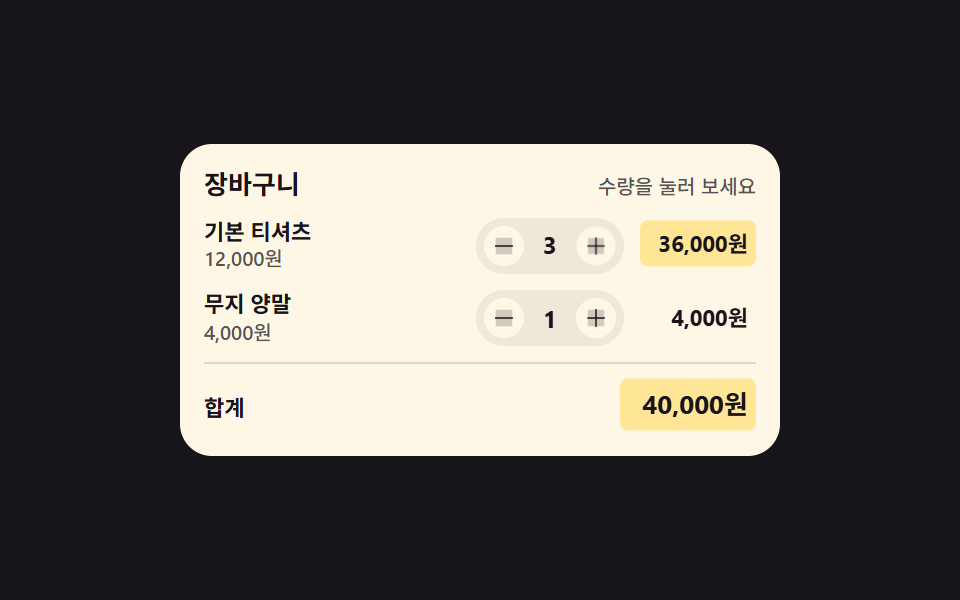 決済画面 デザイン 9選 — カートから支払いまでコピペOK決済画面 デザインとは、買い物かごに入れた人を「これが欲しい」から支払いボタンの手前まで案内する一連の画面のことです。数量を変えると合計が追いかける行、クーポンで割り込む割引行、選んだ支払い方法の下に開く詳細枠。九つともHTML・SCSS・ この記事のデモをすべて見る