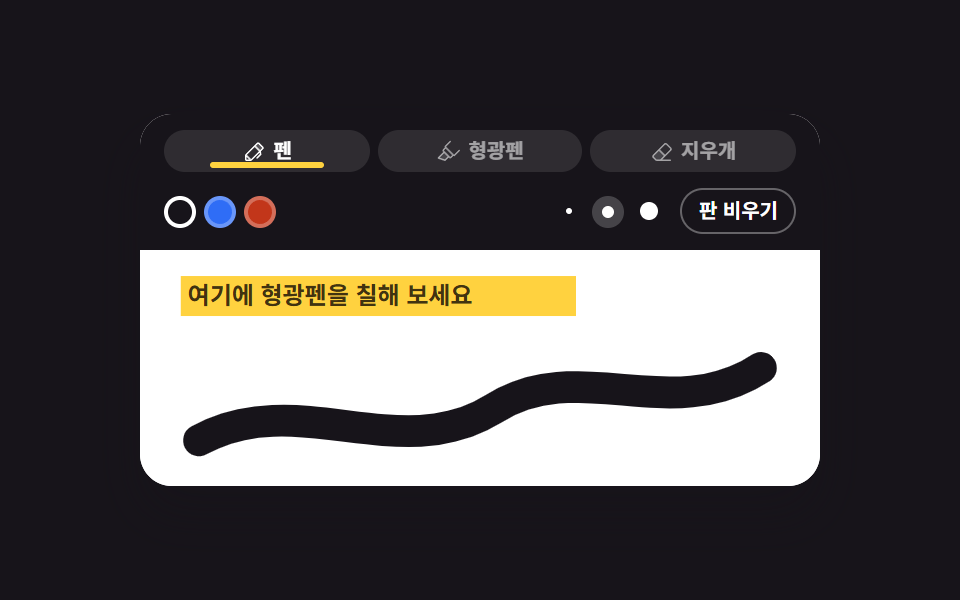
02ペン・蛍光ペン・消しゴムのツールバー
3つの道具と色・太さを選べる描画ボードです。
使いどころ画面注釈ツール、教材の上に書き込むボード
globalCompositeOperationdestination-outmultiply
<main class="stage">
<div class="pt is-demo" id="pt">
  <div class="pt__card">
    <div class="pt__bar">
      <div class="pt__tools" role="group" aria-label="描画ツール">
        <button type="button" class="pt__tool pt__tool--pen" data-group="tool" data-value="pen" aria-pressed="true">
          <svg xmlns="http://www.w3.org/2000/svg" viewBox="0 0 256 256" fill="currentColor" class="pt__ico" aria-hidden="true"><path d="M221.66,90.34,192,120,136,64l29.66-29.66a8,8,0,0,1,11.31,0L221.66,79A8,8,0,0,1,221.66,90.34Z" opacity="0.2"/><path d="M227.32,73.37,182.63,28.69a16,16,0,0,0-22.63,0L36.69,152A15.86,15.86,0,0,0,32,163.31V208a16,16,0,0,0,16,16H92.69A15.86,15.86,0,0,0,104,219.31l83.67-83.66,3.48,13.9-36.8,36.79a8,8,0,0,0,11.31,11.32l40-40a8,8,0,0,0,2.11-7.6l-6.9-27.61L227.32,96A16,16,0,0,0,227.32,73.37ZM48,208V179.31L76.69,208Zm48-3.31L51.31,160,136,75.31,180.69,120Zm96-96L147.32,64l24-24L216,84.69Z"/></svg>
          <span>ペン</span><span class="pt__mark" aria-hidden="true"></span>
        </button>
        <button type="button" class="pt__tool pt__tool--hl" data-group="tool" data-value="highlighter" aria-pressed="false">
          <svg xmlns="http://www.w3.org/2000/svg" viewBox="0 0 256 256" fill="currentColor" class="pt__ico" aria-hidden="true"><path d="M136,176,96,216,24,192l64-64Z" opacity="0.2"/><path d="M253.66,106.34a8,8,0,0,0-11.32,0L192,156.69,109.66,74.34h0L107.31,72l50.35-50.34a8,8,0,1,0-11.32-11.32L96,60.69A16,16,0,0,0,93.18,79.5L72,100.69a16,16,0,0,0,0,22.62L76.69,128,18.34,186.34a8,8,0,0,0,3.13,13.25l72,24A7.88,7.88,0,0,0,96,224a8,8,0,0,0,5.66-2.34L136,187.31l4.69,4.69a16,16,0,0,0,22.62,0l21.18-21.18A16,16,0,0,0,203.31,168l50.35-50.34A8,8,0,0,0,253.66,106.34ZM93.84,206.85l-55-18.35L88,139.31,124.69,176ZM152,180.69l-10.34-10.35h0l-48-48h0L83.31,112,104,91.31,172.69,160Z"/></svg>
          <span>蛍光ペン</span><span class="pt__mark" aria-hidden="true"></span>
        </button>
        <button type="button" class="pt__tool pt__tool--er" data-group="tool" data-value="eraser" aria-pressed="false">
          <svg xmlns="http://www.w3.org/2000/svg" viewBox="0 0 256 256" fill="currentColor" class="pt__ico" aria-hidden="true"><path d="M160,168l-48,48H66.75L36.69,185.94a16,16,0,0,1,0-22.63L96,104Z" opacity="0.2"/><path d="M225,80.4,183.6,39a24,24,0,0,0-33.94,0L31,157.66a24,24,0,0,0,0,33.94l30.06,30.06A8,8,0,0,0,66.74,224H216a8,8,0,0,0,0-16h-84.7L225,114.34A24,24,0,0,0,225,80.4ZM108.68,208H70.05L42.33,180.28a8,8,0,0,1,0-11.31L96,115.31,148.69,168Zm105-105L160,156.69,107.31,104,161,50.34a8,8,0,0,1,11.32,0l41.38,41.38a8,8,0,0,1,0,11.31Z"/></svg>
          <span>消しゴム</span><span class="pt__mark" aria-hidden="true"></span>
        </button>
      </div>
      <div class="pt__opts">
        <div class="pt__swatches" role="group" aria-label="ペンの色">
          <button type="button" class="pt__swatch pt__swatch--ink" data-group="color" data-value="#17141a" aria-pressed="true" aria-label="黒インク"></button>
          <button type="button" class="pt__swatch pt__swatch--blue" data-group="color" data-value="#2f6df6" aria-pressed="false" aria-label="青インク"></button>
          <button type="button" class="pt__swatch pt__swatch--red" data-group="color" data-value="#c2361a" aria-pressed="false" aria-label="赤インク"></button>
        </div>
        <div class="pt__widths" role="group" aria-label="線の太さ">
          <button type="button" class="pt__width" data-group="width" data-value="2" aria-pressed="false" aria-label="細い線"><span class="pt__dot pt__dot--s"></span></button>
          <button type="button" class="pt__width" data-group="width" data-value="4" aria-pressed="true" aria-label="普通の線"><span class="pt__dot pt__dot--m"></span></button>
          <button type="button" class="pt__width" data-group="width" data-value="8" aria-pressed="false" aria-label="太い線"><span class="pt__dot pt__dot--l"></span></button>
        </div>
        <button type="button" class="pt__wipe" id="wipeBtn">ボードを空にする</button>
      </div>
    </div>
    <div class="pt__pad" id="pad">
      <p class="pt__sample">ここに蛍光ペンを塗ってみて</p>
      <canvas class="pt__ink" id="ink" role="img" aria-label="ノートボード、0画"></canvas>
      <span class="pt__band" aria-hidden="true"></span>
      <svg class="pt__ghost" viewBox="0 0 300 104" preserveAspectRatio="none" aria-hidden="true">
        <path class="pt__stroke" pathLength="100" d="M26,84 C70,60 114,96 156,70 C194,46 234,78 274,52"/>
        <rect class="pt__rub" x="-10" y="-7" width="20" height="14" rx="4"/>
      </svg>
    </div>
  </div>
</div>
</main>@use "../../../../site/static/demo-tokens" as *;
// 펜·형광펜·지우개 도구바 — 실제 필기는 canvas 2D 가 그린다(도구마다 globalCompositeOperation 이 다르다).
// 격자 미리보기(.is-demo)는 canvas 를 감추고, 같은 장면을 DOM 띠 하나와 SVG 경로 하나로 다시 만든다.
// demo.py 는 CSS 애니메이션 시계로 24장을 뽑으므로 JS 가 canvas 에 그린 그림은 24장이 전부 같다.
$duration: $dur-loop;
$easing: $ease-out;
$color: $subject-ink;
@include stage($stage-ink);
.pt { display: flex; justify-content: center; width: 100%; }
.pt__card {
width: min(100%, 340px); background: $stage-paper; border-radius: $r-card;
box-shadow: $shadow-raised; overflow: hidden;
}
.pt__bar { display: grid; gap: $sp-2; background: $subject-ink; padding: $sp-2 $sp-3; }
.pt__tools { display: grid; grid-template-columns: repeat(3, 1fr); gap: $sp-1; }
.pt__tool {
position: relative; display: flex; align-items: center; justify-content: center; gap: $sp-1;
width: 100%; cursor: pointer; border: 0; background: rgba(255, 255, 255, .1);
color: rgba(255, 255, 255, .56); border-radius: $r-control; font-family: inherit;
font-weight: 700; font-size: clamp(9px, 2.4vw, 10px); line-height: 1.3; padding: $sp-1 $sp-2;
}
.pt__tool[aria-pressed="true"] { color: $stage-paper; }
.pt__tool:focus-visible { outline: 3px solid $subject-blue; outline-offset: 2px; }
.pt__ico { width: 12px; height: 12px; flex: 0 0 auto; }
// 선택 표시는 라벨 아래 얇은 막대 하나 — 버튼 바탕째 갈아 끼우면 poster 가 그 컷 프레임으로 뽑힌다
.pt__mark {
position: absolute; left: 22%; right: 22%; bottom: 2px; height: 3px;
border-radius: $r-pill; background: $stage-yellow; opacity: 0;
}
.pt__tool[aria-pressed="true"] .pt__mark { opacity: 1; }
.pt__opts { display: flex; align-items: center; gap: $sp-2; }
.pt__swatches, .pt__widths { display: flex; align-items: center; gap: $sp-1; }
.pt__widths { margin-left: auto; }
.pt__swatch {
width: 16px; height: 16px; padding: 0; cursor: pointer; border-radius: 50%;
border: 2px solid rgba(255, 255, 255, .28);
}
.pt__swatch--ink { background: $subject-ink; }
.pt__swatch--blue { background: $subject-blue; }
.pt__swatch--red { background: $error; }
.pt__swatch[aria-pressed="true"] { border-color: $stage-paper; }
.pt__width {
display: flex; align-items: center; justify-content: center; width: 16px; height: 16px;
padding: 0; cursor: pointer; border: 0; background: transparent; border-radius: 50%;
}
.pt__width[aria-pressed="true"] { background: rgba(255, 255, 255, .2); }
.pt__dot { display: block; border-radius: 50%; background: $stage-paper; }
.pt__dot--s { width: 3px; height: 3px; }
.pt__dot--m { width: 6px; height: 6px; }
.pt__dot--l { width: 9px; height: 9px; }
.pt__wipe {
cursor: pointer; border: 1px solid rgba(255, 255, 255, .34); background: transparent;
color: $stage-paper; border-radius: $r-pill; font-family: inherit; font-weight: 700;
font-size: clamp(9px, 2.4vw, 10px); line-height: 1.3; padding: $sp-1 $sp-2;
}
.pt__swatch:focus-visible, .pt__width:focus-visible, .pt__wipe:focus-visible {
outline: 3px solid $subject-blue; outline-offset: 2px;
}
.pt__pad {
position: relative; overflow: hidden; background: $stage-paper;
aspect-ratio: 300 / 104; touch-action: none;
}
.pt__sample {
position: absolute; left: 7%; right: 7%; top: 12%; margin: 0; white-space: nowrap;
font-weight: 700; font-size: clamp(10px, 2.6vw, 12px); line-height: 1.4; color: rgba(23, 20, 26, .82);
}
.pt__ink, .pt__ghost { position: absolute; inset: 0; width: 100%; height: 100%; }
.pt__ghost { display: none; fill: none; }
// 형광 띠는 multiply 로 겹친다 — canvas 쪽 highlighter 가 쓰는 합성 방식과 같은 결과(글자가 비친다)
.pt__band {
display: none; position: absolute; left: 6%; top: 11%; width: 58%; height: 17%;
background: $stage-yellow; mix-blend-mode: multiply; clip-path: inset(0 100% 0 0);
}
.pt__stroke {
stroke: $color; stroke-width: 14; stroke-linecap: round; stroke-linejoin: round;
stroke-dasharray: 100; stroke-dashoffset: 100;
}
.pt__rub { fill: rgba(23, 20, 26, .12); stroke: rgba(23, 20, 26, .55); stroke-width: 2; opacity: 0; }
// ── 미리보기 루프 (2s)
// 4~30% 형광 띠가 예시 문장 위를 왼쪽에서 오른쪽으로 clip-path 로 칠해진다
// 34% 도구 선택 표시가 펜으로 컷 (steps(1, end) — 반투명 교차가 없다)
// 44~50% 굵은 펜 획이 stroke-dashoffset 으로 빠르게 그어진다. 이 구간이 프레임당 변화가 가장 커 poster 가 된다
// 56% 도구 선택 표시가 지우개로 컷
// 58~94% 지우개가 획 위를 지나 오른쪽 끝까지 갔다가 띠 줄로 올라와 왼쪽으로 돌아온다
// 62~78% 펜 획이 시작점 쪽부터 여러 프레임에 걸쳐 걷힌다 (stroke-dashoffset 0 → -100)
// 80~94% 형광 띠가 오른쪽부터 여러 프레임에 걸쳐 걷힌다. 94% 에 빈 판 + 형광펜 선택으로 돌아와 0% 와 같아진다
.pt.is-demo .pt__ink { visibility: hidden; }
.pt.is-demo .pt__ghost { display: block; }
.pt.is-demo .pt__band { display: block; }
.pt.is-demo .pt__band,
.pt.is-demo .pt__stroke,
.pt.is-demo .pt__rub,
.pt.is-demo .pt__mark {
animation-duration: $duration;
animation-iteration-count: infinite;
}
.pt.is-demo .pt__band { animation-name: ptBand; animation-timing-function: $easing; }
.pt.is-demo .pt__stroke { animation-name: ptStroke; animation-timing-function: $easing; }
.pt.is-demo .pt__rub { animation-name: ptRub; animation-timing-function: linear; }
.pt.is-demo .pt__mark { animation-timing-function: steps(1, end); }
.pt.is-demo .pt__tool--pen .pt__mark { animation-name: ptPickPen; }
.pt.is-demo .pt__tool--hl .pt__mark { animation-name: ptPickHl; }
.pt.is-demo .pt__tool--er .pt__mark { animation-name: ptPickEr; }
@keyframes ptBand {
0%, 4% { clip-path: inset(0 100% 0 0); }
30%, 80% { clip-path: inset(0 0 0 0); }
94%, 100% { clip-path: inset(0 100% 0 0); }
}
@keyframes ptStroke {
0%, 44% { stroke-dashoffset: 100; }
50%, 62% { stroke-dashoffset: 0; }
78%, 100% { stroke-dashoffset: -100; }
}
@keyframes ptRub {
0%, 56% { opacity: 0; transform: translate(16px, 80px); }
58%, 62% { opacity: 1; transform: translate(16px, 80px); }
78% { opacity: 1; transform: translate(284px, 80px); }
82% { opacity: 1; transform: translate(284px, 24px); }
93% { opacity: 1; transform: translate(20px, 24px); }
94%, 100% { opacity: 0; transform: translate(16px, 80px); }
}
@keyframes ptPickHl {
0%, 33% { opacity: 1; }
34%, 93% { opacity: 0; }
94%, 100% { opacity: 1; }
}
@keyframes ptPickPen {
0%, 33% { opacity: 0; }
34%, 55% { opacity: 1; }
56%, 100% { opacity: 0; }
}
@keyframes ptPickEr {
0%, 55% { opacity: 0; }
56%, 93% { opacity: 1; }
94%, 100% { opacity: 0; }
}
// 컷만 두면 움직인 프레임이 모자라니 컷 옆에 눌림 움직임을 붙인다 (transform 이라 유령 프레임이 안 생긴다)
.pt.is-demo .pt__tool--pen,
.pt.is-demo .pt__tool--er {
animation-duration: $duration;
animation-timing-function: $ease-pop;
animation-iteration-count: infinite;
}
.pt.is-demo .pt__tool--pen { animation-name: ptPressPen; }
.pt.is-demo .pt__tool--er { animation-name: ptPressEr; }
// 버튼은 스스로 완결한 요소라 자기 중심에서 눌린다 (transform-origin 기본값 50% 50%)
@keyframes ptPressPen {
0%, 32% { transform: scale(1); }
35% { transform: scale(.9); }
40%, 100% { transform: scale(1); }
}
@keyframes ptPressEr {
0%, 54% { transform: scale(1); }
57% { transform: scale(.9); }
62%, 100% { transform: scale(1); }
}
@media (max-width: 340px) {
.pt__bar { gap: $sp-1; padding: $sp-1 $sp-2; }
.pt__opts { gap: $sp-1; }
.pt__sample { left: 6%; right: 6%; }
}
@media (prefers-reduced-motion: reduce) {
.pt.is-demo .pt__band,
.pt.is-demo .pt__stroke,
.pt.is-demo .pt__rub,
.pt.is-demo .pt__mark,
.pt.is-demo .pt__tool--pen,
.pt.is-demo .pt__tool--er { animation: none !important; }
// 움직임 없이 형광 띠와 펜 획이 다 그어진 최종 상태로 세운다
.pt.is-demo .pt__band { clip-path: inset(0 0 0 0) !important; }
.pt.is-demo .pt__stroke { stroke-dashoffset: 0 !important; }
.pt.is-demo .pt__rub { opacity: 0 !important; }
.pt.is-demo .pt__tool--hl .pt__mark,
.pt.is-demo .pt__tool--er .pt__mark { opacity: 0 !important; }
.pt.is-demo .pt__tool--pen .pt__mark { opacity: 1 !important; }
}html, body {
margin: 0;
overflow: hidden;
}
.stage {
box-sizing: border-box;
min-height: 100vh;
display: grid;
place-items: center;
margin: 0;
background: #17141a;
font-family: -apple-system, "Segoe UI", "Noto Sans KR", sans-serif;
padding: clamp(8px, 4vw, 24px);
}
.pt {
display: flex;
justify-content: center;
width: 100%;
}
.pt__card {
width: min(100%, 340px);
background: #ffffff;
border-radius: 16px;
box-shadow: 0 14px 24px rgba(23, 20, 26, 0.32);
overflow: hidden;
}
.pt__bar {
display: grid;
gap: 8px;
background: #17141a;
padding: 8px 12px;
}
.pt__tools {
display: grid;
grid-template-columns: repeat(3, 1fr);
gap: 4px;
}
.pt__tool {
position: relative;
display: flex;
align-items: center;
justify-content: center;
gap: 4px;
width: 100%;
cursor: pointer;
border: 0;
background: rgba(255, 255, 255, 0.1);
color: rgba(255, 255, 255, 0.56);
border-radius: 12px;
font-family: inherit;
font-weight: 700;
font-size: clamp(9px, 2.4vw, 10px);
line-height: 1.3;
padding: 4px 8px;
}
.pt__tool[aria-pressed=true] {
color: #ffffff;
}
.pt__tool:focus-visible {
outline: 3px solid #2f6df6;
outline-offset: 2px;
}
.pt__ico {
width: 12px;
height: 12px;
flex: 0 0 auto;
}
.pt__mark {
position: absolute;
left: 22%;
right: 22%;
bottom: 2px;
height: 3px;
border-radius: 999px;
background: #ffd23f;
opacity: 0;
}
.pt__tool[aria-pressed=true] .pt__mark {
opacity: 1;
}
.pt__opts {
display: flex;
align-items: center;
gap: 8px;
}
.pt__swatches, .pt__widths {
display: flex;
align-items: center;
gap: 4px;
}
.pt__widths {
margin-left: auto;
}
.pt__swatch {
width: 16px;
height: 16px;
padding: 0;
cursor: pointer;
border-radius: 50%;
border: 2px solid rgba(255, 255, 255, 0.28);
}
.pt__swatch--ink {
background: #17141a;
}
.pt__swatch--blue {
background: #2f6df6;
}
.pt__swatch--red {
background: #c2361a;
}
.pt__swatch[aria-pressed=true] {
border-color: #ffffff;
}
.pt__width {
display: flex;
align-items: center;
justify-content: center;
width: 16px;
height: 16px;
padding: 0;
cursor: pointer;
border: 0;
background: transparent;
border-radius: 50%;
}
.pt__width[aria-pressed=true] {
background: rgba(255, 255, 255, 0.2);
}
.pt__dot {
display: block;
border-radius: 50%;
background: #ffffff;
}
.pt__dot--s {
width: 3px;
height: 3px;
}
.pt__dot--m {
width: 6px;
height: 6px;
}
.pt__dot--l {
width: 9px;
height: 9px;
}
.pt__wipe {
cursor: pointer;
border: 1px solid rgba(255, 255, 255, 0.34);
background: transparent;
color: #ffffff;
border-radius: 999px;
font-family: inherit;
font-weight: 700;
font-size: clamp(9px, 2.4vw, 10px);
line-height: 1.3;
padding: 4px 8px;
}
.pt__swatch:focus-visible, .pt__width:focus-visible, .pt__wipe:focus-visible {
outline: 3px solid #2f6df6;
outline-offset: 2px;
}
.pt__pad {
position: relative;
overflow: hidden;
background: #ffffff;
aspect-ratio: 300/104;
touch-action: none;
}
.pt__sample {
position: absolute;
left: 7%;
right: 7%;
top: 12%;
margin: 0;
white-space: nowrap;
font-weight: 700;
font-size: clamp(10px, 2.6vw, 12px);
line-height: 1.4;
color: rgba(23, 20, 26, 0.82);
}
.pt__ink, .pt__ghost {
position: absolute;
inset: 0;
width: 100%;
height: 100%;
}
.pt__ghost {
display: none;
fill: none;
}
.pt__band {
display: none;
position: absolute;
left: 6%;
top: 11%;
width: 58%;
height: 17%;
background: #ffd23f;
mix-blend-mode: multiply;
clip-path: inset(0 100% 0 0);
}
.pt__stroke {
stroke: #17141a;
stroke-width: 14;
stroke-linecap: round;
stroke-linejoin: round;
stroke-dasharray: 100;
stroke-dashoffset: 100;
}
.pt__rub {
fill: rgba(23, 20, 26, 0.12);
stroke: rgba(23, 20, 26, 0.55);
stroke-width: 2;
opacity: 0;
}
.pt.is-demo .pt__ink {
visibility: hidden;
}
.pt.is-demo .pt__ghost {
display: block;
}
.pt.is-demo .pt__band {
display: block;
}
.pt.is-demo .pt__band,
.pt.is-demo .pt__stroke,
.pt.is-demo .pt__rub,
.pt.is-demo .pt__mark {
animation-duration: 2s;
animation-iteration-count: infinite;
}
.pt.is-demo .pt__band {
animation-name: ptBand;
animation-timing-function: ease-out;
}
.pt.is-demo .pt__stroke {
animation-name: ptStroke;
animation-timing-function: ease-out;
}
.pt.is-demo .pt__rub {
animation-name: ptRub;
animation-timing-function: linear;
}
.pt.is-demo .pt__mark {
animation-timing-function: steps(1, end);
}
.pt.is-demo .pt__tool--pen .pt__mark {
animation-name: ptPickPen;
}
.pt.is-demo .pt__tool--hl .pt__mark {
animation-name: ptPickHl;
}
.pt.is-demo .pt__tool--er .pt__mark {
animation-name: ptPickEr;
}
@keyframes ptBand {
0%, 4% {
clip-path: inset(0 100% 0 0);
}
30%, 80% {
clip-path: inset(0 0 0 0);
}
94%, 100% {
clip-path: inset(0 100% 0 0);
}
}
@keyframes ptStroke {
0%, 44% {
stroke-dashoffset: 100;
}
50%, 62% {
stroke-dashoffset: 0;
}
78%, 100% {
stroke-dashoffset: -100;
}
}
@keyframes ptRub {
0%, 56% {
opacity: 0;
transform: translate(16px, 80px);
}
58%, 62% {
opacity: 1;
transform: translate(16px, 80px);
}
78% {
opacity: 1;
transform: translate(284px, 80px);
}
82% {
opacity: 1;
transform: translate(284px, 24px);
}
93% {
opacity: 1;
transform: translate(20px, 24px);
}
94%, 100% {
opacity: 0;
transform: translate(16px, 80px);
}
}
@keyframes ptPickHl {
0%, 33% {
opacity: 1;
}
34%, 93% {
opacity: 0;
}
94%, 100% {
opacity: 1;
}
}
@keyframes ptPickPen {
0%, 33% {
opacity: 0;
}
34%, 55% {
opacity: 1;
}
56%, 100% {
opacity: 0;
}
}
@keyframes ptPickEr {
0%, 55% {
opacity: 0;
}
56%, 93% {
opacity: 1;
}
94%, 100% {
opacity: 0;
}
}
.pt.is-demo .pt__tool--pen,
.pt.is-demo .pt__tool--er {
animation-duration: 2s;
animation-timing-function: cubic-bezier(0.2, 1.4, 0.4, 1);
animation-iteration-count: infinite;
}
.pt.is-demo .pt__tool--pen {
animation-name: ptPressPen;
}
.pt.is-demo .pt__tool--er {
animation-name: ptPressEr;
}
@keyframes ptPressPen {
0%, 32% {
transform: scale(1);
}
35% {
transform: scale(0.9);
}
40%, 100% {
transform: scale(1);
}
}
@keyframes ptPressEr {
0%, 54% {
transform: scale(1);
}
57% {
transform: scale(0.9);
}
62%, 100% {
transform: scale(1);
}
}
@media (max-width: 340px) {
.pt__bar {
gap: 4px;
padding: 4px 8px;
}
.pt__opts {
gap: 4px;
}
.pt__sample {
left: 6%;
right: 6%;
}
}
@media (prefers-reduced-motion: reduce) {
.pt.is-demo .pt__band,
.pt.is-demo .pt__stroke,
.pt.is-demo .pt__rub,
.pt.is-demo .pt__mark,
.pt.is-demo .pt__tool--pen,
.pt.is-demo .pt__tool--er {
animation: none !important;
}
.pt.is-demo .pt__band {
clip-path: inset(0 0 0 0) !important;
}
.pt.is-demo .pt__stroke {
stroke-dashoffset: 0 !important;
}
.pt.is-demo .pt__rub {
opacity: 0 !important;
}
.pt.is-demo .pt__tool--hl .pt__mark,
.pt.is-demo .pt__tool--er .pt__mark {
opacity: 0 !important;
}
.pt.is-demo .pt__tool--pen .pt__mark {
opacity: 1 !important;
}
}var pt = document.getElementById('pt');
var pad = document.getElementById('pad');
var ink = document.getElementById('ink');
var ctx = ink.getContext('2d');
var PAD_LABEL = 'ノートボード、%d画';
// 도구마다 다른 것은 합성 방식(globalCompositeOperation) 하나다.
// pen source-over — 있던 그림 위에 그대로 얹는다
// highlighter multiply — 덮지 않고 곱해서 어둡게 한다. 그래서 아래 글자와 ペン 획이 형광 띠를 통해 비친다
// eraser destination-out — 칠하는 대신 이미 그려진 픽셀의 알파를 깎아낸다
var TOOLS = {
pen: { mode: 'source-over', color: null, width: null },
highlighter: { mode: 'multiply', color: '#ffd23f', width: 16 },
eraser: { mode: 'destination-out', color: '#000000', width: 20 }
};
var strokes = [], current = null, tool = 'pen', color = '#17141a', width = 4;
// 고DPI 대응 — 배킹 스토어를 devicePixelRatio 배로 키우고 좌표계는 CSS 픽셀 그대로 쓴다
function resize() {
var r = pad.getBoundingClientRect(), dpr = window.devicePixelRatio || 1;
ink.width = Math.round(r.width * dpr);
ink.height = Math.round(r.height * dpr);
ctx.setTransform(dpr, 0, 0, dpr, 0, 0);
repaint();
}
function repaint() {
// canvas 크기를 바꾸면 문맥 상태가 초기화되므로 획 목록을 매번 처음부터 다시 긋는다
ctx.globalCompositeOperation = 'source-over';
ctx.clearRect(0, 0, ink.width, ink.height);
ctx.lineCap = 'round';
ctx.lineJoin = 'round';
for (var s = 0; s < strokes.length; s++) {
var st = strokes[s], pts = st.points;
ctx.globalCompositeOperation = st.mode;
ctx.strokeStyle = st.color;
ctx.lineWidth = st.width;
ctx.beginPath();
ctx.moveTo(pts[0].x, pts[0].y);
for (var i = 1; i < pts.length; i++) { ctx.lineTo(pts[i].x, pts[i].y); }
ctx.stroke();
}
ctx.globalCompositeOperation = 'source-over';
ink.setAttribute('aria-label', PAD_LABEL.replace('%d', strokes.length));
}
function toLocal(e) {
var r = ink.getBoundingClientRect();
return { x: e.clientX - r.left, y: e.clientY - r.top };
}
document.addEventListener('click', function (e) {
var btn = e.target.closest('[data-group]');
if (!btn) { return; }
pt.classList.remove('is-demo');
var group = btn.getAttribute('data-group'), value = btn.getAttribute('data-value');
var peers = document.querySelectorAll('[data-group="' + group + '"]');
for (var i = 0; i < peers.length; i++) { peers[i].setAttribute('aria-pressed', String(peers[i] === btn)); }
if (group === 'tool') { tool = value; } else if (group === 'color') { color = value; } else { width = Number(value); }
});
document.getElementById('wipeBtn').addEventListener('click', function () {
pt.classList.remove('is-demo');
strokes = [];
repaint();
});
pad.addEventListener('pointerdown', function (e) {
pt.classList.remove('is-demo');
var spec = TOOLS[tool];
current = { mode: spec.mode, color: spec.color || color, width: spec.width || width, points: [toLocal(e)] };
strokes.push(current);
pad.setPointerCapture(e.pointerId);
repaint();
});
pad.addEventListener('pointermove', function (e) {
if (!current) { return; }
current.points.push(toLocal(e));
repaint();
});
window.addEventListener('pointerup', function () { current = null; });
window.addEventListener('resize', resize);
resize();// PenToolbar — vanilla 판(run/287/demo/02-canvas-pen-highlighter-eraser/index.html) 의 React 포트.
// 도구 세 개가 다른 것은 canvas 2D 의 합성 방식(globalCompositeOperation) 하나다.
// 획은 목록으로 쌓아 두고 매번 처음부터 다시 그린다 — canvas 크기를 바꾸면 문맥 상태가 초기화되기 때문이다.
import { useCallback, useEffect, useRef, useState } from "react";
import type { CSSProperties, PointerEvent as ReactPointerEvent } from "react";
import styles from "./PenToolbar.module.scss";
export type PenToolbarProps = {
duration?: number;
easing?: string;
color?: string;
};
type Vars = CSSProperties & { "--duration"?: string; "--easing"?: string; "--color"?: string };
type Box<T> = { current: T };
type Point = { x: number; y: number };
type Stroke = { mode: GlobalCompositeOperation; color: string; width: number; points: Point[] };
type ToolSpec = { mode: GlobalCompositeOperation; color: string | null; width: number | null };
const PAD_LABEL = "필기판, 획 %d개";
// pen source-over — 있던 그림 위에 그대로 얹는다
// highlighter multiply — 덮지 않고 곱해서 어둡게 한다. 그래서 아래 글자와 펜 획이 형광 띠를 통해 비친다
// eraser destination-out — 칠하는 대신 이미 그려진 픽셀의 알파를 깎아낸다
const TOOLS: Record<string, ToolSpec> = {
pen: { mode: "source-over", color: null, width: null },
highlighter: { mode: "multiply", color: "#ffd23f", width: 16 },
eraser: { mode: "destination-out", color: "#000000", width: 20 },
};
function applyRepaint(ctx: CanvasRenderingContext2D, strokes: Stroke[], width: number, height: number): void {
ctx.globalCompositeOperation = "source-over";
ctx.clearRect(0, 0, width, height);
ctx.lineCap = "round";
ctx.lineJoin = "round";
for (const st of strokes) {
ctx.globalCompositeOperation = st.mode;
ctx.strokeStyle = st.color;
ctx.lineWidth = st.width;
ctx.beginPath();
ctx.moveTo(st.points[0].x, st.points[0].y);
for (let i = 1; i < st.points.length; i++) {
ctx.lineTo(st.points[i].x, st.points[i].y);
}
ctx.stroke();
}
ctx.globalCompositeOperation = "source-over";
}
export default function PenToolbar({
duration = 2000,
easing = "ease-out",
color = "#17141a",
}: PenToolbarProps) {
const padRef = useRef<HTMLDivElement | null>(null);
const inkRef = useRef<HTMLCanvasElement | null>(null);
const strokesRef = useRef<Stroke[]>([]) as Box<Stroke[]>;
const currentRef = useRef<Stroke | null>(null);
const [demo, setDemo] = useState(true);
const [count, setCount] = useState(0);
const [tool, setTool] = useState("pen");
const [inkColor, setInkColor] = useState("#17141a");
const [lineWidth, setLineWidth] = useState(4);
const vars: Vars = { "--duration": `${duration}ms`, "--easing": easing, "--color": color };
const repaint = useCallback(() => {
const canvas = inkRef.current;
if (!canvas) return;
const ctx = canvas.getContext("2d");
if (!ctx) return;
applyRepaint(ctx, strokesRef.current, canvas.width, canvas.height);
setCount(strokesRef.current.length);
}, [strokesRef]);
// 고DPI 대응 — 배킹 스토어를 devicePixelRatio 배로 키우고 좌표계는 CSS 픽셀 그대로 쓴다
const resize = useCallback(() => {
const pad = padRef.current;
const canvas = inkRef.current;
if (!pad || !canvas) return;
const ctx = canvas.getContext("2d");
if (!ctx) return;
const r = pad.getBoundingClientRect();
const dpr = window.devicePixelRatio || 1;
canvas.width = Math.round(r.width * dpr);
canvas.height = Math.round(r.height * dpr);
ctx.setTransform(dpr, 0, 0, dpr, 0, 0);
repaint();
}, [repaint]);
useEffect(() => {
resize();
window.addEventListener("resize", resize);
return () => window.removeEventListener("resize", resize);
}, [resize]);
useEffect(() => {
function onUp(): void {
currentRef.current = null;
}
window.addEventListener("pointerup", onUp);
return () => window.removeEventListener("pointerup", onUp);
}, []);
function toLocal(event: ReactPointerEvent<HTMLDivElement>): Point | null {
const canvas = inkRef.current;
if (!canvas) return null;
const r = canvas.getBoundingClientRect();
return { x: event.clientX - r.left, y: event.clientY - r.top };
}
function onPointerDown(event: ReactPointerEvent<HTMLDivElement>): void {
setDemo(false);
const point = toLocal(event);
const pad = padRef.current;
if (!point || !pad) return;
const spec = TOOLS[tool];
currentRef.current = {
mode: spec.mode,
color: spec.color || inkColor,
width: spec.width || lineWidth,
points: [point],
};
strokesRef.current.push(currentRef.current);
pad.setPointerCapture(event.pointerId);
repaint();
}
function onPointerMove(event: ReactPointerEvent<HTMLDivElement>): void {
const current = currentRef.current;
if (!current) return;
const point = toLocal(event);
if (!point) return;
current.points.push(point);
repaint();
}
function onWipe(): void {
setDemo(false);
strokesRef.current = [];
repaint();
}
function pickTool(value: string): void {
setDemo(false);
setTool(value);
}
const cls = [styles.root, demo ? styles.isDemo : ""].filter(Boolean).join(" ");
const markCls = styles.mark;
return (
<main className={styles.stage}>
<div className={cls} style={vars}>
<div className={styles.card}>
<div className={styles.bar}>
<div className={styles.tools} role="group" aria-label="그리기 도구">
<button type="button" className={`${styles.tool} ${styles.toolPen}`} aria-pressed={tool === "pen"} onClick={() => pickTool("pen")}>
<svg xmlns="http://www.w3.org/2000/svg" viewBox="0 0 256 256" fill="currentColor" className={styles.ico} aria-hidden="true"><path d="M221.66,90.34,192,120,136,64l29.66-29.66a8,8,0,0,1,11.31,0L221.66,79A8,8,0,0,1,221.66,90.34Z" opacity="0.2"/><path d="M227.32,73.37,182.63,28.69a16,16,0,0,0-22.63,0L36.69,152A15.86,15.86,0,0,0,32,163.31V208a16,16,0,0,0,16,16H92.69A15.86,15.86,0,0,0,104,219.31l83.67-83.66,3.48,13.9-36.8,36.79a8,8,0,0,0,11.31,11.32l40-40a8,8,0,0,0,2.11-7.6l-6.9-27.61L227.32,96A16,16,0,0,0,227.32,73.37ZM48,208V179.31L76.69,208Zm48-3.31L51.31,160,136,75.31,180.69,120Zm96-96L147.32,64l24-24L216,84.69Z"/></svg>
<span>펜</span><span className={markCls} aria-hidden="true"></span>
</button>
<button type="button" className={`${styles.tool} ${styles.toolHl}`} aria-pressed={tool === "highlighter"} onClick={() => pickTool("highlighter")}>
<svg xmlns="http://www.w3.org/2000/svg" viewBox="0 0 256 256" fill="currentColor" className={styles.ico} aria-hidden="true"><path d="M136,176,96,216,24,192l64-64Z" opacity="0.2"/><path d="M253.66,106.34a8,8,0,0,0-11.32,0L192,156.69,109.66,74.34h0L107.31,72l50.35-50.34a8,8,0,1,0-11.32-11.32L96,60.69A16,16,0,0,0,93.18,79.5L72,100.69a16,16,0,0,0,0,22.62L76.69,128,18.34,186.34a8,8,0,0,0,3.13,13.25l72,24A7.88,7.88,0,0,0,96,224a8,8,0,0,0,5.66-2.34L136,187.31l4.69,4.69a16,16,0,0,0,22.62,0l21.18-21.18A16,16,0,0,0,203.31,168l50.35-50.34A8,8,0,0,0,253.66,106.34ZM93.84,206.85l-55-18.35L88,139.31,124.69,176ZM152,180.69l-10.34-10.35h0l-48-48h0L83.31,112,104,91.31,172.69,160Z"/></svg>
<span>형광펜</span><span className={markCls} aria-hidden="true"></span>
</button>
<button type="button" className={`${styles.tool} ${styles.toolEr}`} aria-pressed={tool === "eraser"} onClick={() => pickTool("eraser")}>
<svg xmlns="http://www.w3.org/2000/svg" viewBox="0 0 256 256" fill="currentColor" className={styles.ico} aria-hidden="true"><path d="M160,168l-48,48H66.75L36.69,185.94a16,16,0,0,1,0-22.63L96,104Z" opacity="0.2"/><path d="M225,80.4,183.6,39a24,24,0,0,0-33.94,0L31,157.66a24,24,0,0,0,0,33.94l30.06,30.06A8,8,0,0,0,66.74,224H216a8,8,0,0,0,0-16h-84.7L225,114.34A24,24,0,0,0,225,80.4ZM108.68,208H70.05L42.33,180.28a8,8,0,0,1,0-11.31L96,115.31,148.69,168Zm105-105L160,156.69,107.31,104,161,50.34a8,8,0,0,1,11.32,0l41.38,41.38a8,8,0,0,1,0,11.31Z"/></svg>
<span>지우개</span><span className={markCls} aria-hidden="true"></span>
</button>
</div>
<div className={styles.opts}>
<div className={styles.swatches} role="group" aria-label="펜 색">
<button type="button" className={`${styles.swatch} ${styles.swatchInk}`} aria-pressed={inkColor === "#17141a"} aria-label="검정 잉크" onClick={() => setInkColor("#17141a")}></button>
<button type="button" className={`${styles.swatch} ${styles.swatchBlue}`} aria-pressed={inkColor === "#2f6df6"} aria-label="파랑 잉크" onClick={() => setInkColor("#2f6df6")}></button>
<button type="button" className={`${styles.swatch} ${styles.swatchRed}`} aria-pressed={inkColor === "#c2361a"} aria-label="빨강 잉크" onClick={() => setInkColor("#c2361a")}></button>
</div>
<div className={styles.widths} role="group" aria-label="선 굵기">
<button type="button" className={styles.width} aria-pressed={lineWidth === 2} aria-label="가는 선" onClick={() => setLineWidth(2)}><span className={`${styles.dot} ${styles.dotS}`}></span></button>
<button type="button" className={styles.width} aria-pressed={lineWidth === 4} aria-label="보통 선" onClick={() => setLineWidth(4)}><span className={`${styles.dot} ${styles.dotM}`}></span></button>
<button type="button" className={styles.width} aria-pressed={lineWidth === 8} aria-label="굵은 선" onClick={() => setLineWidth(8)}><span className={`${styles.dot} ${styles.dotL}`}></span></button>
</div>
<button type="button" className={styles.wipe} onClick={onWipe}>판 비우기</button>
</div>
</div>
<div className={styles.pad} ref={padRef} onPointerDown={onPointerDown} onPointerMove={onPointerMove}>
<p className={styles.sample}>여기에 형광펜을 칠해 보세요</p>
<canvas className={styles.ink} ref={inkRef} role="img" aria-label={PAD_LABEL.replace("%d", String(count))}></canvas>
<span className={styles.band} aria-hidden="true"></span>
<svg className={styles.ghost} viewBox="0 0 300 104" preserveAspectRatio="none" aria-hidden="true">
<path className={styles.stroke} pathLength="100" d="M26,84 C70,60 114,96 156,70 C194,46 234,78 274,52"/>
<rect className={styles.rub} x="-10" y="-7" width="20" height="14" rx="4"/>
</svg>
</div>
</div>
</div>
</main>
);
}02 ペン・蛍光ペン・消しゴムのツールバー — 計測 累積面積 8.903% · 動いたフレーム 23/23GODRICH オリジナル · SCSS と React は zip に同梱 · canvas 手書きサインと描画UI 9選 — ライブラリなし
このデモが属する記事
 canvas 手書きサインと描画UI 9選 — ライブラリなしcanvas 手書きサインとは、契約書や同意書で手書きの署名を受け取る入力欄のことです。この9つはライブラリなしで、ブラウザ標準のcanvasとPointer Eventsだけを使って作ってあります。ファイルを貼り付ければ、筆圧による太さ・ この記事のデモをすべて見る