07シーソースイッチ
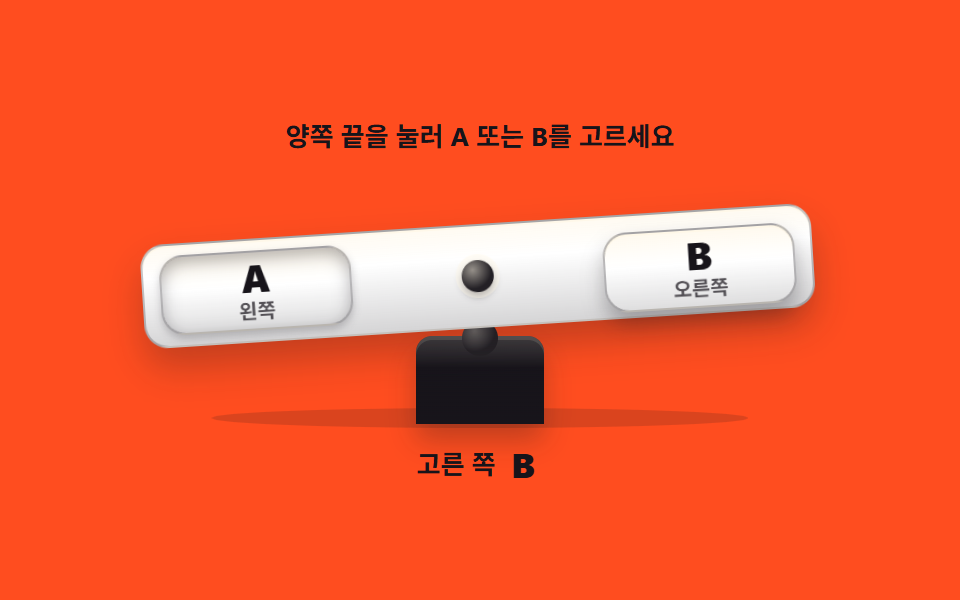
中央に支点を置き、左右を交互に押すと板がその側へ傾き、どちらが選ばれたかを角度で示します。選択は押された見た目と文字の両方で表します。
使いどころA/Bオプションの選択、離陸・着陸のトグルパネル
aria-pressedrotatetransform-origintransition
<main class="stage">
  <div class="ss is-demo" id="ss" data-side="a">
    <p class="ss__hint">両端を押してAかBを選びます</p>
    <div class="ss__scene">
      <div class="ss__ground" aria-hidden="true"></div>
      <div class="ss__plinth" aria-hidden="true"></div>
      <div class="ss__plank">
        <button class="ss__pad ss__pad--a" id="padA" type="button" aria-pressed="true">
          <b class="ss__key">A</b><span class="ss__sub">左</span>
        </button>
        <span class="ss__bolt" aria-hidden="true"></span>
        <button class="ss__pad ss__pad--b" id="padB" type="button" aria-pressed="false">
          <b class="ss__key">B</b><span class="ss__sub">右</span>
        </button>
      </div>
    </div>
    <p class="ss__out">
      <span class="ss__outLabel">選択</span>
      <span class="ss__outVal">
        <b class="ss__letter ss__letter--a">A</b>
        <b class="ss__letter ss__letter--b">B</b>
      </span>
    </p>
  </div>
</main>@use "../../../../site/static/demo-tokens" as *;
// 시소 틸트 스위치 — 중앙 볼트가 축. 양쪽 패드(둘 다 진짜 button)를 누르면 판이 그쪽으로
// 기울고 눌린 쪽 패드가 움푹 들어간다. 선택은 셋으로 알린다 — 기울어진 각도, 가라앉은 패드,
// 아래 글월의 A 또는 B. 색만으로 상태를 알리는 수단은 없다(WCAG 1.4.1).
// 재질은 실물 플라스틱 판이 갖는 위 하이라이트·아래 그늘(linear-gradient + inset box-shadow)로.
// 무대(주황) 위 글자는 전부 먹 — 크림은 대비 3.11 로 AA 미달이라 못 쓴다.
// 격자 미리보기(.is-demo)는 좌우를 번갈아 누르는 장면을 2초에 한 바퀴 돌린다.
$duration: $dur-quick;
$easing: $ease-spring;
$color: $stage-paper;
@include stage($stage-orange);
.ss { display: flex; flex-direction: column; align-items: center; gap: $sp-2; width: 100%; max-width: 400px; }
.ss__hint {
margin: 0; font-weight: 700; font-size: clamp(11px, 3vw, 13px); line-height: 1.5;
color: $subject-ink;
}
.ss__scene { position: relative; width: min(336px, 92vw); height: clamp(104px, 30vw, 128px); }
.ss__ground {
position: absolute; left: 10%; right: 10%; bottom: 0; height: 10px;
border-radius: 50%; background: rgba($subject-ink, .16);
}
// 받침대 — 먹 플라스틱 기둥. 위쪽 반구(가상 요소)가 판이 얹혀 도는 축이다.
.ss__plinth {
position: absolute; left: 50%; bottom: 2px; width: clamp(52px, 16vw, 64px); height: clamp(34px, 10vw, 44px);
transform: translateX(-50%);
background: linear-gradient(180deg, rgba($subject-cream, .2), rgba($subject-cream, 0) 36%, rgba($stage-ink, .55)), $subject-ink;
border-radius: $r-sm $r-sm 0 0;
box-shadow: inset 0 2px 0 rgba($subject-cream, .14), 0 8px 14px rgba($stage-ink, .28);
}
.ss__plinth::before {
content: ""; position: absolute; left: 50%; top: -8px; width: 18px; height: 18px;
transform: translateX(-50%); border-radius: 50%;
background: radial-gradient(circle at 35% 30%, rgba($subject-cream, .4), rgba($subject-cream, .06) 60%), $subject-ink;
}
// 판 — 축은 중앙 볼트가 받침 반구에 닿는 지점이라 transform-origin 을 아래쪽 가운데로 뒀다
// (붙는 지점이 있는 요소의 비중심 origin. 규칙 8 참고).
.ss__plank {
position: absolute; left: 0; right: 0; top: clamp(20px, 6.5vw, 26px); height: clamp(42px, 12vw, 52px);
display: flex; align-items: center; justify-content: space-between; box-sizing: border-box;
padding: 0 $sp-2;
background: linear-gradient(180deg, rgba($subject-cream, .55), rgba($subject-cream, 0) 32%, rgba($stage-ink, .18)), $color;
border: 1px solid rgba($stage-ink, .25); border-radius: $r-control;
box-shadow: 0 10px 18px rgba($stage-ink, .26), inset 0 1px 0 rgba($subject-cream, .7);
transform: rotate(-8deg);
transform-origin: 50% 84%;
transition: transform $duration $easing;
}
.ss[data-side="b"] .ss__plank { transform: rotate(8deg); }
.ss__bolt {
flex: 0 0 auto; width: 16px; height: 16px; border-radius: 50%;
background: radial-gradient(circle at 35% 30%, rgba($subject-cream, .55), rgba($subject-cream, .05) 62%), $subject-ink;
box-shadow: 0 0 0 3px rgba($subject-cream, .4), 0 2px 4px rgba($stage-ink, .5);
}
.ss__pad {
display: flex; flex-direction: column; align-items: center; justify-content: center;
width: clamp(76px, 23vw, 96px); height: clamp(32px, 9vw, 40px);
border: 1px solid rgba($stage-ink, .3); border-radius: $r-control; cursor: pointer;
background: linear-gradient(180deg, rgba($subject-cream, .65), rgba($subject-cream, 0) 44%, rgba($stage-ink, .14)), $color;
box-shadow: 0 6px 10px rgba($stage-ink, .3), inset 0 1px 0 rgba($subject-cream, .8);
font-family: inherit; color: $subject-ink;
transition: transform $duration $easing, box-shadow $duration $easing;
}
.ss__key { font-weight: 800; font-size: clamp(15px, 4.6vw, 19px); line-height: 1.1; }
.ss__sub { font-weight: 700; font-size: clamp(9px, 2.6vw, 10px); line-height: 1.3; color: rgba($subject-ink, .72); }
.ss__pad:focus-visible { outline: 2px solid $subject-ink; outline-offset: 3px; }
.ss__pad:active {
transform: translateY(2px);
box-shadow: 0 2px 4px rgba($stage-ink, .3), inset 0 2px 6px rgba($stage-ink, .28);
}
// 골라진(내려앉은) 쪽 패드 — 움푹 들어간 그림자로 눌림을 표시
.ss[data-side="a"] .ss__pad--a,
.ss[data-side="b"] .ss__pad--b {
transform: translateY(3px);
box-shadow: 0 2px 4px rgba($stage-ink, .22), inset 0 3px 8px rgba($stage-ink, .32);
}
.ss__out {
display: flex; align-items: center; gap: $sp-2; margin: 0;
font-weight: 700; font-size: clamp(11px, 3vw, 13px); line-height: 1.5; color: $subject-ink;
}
.ss__outVal { position: relative; width: 16px; height: 20px; }
.ss__letter {
position: absolute; inset: 0; font-weight: 800;
font-size: clamp(14px, 4vw, 17px); line-height: 20px; color: $subject-ink;
}
.ss__letter--b { visibility: hidden; }
.ss[data-side="b"] .ss__letter--b { visibility: visible; }
.ss[data-side="b"] .ss__letter--a { visibility: hidden; }
// ── 격자 미리보기: 좌우를 번갈아 누른다 ──────────────────────────────
// 왕복을 2초 안에 끝내고 마지막 20% 는 왼쪽 눌림 그대로 멈춘다(루프 복귀는 90% 안).
// 애니메이션은 낱개 속성으로만 — 단축을 쓰면 delay 가 리셋된다.
.ss.is-demo .ss__plank {
animation-name: ssTilt; animation-duration: $dur-loop;
animation-timing-function: $easing; animation-iteration-count: infinite;
}
.ss.is-demo .ss__pad--a {
animation-name: ssPressA; animation-duration: $dur-loop;
animation-timing-function: $easing; animation-iteration-count: infinite;
}
.ss.is-demo .ss__pad--b {
animation-name: ssPressB; animation-duration: $dur-loop;
animation-timing-function: $easing; animation-iteration-count: infinite;
}
.ss.is-demo .ss__letter--a { animation-name: ssShowA; animation-duration: $dur-loop; animation-iteration-count: infinite; }
.ss.is-demo .ss__letter--b { animation-name: ssShowB; animation-duration: $dur-loop; animation-iteration-count: infinite; }
@keyframes ssTilt {
0%, 10% { transform: rotate(-8deg); }
38%, 52% { transform: rotate(8deg); }
80%, 100% { transform: rotate(-8deg); }
}
@keyframes ssPressA {
0%, 12% { transform: translateY(3px); }
26%, 74% { transform: translateY(0); }
84%, 100% { transform: translateY(3px); }
}
@keyframes ssPressB {
0%, 26% { transform: translateY(0); }
38%, 62% { transform: translateY(3px); }
76%, 100% { transform: translateY(0); }
}
// 글월 교체는 visibility 컷 — 반투명 유령 프레임이 생기지 않는다
@keyframes ssShowA {
0%, 23% { visibility: visible; }
25%, 75% { visibility: hidden; }
77%, 100% { visibility: visible; }
}
@keyframes ssShowB {
0%, 23% { visibility: hidden; }
25%, 75% { visibility: visible; }
77%, 100% { visibility: hidden; }
}
@media (max-width: 340px) {
.ss { gap: $sp-1; }
.ss__scene { height: 102px; }
.ss__plank { top: 20px; height: 38px; }
.ss__outVal { height: 18px; }
.ss__letter { line-height: 18px; }
}
// reduce 에서는 시소가 왼쪽으로 기운 한 장으로 선다 — 정적 경로가 화면을 채운다
@media (prefers-reduced-motion: reduce) {
.ss.is-demo .ss__plank,
.ss.is-demo .ss__pad--a,
.ss.is-demo .ss__pad--b,
.ss.is-demo .ss__letter--a,
.ss.is-demo .ss__letter--b { animation: none !important; }
.ss__plank, .ss__pad { transition: none !important; }
}html, body {
margin: 0;
overflow: hidden;
}
.stage {
box-sizing: border-box;
min-height: 100vh;
display: grid;
place-items: center;
margin: 0;
background: #ff4d1f;
font-family: -apple-system, "Segoe UI", "Noto Sans KR", sans-serif;
padding: clamp(8px, 4vw, 24px);
}
.ss {
display: flex;
flex-direction: column;
align-items: center;
gap: 8px;
width: 100%;
max-width: 400px;
}
.ss__hint {
margin: 0;
font-weight: 700;
font-size: clamp(11px, 3vw, 13px);
line-height: 1.5;
color: #17141a;
}
.ss__scene {
position: relative;
width: min(336px, 92vw);
height: clamp(104px, 30vw, 128px);
}
.ss__ground {
position: absolute;
left: 10%;
right: 10%;
bottom: 0;
height: 10px;
border-radius: 50%;
background: rgba(23, 20, 26, 0.16);
}
.ss__plinth {
position: absolute;
left: 50%;
bottom: 2px;
width: clamp(52px, 16vw, 64px);
height: clamp(34px, 10vw, 44px);
transform: translateX(-50%);
background: linear-gradient(180deg, rgba(255, 247, 230, 0.2), rgba(255, 247, 230, 0) 36%, rgba(23, 20, 26, 0.55)), #17141a;
border-radius: 8px 8px 0 0;
box-shadow: inset 0 2px 0 rgba(255, 247, 230, 0.14), 0 8px 14px rgba(23, 20, 26, 0.28);
}
.ss__plinth::before {
content: "";
position: absolute;
left: 50%;
top: -8px;
width: 18px;
height: 18px;
transform: translateX(-50%);
border-radius: 50%;
background: radial-gradient(circle at 35% 30%, rgba(255, 247, 230, 0.4), rgba(255, 247, 230, 0.06) 60%), #17141a;
}
.ss__plank {
position: absolute;
left: 0;
right: 0;
top: clamp(20px, 6.5vw, 26px);
height: clamp(42px, 12vw, 52px);
display: flex;
align-items: center;
justify-content: space-between;
box-sizing: border-box;
padding: 0 8px;
background: linear-gradient(180deg, rgba(255, 247, 230, 0.55), rgba(255, 247, 230, 0) 32%, rgba(23, 20, 26, 0.18)), #ffffff;
border: 1px solid rgba(23, 20, 26, 0.25);
border-radius: 12px;
box-shadow: 0 10px 18px rgba(23, 20, 26, 0.26), inset 0 1px 0 rgba(255, 247, 230, 0.7);
transform: rotate(-8deg);
transform-origin: 50% 84%;
transition: transform 220ms cubic-bezier(0.2, 0.8, 0.2, 1);
}
.ss[data-side=b] .ss__plank {
transform: rotate(8deg);
}
.ss__bolt {
flex: 0 0 auto;
width: 16px;
height: 16px;
border-radius: 50%;
background: radial-gradient(circle at 35% 30%, rgba(255, 247, 230, 0.55), rgba(255, 247, 230, 0.05) 62%), #17141a;
box-shadow: 0 0 0 3px rgba(255, 247, 230, 0.4), 0 2px 4px rgba(23, 20, 26, 0.5);
}
.ss__pad {
display: flex;
flex-direction: column;
align-items: center;
justify-content: center;
width: clamp(76px, 23vw, 96px);
height: clamp(32px, 9vw, 40px);
border: 1px solid rgba(23, 20, 26, 0.3);
border-radius: 12px;
cursor: pointer;
background: linear-gradient(180deg, rgba(255, 247, 230, 0.65), rgba(255, 247, 230, 0) 44%, rgba(23, 20, 26, 0.14)), #ffffff;
box-shadow: 0 6px 10px rgba(23, 20, 26, 0.3), inset 0 1px 0 rgba(255, 247, 230, 0.8);
font-family: inherit;
color: #17141a;
transition: transform 220ms cubic-bezier(0.2, 0.8, 0.2, 1), box-shadow 220ms cubic-bezier(0.2, 0.8, 0.2, 1);
}
.ss__key {
font-weight: 800;
font-size: clamp(15px, 4.6vw, 19px);
line-height: 1.1;
}
.ss__sub {
font-weight: 700;
font-size: clamp(9px, 2.6vw, 10px);
line-height: 1.3;
color: rgba(23, 20, 26, 0.72);
}
.ss__pad:focus-visible {
outline: 2px solid #17141a;
outline-offset: 3px;
}
.ss__pad:active {
transform: translateY(2px);
box-shadow: 0 2px 4px rgba(23, 20, 26, 0.3), inset 0 2px 6px rgba(23, 20, 26, 0.28);
}
.ss[data-side=a] .ss__pad--a,
.ss[data-side=b] .ss__pad--b {
transform: translateY(3px);
box-shadow: 0 2px 4px rgba(23, 20, 26, 0.22), inset 0 3px 8px rgba(23, 20, 26, 0.32);
}
.ss__out {
display: flex;
align-items: center;
gap: 8px;
margin: 0;
font-weight: 700;
font-size: clamp(11px, 3vw, 13px);
line-height: 1.5;
color: #17141a;
}
.ss__outVal {
position: relative;
width: 16px;
height: 20px;
}
.ss__letter {
position: absolute;
inset: 0;
font-weight: 800;
font-size: clamp(14px, 4vw, 17px);
line-height: 20px;
color: #17141a;
}
.ss__letter--b {
visibility: hidden;
}
.ss[data-side=b] .ss__letter--b {
visibility: visible;
}
.ss[data-side=b] .ss__letter--a {
visibility: hidden;
}
.ss.is-demo .ss__plank {
animation-name: ssTilt;
animation-duration: 2s;
animation-timing-function: cubic-bezier(0.2, 0.8, 0.2, 1);
animation-iteration-count: infinite;
}
.ss.is-demo .ss__pad--a {
animation-name: ssPressA;
animation-duration: 2s;
animation-timing-function: cubic-bezier(0.2, 0.8, 0.2, 1);
animation-iteration-count: infinite;
}
.ss.is-demo .ss__pad--b {
animation-name: ssPressB;
animation-duration: 2s;
animation-timing-function: cubic-bezier(0.2, 0.8, 0.2, 1);
animation-iteration-count: infinite;
}
.ss.is-demo .ss__letter--a {
animation-name: ssShowA;
animation-duration: 2s;
animation-iteration-count: infinite;
}
.ss.is-demo .ss__letter--b {
animation-name: ssShowB;
animation-duration: 2s;
animation-iteration-count: infinite;
}
@keyframes ssTilt {
0%, 10% {
transform: rotate(-8deg);
}
38%, 52% {
transform: rotate(8deg);
}
80%, 100% {
transform: rotate(-8deg);
}
}
@keyframes ssPressA {
0%, 12% {
transform: translateY(3px);
}
26%, 74% {
transform: translateY(0);
}
84%, 100% {
transform: translateY(3px);
}
}
@keyframes ssPressB {
0%, 26% {
transform: translateY(0);
}
38%, 62% {
transform: translateY(3px);
}
76%, 100% {
transform: translateY(0);
}
}
@keyframes ssShowA {
0%, 23% {
visibility: visible;
}
25%, 75% {
visibility: hidden;
}
77%, 100% {
visibility: visible;
}
}
@keyframes ssShowB {
0%, 23% {
visibility: hidden;
}
25%, 75% {
visibility: visible;
}
77%, 100% {
visibility: hidden;
}
}
@media (max-width: 340px) {
.ss {
gap: 4px;
}
.ss__scene {
height: 102px;
}
.ss__plank {
top: 20px;
height: 38px;
}
.ss__outVal {
height: 18px;
}
.ss__letter {
line-height: 18px;
}
}
@media (prefers-reduced-motion: reduce) {
.ss.is-demo .ss__plank,
.ss.is-demo .ss__pad--a,
.ss.is-demo .ss__pad--b,
.ss.is-demo .ss__letter--a,
.ss.is-demo .ss__letter--b {
animation: none !important;
}
.ss__plank, .ss__pad {
transition: none !important;
}
}var root = document.getElementById('ss');
var padA = document.getElementById('padA');
var padB = document.getElementById('padB');
// 각도·눌림·글월은 전부 data-side 하나로 갈린다. 화면 글자를 JS 가 건드리지 않는다.
function pick(side) {
root.classList.remove('is-demo');
root.setAttribute('data-side', side);
padA.setAttribute('aria-pressed', side === 'a' ? 'true' : 'false');
padB.setAttribute('aria-pressed', side === 'b' ? 'true' : 'false');
}
padA.addEventListener('click', function () { pick('a'); });
padB.addEventListener('click', function () { pick('b'); });
root.addEventListener('pointerdown', function () { root.classList.remove('is-demo'); });// SeesawSwitch — vanilla 판(run/013/demo/07-skeuo-seesaw-switch) 의 React 포트.
// 각도·눌림·글월은 전부 side 상태 하나로 갈린다. 값·키프레임은 vanilla 와 같다.
import { useState } from "react";
import type { CSSProperties } from "react";
import styles from "./SeesawSwitch.module.scss";
export type SeesawSwitchProps = {
duration?: number;
easing?: string;
color?: string;
};
type Vars = CSSProperties & { "--duration"?: string; "--easing"?: string; "--color"?: string };
const HINT = "양쪽 끝을 눌러 A 또는 B를 고르세요";
const SUB_A = "왼쪽";
const SUB_B = "오른쪽";
const OUT_LABEL = "고른 쪽";
export default function SeesawSwitch({
duration = 220,
easing = "cubic-bezier(.2, .8, .2, 1)",
color = "#ffffff",
}: SeesawSwitchProps) {
const [side, setSide] = useState<"a" | "b">("a");
const [demo, setDemo] = useState(true);
const vars: Vars = { "--duration": `${duration}ms`, "--easing": easing, "--color": color };
function pick(next: "a" | "b") {
setDemo(false);
setSide(next);
}
const cls = [styles.root, demo ? styles.isDemo : ""].filter(Boolean).join(" ");
const pressedA = side === "a";
return (
<main className={styles.stage}>
<div className={cls} data-side={side} style={vars}>
<p className={styles.hint}>{HINT}</p>
<div className={styles.scene}>
<div className={styles.ground} aria-hidden="true"></div>
<div className={styles.plinth} aria-hidden="true"></div>
<div className={styles.plank}>
<button
className={`${styles.pad} ${styles.padA}`}
type="button"
aria-pressed={pressedA}
onClick={() => pick("a")}
>
<b className={styles.key}>A</b>
<span className={styles.sub}>{SUB_A}</span>
</button>
<span className={styles.bolt} aria-hidden="true"></span>
<button
className={`${styles.pad} ${styles.padB}`}
type="button"
aria-pressed={!pressedA}
onClick={() => pick("b")}
>
<b className={styles.key}>B</b>
<span className={styles.sub}>{SUB_B}</span>
</button>
</div>
</div>
<p className={styles.out}>
<span className={styles.outLabel}>{OUT_LABEL}</span>
<span className={styles.outVal}>
<b className={`${styles.letter} ${styles.letterA}`}>A</b>
<b className={`${styles.letter} ${styles.letterB}`}>B</b>
</span>
</p>
</div>
</main>
);
}07 シーソースイッチ — 計測 累積面積 19.144% · 動いたフレーム 15/23GODRICH オリジナル · SCSS と React は zip に同梱 · CSS スイッチボタン 9選 — レバー・ダイヤル・イジェクト、本物の感触
このデモが属する記事
 CSS スイッチボタン 9選 — レバー・ダイヤル・イジェクト、本物の感触css スイッチボタンとは、画面上のオン・オフをレバー・ロッカー・ダイヤルの本物の感触で見せるボタンのことです。9つともライブラリなしのSCSSと短いJSだけで組んであり、押せばその場で傾き、回り、飛び出し、スクリーンリーダーにも状態が伝わ この記事のデモをすべて見る