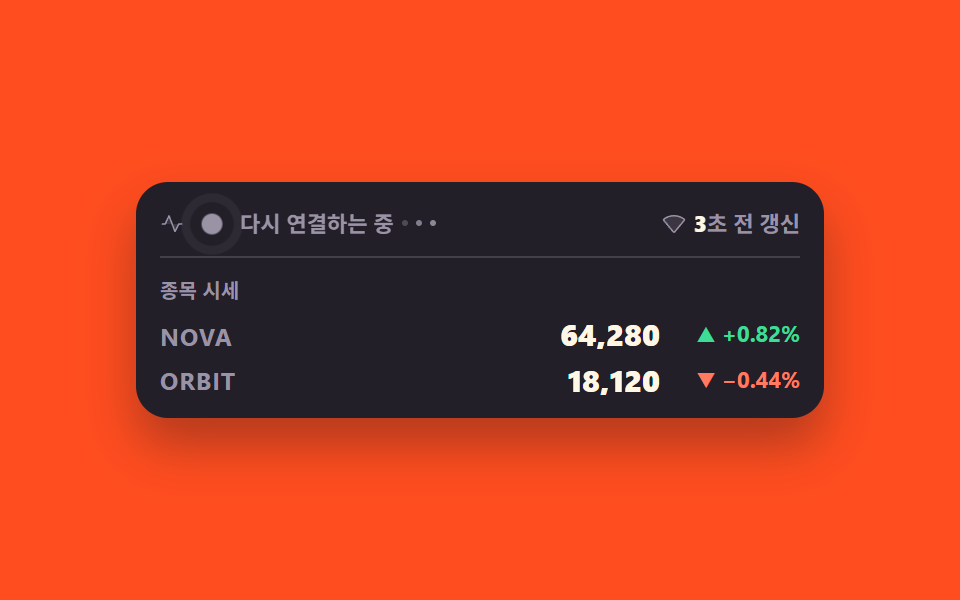
09接続状態と更新の遅れの表示
ライブの点が呼吸する間に最後の更新が何秒前かを数え、visibilityState が hidden になるとタイマーを止めます
使いどころリアルタイム画面の右上の状態表示、再接続の案内バー
visibilityStateanimation-delayopacity
<main class="stage">
<div class="cs is-demo is-live" id="cs">
  <div class="cs__board">
    <div class="cs__bar">
      <span class="cs__left">
        <svg class="cs__ic" xmlns="http://www.w3.org/2000/svg" width="1em" height="1em" viewBox="0 0 256 256" aria-hidden="true"><g fill="currentColor"><path d="m96 40l33.52 88H56Zm104 88h-70.48L160 208Z" opacity=".2"/><path d="M240 128a8 8 0 0 1-8 8h-27.06l-37.78 75.58A8 8 0 0 1 160 216h-.4a8 8 0 0 1-7.08-5.14L95.35 60.76l-32.07 70.55A8 8 0 0 1 56 136H24a8 8 0 0 1 0-16h26.85l37.87-83.31a8 8 0 0 1 14.76.46l57.51 151l31.85-63.71A8 8 0 0 1 200 120h32a8 8 0 0 1 8 8"/></g></svg>
        <span class="cs__dotWrap" aria-hidden="true">
          <span class="cs__halo"></span>
          <span class="cs__dot"></span>
        </span>
        <!-- 상태는 점 색·움직임만으로 전하지 않는다 — 세 상태의 글자를 늘 같은 자리에 겹쳐 두고 한 장만 보인다 -->
        <span class="cs__stateWrap">
          <span class="cs__state cs__state--live">ライブ</span>
          <span class="cs__state cs__state--lost">切断</span>
          <span class="cs__state cs__state--retry">再接続中<span class="cs__dots" aria-hidden="true"><i></i><i></i><i></i></span></span>
        </span>
      </span>
      <span class="cs__right">
        <svg class="cs__ic" xmlns="http://www.w3.org/2000/svg" width="1em" height="1em" viewBox="0 0 256 256" aria-hidden="true"><g fill="currentColor"><path d="m238.2 87.69l-104 125.43a8 8 0 0 1-12.3 0L17.8 87.69a7.79 7.79 0 0 1 1.31-11.21a180.75 180.75 0 0 1 217.78 0a7.79 7.79 0 0 1 1.31 11.21" opacity=".2"/><path d="M247.89 80.91a15.93 15.93 0 0 0-6.17-10.81A186.67 186.67 0 0 0 128 32A186.67 186.67 0 0 0 14.28 70.1a15.93 15.93 0 0 0-6.17 10.81a15.65 15.65 0 0 0 3.54 11.89l104 125.43A15.93 15.93 0 0 0 128 224a15.93 15.93 0 0 0 12.31-5.77l104-125.43a15.65 15.65 0 0 0 3.58-11.89M128 208L24.09 82.74A170.76 170.76 0 0 1 128 48a170.76 170.76 0 0 1 103.91 34.74Z"/></g></svg>
        <!-- 지연 숫자만 칸을 겹쳐 컷 교체한다. 단위 글자는 HTML 에 두고 JS 는 숫자만 갈아 끼운다 -->
        <span class="cs__lagText"><span class="cs__lagWrap">
          <span class="cs__lag cs__lag--now" data-lag>0</span>
          <span class="cs__lag cs__lag--d0" aria-hidden="true">0</span>
          <span class="cs__lag cs__lag--d1" aria-hidden="true">1</span>
          <span class="cs__lag cs__lag--d2" aria-hidden="true">2</span>
          <span class="cs__lag cs__lag--d3" aria-hidden="true">3</span>
        </span>秒前に更新</span>
      </span>
    </div>

    <p class="cs__cap">銘柄価格</p>
    <ul class="cs__rows">
      <li class="cs__row">
        <span class="cs__sym">NOVA</span>
        <span class="cs__price" data-price0>64,280</span>
        <span class="cs__chg is-up" data-chg0>▲ +0.82%</span>
      </li>
      <li class="cs__row">
        <span class="cs__sym">ORBIT</span>
        <span class="cs__price" data-price1>18,120</span>
        <span class="cs__chg is-down" data-chg1>▼ −0.44%</span>
      </li>
    </ul>
  </div>
</div>
</main>@use "../../../../site/static/demo-tokens" as *;
// 연결 상태 줄 — 시세판 머리에 붙는다. 한 자리에 셋이 같이 산다.
// ① 라이브 점: 숨 쉬듯 커졌다 작아진다. 점 옆에 상태 글자를 반드시 같이 둔다(색·움직임만으로 전하지 않는다)
// ② 지연 표시: 마지막 갱신이 몇 초 전인지. 숫자는 tabular-nums 로 자리가 안 흔들린다
// ③ 재연결 시뮬: 값이 한동안 안 오면 실시간 → 연결 끊김 → 다시 연결하는 중 → 실시간 으로 스스로 넘어간다
// 실사용에서는 document.visibilityState 가 hidden 이면 타이머가 아예 세지 않는다(index.html 주석 참고).
// "다시 연결하는 중" 뒤의 점 세 개는 소스에 말줄임표를 남기지 않으려고 요소 세 개 + opacity 애니메이션으로 만든다.
//
// 미리보기(.is-demo)는 같은 장면을 CSS 키프레임 2초 루프로 눕힌다 — JS 는 그동안 화면을 안 건드린다.
// 루프 안 깜빡임: 숨결 2회 = 초당 1회로 WCAG 2.3.1(초당 3회 미만) 아래.
// 되돌림은 96% 컷이라 24프레임의 마지막 장(2초의 95.8%)에는 되돌아가는 장면이 안 찍힌다.
$duration: $dur-loop;
$easing: $ease-out;
$breath: 1s; // 숨결 한 번 — 2초의 약수라 루프가 안 끊긴다
@include stage($stage-orange);
.cs { display: flex; justify-content: center; width: 100%; }
.cs__board {
width: min(100%, 320px); background: $tick-panel; border-radius: $r-card;
box-shadow: $shadow-raised; padding: $sp-3 $sp-3 $sp-2;
}
.cs__bar {
display: flex; align-items: center; justify-content: space-between; gap: $sp-2;
padding: 0 0 $sp-2; border-bottom: 1px solid rgba(154, 147, 166, .28);
}
.cs__left, .cs__right { display: inline-flex; align-items: center; gap: $sp-1; }
.cs__ic { width: 12px; height: 12px; font-size: 12px; flex: 0 0 auto; color: $tick-mute; }
// ── 라이브 점과 숨결 고리. 색은 wrap 이 쥐고 점·고리는 currentColor 를 받는다 (상태 하나만 바꾸면 된다)
.cs__dotWrap { position: relative; width: 20px; height: 10px; flex: 0 0 auto; color: $tick-up; }
.cs__dot {
position: absolute; top: 50%; left: 50%; width: 8px; height: 8px; border-radius: 50%;
transform: translate(-50%, -50%); background: currentColor;
}
.cs__halo {
position: absolute; top: 50%; left: 50%; width: 10px; height: 10px; border-radius: 50%;
border: 2px solid currentColor; opacity: 0; transform: translate(-50%, -50%) scale(.6);
}
.cs__stateWrap { display: grid; }
.cs__state {
grid-area: 1 / 1; display: inline-flex; align-items: center; white-space: nowrap;
font-weight: 700; font-size: clamp(10px, 2.6vw, 11px); line-height: 1.6; opacity: 0;
}
.cs__state--live { color: $tick-up; }
.cs__state--lost { color: $tick-down; }
.cs__state--retry { color: $tick-mute; }
// 점 세 개 — 말줄임표 대신 요소 셋을 차례로 밝힌다
.cs__dots { display: inline-flex; align-items: center; gap: $sp-1; margin-left: $sp-1; }
.cs__dots i {
width: 3px; height: 3px; border-radius: 50%; background: currentColor; opacity: .25;
animation-name: csTypeDot;
animation-duration: $breath;
animation-timing-function: $easing;
animation-iteration-count: infinite;
animation-fill-mode: backwards; // 지연 구간에도 키프레임 첫 장을 쓴다 — 첫 프레임 번쩍임 방지
}
.cs__dots i:nth-child(2) { animation-delay: 150ms; }
.cs__dots i:nth-child(3) { animation-delay: 300ms; }
@keyframes csTypeDot { 0%, 60%, 100% { opacity: .25; } 30% { opacity: 1; } }
// ── 지연 표시. 숫자 칸만 겹쳐 두고 단위 글자는 HTML 에 그대로 둔다
.cs__right { color: $tick-mute; font-weight: 700; font-size: clamp(10px, 2.6vw, 11px); line-height: 1.6; }
.cs__lagText { white-space: nowrap; }
.cs__lagWrap { display: inline-grid; justify-items: end; }
.cs__lag {
grid-area: 1 / 1; font-variant-numeric: tabular-nums;
font-weight: 800; color: $subject-cream;
}
.cs__lag--d0, .cs__lag--d1, .cs__lag--d2, .cs__lag--d3 { opacity: 0; }
.cs__cap {
margin: $sp-2 0 $sp-1; font-weight: 700; font-size: clamp(9px, 2.4vw, 10px); color: $tick-mute;
}
.cs__rows { list-style: none; margin: 0; padding: 0; }
.cs__row { display: grid; grid-template-columns: 1fr auto auto; align-items: center; gap: $sp-2; }
.cs__sym { font-weight: 700; font-size: clamp(10px, 2.8vw, 12px); color: $tick-mute; letter-spacing: .04em; }
.cs__price {
font-weight: 800; font-size: clamp(12px, 3.4vw, 15px); line-height: 1.5; color: $subject-cream;
font-variant-numeric: tabular-nums;
}
.cs__chg {
font-weight: 700; font-size: clamp(10px, 2.6vw, 11px); line-height: 1.5; min-width: 62px;
text-align: right; font-variant-numeric: tabular-nums;
}
.cs__chg.is-up { color: $tick-up; }
.cs__chg.is-down { color: $tick-down; }
// ── 실사용(정적 경로): 지금 상태의 글자 한 장만 보이고 점 색도 따라간다
.cs:not(.is-demo).is-live .cs__state--live,
.cs:not(.is-demo).is-lost .cs__state--lost,
.cs:not(.is-demo).is-retry .cs__state--retry { opacity: 1; }
.cs:not(.is-demo).is-lost .cs__dotWrap { color: $tick-down; }
.cs:not(.is-demo).is-retry .cs__dotWrap { color: $tick-mute; }
// 끊긴 동안에는 숨결을 멈춘다 — 살아 있다는 신호를 거짓으로 주지 않는다
.cs:not(.is-demo).is-lost .cs__halo { animation: none; opacity: 0; }
// 숨결은 미리보기에서도 실사용에서도 똑같이 돈다 (2초 루프 안에서 두 번)
.cs__halo {
animation-name: csHalo;
animation-duration: $breath;
animation-timing-function: $easing;
animation-iteration-count: infinite;
}
@keyframes csHalo {
0% { opacity: .8; transform: translate(-50%, -50%) scale(.6); }
70%, 100% { opacity: 0; transform: translate(-50%, -50%) scale(2.4); }
}
.cs__dot {
animation-name: csBreath;
animation-duration: $breath;
animation-timing-function: $easing;
animation-iteration-count: infinite;
}
@keyframes csBreath {
0%, 100% { transform: translate(-50%, -50%) scale(1); }
50% { transform: translate(-50%, -50%) scale(1.3); }
}
// ── 미리보기 루프(2초)
// 지연 숫자는 24% 마다 steps(1, end) 로 0 → 1 → 2 → 3 컷 교체.
// 72% 에 상태가 "실시간" 에서 "다시 연결하는 중" 으로 한 번 바뀌고 점 색도 같이 바뀐다.
// 96% 되돌림 컷 — 마지막 표본이 95.8% 라 되돌아가는 장면은 안 찍힌다.
.cs.is-demo .cs__lag--now { opacity: 0; }
.cs.is-demo .cs__lag--d0, .cs.is-demo .cs__lag--d1,
.cs.is-demo .cs__lag--d2, .cs.is-demo .cs__lag--d3,
.cs.is-demo .cs__state--live, .cs.is-demo .cs__state--retry,
.cs.is-demo .cs__dotWrap {
animation-duration: $duration;
animation-timing-function: steps(1, end);
animation-iteration-count: infinite;
}
.cs.is-demo .cs__lag--d0 { animation-name: csD0; }
.cs.is-demo .cs__lag--d1 { animation-name: csD1; }
.cs.is-demo .cs__lag--d2 { animation-name: csD2; }
.cs.is-demo .cs__lag--d3 { animation-name: csD3; }
.cs.is-demo .cs__state--live { animation-name: csCutOut; }
.cs.is-demo .cs__state--retry { animation-name: csCutIn; }
.cs.is-demo .cs__dotWrap { animation-name: csHue; }
@keyframes csD0 { 0% { opacity: 1; } 24% { opacity: 0; } 96% { opacity: 1; } }
@keyframes csD1 { 0% { opacity: 0; } 24% { opacity: 1; } 48% { opacity: 0; } }
@keyframes csD2 { 0% { opacity: 0; } 48% { opacity: 1; } 72% { opacity: 0; } }
@keyframes csD3 { 0% { opacity: 0; } 72% { opacity: 1; } 96% { opacity: 0; } }
@keyframes csCutOut { 0% { opacity: 1; } 72% { opacity: 0; } 96% { opacity: 1; } }
@keyframes csCutIn { 0% { opacity: 0; } 72% { opacity: 1; } 96% { opacity: 0; } }
@keyframes csHue { 0% { color: $tick-up; } 72% { color: $tick-mute; } 96% { color: $tick-up; } }
@media (max-width: 340px) {
.cs__board { padding: $sp-2; }
.cs__bar { gap: $sp-1; padding: 0 0 $sp-1; }
.cs__cap { margin: $sp-1 0 0; }
.cs__row { gap: $sp-1; }
.cs__chg { min-width: 56px; }
}
@media (prefers-reduced-motion: reduce) {
// 숨결·점멸은 멈추고 상태 글자와 숫자만 남긴다 — 상태는 색이 아니라 글자가 말한다
.cs__halo { animation: none !important; opacity: 0 !important; }
.cs__dot { animation: none !important; transform: translate(-50%, -50%) scale(1) !important; }
.cs__dots i { animation: none !important; opacity: .6 !important; }
.cs.is-demo .cs__lag--now { opacity: 1 !important; }
.cs.is-demo .cs__lag--d0, .cs.is-demo .cs__lag--d1,
.cs.is-demo .cs__lag--d2, .cs.is-demo .cs__lag--d3 { animation: none !important; opacity: 0 !important; }
.cs.is-demo .cs__state--live { animation: none !important; opacity: 1 !important; }
.cs.is-demo .cs__state--retry { animation: none !important; opacity: 0 !important; }
.cs.is-demo .cs__dotWrap { animation: none !important; color: $tick-up !important; }
}html, body {
margin: 0;
overflow: hidden;
}
.stage {
box-sizing: border-box;
min-height: 100vh;
display: grid;
place-items: center;
margin: 0;
background: #ff4d1f;
font-family: -apple-system, "Segoe UI", "Noto Sans KR", sans-serif;
padding: clamp(8px, 4vw, 24px);
}
.cs {
display: flex;
justify-content: center;
width: 100%;
}
.cs__board {
width: min(100%, 320px);
background: #231f28;
border-radius: 16px;
box-shadow: 0 14px 24px rgba(23, 20, 26, 0.32);
padding: 12px 12px 8px;
}
.cs__bar {
display: flex;
align-items: center;
justify-content: space-between;
gap: 8px;
padding: 0 0 8px;
border-bottom: 1px solid rgba(154, 147, 166, 0.28);
}
.cs__left, .cs__right {
display: inline-flex;
align-items: center;
gap: 4px;
}
.cs__ic {
width: 12px;
height: 12px;
font-size: 12px;
flex: 0 0 auto;
color: #9a93a6;
}
.cs__dotWrap {
position: relative;
width: 20px;
height: 10px;
flex: 0 0 auto;
color: #3ddc97;
}
.cs__dot {
position: absolute;
top: 50%;
left: 50%;
width: 8px;
height: 8px;
border-radius: 50%;
transform: translate(-50%, -50%);
background: currentColor;
}
.cs__halo {
position: absolute;
top: 50%;
left: 50%;
width: 10px;
height: 10px;
border-radius: 50%;
border: 2px solid currentColor;
opacity: 0;
transform: translate(-50%, -50%) scale(0.6);
}
.cs__stateWrap {
display: grid;
}
.cs__state {
grid-area: 1/1;
display: inline-flex;
align-items: center;
white-space: nowrap;
font-weight: 700;
font-size: clamp(10px, 2.6vw, 11px);
line-height: 1.6;
opacity: 0;
}
.cs__state--live {
color: #3ddc97;
}
.cs__state--lost {
color: #ff7a5e;
}
.cs__state--retry {
color: #9a93a6;
}
.cs__dots {
display: inline-flex;
align-items: center;
gap: 4px;
margin-left: 4px;
}
.cs__dots i {
width: 3px;
height: 3px;
border-radius: 50%;
background: currentColor;
opacity: 0.25;
animation-name: csTypeDot;
animation-duration: 1s;
animation-timing-function: ease-out;
animation-iteration-count: infinite;
animation-fill-mode: backwards;
}
.cs__dots i:nth-child(2) {
animation-delay: 150ms;
}
.cs__dots i:nth-child(3) {
animation-delay: 300ms;
}
@keyframes csTypeDot {
0%, 60%, 100% {
opacity: 0.25;
}
30% {
opacity: 1;
}
}
.cs__right {
color: #9a93a6;
font-weight: 700;
font-size: clamp(10px, 2.6vw, 11px);
line-height: 1.6;
}
.cs__lagText {
white-space: nowrap;
}
.cs__lagWrap {
display: inline-grid;
justify-items: end;
}
.cs__lag {
grid-area: 1/1;
font-variant-numeric: tabular-nums;
font-weight: 800;
color: #fff7e6;
}
.cs__lag--d0, .cs__lag--d1, .cs__lag--d2, .cs__lag--d3 {
opacity: 0;
}
.cs__cap {
margin: 8px 0 4px;
font-weight: 700;
font-size: clamp(9px, 2.4vw, 10px);
color: #9a93a6;
}
.cs__rows {
list-style: none;
margin: 0;
padding: 0;
}
.cs__row {
display: grid;
grid-template-columns: 1fr auto auto;
align-items: center;
gap: 8px;
}
.cs__sym {
font-weight: 700;
font-size: clamp(10px, 2.8vw, 12px);
color: #9a93a6;
letter-spacing: 0.04em;
}
.cs__price {
font-weight: 800;
font-size: clamp(12px, 3.4vw, 15px);
line-height: 1.5;
color: #fff7e6;
font-variant-numeric: tabular-nums;
}
.cs__chg {
font-weight: 700;
font-size: clamp(10px, 2.6vw, 11px);
line-height: 1.5;
min-width: 62px;
text-align: right;
font-variant-numeric: tabular-nums;
}
.cs__chg.is-up {
color: #3ddc97;
}
.cs__chg.is-down {
color: #ff7a5e;
}
.cs:not(.is-demo).is-live .cs__state--live,
.cs:not(.is-demo).is-lost .cs__state--lost,
.cs:not(.is-demo).is-retry .cs__state--retry {
opacity: 1;
}
.cs:not(.is-demo).is-lost .cs__dotWrap {
color: #ff7a5e;
}
.cs:not(.is-demo).is-retry .cs__dotWrap {
color: #9a93a6;
}
.cs:not(.is-demo).is-lost .cs__halo {
animation: none;
opacity: 0;
}
.cs__halo {
animation-name: csHalo;
animation-duration: 1s;
animation-timing-function: ease-out;
animation-iteration-count: infinite;
}
@keyframes csHalo {
0% {
opacity: 0.8;
transform: translate(-50%, -50%) scale(0.6);
}
70%, 100% {
opacity: 0;
transform: translate(-50%, -50%) scale(2.4);
}
}
.cs__dot {
animation-name: csBreath;
animation-duration: 1s;
animation-timing-function: ease-out;
animation-iteration-count: infinite;
}
@keyframes csBreath {
0%, 100% {
transform: translate(-50%, -50%) scale(1);
}
50% {
transform: translate(-50%, -50%) scale(1.3);
}
}
.cs.is-demo .cs__lag--now {
opacity: 0;
}
.cs.is-demo .cs__lag--d0, .cs.is-demo .cs__lag--d1,
.cs.is-demo .cs__lag--d2, .cs.is-demo .cs__lag--d3,
.cs.is-demo .cs__state--live, .cs.is-demo .cs__state--retry,
.cs.is-demo .cs__dotWrap {
animation-duration: 2s;
animation-timing-function: steps(1, end);
animation-iteration-count: infinite;
}
.cs.is-demo .cs__lag--d0 {
animation-name: csD0;
}
.cs.is-demo .cs__lag--d1 {
animation-name: csD1;
}
.cs.is-demo .cs__lag--d2 {
animation-name: csD2;
}
.cs.is-demo .cs__lag--d3 {
animation-name: csD3;
}
.cs.is-demo .cs__state--live {
animation-name: csCutOut;
}
.cs.is-demo .cs__state--retry {
animation-name: csCutIn;
}
.cs.is-demo .cs__dotWrap {
animation-name: csHue;
}
@keyframes csD0 {
0% {
opacity: 1;
}
24% {
opacity: 0;
}
96% {
opacity: 1;
}
}
@keyframes csD1 {
0% {
opacity: 0;
}
24% {
opacity: 1;
}
48% {
opacity: 0;
}
}
@keyframes csD2 {
0% {
opacity: 0;
}
48% {
opacity: 1;
}
72% {
opacity: 0;
}
}
@keyframes csD3 {
0% {
opacity: 0;
}
72% {
opacity: 1;
}
96% {
opacity: 0;
}
}
@keyframes csCutOut {
0% {
opacity: 1;
}
72% {
opacity: 0;
}
96% {
opacity: 1;
}
}
@keyframes csCutIn {
0% {
opacity: 0;
}
72% {
opacity: 1;
}
96% {
opacity: 0;
}
}
@keyframes csHue {
0% {
color: #3ddc97;
}
72% {
color: #9a93a6;
}
96% {
color: #3ddc97;
}
}
@media (max-width: 340px) {
.cs__board {
padding: 8px;
}
.cs__bar {
gap: 4px;
padding: 0 0 4px;
}
.cs__cap {
margin: 4px 0 0;
}
.cs__row {
gap: 4px;
}
.cs__chg {
min-width: 56px;
}
}
@media (prefers-reduced-motion: reduce) {
.cs__halo {
animation: none !important;
opacity: 0 !important;
}
.cs__dot {
animation: none !important;
transform: translate(-50%, -50%) scale(1) !important;
}
.cs__dots i {
animation: none !important;
opacity: 0.6 !important;
}
.cs.is-demo .cs__lag--now {
opacity: 1 !important;
}
.cs.is-demo .cs__lag--d0, .cs.is-demo .cs__lag--d1,
.cs.is-demo .cs__lag--d2, .cs.is-demo .cs__lag--d3 {
animation: none !important;
opacity: 0 !important;
}
.cs.is-demo .cs__state--live {
animation: none !important;
opacity: 1 !important;
}
.cs.is-demo .cs__state--retry {
animation: none !important;
opacity: 0 !important;
}
.cs.is-demo .cs__dotWrap {
animation: none !important;
color: #3ddc97 !important;
}
}// 가짜 시세는 시드 PRNG 로 만든다 — 외부 API·키·네트워크가 없어도 같은 흐름이 재현된다
var SEED = 296;
function mulberry32(a) {
return function () {
a |= 0; a = a + 0x6D2B79F5 | 0;
var t = Math.imul(a ^ a >>> 15, 1 | a);
t = t + Math.imul(t ^ t >>> 7, 61 | t) ^ t;
return ((t ^ t >>> 14) >>> 0) / 4294967296;
};
}
var rand = mulberry32(SEED);
var BASE = [63760, 18200];
var price = [64280, 18120];
var root = document.getElementById('cs');
var lagEl = root.querySelector('[data-lag]');
var cells = [
{ p: root.querySelector('[data-price0]'), c: root.querySelector('[data-chg0]') },
{ p: root.querySelector('[data-price1]'), c: root.querySelector('[data-chg1]') }
];
function money(n) { return n.toLocaleString('en-US'); }
function pct(v) { return (v >= 0 ? '+' : '−') + Math.abs(v).toFixed(2) + '%'; }
function arrow(v) { return v >= 0 ? '▲' : '▼'; }
// 상태 이름은 클래스로만 다룬다 — 화면 글자는 HTML 에 세 장 다 있고 CSS 가 한 장만 보여 준다
var LIVE = 'is-live', LOST = 'is-lost', RETRY = 'is-retry';
function setState(name) {
root.classList.remove(LIVE, LOST, RETRY);
root.classList.add(name);
}
var lastAt = Date.now(); // 마지막으로 값이 들어온 시각
var ticks = 0; // 몇 번 받았는지 — 일정 횟수마다 끊김을 흉내 낸다
var phase = LIVE;
function paint(i) {
var chg = (price[i] - BASE[i]) / BASE[i] * 100;
cells[i].p.textContent = money(price[i]);
// 방향은 색만으로 전하지 않는다 — 화살표와 부호를 같이 적는다
cells[i].c.textContent = arrow(chg) + ' ' + pct(chg);
cells[i].c.className = 'cs__chg ' + (chg >= 0 ? 'is-up' : 'is-down');
}
function feed() {
for (var i = 0; i < price.length; i++) {
var step = Math.round((rand() - 0.48) * price[i] * 0.004);
if (step === 0) { step = rand() < 0.5 ? -1 : 1; }
price[i] = price[i] + step;
paint(i);
}
lastAt = Date.now();
ticks += 1;
}
// 지연 표시는 "마지막 갱신이 몇 초 전인가" 다. 값이 안 들어오는 동안에는 숫자가 계속 커진다
function showLag() {
lagEl.textContent = String(Math.floor((Date.now() - lastAt) / 1000));
}
function step() {
if (root.classList.contains('is-demo')) { return; }
// 탭이 안 보이면 세지 않는다 — 안 보이는 화면의 지연 숫자는 뜻이 없고, 돌아왔을 때
// 밀린 갱신이 한꺼번에 터지지도 않게 한다 (document.visibilityState)
if (document.visibilityState === 'hidden') { return; }
var since = Date.now() - lastAt;
if (phase === LIVE) {
// 다섯 번 받고 나면 값이 안 오는 상황을 흉내 낸다 — 지연이 쌓이면 상태가 스스로 넘어간다
if (ticks > 0 && ticks % 5 === 0) {
if (since > 2600) { phase = LOST; setState(LOST); }
} else if (since > 1400) { feed(); }
} else if (phase === LOST) {
if (since > 4200) { phase = RETRY; setState(RETRY); }
} else if (since > 6000) {
phase = LIVE; setState(LIVE); feed();
}
showLag();
}
// 격자 미리보기(.is-demo) 동안에는 CSS 키프레임만 돌고 JS 는 화면을 안 건드린다 — 24프레임이 같은
// 순간을 재현해야 렌더 측정이 흔들리지 않는다. 사람이 닿으면 그때부터 실제 갱신이 시작된다
function live() {
if (root.classList.contains('is-demo')) {
root.classList.remove('is-demo');
lastAt = Date.now();
showLag();
}
}
['pointerdown', 'pointermove', 'focusin'].forEach(function (ev) { root.addEventListener(ev, live); });
var timer = setInterval(step, 250);
// 탭이 다시 보이면 지연을 지금부터 새로 센다 — 안 보던 동안의 초를 몰아서 보여 주지 않는다
document.addEventListener('visibilitychange', function () {
if (document.visibilityState === 'visible') { lastAt = Date.now(); showLag(); }
});
window.addEventListener('pagehide', function () { clearInterval(timer); });// ConnectionStatus — vanilla 판(run/296/demo/09-ticker-connection-status/index.html) 의 React 포트.
// 시세판 머리에 붙는 상태 줄. 라이브 점이 숨 쉬고, 마지막 갱신이 몇 초 전인지 세고,
// 값이 한동안 안 오면 실시간 → 연결 끊김 → 다시 연결하는 중 → 실시간 으로 스스로 넘어간다.
// 상태는 점 색·움직임만으로 전하지 않는다 — 점 옆에 상태 글자가 늘 같이 있다.
import { useEffect, useRef, useState } from "react";
import styles from "./ConnectionStatus.module.scss";
export type ConnectionStatusProps = {
/** 격자 미리보기용 2초 자동 루프. 포인터를 올리거나 키보드로 들어오면 꺼지고 실제 갱신이 시작된다 */
demo?: boolean;
/** 시드 — 같은 값이면 누가 열어도 같은 시세 흐름이 재현된다 */
seed?: number;
/** 값이 들어오는 간격(ms) */
feedMs?: number;
/** 몇 번 받고 나서 끊김을 흉내 낼지 */
dropEvery?: number;
};
type Box<T> = { current: T };
type Phase = "live" | "lost" | "retry";
type Quote = { sym: string; base: number; price: number };
const START: Quote[] = [
{ sym: "NOVA", base: 63760, price: 64280 },
{ sym: "ORBIT", base: 18200, price: 18120 },
];
/** 시드 PRNG — 외부 API·키·네트워크가 없어도 같은 흐름이 재현된다 */
function mulberry32(a: number) {
return function () {
a |= 0; a = a + 0x6D2B79F5 | 0;
let t = Math.imul(a ^ a >>> 15, 1 | a);
t = t + Math.imul(t ^ t >>> 7, 61 | t) ^ t;
return ((t ^ t >>> 14) >>> 0) / 4294967296;
};
}
const money = (n: number) => n.toLocaleString("en-US");
const pct = (v: number) => (v >= 0 ? "+" : "−") + Math.abs(v).toFixed(2) + "%";
const arrow = (v: number) => (v >= 0 ? "▲" : "▼");
export default function ConnectionStatus({
demo = true, seed = 296, feedMs = 1400, dropEvery = 5,
}: ConnectionStatusProps) {
const randRef: Box<(() => number) | null> = useRef(null);
if (randRef.current === null) { randRef.current = mulberry32(seed); }
const [rows, setRows] = useState<Quote[]>(START);
const [live, setLive] = useState(!demo);
const [phase, setPhase] = useState<Phase>("live");
const [lag, setLag] = useState(0);
const lastAt = useRef(Date.now()) as Box<number>;
const ticks = useRef(0) as Box<number>;
useEffect(() => {
if (!live) { return; }
lastAt.current = Date.now();
const feed = () => {
setRows((old) => old.map((r) => {
const rand = randRef.current as () => number;
let step = Math.round((rand() - 0.48) * r.price * 0.004);
if (step === 0) { step = rand() < 0.5 ? -1 : 1; }
return { ...r, price: r.price + step };
}));
lastAt.current = Date.now();
ticks.current += 1;
};
const id = window.setInterval(() => {
// 탭이 안 보이면 세지 않는다 — 안 보이는 화면의 지연 숫자는 뜻이 없고,
// 돌아왔을 때 밀린 갱신이 한꺼번에 터지지도 않게 한다
if (document.visibilityState === "hidden") { return; }
const since = Date.now() - lastAt.current;
setPhase((p) => {
if (p === "live") {
// 몇 번 받고 나면 값이 안 오는 상황을 흉내 낸다 — 지연이 쌓이면 상태가 스스로 넘어간다
if (ticks.current > 0 && ticks.current % dropEvery === 0) {
return since > feedMs + 1200 ? "lost" : p;
}
if (since > feedMs) { feed(); }
return p;
}
if (p === "lost") { return since > feedMs + 2800 ? "retry" : p; }
if (since > feedMs + 4600) { feed(); return "live"; }
return p;
});
setLag(Math.floor((Date.now() - lastAt.current) / 1000));
}, 250);
return () => window.clearInterval(id);
}, [live, feedMs, dropEvery]);
// 탭이 다시 보이면 지연을 지금부터 새로 센다 — 안 보던 동안의 초를 몰아서 보여 주지 않는다
useEffect(() => {
const onVis = () => {
if (document.visibilityState === "visible") { lastAt.current = Date.now(); setLag(0); }
};
document.addEventListener("visibilitychange", onVis);
return () => document.removeEventListener("visibilitychange", onVis);
}, []);
const phaseCls = phase === "live" ? styles.isLive : phase === "lost" ? styles.isLost : styles.isRetry;
const rootCls = [styles.root, live ? "" : styles.isDemo, phaseCls].filter(Boolean).join(" ");
return (
<div
className={rootCls}
onPointerMove={() => setLive(true)}
onPointerDown={() => setLive(true)}
onFocus={() => setLive(true)}
>
<div className={styles.board}>
<div className={styles.bar}>
<span className={styles.left}>
<svg className={styles.ic} xmlns="http://www.w3.org/2000/svg" width="1em" height="1em" viewBox="0 0 256 256" aria-hidden="true"><g fill="currentColor"><path d="m96 40l33.52 88H56Zm104 88h-70.48L160 208Z" opacity=".2" /><path d="M240 128a8 8 0 0 1-8 8h-27.06l-37.78 75.58A8 8 0 0 1 160 216h-.4a8 8 0 0 1-7.08-5.14L95.35 60.76l-32.07 70.55A8 8 0 0 1 56 136H24a8 8 0 0 1 0-16h26.85l37.87-83.31a8 8 0 0 1 14.76.46l57.51 151l31.85-63.71A8 8 0 0 1 200 120h32a8 8 0 0 1 8 8" /></g></svg>
<span className={styles.dotWrap} aria-hidden="true">
<span className={styles.halo} />
<span className={styles.dot} />
</span>
{/* 상태는 점 색·움직임만으로 전하지 않는다 — 세 장을 같은 자리에 겹쳐 두고 한 장만 보인다 */}
<span className={styles.stateWrap}>
<span className={`${styles.state} ${styles.stateLive}`}>실시간</span>
<span className={`${styles.state} ${styles.stateLost}`}>연결 끊김</span>
<span className={`${styles.state} ${styles.stateRetry}`}>
다시 연결하는 중
{/* 점 세 개는 말줄임표 대신 요소 셋 + opacity 애니메이션으로 만든다 */}
<span className={styles.dots} aria-hidden="true"><i /><i /><i /></span>
</span>
</span>
</span>
<span className={styles.right}>
<svg className={styles.ic} xmlns="http://www.w3.org/2000/svg" width="1em" height="1em" viewBox="0 0 256 256" aria-hidden="true"><g fill="currentColor"><path d="m238.2 87.69l-104 125.43a8 8 0 0 1-12.3 0L17.8 87.69a7.79 7.79 0 0 1 1.31-11.21a180.75 180.75 0 0 1 217.78 0a7.79 7.79 0 0 1 1.31 11.21" opacity=".2" /><path d="M247.89 80.91a15.93 15.93 0 0 0-6.17-10.81A186.67 186.67 0 0 0 128 32A186.67 186.67 0 0 0 14.28 70.1a15.93 15.93 0 0 0-6.17 10.81a15.65 15.65 0 0 0 3.54 11.89l104 125.43A15.93 15.93 0 0 0 128 224a15.93 15.93 0 0 0 12.31-5.77l104-125.43a15.65 15.65 0 0 0 3.58-11.89M128 208L24.09 82.74A170.76 170.76 0 0 1 128 48a170.76 170.76 0 0 1 103.91 34.74Z" /></g></svg>
{/* 지연 숫자만 칸을 겹쳐 컷 교체한다. 단위 글자는 마크업에 두고 숫자만 갈아 끼운다 */}
<span className={styles.lagText}><span className={styles.lagWrap}>
<span className={`${styles.lag} ${styles.lagNow}`}>{lag}</span>
<span className={`${styles.lag} ${styles.lagD0}`} aria-hidden="true">0</span>
<span className={`${styles.lag} ${styles.lagD1}`} aria-hidden="true">1</span>
<span className={`${styles.lag} ${styles.lagD2}`} aria-hidden="true">2</span>
<span className={`${styles.lag} ${styles.lagD3}`} aria-hidden="true">3</span>
</span>초 전 갱신</span>
</span>
</div>
<p className={styles.cap}>종목 시세</p>
<ul className={styles.rows}>
{rows.map((r) => {
const chg = (r.price - r.base) / r.base * 100;
return (
<li key={r.sym} className={styles.row}>
<span className={styles.sym}>{r.sym}</span>
<span className={styles.price}>{money(r.price)}</span>
{/* 방향은 색만으로 전하지 않는다 — 화살표와 부호를 같이 적는다 */}
<span className={`${styles.chg} ${chg >= 0 ? styles.upText : styles.downText}`}>
{arrow(chg)} {pct(chg)}
</span>
</li>
);
})}
</ul>
</div>
</div>
);
}09 接続状態と更新の遅れの表示 — 計測 累積面積 0.926% · 動いたフレーム 23/23GODRICH オリジナル · SCSS と React は zip に同梱 · ティッカー ui で作るリアルタイム株価表示9種 — APIキー不要
このデモが属する記事
 ティッカー ui で作るリアルタイム株価表示9種 — APIキー不要ティッカー ui とは、株価のように絶えず変わる数字を、いまどこが変わったのかが目で分かる形にして見せる画面部品のことです。ここに並べた九つは、証券会社のキーも有料のデータ購読もいらず、ファイルを貼るだけでそのまま動きます。 この記事のデモをすべて見る