07ページ値切替と行位置値の移動 — ページ値が変わると前の行の位置値が抜け、新しい行の位置値が入ってくる方式
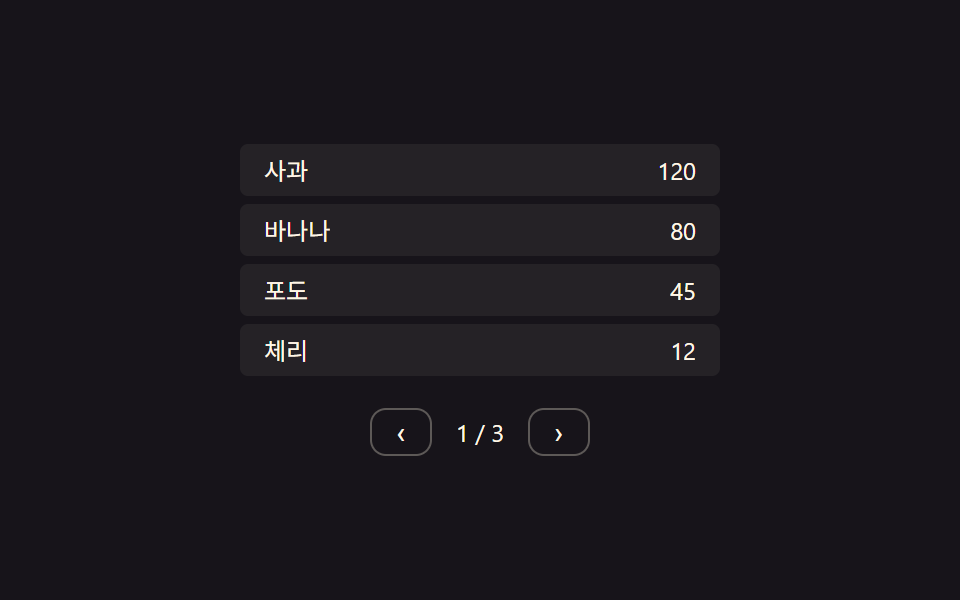
ページ値が次の番号に変わると画面上の行の位置値が片側へ抜け、新しいページの行がもう片側から位置の値を埋めます。
使いどころページ単位に分かれたデータ表、検索結果をページごとに見せる一覧
STAGGER_MS 60delayUntil.tps__row
<main class="stage">
<div class="tps">
  <div class="tps__viewport is-demo" id="tpsViewport"></div>
  <div class="tps__nav">
    <button class="tps__btn" id="tpsPrev" type="button" aria-label="前のページ">‹</button>
    <span class="tps__page" id="tpsPageLabel">1 / 3</span>
    <button class="tps__btn" id="tpsNext" type="button" aria-label="次のページ">›</button>
  </div>
</div>
</main>
@use "../../../../site/static/demo-tokens" as *;
// 계산 겹: 페이지 전환 방향(dir) 값에 따라 나가는/들어오는 행에 순서×STAGGER_MS 시작 지연을 걸고
// 남은 거리의 28%씩 다가가는 보간(lerp)으로 x 를 움직인다 — index.html goTo()/tick() 참조
@include stage($stage-ink);
.tps {
width: 100%;
max-width: 240px;
}
.tps__viewport {
position: relative;
overflow: hidden;
width: 100%;
}
.tps__row {
position: absolute;
left: 0;
width: 100%;
height: 26px;
box-sizing: border-box;
display: flex;
align-items: center;
justify-content: space-between;
padding: 0 $sp-3;
background: rgba(255, 247, 230, .06);
border-radius: $r-xs;
color: $subject-cream;
font: 400 12px/1 -apple-system, "Segoe UI", "Noto Sans KR", sans-serif;
}
.tps__cell--num {
font-variant-numeric: tabular-nums;
}
.tps__nav {
display: flex;
align-items: center;
justify-content: center;
gap: $sp-3;
margin-top: $sp-3;
}
.tps__btn {
border: 1px solid rgba(255, 247, 230, .3);
background: transparent;
color: $subject-cream;
border-radius: $r-sm;
padding: $sp-1 $sp-3;
cursor: pointer;
font-size: 14px;
line-height: 1;
}
.tps__page {
color: $subject-cream;
font-size: 12px;
font-variant-numeric: tabular-nums;
}
@media (max-width: 340px) {
.tps { max-width: 200px; }
.tps__row { height: 24px; font-size: 11px; }
}
@media (prefers-reduced-motion: reduce) {
.tps__row { transition: none; }
}html, body {
margin: 0;
overflow: hidden;
}
.stage {
box-sizing: border-box;
min-height: 100vh;
display: grid;
place-items: center;
margin: 0;
background: #17141a;
font-family: -apple-system, "Segoe UI", "Noto Sans KR", sans-serif;
padding: clamp(8px, 4vw, 24px);
}
.tps {
width: 100%;
max-width: 240px;
}
.tps__viewport {
position: relative;
overflow: hidden;
width: 100%;
}
.tps__row {
position: absolute;
left: 0;
width: 100%;
height: 26px;
box-sizing: border-box;
display: flex;
align-items: center;
justify-content: space-between;
padding: 0 12px;
background: rgba(255, 247, 230, 0.06);
border-radius: 4px;
color: #fff7e6;
font: 400 12px/1 -apple-system, "Segoe UI", "Noto Sans KR", sans-serif;
}
.tps__cell--num {
font-variant-numeric: tabular-nums;
}
.tps__nav {
display: flex;
align-items: center;
justify-content: center;
gap: 12px;
margin-top: 12px;
}
.tps__btn {
border: 1px solid rgba(255, 247, 230, 0.3);
background: transparent;
color: #fff7e6;
border-radius: 8px;
padding: 4px 12px;
cursor: pointer;
font-size: 14px;
line-height: 1;
}
.tps__page {
color: #fff7e6;
font-size: 12px;
font-variant-numeric: tabular-nums;
}
@media (max-width: 340px) {
.tps {
max-width: 200px;
}
.tps__row {
height: 24px;
font-size: 11px;
}
}
@media (prefers-reduced-motion: reduce) {
.tps__row {
transition: none;
}
}(function () {
var root = document.querySelector('.tps');
var viewport = document.getElementById('tpsViewport');
var pageLabel = document.getElementById('tpsPageLabel');
// 상수: 컨테이너 폭(px) · 행 높이(px) · stagger 간격(ms) · 보간 속도 · 자동 전환 간격
var W = 240;
var ROW_H = 30;
var STAGGER_MS = 60;
var LERP = 0.28;
var AUTO_PAGE_MS = 1600;
var pages = [
[['りんご', 120], ['バナナ', 80], ['ぶどう', 45], ['さくらんぼ', 12]],
[['なし', 33], ['すもも', 21], ['すいか', 5], ['まくわうり', 18]],
[['キウイ', 60], ['マンゴー', 40], ['いちご', 90], ['ブルーベリー', 27]]
];
var pageIndex = 0;
var live = []; // 현재 화면에 존재하는 모든 행 {el, x, targetX, delayUntil}
var transitioning = false;
function makeRow(item) {
var el = document.createElement('div');
el.className = 'tps__row';
el.innerHTML = '<span class="tps__cell">' + item[0] + '</span><span class="tps__cell tps__cell--num">' + item[1] + '</span>';
viewport.appendChild(el);
return el;
}
function renderInitial() {
pages[pageIndex].forEach(function (item) {
var el = makeRow(item);
live.push({ el: el, x: 0, targetX: 0, delayUntil: 0, role: 'stay' });
});
layoutStay();
pageLabel.textContent = (pageIndex + 1) + ' / ' + pages.length;
}
function layoutStay() {
var i = 0;
live.forEach(function (r) {
r.el.style.top = (i * ROW_H) + 'px';
i++;
});
}
// 계산 겹: 페이지 값이 바뀌면 방향 값(dir)에 따라 나가는 행·들어오는 행에 행 순서 × STAGGER_MS 만큼
// 시작 시각을 다르게 걸어(stagger) 목표 x 로 보간한다
function goTo(newIndex) {
if (transitioning || newIndex < 0 || newIndex >= pages.length || newIndex === pageIndex) return;
transitioning = true;
var dir = newIndex > pageIndex ? 1 : -1;
var now = performance.now();
var outgoing = live.slice();
outgoing.forEach(function (r, i) {
r.role = 'out';
r.targetX = -dir * W;
r.delayUntil = now + i * STAGGER_MS;
});
var incoming = pages[newIndex].map(function (item, i) {
var el = makeRow(item);
el.style.top = (i * ROW_H) + 'px';
el.style.transform = 'translateX(' + (dir * W) + 'px)';
return { el: el, x: dir * W, targetX: 0, delayUntil: now + i * STAGGER_MS, role: 'in' };
});
live = outgoing.concat(incoming);
pageIndex = newIndex;
pageLabel.textContent = (pageIndex + 1) + ' / ' + pages.length;
setTimeout(function () {
outgoing.forEach(function (r) { r.el.remove(); });
live = live.filter(function (r) { return r.role !== 'out'; });
live.forEach(function (r) { r.role = 'stay'; });
transitioning = false;
}, 900);
}
function tick() {
var now = performance.now();
live.forEach(function (r) {
if (now < r.delayUntil) return;
r.x += (r.targetX - r.x) * LERP;
r.el.style.transform = 'translateX(' + r.x.toFixed(1) + 'px)';
r.el.style.opacity = String(Math.max(0, 1 - Math.abs(r.x) / W));
});
requestAnimationFrame(tick);
}
requestAnimationFrame(tick);
renderInitial();
viewport.style.height = (4 * ROW_H) + 'px';
document.getElementById('tpsPrev').addEventListener('click', function () {
viewport.classList.remove('is-demo');
goTo(pageIndex - 1);
});
document.getElementById('tpsNext').addEventListener('click', function () {
viewport.classList.remove('is-demo');
goTo(pageIndex + 1);
});
// 자동 루프: 페이지 값을 순환하며 다음으로 넘긴다
function autoStep() {
if (viewport.classList.contains('is-demo')) {
goTo((pageIndex + 1) % pages.length);
}
setTimeout(autoStep, AUTO_PAGE_MS);
}
setTimeout(autoStep, AUTO_PAGE_MS);
})();import { useEffect, useRef } from "react";
import styles from "./TableRowPaginationSlide.module.scss";
type Box<T> = { current: T };
type LiveRow = { el: HTMLDivElement; x: number; targetX: number; delayUntil: number; role: "stay" | "out" | "in" };
export default function TableRowPaginationSlide() {
const rootRef = useRef(null) as unknown as Box<HTMLDivElement | null>;
const viewportRef = useRef(null) as unknown as Box<HTMLDivElement | null>;
const labelRef = useRef(null) as unknown as Box<HTMLSpanElement | null>;
useEffect(() => {
const root = rootRef.current;
const viewport = viewportRef.current;
const pageLabel = labelRef.current;
if (!root || !viewport || !pageLabel) return;
// 상수: 컨테이너 폭(px) · 행 높이(px) · stagger 간격(ms) · 보간 속도 · 자동 전환 간격
const W = 240;
const ROW_H = 30;
const STAGGER_MS = 60;
const LERP = 0.28;
const AUTO_PAGE_MS = 1600;
const pages: [string, number][][] = [
[["사과", 120], ["바나나", 80], ["포도", 45], ["체리", 12]],
[["배", 33], ["자두", 21], ["수박", 5], ["참외", 18]],
[["키위", 60], ["망고", 40], ["딸기", 90], ["블루베리", 27]],
];
let pageIndex = 0;
let live: LiveRow[] = [];
let transitioning = false;
let stopped = false;
let rafId = 0;
const timers: number[] = [];
function makeRow(item: [string, number]) {
const el = document.createElement("div");
el.className = styles.row;
el.innerHTML = `<span class="${styles.cell}">${item[0]}</span><span class="${styles.cell} ${styles.cellNum}">${item[1]}</span>`;
viewport!.appendChild(el);
return el;
}
function renderInitial() {
pages[pageIndex].forEach((item) => {
const el = makeRow(item);
live.push({ el, x: 0, targetX: 0, delayUntil: 0, role: "stay" });
});
layoutStay();
pageLabel!.textContent = (pageIndex + 1) + " / " + pages.length;
}
function layoutStay() {
let i = 0;
live.forEach((r) => {
r.el.style.top = (i * ROW_H) + "px";
i++;
});
}
// 계산 겹: 페이지 값이 바뀌면 방향 값(dir)에 따라 나가는 행·들어오는 행에 행 순서 × STAGGER_MS 만큼
// 시작 시각을 다르게 걸어(stagger) 목표 x 로 보간한다
function goTo(newIndex: number) {
if (transitioning || newIndex < 0 || newIndex >= pages.length || newIndex === pageIndex) return;
transitioning = true;
const dir = newIndex > pageIndex ? 1 : -1;
const now = performance.now();
const outgoing = live.slice();
outgoing.forEach((r, i) => {
r.role = "out";
r.targetX = -dir * W;
r.delayUntil = now + i * STAGGER_MS;
});
const incoming: LiveRow[] = pages[newIndex].map((item, i) => {
const el = makeRow(item);
el.style.top = (i * ROW_H) + "px";
el.style.transform = "translateX(" + (dir * W) + "px)";
return { el, x: dir * W, targetX: 0, delayUntil: now + i * STAGGER_MS, role: "in" };
});
live = outgoing.concat(incoming);
pageIndex = newIndex;
pageLabel!.textContent = (pageIndex + 1) + " / " + pages.length;
const tid = window.setTimeout(() => {
outgoing.forEach((r) => r.el.remove());
live = live.filter((r) => r.role !== "out");
live.forEach((r) => { r.role = "stay"; });
transitioning = false;
}, 900);
timers.push(tid);
}
function tick() {
if (stopped) return;
const now = performance.now();
live.forEach((r) => {
if (now < r.delayUntil) return;
r.x += (r.targetX - r.x) * LERP;
r.el.style.transform = "translateX(" + r.x.toFixed(1) + "px)";
r.el.style.opacity = String(Math.max(0, 1 - Math.abs(r.x) / W));
});
rafId = requestAnimationFrame(tick);
}
rafId = requestAnimationFrame(tick);
renderInitial();
viewport.style.height = (4 * ROW_H) + "px";
const prevBtn = root.querySelector(`.${styles.btn}[data-dir="prev"]`) as HTMLButtonElement;
const nextBtn = root.querySelector(`.${styles.btn}[data-dir="next"]`) as HTMLButtonElement;
function onPrev() {
viewport!.classList.remove(styles["is-demo"]);
goTo(pageIndex - 1);
}
function onNext() {
viewport!.classList.remove(styles["is-demo"]);
goTo(pageIndex + 1);
}
prevBtn.addEventListener("click", onPrev);
nextBtn.addEventListener("click", onNext);
function autoStep() {
if (stopped) return;
if (viewport!.classList.contains(styles["is-demo"])) {
goTo((pageIndex + 1) % pages.length);
}
const tid = window.setTimeout(autoStep, AUTO_PAGE_MS);
timers.push(tid);
}
const firstTid = window.setTimeout(autoStep, AUTO_PAGE_MS);
timers.push(firstTid);
return () => {
stopped = true;
cancelAnimationFrame(rafId);
timers.forEach((t) => window.clearTimeout(t));
prevBtn.removeEventListener("click", onPrev);
nextBtn.removeEventListener("click", onNext);
live.forEach((r) => r.el.remove());
};
}, []);
return (
<div className={styles.stage}>
<div ref={rootRef} className={styles.tps}>
<div ref={viewportRef} className={`${styles.viewport} ${styles["is-demo"]}`} />
<div className={styles.nav}>
<button className={styles.btn} data-dir="prev" type="button" aria-label="이전 페이지">‹</button>
<span ref={labelRef} className={styles.page}>1 / 3</span>
<button className={styles.btn} data-dir="next" type="button" aria-label="다음 페이지">›</button>
</div>
</div>
</div>
);
}07 ページ値切替と行位置値の移動 — ページ値が変わると前の行の位置値が抜け、新しい行の位置値が入ってくる方式 — 計測 累積面積 2.208% · 動いたフレーム 6/23GODRICH オリジナル · SCSS と React は zip に同梱 · アコーディオン テーブル 9選 — 行が開閉する9つの方式
このデモが属する記事
 アコーディオン テーブル 9選 — 行が開閉する9つの方式このアコーディオン テーブル特集では、9つのうち1つは行の展開値が変わるとその下の詳細領域の高さ値が一緒に伸び、1つは行の存在値が消える瞬間その行の高さ値が0まで縮んで下の行の位置値が空いた場所を埋め、もう1つはスクロール位置値が基準を超え この記事のデモをすべて見る