05貼り付けた文字列を一度にチップへ分割する入力
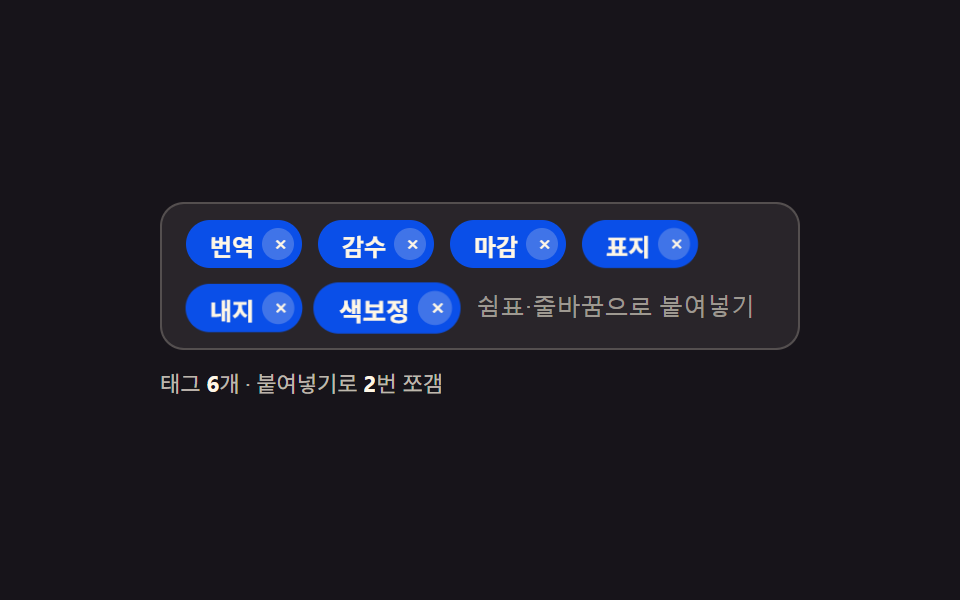
カンマや改行でつながった文字列を貼り付けると、その区切り文字で分割して空の断片を除き、残った断片の数だけチップを一度に作る。
使いどころ表計算ソフトから貼り付けるメール一覧・コード一覧入力
DELIM_PATTERNsplitfilter
<main class="stage">
<div class="tp is-demo" id="tp">
  <div class="tp__row" id="tpRow">
    <input type="text" class="tp__input" id="tpInput" aria-label="タグ入力、貼り付けるとカンマ・改行で分割する" placeholder="カンマ・改行で貼り付け">
  </div>
  <p class="tp__meta">タグ<b id="tpCount">0</b>個・貼り付けで <b id="tpSplit">0</b>回分割</p>
  <p class="tp__sr" role="status" aria-live="polite" id="tpLive"></p>
</div>
</main>
@use "../../../../site/static/demo-tokens" as *;
// 계산 겹: handlePaste() 가 clipboardData 문자열을 DELIM_PATTERN(쉼표·줄바꿈)으로 쪼개 조각 수만큼
// 칩을 만든다. 각 칩은 자기 순번(--i)만큼 등장을 늦춰(stagger) "한 번에 쪼개졌다"는 파동이 보이게 한다 —
// 자동 데모는 navigator.clipboard 를 읽지 않고 DataTransfer 로 흉내낸 진짜 paste 이벤트를 쓴다.
@include stage($stage-ink);
.tp { width: min(100%, 320px); display: flex; flex-direction: column; gap: $sp-2; }
.tp__row {
display: flex; flex-wrap: wrap; align-items: center; gap: $sp-2;
background: rgba($subject-cream, .08); border: 1px solid rgba($subject-cream, .2);
border-radius: $r-control; padding: $sp-2 $sp-3;
}
.tp__input {
flex: 1 1 100px; min-width: 60px; border: none; background: transparent; color: $subject-cream;
font-size: 12px; outline: none;
}
.tp__input::placeholder { color: rgba($subject-cream, .55); }
.tp__chip {
display: inline-flex; align-items: center; gap: $sp-1; height: 24px; padding: 0 $sp-1 0 $sp-3;
background: $subject-blue-deep; color: $subject-cream; border-radius: $r-pill;
font-size: 12px; font-weight: 700; white-space: nowrap;
animation-duration: $dur-enter; animation-timing-function: $ease-spring; animation-fill-mode: both;
}
.tp__chip--enter { animation-name: tpChipIn; animation-delay: calc(var(--i, 0) * 90ms); }
.tp__chipX {
width: 16px; height: 16px; border: none; border-radius: 50%; background: rgba($subject-cream, .22);
color: $subject-cream; font-size: 11px; line-height: 1; cursor: pointer; display: grid; place-items: center;
}
.tp__chipX:focus-visible { outline: 2px solid $subject-cream; outline-offset: 2px; }
.tp__meta { margin: 0; font-size: 11px; color: rgba($subject-cream, .72); }
.tp__meta b { color: $subject-cream; font-weight: 700; }
.tp__sr {
position: absolute; width: 1px; height: 1px; overflow: hidden; clip: rect(0 0 0 0); margin: -1px; padding: 0; border: 0;
}
@keyframes tpChipIn {
0% { transform: scale(.4) translateY(6px); opacity: 0; }
60% { transform: scale(1.08) translateY(0); opacity: 1; }
100% { transform: scale(1) translateY(0); opacity: 1; }
}
@media (max-width: 340px) {
.tp { width: 100%; }
.tp__row { padding: $sp-2; }
}
@media (prefers-reduced-motion: reduce) {
.tp__chip--enter { animation: none; }
}html, body {
margin: 0;
overflow: hidden;
}
.stage {
box-sizing: border-box;
min-height: 100vh;
display: grid;
place-items: center;
margin: 0;
background: #17141a;
font-family: -apple-system, "Segoe UI", "Noto Sans KR", sans-serif;
padding: clamp(8px, 4vw, 24px);
}
.tp {
width: min(100%, 320px);
display: flex;
flex-direction: column;
gap: 8px;
}
.tp__row {
display: flex;
flex-wrap: wrap;
align-items: center;
gap: 8px;
background: rgba(255, 247, 230, 0.08);
border: 1px solid rgba(255, 247, 230, 0.2);
border-radius: 12px;
padding: 8px 12px;
}
.tp__input {
flex: 1 1 100px;
min-width: 60px;
border: none;
background: transparent;
color: #fff7e6;
font-size: 12px;
outline: none;
}
.tp__input::placeholder {
color: rgba(255, 247, 230, 0.55);
}
.tp__chip {
display: inline-flex;
align-items: center;
gap: 4px;
height: 24px;
padding: 0 4px 0 12px;
background: #0a4fe8;
color: #fff7e6;
border-radius: 999px;
font-size: 12px;
font-weight: 700;
white-space: nowrap;
animation-duration: 600ms;
animation-timing-function: cubic-bezier(0.2, 0.8, 0.2, 1);
animation-fill-mode: both;
}
.tp__chip--enter {
animation-name: tpChipIn;
animation-delay: calc(var(--i, 0) * 90ms);
}
.tp__chipX {
width: 16px;
height: 16px;
border: none;
border-radius: 50%;
background: rgba(255, 247, 230, 0.22);
color: #fff7e6;
font-size: 11px;
line-height: 1;
cursor: pointer;
display: grid;
place-items: center;
}
.tp__chipX:focus-visible {
outline: 2px solid #fff7e6;
outline-offset: 2px;
}
.tp__meta {
margin: 0;
font-size: 11px;
color: rgba(255, 247, 230, 0.72);
}
.tp__meta b {
color: #fff7e6;
font-weight: 700;
}
.tp__sr {
position: absolute;
width: 1px;
height: 1px;
overflow: hidden;
clip: rect(0 0 0 0);
margin: -1px;
padding: 0;
border: 0;
}
@keyframes tpChipIn {
0% {
transform: scale(0.4) translateY(6px);
opacity: 0;
}
60% {
transform: scale(1.08) translateY(0);
opacity: 1;
}
100% {
transform: scale(1) translateY(0);
opacity: 1;
}
}
@media (max-width: 340px) {
.tp {
width: 100%;
}
.tp__row {
padding: 8px;
}
}
@media (prefers-reduced-motion: reduce) {
.tp__chip--enter {
animation: none;
}
}(function () {
var DELIM_PATTERN = /[,\n]+/; // 계산 겹 상수: 쉼표·줄바꿈을 구분자로 삼아 붙여넣은 글을 쪼갠다
var PASTES = ['翻訳,校正\\n締切', '表紙,本文,色調整'];
var HOLD_MS = 1100, PAUSE_MS = 900;
var reduce = window.matchMedia('(prefers-reduced-motion: reduce)').matches;
var root = document.getElementById('tp');
var row = document.getElementById('tpRow');
var input = document.getElementById('tpInput');
var countEl = document.getElementById('tpCount');
var splitEl = document.getElementById('tpSplit');
var live = document.getElementById('tpLive');
var seq = 0, splitCount = 0;
function chips() { return row.querySelectorAll('.tp__chip').length; }
function render() { countEl.textContent = chips(); splitEl.textContent = splitCount; }
function human() { if (root.classList.contains('is-demo')) root.classList.remove('is-demo'); }
function addChip(text, stagger) {
seq++;
var chip = document.createElement('span');
chip.className = 'tp__chip tp__chip--enter';
chip.id = 'tpChip' + seq;
chip.style.setProperty('--i', stagger);
chip.innerHTML = '<span class="tp__chipText"></span><button type="button" class="tp__chipX">×</button>';
chip.querySelector('.tp__chipText').textContent = text;
chip.querySelector('.tp__chipX').setAttribute('aria-label', 'タグ削除: ' + text);
chip.querySelector('.tp__chipX').addEventListener('click', function () { human(); chip.remove(); render(); });
row.insertBefore(chip, input);
}
function handlePaste(e) {
// 계산 겹: paste 이벤트의 clipboardData 에서 글을 꺼내 구분자로 쪼갠다 — navigator.clipboard 를 읽지 않는다
// e.isTrusted 로 진짜 사용자 붙여넣기와 자동 데모의 흉내 이벤트(dispatchEvent)를 가른다
if (e.isTrusted) human();
e.preventDefault();
var text = e.clipboardData ? e.clipboardData.getData('text/plain') : '';
var parts = text.split(DELIM_PATTERN).map(function (s) { return s.trim(); }).filter(Boolean);
if (parts.length > 1) splitCount++;
parts.forEach(function (p, i) { addChip(p, i); });
input.value = '';
render();
live.textContent = parts.length + '個のタグに分割';
}
input.addEventListener('paste', handlePaste);
input.addEventListener('keydown', function (e) {
if (e.key === 'Enter' && input.value.trim()) {
human();
addChip(input.value.trim(), 0);
input.value = '';
render();
}
});
function simulatePaste(text) {
// 자동 데모 전용: 실제 클립보드를 읽지 않고 DataTransfer 를 직접 만들어 진짜 paste 이벤트를 흉내낸다
// (human() 을 부르지 않는다 — 이건 사람의 입력이 아니라 자동 재생이다)
var dt = null;
try { dt = new DataTransfer(); dt.setData('text/plain', text); } catch (err) { dt = null; }
if (dt) {
var ev = new ClipboardEvent('paste', { clipboardData: dt, bubbles: true, cancelable: true });
input.dispatchEvent(ev);
} else {
handlePaste({ clipboardData: { getData: function () { return text; } }, preventDefault: function () {} });
}
}
var timer = 0;
function schedule(fn, ms) { timer = window.setTimeout(fn, ms); }
function loop(i) {
if (!root.classList.contains('is-demo')) return;
if (i < PASTES.length) {
simulatePaste(PASTES[i]);
schedule(function () { loop(i + 1); }, HOLD_MS);
} else {
row.querySelectorAll('.tp__chip').forEach(function (c) { c.remove(); });
splitCount = 0;
render();
schedule(function () { loop(0); }, PAUSE_MS);
}
}
render();
if (!reduce) {
schedule(function () { loop(0); }, 300);
} else {
root.classList.remove('is-demo');
}
})();// TagPasteSplitComma — vanilla 판(run/397/demo/05-tag-input-paste-split-comma/index.html) 의 React 포트.
// handlePaste() 는 브라우저가 주는 ClipboardEvent.clipboardData 만 읽는다(navigator.clipboard 는 안 쓴다).
// 자동 데모는 DataTransfer 로 진짜 paste 이벤트를 흉내내고, e.isTrusted 로 사람의 붙여넣기와 가른다.
import { useEffect, useRef, useState } from "react";
import styles from "./TagPasteSplitComma.module.scss";
type Box<T> = { current: T };
type KeyEvt = { key: string };
type ChangeEvt = { target: { value: string } };
type PasteEvt = { isTrusted?: boolean; clipboardData: { getData(t: string): string } | null; preventDefault(): void };
const DELIM_PATTERN = /[,\n]+/; // 계산 겹 상수: 쉼표·줄바꿈을 구분자로 삼아 붙여넣은 글을 쪼갠다
const PASTES = ["번역,감수\n마감", "표지,내지,색보정"];
const HOLD_MS = 1100, PAUSE_MS = 900;
type Chip = { id: number; text: string; i: number };
export default function TagPasteSplitComma() {
const timerRef = useRef(0) as unknown as Box<number>;
const seqRef = useRef(1) as unknown as Box<number>;
const isDemoRef = useRef(true) as unknown as Box<boolean>;
const inputRef = useRef(null) as unknown as Box<HTMLInputElement>;
const [chips, setChips] = useState<Chip[]>([]);
const [draft, setDraft] = useState("");
const [splitCount, setSplitCount] = useState(0);
const [isDemo, setIsDemo] = useState(true);
const [live, setLive] = useState("");
function human() {
if (isDemoRef.current) { isDemoRef.current = false; setIsDemo(false); }
}
function addParts(parts: string[]) {
setChips((cs) => {
let id = seqRef.current;
const added = parts.map((p, i) => ({ id: id++, text: p, i }));
seqRef.current = id;
return [...cs, ...added];
});
}
function handlePaste(e: PasteEvt) {
if (e.isTrusted) human();
e.preventDefault();
const text = e.clipboardData ? e.clipboardData.getData("text/plain") : "";
const parts = text.split(DELIM_PATTERN).map((s) => s.trim()).filter(Boolean);
if (parts.length > 1) setSplitCount((n) => n + 1);
addParts(parts);
setDraft("");
setLive(parts.length + "개 태그로 쪼갬");
}
function simulatePaste(text: string) {
// 자동 데모 전용: DataTransfer 로 흉내낸 진짜 paste 이벤트 — clipboard 를 읽지 않는다
const el = inputRef.current;
if (!el) return;
let dt: DataTransfer | null = null;
try { dt = new DataTransfer(); dt.setData("text/plain", text); } catch { dt = null; }
if (dt) {
const ev = new ClipboardEvent("paste", { clipboardData: dt, bubbles: true, cancelable: true });
el.dispatchEvent(ev);
} else {
handlePaste({ clipboardData: { getData: () => text }, preventDefault: () => {} });
}
}
function removeChip(id: number) {
human();
setChips((cs) => cs.filter((c) => c.id !== id));
}
function onKeyDown(e: KeyEvt) {
if (e.key === "Enter" && draft.trim()) {
human();
addParts([draft.trim()]);
setDraft("");
}
}
useEffect(() => {
const reduce = window.matchMedia("(prefers-reduced-motion: reduce)").matches;
function loop(i: number) {
if (!isDemoRef.current) return;
if (i < PASTES.length) {
simulatePaste(PASTES[i]);
timerRef.current = window.setTimeout(() => loop(i + 1), HOLD_MS);
} else {
setChips([]);
setSplitCount(0);
timerRef.current = window.setTimeout(() => loop(0), PAUSE_MS);
}
}
if (!reduce) {
timerRef.current = window.setTimeout(() => loop(0), 300);
} else {
isDemoRef.current = false;
setIsDemo(false);
}
return () => window.clearTimeout(timerRef.current);
// eslint-disable-next-line react-hooks/exhaustive-deps
}, []);
return (
<main className={styles.stage}>
<div className={styles.tp + " " + (isDemo ? styles.isDemo : "")}>
<div className={styles.row}>
{chips.map((c) => (
<span key={c.id} className={styles.chip} style={{ "--i": c.i } as any}>
<span>{c.text}</span>
<button type="button" className={styles.chipX} aria-label={"태그 삭제: " + c.text} onClick={() => removeChip(c.id)}>×</button>
</span>
))}
<input
type="text" className={styles.input} aria-label="태그 입력, 붙여넣으면 쉼표·줄바꿈으로 쪼갠다"
placeholder="쉼표·줄바꿈으로 붙여넣기" ref={inputRef} value={draft}
onChange={(e: ChangeEvt) => setDraft(e.target.value)} onKeyDown={onKeyDown} onPaste={handlePaste}
/>
</div>
<p className={styles.meta}>태그 <b>{chips.length}</b>개 · 붙여넣기로 <b>{splitCount}</b>번 쪼갬</p>
<p className={styles.sr} role="status">{live}</p>
</div>
</main>
);
}05 貼り付けた文字列を一度にチップへ分割する入力 — 計測 累積面積 14.601% · 動いたフレーム 17/23GODRICH オリジナル · SCSS と React は zip に同梱 · タグ 入力 ui 9パターン
このデモが属する記事
 タグ 入力 ui 9パターンチップ一覧の末尾に「+3」が出る瞬間から見る — 行幅の値がチップ数を計算してあふれた分を畳み、カンマ区切りで貼り付けた文字列は区切り値で割った個数分のチップを一度に作り、文字数の値がチップ幅を計算して伸びる。これがタグ 入力 ui の実際 この記事のデモをすべて見る