08応募CTA — 締切までの残り日数を毎回計算して示すバッジ
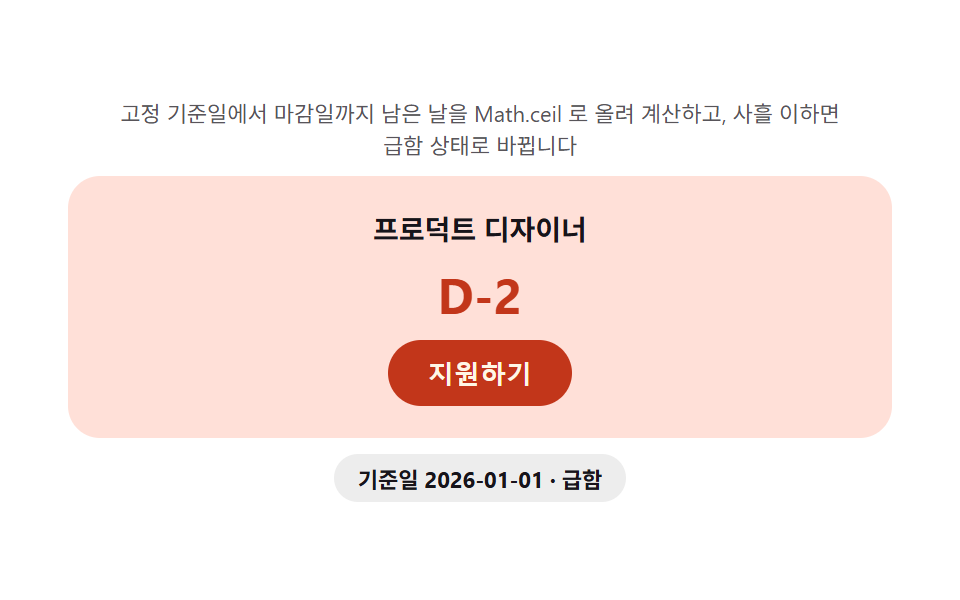
締切のDateオブジェクトから現在時刻を引いたミリ秒差を1日分のミリ秒数で割り、Math.ceilで繰り上げて残り日数を整数で計算し、その値が3以下になるとバッジの色が変わりaria-liveで変化を読み上げます。締切を過ぎると同じ計算が負の値を検知して「締切」の文言に変わります。
使いどころ採用締切バッジ、応募受付カウントダウン
DateMath.ceilaria-live
<main class="stage">
<section class="cta" id="cta">
  <p class="cta__hint" id="ctaHint">固定の基準日から締切日までの残り日数をMath.ceilで繰り上げ計算し、3日以下になると急ぎ状態に変わります。</p>
  <div class="cta__card">
    <p class="cta__role" id="ctaRole">フロントエンドエンジニア</p>
    <p class="cta__days" id="ctaDays" aria-live="polite">D-12</p>
    <button class="cta__btn" id="ctaBtn" type="button">応募する</button>
  </div>
  <p class="cta__meta"><span class="cta__chip" id="ctaChip">基準日 2026-01-01</span></p>
</section>
</main>
@use "../../../../site/static/demo-tokens" as *;
$duration: $dur-base; // 300ms — 급함 상태 전환
$easing: $ease-out;
$color: $subject-blue-deep;
@include stage($stage-paper);
.cta {
width: 100%;
max-width: 380px;
display: flex;
flex-direction: column;
gap: $sp-2;
align-items: center;
text-align: center;
}
.cta__hint {
margin: 0;
padding: 0 $sp-2;
font-weight: 400;
font-size: 11px;
line-height: 1.4;
color: rgba($subject-ink, .72);
}
.cta__card {
width: 100%;
display: flex;
flex-direction: column;
gap: $sp-2;
align-items: center;
padding: $sp-4;
border-radius: $r-card;
background: rgba($subject-ink, .04);
transition: background $duration $easing;
}
.cta__card.is-urgent {
background: $error-soft;
}
.cta__role {
margin: 0;
font-weight: 600;
font-size: 14px;
color: $subject-ink;
}
.cta__days {
margin: 0;
font-weight: 700;
font-size: 22px;
color: $color;
transition: color $duration $easing, transform $duration $ease-pop;
}
.cta__card.is-urgent .cta__days {
color: $error;
transform: scale(1.12);
}
.cta__btn {
appearance: none;
border: 0;
padding: $sp-2 $sp-5;
border-radius: $r-pill;
background: $color;
color: $subject-cream;
font-weight: 700;
font-size: 13px;
cursor: pointer;
transition: background $duration $easing;
}
.cta__card.is-urgent .cta__btn {
background: $error;
}
.cta__meta { margin: 0; }
.cta__chip {
display: inline-flex;
padding: $sp-1 $sp-3;
border-radius: $r-pill;
background: rgba($subject-ink, .08);
color: $subject-ink;
font-weight: 700;
font-size: 11px;
}
@media (max-width: 340px) {
.cta { max-width: 280px; gap: $sp-1; }
.cta__hint { font-size: 9px; }
.cta__card { padding: $sp-2; gap: $sp-1; }
.cta__days { font-size: 18px; }
.cta__btn { padding: $sp-1 $sp-4; font-size: 12px; }
}
@media (prefers-reduced-motion: reduce) {
.cta__card,
.cta__days,
.cta__btn {
transition: none;
}
}html, body {
margin: 0;
overflow: hidden;
}
.stage {
box-sizing: border-box;
min-height: 100vh;
display: grid;
place-items: center;
margin: 0;
background: #ffffff;
font-family: -apple-system, "Segoe UI", "Noto Sans KR", sans-serif;
padding: clamp(8px, 4vw, 24px);
}
.cta {
width: 100%;
max-width: 380px;
display: flex;
flex-direction: column;
gap: 8px;
align-items: center;
text-align: center;
}
.cta__hint {
margin: 0;
padding: 0 8px;
font-weight: 400;
font-size: 11px;
line-height: 1.4;
color: rgba(23, 20, 26, 0.72);
}
.cta__card {
width: 100%;
display: flex;
flex-direction: column;
gap: 8px;
align-items: center;
padding: 16px;
border-radius: 16px;
background: rgba(23, 20, 26, 0.04);
transition: background 300ms ease-out;
}
.cta__card.is-urgent {
background: #ffe0d8;
}
.cta__role {
margin: 0;
font-weight: 600;
font-size: 14px;
color: #17141a;
}
.cta__days {
margin: 0;
font-weight: 700;
font-size: 22px;
color: #0a4fe8;
transition: color 300ms ease-out, transform 300ms cubic-bezier(0.2, 1.4, 0.4, 1);
}
.cta__card.is-urgent .cta__days {
color: #c2361a;
transform: scale(1.12);
}
.cta__btn {
appearance: none;
border: 0;
padding: 8px 20px;
border-radius: 999px;
background: #0a4fe8;
color: #fff7e6;
font-weight: 700;
font-size: 13px;
cursor: pointer;
transition: background 300ms ease-out;
}
.cta__card.is-urgent .cta__btn {
background: #c2361a;
}
.cta__meta {
margin: 0;
}
.cta__chip {
display: inline-flex;
padding: 4px 12px;
border-radius: 999px;
background: rgba(23, 20, 26, 0.08);
color: #17141a;
font-weight: 700;
font-size: 11px;
}
@media (max-width: 340px) {
.cta {
max-width: 280px;
gap: 4px;
}
.cta__hint {
font-size: 9px;
}
.cta__card {
padding: 8px;
gap: 4px;
}
.cta__days {
font-size: 18px;
}
.cta__btn {
padding: 4px 16px;
font-size: 12px;
}
}
@media (prefers-reduced-motion: reduce) {
.cta__card,
.cta__days,
.cta__btn {
transition: none;
}
}// 지원 마감 CTA(08) — 고정 기준시각(EPOCH, 캡처 재현성을 위해 실제 Date.now() 를 쓰지 않는다)
// 에서 마감일까지 남은 밀리초를 하루(86,400,000ms)로 나눠 Math.ceil 로 올린 값을 D-day 로
// 표시한다(계산 한 겹). 남은 일수가 URGENT_DAYS 이하로 좁혀지면 急ぎ 상태(error 색)로 바뀐다.
(function () {
var role = document.getElementById('ctaRole');
var daysEl = document.getElementById('ctaDays');
var btn = document.getElementById('ctaBtn');
var chip = document.getElementById('ctaChip');
var card = document.querySelector('.cta__card');
if (!role || !daysEl || !btn || !chip || !card) return;
var reduce = window.matchMedia('(prefers-reduced-motion: reduce)').matches;
var EPOCH = new Date('2026-01-01T00:00:00Z').getTime(); // 고정 기준시각
var DAY_MS = 86400000;
var URGENT_DAYS = 3;
var ROLES = [
{ name: 'フロントエンドエンジニア', deadline: '2026-01-13T00:00:00Z' },
{ name: 'プロダクトデザイナー', deadline: '2026-01-03T00:00:00Z' },
{ name: 'バックエンドエンジニア', deadline: '2026-01-21T00:00:00Z' }
];
var idx = 0;
function daysLeft(deadlineIso) {
var deadline = new Date(deadlineIso).getTime();
return Math.ceil((deadline - EPOCH) / DAY_MS);
}
function apply(i) {
var r = ROLES[i];
var d = daysLeft(r.deadline);
role.textContent = r.name;
daysEl.textContent = 'D-' + d;
var urgent = d <= URGENT_DAYS;
card.classList.toggle('is-urgent', urgent);
chip.textContent = '基準日 2026-01-01 · ' + (urgent ? '急ぎ' : '余裕');
}
apply(idx);
if (!reduce) {
setInterval(function () {
idx = (idx + 1) % ROLES.length;
apply(idx);
}, 700);
}
})();// TeamApplyCta — vanilla 판(run/338/demo/08-team-apply-cta/index.html) 의 React 포트.
// 고정 기준일에서 마감일까지 남은 날을 Math.ceil 로 올려 계산하고, 사흘 이하면
// 급함 상태로 바뀐다(계산 한 겹).
import { useEffect, useRef } from "react";
import styles from "./TeamApplyCta.module.scss";
export type TeamApplyCtaProps = {
duration?: string;
easing?: string;
color?: string;
};
const HINT = "고정 기준일에서 마감일까지 남은 날을 Math.ceil 로 올려 계산하고, 사흘 이하면 급함 상태로 바뀝니다";
const APPLY_LABEL = "지원하기";
const EPOCH = new Date("2026-01-01T00:00:00Z").getTime();
const DAY_MS = 86400000;
const URGENT_DAYS = 3;
type Role = { name: string; deadline: string };
const ROLES: Role[] = [
{ name: "프론트엔드 엔지니어", deadline: "2026-01-13T00:00:00Z" },
{ name: "프로덕트 디자이너", deadline: "2026-01-03T00:00:00Z" },
{ name: "백엔드 엔지니어", deadline: "2026-01-21T00:00:00Z" }
];
function daysLeft(deadlineIso: string): number {
const deadline = new Date(deadlineIso).getTime();
return Math.ceil((deadline - EPOCH) / DAY_MS);
}
export default function TeamApplyCta({
duration = "300ms",
easing = "ease-out",
color = "#0a4fe8"
}: TeamApplyCtaProps) {
const cardRef = useRef<HTMLDivElement | null>(null);
const roleRef = useRef<HTMLParagraphElement | null>(null);
const daysRef = useRef<HTMLParagraphElement | null>(null);
const chipRef = useRef<HTMLSpanElement | null>(null);
useEffect(() => {
const card = cardRef.current;
const roleEl = roleRef.current;
const daysEl = daysRef.current;
const chip = chipRef.current;
if (!card || !roleEl || !daysEl || !chip) return;
const reduce = window.matchMedia("(prefers-reduced-motion: reduce)").matches;
function apply(i: number): void {
const r = ROLES[i];
const d = daysLeft(r.deadline);
roleEl!.textContent = r.name;
daysEl!.textContent = "D-" + d;
const urgent = d <= URGENT_DAYS;
card!.classList.toggle(styles.isUrgent, urgent);
chip!.textContent = "기준일 2026-01-01 · " + (urgent ? "급함" : "여유");
}
let idx = 0;
apply(0);
let timer = 0;
if (!reduce) {
timer = window.setInterval(() => {
idx = (idx + 1) % ROLES.length;
apply(idx);
}, 700);
}
return () => {
if (timer) window.clearInterval(timer);
};
// eslint-disable-next-line react-hooks/exhaustive-deps
}, []);
return (
<main className={styles.stage}>
<section className={styles.cta}>
<p className={styles.hint}>{HINT}</p>
<div className={styles.card} ref={cardRef}>
<p className={styles.role} ref={roleRef}>프론트엔드 엔지니어</p>
<p className={styles.days} ref={daysRef} aria-live="polite">D-12</p>
<button className={styles.btn} type="button" style={{ background: color }}>
{APPLY_LABEL}
</button>
</div>
<p className={styles.meta}>
<span className={styles.chip} ref={chipRef}>기준일 2026-01-01</span>
</p>
</section>
</main>
);
}08 応募CTA — 締切までの残り日数を毎回計算して示すバッジ — 計測 累積面積 37.419% · 動いたフレーム 10/23GODRICH オリジナル · SCSS と React は zip に同梱 · チーム紹介 デザイン9選 — 人数・自己紹介の長さ・時差まで計算して見せる
このデモが属する記事
 チーム紹介 デザイン9選 — 人数・自己紹介の長さ・時差まで計算して見せるチーム紹介 デザインは、人数や自己紹介の長さ、時差までデータとして計算し直す一枚をレイアウトに重ねる考え方です。人数に関わらず列崩れしない列数を計算し、自己紹介が長ければ測って続きを読むボタンを付け、パートナーロゴは枚数に関係なく同じ速さで この記事のデモをすべて見る