06チャプターマーカーシークバー
シークバーがチャプターごとの目盛りに分かれて見え、再生ヘッドが区間を越えると上のチャプター名が変わります。目盛りを押すとその章の先頭へ実際に飛びます。
使いどころレビューやハイライト動画など、見たい箇所だけを見に来る人が多い場所
segmentaria-valuetextclick
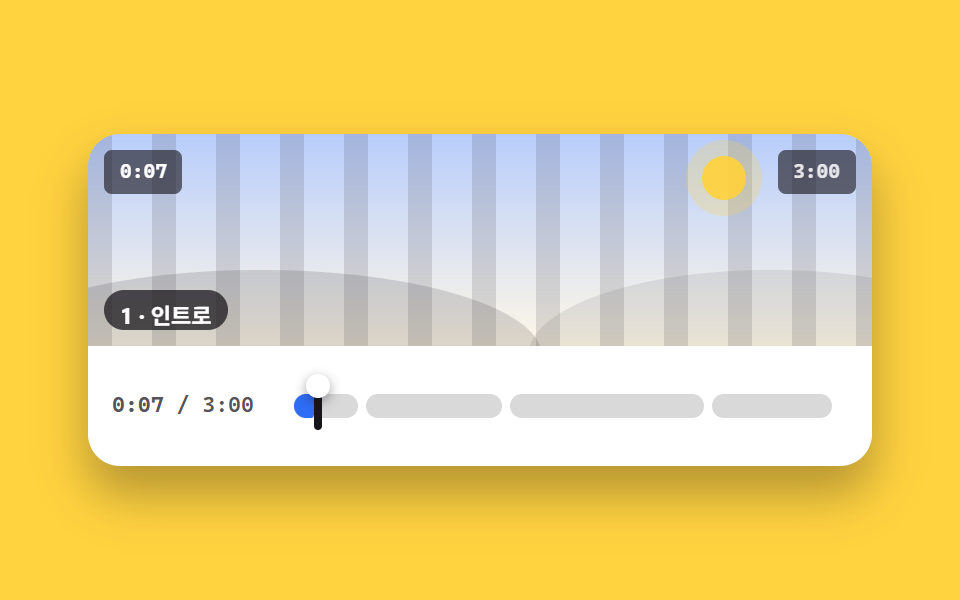
<main class="stage">
  <figure class="pl is-demo" id="pl">
    <div class="pl__screen">
      <div class="pl__stripes" aria-hidden="true"></div>
      <div class="pl__world" aria-hidden="true"><span class="pl__sun"></span><span class="pl__hill pl__hill--a"></span><span class="pl__hill pl__hill--b"></span></div>
      <span class="pl__clock" id="clock">0:08</span>
      <span class="pl__badge">3:00</span>
      <div class="nm">
        <div class="nm__list" id="nm">
          <b class="nm__i">1 · イントロ</b>
          <b class="nm__i">2 · 導入</b>
          <b class="nm__i">3 · 実例</b>
          <b class="nm__i">4 · まとめ</b>
        </div>
      </div>
    </div>
    <div class="sk__row">
      <span class="sk__t"><b id="t-now">0:08</b> / 3:00</span>
      <div class="sk" id="sk" role="slider" tabindex="0" aria-label="再生位置" aria-valuemin="0" aria-valuemax="180" aria-valuenow="8" aria-valuetext="イントロ チャプター、 0:08">
        <div class="ch" id="ch">
          <span class="ch__seg" style="--s:0;--e:.1333;--k:7.5"><i class="ch__fill"></i></span>
          <span class="ch__seg" style="--s:.1333;--e:.4;--k:3.75"><i class="ch__fill"></i></span>
          <span class="ch__seg" style="--s:.4;--e:.7778;--k:2.647"><i class="ch__fill"></i></span>
          <span class="ch__seg ch__seg--end" style="--s:.7778;--e:1;--k:4.5"><i class="ch__fill"></i></span>
          <span class="ch__head" aria-hidden="true"><i class="ch__dot"></i></span>
        </div>
      </div>
    </div>
  </figure>
</main>@use "../../../../site/static/demo-tokens" as *;
// --p 는 등록된 사용자 지정 속성 — 키프레임에서 보간된다 (미등록이면 steps 처럼 튄다)
@property --p { syntax: "<number>"; inherits: true; initial-value: 0.0444; }
$duration: $dur-quick;
$easing: $ease-spring;
$color: $subject-blue;
@include stage($stage-yellow);
.pl {
box-sizing: border-box;
width: min(392px, 92vw);
margin: 0;
border-radius: $r-card;
background: $stage-paper;
box-shadow: $shadow-raised;
overflow: hidden;
}
.pl__screen {
position: relative;
height: clamp(76px, 22vw, 108px);
overflow: hidden;
background: linear-gradient(180deg, rgba(47, 109, 246, .34), rgba(255, 247, 230, .96));
}
.pl__stripes {
position: absolute; inset: 0 -72px;
background: repeating-linear-gradient(90deg, rgba(23, 20, 26, .13) 0 12px, transparent 12px 32px);
animation-name: pl-pan;
animation-duration: $dur-loop;
animation-timing-function: linear;
animation-iteration-count: infinite;
}
@keyframes pl-pan { from { transform: translateX(0); } to { transform: translateX(-64px); } }
.pl__world { position: absolute; inset: 0; }
.pl__sun {
position: absolute; right: 16%; top: 10%;
width: 22px; height: 22px; border-radius: 50%;
background: rgba(255, 210, 63, .95);
box-shadow: 0 0 0 8px rgba(255, 210, 63, .25);
}
.pl__hill { position: absolute; bottom: -46%; height: 82%; border-radius: 50%; }
.pl__hill--a { left: -14%; width: 72%; background: rgba(23, 20, 26, .15); }
.pl__hill--b { right: -18%; width: 62%; background: rgba(23, 20, 26, .09); }
.pl__clock, .pl__badge {
position: absolute; top: $sp-2;
padding: $sp-1 $sp-2;
border-radius: $r-xs;
background: rgba(23, 20, 26, .62);
font-family: ui-monospace, "Cascadia Mono", Menlo, Consolas, monospace;
font-size: 10px; line-height: 14px; font-weight: 700;
}
.pl__clock { left: $sp-2; color: #fff; }
.pl__badge { right: $sp-2; color: rgba(255, 255, 255, .85); }
// ── 챕터 이름 — 한 줄짜리 창으로 4줄을 굴린다. 교체는 steps(1,end) 로 한 프레임 컷 ──
.nm {
position: absolute; left: $sp-2; bottom: $sp-2;
height: 20px;
padding-left: $sp-2; padding-right: $sp-2;
border-radius: $r-pill;
background: rgba(23, 20, 26, .74);
overflow: hidden;
}
.nm__list { translate: 0 calc(var(--i, 0) * -20px); }
.nm__i {
display: block;
height: 20px;
color: #fff;
font-size: 11px; line-height: 20px; font-weight: 700;
white-space: nowrap;
}
.sk__row {
display: flex; align-items: center; gap: $sp-3;
padding: $sp-3;
}
.sk__t {
flex: 0 0 auto;
color: rgba(23, 20, 26, .72);
font-family: ui-monospace, "Cascadia Mono", Menlo, Consolas, monospace;
font-size: 11px; line-height: 14px; font-weight: 600;
}
.sk {
position: relative;
display: flex; align-items: center;
flex: 1 1 auto;
box-sizing: border-box;
height: 36px;
padding-left: $sp-2; padding-right: $sp-2;
cursor: pointer;
touch-action: none;
}
.sk:focus-visible { outline: 2px solid $color; outline-offset: 2px; border-radius: $r-sm; }
// 구간은 % 로 자리를 잡는다 — 틈을 margin-right 로 깎아도 경계 좌표가 안 밀려 재생 머리와 딱 맞는다
.ch {
--p: 0.0444;
position: relative;
flex: 1 1 auto;
height: 12px;
}
.ch__seg {
position: absolute; top: 0; bottom: 0;
left: calc(var(--s) * 100%);
right: calc(100% - var(--e) * 100%);
margin-right: $sp-1;
border-radius: $r-pill;
background: rgba(23, 20, 26, .16);
overflow: hidden;
}
.ch__seg--end { margin-right: 0; }
.ch__seg:hover { background: rgba(23, 20, 26, .26); }
.ch__fill {
position: absolute; inset: 0;
display: block;
border-radius: $r-pill;
background: $color;
transform-origin: left center; // 규칙8: 좌변서 차오름
// 구간 안 진행률 = (p − 시작) × 1/(끝−시작), 0~1 로 잘라낸다
transform: scaleX(clamp(0, calc((var(--p) - var(--s)) * var(--k)), 1));
}
.ch__head {
position: absolute; top: -6px; bottom: -6px;
left: calc(var(--p) * 100%);
width: 4px;
border-radius: $r-pill;
background: $subject-ink;
transform: translateX(-50%);
pointer-events: none;
}
.ch__dot {
position: absolute; left: 50%; top: -4px;
width: 12px; height: 12px;
border-radius: 50%;
background: $stage-paper;
box-shadow: 0 2px 6px rgba(23, 20, 26, .45);
transform: translateX(-50%);
}
// ── 자동 루프: 재생 머리가 바를 지나며 구간을 차례로 채우고, 경계를 넘을 때마다 이름이 갈린다 ──
.pl.is-demo .ch {
animation-name: ch-p;
animation-duration: $dur-loop;
animation-timing-function: linear;
animation-iteration-count: infinite;
}
@keyframes ch-p {
0% { --p: 0.0444; }
80% { --p: 0.94; }
86% { --p: 0.94; }
87% { --p: 0.0444; }
100% { --p: 0.0444; }
}
.pl.is-demo .nm__list {
animation-name: nm-roll, nm-rise;
animation-duration: $dur-loop, $dur-loop;
animation-timing-function: steps(1, end), $easing;
animation-iteration-count: infinite, infinite;
}
// 경계 시각: --p 가 .1333 / .4 / .7778 을 지나는 순간 (7.9% · 31.8% · 65.5%), 복귀는 87%
@keyframes nm-roll {
0% { translate: 0 0; }
7.9% { translate: 0 -20px; }
31.8% { translate: 0 -40px; }
65.5% { translate: 0 -60px; }
87% { translate: 0 0; }
100% { translate: 0 0; }
}
@keyframes nm-rise {
0% { transform: translateY(0); }
7.8% { transform: translateY(0); }
7.9% { transform: translateY(4px); }
15.9% { transform: translateY(0); }
31.7% { transform: translateY(0); }
31.8% { transform: translateY(4px); }
39.8% { transform: translateY(0); }
65.4% { transform: translateY(0); }
65.5% { transform: translateY(4px); }
73.5% { transform: translateY(0); }
86.9% { transform: translateY(0); }
87% { transform: translateY(4px); }
95% { transform: translateY(0); }
100% { transform: translateY(0); }
}
@media (max-width: 340px) {
.sk__row { gap: $sp-2; padding: $sp-2; }
.sk { height: 32px; }
.nm { bottom: $sp-1; }
}
@media (prefers-reduced-motion: reduce) {
.pl.is-demo .ch, .pl.is-demo .nm__list, .pl__stripes { animation: none !important; }
.ch__fill, .ch__head { transition: none; }
}@property --p {
syntax: "<number>";
inherits: true;
initial-value: 0.0444;
}
html, body {
margin: 0;
overflow: hidden;
}
.stage {
box-sizing: border-box;
min-height: 100vh;
display: grid;
place-items: center;
margin: 0;
background: #ffd23f;
font-family: -apple-system, "Segoe UI", "Noto Sans KR", sans-serif;
padding: clamp(8px, 4vw, 24px);
}
.pl {
box-sizing: border-box;
width: min(392px, 92vw);
margin: 0;
border-radius: 16px;
background: #ffffff;
box-shadow: 0 14px 24px rgba(23, 20, 26, 0.32);
overflow: hidden;
}
.pl__screen {
position: relative;
height: clamp(76px, 22vw, 108px);
overflow: hidden;
background: linear-gradient(180deg, rgba(47, 109, 246, 0.34), rgba(255, 247, 230, 0.96));
}
.pl__stripes {
position: absolute;
inset: 0 -72px;
background: repeating-linear-gradient(90deg, rgba(23, 20, 26, 0.13) 0 12px, transparent 12px 32px);
animation-name: pl-pan;
animation-duration: 2s;
animation-timing-function: linear;
animation-iteration-count: infinite;
}
@keyframes pl-pan {
from {
transform: translateX(0);
}
to {
transform: translateX(-64px);
}
}
.pl__world {
position: absolute;
inset: 0;
}
.pl__sun {
position: absolute;
right: 16%;
top: 10%;
width: 22px;
height: 22px;
border-radius: 50%;
background: rgba(255, 210, 63, 0.95);
box-shadow: 0 0 0 8px rgba(255, 210, 63, 0.25);
}
.pl__hill {
position: absolute;
bottom: -46%;
height: 82%;
border-radius: 50%;
}
.pl__hill--a {
left: -14%;
width: 72%;
background: rgba(23, 20, 26, 0.15);
}
.pl__hill--b {
right: -18%;
width: 62%;
background: rgba(23, 20, 26, 0.09);
}
.pl__clock, .pl__badge {
position: absolute;
top: 8px;
padding: 4px 8px;
border-radius: 4px;
background: rgba(23, 20, 26, 0.62);
font-family: ui-monospace, "Cascadia Mono", Menlo, Consolas, monospace;
font-size: 10px;
line-height: 14px;
font-weight: 700;
}
.pl__clock {
left: 8px;
color: #fff;
}
.pl__badge {
right: 8px;
color: rgba(255, 255, 255, 0.85);
}
.nm {
position: absolute;
left: 8px;
bottom: 8px;
height: 20px;
padding-left: 8px;
padding-right: 8px;
border-radius: 999px;
background: rgba(23, 20, 26, 0.74);
overflow: hidden;
}
.nm__list {
translate: 0 calc(var(--i, 0) * -20px);
}
.nm__i {
display: block;
height: 20px;
color: #fff;
font-size: 11px;
line-height: 20px;
font-weight: 700;
white-space: nowrap;
}
.sk__row {
display: flex;
align-items: center;
gap: 12px;
padding: 12px;
}
.sk__t {
flex: 0 0 auto;
color: rgba(23, 20, 26, 0.72);
font-family: ui-monospace, "Cascadia Mono", Menlo, Consolas, monospace;
font-size: 11px;
line-height: 14px;
font-weight: 600;
}
.sk {
position: relative;
display: flex;
align-items: center;
flex: 1 1 auto;
box-sizing: border-box;
height: 36px;
padding-left: 8px;
padding-right: 8px;
cursor: pointer;
touch-action: none;
}
.sk:focus-visible {
outline: 2px solid #2f6df6;
outline-offset: 2px;
border-radius: 8px;
}
.ch {
--p: 0.0444;
position: relative;
flex: 1 1 auto;
height: 12px;
}
.ch__seg {
position: absolute;
top: 0;
bottom: 0;
left: calc(var(--s) * 100%);
right: calc(100% - var(--e) * 100%);
margin-right: 4px;
border-radius: 999px;
background: rgba(23, 20, 26, 0.16);
overflow: hidden;
}
.ch__seg--end {
margin-right: 0;
}
.ch__seg:hover {
background: rgba(23, 20, 26, 0.26);
}
.ch__fill {
position: absolute;
inset: 0;
display: block;
border-radius: 999px;
background: #2f6df6;
transform-origin: left center;
transform: scaleX(clamp(0, (var(--p) - var(--s)) * var(--k), 1));
}
.ch__head {
position: absolute;
top: -6px;
bottom: -6px;
left: calc(var(--p) * 100%);
width: 4px;
border-radius: 999px;
background: #17141a;
transform: translateX(-50%);
pointer-events: none;
}
.ch__dot {
position: absolute;
left: 50%;
top: -4px;
width: 12px;
height: 12px;
border-radius: 50%;
background: #ffffff;
box-shadow: 0 2px 6px rgba(23, 20, 26, 0.45);
transform: translateX(-50%);
}
.pl.is-demo .ch {
animation-name: ch-p;
animation-duration: 2s;
animation-timing-function: linear;
animation-iteration-count: infinite;
}
@keyframes ch-p {
0% {
--p: 0.0444;
}
80% {
--p: 0.94;
}
86% {
--p: 0.94;
}
87% {
--p: 0.0444;
}
100% {
--p: 0.0444;
}
}
.pl.is-demo .nm__list {
animation-name: nm-roll, nm-rise;
animation-duration: 2s, 2s;
animation-timing-function: steps(1, end), cubic-bezier(0.2, 0.8, 0.2, 1);
animation-iteration-count: infinite, infinite;
}
@keyframes nm-roll {
0% {
translate: 0 0;
}
7.9% {
translate: 0 -20px;
}
31.8% {
translate: 0 -40px;
}
65.5% {
translate: 0 -60px;
}
87% {
translate: 0 0;
}
100% {
translate: 0 0;
}
}
@keyframes nm-rise {
0% {
transform: translateY(0);
}
7.8% {
transform: translateY(0);
}
7.9% {
transform: translateY(4px);
}
15.9% {
transform: translateY(0);
}
31.7% {
transform: translateY(0);
}
31.8% {
transform: translateY(4px);
}
39.8% {
transform: translateY(0);
}
65.4% {
transform: translateY(0);
}
65.5% {
transform: translateY(4px);
}
73.5% {
transform: translateY(0);
}
86.9% {
transform: translateY(0);
}
87% {
transform: translateY(4px);
}
95% {
transform: translateY(0);
}
100% {
transform: translateY(0);
}
}
@media (max-width: 340px) {
.sk__row {
gap: 8px;
padding: 8px;
}
.sk {
height: 32px;
}
.nm {
bottom: 4px;
}
}
@media (prefers-reduced-motion: reduce) {
.pl.is-demo .ch, .pl.is-demo .nm__list, .pl__stripes {
animation: none !important;
}
.ch__fill, .ch__head {
transition: none;
}
}// 실제 동작: チャプター 눈금을 누르면 그 チャプター 시작으로 건너뛰고, ←→ 5초 · Home/End 로도 움직인다.
var root = document.getElementById('pl'), sk = document.getElementById('sk'), ch = document.getElementById('ch'),
nm = document.getElementById('nm'), clock = document.getElementById('clock'), now = document.getElementById('t-now');
var DUR = 180, CH = [[0, 'イントロ'], [24, '導入'], [72, '実例'], [140, 'まとめ']], t = 8;
function fmt(s) { s = Math.floor(s); return Math.floor(s / 60) + ':' + ('0' + (s % 60)).slice(-2); }
function idx(s) { var i = 0, k; for (k = 0; k < CH.length; k++) { if (s >= CH[k][0]) i = k; } return i; }
function label() {
var i = idx(t);
clock.textContent = fmt(t);
now.textContent = fmt(t);
sk.setAttribute('aria-valuenow', Math.floor(t));
sk.setAttribute('aria-valuetext', CH[i][1] + ' チャプター、 ' + fmt(t));
return i;
}
function paint() {
ch.style.setProperty('--p', (t / DUR).toFixed(4));
nm.style.setProperty('--i', label());
}
// 자동 루프 중엔 CSS 가 --p 를 움직인다 — 글자는 그리기 직전(rAF)에 그 값을 읽어 같은 프레임에 맞춘다.
// setInterval 로 읽으면 프레임 사이에 값이 어긋나 시계가 再生 머리와 따로 논다 (실측 2026-09-12: 2:49 인데 머리는 イントロ)
var prev = 0;
requestAnimationFrame(function tick(ms) {
if (root.classList.contains('is-demo')) {
var v = parseFloat(getComputedStyle(ch).getPropertyValue('--p'));
if (v === v) { t = v * DUR; label(); }
} else if (ms - prev > 80) {
prev = ms; t = (t + .08) % DUR; paint();
}
requestAnimationFrame(tick);
});
function take() { root.classList.remove('is-demo'); }
[].forEach.call(ch.querySelectorAll('.ch__seg'), function (el, i) {
el.addEventListener('click', function () { take(); t = CH[i][0]; paint(); sk.focus({ preventScroll: true }); });
});
sk.addEventListener('keydown', function (e) {
var k = e.key;
if (k === 'ArrowRight') { t = Math.min(DUR - 1, t + 5); }
else if (k === 'ArrowLeft') { t = Math.max(0, t - 5); }
else if (k === 'Home') { t = 0; }
else if (k === 'End') { t = DUR - 1; }
else { return; }
take(); paint(); e.preventDefault();
});import { useEffect, useRef, useState } from "react";
import type { CSSProperties } from "react";
import styles from "./ChapterMarkers.module.scss";
export type Chapter = { at: number; name: string };
export type ChapterMarkersProps = {
/** 더미 영상 길이(초) */
total?: number;
/** 시작 위치(초) */
start?: number;
/** 챕터 시작 시각과 이름 */
chapters?: Chapter[];
duration?: number;
easing?: string;
color?: string;
};
type Vars = CSSProperties & { "--duration"?: string; "--easing"?: string; "--color"?: string };
type NameVars = CSSProperties & { "--i"?: string };
// TS7006 방지 — 'react' 의 이벤트 제네릭 대신 필요한 필드만 로컬로 선언한다
type KeyEvt = { key: string; preventDefault: () => void };
function fmt(s: number) {
const n = Math.floor(s);
return Math.floor(n / 60) + ":" + ("0" + (n % 60)).slice(-2);
}
function clamp01(v: number) {
return Math.max(0, Math.min(1, v));
}
export default function ChapterMarkers({
total = 180,
start = 8,
chapters = [
{ at: 0, name: "인트로" },
{ at: 24, name: "설치" },
{ at: 72, name: "예제" },
{ at: 140, name: "정리" },
],
duration = 220,
easing = "cubic-bezier(.2,.8,.2,1)",
color = "#2f6df6",
}: ChapterMarkersProps) {
const [t, setT] = useState(start);
const skRef = useRef<HTMLDivElement>(null);
const vars: Vars = { "--duration": `${duration}ms`, "--easing": easing, "--color": color };
// 더미 재생 시계 — 바닐라의 rAF(실시간 1배) 를 setInterval(250ms, +0.25초) 로
useEffect(() => {
const id = setInterval(() => setT((p) => (p + 0.25) % total), 250);
return () => clearInterval(id);
}, [total]);
// 구간은 % 로 자리를 잡는다 — s(시작) · e(끝) · k = 1/(e−s) 로 구간 안 진행률을 낸다
const segs = chapters.map((c, i) => {
const s = c.at / total;
const e = (i + 1 < chapters.length ? chapters[i + 1].at : total) / total;
return { at: c.at, name: c.name, s, e, k: 1 / (e - s) };
});
let i = 0;
for (let k = 0; k < chapters.length; k++) if (t >= chapters[k].at) i = k;
const p = t / total;
const nameVars: NameVars = { "--i": String(i) };
return (
<figure className={styles.player} style={vars}>
<div className={styles.screen}>
<div className={styles.stripes} aria-hidden="true" />
<div className={styles.world} aria-hidden="true">
<span className={styles.sun} />
<span className={`${styles.hill} ${styles.hillA}`} />
<span className={`${styles.hill} ${styles.hillB}`} />
</div>
<span className={styles.clock}>{fmt(t)}</span>
<span className={styles.badge}>{fmt(total)}</span>
<div className={styles.nm}>
<div className={styles.nmList} style={nameVars}>
{chapters.map((c, k) => (
<b key={c.at} className={styles.nmItem}>
{k + 1} · {c.name}
</b>
))}
</div>
</div>
</div>
<div className={styles.row}>
<span className={styles.rowTime}>
<b>{fmt(t)}</b> / {fmt(total)}
</span>
<div
ref={skRef}
className={styles.sk}
role="slider"
tabIndex={0}
aria-label="재생 위치"
aria-valuemin={0}
aria-valuemax={total}
aria-valuenow={Math.floor(t)}
aria-valuetext={`${chapters[i].name} 챕터, ${fmt(t)}`}
onKeyDown={(e: KeyEvt) => {
if (e.key === "ArrowRight") { setT((v) => Math.min(total - 1, v + 5)); e.preventDefault(); }
else if (e.key === "ArrowLeft") { setT((v) => Math.max(0, v - 5)); e.preventDefault(); }
else if (e.key === "Home") { setT(0); e.preventDefault(); }
else if (e.key === "End") { setT(total - 1); e.preventDefault(); }
}}
>
<div className={styles.ch}>
{segs.map((g, k) => (
<span
key={g.at}
className={`${styles.seg} ${k === segs.length - 1 ? styles.segEnd : ""}`}
style={{ left: `${(g.s * 100).toFixed(4)}%`, right: `${(100 - g.e * 100).toFixed(4)}%` }}
onClick={() => {
setT(g.at);
skRef.current?.focus({ preventScroll: true });
}}
>
<i
className={styles.segFill}
style={{ transform: `scaleX(${clamp01((p - g.s) * g.k).toFixed(4)})` }}
/>
</span>
))}
<span className={styles.head} style={{ left: `${(p * 100).toFixed(4)}%` }} aria-hidden="true">
<i className={styles.dot} />
</span>
</div>
</div>
</div>
</figure>
);
}06 チャプターマーカーシークバー — 計測 累積面積 29.851% · 動いたフレーム 23/23GODRICH オリジナル · SCSS と React は zip に同梱 · video player css で組む カスタム動画プレーヤー 9選 — 動画ファイルなしで動く
このデモが属する記事
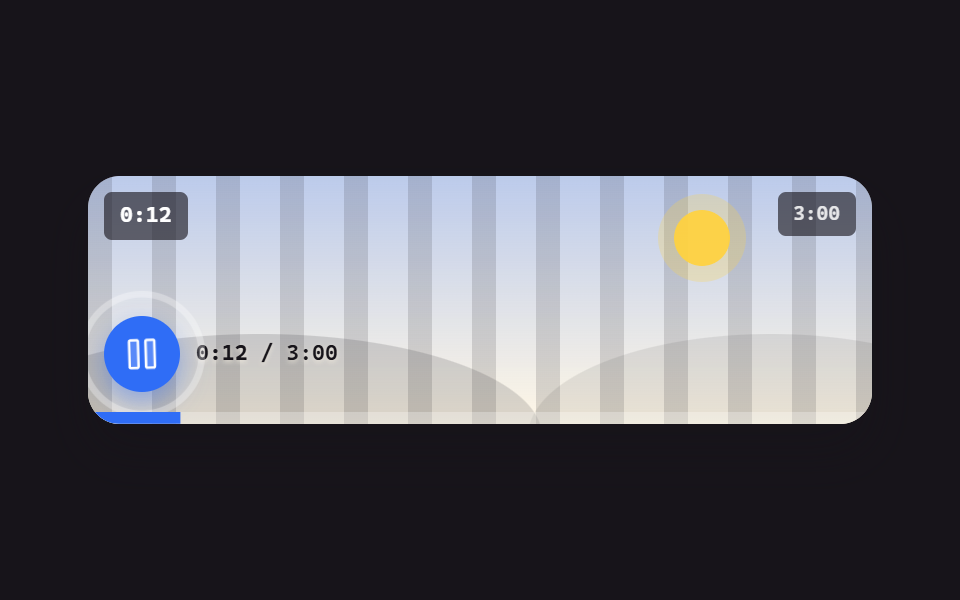 video player css で組む カスタム動画プレーヤー 9選 — 動画ファイルなしで動くvideo player css とは、mp4 を1本も置かずに、再生ボタン・シークバー・音量つまみといった操作まわりだけを HTML と CSS で組み立てるやり方です。ここに並ぶ9つは絵ではなく、押せばその場で状態が変わります。 この記事のデモをすべて見る