07ミニプレーヤー(PiP風)
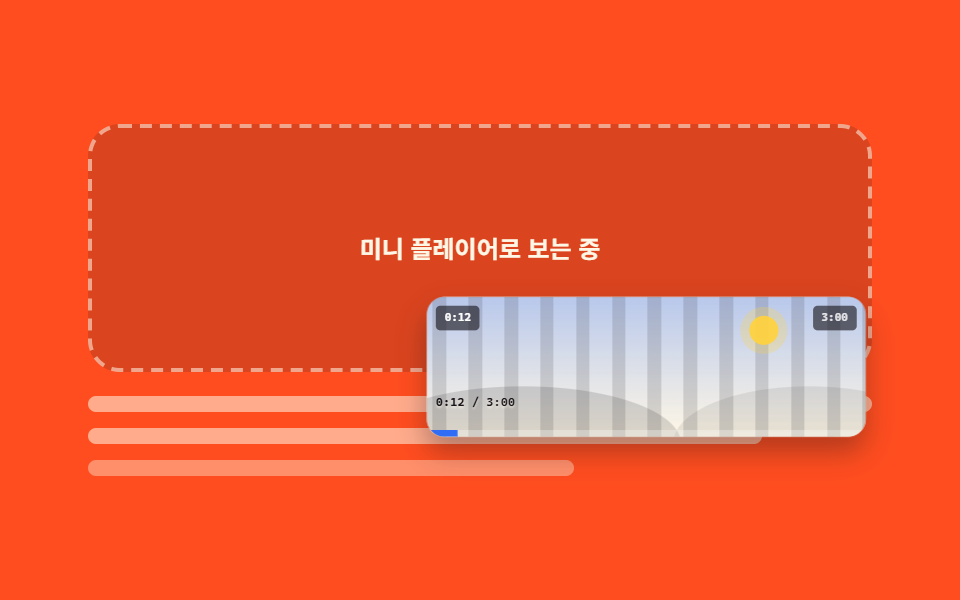
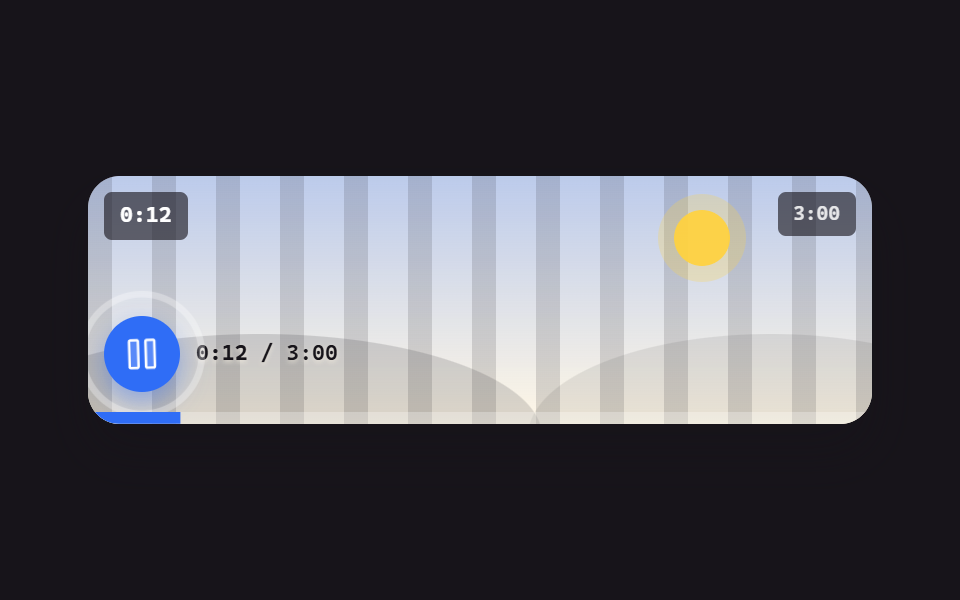
ミニボタンを押すとプレーヤーが右下の小さなカードに縮んで浮かび、閉じるボタンで元に戻ります。別ウィンドウを出すのではなく、コントロールがその場で動きを真似ます。
使いどころ本文を読み進めながら動画を残しておきたいチュートリアルページ
scalearia-labelfocus
<main class="stage">
  <div class="pip is-demo" id="pip">
    <div class="pip__stack">
      <p class="pip__ph">ミニプレーヤーで再生中</p>
      <figure class="pl" id="pl">
        <div class="pl__screen">
          <div class="pl__stripes" aria-hidden="true"></div>
          <div class="pl__world" aria-hidden="true"><span class="pl__sun"></span><span class="pl__hill pl__hill--a"></span><span class="pl__hill pl__hill--b"></span></div>
          <span class="pl__clock" id="clock">0:12</span>
          <span class="pl__badge">3:00</span>
          <button class="pl__close" type="button" id="pip-close" aria-label="ミニプレーヤーを閉じる">
            <svg viewBox="0 0 256 256" width="24" height="24" aria-hidden="true"><g fill="currentColor"><path d="M216 56v144a16 16 0 0 1-16 16H56a16 16 0 0 1-16-16V56a16 16 0 0 1 16-16h144a16 16 0 0 1 16 16" opacity=".2"/><path d="M205.66 194.34a8 8 0 0 1-11.32 11.32L128 139.31l-66.34 66.35a8 8 0 0 1-11.32-11.32L116.69 128L50.34 61.66a8 8 0 0 1 11.32-11.32L128 116.69l66.34-66.35a8 8 0 0 1 11.32 11.32L139.31 128Z"/></g></svg>
          </button>
          <div class="pl__bar">
            <span class="pl__time"><b id="t-now">0:12</b> / 3:00</span>
            <button class="pl__mini" type="button" id="pip-mini" aria-label="ミニプレーヤー" aria-pressed="false">
              <svg viewBox="0 0 256 256" width="20" height="20" aria-hidden="true"><g fill="currentColor"><path d="M224 64v64h-88v72H40a8 8 0 0 1-8-8V64a8 8 0 0 1 8-8h176a8 8 0 0 1 8 8" opacity=".2"/><path d="M216 48H40a16 16 0 0 0-16 16v128a16 16 0 0 0 16 16h176a16 16 0 0 0 16-16V64a16 16 0 0 0-16-16M40 64h176v56h-80a8 8 0 0 0-8 8v64H40Zm176 128h-72v-56h72z"/></g></svg>
            </button>
          </div>
          <span class="pl__fillwrap" aria-hidden="true"><span class="pl__fill" id="fill"></span></span>
        </div>
      </figure>
    </div>
    <div class="pip__doc" aria-hidden="true">
      <span class="pip__line"></span>
      <span class="pip__line pip__line--b"></span>
      <span class="pip__line pip__line--c"></span>
    </div>
  </div>
</main>@use "../../../../site/static/demo-tokens" as *;
$duration: $dur-base;
$easing: $ease-spring;
$color: $subject-blue;
@include stage($stage-orange);
// 미니로 갈 때 쓰는 값 — 레이아웃(top/left/width/height)을 건드리지 않고 transform 하나로만 옮긴다
$mini-scale: .44;
$mini-x: -4px;
$mini-y: 40px;
.pip {
position: relative;
box-sizing: border-box;
width: min(392px, 92vw);
}
.pip__stack {
position: relative;
height: clamp(96px, 26vw, 132px);
}
// 원래 자리에 남는 자리표시
.pip__ph {
position: absolute;
inset: 0;
display: grid;
place-items: center;
box-sizing: border-box;
margin: 0;
border: 2px dashed rgba(255, 247, 230, .55);
border-radius: $r-card;
background: rgba(23, 20, 26, .16);
color: $subject-cream;
font-size: 12px;
line-height: 16px;
font-weight: 700;
opacity: 0;
}
// 본문 자리 (글 줄 흉내)
.pip__doc {
display: flex;
flex-direction: column;
gap: $sp-2;
padding-top: $sp-3;
}
.pip__line {
height: 8px;
border-radius: $r-xs;
background: rgba(255, 247, 230, .55);
}
.pip__line--b { width: 86%; }
.pip__line--c { width: 62%; background: rgba(255, 247, 230, .38); }
// ── 플레이어 ──
.pl {
position: absolute;
inset: 0;
box-sizing: border-box;
margin: 0;
border-radius: $r-card;
background: $subject-cream;
box-shadow: $shadow-raised;
overflow: hidden;
transform-origin: right bottom; // 규칙8: 우하단 도킹 계산 기준
transition: transform $duration $easing;
}
.pl__screen {
position: relative;
height: 100%;
overflow: hidden;
background: linear-gradient(180deg, rgba(47, 109, 246, .34), rgba(255, 247, 230, .96));
}
.pl__stripes {
position: absolute;
inset: 0 -72px;
background: repeating-linear-gradient(90deg, rgba(23, 20, 26, .14) 0 12px, transparent 12px 32px);
animation-name: pl-pan;
animation-duration: $dur-loop;
animation-timing-function: linear;
animation-iteration-count: infinite;
}
@keyframes pl-pan { from { transform: translateX(0); } to { transform: translateX(-64px); } }
.pl__world { position: absolute; inset: 0; }
.pl__sun {
position: absolute; right: 20%; top: 14%;
width: 26px; height: 26px;
border-radius: 50%;
background: rgba(255, 210, 63, .95);
box-shadow: 0 0 0 8px rgba(255, 210, 63, .25);
}
.pl__hill { position: absolute; bottom: -46%; height: 82%; border-radius: 50%; }
.pl__hill--a { left: -14%; width: 72%; background: rgba(23, 20, 26, .15); }
.pl__hill--b { right: -18%; width: 62%; background: rgba(23, 20, 26, .09); }
.pl__clock, .pl__badge {
position: absolute; top: $sp-2;
padding: $sp-1 $sp-2;
border-radius: $r-xs;
background: rgba(23, 20, 26, .62);
font-family: ui-monospace, "Cascadia Mono", Menlo, Consolas, monospace;
font-size: 10px; line-height: 14px; font-weight: 700;
}
.pl__clock { left: $sp-2; color: #fff; }
.pl__badge { right: $sp-2; color: rgba(255, 255, 255, .85); }
.pl__bar {
position: absolute; left: 0; right: 0; bottom: 0;
display: flex; align-items: center; gap: $sp-2;
padding: 0 $sp-2 $sp-3;
}
.pl__time {
color: $subject-ink; // 화면 아래쪽은 크림이라 흰 글자가 1.35~2.10:1 이었다 — 잉크로 8.69~13.49:1
font-family: ui-monospace, "Cascadia Mono", Menlo, Consolas, monospace;
font-size: 11px; line-height: 14px; font-weight: 600;
text-shadow: 0 1px 2px rgba(255, 247, 230, .6);
}
.pl__time b { font-weight: 700; }
.pl__mini {
box-sizing: border-box;
width: 36px; height: 36px;
flex: 0 0 auto;
margin-left: auto;
display: inline-flex; align-items: center; justify-content: center;
border: 0;
border-radius: $r-control;
background: $color;
color: #fff;
cursor: pointer;
box-shadow: 0 6px 14px rgba(47, 109, 246, .45);
}
.pl__mini:hover { background: rgba(47, 109, 246, .88); }
.pl__mini:focus-visible { outline: 2px solid $stage-yellow; outline-offset: 2px; }
// 미니 카드 위의 닫기 — 카드가 통째로 축소되므로 미리 키워 둔다 (축소 후 실효 약 33px)
.pl__close {
position: absolute; top: $sp-1; right: $sp-1;
box-sizing: border-box;
width: 40px; height: 40px;
display: inline-flex; align-items: center; justify-content: center;
border: 0;
border-radius: $r-control;
background: rgba(23, 20, 26, .82);
color: #fff;
cursor: pointer;
transform: scale(1.9);
transform-origin: right top; // 규칙8: 부모 축소 보정 모서리 고정
opacity: 0;
pointer-events: none;
}
.pl__close:focus-visible { outline: 2px solid $stage-yellow; outline-offset: 2px; }
.pl__fillwrap { position: absolute; left: 0; right: 0; bottom: 0; height: 6px; background: rgba(255, 255, 255, .28); }
.pl__fill {
display: block; height: 100%;
background: $color;
transform-origin: left center; // 규칙8: 좌변서 차오름
transform: scaleX(.07);
}
// ── 사람이 눌렀을 때 (JS 가 .is-demo 를 떼고 .is-mini 를 건다) ──
.pip.is-mini .pl { transform: translate($mini-x, $mini-y) scale($mini-scale); }
.pip.is-mini .pip__ph { opacity: 1; }
.pip.is-mini .pl__close { opacity: 1; pointer-events: auto; }
.pip.is-mini .pl__mini { opacity: 0; pointer-events: none; }
// ── 자동 루프: 플레이어가 오른쪽 아래 조각 카드로 줄었다가 제자리로. transform·opacity 만 ──
.pip.is-demo .pl {
animation-name: pip-shrink;
animation-duration: $dur-loop;
animation-timing-function: $easing;
animation-iteration-count: infinite;
}
.pip.is-demo .pip__ph {
animation-name: pip-ph;
animation-duration: $dur-loop;
animation-timing-function: steps(1, end);
animation-iteration-count: infinite;
}
.pip.is-demo .pl__close {
animation-name: pip-close;
animation-duration: $dur-loop;
animation-timing-function: steps(1, end);
animation-iteration-count: infinite;
}
.pip.is-demo .pl__mini {
animation-name: pip-minibtn;
animation-duration: $dur-loop;
animation-timing-function: steps(1, end);
animation-iteration-count: infinite;
}
// 줄어드는 구간을 세 프레임(24프레임 기준 4.17% 간격)으로 좁히고, 자리표시·닫기 버튼을 **줄어들기가 끝나는 그 시점**에
// 컷으로 켠다 — 그래야 "미니로 다 줄어든 장면" 이 최대 변화 프레임이 되어 poster 로 뽑힌다.
// 앞판은 자리표시가 줄어드는 도중(34%)에 켜져서 poster 가 어중간한 중간 크기 장면이었다 (실측 2026-09-12)
@keyframes pip-shrink {
0%, 26% { transform: none; }
38%, 70% { transform: translate($mini-x, $mini-y) scale($mini-scale); }
86%, 100% { transform: none; }
}
// 자리표시는 **줄어들기가 시작하는 그 프레임**에 켜고 돌아온 뒤에 끈다. 다 줄어든 뒤에 켜면
// 날아가는 동안 원래 자리가 텅 빈 채로 남아, 중간 프레임(= poster)이 "카드가 붕 떠 있는" 장면이 된다 (실측 2026-09-12)
@keyframes pip-ph {
0%, 25.99% { opacity: 0; }
26%, 85.99% { opacity: 1; }
86%, 100% { opacity: 0; }
}
@keyframes pip-close {
0%, 37.99% { opacity: 0; }
38%, 71.99% { opacity: 1; }
72%, 100% { opacity: 0; }
}
@keyframes pip-minibtn {
0%, 25.99% { opacity: 1; }
26%, 71.99% { opacity: 0; }
72%, 100% { opacity: 1; }
}
@media (max-width: 340px) {
.pip__doc { gap: $sp-1; padding-top: $sp-2; }
}
@media (prefers-reduced-motion: reduce) {
.pip.is-demo .pl, .pip.is-demo .pip__ph, .pip.is-demo .pl__close,
.pip.is-demo .pl__mini, .pl__stripes { animation: none !important; }
.pl { transition: none; }
}html, body {
margin: 0;
overflow: hidden;
}
.stage {
box-sizing: border-box;
min-height: 100vh;
display: grid;
place-items: center;
margin: 0;
background: #ff4d1f;
font-family: -apple-system, "Segoe UI", "Noto Sans KR", sans-serif;
padding: clamp(8px, 4vw, 24px);
}
.pip {
position: relative;
box-sizing: border-box;
width: min(392px, 92vw);
}
.pip__stack {
position: relative;
height: clamp(96px, 26vw, 132px);
}
.pip__ph {
position: absolute;
inset: 0;
display: grid;
place-items: center;
box-sizing: border-box;
margin: 0;
border: 2px dashed rgba(255, 247, 230, 0.55);
border-radius: 16px;
background: rgba(23, 20, 26, 0.16);
color: #fff7e6;
font-size: 12px;
line-height: 16px;
font-weight: 700;
opacity: 0;
}
.pip__doc {
display: flex;
flex-direction: column;
gap: 8px;
padding-top: 12px;
}
.pip__line {
height: 8px;
border-radius: 4px;
background: rgba(255, 247, 230, 0.55);
}
.pip__line--b {
width: 86%;
}
.pip__line--c {
width: 62%;
background: rgba(255, 247, 230, 0.38);
}
.pl {
position: absolute;
inset: 0;
box-sizing: border-box;
margin: 0;
border-radius: 16px;
background: #fff7e6;
box-shadow: 0 14px 24px rgba(23, 20, 26, 0.32);
overflow: hidden;
transform-origin: right bottom;
transition: transform 300ms cubic-bezier(0.2, 0.8, 0.2, 1);
}
.pl__screen {
position: relative;
height: 100%;
overflow: hidden;
background: linear-gradient(180deg, rgba(47, 109, 246, 0.34), rgba(255, 247, 230, 0.96));
}
.pl__stripes {
position: absolute;
inset: 0 -72px;
background: repeating-linear-gradient(90deg, rgba(23, 20, 26, 0.14) 0 12px, transparent 12px 32px);
animation-name: pl-pan;
animation-duration: 2s;
animation-timing-function: linear;
animation-iteration-count: infinite;
}
@keyframes pl-pan {
from {
transform: translateX(0);
}
to {
transform: translateX(-64px);
}
}
.pl__world {
position: absolute;
inset: 0;
}
.pl__sun {
position: absolute;
right: 20%;
top: 14%;
width: 26px;
height: 26px;
border-radius: 50%;
background: rgba(255, 210, 63, 0.95);
box-shadow: 0 0 0 8px rgba(255, 210, 63, 0.25);
}
.pl__hill {
position: absolute;
bottom: -46%;
height: 82%;
border-radius: 50%;
}
.pl__hill--a {
left: -14%;
width: 72%;
background: rgba(23, 20, 26, 0.15);
}
.pl__hill--b {
right: -18%;
width: 62%;
background: rgba(23, 20, 26, 0.09);
}
.pl__clock, .pl__badge {
position: absolute;
top: 8px;
padding: 4px 8px;
border-radius: 4px;
background: rgba(23, 20, 26, 0.62);
font-family: ui-monospace, "Cascadia Mono", Menlo, Consolas, monospace;
font-size: 10px;
line-height: 14px;
font-weight: 700;
}
.pl__clock {
left: 8px;
color: #fff;
}
.pl__badge {
right: 8px;
color: rgba(255, 255, 255, 0.85);
}
.pl__bar {
position: absolute;
left: 0;
right: 0;
bottom: 0;
display: flex;
align-items: center;
gap: 8px;
padding: 0 8px 12px;
}
.pl__time {
color: #17141a;
font-family: ui-monospace, "Cascadia Mono", Menlo, Consolas, monospace;
font-size: 11px;
line-height: 14px;
font-weight: 600;
text-shadow: 0 1px 2px rgba(255, 247, 230, 0.6);
}
.pl__time b {
font-weight: 700;
}
.pl__mini {
box-sizing: border-box;
width: 36px;
height: 36px;
flex: 0 0 auto;
margin-left: auto;
display: inline-flex;
align-items: center;
justify-content: center;
border: 0;
border-radius: 12px;
background: #2f6df6;
color: #fff;
cursor: pointer;
box-shadow: 0 6px 14px rgba(47, 109, 246, 0.45);
}
.pl__mini:hover {
background: rgba(47, 109, 246, 0.88);
}
.pl__mini:focus-visible {
outline: 2px solid #ffd23f;
outline-offset: 2px;
}
.pl__close {
position: absolute;
top: 4px;
right: 4px;
box-sizing: border-box;
width: 40px;
height: 40px;
display: inline-flex;
align-items: center;
justify-content: center;
border: 0;
border-radius: 12px;
background: rgba(23, 20, 26, 0.82);
color: #fff;
cursor: pointer;
transform: scale(1.9);
transform-origin: right top;
opacity: 0;
pointer-events: none;
}
.pl__close:focus-visible {
outline: 2px solid #ffd23f;
outline-offset: 2px;
}
.pl__fillwrap {
position: absolute;
left: 0;
right: 0;
bottom: 0;
height: 6px;
background: rgba(255, 255, 255, 0.28);
}
.pl__fill {
display: block;
height: 100%;
background: #2f6df6;
transform-origin: left center;
transform: scaleX(0.07);
}
.pip.is-mini .pl {
transform: translate(-4px, 40px) scale(0.44);
}
.pip.is-mini .pip__ph {
opacity: 1;
}
.pip.is-mini .pl__close {
opacity: 1;
pointer-events: auto;
}
.pip.is-mini .pl__mini {
opacity: 0;
pointer-events: none;
}
.pip.is-demo .pl {
animation-name: pip-shrink;
animation-duration: 2s;
animation-timing-function: cubic-bezier(0.2, 0.8, 0.2, 1);
animation-iteration-count: infinite;
}
.pip.is-demo .pip__ph {
animation-name: pip-ph;
animation-duration: 2s;
animation-timing-function: steps(1, end);
animation-iteration-count: infinite;
}
.pip.is-demo .pl__close {
animation-name: pip-close;
animation-duration: 2s;
animation-timing-function: steps(1, end);
animation-iteration-count: infinite;
}
.pip.is-demo .pl__mini {
animation-name: pip-minibtn;
animation-duration: 2s;
animation-timing-function: steps(1, end);
animation-iteration-count: infinite;
}
@keyframes pip-shrink {
0%, 26% {
transform: none;
}
38%, 70% {
transform: translate(-4px, 40px) scale(0.44);
}
86%, 100% {
transform: none;
}
}
@keyframes pip-ph {
0%, 25.99% {
opacity: 0;
}
26%, 85.99% {
opacity: 1;
}
86%, 100% {
opacity: 0;
}
}
@keyframes pip-close {
0%, 37.99% {
opacity: 0;
}
38%, 71.99% {
opacity: 1;
}
72%, 100% {
opacity: 0;
}
}
@keyframes pip-minibtn {
0%, 25.99% {
opacity: 1;
}
26%, 71.99% {
opacity: 0;
}
72%, 100% {
opacity: 1;
}
}
@media (max-width: 340px) {
.pip__doc {
gap: 4px;
padding-top: 8px;
}
}
@media (prefers-reduced-motion: reduce) {
.pip.is-demo .pl, .pip.is-demo .pip__ph, .pip.is-demo .pl__close,
.pip.is-demo .pl__mini, .pl__stripes {
animation: none !important;
}
.pl {
transition: none;
}
}// 실제 동작: 미니 버튼이 플레이어를 transform 으로 오른쪽 아래 조각 카드로 줄인다. 閉じる·Escape 로 복귀.
var pip = document.getElementById('pip'),
btnMini = document.getElementById('pip-mini'),
btnClose = document.getElementById('pip-close'),
clock = document.getElementById('clock'),
now = document.getElementById('t-now'),
fill = document.getElementById('fill');
var DUR = 180, t = 12, last = Date.now();
function fmt(s) { s = Math.floor(s); return Math.floor(s / 60) + ':' + ('0' + (s % 60)).slice(-2); }
setInterval(function () {
var n = Date.now();
t = (t + (n - last) / 1000) % DUR;
last = n;
clock.textContent = fmt(t);
now.textContent = fmt(t);
fill.style.transform = 'scaleX(' + (t / DUR).toFixed(4) + ')';
}, 250);
function setMini(on) {
pip.classList.remove('is-demo');
pip.classList.toggle('is-mini', on);
btnMini.setAttribute('aria-pressed', on ? 'true' : 'false');
}
btnMini.addEventListener('click', function () {
setMini(true);
btnClose.focus({ preventScroll: true });
});
btnClose.addEventListener('click', function () {
setMini(false);
btnMini.focus({ preventScroll: true });
});
document.addEventListener('keydown', function (e) {
if (e.key === 'Escape' && pip.classList.contains('is-mini')) {
setMini(false);
btnMini.focus({ preventScroll: true });
}
});import { useEffect, useRef, useState } from "react";
import type { CSSProperties } from "react";
import styles from "./MiniPlayer.module.scss";
export type MiniPlayerProps = {
/** 더미 영상 길이(초) */
total?: number;
/** 시작 위치(초) */
start?: number;
duration?: number;
easing?: string;
color?: string;
};
type Vars = CSSProperties & { "--duration"?: string; "--easing"?: string; "--color"?: string };
function fmt(s: number) {
const n = Math.floor(s);
return Math.floor(n / 60) + ":" + ("0" + (n % 60)).slice(-2);
}
function MiniIcon() {
return (
<svg viewBox="0 0 256 256" width="20" height="20" aria-hidden="true">
<g fill="currentColor">
<path d="M224 64v64h-88v72H40a8 8 0 0 1-8-8V64a8 8 0 0 1 8-8h176a8 8 0 0 1 8 8" opacity=".2" />
<path d="M216 48H40a16 16 0 0 0-16 16v128a16 16 0 0 0 16 16h176a16 16 0 0 0 16-16V64a16 16 0 0 0-16-16M40 64h176v56h-80a8 8 0 0 0-8 8v64H40Zm176 128h-72v-56h72z" />
</g>
</svg>
);
}
function CloseIcon() {
return (
<svg viewBox="0 0 256 256" width="24" height="24" aria-hidden="true">
<g fill="currentColor">
<path d="M216 56v144a16 16 0 0 1-16 16H56a16 16 0 0 1-16-16V56a16 16 0 0 1 16-16h144a16 16 0 0 1 16 16" opacity=".2" />
<path d="M205.66 194.34a8 8 0 0 1-11.32 11.32L128 139.31l-66.34 66.35a8 8 0 0 1-11.32-11.32L116.69 128L50.34 61.66a8 8 0 0 1 11.32-11.32L128 116.69l66.34-66.35a8 8 0 0 1 11.32 11.32L139.31 128Z" />
</g>
</svg>
);
}
export default function MiniPlayer({
total = 180,
start = 12,
duration = 300,
easing = "cubic-bezier(.2,.8,.2,1)",
color = "#2f6df6",
}: MiniPlayerProps) {
const [mini, setMini] = useState(false);
const [t, setT] = useState(start);
const miniRef = useRef<HTMLButtonElement>(null);
const closeRef = useRef<HTMLButtonElement>(null);
const vars: Vars = { "--duration": `${duration}ms`, "--easing": easing, "--color": color };
// 더미 재생 시계 — 바닐라의 setInterval(250ms) 를 그대로
useEffect(() => {
let last = Date.now();
const id = setInterval(() => {
const n = Date.now();
const step = (n - last) / 1000;
last = n;
setT((p) => (p + step) % total);
}, 250);
return () => clearInterval(id);
}, [total]);
// 미니로 들어가면 닫기 버튼으로 초점을 옮긴다 (닫을 때 되돌리는 건 close 에서)
useEffect(() => {
if (mini) closeRef.current?.focus({ preventScroll: true });
}, [mini]);
// Escape 로 미니에서 나온다. 진짜 Document PiP 는 iframe 안에서 못 쓴다 — transform 으로 흉내 낸다
useEffect(() => {
if (!mini) return;
function onKey(e: KeyboardEvent) {
if (e.key === "Escape") close();
}
document.addEventListener("keydown", onKey);
return () => document.removeEventListener("keydown", onKey);
}, [mini]);
function close() {
setMini(false);
miniRef.current?.focus({ preventScroll: true });
}
return (
<div className={`${styles.pip} ${mini ? styles.isMini : ""}`} style={vars}>
<div className={styles.stack}>
<p className={styles.ph}>미니 플레이어로 보는 중</p>
<figure className={styles.player}>
<div className={styles.screen}>
<div className={styles.stripes} aria-hidden="true" />
<div className={styles.world} aria-hidden="true">
<span className={styles.sun} />
<span className={`${styles.hill} ${styles.hillA}`} />
<span className={`${styles.hill} ${styles.hillB}`} />
</div>
<span className={styles.clock}>{fmt(t)}</span>
<span className={styles.badge}>{fmt(total)}</span>
<button
ref={closeRef}
className={styles.close}
type="button"
aria-label="미니 플레이어 닫기"
onClick={close}
>
<CloseIcon />
</button>
<div className={styles.bar}>
<span className={styles.time}>
<b>{fmt(t)}</b> / {fmt(total)}
</span>
<button
ref={miniRef}
className={styles.mini}
type="button"
aria-label="미니 플레이어"
aria-pressed={mini}
onClick={() => setMini(true)}
>
<MiniIcon />
</button>
</div>
<span className={styles.fillwrap} aria-hidden="true">
<span className={styles.fill} style={{ transform: `scaleX(${(t / total).toFixed(4)})` }} />
</span>
</div>
</figure>
</div>
<div className={styles.doc} aria-hidden="true">
<span className={styles.line} />
<span className={`${styles.line} ${styles.lineB}`} />
<span className={`${styles.line} ${styles.lineC}`} />
</div>
</div>
);
}07 ミニプレーヤー(PiP風) — 計測 累積面積 46.533% · 動いたフレーム 23/23GODRICH オリジナル · SCSS と React は zip に同梱 · video player css で組む カスタム動画プレーヤー 9選 — 動画ファイルなしで動く
このデモが属する記事
 video player css で組む カスタム動画プレーヤー 9選 — 動画ファイルなしで動くvideo player css とは、mp4 を1本も置かずに、再生ボタン・シークバー・音量つまみといった操作まわりだけを HTML と CSS で組み立てるやり方です。ここに並ぶ9つは絵ではなく、押せばその場で状態が変わります。 この記事のデモをすべて見る