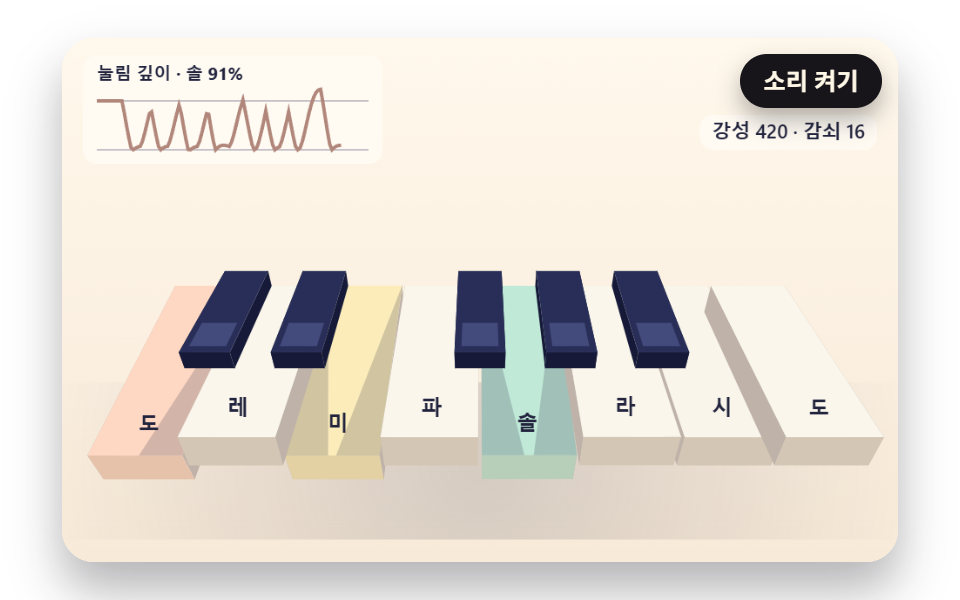
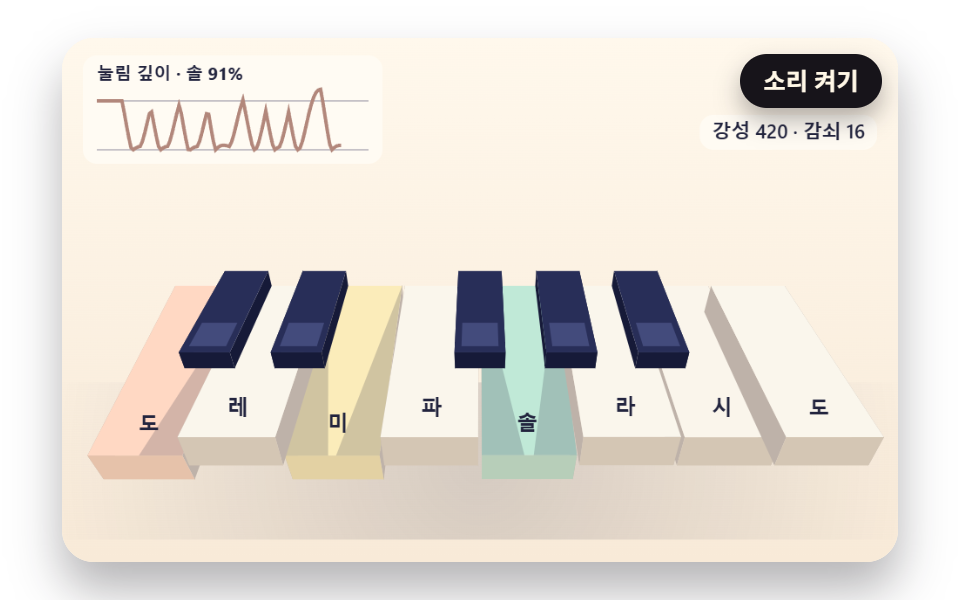
01ばねで沈んで戻る立体の鍵盤
鍵盤の手前が奥の端を軸に傾いて沈み、減衰するばねが押し込みの深さを戻すあいだ、隣の鍵盤との間に見える側面と影の幅が深さの差に合わせて伸び縮みする。
使いどころオンラインのピアノ練習画面
KEY_SPRING_STIFFNESSKEY_TRAVELSHADOW_SLOPE
<main class="stage">
<div class="pn is-demo" id="pn">
  <canvas class="pn__canvas" data-role="canvas" width="480" height="300" role="img" aria-label="奥の端を軸に傾いて沈み、ばねで戻る立体の鍵盤1オクターブ。"></canvas>
  <div class="pn__keys" data-role="keys" data-key-class="pn__key" role="group" aria-label="鍵盤 — キーボードの A S D F G H J K が白鍵、W E T Y U が黒鍵"></div>
  <button class="pn__sound" data-role="sound" type="button" aria-pressed="false">音を出す</button>
  <p class="pn__live" data-role="live" aria-live="polite"></p>
</div>
</main>
@use "../../../../site/static/demo-tokens" as *;
@include stage($stage-paper);
.pn {
position: relative;
width: min(92vw, calc(160vh - 12.8vw));
aspect-ratio: 480 / 300;
margin: 0 auto;
border-radius: $r-card;
// clip — 화면 밖 건반 버튼에 포커스가 가도 상자가 스크롤되지 않는다(hidden 은 스크롤될 수 있다)
overflow: clip;
box-shadow: $shadow-raised;
background: $subject-cream;
}
.pn__canvas {
position: absolute;
inset: 0;
display: block;
width: 100%;
height: 100%;
}
// 건반 버튼 층 — 그림과 같은 자리에 투명 버튼을 겹친다. 층 자체는 포인터를 통과시키고 버튼만 받는다
.pn__keys {
position: absolute;
inset: 0;
pointer-events: none;
}
.pn__key {
position: absolute;
margin: 0;
padding: 0;
border: 0;
border-radius: $r-xs;
background: transparent;
pointer-events: auto;
cursor: pointer;
touch-action: none;
-webkit-tap-highlight-color: transparent;
}
// 포커스 링 — 진한 테두리 + 안쪽 크림 테두리 두 겹이라 상아 건반·남색 건반 어디서나 보인다
.pn__key:focus-visible {
outline: 2px solid $subject-ink;
outline-offset: -2px;
box-shadow: inset 0 0 0 4px $subject-cream;
}
.pn__sound {
position: absolute;
top: $sp-2;
right: $sp-2;
padding: $sp-1 $sp-3;
border: 0;
border-radius: $r-pill;
background: $subject-ink;
color: $subject-cream;
font-family: inherit;
font-weight: 700;
font-size: 12px;
line-height: 1.6;
cursor: pointer;
box-shadow: $shadow-press;
}
.pn__sound[aria-pressed="true"] {
background: $subject-cream;
color: $subject-ink;
outline: 2px solid $subject-ink;
outline-offset: -2px;
}
.pn__sound:focus-visible {
outline: 2px solid $subject-ink;
outline-offset: 2px;
}
// 화면에서는 숨기고 화면 낭독기는 읽는 알림 줄 — display: none 이 아니라 1px 상자로 줄여 접근성 트리에 남긴다
.pn__live {
position: absolute;
width: 1px;
height: 1px;
margin: 0;
padding: 0;
overflow: hidden;
clip-path: inset(50%);
white-space: nowrap;
border: 0;
}
@media (max-width: 340px) {
.pn__sound { font-size: 11px; padding: $sp-1 $sp-2; }
}
// 동작 줄이기 — 장면은 스크립트가 루프 없는 정지 판으로 바꾼다(matchMedia change 리스너). 여기서는 버튼 그림자만 거둔다
@media (prefers-reduced-motion: reduce) {
.pn__sound { box-shadow: none !important; }
}html, body {
margin: 0;
overflow: hidden;
}
.stage {
box-sizing: border-box;
min-height: 100vh;
display: grid;
place-items: center;
margin: 0;
background: #ffffff;
font-family: -apple-system, "Segoe UI", "Noto Sans KR", sans-serif;
padding: clamp(8px, 4vw, 24px);
}
.pn {
position: relative;
width: min(92vw, 160vh - 12.8vw);
aspect-ratio: 480/300;
margin: 0 auto;
border-radius: 16px;
overflow: clip;
box-shadow: 0 14px 24px rgba(23, 20, 26, 0.32);
background: #fff7e6;
}
.pn__canvas {
position: absolute;
inset: 0;
display: block;
width: 100%;
height: 100%;
}
.pn__keys {
position: absolute;
inset: 0;
pointer-events: none;
}
.pn__key {
position: absolute;
margin: 0;
padding: 0;
border: 0;
border-radius: 4px;
background: transparent;
pointer-events: auto;
cursor: pointer;
touch-action: none;
-webkit-tap-highlight-color: transparent;
}
.pn__key:focus-visible {
outline: 2px solid #17141a;
outline-offset: -2px;
box-shadow: inset 0 0 0 4px #fff7e6;
}
.pn__sound {
position: absolute;
top: 8px;
right: 8px;
padding: 4px 12px;
border: 0;
border-radius: 999px;
background: #17141a;
color: #fff7e6;
font-family: inherit;
font-weight: 700;
font-size: 12px;
line-height: 1.6;
cursor: pointer;
box-shadow: 0 6px 12px rgba(23, 20, 26, 0.32);
}
.pn__sound[aria-pressed=true] {
background: #fff7e6;
color: #17141a;
outline: 2px solid #17141a;
outline-offset: -2px;
}
.pn__sound:focus-visible {
outline: 2px solid #17141a;
outline-offset: 2px;
}
.pn__live {
position: absolute;
width: 1px;
height: 1px;
margin: 0;
padding: 0;
overflow: hidden;
clip-path: inset(50%);
white-space: nowrap;
border: 0;
}
@media (max-width: 340px) {
.pn__sound {
font-size: 11px;
padding: 4px 8px;
}
}
@media (prefers-reduced-motion: reduce) {
.pn__sound {
box-shadow: none !important;
}
}(function () {
const root = document.getElementById("pn");
if (!root) return;
const W = 480;
const H = 300;
const FIXED_DT = 16;
const DT_SEC = FIXED_DT / 1000;
const TAU = Math.PI * 2;
// 파스텔 팔레트 — 크림 바탕, 상아 흰건반, 짙은 남색 검은건반. 음 이름 글자는 진한 INK 로 읽힌다
const BG_TOP = [255, 248, 236];
const BG_LOW = [248, 234, 216];
const IVORY = [255, 252, 244];
const IVORY_SHADE = [236, 226, 210];
const IVORY_SIDE = [212, 198, 180];
const NAVY = [40, 46, 88];
const NAVY_TOP = [70, 78, 128];
const NAVY_SIDE = [22, 26, 56];
const INK = [34, 36, 62];
const INK_SOFT = [92, 88, 118];
const PEACH = [255, 188, 156];
const MINT = [140, 218, 192];
const SKY = [150, 200, 246];
const LILAC = [196, 180, 248];
const LEMON = [248, 224, 140];
const ROSE = [246, 166, 188];
const GLOWS = [PEACH, MINT, SKY, LILAC, LEMON, ROSE];
const FONT_FAMILY = '"Segoe UI", "Malgun Gothic", "Hiragino Sans", "Noto Sans KR", sans-serif';
// 음 이름 — 음 번호를 12 로 나눈 나머지(0 = ド)로 고른다. 로케일마다 문구.json 이 바꾼다
const NOTE_NAMES = ['ド', 'ド♯', 'レ', 'レ♯', 'ミ', 'ファ', 'ファ♯', 'ソ', 'ソ♯', 'ラ', 'ラ♯', 'シ'];
const BLACK_PCS = [1, 3, 6, 8, 10];
function pcOf(m) { return ((m % 12) + 12) % 12; }
function isBlack(m) { return BLACK_PCS.indexOf(pcOf(m)) >= 0; }
function noteName(m) { return NOTE_NAMES[pcOf(m)]; }
// 음 높이 — 69번 음(가운데 ド 위의 ラ)을 440Hz 로 두고 반음 하나마다 2^(1/12) 배
const A4_MIDI = 69;
const A4_HZ = 440;
function freqOf(m) { return A4_HZ * Math.pow(2, (m - A4_MIDI) / 12); }
function clamp(v, lo, hi) { return v < lo ? lo : (v > hi ? hi : v); }
function lerp(a, b, k) { return a + (b - a) * k; }
function smooth(x) { const c = clamp(x, 0, 1); return c * c * (3 - 2 * c); }
function rgba(c, a) {
return 'rgba(' + Math.round(clamp(c[0], 0, 255)) + ',' + Math.round(clamp(c[1], 0, 255)) + ',' + Math.round(clamp(c[2], 0, 255)) + ',' + clamp(a, 0, 1).toFixed(3) + ')';
}
function mixRGB(a, b, k) { return [lerp(a[0], b[0], k), lerp(a[1], b[1], k), lerp(a[2], b[2], k)]; }
// 시드 고정 난수 — 같은 시드면 같은 불꽃·흔들림이 다시 나온다 (32비트 정수 섞기)
function makeRng(seed) {
let s = seed >>> 0;
return function () {
s = (s + 0x6d2b79f5) >>> 0;
let t = s;
t = Math.imul(t ^ (t >>> 15), t | 1);
t ^= t + Math.imul(t ^ (t >>> 7), t | 61);
return ((t ^ (t >>> 14)) >>> 0) / 4294967296;
};
}
// 鍵盤 스프링 — 가속도 = −강성 × (위치 − 목표) − 감쇠 × 속도. 위치 1 은 鍵盤 바닥, 넘으면 KEYBED_BOUNCE 만큼만 되튄다
const KEY_SPRING_STIFFNESS = 420;
const KEY_SPRING_DAMPING = 16;
const KEYBED_BOUNCE = 0.3;
function makeSpring() { return { x: 0, v: 0, target: 0 }; }
function stepSpring(s, k, c, dt) {
const a = -k * (s.x - s.target) - c * s.v;
s.v += a * dt;
s.x += s.v * dt;
if (s.x > 1) {
s.x = 1;
s.v = -s.v * KEYBED_BOUNCE;
}
}
// 음마다 스프링 하나 — 치면 목표 1(바닥)로, 세기 × PRESS_KICK 만큼 아래로 밀어 넣는 속도 덤을 얹는다. 떼면 목표 0
const PRESS_KICK = 14;
const springs = new Map();
function springOf(m) {
let s = springs.get(m);
if (!s) {
s = makeSpring();
springs.set(m, s);
}
return s;
}
function stepSprings() {
springs.forEach(function (s) { stepSpring(s, KEY_SPRING_STIFFNESS, KEY_SPRING_DAMPING, DT_SEC); });
}
function resetSprings() {
springs.forEach(function (s) { s.x = 0; s.v = 0; s.target = 0; });
}
function pressSpring(m, vel) {
const s = springOf(m);
s.target = 1;
s.v += vel * PRESS_KICK;
}
function releaseSpring(m) { springOf(m).target = 0; }
function keyDepth(m) { const s = springs.get(m); return s ? shown(s) : 0; }
function keyTint(m) { return isHeld(m) ? 1 : clamp(keyDepth(m), 0, 1); }
function keyGlow(m) { return GLOWS[pcOf(m) % GLOWS.length]; }
// 평평한 鍵盤 弦 — lo~hi 음을 x0~x1 폭에 흰건반 기준으로 고르게 놓고, 검은건반은 흰건반 경계 위에 좁고 짧게
const BLACK_WIDTH_RATIO = 0.58;
const BLACK_HEIGHT_RATIO = 0.62;
function whiteCount(lo, hi) {
let n = 0;
for (let m = lo; m <= hi; m += 1) {
if (!isBlack(m)) {
n += 1;
}
}
return n;
}
function layoutFlat(lo, hi, x0, x1, top, bottom) {
const ww = (x1 - x0) / whiteCount(lo, hi);
const whites = [];
const blacks = [];
let i = 0;
for (let m = lo; m <= hi; m += 1) {
if (isBlack(m)) {
const bw = ww * BLACK_WIDTH_RATIO;
blacks.push({ midi: m, black: true, x: x0 + i * ww - bw / 2, y: top, w: bw, h: (bottom - top) * BLACK_HEIGHT_RATIO });
}
else {
whites.push({ midi: m, black: false, x: x0 + i * ww, y: top, w: ww, h: bottom - top });
i += 1;
}
}
return whites.concat(blacks);
}
// 컴퓨터 자판 한 弦 = 한 옥타브 — 가운데 弦 A S D F G H J K 가 흰건반, 윗줄 W E T Y U 가 검은건반 (자판 배열과 상관없이 ev.code 로)
const KEY_CODES = ['KeyA', 'KeyW', 'KeyS', 'KeyE', 'KeyD', 'KeyF', 'KeyT', 'KeyG', 'KeyY', 'KeyH', 'KeyU', 'KeyJ', 'KeyK'];
// 동시 음 수 상한 — 열 음을 한꺼번에 눌러도 MAX_VOICES 개만 울리고, 넘치면 가장 오래된 음을 놓는다. 화면도 같은 상한으로 그린다
const MAX_VOICES = 6;
const voices = [];
function allocVoice(pool, midi, startMs, auto) {
const freed = [];
for (let i = pool.length - 1; i >= 0; i -= 1) {
if (pool[i].midi === midi) {
freed.push(pool[i]);
pool.splice(i, 1);
}
}
while (pool.length >= MAX_VOICES) {
const old = pool.shift();
if (old) {
freed.push(old);
}
}
pool.push({ midi: midi, startMs: startMs, auto: auto, nodes: null, gain: null });
return freed;
}
function findVoice(midi) {
for (let i = 0; i < voices.length; i += 1) {
if (voices[i].midi === midi) {
return voices[i];
}
}
return null;
}
// 소리 — 기본 꺼짐. AudioContext 는 「音を出す」 버튼의 클릭 핸들러(tail) 안에서만 만든다
let audio = null;
let master = null;
let soundOn = false;
// 두 시계 맞추기 — 소리를 켠 순간의 오디오 시각(초)과 화면 시계(ms)를 짝으로 적어 두고, 그 뒤로는 오디오 시계로 화면 시계를 끈다
let audioBaseSec = 0;
let clockBaseMs = 0;
function screenToAudioSec(ms) { return audioBaseSec + (ms - clockBaseMs) / 1000; }
function audioToScreenMs(sec) { return clockBaseMs + (sec - audioBaseSec) * 1000; }
// 오실레이터 합성 — 사인파 배음 넷(크기 PARTIAL_GAINS)을 더하고, 치는 순간 ATTACK_SEC 만에 올라갔다 DECAY_SEC 동안 잦아든다
const PARTIAL_GAINS = [1, 0.42, 0.18, 0.08];
const ATTACK_SEC = 0.006;
const DECAY_SEC = 1.6;
const RELEASE_SEC = 0.09;
const MASTER_GAIN = 0.16;
function synthStart(v, vel, atMs) {
if (!audio || !master || !soundOn) {
return;
}
const t0 = Math.max(audio.currentTime, screenToAudioSec(atMs));
const g = audio.createGain();
g.gain.setValueAtTime(0.0001, t0);
g.gain.linearRampToValueAtTime(0.25 + 0.75 * vel, t0 + ATTACK_SEC);
g.gain.exponentialRampToValueAtTime(0.0001, t0 + DECAY_SEC);
g.connect(master);
const f = freqOf(v.midi);
const nodes = [];
for (let i = 0; i < PARTIAL_GAINS.length; i += 1) {
const o = audio.createOscillator();
const pg = audio.createGain();
o.type = 'sine';
o.frequency.setValueAtTime(f * (i + 1), t0);
pg.gain.setValueAtTime(PARTIAL_GAINS[i] / PARTIAL_GAINS.length, t0);
o.connect(pg);
pg.connect(g);
o.start(t0);
o.stop(t0 + DECAY_SEC + 0.05);
nodes.push(o);
}
v.nodes = nodes;
v.gain = g;
}
function synthStop(v, atMs) {
if (!audio || !v.gain || !v.nodes) {
return;
}
const t0 = Math.max(audio.currentTime, screenToAudioSec(atMs));
v.gain.gain.cancelScheduledValues(t0);
v.gain.gain.setTargetAtTime(0.0001, t0, RELEASE_SEC / 3);
for (let i = 0; i < v.nodes.length; i += 1) {
try {
v.nodes[i].stop(t0 + RELEASE_SEC * 2);
}
catch (e) { /* 이미 멈춘 노드 */ }
}
v.nodes = null;
v.gain = null;
}
const canvasEl = root.querySelector('[data-role="canvas"]');
const keysEl = root.querySelector('[data-role="keys"]');
const soundEl = root.querySelector('[data-role="sound"]');
const liveEl = root.querySelector('[data-role="live"]');
const ctxRaw = canvasEl ? canvasEl.getContext('2d') : null;
if (!canvasEl || !ctxRaw || !keysEl || !soundEl || !liveEl) {
return;
}
const cv = canvasEl;
const ctx = ctxRaw;
const keysBox = keysEl;
const soundBtn = soundEl;
const live = liveEl;
const reduceQuery = window.matchMedia('(prefers-reduced-motion: reduce)');
// 페이지를 연 채 동작 줄이기 설정을 바꿔도 change 리스너가 이 값을 다시 읽는다
let still = reduceQuery.matches;
// 자동 시연 중인가 — 사람이 처음 손대면 시연 표시를 뗀다
let demo = root.classList.contains('is-demo');
const off = new AbortController();
function fitCanvas() {
// 배율은 2 에서 자른다 — 배율 3 기기에서 화소가 2.25배로 늘어 프레임마다 일이 그만큼 커지지 않게
const dpr = Math.min(window.devicePixelRatio || 1, 2);
cv.width = Math.round(W * dpr);
cv.height = Math.round(H * dpr);
ctx.setTransform(dpr, 0, 0, dpr, 0, 0);
}
function clearStage(top, low) {
const g = ctx.createLinearGradient(0, 0, 0, H);
g.addColorStop(0, rgba(top, 1));
g.addColorStop(1, rgba(low, 1));
ctx.fillStyle = g;
ctx.fillRect(0, 0, W, H);
}
function fontOf(size, weight) { return weight + ' ' + size.toFixed(1) + 'px ' + FONT_FAMILY; }
function roundRectPath(x, y, w, h, r) {
const rr = Math.min(r, w / 2, h / 2);
ctx.beginPath();
ctx.moveTo(x + rr, y);
ctx.arcTo(x + w, y, x + w, y + h, rr);
ctx.arcTo(x + w, y + h, x, y + h, rr);
ctx.arcTo(x, y + h, x, y, rr);
ctx.arcTo(x, y, x + w, y, rr);
ctx.closePath();
}
// 판 위 설명 글 — 크림 알약 바탕에 진한 글자. 돌려주는 값은 알약 폭
function drawCaption(text, x, y, alignRight) {
ctx.font = fontOf(11, 600);
const bw = ctx.measureText(text).width + 14;
const bx = alignRight ? x - bw : x;
ctx.fillStyle = rgba(IVORY, 0.92);
roundRectPath(bx, y, bw, 20, 8);
ctx.fill();
ctx.fillStyle = rgba(INK, 1);
ctx.textAlign = 'left';
ctx.textBaseline = 'middle';
ctx.fillText(text, bx + 7, y + 10.5);
return bw;
}
// 평평한 鍵盤 그리기 — depth(m) 0~1 만큼 앞쪽이 내려가 앞턱이 얇아지고, tint(m) 0~1 만큼 그 음의 빛깔로 물든다. ox 는 가로로 밀린 만큼(보이는 창의 왼쪽 끝)
const KEY_LIP = 7;
function drawFlatKeys(keys, depth, tint, glow, names, ox = 0) {
ctx.save();
ctx.translate(-ox, 0);
for (let i = 0; i < keys.length; i += 1) {
const k = keys[i];
if (k.black || k.x - ox > W || k.x + k.w - ox < 0) {
continue;
}
const d = clamp(depth(k.midi), -0.2, 1);
const drop = d * (KEY_LIP - 2);
const face = mixRGB(mixRGB(IVORY, IVORY_SHADE, Math.max(0, d) * 0.6), glow(k.midi), tint(k.midi) * 0.75);
ctx.fillStyle = rgba(face, 1);
roundRectPath(k.x + 0.75, k.y, k.w - 1.5, k.h - KEY_LIP + drop, 3);
ctx.fill();
ctx.fillStyle = rgba(IVORY_SIDE, 1);
ctx.fillRect(k.x + 0.75, k.y + k.h - KEY_LIP + drop, k.w - 1.5, KEY_LIP - drop);
if (names && k.w >= 14) {
ctx.font = fontOf(Math.min(11, k.w * 0.42), 700);
ctx.textAlign = 'center';
ctx.textBaseline = 'alphabetic';
ctx.fillStyle = rgba(INK, 1);
ctx.fillText(noteName(k.midi), k.x + k.w / 2, k.y + k.h - KEY_LIP - 6 + drop);
}
}
for (let i = 0; i < keys.length; i += 1) {
const k = keys[i];
if (!k.black || k.x - ox > W || k.x + k.w - ox < 0) {
continue;
}
const d = clamp(depth(k.midi), -0.2, 1);
const drop = d * 4;
const face = mixRGB(NAVY, glow(k.midi), tint(k.midi) * 0.55);
ctx.fillStyle = rgba(NAVY_SIDE, 1);
roundRectPath(k.x, k.y, k.w, k.h + 2, 2);
ctx.fill();
ctx.fillStyle = rgba(face, 1);
roundRectPath(k.x + 1, k.y, k.w - 2, k.h - 6 + drop, 2);
ctx.fill();
ctx.fillStyle = rgba(mixRGB(NAVY_TOP, glow(k.midi), tint(k.midi) * 0.5), 1);
ctx.fillRect(k.x + 2, k.y + k.h - 9 + drop, k.w - 4, 3);
}
ctx.restore();
}
// 입체 鍵盤 — 가운데 ド(60)부터 한 옥타브 위 ド(72)까지. 세계 좌표 x 가로 · y 위 · z 안쪽(0 = 鍵盤 앞 끝, KEY_LEN = 뒤 끝 축)
const LO = 60;
const HI = 72;
const KEY_LEN = 150;
const KEY_THICK = 22;
const WHITE_W = 54;
const KEY_GAP = 2;
const BLACK_LEN = 92;
const BLACK_W = 30;
const BLACK_RISE = 12;
// 앞 끝이 내려가는 거리 — 눌림 1 이면 앞 끝이 KEY_TRAVEL 만큼, 기울기 = asin(눌림 × KEY_TRAVEL / 축까지 거리)
const KEY_TRAVEL = 16;
// 카메라 — 높이 CAM_H, 앞 끝에서 CAM_D 뒤, PITCH 라디안 내려다본다. 화면 = 중심 + FOCAL × (가로·세로) / 깊이
const CAM_H = 250;
const CAM_D = 250;
const PITCH = 0.7;
const FOCAL = 380;
const CENTER_X = 240;
const CENTER_Y = 196;
// 옆 건반이 높을수록 눌린 鍵盤 위로 그늘이 넓어진다 — 그늘 폭 = 높이 차 × SHADOW_SLOPE
const SHADOW_SLOPE = 1.6;
const HISTORY_LEN = 120;
const BEAT_MS = 250;
const LOOP_MS = 2400;
// 시연 — ド ミ ソ ド シ ラ ソ, 마지막에 ド·ミ·ソ 화음 (직접 지은 짧은 음형)
const SEQ = [
[0.8, 60, 0.5, 0.8], [1.6, 64, 0.5, 0.7], [2.4, 67, 0.5, 0.9], [3.2, 72, 0.6, 1],
[4.2, 71, 0.4, 0.6], [4.8, 69, 0.4, 0.6], [5.4, 67, 0.4, 0.7],
[6.4, 60, 2.2, 0.85], [6.4, 64, 2.2, 0.85], [6.4, 67, 2.2, 0.85]
];
const STILL_CHORD = [60, 64, 67];
const DEPTH_LABEL = '押し込みの深さ';
const SPRING_LABEL = '剛性 {k} · 減衰 {c}';
let keys3 = [];
let lastKey = 60;
let history = [];
// 원근 투영 — 카메라 자리로 옮기고 PITCH 만큼 내려다본 뒤 깊이로 나눈다
function project(p) {
const dy = p[1] - CAM_H;
const dz = p[2] + CAM_D;
const zc = dz * Math.cos(PITCH) - dy * Math.sin(PITCH);
const yc = dy * Math.cos(PITCH) + dz * Math.sin(PITCH);
return [CENTER_X + FOCAL * p[0] / zc, CENTER_Y - FOCAL * yc / zc];
}
// 뒤 끝(z = KEY_LEN) 축 회전 — 축에서 앞쪽으로 떨어진 거리만큼 아래로 내려간다
function tilt(p, theta) {
const ry = p[1];
const rz = p[2] - KEY_LEN;
return [p[0], ry * Math.cos(theta) + rz * Math.sin(theta), KEY_LEN - ry * Math.sin(theta) + rz * Math.cos(theta)];
}
function thetaOf(k, depth) {
return Math.asin(clamp(depth * KEY_TRAVEL / (KEY_LEN - k.zFront), -0.5, 0.5));
}
// 앞 끝 높이 — 그늘 폭을 정할 때 이웃끼리 견준다
function frontHeight(k, depth) {
return -(KEY_LEN - k.zFront) * Math.sin(thetaOf(k, depth));
}
function quad(pts, theta, fill) {
ctx.beginPath();
for (let i = 0; i < pts.length; i += 1) {
const s = project(tilt(pts[i], theta));
if (i === 0) {
ctx.moveTo(s[0], s[1]);
}
else {
ctx.lineTo(s[0], s[1]);
}
}
ctx.closePath();
ctx.fillStyle = fill;
ctx.fill();
}
function build() {
keys3 = [];
const total = whiteCount(LO, HI) * WHITE_W;
let i = 0;
for (let m = LO; m <= HI; m += 1) {
const left = -total / 2 + i * WHITE_W;
if (isBlack(m)) {
keys3.push({ midi: m, black: true, x0: left - BLACK_W / 2, x1: left + BLACK_W / 2, zFront: KEY_LEN - BLACK_LEN, spring: springOf(m) });
}
else {
keys3.push({ midi: m, black: false, x0: left + KEY_GAP / 2, x1: left + WHITE_W - KEY_GAP / 2, zFront: 0, spring: springOf(m) });
i += 1;
}
}
}
function reset() {
resetSprings();
history = [];
lastKey = 60;
}
function loopLength() { return LOOP_MS; }
function step(ms, prev) {
runSeq(SEQ, BEAT_MS, ms, prev);
stepSprings();
history.push(springOf(lastKey).x);
if (history.length > HISTORY_LEN) {
history.shift();
}
}
function finalScene() {
for (let i = 0; i < STILL_CHORD.length; i += 1) {
const s = springOf(STILL_CHORD[i]);
s.target = 1;
s.x = 1;
}
lastKey = STILL_CHORD[0];
}
function onNoteOn(midi, vel, auto) {
pressSpring(midi, vel);
lastKey = midi;
}
function onNoteOff(midi, auto) { releaseSpring(midi); }
function keyBase() { return LO; }
function keyPan() { return 0; }
function onDrag(x, y, down) { }
function onKeyFocus(midi) { }
function onWake() { }
function keyRects() {
const out = [];
for (let i = 0; i < keys3.length; i += 1) {
const k = keys3[i];
const top = k.black ? BLACK_RISE : 0;
const a = project([k.x0, top, k.zFront]);
const b = project([k.x1, top, k.zFront]);
const c = project([k.x0, top, KEY_LEN]);
const d = project([k.x1, top, KEY_LEN]);
const e = project([k.x0, k.black ? 0 : -KEY_THICK, k.zFront]);
const x0 = Math.min(a[0], c[0], e[0]);
const x1 = Math.max(b[0], d[0]);
const y0 = Math.min(c[1], d[1]);
const y1 = Math.max(e[1], a[1]);
out.push({ midi: k.midi, black: k.black, x: x0, y: y0, w: x1 - x0, h: y1 - y0 });
}
return out.sort(function (p, q) { return (p.black ? 1 : 0) - (q.black ? 1 : 0); });
}
function drawKey(k, neighbors) {
const d = shown(k.spring);
const th = thetaOf(k, d);
const top = k.black ? BLACK_RISE : 0;
const bottom = k.black ? 0 : -KEY_THICK;
const zf = k.zFront;
const glow = GLOWS[pcOf(k.midi) % GLOWS.length];
const tint = clamp(d, 0, 1);
const sideC = k.black ? NAVY_SIDE : mixRGB(IVORY_SIDE, INK_SOFT, 0.18);
// 옆면 둘 · 앞면 · 윗면 순 — 그리는 순서가 가림을 정한다(깊이 내림차순으로 이미 정렬)
quad([[k.x0, top, zf], [k.x0, top, KEY_LEN], [k.x0, bottom, KEY_LEN], [k.x0, bottom, zf]], th, rgba(sideC, 1));
quad([[k.x1, top, zf], [k.x1, top, KEY_LEN], [k.x1, bottom, KEY_LEN], [k.x1, bottom, zf]], th, rgba(sideC, 1));
const frontC = k.black ? mixRGB(NAVY_SIDE, glow, tint * 0.35) : mixRGB(IVORY_SIDE, glow, tint * 0.45);
quad([[k.x0, top, zf], [k.x1, top, zf], [k.x1, bottom, zf], [k.x0, bottom, zf]], th, rgba(frontC, 1));
const topC = k.black ? mixRGB(NAVY, glow, tint * 0.5) : mixRGB(mixRGB(IVORY, IVORY_SHADE, 0.25 * (1 - tint)), glow, tint * 0.6);
quad([[k.x0, top, zf], [k.x1, top, zf], [k.x1, top, KEY_LEN], [k.x0, top, KEY_LEN]], th, rgba(topC, 1));
if (k.black) {
// 검은건반 윗면 앞쪽 광택 — 기울수록 빛 띠가 앞으로 쏠린다
quad([[k.x0 + 4, top, zf + 6], [k.x1 - 4, top, zf + 6], [k.x1 - 4, top, zf + 30 - tint * 14], [k.x0 + 4, top, zf + 30 - tint * 14]], th, rgba(NAVY_TOP, 0.9));
return;
}
// 그늘 — 이웃 앞 끝이 나보다 높으면 그 차이에 비례한 폭의 삼각형이 내 윗면에 드리운다(뒤 끝 축에서는 0)
const myH = frontHeight(k, d);
for (let i = 0; i < neighbors.length; i += 1) {
const n = neighbors[i];
const gap = frontHeight(n, shown(n.spring)) - myH;
if (gap <= 0.3) {
continue;
}
const band = Math.min(gap * SHADOW_SLOPE, (k.x1 - k.x0) * 0.6);
const edge = n.x0 > k.x0 ? k.x1 : k.x0;
const inner = n.x0 > k.x0 ? edge - band : edge + band;
quad([[edge, top, zf], [inner, top, zf], [edge, top, KEY_LEN]], th, rgba(INK, 0.2));
}
const label = project(tilt([(k.x0 + k.x1) / 2, top, zf + 22], th));
ctx.font = fontOf(12, 700);
ctx.textAlign = 'center';
ctx.textBaseline = 'middle';
ctx.fillStyle = rgba(INK, 1);
ctx.fillText(noteName(k.midi), label[0], label[1]);
}
function drawHistory() {
const x0 = 12;
const y0 = 10;
const w = 172;
const h = 62;
ctx.fillStyle = rgba(IVORY, 0.9);
roundRectPath(x0, y0, w, h, 8);
ctx.fill();
ctx.font = fontOf(10, 700);
ctx.textAlign = 'left';
ctx.textBaseline = 'top';
ctx.fillStyle = rgba(INK, 1);
ctx.fillText(DEPTH_LABEL + ' · ' + noteName(lastKey) + ' ' + Math.round(clamp(springOf(lastKey).x, -1, 1) * 100) + '%', x0 + 8, y0 + 6);
// 0(쉼)·1(바닥) 기준선, 그 사이를 오간 깊이 곡선 — 쉼 위로 올라간 부분이 되튐
const gy0 = y0 + 26;
const gy1 = y0 + h - 8;
ctx.strokeStyle = rgba(INK_SOFT, 0.35);
ctx.lineWidth = 1;
ctx.beginPath();
ctx.moveTo(x0 + 8, gy0);
ctx.lineTo(x0 + w - 8, gy0);
ctx.moveTo(x0 + 8, gy1);
ctx.lineTo(x0 + w - 8, gy1);
ctx.stroke();
ctx.strokeStyle = rgba(mixRGB(PEACH, INK, 0.35), 1);
ctx.lineWidth = 2;
ctx.beginPath();
for (let i = 0; i < history.length; i += 1) {
const x = x0 + 8 + (w - 16) * i / (HISTORY_LEN - 1);
const y = gy0 + (gy1 - gy0) * clamp(history[i], -0.3, 1);
if (i === 0) {
ctx.moveTo(x, y);
}
else {
ctx.lineTo(x, y);
}
}
ctx.stroke();
}
function draw() {
clearStage(BG_TOP, BG_LOW);
// 바닥 그림자 — 鍵盤 弦 아래 타원 그늘
const fl = project([0, -KEY_THICK, 10]);
const g = ctx.createRadialGradient(fl[0], fl[1] + 6, 10, fl[0], fl[1] + 6, 250);
g.addColorStop(0, rgba(INK, 0.16));
g.addColorStop(1, rgba(INK, 0));
ctx.fillStyle = g;
ctx.fillRect(0, fl[1] - 40, W, 90);
const whites = keys3.filter(function (k) { return !k.black; });
const blacks = keys3.filter(function (k) { return k.black; });
const order = function (a, b) {
return shown(b.spring) - shown(a.spring) || Math.abs(b.x0 + b.x1) - Math.abs(a.x0 + a.x1);
};
const ws = whites.slice().sort(order);
for (let i = 0; i < ws.length; i += 1) {
const k = ws[i];
const idx = whites.indexOf(k);
const nb = [];
if (idx > 0) {
nb.push(whites[idx - 1]);
}
if (idx < whites.length - 1) {
nb.push(whites[idx + 1]);
}
drawKey(k, nb);
}
const bs = blacks.slice().sort(order);
for (let i = 0; i < bs.length; i += 1) {
drawKey(bs[i], []);
}
drawHistory();
drawCaption(SPRING_LABEL.replace('{k}', String(KEY_SPRING_STIFFNESS)).replace('{c}', String(KEY_SPRING_DAMPING)), W - 12, 44, true);
}
// 계산을 마치고 그리기 시작했는가
let ready = false;
// 정리 뒤(리액트 언마운트)에 늦게 온 일이 다시 시작하지 않게
let alive = true;
// 화면 시계(ms) — 16ms 고정 스텝으로만 늘어난다. 소리가 켜져 있으면 오디오 시계가 목표를 정한다
let clock = 0;
let screenTarget = 0;
let prevLoop = 0;
// 사람이 마지막으로 친 시각 — HUMAN_QUIET_MS 동안 조용하면 자동 시연이 다시 이어진다
const HUMAN_QUIET_MS = 2500;
let lastHuman = -1e9;
function autoAllowed() { return demo || clock - lastHuman > HUMAN_QUIET_MS; }
// 스프링 값을 화면에 쓸 때 — 동작 줄이기면 흔들림 없이 목표 자리 그대로
function shown(s) { return still ? s.target : s.x; }
function wake() {
if (!demo) {
return;
}
demo = false;
root.classList.remove('is-demo');
onWake();
}
// 음 이름 알림 — 사람이 친 음은 GROUP_MS 안에 든 것끼리 한 줄로, 자동 시연은 한 마디(BAR_MS)에 한 번 모아서
const GROUP_MS = 250;
const BAR_MS = 2000;
const BAR_LABEL = '自動演奏: {names}';
let groupNames = [];
let lastSpoken = -1e9;
let barNames = [];
let barIndex = 0;
function announce(midi, auto) {
const nm = noteName(midi);
if (auto) {
if (barNames.indexOf(nm) < 0) {
barNames.push(nm);
}
return;
}
if (clock - lastSpoken > GROUP_MS) {
groupNames = [];
}
if (groupNames.indexOf(nm) < 0) {
groupNames.push(nm);
}
lastSpoken = clock;
live.textContent = groupNames.join(' · ');
}
function flushBar() {
const b = Math.floor(clock / BAR_MS);
if (b === barIndex) {
return;
}
barIndex = b;
if (barNames.length > 0 && clock - lastSpoken > BAR_MS) {
live.textContent = BAR_LABEL.replace('{names}', barNames.join(' · '));
}
barNames = [];
}
// 鍵盤 버튼 — 그림 위에 투명한 진짜 <button> 을 같은 자리에 겹친다. 눌린 동안 aria-pressed="true"
const keyButtons = new Map();
function setPressed(midi, on) {
const b = keyButtons.get(midi);
if (b) {
b.setAttribute('aria-pressed', on ? 'true' : 'false');
}
}
function isHeld(midi) { return findVoice(midi) !== null; }
function press(midi, vel, auto) {
if (!auto) {
lastHuman = clock;
wake();
}
const freed = allocVoice(voices, midi, clock, auto);
for (let i = 0; i < freed.length; i += 1) {
synthStop(freed[i], clock);
if (freed[i].midi !== midi) {
setPressed(freed[i].midi, false);
onNoteOff(freed[i].midi, auto);
}
}
const v = findVoice(midi);
if (v) {
synthStart(v, vel, clock);
}
setPressed(midi, true);
announce(midi, auto);
onNoteOn(midi, vel, auto);
if (still && ready) {
render();
}
}
function release(midi, auto) {
const v = findVoice(midi);
if (!v || (auto && !v.auto)) {
return;
}
voices.splice(voices.indexOf(v), 1);
synthStop(v, clock);
setPressed(midi, false);
onNoteOff(midi, auto);
if (still && ready) {
render();
}
}
function releaseAll() {
while (voices.length > 0) {
const v = voices[voices.length - 1];
release(v.midi, v.auto);
if (voices.indexOf(v) >= 0) {
voices.splice(voices.indexOf(v), 1);
}
}
}
// 악보 따라 치기 — 지난 시각(prev)부터 이번 시각(ms)까지 지나간 시작·끝을 찾는다. 한 바퀴 넘어가면 둘로 나눠 본다
function crossed(t, prev, ms) {
return prev <= ms ? (t > prev && t <= ms) : (t > prev || t <= ms);
}
function runSeq(seq, beatMs, ms, prev) {
for (let i = 0; i < seq.length; i += 1) {
const n = seq[i];
if (crossed((n[0] + n[2]) * beatMs, prev, ms)) {
release(n[1], true);
}
}
for (let i = 0; i < seq.length; i += 1) {
const n = seq[i];
if (crossed(n[0] * beatMs, prev, ms) && autoAllowed()) {
press(n[1], n[3], true);
}
}
}
// 포인터 자리를 판 좌표(480×300)로 — 화면에 보이는 캔버스 크기와 상관없이
function toBoard(ev) {
const r = cv.getBoundingClientRect();
return [(ev.clientX - r.left) * W / Math.max(1, r.width), (ev.clientY - r.top) * H / Math.max(1, r.height)];
}
function buildButtons() {
while (keysBox.firstChild) {
keysBox.removeChild(keysBox.firstChild);
}
keyButtons.clear();
const rects = keyRects();
for (let i = 0; i < rects.length; i += 1) {
const k = rects[i];
const b = document.createElement('button');
b.type = 'button';
b.className = keysBox.getAttribute('data-key-class') || '';
// 이름 + 옥타브 번호(가운데 ド = 4) — 두 옥타브 이상인 판에서 같은 이름 건반을 낭독으로도 가른다
b.setAttribute('aria-label', noteName(k.midi) + String(Math.floor(k.midi / 12) - 1));
b.setAttribute('aria-pressed', isHeld(k.midi) ? 'true' : 'false');
b.style.left = (k.x / W * 100).toFixed(3) + '%';
b.style.top = (k.y / H * 100).toFixed(3) + '%';
b.style.width = (k.w / W * 100).toFixed(3) + '%';
b.style.height = (k.h / H * 100).toFixed(3) + '%';
const midi = k.midi;
b.addEventListener('pointerdown', function (ev) {
const r = b.getBoundingClientRect();
// 鍵盤 앞쪽(아래)을 칠수록 세게 — 0.45~1
press(midi, 0.45 + 0.55 * clamp((ev.clientY - r.top) / Math.max(1, r.height), 0, 1), false);
}, { signal: off.signal });
b.addEventListener('pointerenter', function (ev) {
if ((ev.buttons & 1) === 1) {
press(midi, 0.7, false);
}
}, { signal: off.signal });
const up = function () { const v = findVoice(midi); if (v && !v.auto) {
release(midi, false);
} };
b.addEventListener('pointerup', up, { signal: off.signal });
b.addEventListener('pointerleave', up, { signal: off.signal });
b.addEventListener('pointercancel', up, { signal: off.signal });
// 키보드 — 포커스된 건반에서 Enter·Space 를 누르는 동안 눌리고, 떼면 놓인다
b.addEventListener('keydown', function (ev) {
if (ev.key !== 'Enter' && ev.key !== ' ') {
return;
}
ev.preventDefault();
if (!ev.repeat) {
press(midi, 0.75, false);
}
}, { signal: off.signal });
b.addEventListener('keyup', function (ev) {
if (ev.key !== 'Enter' && ev.key !== ' ') {
return;
}
ev.preventDefault();
up();
}, { signal: off.signal });
b.addEventListener('focus', function () { onKeyFocus(midi); }, { signal: off.signal });
keysBox.appendChild(b);
keyButtons.set(midi, b);
}
}
let panShown = 0;
function syncPan() {
const p = keyPan();
if (Math.abs(p - panShown) < 0.05) {
return;
}
panShown = p;
keysBox.style.transform = 'translateX(' + (-p / W * 100).toFixed(3) + '%)';
}
// 컴퓨터 자판 — 가운데 弦 한 줄이 한 옥타브. 누르고 있는 동안 소리가 이어진다(자동 반복은 무시)
window.addEventListener('keydown', function (ev) {
const i = KEY_CODES.indexOf(ev.code);
if (i < 0 || ev.repeat || ev.ctrlKey || ev.metaKey || ev.altKey) {
return;
}
press(keyBase() + i, 0.75, false);
}, { signal: off.signal });
window.addEventListener('keyup', function (ev) {
const i = KEY_CODES.indexOf(ev.code);
if (i < 0) {
return;
}
const v = findVoice(keyBase() + i);
if (v && !v.auto) {
release(keyBase() + i, false);
}
}, { signal: off.signal });
root.addEventListener('pointermove', function (ev) {
const p = toBoard(ev);
onDrag(p[0], p[1], (ev.buttons & 1) === 1);
}, { signal: off.signal });
// 音を出す — AudioContext 를 만드는 곳은 이 클릭 핸들러 하나뿐이다. 켜는 순간 화면 시계를 오디오 시계에 다시 맞춘다
const SOUND_ON_LABEL = '音を出す';
const SOUND_OFF_LABEL = '音を消す';
function syncClocks() {
if (!audio) {
return;
}
audioBaseSec = audio.currentTime;
clockBaseMs = clock;
screenTarget = clock;
}
soundBtn.addEventListener('click', function () {
if (!audio) {
audio = new AudioContext();
master = audio.createGain();
master.gain.value = MASTER_GAIN;
master.connect(audio.destination);
}
soundOn = !soundOn;
soundBtn.setAttribute('aria-pressed', soundOn ? 'true' : 'false');
soundBtn.textContent = soundOn ? SOUND_OFF_LABEL : SOUND_ON_LABEL;
if (soundOn) {
syncClocks();
audio.resume().then(syncClocks);
}
else {
for (let i = 0; i < voices.length; i += 1) {
synthStop(voices[i], clock);
}
screenTarget = clock;
}
wake();
}, { signal: off.signal });
function render() {
draw();
syncPan();
}
function tick() {
clock += FIXED_DT;
const ms = clock % loopLength();
step(ms, prevLoop);
prevLoop = ms;
flushBar();
}
let rafId = 0;
let lastTs = -1;
function frame(ts) {
if (still) {
rafId = 0;
return;
}
if (lastTs < 0) {
lastTs = ts;
}
// 탭이 숨었다 돌아와도 한 번에 100ms 까지만 따라잡는다
const dt = Math.min(ts - lastTs, 100);
lastTs = ts;
if (soundOn && audio && audio.state === 'running') {
screenTarget = audioToScreenMs(audio.currentTime);
if (screenTarget - clock > 200) {
syncClocks();
}
}
else {
screenTarget += dt;
}
let n = 0;
while (clock + FIXED_DT <= screenTarget && n < 8) {
tick();
n += 1;
}
if (n === 8) {
screenTarget = clock;
}
render();
rafId = window.requestAnimationFrame(frame);
}
function startLoop() {
if (rafId) {
return;
}
lastTs = -1;
rafId = window.requestAnimationFrame(frame);
}
function stopLoop() {
if (rafId) {
window.cancelAnimationFrame(rafId);
rafId = 0;
}
}
// 동작 줄이기 — 루프를 돌리지 않고 눌린 鍵盤 색과 음 이름만 바뀌는 정지 판 한 장
function showStill() {
stopLoop();
releaseAll();
reset();
finalScene();
render();
}
function play() {
releaseAll();
clock = 0;
screenTarget = 0;
prevLoop = 0;
barIndex = 0;
reset();
render();
startLoop();
}
// 설정이 페이지를 연 채 바뀌면 — 켜지면 정지 판으로, 꺼지면 시연을 처음부터
function onMotionPref() {
still = reduceQuery.matches;
if (!ready) {
return;
}
if (still) {
showStill();
}
else {
play();
}
}
reduceQuery.addEventListener('change', onMotionPref, { signal: off.signal });
window.addEventListener('resize', function () {
fitCanvas();
// 화면 폭이 바뀌면 鍵盤 배치(07 은 鍵盤 폭 최소값)와 버튼 자리를 다시 계산한다
if (ready) {
build();
buildButtons();
render();
}
}, { signal: off.signal });
function begin() {
if (!alive) {
return;
}
fitCanvas();
build();
buildButtons();
ready = true;
if (still) {
showStill();
}
else {
play();
}
}
begin();
return function () {
alive = false;
stopLoop();
off.abort();
for (let i = 0; i < voices.length; i += 1) {
synthStop(voices[i], clock);
}
if (audio) {
audio.close();
}
};
})();// KeySpringTiltDepth - vanilla 판(01-piano-key-spring-tilt-depth) 의 React 포트. 같은 계산을 useEffect 안에서 돌린다.
import { useEffect, useRef } from "react";
import styles from "./KeySpringTiltDepth.module.scss";
const cx = (s: string): string => s.split(" ").map((n) => styles[n] ?? n).join(" ");
export default function KeySpringTiltDepth() {
const rootRef = useRef<HTMLDivElement | null>(null);
useEffect(() => {
const rootEl = rootRef.current;
if (!rootEl) return;
const root: HTMLElement = rootEl;
type RGB = [number, number, number];
type Pt = [number, number];
// 건반 한 개의 판 위 상자 — (x, y) 왼쪽 위, w·h 크기. 버튼 자리도 이 상자로 정한다
type KeyRect = { midi: number; black: boolean; x: number; y: number; w: number; h: number };
// 감쇠 스프링 하나 — x 위치(0 = 쉼, 1 = 바닥), v 속도(1/초), target 목표
type Spring = { x: number; v: number; target: number };
// 울리는 음 하나 — 소리를 켰을 때만 nodes·gain 이 생긴다. 소리가 꺼져 있으면 화면용 기록만 남는다
type Voice = { midi: number; startMs: number; auto: boolean; nodes: OscillatorNode[] | null; gain: GainNode | null };
// 악보 한 음 — [시작 박, 음 번호, 길이(박), 세기 0~1]
type SeqNote = [number, number, number, number];
const W = 480;
const H = 300;
const FIXED_DT = 16;
const DT_SEC = FIXED_DT / 1000;
const TAU = Math.PI * 2;
// 파스텔 팔레트 — 크림 바탕, 상아 흰건반, 짙은 남색 검은건반. 음 이름 글자는 진한 INK 로 읽힌다
const BG_TOP: RGB = [255, 248, 236];
const BG_LOW: RGB = [248, 234, 216];
const IVORY: RGB = [255, 252, 244];
const IVORY_SHADE: RGB = [236, 226, 210];
const IVORY_SIDE: RGB = [212, 198, 180];
const NAVY: RGB = [40, 46, 88];
const NAVY_TOP: RGB = [70, 78, 128];
const NAVY_SIDE: RGB = [22, 26, 56];
const INK: RGB = [34, 36, 62];
const INK_SOFT: RGB = [92, 88, 118];
const PEACH: RGB = [255, 188, 156];
const MINT: RGB = [140, 218, 192];
const SKY: RGB = [150, 200, 246];
const LILAC: RGB = [196, 180, 248];
const LEMON: RGB = [248, 224, 140];
const ROSE: RGB = [246, 166, 188];
const GLOWS: RGB[] = [PEACH, MINT, SKY, LILAC, LEMON, ROSE];
const FONT_FAMILY = '"Segoe UI", "Malgun Gothic", "Hiragino Sans", "Noto Sans KR", sans-serif';
// 음 이름 — 음 번호를 12 로 나눈 나머지(0 = 도)로 고른다. 로케일마다 문구.json 이 바꾼다
const NOTE_NAMES: string[] = ['도', '도♯', '레', '레♯', '미', '파', '파♯', '솔', '솔♯', '라', '라♯', '시'];
const BLACK_PCS: number[] = [1, 3, 6, 8, 10];
function pcOf(m: number): number { return ((m % 12) + 12) % 12; }
function isBlack(m: number): boolean { return BLACK_PCS.indexOf(pcOf(m)) >= 0; }
function noteName(m: number): string { return NOTE_NAMES[pcOf(m)]; }
// 음 높이 — 69번 음(가운데 도 위의 라)을 440Hz 로 두고 반음 하나마다 2^(1/12) 배
const A4_MIDI = 69;
const A4_HZ = 440;
function freqOf(m: number): number { return A4_HZ * Math.pow(2, (m - A4_MIDI) / 12); }
function clamp(v: number, lo: number, hi: number): number { return v < lo ? lo : (v > hi ? hi : v); }
function lerp(a: number, b: number, k: number): number { return a + (b - a) * k; }
function smooth(x: number): number { const c = clamp(x, 0, 1); return c * c * (3 - 2 * c); }
function rgba(c: RGB, a: number): string {
return 'rgba(' + Math.round(clamp(c[0], 0, 255)) + ',' + Math.round(clamp(c[1], 0, 255)) + ',' + Math.round(clamp(c[2], 0, 255)) + ',' + clamp(a, 0, 1).toFixed(3) + ')';
}
function mixRGB(a: RGB, b: RGB, k: number): RGB { return [lerp(a[0], b[0], k), lerp(a[1], b[1], k), lerp(a[2], b[2], k)]; }
// 시드 고정 난수 — 같은 시드면 같은 불꽃·흔들림이 다시 나온다 (32비트 정수 섞기)
function makeRng(seed: number): () => number {
let s = seed >>> 0;
return function (): number {
s = (s + 0x6d2b79f5) >>> 0;
let t = s;
t = Math.imul(t ^ (t >>> 15), t | 1);
t ^= t + Math.imul(t ^ (t >>> 7), t | 61);
return ((t ^ (t >>> 14)) >>> 0) / 4294967296;
};
}
// 건반 스프링 — 가속도 = −강성 × (위치 − 목표) − 감쇠 × 속도. 위치 1 은 건반 바닥, 넘으면 KEYBED_BOUNCE 만큼만 되튄다
const KEY_SPRING_STIFFNESS = 420;
const KEY_SPRING_DAMPING = 16;
const KEYBED_BOUNCE = 0.3;
function makeSpring(): Spring { return { x: 0, v: 0, target: 0 }; }
function stepSpring(s: Spring, k: number, c: number, dt: number): void {
const a = -k * (s.x - s.target) - c * s.v;
s.v += a * dt;
s.x += s.v * dt;
if (s.x > 1) { s.x = 1; s.v = -s.v * KEYBED_BOUNCE; }
}
// 음마다 스프링 하나 — 치면 목표 1(바닥)로, 세기 × PRESS_KICK 만큼 아래로 밀어 넣는 속도 덤을 얹는다. 떼면 목표 0
const PRESS_KICK = 14;
const springs = new Map<number, Spring>();
function springOf(m: number): Spring {
let s = springs.get(m);
if (!s) { s = makeSpring(); springs.set(m, s); }
return s;
}
function stepSprings(): void {
springs.forEach(function (s: Spring): void { stepSpring(s, KEY_SPRING_STIFFNESS, KEY_SPRING_DAMPING, DT_SEC); });
}
function resetSprings(): void {
springs.forEach(function (s: Spring): void { s.x = 0; s.v = 0; s.target = 0; });
}
function pressSpring(m: number, vel: number): void {
const s = springOf(m);
s.target = 1;
s.v += vel * PRESS_KICK;
}
function releaseSpring(m: number): void { springOf(m).target = 0; }
function keyDepth(m: number): number { const s = springs.get(m); return s ? shown(s) : 0; }
function keyTint(m: number): number { return isHeld(m) ? 1 : clamp(keyDepth(m), 0, 1); }
function keyGlow(m: number): RGB { return GLOWS[pcOf(m) % GLOWS.length]; }
// 평평한 건반 줄 — lo~hi 음을 x0~x1 폭에 흰건반 기준으로 고르게 놓고, 검은건반은 흰건반 경계 위에 좁고 짧게
const BLACK_WIDTH_RATIO = 0.58;
const BLACK_HEIGHT_RATIO = 0.62;
function whiteCount(lo: number, hi: number): number {
let n = 0;
for (let m = lo; m <= hi; m += 1) { if (!isBlack(m)) { n += 1; } }
return n;
}
function layoutFlat(lo: number, hi: number, x0: number, x1: number, top: number, bottom: number): KeyRect[] {
const ww = (x1 - x0) / whiteCount(lo, hi);
const whites: KeyRect[] = [];
const blacks: KeyRect[] = [];
let i = 0;
for (let m = lo; m <= hi; m += 1) {
if (isBlack(m)) {
const bw = ww * BLACK_WIDTH_RATIO;
blacks.push({ midi: m, black: true, x: x0 + i * ww - bw / 2, y: top, w: bw, h: (bottom - top) * BLACK_HEIGHT_RATIO });
} else {
whites.push({ midi: m, black: false, x: x0 + i * ww, y: top, w: ww, h: bottom - top });
i += 1;
}
}
return whites.concat(blacks);
}
// 컴퓨터 자판 한 줄 = 한 옥타브 — 가운데 줄 A S D F G H J K 가 흰건반, 윗줄 W E T Y U 가 검은건반 (자판 배열과 상관없이 ev.code 로)
const KEY_CODES: string[] = ['KeyA', 'KeyW', 'KeyS', 'KeyE', 'KeyD', 'KeyF', 'KeyT', 'KeyG', 'KeyY', 'KeyH', 'KeyU', 'KeyJ', 'KeyK'];
// 동시 음 수 상한 — 열 음을 한꺼번에 눌러도 MAX_VOICES 개만 울리고, 넘치면 가장 오래된 음을 놓는다. 화면도 같은 상한으로 그린다
const MAX_VOICES = 6;
const voices: Voice[] = [];
function allocVoice(pool: Voice[], midi: number, startMs: number, auto: boolean): Voice[] {
const freed: Voice[] = [];
for (let i = pool.length - 1; i >= 0; i -= 1) {
if (pool[i].midi === midi) { freed.push(pool[i]); pool.splice(i, 1); }
}
while (pool.length >= MAX_VOICES) {
const old = pool.shift();
if (old) { freed.push(old); }
}
pool.push({ midi: midi, startMs: startMs, auto: auto, nodes: null, gain: null });
return freed;
}
function findVoice(midi: number): Voice | null {
for (let i = 0; i < voices.length; i += 1) { if (voices[i].midi === midi) { return voices[i]; } }
return null;
}
// 소리 — 기본 꺼짐. AudioContext 는 「소리 켜기」 버튼의 클릭 핸들러(tail) 안에서만 만든다
let audio: AudioContext | null = null;
let master: GainNode | null = null;
let soundOn = false;
// 두 시계 맞추기 — 소리를 켠 순간의 오디오 시각(초)과 화면 시계(ms)를 짝으로 적어 두고, 그 뒤로는 오디오 시계로 화면 시계를 끈다
let audioBaseSec = 0;
let clockBaseMs = 0;
function screenToAudioSec(ms: number): number { return audioBaseSec + (ms - clockBaseMs) / 1000; }
function audioToScreenMs(sec: number): number { return clockBaseMs + (sec - audioBaseSec) * 1000; }
// 오실레이터 합성 — 사인파 배음 넷(크기 PARTIAL_GAINS)을 더하고, 치는 순간 ATTACK_SEC 만에 올라갔다 DECAY_SEC 동안 잦아든다
const PARTIAL_GAINS: number[] = [1, 0.42, 0.18, 0.08];
const ATTACK_SEC = 0.006;
const DECAY_SEC = 1.6;
const RELEASE_SEC = 0.09;
const MASTER_GAIN = 0.16;
function synthStart(v: Voice, vel: number, atMs: number): void {
if (!audio || !master || !soundOn) { return; }
const t0 = Math.max(audio.currentTime, screenToAudioSec(atMs));
const g = audio.createGain();
g.gain.setValueAtTime(0.0001, t0);
g.gain.linearRampToValueAtTime(0.25 + 0.75 * vel, t0 + ATTACK_SEC);
g.gain.exponentialRampToValueAtTime(0.0001, t0 + DECAY_SEC);
g.connect(master);
const f = freqOf(v.midi);
const nodes: OscillatorNode[] = [];
for (let i = 0; i < PARTIAL_GAINS.length; i += 1) {
const o = audio.createOscillator();
const pg = audio.createGain();
o.type = 'sine';
o.frequency.setValueAtTime(f * (i + 1), t0);
pg.gain.setValueAtTime(PARTIAL_GAINS[i] / PARTIAL_GAINS.length, t0);
o.connect(pg);
pg.connect(g);
o.start(t0);
o.stop(t0 + DECAY_SEC + 0.05);
nodes.push(o);
}
v.nodes = nodes;
v.gain = g;
}
function synthStop(v: Voice, atMs: number): void {
if (!audio || !v.gain || !v.nodes) { return; }
const t0 = Math.max(audio.currentTime, screenToAudioSec(atMs));
v.gain.gain.cancelScheduledValues(t0);
v.gain.gain.setTargetAtTime(0.0001, t0, RELEASE_SEC / 3);
for (let i = 0; i < v.nodes.length; i += 1) {
try { v.nodes[i].stop(t0 + RELEASE_SEC * 2); } catch (e) { /* 이미 멈춘 노드 */ }
}
v.nodes = null;
v.gain = null;
}
const canvasEl = root.querySelector('[data-role="canvas"]') as HTMLCanvasElement | null;
const keysEl = root.querySelector('[data-role="keys"]') as HTMLElement | null;
const soundEl = root.querySelector('[data-role="sound"]') as HTMLButtonElement | null;
const liveEl = root.querySelector('[data-role="live"]') as HTMLElement | null;
const ctxRaw = canvasEl ? canvasEl.getContext('2d') : null;
if (!canvasEl || !ctxRaw || !keysEl || !soundEl || !liveEl) { return; }
const cv: HTMLCanvasElement = canvasEl;
const ctx: CanvasRenderingContext2D = ctxRaw;
const keysBox: HTMLElement = keysEl;
const soundBtn: HTMLButtonElement = soundEl;
const live: HTMLElement = liveEl;
const reduceQuery = window.matchMedia('(prefers-reduced-motion: reduce)');
// 페이지를 연 채 동작 줄이기 설정을 바꿔도 change 리스너가 이 값을 다시 읽는다
let still = reduceQuery.matches;
// 자동 시연 중인가 — 사람이 처음 손대면 시연 표시를 뗀다
let demo = root.classList.contains('is-demo');
const off = new AbortController();
function fitCanvas(): void {
// 배율은 2 에서 자른다 — 배율 3 기기에서 화소가 2.25배로 늘어 프레임마다 일이 그만큼 커지지 않게
const dpr = Math.min(window.devicePixelRatio || 1, 2);
cv.width = Math.round(W * dpr);
cv.height = Math.round(H * dpr);
ctx.setTransform(dpr, 0, 0, dpr, 0, 0);
}
function clearStage(top: RGB, low: RGB): void {
const g = ctx.createLinearGradient(0, 0, 0, H);
g.addColorStop(0, rgba(top, 1));
g.addColorStop(1, rgba(low, 1));
ctx.fillStyle = g;
ctx.fillRect(0, 0, W, H);
}
function fontOf(size: number, weight: number): string { return weight + ' ' + size.toFixed(1) + 'px ' + FONT_FAMILY; }
function roundRectPath(x: number, y: number, w: number, h: number, r: number): void {
const rr = Math.min(r, w / 2, h / 2);
ctx.beginPath();
ctx.moveTo(x + rr, y);
ctx.arcTo(x + w, y, x + w, y + h, rr);
ctx.arcTo(x + w, y + h, x, y + h, rr);
ctx.arcTo(x, y + h, x, y, rr);
ctx.arcTo(x, y, x + w, y, rr);
ctx.closePath();
}
// 판 위 설명 글 — 크림 알약 바탕에 진한 글자. 돌려주는 값은 알약 폭
function drawCaption(text: string, x: number, y: number, alignRight: boolean): number {
ctx.font = fontOf(11, 600);
const bw = ctx.measureText(text).width + 14;
const bx = alignRight ? x - bw : x;
ctx.fillStyle = rgba(IVORY, 0.92);
roundRectPath(bx, y, bw, 20, 8);
ctx.fill();
ctx.fillStyle = rgba(INK, 1);
ctx.textAlign = 'left';
ctx.textBaseline = 'middle';
ctx.fillText(text, bx + 7, y + 10.5);
return bw;
}
// 평평한 건반 그리기 — depth(m) 0~1 만큼 앞쪽이 내려가 앞턱이 얇아지고, tint(m) 0~1 만큼 그 음의 빛깔로 물든다. ox 는 가로로 밀린 만큼(보이는 창의 왼쪽 끝)
const KEY_LIP = 7;
function drawFlatKeys(keys: KeyRect[], depth: (m: number) => number, tint: (m: number) => number, glow: (m: number) => RGB, names: boolean, ox: number = 0): void {
ctx.save();
ctx.translate(-ox, 0);
for (let i = 0; i < keys.length; i += 1) {
const k = keys[i];
if (k.black || k.x - ox > W || k.x + k.w - ox < 0) { continue; }
const d = clamp(depth(k.midi), -0.2, 1);
const drop = d * (KEY_LIP - 2);
const face = mixRGB(mixRGB(IVORY, IVORY_SHADE, Math.max(0, d) * 0.6), glow(k.midi), tint(k.midi) * 0.75);
ctx.fillStyle = rgba(face, 1);
roundRectPath(k.x + 0.75, k.y, k.w - 1.5, k.h - KEY_LIP + drop, 3);
ctx.fill();
ctx.fillStyle = rgba(IVORY_SIDE, 1);
ctx.fillRect(k.x + 0.75, k.y + k.h - KEY_LIP + drop, k.w - 1.5, KEY_LIP - drop);
if (names && k.w >= 14) {
ctx.font = fontOf(Math.min(11, k.w * 0.42), 700);
ctx.textAlign = 'center';
ctx.textBaseline = 'alphabetic';
ctx.fillStyle = rgba(INK, 1);
ctx.fillText(noteName(k.midi), k.x + k.w / 2, k.y + k.h - KEY_LIP - 6 + drop);
}
}
for (let i = 0; i < keys.length; i += 1) {
const k = keys[i];
if (!k.black || k.x - ox > W || k.x + k.w - ox < 0) { continue; }
const d = clamp(depth(k.midi), -0.2, 1);
const drop = d * 4;
const face = mixRGB(NAVY, glow(k.midi), tint(k.midi) * 0.55);
ctx.fillStyle = rgba(NAVY_SIDE, 1);
roundRectPath(k.x, k.y, k.w, k.h + 2, 2);
ctx.fill();
ctx.fillStyle = rgba(face, 1);
roundRectPath(k.x + 1, k.y, k.w - 2, k.h - 6 + drop, 2);
ctx.fill();
ctx.fillStyle = rgba(mixRGB(NAVY_TOP, glow(k.midi), tint(k.midi) * 0.5), 1);
ctx.fillRect(k.x + 2, k.y + k.h - 9 + drop, k.w - 4, 3);
}
ctx.restore();
}
// 입체 건반 — 가운데 도(60)부터 한 옥타브 위 도(72)까지. 세계 좌표 x 가로 · y 위 · z 안쪽(0 = 건반 앞 끝, KEY_LEN = 뒤 끝 축)
const LO = 60;
const HI = 72;
const KEY_LEN = 150;
const KEY_THICK = 22;
const WHITE_W = 54;
const KEY_GAP = 2;
const BLACK_LEN = 92;
const BLACK_W = 30;
const BLACK_RISE = 12;
// 앞 끝이 내려가는 거리 — 눌림 1 이면 앞 끝이 KEY_TRAVEL 만큼, 기울기 = asin(눌림 × KEY_TRAVEL / 축까지 거리)
const KEY_TRAVEL = 16;
// 카메라 — 높이 CAM_H, 앞 끝에서 CAM_D 뒤, PITCH 라디안 내려다본다. 화면 = 중심 + FOCAL × (가로·세로) / 깊이
const CAM_H = 250;
const CAM_D = 250;
const PITCH = 0.7;
const FOCAL = 380;
const CENTER_X = 240;
const CENTER_Y = 196;
// 옆 건반이 높을수록 눌린 건반 위로 그늘이 넓어진다 — 그늘 폭 = 높이 차 × SHADOW_SLOPE
const SHADOW_SLOPE = 1.6;
const HISTORY_LEN = 120;
const BEAT_MS = 250;
const LOOP_MS = 2400;
// 시연 — 도 미 솔 도 시 라 솔, 마지막에 도·미·솔 화음 (직접 지은 짧은 음형)
const SEQ: SeqNote[] = [
[0.8, 60, 0.5, 0.8], [1.6, 64, 0.5, 0.7], [2.4, 67, 0.5, 0.9], [3.2, 72, 0.6, 1],
[4.2, 71, 0.4, 0.6], [4.8, 69, 0.4, 0.6], [5.4, 67, 0.4, 0.7],
[6.4, 60, 2.2, 0.85], [6.4, 64, 2.2, 0.85], [6.4, 67, 2.2, 0.85]
];
const STILL_CHORD: number[] = [60, 64, 67];
const DEPTH_LABEL = '눌림 깊이';
const SPRING_LABEL = '강성 {k} · 감쇠 {c}';
type P3 = [number, number, number];
type Key3 = { midi: number; black: boolean; x0: number; x1: number; zFront: number; spring: Spring };
let keys3: Key3[] = [];
let lastKey = 60;
let history: number[] = [];
// 원근 투영 — 카메라 자리로 옮기고 PITCH 만큼 내려다본 뒤 깊이로 나눈다
function project(p: P3): Pt {
const dy = p[1] - CAM_H;
const dz = p[2] + CAM_D;
const zc = dz * Math.cos(PITCH) - dy * Math.sin(PITCH);
const yc = dy * Math.cos(PITCH) + dz * Math.sin(PITCH);
return [CENTER_X + FOCAL * p[0] / zc, CENTER_Y - FOCAL * yc / zc];
}
// 뒤 끝(z = KEY_LEN) 축 회전 — 축에서 앞쪽으로 떨어진 거리만큼 아래로 내려간다
function tilt(p: P3, theta: number): P3 {
const ry = p[1];
const rz = p[2] - KEY_LEN;
return [p[0], ry * Math.cos(theta) + rz * Math.sin(theta), KEY_LEN - ry * Math.sin(theta) + rz * Math.cos(theta)];
}
function thetaOf(k: Key3, depth: number): number {
return Math.asin(clamp(depth * KEY_TRAVEL / (KEY_LEN - k.zFront), -0.5, 0.5));
}
// 앞 끝 높이 — 그늘 폭을 정할 때 이웃끼리 견준다
function frontHeight(k: Key3, depth: number): number {
return -(KEY_LEN - k.zFront) * Math.sin(thetaOf(k, depth));
}
function quad(pts: P3[], theta: number, fill: string): void {
ctx.beginPath();
for (let i = 0; i < pts.length; i += 1) {
const s = project(tilt(pts[i], theta));
if (i === 0) { ctx.moveTo(s[0], s[1]); } else { ctx.lineTo(s[0], s[1]); }
}
ctx.closePath();
ctx.fillStyle = fill;
ctx.fill();
}
function build(): void {
keys3 = [];
const total = whiteCount(LO, HI) * WHITE_W;
let i = 0;
for (let m = LO; m <= HI; m += 1) {
const left = -total / 2 + i * WHITE_W;
if (isBlack(m)) {
keys3.push({ midi: m, black: true, x0: left - BLACK_W / 2, x1: left + BLACK_W / 2, zFront: KEY_LEN - BLACK_LEN, spring: springOf(m) });
} else {
keys3.push({ midi: m, black: false, x0: left + KEY_GAP / 2, x1: left + WHITE_W - KEY_GAP / 2, zFront: 0, spring: springOf(m) });
i += 1;
}
}
}
function reset(): void {
resetSprings();
history = [];
lastKey = 60;
}
function loopLength(): number { return LOOP_MS; }
function step(ms: number, prev: number): void {
runSeq(SEQ, BEAT_MS, ms, prev);
stepSprings();
history.push(springOf(lastKey).x);
if (history.length > HISTORY_LEN) { history.shift(); }
}
function finalScene(): void {
for (let i = 0; i < STILL_CHORD.length; i += 1) { const s = springOf(STILL_CHORD[i]); s.target = 1; s.x = 1; }
lastKey = STILL_CHORD[0];
}
function onNoteOn(midi: number, vel: number, auto: boolean): void {
pressSpring(midi, vel);
lastKey = midi;
}
function onNoteOff(midi: number, auto: boolean): void { releaseSpring(midi); }
function keyBase(): number { return LO; }
function keyPan(): number { return 0; }
function onDrag(x: number, y: number, down: boolean): void { }
function onKeyFocus(midi: number): void { }
function onWake(): void { }
function keyRects(): KeyRect[] {
const out: KeyRect[] = [];
for (let i = 0; i < keys3.length; i += 1) {
const k = keys3[i];
const top = k.black ? BLACK_RISE : 0;
const a = project([k.x0, top, k.zFront]);
const b = project([k.x1, top, k.zFront]);
const c = project([k.x0, top, KEY_LEN]);
const d = project([k.x1, top, KEY_LEN]);
const e = project([k.x0, k.black ? 0 : -KEY_THICK, k.zFront]);
const x0 = Math.min(a[0], c[0], e[0]);
const x1 = Math.max(b[0], d[0]);
const y0 = Math.min(c[1], d[1]);
const y1 = Math.max(e[1], a[1]);
out.push({ midi: k.midi, black: k.black, x: x0, y: y0, w: x1 - x0, h: y1 - y0 });
}
return out.sort(function (p: KeyRect, q: KeyRect): number { return (p.black ? 1 : 0) - (q.black ? 1 : 0); });
}
function drawKey(k: Key3, neighbors: Key3[]): void {
const d = shown(k.spring);
const th = thetaOf(k, d);
const top = k.black ? BLACK_RISE : 0;
const bottom = k.black ? 0 : -KEY_THICK;
const zf = k.zFront;
const glow = GLOWS[pcOf(k.midi) % GLOWS.length];
const tint = clamp(d, 0, 1);
const sideC = k.black ? NAVY_SIDE : mixRGB(IVORY_SIDE, INK_SOFT, 0.18);
// 옆면 둘 · 앞면 · 윗면 순 — 그리는 순서가 가림을 정한다(깊이 내림차순으로 이미 정렬)
quad([[k.x0, top, zf], [k.x0, top, KEY_LEN], [k.x0, bottom, KEY_LEN], [k.x0, bottom, zf]], th, rgba(sideC, 1));
quad([[k.x1, top, zf], [k.x1, top, KEY_LEN], [k.x1, bottom, KEY_LEN], [k.x1, bottom, zf]], th, rgba(sideC, 1));
const frontC = k.black ? mixRGB(NAVY_SIDE, glow, tint * 0.35) : mixRGB(IVORY_SIDE, glow, tint * 0.45);
quad([[k.x0, top, zf], [k.x1, top, zf], [k.x1, bottom, zf], [k.x0, bottom, zf]], th, rgba(frontC, 1));
const topC = k.black ? mixRGB(NAVY, glow, tint * 0.5) : mixRGB(mixRGB(IVORY, IVORY_SHADE, 0.25 * (1 - tint)), glow, tint * 0.6);
quad([[k.x0, top, zf], [k.x1, top, zf], [k.x1, top, KEY_LEN], [k.x0, top, KEY_LEN]], th, rgba(topC, 1));
if (k.black) {
// 검은건반 윗면 앞쪽 광택 — 기울수록 빛 띠가 앞으로 쏠린다
quad([[k.x0 + 4, top, zf + 6], [k.x1 - 4, top, zf + 6], [k.x1 - 4, top, zf + 30 - tint * 14], [k.x0 + 4, top, zf + 30 - tint * 14]], th, rgba(NAVY_TOP, 0.9));
return;
}
// 그늘 — 이웃 앞 끝이 나보다 높으면 그 차이에 비례한 폭의 삼각형이 내 윗면에 드리운다(뒤 끝 축에서는 0)
const myH = frontHeight(k, d);
for (let i = 0; i < neighbors.length; i += 1) {
const n = neighbors[i];
const gap = frontHeight(n, shown(n.spring)) - myH;
if (gap <= 0.3) { continue; }
const band = Math.min(gap * SHADOW_SLOPE, (k.x1 - k.x0) * 0.6);
const edge = n.x0 > k.x0 ? k.x1 : k.x0;
const inner = n.x0 > k.x0 ? edge - band : edge + band;
quad([[edge, top, zf], [inner, top, zf], [edge, top, KEY_LEN]], th, rgba(INK, 0.2));
}
const label = project(tilt([(k.x0 + k.x1) / 2, top, zf + 22], th));
ctx.font = fontOf(12, 700);
ctx.textAlign = 'center';
ctx.textBaseline = 'middle';
ctx.fillStyle = rgba(INK, 1);
ctx.fillText(noteName(k.midi), label[0], label[1]);
}
function drawHistory(): void {
const x0 = 12;
const y0 = 10;
const w = 172;
const h = 62;
ctx.fillStyle = rgba(IVORY, 0.9);
roundRectPath(x0, y0, w, h, 8);
ctx.fill();
ctx.font = fontOf(10, 700);
ctx.textAlign = 'left';
ctx.textBaseline = 'top';
ctx.fillStyle = rgba(INK, 1);
ctx.fillText(DEPTH_LABEL + ' · ' + noteName(lastKey) + ' ' + Math.round(clamp(springOf(lastKey).x, -1, 1) * 100) + '%', x0 + 8, y0 + 6);
// 0(쉼)·1(바닥) 기준선, 그 사이를 오간 깊이 곡선 — 쉼 위로 올라간 부분이 되튐
const gy0 = y0 + 26;
const gy1 = y0 + h - 8;
ctx.strokeStyle = rgba(INK_SOFT, 0.35);
ctx.lineWidth = 1;
ctx.beginPath();
ctx.moveTo(x0 + 8, gy0); ctx.lineTo(x0 + w - 8, gy0);
ctx.moveTo(x0 + 8, gy1); ctx.lineTo(x0 + w - 8, gy1);
ctx.stroke();
ctx.strokeStyle = rgba(mixRGB(PEACH, INK, 0.35), 1);
ctx.lineWidth = 2;
ctx.beginPath();
for (let i = 0; i < history.length; i += 1) {
const x = x0 + 8 + (w - 16) * i / (HISTORY_LEN - 1);
const y = gy0 + (gy1 - gy0) * clamp(history[i], -0.3, 1);
if (i === 0) { ctx.moveTo(x, y); } else { ctx.lineTo(x, y); }
}
ctx.stroke();
}
function draw(): void {
clearStage(BG_TOP, BG_LOW);
// 바닥 그림자 — 건반 줄 아래 타원 그늘
const fl = project([0, -KEY_THICK, 10]);
const g = ctx.createRadialGradient(fl[0], fl[1] + 6, 10, fl[0], fl[1] + 6, 250);
g.addColorStop(0, rgba(INK, 0.16));
g.addColorStop(1, rgba(INK, 0));
ctx.fillStyle = g;
ctx.fillRect(0, fl[1] - 40, W, 90);
const whites = keys3.filter(function (k: Key3): boolean { return !k.black; });
const blacks = keys3.filter(function (k: Key3): boolean { return k.black; });
const order = function (a: Key3, b: Key3): number {
return shown(b.spring) - shown(a.spring) || Math.abs(b.x0 + b.x1) - Math.abs(a.x0 + a.x1);
};
const ws = whites.slice().sort(order);
for (let i = 0; i < ws.length; i += 1) {
const k = ws[i];
const idx = whites.indexOf(k);
const nb: Key3[] = [];
if (idx > 0) { nb.push(whites[idx - 1]); }
if (idx < whites.length - 1) { nb.push(whites[idx + 1]); }
drawKey(k, nb);
}
const bs = blacks.slice().sort(order);
for (let i = 0; i < bs.length; i += 1) { drawKey(bs[i], []); }
drawHistory();
drawCaption(SPRING_LABEL.replace('{k}', String(KEY_SPRING_STIFFNESS)).replace('{c}', String(KEY_SPRING_DAMPING)), W - 12, 44, true);
}
// 계산을 마치고 그리기 시작했는가
let ready = false;
// 정리 뒤(리액트 언마운트)에 늦게 온 일이 다시 시작하지 않게
let alive = true;
// 화면 시계(ms) — 16ms 고정 스텝으로만 늘어난다. 소리가 켜져 있으면 오디오 시계가 목표를 정한다
let clock = 0;
let screenTarget = 0;
let prevLoop = 0;
// 사람이 마지막으로 친 시각 — HUMAN_QUIET_MS 동안 조용하면 자동 시연이 다시 이어진다
const HUMAN_QUIET_MS = 2500;
let lastHuman = -1e9;
function autoAllowed(): boolean { return demo || clock - lastHuman > HUMAN_QUIET_MS; }
// 스프링 값을 화면에 쓸 때 — 동작 줄이기면 흔들림 없이 목표 자리 그대로
function shown(s: Spring): number { return still ? s.target : s.x; }
function wake(): void {
if (!demo) { return; }
demo = false;
root.classList.remove('is-demo');
onWake();
}
// 음 이름 알림 — 사람이 친 음은 GROUP_MS 안에 든 것끼리 한 줄로, 자동 시연은 한 마디(BAR_MS)에 한 번 모아서
const GROUP_MS = 250;
const BAR_MS = 2000;
const BAR_LABEL = '자동 연주: {names}';
let groupNames: string[] = [];
let lastSpoken = -1e9;
let barNames: string[] = [];
let barIndex = 0;
function announce(midi: number, auto: boolean): void {
const nm = noteName(midi);
if (auto) {
if (barNames.indexOf(nm) < 0) { barNames.push(nm); }
return;
}
if (clock - lastSpoken > GROUP_MS) { groupNames = []; }
if (groupNames.indexOf(nm) < 0) { groupNames.push(nm); }
lastSpoken = clock;
live.textContent = groupNames.join(' · ');
}
function flushBar(): void {
const b = Math.floor(clock / BAR_MS);
if (b === barIndex) { return; }
barIndex = b;
if (barNames.length > 0 && clock - lastSpoken > BAR_MS) { live.textContent = BAR_LABEL.replace('{names}', barNames.join(' · ')); }
barNames = [];
}
// 건반 버튼 — 그림 위에 투명한 진짜 <button> 을 같은 자리에 겹친다. 눌린 동안 aria-pressed="true"
const keyButtons = new Map<number, HTMLButtonElement>();
function setPressed(midi: number, on: boolean): void {
const b = keyButtons.get(midi);
if (b) { b.setAttribute('aria-pressed', on ? 'true' : 'false'); }
}
function isHeld(midi: number): boolean { return findVoice(midi) !== null; }
function press(midi: number, vel: number, auto: boolean): void {
if (!auto) { lastHuman = clock; wake(); }
const freed = allocVoice(voices, midi, clock, auto);
for (let i = 0; i < freed.length; i += 1) {
synthStop(freed[i], clock);
if (freed[i].midi !== midi) { setPressed(freed[i].midi, false); onNoteOff(freed[i].midi, auto); }
}
const v = findVoice(midi);
if (v) { synthStart(v, vel, clock); }
setPressed(midi, true);
announce(midi, auto);
onNoteOn(midi, vel, auto);
if (still && ready) { render(); }
}
function release(midi: number, auto: boolean): void {
const v = findVoice(midi);
if (!v || (auto && !v.auto)) { return; }
voices.splice(voices.indexOf(v), 1);
synthStop(v, clock);
setPressed(midi, false);
onNoteOff(midi, auto);
if (still && ready) { render(); }
}
function releaseAll(): void {
while (voices.length > 0) {
const v = voices[voices.length - 1];
release(v.midi, v.auto);
if (voices.indexOf(v) >= 0) { voices.splice(voices.indexOf(v), 1); }
}
}
// 악보 따라 치기 — 지난 시각(prev)부터 이번 시각(ms)까지 지나간 시작·끝을 찾는다. 한 바퀴 넘어가면 둘로 나눠 본다
function crossed(t: number, prev: number, ms: number): boolean {
return prev <= ms ? (t > prev && t <= ms) : (t > prev || t <= ms);
}
function runSeq(seq: SeqNote[], beatMs: number, ms: number, prev: number): void {
for (let i = 0; i < seq.length; i += 1) {
const n = seq[i];
if (crossed((n[0] + n[2]) * beatMs, prev, ms)) { release(n[1], true); }
}
for (let i = 0; i < seq.length; i += 1) {
const n = seq[i];
if (crossed(n[0] * beatMs, prev, ms) && autoAllowed()) { press(n[1], n[3], true); }
}
}
// 포인터 자리를 판 좌표(480×300)로 — 화면에 보이는 캔버스 크기와 상관없이
function toBoard(ev: PointerEvent): Pt {
const r = cv.getBoundingClientRect();
return [(ev.clientX - r.left) * W / Math.max(1, r.width), (ev.clientY - r.top) * H / Math.max(1, r.height)];
}
function buildButtons(): void {
while (keysBox.firstChild) { keysBox.removeChild(keysBox.firstChild); }
keyButtons.clear();
const rects = keyRects();
for (let i = 0; i < rects.length; i += 1) {
const k = rects[i];
const b = document.createElement('button');
b.type = 'button';
b.className = keysBox.getAttribute('data-key-class') || '';
// 이름 + 옥타브 번호(가운데 도 = 4) — 두 옥타브 이상인 판에서 같은 이름 건반을 낭독으로도 가른다
b.setAttribute('aria-label', noteName(k.midi) + String(Math.floor(k.midi / 12) - 1));
b.setAttribute('aria-pressed', isHeld(k.midi) ? 'true' : 'false');
b.style.left = (k.x / W * 100).toFixed(3) + '%';
b.style.top = (k.y / H * 100).toFixed(3) + '%';
b.style.width = (k.w / W * 100).toFixed(3) + '%';
b.style.height = (k.h / H * 100).toFixed(3) + '%';
const midi = k.midi;
b.addEventListener('pointerdown', function (ev: PointerEvent): void {
const r = b.getBoundingClientRect();
// 건반 앞쪽(아래)을 칠수록 세게 — 0.45~1
press(midi, 0.45 + 0.55 * clamp((ev.clientY - r.top) / Math.max(1, r.height), 0, 1), false);
}, { signal: off.signal });
b.addEventListener('pointerenter', function (ev: PointerEvent): void {
if ((ev.buttons & 1) === 1) { press(midi, 0.7, false); }
}, { signal: off.signal });
const up = function (): void { const v = findVoice(midi); if (v && !v.auto) { release(midi, false); } };
b.addEventListener('pointerup', up, { signal: off.signal });
b.addEventListener('pointerleave', up, { signal: off.signal });
b.addEventListener('pointercancel', up, { signal: off.signal });
// 키보드 — 포커스된 건반에서 Enter·Space 를 누르는 동안 눌리고, 떼면 놓인다
b.addEventListener('keydown', function (ev: KeyboardEvent): void {
if (ev.key !== 'Enter' && ev.key !== ' ') { return; }
ev.preventDefault();
if (!ev.repeat) { press(midi, 0.75, false); }
}, { signal: off.signal });
b.addEventListener('keyup', function (ev: KeyboardEvent): void {
if (ev.key !== 'Enter' && ev.key !== ' ') { return; }
ev.preventDefault();
up();
}, { signal: off.signal });
b.addEventListener('focus', function (): void { onKeyFocus(midi); }, { signal: off.signal });
keysBox.appendChild(b);
keyButtons.set(midi, b);
}
}
let panShown = 0;
function syncPan(): void {
const p = keyPan();
if (Math.abs(p - panShown) < 0.05) { return; }
panShown = p;
keysBox.style.transform = 'translateX(' + (-p / W * 100).toFixed(3) + '%)';
}
// 컴퓨터 자판 — 가운데 줄 한 줄이 한 옥타브. 누르고 있는 동안 소리가 이어진다(자동 반복은 무시)
window.addEventListener('keydown', function (ev: KeyboardEvent): void {
const i = KEY_CODES.indexOf(ev.code);
if (i < 0 || ev.repeat || ev.ctrlKey || ev.metaKey || ev.altKey) { return; }
press(keyBase() + i, 0.75, false);
}, { signal: off.signal });
window.addEventListener('keyup', function (ev: KeyboardEvent): void {
const i = KEY_CODES.indexOf(ev.code);
if (i < 0) { return; }
const v = findVoice(keyBase() + i);
if (v && !v.auto) { release(keyBase() + i, false); }
}, { signal: off.signal });
root.addEventListener('pointermove', function (ev: PointerEvent): void {
const p = toBoard(ev);
onDrag(p[0], p[1], (ev.buttons & 1) === 1);
}, { signal: off.signal });
// 소리 켜기 — AudioContext 를 만드는 곳은 이 클릭 핸들러 하나뿐이다. 켜는 순간 화면 시계를 오디오 시계에 다시 맞춘다
const SOUND_ON_LABEL = '소리 켜기';
const SOUND_OFF_LABEL = '소리 끄기';
function syncClocks(): void {
if (!audio) { return; }
audioBaseSec = audio.currentTime;
clockBaseMs = clock;
screenTarget = clock;
}
soundBtn.addEventListener('click', function (): void {
if (!audio) {
audio = new AudioContext();
master = audio.createGain();
master.gain.value = MASTER_GAIN;
master.connect(audio.destination);
}
soundOn = !soundOn;
soundBtn.setAttribute('aria-pressed', soundOn ? 'true' : 'false');
soundBtn.textContent = soundOn ? SOUND_OFF_LABEL : SOUND_ON_LABEL;
if (soundOn) {
syncClocks();
audio.resume().then(syncClocks);
} else {
for (let i = 0; i < voices.length; i += 1) { synthStop(voices[i], clock); }
screenTarget = clock;
}
wake();
}, { signal: off.signal });
function render(): void {
draw();
syncPan();
}
function tick(): void {
clock += FIXED_DT;
const ms = clock % loopLength();
step(ms, prevLoop);
prevLoop = ms;
flushBar();
}
let rafId = 0;
let lastTs = -1;
function frame(ts: number): void {
if (still) { rafId = 0; return; }
if (lastTs < 0) { lastTs = ts; }
// 탭이 숨었다 돌아와도 한 번에 100ms 까지만 따라잡는다
const dt = Math.min(ts - lastTs, 100);
lastTs = ts;
if (soundOn && audio && audio.state === 'running') {
screenTarget = audioToScreenMs(audio.currentTime);
if (screenTarget - clock > 200) { syncClocks(); }
} else {
screenTarget += dt;
}
let n = 0;
while (clock + FIXED_DT <= screenTarget && n < 8) {
tick();
n += 1;
}
if (n === 8) { screenTarget = clock; }
render();
rafId = window.requestAnimationFrame(frame);
}
function startLoop(): void {
if (rafId) { return; }
lastTs = -1;
rafId = window.requestAnimationFrame(frame);
}
function stopLoop(): void {
if (rafId) { window.cancelAnimationFrame(rafId); rafId = 0; }
}
// 동작 줄이기 — 루프를 돌리지 않고 눌린 건반 색과 음 이름만 바뀌는 정지 판 한 장
function showStill(): void {
stopLoop();
releaseAll();
reset();
finalScene();
render();
}
function play(): void {
releaseAll();
clock = 0;
screenTarget = 0;
prevLoop = 0;
barIndex = 0;
reset();
render();
startLoop();
}
// 설정이 페이지를 연 채 바뀌면 — 켜지면 정지 판으로, 꺼지면 시연을 처음부터
function onMotionPref(): void {
still = reduceQuery.matches;
if (!ready) { return; }
if (still) { showStill(); } else { play(); }
}
reduceQuery.addEventListener('change', onMotionPref, { signal: off.signal });
window.addEventListener('resize', function (): void {
fitCanvas();
// 화면 폭이 바뀌면 건반 배치(07 은 건반 폭 최소값)와 버튼 자리를 다시 계산한다
if (ready) { build(); buildButtons(); render(); }
}, { signal: off.signal });
function begin(): void {
if (!alive) { return; }
fitCanvas();
build();
buildButtons();
ready = true;
if (still) { showStill(); } else { play(); }
}
begin();
return function (): void {
alive = false;
stopLoop();
off.abort();
for (let i = 0; i < voices.length; i += 1) { synthStop(voices[i], clock); }
if (audio) { audio.close(); }
};
}, []);
return (
<div className={cx("pn") + " is-demo"} ref={rootRef}>
<canvas className={cx("pn__canvas")} data-role="canvas" width={480} height={300} role="img" aria-label="뒤 끝을 축으로 기울어 눌렸다가 스프링으로 돌아오는 입체 건반 한 옥타브."></canvas>
<div className={cx("pn__keys")} data-role="keys" data-key-class={cx("pn__key")} role="group" aria-label="건반 — 자판 A S D F G H J K 는 흰건반, W E T Y U 는 검은건반"></div>
<button className={cx("pn__sound")} data-role="sound" type="button" aria-pressed="false">{'소리 켜기'}</button>
<p className={cx("pn__live")} data-role="live" aria-live="polite"></p>
</div>
);
}01 ばねで沈んで戻る立体の鍵盤 — 計測 累積面積 19.043% · 動いたフレーム 23/23GODRICH オリジナル · SCSS と React は zip に同梱 · ブラウザ ピアノ 9種 — ばねの鍵盤・ハンマー・弦の倍音・自動演奏
このデモが属する記事
 ブラウザ ピアノ 9種 — ばねの鍵盤・ハンマー・弦の倍音・自動演奏ブラウザ ピアノを画面に置くとき、最初に決めるのは音より先に動きの形です。鍵盤が一つ沈んだとき、画面の弦はどんな形で震えるべきか。03番はハンマーが当たった位置で倍音ごとの大きさを決め、06番は倍音の合う別の弦まで一緒に鳴らし、02番はてこ この記事のデモをすべて見る