歩くアニメーション 作り方 9種 — 計算で歩かせるサイクル
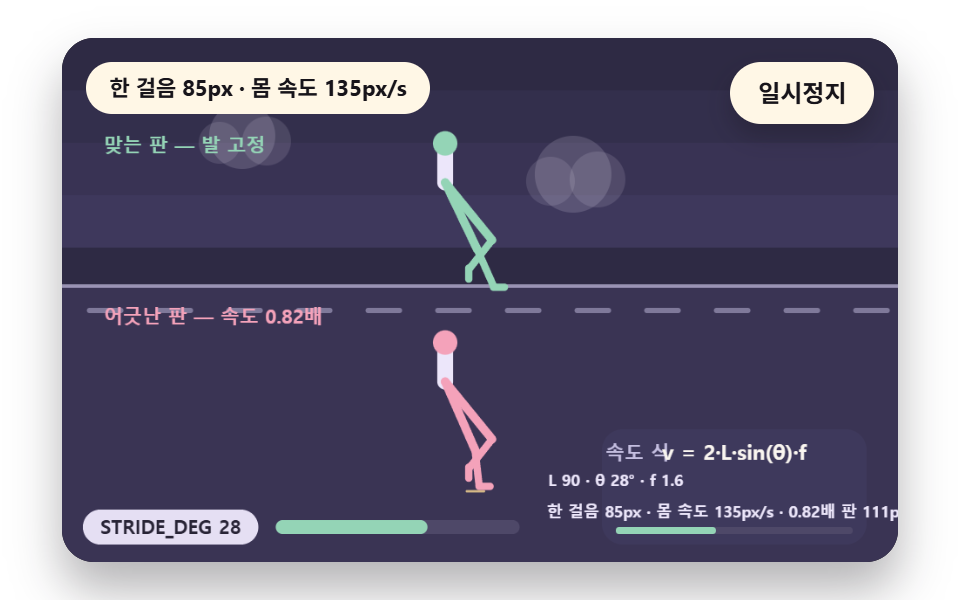
歩行は前へ倒れる体を脚が交互に支える計算です — 02番は接地から持ち上げまで五つの局面で足の裏が床に張り付く時間を作り、03番は歩幅を開く角度で速さを決め、07番は下り坂で体を前に傾けて脚が体勢を立て直す時間を稼ぎます。
キャラクターの歩くアニメーションは、ポーズを順にめくる再生ではなく、前傾する体を二本の脚が交互に床へ押す角度を毎フレーム計算して歩いているように見せるものです — 歩くアニメーションの作り方はサイクル位相から始まります
 01 wc-phase-advance-wrap
 02 wc-stance-5phase-sole
 03 wc-stride-angle-speed
 04 wc-head-bob-gaze
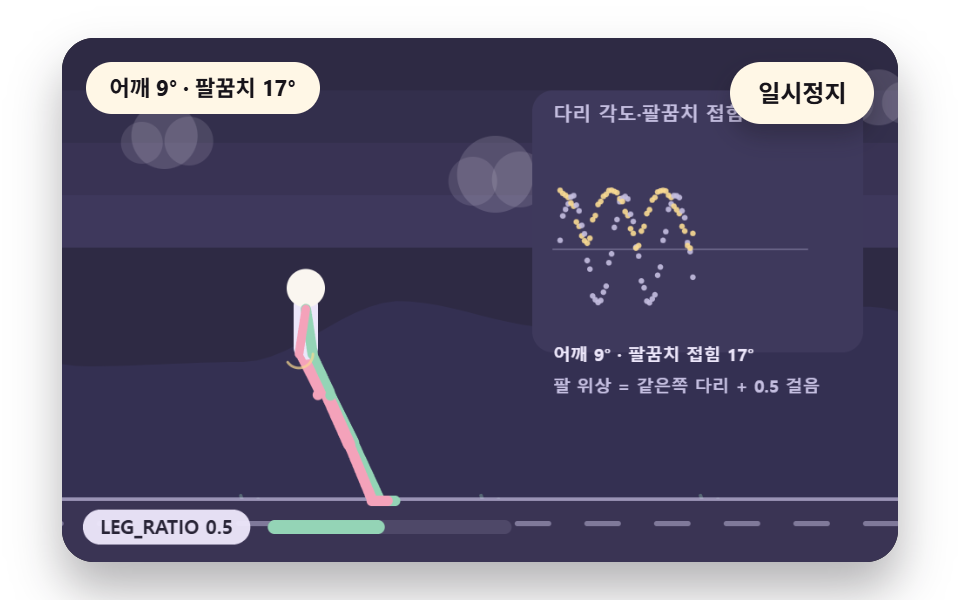 05 wc-elbow-counterswing
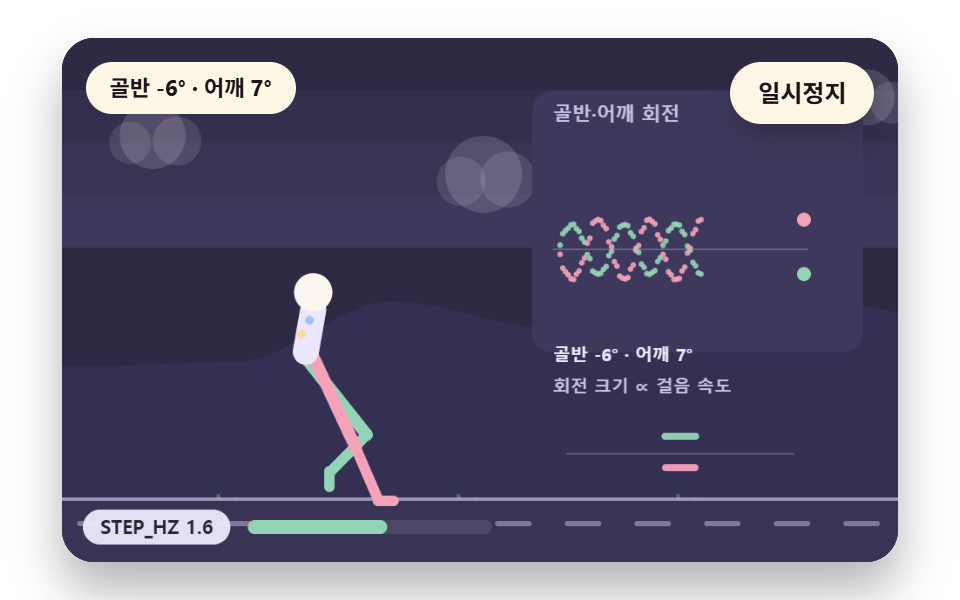 06 wc-torso-hip-rock
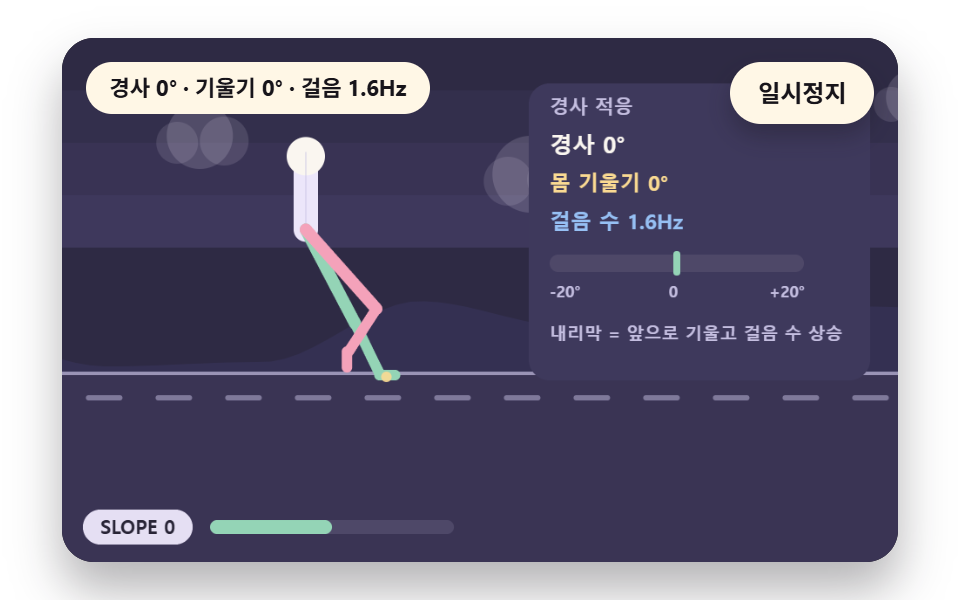 07 wc-slope-adapt-lean
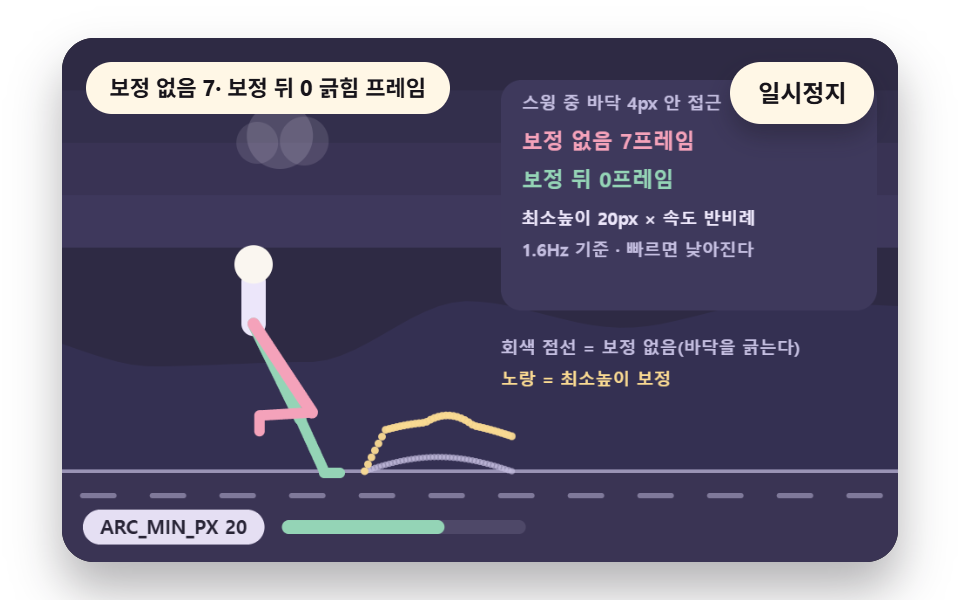 08 wc-foot-arc-correct
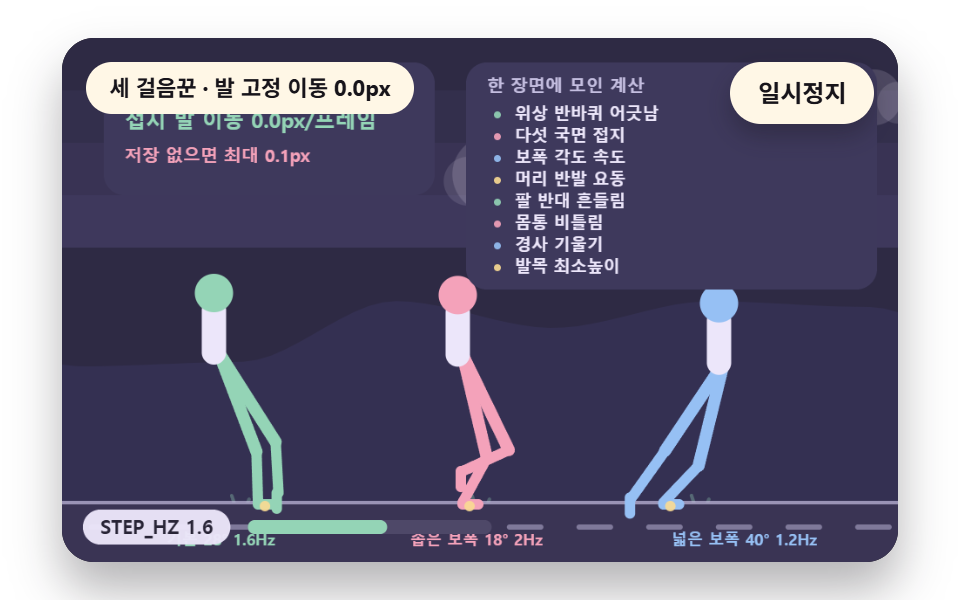 09 wc-footplant-ground-lock
自動再生 · タイルを押すとその項目へ · すべて1つのzip
- 01 継ぎ目なくつながるサイクル位相
- 02 接地から蹴り出しまで足裏が張り付く五つの局面
- 03 歩幅の角度で歩みの速さを決める
- 04 歩みごとに浮く頭と固定される視線
- 05 脚と逆に振れる肘
- 06 歩みごとに左右へ回る胴と骨盤
- 07 斜面で体が傾く適応の歩き
- 08 足の通る弧を削る移動の補正
- 09 床に固定される足裏と完成場面
九つの場面は同じ歩きの時計と同じ脚の解き方を使い、場面ごとに違うのは見る値ひとつだけです。キャラクターは画面の中央で足踏みの位置のまま歩き、床の目盛りと背景の丘や雲が groundV の速さで後ろへ流れます。
歩きの状態は歩行周期の計算からだけ作ります
時計は二つです。歩きの時計 walkT は歩きの位相を決め、場面の時計 sceneT は向きの転換や斜面の切り替えのような時間表を回します。脚の角度・足の位置・腕の振りは (walkT * STEP_HZ) % 1 から解いて出し、保存した歩きの絵はありません。
    function advance(dt) {
        sceneT += dt;
        walkT += dt;
        if (!manual) {
            while (evAt < script.length && script[evAt].t <= sceneT) {
                const ev = script[evAt];
                evAt += 1;
                ev.f();
            }
            if (sceneT >= LAP_S) {
                lap += 1;
                begin();
                return;
            }
        }
        update(dt);
    }
begin() が一判ごとに二つの時計を0に戻すので、同じ時間表は同じ歩きを出します。9つの index.html のどこにも Math.random・Date・performance・fetch はありません。
一歩は1/60秒で固定して消化します
フレームの間隔は DT_MAX の0.05秒で切って acc に積み、while (acc >= STEP_S) で STEP_S の1/60秒ずつ advance に渡します。タブが隠れるあいだはループを止め、戻ったら acc を空にして最初のフレームの dt を捨てるので、数秒が一フレームに集まって歩きが跳ぶことはありません。
歩きのサイクル 9種 — 位相のつなぎ・接地を含む五つの局面・歩幅の角度・頭の上下と視線・肘の逆振れ・胴の揺れ・斜面への対応・足の移動弧の補正・足裏の固定
九つの場面を描画して測った面積とフレーム
| 場面 | 累積面積 | 動いたフレーム | 強さの平均 |
|---|---|---|---|
| 01 位相のつなぎ | 21.4% | 23/23 | 78.4 |
| 02 五つの局面 | 20.3% | 23/23 | 62.0 |
| 03 歩幅の角度 | 13.5% | 23/23 | 62.6 |
| 04 頭と視線 | 14.3% | 23/23 | 70.5 |
| 05 肘 | 15.6% | 23/23 | 78.9 |
| 06 胴のねじれ | 14.9% | 23/23 | 73.3 |
| 07 斜面への対応 | 20.2% | 23/23 | 63.1 |
| 08 弧の補正 | 14.1% | 23/23 | 64.9 |
| 09 足の固定の完成 | 16.1% | 23/23 | 115.8 |
累積面積が最も広いのは01の21.4%で、最も狭いのは03の13.5%です。九つの場面はどれも23/23フレーム動き、強さの平均は09の115.8が最高で、最も低いのは02の62.0です。
01切れ目なくつながるサイクル位相
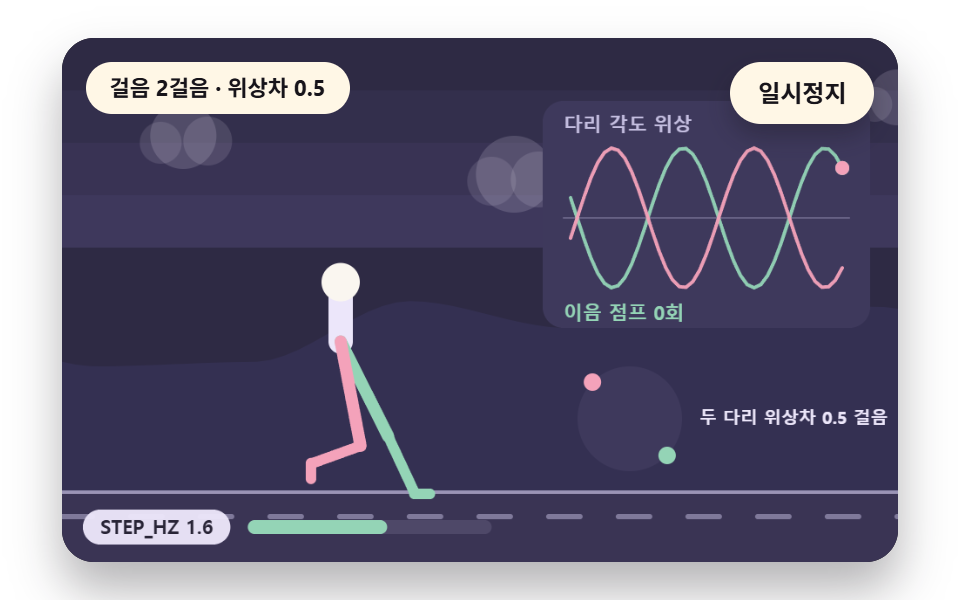
歩きを二歩でひと回りと見て、cyclePhase() は (walkT * STEP_HZ) % 2 を返し、legPhase() は右脚にだけ半歩を足して二本の脚を半歩ずらします。剰余で位相を切るので、最後のポーズと最初のポーズの間に歩くたび跳ぶ段差は生まれません。右のパネルの「つなぎの跳び」は一フレームで sin の値が0.35を超えて跳んだ回数で、同じ式をノードで3.75秒(225フレーム)回した値は0回でした。
<main class="stage">
<div class="vj is-demo" id="vj">
  <div class="vj__pad" data-role="pad" tabindex="0" role="application" aria-label="歩行サイクルの舞台 — 左右の矢印キーで歩みの速さを変える、EnterかSpaceで一時停止、Nで一歩、Rで最初から">
    <canvas class="vj__canvas" data-role="canvas" width="480" height="300" role="img" aria-label="一歩ごとに二本の脚の位相が円の上を半周ずつずれて回る。左の印が継ぎ目を越えるとき、脚の角度は一周の剰余で切られて跳びなしにつながり、右には二本の脚の位相が平面上の曲線として描かれ、ちょうど半周の差を保つ。下の目盛りは定数名と今の値を示し、動きを減らす設定では歩みの止まった立ち姿勢一枚だけが描かれます"></canvas>
  </div>
  <p class="vj__status" data-role="status" aria-live="off">歩行サイクルの場面</p>
  <div class="vj__ctrl">
    <button class="vj__pause" data-role="pause" type="button" aria-pressed="false">一時停止</button>
  </div>
  <p class="vj__done" data-role="done" role="status" aria-live="polite"></p>
</div>
</main>
@use "../../../../site/static/demo-tokens" as *;
@include stage($stage-paper);
.vj {
position: relative;
width: min(92vw, calc(160vh - 12.8vw));
aspect-ratio: 480 / 300;
margin: 0 auto;
border-radius: $r-card;
overflow: hidden;
box-shadow: $shadow-raised;
background: $subject-ink;
}
// 무대 상자 — 눌러서 한 번 깨뜨리는 곳(touch-action: none 은 이 상자에만). 무대 밖 터치는 페이지 스크롤 그대로
.vj__pad {
position: absolute;
inset: 0;
border-radius: inherit;
outline: none;
touch-action: none;
cursor: pointer;
}
// 바깥 .vj 가 넘침을 자르므로 포커스 테두리는 안쪽으로 들인다
.vj__pad:focus-visible {
outline: 3px solid $subject-cream;
outline-offset: -3px;
}
.vj__canvas {
position: absolute;
inset: 0;
display: block;
width: 100%;
height: 100%;
}
.vj__ctrl {
position: absolute;
right: $sp-3;
top: $sp-3;
display: flex;
gap: $sp-2;
}
.vj__pause {
padding: $sp-1 $sp-3;
border: 2px solid $subject-cream;
border-radius: $r-pill;
background: $subject-cream;
color: $subject-ink;
font-family: inherit;
font-weight: 700;
font-size: 12px;
line-height: 1.6;
cursor: pointer;
box-shadow: $shadow-press;
transition: transform $dur-quick $ease-spring;
}
// 스크린리더에만 읽히는 낭독 문장 — 모드가 바뀔 때만 쓴다
.vj__done {
position: absolute;
width: 1px;
height: 1px;
margin: 0;
overflow: hidden;
clip-path: inset(50%);
white-space: nowrap;
}
// 눌린 상태(멈춤) — 바탕과 글자색을 뒤집어 aria-pressed 가 눈에도 보이게
.vj__pause[aria-pressed="true"] {
background: $subject-ink;
color: $subject-cream;
}
.vj__pause:hover {
transform: translateY(-2px);
}
.vj__pause:active {
transform: translateY(1px);
}
.vj__pause:focus-visible {
outline: 3px solid $subject-cream;
outline-offset: 3px;
}
// 상태 줄 — 지금 장면의 수치를 글자로. 화면에만 있고 aria-live 는 늘 off
.vj__status {
position: absolute;
left: $sp-3;
top: $sp-3;
max-width: calc(100% - 100px);
margin: 0;
padding: $sp-1 $sp-3;
border-radius: $r-pill;
background: $subject-cream;
color: $subject-ink;
font-weight: 700;
font-size: 11px;
line-height: 1.6;
white-space: nowrap;
overflow: hidden;
text-overflow: ellipsis;
pointer-events: none;
}
@media (max-width: 340px) {
.vj__pause,
.vj__status { font-size: 10px; padding: 0 $sp-2; }
}
// 움직임 줄이기 — 장면은 스크립트가 글리치 없는 원문 한 장으로 멈춘다. 버튼도 떠오르지 않게
@media (prefers-reduced-motion: reduce) {
.vj__pause { transition: none !important; }
.vj__pause:hover,
.vj__pause:active { transform: none !important; }
}html, body {
margin: 0;
overflow: hidden;
}
.stage {
box-sizing: border-box;
min-height: 100vh;
display: grid;
place-items: center;
margin: 0;
background: #ffffff;
font-family: -apple-system, "Segoe UI", "Noto Sans KR", sans-serif;
padding: clamp(8px, 4vw, 24px);
}
.vj {
position: relative;
width: min(92vw, 160vh - 12.8vw);
aspect-ratio: 480/300;
margin: 0 auto;
border-radius: 16px;
overflow: hidden;
box-shadow: 0 14px 24px rgba(23, 20, 26, 0.32);
background: #17141a;
}
.vj__pad {
position: absolute;
inset: 0;
border-radius: inherit;
outline: none;
touch-action: none;
cursor: pointer;
}
.vj__pad:focus-visible {
outline: 3px solid #fff7e6;
outline-offset: -3px;
}
.vj__canvas {
position: absolute;
inset: 0;
display: block;
width: 100%;
height: 100%;
}
.vj__ctrl {
position: absolute;
right: 12px;
top: 12px;
display: flex;
gap: 8px;
}
.vj__pause {
padding: 4px 12px;
border: 2px solid #fff7e6;
border-radius: 999px;
background: #fff7e6;
color: #17141a;
font-family: inherit;
font-weight: 700;
font-size: 12px;
line-height: 1.6;
cursor: pointer;
box-shadow: 0 6px 12px rgba(23, 20, 26, 0.32);
transition: transform 220ms cubic-bezier(0.2, 0.8, 0.2, 1);
}
.vj__done {
position: absolute;
width: 1px;
height: 1px;
margin: 0;
overflow: hidden;
clip-path: inset(50%);
white-space: nowrap;
}
.vj__pause[aria-pressed=true] {
background: #17141a;
color: #fff7e6;
}
.vj__pause:hover {
transform: translateY(-2px);
}
.vj__pause:active {
transform: translateY(1px);
}
.vj__pause:focus-visible {
outline: 3px solid #fff7e6;
outline-offset: 3px;
}
.vj__status {
position: absolute;
left: 12px;
top: 12px;
max-width: calc(100% - 100px);
margin: 0;
padding: 4px 12px;
border-radius: 999px;
background: #fff7e6;
color: #17141a;
font-weight: 700;
font-size: 11px;
line-height: 1.6;
white-space: nowrap;
overflow: hidden;
text-overflow: ellipsis;
pointer-events: none;
}
@media (max-width: 340px) {
.vj__pause,
.vj__status {
font-size: 10px;
padding: 0 8px;
}
}
@media (prefers-reduced-motion: reduce) {
.vj__pause {
transition: none !important;
}
.vj__pause:hover,
.vj__pause:active {
transform: none !important;
}
}(function () {
const root = document.getElementById("vj");
if (!root) return;
// 무대 좌표 — 캔버스 안 계산은 늘 480×300. 화면에 보이는 크기와 상관없다
const W = 480;
const H = 300;
const TAU = Math.PI * 2;
function clamp(v, lo, hi) { return v < lo ? lo : (v > hi ? hi : v); }
function lerp(a, b, k) { return a + (b - a) * k; }
function easeOut(k) { const u = 1 - clamp(k, 0, 1); return 1 - u * u * u; }
// 파스텔 팔레트 — 바탕은 짙은 자두색, 타일은 연한 색 위에 짙은 잉크 숫자
const INK = [40, 36, 54];
const PAPER = [250, 246, 240];
const ROSE = [244, 162, 186];
const MINT = [148, 212, 182];
const SKY = [150, 192, 244];
const SUN = [250, 218, 146];
const NEU = [236, 230, 250];
const BGC = [46, 42, 68];
const PANEL = [62, 57, 92];
const DIM = [196, 190, 224];
function rgba(c, a) {
return 'rgba(' + Math.round(clamp(c[0], 0, 255)) + ',' + Math.round(clamp(c[1], 0, 255)) + ',' + Math.round(clamp(c[2], 0, 255)) + ',' + clamp(a, 0, 1).toFixed(3) + ')';
}
function hsl(h, s, l) {
const a = s * Math.min(l, 1 - l);
const f = function (n) {
const k = (n + h / 30) % 12;
return l - a * Math.max(-1, Math.min(k - 3, Math.min(9 - k, 1)));
};
return [Math.round(f(0) * 255), Math.round(f(8) * 255), Math.round(f(4) * 255)];
}
// 정수 해시 — 같은 (a, b) 에는 늘 같은 0 이상 1 미만 값. 난수 함수는 쓰지 않는다
function hash2(a, b) {
let h = (Math.imul(a | 0, 374761393) + Math.imul(b | 0, 668265263)) | 0;
h = Math.imul(h ^ (h >>> 13), 1274126177);
h = h ^ (h >>> 16);
return (h >>> 0) / 4294967296;
}
// 2차원 값 잡음 — 정수 격자점마다 해시 값이 있고 그 사이를 부드럽게 잇는다
function noise2(x, y, seed) {
const xi = Math.floor(x);
const yi = Math.floor(y);
const fx = x - xi;
const fy = y - yi;
const ux = fx * fx * (3 - 2 * fx);
const uy = fy * fy * (3 - 2 * fy);
const s = seed * 131;
return lerp(lerp(hash2(xi + s, yi), hash2(xi + 1 + s, yi), ux), lerp(hash2(xi + s, yi + 1), hash2(xi + 1 + s, yi + 1), ux), uy);
}
// 장면 시계(秒)·판 반복 번호·시간표 — 시간표는 (시각, 할 일) 목록이고 시각이 지나면 한 번씩 부른다
let sceneT = 0;
let lap = 0;
let script = [];
let evAt = 0;
// 문구 틀의 {a}·{b}·{c} 자리에 값을 끼운다 — 화면 문구는 늘 틀 한 줄이고 로케일 사전이 통째로 바꾼다
function fill(s, a, b, c) {
return s.split('{a}').join(a).split('{b}').join(b === undefined ? '' : b).split('{c}').join(c === undefined ? '' : c);
}
function r1(v) { return String(Math.round(v * 10) / 10); }
function group(v) {
// 천 단위 점 — 로케일 함수에 기대지 않는다
const s = String(Math.round(v));
let o = '';
for (let i = 0; i < s.length; i += 1) {
if (i > 0 && (s.length - i) % 3 === 0) {
o += ',';
}
o += s.charAt(i);
}
return o;
}
// 기본값 상수 — 변형 3개(STEP_HZ·STRIDE_DEG·LEG_RATIO)가 이 줄의 값을 바꾼다
const STEP_HZ = 1.6;
const STRIDE_DEG = 28;
const LEG_PX = 90;
const LEG_RATIO = 0.48;
const CONTACT_SHARE = 0.6;
const GAIT = { stepHz: STEP_HZ, strideDeg: STRIDE_DEG, legPx: LEG_PX, legRatio: LEG_RATIO, contactShare: CONTACT_SHARE };
// walkT 는 걸음 시간으로만 오르는 시계(秒). phase 는 一歩 위상 0~1, cyclePhase 는 두 걸음 위상 0~2
let walkT = 0;
function stepPhase() { return (walkT * GAIT.stepHz) % 1; }
function cyclePhase() { return (walkT * GAIT.stepHz) % 2; }
function stepIndex() { return Math.floor(walkT * GAIT.stepHz); }
// 다리별 一歩 위상 — 왼다리가 정수 걸음, 오른다리가 반 걸음 어긋난다
function legPhase(right) { return ((walkT * GAIT.stepHz) + (right ? 0.5 : 0)) % 1; }
// 接地 국면 판정 — ph 가 contactShare 안이면 발이 바닥에 붙어 있다
function inStance(ph) { return ph < GAIT.contactShare; }
// 五つの局面 — 接地(0~0.12) · 抵抗(0.12~0.3) · 中間(0.3~0.45) · 蹴り出し(0.45~contactShare) · 持ち上げ(나머지)
const PH5 = [
{ name: '接地', a: 0, b: 0.12, col: null },
{ name: '抵抗', a: 0.12, b: 0.3, col: null },
{ name: '中間', a: 0.3, b: 0.45, col: null },
{ name: '蹴り出し', a: 0.45, b: 0.6, col: null },
{ name: '持ち上げ', a: 0.6, b: 1, col: null },
];
function phaseName(ph) {
for (let i = 0; i < PH5.length; i += 1) {
if (ph >= PH5[i].a && ph < PH5[i].b) {
return PH5[i].name;
}
}
return '持ち上げ';
}
// 라디안 변환 — 각도 값은 도 단위 상수로 두고 계산 직전에만 바꾼다
function rad(deg) { return deg * Math.PI / 180; }
function solveFoot(hipX, hipY, ph, plantX, slopeDeg, groundY) {
const leg = GAIT.legPx;
const L1 = leg / (1 + GAIT.legRatio);
const L2 = leg * GAIT.legRatio / (1 + GAIT.legRatio);
let ax;
let ay;
let ankleDeg;
const planted = inStance(ph);
if (planted) {
ax = plantX;
ay = groundY;
ankleDeg = -slopeDeg;
}
else {
const k = (ph - GAIT.contactShare) / (1 - GAIT.contactShare);
const half = rad(GAIT.strideDeg);
const ang = lerp(half, -half, k);
ax = hipX + Math.sin(ang) * leg;
ay = groundY - Math.abs(Math.sin(Math.PI * k)) * leg * 0.22;
ankleDeg = 90 - slopeDeg;
}
const dx = ax - hipX;
const dy = ay - hipY;
let d = Math.hypot(dx, dy);
d = Math.min(d, L1 + L2 - 0.01);
const base = Math.atan2(dy, dx);
const cosK = (L1 * L1 + d * d - L2 * L2) / (2 * L1 * d);
const elbow = Math.acos(clamp(cosK, -1, 1));
const kneeAng = base - elbow;
return { ax: ax, ay: ay, kneeX: hipX + Math.cos(kneeAng) * L1, kneeY: hipY + Math.sin(kneeAng) * L1, ankleDeg: ankleDeg, planted: planted };
}
// 몸 높이 — 接地 국면 中間(다리가 곧게 펴는 ph=0.3 부근)이 가장 높고 이중 接地(두 발 다 지면)에서 살짝 낮아진다
function hipHeight(ph) {
const bob = Math.sin(ph * Math.PI * 2 - Math.PI / 2);
return GAIT.legPx * (0.93 + 0.04 * bob);
}
// 몸 앞뒤 기울기 — 내리막에서 앞으로 숙여 다리 회복 시간을 번다
function leanDeg(slopeDeg) { return slopeDeg < 0 ? slopeDeg * 0.5 : slopeDeg * 0.25; }
let plants = [null, null]; // [왼, 오른]
// 接地 시작 ph(=0 또는 contactShare 근처)에서 plantX 를 몸 위치로부터 한 번만 풀어 저장한다
function lockPlants(hipX) {
for (let r = 0; r < 2; r += 1) {
const ph = legPhase(r === 1);
const otherPh = legPhase(r === 0);
if (inStance(ph) && plants[r] === null) {
const half = rad(GAIT.strideDeg);
const k = ph / GAIT.contactShare;
const ang = lerp(half, -half, k);
const px = hipX + Math.sin(ang) * GAIT.legPx;
plants[r] = { x: px, ph0: ph };
}
if (!inStance(ph)) {
plants[r] = null;
}
}
}
function plantXOf(r, hipX) {
const p = plants[r];
if (p !== null) {
return p.x;
}
return hipX;
}
// ── 그리기 도구
const canvasEl = root.querySelector('[data-role="canvas"]');
const padEl = root.querySelector('[data-role="pad"]');
const pauseEl = root.querySelector('[data-role="pause"]');
const statusEl = root.querySelector('[data-role="status"]');
const doneEl = root.querySelector('[data-role="done"]');
const ctxRaw = canvasEl ? canvasEl.getContext('2d') : null;
if (!canvasEl || !ctxRaw || !pauseEl || !padEl || !doneEl) {
return;
}
const cv = canvasEl;
const ctx = ctxRaw;
const pauseBtn = pauseEl;
const doneP = doneEl;
const pad = padEl;
// 외부 웹폰트는 부르지 않는다 — 기기에 있는 글꼴 목록만
const UI_FONT = 'system-ui, -apple-system, "Segoe UI", "Noto Sans KR", sans-serif';
let dpr = 1;
function fitCanvas() {
// 배율은 2 에서 자른다 — 계산은 늘 480×300 이고 화면 배율만 이 값
dpr = Math.min(window.devicePixelRatio || 1, 2);
cv.width = Math.round(W * dpr);
cv.height = Math.round(H * dpr);
ctx.setTransform(dpr, 0, 0, dpr, 0, 0);
}
function box(x, y, w, h, r, c, a) {
if (w <= 0.2 || h <= 0.2 || a <= 0) {
return;
}
ctx.beginPath();
ctx.roundRect(x, y, w, h, Math.max(0, Math.min(r, w / 2, h / 2)));
ctx.fillStyle = rgba(c, a);
ctx.fill();
}
function disc(x, y, r, c, a) {
ctx.beginPath();
ctx.arc(x, y, r, 0, TAU);
ctx.fillStyle = rgba(c, a);
ctx.fill();
}
function seg(x1, y1, x2, y2, c, a, w) {
ctx.beginPath();
ctx.moveTo(x1, y1);
ctx.lineTo(x2, y2);
ctx.strokeStyle = rgba(c, a);
ctx.lineWidth = w;
ctx.lineCap = 'round';
ctx.stroke();
}
function text(s, x, y, c, px, weight, align) {
ctx.font = weight + ' ' + px + 'px ' + UI_FONT;
ctx.textAlign = align;
ctx.textBaseline = 'middle';
ctx.fillStyle = rgba(c, 1);
ctx.fillText(s, x, y);
}
function panel(x, y, w, h) { box(x, y, w, h, 12, PANEL, 1); }
// 아래쪽 눈금 — 상수 이름과 지금 값 · 크기 막대
function hud(name, val, frac) {
const label = name + ' ' + val;
ctx.font = '700 11px ' + UI_FONT;
const w = ctx.measureText(label).width + 20;
const x = 12;
const y = H - 30;
box(x, y, w, 20, 10, NEU, 0.96);
text(label, x + w / 2, y + 10.5, INK, 11, 700, 'center');
const mx = x + w + 10;
box(mx, y + 6, 140, 8, 4, [78, 72, 104], 1);
box(mx, y + 6, 140 * clamp(frac, 0, 1), 8, 4, MINT, 1);
}
// ── 상태 줄·낭독 문장
const SPK_STEP = '歩数 {a} 歩、サイクルの局面 {b}';
function speakBoard() {
return fill(SPK_STEP, String(stepIndex()), phaseName(legPhase(false)));
}
let shownStatus = '';
function pushStatus(s) {
if (!statusEl || s === shownStatus) {
return;
}
shownStatus = s;
statusEl.textContent = s;
}
let paused = false;
// 움직임 줄이기 — 켜지면 루프 대신 정지 한 장
let still = false;
const reduceQuery = window.matchMedia('(prefers-reduced-motion: reduce)');
// 페이지를 연 채 움직임 줄이기 설정을 바꿔도 change 리스너가 다시 읽는다
still = reduceQuery.matches;
// 자동 시연 표시 — 사람이 처음 손대면 떼고, 그 뒤부터 모드가 바뀔 때만 낭독 문장을 쓴다
let demo = root.classList.contains('is-demo');
const off = new AbortController();
// 사람이 직접 조작하는 중이면 시간표는 멈추고 계산만 흐른다
let manual = false;
function wake() {
if (!demo) {
return;
}
demo = false;
root.classList.remove('is-demo');
}
function takeOver() {
if (manual) {
return;
}
manual = true;
wake();
}
// 낭독 모드 — 완성이면 1000, 손으로 하는 중이면 맞은 타일 수, 자동 시연이면 장면이 정한 단계
function modeBase(sceneMode) {
return manual ? 100 + Math.floor(hipHeight(legPhase(false))) : sceneMode;
}
// 낭독 문장 — 화면 상태 줄(aria-live off)과 따로, 모드가 바뀔 때와 사람이 조작했을 때만 role=status 에 쓴다
let lastMode = -9;
function say() {
doneP.textContent = speakText();
lastMode = still ? -2 : modeId();
}
function advance(dt) {
sceneT += dt;
walkT += dt;
if (!manual) {
while (evAt < script.length && script[evAt].t <= sceneT) {
const ev = script[evAt];
evAt += 1;
ev.f();
}
if (sceneT >= LAP_S) {
lap += 1;
begin();
return;
}
}
update(dt);
}
function begin() {
sceneT = 0;
walkT = lap * 0; // 걸음 시계는 장면과 함께 0 에서 다시 시작 — 같은 시간표면 같은 걸음
evAt = 0;
script = [];
build();
}
// 고정 걸음 + 歩数 상한 — 프레임 간격이 흔들려도 같은 계산, 탭이 멈췄다 돌아와도 한 번에 몰리지 않는다
const STEP_S = 1 / 60;
const DT_MAX = 0.05;
let acc = 0;
function showNow() {
draw();
pushStatus(statusText());
if (!demo) {
const m = still ? -2 : modeId();
if (m !== lastMode) {
say();
}
}
}
let rafId = 0;
let lastTs = -1;
function frame(ts) {
if (still || paused) {
rafId = 0;
return;
}
if (lastTs < 0) {
lastTs = ts;
}
const dt = Math.min((ts - lastTs) / 1000, DT_MAX);
lastTs = ts;
acc += dt;
while (acc >= STEP_S) {
advance(STEP_S);
acc -= STEP_S;
}
showNow();
rafId = window.requestAnimationFrame(frame);
}
function startLoop() {
if (rafId) {
return;
}
// 멈췄던 사이의 시간을 첫 프레임 dt 로 넘기지 않는다
lastTs = -1;
acc = 0;
rafId = window.requestAnimationFrame(frame);
}
function stopLoop() {
if (rafId) {
window.cancelAnimationFrame(rafId);
rafId = 0;
}
}
// 움직임 줄이기 — 루프 없이 시간표의 REST_S 초까지를 한 번에 치른 장면 한 컷. 캐릭터는 걸음 보간 없이 그 시점의 자리에 바로 선다
function showRest() {
stopLoop();
lap = 0;
begin();
walkT = REST_S;
while (evAt < script.length && script[evAt].t <= REST_S) {
const ev = script[evAt];
evAt += 1;
sceneT = ev.t;
ev.f();
}
sceneT = REST_S;
update(0);
showNow();
}
function play() {
begin();
showNow();
if (!paused) {
startLoop();
}
}
// 사람이 조작한 뒤 — 멈춘 채이거나 움직임 줄이기이면 보간을 건너뛰어 바로 보이게 한다. 조작 직후는 낭독 문장도 쓴다
function afterInput(speak) {
if (paused || still) {
sceneT += 1;
}
update(0);
showNow();
if (speak) {
say();
}
}
function togglePause() {
paused = !paused;
pauseBtn.setAttribute('aria-pressed', paused ? 'true' : 'false');
wake();
if (paused) {
stopLoop();
}
else if (!still) {
startLoop();
}
say();
}
function restart() {
manual = false;
lap = 0;
begin();
update(0);
showNow();
say();
}
// N 一歩 — 시간표의 다음 일 하나를 지금 치른다. 시간표가 끝났으면 처음부터 다시 짠 뒤 첫 일
function stepOnce() {
takeOver();
if (evAt >= script.length) {
lap += 1;
begin();
}
if (evAt < script.length) {
const ev = script[evAt];
evAt += 1;
if (sceneT < ev.t) {
sceneT = ev.t;
}
ev.f();
}
afterInput(true);
}
function keyMove(dx, dy) {
// 좌우 방향키 = 걸음 속도 한 단계 조절. 위·아래는 항목이 keyHook 로 따로 받는다
if (dx !== 0) {
GAIT.stepHz = clamp(Math.round((GAIT.stepHz + dx * 0.4) * 10) / 10, 0.8, 2.8);
}
else if (keyHook !== null) {
keyHook(dy < 0 ? 'ArrowUpHint' : 'ArrowDownHint');
return;
}
takeOver();
afterInput(true);
}
function toCanvas(e) {
const r = cv.getBoundingClientRect();
return [(e.clientX - r.left) * W / r.width, (e.clientY - r.top) * H / r.height];
}
pauseBtn.addEventListener('click', togglePause, { signal: off.signal });
// 키보드 — 무대에 포커스가 있을 때만. 방향키 = 빈칸 이웃 타일 이동, Enter·Space = 一時停止, N = 一歩, R = 처음부터
pad.addEventListener('keydown', function (e) {
if (e.altKey || e.ctrlKey || e.metaKey) {
return;
}
const k = e.key;
if (k === 'Enter' || k === ' ' || k === 'p' || k === 'P') {
e.preventDefault();
togglePause();
}
else if (k === 'r' || k === 'R') {
restart();
}
else if (k === 'n' || k === 'N') {
e.preventDefault();
stepOnce();
}
else if (k === 'ArrowLeft') {
e.preventDefault();
keyMove(-1, 0);
}
else if (k === 'ArrowRight') {
e.preventDefault();
keyMove(1, 0);
}
else if (k === 'ArrowUp') {
e.preventDefault();
keyMove(0, -1);
}
else if (k === 'ArrowDown') {
e.preventDefault();
keyMove(0, 1);
}
else if (keyHook !== null && keyHook(k)) {
e.preventDefault();
takeOver();
afterInput(true);
}
}, { signal: off.signal });
// 포인터 — 마우스·터치·펜을 한 이벤트로. 누르는 순간부터 놓을 때까지 무대가 포인터를 붙잡는다
let ptrDown = false;
// 장면이 방향키·Enter·N·R 밖의 키를 받고 싶을 때 거는 갈고리 — 먹었으면 true
let keyHook = null;
pad.addEventListener('pointerdown', function (e) {
takeOver();
ptrDown = true;
try {
pad.setPointerCapture(e.pointerId);
}
catch (err) {
ptrDown = true;
}
const p = toCanvas(e);
onPtr(0, p[0], p[1]);
afterInput(false);
}, { signal: off.signal });
pad.addEventListener('pointermove', function (e) {
if (!ptrDown) {
return;
}
const p = toCanvas(e);
onPtr(1, p[0], p[1]);
afterInput(false);
}, { signal: off.signal });
function ptrEnd(e) {
if (!ptrDown) {
return;
}
ptrDown = false;
const p = toCanvas(e);
onPtr(2, p[0], p[1]);
afterInput(true);
}
pad.addEventListener('pointerup', ptrEnd, { signal: off.signal });
pad.addEventListener('pointercancel', ptrEnd, { signal: off.signal });
// 탭이 숨으면 멈추고, 돌아오면 시계를 다시 맞춰 시작
document.addEventListener('visibilitychange', function () {
if (document.hidden) {
stopLoop();
}
else if (!paused && !still) {
startLoop();
}
}, { signal: off.signal });
// 설정이 바뀌면 — 켜지면 판 한 장, 꺼지면 다시 움직인다
reduceQuery.addEventListener('change', function () {
still = reduceQuery.matches;
if (still) {
showRest();
}
else {
lap = 0;
play();
}
}, { signal: off.signal });
window.addEventListener('resize', function () {
fitCanvas();
showNow();
}, { signal: off.signal });
// ── 캐릭터 그리기 — 자체 도형 캐릭터(머리·몸통·2링크 다리 2·팔 2). 브랜드 캐릭터 아님
// limb(x1, y1, x2, y2, 색, 굵기) — 관절 두 점을 잇는 둥근 막대
function limb(x1, y1, x2, y2, c, w) {
seg(x1, y1, x2, y2, c, 1, w);
}
// footShape(x, y, ankleDeg, 색) — 발바닥. ankleDeg 는 바닥 기준 도 단위(0 = 바닥에 평평)
function footShape(x, y, ankleDeg, c) {
ctx.save();
ctx.translate(x, y);
ctx.rotate(ankleDeg * Math.PI / 180);
box(-3, -2, 15, 6, 3, c, 1);
ctx.restore();
}
// drawGround(y, slopeDeg) — 기울어진 바닥면. y 는 화면 가운데서의 기준 높이.
// groundV > 0 이면 바닥의 눈금 줄무늬가 그 속도로 왪쪽으로 흘러 간다 — 몸이 앞으로 가는 속도의 시각화
let groundV = 0;
function drawGround(y, slopeDeg) {
// 기울기가 있으면 화면 가운데 x=W/2 에서 높이 y 인 직선 — groundYAt 과 같은식
const y0 = groundYAt(0, y, slopeDeg);
const y1 = groundYAt(W, y, slopeDeg);
// 받침 띠 — 바닥선 아래 옅은 색 띠
ctx.beginPath();
ctx.moveTo(0, y0);
ctx.lineTo(W, y1);
ctx.lineTo(W, H);
ctx.lineTo(0, H);
ctx.closePath();
ctx.fillStyle = rgba([58, 52, 84], 1);
ctx.fill();
seg(0, y0, W, y1, DIM, 0.7, 2);
// 눈금 줄무늬 — 걸음이 밀어 내는 속도로 흘러 간다. 간격 40px, 길이 18px
if (groundV > 0) {
const gap = 40;
const off = (walkT * groundV) % gap;
for (let x = -gap; x < W + gap; x += gap) {
const sx = x - off;
seg(sx, groundYAt(sx + 9, y, slopeDeg) + 14, sx + 18, groundYAt(sx + 27, y, slopeDeg) + 14, DIM, 0.5, 3);
}
}
}
// drawScenery() — 걷는 세계의 경물 층. 하늘 그라디언트 띠·언덕·구름·가로등이 groundV 에 비례해 뒤로 흐른다.
// 배경 톤 전체가 걸음 속도 값의 전파 범위다 — 몸이 앞으로 간다는 감각을 화면 전체가 받친다(BD26: 면적을 장식이 아니라 값의 전파로)
function drawScenery() {
// 바탕 — 하늘 띠와 언덕 사이 빈 구간이 지워지지 않아 캐릭터 자국이 번졌다. 먼저 한 번 칠한다
box(0, 0, W, H, 0, BGC, 1);
// 하늘 — 세로 옅은 띠 4개. 걸음 위상에 따라 명도가 살짝 숨쉰다
const skyT = Math.sin(walkT * GAIT.stepHz * Math.PI);
for (let i = 0; i < 4; i += 1) {
const t = i / 3;
const c = [lerp(46, 62, t), lerp(42, 56, t), lerp(68, 92, t)];
box(0, i * 30, W, 30, 0, c, 1);
}
// 먼 언덕 — noise2 로 굽이친다. 걸음 속도의 0.35배로 흐른다(원근 감쇠)
if (groundV > 0) {
const scroll = walkT * groundV * 0.35;
ctx.beginPath();
ctx.moveTo(0, H);
for (let x = 0; x <= W; x += 8) {
const yy = 168 + noise2((x + scroll) / 90, 3, 11) * 46 - 20;
ctx.lineTo(x, yy);
}
ctx.lineTo(W, H);
ctx.closePath();
ctx.fillStyle = rgba([52, 48, 82], 1);
ctx.fill();
// 구름 세 점 — 0.6배 속도
const cs = walkT * groundV * 0.6;
for (let i = 0; i < 3; i += 1) {
const cx = ((i * 190 + 60 - cs) % (W + 120) + W + 120) % (W + 120) - 60;
const cy = 34 + i * 22;
disc(cx, cy, 16 + i * 3, NEU, 0.16);
disc(cx + 14, cy + 3, 12 + i * 2, NEU, 0.13);
disc(cx - 13, cy + 4, 10 + i * 2, NEU, 0.12);
}
// 가까운 풀 다발 — 1.15배 속도(지면보다 살짝 빠른 근경)
const gs = walkT * groundV * 1.15;
for (let i = 0; i < 14; i += 1) {
const gx = ((i * 46 + 20 - gs) % (W + 60) + W + 60) % (W + 60) - 30;
const gy = H - 14 - (i % 3) * 6;
seg(gx, gy, gx - 4, gy - 12, MINT, 0.35, 2);
seg(gx + 2, gy, gx + 6, gy - 10, MINT, 0.3, 2);
}
}
}
// groundYAt(x, baseY, slopeDeg) — 경사식: 기울기가 있으면 x 에서의 바닥 높이
function groundYAt(x, baseY, slopeDeg) {
return baseY + (x - W / 2) * Math.tan(rad(slopeDeg)) * -1;
} // 01 — 걷기 사이클은 두 걸음(왼·오른)을 한 바퀴로 잡고 위상을 시간으로 민다.
// 각도는 한 바퀴 단위 나머지 연산으로 잘리고 두 다리 위상은 정확히 반 바퀴 어긋나 있다.
// 이음 확인: 왼쪽 바퀴의 이음새(위상 0 지점)를 지날 때 다리 각도가 연속인지, 오른쪽 곡선이 반 바퀴 차이를 유지하는지.
const LAP_S = 6.0;
const REST_S = 2.0;
const GROUND_Y = 260;
const CHAR_X = 160;
// PHX·PHY — 오른쪽 위상 곡선 패널 위치
const PHX = 276;
const PHY = 36;
const PHW = 188;
const PHH = 130;
let lastL = 0;
let lastR = 0;
let seamJumps = [];
function build() {
lastL = 0;
lastR = 0;
seamJumps = [];
groundV = Math.sin(rad(GAIT.strideDeg)) * GAIT.legPx * 2 * GAIT.stepHz;
}
function update(dt) {
if (dt <= 0) {
return;
}
const l = cyclePhase();
const r = (l + 1) % 2;
// 이음 점프 측정 — 一歩 안에서 다리 각도가 0.35 라디안 넘게 튀면 점프로 센다
const la = Math.sin((l % 1) * TAU);
const ra = Math.sin((r % 1) * TAU);
if (Math.abs(la - lastL) > 0.35 || Math.abs(ra - lastR) > 0.35) {
seamJumps.push(sceneT);
}
lastL = la;
lastR = ra;
}
// 캐릭터 한 명 — hip 아래 2링크 다리. 接地 국면은 footplant 저장 위치 사용
function drawWalker(cx, showSeam) {
const hipY = GROUND_Y - hipHeight(legPhase(false));
const hipX = cx;
lockPlants(hipX);
// 몸통·머리
limb(hipX, hipY, hipX, hipY - 26, NEU, 14);
disc(hipX, hipY - 34, 11, PAPER, 1);
// 다리 두 개 — 오른다리 위상 = 왼다리 + 반 바퀴
const cols = [MINT, ROSE];
for (let r = 0; r < 2; r += 1) {
const ph = legPhase(r === 1);
const fs = solveFoot(hipX, hipY, ph, plantXOf(r, hipX), 0, GROUND_Y);
limb(hipX, hipY, fs.kneeX, fs.kneeY, cols[r], 7);
limb(fs.kneeX, fs.kneeY, fs.ax, fs.ay, cols[r], 6);
footShape(fs.ax, fs.ay, fs.planted ? 0 : fs.ankleDeg, cols[r]);
}
// 이음 표식 — 위상 0 을 지나는 순간 링
if (showSeam && (cyclePhase() % 1) < 0.04) {
disc(hipX, hipY - 50, 6, SUN, 0.9);
}
}
function draw() {
drawScenery();
drawGround(GROUND_Y, 0);
drawWalker(CHAR_X, true);
// 오른쪽 패널 — 두 다리 위상이 벌판(원 위 각도)을 따라가는 곡선. 세로축 = 각도, 가로축 = 시간
panel(PHX, PHY, PHW, PHH);
text('脚の角度の位相', PHX + 12, PHY + 14, DIM, 11, 700, 'left');
const cy = PHY + PHH / 2 + 2;
seg(PHX + 12, cy, PHX + PHW - 12, cy, DIM, 0.3, 1);
for (let i = 0; i < 2; i += 1) {
const ox = PHX + 16 + i * (PHW - 32 + 4);
// 각 다리의 최근 1.2秒 각도 흔적 — 걸음 시계로 다시 계산해 그린다(저장 없이 결정적)
for (let k = 0; k <= 40; k += 1) {
const tt = walkT - (40 - k) * 0.03;
const ang = Math.sin((((tt * GAIT.stepHz) + (i === 1 ? 0.5 : 0)) % 1) * TAU);
const px = PHX + 16 + k * ((PHW - 32) / 40) + i * 0;
const py = cy - ang * 40;
if (k === 0) {
ctx.beginPath();
ctx.moveTo(px, py);
}
else {
ctx.lineTo(px, py);
}
}
ctx.strokeStyle = rgba(i === 0 ? MINT : ROSE, 0.95);
ctx.lineWidth = 2;
ctx.stroke();
}
// 반 바퀴 차이 표시 — 두 곡선의 지금 값 점과 세로 점선
const lNow = Math.sin((cyclePhase() % 1) * TAU);
const rNow = Math.sin((((cyclePhase() + 1) % 2) % 1) * TAU);
disc(PHX + PHW - 16, cy - lNow * 40, 4, MINT, 1);
disc(PHX + PHW - 16, cy - rNow * 40, 4, ROSE, 1);
// 위상 원 — 벌판 위 두 점이 반 바퀴 어긋나게 도는 모습
const cyp = PHY + PHH + 52;
disc(PHX + 50, cyp, 30, PANEL, 1);
for (let i = 0; i < 2; i += 1) {
const a = (((walkT * GAIT.stepHz) + (i === 1 ? 0.5 : 0)) % 1) * TAU - Math.PI / 2;
disc(PHX + 50 + Math.cos(a) * 30, cyp + Math.sin(a) * 30, 5, i === 0 ? MINT : ROSE, 1);
}
text('二本の脚の位相差は0.5歩', PHX + 90, cyp, NEU, 10, 700, 'left');
// 이음 점프 수 — 0 이어야 이음이 없다
text(fill('継ぎ目の跳び {a} 回', String(seamJumps.length)), PHX + 12, PHY + PHH - 8, seamJumps.length === 0 ? MINT : SUN, 11, 700, 'left');
hud('STEP_HZ', r1(GAIT.stepHz), GAIT.stepHz / 2.8);
}
function statusText() {
return fill('{a} 歩・位相差 {b}', String(stepIndex()), '0.5');
}
function modeId() { return modeBase(Math.min(3, Math.floor(sceneT / 2))); }
function speakText() { return speakBoard(); }
function onDir(d) { keyMove(d === 0 ? 1 : d === 1 ? -1 : 0, 0); }
function onPtr(kind, x, y) { if (kind !== 0) {
return;
} GAIT.stepHz = clamp(GAIT.stepHz + (x > W / 2 ? 0.2 : -0.2), 0.8, 2.8); }
fitCanvas();
if (still) {
showRest();
}
else {
play();
}
return function () {
stopLoop();
off.abort();
};
})();// PhaseAdvanceWrap - 같은 항목 vanilla index.html 의 React 판. 같은 계산을 useEffect 안에서 돌린다
import { useEffect, useRef } from "react";
import styles from "./PhaseAdvanceWrap.module.scss";
const cx = (s: string): string => s.split(" ").map((n) => styles[n] ?? n).join(" ");
export default function PhaseAdvanceWrap() {
const rootRef = useRef<HTMLDivElement | null>(null);
useEffect(() => {
const rootEl = rootRef.current;
if (!rootEl) return;
const root: HTMLElement = rootEl;
type RGB = [number, number, number];
// 무대 좌표 — 캔버스 안 계산은 늘 480×300. 화면에 보이는 크기와 상관없다
const W = 480;
const H = 300;
const TAU = Math.PI * 2;
function clamp(v: number, lo: number, hi: number): number { return v < lo ? lo : (v > hi ? hi : v); }
function lerp(a: number, b: number, k: number): number { return a + (b - a) * k; }
function easeOut(k: number): number { const u = 1 - clamp(k, 0, 1); return 1 - u * u * u; }
// 파스텔 팔레트 — 바탕은 짙은 자두색, 타일은 연한 색 위에 짙은 잉크 숫자
const INK: RGB = [40, 36, 54];
const PAPER: RGB = [250, 246, 240];
const ROSE: RGB = [244, 162, 186];
const MINT: RGB = [148, 212, 182];
const SKY: RGB = [150, 192, 244];
const SUN: RGB = [250, 218, 146];
const NEU: RGB = [236, 230, 250];
const BGC: RGB = [46, 42, 68];
const PANEL: RGB = [62, 57, 92];
const DIM: RGB = [196, 190, 224];
function rgba(c: RGB, a: number): string {
return 'rgba(' + Math.round(clamp(c[0], 0, 255)) + ',' + Math.round(clamp(c[1], 0, 255)) + ',' + Math.round(clamp(c[2], 0, 255)) + ',' + clamp(a, 0, 1).toFixed(3) + ')';
}
function hsl(h: number, s: number, l: number): RGB {
const a = s * Math.min(l, 1 - l);
const f = function (n: number): number {
const k = (n + h / 30) % 12;
return l - a * Math.max(-1, Math.min(k - 3, Math.min(9 - k, 1)));
};
return [Math.round(f(0) * 255), Math.round(f(8) * 255), Math.round(f(4) * 255)];
}
// 정수 해시 — 같은 (a, b) 에는 늘 같은 0 이상 1 미만 값. 난수 함수는 쓰지 않는다
function hash2(a: number, b: number): number {
let h = (Math.imul(a | 0, 374761393) + Math.imul(b | 0, 668265263)) | 0;
h = Math.imul(h ^ (h >>> 13), 1274126177);
h = h ^ (h >>> 16);
return (h >>> 0) / 4294967296;
}
// 2차원 값 잡음 — 정수 격자점마다 해시 값이 있고 그 사이를 부드럽게 잇는다
function noise2(x: number, y: number, seed: number): number {
const xi = Math.floor(x);
const yi = Math.floor(y);
const fx = x - xi;
const fy = y - yi;
const ux = fx * fx * (3 - 2 * fx);
const uy = fy * fy * (3 - 2 * fy);
const s = seed * 131;
return lerp(lerp(hash2(xi + s, yi), hash2(xi + 1 + s, yi), ux), lerp(hash2(xi + s, yi + 1), hash2(xi + 1 + s, yi + 1), ux), uy);
}
// 장면 시계(초)·판 반복 번호·시간표 — 시간표는 (시각, 할 일) 목록이고 시각이 지나면 한 번씩 부른다
let sceneT = 0;
let lap = 0;
type Ev = { t: number; f: () => void };
let script: Ev[] = [];
let evAt = 0;
// 문구 틀의 {a}·{b}·{c} 자리에 값을 끼운다 — 화면 문구는 늘 틀 한 줄이고 로케일 사전이 통째로 바꾼다
function fill(s: string, a: string, b?: string, c?: string): string {
return s.split('{a}').join(a).split('{b}').join(b === undefined ? '' : b).split('{c}').join(c === undefined ? '' : c);
}
function r1(v: number): string { return String(Math.round(v * 10) / 10); }
function group(v: number): string {
// 천 단위 점 — 로케일 함수에 기대지 않는다
const s = String(Math.round(v));
let o = '';
for (let i = 0; i < s.length; i += 1) {
if (i > 0 && (s.length - i) % 3 === 0) { o += ','; }
o += s.charAt(i);
}
return o;
}
// ── 보행 사이클 모델 — 한 걸음 = 위상 0~1 (contact → … → 다음 contact). 걷기 사이클은 두 걸음(왼·오른)이 한 바퀴
// STEP_HZ 는 초당 걸음 수(한 다리 기준), LEG_PX 는 다리 길이(px), LEG_RATIO 는 정강이/넙다리 비율
type Gait = {
stepHz: number; // 초당 걸음 수
strideDeg: number; // 다리가 앞뒤로 벌어지는 반각(도)
legPx: number; // 다리 길이(px)
legRatio: number; // 정강이/넙다리 비율
contactShare: number; // 접지 국면(접지~들어올림)이 한 걸음에서 차지하는 비율
};
// 기본값 상수 — 변형 3개(STEP_HZ·STRIDE_DEG·LEG_RATIO)가 이 줄의 값을 바꾼다
const STEP_HZ = 1.6;
const STRIDE_DEG = 28;
const LEG_PX = 90;
const LEG_RATIO = 0.48;
const CONTACT_SHARE = 0.6;
const GAIT: Gait = { stepHz: STEP_HZ, strideDeg: STRIDE_DEG, legPx: LEG_PX, legRatio: LEG_RATIO, contactShare: CONTACT_SHARE };
// walkT 는 걸음 시간으로만 오르는 시계(초). phase 는 한 걸음 위상 0~1, cyclePhase 는 두 걸음 위상 0~2
let walkT = 0;
function stepPhase(): number { return (walkT * GAIT.stepHz) % 1; }
function cyclePhase(): number { return (walkT * GAIT.stepHz) % 2; }
function stepIndex(): number { return Math.floor(walkT * GAIT.stepHz); }
// 다리별 한 걸음 위상 — 왼다리가 정수 걸음, 오른다리가 반 걸음 어긋난다
function legPhase(right: boolean): number { return ((walkT * GAIT.stepHz) + (right ? 0.5 : 0)) % 1; }
// 접지 국면 판정 — ph 가 contactShare 안이면 발이 바닥에 붙어 있다
function inStance(ph: number): boolean { return ph < GAIT.contactShare; }
// 다섯 국면 — 접지(0~0.12) · 저항(0.12~0.3) · 중간(0.3~0.45) · 밀어내기(0.45~contactShare) · 들어올림(나머지)
const PH5 = [
{ name: '접지', a: 0, b: 0.12, col: null },
{ name: '저항', a: 0.12, b: 0.3, col: null },
{ name: '중간', a: 0.3, b: 0.45, col: null },
{ name: '밀어내기', a: 0.45, b: 0.6, col: null },
{ name: '들어올림', a: 0.6, b: 1, col: null },
];
function phaseName(ph: number): string {
for (let i = 0; i < PH5.length; i += 1) {
if (ph >= PH5[i].a && ph < PH5[i].b) { return PH5[i].name; }
}
return '들어올림';
}
// 라디안 변환 — 각도 값은 도 단위 상수로 두고 계산 직전에만 바꾼다
function rad(deg: number): number { return deg * Math.PI / 180; }
// 보행 핵심 풀이 — hipY(고관절 높이)·ph(한 걸음 위상)에서 발목 위치를 구한다.
// 접지 국면: 발목은 화면 좌표에 얼어 있다(footPlant). 몸이 속도 v 로 지나가므로 발의 상대 위치 = plantX - hipX.
// 무릎은 넙다리+정강이 2링크로: 고관절→발목 거리 d, 넙다리 L1 = leg/(1+r), 정강이 L2 = leg·r/(1+r) 로
// 여각으로 무릎을 푼다(코사인 법칙). 발목각은 경사각만큼 꺾어 발바닥이 바닥에 평평하게 붙게 한다.
// 스윙 국면: 발목각은 위상의 사인 호를 따라 앞으로 옮겨 가고 발 등이 위를 향한다(뒤꿈치부터 내려오는 근사)
type FootSolve = { ax: number; ay: number; kneeX: number; kneeY: number; ankleDeg: number; planted: boolean };
function solveFoot(hipX: number, hipY: number, ph: number, plantX: number, slopeDeg: number, groundY: number): FootSolve {
const leg = GAIT.legPx;
const L1 = leg / (1 + GAIT.legRatio);
const L2 = leg * GAIT.legRatio / (1 + GAIT.legRatio);
let ax: number;
let ay: number;
let ankleDeg: number;
const planted = inStance(ph);
if (planted) {
ax = plantX;
ay = groundY;
ankleDeg = -slopeDeg;
} else {
const k = (ph - GAIT.contactShare) / (1 - GAIT.contactShare);
const half = rad(GAIT.strideDeg);
const ang = lerp(half, -half, k);
ax = hipX + Math.sin(ang) * leg;
ay = groundY - Math.abs(Math.sin(Math.PI * k)) * leg * 0.22;
ankleDeg = 90 - slopeDeg;
}
const dx = ax - hipX;
const dy = ay - hipY;
let d = Math.hypot(dx, dy);
d = Math.min(d, L1 + L2 - 0.01);
const base = Math.atan2(dy, dx);
const cosK = (L1 * L1 + d * d - L2 * L2) / (2 * L1 * d);
const elbow = Math.acos(clamp(cosK, -1, 1));
const kneeAng = base - elbow;
return { ax: ax, ay: ay, kneeX: hipX + Math.cos(kneeAng) * L1, kneeY: hipY + Math.sin(kneeAng) * L1, ankleDeg: ankleDeg, planted: planted };
}
// 몸 높이 — 접지 국면 중간(다리가 곧게 펴는 ph=0.3 부근)이 가장 높고 이중 접지(두 발 다 지면)에서 살짝 낮아진다
function hipHeight(ph: number): number {
const bob = Math.sin(ph * Math.PI * 2 - Math.PI / 2);
return GAIT.legPx * (0.93 + 0.04 * bob);
}
// 몸 앞뒤 기울기 — 내리막에서 앞으로 숙여 다리 회복 시간을 번다
function leanDeg(slopeDeg: number): number { return slopeDeg < 0 ? slopeDeg * 0.5 : slopeDeg * 0.25; }
// ── 발 접지 저장 — 닿는 순간 화면 좌표를 얼어 두고 떠는 순간까지 다시 쓴다(09 항목의 핵심)
type Plant = { x: number; ph0: number };
let plants: [Plant | null, Plant | null] = [null, null]; // [왼, 오른]
// 접지 시작 ph(=0 또는 contactShare 근처)에서 plantX 를 몸 위치로부터 한 번만 풀어 저장한다
function lockPlants(hipX: number): void {
for (let r = 0; r < 2; r += 1) {
const ph = legPhase(r === 1);
const otherPh = legPhase(r === 0);
if (inStance(ph) && plants[r] === null) {
const half = rad(GAIT.strideDeg);
const k = ph / GAIT.contactShare;
const ang = lerp(half, -half, k);
const px = hipX + Math.sin(ang) * GAIT.legPx;
plants[r] = { x: px, ph0: ph };
}
if (!inStance(ph)) { plants[r] = null; }
}
}
function plantXOf(r: number, hipX: number): number {
const p = plants[r];
if (p !== null) { return p.x; }
return hipX;
}
// ── 그리기 도구
const canvasEl = root.querySelector('[data-role="canvas"]') as HTMLCanvasElement | null;
const padEl = root.querySelector('[data-role="pad"]') as HTMLElement | null;
const pauseEl = root.querySelector('[data-role="pause"]') as HTMLButtonElement | null;
const statusEl = root.querySelector('[data-role="status"]') as HTMLElement | null;
const doneEl = root.querySelector('[data-role="done"]') as HTMLElement | null;
const ctxRaw = canvasEl ? canvasEl.getContext('2d') : null;
if (!canvasEl || !ctxRaw || !pauseEl || !padEl || !doneEl) { return; }
const cv: HTMLCanvasElement = canvasEl;
const ctx: CanvasRenderingContext2D = ctxRaw;
const pauseBtn: HTMLButtonElement = pauseEl;
const doneP: HTMLElement = doneEl;
const pad: HTMLElement = padEl;
// 외부 웹폰트는 부르지 않는다 — 기기에 있는 글꼴 목록만
const UI_FONT = 'system-ui, -apple-system, "Segoe UI", "Noto Sans KR", sans-serif';
let dpr = 1;
function fitCanvas(): void {
// 배율은 2 에서 자른다 — 계산은 늘 480×300 이고 화면 배율만 이 값
dpr = Math.min(window.devicePixelRatio || 1, 2);
cv.width = Math.round(W * dpr);
cv.height = Math.round(H * dpr);
ctx.setTransform(dpr, 0, 0, dpr, 0, 0);
}
function box(x: number, y: number, w: number, h: number, r: number, c: RGB, a: number): void {
if (w <= 0.2 || h <= 0.2 || a <= 0) { return; }
ctx.beginPath();
ctx.roundRect(x, y, w, h, Math.max(0, Math.min(r, w / 2, h / 2)));
ctx.fillStyle = rgba(c, a);
ctx.fill();
}
function disc(x: number, y: number, r: number, c: RGB, a: number): void {
ctx.beginPath();
ctx.arc(x, y, r, 0, TAU);
ctx.fillStyle = rgba(c, a);
ctx.fill();
}
function seg(x1: number, y1: number, x2: number, y2: number, c: RGB, a: number, w: number): void {
ctx.beginPath();
ctx.moveTo(x1, y1);
ctx.lineTo(x2, y2);
ctx.strokeStyle = rgba(c, a);
ctx.lineWidth = w;
ctx.lineCap = 'round';
ctx.stroke();
}
function text(s: string, x: number, y: number, c: RGB, px: number, weight: number, align: CanvasTextAlign): void {
ctx.font = weight + ' ' + px + 'px ' + UI_FONT;
ctx.textAlign = align;
ctx.textBaseline = 'middle';
ctx.fillStyle = rgba(c, 1);
ctx.fillText(s, x, y);
}
function panel(x: number, y: number, w: number, h: number): void { box(x, y, w, h, 12, PANEL, 1); }
// 아래쪽 눈금 — 상수 이름과 지금 값 · 크기 막대
function hud(name: string, val: string, frac: number): void {
const label = name + ' ' + val;
ctx.font = '700 11px ' + UI_FONT;
const w = ctx.measureText(label).width + 20;
const x = 12;
const y = H - 30;
box(x, y, w, 20, 10, NEU, 0.96);
text(label, x + w / 2, y + 10.5, INK, 11, 700, 'center');
const mx = x + w + 10;
box(mx, y + 6, 140, 8, 4, [78, 72, 104], 1);
box(mx, y + 6, 140 * clamp(frac, 0, 1), 8, 4, MINT, 1);
}
// ── 상태 줄·낭독 문장
const SPK_STEP = '걸음 {a}걸음, 사이클 국면 {b}';
function speakBoard(): string {
return fill(SPK_STEP, String(stepIndex()), phaseName(legPhase(false)));
}
let shownStatus = '';
function pushStatus(s: string): void {
if (!statusEl || s === shownStatus) { return; }
shownStatus = s;
statusEl.textContent = s;
}
let paused = false;
// 움직임 줄이기 — 켜지면 루프 대신 정지 한 장
let still = false;
const reduceQuery = window.matchMedia('(prefers-reduced-motion: reduce)');
// 페이지를 연 채 움직임 줄이기 설정을 바꿔도 change 리스너가 다시 읽는다
still = reduceQuery.matches;
// 자동 시연 표시 — 사람이 처음 손대면 떼고, 그 뒤부터 모드가 바뀔 때만 낭독 문장을 쓴다
let demo = root.classList.contains('is-demo');
const off = new AbortController();
// 사람이 직접 조작하는 중이면 시간표는 멈추고 계산만 흐른다
let manual = false;
function wake(): void {
if (!demo) { return; }
demo = false;
root.classList.remove('is-demo');
}
function takeOver(): void {
if (manual) { return; }
manual = true;
wake();
}
// 낭독 모드 — 완성이면 1000, 손으로 하는 중이면 맞은 타일 수, 자동 시연이면 장면이 정한 단계
function modeBase(sceneMode: number): number {
return manual ? 100 + Math.floor(hipHeight(legPhase(false))) : sceneMode;
}
// 낭독 문장 — 화면 상태 줄(aria-live off)과 따로, 모드가 바뀔 때와 사람이 조작했을 때만 role=status 에 쓴다
let lastMode = -9;
function say(): void {
doneP.textContent = speakText();
lastMode = still ? -2 : modeId();
}
function advance(dt: number): void {
sceneT += dt;
walkT += dt;
if (!manual) {
while (evAt < script.length && script[evAt].t <= sceneT) {
const ev = script[evAt];
evAt += 1;
ev.f();
}
if (sceneT >= LAP_S) { lap += 1; begin(); return; }
}
update(dt);
}
function begin(): void {
sceneT = 0;
walkT = lap * 0; // 걸음 시계는 장면과 함께 0 에서 다시 시작 — 같은 시간표면 같은 걸음
evAt = 0;
script = [];
build();
}
// 고정 걸음 + 걸음 수 상한 — 프레임 간격이 흔들려도 같은 계산, 탭이 멈췄다 돌아와도 한 번에 몰리지 않는다
const STEP_S = 1 / 60;
const DT_MAX = 0.05;
let acc = 0;
function showNow(): void {
draw();
pushStatus(statusText());
if (!demo) {
const m = still ? -2 : modeId();
if (m !== lastMode) { say(); }
}
}
let rafId = 0;
let lastTs = -1;
function frame(ts: number): void {
if (still || paused) { rafId = 0; return; }
if (lastTs < 0) { lastTs = ts; }
const dt = Math.min((ts - lastTs) / 1000, DT_MAX);
lastTs = ts;
acc += dt;
while (acc >= STEP_S) {
advance(STEP_S);
acc -= STEP_S;
}
showNow();
rafId = window.requestAnimationFrame(frame);
}
function startLoop(): void {
if (rafId) { return; }
// 멈췄던 사이의 시간을 첫 프레임 dt 로 넘기지 않는다
lastTs = -1;
acc = 0;
rafId = window.requestAnimationFrame(frame);
}
function stopLoop(): void {
if (rafId) { window.cancelAnimationFrame(rafId); rafId = 0; }
}
// 움직임 줄이기 — 루프 없이 시간표의 REST_S 초까지를 한 번에 치른 장면 한 컷. 캐릭터는 걸음 보간 없이 그 시점의 자리에 바로 선다
function showRest(): void {
stopLoop();
lap = 0;
begin();
walkT = REST_S;
while (evAt < script.length && script[evAt].t <= REST_S) {
const ev = script[evAt];
evAt += 1;
sceneT = ev.t;
ev.f();
}
sceneT = REST_S;
update(0);
showNow();
}
function play(): void {
begin();
showNow();
if (!paused) { startLoop(); }
}
// 사람이 조작한 뒤 — 멈춘 채이거나 움직임 줄이기이면 보간을 건너뛰어 바로 보이게 한다. 조작 직후는 낭독 문장도 쓴다
function afterInput(speak: boolean): void {
if (paused || still) { sceneT += 1; }
update(0);
showNow();
if (speak) { say(); }
}
function togglePause(): void {
paused = !paused;
pauseBtn.setAttribute('aria-pressed', paused ? 'true' : 'false');
wake();
if (paused) { stopLoop(); } else if (!still) { startLoop(); }
say();
}
function restart(): void {
manual = false;
lap = 0;
begin();
update(0);
showNow();
say();
}
// N 한 걸음 — 시간표의 다음 일 하나를 지금 치른다. 시간표가 끝났으면 처음부터 다시 짠 뒤 첫 일
function stepOnce(): void {
takeOver();
if (evAt >= script.length) { lap += 1; begin(); }
if (evAt < script.length) {
const ev = script[evAt];
evAt += 1;
if (sceneT < ev.t) { sceneT = ev.t; }
ev.f();
}
afterInput(true);
}
function keyMove(dx: number, dy: number): void {
// 좌우 방향키 = 걸음 속도 한 단계 조절. 위·아래는 항목이 keyHook 로 따로 받는다
if (dx !== 0) {
GAIT.stepHz = clamp(Math.round((GAIT.stepHz + dx * 0.4) * 10) / 10, 0.8, 2.8);
} else if (keyHook !== null) {
keyHook(dy < 0 ? 'ArrowUpHint' : 'ArrowDownHint');
return;
}
takeOver();
afterInput(true);
}
function toCanvas(e: PointerEvent): number[] {
const r = cv.getBoundingClientRect();
return [(e.clientX - r.left) * W / r.width, (e.clientY - r.top) * H / r.height];
}
pauseBtn.addEventListener('click', togglePause, { signal: off.signal });
// 키보드 — 무대에 포커스가 있을 때만. 방향키 = 빈칸 이웃 타일 이동, Enter·Space = 일시정지, N = 한 걸음, R = 처음부터
pad.addEventListener('keydown', function (e: KeyboardEvent): void {
if (e.altKey || e.ctrlKey || e.metaKey) { return; }
const k = e.key;
if (k === 'Enter' || k === ' ' || k === 'p' || k === 'P') {
e.preventDefault();
togglePause();
} else if (k === 'r' || k === 'R') {
restart();
} else if (k === 'n' || k === 'N') {
e.preventDefault();
stepOnce();
} else if (k === 'ArrowLeft') {
e.preventDefault();
keyMove(-1, 0);
} else if (k === 'ArrowRight') {
e.preventDefault();
keyMove(1, 0);
} else if (k === 'ArrowUp') {
e.preventDefault();
keyMove(0, -1);
} else if (k === 'ArrowDown') {
e.preventDefault();
keyMove(0, 1);
} else if (keyHook !== null && keyHook(k)) {
e.preventDefault();
takeOver();
afterInput(true);
}
}, { signal: off.signal });
// 포인터 — 마우스·터치·펜을 한 이벤트로. 누르는 순간부터 놓을 때까지 무대가 포인터를 붙잡는다
let ptrDown = false;
// 장면이 방향키·Enter·N·R 밖의 키를 받고 싶을 때 거는 갈고리 — 먹었으면 true
let keyHook: ((k: string) => boolean) | null = null;
pad.addEventListener('pointerdown', function (e: PointerEvent): void {
takeOver();
ptrDown = true;
try { pad.setPointerCapture(e.pointerId); } catch (err) { ptrDown = true; }
const p = toCanvas(e);
onPtr(0, p[0], p[1]);
afterInput(false);
}, { signal: off.signal });
pad.addEventListener('pointermove', function (e: PointerEvent): void {
if (!ptrDown) { return; }
const p = toCanvas(e);
onPtr(1, p[0], p[1]);
afterInput(false);
}, { signal: off.signal });
function ptrEnd(e: PointerEvent): void {
if (!ptrDown) { return; }
ptrDown = false;
const p = toCanvas(e);
onPtr(2, p[0], p[1]);
afterInput(true);
}
pad.addEventListener('pointerup', ptrEnd, { signal: off.signal });
pad.addEventListener('pointercancel', ptrEnd, { signal: off.signal });
// 탭이 숨으면 멈추고, 돌아오면 시계를 다시 맞춰 시작
document.addEventListener('visibilitychange', function (): void {
if (document.hidden) { stopLoop(); } else if (!paused && !still) { startLoop(); }
}, { signal: off.signal });
// 설정이 바뀌면 — 켜지면 판 한 장, 꺼지면 다시 움직인다
reduceQuery.addEventListener('change', function (): void {
still = reduceQuery.matches;
if (still) { showRest(); } else { lap = 0; play(); }
}, { signal: off.signal });
window.addEventListener('resize', function (): void {
fitCanvas();
showNow();
}, { signal: off.signal });
// ── 캐릭터 그리기 — 자체 도형 캐릭터(머리·몸통·2링크 다리 2·팔 2). 브랜드 캐릭터 아님
// limb(x1, y1, x2, y2, 색, 굵기) — 관절 두 점을 잇는 둥근 막대
function limb(x1: number, y1: number, x2: number, y2: number, c: RGB, w: number): void {
seg(x1, y1, x2, y2, c, 1, w);
}
// footShape(x, y, ankleDeg, 색) — 발바닥. ankleDeg 는 바닥 기준 도 단위(0 = 바닥에 평평)
function footShape(x: number, y: number, ankleDeg: number, c: RGB): void {
ctx.save();
ctx.translate(x, y);
ctx.rotate(ankleDeg * Math.PI / 180);
box(-3, -2, 15, 6, 3, c, 1);
ctx.restore();
}
// drawGround(y, slopeDeg) — 기울어진 바닥면. y 는 화면 가운데서의 기준 높이.
// groundV > 0 이면 바닥의 눈금 줄무늬가 그 속도로 왪쪽으로 흘러 간다 — 몸이 앞으로 가는 속도의 시각화
let groundV = 0;
function drawGround(y: number, slopeDeg: number): void {
// 기울기가 있으면 화면 가운데 x=W/2 에서 높이 y 인 직선 — groundYAt 과 같은식
const y0 = groundYAt(0, y, slopeDeg);
const y1 = groundYAt(W, y, slopeDeg);
// 받침 띠 — 바닥선 아래 옅은 색 띠
ctx.beginPath();
ctx.moveTo(0, y0);
ctx.lineTo(W, y1);
ctx.lineTo(W, H);
ctx.lineTo(0, H);
ctx.closePath();
ctx.fillStyle = rgba([58, 52, 84], 1);
ctx.fill();
seg(0, y0, W, y1, DIM, 0.7, 2);
// 눈금 줄무늬 — 걸음이 밀어 내는 속도로 흘러 간다. 간격 40px, 길이 18px
if (groundV > 0) {
const gap = 40;
const off = (walkT * groundV) % gap;
for (let x = -gap; x < W + gap; x += gap) {
const sx = x - off;
seg(sx, groundYAt(sx + 9, y, slopeDeg) + 14, sx + 18, groundYAt(sx + 27, y, slopeDeg) + 14, DIM, 0.5, 3);
}
}
}
// drawScenery() — 걷는 세계의 경물 층. 하늘 그라디언트 띠·언덕·구름·가로등이 groundV 에 비례해 뒤로 흐른다.
// 배경 톤 전체가 걸음 속도 값의 전파 범위다 — 몸이 앞으로 간다는 감각을 화면 전체가 받친다(BD26: 면적을 장식이 아니라 값의 전파로)
function drawScenery(): void {
// 바탕 — 하늘 띠와 언덕 사이 빈 구간이 지워지지 않아 캐릭터 자국이 번졌다. 먼저 한 번 칠한다
box(0, 0, W, H, 0, BGC, 1);
// 하늘 — 세로 옅은 띠 4개. 걸음 위상에 따라 명도가 살짝 숨쉰다
const skyT = Math.sin(walkT * GAIT.stepHz * Math.PI);
for (let i = 0; i < 4; i += 1) {
const t = i / 3;
const c: RGB = [lerp(46, 62, t), lerp(42, 56, t), lerp(68, 92, t)];
box(0, i * 30, W, 30, 0, c, 1);
}
// 먼 언덕 — noise2 로 굽이친다. 걸음 속도의 0.35배로 흐른다(원근 감쇠)
if (groundV > 0) {
const scroll = walkT * groundV * 0.35;
ctx.beginPath();
ctx.moveTo(0, H);
for (let x = 0; x <= W; x += 8) {
const yy = 168 + noise2((x + scroll) / 90, 3, 11) * 46 - 20;
ctx.lineTo(x, yy);
}
ctx.lineTo(W, H);
ctx.closePath();
ctx.fillStyle = rgba([52, 48, 82], 1);
ctx.fill();
// 구름 세 점 — 0.6배 속도
const cs = walkT * groundV * 0.6;
for (let i = 0; i < 3; i += 1) {
const cx = ((i * 190 + 60 - cs) % (W + 120) + W + 120) % (W + 120) - 60;
const cy = 34 + i * 22;
disc(cx, cy, 16 + i * 3, NEU, 0.16);
disc(cx + 14, cy + 3, 12 + i * 2, NEU, 0.13);
disc(cx - 13, cy + 4, 10 + i * 2, NEU, 0.12);
}
// 가까운 풀 다발 — 1.15배 속도(지면보다 살짝 빠른 근경)
const gs = walkT * groundV * 1.15;
for (let i = 0; i < 14; i += 1) {
const gx = ((i * 46 + 20 - gs) % (W + 60) + W + 60) % (W + 60) - 30;
const gy = H - 14 - (i % 3) * 6;
seg(gx, gy, gx - 4, gy - 12, MINT, 0.35, 2);
seg(gx + 2, gy, gx + 6, gy - 10, MINT, 0.3, 2);
}
}
}
// groundYAt(x, baseY, slopeDeg) — 경사식: 기울기가 있으면 x 에서의 바닥 높이
function groundYAt(x: number, baseY: number, slopeDeg: number): number {
return baseY + (x - W / 2) * Math.tan(rad(slopeDeg)) * -1;
}// 01 — 걷기 사이클은 두 걸음(왼·오른)을 한 바퀴로 잡고 위상을 시간으로 민다.
// 각도는 한 바퀴 단위 나머지 연산으로 잘리고 두 다리 위상은 정확히 반 바퀴 어긋나 있다.
// 이음 확인: 왼쪽 바퀴의 이음새(위상 0 지점)를 지날 때 다리 각도가 연속인지, 오른쪽 곡선이 반 바퀴 차이를 유지하는지.
const LAP_S = 6.0;
const REST_S = 2.0;
const GROUND_Y = 260;
const CHAR_X = 160;
// PHX·PHY — 오른쪽 위상 곡선 패널 위치
const PHX = 276;
const PHY = 36;
const PHW = 188;
const PHH = 130;
let lastL = 0;
let lastR = 0;
let seamJumps: number[] = [];
function build(): void {
lastL = 0;
lastR = 0;
seamJumps = [];
groundV = Math.sin(rad(GAIT.strideDeg)) * GAIT.legPx * 2 * GAIT.stepHz;
}
function update(dt: number): void {
if (dt <= 0) { return; }
const l = cyclePhase();
const r = (l + 1) % 2;
// 이음 점프 측정 — 한 걸음 안에서 다리 각도가 0.35 라디안 넘게 튀면 점프로 센다
const la = Math.sin((l % 1) * TAU);
const ra = Math.sin((r % 1) * TAU);
if (Math.abs(la - lastL) > 0.35 || Math.abs(ra - lastR) > 0.35) { seamJumps.push(sceneT); }
lastL = la;
lastR = ra;
}
// 캐릭터 한 명 — hip 아래 2링크 다리. 접지 국면은 footplant 저장 위치 사용
function drawWalker(cx: number, showSeam: boolean): void {
const hipY = GROUND_Y - hipHeight(legPhase(false));
const hipX = cx;
lockPlants(hipX);
// 몸통·머리
limb(hipX, hipY, hipX, hipY - 26, NEU, 14);
disc(hipX, hipY - 34, 11, PAPER, 1);
// 다리 두 개 — 오른다리 위상 = 왼다리 + 반 바퀴
const cols: RGB[] = [MINT, ROSE];
for (let r = 0; r < 2; r += 1) {
const ph = legPhase(r === 1);
const fs = solveFoot(hipX, hipY, ph, plantXOf(r, hipX), 0, GROUND_Y);
limb(hipX, hipY, fs.kneeX, fs.kneeY, cols[r], 7);
limb(fs.kneeX, fs.kneeY, fs.ax, fs.ay, cols[r], 6);
footShape(fs.ax, fs.ay, fs.planted ? 0 : fs.ankleDeg, cols[r]);
}
// 이음 표식 — 위상 0 을 지나는 순간 링
if (showSeam && (cyclePhase() % 1) < 0.04) {
disc(hipX, hipY - 50, 6, SUN, 0.9);
}
}
function draw(): void {
drawScenery();
drawGround(GROUND_Y, 0);
drawWalker(CHAR_X, true);
// 오른쪽 패널 — 두 다리 위상이 벌판(원 위 각도)을 따라가는 곡선. 세로축 = 각도, 가로축 = 시간
panel(PHX, PHY, PHW, PHH);
text('다리 각도 위상', PHX + 12, PHY + 14, DIM, 11, 700, 'left');
const cy = PHY + PHH / 2 + 2;
seg(PHX + 12, cy, PHX + PHW - 12, cy, DIM, 0.3, 1);
for (let i = 0; i < 2; i += 1) {
const ox = PHX + 16 + i * (PHW - 32 + 4);
// 각 다리의 최근 1.2초 각도 흔적 — 걸음 시계로 다시 계산해 그린다(저장 없이 결정적)
for (let k = 0; k <= 40; k += 1) {
const tt = walkT - (40 - k) * 0.03;
const ang = Math.sin((((tt * GAIT.stepHz) + (i === 1 ? 0.5 : 0)) % 1) * TAU);
const px = PHX + 16 + k * ((PHW - 32) / 40) + i * 0;
const py = cy - ang * 40;
if (k === 0) { ctx.beginPath(); ctx.moveTo(px, py); } else { ctx.lineTo(px, py); }
}
ctx.strokeStyle = rgba(i === 0 ? MINT : ROSE, 0.95);
ctx.lineWidth = 2;
ctx.stroke();
}
// 반 바퀴 차이 표시 — 두 곡선의 지금 값 점과 세로 점선
const lNow = Math.sin((cyclePhase() % 1) * TAU);
const rNow = Math.sin((((cyclePhase() + 1) % 2) % 1) * TAU);
disc(PHX + PHW - 16, cy - lNow * 40, 4, MINT, 1);
disc(PHX + PHW - 16, cy - rNow * 40, 4, ROSE, 1);
// 위상 원 — 벌판 위 두 점이 반 바퀴 어긋나게 도는 모습
const cyp = PHY + PHH + 52;
disc(PHX + 50, cyp, 30, PANEL, 1);
for (let i = 0; i < 2; i += 1) {
const a = (((walkT * GAIT.stepHz) + (i === 1 ? 0.5 : 0)) % 1) * TAU - Math.PI / 2;
disc(PHX + 50 + Math.cos(a) * 30, cyp + Math.sin(a) * 30, 5, i === 0 ? MINT : ROSE, 1);
}
text('두 다리 위상차 0.5 걸음', PHX + 90, cyp, NEU, 10, 700, 'left');
// 이음 점프 수 — 0 이어야 이음이 없다
text(fill('이음 점프 {a}회', String(seamJumps.length)), PHX + 12, PHY + PHH - 8, seamJumps.length === 0 ? MINT : SUN, 11, 700, 'left');
hud('STEP_HZ', r1(GAIT.stepHz), GAIT.stepHz / 2.8);
}
function statusText(): string {
return fill('걸음 {a}걸음 · 위상차 {b}', String(stepIndex()), '0.5');
}
function modeId(): number { return modeBase(Math.min(3, Math.floor(sceneT / 2))); }
function speakText(): string { return speakBoard(); }
function onDir(d: number): void { keyMove(d === 0 ? 1 : d === 1 ? -1 : 0, 0); }
function onPtr(kind: number, x: number, y: number): void { if (kind !== 0) { return; } GAIT.stepHz = clamp(GAIT.stepHz + (x > W / 2 ? 0.2 : -0.2), 0.8, 2.8); }
fitCanvas();
if (still) { showRest(); } else { play(); }
return function (): void {
stopLoop();
off.abort();
};
}, []);
return (
<div className={cx("vj") + " is-demo"} ref={rootRef}>
<div className={cx("vj__pad")} data-role="pad" tabIndex={0} role="application" aria-label={'걷기 사이클 시연 무대 — 방향키 좌우로 걸음 속도 바꾸기, Enter 또는 Space 로 일시정지, N 으로 한 걸음, R 로 처음부터'}>
<canvas className={cx("vj__canvas")} data-role="canvas" width={480} height={300} role="img" aria-label={'한 걸음마다 두 다리 위상이 원 위를 반 바퀴씩 어긋나게 돈다. 왼쪽 바퀴 표시가 이음새를 넘을 때 다리 각도는 나머지 연산으로 잘려 점프 없이 이어지고, 오른쪽에는 두 다리의 위상이 벌판 위 곡선으로 그려져 정확히 반 바퀴 차이를 유지한다. 아래 눈금은 상수 이름과 지금 값을 보이고, 움직임 줄이기에서는 걸음이 멈춘 선 자세 한 장만 그려진다'}></canvas>
</div>
<p className={cx("vj__status")} data-role="status" aria-live="off">{'걷기 사이클 장면'}</p>
<div className={cx("vj__ctrl")}>
<button className={cx("vj__pause")} data-role="pause" type="button" aria-pressed="false">{'일시정지'}</button>
</div>
<p className={cx("vj__done")} data-role="done" role="status" aria-live="polite"></p>
</div>
);
}01 · 継ぎ目なくつながるサイクル位相 — 計測 累積面積 21.353% · 動いたフレーム 23/23GODRICH オリジナル · SCSS と React は zip に同梱 · パスワードを見る
    const GAIT = { stepHz: STEP_HZ, strideDeg: STRIDE_DEG, legPx: LEG_PX, legRatio: LEG_RATIO, contactShare: CONTACT_SHARE };
    // walkT は歩きの時間だけで進む時計(秒)。phase は一歩の位相0〜1、cyclePhase は二歩の位相0〜2
    let walkT = 0;
    function stepPhase() { return (walkT * GAIT.stepHz) % 1; }
    function cyclePhase() { return (walkT * GAIT.stepHz) % 2; }
    function stepIndex() { return Math.floor(walkT * GAIT.stepHz); }
    // 脚ごとの一歩の位相 — 左脚が整数の歩、右脚が半歩ずれる
    function legPhase(right) { return ((walkT * GAIT.stepHz) + (right ? 0.5 : 0)) % 1; }
02接地から押し出しまで足の裏が張り付く五つの局面
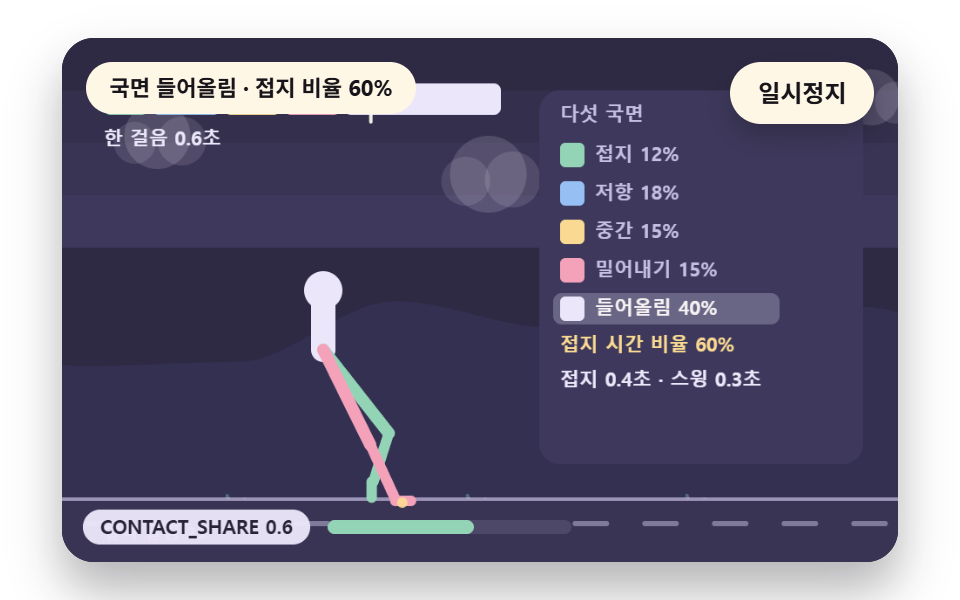
一歩を接地12%・抵抗18%・中間15%・押し出し15%・持ち上げ40%に分け、CONTACT_SHARE の0.6の内側(inStance)では solveFoot が足首を床の高さに固定します。足首は接地で-14度で触れて0度に寝たあと、0.45歩を過ぎてからつま先で押しながら16度まで転がります。一歩0.63秒のうち接地が0.37秒、スイングが0.25秒です。
<main class="stage">
<div class="vj is-demo" id="vj">
  <div class="vj__pad" data-role="pad" tabindex="0" role="application" aria-label="歩行サイクルの舞台 — 左右の矢印キーで歩みの速さを変える、EnterかSpaceで一時停止、Nで一歩、Rで最初から">
    <canvas class="vj__canvas" data-role="canvas" width="480" height="300" role="img" aria-label="一歩を接地・抵抗・中間・蹴り出し・持ち上げの五つの局面に分け、局面ごとに色の帯が埋まる。接地から持ち上げまで足裏は床に平らに張り付き、つま先の接点はその場に凍り、持ち上げのあとだけが弧を描いて前に運ばれる。右には局面の名前と一歩の時間に占める割合が出る。下の目盛りは定数名と今の値を示し、動きを減らす設定では歩みの止まった立ち姿勢一枚だけが描かれます"></canvas>
  </div>
  <p class="vj__status" data-role="status" aria-live="off">歩行サイクルの場面</p>
  <div class="vj__ctrl">
    <button class="vj__pause" data-role="pause" type="button" aria-pressed="false">一時停止</button>
  </div>
  <p class="vj__done" data-role="done" role="status" aria-live="polite"></p>
</div>
</main>
@use "../../../../site/static/demo-tokens" as *;
@include stage($stage-paper);
.vj {
position: relative;
width: min(92vw, calc(160vh - 12.8vw));
aspect-ratio: 480 / 300;
margin: 0 auto;
border-radius: $r-card;
overflow: hidden;
box-shadow: $shadow-raised;
background: $subject-ink;
}
// 무대 상자 — 눌러서 한 번 깨뜨리는 곳(touch-action: none 은 이 상자에만). 무대 밖 터치는 페이지 스크롤 그대로
.vj__pad {
position: absolute;
inset: 0;
border-radius: inherit;
outline: none;
touch-action: none;
cursor: pointer;
}
// 바깥 .vj 가 넘침을 자르므로 포커스 테두리는 안쪽으로 들인다
.vj__pad:focus-visible {
outline: 3px solid $subject-cream;
outline-offset: -3px;
}
.vj__canvas {
position: absolute;
inset: 0;
display: block;
width: 100%;
height: 100%;
}
.vj__ctrl {
position: absolute;
right: $sp-3;
top: $sp-3;
display: flex;
gap: $sp-2;
}
.vj__pause {
padding: $sp-1 $sp-3;
border: 2px solid $subject-cream;
border-radius: $r-pill;
background: $subject-cream;
color: $subject-ink;
font-family: inherit;
font-weight: 700;
font-size: 12px;
line-height: 1.6;
cursor: pointer;
box-shadow: $shadow-press;
transition: transform $dur-quick $ease-spring;
}
// 스크린리더에만 읽히는 낭독 문장 — 모드가 바뀔 때만 쓴다
.vj__done {
position: absolute;
width: 1px;
height: 1px;
margin: 0;
overflow: hidden;
clip-path: inset(50%);
white-space: nowrap;
}
// 눌린 상태(멈춤) — 바탕과 글자색을 뒤집어 aria-pressed 가 눈에도 보이게
.vj__pause[aria-pressed="true"] {
background: $subject-ink;
color: $subject-cream;
}
.vj__pause:hover {
transform: translateY(-2px);
}
.vj__pause:active {
transform: translateY(1px);
}
.vj__pause:focus-visible {
outline: 3px solid $subject-cream;
outline-offset: 3px;
}
// 상태 줄 — 지금 장면의 수치를 글자로. 화면에만 있고 aria-live 는 늘 off
.vj__status {
position: absolute;
left: $sp-3;
top: $sp-3;
max-width: calc(100% - 100px);
margin: 0;
padding: $sp-1 $sp-3;
border-radius: $r-pill;
background: $subject-cream;
color: $subject-ink;
font-weight: 700;
font-size: 11px;
line-height: 1.6;
white-space: nowrap;
overflow: hidden;
text-overflow: ellipsis;
pointer-events: none;
}
@media (max-width: 340px) {
.vj__pause,
.vj__status { font-size: 10px; padding: 0 $sp-2; }
}
// 움직임 줄이기 — 장면은 스크립트가 글리치 없는 원문 한 장으로 멈춘다. 버튼도 떠오르지 않게
@media (prefers-reduced-motion: reduce) {
.vj__pause { transition: none !important; }
.vj__pause:hover,
.vj__pause:active { transform: none !important; }
}html, body {
margin: 0;
overflow: hidden;
}
.stage {
box-sizing: border-box;
min-height: 100vh;
display: grid;
place-items: center;
margin: 0;
background: #ffffff;
font-family: -apple-system, "Segoe UI", "Noto Sans KR", sans-serif;
padding: clamp(8px, 4vw, 24px);
}
.vj {
position: relative;
width: min(92vw, 160vh - 12.8vw);
aspect-ratio: 480/300;
margin: 0 auto;
border-radius: 16px;
overflow: hidden;
box-shadow: 0 14px 24px rgba(23, 20, 26, 0.32);
background: #17141a;
}
.vj__pad {
position: absolute;
inset: 0;
border-radius: inherit;
outline: none;
touch-action: none;
cursor: pointer;
}
.vj__pad:focus-visible {
outline: 3px solid #fff7e6;
outline-offset: -3px;
}
.vj__canvas {
position: absolute;
inset: 0;
display: block;
width: 100%;
height: 100%;
}
.vj__ctrl {
position: absolute;
right: 12px;
top: 12px;
display: flex;
gap: 8px;
}
.vj__pause {
padding: 4px 12px;
border: 2px solid #fff7e6;
border-radius: 999px;
background: #fff7e6;
color: #17141a;
font-family: inherit;
font-weight: 700;
font-size: 12px;
line-height: 1.6;
cursor: pointer;
box-shadow: 0 6px 12px rgba(23, 20, 26, 0.32);
transition: transform 220ms cubic-bezier(0.2, 0.8, 0.2, 1);
}
.vj__done {
position: absolute;
width: 1px;
height: 1px;
margin: 0;
overflow: hidden;
clip-path: inset(50%);
white-space: nowrap;
}
.vj__pause[aria-pressed=true] {
background: #17141a;
color: #fff7e6;
}
.vj__pause:hover {
transform: translateY(-2px);
}
.vj__pause:active {
transform: translateY(1px);
}
.vj__pause:focus-visible {
outline: 3px solid #fff7e6;
outline-offset: 3px;
}
.vj__status {
position: absolute;
left: 12px;
top: 12px;
max-width: calc(100% - 100px);
margin: 0;
padding: 4px 12px;
border-radius: 999px;
background: #fff7e6;
color: #17141a;
font-weight: 700;
font-size: 11px;
line-height: 1.6;
white-space: nowrap;
overflow: hidden;
text-overflow: ellipsis;
pointer-events: none;
}
@media (max-width: 340px) {
.vj__pause,
.vj__status {
font-size: 10px;
padding: 0 8px;
}
}
@media (prefers-reduced-motion: reduce) {
.vj__pause {
transition: none !important;
}
.vj__pause:hover,
.vj__pause:active {
transform: none !important;
}
}(function () {
const root = document.getElementById("vj");
if (!root) return;
// 무대 좌표 — 캔버스 안 계산은 늘 480×300. 화면에 보이는 크기와 상관없다
const W = 480;
const H = 300;
const TAU = Math.PI * 2;
function clamp(v, lo, hi) { return v < lo ? lo : (v > hi ? hi : v); }
function lerp(a, b, k) { return a + (b - a) * k; }
function easeOut(k) { const u = 1 - clamp(k, 0, 1); return 1 - u * u * u; }
// 파스텔 팔레트 — 바탕은 짙은 자두색, 타일은 연한 색 위에 짙은 잉크 숫자
const INK = [40, 36, 54];
const PAPER = [250, 246, 240];
const ROSE = [244, 162, 186];
const MINT = [148, 212, 182];
const SKY = [150, 192, 244];
const SUN = [250, 218, 146];
const NEU = [236, 230, 250];
const BGC = [46, 42, 68];
const PANEL = [62, 57, 92];
const DIM = [196, 190, 224];
function rgba(c, a) {
return 'rgba(' + Math.round(clamp(c[0], 0, 255)) + ',' + Math.round(clamp(c[1], 0, 255)) + ',' + Math.round(clamp(c[2], 0, 255)) + ',' + clamp(a, 0, 1).toFixed(3) + ')';
}
function hsl(h, s, l) {
const a = s * Math.min(l, 1 - l);
const f = function (n) {
const k = (n + h / 30) % 12;
return l - a * Math.max(-1, Math.min(k - 3, Math.min(9 - k, 1)));
};
return [Math.round(f(0) * 255), Math.round(f(8) * 255), Math.round(f(4) * 255)];
}
// 정수 해시 — 같은 (a, b) 에는 늘 같은 0 이상 1 미만 값. 난수 함수는 쓰지 않는다
function hash2(a, b) {
let h = (Math.imul(a | 0, 374761393) + Math.imul(b | 0, 668265263)) | 0;
h = Math.imul(h ^ (h >>> 13), 1274126177);
h = h ^ (h >>> 16);
return (h >>> 0) / 4294967296;
}
// 2차원 값 잡음 — 정수 격자점마다 해시 값이 있고 그 사이를 부드럽게 잇는다
function noise2(x, y, seed) {
const xi = Math.floor(x);
const yi = Math.floor(y);
const fx = x - xi;
const fy = y - yi;
const ux = fx * fx * (3 - 2 * fx);
const uy = fy * fy * (3 - 2 * fy);
const s = seed * 131;
return lerp(lerp(hash2(xi + s, yi), hash2(xi + 1 + s, yi), ux), lerp(hash2(xi + s, yi + 1), hash2(xi + 1 + s, yi + 1), ux), uy);
}
// 장면 시계(秒)·판 반복 번호·시간표 — 시간표는 (시각, 할 일) 목록이고 시각이 지나면 한 번씩 부른다
let sceneT = 0;
let lap = 0;
let script = [];
let evAt = 0;
// 문구 틀의 {a}·{b}·{c} 자리에 값을 끼운다 — 화면 문구는 늘 틀 한 줄이고 로케일 사전이 통째로 바꾼다
function fill(s, a, b, c) {
return s.split('{a}').join(a).split('{b}').join(b === undefined ? '' : b).split('{c}').join(c === undefined ? '' : c);
}
function r1(v) { return String(Math.round(v * 10) / 10); }
function group(v) {
// 천 단위 점 — 로케일 함수에 기대지 않는다
const s = String(Math.round(v));
let o = '';
for (let i = 0; i < s.length; i += 1) {
if (i > 0 && (s.length - i) % 3 === 0) {
o += ',';
}
o += s.charAt(i);
}
return o;
}
// 기본값 상수 — 변형 3개(STEP_HZ·STRIDE_DEG·LEG_RATIO)가 이 줄의 값을 바꾼다
const STEP_HZ = 1.6;
const STRIDE_DEG = 28;
const LEG_PX = 90;
const LEG_RATIO = 0.48;
const CONTACT_SHARE = 0.6;
const GAIT = { stepHz: STEP_HZ, strideDeg: STRIDE_DEG, legPx: LEG_PX, legRatio: LEG_RATIO, contactShare: CONTACT_SHARE };
// walkT 는 걸음 시간으로만 오르는 시계(秒). phase 는 一歩 위상 0~1, cyclePhase 는 두 걸음 위상 0~2
let walkT = 0;
function stepPhase() { return (walkT * GAIT.stepHz) % 1; }
function cyclePhase() { return (walkT * GAIT.stepHz) % 2; }
function stepIndex() { return Math.floor(walkT * GAIT.stepHz); }
// 다리별 一歩 위상 — 왼다리가 정수 걸음, 오른다리가 반 걸음 어긋난다
function legPhase(right) { return ((walkT * GAIT.stepHz) + (right ? 0.5 : 0)) % 1; }
// 接地 국면 판정 — ph 가 contactShare 안이면 발이 바닥에 붙어 있다
function inStance(ph) { return ph < GAIT.contactShare; }
// 五つの局面 — 接地(0~0.12) · 抵抗(0.12~0.3) · 中間(0.3~0.45) · 蹴り出し(0.45~contactShare) · 持ち上げ(나머지)
const PH5 = [
{ name: '接地', a: 0, b: 0.12, col: null },
{ name: '抵抗', a: 0.12, b: 0.3, col: null },
{ name: '中間', a: 0.3, b: 0.45, col: null },
{ name: '蹴り出し', a: 0.45, b: 0.6, col: null },
{ name: '持ち上げ', a: 0.6, b: 1, col: null },
];
function phaseName(ph) {
for (let i = 0; i < PH5.length; i += 1) {
if (ph >= PH5[i].a && ph < PH5[i].b) {
return PH5[i].name;
}
}
return '持ち上げ';
}
// 라디안 변환 — 각도 값은 도 단위 상수로 두고 계산 직전에만 바꾼다
function rad(deg) { return deg * Math.PI / 180; }
function solveFoot(hipX, hipY, ph, plantX, slopeDeg, groundY) {
const leg = GAIT.legPx;
const L1 = leg / (1 + GAIT.legRatio);
const L2 = leg * GAIT.legRatio / (1 + GAIT.legRatio);
let ax;
let ay;
let ankleDeg;
const planted = inStance(ph);
if (planted) {
ax = plantX;
ay = groundY;
ankleDeg = -slopeDeg;
}
else {
const k = (ph - GAIT.contactShare) / (1 - GAIT.contactShare);
const half = rad(GAIT.strideDeg);
const ang = lerp(half, -half, k);
ax = hipX + Math.sin(ang) * leg;
ay = groundY - Math.abs(Math.sin(Math.PI * k)) * leg * 0.22;
ankleDeg = 90 - slopeDeg;
}
const dx = ax - hipX;
const dy = ay - hipY;
let d = Math.hypot(dx, dy);
d = Math.min(d, L1 + L2 - 0.01);
const base = Math.atan2(dy, dx);
const cosK = (L1 * L1 + d * d - L2 * L2) / (2 * L1 * d);
const elbow = Math.acos(clamp(cosK, -1, 1));
const kneeAng = base - elbow;
return { ax: ax, ay: ay, kneeX: hipX + Math.cos(kneeAng) * L1, kneeY: hipY + Math.sin(kneeAng) * L1, ankleDeg: ankleDeg, planted: planted };
}
// 몸 높이 — 接地 국면 中間(다리가 곧게 펴는 ph=0.3 부근)이 가장 높고 이중 接地(두 발 다 지면)에서 살짝 낮아진다
function hipHeight(ph) {
const bob = Math.sin(ph * Math.PI * 2 - Math.PI / 2);
return GAIT.legPx * (0.93 + 0.04 * bob);
}
// 몸 앞뒤 기울기 — 내리막에서 앞으로 숙여 다리 회복 시간을 번다
function leanDeg(slopeDeg) { return slopeDeg < 0 ? slopeDeg * 0.5 : slopeDeg * 0.25; }
let plants = [null, null]; // [왼, 오른]
// 接地 시작 ph(=0 또는 contactShare 근처)에서 plantX 를 몸 위치로부터 한 번만 풀어 저장한다
function lockPlants(hipX) {
for (let r = 0; r < 2; r += 1) {
const ph = legPhase(r === 1);
const otherPh = legPhase(r === 0);
if (inStance(ph) && plants[r] === null) {
const half = rad(GAIT.strideDeg);
const k = ph / GAIT.contactShare;
const ang = lerp(half, -half, k);
const px = hipX + Math.sin(ang) * GAIT.legPx;
plants[r] = { x: px, ph0: ph };
}
if (!inStance(ph)) {
plants[r] = null;
}
}
}
function plantXOf(r, hipX) {
const p = plants[r];
if (p !== null) {
return p.x;
}
return hipX;
}
// ── 그리기 도구
const canvasEl = root.querySelector('[data-role="canvas"]');
const padEl = root.querySelector('[data-role="pad"]');
const pauseEl = root.querySelector('[data-role="pause"]');
const statusEl = root.querySelector('[data-role="status"]');
const doneEl = root.querySelector('[data-role="done"]');
const ctxRaw = canvasEl ? canvasEl.getContext('2d') : null;
if (!canvasEl || !ctxRaw || !pauseEl || !padEl || !doneEl) {
return;
}
const cv = canvasEl;
const ctx = ctxRaw;
const pauseBtn = pauseEl;
const doneP = doneEl;
const pad = padEl;
// 외부 웹폰트는 부르지 않는다 — 기기에 있는 글꼴 목록만
const UI_FONT = 'system-ui, -apple-system, "Segoe UI", "Noto Sans KR", sans-serif';
let dpr = 1;
function fitCanvas() {
// 배율은 2 에서 자른다 — 계산은 늘 480×300 이고 화면 배율만 이 값
dpr = Math.min(window.devicePixelRatio || 1, 2);
cv.width = Math.round(W * dpr);
cv.height = Math.round(H * dpr);
ctx.setTransform(dpr, 0, 0, dpr, 0, 0);
}
function box(x, y, w, h, r, c, a) {
if (w <= 0.2 || h <= 0.2 || a <= 0) {
return;
}
ctx.beginPath();
ctx.roundRect(x, y, w, h, Math.max(0, Math.min(r, w / 2, h / 2)));
ctx.fillStyle = rgba(c, a);
ctx.fill();
}
function disc(x, y, r, c, a) {
ctx.beginPath();
ctx.arc(x, y, r, 0, TAU);
ctx.fillStyle = rgba(c, a);
ctx.fill();
}
function seg(x1, y1, x2, y2, c, a, w) {
ctx.beginPath();
ctx.moveTo(x1, y1);
ctx.lineTo(x2, y2);
ctx.strokeStyle = rgba(c, a);
ctx.lineWidth = w;
ctx.lineCap = 'round';
ctx.stroke();
}
function text(s, x, y, c, px, weight, align) {
ctx.font = weight + ' ' + px + 'px ' + UI_FONT;
ctx.textAlign = align;
ctx.textBaseline = 'middle';
ctx.fillStyle = rgba(c, 1);
ctx.fillText(s, x, y);
}
function panel(x, y, w, h) { box(x, y, w, h, 12, PANEL, 1); }
// 아래쪽 눈금 — 상수 이름과 지금 값 · 크기 막대
function hud(name, val, frac) {
const label = name + ' ' + val;
ctx.font = '700 11px ' + UI_FONT;
const w = ctx.measureText(label).width + 20;
const x = 12;
const y = H - 30;
box(x, y, w, 20, 10, NEU, 0.96);
text(label, x + w / 2, y + 10.5, INK, 11, 700, 'center');
const mx = x + w + 10;
box(mx, y + 6, 140, 8, 4, [78, 72, 104], 1);
box(mx, y + 6, 140 * clamp(frac, 0, 1), 8, 4, MINT, 1);
}
// ── 상태 줄·낭독 문장
const SPK_STEP = '歩数 {a} 歩、サイクルの局面 {b}';
function speakBoard() {
return fill(SPK_STEP, String(stepIndex()), phaseName(legPhase(false)));
}
let shownStatus = '';
function pushStatus(s) {
if (!statusEl || s === shownStatus) {
return;
}
shownStatus = s;
statusEl.textContent = s;
}
let paused = false;
// 움직임 줄이기 — 켜지면 루프 대신 정지 한 장
let still = false;
const reduceQuery = window.matchMedia('(prefers-reduced-motion: reduce)');
// 페이지를 연 채 움직임 줄이기 설정을 바꿔도 change 리스너가 다시 읽는다
still = reduceQuery.matches;
// 자동 시연 표시 — 사람이 처음 손대면 떼고, 그 뒤부터 모드가 바뀔 때만 낭독 문장을 쓴다
let demo = root.classList.contains('is-demo');
const off = new AbortController();
// 사람이 직접 조작하는 중이면 시간표는 멈추고 계산만 흐른다
let manual = false;
function wake() {
if (!demo) {
return;
}
demo = false;
root.classList.remove('is-demo');
}
function takeOver() {
if (manual) {
return;
}
manual = true;
wake();
}
// 낭독 모드 — 완성이면 1000, 손으로 하는 중이면 맞은 타일 수, 자동 시연이면 장면이 정한 단계
function modeBase(sceneMode) {
return manual ? 100 + Math.floor(hipHeight(legPhase(false))) : sceneMode;
}
// 낭독 문장 — 화면 상태 줄(aria-live off)과 따로, 모드가 바뀔 때와 사람이 조작했을 때만 role=status 에 쓴다
let lastMode = -9;
function say() {
doneP.textContent = speakText();
lastMode = still ? -2 : modeId();
}
function advance(dt) {
sceneT += dt;
walkT += dt;
if (!manual) {
while (evAt < script.length && script[evAt].t <= sceneT) {
const ev = script[evAt];
evAt += 1;
ev.f();
}
if (sceneT >= LAP_S) {
lap += 1;
begin();
return;
}
}
update(dt);
}
function begin() {
sceneT = 0;
walkT = lap * 0; // 걸음 시계는 장면과 함께 0 에서 다시 시작 — 같은 시간표면 같은 걸음
evAt = 0;
script = [];
build();
}
// 고정 걸음 + 歩数 상한 — 프레임 간격이 흔들려도 같은 계산, 탭이 멈췄다 돌아와도 한 번에 몰리지 않는다
const STEP_S = 1 / 60;
const DT_MAX = 0.05;
let acc = 0;
function showNow() {
draw();
pushStatus(statusText());
if (!demo) {
const m = still ? -2 : modeId();
if (m !== lastMode) {
say();
}
}
}
let rafId = 0;
let lastTs = -1;
function frame(ts) {
if (still || paused) {
rafId = 0;
return;
}
if (lastTs < 0) {
lastTs = ts;
}
const dt = Math.min((ts - lastTs) / 1000, DT_MAX);
lastTs = ts;
acc += dt;
while (acc >= STEP_S) {
advance(STEP_S);
acc -= STEP_S;
}
showNow();
rafId = window.requestAnimationFrame(frame);
}
function startLoop() {
if (rafId) {
return;
}
// 멈췄던 사이의 시간을 첫 프레임 dt 로 넘기지 않는다
lastTs = -1;
acc = 0;
rafId = window.requestAnimationFrame(frame);
}
function stopLoop() {
if (rafId) {
window.cancelAnimationFrame(rafId);
rafId = 0;
}
}
// 움직임 줄이기 — 루프 없이 시간표의 REST_S 초까지를 한 번에 치른 장면 한 컷. 캐릭터는 걸음 보간 없이 그 시점의 자리에 바로 선다
function showRest() {
stopLoop();
lap = 0;
begin();
walkT = REST_S;
while (evAt < script.length && script[evAt].t <= REST_S) {
const ev = script[evAt];
evAt += 1;
sceneT = ev.t;
ev.f();
}
sceneT = REST_S;
update(0);
showNow();
}
function play() {
begin();
showNow();
if (!paused) {
startLoop();
}
}
// 사람이 조작한 뒤 — 멈춘 채이거나 움직임 줄이기이면 보간을 건너뛰어 바로 보이게 한다. 조작 직후는 낭독 문장도 쓴다
function afterInput(speak) {
if (paused || still) {
sceneT += 1;
}
update(0);
showNow();
if (speak) {
say();
}
}
function togglePause() {
paused = !paused;
pauseBtn.setAttribute('aria-pressed', paused ? 'true' : 'false');
wake();
if (paused) {
stopLoop();
}
else if (!still) {
startLoop();
}
say();
}
function restart() {
manual = false;
lap = 0;
begin();
update(0);
showNow();
say();
}
// N 一歩 — 시간표의 다음 일 하나를 지금 치른다. 시간표가 끝났으면 처음부터 다시 짠 뒤 첫 일
function stepOnce() {
takeOver();
if (evAt >= script.length) {
lap += 1;
begin();
}
if (evAt < script.length) {
const ev = script[evAt];
evAt += 1;
if (sceneT < ev.t) {
sceneT = ev.t;
}
ev.f();
}
afterInput(true);
}
function keyMove(dx, dy) {
// 좌우 방향키 = 걸음 속도 한 단계 조절. 위·아래는 항목이 keyHook 로 따로 받는다
if (dx !== 0) {
GAIT.stepHz = clamp(Math.round((GAIT.stepHz + dx * 0.4) * 10) / 10, 0.8, 2.8);
}
else if (keyHook !== null) {
keyHook(dy < 0 ? 'ArrowUpHint' : 'ArrowDownHint');
return;
}
takeOver();
afterInput(true);
}
function toCanvas(e) {
const r = cv.getBoundingClientRect();
return [(e.clientX - r.left) * W / r.width, (e.clientY - r.top) * H / r.height];
}
pauseBtn.addEventListener('click', togglePause, { signal: off.signal });
// 키보드 — 무대에 포커스가 있을 때만. 방향키 = 빈칸 이웃 타일 이동, Enter·Space = 一時停止, N = 一歩, R = 처음부터
pad.addEventListener('keydown', function (e) {
if (e.altKey || e.ctrlKey || e.metaKey) {
return;
}
const k = e.key;
if (k === 'Enter' || k === ' ' || k === 'p' || k === 'P') {
e.preventDefault();
togglePause();
}
else if (k === 'r' || k === 'R') {
restart();
}
else if (k === 'n' || k === 'N') {
e.preventDefault();
stepOnce();
}
else if (k === 'ArrowLeft') {
e.preventDefault();
keyMove(-1, 0);
}
else if (k === 'ArrowRight') {
e.preventDefault();
keyMove(1, 0);
}
else if (k === 'ArrowUp') {
e.preventDefault();
keyMove(0, -1);
}
else if (k === 'ArrowDown') {
e.preventDefault();
keyMove(0, 1);
}
else if (keyHook !== null && keyHook(k)) {
e.preventDefault();
takeOver();
afterInput(true);
}
}, { signal: off.signal });
// 포인터 — 마우스·터치·펜을 한 이벤트로. 누르는 순간부터 놓을 때까지 무대가 포인터를 붙잡는다
let ptrDown = false;
// 장면이 방향키·Enter·N·R 밖의 키를 받고 싶을 때 거는 갈고리 — 먹었으면 true
let keyHook = null;
pad.addEventListener('pointerdown', function (e) {
takeOver();
ptrDown = true;
try {
pad.setPointerCapture(e.pointerId);
}
catch (err) {
ptrDown = true;
}
const p = toCanvas(e);
onPtr(0, p[0], p[1]);
afterInput(false);
}, { signal: off.signal });
pad.addEventListener('pointermove', function (e) {
if (!ptrDown) {
return;
}
const p = toCanvas(e);
onPtr(1, p[0], p[1]);
afterInput(false);
}, { signal: off.signal });
function ptrEnd(e) {
if (!ptrDown) {
return;
}
ptrDown = false;
const p = toCanvas(e);
onPtr(2, p[0], p[1]);
afterInput(true);
}
pad.addEventListener('pointerup', ptrEnd, { signal: off.signal });
pad.addEventListener('pointercancel', ptrEnd, { signal: off.signal });
// 탭이 숨으면 멈추고, 돌아오면 시계를 다시 맞춰 시작
document.addEventListener('visibilitychange', function () {
if (document.hidden) {
stopLoop();
}
else if (!paused && !still) {
startLoop();
}
}, { signal: off.signal });
// 설정이 바뀌면 — 켜지면 판 한 장, 꺼지면 다시 움직인다
reduceQuery.addEventListener('change', function () {
still = reduceQuery.matches;
if (still) {
showRest();
}
else {
lap = 0;
play();
}
}, { signal: off.signal });
window.addEventListener('resize', function () {
fitCanvas();
showNow();
}, { signal: off.signal });
// ── 캐릭터 그리기 — 자체 도형 캐릭터(머리·몸통·2링크 다리 2·팔 2). 브랜드 캐릭터 아님
// limb(x1, y1, x2, y2, 색, 굵기) — 관절 두 점을 잇는 둥근 막대
function limb(x1, y1, x2, y2, c, w) {
seg(x1, y1, x2, y2, c, 1, w);
}
// footShape(x, y, ankleDeg, 색) — 발바닥. ankleDeg 는 바닥 기준 도 단위(0 = 바닥에 평평)
function footShape(x, y, ankleDeg, c) {
ctx.save();
ctx.translate(x, y);
ctx.rotate(ankleDeg * Math.PI / 180);
box(-3, -2, 15, 6, 3, c, 1);
ctx.restore();
}
// drawGround(y, slopeDeg) — 기울어진 바닥면. y 는 화면 가운데서의 기준 높이.
// groundV > 0 이면 바닥의 눈금 줄무늬가 그 속도로 왪쪽으로 흘러 간다 — 몸이 앞으로 가는 속도의 시각화
let groundV = 0;
function drawGround(y, slopeDeg) {
// 기울기가 있으면 화면 가운데 x=W/2 에서 높이 y 인 직선 — groundYAt 과 같은식
const y0 = groundYAt(0, y, slopeDeg);
const y1 = groundYAt(W, y, slopeDeg);
// 받침 띠 — 바닥선 아래 옅은 색 띠
ctx.beginPath();
ctx.moveTo(0, y0);
ctx.lineTo(W, y1);
ctx.lineTo(W, H);
ctx.lineTo(0, H);
ctx.closePath();
ctx.fillStyle = rgba([58, 52, 84], 1);
ctx.fill();
seg(0, y0, W, y1, DIM, 0.7, 2);
// 눈금 줄무늬 — 걸음이 밀어 내는 속도로 흘러 간다. 간격 40px, 길이 18px
if (groundV > 0) {
const gap = 40;
const off = (walkT * groundV) % gap;
for (let x = -gap; x < W + gap; x += gap) {
const sx = x - off;
seg(sx, groundYAt(sx + 9, y, slopeDeg) + 14, sx + 18, groundYAt(sx + 27, y, slopeDeg) + 14, DIM, 0.5, 3);
}
}
}
// drawScenery() — 걷는 세계의 경물 층. 하늘 그라디언트 띠·언덕·구름·가로등이 groundV 에 비례해 뒤로 흐른다.
// 배경 톤 전체가 걸음 속도 값의 전파 범위다 — 몸이 앞으로 간다는 감각을 화면 전체가 받친다(BD26: 면적을 장식이 아니라 값의 전파로)
function drawScenery() {
// 바탕 — 하늘 띠와 언덕 사이 빈 구간이 지워지지 않아 캐릭터 자국이 번졌다. 먼저 한 번 칠한다
box(0, 0, W, H, 0, BGC, 1);
// 하늘 — 세로 옅은 띠 4개. 걸음 위상에 따라 명도가 살짝 숨쉰다
const skyT = Math.sin(walkT * GAIT.stepHz * Math.PI);
for (let i = 0; i < 4; i += 1) {
const t = i / 3;
const c = [lerp(46, 62, t), lerp(42, 56, t), lerp(68, 92, t)];
box(0, i * 30, W, 30, 0, c, 1);
}
// 먼 언덕 — noise2 로 굽이친다. 걸음 속도의 0.35배로 흐른다(원근 감쇠)
if (groundV > 0) {
const scroll = walkT * groundV * 0.35;
ctx.beginPath();
ctx.moveTo(0, H);
for (let x = 0; x <= W; x += 8) {
const yy = 168 + noise2((x + scroll) / 90, 3, 11) * 46 - 20;
ctx.lineTo(x, yy);
}
ctx.lineTo(W, H);
ctx.closePath();
ctx.fillStyle = rgba([52, 48, 82], 1);
ctx.fill();
// 구름 세 점 — 0.6배 속도
const cs = walkT * groundV * 0.6;
for (let i = 0; i < 3; i += 1) {
const cx = ((i * 190 + 60 - cs) % (W + 120) + W + 120) % (W + 120) - 60;
const cy = 34 + i * 22;
disc(cx, cy, 16 + i * 3, NEU, 0.16);
disc(cx + 14, cy + 3, 12 + i * 2, NEU, 0.13);
disc(cx - 13, cy + 4, 10 + i * 2, NEU, 0.12);
}
// 가까운 풀 다발 — 1.15배 속도(지면보다 살짝 빠른 근경)
const gs = walkT * groundV * 1.15;
for (let i = 0; i < 14; i += 1) {
const gx = ((i * 46 + 20 - gs) % (W + 60) + W + 60) % (W + 60) - 30;
const gy = H - 14 - (i % 3) * 6;
seg(gx, gy, gx - 4, gy - 12, MINT, 0.35, 2);
seg(gx + 2, gy, gx + 6, gy - 10, MINT, 0.3, 2);
}
}
}
// groundYAt(x, baseY, slopeDeg) — 경사식: 기울기가 있으면 x 에서의 바닥 높이
function groundYAt(x, baseY, slopeDeg) {
return baseY + (x - W / 2) * Math.tan(rad(slopeDeg)) * -1;
} // 02 — 한 걸음을 接地·抵抗·中間·蹴り出し·持ち上げ 다섯 국면으로 나눈다.
// 接地 국면(0 ~ contactShare)에서는 발바닥이 바닥에 평평하게 붙어 발목각을 몸 위치에서 거꾸로 푼다.
// 持ち上げ 국면에서만 발이 호를 그리며 앞으로 옮겨 간다. 오른쪽에 국면 색 띠와 걸음 시간 비율.
const LAP_S = 7.2;
const REST_S = 2.4;
const GROUND_Y = 264;
const CHAR_X = 150;
const PHX = 274;
const PHW = 186;
const PH5C = [MINT, SKY, SUN, ROSE, NEU];
let stancePh = 0;
let liftPh = 0;
let dutyHist = [];
function build() {
dutyHist = [];
groundV = Math.sin(rad(GAIT.strideDeg)) * GAIT.legPx * 2 * GAIT.stepHz;
}
function update(dt) {
if (dt <= 0) {
return;
}
stancePh = legPhase(false);
liftPh = legPhase(true);
if (dutyHist.length < 1 || Math.floor(walkT * GAIT.stepHz) !== Math.floor((walkT - dt) * GAIT.stepHz)) {
dutyHist.push(GAIT.contactShare);
if (dutyHist.length > 8) {
dutyHist.shift();
}
}
}
// 발바닥 굴림 — 接地 국면 동안 발목각이 뒤꿈치 닿기 -14도 에서 앞꿈치 밀기 16도 로 굴러간다
function drawStanceFoot(hipX, hipY, ph) {
const fs = solveFoot(hipX, hipY, ph, plantXOf(0, hipX), 0, GROUND_Y);
// 接地 국면: 발바닥을 바닥에 붙인 채 굴림 — ankleDeg 를 ph 로 보간(뒤꿈치 닿기 → 앞꿈치 밀기)
const roll = ph < 0.12 ? lerp(-14, 0, ph / 0.12) : (ph > 0.45 ? lerp(0, 16, (ph - 0.45) / (GAIT.contactShare - 0.45)) : 0);
footShape(fs.ax, fs.ay, fs.planted ? roll : fs.ankleDeg, MINT);
return roll;
}
function draw() {
drawScenery();
drawGround(GROUND_Y, 0);
// 왼쪽 큰 캐릭터 — 국면 색이 몸에도 어린다
const hipY = GROUND_Y - hipHeight(stancePh);
const hipX = CHAR_X;
lockPlants(hipX);
const phIdx = PH5.findIndex(function (p) { return stancePh >= p.a && stancePh < p.b; });
const bodyCol = PH5C[phIdx < 0 ? 4 : phIdx];
limb(hipX, hipY, hipX, hipY - 26, NEU, 14);
disc(hipX, hipY - 34, 11, bodyCol, 1);
for (let r = 0; r < 2; r += 1) {
const ph = r === 0 ? stancePh : liftPh;
const fs = solveFoot(hipX, hipY, ph, plantXOf(r, hipX), 0, GROUND_Y);
limb(hipX, hipY, fs.kneeX, fs.kneeY, r === 0 ? MINT : ROSE, 7);
limb(fs.kneeX, fs.kneeY, fs.ax, fs.ay, r === 0 ? MINT : ROSE, 6);
if (r === 0) {
const roll = drawStanceFoot(hipX, hipY, ph);
// 굴림 각도 눈금 — 接地 국면 동안의 足首の回し
text('足首の回し ' + Math.round(roll) + '°', 24, GROUND_Y + 20, DIM, 10, 700, 'left');
}
else {
footShape(fs.ax, fs.ay, fs.planted ? 0 : fs.ankleDeg, ROSE);
}
// 接地 표시 — planted 발 아래 바닥에 밝은 접촉 점
if (fs.planted) {
disc(fs.ax + 4, fs.ay + 2, 3, SUN, 0.9);
}
}
// 걸음 시간 막대 — 한 걸음을 五つの局面 색띠로. 지금 위치 세로 줄
const bx = 24;
const by = 26;
const bw = 230;
let px = bx;
for (let i = 0; i < PH5.length; i += 1) {
const w = bw * (PH5[i].b - PH5[i].a);
box(px, by, w - 2, 18, 4, PH5C[i], 1);
px += w;
}
const cur = stancePh * bw;
seg(bx + cur, by - 4, bx + cur, by + 22, PAPER, 0.95, 2);
text('一歩 ' + r1(1 / GAIT.stepHz) + '秒', bx, by + 32, NEU, 11, 700, 'left');
// 오른쪽 패널 — 국면별 이름·비율·현재 국면 강조
panel(PHX, 30, PHW, 214);
text('五つの局面', PHX + 12, 44, DIM, 11, 700, 'left');
for (let i = 0; i < PH5.length; i += 1) {
const y = 60 + i * 22;
const cur2 = stancePh >= PH5[i].a && stancePh < PH5[i].b;
box(PHX + 12, y, 14, 14, 3, PH5C[i], 1);
text(PH5[i].name + ' ' + Math.round((PH5[i].b - PH5[i].a) * 100) + '%', PHX + 32, y + 7, cur2 ? PAPER : DIM, 11, 700, 'left');
if (cur2) {
box(PHX + 8, y - 2, 130, 18, 5, NEU, 0.25);
}
}
// 接地 비율 값 — contactShare 가 한 걸음에서 차지하는 몫
text(fill('接地時間の割合 {a}%', String(Math.round(GAIT.contactShare * 100))), PHX + 12, 176, SUN, 11, 700, 'left');
text(fill('接地 {a} 秒・振り {b} 秒', r1(GAIT.contactShare / GAIT.stepHz), r1((1 - GAIT.contactShare) / GAIT.stepHz)), PHX + 12, 196, NEU, 11, 700, 'left');
hud('CONTACT_SHARE', r1(GAIT.contactShare), GAIT.contactShare);
}
function statusText() {
return fill('局面 {a}・接地の割合 {b}%', phaseName(stancePh), String(Math.round(GAIT.contactShare * 100)));
}
function modeId() { return modeBase(PH5.findIndex(function (p) { return stancePh >= p.a && stancePh < p.b; }) + 1); }
function speakText() { return fill('左脚の局面 {a}', phaseName(stancePh)); }
function onDir(d) { keyMove(d === 0 ? 1 : d === 1 ? -1 : 0, 0); }
function onPtr(kind, x, y) { if (kind !== 0) {
return;
} GAIT.stepHz = clamp(GAIT.stepHz + (y > H / 2 ? 0.2 : -0.2), 0.8, 2.8); }
fitCanvas();
if (still) {
showRest();
}
else {
play();
}
return function () {
stopLoop();
off.abort();
};
})();// StanceFivePhase - 같은 항목 vanilla index.html 의 React 판. 같은 계산을 useEffect 안에서 돌린다
import { useEffect, useRef } from "react";
import styles from "./StanceFivePhase.module.scss";
const cx = (s: string): string => s.split(" ").map((n) => styles[n] ?? n).join(" ");
export default function StanceFivePhase() {
const rootRef = useRef<HTMLDivElement | null>(null);
useEffect(() => {
const rootEl = rootRef.current;
if (!rootEl) return;
const root: HTMLElement = rootEl;
type RGB = [number, number, number];
// 무대 좌표 — 캔버스 안 계산은 늘 480×300. 화면에 보이는 크기와 상관없다
const W = 480;
const H = 300;
const TAU = Math.PI * 2;
function clamp(v: number, lo: number, hi: number): number { return v < lo ? lo : (v > hi ? hi : v); }
function lerp(a: number, b: number, k: number): number { return a + (b - a) * k; }
function easeOut(k: number): number { const u = 1 - clamp(k, 0, 1); return 1 - u * u * u; }
// 파스텔 팔레트 — 바탕은 짙은 자두색, 타일은 연한 색 위에 짙은 잉크 숫자
const INK: RGB = [40, 36, 54];
const PAPER: RGB = [250, 246, 240];
const ROSE: RGB = [244, 162, 186];
const MINT: RGB = [148, 212, 182];
const SKY: RGB = [150, 192, 244];
const SUN: RGB = [250, 218, 146];
const NEU: RGB = [236, 230, 250];
const BGC: RGB = [46, 42, 68];
const PANEL: RGB = [62, 57, 92];
const DIM: RGB = [196, 190, 224];
function rgba(c: RGB, a: number): string {
return 'rgba(' + Math.round(clamp(c[0], 0, 255)) + ',' + Math.round(clamp(c[1], 0, 255)) + ',' + Math.round(clamp(c[2], 0, 255)) + ',' + clamp(a, 0, 1).toFixed(3) + ')';
}
function hsl(h: number, s: number, l: number): RGB {
const a = s * Math.min(l, 1 - l);
const f = function (n: number): number {
const k = (n + h / 30) % 12;
return l - a * Math.max(-1, Math.min(k - 3, Math.min(9 - k, 1)));
};
return [Math.round(f(0) * 255), Math.round(f(8) * 255), Math.round(f(4) * 255)];
}
// 정수 해시 — 같은 (a, b) 에는 늘 같은 0 이상 1 미만 값. 난수 함수는 쓰지 않는다
function hash2(a: number, b: number): number {
let h = (Math.imul(a | 0, 374761393) + Math.imul(b | 0, 668265263)) | 0;
h = Math.imul(h ^ (h >>> 13), 1274126177);
h = h ^ (h >>> 16);
return (h >>> 0) / 4294967296;
}
// 2차원 값 잡음 — 정수 격자점마다 해시 값이 있고 그 사이를 부드럽게 잇는다
function noise2(x: number, y: number, seed: number): number {
const xi = Math.floor(x);
const yi = Math.floor(y);
const fx = x - xi;
const fy = y - yi;
const ux = fx * fx * (3 - 2 * fx);
const uy = fy * fy * (3 - 2 * fy);
const s = seed * 131;
return lerp(lerp(hash2(xi + s, yi), hash2(xi + 1 + s, yi), ux), lerp(hash2(xi + s, yi + 1), hash2(xi + 1 + s, yi + 1), ux), uy);
}
// 장면 시계(초)·판 반복 번호·시간표 — 시간표는 (시각, 할 일) 목록이고 시각이 지나면 한 번씩 부른다
let sceneT = 0;
let lap = 0;
type Ev = { t: number; f: () => void };
let script: Ev[] = [];
let evAt = 0;
// 문구 틀의 {a}·{b}·{c} 자리에 값을 끼운다 — 화면 문구는 늘 틀 한 줄이고 로케일 사전이 통째로 바꾼다
function fill(s: string, a: string, b?: string, c?: string): string {
return s.split('{a}').join(a).split('{b}').join(b === undefined ? '' : b).split('{c}').join(c === undefined ? '' : c);
}
function r1(v: number): string { return String(Math.round(v * 10) / 10); }
function group(v: number): string {
// 천 단위 점 — 로케일 함수에 기대지 않는다
const s = String(Math.round(v));
let o = '';
for (let i = 0; i < s.length; i += 1) {
if (i > 0 && (s.length - i) % 3 === 0) { o += ','; }
o += s.charAt(i);
}
return o;
}
// ── 보행 사이클 모델 — 한 걸음 = 위상 0~1 (contact → … → 다음 contact). 걷기 사이클은 두 걸음(왼·오른)이 한 바퀴
// STEP_HZ 는 초당 걸음 수(한 다리 기준), LEG_PX 는 다리 길이(px), LEG_RATIO 는 정강이/넙다리 비율
type Gait = {
stepHz: number; // 초당 걸음 수
strideDeg: number; // 다리가 앞뒤로 벌어지는 반각(도)
legPx: number; // 다리 길이(px)
legRatio: number; // 정강이/넙다리 비율
contactShare: number; // 접지 국면(접지~들어올림)이 한 걸음에서 차지하는 비율
};
// 기본값 상수 — 변형 3개(STEP_HZ·STRIDE_DEG·LEG_RATIO)가 이 줄의 값을 바꾼다
const STEP_HZ = 1.6;
const STRIDE_DEG = 28;
const LEG_PX = 90;
const LEG_RATIO = 0.48;
const CONTACT_SHARE = 0.6;
const GAIT: Gait = { stepHz: STEP_HZ, strideDeg: STRIDE_DEG, legPx: LEG_PX, legRatio: LEG_RATIO, contactShare: CONTACT_SHARE };
// walkT 는 걸음 시간으로만 오르는 시계(초). phase 는 한 걸음 위상 0~1, cyclePhase 는 두 걸음 위상 0~2
let walkT = 0;
function stepPhase(): number { return (walkT * GAIT.stepHz) % 1; }
function cyclePhase(): number { return (walkT * GAIT.stepHz) % 2; }
function stepIndex(): number { return Math.floor(walkT * GAIT.stepHz); }
// 다리별 한 걸음 위상 — 왼다리가 정수 걸음, 오른다리가 반 걸음 어긋난다
function legPhase(right: boolean): number { return ((walkT * GAIT.stepHz) + (right ? 0.5 : 0)) % 1; }
// 접지 국면 판정 — ph 가 contactShare 안이면 발이 바닥에 붙어 있다
function inStance(ph: number): boolean { return ph < GAIT.contactShare; }
// 다섯 국면 — 접지(0~0.12) · 저항(0.12~0.3) · 중간(0.3~0.45) · 밀어내기(0.45~contactShare) · 들어올림(나머지)
const PH5 = [
{ name: '접지', a: 0, b: 0.12, col: null },
{ name: '저항', a: 0.12, b: 0.3, col: null },
{ name: '중간', a: 0.3, b: 0.45, col: null },
{ name: '밀어내기', a: 0.45, b: 0.6, col: null },
{ name: '들어올림', a: 0.6, b: 1, col: null },
];
function phaseName(ph: number): string {
for (let i = 0; i < PH5.length; i += 1) {
if (ph >= PH5[i].a && ph < PH5[i].b) { return PH5[i].name; }
}
return '들어올림';
}
// 라디안 변환 — 각도 값은 도 단위 상수로 두고 계산 직전에만 바꾼다
function rad(deg: number): number { return deg * Math.PI / 180; }
// 보행 핵심 풀이 — hipY(고관절 높이)·ph(한 걸음 위상)에서 발목 위치를 구한다.
// 접지 국면: 발목은 화면 좌표에 얼어 있다(footPlant). 몸이 속도 v 로 지나가므로 발의 상대 위치 = plantX - hipX.
// 무릎은 넙다리+정강이 2링크로: 고관절→발목 거리 d, 넙다리 L1 = leg/(1+r), 정강이 L2 = leg·r/(1+r) 로
// 여각으로 무릎을 푼다(코사인 법칙). 발목각은 경사각만큼 꺾어 발바닥이 바닥에 평평하게 붙게 한다.
// 스윙 국면: 발목각은 위상의 사인 호를 따라 앞으로 옮겨 가고 발 등이 위를 향한다(뒤꿈치부터 내려오는 근사)
type FootSolve = { ax: number; ay: number; kneeX: number; kneeY: number; ankleDeg: number; planted: boolean };
function solveFoot(hipX: number, hipY: number, ph: number, plantX: number, slopeDeg: number, groundY: number): FootSolve {
const leg = GAIT.legPx;
const L1 = leg / (1 + GAIT.legRatio);
const L2 = leg * GAIT.legRatio / (1 + GAIT.legRatio);
let ax: number;
let ay: number;
let ankleDeg: number;
const planted = inStance(ph);
if (planted) {
ax = plantX;
ay = groundY;
ankleDeg = -slopeDeg;
} else {
const k = (ph - GAIT.contactShare) / (1 - GAIT.contactShare);
const half = rad(GAIT.strideDeg);
const ang = lerp(half, -half, k);
ax = hipX + Math.sin(ang) * leg;
ay = groundY - Math.abs(Math.sin(Math.PI * k)) * leg * 0.22;
ankleDeg = 90 - slopeDeg;
}
const dx = ax - hipX;
const dy = ay - hipY;
let d = Math.hypot(dx, dy);
d = Math.min(d, L1 + L2 - 0.01);
const base = Math.atan2(dy, dx);
const cosK = (L1 * L1 + d * d - L2 * L2) / (2 * L1 * d);
const elbow = Math.acos(clamp(cosK, -1, 1));
const kneeAng = base - elbow;
return { ax: ax, ay: ay, kneeX: hipX + Math.cos(kneeAng) * L1, kneeY: hipY + Math.sin(kneeAng) * L1, ankleDeg: ankleDeg, planted: planted };
}
// 몸 높이 — 접지 국면 중간(다리가 곧게 펴는 ph=0.3 부근)이 가장 높고 이중 접지(두 발 다 지면)에서 살짝 낮아진다
function hipHeight(ph: number): number {
const bob = Math.sin(ph * Math.PI * 2 - Math.PI / 2);
return GAIT.legPx * (0.93 + 0.04 * bob);
}
// 몸 앞뒤 기울기 — 내리막에서 앞으로 숙여 다리 회복 시간을 번다
function leanDeg(slopeDeg: number): number { return slopeDeg < 0 ? slopeDeg * 0.5 : slopeDeg * 0.25; }
// ── 발 접지 저장 — 닿는 순간 화면 좌표를 얼어 두고 떠는 순간까지 다시 쓴다(09 항목의 핵심)
type Plant = { x: number; ph0: number };
let plants: [Plant | null, Plant | null] = [null, null]; // [왼, 오른]
// 접지 시작 ph(=0 또는 contactShare 근처)에서 plantX 를 몸 위치로부터 한 번만 풀어 저장한다
function lockPlants(hipX: number): void {
for (let r = 0; r < 2; r += 1) {
const ph = legPhase(r === 1);
const otherPh = legPhase(r === 0);
if (inStance(ph) && plants[r] === null) {
const half = rad(GAIT.strideDeg);
const k = ph / GAIT.contactShare;
const ang = lerp(half, -half, k);
const px = hipX + Math.sin(ang) * GAIT.legPx;
plants[r] = { x: px, ph0: ph };
}
if (!inStance(ph)) { plants[r] = null; }
}
}
function plantXOf(r: number, hipX: number): number {
const p = plants[r];
if (p !== null) { return p.x; }
return hipX;
}
// ── 그리기 도구
const canvasEl = root.querySelector('[data-role="canvas"]') as HTMLCanvasElement | null;
const padEl = root.querySelector('[data-role="pad"]') as HTMLElement | null;
const pauseEl = root.querySelector('[data-role="pause"]') as HTMLButtonElement | null;
const statusEl = root.querySelector('[data-role="status"]') as HTMLElement | null;
const doneEl = root.querySelector('[data-role="done"]') as HTMLElement | null;
const ctxRaw = canvasEl ? canvasEl.getContext('2d') : null;
if (!canvasEl || !ctxRaw || !pauseEl || !padEl || !doneEl) { return; }
const cv: HTMLCanvasElement = canvasEl;
const ctx: CanvasRenderingContext2D = ctxRaw;
const pauseBtn: HTMLButtonElement = pauseEl;
const doneP: HTMLElement = doneEl;
const pad: HTMLElement = padEl;
// 외부 웹폰트는 부르지 않는다 — 기기에 있는 글꼴 목록만
const UI_FONT = 'system-ui, -apple-system, "Segoe UI", "Noto Sans KR", sans-serif';
let dpr = 1;
function fitCanvas(): void {
// 배율은 2 에서 자른다 — 계산은 늘 480×300 이고 화면 배율만 이 값
dpr = Math.min(window.devicePixelRatio || 1, 2);
cv.width = Math.round(W * dpr);
cv.height = Math.round(H * dpr);
ctx.setTransform(dpr, 0, 0, dpr, 0, 0);
}
function box(x: number, y: number, w: number, h: number, r: number, c: RGB, a: number): void {
if (w <= 0.2 || h <= 0.2 || a <= 0) { return; }
ctx.beginPath();
ctx.roundRect(x, y, w, h, Math.max(0, Math.min(r, w / 2, h / 2)));
ctx.fillStyle = rgba(c, a);
ctx.fill();
}
function disc(x: number, y: number, r: number, c: RGB, a: number): void {
ctx.beginPath();
ctx.arc(x, y, r, 0, TAU);
ctx.fillStyle = rgba(c, a);
ctx.fill();
}
function seg(x1: number, y1: number, x2: number, y2: number, c: RGB, a: number, w: number): void {
ctx.beginPath();
ctx.moveTo(x1, y1);
ctx.lineTo(x2, y2);
ctx.strokeStyle = rgba(c, a);
ctx.lineWidth = w;
ctx.lineCap = 'round';
ctx.stroke();
}
function text(s: string, x: number, y: number, c: RGB, px: number, weight: number, align: CanvasTextAlign): void {
ctx.font = weight + ' ' + px + 'px ' + UI_FONT;
ctx.textAlign = align;
ctx.textBaseline = 'middle';
ctx.fillStyle = rgba(c, 1);
ctx.fillText(s, x, y);
}
function panel(x: number, y: number, w: number, h: number): void { box(x, y, w, h, 12, PANEL, 1); }
// 아래쪽 눈금 — 상수 이름과 지금 값 · 크기 막대
function hud(name: string, val: string, frac: number): void {
const label = name + ' ' + val;
ctx.font = '700 11px ' + UI_FONT;
const w = ctx.measureText(label).width + 20;
const x = 12;
const y = H - 30;
box(x, y, w, 20, 10, NEU, 0.96);
text(label, x + w / 2, y + 10.5, INK, 11, 700, 'center');
const mx = x + w + 10;
box(mx, y + 6, 140, 8, 4, [78, 72, 104], 1);
box(mx, y + 6, 140 * clamp(frac, 0, 1), 8, 4, MINT, 1);
}
// ── 상태 줄·낭독 문장
const SPK_STEP = '걸음 {a}걸음, 사이클 국면 {b}';
function speakBoard(): string {
return fill(SPK_STEP, String(stepIndex()), phaseName(legPhase(false)));
}
let shownStatus = '';
function pushStatus(s: string): void {
if (!statusEl || s === shownStatus) { return; }
shownStatus = s;
statusEl.textContent = s;
}
let paused = false;
// 움직임 줄이기 — 켜지면 루프 대신 정지 한 장
let still = false;
const reduceQuery = window.matchMedia('(prefers-reduced-motion: reduce)');
// 페이지를 연 채 움직임 줄이기 설정을 바꿔도 change 리스너가 다시 읽는다
still = reduceQuery.matches;
// 자동 시연 표시 — 사람이 처음 손대면 떼고, 그 뒤부터 모드가 바뀔 때만 낭독 문장을 쓴다
let demo = root.classList.contains('is-demo');
const off = new AbortController();
// 사람이 직접 조작하는 중이면 시간표는 멈추고 계산만 흐른다
let manual = false;
function wake(): void {
if (!demo) { return; }
demo = false;
root.classList.remove('is-demo');
}
function takeOver(): void {
if (manual) { return; }
manual = true;
wake();
}
// 낭독 모드 — 완성이면 1000, 손으로 하는 중이면 맞은 타일 수, 자동 시연이면 장면이 정한 단계
function modeBase(sceneMode: number): number {
return manual ? 100 + Math.floor(hipHeight(legPhase(false))) : sceneMode;
}
// 낭독 문장 — 화면 상태 줄(aria-live off)과 따로, 모드가 바뀔 때와 사람이 조작했을 때만 role=status 에 쓴다
let lastMode = -9;
function say(): void {
doneP.textContent = speakText();
lastMode = still ? -2 : modeId();
}
function advance(dt: number): void {
sceneT += dt;
walkT += dt;
if (!manual) {
while (evAt < script.length && script[evAt].t <= sceneT) {
const ev = script[evAt];
evAt += 1;
ev.f();
}
if (sceneT >= LAP_S) { lap += 1; begin(); return; }
}
update(dt);
}
function begin(): void {
sceneT = 0;
walkT = lap * 0; // 걸음 시계는 장면과 함께 0 에서 다시 시작 — 같은 시간표면 같은 걸음
evAt = 0;
script = [];
build();
}
// 고정 걸음 + 걸음 수 상한 — 프레임 간격이 흔들려도 같은 계산, 탭이 멈췄다 돌아와도 한 번에 몰리지 않는다
const STEP_S = 1 / 60;
const DT_MAX = 0.05;
let acc = 0;
function showNow(): void {
draw();
pushStatus(statusText());
if (!demo) {
const m = still ? -2 : modeId();
if (m !== lastMode) { say(); }
}
}
let rafId = 0;
let lastTs = -1;
function frame(ts: number): void {
if (still || paused) { rafId = 0; return; }
if (lastTs < 0) { lastTs = ts; }
const dt = Math.min((ts - lastTs) / 1000, DT_MAX);
lastTs = ts;
acc += dt;
while (acc >= STEP_S) {
advance(STEP_S);
acc -= STEP_S;
}
showNow();
rafId = window.requestAnimationFrame(frame);
}
function startLoop(): void {
if (rafId) { return; }
// 멈췄던 사이의 시간을 첫 프레임 dt 로 넘기지 않는다
lastTs = -1;
acc = 0;
rafId = window.requestAnimationFrame(frame);
}
function stopLoop(): void {
if (rafId) { window.cancelAnimationFrame(rafId); rafId = 0; }
}
// 움직임 줄이기 — 루프 없이 시간표의 REST_S 초까지를 한 번에 치른 장면 한 컷. 캐릭터는 걸음 보간 없이 그 시점의 자리에 바로 선다
function showRest(): void {
stopLoop();
lap = 0;
begin();
walkT = REST_S;
while (evAt < script.length && script[evAt].t <= REST_S) {
const ev = script[evAt];
evAt += 1;
sceneT = ev.t;
ev.f();
}
sceneT = REST_S;
update(0);
showNow();
}
function play(): void {
begin();
showNow();
if (!paused) { startLoop(); }
}
// 사람이 조작한 뒤 — 멈춘 채이거나 움직임 줄이기이면 보간을 건너뛰어 바로 보이게 한다. 조작 직후는 낭독 문장도 쓴다
function afterInput(speak: boolean): void {
if (paused || still) { sceneT += 1; }
update(0);
showNow();
if (speak) { say(); }
}
function togglePause(): void {
paused = !paused;
pauseBtn.setAttribute('aria-pressed', paused ? 'true' : 'false');
wake();
if (paused) { stopLoop(); } else if (!still) { startLoop(); }
say();
}
function restart(): void {
manual = false;
lap = 0;
begin();
update(0);
showNow();
say();
}
// N 한 걸음 — 시간표의 다음 일 하나를 지금 치른다. 시간표가 끝났으면 처음부터 다시 짠 뒤 첫 일
function stepOnce(): void {
takeOver();
if (evAt >= script.length) { lap += 1; begin(); }
if (evAt < script.length) {
const ev = script[evAt];
evAt += 1;
if (sceneT < ev.t) { sceneT = ev.t; }
ev.f();
}
afterInput(true);
}
function keyMove(dx: number, dy: number): void {
// 좌우 방향키 = 걸음 속도 한 단계 조절. 위·아래는 항목이 keyHook 로 따로 받는다
if (dx !== 0) {
GAIT.stepHz = clamp(Math.round((GAIT.stepHz + dx * 0.4) * 10) / 10, 0.8, 2.8);
} else if (keyHook !== null) {
keyHook(dy < 0 ? 'ArrowUpHint' : 'ArrowDownHint');
return;
}
takeOver();
afterInput(true);
}
function toCanvas(e: PointerEvent): number[] {
const r = cv.getBoundingClientRect();
return [(e.clientX - r.left) * W / r.width, (e.clientY - r.top) * H / r.height];
}
pauseBtn.addEventListener('click', togglePause, { signal: off.signal });
// 키보드 — 무대에 포커스가 있을 때만. 방향키 = 빈칸 이웃 타일 이동, Enter·Space = 일시정지, N = 한 걸음, R = 처음부터
pad.addEventListener('keydown', function (e: KeyboardEvent): void {
if (e.altKey || e.ctrlKey || e.metaKey) { return; }
const k = e.key;
if (k === 'Enter' || k === ' ' || k === 'p' || k === 'P') {
e.preventDefault();
togglePause();
} else if (k === 'r' || k === 'R') {
restart();
} else if (k === 'n' || k === 'N') {
e.preventDefault();
stepOnce();
} else if (k === 'ArrowLeft') {
e.preventDefault();
keyMove(-1, 0);
} else if (k === 'ArrowRight') {
e.preventDefault();
keyMove(1, 0);
} else if (k === 'ArrowUp') {
e.preventDefault();
keyMove(0, -1);
} else if (k === 'ArrowDown') {
e.preventDefault();
keyMove(0, 1);
} else if (keyHook !== null && keyHook(k)) {
e.preventDefault();
takeOver();
afterInput(true);
}
}, { signal: off.signal });
// 포인터 — 마우스·터치·펜을 한 이벤트로. 누르는 순간부터 놓을 때까지 무대가 포인터를 붙잡는다
let ptrDown = false;
// 장면이 방향키·Enter·N·R 밖의 키를 받고 싶을 때 거는 갈고리 — 먹었으면 true
let keyHook: ((k: string) => boolean) | null = null;
pad.addEventListener('pointerdown', function (e: PointerEvent): void {
takeOver();
ptrDown = true;
try { pad.setPointerCapture(e.pointerId); } catch (err) { ptrDown = true; }
const p = toCanvas(e);
onPtr(0, p[0], p[1]);
afterInput(false);
}, { signal: off.signal });
pad.addEventListener('pointermove', function (e: PointerEvent): void {
if (!ptrDown) { return; }
const p = toCanvas(e);
onPtr(1, p[0], p[1]);
afterInput(false);
}, { signal: off.signal });
function ptrEnd(e: PointerEvent): void {
if (!ptrDown) { return; }
ptrDown = false;
const p = toCanvas(e);
onPtr(2, p[0], p[1]);
afterInput(true);
}
pad.addEventListener('pointerup', ptrEnd, { signal: off.signal });
pad.addEventListener('pointercancel', ptrEnd, { signal: off.signal });
// 탭이 숨으면 멈추고, 돌아오면 시계를 다시 맞춰 시작
document.addEventListener('visibilitychange', function (): void {
if (document.hidden) { stopLoop(); } else if (!paused && !still) { startLoop(); }
}, { signal: off.signal });
// 설정이 바뀌면 — 켜지면 판 한 장, 꺼지면 다시 움직인다
reduceQuery.addEventListener('change', function (): void {
still = reduceQuery.matches;
if (still) { showRest(); } else { lap = 0; play(); }
}, { signal: off.signal });
window.addEventListener('resize', function (): void {
fitCanvas();
showNow();
}, { signal: off.signal });
// ── 캐릭터 그리기 — 자체 도형 캐릭터(머리·몸통·2링크 다리 2·팔 2). 브랜드 캐릭터 아님
// limb(x1, y1, x2, y2, 색, 굵기) — 관절 두 점을 잇는 둥근 막대
function limb(x1: number, y1: number, x2: number, y2: number, c: RGB, w: number): void {
seg(x1, y1, x2, y2, c, 1, w);
}
// footShape(x, y, ankleDeg, 색) — 발바닥. ankleDeg 는 바닥 기준 도 단위(0 = 바닥에 평평)
function footShape(x: number, y: number, ankleDeg: number, c: RGB): void {
ctx.save();
ctx.translate(x, y);
ctx.rotate(ankleDeg * Math.PI / 180);
box(-3, -2, 15, 6, 3, c, 1);
ctx.restore();
}
// drawGround(y, slopeDeg) — 기울어진 바닥면. y 는 화면 가운데서의 기준 높이.
// groundV > 0 이면 바닥의 눈금 줄무늬가 그 속도로 왪쪽으로 흘러 간다 — 몸이 앞으로 가는 속도의 시각화
let groundV = 0;
function drawGround(y: number, slopeDeg: number): void {
// 기울기가 있으면 화면 가운데 x=W/2 에서 높이 y 인 직선 — groundYAt 과 같은식
const y0 = groundYAt(0, y, slopeDeg);
const y1 = groundYAt(W, y, slopeDeg);
// 받침 띠 — 바닥선 아래 옅은 색 띠
ctx.beginPath();
ctx.moveTo(0, y0);
ctx.lineTo(W, y1);
ctx.lineTo(W, H);
ctx.lineTo(0, H);
ctx.closePath();
ctx.fillStyle = rgba([58, 52, 84], 1);
ctx.fill();
seg(0, y0, W, y1, DIM, 0.7, 2);
// 눈금 줄무늬 — 걸음이 밀어 내는 속도로 흘러 간다. 간격 40px, 길이 18px
if (groundV > 0) {
const gap = 40;
const off = (walkT * groundV) % gap;
for (let x = -gap; x < W + gap; x += gap) {
const sx = x - off;
seg(sx, groundYAt(sx + 9, y, slopeDeg) + 14, sx + 18, groundYAt(sx + 27, y, slopeDeg) + 14, DIM, 0.5, 3);
}
}
}
// drawScenery() — 걷는 세계의 경물 층. 하늘 그라디언트 띠·언덕·구름·가로등이 groundV 에 비례해 뒤로 흐른다.
// 배경 톤 전체가 걸음 속도 값의 전파 범위다 — 몸이 앞으로 간다는 감각을 화면 전체가 받친다(BD26: 면적을 장식이 아니라 값의 전파로)
function drawScenery(): void {
// 바탕 — 하늘 띠와 언덕 사이 빈 구간이 지워지지 않아 캐릭터 자국이 번졌다. 먼저 한 번 칠한다
box(0, 0, W, H, 0, BGC, 1);
// 하늘 — 세로 옅은 띠 4개. 걸음 위상에 따라 명도가 살짝 숨쉰다
const skyT = Math.sin(walkT * GAIT.stepHz * Math.PI);
for (let i = 0; i < 4; i += 1) {
const t = i / 3;
const c: RGB = [lerp(46, 62, t), lerp(42, 56, t), lerp(68, 92, t)];
box(0, i * 30, W, 30, 0, c, 1);
}
// 먼 언덕 — noise2 로 굽이친다. 걸음 속도의 0.35배로 흐른다(원근 감쇠)
if (groundV > 0) {
const scroll = walkT * groundV * 0.35;
ctx.beginPath();
ctx.moveTo(0, H);
for (let x = 0; x <= W; x += 8) {
const yy = 168 + noise2((x + scroll) / 90, 3, 11) * 46 - 20;
ctx.lineTo(x, yy);
}
ctx.lineTo(W, H);
ctx.closePath();
ctx.fillStyle = rgba([52, 48, 82], 1);
ctx.fill();
// 구름 세 점 — 0.6배 속도
const cs = walkT * groundV * 0.6;
for (let i = 0; i < 3; i += 1) {
const cx = ((i * 190 + 60 - cs) % (W + 120) + W + 120) % (W + 120) - 60;
const cy = 34 + i * 22;
disc(cx, cy, 16 + i * 3, NEU, 0.16);
disc(cx + 14, cy + 3, 12 + i * 2, NEU, 0.13);
disc(cx - 13, cy + 4, 10 + i * 2, NEU, 0.12);
}
// 가까운 풀 다발 — 1.15배 속도(지면보다 살짝 빠른 근경)
const gs = walkT * groundV * 1.15;
for (let i = 0; i < 14; i += 1) {
const gx = ((i * 46 + 20 - gs) % (W + 60) + W + 60) % (W + 60) - 30;
const gy = H - 14 - (i % 3) * 6;
seg(gx, gy, gx - 4, gy - 12, MINT, 0.35, 2);
seg(gx + 2, gy, gx + 6, gy - 10, MINT, 0.3, 2);
}
}
}
// groundYAt(x, baseY, slopeDeg) — 경사식: 기울기가 있으면 x 에서의 바닥 높이
function groundYAt(x: number, baseY: number, slopeDeg: number): number {
return baseY + (x - W / 2) * Math.tan(rad(slopeDeg)) * -1;
}// 02 — 한 걸음을 접지·저항·중간·밀어내기·들어올림 다섯 국면으로 나눈다.
// 접지 국면(0 ~ contactShare)에서는 발바닥이 바닥에 평평하게 붙어 발목각을 몸 위치에서 거꾸로 푼다.
// 들어올림 국면에서만 발이 호를 그리며 앞으로 옮겨 간다. 오른쪽에 국면 색 띠와 걸음 시간 비율.
const LAP_S = 7.2;
const REST_S = 2.4;
const GROUND_Y = 264;
const CHAR_X = 150;
const PHX = 274;
const PHW = 186;
const PH5C: RGB[] = [MINT, SKY, SUN, ROSE, NEU];
let stancePh = 0;
let liftPh = 0;
let dutyHist: number[] = [];
function build(): void {
dutyHist = [];
groundV = Math.sin(rad(GAIT.strideDeg)) * GAIT.legPx * 2 * GAIT.stepHz;
}
function update(dt: number): void {
if (dt <= 0) { return; }
stancePh = legPhase(false);
liftPh = legPhase(true);
if (dutyHist.length < 1 || Math.floor(walkT * GAIT.stepHz) !== Math.floor((walkT - dt) * GAIT.stepHz)) {
dutyHist.push(GAIT.contactShare);
if (dutyHist.length > 8) { dutyHist.shift(); }
}
}
// 발바닥 굴림 — 접지 국면 동안 발목각이 뒤꿈치 닿기 -14도 에서 앞꿈치 밀기 16도 로 굴러간다
function drawStanceFoot(hipX: number, hipY: number, ph: number): number {
const fs = solveFoot(hipX, hipY, ph, plantXOf(0, hipX), 0, GROUND_Y);
// 접지 국면: 발바닥을 바닥에 붙인 채 굴림 — ankleDeg 를 ph 로 보간(뒤꿈치 닿기 → 앞꿈치 밀기)
const roll = ph < 0.12 ? lerp(-14, 0, ph / 0.12) : (ph > 0.45 ? lerp(0, 16, (ph - 0.45) / (GAIT.contactShare - 0.45)) : 0);
footShape(fs.ax, fs.ay, fs.planted ? roll : fs.ankleDeg, MINT);
return roll;
}
function draw(): void {
drawScenery();
drawGround(GROUND_Y, 0);
// 왼쪽 큰 캐릭터 — 국면 색이 몸에도 어린다
const hipY = GROUND_Y - hipHeight(stancePh);
const hipX = CHAR_X;
lockPlants(hipX);
const phIdx = PH5.findIndex(function (p) { return stancePh >= p.a && stancePh < p.b; });
const bodyCol = PH5C[phIdx < 0 ? 4 : phIdx];
limb(hipX, hipY, hipX, hipY - 26, NEU, 14);
disc(hipX, hipY - 34, 11, bodyCol, 1);
for (let r = 0; r < 2; r += 1) {
const ph = r === 0 ? stancePh : liftPh;
const fs = solveFoot(hipX, hipY, ph, plantXOf(r, hipX), 0, GROUND_Y);
limb(hipX, hipY, fs.kneeX, fs.kneeY, r === 0 ? MINT : ROSE, 7);
limb(fs.kneeX, fs.kneeY, fs.ax, fs.ay, r === 0 ? MINT : ROSE, 6);
if (r === 0) {
const roll = drawStanceFoot(hipX, hipY, ph);
// 굴림 각도 눈금 — 접지 국면 동안의 발목 굴림
text('발목 굴림 ' + Math.round(roll) + '°', 24, GROUND_Y + 20, DIM, 10, 700, 'left');
} else {
footShape(fs.ax, fs.ay, fs.planted ? 0 : fs.ankleDeg, ROSE);
}
// 접지 표시 — planted 발 아래 바닥에 밝은 접촉 점
if (fs.planted) {
disc(fs.ax + 4, fs.ay + 2, 3, SUN, 0.9);
}
}
// 걸음 시간 막대 — 한 걸음을 다섯 국면 색띠로. 지금 위치 세로 줄
const bx = 24;
const by = 26;
const bw = 230;
let px = bx;
for (let i = 0; i < PH5.length; i += 1) {
const w = bw * (PH5[i].b - PH5[i].a);
box(px, by, w - 2, 18, 4, PH5C[i], 1);
px += w;
}
const cur = stancePh * bw;
seg(bx + cur, by - 4, bx + cur, by + 22, PAPER, 0.95, 2);
text('한 걸음 ' + r1(1 / GAIT.stepHz) + '초', bx, by + 32, NEU, 11, 700, 'left');
// 오른쪽 패널 — 국면별 이름·비율·현재 국면 강조
panel(PHX, 30, PHW, 214);
text('다섯 국면', PHX + 12, 44, DIM, 11, 700, 'left');
for (let i = 0; i < PH5.length; i += 1) {
const y = 60 + i * 22;
const cur2 = stancePh >= PH5[i].a && stancePh < PH5[i].b;
box(PHX + 12, y, 14, 14, 3, PH5C[i], 1);
text(PH5[i].name + ' ' + Math.round((PH5[i].b - PH5[i].a) * 100) + '%', PHX + 32, y + 7, cur2 ? PAPER : DIM, 11, 700, 'left');
if (cur2) { box(PHX + 8, y - 2, 130, 18, 5, NEU, 0.25); }
}
// 접지 비율 값 — contactShare 가 한 걸음에서 차지하는 몫
text(fill('접지 시간 비율 {a}%', String(Math.round(GAIT.contactShare * 100))), PHX + 12, 176, SUN, 11, 700, 'left');
text(fill('접지 {a}초 · 스윙 {b}초', r1(GAIT.contactShare / GAIT.stepHz), r1((1 - GAIT.contactShare) / GAIT.stepHz)), PHX + 12, 196, NEU, 11, 700, 'left');
hud('CONTACT_SHARE', r1(GAIT.contactShare), GAIT.contactShare);
}
function statusText(): string {
return fill('국면 {a} · 접지 비율 {b}%', phaseName(stancePh), String(Math.round(GAIT.contactShare * 100)));
}
function modeId(): number { return modeBase(PH5.findIndex(function (p) { return stancePh >= p.a && stancePh < p.b; }) + 1); }
function speakText(): string { return fill('왼다리 국면 {a}', phaseName(stancePh)); }
function onDir(d: number): void { keyMove(d === 0 ? 1 : d === 1 ? -1 : 0, 0); }
function onPtr(kind: number, x: number, y: number): void { if (kind !== 0) { return; } GAIT.stepHz = clamp(GAIT.stepHz + (y > H / 2 ? 0.2 : -0.2), 0.8, 2.8); }
fitCanvas();
if (still) { showRest(); } else { play(); }
return function (): void {
stopLoop();
off.abort();
};
}, []);
return (
<div className={cx("vj") + " is-demo"} ref={rootRef}>
<div className={cx("vj__pad")} data-role="pad" tabIndex={0} role="application" aria-label={'걷기 사이클 시연 무대 — 방향키 좌우로 걸음 속도 바꾸기, Enter 또는 Space 로 일시정지, N 으로 한 걸음, R 로 처음부터'}>
<canvas className={cx("vj__canvas")} data-role="canvas" width={480} height={300} role="img" aria-label={'한 걸음을 접지·저항·중간·밀어내기·들어올림 다섯 국면으로 나눠 국면마다 색 띠가 채워진다. 접지부터 들어올림까지 발바닥이 바닥에 평평하게 붙어 있고 발끝 접점은 제자리에 얼어 있으며, 들어올림 이후에만 발이 호를 그리며 앞으로 옮겨 간다. 오른쪽에는 국면 이름과 걸음 시간 중 차지하는 비율이 나온다. 아래 눈금은 상수 이름과 지금 값을 보이고, 움직임 줄이기에서는 걸음이 멈춘 선 자세 한 장만 그려진다'}></canvas>
</div>
<p className={cx("vj__status")} data-role="status" aria-live="off">{'걷기 사이클 장면'}</p>
<div className={cx("vj__ctrl")}>
<button className={cx("vj__pause")} data-role="pause" type="button" aria-pressed="false">{'일시정지'}</button>
</div>
<p className={cx("vj__done")} data-role="done" role="status" aria-live="polite"></p>
</div>
);
}02 · 接地から蹴り出しまで足裏が張り付く五つの局面 — 計測 累積面積 20.344% · 動いたフレーム 23/23GODRICH オリジナル · SCSS と React は zip に同梱 · パスワードを見る
    function drawStanceFoot(hipX, hipY, ph) {
        const fs = solveFoot(hipX, hipY, ph, plantXOf(0, hipX), 0, GROUND_Y);
        // 接地の局面: 足裏を床に付けたまま転がす — ankleDeg を ph で補間(かかとの接地 → つま先の押し出し)
        const roll = ph < 0.12 ? lerp(-14, 0, ph / 0.12) : (ph > 0.45 ? lerp(0, 16, (ph - 0.45) / (GAIT.contactShare - 0.45)) : 0);
        footShape(fs.ax, fs.ay, fs.planted ? roll : fs.ankleDeg, MINT);
        return roll;
    }
03歩幅の角度で歩く速さを決める
STRIDE_DEG の28度で一歩が押し出す距離は 2 * LEG_PX * sin(28度) の84.5pxで、これに STEP_HZ の1.6を掛けた135.2px/sが groundV に入り、床の目盛りがその速さで流れます。下の合わない判は体の速さを0.82倍の110.9px/sにして、接地した足が drift の分だけ這う軌跡を描いて見せます。接地の0.37秒に体が進む距離は50.7pxです。
<main class="stage">
<div class="vj is-demo" id="vj">
  <div class="vj__pad" data-role="pad" tabindex="0" role="application" aria-label="歩行サイクルの舞台 — 左右の矢印キーで歩みの速さを変える、EnterかSpaceで一時停止、Nで一歩、Rで最初から">
    <canvas class="vj__canvas" data-role="canvas" width="480" height="300" role="img" aria-label="脚が前後に開く角度STRIDE_DEGの28度では、一歩が押し出す距離は脚の長さと角度から決まる。上の棒は移動の速さ、下は歩数で、その積が足裏が床に張り付いている間に体が通る速さと一致しなければならない。下には0.82倍にずれた版が重ねて描かれ、足が床をすべって見える違いがわかる。下の目盛りは定数名と今の値を示し、動きを減らす設定では歩みの止まった立ち姿勢一枚だけが描かれます"></canvas>
  </div>
  <p class="vj__status" data-role="status" aria-live="off">歩行サイクルの場面</p>
  <div class="vj__ctrl">
    <button class="vj__pause" data-role="pause" type="button" aria-pressed="false">一時停止</button>
  </div>
  <p class="vj__done" data-role="done" role="status" aria-live="polite"></p>
</div>
</main>
@use "../../../../site/static/demo-tokens" as *;
@include stage($stage-paper);
.vj {
position: relative;
width: min(92vw, calc(160vh - 12.8vw));
aspect-ratio: 480 / 300;
margin: 0 auto;
border-radius: $r-card;
overflow: hidden;
box-shadow: $shadow-raised;
background: $subject-ink;
}
// 무대 상자 — 눌러서 한 번 깨뜨리는 곳(touch-action: none 은 이 상자에만). 무대 밖 터치는 페이지 스크롤 그대로
.vj__pad {
position: absolute;
inset: 0;
border-radius: inherit;
outline: none;
touch-action: none;
cursor: pointer;
}
// 바깥 .vj 가 넘침을 자르므로 포커스 테두리는 안쪽으로 들인다
.vj__pad:focus-visible {
outline: 3px solid $subject-cream;
outline-offset: -3px;
}
.vj__canvas {
position: absolute;
inset: 0;
display: block;
width: 100%;
height: 100%;
}
.vj__ctrl {
position: absolute;
right: $sp-3;
top: $sp-3;
display: flex;
gap: $sp-2;
}
.vj__pause {
padding: $sp-1 $sp-3;
border: 2px solid $subject-cream;
border-radius: $r-pill;
background: $subject-cream;
color: $subject-ink;
font-family: inherit;
font-weight: 700;
font-size: 12px;
line-height: 1.6;
cursor: pointer;
box-shadow: $shadow-press;
transition: transform $dur-quick $ease-spring;
}
// 스크린리더에만 읽히는 낭독 문장 — 모드가 바뀔 때만 쓴다
.vj__done {
position: absolute;
width: 1px;
height: 1px;
margin: 0;
overflow: hidden;
clip-path: inset(50%);
white-space: nowrap;
}
// 눌린 상태(멈춤) — 바탕과 글자색을 뒤집어 aria-pressed 가 눈에도 보이게
.vj__pause[aria-pressed="true"] {
background: $subject-ink;
color: $subject-cream;
}
.vj__pause:hover {
transform: translateY(-2px);
}
.vj__pause:active {
transform: translateY(1px);
}
.vj__pause:focus-visible {
outline: 3px solid $subject-cream;
outline-offset: 3px;
}
// 상태 줄 — 지금 장면의 수치를 글자로. 화면에만 있고 aria-live 는 늘 off
.vj__status {
position: absolute;
left: $sp-3;
top: $sp-3;
max-width: calc(100% - 100px);
margin: 0;
padding: $sp-1 $sp-3;
border-radius: $r-pill;
background: $subject-cream;
color: $subject-ink;
font-weight: 700;
font-size: 11px;
line-height: 1.6;
white-space: nowrap;
overflow: hidden;
text-overflow: ellipsis;
pointer-events: none;
}
@media (max-width: 340px) {
.vj__pause,
.vj__status { font-size: 10px; padding: 0 $sp-2; }
}
// 움직임 줄이기 — 장면은 스크립트가 글리치 없는 원문 한 장으로 멈춘다. 버튼도 떠오르지 않게
@media (prefers-reduced-motion: reduce) {
.vj__pause { transition: none !important; }
.vj__pause:hover,
.vj__pause:active { transform: none !important; }
}html, body {
margin: 0;
overflow: hidden;
}
.stage {
box-sizing: border-box;
min-height: 100vh;
display: grid;
place-items: center;
margin: 0;
background: #ffffff;
font-family: -apple-system, "Segoe UI", "Noto Sans KR", sans-serif;
padding: clamp(8px, 4vw, 24px);
}
.vj {
position: relative;
width: min(92vw, 160vh - 12.8vw);
aspect-ratio: 480/300;
margin: 0 auto;
border-radius: 16px;
overflow: hidden;
box-shadow: 0 14px 24px rgba(23, 20, 26, 0.32);
background: #17141a;
}
.vj__pad {
position: absolute;
inset: 0;
border-radius: inherit;
outline: none;
touch-action: none;
cursor: pointer;
}
.vj__pad:focus-visible {
outline: 3px solid #fff7e6;
outline-offset: -3px;
}
.vj__canvas {
position: absolute;
inset: 0;
display: block;
width: 100%;
height: 100%;
}
.vj__ctrl {
position: absolute;
right: 12px;
top: 12px;
display: flex;
gap: 8px;
}
.vj__pause {
padding: 4px 12px;
border: 2px solid #fff7e6;
border-radius: 999px;
background: #fff7e6;
color: #17141a;
font-family: inherit;
font-weight: 700;
font-size: 12px;
line-height: 1.6;
cursor: pointer;
box-shadow: 0 6px 12px rgba(23, 20, 26, 0.32);
transition: transform 220ms cubic-bezier(0.2, 0.8, 0.2, 1);
}
.vj__done {
position: absolute;
width: 1px;
height: 1px;
margin: 0;
overflow: hidden;
clip-path: inset(50%);
white-space: nowrap;
}
.vj__pause[aria-pressed=true] {
background: #17141a;
color: #fff7e6;
}
.vj__pause:hover {
transform: translateY(-2px);
}
.vj__pause:active {
transform: translateY(1px);
}
.vj__pause:focus-visible {
outline: 3px solid #fff7e6;
outline-offset: 3px;
}
.vj__status {
position: absolute;
left: 12px;
top: 12px;
max-width: calc(100% - 100px);
margin: 0;
padding: 4px 12px;
border-radius: 999px;
background: #fff7e6;
color: #17141a;
font-weight: 700;
font-size: 11px;
line-height: 1.6;
white-space: nowrap;
overflow: hidden;
text-overflow: ellipsis;
pointer-events: none;
}
@media (max-width: 340px) {
.vj__pause,
.vj__status {
font-size: 10px;
padding: 0 8px;
}
}
@media (prefers-reduced-motion: reduce) {
.vj__pause {
transition: none !important;
}
.vj__pause:hover,
.vj__pause:active {
transform: none !important;
}
}(function () {
const root = document.getElementById("vj");
if (!root) return;
// 무대 좌표 — 캔버스 안 계산은 늘 480×300. 화면에 보이는 크기와 상관없다
const W = 480;
const H = 300;
const TAU = Math.PI * 2;
function clamp(v, lo, hi) { return v < lo ? lo : (v > hi ? hi : v); }
function lerp(a, b, k) { return a + (b - a) * k; }
function easeOut(k) { const u = 1 - clamp(k, 0, 1); return 1 - u * u * u; }
// 파스텔 팔레트 — 바탕은 짙은 자두색, 타일은 연한 색 위에 짙은 잉크 숫자
const INK = [40, 36, 54];
const PAPER = [250, 246, 240];
const ROSE = [244, 162, 186];
const MINT = [148, 212, 182];
const SKY = [150, 192, 244];
const SUN = [250, 218, 146];
const NEU = [236, 230, 250];
const BGC = [46, 42, 68];
const PANEL = [62, 57, 92];
const DIM = [196, 190, 224];
function rgba(c, a) {
return 'rgba(' + Math.round(clamp(c[0], 0, 255)) + ',' + Math.round(clamp(c[1], 0, 255)) + ',' + Math.round(clamp(c[2], 0, 255)) + ',' + clamp(a, 0, 1).toFixed(3) + ')';
}
function hsl(h, s, l) {
const a = s * Math.min(l, 1 - l);
const f = function (n) {
const k = (n + h / 30) % 12;
return l - a * Math.max(-1, Math.min(k - 3, Math.min(9 - k, 1)));
};
return [Math.round(f(0) * 255), Math.round(f(8) * 255), Math.round(f(4) * 255)];
}
// 정수 해시 — 같은 (a, b) 에는 늘 같은 0 이상 1 미만 값. 난수 함수는 쓰지 않는다
function hash2(a, b) {
let h = (Math.imul(a | 0, 374761393) + Math.imul(b | 0, 668265263)) | 0;
h = Math.imul(h ^ (h >>> 13), 1274126177);
h = h ^ (h >>> 16);
return (h >>> 0) / 4294967296;
}
// 2차원 값 잡음 — 정수 격자점마다 해시 값이 있고 그 사이를 부드럽게 잇는다
function noise2(x, y, seed) {
const xi = Math.floor(x);
const yi = Math.floor(y);
const fx = x - xi;
const fy = y - yi;
const ux = fx * fx * (3 - 2 * fx);
const uy = fy * fy * (3 - 2 * fy);
const s = seed * 131;
return lerp(lerp(hash2(xi + s, yi), hash2(xi + 1 + s, yi), ux), lerp(hash2(xi + s, yi + 1), hash2(xi + 1 + s, yi + 1), ux), uy);
}
// 장면 시계(秒)·판 반복 번호·시간표 — 시간표는 (시각, 할 일) 목록이고 시각이 지나면 한 번씩 부른다
let sceneT = 0;
let lap = 0;
let script = [];
let evAt = 0;
// 문구 틀의 {a}·{b}·{c} 자리에 값을 끼운다 — 화면 문구는 늘 틀 한 줄이고 로케일 사전이 통째로 바꾼다
function fill(s, a, b, c) {
return s.split('{a}').join(a).split('{b}').join(b === undefined ? '' : b).split('{c}').join(c === undefined ? '' : c);
}
function r1(v) { return String(Math.round(v * 10) / 10); }
function group(v) {
// 천 단위 점 — 로케일 함수에 기대지 않는다
const s = String(Math.round(v));
let o = '';
for (let i = 0; i < s.length; i += 1) {
if (i > 0 && (s.length - i) % 3 === 0) {
o += ',';
}
o += s.charAt(i);
}
return o;
}
// 기본값 상수 — 변형 3개(STEP_HZ·STRIDE_DEG·LEG_RATIO)가 이 줄의 값을 바꾼다
const STEP_HZ = 1.6;
const STRIDE_DEG = 28;
const LEG_PX = 90;
const LEG_RATIO = 0.48;
const CONTACT_SHARE = 0.6;
const GAIT = { stepHz: STEP_HZ, strideDeg: STRIDE_DEG, legPx: LEG_PX, legRatio: LEG_RATIO, contactShare: CONTACT_SHARE };
// walkT 는 걸음 시간으로만 오르는 시계(秒). phase 는 一歩 위상 0~1, cyclePhase 는 두 걸음 위상 0~2
let walkT = 0;
function stepPhase() { return (walkT * GAIT.stepHz) % 1; }
function cyclePhase() { return (walkT * GAIT.stepHz) % 2; }
function stepIndex() { return Math.floor(walkT * GAIT.stepHz); }
// 다리별 一歩 위상 — 왼다리가 정수 걸음, 오른다리가 반 걸음 어긋난다
function legPhase(right) { return ((walkT * GAIT.stepHz) + (right ? 0.5 : 0)) % 1; }
// 接地 국면 판정 — ph 가 contactShare 안이면 발이 바닥에 붙어 있다
function inStance(ph) { return ph < GAIT.contactShare; }
// 五つの局面 — 接地(0~0.12) · 抵抗(0.12~0.3) · 中間(0.3~0.45) · 蹴り出し(0.45~contactShare) · 持ち上げ(나머지)
const PH5 = [
{ name: '接地', a: 0, b: 0.12, col: null },
{ name: '抵抗', a: 0.12, b: 0.3, col: null },
{ name: '中間', a: 0.3, b: 0.45, col: null },
{ name: '蹴り出し', a: 0.45, b: 0.6, col: null },
{ name: '持ち上げ', a: 0.6, b: 1, col: null },
];
function phaseName(ph) {
for (let i = 0; i < PH5.length; i += 1) {
if (ph >= PH5[i].a && ph < PH5[i].b) {
return PH5[i].name;
}
}
return '持ち上げ';
}
// 라디안 변환 — 각도 값은 도 단위 상수로 두고 계산 직전에만 바꾼다
function rad(deg) { return deg * Math.PI / 180; }
function solveFoot(hipX, hipY, ph, plantX, slopeDeg, groundY) {
const leg = GAIT.legPx;
const L1 = leg / (1 + GAIT.legRatio);
const L2 = leg * GAIT.legRatio / (1 + GAIT.legRatio);
let ax;
let ay;
let ankleDeg;
const planted = inStance(ph);
if (planted) {
ax = plantX;
ay = groundY;
ankleDeg = -slopeDeg;
}
else {
const k = (ph - GAIT.contactShare) / (1 - GAIT.contactShare);
const half = rad(GAIT.strideDeg);
const ang = lerp(half, -half, k);
ax = hipX + Math.sin(ang) * leg;
ay = groundY - Math.abs(Math.sin(Math.PI * k)) * leg * 0.22;
ankleDeg = 90 - slopeDeg;
}
const dx = ax - hipX;
const dy = ay - hipY;
let d = Math.hypot(dx, dy);
d = Math.min(d, L1 + L2 - 0.01);
const base = Math.atan2(dy, dx);
const cosK = (L1 * L1 + d * d - L2 * L2) / (2 * L1 * d);
const elbow = Math.acos(clamp(cosK, -1, 1));
const kneeAng = base - elbow;
return { ax: ax, ay: ay, kneeX: hipX + Math.cos(kneeAng) * L1, kneeY: hipY + Math.sin(kneeAng) * L1, ankleDeg: ankleDeg, planted: planted };
}
// 몸 높이 — 接地 국면 中間(다리가 곧게 펴는 ph=0.3 부근)이 가장 높고 이중 接地(두 발 다 지면)에서 살짝 낮아진다
function hipHeight(ph) {
const bob = Math.sin(ph * Math.PI * 2 - Math.PI / 2);
return GAIT.legPx * (0.93 + 0.04 * bob);
}
// 몸 앞뒤 기울기 — 내리막에서 앞으로 숙여 다리 회복 시간을 번다
function leanDeg(slopeDeg) { return slopeDeg < 0 ? slopeDeg * 0.5 : slopeDeg * 0.25; }
let plants = [null, null]; // [왼, 오른]
// 接地 시작 ph(=0 또는 contactShare 근처)에서 plantX 를 몸 위치로부터 한 번만 풀어 저장한다
function lockPlants(hipX) {
for (let r = 0; r < 2; r += 1) {
const ph = legPhase(r === 1);
const otherPh = legPhase(r === 0);
if (inStance(ph) && plants[r] === null) {
const half = rad(GAIT.strideDeg);
const k = ph / GAIT.contactShare;
const ang = lerp(half, -half, k);
const px = hipX + Math.sin(ang) * GAIT.legPx;
plants[r] = { x: px, ph0: ph };
}
if (!inStance(ph)) {
plants[r] = null;
}
}
}
function plantXOf(r, hipX) {
const p = plants[r];
if (p !== null) {
return p.x;
}
return hipX;
}
// ── 그리기 도구
const canvasEl = root.querySelector('[data-role="canvas"]');
const padEl = root.querySelector('[data-role="pad"]');
const pauseEl = root.querySelector('[data-role="pause"]');
const statusEl = root.querySelector('[data-role="status"]');
const doneEl = root.querySelector('[data-role="done"]');
const ctxRaw = canvasEl ? canvasEl.getContext('2d') : null;
if (!canvasEl || !ctxRaw || !pauseEl || !padEl || !doneEl) {
return;
}
const cv = canvasEl;
const ctx = ctxRaw;
const pauseBtn = pauseEl;
const doneP = doneEl;
const pad = padEl;
// 외부 웹폰트는 부르지 않는다 — 기기에 있는 글꼴 목록만
const UI_FONT = 'system-ui, -apple-system, "Segoe UI", "Noto Sans KR", sans-serif';
let dpr = 1;
function fitCanvas() {
// 배율은 2 에서 자른다 — 계산은 늘 480×300 이고 화면 배율만 이 값
dpr = Math.min(window.devicePixelRatio || 1, 2);
cv.width = Math.round(W * dpr);
cv.height = Math.round(H * dpr);
ctx.setTransform(dpr, 0, 0, dpr, 0, 0);
}
function box(x, y, w, h, r, c, a) {
if (w <= 0.2 || h <= 0.2 || a <= 0) {
return;
}
ctx.beginPath();
ctx.roundRect(x, y, w, h, Math.max(0, Math.min(r, w / 2, h / 2)));
ctx.fillStyle = rgba(c, a);
ctx.fill();
}
function disc(x, y, r, c, a) {
ctx.beginPath();
ctx.arc(x, y, r, 0, TAU);
ctx.fillStyle = rgba(c, a);
ctx.fill();
}
function seg(x1, y1, x2, y2, c, a, w) {
ctx.beginPath();
ctx.moveTo(x1, y1);
ctx.lineTo(x2, y2);
ctx.strokeStyle = rgba(c, a);
ctx.lineWidth = w;
ctx.lineCap = 'round';
ctx.stroke();
}
function text(s, x, y, c, px, weight, align) {
ctx.font = weight + ' ' + px + 'px ' + UI_FONT;
ctx.textAlign = align;
ctx.textBaseline = 'middle';
ctx.fillStyle = rgba(c, 1);
ctx.fillText(s, x, y);
}
function panel(x, y, w, h) { box(x, y, w, h, 12, PANEL, 1); }
// 아래쪽 눈금 — 상수 이름과 지금 값 · 크기 막대
function hud(name, val, frac) {
const label = name + ' ' + val;
ctx.font = '700 11px ' + UI_FONT;
const w = ctx.measureText(label).width + 20;
const x = 12;
const y = H - 30;
box(x, y, w, 20, 10, NEU, 0.96);
text(label, x + w / 2, y + 10.5, INK, 11, 700, 'center');
const mx = x + w + 10;
box(mx, y + 6, 140, 8, 4, [78, 72, 104], 1);
box(mx, y + 6, 140 * clamp(frac, 0, 1), 8, 4, MINT, 1);
}
// ── 상태 줄·낭독 문장
const SPK_STEP = '歩数 {a} 歩、サイクルの局面 {b}';
function speakBoard() {
return fill(SPK_STEP, String(stepIndex()), phaseName(legPhase(false)));
}
let shownStatus = '';
function pushStatus(s) {
if (!statusEl || s === shownStatus) {
return;
}
shownStatus = s;
statusEl.textContent = s;
}
let paused = false;
// 움직임 줄이기 — 켜지면 루프 대신 정지 한 장
let still = false;
const reduceQuery = window.matchMedia('(prefers-reduced-motion: reduce)');
// 페이지를 연 채 움직임 줄이기 설정을 바꿔도 change 리스너가 다시 읽는다
still = reduceQuery.matches;
// 자동 시연 표시 — 사람이 처음 손대면 떼고, 그 뒤부터 모드가 바뀔 때만 낭독 문장을 쓴다
let demo = root.classList.contains('is-demo');
const off = new AbortController();
// 사람이 직접 조작하는 중이면 시간표는 멈추고 계산만 흐른다
let manual = false;
function wake() {
if (!demo) {
return;
}
demo = false;
root.classList.remove('is-demo');
}
function takeOver() {
if (manual) {
return;
}
manual = true;
wake();
}
// 낭독 모드 — 완성이면 1000, 손으로 하는 중이면 맞은 타일 수, 자동 시연이면 장면이 정한 단계
function modeBase(sceneMode) {
return manual ? 100 + Math.floor(hipHeight(legPhase(false))) : sceneMode;
}
// 낭독 문장 — 화면 상태 줄(aria-live off)과 따로, 모드가 바뀔 때와 사람이 조작했을 때만 role=status 에 쓴다
let lastMode = -9;
function say() {
doneP.textContent = speakText();
lastMode = still ? -2 : modeId();
}
function advance(dt) {
sceneT += dt;
walkT += dt;
if (!manual) {
while (evAt < script.length && script[evAt].t <= sceneT) {
const ev = script[evAt];
evAt += 1;
ev.f();
}
if (sceneT >= LAP_S) {
lap += 1;
begin();
return;
}
}
update(dt);
}
function begin() {
sceneT = 0;
walkT = lap * 0; // 걸음 시계는 장면과 함께 0 에서 다시 시작 — 같은 시간표면 같은 걸음
evAt = 0;
script = [];
build();
}
// 고정 걸음 + 歩数 상한 — 프레임 간격이 흔들려도 같은 계산, 탭이 멈췄다 돌아와도 한 번에 몰리지 않는다
const STEP_S = 1 / 60;
const DT_MAX = 0.05;
let acc = 0;
function showNow() {
draw();
pushStatus(statusText());
if (!demo) {
const m = still ? -2 : modeId();
if (m !== lastMode) {
say();
}
}
}
let rafId = 0;
let lastTs = -1;
function frame(ts) {
if (still || paused) {
rafId = 0;
return;
}
if (lastTs < 0) {
lastTs = ts;
}
const dt = Math.min((ts - lastTs) / 1000, DT_MAX);
lastTs = ts;
acc += dt;
while (acc >= STEP_S) {
advance(STEP_S);
acc -= STEP_S;
}
showNow();
rafId = window.requestAnimationFrame(frame);
}
function startLoop() {
if (rafId) {
return;
}
// 멈췄던 사이의 시간을 첫 프레임 dt 로 넘기지 않는다
lastTs = -1;
acc = 0;
rafId = window.requestAnimationFrame(frame);
}
function stopLoop() {
if (rafId) {
window.cancelAnimationFrame(rafId);
rafId = 0;
}
}
// 움직임 줄이기 — 루프 없이 시간표의 REST_S 초까지를 한 번에 치른 장면 한 컷. 캐릭터는 걸음 보간 없이 그 시점의 자리에 바로 선다
function showRest() {
stopLoop();
lap = 0;
begin();
walkT = REST_S;
while (evAt < script.length && script[evAt].t <= REST_S) {
const ev = script[evAt];
evAt += 1;
sceneT = ev.t;
ev.f();
}
sceneT = REST_S;
update(0);
showNow();
}
function play() {
begin();
showNow();
if (!paused) {
startLoop();
}
}
// 사람이 조작한 뒤 — 멈춘 채이거나 움직임 줄이기이면 보간을 건너뛰어 바로 보이게 한다. 조작 직후는 낭독 문장도 쓴다
function afterInput(speak) {
if (paused || still) {
sceneT += 1;
}
update(0);
showNow();
if (speak) {
say();
}
}
function togglePause() {
paused = !paused;
pauseBtn.setAttribute('aria-pressed', paused ? 'true' : 'false');
wake();
if (paused) {
stopLoop();
}
else if (!still) {
startLoop();
}
say();
}
function restart() {
manual = false;
lap = 0;
begin();
update(0);
showNow();
say();
}
// N 一歩 — 시간표의 다음 일 하나를 지금 치른다. 시간표가 끝났으면 처음부터 다시 짠 뒤 첫 일
function stepOnce() {
takeOver();
if (evAt >= script.length) {
lap += 1;
begin();
}
if (evAt < script.length) {
const ev = script[evAt];
evAt += 1;
if (sceneT < ev.t) {
sceneT = ev.t;
}
ev.f();
}
afterInput(true);
}
function keyMove(dx, dy) {
// 좌우 방향키 = 걸음 속도 한 단계 조절. 위·아래는 항목이 keyHook 로 따로 받는다
if (dx !== 0) {
GAIT.stepHz = clamp(Math.round((GAIT.stepHz + dx * 0.4) * 10) / 10, 0.8, 2.8);
}
else if (keyHook !== null) {
keyHook(dy < 0 ? 'ArrowUpHint' : 'ArrowDownHint');
return;
}
takeOver();
afterInput(true);
}
function toCanvas(e) {
const r = cv.getBoundingClientRect();
return [(e.clientX - r.left) * W / r.width, (e.clientY - r.top) * H / r.height];
}
pauseBtn.addEventListener('click', togglePause, { signal: off.signal });
// 키보드 — 무대에 포커스가 있을 때만. 방향키 = 빈칸 이웃 타일 이동, Enter·Space = 一時停止, N = 一歩, R = 처음부터
pad.addEventListener('keydown', function (e) {
if (e.altKey || e.ctrlKey || e.metaKey) {
return;
}
const k = e.key;
if (k === 'Enter' || k === ' ' || k === 'p' || k === 'P') {
e.preventDefault();
togglePause();
}
else if (k === 'r' || k === 'R') {
restart();
}
else if (k === 'n' || k === 'N') {
e.preventDefault();
stepOnce();
}
else if (k === 'ArrowLeft') {
e.preventDefault();
keyMove(-1, 0);
}
else if (k === 'ArrowRight') {
e.preventDefault();
keyMove(1, 0);
}
else if (k === 'ArrowUp') {
e.preventDefault();
keyMove(0, -1);
}
else if (k === 'ArrowDown') {
e.preventDefault();
keyMove(0, 1);
}
else if (keyHook !== null && keyHook(k)) {
e.preventDefault();
takeOver();
afterInput(true);
}
}, { signal: off.signal });
// 포인터 — 마우스·터치·펜을 한 이벤트로. 누르는 순간부터 놓을 때까지 무대가 포인터를 붙잡는다
let ptrDown = false;
// 장면이 방향키·Enter·N·R 밖의 키를 받고 싶을 때 거는 갈고리 — 먹었으면 true
let keyHook = null;
pad.addEventListener('pointerdown', function (e) {
takeOver();
ptrDown = true;
try {
pad.setPointerCapture(e.pointerId);
}
catch (err) {
ptrDown = true;
}
const p = toCanvas(e);
onPtr(0, p[0], p[1]);
afterInput(false);
}, { signal: off.signal });
pad.addEventListener('pointermove', function (e) {
if (!ptrDown) {
return;
}
const p = toCanvas(e);
onPtr(1, p[0], p[1]);
afterInput(false);
}, { signal: off.signal });
function ptrEnd(e) {
if (!ptrDown) {
return;
}
ptrDown = false;
const p = toCanvas(e);
onPtr(2, p[0], p[1]);
afterInput(true);
}
pad.addEventListener('pointerup', ptrEnd, { signal: off.signal });
pad.addEventListener('pointercancel', ptrEnd, { signal: off.signal });
// 탭이 숨으면 멈추고, 돌아오면 시계를 다시 맞춰 시작
document.addEventListener('visibilitychange', function () {
if (document.hidden) {
stopLoop();
}
else if (!paused && !still) {
startLoop();
}
}, { signal: off.signal });
// 설정이 바뀌면 — 켜지면 판 한 장, 꺼지면 다시 움직인다
reduceQuery.addEventListener('change', function () {
still = reduceQuery.matches;
if (still) {
showRest();
}
else {
lap = 0;
play();
}
}, { signal: off.signal });
window.addEventListener('resize', function () {
fitCanvas();
showNow();
}, { signal: off.signal });
// ── 캐릭터 그리기 — 자체 도형 캐릭터(머리·몸통·2링크 다리 2·팔 2). 브랜드 캐릭터 아님
// limb(x1, y1, x2, y2, 색, 굵기) — 관절 두 점을 잇는 둥근 막대
function limb(x1, y1, x2, y2, c, w) {
seg(x1, y1, x2, y2, c, 1, w);
}
// footShape(x, y, ankleDeg, 색) — 발바닥. ankleDeg 는 바닥 기준 도 단위(0 = 바닥에 평평)
function footShape(x, y, ankleDeg, c) {
ctx.save();
ctx.translate(x, y);
ctx.rotate(ankleDeg * Math.PI / 180);
box(-3, -2, 15, 6, 3, c, 1);
ctx.restore();
}
// drawGround(y, slopeDeg) — 기울어진 바닥면. y 는 화면 가운데서의 기준 높이.
// groundV > 0 이면 바닥의 눈금 줄무늬가 그 속도로 왪쪽으로 흘러 간다 — 몸이 앞으로 가는 속도의 시각화
let groundV = 0;
function drawGround(y, slopeDeg) {
// 기울기가 있으면 화면 가운데 x=W/2 에서 높이 y 인 직선 — groundYAt 과 같은식
const y0 = groundYAt(0, y, slopeDeg);
const y1 = groundYAt(W, y, slopeDeg);
// 받침 띠 — 바닥선 아래 옅은 색 띠
ctx.beginPath();
ctx.moveTo(0, y0);
ctx.lineTo(W, y1);
ctx.lineTo(W, H);
ctx.lineTo(0, H);
ctx.closePath();
ctx.fillStyle = rgba([58, 52, 84], 1);
ctx.fill();
seg(0, y0, W, y1, DIM, 0.7, 2);
// 눈금 줄무늬 — 걸음이 밀어 내는 속도로 흘러 간다. 간격 40px, 길이 18px
if (groundV > 0) {
const gap = 40;
const off = (walkT * groundV) % gap;
for (let x = -gap; x < W + gap; x += gap) {
const sx = x - off;
seg(sx, groundYAt(sx + 9, y, slopeDeg) + 14, sx + 18, groundYAt(sx + 27, y, slopeDeg) + 14, DIM, 0.5, 3);
}
}
}
// drawScenery() — 걷는 세계의 경물 층. 하늘 그라디언트 띠·언덕·구름·가로등이 groundV 에 비례해 뒤로 흐른다.
// 배경 톤 전체가 걸음 속도 값의 전파 범위다 — 몸이 앞으로 간다는 감각을 화면 전체가 받친다(BD26: 면적을 장식이 아니라 값의 전파로)
function drawScenery() {
// 바탕 — 하늘 띠와 언덕 사이 빈 구간이 지워지지 않아 캐릭터 자국이 번졌다. 먼저 한 번 칠한다
box(0, 0, W, H, 0, BGC, 1);
// 하늘 — 세로 옅은 띠 4개. 걸음 위상에 따라 명도가 살짝 숨쉰다
const skyT = Math.sin(walkT * GAIT.stepHz * Math.PI);
for (let i = 0; i < 4; i += 1) {
const t = i / 3;
const c = [lerp(46, 62, t), lerp(42, 56, t), lerp(68, 92, t)];
box(0, i * 30, W, 30, 0, c, 1);
}
// 먼 언덕 — noise2 로 굽이친다. 걸음 속도의 0.35배로 흐른다(원근 감쇠)
if (groundV > 0) {
const scroll = walkT * groundV * 0.35;
ctx.beginPath();
ctx.moveTo(0, H);
for (let x = 0; x <= W; x += 8) {
const yy = 168 + noise2((x + scroll) / 90, 3, 11) * 46 - 20;
ctx.lineTo(x, yy);
}
ctx.lineTo(W, H);
ctx.closePath();
ctx.fillStyle = rgba([52, 48, 82], 1);
ctx.fill();
// 구름 세 점 — 0.6배 속도
const cs = walkT * groundV * 0.6;
for (let i = 0; i < 3; i += 1) {
const cx = ((i * 190 + 60 - cs) % (W + 120) + W + 120) % (W + 120) - 60;
const cy = 34 + i * 22;
disc(cx, cy, 16 + i * 3, NEU, 0.16);
disc(cx + 14, cy + 3, 12 + i * 2, NEU, 0.13);
disc(cx - 13, cy + 4, 10 + i * 2, NEU, 0.12);
}
// 가까운 풀 다발 — 1.15배 속도(지면보다 살짝 빠른 근경)
const gs = walkT * groundV * 1.15;
for (let i = 0; i < 14; i += 1) {
const gx = ((i * 46 + 20 - gs) % (W + 60) + W + 60) % (W + 60) - 30;
const gy = H - 14 - (i % 3) * 6;
seg(gx, gy, gx - 4, gy - 12, MINT, 0.35, 2);
seg(gx + 2, gy, gx + 6, gy - 10, MINT, 0.3, 2);
}
}
}
// groundYAt(x, baseY, slopeDeg) — 경사식: 기울기가 있으면 x 에서의 바닥 높이
function groundYAt(x, baseY, slopeDeg) {
return baseY + (x - W / 2) * Math.tan(rad(slopeDeg)) * -1;
} // 03 — 다리가 앞뒤로 벌어지는 각도 STRIDE_DEG 로 一歩 거리가 정해진다.
// 一歩 거리 = 다리 길이 × sin(STRIDE_DEG) × 2, 이동 속도 = 거리 × 歩数.
// 발이 바닥에 붙어 있는 동안 몸이 정확히 그 속도로 지나가야 미끄러지지 않는다 — 맞는 경우와 어긋난 경우를 겹쳐 보여 준다.
const LAP_S = 7.6;
const REST_S = 2.4;
const GROUND_Y = 142;
const STAGE_X = 220;
const STAGE_S = 0.7;
const PANEL_Y = 224;
// MISMATCH — 일부러 속도를 0.82배로 어긋나게 한 비교 캐릭터의 배율
const MISMATCH = 0.82;
let stepDist = 0;
let vOk = 0;
function build() {
stepDist = 0;
vOk = 0;
}
function update(dt) {
if (dt <= 0) {
return;
}
// 一歩 거리 — 앞발 도달(앞 벌림)과 뒷발 밀기(뒤 벌림)의 합
stepDist = Math.sin(rad(GAIT.strideDeg)) * GAIT.legPx * 2;
vOk = stepDist * GAIT.stepHz;
groundV = vOk;
}
// 걷는 캐릭터 — groundSpeed 로 몸이 앞으로 간다. footLock 이 참이면 接地 발을 화면 좌표에 얼어 미끄러짐 0
function drawStrider(ox, groundSpeed, footLock, col) {
const hipX = ox;
const hipY = GROUND_Y - hipHeight(legPhase(false));
lockPlants(hipX);
limb(hipX, hipY, hipX, hipY - 24, NEU, 13);
disc(hipX, hipY - 32, 10, col, 1);
for (let r = 0; r < 2; r += 1) {
const ph = legPhase(r === 1);
let px = plantXOf(r, hipX);
if (!footLock) {
// 어긋난 판 — 발을 몸 속도에 얹어 버리면 接地 구간에서 발이 바닥을 기어간다
const drift = groundSpeed * (sceneT % 3) * (inStance(ph) ? 1 : 0) * 0.12;
px = hipX + Math.sin(lerp(rad(GAIT.strideDeg), -rad(GAIT.strideDeg), inStance(ph) ? ph / GAIT.contactShare : 0)) * GAIT.legPx + drift;
}
const fs = solveFoot(hipX, hipY, ph, px, 0, GROUND_Y);
limb(hipX, hipY, fs.kneeX, fs.kneeY, col, 7);
limb(fs.kneeX, fs.kneeY, fs.ax, fs.ay, col, 6);
footShape(fs.ax, fs.ay, fs.planted ? 0 : fs.ankleDeg, col);
// 미끄러짐 자취 — 接地 중인 발이 가로로 움직이면 바닥에 그어지는 선
if (fs.planted && !footLock) {
seg(fs.ax - 10, fs.ay + 5, fs.ax + 4, fs.ay + 5, SUN, 0.8, 2);
}
}
}
function draw() {
drawScenery();
drawGround(GROUND_Y, 0);
// 위쪽 — 맞는 판(footLock). 아래쪽 줄무늬 바닥에서 몸이 vOk 로 지나간다
ctx.save();
ctx.translate(STAGE_X, GROUND_Y);
ctx.scale(STAGE_S, STAGE_S);
ctx.translate(-STAGE_X, -GROUND_Y);
drawStrider(STAGE_X, vOk, true, MINT);
ctx.restore();
text('合っている版 — 足を固定', 24, 62, MINT, 11, 700, 'left');
// 아래 — 어긋난 판(속도 0.82배). 발이 바닥에서 기어가 보인다
const gy2 = 256;
ctx.save();
ctx.translate(STAGE_X, gy2);
ctx.scale(STAGE_S, STAGE_S);
ctx.translate(-STAGE_X, -GROUND_Y);
drawStrider(STAGE_X, vOk * MISMATCH, false, ROSE);
ctx.restore();
text('ずれた版 — 速さは0.82倍', 24, gy2 - 96, ROSE, 11, 700, 'left');
// 오른쪽 패널 — 속도 = 보폭 × 歩数 식과 막대
panel(310, PANEL_Y, 152, 66);
text('速さの式', 312, PANEL_Y + 14, DIM, 11, 700, 'left');
text('v = 2·L·sin(θ)·f', 386, PANEL_Y + 14, PAPER, 12, 800, 'center');
text('L ' + GAIT.legPx + ' · θ ' + GAIT.strideDeg + '° · f ' + r1(GAIT.stepHz), 318, PANEL_Y + 30, NEU, 9, 700, 'center');
// 一歩 거리와 속도 막대
text(fill('一歩 {a} px・体の速さ {b} px/s', String(Math.round(stepDist)), String(Math.round(vOk))) + ' · ' + fill('0.82倍の版は {a} px/s', String(Math.round(vOk * MISMATCH))), 386, PANEL_Y + 48, NEU, 9, 700, 'center');
box(318, PANEL_Y + 56, 136, 4, 2, [78, 72, 104], 1);
box(318, PANEL_Y + 56, 136 * clamp(stepDist / 200, 0, 1), 4, 2, MINT, 1);
hud('STRIDE_DEG', String(GAIT.strideDeg), GAIT.strideDeg / 45);
}
function statusText() {
return fill('一歩 {a} px・体の速さ {b} px/s', String(Math.round(stepDist)), String(Math.round(vOk)));
}
function modeId() { return modeBase(Math.min(3, Math.floor(sceneT / 2.5))); }
function speakText() { return speakBoard(); }
function onDir(d) {
if (d === 0) {
GAIT.strideDeg = clamp(GAIT.strideDeg + 2, 10, 44);
}
else if (d === 1) {
GAIT.strideDeg = clamp(GAIT.strideDeg - 2, 10, 44);
}
else {
keyMove(d === 2 ? 1 : -1, 0);
return;
}
takeOver();
afterInput(true);
}
function onPtr(kind, x, y) { if (kind !== 0) {
return;
} GAIT.strideDeg = clamp(GAIT.strideDeg + (x > W / 2 ? 2 : -2), 10, 44); }
fitCanvas();
if (still) {
showRest();
}
else {
play();
}
return function () {
stopLoop();
off.abort();
};
})();// StrideAngleSpeed - 같은 항목 vanilla index.html 의 React 판. 같은 계산을 useEffect 안에서 돌린다
import { useEffect, useRef } from "react";
import styles from "./StrideAngleSpeed.module.scss";
const cx = (s: string): string => s.split(" ").map((n) => styles[n] ?? n).join(" ");
export default function StrideAngleSpeed() {
const rootRef = useRef<HTMLDivElement | null>(null);
useEffect(() => {
const rootEl = rootRef.current;
if (!rootEl) return;
const root: HTMLElement = rootEl;
type RGB = [number, number, number];
// 무대 좌표 — 캔버스 안 계산은 늘 480×300. 화면에 보이는 크기와 상관없다
const W = 480;
const H = 300;
const TAU = Math.PI * 2;
function clamp(v: number, lo: number, hi: number): number { return v < lo ? lo : (v > hi ? hi : v); }
function lerp(a: number, b: number, k: number): number { return a + (b - a) * k; }
function easeOut(k: number): number { const u = 1 - clamp(k, 0, 1); return 1 - u * u * u; }
// 파스텔 팔레트 — 바탕은 짙은 자두색, 타일은 연한 색 위에 짙은 잉크 숫자
const INK: RGB = [40, 36, 54];
const PAPER: RGB = [250, 246, 240];
const ROSE: RGB = [244, 162, 186];
const MINT: RGB = [148, 212, 182];
const SKY: RGB = [150, 192, 244];
const SUN: RGB = [250, 218, 146];
const NEU: RGB = [236, 230, 250];
const BGC: RGB = [46, 42, 68];
const PANEL: RGB = [62, 57, 92];
const DIM: RGB = [196, 190, 224];
function rgba(c: RGB, a: number): string {
return 'rgba(' + Math.round(clamp(c[0], 0, 255)) + ',' + Math.round(clamp(c[1], 0, 255)) + ',' + Math.round(clamp(c[2], 0, 255)) + ',' + clamp(a, 0, 1).toFixed(3) + ')';
}
function hsl(h: number, s: number, l: number): RGB {
const a = s * Math.min(l, 1 - l);
const f = function (n: number): number {
const k = (n + h / 30) % 12;
return l - a * Math.max(-1, Math.min(k - 3, Math.min(9 - k, 1)));
};
return [Math.round(f(0) * 255), Math.round(f(8) * 255), Math.round(f(4) * 255)];
}
// 정수 해시 — 같은 (a, b) 에는 늘 같은 0 이상 1 미만 값. 난수 함수는 쓰지 않는다
function hash2(a: number, b: number): number {
let h = (Math.imul(a | 0, 374761393) + Math.imul(b | 0, 668265263)) | 0;
h = Math.imul(h ^ (h >>> 13), 1274126177);
h = h ^ (h >>> 16);
return (h >>> 0) / 4294967296;
}
// 2차원 값 잡음 — 정수 격자점마다 해시 값이 있고 그 사이를 부드럽게 잇는다
function noise2(x: number, y: number, seed: number): number {
const xi = Math.floor(x);
const yi = Math.floor(y);
const fx = x - xi;
const fy = y - yi;
const ux = fx * fx * (3 - 2 * fx);
const uy = fy * fy * (3 - 2 * fy);
const s = seed * 131;
return lerp(lerp(hash2(xi + s, yi), hash2(xi + 1 + s, yi), ux), lerp(hash2(xi + s, yi + 1), hash2(xi + 1 + s, yi + 1), ux), uy);
}
// 장면 시계(초)·판 반복 번호·시간표 — 시간표는 (시각, 할 일) 목록이고 시각이 지나면 한 번씩 부른다
let sceneT = 0;
let lap = 0;
type Ev = { t: number; f: () => void };
let script: Ev[] = [];
let evAt = 0;
// 문구 틀의 {a}·{b}·{c} 자리에 값을 끼운다 — 화면 문구는 늘 틀 한 줄이고 로케일 사전이 통째로 바꾼다
function fill(s: string, a: string, b?: string, c?: string): string {
return s.split('{a}').join(a).split('{b}').join(b === undefined ? '' : b).split('{c}').join(c === undefined ? '' : c);
}
function r1(v: number): string { return String(Math.round(v * 10) / 10); }
function group(v: number): string {
// 천 단위 점 — 로케일 함수에 기대지 않는다
const s = String(Math.round(v));
let o = '';
for (let i = 0; i < s.length; i += 1) {
if (i > 0 && (s.length - i) % 3 === 0) { o += ','; }
o += s.charAt(i);
}
return o;
}
// ── 보행 사이클 모델 — 한 걸음 = 위상 0~1 (contact → … → 다음 contact). 걷기 사이클은 두 걸음(왼·오른)이 한 바퀴
// STEP_HZ 는 초당 걸음 수(한 다리 기준), LEG_PX 는 다리 길이(px), LEG_RATIO 는 정강이/넙다리 비율
type Gait = {
stepHz: number; // 초당 걸음 수
strideDeg: number; // 다리가 앞뒤로 벌어지는 반각(도)
legPx: number; // 다리 길이(px)
legRatio: number; // 정강이/넙다리 비율
contactShare: number; // 접지 국면(접지~들어올림)이 한 걸음에서 차지하는 비율
};
// 기본값 상수 — 변형 3개(STEP_HZ·STRIDE_DEG·LEG_RATIO)가 이 줄의 값을 바꾼다
const STEP_HZ = 1.6;
const STRIDE_DEG = 28;
const LEG_PX = 90;
const LEG_RATIO = 0.48;
const CONTACT_SHARE = 0.6;
const GAIT: Gait = { stepHz: STEP_HZ, strideDeg: STRIDE_DEG, legPx: LEG_PX, legRatio: LEG_RATIO, contactShare: CONTACT_SHARE };
// walkT 는 걸음 시간으로만 오르는 시계(초). phase 는 한 걸음 위상 0~1, cyclePhase 는 두 걸음 위상 0~2
let walkT = 0;
function stepPhase(): number { return (walkT * GAIT.stepHz) % 1; }
function cyclePhase(): number { return (walkT * GAIT.stepHz) % 2; }
function stepIndex(): number { return Math.floor(walkT * GAIT.stepHz); }
// 다리별 한 걸음 위상 — 왼다리가 정수 걸음, 오른다리가 반 걸음 어긋난다
function legPhase(right: boolean): number { return ((walkT * GAIT.stepHz) + (right ? 0.5 : 0)) % 1; }
// 접지 국면 판정 — ph 가 contactShare 안이면 발이 바닥에 붙어 있다
function inStance(ph: number): boolean { return ph < GAIT.contactShare; }
// 다섯 국면 — 접지(0~0.12) · 저항(0.12~0.3) · 중간(0.3~0.45) · 밀어내기(0.45~contactShare) · 들어올림(나머지)
const PH5 = [
{ name: '접지', a: 0, b: 0.12, col: null },
{ name: '저항', a: 0.12, b: 0.3, col: null },
{ name: '중간', a: 0.3, b: 0.45, col: null },
{ name: '밀어내기', a: 0.45, b: 0.6, col: null },
{ name: '들어올림', a: 0.6, b: 1, col: null },
];
function phaseName(ph: number): string {
for (let i = 0; i < PH5.length; i += 1) {
if (ph >= PH5[i].a && ph < PH5[i].b) { return PH5[i].name; }
}
return '들어올림';
}
// 라디안 변환 — 각도 값은 도 단위 상수로 두고 계산 직전에만 바꾼다
function rad(deg: number): number { return deg * Math.PI / 180; }
// 보행 핵심 풀이 — hipY(고관절 높이)·ph(한 걸음 위상)에서 발목 위치를 구한다.
// 접지 국면: 발목은 화면 좌표에 얼어 있다(footPlant). 몸이 속도 v 로 지나가므로 발의 상대 위치 = plantX - hipX.
// 무릎은 넙다리+정강이 2링크로: 고관절→발목 거리 d, 넙다리 L1 = leg/(1+r), 정강이 L2 = leg·r/(1+r) 로
// 여각으로 무릎을 푼다(코사인 법칙). 발목각은 경사각만큼 꺾어 발바닥이 바닥에 평평하게 붙게 한다.
// 스윙 국면: 발목각은 위상의 사인 호를 따라 앞으로 옮겨 가고 발 등이 위를 향한다(뒤꿈치부터 내려오는 근사)
type FootSolve = { ax: number; ay: number; kneeX: number; kneeY: number; ankleDeg: number; planted: boolean };
function solveFoot(hipX: number, hipY: number, ph: number, plantX: number, slopeDeg: number, groundY: number): FootSolve {
const leg = GAIT.legPx;
const L1 = leg / (1 + GAIT.legRatio);
const L2 = leg * GAIT.legRatio / (1 + GAIT.legRatio);
let ax: number;
let ay: number;
let ankleDeg: number;
const planted = inStance(ph);
if (planted) {
ax = plantX;
ay = groundY;
ankleDeg = -slopeDeg;
} else {
const k = (ph - GAIT.contactShare) / (1 - GAIT.contactShare);
const half = rad(GAIT.strideDeg);
const ang = lerp(half, -half, k);
ax = hipX + Math.sin(ang) * leg;
ay = groundY - Math.abs(Math.sin(Math.PI * k)) * leg * 0.22;
ankleDeg = 90 - slopeDeg;
}
const dx = ax - hipX;
const dy = ay - hipY;
let d = Math.hypot(dx, dy);
d = Math.min(d, L1 + L2 - 0.01);
const base = Math.atan2(dy, dx);
const cosK = (L1 * L1 + d * d - L2 * L2) / (2 * L1 * d);
const elbow = Math.acos(clamp(cosK, -1, 1));
const kneeAng = base - elbow;
return { ax: ax, ay: ay, kneeX: hipX + Math.cos(kneeAng) * L1, kneeY: hipY + Math.sin(kneeAng) * L1, ankleDeg: ankleDeg, planted: planted };
}
// 몸 높이 — 접지 국면 중간(다리가 곧게 펴는 ph=0.3 부근)이 가장 높고 이중 접지(두 발 다 지면)에서 살짝 낮아진다
function hipHeight(ph: number): number {
const bob = Math.sin(ph * Math.PI * 2 - Math.PI / 2);
return GAIT.legPx * (0.93 + 0.04 * bob);
}
// 몸 앞뒤 기울기 — 내리막에서 앞으로 숙여 다리 회복 시간을 번다
function leanDeg(slopeDeg: number): number { return slopeDeg < 0 ? slopeDeg * 0.5 : slopeDeg * 0.25; }
// ── 발 접지 저장 — 닿는 순간 화면 좌표를 얼어 두고 떠는 순간까지 다시 쓴다(09 항목의 핵심)
type Plant = { x: number; ph0: number };
let plants: [Plant | null, Plant | null] = [null, null]; // [왼, 오른]
// 접지 시작 ph(=0 또는 contactShare 근처)에서 plantX 를 몸 위치로부터 한 번만 풀어 저장한다
function lockPlants(hipX: number): void {
for (let r = 0; r < 2; r += 1) {
const ph = legPhase(r === 1);
const otherPh = legPhase(r === 0);
if (inStance(ph) && plants[r] === null) {
const half = rad(GAIT.strideDeg);
const k = ph / GAIT.contactShare;
const ang = lerp(half, -half, k);
const px = hipX + Math.sin(ang) * GAIT.legPx;
plants[r] = { x: px, ph0: ph };
}
if (!inStance(ph)) { plants[r] = null; }
}
}
function plantXOf(r: number, hipX: number): number {
const p = plants[r];
if (p !== null) { return p.x; }
return hipX;
}
// ── 그리기 도구
const canvasEl = root.querySelector('[data-role="canvas"]') as HTMLCanvasElement | null;
const padEl = root.querySelector('[data-role="pad"]') as HTMLElement | null;
const pauseEl = root.querySelector('[data-role="pause"]') as HTMLButtonElement | null;
const statusEl = root.querySelector('[data-role="status"]') as HTMLElement | null;
const doneEl = root.querySelector('[data-role="done"]') as HTMLElement | null;
const ctxRaw = canvasEl ? canvasEl.getContext('2d') : null;
if (!canvasEl || !ctxRaw || !pauseEl || !padEl || !doneEl) { return; }
const cv: HTMLCanvasElement = canvasEl;
const ctx: CanvasRenderingContext2D = ctxRaw;
const pauseBtn: HTMLButtonElement = pauseEl;
const doneP: HTMLElement = doneEl;
const pad: HTMLElement = padEl;
// 외부 웹폰트는 부르지 않는다 — 기기에 있는 글꼴 목록만
const UI_FONT = 'system-ui, -apple-system, "Segoe UI", "Noto Sans KR", sans-serif';
let dpr = 1;
function fitCanvas(): void {
// 배율은 2 에서 자른다 — 계산은 늘 480×300 이고 화면 배율만 이 값
dpr = Math.min(window.devicePixelRatio || 1, 2);
cv.width = Math.round(W * dpr);
cv.height = Math.round(H * dpr);
ctx.setTransform(dpr, 0, 0, dpr, 0, 0);
}
function box(x: number, y: number, w: number, h: number, r: number, c: RGB, a: number): void {
if (w <= 0.2 || h <= 0.2 || a <= 0) { return; }
ctx.beginPath();
ctx.roundRect(x, y, w, h, Math.max(0, Math.min(r, w / 2, h / 2)));
ctx.fillStyle = rgba(c, a);
ctx.fill();
}
function disc(x: number, y: number, r: number, c: RGB, a: number): void {
ctx.beginPath();
ctx.arc(x, y, r, 0, TAU);
ctx.fillStyle = rgba(c, a);
ctx.fill();
}
function seg(x1: number, y1: number, x2: number, y2: number, c: RGB, a: number, w: number): void {
ctx.beginPath();
ctx.moveTo(x1, y1);
ctx.lineTo(x2, y2);
ctx.strokeStyle = rgba(c, a);
ctx.lineWidth = w;
ctx.lineCap = 'round';
ctx.stroke();
}
function text(s: string, x: number, y: number, c: RGB, px: number, weight: number, align: CanvasTextAlign): void {
ctx.font = weight + ' ' + px + 'px ' + UI_FONT;
ctx.textAlign = align;
ctx.textBaseline = 'middle';
ctx.fillStyle = rgba(c, 1);
ctx.fillText(s, x, y);
}
function panel(x: number, y: number, w: number, h: number): void { box(x, y, w, h, 12, PANEL, 1); }
// 아래쪽 눈금 — 상수 이름과 지금 값 · 크기 막대
function hud(name: string, val: string, frac: number): void {
const label = name + ' ' + val;
ctx.font = '700 11px ' + UI_FONT;
const w = ctx.measureText(label).width + 20;
const x = 12;
const y = H - 30;
box(x, y, w, 20, 10, NEU, 0.96);
text(label, x + w / 2, y + 10.5, INK, 11, 700, 'center');
const mx = x + w + 10;
box(mx, y + 6, 140, 8, 4, [78, 72, 104], 1);
box(mx, y + 6, 140 * clamp(frac, 0, 1), 8, 4, MINT, 1);
}
// ── 상태 줄·낭독 문장
const SPK_STEP = '걸음 {a}걸음, 사이클 국면 {b}';
function speakBoard(): string {
return fill(SPK_STEP, String(stepIndex()), phaseName(legPhase(false)));
}
let shownStatus = '';
function pushStatus(s: string): void {
if (!statusEl || s === shownStatus) { return; }
shownStatus = s;
statusEl.textContent = s;
}
let paused = false;
// 움직임 줄이기 — 켜지면 루프 대신 정지 한 장
let still = false;
const reduceQuery = window.matchMedia('(prefers-reduced-motion: reduce)');
// 페이지를 연 채 움직임 줄이기 설정을 바꿔도 change 리스너가 다시 읽는다
still = reduceQuery.matches;
// 자동 시연 표시 — 사람이 처음 손대면 떼고, 그 뒤부터 모드가 바뀔 때만 낭독 문장을 쓴다
let demo = root.classList.contains('is-demo');
const off = new AbortController();
// 사람이 직접 조작하는 중이면 시간표는 멈추고 계산만 흐른다
let manual = false;
function wake(): void {
if (!demo) { return; }
demo = false;
root.classList.remove('is-demo');
}
function takeOver(): void {
if (manual) { return; }
manual = true;
wake();
}
// 낭독 모드 — 완성이면 1000, 손으로 하는 중이면 맞은 타일 수, 자동 시연이면 장면이 정한 단계
function modeBase(sceneMode: number): number {
return manual ? 100 + Math.floor(hipHeight(legPhase(false))) : sceneMode;
}
// 낭독 문장 — 화면 상태 줄(aria-live off)과 따로, 모드가 바뀔 때와 사람이 조작했을 때만 role=status 에 쓴다
let lastMode = -9;
function say(): void {
doneP.textContent = speakText();
lastMode = still ? -2 : modeId();
}
function advance(dt: number): void {
sceneT += dt;
walkT += dt;
if (!manual) {
while (evAt < script.length && script[evAt].t <= sceneT) {
const ev = script[evAt];
evAt += 1;
ev.f();
}
if (sceneT >= LAP_S) { lap += 1; begin(); return; }
}
update(dt);
}
function begin(): void {
sceneT = 0;
walkT = lap * 0; // 걸음 시계는 장면과 함께 0 에서 다시 시작 — 같은 시간표면 같은 걸음
evAt = 0;
script = [];
build();
}
// 고정 걸음 + 걸음 수 상한 — 프레임 간격이 흔들려도 같은 계산, 탭이 멈췄다 돌아와도 한 번에 몰리지 않는다
const STEP_S = 1 / 60;
const DT_MAX = 0.05;
let acc = 0;
function showNow(): void {
draw();
pushStatus(statusText());
if (!demo) {
const m = still ? -2 : modeId();
if (m !== lastMode) { say(); }
}
}
let rafId = 0;
let lastTs = -1;
function frame(ts: number): void {
if (still || paused) { rafId = 0; return; }
if (lastTs < 0) { lastTs = ts; }
const dt = Math.min((ts - lastTs) / 1000, DT_MAX);
lastTs = ts;
acc += dt;
while (acc >= STEP_S) {
advance(STEP_S);
acc -= STEP_S;
}
showNow();
rafId = window.requestAnimationFrame(frame);
}
function startLoop(): void {
if (rafId) { return; }
// 멈췄던 사이의 시간을 첫 프레임 dt 로 넘기지 않는다
lastTs = -1;
acc = 0;
rafId = window.requestAnimationFrame(frame);
}
function stopLoop(): void {
if (rafId) { window.cancelAnimationFrame(rafId); rafId = 0; }
}
// 움직임 줄이기 — 루프 없이 시간표의 REST_S 초까지를 한 번에 치른 장면 한 컷. 캐릭터는 걸음 보간 없이 그 시점의 자리에 바로 선다
function showRest(): void {
stopLoop();
lap = 0;
begin();
walkT = REST_S;
while (evAt < script.length && script[evAt].t <= REST_S) {
const ev = script[evAt];
evAt += 1;
sceneT = ev.t;
ev.f();
}
sceneT = REST_S;
update(0);
showNow();
}
function play(): void {
begin();
showNow();
if (!paused) { startLoop(); }
}
// 사람이 조작한 뒤 — 멈춘 채이거나 움직임 줄이기이면 보간을 건너뛰어 바로 보이게 한다. 조작 직후는 낭독 문장도 쓴다
function afterInput(speak: boolean): void {
if (paused || still) { sceneT += 1; }
update(0);
showNow();
if (speak) { say(); }
}
function togglePause(): void {
paused = !paused;
pauseBtn.setAttribute('aria-pressed', paused ? 'true' : 'false');
wake();
if (paused) { stopLoop(); } else if (!still) { startLoop(); }
say();
}
function restart(): void {
manual = false;
lap = 0;
begin();
update(0);
showNow();
say();
}
// N 한 걸음 — 시간표의 다음 일 하나를 지금 치른다. 시간표가 끝났으면 처음부터 다시 짠 뒤 첫 일
function stepOnce(): void {
takeOver();
if (evAt >= script.length) { lap += 1; begin(); }
if (evAt < script.length) {
const ev = script[evAt];
evAt += 1;
if (sceneT < ev.t) { sceneT = ev.t; }
ev.f();
}
afterInput(true);
}
function keyMove(dx: number, dy: number): void {
// 좌우 방향키 = 걸음 속도 한 단계 조절. 위·아래는 항목이 keyHook 로 따로 받는다
if (dx !== 0) {
GAIT.stepHz = clamp(Math.round((GAIT.stepHz + dx * 0.4) * 10) / 10, 0.8, 2.8);
} else if (keyHook !== null) {
keyHook(dy < 0 ? 'ArrowUpHint' : 'ArrowDownHint');
return;
}
takeOver();
afterInput(true);
}
function toCanvas(e: PointerEvent): number[] {
const r = cv.getBoundingClientRect();
return [(e.clientX - r.left) * W / r.width, (e.clientY - r.top) * H / r.height];
}
pauseBtn.addEventListener('click', togglePause, { signal: off.signal });
// 키보드 — 무대에 포커스가 있을 때만. 방향키 = 빈칸 이웃 타일 이동, Enter·Space = 일시정지, N = 한 걸음, R = 처음부터
pad.addEventListener('keydown', function (e: KeyboardEvent): void {
if (e.altKey || e.ctrlKey || e.metaKey) { return; }
const k = e.key;
if (k === 'Enter' || k === ' ' || k === 'p' || k === 'P') {
e.preventDefault();
togglePause();
} else if (k === 'r' || k === 'R') {
restart();
} else if (k === 'n' || k === 'N') {
e.preventDefault();
stepOnce();
} else if (k === 'ArrowLeft') {
e.preventDefault();
keyMove(-1, 0);
} else if (k === 'ArrowRight') {
e.preventDefault();
keyMove(1, 0);
} else if (k === 'ArrowUp') {
e.preventDefault();
keyMove(0, -1);
} else if (k === 'ArrowDown') {
e.preventDefault();
keyMove(0, 1);
} else if (keyHook !== null && keyHook(k)) {
e.preventDefault();
takeOver();
afterInput(true);
}
}, { signal: off.signal });
// 포인터 — 마우스·터치·펜을 한 이벤트로. 누르는 순간부터 놓을 때까지 무대가 포인터를 붙잡는다
let ptrDown = false;
// 장면이 방향키·Enter·N·R 밖의 키를 받고 싶을 때 거는 갈고리 — 먹었으면 true
let keyHook: ((k: string) => boolean) | null = null;
pad.addEventListener('pointerdown', function (e: PointerEvent): void {
takeOver();
ptrDown = true;
try { pad.setPointerCapture(e.pointerId); } catch (err) { ptrDown = true; }
const p = toCanvas(e);
onPtr(0, p[0], p[1]);
afterInput(false);
}, { signal: off.signal });
pad.addEventListener('pointermove', function (e: PointerEvent): void {
if (!ptrDown) { return; }
const p = toCanvas(e);
onPtr(1, p[0], p[1]);
afterInput(false);
}, { signal: off.signal });
function ptrEnd(e: PointerEvent): void {
if (!ptrDown) { return; }
ptrDown = false;
const p = toCanvas(e);
onPtr(2, p[0], p[1]);
afterInput(true);
}
pad.addEventListener('pointerup', ptrEnd, { signal: off.signal });
pad.addEventListener('pointercancel', ptrEnd, { signal: off.signal });
// 탭이 숨으면 멈추고, 돌아오면 시계를 다시 맞춰 시작
document.addEventListener('visibilitychange', function (): void {
if (document.hidden) { stopLoop(); } else if (!paused && !still) { startLoop(); }
}, { signal: off.signal });
// 설정이 바뀌면 — 켜지면 판 한 장, 꺼지면 다시 움직인다
reduceQuery.addEventListener('change', function (): void {
still = reduceQuery.matches;
if (still) { showRest(); } else { lap = 0; play(); }
}, { signal: off.signal });
window.addEventListener('resize', function (): void {
fitCanvas();
showNow();
}, { signal: off.signal });
// ── 캐릭터 그리기 — 자체 도형 캐릭터(머리·몸통·2링크 다리 2·팔 2). 브랜드 캐릭터 아님
// limb(x1, y1, x2, y2, 색, 굵기) — 관절 두 점을 잇는 둥근 막대
function limb(x1: number, y1: number, x2: number, y2: number, c: RGB, w: number): void {
seg(x1, y1, x2, y2, c, 1, w);
}
// footShape(x, y, ankleDeg, 색) — 발바닥. ankleDeg 는 바닥 기준 도 단위(0 = 바닥에 평평)
function footShape(x: number, y: number, ankleDeg: number, c: RGB): void {
ctx.save();
ctx.translate(x, y);
ctx.rotate(ankleDeg * Math.PI / 180);
box(-3, -2, 15, 6, 3, c, 1);
ctx.restore();
}
// drawGround(y, slopeDeg) — 기울어진 바닥면. y 는 화면 가운데서의 기준 높이.
// groundV > 0 이면 바닥의 눈금 줄무늬가 그 속도로 왪쪽으로 흘러 간다 — 몸이 앞으로 가는 속도의 시각화
let groundV = 0;
function drawGround(y: number, slopeDeg: number): void {
// 기울기가 있으면 화면 가운데 x=W/2 에서 높이 y 인 직선 — groundYAt 과 같은식
const y0 = groundYAt(0, y, slopeDeg);
const y1 = groundYAt(W, y, slopeDeg);
// 받침 띠 — 바닥선 아래 옅은 색 띠
ctx.beginPath();
ctx.moveTo(0, y0);
ctx.lineTo(W, y1);
ctx.lineTo(W, H);
ctx.lineTo(0, H);
ctx.closePath();
ctx.fillStyle = rgba([58, 52, 84], 1);
ctx.fill();
seg(0, y0, W, y1, DIM, 0.7, 2);
// 눈금 줄무늬 — 걸음이 밀어 내는 속도로 흘러 간다. 간격 40px, 길이 18px
if (groundV > 0) {
const gap = 40;
const off = (walkT * groundV) % gap;
for (let x = -gap; x < W + gap; x += gap) {
const sx = x - off;
seg(sx, groundYAt(sx + 9, y, slopeDeg) + 14, sx + 18, groundYAt(sx + 27, y, slopeDeg) + 14, DIM, 0.5, 3);
}
}
}
// drawScenery() — 걷는 세계의 경물 층. 하늘 그라디언트 띠·언덕·구름·가로등이 groundV 에 비례해 뒤로 흐른다.
// 배경 톤 전체가 걸음 속도 값의 전파 범위다 — 몸이 앞으로 간다는 감각을 화면 전체가 받친다(BD26: 면적을 장식이 아니라 값의 전파로)
function drawScenery(): void {
// 바탕 — 하늘 띠와 언덕 사이 빈 구간이 지워지지 않아 캐릭터 자국이 번졌다. 먼저 한 번 칠한다
box(0, 0, W, H, 0, BGC, 1);
// 하늘 — 세로 옅은 띠 4개. 걸음 위상에 따라 명도가 살짝 숨쉰다
const skyT = Math.sin(walkT * GAIT.stepHz * Math.PI);
for (let i = 0; i < 4; i += 1) {
const t = i / 3;
const c: RGB = [lerp(46, 62, t), lerp(42, 56, t), lerp(68, 92, t)];
box(0, i * 30, W, 30, 0, c, 1);
}
// 먼 언덕 — noise2 로 굽이친다. 걸음 속도의 0.35배로 흐른다(원근 감쇠)
if (groundV > 0) {
const scroll = walkT * groundV * 0.35;
ctx.beginPath();
ctx.moveTo(0, H);
for (let x = 0; x <= W; x += 8) {
const yy = 168 + noise2((x + scroll) / 90, 3, 11) * 46 - 20;
ctx.lineTo(x, yy);
}
ctx.lineTo(W, H);
ctx.closePath();
ctx.fillStyle = rgba([52, 48, 82], 1);
ctx.fill();
// 구름 세 점 — 0.6배 속도
const cs = walkT * groundV * 0.6;
for (let i = 0; i < 3; i += 1) {
const cx = ((i * 190 + 60 - cs) % (W + 120) + W + 120) % (W + 120) - 60;
const cy = 34 + i * 22;
disc(cx, cy, 16 + i * 3, NEU, 0.16);
disc(cx + 14, cy + 3, 12 + i * 2, NEU, 0.13);
disc(cx - 13, cy + 4, 10 + i * 2, NEU, 0.12);
}
// 가까운 풀 다발 — 1.15배 속도(지면보다 살짝 빠른 근경)
const gs = walkT * groundV * 1.15;
for (let i = 0; i < 14; i += 1) {
const gx = ((i * 46 + 20 - gs) % (W + 60) + W + 60) % (W + 60) - 30;
const gy = H - 14 - (i % 3) * 6;
seg(gx, gy, gx - 4, gy - 12, MINT, 0.35, 2);
seg(gx + 2, gy, gx + 6, gy - 10, MINT, 0.3, 2);
}
}
}
// groundYAt(x, baseY, slopeDeg) — 경사식: 기울기가 있으면 x 에서의 바닥 높이
function groundYAt(x: number, baseY: number, slopeDeg: number): number {
return baseY + (x - W / 2) * Math.tan(rad(slopeDeg)) * -1;
}// 03 — 다리가 앞뒤로 벌어지는 각도 STRIDE_DEG 로 한 걸음 거리가 정해진다.
// 한 걸음 거리 = 다리 길이 × sin(STRIDE_DEG) × 2, 이동 속도 = 거리 × 걸음 수.
// 발이 바닥에 붙어 있는 동안 몸이 정확히 그 속도로 지나가야 미끄러지지 않는다 — 맞는 경우와 어긋난 경우를 겹쳐 보여 준다.
const LAP_S = 7.6;
const REST_S = 2.4;
const GROUND_Y = 142;
const STAGE_X = 220;
const STAGE_S = 0.7;
const PANEL_Y = 224;
// MISMATCH — 일부러 속도를 0.82배로 어긋나게 한 비교 캐릭터의 배율
const MISMATCH = 0.82;
let stepDist = 0;
let vOk = 0;
function build(): void {
stepDist = 0;
vOk = 0;
}
function update(dt: number): void {
if (dt <= 0) { return; }
// 한 걸음 거리 — 앞발 도달(앞 벌림)과 뒷발 밀기(뒤 벌림)의 합
stepDist = Math.sin(rad(GAIT.strideDeg)) * GAIT.legPx * 2;
vOk = stepDist * GAIT.stepHz;
groundV = vOk;
}
// 걷는 캐릭터 — groundSpeed 로 몸이 앞으로 간다. footLock 이 참이면 접지 발을 화면 좌표에 얼어 미끄러짐 0
function drawStrider(ox: number, groundSpeed: number, footLock: boolean, col: RGB): void {
const hipX = ox;
const hipY = GROUND_Y - hipHeight(legPhase(false));
lockPlants(hipX);
limb(hipX, hipY, hipX, hipY - 24, NEU, 13);
disc(hipX, hipY - 32, 10, col, 1);
for (let r = 0; r < 2; r += 1) {
const ph = legPhase(r === 1);
let px = plantXOf(r, hipX);
if (!footLock) {
// 어긋난 판 — 발을 몸 속도에 얹어 버리면 접지 구간에서 발이 바닥을 기어간다
const drift = groundSpeed * (sceneT % 3) * (inStance(ph) ? 1 : 0) * 0.12;
px = hipX + Math.sin(lerp(rad(GAIT.strideDeg), -rad(GAIT.strideDeg), inStance(ph) ? ph / GAIT.contactShare : 0)) * GAIT.legPx + drift;
}
const fs = solveFoot(hipX, hipY, ph, px, 0, GROUND_Y);
limb(hipX, hipY, fs.kneeX, fs.kneeY, col, 7);
limb(fs.kneeX, fs.kneeY, fs.ax, fs.ay, col, 6);
footShape(fs.ax, fs.ay, fs.planted ? 0 : fs.ankleDeg, col);
// 미끄러짐 자취 — 접지 중인 발이 가로로 움직이면 바닥에 그어지는 선
if (fs.planted && !footLock) {
seg(fs.ax - 10, fs.ay + 5, fs.ax + 4, fs.ay + 5, SUN, 0.8, 2);
}
}
}
function draw(): void {
drawScenery();
drawGround(GROUND_Y, 0);
// 위쪽 — 맞는 판(footLock). 아래쪽 줄무늬 바닥에서 몸이 vOk 로 지나간다
ctx.save();
ctx.translate(STAGE_X, GROUND_Y);
ctx.scale(STAGE_S, STAGE_S);
ctx.translate(-STAGE_X, -GROUND_Y);
drawStrider(STAGE_X, vOk, true, MINT);
ctx.restore();
text('맞는 판 — 발 고정', 24, 62, MINT, 11, 700, 'left');
// 아래 — 어긋난 판(속도 0.82배). 발이 바닥에서 기어가 보인다
const gy2 = 256;
ctx.save();
ctx.translate(STAGE_X, gy2);
ctx.scale(STAGE_S, STAGE_S);
ctx.translate(-STAGE_X, -GROUND_Y);
drawStrider(STAGE_X, vOk * MISMATCH, false, ROSE);
ctx.restore();
text('어긋난 판 — 속도 0.82배', 24, gy2 - 96, ROSE, 11, 700, 'left');
// 오른쪽 패널 — 속도 = 보폭 × 걸음 수 식과 막대
panel(310, PANEL_Y, 152, 66);
text('속도 식', 312, PANEL_Y + 14, DIM, 11, 700, 'left');
text('v = 2·L·sin(θ)·f', 386, PANEL_Y + 14, PAPER, 12, 800, 'center');
text('L ' + GAIT.legPx + ' · θ ' + GAIT.strideDeg + '° · f ' + r1(GAIT.stepHz), 318, PANEL_Y + 30, NEU, 9, 700, 'center');
// 한 걸음 거리와 속도 막대
text(fill('한 걸음 {a}px · 몸 속도 {b}px/s', String(Math.round(stepDist)), String(Math.round(vOk))) + ' · ' + fill('0.82배 판 {a}px/s', String(Math.round(vOk * MISMATCH))), 386, PANEL_Y + 48, NEU, 9, 700, 'center');
box(318, PANEL_Y + 56, 136, 4, 2, [78, 72, 104], 1);
box(318, PANEL_Y + 56, 136 * clamp(stepDist / 200, 0, 1), 4, 2, MINT, 1);
hud('STRIDE_DEG', String(GAIT.strideDeg), GAIT.strideDeg / 45);
}
function statusText(): string {
return fill('한 걸음 {a}px · 몸 속도 {b}px/s', String(Math.round(stepDist)), String(Math.round(vOk)));
}
function modeId(): number { return modeBase(Math.min(3, Math.floor(sceneT / 2.5))); }
function speakText(): string { return speakBoard(); }
function onDir(d: number): void {
if (d === 0) { GAIT.strideDeg = clamp(GAIT.strideDeg + 2, 10, 44); }
else if (d === 1) { GAIT.strideDeg = clamp(GAIT.strideDeg - 2, 10, 44); }
else { keyMove(d === 2 ? 1 : -1, 0); return; }
takeOver();
afterInput(true);
}
function onPtr(kind: number, x: number, y: number): void { if (kind !== 0) { return; } GAIT.strideDeg = clamp(GAIT.strideDeg + (x > W / 2 ? 2 : -2), 10, 44); }
fitCanvas();
if (still) { showRest(); } else { play(); }
return function (): void {
stopLoop();
off.abort();
};
}, []);
return (
<div className={cx("vj") + " is-demo"} ref={rootRef}>
<div className={cx("vj__pad")} data-role="pad" tabIndex={0} role="application" aria-label={'걷기 사이클 시연 무대 — 방향키 좌우로 걸음 속도 바꾸기, Enter 또는 Space 로 일시정지, N 으로 한 걸음, R 로 처음부터'}>
<canvas className={cx("vj__canvas")} data-role="canvas" width={480} height={300} role="img" aria-label={'다리가 앞뒤로 벌어지는 각도 STRIDE_DEG 28도에서 한 걸음이 밀어 내는 거리는 다리 길이와 각도로 정해진다. 위쪽 막대는 이동 속도, 아래쪽은 걸음 수이고 둘의 곱이 발이 바닥에 붙어 있는 동안 몸이 지나가는 속도와 정확히 같아야 한다. 같지 않은 경우를 옆에 겹쳐 그려 발이 바닥에서 미끄러져 보이는 차이를 보여 준다. 아래 눈금은 상수 이름과 지금 값을 보이고, 움직임 줄이기에서는 걸음이 멈춘 선 자세 한 장만 그려진다'}></canvas>
</div>
<p className={cx("vj__status")} data-role="status" aria-live="off">{'걷기 사이클 장면'}</p>
<div className={cx("vj__ctrl")}>
<button className={cx("vj__pause")} data-role="pause" type="button" aria-pressed="false">{'일시정지'}</button>
</div>
<p className={cx("vj__done")} data-role="done" role="status" aria-live="polite"></p>
</div>
);
}03 · 歩幅の角度で歩みの速さを決める — 計測 累積面積 13.483% · 動いたフレーム 23/23GODRICH オリジナル · SCSS と React は zip に同梱 · パスワードを見る
    function build() {
        stepDist = 0;
        vOk = 0;
    }
    function update(dt) {
        if (dt <= 0) {
            return;
        }
        // 一歩の距離 — 前足の到達(前への開き)と後ろ足の押し出し(後ろへの開き)の合計
        stepDist = Math.sin(rad(GAIT.strideDeg)) * GAIT.legPx * 2;
        vOk = stepDist * GAIT.stepHz;
        groundV = vOk;
    }
04歩くたびに上下する頭と定まる視線
hipHeight が作る体の高さの揺れは振幅7.20pxで、頭は headY でその揺れの82%を逆に引くので目の振幅は1.3pxまで減り、目の高さがほぼ一定に見えます。向きが変わる2.4秒より0.4秒早く、視線 gazeX が320から120へ先に動いて次の向きを知らせます。
<main class="stage">
<div class="vj is-demo" id="vj">
  <div class="vj__pad" data-role="pad" tabindex="0" role="application" aria-label="歩行サイクルの舞台 — 矢印キーで視線の先を動かす、EnterかSpaceで一時停止、Nで一歩、Rで最初から">
    <canvas class="vj__canvas" data-role="canvas" width="480" height="300" role="img" aria-label="体は一歩ごとに平均の高さの上下に乗るが、頭は半周ずれた位相で上下し、目線はほぼ水平に保たれる。目線と体の高さの曲線が右に重ねて描かれ、視線の先を決めると瞳と頭の角度がわずかにそちらを向く。歩む向きが変わる前に視線が先へ動いて次の方向を知らせる。下の目盛りは定数名と今の値を示し、動きを減らす設定では歩みの止まった立ち姿勢一枚だけが描かれます"></canvas>
  </div>
  <p class="vj__status" data-role="status" aria-live="off">歩行サイクルの場面</p>
  <div class="vj__ctrl">
    <button class="vj__pause" data-role="pause" type="button" aria-pressed="false">一時停止</button>
  </div>
  <p class="vj__done" data-role="done" role="status" aria-live="polite"></p>
</div>
</main>
@use "../../../../site/static/demo-tokens" as *;
@include stage($stage-paper);
.vj {
position: relative;
width: min(92vw, calc(160vh - 12.8vw));
aspect-ratio: 480 / 300;
margin: 0 auto;
border-radius: $r-card;
overflow: hidden;
box-shadow: $shadow-raised;
background: $subject-ink;
}
// 무대 상자 — 눌러서 한 번 깨뜨리는 곳(touch-action: none 은 이 상자에만). 무대 밖 터치는 페이지 스크롤 그대로
.vj__pad {
position: absolute;
inset: 0;
border-radius: inherit;
outline: none;
touch-action: none;
cursor: pointer;
}
// 바깥 .vj 가 넘침을 자르므로 포커스 테두리는 안쪽으로 들인다
.vj__pad:focus-visible {
outline: 3px solid $subject-cream;
outline-offset: -3px;
}
.vj__canvas {
position: absolute;
inset: 0;
display: block;
width: 100%;
height: 100%;
}
.vj__ctrl {
position: absolute;
right: $sp-3;
top: $sp-3;
display: flex;
gap: $sp-2;
}
.vj__pause {
padding: $sp-1 $sp-3;
border: 2px solid $subject-cream;
border-radius: $r-pill;
background: $subject-cream;
color: $subject-ink;
font-family: inherit;
font-weight: 700;
font-size: 12px;
line-height: 1.6;
cursor: pointer;
box-shadow: $shadow-press;
transition: transform $dur-quick $ease-spring;
}
// 스크린리더에만 읽히는 낭독 문장 — 모드가 바뀔 때만 쓴다
.vj__done {
position: absolute;
width: 1px;
height: 1px;
margin: 0;
overflow: hidden;
clip-path: inset(50%);
white-space: nowrap;
}
// 눌린 상태(멈춤) — 바탕과 글자색을 뒤집어 aria-pressed 가 눈에도 보이게
.vj__pause[aria-pressed="true"] {
background: $subject-ink;
color: $subject-cream;
}
.vj__pause:hover {
transform: translateY(-2px);
}
.vj__pause:active {
transform: translateY(1px);
}
.vj__pause:focus-visible {
outline: 3px solid $subject-cream;
outline-offset: 3px;
}
// 상태 줄 — 지금 장면의 수치를 글자로. 화면에만 있고 aria-live 는 늘 off
.vj__status {
position: absolute;
left: $sp-3;
top: $sp-3;
max-width: calc(100% - 100px);
margin: 0;
padding: $sp-1 $sp-3;
border-radius: $r-pill;
background: $subject-cream;
color: $subject-ink;
font-weight: 700;
font-size: 11px;
line-height: 1.6;
white-space: nowrap;
overflow: hidden;
text-overflow: ellipsis;
pointer-events: none;
}
@media (max-width: 340px) {
.vj__pause,
.vj__status { font-size: 10px; padding: 0 $sp-2; }
}
// 움직임 줄이기 — 장면은 스크립트가 글리치 없는 원문 한 장으로 멈춘다. 버튼도 떠오르지 않게
@media (prefers-reduced-motion: reduce) {
.vj__pause { transition: none !important; }
.vj__pause:hover,
.vj__pause:active { transform: none !important; }
}html, body {
margin: 0;
overflow: hidden;
}
.stage {
box-sizing: border-box;
min-height: 100vh;
display: grid;
place-items: center;
margin: 0;
background: #ffffff;
font-family: -apple-system, "Segoe UI", "Noto Sans KR", sans-serif;
padding: clamp(8px, 4vw, 24px);
}
.vj {
position: relative;
width: min(92vw, 160vh - 12.8vw);
aspect-ratio: 480/300;
margin: 0 auto;
border-radius: 16px;
overflow: hidden;
box-shadow: 0 14px 24px rgba(23, 20, 26, 0.32);
background: #17141a;
}
.vj__pad {
position: absolute;
inset: 0;
border-radius: inherit;
outline: none;
touch-action: none;
cursor: pointer;
}
.vj__pad:focus-visible {
outline: 3px solid #fff7e6;
outline-offset: -3px;
}
.vj__canvas {
position: absolute;
inset: 0;
display: block;
width: 100%;
height: 100%;
}
.vj__ctrl {
position: absolute;
right: 12px;
top: 12px;
display: flex;
gap: 8px;
}
.vj__pause {
padding: 4px 12px;
border: 2px solid #fff7e6;
border-radius: 999px;
background: #fff7e6;
color: #17141a;
font-family: inherit;
font-weight: 700;
font-size: 12px;
line-height: 1.6;
cursor: pointer;
box-shadow: 0 6px 12px rgba(23, 20, 26, 0.32);
transition: transform 220ms cubic-bezier(0.2, 0.8, 0.2, 1);
}
.vj__done {
position: absolute;
width: 1px;
height: 1px;
margin: 0;
overflow: hidden;
clip-path: inset(50%);
white-space: nowrap;
}
.vj__pause[aria-pressed=true] {
background: #17141a;
color: #fff7e6;
}
.vj__pause:hover {
transform: translateY(-2px);
}
.vj__pause:active {
transform: translateY(1px);
}
.vj__pause:focus-visible {
outline: 3px solid #fff7e6;
outline-offset: 3px;
}
.vj__status {
position: absolute;
left: 12px;
top: 12px;
max-width: calc(100% - 100px);
margin: 0;
padding: 4px 12px;
border-radius: 999px;
background: #fff7e6;
color: #17141a;
font-weight: 700;
font-size: 11px;
line-height: 1.6;
white-space: nowrap;
overflow: hidden;
text-overflow: ellipsis;
pointer-events: none;
}
@media (max-width: 340px) {
.vj__pause,
.vj__status {
font-size: 10px;
padding: 0 8px;
}
}
@media (prefers-reduced-motion: reduce) {
.vj__pause {
transition: none !important;
}
.vj__pause:hover,
.vj__pause:active {
transform: none !important;
}
}(function () {
const root = document.getElementById("vj");
if (!root) return;
// 무대 좌표 — 캔버스 안 계산은 늘 480×300. 화면에 보이는 크기와 상관없다
const W = 480;
const H = 300;
const TAU = Math.PI * 2;
function clamp(v, lo, hi) { return v < lo ? lo : (v > hi ? hi : v); }
function lerp(a, b, k) { return a + (b - a) * k; }
function easeOut(k) { const u = 1 - clamp(k, 0, 1); return 1 - u * u * u; }
// 파스텔 팔레트 — 바탕은 짙은 자두색, 타일은 연한 색 위에 짙은 잉크 숫자
const INK = [40, 36, 54];
const PAPER = [250, 246, 240];
const ROSE = [244, 162, 186];
const MINT = [148, 212, 182];
const SKY = [150, 192, 244];
const SUN = [250, 218, 146];
const NEU = [236, 230, 250];
const BGC = [46, 42, 68];
const PANEL = [62, 57, 92];
const DIM = [196, 190, 224];
function rgba(c, a) {
return 'rgba(' + Math.round(clamp(c[0], 0, 255)) + ',' + Math.round(clamp(c[1], 0, 255)) + ',' + Math.round(clamp(c[2], 0, 255)) + ',' + clamp(a, 0, 1).toFixed(3) + ')';
}
function hsl(h, s, l) {
const a = s * Math.min(l, 1 - l);
const f = function (n) {
const k = (n + h / 30) % 12;
return l - a * Math.max(-1, Math.min(k - 3, Math.min(9 - k, 1)));
};
return [Math.round(f(0) * 255), Math.round(f(8) * 255), Math.round(f(4) * 255)];
}
// 정수 해시 — 같은 (a, b) 에는 늘 같은 0 이상 1 미만 값. 난수 함수는 쓰지 않는다
function hash2(a, b) {
let h = (Math.imul(a | 0, 374761393) + Math.imul(b | 0, 668265263)) | 0;
h = Math.imul(h ^ (h >>> 13), 1274126177);
h = h ^ (h >>> 16);
return (h >>> 0) / 4294967296;
}
// 2차원 값 잡음 — 정수 격자점마다 해시 값이 있고 그 사이를 부드럽게 잇는다
function noise2(x, y, seed) {
const xi = Math.floor(x);
const yi = Math.floor(y);
const fx = x - xi;
const fy = y - yi;
const ux = fx * fx * (3 - 2 * fx);
const uy = fy * fy * (3 - 2 * fy);
const s = seed * 131;
return lerp(lerp(hash2(xi + s, yi), hash2(xi + 1 + s, yi), ux), lerp(hash2(xi + s, yi + 1), hash2(xi + 1 + s, yi + 1), ux), uy);
}
// 장면 시계(秒)·판 반복 번호·시간표 — 시간표는 (시각, 할 일) 목록이고 시각이 지나면 한 번씩 부른다
let sceneT = 0;
let lap = 0;
let script = [];
let evAt = 0;
// 문구 틀의 {a}·{b}·{c} 자리에 값을 끼운다 — 화면 문구는 늘 틀 한 줄이고 로케일 사전이 통째로 바꾼다
function fill(s, a, b, c) {
return s.split('{a}').join(a).split('{b}').join(b === undefined ? '' : b).split('{c}').join(c === undefined ? '' : c);
}
function r1(v) { return String(Math.round(v * 10) / 10); }
function group(v) {
// 천 단위 점 — 로케일 함수에 기대지 않는다
const s = String(Math.round(v));
let o = '';
for (let i = 0; i < s.length; i += 1) {
if (i > 0 && (s.length - i) % 3 === 0) {
o += ',';
}
o += s.charAt(i);
}
return o;
}
// 기본값 상수 — 변형 3개(STEP_HZ·STRIDE_DEG·LEG_RATIO)가 이 줄의 값을 바꾼다
const STEP_HZ = 1.6;
const STRIDE_DEG = 28;
const LEG_PX = 90;
const LEG_RATIO = 0.48;
const CONTACT_SHARE = 0.6;
const GAIT = { stepHz: STEP_HZ, strideDeg: STRIDE_DEG, legPx: LEG_PX, legRatio: LEG_RATIO, contactShare: CONTACT_SHARE };
// walkT 는 걸음 시간으로만 오르는 시계(秒). phase 는 一歩 위상 0~1, cyclePhase 는 두 걸음 위상 0~2
let walkT = 0;
function stepPhase() { return (walkT * GAIT.stepHz) % 1; }
function cyclePhase() { return (walkT * GAIT.stepHz) % 2; }
function stepIndex() { return Math.floor(walkT * GAIT.stepHz); }
// 다리별 一歩 위상 — 왼다리가 정수 걸음, 오른다리가 반 걸음 어긋난다
function legPhase(right) { return ((walkT * GAIT.stepHz) + (right ? 0.5 : 0)) % 1; }
// 接地 국면 판정 — ph 가 contactShare 안이면 발이 바닥에 붙어 있다
function inStance(ph) { return ph < GAIT.contactShare; }
// 五つの局面 — 接地(0~0.12) · 抵抗(0.12~0.3) · 中間(0.3~0.45) · 蹴り出し(0.45~contactShare) · 持ち上げ(나머지)
const PH5 = [
{ name: '接地', a: 0, b: 0.12, col: null },
{ name: '抵抗', a: 0.12, b: 0.3, col: null },
{ name: '中間', a: 0.3, b: 0.45, col: null },
{ name: '蹴り出し', a: 0.45, b: 0.6, col: null },
{ name: '持ち上げ', a: 0.6, b: 1, col: null },
];
function phaseName(ph) {
for (let i = 0; i < PH5.length; i += 1) {
if (ph >= PH5[i].a && ph < PH5[i].b) {
return PH5[i].name;
}
}
return '持ち上げ';
}
// 라디안 변환 — 각도 값은 도 단위 상수로 두고 계산 직전에만 바꾼다
function rad(deg) { return deg * Math.PI / 180; }
function solveFoot(hipX, hipY, ph, plantX, slopeDeg, groundY) {
const leg = GAIT.legPx;
const L1 = leg / (1 + GAIT.legRatio);
const L2 = leg * GAIT.legRatio / (1 + GAIT.legRatio);
let ax;
let ay;
let ankleDeg;
const planted = inStance(ph);
if (planted) {
ax = plantX;
ay = groundY;
ankleDeg = -slopeDeg;
}
else {
const k = (ph - GAIT.contactShare) / (1 - GAIT.contactShare);
const half = rad(GAIT.strideDeg);
const ang = lerp(half, -half, k);
ax = hipX + Math.sin(ang) * leg;
ay = groundY - Math.abs(Math.sin(Math.PI * k)) * leg * 0.22;
ankleDeg = 90 - slopeDeg;
}
const dx = ax - hipX;
const dy = ay - hipY;
let d = Math.hypot(dx, dy);
d = Math.min(d, L1 + L2 - 0.01);
const base = Math.atan2(dy, dx);
const cosK = (L1 * L1 + d * d - L2 * L2) / (2 * L1 * d);
const elbow = Math.acos(clamp(cosK, -1, 1));
const kneeAng = base - elbow;
return { ax: ax, ay: ay, kneeX: hipX + Math.cos(kneeAng) * L1, kneeY: hipY + Math.sin(kneeAng) * L1, ankleDeg: ankleDeg, planted: planted };
}
// 몸 높이 — 接地 국면 中間(다리가 곧게 펴는 ph=0.3 부근)이 가장 높고 이중 接地(두 발 다 지면)에서 살짝 낮아진다
function hipHeight(ph) {
const bob = Math.sin(ph * Math.PI * 2 - Math.PI / 2);
return GAIT.legPx * (0.93 + 0.04 * bob);
}
// 몸 앞뒤 기울기 — 내리막에서 앞으로 숙여 다리 회복 시간을 번다
function leanDeg(slopeDeg) { return slopeDeg < 0 ? slopeDeg * 0.5 : slopeDeg * 0.25; }
let plants = [null, null]; // [왼, 오른]
// 接地 시작 ph(=0 또는 contactShare 근처)에서 plantX 를 몸 위치로부터 한 번만 풀어 저장한다
function lockPlants(hipX) {
for (let r = 0; r < 2; r += 1) {
const ph = legPhase(r === 1);
const otherPh = legPhase(r === 0);
if (inStance(ph) && plants[r] === null) {
const half = rad(GAIT.strideDeg);
const k = ph / GAIT.contactShare;
const ang = lerp(half, -half, k);
const px = hipX + Math.sin(ang) * GAIT.legPx;
plants[r] = { x: px, ph0: ph };
}
if (!inStance(ph)) {
plants[r] = null;
}
}
}
function plantXOf(r, hipX) {
const p = plants[r];
if (p !== null) {
return p.x;
}
return hipX;
}
// ── 그리기 도구
const canvasEl = root.querySelector('[data-role="canvas"]');
const padEl = root.querySelector('[data-role="pad"]');
const pauseEl = root.querySelector('[data-role="pause"]');
const statusEl = root.querySelector('[data-role="status"]');
const doneEl = root.querySelector('[data-role="done"]');
const ctxRaw = canvasEl ? canvasEl.getContext('2d') : null;
if (!canvasEl || !ctxRaw || !pauseEl || !padEl || !doneEl) {
return;
}
const cv = canvasEl;
const ctx = ctxRaw;
const pauseBtn = pauseEl;
const doneP = doneEl;
const pad = padEl;
// 외부 웹폰트는 부르지 않는다 — 기기에 있는 글꼴 목록만
const UI_FONT = 'system-ui, -apple-system, "Segoe UI", "Noto Sans KR", sans-serif';
let dpr = 1;
function fitCanvas() {
// 배율은 2 에서 자른다 — 계산은 늘 480×300 이고 화면 배율만 이 값
dpr = Math.min(window.devicePixelRatio || 1, 2);
cv.width = Math.round(W * dpr);
cv.height = Math.round(H * dpr);
ctx.setTransform(dpr, 0, 0, dpr, 0, 0);
}
function box(x, y, w, h, r, c, a) {
if (w <= 0.2 || h <= 0.2 || a <= 0) {
return;
}
ctx.beginPath();
ctx.roundRect(x, y, w, h, Math.max(0, Math.min(r, w / 2, h / 2)));
ctx.fillStyle = rgba(c, a);
ctx.fill();
}
function disc(x, y, r, c, a) {
ctx.beginPath();
ctx.arc(x, y, r, 0, TAU);
ctx.fillStyle = rgba(c, a);
ctx.fill();
}
function seg(x1, y1, x2, y2, c, a, w) {
ctx.beginPath();
ctx.moveTo(x1, y1);
ctx.lineTo(x2, y2);
ctx.strokeStyle = rgba(c, a);
ctx.lineWidth = w;
ctx.lineCap = 'round';
ctx.stroke();
}
function text(s, x, y, c, px, weight, align) {
ctx.font = weight + ' ' + px + 'px ' + UI_FONT;
ctx.textAlign = align;
ctx.textBaseline = 'middle';
ctx.fillStyle = rgba(c, 1);
ctx.fillText(s, x, y);
}
function panel(x, y, w, h) { box(x, y, w, h, 12, PANEL, 1); }
// 아래쪽 눈금 — 상수 이름과 지금 값 · 크기 막대
function hud(name, val, frac) {
const label = name + ' ' + val;
ctx.font = '700 11px ' + UI_FONT;
const w = ctx.measureText(label).width + 20;
const x = 12;
const y = H - 30;
box(x, y, w, 20, 10, NEU, 0.96);
text(label, x + w / 2, y + 10.5, INK, 11, 700, 'center');
const mx = x + w + 10;
box(mx, y + 6, 140, 8, 4, [78, 72, 104], 1);
box(mx, y + 6, 140 * clamp(frac, 0, 1), 8, 4, MINT, 1);
}
// ── 상태 줄·낭독 문장
const SPK_STEP = '歩数 {a} 歩、サイクルの局面 {b}';
function speakBoard() {
return fill(SPK_STEP, String(stepIndex()), phaseName(legPhase(false)));
}
let shownStatus = '';
function pushStatus(s) {
if (!statusEl || s === shownStatus) {
return;
}
shownStatus = s;
statusEl.textContent = s;
}
let paused = false;
// 움직임 줄이기 — 켜지면 루프 대신 정지 한 장
let still = false;
const reduceQuery = window.matchMedia('(prefers-reduced-motion: reduce)');
// 페이지를 연 채 움직임 줄이기 설정을 바꿔도 change 리스너가 다시 읽는다
still = reduceQuery.matches;
// 자동 시연 표시 — 사람이 처음 손대면 떼고, 그 뒤부터 모드가 바뀔 때만 낭독 문장을 쓴다
let demo = root.classList.contains('is-demo');
const off = new AbortController();
// 사람이 직접 조작하는 중이면 시간표는 멈추고 계산만 흐른다
let manual = false;
function wake() {
if (!demo) {
return;
}
demo = false;
root.classList.remove('is-demo');
}
function takeOver() {
if (manual) {
return;
}
manual = true;
wake();
}
// 낭독 모드 — 완성이면 1000, 손으로 하는 중이면 맞은 타일 수, 자동 시연이면 장면이 정한 단계
function modeBase(sceneMode) {
return manual ? 100 + Math.floor(hipHeight(legPhase(false))) : sceneMode;
}
// 낭독 문장 — 화면 상태 줄(aria-live off)과 따로, 모드가 바뀔 때와 사람이 조작했을 때만 role=status 에 쓴다
let lastMode = -9;
function say() {
doneP.textContent = speakText();
lastMode = still ? -2 : modeId();
}
function advance(dt) {
sceneT += dt;
walkT += dt;
if (!manual) {
while (evAt < script.length && script[evAt].t <= sceneT) {
const ev = script[evAt];
evAt += 1;
ev.f();
}
if (sceneT >= LAP_S) {
lap += 1;
begin();
return;
}
}
update(dt);
}
function begin() {
sceneT = 0;
walkT = lap * 0; // 걸음 시계는 장면과 함께 0 에서 다시 시작 — 같은 시간표면 같은 걸음
evAt = 0;
script = [];
build();
}
// 고정 걸음 + 歩数 상한 — 프레임 간격이 흔들려도 같은 계산, 탭이 멈췄다 돌아와도 한 번에 몰리지 않는다
const STEP_S = 1 / 60;
const DT_MAX = 0.05;
let acc = 0;
function showNow() {
draw();
pushStatus(statusText());
if (!demo) {
const m = still ? -2 : modeId();
if (m !== lastMode) {
say();
}
}
}
let rafId = 0;
let lastTs = -1;
function frame(ts) {
if (still || paused) {
rafId = 0;
return;
}
if (lastTs < 0) {
lastTs = ts;
}
const dt = Math.min((ts - lastTs) / 1000, DT_MAX);
lastTs = ts;
acc += dt;
while (acc >= STEP_S) {
advance(STEP_S);
acc -= STEP_S;
}
showNow();
rafId = window.requestAnimationFrame(frame);
}
function startLoop() {
if (rafId) {
return;
}
// 멈췄던 사이의 시간을 첫 프레임 dt 로 넘기지 않는다
lastTs = -1;
acc = 0;
rafId = window.requestAnimationFrame(frame);
}
function stopLoop() {
if (rafId) {
window.cancelAnimationFrame(rafId);
rafId = 0;
}
}
// 움직임 줄이기 — 루프 없이 시간표의 REST_S 초까지를 한 번에 치른 장면 한 컷. 캐릭터는 걸음 보간 없이 그 시점의 자리에 바로 선다
function showRest() {
stopLoop();
lap = 0;
begin();
walkT = REST_S;
while (evAt < script.length && script[evAt].t <= REST_S) {
const ev = script[evAt];
evAt += 1;
sceneT = ev.t;
ev.f();
}
sceneT = REST_S;
update(0);
showNow();
}
function play() {
begin();
showNow();
if (!paused) {
startLoop();
}
}
// 사람이 조작한 뒤 — 멈춘 채이거나 움직임 줄이기이면 보간을 건너뛰어 바로 보이게 한다. 조작 직후는 낭독 문장도 쓴다
function afterInput(speak) {
if (paused || still) {
sceneT += 1;
}
update(0);
showNow();
if (speak) {
say();
}
}
function togglePause() {
paused = !paused;
pauseBtn.setAttribute('aria-pressed', paused ? 'true' : 'false');
wake();
if (paused) {
stopLoop();
}
else if (!still) {
startLoop();
}
say();
}
function restart() {
manual = false;
lap = 0;
begin();
update(0);
showNow();
say();
}
// N 一歩 — 시간표의 다음 일 하나를 지금 치른다. 시간표가 끝났으면 처음부터 다시 짠 뒤 첫 일
function stepOnce() {
takeOver();
if (evAt >= script.length) {
lap += 1;
begin();
}
if (evAt < script.length) {
const ev = script[evAt];
evAt += 1;
if (sceneT < ev.t) {
sceneT = ev.t;
}
ev.f();
}
afterInput(true);
}
function keyMove(dx, dy) {
// 좌우 방향키 = 걸음 속도 한 단계 조절. 위·아래는 항목이 keyHook 로 따로 받는다
if (dx !== 0) {
GAIT.stepHz = clamp(Math.round((GAIT.stepHz + dx * 0.4) * 10) / 10, 0.8, 2.8);
}
else if (keyHook !== null) {
keyHook(dy < 0 ? 'ArrowUpHint' : 'ArrowDownHint');
return;
}
takeOver();
afterInput(true);
}
function toCanvas(e) {
const r = cv.getBoundingClientRect();
return [(e.clientX - r.left) * W / r.width, (e.clientY - r.top) * H / r.height];
}
pauseBtn.addEventListener('click', togglePause, { signal: off.signal });
// 키보드 — 무대에 포커스가 있을 때만. 방향키 = 빈칸 이웃 타일 이동, Enter·Space = 一時停止, N = 一歩, R = 처음부터
pad.addEventListener('keydown', function (e) {
if (e.altKey || e.ctrlKey || e.metaKey) {
return;
}
const k = e.key;
if (k === 'Enter' || k === ' ' || k === 'p' || k === 'P') {
e.preventDefault();
togglePause();
}
else if (k === 'r' || k === 'R') {
restart();
}
else if (k === 'n' || k === 'N') {
e.preventDefault();
stepOnce();
}
else if (k === 'ArrowLeft') {
e.preventDefault();
keyMove(-1, 0);
}
else if (k === 'ArrowRight') {
e.preventDefault();
keyMove(1, 0);
}
else if (k === 'ArrowUp') {
e.preventDefault();
keyMove(0, -1);
}
else if (k === 'ArrowDown') {
e.preventDefault();
keyMove(0, 1);
}
else if (keyHook !== null && keyHook(k)) {
e.preventDefault();
takeOver();
afterInput(true);
}
}, { signal: off.signal });
// 포인터 — 마우스·터치·펜을 한 이벤트로. 누르는 순간부터 놓을 때까지 무대가 포인터를 붙잡는다
let ptrDown = false;
// 장면이 방향키·Enter·N·R 밖의 키를 받고 싶을 때 거는 갈고리 — 먹었으면 true
let keyHook = null;
pad.addEventListener('pointerdown', function (e) {
takeOver();
ptrDown = true;
try {
pad.setPointerCapture(e.pointerId);
}
catch (err) {
ptrDown = true;
}
const p = toCanvas(e);
onPtr(0, p[0], p[1]);
afterInput(false);
}, { signal: off.signal });
pad.addEventListener('pointermove', function (e) {
if (!ptrDown) {
return;
}
const p = toCanvas(e);
onPtr(1, p[0], p[1]);
afterInput(false);
}, { signal: off.signal });
function ptrEnd(e) {
if (!ptrDown) {
return;
}
ptrDown = false;
const p = toCanvas(e);
onPtr(2, p[0], p[1]);
afterInput(true);
}
pad.addEventListener('pointerup', ptrEnd, { signal: off.signal });
pad.addEventListener('pointercancel', ptrEnd, { signal: off.signal });
// 탭이 숨으면 멈추고, 돌아오면 시계를 다시 맞춰 시작
document.addEventListener('visibilitychange', function () {
if (document.hidden) {
stopLoop();
}
else if (!paused && !still) {
startLoop();
}
}, { signal: off.signal });
// 설정이 바뀌면 — 켜지면 판 한 장, 꺼지면 다시 움직인다
reduceQuery.addEventListener('change', function () {
still = reduceQuery.matches;
if (still) {
showRest();
}
else {
lap = 0;
play();
}
}, { signal: off.signal });
window.addEventListener('resize', function () {
fitCanvas();
showNow();
}, { signal: off.signal });
// ── 캐릭터 그리기 — 자체 도형 캐릭터(머리·몸통·2링크 다리 2·팔 2). 브랜드 캐릭터 아님
// limb(x1, y1, x2, y2, 색, 굵기) — 관절 두 점을 잇는 둥근 막대
function limb(x1, y1, x2, y2, c, w) {
seg(x1, y1, x2, y2, c, 1, w);
}
// footShape(x, y, ankleDeg, 색) — 발바닥. ankleDeg 는 바닥 기준 도 단위(0 = 바닥에 평평)
function footShape(x, y, ankleDeg, c) {
ctx.save();
ctx.translate(x, y);
ctx.rotate(ankleDeg * Math.PI / 180);
box(-3, -2, 15, 6, 3, c, 1);
ctx.restore();
}
// drawGround(y, slopeDeg) — 기울어진 바닥면. y 는 화면 가운데서의 기준 높이.
// groundV > 0 이면 바닥의 눈금 줄무늬가 그 속도로 왪쪽으로 흘러 간다 — 몸이 앞으로 가는 속도의 시각화
let groundV = 0;
function drawGround(y, slopeDeg) {
// 기울기가 있으면 화면 가운데 x=W/2 에서 높이 y 인 직선 — groundYAt 과 같은식
const y0 = groundYAt(0, y, slopeDeg);
const y1 = groundYAt(W, y, slopeDeg);
// 받침 띠 — 바닥선 아래 옅은 색 띠
ctx.beginPath();
ctx.moveTo(0, y0);
ctx.lineTo(W, y1);
ctx.lineTo(W, H);
ctx.lineTo(0, H);
ctx.closePath();
ctx.fillStyle = rgba([58, 52, 84], 1);
ctx.fill();
seg(0, y0, W, y1, DIM, 0.7, 2);
// 눈금 줄무늬 — 걸음이 밀어 내는 속도로 흘러 간다. 간격 40px, 길이 18px
if (groundV > 0) {
const gap = 40;
const off = (walkT * groundV) % gap;
for (let x = -gap; x < W + gap; x += gap) {
const sx = x - off;
seg(sx, groundYAt(sx + 9, y, slopeDeg) + 14, sx + 18, groundYAt(sx + 27, y, slopeDeg) + 14, DIM, 0.5, 3);
}
}
}
// drawScenery() — 걷는 세계의 경물 층. 하늘 그라디언트 띠·언덕·구름·가로등이 groundV 에 비례해 뒤로 흐른다.
// 배경 톤 전체가 걸음 속도 값의 전파 범위다 — 몸이 앞으로 간다는 감각을 화면 전체가 받친다(BD26: 면적을 장식이 아니라 값의 전파로)
function drawScenery() {
// 바탕 — 하늘 띠와 언덕 사이 빈 구간이 지워지지 않아 캐릭터 자국이 번졌다. 먼저 한 번 칠한다
box(0, 0, W, H, 0, BGC, 1);
// 하늘 — 세로 옅은 띠 4개. 걸음 위상에 따라 명도가 살짝 숨쉰다
const skyT = Math.sin(walkT * GAIT.stepHz * Math.PI);
for (let i = 0; i < 4; i += 1) {
const t = i / 3;
const c = [lerp(46, 62, t), lerp(42, 56, t), lerp(68, 92, t)];
box(0, i * 30, W, 30, 0, c, 1);
}
// 먼 언덕 — noise2 로 굽이친다. 걸음 속도의 0.35배로 흐른다(원근 감쇠)
if (groundV > 0) {
const scroll = walkT * groundV * 0.35;
ctx.beginPath();
ctx.moveTo(0, H);
for (let x = 0; x <= W; x += 8) {
const yy = 168 + noise2((x + scroll) / 90, 3, 11) * 46 - 20;
ctx.lineTo(x, yy);
}
ctx.lineTo(W, H);
ctx.closePath();
ctx.fillStyle = rgba([52, 48, 82], 1);
ctx.fill();
// 구름 세 점 — 0.6배 속도
const cs = walkT * groundV * 0.6;
for (let i = 0; i < 3; i += 1) {
const cx = ((i * 190 + 60 - cs) % (W + 120) + W + 120) % (W + 120) - 60;
const cy = 34 + i * 22;
disc(cx, cy, 16 + i * 3, NEU, 0.16);
disc(cx + 14, cy + 3, 12 + i * 2, NEU, 0.13);
disc(cx - 13, cy + 4, 10 + i * 2, NEU, 0.12);
}
// 가까운 풀 다발 — 1.15배 속도(지면보다 살짝 빠른 근경)
const gs = walkT * groundV * 1.15;
for (let i = 0; i < 14; i += 1) {
const gx = ((i * 46 + 20 - gs) % (W + 60) + W + 60) % (W + 60) - 30;
const gy = H - 14 - (i % 3) * 6;
seg(gx, gy, gx - 4, gy - 12, MINT, 0.35, 2);
seg(gx + 2, gy, gx + 6, gy - 10, MINT, 0.3, 2);
}
}
}
// groundYAt(x, baseY, slopeDeg) — 경사식: 기울기가 있으면 x 에서의 바닥 높이
function groundYAt(x, baseY, slopeDeg) {
return baseY + (x - W / 2) * Math.tan(rad(slopeDeg)) * -1;
} // 04 — 몸은 두 다리가 번갈아 서는 동안 평균 높이 위아래로 움직이고 머리는 반 바퀴 어긋난 위상으로 흔들려 눈높이가 거의 일정하다.
// 시선 지점 gazeX·gazeY — 눈동자와 머리 각도가 그쪽으로 살짝 돌고, 걸음 방향이 바뀌기 전에 시선이 먼저 움직인다.
const LAP_S = 7.6;
const REST_S = 2.4;
const GROUND_Y = 264;
const CHAR_X = 140;
const PHX = 270;
let gazeX = 320;
let gazeY = 150;
let headY = 0;
let bobNow = 0;
let dirChangeAt = -1;
// 곡선 흔적 — 体の高さと目線の高さ 최근 6秒(1/15秒 간격 90점)
let bobHist = [];
let eyeHist = [];
function build() {
bobHist = [];
eyeHist = [];
dirChangeAt = 2.4;
groundV = Math.sin(rad(GAIT.strideDeg)) * GAIT.legPx * 2 * GAIT.stepHz;
}
function update(dt) {
if (dt <= 0) {
return;
}
const ph = legPhase(false);
// 몸 요동 — hipHeight 가 이미 ph 의 사인. 머리는 반 바퀴 어긋난 위상으로 상쇄
bobNow = hipHeight(ph);
headY = bobNow - 0.82 * (hipHeight(ph) - GAIT.legPx * 0.93);
// 걸음 방향 전환 — 전환 0.4秒 전에 시선이 먼저 목표로 움직인다
if (dirChangeAt > 0 && sceneT > dirChangeAt - 0.4 && sceneT < dirChangeAt) {
const k = (sceneT - (dirChangeAt - 0.4)) / 0.4;
gazeX = lerp(320, 120, k);
}
if (dirChangeAt > 0 && sceneT >= dirChangeAt) {
gazeX = 120;
dirChangeAt = -1;
}
if (Math.floor(sceneT * 30) % 2 === 0) {
bobHist.push(bobNow);
eyeHist.push(headY);
if (bobHist.length > 90) {
bobHist.shift();
eyeHist.shift();
}
}
}
function draw() {
drawScenery();
drawGround(GROUND_Y, 0);
// 시선 지점 표식
disc(gazeX, gazeY, 5, SUN, 0.9);
ctx.beginPath();
ctx.arc(gazeX, gazeY, 10, 0, TAU);
ctx.strokeStyle = rgba(SUN, 0.5);
ctx.lineWidth = 2;
ctx.stroke();
// 캐릭터 — 몸높이 bobNow, 머리 위치는 headY 로 상쇄
const hipY = GROUND_Y - bobNow;
const hipX = CHAR_X;
lockPlants(hipX);
limb(hipX, hipY, hipX, hipY - 24, NEU, 14);
// 목·머리 — 몸통 위 headY 상쇄를 얹어 눈높이를 평평하게
const headCy = hipY - 24 - 12 - (headY - bobNow) * 0.9;
seg(hipX, hipY - 24, hipX, headCy, NEU, 1, 6);
// 머리 각도 — 시선 방향으로 살짝
const lookA = Math.atan2(gazeY - headCy, gazeX - hipX);
const tilt = clamp(lookA * 0.25, -0.3, 0.3);
ctx.save();
ctx.translate(hipX, headCy);
ctx.rotate(tilt);
disc(0, 0, 11, PAPER, 1);
// 눈동자 — 시선 쪽으로 치우침
disc(Math.cos(lookA) * 4, Math.sin(lookA) * 3, 2.5, INK, 1);
ctx.restore();
for (let r = 0; r < 2; r += 1) {
const ph = legPhase(r === 1);
const fs = solveFoot(hipX, hipY, ph, plantXOf(r, hipX), 0, GROUND_Y);
limb(hipX, hipY, fs.kneeX, fs.kneeY, r === 0 ? MINT : ROSE, 7);
limb(fs.kneeX, fs.kneeY, fs.ax, fs.ay, r === 0 ? MINT : ROSE, 6);
footShape(fs.ax, fs.ay, fs.planted ? 0 : fs.ankleDeg, r === 0 ? MINT : ROSE);
}
// 오른쪽 패널 — 몸높이(민트)·눈높이(하늘) 두 곡선. 눈높이 진폭이 훨씬 작다
panel(PHX, 30, 190, 150);
text('体の高さと目線の高さ', PHX + 12, 44, DIM, 11, 700, 'left');
const cy = 30 + 150 / 2 + 18;
seg(PHX + 12, cy, PHX + 158, cy, DIM, 0.3, 1);
for (let k = 0; k < bobHist.length; k += 1) {
const px = PHX + 16 + k * (140 / 90);
disc(px, cy - (bobHist[k] - GAIT.legPx * 0.93) * 1.6, 1.6, MINT, 0.9);
disc(px, cy - (eyeHist[k] - GAIT.legPx * 0.93) * 1.6, 1.6, SKY, 0.9);
}
// 지금 값 점
disc(PHX + 156, cy - (bobNow - GAIT.legPx * 0.93) * 1.6, 4, MINT, 1);
disc(PHX + 156, cy - (headY - GAIT.legPx * 0.93) * 1.6, 4, SKY, 1);
text(fill('体の振れ {a} px・目の振れ {b} px', r1(7.2), r1(1.3)), PHX + 12, 182, NEU, 10, 700, 'left');
text('頭の位相 = 体の位相 + 0.5歩', PHX + 12, 200, DIM, 10, 700, 'left');
hud('STEP_HZ', r1(GAIT.stepHz), GAIT.stepHz / 2.8);
}
function statusText() {
return fill('体の高さ {a} px・目線 {b} px', r1(bobNow), r1(headY));
}
function modeId() { return modeBase(Math.min(3, Math.floor(sceneT / 2.5))); }
function speakText() { return speakBoard(); }
function onDir(d) { keyMove(d === 0 ? 1 : d === 1 ? -1 : 0, 0); }
function onPtr(kind, x, y) {
if (kind !== 0) {
return;
}
gazeX = clamp(x, 40, W - 40);
gazeY = clamp(y, 40, GROUND_Y - 20);
}
fitCanvas();
if (still) {
showRest();
}
else {
play();
}
return function () {
stopLoop();
off.abort();
};
})();// HeadBobGaze - 같은 항목 vanilla index.html 의 React 판. 같은 계산을 useEffect 안에서 돌린다
import { useEffect, useRef } from "react";
import styles from "./HeadBobGaze.module.scss";
const cx = (s: string): string => s.split(" ").map((n) => styles[n] ?? n).join(" ");
export default function HeadBobGaze() {
const rootRef = useRef<HTMLDivElement | null>(null);
useEffect(() => {
const rootEl = rootRef.current;
if (!rootEl) return;
const root: HTMLElement = rootEl;
type RGB = [number, number, number];
// 무대 좌표 — 캔버스 안 계산은 늘 480×300. 화면에 보이는 크기와 상관없다
const W = 480;
const H = 300;
const TAU = Math.PI * 2;
function clamp(v: number, lo: number, hi: number): number { return v < lo ? lo : (v > hi ? hi : v); }
function lerp(a: number, b: number, k: number): number { return a + (b - a) * k; }
function easeOut(k: number): number { const u = 1 - clamp(k, 0, 1); return 1 - u * u * u; }
// 파스텔 팔레트 — 바탕은 짙은 자두색, 타일은 연한 색 위에 짙은 잉크 숫자
const INK: RGB = [40, 36, 54];
const PAPER: RGB = [250, 246, 240];
const ROSE: RGB = [244, 162, 186];
const MINT: RGB = [148, 212, 182];
const SKY: RGB = [150, 192, 244];
const SUN: RGB = [250, 218, 146];
const NEU: RGB = [236, 230, 250];
const BGC: RGB = [46, 42, 68];
const PANEL: RGB = [62, 57, 92];
const DIM: RGB = [196, 190, 224];
function rgba(c: RGB, a: number): string {
return 'rgba(' + Math.round(clamp(c[0], 0, 255)) + ',' + Math.round(clamp(c[1], 0, 255)) + ',' + Math.round(clamp(c[2], 0, 255)) + ',' + clamp(a, 0, 1).toFixed(3) + ')';
}
function hsl(h: number, s: number, l: number): RGB {
const a = s * Math.min(l, 1 - l);
const f = function (n: number): number {
const k = (n + h / 30) % 12;
return l - a * Math.max(-1, Math.min(k - 3, Math.min(9 - k, 1)));
};
return [Math.round(f(0) * 255), Math.round(f(8) * 255), Math.round(f(4) * 255)];
}
// 정수 해시 — 같은 (a, b) 에는 늘 같은 0 이상 1 미만 값. 난수 함수는 쓰지 않는다
function hash2(a: number, b: number): number {
let h = (Math.imul(a | 0, 374761393) + Math.imul(b | 0, 668265263)) | 0;
h = Math.imul(h ^ (h >>> 13), 1274126177);
h = h ^ (h >>> 16);
return (h >>> 0) / 4294967296;
}
// 2차원 값 잡음 — 정수 격자점마다 해시 값이 있고 그 사이를 부드럽게 잇는다
function noise2(x: number, y: number, seed: number): number {
const xi = Math.floor(x);
const yi = Math.floor(y);
const fx = x - xi;
const fy = y - yi;
const ux = fx * fx * (3 - 2 * fx);
const uy = fy * fy * (3 - 2 * fy);
const s = seed * 131;
return lerp(lerp(hash2(xi + s, yi), hash2(xi + 1 + s, yi), ux), lerp(hash2(xi + s, yi + 1), hash2(xi + 1 + s, yi + 1), ux), uy);
}
// 장면 시계(초)·판 반복 번호·시간표 — 시간표는 (시각, 할 일) 목록이고 시각이 지나면 한 번씩 부른다
let sceneT = 0;
let lap = 0;
type Ev = { t: number; f: () => void };
let script: Ev[] = [];
let evAt = 0;
// 문구 틀의 {a}·{b}·{c} 자리에 값을 끼운다 — 화면 문구는 늘 틀 한 줄이고 로케일 사전이 통째로 바꾼다
function fill(s: string, a: string, b?: string, c?: string): string {
return s.split('{a}').join(a).split('{b}').join(b === undefined ? '' : b).split('{c}').join(c === undefined ? '' : c);
}
function r1(v: number): string { return String(Math.round(v * 10) / 10); }
function group(v: number): string {
// 천 단위 점 — 로케일 함수에 기대지 않는다
const s = String(Math.round(v));
let o = '';
for (let i = 0; i < s.length; i += 1) {
if (i > 0 && (s.length - i) % 3 === 0) { o += ','; }
o += s.charAt(i);
}
return o;
}
// ── 보행 사이클 모델 — 한 걸음 = 위상 0~1 (contact → … → 다음 contact). 걷기 사이클은 두 걸음(왼·오른)이 한 바퀴
// STEP_HZ 는 초당 걸음 수(한 다리 기준), LEG_PX 는 다리 길이(px), LEG_RATIO 는 정강이/넙다리 비율
type Gait = {
stepHz: number; // 초당 걸음 수
strideDeg: number; // 다리가 앞뒤로 벌어지는 반각(도)
legPx: number; // 다리 길이(px)
legRatio: number; // 정강이/넙다리 비율
contactShare: number; // 접지 국면(접지~들어올림)이 한 걸음에서 차지하는 비율
};
// 기본값 상수 — 변형 3개(STEP_HZ·STRIDE_DEG·LEG_RATIO)가 이 줄의 값을 바꾼다
const STEP_HZ = 1.6;
const STRIDE_DEG = 28;
const LEG_PX = 90;
const LEG_RATIO = 0.48;
const CONTACT_SHARE = 0.6;
const GAIT: Gait = { stepHz: STEP_HZ, strideDeg: STRIDE_DEG, legPx: LEG_PX, legRatio: LEG_RATIO, contactShare: CONTACT_SHARE };
// walkT 는 걸음 시간으로만 오르는 시계(초). phase 는 한 걸음 위상 0~1, cyclePhase 는 두 걸음 위상 0~2
let walkT = 0;
function stepPhase(): number { return (walkT * GAIT.stepHz) % 1; }
function cyclePhase(): number { return (walkT * GAIT.stepHz) % 2; }
function stepIndex(): number { return Math.floor(walkT * GAIT.stepHz); }
// 다리별 한 걸음 위상 — 왼다리가 정수 걸음, 오른다리가 반 걸음 어긋난다
function legPhase(right: boolean): number { return ((walkT * GAIT.stepHz) + (right ? 0.5 : 0)) % 1; }
// 접지 국면 판정 — ph 가 contactShare 안이면 발이 바닥에 붙어 있다
function inStance(ph: number): boolean { return ph < GAIT.contactShare; }
// 다섯 국면 — 접지(0~0.12) · 저항(0.12~0.3) · 중간(0.3~0.45) · 밀어내기(0.45~contactShare) · 들어올림(나머지)
const PH5 = [
{ name: '접지', a: 0, b: 0.12, col: null },
{ name: '저항', a: 0.12, b: 0.3, col: null },
{ name: '중간', a: 0.3, b: 0.45, col: null },
{ name: '밀어내기', a: 0.45, b: 0.6, col: null },
{ name: '들어올림', a: 0.6, b: 1, col: null },
];
function phaseName(ph: number): string {
for (let i = 0; i < PH5.length; i += 1) {
if (ph >= PH5[i].a && ph < PH5[i].b) { return PH5[i].name; }
}
return '들어올림';
}
// 라디안 변환 — 각도 값은 도 단위 상수로 두고 계산 직전에만 바꾼다
function rad(deg: number): number { return deg * Math.PI / 180; }
// 보행 핵심 풀이 — hipY(고관절 높이)·ph(한 걸음 위상)에서 발목 위치를 구한다.
// 접지 국면: 발목은 화면 좌표에 얼어 있다(footPlant). 몸이 속도 v 로 지나가므로 발의 상대 위치 = plantX - hipX.
// 무릎은 넙다리+정강이 2링크로: 고관절→발목 거리 d, 넙다리 L1 = leg/(1+r), 정강이 L2 = leg·r/(1+r) 로
// 여각으로 무릎을 푼다(코사인 법칙). 발목각은 경사각만큼 꺾어 발바닥이 바닥에 평평하게 붙게 한다.
// 스윙 국면: 발목각은 위상의 사인 호를 따라 앞으로 옮겨 가고 발 등이 위를 향한다(뒤꿈치부터 내려오는 근사)
type FootSolve = { ax: number; ay: number; kneeX: number; kneeY: number; ankleDeg: number; planted: boolean };
function solveFoot(hipX: number, hipY: number, ph: number, plantX: number, slopeDeg: number, groundY: number): FootSolve {
const leg = GAIT.legPx;
const L1 = leg / (1 + GAIT.legRatio);
const L2 = leg * GAIT.legRatio / (1 + GAIT.legRatio);
let ax: number;
let ay: number;
let ankleDeg: number;
const planted = inStance(ph);
if (planted) {
ax = plantX;
ay = groundY;
ankleDeg = -slopeDeg;
} else {
const k = (ph - GAIT.contactShare) / (1 - GAIT.contactShare);
const half = rad(GAIT.strideDeg);
const ang = lerp(half, -half, k);
ax = hipX + Math.sin(ang) * leg;
ay = groundY - Math.abs(Math.sin(Math.PI * k)) * leg * 0.22;
ankleDeg = 90 - slopeDeg;
}
const dx = ax - hipX;
const dy = ay - hipY;
let d = Math.hypot(dx, dy);
d = Math.min(d, L1 + L2 - 0.01);
const base = Math.atan2(dy, dx);
const cosK = (L1 * L1 + d * d - L2 * L2) / (2 * L1 * d);
const elbow = Math.acos(clamp(cosK, -1, 1));
const kneeAng = base - elbow;
return { ax: ax, ay: ay, kneeX: hipX + Math.cos(kneeAng) * L1, kneeY: hipY + Math.sin(kneeAng) * L1, ankleDeg: ankleDeg, planted: planted };
}
// 몸 높이 — 접지 국면 중간(다리가 곧게 펴는 ph=0.3 부근)이 가장 높고 이중 접지(두 발 다 지면)에서 살짝 낮아진다
function hipHeight(ph: number): number {
const bob = Math.sin(ph * Math.PI * 2 - Math.PI / 2);
return GAIT.legPx * (0.93 + 0.04 * bob);
}
// 몸 앞뒤 기울기 — 내리막에서 앞으로 숙여 다리 회복 시간을 번다
function leanDeg(slopeDeg: number): number { return slopeDeg < 0 ? slopeDeg * 0.5 : slopeDeg * 0.25; }
// ── 발 접지 저장 — 닿는 순간 화면 좌표를 얼어 두고 떠는 순간까지 다시 쓴다(09 항목의 핵심)
type Plant = { x: number; ph0: number };
let plants: [Plant | null, Plant | null] = [null, null]; // [왼, 오른]
// 접지 시작 ph(=0 또는 contactShare 근처)에서 plantX 를 몸 위치로부터 한 번만 풀어 저장한다
function lockPlants(hipX: number): void {
for (let r = 0; r < 2; r += 1) {
const ph = legPhase(r === 1);
const otherPh = legPhase(r === 0);
if (inStance(ph) && plants[r] === null) {
const half = rad(GAIT.strideDeg);
const k = ph / GAIT.contactShare;
const ang = lerp(half, -half, k);
const px = hipX + Math.sin(ang) * GAIT.legPx;
plants[r] = { x: px, ph0: ph };
}
if (!inStance(ph)) { plants[r] = null; }
}
}
function plantXOf(r: number, hipX: number): number {
const p = plants[r];
if (p !== null) { return p.x; }
return hipX;
}
// ── 그리기 도구
const canvasEl = root.querySelector('[data-role="canvas"]') as HTMLCanvasElement | null;
const padEl = root.querySelector('[data-role="pad"]') as HTMLElement | null;
const pauseEl = root.querySelector('[data-role="pause"]') as HTMLButtonElement | null;
const statusEl = root.querySelector('[data-role="status"]') as HTMLElement | null;
const doneEl = root.querySelector('[data-role="done"]') as HTMLElement | null;
const ctxRaw = canvasEl ? canvasEl.getContext('2d') : null;
if (!canvasEl || !ctxRaw || !pauseEl || !padEl || !doneEl) { return; }
const cv: HTMLCanvasElement = canvasEl;
const ctx: CanvasRenderingContext2D = ctxRaw;
const pauseBtn: HTMLButtonElement = pauseEl;
const doneP: HTMLElement = doneEl;
const pad: HTMLElement = padEl;
// 외부 웹폰트는 부르지 않는다 — 기기에 있는 글꼴 목록만
const UI_FONT = 'system-ui, -apple-system, "Segoe UI", "Noto Sans KR", sans-serif';
let dpr = 1;
function fitCanvas(): void {
// 배율은 2 에서 자른다 — 계산은 늘 480×300 이고 화면 배율만 이 값
dpr = Math.min(window.devicePixelRatio || 1, 2);
cv.width = Math.round(W * dpr);
cv.height = Math.round(H * dpr);
ctx.setTransform(dpr, 0, 0, dpr, 0, 0);
}
function box(x: number, y: number, w: number, h: number, r: number, c: RGB, a: number): void {
if (w <= 0.2 || h <= 0.2 || a <= 0) { return; }
ctx.beginPath();
ctx.roundRect(x, y, w, h, Math.max(0, Math.min(r, w / 2, h / 2)));
ctx.fillStyle = rgba(c, a);
ctx.fill();
}
function disc(x: number, y: number, r: number, c: RGB, a: number): void {
ctx.beginPath();
ctx.arc(x, y, r, 0, TAU);
ctx.fillStyle = rgba(c, a);
ctx.fill();
}
function seg(x1: number, y1: number, x2: number, y2: number, c: RGB, a: number, w: number): void {
ctx.beginPath();
ctx.moveTo(x1, y1);
ctx.lineTo(x2, y2);
ctx.strokeStyle = rgba(c, a);
ctx.lineWidth = w;
ctx.lineCap = 'round';
ctx.stroke();
}
function text(s: string, x: number, y: number, c: RGB, px: number, weight: number, align: CanvasTextAlign): void {
ctx.font = weight + ' ' + px + 'px ' + UI_FONT;
ctx.textAlign = align;
ctx.textBaseline = 'middle';
ctx.fillStyle = rgba(c, 1);
ctx.fillText(s, x, y);
}
function panel(x: number, y: number, w: number, h: number): void { box(x, y, w, h, 12, PANEL, 1); }
// 아래쪽 눈금 — 상수 이름과 지금 값 · 크기 막대
function hud(name: string, val: string, frac: number): void {
const label = name + ' ' + val;
ctx.font = '700 11px ' + UI_FONT;
const w = ctx.measureText(label).width + 20;
const x = 12;
const y = H - 30;
box(x, y, w, 20, 10, NEU, 0.96);
text(label, x + w / 2, y + 10.5, INK, 11, 700, 'center');
const mx = x + w + 10;
box(mx, y + 6, 140, 8, 4, [78, 72, 104], 1);
box(mx, y + 6, 140 * clamp(frac, 0, 1), 8, 4, MINT, 1);
}
// ── 상태 줄·낭독 문장
const SPK_STEP = '걸음 {a}걸음, 사이클 국면 {b}';
function speakBoard(): string {
return fill(SPK_STEP, String(stepIndex()), phaseName(legPhase(false)));
}
let shownStatus = '';
function pushStatus(s: string): void {
if (!statusEl || s === shownStatus) { return; }
shownStatus = s;
statusEl.textContent = s;
}
let paused = false;
// 움직임 줄이기 — 켜지면 루프 대신 정지 한 장
let still = false;
const reduceQuery = window.matchMedia('(prefers-reduced-motion: reduce)');
// 페이지를 연 채 움직임 줄이기 설정을 바꿔도 change 리스너가 다시 읽는다
still = reduceQuery.matches;
// 자동 시연 표시 — 사람이 처음 손대면 떼고, 그 뒤부터 모드가 바뀔 때만 낭독 문장을 쓴다
let demo = root.classList.contains('is-demo');
const off = new AbortController();
// 사람이 직접 조작하는 중이면 시간표는 멈추고 계산만 흐른다
let manual = false;
function wake(): void {
if (!demo) { return; }
demo = false;
root.classList.remove('is-demo');
}
function takeOver(): void {
if (manual) { return; }
manual = true;
wake();
}
// 낭독 모드 — 완성이면 1000, 손으로 하는 중이면 맞은 타일 수, 자동 시연이면 장면이 정한 단계
function modeBase(sceneMode: number): number {
return manual ? 100 + Math.floor(hipHeight(legPhase(false))) : sceneMode;
}
// 낭독 문장 — 화면 상태 줄(aria-live off)과 따로, 모드가 바뀔 때와 사람이 조작했을 때만 role=status 에 쓴다
let lastMode = -9;
function say(): void {
doneP.textContent = speakText();
lastMode = still ? -2 : modeId();
}
function advance(dt: number): void {
sceneT += dt;
walkT += dt;
if (!manual) {
while (evAt < script.length && script[evAt].t <= sceneT) {
const ev = script[evAt];
evAt += 1;
ev.f();
}
if (sceneT >= LAP_S) { lap += 1; begin(); return; }
}
update(dt);
}
function begin(): void {
sceneT = 0;
walkT = lap * 0; // 걸음 시계는 장면과 함께 0 에서 다시 시작 — 같은 시간표면 같은 걸음
evAt = 0;
script = [];
build();
}
// 고정 걸음 + 걸음 수 상한 — 프레임 간격이 흔들려도 같은 계산, 탭이 멈췄다 돌아와도 한 번에 몰리지 않는다
const STEP_S = 1 / 60;
const DT_MAX = 0.05;
let acc = 0;
function showNow(): void {
draw();
pushStatus(statusText());
if (!demo) {
const m = still ? -2 : modeId();
if (m !== lastMode) { say(); }
}
}
let rafId = 0;
let lastTs = -1;
function frame(ts: number): void {
if (still || paused) { rafId = 0; return; }
if (lastTs < 0) { lastTs = ts; }
const dt = Math.min((ts - lastTs) / 1000, DT_MAX);
lastTs = ts;
acc += dt;
while (acc >= STEP_S) {
advance(STEP_S);
acc -= STEP_S;
}
showNow();
rafId = window.requestAnimationFrame(frame);
}
function startLoop(): void {
if (rafId) { return; }
// 멈췄던 사이의 시간을 첫 프레임 dt 로 넘기지 않는다
lastTs = -1;
acc = 0;
rafId = window.requestAnimationFrame(frame);
}
function stopLoop(): void {
if (rafId) { window.cancelAnimationFrame(rafId); rafId = 0; }
}
// 움직임 줄이기 — 루프 없이 시간표의 REST_S 초까지를 한 번에 치른 장면 한 컷. 캐릭터는 걸음 보간 없이 그 시점의 자리에 바로 선다
function showRest(): void {
stopLoop();
lap = 0;
begin();
walkT = REST_S;
while (evAt < script.length && script[evAt].t <= REST_S) {
const ev = script[evAt];
evAt += 1;
sceneT = ev.t;
ev.f();
}
sceneT = REST_S;
update(0);
showNow();
}
function play(): void {
begin();
showNow();
if (!paused) { startLoop(); }
}
// 사람이 조작한 뒤 — 멈춘 채이거나 움직임 줄이기이면 보간을 건너뛰어 바로 보이게 한다. 조작 직후는 낭독 문장도 쓴다
function afterInput(speak: boolean): void {
if (paused || still) { sceneT += 1; }
update(0);
showNow();
if (speak) { say(); }
}
function togglePause(): void {
paused = !paused;
pauseBtn.setAttribute('aria-pressed', paused ? 'true' : 'false');
wake();
if (paused) { stopLoop(); } else if (!still) { startLoop(); }
say();
}
function restart(): void {
manual = false;
lap = 0;
begin();
update(0);
showNow();
say();
}
// N 한 걸음 — 시간표의 다음 일 하나를 지금 치른다. 시간표가 끝났으면 처음부터 다시 짠 뒤 첫 일
function stepOnce(): void {
takeOver();
if (evAt >= script.length) { lap += 1; begin(); }
if (evAt < script.length) {
const ev = script[evAt];
evAt += 1;
if (sceneT < ev.t) { sceneT = ev.t; }
ev.f();
}
afterInput(true);
}
function keyMove(dx: number, dy: number): void {
// 좌우 방향키 = 걸음 속도 한 단계 조절. 위·아래는 항목이 keyHook 로 따로 받는다
if (dx !== 0) {
GAIT.stepHz = clamp(Math.round((GAIT.stepHz + dx * 0.4) * 10) / 10, 0.8, 2.8);
} else if (keyHook !== null) {
keyHook(dy < 0 ? 'ArrowUpHint' : 'ArrowDownHint');
return;
}
takeOver();
afterInput(true);
}
function toCanvas(e: PointerEvent): number[] {
const r = cv.getBoundingClientRect();
return [(e.clientX - r.left) * W / r.width, (e.clientY - r.top) * H / r.height];
}
pauseBtn.addEventListener('click', togglePause, { signal: off.signal });
// 키보드 — 무대에 포커스가 있을 때만. 방향키 = 빈칸 이웃 타일 이동, Enter·Space = 일시정지, N = 한 걸음, R = 처음부터
pad.addEventListener('keydown', function (e: KeyboardEvent): void {
if (e.altKey || e.ctrlKey || e.metaKey) { return; }
const k = e.key;
if (k === 'Enter' || k === ' ' || k === 'p' || k === 'P') {
e.preventDefault();
togglePause();
} else if (k === 'r' || k === 'R') {
restart();
} else if (k === 'n' || k === 'N') {
e.preventDefault();
stepOnce();
} else if (k === 'ArrowLeft') {
e.preventDefault();
keyMove(-1, 0);
} else if (k === 'ArrowRight') {
e.preventDefault();
keyMove(1, 0);
} else if (k === 'ArrowUp') {
e.preventDefault();
keyMove(0, -1);
} else if (k === 'ArrowDown') {
e.preventDefault();
keyMove(0, 1);
} else if (keyHook !== null && keyHook(k)) {
e.preventDefault();
takeOver();
afterInput(true);
}
}, { signal: off.signal });
// 포인터 — 마우스·터치·펜을 한 이벤트로. 누르는 순간부터 놓을 때까지 무대가 포인터를 붙잡는다
let ptrDown = false;
// 장면이 방향키·Enter·N·R 밖의 키를 받고 싶을 때 거는 갈고리 — 먹었으면 true
let keyHook: ((k: string) => boolean) | null = null;
pad.addEventListener('pointerdown', function (e: PointerEvent): void {
takeOver();
ptrDown = true;
try { pad.setPointerCapture(e.pointerId); } catch (err) { ptrDown = true; }
const p = toCanvas(e);
onPtr(0, p[0], p[1]);
afterInput(false);
}, { signal: off.signal });
pad.addEventListener('pointermove', function (e: PointerEvent): void {
if (!ptrDown) { return; }
const p = toCanvas(e);
onPtr(1, p[0], p[1]);
afterInput(false);
}, { signal: off.signal });
function ptrEnd(e: PointerEvent): void {
if (!ptrDown) { return; }
ptrDown = false;
const p = toCanvas(e);
onPtr(2, p[0], p[1]);
afterInput(true);
}
pad.addEventListener('pointerup', ptrEnd, { signal: off.signal });
pad.addEventListener('pointercancel', ptrEnd, { signal: off.signal });
// 탭이 숨으면 멈추고, 돌아오면 시계를 다시 맞춰 시작
document.addEventListener('visibilitychange', function (): void {
if (document.hidden) { stopLoop(); } else if (!paused && !still) { startLoop(); }
}, { signal: off.signal });
// 설정이 바뀌면 — 켜지면 판 한 장, 꺼지면 다시 움직인다
reduceQuery.addEventListener('change', function (): void {
still = reduceQuery.matches;
if (still) { showRest(); } else { lap = 0; play(); }
}, { signal: off.signal });
window.addEventListener('resize', function (): void {
fitCanvas();
showNow();
}, { signal: off.signal });
// ── 캐릭터 그리기 — 자체 도형 캐릭터(머리·몸통·2링크 다리 2·팔 2). 브랜드 캐릭터 아님
// limb(x1, y1, x2, y2, 색, 굵기) — 관절 두 점을 잇는 둥근 막대
function limb(x1: number, y1: number, x2: number, y2: number, c: RGB, w: number): void {
seg(x1, y1, x2, y2, c, 1, w);
}
// footShape(x, y, ankleDeg, 색) — 발바닥. ankleDeg 는 바닥 기준 도 단위(0 = 바닥에 평평)
function footShape(x: number, y: number, ankleDeg: number, c: RGB): void {
ctx.save();
ctx.translate(x, y);
ctx.rotate(ankleDeg * Math.PI / 180);
box(-3, -2, 15, 6, 3, c, 1);
ctx.restore();
}
// drawGround(y, slopeDeg) — 기울어진 바닥면. y 는 화면 가운데서의 기준 높이.
// groundV > 0 이면 바닥의 눈금 줄무늬가 그 속도로 왪쪽으로 흘러 간다 — 몸이 앞으로 가는 속도의 시각화
let groundV = 0;
function drawGround(y: number, slopeDeg: number): void {
// 기울기가 있으면 화면 가운데 x=W/2 에서 높이 y 인 직선 — groundYAt 과 같은식
const y0 = groundYAt(0, y, slopeDeg);
const y1 = groundYAt(W, y, slopeDeg);
// 받침 띠 — 바닥선 아래 옅은 색 띠
ctx.beginPath();
ctx.moveTo(0, y0);
ctx.lineTo(W, y1);
ctx.lineTo(W, H);
ctx.lineTo(0, H);
ctx.closePath();
ctx.fillStyle = rgba([58, 52, 84], 1);
ctx.fill();
seg(0, y0, W, y1, DIM, 0.7, 2);
// 눈금 줄무늬 — 걸음이 밀어 내는 속도로 흘러 간다. 간격 40px, 길이 18px
if (groundV > 0) {
const gap = 40;
const off = (walkT * groundV) % gap;
for (let x = -gap; x < W + gap; x += gap) {
const sx = x - off;
seg(sx, groundYAt(sx + 9, y, slopeDeg) + 14, sx + 18, groundYAt(sx + 27, y, slopeDeg) + 14, DIM, 0.5, 3);
}
}
}
// drawScenery() — 걷는 세계의 경물 층. 하늘 그라디언트 띠·언덕·구름·가로등이 groundV 에 비례해 뒤로 흐른다.
// 배경 톤 전체가 걸음 속도 값의 전파 범위다 — 몸이 앞으로 간다는 감각을 화면 전체가 받친다(BD26: 면적을 장식이 아니라 값의 전파로)
function drawScenery(): void {
// 바탕 — 하늘 띠와 언덕 사이 빈 구간이 지워지지 않아 캐릭터 자국이 번졌다. 먼저 한 번 칠한다
box(0, 0, W, H, 0, BGC, 1);
// 하늘 — 세로 옅은 띠 4개. 걸음 위상에 따라 명도가 살짝 숨쉰다
const skyT = Math.sin(walkT * GAIT.stepHz * Math.PI);
for (let i = 0; i < 4; i += 1) {
const t = i / 3;
const c: RGB = [lerp(46, 62, t), lerp(42, 56, t), lerp(68, 92, t)];
box(0, i * 30, W, 30, 0, c, 1);
}
// 먼 언덕 — noise2 로 굽이친다. 걸음 속도의 0.35배로 흐른다(원근 감쇠)
if (groundV > 0) {
const scroll = walkT * groundV * 0.35;
ctx.beginPath();
ctx.moveTo(0, H);
for (let x = 0; x <= W; x += 8) {
const yy = 168 + noise2((x + scroll) / 90, 3, 11) * 46 - 20;
ctx.lineTo(x, yy);
}
ctx.lineTo(W, H);
ctx.closePath();
ctx.fillStyle = rgba([52, 48, 82], 1);
ctx.fill();
// 구름 세 점 — 0.6배 속도
const cs = walkT * groundV * 0.6;
for (let i = 0; i < 3; i += 1) {
const cx = ((i * 190 + 60 - cs) % (W + 120) + W + 120) % (W + 120) - 60;
const cy = 34 + i * 22;
disc(cx, cy, 16 + i * 3, NEU, 0.16);
disc(cx + 14, cy + 3, 12 + i * 2, NEU, 0.13);
disc(cx - 13, cy + 4, 10 + i * 2, NEU, 0.12);
}
// 가까운 풀 다발 — 1.15배 속도(지면보다 살짝 빠른 근경)
const gs = walkT * groundV * 1.15;
for (let i = 0; i < 14; i += 1) {
const gx = ((i * 46 + 20 - gs) % (W + 60) + W + 60) % (W + 60) - 30;
const gy = H - 14 - (i % 3) * 6;
seg(gx, gy, gx - 4, gy - 12, MINT, 0.35, 2);
seg(gx + 2, gy, gx + 6, gy - 10, MINT, 0.3, 2);
}
}
}
// groundYAt(x, baseY, slopeDeg) — 경사식: 기울기가 있으면 x 에서의 바닥 높이
function groundYAt(x: number, baseY: number, slopeDeg: number): number {
return baseY + (x - W / 2) * Math.tan(rad(slopeDeg)) * -1;
}// 04 — 몸은 두 다리가 번갈아 서는 동안 평균 높이 위아래로 움직이고 머리는 반 바퀴 어긋난 위상으로 흔들려 눈높이가 거의 일정하다.
// 시선 지점 gazeX·gazeY — 눈동자와 머리 각도가 그쪽으로 살짝 돌고, 걸음 방향이 바뀌기 전에 시선이 먼저 움직인다.
const LAP_S = 7.6;
const REST_S = 2.4;
const GROUND_Y = 264;
const CHAR_X = 140;
const PHX = 270;
let gazeX = 320;
let gazeY = 150;
let headY = 0;
let bobNow = 0;
let dirChangeAt = -1;
// 곡선 흔적 — 몸높이·눈높이 최근 6초(1/15초 간격 90점)
let bobHist: number[] = [];
let eyeHist: number[] = [];
function build(): void {
bobHist = [];
eyeHist = [];
dirChangeAt = 2.4;
groundV = Math.sin(rad(GAIT.strideDeg)) * GAIT.legPx * 2 * GAIT.stepHz;
}
function update(dt: number): void {
if (dt <= 0) { return; }
const ph = legPhase(false);
// 몸 요동 — hipHeight 가 이미 ph 의 사인. 머리는 반 바퀴 어긋난 위상으로 상쇄
bobNow = hipHeight(ph);
headY = bobNow - 0.82 * (hipHeight(ph) - GAIT.legPx * 0.93);
// 걸음 방향 전환 — 전환 0.4초 전에 시선이 먼저 목표로 움직인다
if (dirChangeAt > 0 && sceneT > dirChangeAt - 0.4 && sceneT < dirChangeAt) {
const k = (sceneT - (dirChangeAt - 0.4)) / 0.4;
gazeX = lerp(320, 120, k);
}
if (dirChangeAt > 0 && sceneT >= dirChangeAt) {
gazeX = 120;
dirChangeAt = -1;
}
if (Math.floor(sceneT * 30) % 2 === 0) {
bobHist.push(bobNow);
eyeHist.push(headY);
if (bobHist.length > 90) { bobHist.shift(); eyeHist.shift(); }
}
}
function draw(): void {
drawScenery();
drawGround(GROUND_Y, 0);
// 시선 지점 표식
disc(gazeX, gazeY, 5, SUN, 0.9);
ctx.beginPath();
ctx.arc(gazeX, gazeY, 10, 0, TAU);
ctx.strokeStyle = rgba(SUN, 0.5);
ctx.lineWidth = 2;
ctx.stroke();
// 캐릭터 — 몸높이 bobNow, 머리 위치는 headY 로 상쇄
const hipY = GROUND_Y - bobNow;
const hipX = CHAR_X;
lockPlants(hipX);
limb(hipX, hipY, hipX, hipY - 24, NEU, 14);
// 목·머리 — 몸통 위 headY 상쇄를 얹어 눈높이를 평평하게
const headCy = hipY - 24 - 12 - (headY - bobNow) * 0.9;
seg(hipX, hipY - 24, hipX, headCy, NEU, 1, 6);
// 머리 각도 — 시선 방향으로 살짝
const lookA = Math.atan2(gazeY - headCy, gazeX - hipX);
const tilt = clamp(lookA * 0.25, -0.3, 0.3);
ctx.save();
ctx.translate(hipX, headCy);
ctx.rotate(tilt);
disc(0, 0, 11, PAPER, 1);
// 눈동자 — 시선 쪽으로 치우침
disc(Math.cos(lookA) * 4, Math.sin(lookA) * 3, 2.5, INK, 1);
ctx.restore();
for (let r = 0; r < 2; r += 1) {
const ph = legPhase(r === 1);
const fs = solveFoot(hipX, hipY, ph, plantXOf(r, hipX), 0, GROUND_Y);
limb(hipX, hipY, fs.kneeX, fs.kneeY, r === 0 ? MINT : ROSE, 7);
limb(fs.kneeX, fs.kneeY, fs.ax, fs.ay, r === 0 ? MINT : ROSE, 6);
footShape(fs.ax, fs.ay, fs.planted ? 0 : fs.ankleDeg, r === 0 ? MINT : ROSE);
}
// 오른쪽 패널 — 몸높이(민트)·눈높이(하늘) 두 곡선. 눈높이 진폭이 훨씬 작다
panel(PHX, 30, 190, 150);
text('몸높이·눈높이', PHX + 12, 44, DIM, 11, 700, 'left');
const cy = 30 + 150 / 2 + 18;
seg(PHX + 12, cy, PHX + 158, cy, DIM, 0.3, 1);
for (let k = 0; k < bobHist.length; k += 1) {
const px = PHX + 16 + k * (140 / 90);
disc(px, cy - (bobHist[k] - GAIT.legPx * 0.93) * 1.6, 1.6, MINT, 0.9);
disc(px, cy - (eyeHist[k] - GAIT.legPx * 0.93) * 1.6, 1.6, SKY, 0.9);
}
// 지금 값 점
disc(PHX + 156, cy - (bobNow - GAIT.legPx * 0.93) * 1.6, 4, MINT, 1);
disc(PHX + 156, cy - (headY - GAIT.legPx * 0.93) * 1.6, 4, SKY, 1);
text(fill('몸 진폭 {a}px · 눈 진폭 {b}px', r1(7.2), r1(1.3)), PHX + 12, 182, NEU, 10, 700, 'left');
text('머리 위상 = 몸 위상 + 0.5 걸음', PHX + 12, 200, DIM, 10, 700, 'left');
hud('STEP_HZ', r1(GAIT.stepHz), GAIT.stepHz / 2.8);
}
function statusText(): string {
return fill('몸 높이 {a}px · 눈높이 {b}px', r1(bobNow), r1(headY));
}
function modeId(): number { return modeBase(Math.min(3, Math.floor(sceneT / 2.5))); }
function speakText(): string { return speakBoard(); }
function onDir(d: number): void { keyMove(d === 0 ? 1 : d === 1 ? -1 : 0, 0); }
function onPtr(kind: number, x: number, y: number): void {
if (kind !== 0) { return; }
gazeX = clamp(x, 40, W - 40);
gazeY = clamp(y, 40, GROUND_Y - 20);
}
fitCanvas();
if (still) { showRest(); } else { play(); }
return function (): void {
stopLoop();
off.abort();
};
}, []);
return (
<div className={cx("vj") + " is-demo"} ref={rootRef}>
<div className={cx("vj__pad")} data-role="pad" tabIndex={0} role="application" aria-label={'걷기 사이클 시연 무대 — 방향키로 시선 지점을 움직이기, Enter 또는 Space 로 일시정지, N 으로 한 걸음, R 로 처음부터'}>
<canvas className={cx("vj__canvas")} data-role="canvas" width={480} height={300} role="img" aria-label={'몸 높이는 걸음마다 평균보다 위아래로 움직이는데 머리는 반 바퀴 어긋난 위상으로 흔들려 눈높이가 거의 일정하다. 눈높이 곡선과 몸높이 곡선이 오른쪽에 겹쳐 그려지고, 시선 지점을 정하면 눈동자와 머리 각도가 그쪽으로 살짝 돌아간다. 걸음 방향이 바뀌기 전에 시선이 먼저 움직여 다음 방향을 알려 준다. 아래 눈금은 상수 이름과 지금 값을 보이고, 움직임 줄이기에서는 걸음이 멈춘 선 자세 한 장만 그려진다'}></canvas>
</div>
<p className={cx("vj__status")} data-role="status" aria-live="off">{'걷기 사이클 장면'}</p>
<div className={cx("vj__ctrl")}>
<button className={cx("vj__pause")} data-role="pause" type="button" aria-pressed="false">{'일시정지'}</button>
</div>
<p className={cx("vj__done")} data-role="done" role="status" aria-live="polite"></p>
</div>
);
}04 · 歩みごとに浮く頭と固定される視線 — 計測 累積面積 14.278% · 動いたフレーム 23/23GODRICH オリジナル · SCSS と React は zip に同梱 · パスワードを見る
        const ph = legPhase(false);
        // 体の上下 — hipHeight がすでに ph のサイン。頭は半周ずれた位相で打ち消す
        bobNow = hipHeight(ph);
        headY = bobNow - 0.82 * (hipHeight(ph) - GAIT.legPx * 0.93);
        // 歩く向きの転換 — 転換の0.4秒前に視線が先に目標へ動く
        if (dirChangeAt > 0 && sceneT > dirChangeAt - 0.4 && sceneT < dirChangeAt) {
            const k = (sceneT - (dirChangeAt - 0.4)) / 0.4;
            gazeX = lerp(320, 120, k);
        }
        if (dirChangeAt > 0 && sceneT >= dirChangeAt) {
            gazeX = 120;
            dirChangeAt = -1;
        }
05脚と逆に振れる肘
solveArm は同じ側の脚から半歩ずれた armPh で肩を STRIDE_DEG * 0.6 の分、つまり最大16.8度振り、肘は 70 * (0.4 + LEG_RATIO) の大きさで最大61.6度曲げます。LEG_RATIO を0.42に下げると同じ式が57.4度を返すので、脚の比率を変えると腕の感じも一緒に動きます。
<main class="stage">
<div class="vj is-demo" id="vj">
  <div class="vj__pad" data-role="pad" tabindex="0" role="application" aria-label="歩行サイクルの舞台 — 左右の矢印キーで歩みの速さを変える、EnterかSpaceで一時停止、Nで一歩、Rで最初から">
    <canvas class="vj__canvas" data-role="canvas" width="480" height="300" role="img" aria-label="腕は同じ側の脚とちょうど半位相で逆に振れる。肩の角度は脚の角度に比例し、肘は前へ出るとき屈み後ろへ引くときに伸び、その屈みは脚の比率LEG_RATIOで合わせられる。右には脚の角度と肘の屈みが二本の曲線で並び、半位相の関係が見える。下の目盛りは定数名と今の値を示し、動きを減らす設定では歩みの止まった立ち姿勢一枚だけが描かれます"></canvas>
  </div>
  <p class="vj__status" data-role="status" aria-live="off">歩行サイクルの場面</p>
  <div class="vj__ctrl">
    <button class="vj__pause" data-role="pause" type="button" aria-pressed="false">一時停止</button>
  </div>
  <p class="vj__done" data-role="done" role="status" aria-live="polite"></p>
</div>
</main>
@use "../../../../site/static/demo-tokens" as *;
@include stage($stage-paper);
.vj {
position: relative;
width: min(92vw, calc(160vh - 12.8vw));
aspect-ratio: 480 / 300;
margin: 0 auto;
border-radius: $r-card;
overflow: hidden;
box-shadow: $shadow-raised;
background: $subject-ink;
}
// 무대 상자 — 눌러서 한 번 깨뜨리는 곳(touch-action: none 은 이 상자에만). 무대 밖 터치는 페이지 스크롤 그대로
.vj__pad {
position: absolute;
inset: 0;
border-radius: inherit;
outline: none;
touch-action: none;
cursor: pointer;
}
// 바깥 .vj 가 넘침을 자르므로 포커스 테두리는 안쪽으로 들인다
.vj__pad:focus-visible {
outline: 3px solid $subject-cream;
outline-offset: -3px;
}
.vj__canvas {
position: absolute;
inset: 0;
display: block;
width: 100%;
height: 100%;
}
.vj__ctrl {
position: absolute;
right: $sp-3;
top: $sp-3;
display: flex;
gap: $sp-2;
}
.vj__pause {
padding: $sp-1 $sp-3;
border: 2px solid $subject-cream;
border-radius: $r-pill;
background: $subject-cream;
color: $subject-ink;
font-family: inherit;
font-weight: 700;
font-size: 12px;
line-height: 1.6;
cursor: pointer;
box-shadow: $shadow-press;
transition: transform $dur-quick $ease-spring;
}
// 스크린리더에만 읽히는 낭독 문장 — 모드가 바뀔 때만 쓴다
.vj__done {
position: absolute;
width: 1px;
height: 1px;
margin: 0;
overflow: hidden;
clip-path: inset(50%);
white-space: nowrap;
}
// 눌린 상태(멈춤) — 바탕과 글자색을 뒤집어 aria-pressed 가 눈에도 보이게
.vj__pause[aria-pressed="true"] {
background: $subject-ink;
color: $subject-cream;
}
.vj__pause:hover {
transform: translateY(-2px);
}
.vj__pause:active {
transform: translateY(1px);
}
.vj__pause:focus-visible {
outline: 3px solid $subject-cream;
outline-offset: 3px;
}
// 상태 줄 — 지금 장면의 수치를 글자로. 화면에만 있고 aria-live 는 늘 off
.vj__status {
position: absolute;
left: $sp-3;
top: $sp-3;
max-width: calc(100% - 100px);
margin: 0;
padding: $sp-1 $sp-3;
border-radius: $r-pill;
background: $subject-cream;
color: $subject-ink;
font-weight: 700;
font-size: 11px;
line-height: 1.6;
white-space: nowrap;
overflow: hidden;
text-overflow: ellipsis;
pointer-events: none;
}
@media (max-width: 340px) {
.vj__pause,
.vj__status { font-size: 10px; padding: 0 $sp-2; }
}
// 움직임 줄이기 — 장면은 스크립트가 글리치 없는 원문 한 장으로 멈춘다. 버튼도 떠오르지 않게
@media (prefers-reduced-motion: reduce) {
.vj__pause { transition: none !important; }
.vj__pause:hover,
.vj__pause:active { transform: none !important; }
}html, body {
margin: 0;
overflow: hidden;
}
.stage {
box-sizing: border-box;
min-height: 100vh;
display: grid;
place-items: center;
margin: 0;
background: #ffffff;
font-family: -apple-system, "Segoe UI", "Noto Sans KR", sans-serif;
padding: clamp(8px, 4vw, 24px);
}
.vj {
position: relative;
width: min(92vw, 160vh - 12.8vw);
aspect-ratio: 480/300;
margin: 0 auto;
border-radius: 16px;
overflow: hidden;
box-shadow: 0 14px 24px rgba(23, 20, 26, 0.32);
background: #17141a;
}
.vj__pad {
position: absolute;
inset: 0;
border-radius: inherit;
outline: none;
touch-action: none;
cursor: pointer;
}
.vj__pad:focus-visible {
outline: 3px solid #fff7e6;
outline-offset: -3px;
}
.vj__canvas {
position: absolute;
inset: 0;
display: block;
width: 100%;
height: 100%;
}
.vj__ctrl {
position: absolute;
right: 12px;
top: 12px;
display: flex;
gap: 8px;
}
.vj__pause {
padding: 4px 12px;
border: 2px solid #fff7e6;
border-radius: 999px;
background: #fff7e6;
color: #17141a;
font-family: inherit;
font-weight: 700;
font-size: 12px;
line-height: 1.6;
cursor: pointer;
box-shadow: 0 6px 12px rgba(23, 20, 26, 0.32);
transition: transform 220ms cubic-bezier(0.2, 0.8, 0.2, 1);
}
.vj__done {
position: absolute;
width: 1px;
height: 1px;
margin: 0;
overflow: hidden;
clip-path: inset(50%);
white-space: nowrap;
}
.vj__pause[aria-pressed=true] {
background: #17141a;
color: #fff7e6;
}
.vj__pause:hover {
transform: translateY(-2px);
}
.vj__pause:active {
transform: translateY(1px);
}
.vj__pause:focus-visible {
outline: 3px solid #fff7e6;
outline-offset: 3px;
}
.vj__status {
position: absolute;
left: 12px;
top: 12px;
max-width: calc(100% - 100px);
margin: 0;
padding: 4px 12px;
border-radius: 999px;
background: #fff7e6;
color: #17141a;
font-weight: 700;
font-size: 11px;
line-height: 1.6;
white-space: nowrap;
overflow: hidden;
text-overflow: ellipsis;
pointer-events: none;
}
@media (max-width: 340px) {
.vj__pause,
.vj__status {
font-size: 10px;
padding: 0 8px;
}
}
@media (prefers-reduced-motion: reduce) {
.vj__pause {
transition: none !important;
}
.vj__pause:hover,
.vj__pause:active {
transform: none !important;
}
}(function () {
const root = document.getElementById("vj");
if (!root) return;
// 무대 좌표 — 캔버스 안 계산은 늘 480×300. 화면에 보이는 크기와 상관없다
const W = 480;
const H = 300;
const TAU = Math.PI * 2;
function clamp(v, lo, hi) { return v < lo ? lo : (v > hi ? hi : v); }
function lerp(a, b, k) { return a + (b - a) * k; }
function easeOut(k) { const u = 1 - clamp(k, 0, 1); return 1 - u * u * u; }
// 파스텔 팔레트 — 바탕은 짙은 자두색, 타일은 연한 색 위에 짙은 잉크 숫자
const INK = [40, 36, 54];
const PAPER = [250, 246, 240];
const ROSE = [244, 162, 186];
const MINT = [148, 212, 182];
const SKY = [150, 192, 244];
const SUN = [250, 218, 146];
const NEU = [236, 230, 250];
const BGC = [46, 42, 68];
const PANEL = [62, 57, 92];
const DIM = [196, 190, 224];
function rgba(c, a) {
return 'rgba(' + Math.round(clamp(c[0], 0, 255)) + ',' + Math.round(clamp(c[1], 0, 255)) + ',' + Math.round(clamp(c[2], 0, 255)) + ',' + clamp(a, 0, 1).toFixed(3) + ')';
}
function hsl(h, s, l) {
const a = s * Math.min(l, 1 - l);
const f = function (n) {
const k = (n + h / 30) % 12;
return l - a * Math.max(-1, Math.min(k - 3, Math.min(9 - k, 1)));
};
return [Math.round(f(0) * 255), Math.round(f(8) * 255), Math.round(f(4) * 255)];
}
// 정수 해시 — 같은 (a, b) 에는 늘 같은 0 이상 1 미만 값. 난수 함수는 쓰지 않는다
function hash2(a, b) {
let h = (Math.imul(a | 0, 374761393) + Math.imul(b | 0, 668265263)) | 0;
h = Math.imul(h ^ (h >>> 13), 1274126177);
h = h ^ (h >>> 16);
return (h >>> 0) / 4294967296;
}
// 2차원 값 잡음 — 정수 격자점마다 해시 값이 있고 그 사이를 부드럽게 잇는다
function noise2(x, y, seed) {
const xi = Math.floor(x);
const yi = Math.floor(y);
const fx = x - xi;
const fy = y - yi;
const ux = fx * fx * (3 - 2 * fx);
const uy = fy * fy * (3 - 2 * fy);
const s = seed * 131;
return lerp(lerp(hash2(xi + s, yi), hash2(xi + 1 + s, yi), ux), lerp(hash2(xi + s, yi + 1), hash2(xi + 1 + s, yi + 1), ux), uy);
}
// 장면 시계(秒)·판 반복 번호·시간표 — 시간표는 (시각, 할 일) 목록이고 시각이 지나면 한 번씩 부른다
let sceneT = 0;
let lap = 0;
let script = [];
let evAt = 0;
// 문구 틀의 {a}·{b}·{c} 자리에 값을 끼운다 — 화면 문구는 늘 틀 한 줄이고 로케일 사전이 통째로 바꾼다
function fill(s, a, b, c) {
return s.split('{a}').join(a).split('{b}').join(b === undefined ? '' : b).split('{c}').join(c === undefined ? '' : c);
}
function r1(v) { return String(Math.round(v * 10) / 10); }
function group(v) {
// 천 단위 점 — 로케일 함수에 기대지 않는다
const s = String(Math.round(v));
let o = '';
for (let i = 0; i < s.length; i += 1) {
if (i > 0 && (s.length - i) % 3 === 0) {
o += ',';
}
o += s.charAt(i);
}
return o;
}
// 기본값 상수 — 변형 3개(STEP_HZ·STRIDE_DEG·LEG_RATIO)가 이 줄의 값을 바꾼다
const STEP_HZ = 1.6;
const STRIDE_DEG = 28;
const LEG_PX = 90;
const LEG_RATIO = 0.48;
const CONTACT_SHARE = 0.6;
const GAIT = { stepHz: STEP_HZ, strideDeg: STRIDE_DEG, legPx: LEG_PX, legRatio: LEG_RATIO, contactShare: CONTACT_SHARE };
// walkT 는 걸음 시간으로만 오르는 시계(秒). phase 는 一歩 위상 0~1, cyclePhase 는 두 걸음 위상 0~2
let walkT = 0;
function stepPhase() { return (walkT * GAIT.stepHz) % 1; }
function cyclePhase() { return (walkT * GAIT.stepHz) % 2; }
function stepIndex() { return Math.floor(walkT * GAIT.stepHz); }
// 다리별 一歩 위상 — 왼다리가 정수 걸음, 오른다리가 반 걸음 어긋난다
function legPhase(right) { return ((walkT * GAIT.stepHz) + (right ? 0.5 : 0)) % 1; }
// 接地 국면 판정 — ph 가 contactShare 안이면 발이 바닥에 붙어 있다
function inStance(ph) { return ph < GAIT.contactShare; }
// 五つの局面 — 接地(0~0.12) · 抵抗(0.12~0.3) · 中間(0.3~0.45) · 蹴り出し(0.45~contactShare) · 持ち上げ(나머지)
const PH5 = [
{ name: '接地', a: 0, b: 0.12, col: null },
{ name: '抵抗', a: 0.12, b: 0.3, col: null },
{ name: '中間', a: 0.3, b: 0.45, col: null },
{ name: '蹴り出し', a: 0.45, b: 0.6, col: null },
{ name: '持ち上げ', a: 0.6, b: 1, col: null },
];
function phaseName(ph) {
for (let i = 0; i < PH5.length; i += 1) {
if (ph >= PH5[i].a && ph < PH5[i].b) {
return PH5[i].name;
}
}
return '持ち上げ';
}
// 라디안 변환 — 각도 값은 도 단위 상수로 두고 계산 직전에만 바꾼다
function rad(deg) { return deg * Math.PI / 180; }
function solveFoot(hipX, hipY, ph, plantX, slopeDeg, groundY) {
const leg = GAIT.legPx;
const L1 = leg / (1 + GAIT.legRatio);
const L2 = leg * GAIT.legRatio / (1 + GAIT.legRatio);
let ax;
let ay;
let ankleDeg;
const planted = inStance(ph);
if (planted) {
ax = plantX;
ay = groundY;
ankleDeg = -slopeDeg;
}
else {
const k = (ph - GAIT.contactShare) / (1 - GAIT.contactShare);
const half = rad(GAIT.strideDeg);
const ang = lerp(half, -half, k);
ax = hipX + Math.sin(ang) * leg;
ay = groundY - Math.abs(Math.sin(Math.PI * k)) * leg * 0.22;
ankleDeg = 90 - slopeDeg;
}
const dx = ax - hipX;
const dy = ay - hipY;
let d = Math.hypot(dx, dy);
d = Math.min(d, L1 + L2 - 0.01);
const base = Math.atan2(dy, dx);
const cosK = (L1 * L1 + d * d - L2 * L2) / (2 * L1 * d);
const elbow = Math.acos(clamp(cosK, -1, 1));
const kneeAng = base - elbow;
return { ax: ax, ay: ay, kneeX: hipX + Math.cos(kneeAng) * L1, kneeY: hipY + Math.sin(kneeAng) * L1, ankleDeg: ankleDeg, planted: planted };
}
// 몸 높이 — 接地 국면 中間(다리가 곧게 펴는 ph=0.3 부근)이 가장 높고 이중 接地(두 발 다 지면)에서 살짝 낮아진다
function hipHeight(ph) {
const bob = Math.sin(ph * Math.PI * 2 - Math.PI / 2);
return GAIT.legPx * (0.93 + 0.04 * bob);
}
// 몸 앞뒤 기울기 — 내리막에서 앞으로 숙여 다리 회복 시간을 번다
function leanDeg(slopeDeg) { return slopeDeg < 0 ? slopeDeg * 0.5 : slopeDeg * 0.25; }
let plants = [null, null]; // [왼, 오른]
// 接地 시작 ph(=0 또는 contactShare 근처)에서 plantX 를 몸 위치로부터 한 번만 풀어 저장한다
function lockPlants(hipX) {
for (let r = 0; r < 2; r += 1) {
const ph = legPhase(r === 1);
const otherPh = legPhase(r === 0);
if (inStance(ph) && plants[r] === null) {
const half = rad(GAIT.strideDeg);
const k = ph / GAIT.contactShare;
const ang = lerp(half, -half, k);
const px = hipX + Math.sin(ang) * GAIT.legPx;
plants[r] = { x: px, ph0: ph };
}
if (!inStance(ph)) {
plants[r] = null;
}
}
}
function plantXOf(r, hipX) {
const p = plants[r];
if (p !== null) {
return p.x;
}
return hipX;
}
// ── 그리기 도구
const canvasEl = root.querySelector('[data-role="canvas"]');
const padEl = root.querySelector('[data-role="pad"]');
const pauseEl = root.querySelector('[data-role="pause"]');
const statusEl = root.querySelector('[data-role="status"]');
const doneEl = root.querySelector('[data-role="done"]');
const ctxRaw = canvasEl ? canvasEl.getContext('2d') : null;
if (!canvasEl || !ctxRaw || !pauseEl || !padEl || !doneEl) {
return;
}
const cv = canvasEl;
const ctx = ctxRaw;
const pauseBtn = pauseEl;
const doneP = doneEl;
const pad = padEl;
// 외부 웹폰트는 부르지 않는다 — 기기에 있는 글꼴 목록만
const UI_FONT = 'system-ui, -apple-system, "Segoe UI", "Noto Sans KR", sans-serif';
let dpr = 1;
function fitCanvas() {
// 배율은 2 에서 자른다 — 계산은 늘 480×300 이고 화면 배율만 이 값
dpr = Math.min(window.devicePixelRatio || 1, 2);
cv.width = Math.round(W * dpr);
cv.height = Math.round(H * dpr);
ctx.setTransform(dpr, 0, 0, dpr, 0, 0);
}
function box(x, y, w, h, r, c, a) {
if (w <= 0.2 || h <= 0.2 || a <= 0) {
return;
}
ctx.beginPath();
ctx.roundRect(x, y, w, h, Math.max(0, Math.min(r, w / 2, h / 2)));
ctx.fillStyle = rgba(c, a);
ctx.fill();
}
function disc(x, y, r, c, a) {
ctx.beginPath();
ctx.arc(x, y, r, 0, TAU);
ctx.fillStyle = rgba(c, a);
ctx.fill();
}
function seg(x1, y1, x2, y2, c, a, w) {
ctx.beginPath();
ctx.moveTo(x1, y1);
ctx.lineTo(x2, y2);
ctx.strokeStyle = rgba(c, a);
ctx.lineWidth = w;
ctx.lineCap = 'round';
ctx.stroke();
}
function text(s, x, y, c, px, weight, align) {
ctx.font = weight + ' ' + px + 'px ' + UI_FONT;
ctx.textAlign = align;
ctx.textBaseline = 'middle';
ctx.fillStyle = rgba(c, 1);
ctx.fillText(s, x, y);
}
function panel(x, y, w, h) { box(x, y, w, h, 12, PANEL, 1); }
// 아래쪽 눈금 — 상수 이름과 지금 값 · 크기 막대
function hud(name, val, frac) {
const label = name + ' ' + val;
ctx.font = '700 11px ' + UI_FONT;
const w = ctx.measureText(label).width + 20;
const x = 12;
const y = H - 30;
box(x, y, w, 20, 10, NEU, 0.96);
text(label, x + w / 2, y + 10.5, INK, 11, 700, 'center');
const mx = x + w + 10;
box(mx, y + 6, 140, 8, 4, [78, 72, 104], 1);
box(mx, y + 6, 140 * clamp(frac, 0, 1), 8, 4, MINT, 1);
}
// ── 상태 줄·낭독 문장
const SPK_STEP = '歩数 {a} 歩、サイクルの局面 {b}';
function speakBoard() {
return fill(SPK_STEP, String(stepIndex()), phaseName(legPhase(false)));
}
let shownStatus = '';
function pushStatus(s) {
if (!statusEl || s === shownStatus) {
return;
}
shownStatus = s;
statusEl.textContent = s;
}
let paused = false;
// 움직임 줄이기 — 켜지면 루프 대신 정지 한 장
let still = false;
const reduceQuery = window.matchMedia('(prefers-reduced-motion: reduce)');
// 페이지를 연 채 움직임 줄이기 설정을 바꿔도 change 리스너가 다시 읽는다
still = reduceQuery.matches;
// 자동 시연 표시 — 사람이 처음 손대면 떼고, 그 뒤부터 모드가 바뀔 때만 낭독 문장을 쓴다
let demo = root.classList.contains('is-demo');
const off = new AbortController();
// 사람이 직접 조작하는 중이면 시간표는 멈추고 계산만 흐른다
let manual = false;
function wake() {
if (!demo) {
return;
}
demo = false;
root.classList.remove('is-demo');
}
function takeOver() {
if (manual) {
return;
}
manual = true;
wake();
}
// 낭독 모드 — 완성이면 1000, 손으로 하는 중이면 맞은 타일 수, 자동 시연이면 장면이 정한 단계
function modeBase(sceneMode) {
return manual ? 100 + Math.floor(hipHeight(legPhase(false))) : sceneMode;
}
// 낭독 문장 — 화면 상태 줄(aria-live off)과 따로, 모드가 바뀔 때와 사람이 조작했을 때만 role=status 에 쓴다
let lastMode = -9;
function say() {
doneP.textContent = speakText();
lastMode = still ? -2 : modeId();
}
function advance(dt) {
sceneT += dt;
walkT += dt;
if (!manual) {
while (evAt < script.length && script[evAt].t <= sceneT) {
const ev = script[evAt];
evAt += 1;
ev.f();
}
if (sceneT >= LAP_S) {
lap += 1;
begin();
return;
}
}
update(dt);
}
function begin() {
sceneT = 0;
walkT = lap * 0; // 걸음 시계는 장면과 함께 0 에서 다시 시작 — 같은 시간표면 같은 걸음
evAt = 0;
script = [];
build();
}
// 고정 걸음 + 歩数 상한 — 프레임 간격이 흔들려도 같은 계산, 탭이 멈췄다 돌아와도 한 번에 몰리지 않는다
const STEP_S = 1 / 60;
const DT_MAX = 0.05;
let acc = 0;
function showNow() {
draw();
pushStatus(statusText());
if (!demo) {
const m = still ? -2 : modeId();
if (m !== lastMode) {
say();
}
}
}
let rafId = 0;
let lastTs = -1;
function frame(ts) {
if (still || paused) {
rafId = 0;
return;
}
if (lastTs < 0) {
lastTs = ts;
}
const dt = Math.min((ts - lastTs) / 1000, DT_MAX);
lastTs = ts;
acc += dt;
while (acc >= STEP_S) {
advance(STEP_S);
acc -= STEP_S;
}
showNow();
rafId = window.requestAnimationFrame(frame);
}
function startLoop() {
if (rafId) {
return;
}
// 멈췄던 사이의 시간을 첫 프레임 dt 로 넘기지 않는다
lastTs = -1;
acc = 0;
rafId = window.requestAnimationFrame(frame);
}
function stopLoop() {
if (rafId) {
window.cancelAnimationFrame(rafId);
rafId = 0;
}
}
// 움직임 줄이기 — 루프 없이 시간표의 REST_S 초까지를 한 번에 치른 장면 한 컷. 캐릭터는 걸음 보간 없이 그 시점의 자리에 바로 선다
function showRest() {
stopLoop();
lap = 0;
begin();
walkT = REST_S;
while (evAt < script.length && script[evAt].t <= REST_S) {
const ev = script[evAt];
evAt += 1;
sceneT = ev.t;
ev.f();
}
sceneT = REST_S;
update(0);
showNow();
}
function play() {
begin();
showNow();
if (!paused) {
startLoop();
}
}
// 사람이 조작한 뒤 — 멈춘 채이거나 움직임 줄이기이면 보간을 건너뛰어 바로 보이게 한다. 조작 직후는 낭독 문장도 쓴다
function afterInput(speak) {
if (paused || still) {
sceneT += 1;
}
update(0);
showNow();
if (speak) {
say();
}
}
function togglePause() {
paused = !paused;
pauseBtn.setAttribute('aria-pressed', paused ? 'true' : 'false');
wake();
if (paused) {
stopLoop();
}
else if (!still) {
startLoop();
}
say();
}
function restart() {
manual = false;
lap = 0;
begin();
update(0);
showNow();
say();
}
// N 一歩 — 시간표의 다음 일 하나를 지금 치른다. 시간표가 끝났으면 처음부터 다시 짠 뒤 첫 일
function stepOnce() {
takeOver();
if (evAt >= script.length) {
lap += 1;
begin();
}
if (evAt < script.length) {
const ev = script[evAt];
evAt += 1;
if (sceneT < ev.t) {
sceneT = ev.t;
}
ev.f();
}
afterInput(true);
}
function keyMove(dx, dy) {
// 좌우 방향키 = 걸음 속도 한 단계 조절. 위·아래는 항목이 keyHook 로 따로 받는다
if (dx !== 0) {
GAIT.stepHz = clamp(Math.round((GAIT.stepHz + dx * 0.4) * 10) / 10, 0.8, 2.8);
}
else if (keyHook !== null) {
keyHook(dy < 0 ? 'ArrowUpHint' : 'ArrowDownHint');
return;
}
takeOver();
afterInput(true);
}
function toCanvas(e) {
const r = cv.getBoundingClientRect();
return [(e.clientX - r.left) * W / r.width, (e.clientY - r.top) * H / r.height];
}
pauseBtn.addEventListener('click', togglePause, { signal: off.signal });
// 키보드 — 무대에 포커스가 있을 때만. 방향키 = 빈칸 이웃 타일 이동, Enter·Space = 一時停止, N = 一歩, R = 처음부터
pad.addEventListener('keydown', function (e) {
if (e.altKey || e.ctrlKey || e.metaKey) {
return;
}
const k = e.key;
if (k === 'Enter' || k === ' ' || k === 'p' || k === 'P') {
e.preventDefault();
togglePause();
}
else if (k === 'r' || k === 'R') {
restart();
}
else if (k === 'n' || k === 'N') {
e.preventDefault();
stepOnce();
}
else if (k === 'ArrowLeft') {
e.preventDefault();
keyMove(-1, 0);
}
else if (k === 'ArrowRight') {
e.preventDefault();
keyMove(1, 0);
}
else if (k === 'ArrowUp') {
e.preventDefault();
keyMove(0, -1);
}
else if (k === 'ArrowDown') {
e.preventDefault();
keyMove(0, 1);
}
else if (keyHook !== null && keyHook(k)) {
e.preventDefault();
takeOver();
afterInput(true);
}
}, { signal: off.signal });
// 포인터 — 마우스·터치·펜을 한 이벤트로. 누르는 순간부터 놓을 때까지 무대가 포인터를 붙잡는다
let ptrDown = false;
// 장면이 방향키·Enter·N·R 밖의 키를 받고 싶을 때 거는 갈고리 — 먹었으면 true
let keyHook = null;
pad.addEventListener('pointerdown', function (e) {
takeOver();
ptrDown = true;
try {
pad.setPointerCapture(e.pointerId);
}
catch (err) {
ptrDown = true;
}
const p = toCanvas(e);
onPtr(0, p[0], p[1]);
afterInput(false);
}, { signal: off.signal });
pad.addEventListener('pointermove', function (e) {
if (!ptrDown) {
return;
}
const p = toCanvas(e);
onPtr(1, p[0], p[1]);
afterInput(false);
}, { signal: off.signal });
function ptrEnd(e) {
if (!ptrDown) {
return;
}
ptrDown = false;
const p = toCanvas(e);
onPtr(2, p[0], p[1]);
afterInput(true);
}
pad.addEventListener('pointerup', ptrEnd, { signal: off.signal });
pad.addEventListener('pointercancel', ptrEnd, { signal: off.signal });
// 탭이 숨으면 멈추고, 돌아오면 시계를 다시 맞춰 시작
document.addEventListener('visibilitychange', function () {
if (document.hidden) {
stopLoop();
}
else if (!paused && !still) {
startLoop();
}
}, { signal: off.signal });
// 설정이 바뀌면 — 켜지면 판 한 장, 꺼지면 다시 움직인다
reduceQuery.addEventListener('change', function () {
still = reduceQuery.matches;
if (still) {
showRest();
}
else {
lap = 0;
play();
}
}, { signal: off.signal });
window.addEventListener('resize', function () {
fitCanvas();
showNow();
}, { signal: off.signal });
// ── 캐릭터 그리기 — 자체 도형 캐릭터(머리·몸통·2링크 다리 2·팔 2). 브랜드 캐릭터 아님
// limb(x1, y1, x2, y2, 색, 굵기) — 관절 두 점을 잇는 둥근 막대
function limb(x1, y1, x2, y2, c, w) {
seg(x1, y1, x2, y2, c, 1, w);
}
// footShape(x, y, ankleDeg, 색) — 발바닥. ankleDeg 는 바닥 기준 도 단위(0 = 바닥에 평평)
function footShape(x, y, ankleDeg, c) {
ctx.save();
ctx.translate(x, y);
ctx.rotate(ankleDeg * Math.PI / 180);
box(-3, -2, 15, 6, 3, c, 1);
ctx.restore();
}
// drawGround(y, slopeDeg) — 기울어진 바닥면. y 는 화면 가운데서의 기준 높이.
// groundV > 0 이면 바닥의 눈금 줄무늬가 그 속도로 왪쪽으로 흘러 간다 — 몸이 앞으로 가는 속도의 시각화
let groundV = 0;
function drawGround(y, slopeDeg) {
// 기울기가 있으면 화면 가운데 x=W/2 에서 높이 y 인 직선 — groundYAt 과 같은식
const y0 = groundYAt(0, y, slopeDeg);
const y1 = groundYAt(W, y, slopeDeg);
// 받침 띠 — 바닥선 아래 옅은 색 띠
ctx.beginPath();
ctx.moveTo(0, y0);
ctx.lineTo(W, y1);
ctx.lineTo(W, H);
ctx.lineTo(0, H);
ctx.closePath();
ctx.fillStyle = rgba([58, 52, 84], 1);
ctx.fill();
seg(0, y0, W, y1, DIM, 0.7, 2);
// 눈금 줄무늬 — 걸음이 밀어 내는 속도로 흘러 간다. 간격 40px, 길이 18px
if (groundV > 0) {
const gap = 40;
const off = (walkT * groundV) % gap;
for (let x = -gap; x < W + gap; x += gap) {
const sx = x - off;
seg(sx, groundYAt(sx + 9, y, slopeDeg) + 14, sx + 18, groundYAt(sx + 27, y, slopeDeg) + 14, DIM, 0.5, 3);
}
}
}
// drawScenery() — 걷는 세계의 경물 층. 하늘 그라디언트 띠·언덕·구름·가로등이 groundV 에 비례해 뒤로 흐른다.
// 배경 톤 전체가 걸음 속도 값의 전파 범위다 — 몸이 앞으로 간다는 감각을 화면 전체가 받친다(BD26: 면적을 장식이 아니라 값의 전파로)
function drawScenery() {
// 바탕 — 하늘 띠와 언덕 사이 빈 구간이 지워지지 않아 캐릭터 자국이 번졌다. 먼저 한 번 칠한다
box(0, 0, W, H, 0, BGC, 1);
// 하늘 — 세로 옅은 띠 4개. 걸음 위상에 따라 명도가 살짝 숨쉰다
const skyT = Math.sin(walkT * GAIT.stepHz * Math.PI);
for (let i = 0; i < 4; i += 1) {
const t = i / 3;
const c = [lerp(46, 62, t), lerp(42, 56, t), lerp(68, 92, t)];
box(0, i * 30, W, 30, 0, c, 1);
}
// 먼 언덕 — noise2 로 굽이친다. 걸음 속도의 0.35배로 흐른다(원근 감쇠)
if (groundV > 0) {
const scroll = walkT * groundV * 0.35;
ctx.beginPath();
ctx.moveTo(0, H);
for (let x = 0; x <= W; x += 8) {
const yy = 168 + noise2((x + scroll) / 90, 3, 11) * 46 - 20;
ctx.lineTo(x, yy);
}
ctx.lineTo(W, H);
ctx.closePath();
ctx.fillStyle = rgba([52, 48, 82], 1);
ctx.fill();
// 구름 세 점 — 0.6배 속도
const cs = walkT * groundV * 0.6;
for (let i = 0; i < 3; i += 1) {
const cx = ((i * 190 + 60 - cs) % (W + 120) + W + 120) % (W + 120) - 60;
const cy = 34 + i * 22;
disc(cx, cy, 16 + i * 3, NEU, 0.16);
disc(cx + 14, cy + 3, 12 + i * 2, NEU, 0.13);
disc(cx - 13, cy + 4, 10 + i * 2, NEU, 0.12);
}
// 가까운 풀 다발 — 1.15배 속도(지면보다 살짝 빠른 근경)
const gs = walkT * groundV * 1.15;
for (let i = 0; i < 14; i += 1) {
const gx = ((i * 46 + 20 - gs) % (W + 60) + W + 60) % (W + 60) - 30;
const gy = H - 14 - (i % 3) * 6;
seg(gx, gy, gx - 4, gy - 12, MINT, 0.35, 2);
seg(gx + 2, gy, gx + 6, gy - 10, MINT, 0.3, 2);
}
}
}
// groundYAt(x, baseY, slopeDeg) — 경사식: 기울기가 있으면 x 에서의 바닥 높이
function groundYAt(x, baseY, slopeDeg) {
return baseY + (x - W / 2) * Math.tan(rad(slopeDeg)) * -1;
} // 05 — 팔은 같은 쪽 다리와 반 위상으로 흔들린다. 어깨 각도는 다리 각도에 비례, 팔꿈치는 앞 스윙에서 접히고 뒤 스윙에서 펴진다.
// 접힘 각도는 LEG_RATIO 로 스케일 — 다리 길이 비율이 바뀌면 팔 느낌도 함께 바뀐다. 손은 접힘을 따라 처진다.
const LAP_S = 7.2;
const REST_S = 2.4;
const GROUND_Y = 264;
const CHAR_X = 140;
const PHX = 270;
const ARM_L = 26; // 위팔 길이 px
const FORE_L = 24; // 아래팔 길이 px
let elbowNow = 0;
let shoulderNow = 0;
let elbowHist = [];
let legHist = [];
function build() {
elbowHist = [];
legHist = [];
groundV = Math.sin(rad(GAIT.strideDeg)) * GAIT.legPx * 2 * GAIT.stepHz;
}
// 팔 풀이 — 어깨 각도(다리에 비례·반위상)와 팔꿈치 접힘(앞 스윙에서 최대). 접힘 스케일은 LEG_RATIO
function solveArm(shoulderX, shoulderY, side) {
const ph = legPhase(side === 1);
const armPh = (ph + 0.5) % 1;
const swing = Math.sin(armPh * TAU);
const deg = swing * GAIT.strideDeg * 0.6;
const bendBase = Math.max(0, Math.sin(armPh * Math.PI)) * 70;
const bend = bendBase * (0.4 + GAIT.legRatio);
const a = rad(deg);
const ex = shoulderX + Math.sin(a) * ARM_L;
const ey = shoulderY + Math.cos(a) * ARM_L;
const fa = a + rad(bend) * (Math.sin(a) >= 0 ? 1 : 0.6);
const hx = ex + Math.sin(fa) * FORE_L;
const hy = ey + Math.cos(fa) * FORE_L;
return { ex: ex, ey: ey, hx: hx, hy: hy, bend: bend, deg: deg };
}
function update(dt) {
if (dt <= 0) {
return;
}
const arm = solveArm(0, 0, 0);
elbowNow = arm.bend;
shoulderNow = arm.deg;
if (Math.floor(sceneT * 30) % 2 === 0) {
elbowHist.push(elbowNow);
legHist.push(Math.sin(legPhase(false) * TAU) * GAIT.strideDeg);
if (elbowHist.length > 90) {
elbowHist.shift();
legHist.shift();
}
}
}
function draw() {
drawScenery();
drawGround(GROUND_Y, 0);
const hipY = GROUND_Y - hipHeight(legPhase(false));
const hipX = CHAR_X;
lockPlants(hipX);
// 다리 먼저(뒤층)
for (let r = 0; r < 2; r += 1) {
const ph = legPhase(r === 1);
const fs = solveFoot(hipX, hipY, ph, plantXOf(r, hipX), 0, GROUND_Y);
limb(hipX, hipY, fs.kneeX, fs.kneeY, r === 0 ? MINT : ROSE, 7);
limb(fs.kneeX, fs.kneeY, fs.ax, fs.ay, r === 0 ? MINT : ROSE, 6);
footShape(fs.ax, fs.ay, fs.planted ? 0 : fs.ankleDeg, r === 0 ? MINT : ROSE);
}
// 몸통·머리
limb(hipX, hipY, hipX, hipY - 24, NEU, 14);
disc(hipX, hipY - 34, 11, PAPER, 1);
// 팔 두 개 — 어깨는 몸통 위단. 왼팔(민트)은 화면상 앞, 오른팔(로즈)은 뒤(가늘게)
for (let r = 0; r < 2; r += 1) {
const shX = hipX;
const shY = hipY - 22;
const arm = solveArm(shX, shY, r);
const w = r === 0 ? 6 : 5;
const col = r === 0 ? MINT : ROSE;
limb(shX, shY, arm.ex, arm.ey, col, w);
limb(arm.ex, arm.ey, arm.hx, arm.hy, col, w - 1);
// 손 — 접힘 끝에서 가볍게 처지는 점
disc(arm.hx, arm.hy + 2, 3, col, 1);
// 팔꿈치 각도 표시 — 접힌 쪽에 호
if (arm.bend > 35) {
ctx.beginPath();
ctx.arc(arm.ex, arm.ey, 8, 0, TAU * 0.4);
ctx.strokeStyle = rgba(SUN, 0.7);
ctx.lineWidth = 1.5;
ctx.stroke();
}
}
// 오른쪽 패널 — 다리 각도(회색)·팔꿈치 접힘(노랑) 두 곡선, 반 위상
panel(PHX, 30, 190, 150);
text('脚の角度と肘の屈み', PHX + 12, 44, DIM, 11, 700, 'left');
const cy = 30 + 150 / 2 + 16;
seg(PHX + 12, cy, PHX + 158, cy, DIM, 0.3, 1);
for (let k = 0; k < legHist.length; k += 1) {
const px = PHX + 16 + k * (140 / 90);
disc(px, cy - legHist[k] * 1.1, 1.6, DIM, 0.9);
disc(px, cy - elbowHist[k] * 0.55, 1.6, SUN, 0.9);
}
text(fill('肩 {a} 度・肘の屈み {b} 度', String(Math.round(shoulderNow)), String(Math.round(elbowNow))), PHX + 12, 182, NEU, 10, 700, 'left');
text('腕の位相 = 同じ側の脚 + 0.5歩', PHX + 12, 200, DIM, 10, 700, 'left');
hud('LEG_RATIO', r1(GAIT.legRatio), GAIT.legRatio);
}
function statusText() {
return fill('肩 {a} 度・肘 {b} 度', String(Math.round(shoulderNow)), String(Math.round(elbowNow)));
}
function modeId() { return modeBase(Math.min(3, Math.floor(sceneT / 2.5))); }
function speakText() { return speakBoard(); }
function onDir(d) {
// 좌우 = 걸음 속도, 위·아래 = LEG_RATIO 조절(팔 느낌이 함께 바뀐다)
if (d === 2) {
GAIT.legRatio = clamp(Math.round((GAIT.legRatio + 0.02) * 100) / 100, 0.4, 0.56);
}
else if (d === 3) {
GAIT.legRatio = clamp(Math.round((GAIT.legRatio - 0.02) * 100) / 100, 0.4, 0.56);
}
else {
keyMove(d === 0 ? 1 : -1, 0);
return;
}
takeOver();
afterInput(true);
}
function onPtr(kind, x, y) { if (kind !== 0) {
return;
} GAIT.stepHz = clamp(GAIT.stepHz + (x > W / 2 ? 0.2 : -0.2), 0.8, 2.8); }
fitCanvas();
if (still) {
showRest();
}
else {
play();
}
return function () {
stopLoop();
off.abort();
};
})();// ElbowCounterswing - 같은 항목 vanilla index.html 의 React 판. 같은 계산을 useEffect 안에서 돌린다
import { useEffect, useRef } from "react";
import styles from "./ElbowCounterswing.module.scss";
const cx = (s: string): string => s.split(" ").map((n) => styles[n] ?? n).join(" ");
export default function ElbowCounterswing() {
const rootRef = useRef<HTMLDivElement | null>(null);
useEffect(() => {
const rootEl = rootRef.current;
if (!rootEl) return;
const root: HTMLElement = rootEl;
type RGB = [number, number, number];
// 무대 좌표 — 캔버스 안 계산은 늘 480×300. 화면에 보이는 크기와 상관없다
const W = 480;
const H = 300;
const TAU = Math.PI * 2;
function clamp(v: number, lo: number, hi: number): number { return v < lo ? lo : (v > hi ? hi : v); }
function lerp(a: number, b: number, k: number): number { return a + (b - a) * k; }
function easeOut(k: number): number { const u = 1 - clamp(k, 0, 1); return 1 - u * u * u; }
// 파스텔 팔레트 — 바탕은 짙은 자두색, 타일은 연한 색 위에 짙은 잉크 숫자
const INK: RGB = [40, 36, 54];
const PAPER: RGB = [250, 246, 240];
const ROSE: RGB = [244, 162, 186];
const MINT: RGB = [148, 212, 182];
const SKY: RGB = [150, 192, 244];
const SUN: RGB = [250, 218, 146];
const NEU: RGB = [236, 230, 250];
const BGC: RGB = [46, 42, 68];
const PANEL: RGB = [62, 57, 92];
const DIM: RGB = [196, 190, 224];
function rgba(c: RGB, a: number): string {
return 'rgba(' + Math.round(clamp(c[0], 0, 255)) + ',' + Math.round(clamp(c[1], 0, 255)) + ',' + Math.round(clamp(c[2], 0, 255)) + ',' + clamp(a, 0, 1).toFixed(3) + ')';
}
function hsl(h: number, s: number, l: number): RGB {
const a = s * Math.min(l, 1 - l);
const f = function (n: number): number {
const k = (n + h / 30) % 12;
return l - a * Math.max(-1, Math.min(k - 3, Math.min(9 - k, 1)));
};
return [Math.round(f(0) * 255), Math.round(f(8) * 255), Math.round(f(4) * 255)];
}
// 정수 해시 — 같은 (a, b) 에는 늘 같은 0 이상 1 미만 값. 난수 함수는 쓰지 않는다
function hash2(a: number, b: number): number {
let h = (Math.imul(a | 0, 374761393) + Math.imul(b | 0, 668265263)) | 0;
h = Math.imul(h ^ (h >>> 13), 1274126177);
h = h ^ (h >>> 16);
return (h >>> 0) / 4294967296;
}
// 2차원 값 잡음 — 정수 격자점마다 해시 값이 있고 그 사이를 부드럽게 잇는다
function noise2(x: number, y: number, seed: number): number {
const xi = Math.floor(x);
const yi = Math.floor(y);
const fx = x - xi;
const fy = y - yi;
const ux = fx * fx * (3 - 2 * fx);
const uy = fy * fy * (3 - 2 * fy);
const s = seed * 131;
return lerp(lerp(hash2(xi + s, yi), hash2(xi + 1 + s, yi), ux), lerp(hash2(xi + s, yi + 1), hash2(xi + 1 + s, yi + 1), ux), uy);
}
// 장면 시계(초)·판 반복 번호·시간표 — 시간표는 (시각, 할 일) 목록이고 시각이 지나면 한 번씩 부른다
let sceneT = 0;
let lap = 0;
type Ev = { t: number; f: () => void };
let script: Ev[] = [];
let evAt = 0;
// 문구 틀의 {a}·{b}·{c} 자리에 값을 끼운다 — 화면 문구는 늘 틀 한 줄이고 로케일 사전이 통째로 바꾼다
function fill(s: string, a: string, b?: string, c?: string): string {
return s.split('{a}').join(a).split('{b}').join(b === undefined ? '' : b).split('{c}').join(c === undefined ? '' : c);
}
function r1(v: number): string { return String(Math.round(v * 10) / 10); }
function group(v: number): string {
// 천 단위 점 — 로케일 함수에 기대지 않는다
const s = String(Math.round(v));
let o = '';
for (let i = 0; i < s.length; i += 1) {
if (i > 0 && (s.length - i) % 3 === 0) { o += ','; }
o += s.charAt(i);
}
return o;
}
// ── 보행 사이클 모델 — 한 걸음 = 위상 0~1 (contact → … → 다음 contact). 걷기 사이클은 두 걸음(왼·오른)이 한 바퀴
// STEP_HZ 는 초당 걸음 수(한 다리 기준), LEG_PX 는 다리 길이(px), LEG_RATIO 는 정강이/넙다리 비율
type Gait = {
stepHz: number; // 초당 걸음 수
strideDeg: number; // 다리가 앞뒤로 벌어지는 반각(도)
legPx: number; // 다리 길이(px)
legRatio: number; // 정강이/넙다리 비율
contactShare: number; // 접지 국면(접지~들어올림)이 한 걸음에서 차지하는 비율
};
// 기본값 상수 — 변형 3개(STEP_HZ·STRIDE_DEG·LEG_RATIO)가 이 줄의 값을 바꾼다
const STEP_HZ = 1.6;
const STRIDE_DEG = 28;
const LEG_PX = 90;
const LEG_RATIO = 0.48;
const CONTACT_SHARE = 0.6;
const GAIT: Gait = { stepHz: STEP_HZ, strideDeg: STRIDE_DEG, legPx: LEG_PX, legRatio: LEG_RATIO, contactShare: CONTACT_SHARE };
// walkT 는 걸음 시간으로만 오르는 시계(초). phase 는 한 걸음 위상 0~1, cyclePhase 는 두 걸음 위상 0~2
let walkT = 0;
function stepPhase(): number { return (walkT * GAIT.stepHz) % 1; }
function cyclePhase(): number { return (walkT * GAIT.stepHz) % 2; }
function stepIndex(): number { return Math.floor(walkT * GAIT.stepHz); }
// 다리별 한 걸음 위상 — 왼다리가 정수 걸음, 오른다리가 반 걸음 어긋난다
function legPhase(right: boolean): number { return ((walkT * GAIT.stepHz) + (right ? 0.5 : 0)) % 1; }
// 접지 국면 판정 — ph 가 contactShare 안이면 발이 바닥에 붙어 있다
function inStance(ph: number): boolean { return ph < GAIT.contactShare; }
// 다섯 국면 — 접지(0~0.12) · 저항(0.12~0.3) · 중간(0.3~0.45) · 밀어내기(0.45~contactShare) · 들어올림(나머지)
const PH5 = [
{ name: '접지', a: 0, b: 0.12, col: null },
{ name: '저항', a: 0.12, b: 0.3, col: null },
{ name: '중간', a: 0.3, b: 0.45, col: null },
{ name: '밀어내기', a: 0.45, b: 0.6, col: null },
{ name: '들어올림', a: 0.6, b: 1, col: null },
];
function phaseName(ph: number): string {
for (let i = 0; i < PH5.length; i += 1) {
if (ph >= PH5[i].a && ph < PH5[i].b) { return PH5[i].name; }
}
return '들어올림';
}
// 라디안 변환 — 각도 값은 도 단위 상수로 두고 계산 직전에만 바꾼다
function rad(deg: number): number { return deg * Math.PI / 180; }
// 보행 핵심 풀이 — hipY(고관절 높이)·ph(한 걸음 위상)에서 발목 위치를 구한다.
// 접지 국면: 발목은 화면 좌표에 얼어 있다(footPlant). 몸이 속도 v 로 지나가므로 발의 상대 위치 = plantX - hipX.
// 무릎은 넙다리+정강이 2링크로: 고관절→발목 거리 d, 넙다리 L1 = leg/(1+r), 정강이 L2 = leg·r/(1+r) 로
// 여각으로 무릎을 푼다(코사인 법칙). 발목각은 경사각만큼 꺾어 발바닥이 바닥에 평평하게 붙게 한다.
// 스윙 국면: 발목각은 위상의 사인 호를 따라 앞으로 옮겨 가고 발 등이 위를 향한다(뒤꿈치부터 내려오는 근사)
type FootSolve = { ax: number; ay: number; kneeX: number; kneeY: number; ankleDeg: number; planted: boolean };
function solveFoot(hipX: number, hipY: number, ph: number, plantX: number, slopeDeg: number, groundY: number): FootSolve {
const leg = GAIT.legPx;
const L1 = leg / (1 + GAIT.legRatio);
const L2 = leg * GAIT.legRatio / (1 + GAIT.legRatio);
let ax: number;
let ay: number;
let ankleDeg: number;
const planted = inStance(ph);
if (planted) {
ax = plantX;
ay = groundY;
ankleDeg = -slopeDeg;
} else {
const k = (ph - GAIT.contactShare) / (1 - GAIT.contactShare);
const half = rad(GAIT.strideDeg);
const ang = lerp(half, -half, k);
ax = hipX + Math.sin(ang) * leg;
ay = groundY - Math.abs(Math.sin(Math.PI * k)) * leg * 0.22;
ankleDeg = 90 - slopeDeg;
}
const dx = ax - hipX;
const dy = ay - hipY;
let d = Math.hypot(dx, dy);
d = Math.min(d, L1 + L2 - 0.01);
const base = Math.atan2(dy, dx);
const cosK = (L1 * L1 + d * d - L2 * L2) / (2 * L1 * d);
const elbow = Math.acos(clamp(cosK, -1, 1));
const kneeAng = base - elbow;
return { ax: ax, ay: ay, kneeX: hipX + Math.cos(kneeAng) * L1, kneeY: hipY + Math.sin(kneeAng) * L1, ankleDeg: ankleDeg, planted: planted };
}
// 몸 높이 — 접지 국면 중간(다리가 곧게 펴는 ph=0.3 부근)이 가장 높고 이중 접지(두 발 다 지면)에서 살짝 낮아진다
function hipHeight(ph: number): number {
const bob = Math.sin(ph * Math.PI * 2 - Math.PI / 2);
return GAIT.legPx * (0.93 + 0.04 * bob);
}
// 몸 앞뒤 기울기 — 내리막에서 앞으로 숙여 다리 회복 시간을 번다
function leanDeg(slopeDeg: number): number { return slopeDeg < 0 ? slopeDeg * 0.5 : slopeDeg * 0.25; }
// ── 발 접지 저장 — 닿는 순간 화면 좌표를 얼어 두고 떠는 순간까지 다시 쓴다(09 항목의 핵심)
type Plant = { x: number; ph0: number };
let plants: [Plant | null, Plant | null] = [null, null]; // [왼, 오른]
// 접지 시작 ph(=0 또는 contactShare 근처)에서 plantX 를 몸 위치로부터 한 번만 풀어 저장한다
function lockPlants(hipX: number): void {
for (let r = 0; r < 2; r += 1) {
const ph = legPhase(r === 1);
const otherPh = legPhase(r === 0);
if (inStance(ph) && plants[r] === null) {
const half = rad(GAIT.strideDeg);
const k = ph / GAIT.contactShare;
const ang = lerp(half, -half, k);
const px = hipX + Math.sin(ang) * GAIT.legPx;
plants[r] = { x: px, ph0: ph };
}
if (!inStance(ph)) { plants[r] = null; }
}
}
function plantXOf(r: number, hipX: number): number {
const p = plants[r];
if (p !== null) { return p.x; }
return hipX;
}
// ── 그리기 도구
const canvasEl = root.querySelector('[data-role="canvas"]') as HTMLCanvasElement | null;
const padEl = root.querySelector('[data-role="pad"]') as HTMLElement | null;
const pauseEl = root.querySelector('[data-role="pause"]') as HTMLButtonElement | null;
const statusEl = root.querySelector('[data-role="status"]') as HTMLElement | null;
const doneEl = root.querySelector('[data-role="done"]') as HTMLElement | null;
const ctxRaw = canvasEl ? canvasEl.getContext('2d') : null;
if (!canvasEl || !ctxRaw || !pauseEl || !padEl || !doneEl) { return; }
const cv: HTMLCanvasElement = canvasEl;
const ctx: CanvasRenderingContext2D = ctxRaw;
const pauseBtn: HTMLButtonElement = pauseEl;
const doneP: HTMLElement = doneEl;
const pad: HTMLElement = padEl;
// 외부 웹폰트는 부르지 않는다 — 기기에 있는 글꼴 목록만
const UI_FONT = 'system-ui, -apple-system, "Segoe UI", "Noto Sans KR", sans-serif';
let dpr = 1;
function fitCanvas(): void {
// 배율은 2 에서 자른다 — 계산은 늘 480×300 이고 화면 배율만 이 값
dpr = Math.min(window.devicePixelRatio || 1, 2);
cv.width = Math.round(W * dpr);
cv.height = Math.round(H * dpr);
ctx.setTransform(dpr, 0, 0, dpr, 0, 0);
}
function box(x: number, y: number, w: number, h: number, r: number, c: RGB, a: number): void {
if (w <= 0.2 || h <= 0.2 || a <= 0) { return; }
ctx.beginPath();
ctx.roundRect(x, y, w, h, Math.max(0, Math.min(r, w / 2, h / 2)));
ctx.fillStyle = rgba(c, a);
ctx.fill();
}
function disc(x: number, y: number, r: number, c: RGB, a: number): void {
ctx.beginPath();
ctx.arc(x, y, r, 0, TAU);
ctx.fillStyle = rgba(c, a);
ctx.fill();
}
function seg(x1: number, y1: number, x2: number, y2: number, c: RGB, a: number, w: number): void {
ctx.beginPath();
ctx.moveTo(x1, y1);
ctx.lineTo(x2, y2);
ctx.strokeStyle = rgba(c, a);
ctx.lineWidth = w;
ctx.lineCap = 'round';
ctx.stroke();
}
function text(s: string, x: number, y: number, c: RGB, px: number, weight: number, align: CanvasTextAlign): void {
ctx.font = weight + ' ' + px + 'px ' + UI_FONT;
ctx.textAlign = align;
ctx.textBaseline = 'middle';
ctx.fillStyle = rgba(c, 1);
ctx.fillText(s, x, y);
}
function panel(x: number, y: number, w: number, h: number): void { box(x, y, w, h, 12, PANEL, 1); }
// 아래쪽 눈금 — 상수 이름과 지금 값 · 크기 막대
function hud(name: string, val: string, frac: number): void {
const label = name + ' ' + val;
ctx.font = '700 11px ' + UI_FONT;
const w = ctx.measureText(label).width + 20;
const x = 12;
const y = H - 30;
box(x, y, w, 20, 10, NEU, 0.96);
text(label, x + w / 2, y + 10.5, INK, 11, 700, 'center');
const mx = x + w + 10;
box(mx, y + 6, 140, 8, 4, [78, 72, 104], 1);
box(mx, y + 6, 140 * clamp(frac, 0, 1), 8, 4, MINT, 1);
}
// ── 상태 줄·낭독 문장
const SPK_STEP = '걸음 {a}걸음, 사이클 국면 {b}';
function speakBoard(): string {
return fill(SPK_STEP, String(stepIndex()), phaseName(legPhase(false)));
}
let shownStatus = '';
function pushStatus(s: string): void {
if (!statusEl || s === shownStatus) { return; }
shownStatus = s;
statusEl.textContent = s;
}
let paused = false;
// 움직임 줄이기 — 켜지면 루프 대신 정지 한 장
let still = false;
const reduceQuery = window.matchMedia('(prefers-reduced-motion: reduce)');
// 페이지를 연 채 움직임 줄이기 설정을 바꿔도 change 리스너가 다시 읽는다
still = reduceQuery.matches;
// 자동 시연 표시 — 사람이 처음 손대면 떼고, 그 뒤부터 모드가 바뀔 때만 낭독 문장을 쓴다
let demo = root.classList.contains('is-demo');
const off = new AbortController();
// 사람이 직접 조작하는 중이면 시간표는 멈추고 계산만 흐른다
let manual = false;
function wake(): void {
if (!demo) { return; }
demo = false;
root.classList.remove('is-demo');
}
function takeOver(): void {
if (manual) { return; }
manual = true;
wake();
}
// 낭독 모드 — 완성이면 1000, 손으로 하는 중이면 맞은 타일 수, 자동 시연이면 장면이 정한 단계
function modeBase(sceneMode: number): number {
return manual ? 100 + Math.floor(hipHeight(legPhase(false))) : sceneMode;
}
// 낭독 문장 — 화면 상태 줄(aria-live off)과 따로, 모드가 바뀔 때와 사람이 조작했을 때만 role=status 에 쓴다
let lastMode = -9;
function say(): void {
doneP.textContent = speakText();
lastMode = still ? -2 : modeId();
}
function advance(dt: number): void {
sceneT += dt;
walkT += dt;
if (!manual) {
while (evAt < script.length && script[evAt].t <= sceneT) {
const ev = script[evAt];
evAt += 1;
ev.f();
}
if (sceneT >= LAP_S) { lap += 1; begin(); return; }
}
update(dt);
}
function begin(): void {
sceneT = 0;
walkT = lap * 0; // 걸음 시계는 장면과 함께 0 에서 다시 시작 — 같은 시간표면 같은 걸음
evAt = 0;
script = [];
build();
}
// 고정 걸음 + 걸음 수 상한 — 프레임 간격이 흔들려도 같은 계산, 탭이 멈췄다 돌아와도 한 번에 몰리지 않는다
const STEP_S = 1 / 60;
const DT_MAX = 0.05;
let acc = 0;
function showNow(): void {
draw();
pushStatus(statusText());
if (!demo) {
const m = still ? -2 : modeId();
if (m !== lastMode) { say(); }
}
}
let rafId = 0;
let lastTs = -1;
function frame(ts: number): void {
if (still || paused) { rafId = 0; return; }
if (lastTs < 0) { lastTs = ts; }
const dt = Math.min((ts - lastTs) / 1000, DT_MAX);
lastTs = ts;
acc += dt;
while (acc >= STEP_S) {
advance(STEP_S);
acc -= STEP_S;
}
showNow();
rafId = window.requestAnimationFrame(frame);
}
function startLoop(): void {
if (rafId) { return; }
// 멈췄던 사이의 시간을 첫 프레임 dt 로 넘기지 않는다
lastTs = -1;
acc = 0;
rafId = window.requestAnimationFrame(frame);
}
function stopLoop(): void {
if (rafId) { window.cancelAnimationFrame(rafId); rafId = 0; }
}
// 움직임 줄이기 — 루프 없이 시간표의 REST_S 초까지를 한 번에 치른 장면 한 컷. 캐릭터는 걸음 보간 없이 그 시점의 자리에 바로 선다
function showRest(): void {
stopLoop();
lap = 0;
begin();
walkT = REST_S;
while (evAt < script.length && script[evAt].t <= REST_S) {
const ev = script[evAt];
evAt += 1;
sceneT = ev.t;
ev.f();
}
sceneT = REST_S;
update(0);
showNow();
}
function play(): void {
begin();
showNow();
if (!paused) { startLoop(); }
}
// 사람이 조작한 뒤 — 멈춘 채이거나 움직임 줄이기이면 보간을 건너뛰어 바로 보이게 한다. 조작 직후는 낭독 문장도 쓴다
function afterInput(speak: boolean): void {
if (paused || still) { sceneT += 1; }
update(0);
showNow();
if (speak) { say(); }
}
function togglePause(): void {
paused = !paused;
pauseBtn.setAttribute('aria-pressed', paused ? 'true' : 'false');
wake();
if (paused) { stopLoop(); } else if (!still) { startLoop(); }
say();
}
function restart(): void {
manual = false;
lap = 0;
begin();
update(0);
showNow();
say();
}
// N 한 걸음 — 시간표의 다음 일 하나를 지금 치른다. 시간표가 끝났으면 처음부터 다시 짠 뒤 첫 일
function stepOnce(): void {
takeOver();
if (evAt >= script.length) { lap += 1; begin(); }
if (evAt < script.length) {
const ev = script[evAt];
evAt += 1;
if (sceneT < ev.t) { sceneT = ev.t; }
ev.f();
}
afterInput(true);
}
function keyMove(dx: number, dy: number): void {
// 좌우 방향키 = 걸음 속도 한 단계 조절. 위·아래는 항목이 keyHook 로 따로 받는다
if (dx !== 0) {
GAIT.stepHz = clamp(Math.round((GAIT.stepHz + dx * 0.4) * 10) / 10, 0.8, 2.8);
} else if (keyHook !== null) {
keyHook(dy < 0 ? 'ArrowUpHint' : 'ArrowDownHint');
return;
}
takeOver();
afterInput(true);
}
function toCanvas(e: PointerEvent): number[] {
const r = cv.getBoundingClientRect();
return [(e.clientX - r.left) * W / r.width, (e.clientY - r.top) * H / r.height];
}
pauseBtn.addEventListener('click', togglePause, { signal: off.signal });
// 키보드 — 무대에 포커스가 있을 때만. 방향키 = 빈칸 이웃 타일 이동, Enter·Space = 일시정지, N = 한 걸음, R = 처음부터
pad.addEventListener('keydown', function (e: KeyboardEvent): void {
if (e.altKey || e.ctrlKey || e.metaKey) { return; }
const k = e.key;
if (k === 'Enter' || k === ' ' || k === 'p' || k === 'P') {
e.preventDefault();
togglePause();
} else if (k === 'r' || k === 'R') {
restart();
} else if (k === 'n' || k === 'N') {
e.preventDefault();
stepOnce();
} else if (k === 'ArrowLeft') {
e.preventDefault();
keyMove(-1, 0);
} else if (k === 'ArrowRight') {
e.preventDefault();
keyMove(1, 0);
} else if (k === 'ArrowUp') {
e.preventDefault();
keyMove(0, -1);
} else if (k === 'ArrowDown') {
e.preventDefault();
keyMove(0, 1);
} else if (keyHook !== null && keyHook(k)) {
e.preventDefault();
takeOver();
afterInput(true);
}
}, { signal: off.signal });
// 포인터 — 마우스·터치·펜을 한 이벤트로. 누르는 순간부터 놓을 때까지 무대가 포인터를 붙잡는다
let ptrDown = false;
// 장면이 방향키·Enter·N·R 밖의 키를 받고 싶을 때 거는 갈고리 — 먹었으면 true
let keyHook: ((k: string) => boolean) | null = null;
pad.addEventListener('pointerdown', function (e: PointerEvent): void {
takeOver();
ptrDown = true;
try { pad.setPointerCapture(e.pointerId); } catch (err) { ptrDown = true; }
const p = toCanvas(e);
onPtr(0, p[0], p[1]);
afterInput(false);
}, { signal: off.signal });
pad.addEventListener('pointermove', function (e: PointerEvent): void {
if (!ptrDown) { return; }
const p = toCanvas(e);
onPtr(1, p[0], p[1]);
afterInput(false);
}, { signal: off.signal });
function ptrEnd(e: PointerEvent): void {
if (!ptrDown) { return; }
ptrDown = false;
const p = toCanvas(e);
onPtr(2, p[0], p[1]);
afterInput(true);
}
pad.addEventListener('pointerup', ptrEnd, { signal: off.signal });
pad.addEventListener('pointercancel', ptrEnd, { signal: off.signal });
// 탭이 숨으면 멈추고, 돌아오면 시계를 다시 맞춰 시작
document.addEventListener('visibilitychange', function (): void {
if (document.hidden) { stopLoop(); } else if (!paused && !still) { startLoop(); }
}, { signal: off.signal });
// 설정이 바뀌면 — 켜지면 판 한 장, 꺼지면 다시 움직인다
reduceQuery.addEventListener('change', function (): void {
still = reduceQuery.matches;
if (still) { showRest(); } else { lap = 0; play(); }
}, { signal: off.signal });
window.addEventListener('resize', function (): void {
fitCanvas();
showNow();
}, { signal: off.signal });
// ── 캐릭터 그리기 — 자체 도형 캐릭터(머리·몸통·2링크 다리 2·팔 2). 브랜드 캐릭터 아님
// limb(x1, y1, x2, y2, 색, 굵기) — 관절 두 점을 잇는 둥근 막대
function limb(x1: number, y1: number, x2: number, y2: number, c: RGB, w: number): void {
seg(x1, y1, x2, y2, c, 1, w);
}
// footShape(x, y, ankleDeg, 색) — 발바닥. ankleDeg 는 바닥 기준 도 단위(0 = 바닥에 평평)
function footShape(x: number, y: number, ankleDeg: number, c: RGB): void {
ctx.save();
ctx.translate(x, y);
ctx.rotate(ankleDeg * Math.PI / 180);
box(-3, -2, 15, 6, 3, c, 1);
ctx.restore();
}
// drawGround(y, slopeDeg) — 기울어진 바닥면. y 는 화면 가운데서의 기준 높이.
// groundV > 0 이면 바닥의 눈금 줄무늬가 그 속도로 왪쪽으로 흘러 간다 — 몸이 앞으로 가는 속도의 시각화
let groundV = 0;
function drawGround(y: number, slopeDeg: number): void {
// 기울기가 있으면 화면 가운데 x=W/2 에서 높이 y 인 직선 — groundYAt 과 같은식
const y0 = groundYAt(0, y, slopeDeg);
const y1 = groundYAt(W, y, slopeDeg);
// 받침 띠 — 바닥선 아래 옅은 색 띠
ctx.beginPath();
ctx.moveTo(0, y0);
ctx.lineTo(W, y1);
ctx.lineTo(W, H);
ctx.lineTo(0, H);
ctx.closePath();
ctx.fillStyle = rgba([58, 52, 84], 1);
ctx.fill();
seg(0, y0, W, y1, DIM, 0.7, 2);
// 눈금 줄무늬 — 걸음이 밀어 내는 속도로 흘러 간다. 간격 40px, 길이 18px
if (groundV > 0) {
const gap = 40;
const off = (walkT * groundV) % gap;
for (let x = -gap; x < W + gap; x += gap) {
const sx = x - off;
seg(sx, groundYAt(sx + 9, y, slopeDeg) + 14, sx + 18, groundYAt(sx + 27, y, slopeDeg) + 14, DIM, 0.5, 3);
}
}
}
// drawScenery() — 걷는 세계의 경물 층. 하늘 그라디언트 띠·언덕·구름·가로등이 groundV 에 비례해 뒤로 흐른다.
// 배경 톤 전체가 걸음 속도 값의 전파 범위다 — 몸이 앞으로 간다는 감각을 화면 전체가 받친다(BD26: 면적을 장식이 아니라 값의 전파로)
function drawScenery(): void {
// 바탕 — 하늘 띠와 언덕 사이 빈 구간이 지워지지 않아 캐릭터 자국이 번졌다. 먼저 한 번 칠한다
box(0, 0, W, H, 0, BGC, 1);
// 하늘 — 세로 옅은 띠 4개. 걸음 위상에 따라 명도가 살짝 숨쉰다
const skyT = Math.sin(walkT * GAIT.stepHz * Math.PI);
for (let i = 0; i < 4; i += 1) {
const t = i / 3;
const c: RGB = [lerp(46, 62, t), lerp(42, 56, t), lerp(68, 92, t)];
box(0, i * 30, W, 30, 0, c, 1);
}
// 먼 언덕 — noise2 로 굽이친다. 걸음 속도의 0.35배로 흐른다(원근 감쇠)
if (groundV > 0) {
const scroll = walkT * groundV * 0.35;
ctx.beginPath();
ctx.moveTo(0, H);
for (let x = 0; x <= W; x += 8) {
const yy = 168 + noise2((x + scroll) / 90, 3, 11) * 46 - 20;
ctx.lineTo(x, yy);
}
ctx.lineTo(W, H);
ctx.closePath();
ctx.fillStyle = rgba([52, 48, 82], 1);
ctx.fill();
// 구름 세 점 — 0.6배 속도
const cs = walkT * groundV * 0.6;
for (let i = 0; i < 3; i += 1) {
const cx = ((i * 190 + 60 - cs) % (W + 120) + W + 120) % (W + 120) - 60;
const cy = 34 + i * 22;
disc(cx, cy, 16 + i * 3, NEU, 0.16);
disc(cx + 14, cy + 3, 12 + i * 2, NEU, 0.13);
disc(cx - 13, cy + 4, 10 + i * 2, NEU, 0.12);
}
// 가까운 풀 다발 — 1.15배 속도(지면보다 살짝 빠른 근경)
const gs = walkT * groundV * 1.15;
for (let i = 0; i < 14; i += 1) {
const gx = ((i * 46 + 20 - gs) % (W + 60) + W + 60) % (W + 60) - 30;
const gy = H - 14 - (i % 3) * 6;
seg(gx, gy, gx - 4, gy - 12, MINT, 0.35, 2);
seg(gx + 2, gy, gx + 6, gy - 10, MINT, 0.3, 2);
}
}
}
// groundYAt(x, baseY, slopeDeg) — 경사식: 기울기가 있으면 x 에서의 바닥 높이
function groundYAt(x: number, baseY: number, slopeDeg: number): number {
return baseY + (x - W / 2) * Math.tan(rad(slopeDeg)) * -1;
}// 05 — 팔은 같은 쪽 다리와 반 위상으로 흔들린다. 어깨 각도는 다리 각도에 비례, 팔꿈치는 앞 스윙에서 접히고 뒤 스윙에서 펴진다.
// 접힘 각도는 LEG_RATIO 로 스케일 — 다리 길이 비율이 바뀌면 팔 느낌도 함께 바뀐다. 손은 접힘을 따라 처진다.
const LAP_S = 7.2;
const REST_S = 2.4;
const GROUND_Y = 264;
const CHAR_X = 140;
const PHX = 270;
const ARM_L = 26; // 위팔 길이 px
const FORE_L = 24; // 아래팔 길이 px
let elbowNow = 0;
let shoulderNow = 0;
let elbowHist: number[] = [];
let legHist: number[] = [];
function build(): void {
elbowHist = [];
legHist = [];
groundV = Math.sin(rad(GAIT.strideDeg)) * GAIT.legPx * 2 * GAIT.stepHz;
}
// 팔 풀이 — 어깨 각도(다리에 비례·반위상)와 팔꿈치 접힘(앞 스윙에서 최대). 접힘 스케일은 LEG_RATIO
function solveArm(shoulderX: number, shoulderY: number, side: number): { ex: number; ey: number; hx: number; hy: number; bend: number; deg: number } {
const ph = legPhase(side === 1);
const armPh = (ph + 0.5) % 1;
const swing = Math.sin(armPh * TAU);
const deg = swing * GAIT.strideDeg * 0.6;
const bendBase = Math.max(0, Math.sin(armPh * Math.PI)) * 70;
const bend = bendBase * (0.4 + GAIT.legRatio);
const a = rad(deg);
const ex = shoulderX + Math.sin(a) * ARM_L;
const ey = shoulderY + Math.cos(a) * ARM_L;
const fa = a + rad(bend) * (Math.sin(a) >= 0 ? 1 : 0.6);
const hx = ex + Math.sin(fa) * FORE_L;
const hy = ey + Math.cos(fa) * FORE_L;
return { ex: ex, ey: ey, hx: hx, hy: hy, bend: bend, deg: deg };
}
function update(dt: number): void {
if (dt <= 0) { return; }
const arm = solveArm(0, 0, 0);
elbowNow = arm.bend;
shoulderNow = arm.deg;
if (Math.floor(sceneT * 30) % 2 === 0) {
elbowHist.push(elbowNow);
legHist.push(Math.sin(legPhase(false) * TAU) * GAIT.strideDeg);
if (elbowHist.length > 90) { elbowHist.shift(); legHist.shift(); }
}
}
function draw(): void {
drawScenery();
drawGround(GROUND_Y, 0);
const hipY = GROUND_Y - hipHeight(legPhase(false));
const hipX = CHAR_X;
lockPlants(hipX);
// 다리 먼저(뒤층)
for (let r = 0; r < 2; r += 1) {
const ph = legPhase(r === 1);
const fs = solveFoot(hipX, hipY, ph, plantXOf(r, hipX), 0, GROUND_Y);
limb(hipX, hipY, fs.kneeX, fs.kneeY, r === 0 ? MINT : ROSE, 7);
limb(fs.kneeX, fs.kneeY, fs.ax, fs.ay, r === 0 ? MINT : ROSE, 6);
footShape(fs.ax, fs.ay, fs.planted ? 0 : fs.ankleDeg, r === 0 ? MINT : ROSE);
}
// 몸통·머리
limb(hipX, hipY, hipX, hipY - 24, NEU, 14);
disc(hipX, hipY - 34, 11, PAPER, 1);
// 팔 두 개 — 어깨는 몸통 위단. 왼팔(민트)은 화면상 앞, 오른팔(로즈)은 뒤(가늘게)
for (let r = 0; r < 2; r += 1) {
const shX = hipX;
const shY = hipY - 22;
const arm = solveArm(shX, shY, r);
const w = r === 0 ? 6 : 5;
const col: RGB = r === 0 ? MINT : ROSE;
limb(shX, shY, arm.ex, arm.ey, col, w);
limb(arm.ex, arm.ey, arm.hx, arm.hy, col, w - 1);
// 손 — 접힘 끝에서 가볍게 처지는 점
disc(arm.hx, arm.hy + 2, 3, col, 1);
// 팔꿈치 각도 표시 — 접힌 쪽에 호
if (arm.bend > 35) {
ctx.beginPath();
ctx.arc(arm.ex, arm.ey, 8, 0, TAU * 0.4);
ctx.strokeStyle = rgba(SUN, 0.7);
ctx.lineWidth = 1.5;
ctx.stroke();
}
}
// 오른쪽 패널 — 다리 각도(회색)·팔꿈치 접힘(노랑) 두 곡선, 반 위상
panel(PHX, 30, 190, 150);
text('다리 각도·팔꿈치 접힘', PHX + 12, 44, DIM, 11, 700, 'left');
const cy = 30 + 150 / 2 + 16;
seg(PHX + 12, cy, PHX + 158, cy, DIM, 0.3, 1);
for (let k = 0; k < legHist.length; k += 1) {
const px = PHX + 16 + k * (140 / 90);
disc(px, cy - legHist[k] * 1.1, 1.6, DIM, 0.9);
disc(px, cy - elbowHist[k] * 0.55, 1.6, SUN, 0.9);
}
text(fill('어깨 {a}° · 팔꿈치 접힘 {b}°', String(Math.round(shoulderNow)), String(Math.round(elbowNow))), PHX + 12, 182, NEU, 10, 700, 'left');
text('팔 위상 = 같은쪽 다리 + 0.5 걸음', PHX + 12, 200, DIM, 10, 700, 'left');
hud('LEG_RATIO', r1(GAIT.legRatio), GAIT.legRatio);
}
function statusText(): string {
return fill('어깨 {a}° · 팔꿈치 {b}°', String(Math.round(shoulderNow)), String(Math.round(elbowNow)));
}
function modeId(): number { return modeBase(Math.min(3, Math.floor(sceneT / 2.5))); }
function speakText(): string { return speakBoard(); }
function onDir(d: number): void {
// 좌우 = 걸음 속도, 위·아래 = LEG_RATIO 조절(팔 느낌이 함께 바뀐다)
if (d === 2) { GAIT.legRatio = clamp(Math.round((GAIT.legRatio + 0.02) * 100) / 100, 0.4, 0.56); }
else if (d === 3) { GAIT.legRatio = clamp(Math.round((GAIT.legRatio - 0.02) * 100) / 100, 0.4, 0.56); }
else { keyMove(d === 0 ? 1 : -1, 0); return; }
takeOver();
afterInput(true);
}
function onPtr(kind: number, x: number, y: number): void { if (kind !== 0) { return; } GAIT.stepHz = clamp(GAIT.stepHz + (x > W / 2 ? 0.2 : -0.2), 0.8, 2.8); }
fitCanvas();
if (still) { showRest(); } else { play(); }
return function (): void {
stopLoop();
off.abort();
};
}, []);
return (
<div className={cx("vj") + " is-demo"} ref={rootRef}>
<div className={cx("vj__pad")} data-role="pad" tabIndex={0} role="application" aria-label={'걷기 사이클 시연 무대 — 방향키 좌우로 걸음 속도 바꾸기, Enter 또는 Space 로 일시정지, N 으로 한 걸음, R 로 처음부터'}>
<canvas className={cx("vj__canvas")} data-role="canvas" width={480} height={300} role="img" aria-label={'팔은 같은 쪽 다리와 정확히 반 위상으로 흔들린다. 어깨 각도는 다리 각도에 비례하고 팔꿈치는 앞으로 나갈 때 접혔다가 뒤로 빠질 때 펴지며, 접힘 각도는 다리 길이 비율 LEG_RATIO 로 스케일된다. 오른쪽에는 다리 각도와 팔꿈치 각도가 두 곡선으로 나란히 그려져 반 위상 관계가 보인다. 아래 눈금은 상수 이름과 지금 값을 보이고, 움직임 줄이기에서는 걸음이 멈춘 선 자세 한 장만 그려진다'}></canvas>
</div>
<p className={cx("vj__status")} data-role="status" aria-live="off">{'걷기 사이클 장면'}</p>
<div className={cx("vj__ctrl")}>
<button className={cx("vj__pause")} data-role="pause" type="button" aria-pressed="false">{'일시정지'}</button>
</div>
<p className={cx("vj__done")} data-role="done" role="status" aria-live="polite"></p>
</div>
);
}05 · 脚と逆に振れる肘 — 計測 累積面積 15.59% · 動いたフレーム 23/23GODRICH オリジナル · SCSS と React は zip に同梱 · パスワードを見る
    // 腕の解き方 — 肩の角度(脚に比例・逆位相)と肘の曲がり(前のスイングで最大)。曲がりの尺度は LEG_RATIO
    function solveArm(shoulderX, shoulderY, side) {
        const ph = legPhase(side === 1);
        const armPh = (ph + 0.5) % 1;
        const swing = Math.sin(armPh * TAU);
        const deg = swing * GAIT.strideDeg * 0.6;
        const bendBase = Math.max(0, Math.sin(armPh * Math.PI)) * 70;
        const bend = bendBase * (0.4 + GAIT.legRatio);
        const a = rad(deg);
        const ex = shoulderX + Math.sin(a) * ARM_L;
        const ey = shoulderY + Math.cos(a) * ARM_L;
        const fa = a + rad(bend) * (Math.sin(a) >= 0 ? 1 : 0.6);
        const hx = ex + Math.sin(fa) * FORE_L;
        const hy = ey + Math.cos(fa) * FORE_L;
        return { ex: ex, ey: ey, hx: hx, hy: hy, bend: bend, deg: deg };
    }
06歩くたびに左右へ回る胴と骨盤
骨盤は hipTwist = sin(ph * TAU) * amp で回り、肩は逆向きに1.2倍(shTwist)回ります。amp は 6 * (STEP_HZ / 1.6) なので、1.6Hzで骨盤±6度・肩±7.2度になり、歩数が2.4Hzに上がると±9度・±10.8度に大きくなって、速く歩くほど胴がよくねじれます。
<main class="stage">
<div class="vj is-demo" id="vj">
  <div class="vj__pad" data-role="pad" tabindex="0" role="application" aria-label="歩行サイクルの舞台 — 左右の矢印キーで歩みの速さを変える、EnterかSpaceで一時停止、Nで一歩、Rで最初から">
    <canvas class="vj__canvas" data-role="canvas" width="480" height="300" role="img" aria-label="足が前に出ると骨盤はその側へ回り、肩は逆へ回って体がねじれる。小さな回転は横の輪郭に肋骨と背中のずれとして現れ、一歩ごとに往復し、その大きさは歩みの速さに比例して大きくなる。右の目盛りには骨盤と肩の回転がそれぞれの棒で示される。下の目盛りは定数名と今の値を示し、動きを減らす設定では歩みの止まった立ち姿勢一枚だけが描かれます"></canvas>
  </div>
  <p class="vj__status" data-role="status" aria-live="off">歩行サイクルの場面</p>
  <div class="vj__ctrl">
    <button class="vj__pause" data-role="pause" type="button" aria-pressed="false">一時停止</button>
  </div>
  <p class="vj__done" data-role="done" role="status" aria-live="polite"></p>
</div>
</main>
@use "../../../../site/static/demo-tokens" as *;
@include stage($stage-paper);
.vj {
position: relative;
width: min(92vw, calc(160vh - 12.8vw));
aspect-ratio: 480 / 300;
margin: 0 auto;
border-radius: $r-card;
overflow: hidden;
box-shadow: $shadow-raised;
background: $subject-ink;
}
// 무대 상자 — 눌러서 한 번 깨뜨리는 곳(touch-action: none 은 이 상자에만). 무대 밖 터치는 페이지 스크롤 그대로
.vj__pad {
position: absolute;
inset: 0;
border-radius: inherit;
outline: none;
touch-action: none;
cursor: pointer;
}
// 바깥 .vj 가 넘침을 자르므로 포커스 테두리는 안쪽으로 들인다
.vj__pad:focus-visible {
outline: 3px solid $subject-cream;
outline-offset: -3px;
}
.vj__canvas {
position: absolute;
inset: 0;
display: block;
width: 100%;
height: 100%;
}
.vj__ctrl {
position: absolute;
right: $sp-3;
top: $sp-3;
display: flex;
gap: $sp-2;
}
.vj__pause {
padding: $sp-1 $sp-3;
border: 2px solid $subject-cream;
border-radius: $r-pill;
background: $subject-cream;
color: $subject-ink;
font-family: inherit;
font-weight: 700;
font-size: 12px;
line-height: 1.6;
cursor: pointer;
box-shadow: $shadow-press;
transition: transform $dur-quick $ease-spring;
}
// 스크린리더에만 읽히는 낭독 문장 — 모드가 바뀔 때만 쓴다
.vj__done {
position: absolute;
width: 1px;
height: 1px;
margin: 0;
overflow: hidden;
clip-path: inset(50%);
white-space: nowrap;
}
// 눌린 상태(멈춤) — 바탕과 글자색을 뒤집어 aria-pressed 가 눈에도 보이게
.vj__pause[aria-pressed="true"] {
background: $subject-ink;
color: $subject-cream;
}
.vj__pause:hover {
transform: translateY(-2px);
}
.vj__pause:active {
transform: translateY(1px);
}
.vj__pause:focus-visible {
outline: 3px solid $subject-cream;
outline-offset: 3px;
}
// 상태 줄 — 지금 장면의 수치를 글자로. 화면에만 있고 aria-live 는 늘 off
.vj__status {
position: absolute;
left: $sp-3;
top: $sp-3;
max-width: calc(100% - 100px);
margin: 0;
padding: $sp-1 $sp-3;
border-radius: $r-pill;
background: $subject-cream;
color: $subject-ink;
font-weight: 700;
font-size: 11px;
line-height: 1.6;
white-space: nowrap;
overflow: hidden;
text-overflow: ellipsis;
pointer-events: none;
}
@media (max-width: 340px) {
.vj__pause,
.vj__status { font-size: 10px; padding: 0 $sp-2; }
}
// 움직임 줄이기 — 장면은 스크립트가 글리치 없는 원문 한 장으로 멈춘다. 버튼도 떠오르지 않게
@media (prefers-reduced-motion: reduce) {
.vj__pause { transition: none !important; }
.vj__pause:hover,
.vj__pause:active { transform: none !important; }
}html, body {
margin: 0;
overflow: hidden;
}
.stage {
box-sizing: border-box;
min-height: 100vh;
display: grid;
place-items: center;
margin: 0;
background: #ffffff;
font-family: -apple-system, "Segoe UI", "Noto Sans KR", sans-serif;
padding: clamp(8px, 4vw, 24px);
}
.vj {
position: relative;
width: min(92vw, 160vh - 12.8vw);
aspect-ratio: 480/300;
margin: 0 auto;
border-radius: 16px;
overflow: hidden;
box-shadow: 0 14px 24px rgba(23, 20, 26, 0.32);
background: #17141a;
}
.vj__pad {
position: absolute;
inset: 0;
border-radius: inherit;
outline: none;
touch-action: none;
cursor: pointer;
}
.vj__pad:focus-visible {
outline: 3px solid #fff7e6;
outline-offset: -3px;
}
.vj__canvas {
position: absolute;
inset: 0;
display: block;
width: 100%;
height: 100%;
}
.vj__ctrl {
position: absolute;
right: 12px;
top: 12px;
display: flex;
gap: 8px;
}
.vj__pause {
padding: 4px 12px;
border: 2px solid #fff7e6;
border-radius: 999px;
background: #fff7e6;
color: #17141a;
font-family: inherit;
font-weight: 700;
font-size: 12px;
line-height: 1.6;
cursor: pointer;
box-shadow: 0 6px 12px rgba(23, 20, 26, 0.32);
transition: transform 220ms cubic-bezier(0.2, 0.8, 0.2, 1);
}
.vj__done {
position: absolute;
width: 1px;
height: 1px;
margin: 0;
overflow: hidden;
clip-path: inset(50%);
white-space: nowrap;
}
.vj__pause[aria-pressed=true] {
background: #17141a;
color: #fff7e6;
}
.vj__pause:hover {
transform: translateY(-2px);
}
.vj__pause:active {
transform: translateY(1px);
}
.vj__pause:focus-visible {
outline: 3px solid #fff7e6;
outline-offset: 3px;
}
.vj__status {
position: absolute;
left: 12px;
top: 12px;
max-width: calc(100% - 100px);
margin: 0;
padding: 4px 12px;
border-radius: 999px;
background: #fff7e6;
color: #17141a;
font-weight: 700;
font-size: 11px;
line-height: 1.6;
white-space: nowrap;
overflow: hidden;
text-overflow: ellipsis;
pointer-events: none;
}
@media (max-width: 340px) {
.vj__pause,
.vj__status {
font-size: 10px;
padding: 0 8px;
}
}
@media (prefers-reduced-motion: reduce) {
.vj__pause {
transition: none !important;
}
.vj__pause:hover,
.vj__pause:active {
transform: none !important;
}
}(function () {
const root = document.getElementById("vj");
if (!root) return;
// 무대 좌표 — 캔버스 안 계산은 늘 480×300. 화면에 보이는 크기와 상관없다
const W = 480;
const H = 300;
const TAU = Math.PI * 2;
function clamp(v, lo, hi) { return v < lo ? lo : (v > hi ? hi : v); }
function lerp(a, b, k) { return a + (b - a) * k; }
function easeOut(k) { const u = 1 - clamp(k, 0, 1); return 1 - u * u * u; }
// 파스텔 팔레트 — 바탕은 짙은 자두색, 타일은 연한 색 위에 짙은 잉크 숫자
const INK = [40, 36, 54];
const PAPER = [250, 246, 240];
const ROSE = [244, 162, 186];
const MINT = [148, 212, 182];
const SKY = [150, 192, 244];
const SUN = [250, 218, 146];
const NEU = [236, 230, 250];
const BGC = [46, 42, 68];
const PANEL = [62, 57, 92];
const DIM = [196, 190, 224];
function rgba(c, a) {
return 'rgba(' + Math.round(clamp(c[0], 0, 255)) + ',' + Math.round(clamp(c[1], 0, 255)) + ',' + Math.round(clamp(c[2], 0, 255)) + ',' + clamp(a, 0, 1).toFixed(3) + ')';
}
function hsl(h, s, l) {
const a = s * Math.min(l, 1 - l);
const f = function (n) {
const k = (n + h / 30) % 12;
return l - a * Math.max(-1, Math.min(k - 3, Math.min(9 - k, 1)));
};
return [Math.round(f(0) * 255), Math.round(f(8) * 255), Math.round(f(4) * 255)];
}
// 정수 해시 — 같은 (a, b) 에는 늘 같은 0 이상 1 미만 값. 난수 함수는 쓰지 않는다
function hash2(a, b) {
let h = (Math.imul(a | 0, 374761393) + Math.imul(b | 0, 668265263)) | 0;
h = Math.imul(h ^ (h >>> 13), 1274126177);
h = h ^ (h >>> 16);
return (h >>> 0) / 4294967296;
}
// 2차원 값 잡음 — 정수 격자점마다 해시 값이 있고 그 사이를 부드럽게 잇는다
function noise2(x, y, seed) {
const xi = Math.floor(x);
const yi = Math.floor(y);
const fx = x - xi;
const fy = y - yi;
const ux = fx * fx * (3 - 2 * fx);
const uy = fy * fy * (3 - 2 * fy);
const s = seed * 131;
return lerp(lerp(hash2(xi + s, yi), hash2(xi + 1 + s, yi), ux), lerp(hash2(xi + s, yi + 1), hash2(xi + 1 + s, yi + 1), ux), uy);
}
// 장면 시계(秒)·판 반복 번호·시간표 — 시간표는 (시각, 할 일) 목록이고 시각이 지나면 한 번씩 부른다
let sceneT = 0;
let lap = 0;
let script = [];
let evAt = 0;
// 문구 틀의 {a}·{b}·{c} 자리에 값을 끼운다 — 화면 문구는 늘 틀 한 줄이고 로케일 사전이 통째로 바꾼다
function fill(s, a, b, c) {
return s.split('{a}').join(a).split('{b}').join(b === undefined ? '' : b).split('{c}').join(c === undefined ? '' : c);
}
function r1(v) { return String(Math.round(v * 10) / 10); }
function group(v) {
// 천 단위 점 — 로케일 함수에 기대지 않는다
const s = String(Math.round(v));
let o = '';
for (let i = 0; i < s.length; i += 1) {
if (i > 0 && (s.length - i) % 3 === 0) {
o += ',';
}
o += s.charAt(i);
}
return o;
}
// 기본값 상수 — 변형 3개(STEP_HZ·STRIDE_DEG·LEG_RATIO)가 이 줄의 값을 바꾼다
const STEP_HZ = 1.6;
const STRIDE_DEG = 28;
const LEG_PX = 90;
const LEG_RATIO = 0.48;
const CONTACT_SHARE = 0.6;
const GAIT = { stepHz: STEP_HZ, strideDeg: STRIDE_DEG, legPx: LEG_PX, legRatio: LEG_RATIO, contactShare: CONTACT_SHARE };
// walkT 는 걸음 시간으로만 오르는 시계(秒). phase 는 一歩 위상 0~1, cyclePhase 는 두 걸음 위상 0~2
let walkT = 0;
function stepPhase() { return (walkT * GAIT.stepHz) % 1; }
function cyclePhase() { return (walkT * GAIT.stepHz) % 2; }
function stepIndex() { return Math.floor(walkT * GAIT.stepHz); }
// 다리별 一歩 위상 — 왼다리가 정수 걸음, 오른다리가 반 걸음 어긋난다
function legPhase(right) { return ((walkT * GAIT.stepHz) + (right ? 0.5 : 0)) % 1; }
// 接地 국면 판정 — ph 가 contactShare 안이면 발이 바닥에 붙어 있다
function inStance(ph) { return ph < GAIT.contactShare; }
// 五つの局面 — 接地(0~0.12) · 抵抗(0.12~0.3) · 中間(0.3~0.45) · 蹴り出し(0.45~contactShare) · 持ち上げ(나머지)
const PH5 = [
{ name: '接地', a: 0, b: 0.12, col: null },
{ name: '抵抗', a: 0.12, b: 0.3, col: null },
{ name: '中間', a: 0.3, b: 0.45, col: null },
{ name: '蹴り出し', a: 0.45, b: 0.6, col: null },
{ name: '持ち上げ', a: 0.6, b: 1, col: null },
];
function phaseName(ph) {
for (let i = 0; i < PH5.length; i += 1) {
if (ph >= PH5[i].a && ph < PH5[i].b) {
return PH5[i].name;
}
}
return '持ち上げ';
}
// 라디안 변환 — 각도 값은 도 단위 상수로 두고 계산 직전에만 바꾼다
function rad(deg) { return deg * Math.PI / 180; }
function solveFoot(hipX, hipY, ph, plantX, slopeDeg, groundY) {
const leg = GAIT.legPx;
const L1 = leg / (1 + GAIT.legRatio);
const L2 = leg * GAIT.legRatio / (1 + GAIT.legRatio);
let ax;
let ay;
let ankleDeg;
const planted = inStance(ph);
if (planted) {
ax = plantX;
ay = groundY;
ankleDeg = -slopeDeg;
}
else {
const k = (ph - GAIT.contactShare) / (1 - GAIT.contactShare);
const half = rad(GAIT.strideDeg);
const ang = lerp(half, -half, k);
ax = hipX + Math.sin(ang) * leg;
ay = groundY - Math.abs(Math.sin(Math.PI * k)) * leg * 0.22;
ankleDeg = 90 - slopeDeg;
}
const dx = ax - hipX;
const dy = ay - hipY;
let d = Math.hypot(dx, dy);
d = Math.min(d, L1 + L2 - 0.01);
const base = Math.atan2(dy, dx);
const cosK = (L1 * L1 + d * d - L2 * L2) / (2 * L1 * d);
const elbow = Math.acos(clamp(cosK, -1, 1));
const kneeAng = base - elbow;
return { ax: ax, ay: ay, kneeX: hipX + Math.cos(kneeAng) * L1, kneeY: hipY + Math.sin(kneeAng) * L1, ankleDeg: ankleDeg, planted: planted };
}
// 몸 높이 — 接地 국면 中間(다리가 곧게 펴는 ph=0.3 부근)이 가장 높고 이중 接地(두 발 다 지면)에서 살짝 낮아진다
function hipHeight(ph) {
const bob = Math.sin(ph * Math.PI * 2 - Math.PI / 2);
return GAIT.legPx * (0.93 + 0.04 * bob);
}
// 몸 앞뒤 기울기 — 내리막에서 앞으로 숙여 다리 회복 시간을 번다
function leanDeg(slopeDeg) { return slopeDeg < 0 ? slopeDeg * 0.5 : slopeDeg * 0.25; }
let plants = [null, null]; // [왼, 오른]
// 接地 시작 ph(=0 또는 contactShare 근처)에서 plantX 를 몸 위치로부터 한 번만 풀어 저장한다
function lockPlants(hipX) {
for (let r = 0; r < 2; r += 1) {
const ph = legPhase(r === 1);
const otherPh = legPhase(r === 0);
if (inStance(ph) && plants[r] === null) {
const half = rad(GAIT.strideDeg);
const k = ph / GAIT.contactShare;
const ang = lerp(half, -half, k);
const px = hipX + Math.sin(ang) * GAIT.legPx;
plants[r] = { x: px, ph0: ph };
}
if (!inStance(ph)) {
plants[r] = null;
}
}
}
function plantXOf(r, hipX) {
const p = plants[r];
if (p !== null) {
return p.x;
}
return hipX;
}
// ── 그리기 도구
const canvasEl = root.querySelector('[data-role="canvas"]');
const padEl = root.querySelector('[data-role="pad"]');
const pauseEl = root.querySelector('[data-role="pause"]');
const statusEl = root.querySelector('[data-role="status"]');
const doneEl = root.querySelector('[data-role="done"]');
const ctxRaw = canvasEl ? canvasEl.getContext('2d') : null;
if (!canvasEl || !ctxRaw || !pauseEl || !padEl || !doneEl) {
return;
}
const cv = canvasEl;
const ctx = ctxRaw;
const pauseBtn = pauseEl;
const doneP = doneEl;
const pad = padEl;
// 외부 웹폰트는 부르지 않는다 — 기기에 있는 글꼴 목록만
const UI_FONT = 'system-ui, -apple-system, "Segoe UI", "Noto Sans KR", sans-serif';
let dpr = 1;
function fitCanvas() {
// 배율은 2 에서 자른다 — 계산은 늘 480×300 이고 화면 배율만 이 값
dpr = Math.min(window.devicePixelRatio || 1, 2);
cv.width = Math.round(W * dpr);
cv.height = Math.round(H * dpr);
ctx.setTransform(dpr, 0, 0, dpr, 0, 0);
}
function box(x, y, w, h, r, c, a) {
if (w <= 0.2 || h <= 0.2 || a <= 0) {
return;
}
ctx.beginPath();
ctx.roundRect(x, y, w, h, Math.max(0, Math.min(r, w / 2, h / 2)));
ctx.fillStyle = rgba(c, a);
ctx.fill();
}
function disc(x, y, r, c, a) {
ctx.beginPath();
ctx.arc(x, y, r, 0, TAU);
ctx.fillStyle = rgba(c, a);
ctx.fill();
}
function seg(x1, y1, x2, y2, c, a, w) {
ctx.beginPath();
ctx.moveTo(x1, y1);
ctx.lineTo(x2, y2);
ctx.strokeStyle = rgba(c, a);
ctx.lineWidth = w;
ctx.lineCap = 'round';
ctx.stroke();
}
function text(s, x, y, c, px, weight, align) {
ctx.font = weight + ' ' + px + 'px ' + UI_FONT;
ctx.textAlign = align;
ctx.textBaseline = 'middle';
ctx.fillStyle = rgba(c, 1);
ctx.fillText(s, x, y);
}
function panel(x, y, w, h) { box(x, y, w, h, 12, PANEL, 1); }
// 아래쪽 눈금 — 상수 이름과 지금 값 · 크기 막대
function hud(name, val, frac) {
const label = name + ' ' + val;
ctx.font = '700 11px ' + UI_FONT;
const w = ctx.measureText(label).width + 20;
const x = 12;
const y = H - 30;
box(x, y, w, 20, 10, NEU, 0.96);
text(label, x + w / 2, y + 10.5, INK, 11, 700, 'center');
const mx = x + w + 10;
box(mx, y + 6, 140, 8, 4, [78, 72, 104], 1);
box(mx, y + 6, 140 * clamp(frac, 0, 1), 8, 4, MINT, 1);
}
// ── 상태 줄·낭독 문장
const SPK_STEP = '歩数 {a} 歩、サイクルの局面 {b}';
function speakBoard() {
return fill(SPK_STEP, String(stepIndex()), phaseName(legPhase(false)));
}
let shownStatus = '';
function pushStatus(s) {
if (!statusEl || s === shownStatus) {
return;
}
shownStatus = s;
statusEl.textContent = s;
}
let paused = false;
// 움직임 줄이기 — 켜지면 루프 대신 정지 한 장
let still = false;
const reduceQuery = window.matchMedia('(prefers-reduced-motion: reduce)');
// 페이지를 연 채 움직임 줄이기 설정을 바꿔도 change 리스너가 다시 읽는다
still = reduceQuery.matches;
// 자동 시연 표시 — 사람이 처음 손대면 떼고, 그 뒤부터 모드가 바뀔 때만 낭독 문장을 쓴다
let demo = root.classList.contains('is-demo');
const off = new AbortController();
// 사람이 직접 조작하는 중이면 시간표는 멈추고 계산만 흐른다
let manual = false;
function wake() {
if (!demo) {
return;
}
demo = false;
root.classList.remove('is-demo');
}
function takeOver() {
if (manual) {
return;
}
manual = true;
wake();
}
// 낭독 모드 — 완성이면 1000, 손으로 하는 중이면 맞은 타일 수, 자동 시연이면 장면이 정한 단계
function modeBase(sceneMode) {
return manual ? 100 + Math.floor(hipHeight(legPhase(false))) : sceneMode;
}
// 낭독 문장 — 화면 상태 줄(aria-live off)과 따로, 모드가 바뀔 때와 사람이 조작했을 때만 role=status 에 쓴다
let lastMode = -9;
function say() {
doneP.textContent = speakText();
lastMode = still ? -2 : modeId();
}
function advance(dt) {
sceneT += dt;
walkT += dt;
if (!manual) {
while (evAt < script.length && script[evAt].t <= sceneT) {
const ev = script[evAt];
evAt += 1;
ev.f();
}
if (sceneT >= LAP_S) {
lap += 1;
begin();
return;
}
}
update(dt);
}
function begin() {
sceneT = 0;
walkT = lap * 0; // 걸음 시계는 장면과 함께 0 에서 다시 시작 — 같은 시간표면 같은 걸음
evAt = 0;
script = [];
build();
}
// 고정 걸음 + 歩数 상한 — 프레임 간격이 흔들려도 같은 계산, 탭이 멈췄다 돌아와도 한 번에 몰리지 않는다
const STEP_S = 1 / 60;
const DT_MAX = 0.05;
let acc = 0;
function showNow() {
draw();
pushStatus(statusText());
if (!demo) {
const m = still ? -2 : modeId();
if (m !== lastMode) {
say();
}
}
}
let rafId = 0;
let lastTs = -1;
function frame(ts) {
if (still || paused) {
rafId = 0;
return;
}
if (lastTs < 0) {
lastTs = ts;
}
const dt = Math.min((ts - lastTs) / 1000, DT_MAX);
lastTs = ts;
acc += dt;
while (acc >= STEP_S) {
advance(STEP_S);
acc -= STEP_S;
}
showNow();
rafId = window.requestAnimationFrame(frame);
}
function startLoop() {
if (rafId) {
return;
}
// 멈췄던 사이의 시간을 첫 프레임 dt 로 넘기지 않는다
lastTs = -1;
acc = 0;
rafId = window.requestAnimationFrame(frame);
}
function stopLoop() {
if (rafId) {
window.cancelAnimationFrame(rafId);
rafId = 0;
}
}
// 움직임 줄이기 — 루프 없이 시간표의 REST_S 초까지를 한 번에 치른 장면 한 컷. 캐릭터는 걸음 보간 없이 그 시점의 자리에 바로 선다
function showRest() {
stopLoop();
lap = 0;
begin();
walkT = REST_S;
while (evAt < script.length && script[evAt].t <= REST_S) {
const ev = script[evAt];
evAt += 1;
sceneT = ev.t;
ev.f();
}
sceneT = REST_S;
update(0);
showNow();
}
function play() {
begin();
showNow();
if (!paused) {
startLoop();
}
}
// 사람이 조작한 뒤 — 멈춘 채이거나 움직임 줄이기이면 보간을 건너뛰어 바로 보이게 한다. 조작 직후는 낭독 문장도 쓴다
function afterInput(speak) {
if (paused || still) {
sceneT += 1;
}
update(0);
showNow();
if (speak) {
say();
}
}
function togglePause() {
paused = !paused;
pauseBtn.setAttribute('aria-pressed', paused ? 'true' : 'false');
wake();
if (paused) {
stopLoop();
}
else if (!still) {
startLoop();
}
say();
}
function restart() {
manual = false;
lap = 0;
begin();
update(0);
showNow();
say();
}
// N 一歩 — 시간표의 다음 일 하나를 지금 치른다. 시간표가 끝났으면 처음부터 다시 짠 뒤 첫 일
function stepOnce() {
takeOver();
if (evAt >= script.length) {
lap += 1;
begin();
}
if (evAt < script.length) {
const ev = script[evAt];
evAt += 1;
if (sceneT < ev.t) {
sceneT = ev.t;
}
ev.f();
}
afterInput(true);
}
function keyMove(dx, dy) {
// 좌우 방향키 = 걸음 속도 한 단계 조절. 위·아래는 항목이 keyHook 로 따로 받는다
if (dx !== 0) {
GAIT.stepHz = clamp(Math.round((GAIT.stepHz + dx * 0.4) * 10) / 10, 0.8, 2.8);
}
else if (keyHook !== null) {
keyHook(dy < 0 ? 'ArrowUpHint' : 'ArrowDownHint');
return;
}
takeOver();
afterInput(true);
}
function toCanvas(e) {
const r = cv.getBoundingClientRect();
return [(e.clientX - r.left) * W / r.width, (e.clientY - r.top) * H / r.height];
}
pauseBtn.addEventListener('click', togglePause, { signal: off.signal });
// 키보드 — 무대에 포커스가 있을 때만. 방향키 = 빈칸 이웃 타일 이동, Enter·Space = 一時停止, N = 一歩, R = 처음부터
pad.addEventListener('keydown', function (e) {
if (e.altKey || e.ctrlKey || e.metaKey) {
return;
}
const k = e.key;
if (k === 'Enter' || k === ' ' || k === 'p' || k === 'P') {
e.preventDefault();
togglePause();
}
else if (k === 'r' || k === 'R') {
restart();
}
else if (k === 'n' || k === 'N') {
e.preventDefault();
stepOnce();
}
else if (k === 'ArrowLeft') {
e.preventDefault();
keyMove(-1, 0);
}
else if (k === 'ArrowRight') {
e.preventDefault();
keyMove(1, 0);
}
else if (k === 'ArrowUp') {
e.preventDefault();
keyMove(0, -1);
}
else if (k === 'ArrowDown') {
e.preventDefault();
keyMove(0, 1);
}
else if (keyHook !== null && keyHook(k)) {
e.preventDefault();
takeOver();
afterInput(true);
}
}, { signal: off.signal });
// 포인터 — 마우스·터치·펜을 한 이벤트로. 누르는 순간부터 놓을 때까지 무대가 포인터를 붙잡는다
let ptrDown = false;
// 장면이 방향키·Enter·N·R 밖의 키를 받고 싶을 때 거는 갈고리 — 먹었으면 true
let keyHook = null;
pad.addEventListener('pointerdown', function (e) {
takeOver();
ptrDown = true;
try {
pad.setPointerCapture(e.pointerId);
}
catch (err) {
ptrDown = true;
}
const p = toCanvas(e);
onPtr(0, p[0], p[1]);
afterInput(false);
}, { signal: off.signal });
pad.addEventListener('pointermove', function (e) {
if (!ptrDown) {
return;
}
const p = toCanvas(e);
onPtr(1, p[0], p[1]);
afterInput(false);
}, { signal: off.signal });
function ptrEnd(e) {
if (!ptrDown) {
return;
}
ptrDown = false;
const p = toCanvas(e);
onPtr(2, p[0], p[1]);
afterInput(true);
}
pad.addEventListener('pointerup', ptrEnd, { signal: off.signal });
pad.addEventListener('pointercancel', ptrEnd, { signal: off.signal });
// 탭이 숨으면 멈추고, 돌아오면 시계를 다시 맞춰 시작
document.addEventListener('visibilitychange', function () {
if (document.hidden) {
stopLoop();
}
else if (!paused && !still) {
startLoop();
}
}, { signal: off.signal });
// 설정이 바뀌면 — 켜지면 판 한 장, 꺼지면 다시 움직인다
reduceQuery.addEventListener('change', function () {
still = reduceQuery.matches;
if (still) {
showRest();
}
else {
lap = 0;
play();
}
}, { signal: off.signal });
window.addEventListener('resize', function () {
fitCanvas();
showNow();
}, { signal: off.signal });
// ── 캐릭터 그리기 — 자체 도형 캐릭터(머리·몸통·2링크 다리 2·팔 2). 브랜드 캐릭터 아님
// limb(x1, y1, x2, y2, 색, 굵기) — 관절 두 점을 잇는 둥근 막대
function limb(x1, y1, x2, y2, c, w) {
seg(x1, y1, x2, y2, c, 1, w);
}
// footShape(x, y, ankleDeg, 색) — 발바닥. ankleDeg 는 바닥 기준 도 단위(0 = 바닥에 평평)
function footShape(x, y, ankleDeg, c) {
ctx.save();
ctx.translate(x, y);
ctx.rotate(ankleDeg * Math.PI / 180);
box(-3, -2, 15, 6, 3, c, 1);
ctx.restore();
}
// drawGround(y, slopeDeg) — 기울어진 바닥면. y 는 화면 가운데서의 기준 높이.
// groundV > 0 이면 바닥의 눈금 줄무늬가 그 속도로 왪쪽으로 흘러 간다 — 몸이 앞으로 가는 속도의 시각화
let groundV = 0;
function drawGround(y, slopeDeg) {
// 기울기가 있으면 화면 가운데 x=W/2 에서 높이 y 인 직선 — groundYAt 과 같은식
const y0 = groundYAt(0, y, slopeDeg);
const y1 = groundYAt(W, y, slopeDeg);
// 받침 띠 — 바닥선 아래 옅은 색 띠
ctx.beginPath();
ctx.moveTo(0, y0);
ctx.lineTo(W, y1);
ctx.lineTo(W, H);
ctx.lineTo(0, H);
ctx.closePath();
ctx.fillStyle = rgba([58, 52, 84], 1);
ctx.fill();
seg(0, y0, W, y1, DIM, 0.7, 2);
// 눈금 줄무늬 — 걸음이 밀어 내는 속도로 흘러 간다. 간격 40px, 길이 18px
if (groundV > 0) {
const gap = 40;
const off = (walkT * groundV) % gap;
for (let x = -gap; x < W + gap; x += gap) {
const sx = x - off;
seg(sx, groundYAt(sx + 9, y, slopeDeg) + 14, sx + 18, groundYAt(sx + 27, y, slopeDeg) + 14, DIM, 0.5, 3);
}
}
}
// drawScenery() — 걷는 세계의 경물 층. 하늘 그라디언트 띠·언덕·구름·가로등이 groundV 에 비례해 뒤로 흐른다.
// 배경 톤 전체가 걸음 속도 값의 전파 범위다 — 몸이 앞으로 간다는 감각을 화면 전체가 받친다(BD26: 면적을 장식이 아니라 값의 전파로)
function drawScenery() {
// 바탕 — 하늘 띠와 언덕 사이 빈 구간이 지워지지 않아 캐릭터 자국이 번졌다. 먼저 한 번 칠한다
box(0, 0, W, H, 0, BGC, 1);
// 하늘 — 세로 옅은 띠 4개. 걸음 위상에 따라 명도가 살짝 숨쉰다
const skyT = Math.sin(walkT * GAIT.stepHz * Math.PI);
for (let i = 0; i < 4; i += 1) {
const t = i / 3;
const c = [lerp(46, 62, t), lerp(42, 56, t), lerp(68, 92, t)];
box(0, i * 30, W, 30, 0, c, 1);
}
// 먼 언덕 — noise2 로 굽이친다. 걸음 속도의 0.35배로 흐른다(원근 감쇠)
if (groundV > 0) {
const scroll = walkT * groundV * 0.35;
ctx.beginPath();
ctx.moveTo(0, H);
for (let x = 0; x <= W; x += 8) {
const yy = 168 + noise2((x + scroll) / 90, 3, 11) * 46 - 20;
ctx.lineTo(x, yy);
}
ctx.lineTo(W, H);
ctx.closePath();
ctx.fillStyle = rgba([52, 48, 82], 1);
ctx.fill();
// 구름 세 점 — 0.6배 속도
const cs = walkT * groundV * 0.6;
for (let i = 0; i < 3; i += 1) {
const cx = ((i * 190 + 60 - cs) % (W + 120) + W + 120) % (W + 120) - 60;
const cy = 34 + i * 22;
disc(cx, cy, 16 + i * 3, NEU, 0.16);
disc(cx + 14, cy + 3, 12 + i * 2, NEU, 0.13);
disc(cx - 13, cy + 4, 10 + i * 2, NEU, 0.12);
}
// 가까운 풀 다발 — 1.15배 속도(지면보다 살짝 빠른 근경)
const gs = walkT * groundV * 1.15;
for (let i = 0; i < 14; i += 1) {
const gx = ((i * 46 + 20 - gs) % (W + 60) + W + 60) % (W + 60) - 30;
const gy = H - 14 - (i % 3) * 6;
seg(gx, gy, gx - 4, gy - 12, MINT, 0.35, 2);
seg(gx + 2, gy, gx + 6, gy - 10, MINT, 0.3, 2);
}
}
}
// groundYAt(x, baseY, slopeDeg) — 경사식: 기울기가 있으면 x 에서의 바닥 높이
function groundYAt(x, baseY, slopeDeg) {
return baseY + (x - W / 2) * Math.tan(rad(slopeDeg)) * -1;
} // 06 — 발이 앞으로 나갈 때 골반은 그쪽으로, 어깨는 반대로 돌아가 몸이 비틀린다.
// 옆모습 실루엣에서는 갈비·등의 앞뒤 어긋남으로 나타난다. 회전 각도는 걸음 속도에 비례해 커진다.
const LAP_S = 7.2;
const REST_S = 2.4;
const GROUND_Y = 264;
const CHAR_X = 140;
const PHX = 270;
let hipTwist = 0;
let shTwist = 0;
let hipHist = [];
let shHist = [];
function build() {
hipHist = [];
shHist = [];
groundV = Math.sin(rad(GAIT.strideDeg)) * GAIT.legPx * 2 * GAIT.stepHz;
}
function update(dt) {
if (dt <= 0) {
return;
}
// 骨盤と肩の回転 — 걸음 위상 사인에 비례, 크기는 걸음 속도에 비례(1.6Hz 에서 ±6도)
const ph = legPhase(false);
const amp = 6 * (GAIT.stepHz / 1.6);
hipTwist = Math.sin(ph * TAU) * amp;
shTwist = -Math.sin(ph * TAU) * amp * 1.2;
if (Math.floor(sceneT * 30) % 2 === 0) {
hipHist.push(hipTwist);
shHist.push(shTwist);
if (hipHist.length > 90) {
hipHist.shift();
shHist.shift();
}
}
}
function draw() {
drawScenery();
drawGround(GROUND_Y, 0);
const hipY = GROUND_Y - hipHeight(legPhase(false));
const hipX = CHAR_X;
lockPlants(hipX);
// 다리 — 골반 회전만큼 고관절 x 가 앞뒤로 갈라진다
for (let r = 0; r < 2; r += 1) {
const ph = legPhase(r === 1);
const hx = hipX + (r === 0 ? 1 : -1) * hipTwist * 0.5;
const fs = solveFoot(hx, hipY, ph, plantXOf(r, hipX), 0, GROUND_Y);
limb(hx, hipY, fs.kneeX, fs.kneeY, r === 0 ? MINT : ROSE, 7);
limb(fs.kneeX, fs.kneeY, fs.ax, fs.ay, r === 0 ? MINT : ROSE, 6);
footShape(fs.ax, fs.ay, fs.planted ? 0 : fs.ankleDeg, r === 0 ? MINT : ROSE);
}
// 몸통 — 위쪽(어깨대)은 반대로 비틀린다. 옆모습이라 폭 차이로 보임
const shX = hipX + shTwist * 0.6;
limb(hipX, hipY, shX, hipY - 24, NEU, 15);
// 갈비·등 표식 — 몸통 양옆 점이 비틀림만큼 앞뒤로
disc(hipX + hipTwist * 0.4, hipY - 10, 2.5, SUN, 0.9);
disc(shX - shTwist * 0.3, hipY - 18, 2.5, SKY, 0.9);
// 머리 — 어깨 위
disc(shX, hipY - 34, 11, PAPER, 1);
// 비틀림 표시 — 골반·어깤줄을 위에서 본 것처럼 작은 막대로(옆이 아니라 값 표시용)
// 오른쪽 패널 — 골반(민트)·어깨(로즈) 회전 곡선이 서로 반대로
panel(PHX, 30, 190, 150);
text('骨盤と肩の回転', PHX + 12, 44, DIM, 11, 700, 'left');
const cy = 30 + 150 / 2 + 16;
seg(PHX + 12, cy, PHX + 158, cy, DIM, 0.3, 1);
for (let k = 0; k < hipHist.length; k += 1) {
const px = PHX + 16 + k * (140 / 90);
disc(px, cy - hipHist[k] * 2.4, 1.6, MINT, 0.9);
disc(px, cy - shHist[k] * 2.4, 1.6, ROSE, 0.9);
}
disc(PHX + 156, cy - hipTwist * 2.4, 4, MINT, 1);
disc(PHX + 156, cy - shTwist * 2.4, 4, ROSE, 1);
text(fill('骨盤 {a} 度・肩 {b} 度', String(Math.round(hipTwist)), String(Math.round(shTwist))), PHX + 12, 182, NEU, 10, 700, 'left');
text('回転の大きさは歩みの速さに比例', PHX + 12, 200, DIM, 10, 700, 'left');
// 위에서 본 골반·어깤줄 미니 표시 — 회전 값을 각도 막대로
const gy = 238;
seg(PHX + 20, gy, PHX + 150, gy, DIM, 0.3, 1);
seg(PHX + 85 - hipTwist * 1.5, gy - 10, PHX + 85 + hipTwist * 1.5, gy - 10, MINT, 0.95, 4);
seg(PHX + 85 - shTwist * 1.2, gy + 8, PHX + 85 + shTwist * 1.2, gy + 8, ROSE, 0.95, 4);
hud('STEP_HZ', r1(GAIT.stepHz), GAIT.stepHz / 2.8);
}
function statusText() {
return fill('骨盤 {a} 度・肩 {b} 度', String(Math.round(hipTwist)), String(Math.round(shTwist)));
}
function modeId() { return modeBase(Math.min(3, Math.floor(sceneT / 2.5))); }
function speakText() { return speakBoard(); }
function onDir(d) { keyMove(d === 0 ? 1 : d === 1 ? -1 : 0, 0); }
function onPtr(kind, x, y) { if (kind !== 0) {
return;
} GAIT.stepHz = clamp(GAIT.stepHz + (x > W / 2 ? 0.2 : -0.2), 0.8, 2.8); }
fitCanvas();
if (still) {
showRest();
}
else {
play();
}
return function () {
stopLoop();
off.abort();
};
})();// TorsoHipRock - 같은 항목 vanilla index.html 의 React 판. 같은 계산을 useEffect 안에서 돌린다
import { useEffect, useRef } from "react";
import styles from "./TorsoHipRock.module.scss";
const cx = (s: string): string => s.split(" ").map((n) => styles[n] ?? n).join(" ");
export default function TorsoHipRock() {
const rootRef = useRef<HTMLDivElement | null>(null);
useEffect(() => {
const rootEl = rootRef.current;
if (!rootEl) return;
const root: HTMLElement = rootEl;
type RGB = [number, number, number];
// 무대 좌표 — 캔버스 안 계산은 늘 480×300. 화면에 보이는 크기와 상관없다
const W = 480;
const H = 300;
const TAU = Math.PI * 2;
function clamp(v: number, lo: number, hi: number): number { return v < lo ? lo : (v > hi ? hi : v); }
function lerp(a: number, b: number, k: number): number { return a + (b - a) * k; }
function easeOut(k: number): number { const u = 1 - clamp(k, 0, 1); return 1 - u * u * u; }
// 파스텔 팔레트 — 바탕은 짙은 자두색, 타일은 연한 색 위에 짙은 잉크 숫자
const INK: RGB = [40, 36, 54];
const PAPER: RGB = [250, 246, 240];
const ROSE: RGB = [244, 162, 186];
const MINT: RGB = [148, 212, 182];
const SKY: RGB = [150, 192, 244];
const SUN: RGB = [250, 218, 146];
const NEU: RGB = [236, 230, 250];
const BGC: RGB = [46, 42, 68];
const PANEL: RGB = [62, 57, 92];
const DIM: RGB = [196, 190, 224];
function rgba(c: RGB, a: number): string {
return 'rgba(' + Math.round(clamp(c[0], 0, 255)) + ',' + Math.round(clamp(c[1], 0, 255)) + ',' + Math.round(clamp(c[2], 0, 255)) + ',' + clamp(a, 0, 1).toFixed(3) + ')';
}
function hsl(h: number, s: number, l: number): RGB {
const a = s * Math.min(l, 1 - l);
const f = function (n: number): number {
const k = (n + h / 30) % 12;
return l - a * Math.max(-1, Math.min(k - 3, Math.min(9 - k, 1)));
};
return [Math.round(f(0) * 255), Math.round(f(8) * 255), Math.round(f(4) * 255)];
}
// 정수 해시 — 같은 (a, b) 에는 늘 같은 0 이상 1 미만 값. 난수 함수는 쓰지 않는다
function hash2(a: number, b: number): number {
let h = (Math.imul(a | 0, 374761393) + Math.imul(b | 0, 668265263)) | 0;
h = Math.imul(h ^ (h >>> 13), 1274126177);
h = h ^ (h >>> 16);
return (h >>> 0) / 4294967296;
}
// 2차원 값 잡음 — 정수 격자점마다 해시 값이 있고 그 사이를 부드럽게 잇는다
function noise2(x: number, y: number, seed: number): number {
const xi = Math.floor(x);
const yi = Math.floor(y);
const fx = x - xi;
const fy = y - yi;
const ux = fx * fx * (3 - 2 * fx);
const uy = fy * fy * (3 - 2 * fy);
const s = seed * 131;
return lerp(lerp(hash2(xi + s, yi), hash2(xi + 1 + s, yi), ux), lerp(hash2(xi + s, yi + 1), hash2(xi + 1 + s, yi + 1), ux), uy);
}
// 장면 시계(초)·판 반복 번호·시간표 — 시간표는 (시각, 할 일) 목록이고 시각이 지나면 한 번씩 부른다
let sceneT = 0;
let lap = 0;
type Ev = { t: number; f: () => void };
let script: Ev[] = [];
let evAt = 0;
// 문구 틀의 {a}·{b}·{c} 자리에 값을 끼운다 — 화면 문구는 늘 틀 한 줄이고 로케일 사전이 통째로 바꾼다
function fill(s: string, a: string, b?: string, c?: string): string {
return s.split('{a}').join(a).split('{b}').join(b === undefined ? '' : b).split('{c}').join(c === undefined ? '' : c);
}
function r1(v: number): string { return String(Math.round(v * 10) / 10); }
function group(v: number): string {
// 천 단위 점 — 로케일 함수에 기대지 않는다
const s = String(Math.round(v));
let o = '';
for (let i = 0; i < s.length; i += 1) {
if (i > 0 && (s.length - i) % 3 === 0) { o += ','; }
o += s.charAt(i);
}
return o;
}
// ── 보행 사이클 모델 — 한 걸음 = 위상 0~1 (contact → … → 다음 contact). 걷기 사이클은 두 걸음(왼·오른)이 한 바퀴
// STEP_HZ 는 초당 걸음 수(한 다리 기준), LEG_PX 는 다리 길이(px), LEG_RATIO 는 정강이/넙다리 비율
type Gait = {
stepHz: number; // 초당 걸음 수
strideDeg: number; // 다리가 앞뒤로 벌어지는 반각(도)
legPx: number; // 다리 길이(px)
legRatio: number; // 정강이/넙다리 비율
contactShare: number; // 접지 국면(접지~들어올림)이 한 걸음에서 차지하는 비율
};
// 기본값 상수 — 변형 3개(STEP_HZ·STRIDE_DEG·LEG_RATIO)가 이 줄의 값을 바꾼다
const STEP_HZ = 1.6;
const STRIDE_DEG = 28;
const LEG_PX = 90;
const LEG_RATIO = 0.48;
const CONTACT_SHARE = 0.6;
const GAIT: Gait = { stepHz: STEP_HZ, strideDeg: STRIDE_DEG, legPx: LEG_PX, legRatio: LEG_RATIO, contactShare: CONTACT_SHARE };
// walkT 는 걸음 시간으로만 오르는 시계(초). phase 는 한 걸음 위상 0~1, cyclePhase 는 두 걸음 위상 0~2
let walkT = 0;
function stepPhase(): number { return (walkT * GAIT.stepHz) % 1; }
function cyclePhase(): number { return (walkT * GAIT.stepHz) % 2; }
function stepIndex(): number { return Math.floor(walkT * GAIT.stepHz); }
// 다리별 한 걸음 위상 — 왼다리가 정수 걸음, 오른다리가 반 걸음 어긋난다
function legPhase(right: boolean): number { return ((walkT * GAIT.stepHz) + (right ? 0.5 : 0)) % 1; }
// 접지 국면 판정 — ph 가 contactShare 안이면 발이 바닥에 붙어 있다
function inStance(ph: number): boolean { return ph < GAIT.contactShare; }
// 다섯 국면 — 접지(0~0.12) · 저항(0.12~0.3) · 중간(0.3~0.45) · 밀어내기(0.45~contactShare) · 들어올림(나머지)
const PH5 = [
{ name: '접지', a: 0, b: 0.12, col: null },
{ name: '저항', a: 0.12, b: 0.3, col: null },
{ name: '중간', a: 0.3, b: 0.45, col: null },
{ name: '밀어내기', a: 0.45, b: 0.6, col: null },
{ name: '들어올림', a: 0.6, b: 1, col: null },
];
function phaseName(ph: number): string {
for (let i = 0; i < PH5.length; i += 1) {
if (ph >= PH5[i].a && ph < PH5[i].b) { return PH5[i].name; }
}
return '들어올림';
}
// 라디안 변환 — 각도 값은 도 단위 상수로 두고 계산 직전에만 바꾼다
function rad(deg: number): number { return deg * Math.PI / 180; }
// 보행 핵심 풀이 — hipY(고관절 높이)·ph(한 걸음 위상)에서 발목 위치를 구한다.
// 접지 국면: 발목은 화면 좌표에 얼어 있다(footPlant). 몸이 속도 v 로 지나가므로 발의 상대 위치 = plantX - hipX.
// 무릎은 넙다리+정강이 2링크로: 고관절→발목 거리 d, 넙다리 L1 = leg/(1+r), 정강이 L2 = leg·r/(1+r) 로
// 여각으로 무릎을 푼다(코사인 법칙). 발목각은 경사각만큼 꺾어 발바닥이 바닥에 평평하게 붙게 한다.
// 스윙 국면: 발목각은 위상의 사인 호를 따라 앞으로 옮겨 가고 발 등이 위를 향한다(뒤꿈치부터 내려오는 근사)
type FootSolve = { ax: number; ay: number; kneeX: number; kneeY: number; ankleDeg: number; planted: boolean };
function solveFoot(hipX: number, hipY: number, ph: number, plantX: number, slopeDeg: number, groundY: number): FootSolve {
const leg = GAIT.legPx;
const L1 = leg / (1 + GAIT.legRatio);
const L2 = leg * GAIT.legRatio / (1 + GAIT.legRatio);
let ax: number;
let ay: number;
let ankleDeg: number;
const planted = inStance(ph);
if (planted) {
ax = plantX;
ay = groundY;
ankleDeg = -slopeDeg;
} else {
const k = (ph - GAIT.contactShare) / (1 - GAIT.contactShare);
const half = rad(GAIT.strideDeg);
const ang = lerp(half, -half, k);
ax = hipX + Math.sin(ang) * leg;
ay = groundY - Math.abs(Math.sin(Math.PI * k)) * leg * 0.22;
ankleDeg = 90 - slopeDeg;
}
const dx = ax - hipX;
const dy = ay - hipY;
let d = Math.hypot(dx, dy);
d = Math.min(d, L1 + L2 - 0.01);
const base = Math.atan2(dy, dx);
const cosK = (L1 * L1 + d * d - L2 * L2) / (2 * L1 * d);
const elbow = Math.acos(clamp(cosK, -1, 1));
const kneeAng = base - elbow;
return { ax: ax, ay: ay, kneeX: hipX + Math.cos(kneeAng) * L1, kneeY: hipY + Math.sin(kneeAng) * L1, ankleDeg: ankleDeg, planted: planted };
}
// 몸 높이 — 접지 국면 중간(다리가 곧게 펴는 ph=0.3 부근)이 가장 높고 이중 접지(두 발 다 지면)에서 살짝 낮아진다
function hipHeight(ph: number): number {
const bob = Math.sin(ph * Math.PI * 2 - Math.PI / 2);
return GAIT.legPx * (0.93 + 0.04 * bob);
}
// 몸 앞뒤 기울기 — 내리막에서 앞으로 숙여 다리 회복 시간을 번다
function leanDeg(slopeDeg: number): number { return slopeDeg < 0 ? slopeDeg * 0.5 : slopeDeg * 0.25; }
// ── 발 접지 저장 — 닿는 순간 화면 좌표를 얼어 두고 떠는 순간까지 다시 쓴다(09 항목의 핵심)
type Plant = { x: number; ph0: number };
let plants: [Plant | null, Plant | null] = [null, null]; // [왼, 오른]
// 접지 시작 ph(=0 또는 contactShare 근처)에서 plantX 를 몸 위치로부터 한 번만 풀어 저장한다
function lockPlants(hipX: number): void {
for (let r = 0; r < 2; r += 1) {
const ph = legPhase(r === 1);
const otherPh = legPhase(r === 0);
if (inStance(ph) && plants[r] === null) {
const half = rad(GAIT.strideDeg);
const k = ph / GAIT.contactShare;
const ang = lerp(half, -half, k);
const px = hipX + Math.sin(ang) * GAIT.legPx;
plants[r] = { x: px, ph0: ph };
}
if (!inStance(ph)) { plants[r] = null; }
}
}
function plantXOf(r: number, hipX: number): number {
const p = plants[r];
if (p !== null) { return p.x; }
return hipX;
}
// ── 그리기 도구
const canvasEl = root.querySelector('[data-role="canvas"]') as HTMLCanvasElement | null;
const padEl = root.querySelector('[data-role="pad"]') as HTMLElement | null;
const pauseEl = root.querySelector('[data-role="pause"]') as HTMLButtonElement | null;
const statusEl = root.querySelector('[data-role="status"]') as HTMLElement | null;
const doneEl = root.querySelector('[data-role="done"]') as HTMLElement | null;
const ctxRaw = canvasEl ? canvasEl.getContext('2d') : null;
if (!canvasEl || !ctxRaw || !pauseEl || !padEl || !doneEl) { return; }
const cv: HTMLCanvasElement = canvasEl;
const ctx: CanvasRenderingContext2D = ctxRaw;
const pauseBtn: HTMLButtonElement = pauseEl;
const doneP: HTMLElement = doneEl;
const pad: HTMLElement = padEl;
// 외부 웹폰트는 부르지 않는다 — 기기에 있는 글꼴 목록만
const UI_FONT = 'system-ui, -apple-system, "Segoe UI", "Noto Sans KR", sans-serif';
let dpr = 1;
function fitCanvas(): void {
// 배율은 2 에서 자른다 — 계산은 늘 480×300 이고 화면 배율만 이 값
dpr = Math.min(window.devicePixelRatio || 1, 2);
cv.width = Math.round(W * dpr);
cv.height = Math.round(H * dpr);
ctx.setTransform(dpr, 0, 0, dpr, 0, 0);
}
function box(x: number, y: number, w: number, h: number, r: number, c: RGB, a: number): void {
if (w <= 0.2 || h <= 0.2 || a <= 0) { return; }
ctx.beginPath();
ctx.roundRect(x, y, w, h, Math.max(0, Math.min(r, w / 2, h / 2)));
ctx.fillStyle = rgba(c, a);
ctx.fill();
}
function disc(x: number, y: number, r: number, c: RGB, a: number): void {
ctx.beginPath();
ctx.arc(x, y, r, 0, TAU);
ctx.fillStyle = rgba(c, a);
ctx.fill();
}
function seg(x1: number, y1: number, x2: number, y2: number, c: RGB, a: number, w: number): void {
ctx.beginPath();
ctx.moveTo(x1, y1);
ctx.lineTo(x2, y2);
ctx.strokeStyle = rgba(c, a);
ctx.lineWidth = w;
ctx.lineCap = 'round';
ctx.stroke();
}
function text(s: string, x: number, y: number, c: RGB, px: number, weight: number, align: CanvasTextAlign): void {
ctx.font = weight + ' ' + px + 'px ' + UI_FONT;
ctx.textAlign = align;
ctx.textBaseline = 'middle';
ctx.fillStyle = rgba(c, 1);
ctx.fillText(s, x, y);
}
function panel(x: number, y: number, w: number, h: number): void { box(x, y, w, h, 12, PANEL, 1); }
// 아래쪽 눈금 — 상수 이름과 지금 값 · 크기 막대
function hud(name: string, val: string, frac: number): void {
const label = name + ' ' + val;
ctx.font = '700 11px ' + UI_FONT;
const w = ctx.measureText(label).width + 20;
const x = 12;
const y = H - 30;
box(x, y, w, 20, 10, NEU, 0.96);
text(label, x + w / 2, y + 10.5, INK, 11, 700, 'center');
const mx = x + w + 10;
box(mx, y + 6, 140, 8, 4, [78, 72, 104], 1);
box(mx, y + 6, 140 * clamp(frac, 0, 1), 8, 4, MINT, 1);
}
// ── 상태 줄·낭독 문장
const SPK_STEP = '걸음 {a}걸음, 사이클 국면 {b}';
function speakBoard(): string {
return fill(SPK_STEP, String(stepIndex()), phaseName(legPhase(false)));
}
let shownStatus = '';
function pushStatus(s: string): void {
if (!statusEl || s === shownStatus) { return; }
shownStatus = s;
statusEl.textContent = s;
}
let paused = false;
// 움직임 줄이기 — 켜지면 루프 대신 정지 한 장
let still = false;
const reduceQuery = window.matchMedia('(prefers-reduced-motion: reduce)');
// 페이지를 연 채 움직임 줄이기 설정을 바꿔도 change 리스너가 다시 읽는다
still = reduceQuery.matches;
// 자동 시연 표시 — 사람이 처음 손대면 떼고, 그 뒤부터 모드가 바뀔 때만 낭독 문장을 쓴다
let demo = root.classList.contains('is-demo');
const off = new AbortController();
// 사람이 직접 조작하는 중이면 시간표는 멈추고 계산만 흐른다
let manual = false;
function wake(): void {
if (!demo) { return; }
demo = false;
root.classList.remove('is-demo');
}
function takeOver(): void {
if (manual) { return; }
manual = true;
wake();
}
// 낭독 모드 — 완성이면 1000, 손으로 하는 중이면 맞은 타일 수, 자동 시연이면 장면이 정한 단계
function modeBase(sceneMode: number): number {
return manual ? 100 + Math.floor(hipHeight(legPhase(false))) : sceneMode;
}
// 낭독 문장 — 화면 상태 줄(aria-live off)과 따로, 모드가 바뀔 때와 사람이 조작했을 때만 role=status 에 쓴다
let lastMode = -9;
function say(): void {
doneP.textContent = speakText();
lastMode = still ? -2 : modeId();
}
function advance(dt: number): void {
sceneT += dt;
walkT += dt;
if (!manual) {
while (evAt < script.length && script[evAt].t <= sceneT) {
const ev = script[evAt];
evAt += 1;
ev.f();
}
if (sceneT >= LAP_S) { lap += 1; begin(); return; }
}
update(dt);
}
function begin(): void {
sceneT = 0;
walkT = lap * 0; // 걸음 시계는 장면과 함께 0 에서 다시 시작 — 같은 시간표면 같은 걸음
evAt = 0;
script = [];
build();
}
// 고정 걸음 + 걸음 수 상한 — 프레임 간격이 흔들려도 같은 계산, 탭이 멈췄다 돌아와도 한 번에 몰리지 않는다
const STEP_S = 1 / 60;
const DT_MAX = 0.05;
let acc = 0;
function showNow(): void {
draw();
pushStatus(statusText());
if (!demo) {
const m = still ? -2 : modeId();
if (m !== lastMode) { say(); }
}
}
let rafId = 0;
let lastTs = -1;
function frame(ts: number): void {
if (still || paused) { rafId = 0; return; }
if (lastTs < 0) { lastTs = ts; }
const dt = Math.min((ts - lastTs) / 1000, DT_MAX);
lastTs = ts;
acc += dt;
while (acc >= STEP_S) {
advance(STEP_S);
acc -= STEP_S;
}
showNow();
rafId = window.requestAnimationFrame(frame);
}
function startLoop(): void {
if (rafId) { return; }
// 멈췄던 사이의 시간을 첫 프레임 dt 로 넘기지 않는다
lastTs = -1;
acc = 0;
rafId = window.requestAnimationFrame(frame);
}
function stopLoop(): void {
if (rafId) { window.cancelAnimationFrame(rafId); rafId = 0; }
}
// 움직임 줄이기 — 루프 없이 시간표의 REST_S 초까지를 한 번에 치른 장면 한 컷. 캐릭터는 걸음 보간 없이 그 시점의 자리에 바로 선다
function showRest(): void {
stopLoop();
lap = 0;
begin();
walkT = REST_S;
while (evAt < script.length && script[evAt].t <= REST_S) {
const ev = script[evAt];
evAt += 1;
sceneT = ev.t;
ev.f();
}
sceneT = REST_S;
update(0);
showNow();
}
function play(): void {
begin();
showNow();
if (!paused) { startLoop(); }
}
// 사람이 조작한 뒤 — 멈춘 채이거나 움직임 줄이기이면 보간을 건너뛰어 바로 보이게 한다. 조작 직후는 낭독 문장도 쓴다
function afterInput(speak: boolean): void {
if (paused || still) { sceneT += 1; }
update(0);
showNow();
if (speak) { say(); }
}
function togglePause(): void {
paused = !paused;
pauseBtn.setAttribute('aria-pressed', paused ? 'true' : 'false');
wake();
if (paused) { stopLoop(); } else if (!still) { startLoop(); }
say();
}
function restart(): void {
manual = false;
lap = 0;
begin();
update(0);
showNow();
say();
}
// N 한 걸음 — 시간표의 다음 일 하나를 지금 치른다. 시간표가 끝났으면 처음부터 다시 짠 뒤 첫 일
function stepOnce(): void {
takeOver();
if (evAt >= script.length) { lap += 1; begin(); }
if (evAt < script.length) {
const ev = script[evAt];
evAt += 1;
if (sceneT < ev.t) { sceneT = ev.t; }
ev.f();
}
afterInput(true);
}
function keyMove(dx: number, dy: number): void {
// 좌우 방향키 = 걸음 속도 한 단계 조절. 위·아래는 항목이 keyHook 로 따로 받는다
if (dx !== 0) {
GAIT.stepHz = clamp(Math.round((GAIT.stepHz + dx * 0.4) * 10) / 10, 0.8, 2.8);
} else if (keyHook !== null) {
keyHook(dy < 0 ? 'ArrowUpHint' : 'ArrowDownHint');
return;
}
takeOver();
afterInput(true);
}
function toCanvas(e: PointerEvent): number[] {
const r = cv.getBoundingClientRect();
return [(e.clientX - r.left) * W / r.width, (e.clientY - r.top) * H / r.height];
}
pauseBtn.addEventListener('click', togglePause, { signal: off.signal });
// 키보드 — 무대에 포커스가 있을 때만. 방향키 = 빈칸 이웃 타일 이동, Enter·Space = 일시정지, N = 한 걸음, R = 처음부터
pad.addEventListener('keydown', function (e: KeyboardEvent): void {
if (e.altKey || e.ctrlKey || e.metaKey) { return; }
const k = e.key;
if (k === 'Enter' || k === ' ' || k === 'p' || k === 'P') {
e.preventDefault();
togglePause();
} else if (k === 'r' || k === 'R') {
restart();
} else if (k === 'n' || k === 'N') {
e.preventDefault();
stepOnce();
} else if (k === 'ArrowLeft') {
e.preventDefault();
keyMove(-1, 0);
} else if (k === 'ArrowRight') {
e.preventDefault();
keyMove(1, 0);
} else if (k === 'ArrowUp') {
e.preventDefault();
keyMove(0, -1);
} else if (k === 'ArrowDown') {
e.preventDefault();
keyMove(0, 1);
} else if (keyHook !== null && keyHook(k)) {
e.preventDefault();
takeOver();
afterInput(true);
}
}, { signal: off.signal });
// 포인터 — 마우스·터치·펜을 한 이벤트로. 누르는 순간부터 놓을 때까지 무대가 포인터를 붙잡는다
let ptrDown = false;
// 장면이 방향키·Enter·N·R 밖의 키를 받고 싶을 때 거는 갈고리 — 먹었으면 true
let keyHook: ((k: string) => boolean) | null = null;
pad.addEventListener('pointerdown', function (e: PointerEvent): void {
takeOver();
ptrDown = true;
try { pad.setPointerCapture(e.pointerId); } catch (err) { ptrDown = true; }
const p = toCanvas(e);
onPtr(0, p[0], p[1]);
afterInput(false);
}, { signal: off.signal });
pad.addEventListener('pointermove', function (e: PointerEvent): void {
if (!ptrDown) { return; }
const p = toCanvas(e);
onPtr(1, p[0], p[1]);
afterInput(false);
}, { signal: off.signal });
function ptrEnd(e: PointerEvent): void {
if (!ptrDown) { return; }
ptrDown = false;
const p = toCanvas(e);
onPtr(2, p[0], p[1]);
afterInput(true);
}
pad.addEventListener('pointerup', ptrEnd, { signal: off.signal });
pad.addEventListener('pointercancel', ptrEnd, { signal: off.signal });
// 탭이 숨으면 멈추고, 돌아오면 시계를 다시 맞춰 시작
document.addEventListener('visibilitychange', function (): void {
if (document.hidden) { stopLoop(); } else if (!paused && !still) { startLoop(); }
}, { signal: off.signal });
// 설정이 바뀌면 — 켜지면 판 한 장, 꺼지면 다시 움직인다
reduceQuery.addEventListener('change', function (): void {
still = reduceQuery.matches;
if (still) { showRest(); } else { lap = 0; play(); }
}, { signal: off.signal });
window.addEventListener('resize', function (): void {
fitCanvas();
showNow();
}, { signal: off.signal });
// ── 캐릭터 그리기 — 자체 도형 캐릭터(머리·몸통·2링크 다리 2·팔 2). 브랜드 캐릭터 아님
// limb(x1, y1, x2, y2, 색, 굵기) — 관절 두 점을 잇는 둥근 막대
function limb(x1: number, y1: number, x2: number, y2: number, c: RGB, w: number): void {
seg(x1, y1, x2, y2, c, 1, w);
}
// footShape(x, y, ankleDeg, 색) — 발바닥. ankleDeg 는 바닥 기준 도 단위(0 = 바닥에 평평)
function footShape(x: number, y: number, ankleDeg: number, c: RGB): void {
ctx.save();
ctx.translate(x, y);
ctx.rotate(ankleDeg * Math.PI / 180);
box(-3, -2, 15, 6, 3, c, 1);
ctx.restore();
}
// drawGround(y, slopeDeg) — 기울어진 바닥면. y 는 화면 가운데서의 기준 높이.
// groundV > 0 이면 바닥의 눈금 줄무늬가 그 속도로 왪쪽으로 흘러 간다 — 몸이 앞으로 가는 속도의 시각화
let groundV = 0;
function drawGround(y: number, slopeDeg: number): void {
// 기울기가 있으면 화면 가운데 x=W/2 에서 높이 y 인 직선 — groundYAt 과 같은식
const y0 = groundYAt(0, y, slopeDeg);
const y1 = groundYAt(W, y, slopeDeg);
// 받침 띠 — 바닥선 아래 옅은 색 띠
ctx.beginPath();
ctx.moveTo(0, y0);
ctx.lineTo(W, y1);
ctx.lineTo(W, H);
ctx.lineTo(0, H);
ctx.closePath();
ctx.fillStyle = rgba([58, 52, 84], 1);
ctx.fill();
seg(0, y0, W, y1, DIM, 0.7, 2);
// 눈금 줄무늬 — 걸음이 밀어 내는 속도로 흘러 간다. 간격 40px, 길이 18px
if (groundV > 0) {
const gap = 40;
const off = (walkT * groundV) % gap;
for (let x = -gap; x < W + gap; x += gap) {
const sx = x - off;
seg(sx, groundYAt(sx + 9, y, slopeDeg) + 14, sx + 18, groundYAt(sx + 27, y, slopeDeg) + 14, DIM, 0.5, 3);
}
}
}
// drawScenery() — 걷는 세계의 경물 층. 하늘 그라디언트 띠·언덕·구름·가로등이 groundV 에 비례해 뒤로 흐른다.
// 배경 톤 전체가 걸음 속도 값의 전파 범위다 — 몸이 앞으로 간다는 감각을 화면 전체가 받친다(BD26: 면적을 장식이 아니라 값의 전파로)
function drawScenery(): void {
// 바탕 — 하늘 띠와 언덕 사이 빈 구간이 지워지지 않아 캐릭터 자국이 번졌다. 먼저 한 번 칠한다
box(0, 0, W, H, 0, BGC, 1);
// 하늘 — 세로 옅은 띠 4개. 걸음 위상에 따라 명도가 살짝 숨쉰다
const skyT = Math.sin(walkT * GAIT.stepHz * Math.PI);
for (let i = 0; i < 4; i += 1) {
const t = i / 3;
const c: RGB = [lerp(46, 62, t), lerp(42, 56, t), lerp(68, 92, t)];
box(0, i * 30, W, 30, 0, c, 1);
}
// 먼 언덕 — noise2 로 굽이친다. 걸음 속도의 0.35배로 흐른다(원근 감쇠)
if (groundV > 0) {
const scroll = walkT * groundV * 0.35;
ctx.beginPath();
ctx.moveTo(0, H);
for (let x = 0; x <= W; x += 8) {
const yy = 168 + noise2((x + scroll) / 90, 3, 11) * 46 - 20;
ctx.lineTo(x, yy);
}
ctx.lineTo(W, H);
ctx.closePath();
ctx.fillStyle = rgba([52, 48, 82], 1);
ctx.fill();
// 구름 세 점 — 0.6배 속도
const cs = walkT * groundV * 0.6;
for (let i = 0; i < 3; i += 1) {
const cx = ((i * 190 + 60 - cs) % (W + 120) + W + 120) % (W + 120) - 60;
const cy = 34 + i * 22;
disc(cx, cy, 16 + i * 3, NEU, 0.16);
disc(cx + 14, cy + 3, 12 + i * 2, NEU, 0.13);
disc(cx - 13, cy + 4, 10 + i * 2, NEU, 0.12);
}
// 가까운 풀 다발 — 1.15배 속도(지면보다 살짝 빠른 근경)
const gs = walkT * groundV * 1.15;
for (let i = 0; i < 14; i += 1) {
const gx = ((i * 46 + 20 - gs) % (W + 60) + W + 60) % (W + 60) - 30;
const gy = H - 14 - (i % 3) * 6;
seg(gx, gy, gx - 4, gy - 12, MINT, 0.35, 2);
seg(gx + 2, gy, gx + 6, gy - 10, MINT, 0.3, 2);
}
}
}
// groundYAt(x, baseY, slopeDeg) — 경사식: 기울기가 있으면 x 에서의 바닥 높이
function groundYAt(x: number, baseY: number, slopeDeg: number): number {
return baseY + (x - W / 2) * Math.tan(rad(slopeDeg)) * -1;
}// 06 — 발이 앞으로 나갈 때 골반은 그쪽으로, 어깨는 반대로 돌아가 몸이 비틀린다.
// 옆모습 실루엣에서는 갈비·등의 앞뒤 어긋남으로 나타난다. 회전 각도는 걸음 속도에 비례해 커진다.
const LAP_S = 7.2;
const REST_S = 2.4;
const GROUND_Y = 264;
const CHAR_X = 140;
const PHX = 270;
let hipTwist = 0;
let shTwist = 0;
let hipHist: number[] = [];
let shHist: number[] = [];
function build(): void {
hipHist = [];
shHist = [];
groundV = Math.sin(rad(GAIT.strideDeg)) * GAIT.legPx * 2 * GAIT.stepHz;
}
function update(dt: number): void {
if (dt <= 0) { return; }
// 골반·어깨 회전 — 걸음 위상 사인에 비례, 크기는 걸음 속도에 비례(1.6Hz 에서 ±6도)
const ph = legPhase(false);
const amp = 6 * (GAIT.stepHz / 1.6);
hipTwist = Math.sin(ph * TAU) * amp;
shTwist = -Math.sin(ph * TAU) * amp * 1.2;
if (Math.floor(sceneT * 30) % 2 === 0) {
hipHist.push(hipTwist);
shHist.push(shTwist);
if (hipHist.length > 90) { hipHist.shift(); shHist.shift(); }
}
}
function draw(): void {
drawScenery();
drawGround(GROUND_Y, 0);
const hipY = GROUND_Y - hipHeight(legPhase(false));
const hipX = CHAR_X;
lockPlants(hipX);
// 다리 — 골반 회전만큼 고관절 x 가 앞뒤로 갈라진다
for (let r = 0; r < 2; r += 1) {
const ph = legPhase(r === 1);
const hx = hipX + (r === 0 ? 1 : -1) * hipTwist * 0.5;
const fs = solveFoot(hx, hipY, ph, plantXOf(r, hipX), 0, GROUND_Y);
limb(hx, hipY, fs.kneeX, fs.kneeY, r === 0 ? MINT : ROSE, 7);
limb(fs.kneeX, fs.kneeY, fs.ax, fs.ay, r === 0 ? MINT : ROSE, 6);
footShape(fs.ax, fs.ay, fs.planted ? 0 : fs.ankleDeg, r === 0 ? MINT : ROSE);
}
// 몸통 — 위쪽(어깨대)은 반대로 비틀린다. 옆모습이라 폭 차이로 보임
const shX = hipX + shTwist * 0.6;
limb(hipX, hipY, shX, hipY - 24, NEU, 15);
// 갈비·등 표식 — 몸통 양옆 점이 비틀림만큼 앞뒤로
disc(hipX + hipTwist * 0.4, hipY - 10, 2.5, SUN, 0.9);
disc(shX - shTwist * 0.3, hipY - 18, 2.5, SKY, 0.9);
// 머리 — 어깨 위
disc(shX, hipY - 34, 11, PAPER, 1);
// 비틀림 표시 — 골반·어깤줄을 위에서 본 것처럼 작은 막대로(옆이 아니라 값 표시용)
// 오른쪽 패널 — 골반(민트)·어깨(로즈) 회전 곡선이 서로 반대로
panel(PHX, 30, 190, 150);
text('골반·어깨 회전', PHX + 12, 44, DIM, 11, 700, 'left');
const cy = 30 + 150 / 2 + 16;
seg(PHX + 12, cy, PHX + 158, cy, DIM, 0.3, 1);
for (let k = 0; k < hipHist.length; k += 1) {
const px = PHX + 16 + k * (140 / 90);
disc(px, cy - hipHist[k] * 2.4, 1.6, MINT, 0.9);
disc(px, cy - shHist[k] * 2.4, 1.6, ROSE, 0.9);
}
disc(PHX + 156, cy - hipTwist * 2.4, 4, MINT, 1);
disc(PHX + 156, cy - shTwist * 2.4, 4, ROSE, 1);
text(fill('골반 {a}° · 어깨 {b}°', String(Math.round(hipTwist)), String(Math.round(shTwist))), PHX + 12, 182, NEU, 10, 700, 'left');
text('회전 크기 ∝ 걸음 속도', PHX + 12, 200, DIM, 10, 700, 'left');
// 위에서 본 골반·어깤줄 미니 표시 — 회전 값을 각도 막대로
const gy = 238;
seg(PHX + 20, gy, PHX + 150, gy, DIM, 0.3, 1);
seg(PHX + 85 - hipTwist * 1.5, gy - 10, PHX + 85 + hipTwist * 1.5, gy - 10, MINT, 0.95, 4);
seg(PHX + 85 - shTwist * 1.2, gy + 8, PHX + 85 + shTwist * 1.2, gy + 8, ROSE, 0.95, 4);
hud('STEP_HZ', r1(GAIT.stepHz), GAIT.stepHz / 2.8);
}
function statusText(): string {
return fill('골반 {a}° · 어깨 {b}°', String(Math.round(hipTwist)), String(Math.round(shTwist)));
}
function modeId(): number { return modeBase(Math.min(3, Math.floor(sceneT / 2.5))); }
function speakText(): string { return speakBoard(); }
function onDir(d: number): void { keyMove(d === 0 ? 1 : d === 1 ? -1 : 0, 0); }
function onPtr(kind: number, x: number, y: number): void { if (kind !== 0) { return; } GAIT.stepHz = clamp(GAIT.stepHz + (x > W / 2 ? 0.2 : -0.2), 0.8, 2.8); }
fitCanvas();
if (still) { showRest(); } else { play(); }
return function (): void {
stopLoop();
off.abort();
};
}, []);
return (
<div className={cx("vj") + " is-demo"} ref={rootRef}>
<div className={cx("vj__pad")} data-role="pad" tabIndex={0} role="application" aria-label={'걷기 사이클 시연 무대 — 방향키 좌우로 걸음 속도 바꾸기, Enter 또는 Space 로 일시정지, N 으로 한 걸음, R 로 처음부터'}>
<canvas className={cx("vj__canvas")} data-role="canvas" width={480} height={300} role="img" aria-label={'발이 앞으로 나갈 때 골반은 그쪽으로 돌아가고 어깨는 반대로 돌아가 몸이 비틀린다. 옆모습 실루엣에 갈비와 등 어긋남으로 나타나는 작은 회전이 걸음마다 왕복하고, 회전 각도는 걸음 속도에 비례해 커진다. 오른쪽 눈금은 골반 회전과 어깨 회전을 각각의 막대로 보여 준다. 아래 눈금은 상수 이름과 지금 값을 보이고, 움직임 줄이기에서는 걸음이 멈춘 선 자세 한 장만 그려진다'}></canvas>
</div>
<p className={cx("vj__status")} data-role="status" aria-live="off">{'걷기 사이클 장면'}</p>
<div className={cx("vj__ctrl")}>
<button className={cx("vj__pause")} data-role="pause" type="button" aria-pressed="false">{'일시정지'}</button>
</div>
<p className={cx("vj__done")} data-role="done" role="status" aria-live="polite"></p>
</div>
);
}06 · 歩みごとに左右へ回る胴と骨盤 — 計測 累積面積 14.933% · 動いたフレーム 23/23GODRICH オリジナル · SCSS と React は zip に同梱 · パスワードを見る
    function update(dt) {
        if (dt <= 0) {
            return;
        }
        // 骨盤・肩の回転 — 歩きの位相のサインに比例し、大きさは歩く速さに比例(1.6Hzで±6度)
        const ph = legPhase(false);
        const amp = 6 * (GAIT.stepHz / 1.6);
        hipTwist = Math.sin(ph * TAU) * amp;
        shTwist = -Math.sin(ph * TAU) * amp * 1.2;
        if (Math.floor(sceneT * 30) % 2 === 0) {
            hipHist.push(hipTwist);
            shHist.push(shTwist);
            if (hipHist.length > 90) {
                hipHist.shift();
                shHist.shift();
            }
        }
    }
07斜面で体が傾く適応の歩き
leanDeg は下りの傾きに0.5、上りに0.25を掛けて体を傾け、下り-14度では体が7度前に倒れて baseStepHz + max(0, -lean) * 0.06 の式で歩数が1.6Hzから約2.02Hzに上がります。上り+10度では体が2.5度後ろに傾き、歩数は1.6Hzのままです。接地した足の高さは groundYAt の斜面の式で求め、足首は斜面の角度だけ曲げます。
<main class="stage">
<div class="vj is-demo" id="vj">
  <div class="vj__pad" data-role="pad" tabindex="0" role="application" aria-label="歩行サイクルの舞台 — 左右の矢印キーで歩みの速さを変える、EnterかSpaceで一時停止、Nで一歩、Rで最初から">
    <canvas class="vj__canvas" data-role="canvas" width="480" height="300" role="img" aria-label="床が傾くと足の置かれる高さは斜面の式から求まり、体は下り坂で前へ上り坂で後ろへ傾く。下り坂では脚が体勢を立て直す時間が増えて歩数がそのぶん上がり、足首は斜面の角度だけ折れて床に張り付く。右には斜面の角度と、それによる体の傾きと歩数が出る。下の目盛りは定数名と今の値を示し、動きを減らす設定では歩みの止まった立ち姿勢一枚だけが描かれます"></canvas>
  </div>
  <p class="vj__status" data-role="status" aria-live="off">歩行サイクルの場面</p>
  <div class="vj__ctrl">
    <button class="vj__pause" data-role="pause" type="button" aria-pressed="false">一時停止</button>
  </div>
  <p class="vj__done" data-role="done" role="status" aria-live="polite"></p>
</div>
</main>
@use "../../../../site/static/demo-tokens" as *;
@include stage($stage-paper);
.vj {
position: relative;
width: min(92vw, calc(160vh - 12.8vw));
aspect-ratio: 480 / 300;
margin: 0 auto;
border-radius: $r-card;
overflow: hidden;
box-shadow: $shadow-raised;
background: $subject-ink;
}
// 무대 상자 — 눌러서 한 번 깨뜨리는 곳(touch-action: none 은 이 상자에만). 무대 밖 터치는 페이지 스크롤 그대로
.vj__pad {
position: absolute;
inset: 0;
border-radius: inherit;
outline: none;
touch-action: none;
cursor: pointer;
}
// 바깥 .vj 가 넘침을 자르므로 포커스 테두리는 안쪽으로 들인다
.vj__pad:focus-visible {
outline: 3px solid $subject-cream;
outline-offset: -3px;
}
.vj__canvas {
position: absolute;
inset: 0;
display: block;
width: 100%;
height: 100%;
}
.vj__ctrl {
position: absolute;
right: $sp-3;
top: $sp-3;
display: flex;
gap: $sp-2;
}
.vj__pause {
padding: $sp-1 $sp-3;
border: 2px solid $subject-cream;
border-radius: $r-pill;
background: $subject-cream;
color: $subject-ink;
font-family: inherit;
font-weight: 700;
font-size: 12px;
line-height: 1.6;
cursor: pointer;
box-shadow: $shadow-press;
transition: transform $dur-quick $ease-spring;
}
// 스크린리더에만 읽히는 낭독 문장 — 모드가 바뀔 때만 쓴다
.vj__done {
position: absolute;
width: 1px;
height: 1px;
margin: 0;
overflow: hidden;
clip-path: inset(50%);
white-space: nowrap;
}
// 눌린 상태(멈춤) — 바탕과 글자색을 뒤집어 aria-pressed 가 눈에도 보이게
.vj__pause[aria-pressed="true"] {
background: $subject-ink;
color: $subject-cream;
}
.vj__pause:hover {
transform: translateY(-2px);
}
.vj__pause:active {
transform: translateY(1px);
}
.vj__pause:focus-visible {
outline: 3px solid $subject-cream;
outline-offset: 3px;
}
// 상태 줄 — 지금 장면의 수치를 글자로. 화면에만 있고 aria-live 는 늘 off
.vj__status {
position: absolute;
left: $sp-3;
top: $sp-3;
max-width: calc(100% - 100px);
margin: 0;
padding: $sp-1 $sp-3;
border-radius: $r-pill;
background: $subject-cream;
color: $subject-ink;
font-weight: 700;
font-size: 11px;
line-height: 1.6;
white-space: nowrap;
overflow: hidden;
text-overflow: ellipsis;
pointer-events: none;
}
@media (max-width: 340px) {
.vj__pause,
.vj__status { font-size: 10px; padding: 0 $sp-2; }
}
// 움직임 줄이기 — 장면은 스크립트가 글리치 없는 원문 한 장으로 멈춘다. 버튼도 떠오르지 않게
@media (prefers-reduced-motion: reduce) {
.vj__pause { transition: none !important; }
.vj__pause:hover,
.vj__pause:active { transform: none !important; }
}html, body {
margin: 0;
overflow: hidden;
}
.stage {
box-sizing: border-box;
min-height: 100vh;
display: grid;
place-items: center;
margin: 0;
background: #ffffff;
font-family: -apple-system, "Segoe UI", "Noto Sans KR", sans-serif;
padding: clamp(8px, 4vw, 24px);
}
.vj {
position: relative;
width: min(92vw, 160vh - 12.8vw);
aspect-ratio: 480/300;
margin: 0 auto;
border-radius: 16px;
overflow: hidden;
box-shadow: 0 14px 24px rgba(23, 20, 26, 0.32);
background: #17141a;
}
.vj__pad {
position: absolute;
inset: 0;
border-radius: inherit;
outline: none;
touch-action: none;
cursor: pointer;
}
.vj__pad:focus-visible {
outline: 3px solid #fff7e6;
outline-offset: -3px;
}
.vj__canvas {
position: absolute;
inset: 0;
display: block;
width: 100%;
height: 100%;
}
.vj__ctrl {
position: absolute;
right: 12px;
top: 12px;
display: flex;
gap: 8px;
}
.vj__pause {
padding: 4px 12px;
border: 2px solid #fff7e6;
border-radius: 999px;
background: #fff7e6;
color: #17141a;
font-family: inherit;
font-weight: 700;
font-size: 12px;
line-height: 1.6;
cursor: pointer;
box-shadow: 0 6px 12px rgba(23, 20, 26, 0.32);
transition: transform 220ms cubic-bezier(0.2, 0.8, 0.2, 1);
}
.vj__done {
position: absolute;
width: 1px;
height: 1px;
margin: 0;
overflow: hidden;
clip-path: inset(50%);
white-space: nowrap;
}
.vj__pause[aria-pressed=true] {
background: #17141a;
color: #fff7e6;
}
.vj__pause:hover {
transform: translateY(-2px);
}
.vj__pause:active {
transform: translateY(1px);
}
.vj__pause:focus-visible {
outline: 3px solid #fff7e6;
outline-offset: 3px;
}
.vj__status {
position: absolute;
left: 12px;
top: 12px;
max-width: calc(100% - 100px);
margin: 0;
padding: 4px 12px;
border-radius: 999px;
background: #fff7e6;
color: #17141a;
font-weight: 700;
font-size: 11px;
line-height: 1.6;
white-space: nowrap;
overflow: hidden;
text-overflow: ellipsis;
pointer-events: none;
}
@media (max-width: 340px) {
.vj__pause,
.vj__status {
font-size: 10px;
padding: 0 8px;
}
}
@media (prefers-reduced-motion: reduce) {
.vj__pause {
transition: none !important;
}
.vj__pause:hover,
.vj__pause:active {
transform: none !important;
}
}(function () {
const root = document.getElementById("vj");
if (!root) return;
// 무대 좌표 — 캔버스 안 계산은 늘 480×300. 화면에 보이는 크기와 상관없다
const W = 480;
const H = 300;
const TAU = Math.PI * 2;
function clamp(v, lo, hi) { return v < lo ? lo : (v > hi ? hi : v); }
function lerp(a, b, k) { return a + (b - a) * k; }
function easeOut(k) { const u = 1 - clamp(k, 0, 1); return 1 - u * u * u; }
// 파스텔 팔레트 — 바탕은 짙은 자두색, 타일은 연한 색 위에 짙은 잉크 숫자
const INK = [40, 36, 54];
const PAPER = [250, 246, 240];
const ROSE = [244, 162, 186];
const MINT = [148, 212, 182];
const SKY = [150, 192, 244];
const SUN = [250, 218, 146];
const NEU = [236, 230, 250];
const BGC = [46, 42, 68];
const PANEL = [62, 57, 92];
const DIM = [196, 190, 224];
function rgba(c, a) {
return 'rgba(' + Math.round(clamp(c[0], 0, 255)) + ',' + Math.round(clamp(c[1], 0, 255)) + ',' + Math.round(clamp(c[2], 0, 255)) + ',' + clamp(a, 0, 1).toFixed(3) + ')';
}
function hsl(h, s, l) {
const a = s * Math.min(l, 1 - l);
const f = function (n) {
const k = (n + h / 30) % 12;
return l - a * Math.max(-1, Math.min(k - 3, Math.min(9 - k, 1)));
};
return [Math.round(f(0) * 255), Math.round(f(8) * 255), Math.round(f(4) * 255)];
}
// 정수 해시 — 같은 (a, b) 에는 늘 같은 0 이상 1 미만 값. 난수 함수는 쓰지 않는다
function hash2(a, b) {
let h = (Math.imul(a | 0, 374761393) + Math.imul(b | 0, 668265263)) | 0;
h = Math.imul(h ^ (h >>> 13), 1274126177);
h = h ^ (h >>> 16);
return (h >>> 0) / 4294967296;
}
// 2차원 값 잡음 — 정수 격자점마다 해시 값이 있고 그 사이를 부드럽게 잇는다
function noise2(x, y, seed) {
const xi = Math.floor(x);
const yi = Math.floor(y);
const fx = x - xi;
const fy = y - yi;
const ux = fx * fx * (3 - 2 * fx);
const uy = fy * fy * (3 - 2 * fy);
const s = seed * 131;
return lerp(lerp(hash2(xi + s, yi), hash2(xi + 1 + s, yi), ux), lerp(hash2(xi + s, yi + 1), hash2(xi + 1 + s, yi + 1), ux), uy);
}
// 장면 시계(秒)·판 반복 번호·시간표 — 시간표는 (시각, 할 일) 목록이고 시각이 지나면 한 번씩 부른다
let sceneT = 0;
let lap = 0;
let script = [];
let evAt = 0;
// 문구 틀의 {a}·{b}·{c} 자리에 값을 끼운다 — 화면 문구는 늘 틀 한 줄이고 로케일 사전이 통째로 바꾼다
function fill(s, a, b, c) {
return s.split('{a}').join(a).split('{b}').join(b === undefined ? '' : b).split('{c}').join(c === undefined ? '' : c);
}
function r1(v) { return String(Math.round(v * 10) / 10); }
function group(v) {
// 천 단위 점 — 로케일 함수에 기대지 않는다
const s = String(Math.round(v));
let o = '';
for (let i = 0; i < s.length; i += 1) {
if (i > 0 && (s.length - i) % 3 === 0) {
o += ',';
}
o += s.charAt(i);
}
return o;
}
// 기본값 상수 — 변형 3개(STEP_HZ·STRIDE_DEG·LEG_RATIO)가 이 줄의 값을 바꾼다
const STEP_HZ = 1.6;
const STRIDE_DEG = 28;
const LEG_PX = 90;
const LEG_RATIO = 0.48;
const CONTACT_SHARE = 0.6;
const GAIT = { stepHz: STEP_HZ, strideDeg: STRIDE_DEG, legPx: LEG_PX, legRatio: LEG_RATIO, contactShare: CONTACT_SHARE };
// walkT 는 걸음 시간으로만 오르는 시계(秒). phase 는 一歩 위상 0~1, cyclePhase 는 두 걸음 위상 0~2
let walkT = 0;
function stepPhase() { return (walkT * GAIT.stepHz) % 1; }
function cyclePhase() { return (walkT * GAIT.stepHz) % 2; }
function stepIndex() { return Math.floor(walkT * GAIT.stepHz); }
// 다리별 一歩 위상 — 왼다리가 정수 걸음, 오른다리가 반 걸음 어긋난다
function legPhase(right) { return ((walkT * GAIT.stepHz) + (right ? 0.5 : 0)) % 1; }
// 接地 국면 판정 — ph 가 contactShare 안이면 발이 바닥에 붙어 있다
function inStance(ph) { return ph < GAIT.contactShare; }
// 五つの局面 — 接地(0~0.12) · 抵抗(0.12~0.3) · 中間(0.3~0.45) · 蹴り出し(0.45~contactShare) · 持ち上げ(나머지)
const PH5 = [
{ name: '接地', a: 0, b: 0.12, col: null },
{ name: '抵抗', a: 0.12, b: 0.3, col: null },
{ name: '中間', a: 0.3, b: 0.45, col: null },
{ name: '蹴り出し', a: 0.45, b: 0.6, col: null },
{ name: '持ち上げ', a: 0.6, b: 1, col: null },
];
function phaseName(ph) {
for (let i = 0; i < PH5.length; i += 1) {
if (ph >= PH5[i].a && ph < PH5[i].b) {
return PH5[i].name;
}
}
return '持ち上げ';
}
// 라디안 변환 — 각도 값은 도 단위 상수로 두고 계산 직전에만 바꾼다
function rad(deg) { return deg * Math.PI / 180; }
function solveFoot(hipX, hipY, ph, plantX, slopeDeg, groundY) {
const leg = GAIT.legPx;
const L1 = leg / (1 + GAIT.legRatio);
const L2 = leg * GAIT.legRatio / (1 + GAIT.legRatio);
let ax;
let ay;
let ankleDeg;
const planted = inStance(ph);
if (planted) {
ax = plantX;
ay = groundY;
ankleDeg = -slopeDeg;
}
else {
const k = (ph - GAIT.contactShare) / (1 - GAIT.contactShare);
const half = rad(GAIT.strideDeg);
const ang = lerp(half, -half, k);
ax = hipX + Math.sin(ang) * leg;
ay = groundY - Math.abs(Math.sin(Math.PI * k)) * leg * 0.22;
ankleDeg = 90 - slopeDeg;
}
const dx = ax - hipX;
const dy = ay - hipY;
let d = Math.hypot(dx, dy);
d = Math.min(d, L1 + L2 - 0.01);
const base = Math.atan2(dy, dx);
const cosK = (L1 * L1 + d * d - L2 * L2) / (2 * L1 * d);
const elbow = Math.acos(clamp(cosK, -1, 1));
const kneeAng = base - elbow;
return { ax: ax, ay: ay, kneeX: hipX + Math.cos(kneeAng) * L1, kneeY: hipY + Math.sin(kneeAng) * L1, ankleDeg: ankleDeg, planted: planted };
}
// 몸 높이 — 接地 국면 中間(다리가 곧게 펴는 ph=0.3 부근)이 가장 높고 이중 接地(두 발 다 지면)에서 살짝 낮아진다
function hipHeight(ph) {
const bob = Math.sin(ph * Math.PI * 2 - Math.PI / 2);
return GAIT.legPx * (0.93 + 0.04 * bob);
}
// 몸 앞뒤 기울기 — 내리막에서 앞으로 숙여 다리 회복 시간을 번다
function leanDeg(slopeDeg) { return slopeDeg < 0 ? slopeDeg * 0.5 : slopeDeg * 0.25; }
let plants = [null, null]; // [왼, 오른]
// 接地 시작 ph(=0 또는 contactShare 근처)에서 plantX 를 몸 위치로부터 한 번만 풀어 저장한다
function lockPlants(hipX) {
for (let r = 0; r < 2; r += 1) {
const ph = legPhase(r === 1);
const otherPh = legPhase(r === 0);
if (inStance(ph) && plants[r] === null) {
const half = rad(GAIT.strideDeg);
const k = ph / GAIT.contactShare;
const ang = lerp(half, -half, k);
const px = hipX + Math.sin(ang) * GAIT.legPx;
plants[r] = { x: px, ph0: ph };
}
if (!inStance(ph)) {
plants[r] = null;
}
}
}
function plantXOf(r, hipX) {
const p = plants[r];
if (p !== null) {
return p.x;
}
return hipX;
}
// ── 그리기 도구
const canvasEl = root.querySelector('[data-role="canvas"]');
const padEl = root.querySelector('[data-role="pad"]');
const pauseEl = root.querySelector('[data-role="pause"]');
const statusEl = root.querySelector('[data-role="status"]');
const doneEl = root.querySelector('[data-role="done"]');
const ctxRaw = canvasEl ? canvasEl.getContext('2d') : null;
if (!canvasEl || !ctxRaw || !pauseEl || !padEl || !doneEl) {
return;
}
const cv = canvasEl;
const ctx = ctxRaw;
const pauseBtn = pauseEl;
const doneP = doneEl;
const pad = padEl;
// 외부 웹폰트는 부르지 않는다 — 기기에 있는 글꼴 목록만
const UI_FONT = 'system-ui, -apple-system, "Segoe UI", "Noto Sans KR", sans-serif';
let dpr = 1;
function fitCanvas() {
// 배율은 2 에서 자른다 — 계산은 늘 480×300 이고 화면 배율만 이 값
dpr = Math.min(window.devicePixelRatio || 1, 2);
cv.width = Math.round(W * dpr);
cv.height = Math.round(H * dpr);
ctx.setTransform(dpr, 0, 0, dpr, 0, 0);
}
function box(x, y, w, h, r, c, a) {
if (w <= 0.2 || h <= 0.2 || a <= 0) {
return;
}
ctx.beginPath();
ctx.roundRect(x, y, w, h, Math.max(0, Math.min(r, w / 2, h / 2)));
ctx.fillStyle = rgba(c, a);
ctx.fill();
}
function disc(x, y, r, c, a) {
ctx.beginPath();
ctx.arc(x, y, r, 0, TAU);
ctx.fillStyle = rgba(c, a);
ctx.fill();
}
function seg(x1, y1, x2, y2, c, a, w) {
ctx.beginPath();
ctx.moveTo(x1, y1);
ctx.lineTo(x2, y2);
ctx.strokeStyle = rgba(c, a);
ctx.lineWidth = w;
ctx.lineCap = 'round';
ctx.stroke();
}
function text(s, x, y, c, px, weight, align) {
ctx.font = weight + ' ' + px + 'px ' + UI_FONT;
ctx.textAlign = align;
ctx.textBaseline = 'middle';
ctx.fillStyle = rgba(c, 1);
ctx.fillText(s, x, y);
}
function panel(x, y, w, h) { box(x, y, w, h, 12, PANEL, 1); }
// 아래쪽 눈금 — 상수 이름과 지금 값 · 크기 막대
function hud(name, val, frac) {
const label = name + ' ' + val;
ctx.font = '700 11px ' + UI_FONT;
const w = ctx.measureText(label).width + 20;
const x = 12;
const y = H - 30;
box(x, y, w, 20, 10, NEU, 0.96);
text(label, x + w / 2, y + 10.5, INK, 11, 700, 'center');
const mx = x + w + 10;
box(mx, y + 6, 140, 8, 4, [78, 72, 104], 1);
box(mx, y + 6, 140 * clamp(frac, 0, 1), 8, 4, MINT, 1);
}
// ── 상태 줄·낭독 문장
const SPK_STEP = '歩数 {a} 歩、サイクルの局面 {b}';
function speakBoard() {
return fill(SPK_STEP, String(stepIndex()), phaseName(legPhase(false)));
}
let shownStatus = '';
function pushStatus(s) {
if (!statusEl || s === shownStatus) {
return;
}
shownStatus = s;
statusEl.textContent = s;
}
let paused = false;
// 움직임 줄이기 — 켜지면 루프 대신 정지 한 장
let still = false;
const reduceQuery = window.matchMedia('(prefers-reduced-motion: reduce)');
// 페이지를 연 채 움직임 줄이기 설정을 바꿔도 change 리스너가 다시 읽는다
still = reduceQuery.matches;
// 자동 시연 표시 — 사람이 처음 손대면 떼고, 그 뒤부터 모드가 바뀔 때만 낭독 문장을 쓴다
let demo = root.classList.contains('is-demo');
const off = new AbortController();
// 사람이 직접 조작하는 중이면 시간표는 멈추고 계산만 흐른다
let manual = false;
function wake() {
if (!demo) {
return;
}
demo = false;
root.classList.remove('is-demo');
}
function takeOver() {
if (manual) {
return;
}
manual = true;
wake();
}
// 낭독 모드 — 완성이면 1000, 손으로 하는 중이면 맞은 타일 수, 자동 시연이면 장면이 정한 단계
function modeBase(sceneMode) {
return manual ? 100 + Math.floor(hipHeight(legPhase(false))) : sceneMode;
}
// 낭독 문장 — 화면 상태 줄(aria-live off)과 따로, 모드가 바뀔 때와 사람이 조작했을 때만 role=status 에 쓴다
let lastMode = -9;
function say() {
doneP.textContent = speakText();
lastMode = still ? -2 : modeId();
}
function advance(dt) {
sceneT += dt;
walkT += dt;
if (!manual) {
while (evAt < script.length && script[evAt].t <= sceneT) {
const ev = script[evAt];
evAt += 1;
ev.f();
}
if (sceneT >= LAP_S) {
lap += 1;
begin();
return;
}
}
update(dt);
}
function begin() {
sceneT = 0;
walkT = lap * 0; // 걸음 시계는 장면과 함께 0 에서 다시 시작 — 같은 시간표면 같은 걸음
evAt = 0;
script = [];
build();
}
// 고정 걸음 + 歩数 상한 — 프레임 간격이 흔들려도 같은 계산, 탭이 멈췄다 돌아와도 한 번에 몰리지 않는다
const STEP_S = 1 / 60;
const DT_MAX = 0.05;
let acc = 0;
function showNow() {
draw();
pushStatus(statusText());
if (!demo) {
const m = still ? -2 : modeId();
if (m !== lastMode) {
say();
}
}
}
let rafId = 0;
let lastTs = -1;
function frame(ts) {
if (still || paused) {
rafId = 0;
return;
}
if (lastTs < 0) {
lastTs = ts;
}
const dt = Math.min((ts - lastTs) / 1000, DT_MAX);
lastTs = ts;
acc += dt;
while (acc >= STEP_S) {
advance(STEP_S);
acc -= STEP_S;
}
showNow();
rafId = window.requestAnimationFrame(frame);
}
function startLoop() {
if (rafId) {
return;
}
// 멈췄던 사이의 시간을 첫 프레임 dt 로 넘기지 않는다
lastTs = -1;
acc = 0;
rafId = window.requestAnimationFrame(frame);
}
function stopLoop() {
if (rafId) {
window.cancelAnimationFrame(rafId);
rafId = 0;
}
}
// 움직임 줄이기 — 루프 없이 시간표의 REST_S 초까지를 한 번에 치른 장면 한 컷. 캐릭터는 걸음 보간 없이 그 시점의 자리에 바로 선다
function showRest() {
stopLoop();
lap = 0;
begin();
walkT = REST_S;
while (evAt < script.length && script[evAt].t <= REST_S) {
const ev = script[evAt];
evAt += 1;
sceneT = ev.t;
ev.f();
}
sceneT = REST_S;
update(0);
showNow();
}
function play() {
begin();
showNow();
if (!paused) {
startLoop();
}
}
// 사람이 조작한 뒤 — 멈춘 채이거나 움직임 줄이기이면 보간을 건너뛰어 바로 보이게 한다. 조작 직후는 낭독 문장도 쓴다
function afterInput(speak) {
if (paused || still) {
sceneT += 1;
}
update(0);
showNow();
if (speak) {
say();
}
}
function togglePause() {
paused = !paused;
pauseBtn.setAttribute('aria-pressed', paused ? 'true' : 'false');
wake();
if (paused) {
stopLoop();
}
else if (!still) {
startLoop();
}
say();
}
function restart() {
manual = false;
lap = 0;
begin();
update(0);
showNow();
say();
}
// N 一歩 — 시간표의 다음 일 하나를 지금 치른다. 시간표가 끝났으면 처음부터 다시 짠 뒤 첫 일
function stepOnce() {
takeOver();
if (evAt >= script.length) {
lap += 1;
begin();
}
if (evAt < script.length) {
const ev = script[evAt];
evAt += 1;
if (sceneT < ev.t) {
sceneT = ev.t;
}
ev.f();
}
afterInput(true);
}
function keyMove(dx, dy) {
// 좌우 방향키 = 걸음 속도 한 단계 조절. 위·아래는 항목이 keyHook 로 따로 받는다
if (dx !== 0) {
GAIT.stepHz = clamp(Math.round((GAIT.stepHz + dx * 0.4) * 10) / 10, 0.8, 2.8);
}
else if (keyHook !== null) {
keyHook(dy < 0 ? 'ArrowUpHint' : 'ArrowDownHint');
return;
}
takeOver();
afterInput(true);
}
function toCanvas(e) {
const r = cv.getBoundingClientRect();
return [(e.clientX - r.left) * W / r.width, (e.clientY - r.top) * H / r.height];
}
pauseBtn.addEventListener('click', togglePause, { signal: off.signal });
// 키보드 — 무대에 포커스가 있을 때만. 방향키 = 빈칸 이웃 타일 이동, Enter·Space = 一時停止, N = 一歩, R = 처음부터
pad.addEventListener('keydown', function (e) {
if (e.altKey || e.ctrlKey || e.metaKey) {
return;
}
const k = e.key;
if (k === 'Enter' || k === ' ' || k === 'p' || k === 'P') {
e.preventDefault();
togglePause();
}
else if (k === 'r' || k === 'R') {
restart();
}
else if (k === 'n' || k === 'N') {
e.preventDefault();
stepOnce();
}
else if (k === 'ArrowLeft') {
e.preventDefault();
keyMove(-1, 0);
}
else if (k === 'ArrowRight') {
e.preventDefault();
keyMove(1, 0);
}
else if (k === 'ArrowUp') {
e.preventDefault();
keyMove(0, -1);
}
else if (k === 'ArrowDown') {
e.preventDefault();
keyMove(0, 1);
}
else if (keyHook !== null && keyHook(k)) {
e.preventDefault();
takeOver();
afterInput(true);
}
}, { signal: off.signal });
// 포인터 — 마우스·터치·펜을 한 이벤트로. 누르는 순간부터 놓을 때까지 무대가 포인터를 붙잡는다
let ptrDown = false;
// 장면이 방향키·Enter·N·R 밖의 키를 받고 싶을 때 거는 갈고리 — 먹었으면 true
let keyHook = null;
pad.addEventListener('pointerdown', function (e) {
takeOver();
ptrDown = true;
try {
pad.setPointerCapture(e.pointerId);
}
catch (err) {
ptrDown = true;
}
const p = toCanvas(e);
onPtr(0, p[0], p[1]);
afterInput(false);
}, { signal: off.signal });
pad.addEventListener('pointermove', function (e) {
if (!ptrDown) {
return;
}
const p = toCanvas(e);
onPtr(1, p[0], p[1]);
afterInput(false);
}, { signal: off.signal });
function ptrEnd(e) {
if (!ptrDown) {
return;
}
ptrDown = false;
const p = toCanvas(e);
onPtr(2, p[0], p[1]);
afterInput(true);
}
pad.addEventListener('pointerup', ptrEnd, { signal: off.signal });
pad.addEventListener('pointercancel', ptrEnd, { signal: off.signal });
// 탭이 숨으면 멈추고, 돌아오면 시계를 다시 맞춰 시작
document.addEventListener('visibilitychange', function () {
if (document.hidden) {
stopLoop();
}
else if (!paused && !still) {
startLoop();
}
}, { signal: off.signal });
// 설정이 바뀌면 — 켜지면 판 한 장, 꺼지면 다시 움직인다
reduceQuery.addEventListener('change', function () {
still = reduceQuery.matches;
if (still) {
showRest();
}
else {
lap = 0;
play();
}
}, { signal: off.signal });
window.addEventListener('resize', function () {
fitCanvas();
showNow();
}, { signal: off.signal });
// ── 캐릭터 그리기 — 자체 도형 캐릭터(머리·몸통·2링크 다리 2·팔 2). 브랜드 캐릭터 아님
// limb(x1, y1, x2, y2, 색, 굵기) — 관절 두 점을 잇는 둥근 막대
function limb(x1, y1, x2, y2, c, w) {
seg(x1, y1, x2, y2, c, 1, w);
}
// footShape(x, y, ankleDeg, 색) — 발바닥. ankleDeg 는 바닥 기준 도 단위(0 = 바닥에 평평)
function footShape(x, y, ankleDeg, c) {
ctx.save();
ctx.translate(x, y);
ctx.rotate(ankleDeg * Math.PI / 180);
box(-3, -2, 15, 6, 3, c, 1);
ctx.restore();
}
// drawGround(y, slopeDeg) — 기울어진 바닥면. y 는 화면 가운데서의 기준 높이.
// groundV > 0 이면 바닥의 눈금 줄무늬가 그 속도로 왪쪽으로 흘러 간다 — 몸이 앞으로 가는 속도의 시각화
let groundV = 0;
function drawGround(y, slopeDeg) {
// 기울기가 있으면 화면 가운데 x=W/2 에서 높이 y 인 직선 — groundYAt 과 같은식
const y0 = groundYAt(0, y, slopeDeg);
const y1 = groundYAt(W, y, slopeDeg);
// 받침 띠 — 바닥선 아래 옅은 색 띠
ctx.beginPath();
ctx.moveTo(0, y0);
ctx.lineTo(W, y1);
ctx.lineTo(W, H);
ctx.lineTo(0, H);
ctx.closePath();
ctx.fillStyle = rgba([58, 52, 84], 1);
ctx.fill();
seg(0, y0, W, y1, DIM, 0.7, 2);
// 눈금 줄무늬 — 걸음이 밀어 내는 속도로 흘러 간다. 간격 40px, 길이 18px
if (groundV > 0) {
const gap = 40;
const off = (walkT * groundV) % gap;
for (let x = -gap; x < W + gap; x += gap) {
const sx = x - off;
seg(sx, groundYAt(sx + 9, y, slopeDeg) + 14, sx + 18, groundYAt(sx + 27, y, slopeDeg) + 14, DIM, 0.5, 3);
}
}
}
// drawScenery() — 걷는 세계의 경물 층. 하늘 그라디언트 띠·언덕·구름·가로등이 groundV 에 비례해 뒤로 흐른다.
// 배경 톤 전체가 걸음 속도 값의 전파 범위다 — 몸이 앞으로 간다는 감각을 화면 전체가 받친다(BD26: 면적을 장식이 아니라 값의 전파로)
function drawScenery() {
// 바탕 — 하늘 띠와 언덕 사이 빈 구간이 지워지지 않아 캐릭터 자국이 번졌다. 먼저 한 번 칠한다
box(0, 0, W, H, 0, BGC, 1);
// 하늘 — 세로 옅은 띠 4개. 걸음 위상에 따라 명도가 살짝 숨쉰다
const skyT = Math.sin(walkT * GAIT.stepHz * Math.PI);
for (let i = 0; i < 4; i += 1) {
const t = i / 3;
const c = [lerp(46, 62, t), lerp(42, 56, t), lerp(68, 92, t)];
box(0, i * 30, W, 30, 0, c, 1);
}
// 먼 언덕 — noise2 로 굽이친다. 걸음 속도의 0.35배로 흐른다(원근 감쇠)
if (groundV > 0) {
const scroll = walkT * groundV * 0.35;
ctx.beginPath();
ctx.moveTo(0, H);
for (let x = 0; x <= W; x += 8) {
const yy = 168 + noise2((x + scroll) / 90, 3, 11) * 46 - 20;
ctx.lineTo(x, yy);
}
ctx.lineTo(W, H);
ctx.closePath();
ctx.fillStyle = rgba([52, 48, 82], 1);
ctx.fill();
// 구름 세 점 — 0.6배 속도
const cs = walkT * groundV * 0.6;
for (let i = 0; i < 3; i += 1) {
const cx = ((i * 190 + 60 - cs) % (W + 120) + W + 120) % (W + 120) - 60;
const cy = 34 + i * 22;
disc(cx, cy, 16 + i * 3, NEU, 0.16);
disc(cx + 14, cy + 3, 12 + i * 2, NEU, 0.13);
disc(cx - 13, cy + 4, 10 + i * 2, NEU, 0.12);
}
// 가까운 풀 다발 — 1.15배 속도(지면보다 살짝 빠른 근경)
const gs = walkT * groundV * 1.15;
for (let i = 0; i < 14; i += 1) {
const gx = ((i * 46 + 20 - gs) % (W + 60) + W + 60) % (W + 60) - 30;
const gy = H - 14 - (i % 3) * 6;
seg(gx, gy, gx - 4, gy - 12, MINT, 0.35, 2);
seg(gx + 2, gy, gx + 6, gy - 10, MINT, 0.3, 2);
}
}
}
// groundYAt(x, baseY, slopeDeg) — 경사식: 기울기가 있으면 x 에서의 바닥 높이
function groundYAt(x, baseY, slopeDeg) {
return baseY + (x - W / 2) * Math.tan(rad(slopeDeg)) * -1;
} // 07 — 바닥이 기울어지면 발 높이를 경사식에서 구하고 몸은 내리막에서 앞으로 오르막에서 뒤로 기운다.
// 내리막에서는 걸음 수가 그만큼 올라가고 발목은 斜面 각도만큼 꺾여 바닥에 붙는다.
const LAP_S = 8.4;
const REST_S = 2.8;
const BASE_Y = 192;
const CHAR_X = 140;
const PHX = 268;
// 斜面 사이클 — 평지 → 내리막 -14° → 평지 → 오르막 +10° 로 돌아간다
const SLOPES = [0, -14, 0, 10];
let slopeNow = 0;
let baseStepHz = 1.6;
function build() {
baseStepHz = 1.6;
groundV = Math.sin(rad(GAIT.strideDeg)) * GAIT.legPx * 2 * GAIT.stepHz;
}
function slopeAt() {
// 한 판을 네 구간으로 — 구간마다 0.3秒 전환 보간
const seg = 4;
const t = sceneT / LAP_S * seg;
const i = Math.min(seg - 1, Math.floor(t));
const k = clamp((t - i) * seg * 0.25 / 0.25, 0, 1);
const a = SLOPES[i];
const b = SLOPES[(i + 1) % seg];
return lerp(a, b, easeOut(clamp((t - i - 0.7) * 2.5, 0, 1)));
}
function update(dt) {
if (dt <= 0) {
return;
}
slopeNow = slopeAt();
// 내리막에서 걸음 수를 올린다 — 앞으로 기울기(-lean)가 클수록 stepHz 증가
const lean = leanDeg(slopeNow);
GAIT.stepHz = clamp(baseStepHz + Math.max(0, -lean) * 0.06, 0.8, 2.8);
}
function draw() {
drawScenery();
drawGround(BASE_Y, slopeNow);
const gy = groundYAt(CHAR_X, BASE_Y, slopeNow);
const lean = leanDeg(slopeNow);
const hipY = gy - hipHeight(legPhase(false)) * Math.cos(rad(slopeNow));
const hipX = CHAR_X + Math.sin(sceneT * 0.5) * 0;
lockPlants(hipX);
// 몸통 — leanDeg 만큼 기울여 그린다(내리막 = 앞으로 숙임)
const topX = hipX - Math.sin(rad(lean)) * 34; // lean<0(내리막)=앞으로 숙임: 머리를 진행 방향 +x 쪽으로
const topY = hipY - Math.cos(rad(lean)) * 34;
limb(hipX, hipY, topX, topY, NEU, 14);
disc(topX, topY - 8, 11, PAPER, 1);
// 体の傾き 표시 — 수직 점선과의 각
seg(hipX, hipY, hipX, hipY - 44, DIM, 0.4, 1);
ctx.beginPath();
ctx.arc(hipX, hipY, 26, -Math.PI / 2, -Math.PI / 2 - rad(lean), lean > 0);
ctx.strokeStyle = rgba(SUN, 0.85);
ctx.lineWidth = 2;
ctx.stroke();
for (let r = 0; r < 2; r += 1) {
const ph = legPhase(r === 1);
// 발 接地 높이 — 경사식 groundYAt 에서. plant 도 경사면 위 위치에 얼어 있다
let px = plantXOf(r, hipX);
const fs = solveFootSlope(hipX, hipY, ph, px);
limb(hipX, hipY, fs.kneeX, fs.kneeY, r === 0 ? MINT : ROSE, 7);
limb(fs.kneeX, fs.kneeY, fs.ax, fs.ay, r === 0 ? MINT : ROSE, 6);
// 발목 — 경사각만큼 꺾여 바닥에 붙는다(스윙 중 등도 斜面 보정)
footShape(fs.ax, fs.ay, fs.planted ? slopeNow : fs.ankleDeg + slopeNow * 0.5, r === 0 ? MINT : ROSE);
if (fs.planted) {
disc(fs.ax + 4, fs.ay + 2, 3, SUN, 0.9);
}
}
// 오른쪽 패널 — 斜面·기울기·歩数
panel(PHX, 26, 196, 170);
text('斜面への対応', PHX + 12, 40, DIM, 11, 700, 'left');
text('斜面 ' + Math.round(slopeNow) + '°', PHX + 12, 62, PAPER, 13, 800, 'left');
text('体の傾き ' + r1(lean) + '°', PHX + 12, 84, SUN, 12, 700, 'left');
text('歩数 ' + r1(GAIT.stepHz) + 'Hz', PHX + 12, 106, SKY, 12, 700, 'left');
// 斜面 눈금 막대 — -20° ~ +20°
box(PHX + 12, 124, 146, 10, 5, [78, 72, 104], 1);
const gx = PHX + 85 + slopeNow / 20 * 73;
box(gx - 2, 122, 4, 14, 2, MINT, 1);
text('-20°', PHX + 12, 146, DIM, 9, 700, 'left');
text('0', PHX + 83, 146, DIM, 9, 700, 'center');
text('+20°', PHX + 138, 146, DIM, 9, 700, 'left');
text('下り坂では前に傾き歩数が上がる', PHX + 12, 170, DIM, 10, 700, 'left');
hud('SLOPE', String(Math.round(slopeNow)), (slopeNow + 20) / 40);
}
function solveFootSlope(hipX, hipY, ph, plantX) {
const leg = GAIT.legPx;
const L1 = leg / (1 + GAIT.legRatio);
const L2 = leg * GAIT.legRatio / (1 + GAIT.legRatio);
let ax;
let ay;
let ankleDeg;
const planted = inStance(ph);
if (planted) {
ax = plantX;
ay = groundYAt(plantX, BASE_Y, slopeNow);
ankleDeg = -slopeNow;
}
else {
const k = (ph - GAIT.contactShare) / (1 - GAIT.contactShare);
const half = rad(GAIT.strideDeg);
const ang = lerp(half, -half, k);
ax = hipX + Math.sin(ang) * leg;
ay = groundYAt(ax, BASE_Y, slopeNow) - Math.abs(Math.sin(Math.PI * k)) * leg * 0.22;
ankleDeg = 90 - slopeNow;
}
const dx = ax - hipX;
const dy = ay - hipY;
let d = Math.hypot(dx, dy);
d = Math.min(d, L1 + L2 - 0.01);
const base = Math.atan2(dy, dx);
const cosK = (L1 * L1 + d * d - L2 * L2) / (2 * L1 * d);
const elbow = Math.acos(clamp(cosK, -1, 1));
const kneeAng = base - elbow;
return { ax: ax, ay: ay, kneeX: hipX + Math.cos(kneeAng) * L1, kneeY: hipY + Math.sin(kneeAng) * L1, ankleDeg: ankleDeg, planted: planted };
}
function statusText() {
return fill('斜面 {a} 度・傾き {b} 度・歩数 {c} Hz', String(Math.round(slopeNow)), r1(leanDeg(slopeNow)), r1(GAIT.stepHz));
}
function modeId() { return modeBase(Math.min(3, Math.floor(sceneT / 2.8))); }
function speakText() { return fill('斜面 {a} 度で体を {b} 度に傾けて歩く', String(Math.round(slopeNow)), r1(leanDeg(slopeNow))); }
function onDir(d) { keyMove(d === 0 ? 1 : d === 1 ? -1 : 0, 0); }
function onPtr(kind, x, y) { if (kind !== 0) {
return;
} baseStepHz = clamp(baseStepHz + (y > H / 2 ? 0.2 : -0.2), 0.8, 2.4); }
fitCanvas();
if (still) {
showRest();
}
else {
play();
}
return function () {
stopLoop();
off.abort();
};
})();// SlopeAdaptLean - 같은 항목 vanilla index.html 의 React 판. 같은 계산을 useEffect 안에서 돌린다
import { useEffect, useRef } from "react";
import styles from "./SlopeAdaptLean.module.scss";
const cx = (s: string): string => s.split(" ").map((n) => styles[n] ?? n).join(" ");
export default function SlopeAdaptLean() {
const rootRef = useRef<HTMLDivElement | null>(null);
useEffect(() => {
const rootEl = rootRef.current;
if (!rootEl) return;
const root: HTMLElement = rootEl;
type RGB = [number, number, number];
// 무대 좌표 — 캔버스 안 계산은 늘 480×300. 화면에 보이는 크기와 상관없다
const W = 480;
const H = 300;
const TAU = Math.PI * 2;
function clamp(v: number, lo: number, hi: number): number { return v < lo ? lo : (v > hi ? hi : v); }
function lerp(a: number, b: number, k: number): number { return a + (b - a) * k; }
function easeOut(k: number): number { const u = 1 - clamp(k, 0, 1); return 1 - u * u * u; }
// 파스텔 팔레트 — 바탕은 짙은 자두색, 타일은 연한 색 위에 짙은 잉크 숫자
const INK: RGB = [40, 36, 54];
const PAPER: RGB = [250, 246, 240];
const ROSE: RGB = [244, 162, 186];
const MINT: RGB = [148, 212, 182];
const SKY: RGB = [150, 192, 244];
const SUN: RGB = [250, 218, 146];
const NEU: RGB = [236, 230, 250];
const BGC: RGB = [46, 42, 68];
const PANEL: RGB = [62, 57, 92];
const DIM: RGB = [196, 190, 224];
function rgba(c: RGB, a: number): string {
return 'rgba(' + Math.round(clamp(c[0], 0, 255)) + ',' + Math.round(clamp(c[1], 0, 255)) + ',' + Math.round(clamp(c[2], 0, 255)) + ',' + clamp(a, 0, 1).toFixed(3) + ')';
}
function hsl(h: number, s: number, l: number): RGB {
const a = s * Math.min(l, 1 - l);
const f = function (n: number): number {
const k = (n + h / 30) % 12;
return l - a * Math.max(-1, Math.min(k - 3, Math.min(9 - k, 1)));
};
return [Math.round(f(0) * 255), Math.round(f(8) * 255), Math.round(f(4) * 255)];
}
// 정수 해시 — 같은 (a, b) 에는 늘 같은 0 이상 1 미만 값. 난수 함수는 쓰지 않는다
function hash2(a: number, b: number): number {
let h = (Math.imul(a | 0, 374761393) + Math.imul(b | 0, 668265263)) | 0;
h = Math.imul(h ^ (h >>> 13), 1274126177);
h = h ^ (h >>> 16);
return (h >>> 0) / 4294967296;
}
// 2차원 값 잡음 — 정수 격자점마다 해시 값이 있고 그 사이를 부드럽게 잇는다
function noise2(x: number, y: number, seed: number): number {
const xi = Math.floor(x);
const yi = Math.floor(y);
const fx = x - xi;
const fy = y - yi;
const ux = fx * fx * (3 - 2 * fx);
const uy = fy * fy * (3 - 2 * fy);
const s = seed * 131;
return lerp(lerp(hash2(xi + s, yi), hash2(xi + 1 + s, yi), ux), lerp(hash2(xi + s, yi + 1), hash2(xi + 1 + s, yi + 1), ux), uy);
}
// 장면 시계(초)·판 반복 번호·시간표 — 시간표는 (시각, 할 일) 목록이고 시각이 지나면 한 번씩 부른다
let sceneT = 0;
let lap = 0;
type Ev = { t: number; f: () => void };
let script: Ev[] = [];
let evAt = 0;
// 문구 틀의 {a}·{b}·{c} 자리에 값을 끼운다 — 화면 문구는 늘 틀 한 줄이고 로케일 사전이 통째로 바꾼다
function fill(s: string, a: string, b?: string, c?: string): string {
return s.split('{a}').join(a).split('{b}').join(b === undefined ? '' : b).split('{c}').join(c === undefined ? '' : c);
}
function r1(v: number): string { return String(Math.round(v * 10) / 10); }
function group(v: number): string {
// 천 단위 점 — 로케일 함수에 기대지 않는다
const s = String(Math.round(v));
let o = '';
for (let i = 0; i < s.length; i += 1) {
if (i > 0 && (s.length - i) % 3 === 0) { o += ','; }
o += s.charAt(i);
}
return o;
}
// ── 보행 사이클 모델 — 한 걸음 = 위상 0~1 (contact → … → 다음 contact). 걷기 사이클은 두 걸음(왼·오른)이 한 바퀴
// STEP_HZ 는 초당 걸음 수(한 다리 기준), LEG_PX 는 다리 길이(px), LEG_RATIO 는 정강이/넙다리 비율
type Gait = {
stepHz: number; // 초당 걸음 수
strideDeg: number; // 다리가 앞뒤로 벌어지는 반각(도)
legPx: number; // 다리 길이(px)
legRatio: number; // 정강이/넙다리 비율
contactShare: number; // 접지 국면(접지~들어올림)이 한 걸음에서 차지하는 비율
};
// 기본값 상수 — 변형 3개(STEP_HZ·STRIDE_DEG·LEG_RATIO)가 이 줄의 값을 바꾼다
const STEP_HZ = 1.6;
const STRIDE_DEG = 28;
const LEG_PX = 90;
const LEG_RATIO = 0.48;
const CONTACT_SHARE = 0.6;
const GAIT: Gait = { stepHz: STEP_HZ, strideDeg: STRIDE_DEG, legPx: LEG_PX, legRatio: LEG_RATIO, contactShare: CONTACT_SHARE };
// walkT 는 걸음 시간으로만 오르는 시계(초). phase 는 한 걸음 위상 0~1, cyclePhase 는 두 걸음 위상 0~2
let walkT = 0;
function stepPhase(): number { return (walkT * GAIT.stepHz) % 1; }
function cyclePhase(): number { return (walkT * GAIT.stepHz) % 2; }
function stepIndex(): number { return Math.floor(walkT * GAIT.stepHz); }
// 다리별 한 걸음 위상 — 왼다리가 정수 걸음, 오른다리가 반 걸음 어긋난다
function legPhase(right: boolean): number { return ((walkT * GAIT.stepHz) + (right ? 0.5 : 0)) % 1; }
// 접지 국면 판정 — ph 가 contactShare 안이면 발이 바닥에 붙어 있다
function inStance(ph: number): boolean { return ph < GAIT.contactShare; }
// 다섯 국면 — 접지(0~0.12) · 저항(0.12~0.3) · 중간(0.3~0.45) · 밀어내기(0.45~contactShare) · 들어올림(나머지)
const PH5 = [
{ name: '접지', a: 0, b: 0.12, col: null },
{ name: '저항', a: 0.12, b: 0.3, col: null },
{ name: '중간', a: 0.3, b: 0.45, col: null },
{ name: '밀어내기', a: 0.45, b: 0.6, col: null },
{ name: '들어올림', a: 0.6, b: 1, col: null },
];
function phaseName(ph: number): string {
for (let i = 0; i < PH5.length; i += 1) {
if (ph >= PH5[i].a && ph < PH5[i].b) { return PH5[i].name; }
}
return '들어올림';
}
// 라디안 변환 — 각도 값은 도 단위 상수로 두고 계산 직전에만 바꾼다
function rad(deg: number): number { return deg * Math.PI / 180; }
// 보행 핵심 풀이 — hipY(고관절 높이)·ph(한 걸음 위상)에서 발목 위치를 구한다.
// 접지 국면: 발목은 화면 좌표에 얼어 있다(footPlant). 몸이 속도 v 로 지나가므로 발의 상대 위치 = plantX - hipX.
// 무릎은 넙다리+정강이 2링크로: 고관절→발목 거리 d, 넙다리 L1 = leg/(1+r), 정강이 L2 = leg·r/(1+r) 로
// 여각으로 무릎을 푼다(코사인 법칙). 발목각은 경사각만큼 꺾어 발바닥이 바닥에 평평하게 붙게 한다.
// 스윙 국면: 발목각은 위상의 사인 호를 따라 앞으로 옮겨 가고 발 등이 위를 향한다(뒤꿈치부터 내려오는 근사)
type FootSolve = { ax: number; ay: number; kneeX: number; kneeY: number; ankleDeg: number; planted: boolean };
function solveFoot(hipX: number, hipY: number, ph: number, plantX: number, slopeDeg: number, groundY: number): FootSolve {
const leg = GAIT.legPx;
const L1 = leg / (1 + GAIT.legRatio);
const L2 = leg * GAIT.legRatio / (1 + GAIT.legRatio);
let ax: number;
let ay: number;
let ankleDeg: number;
const planted = inStance(ph);
if (planted) {
ax = plantX;
ay = groundY;
ankleDeg = -slopeDeg;
} else {
const k = (ph - GAIT.contactShare) / (1 - GAIT.contactShare);
const half = rad(GAIT.strideDeg);
const ang = lerp(half, -half, k);
ax = hipX + Math.sin(ang) * leg;
ay = groundY - Math.abs(Math.sin(Math.PI * k)) * leg * 0.22;
ankleDeg = 90 - slopeDeg;
}
const dx = ax - hipX;
const dy = ay - hipY;
let d = Math.hypot(dx, dy);
d = Math.min(d, L1 + L2 - 0.01);
const base = Math.atan2(dy, dx);
const cosK = (L1 * L1 + d * d - L2 * L2) / (2 * L1 * d);
const elbow = Math.acos(clamp(cosK, -1, 1));
const kneeAng = base - elbow;
return { ax: ax, ay: ay, kneeX: hipX + Math.cos(kneeAng) * L1, kneeY: hipY + Math.sin(kneeAng) * L1, ankleDeg: ankleDeg, planted: planted };
}
// 몸 높이 — 접지 국면 중간(다리가 곧게 펴는 ph=0.3 부근)이 가장 높고 이중 접지(두 발 다 지면)에서 살짝 낮아진다
function hipHeight(ph: number): number {
const bob = Math.sin(ph * Math.PI * 2 - Math.PI / 2);
return GAIT.legPx * (0.93 + 0.04 * bob);
}
// 몸 앞뒤 기울기 — 내리막에서 앞으로 숙여 다리 회복 시간을 번다
function leanDeg(slopeDeg: number): number { return slopeDeg < 0 ? slopeDeg * 0.5 : slopeDeg * 0.25; }
// ── 발 접지 저장 — 닿는 순간 화면 좌표를 얼어 두고 떠는 순간까지 다시 쓴다(09 항목의 핵심)
type Plant = { x: number; ph0: number };
let plants: [Plant | null, Plant | null] = [null, null]; // [왼, 오른]
// 접지 시작 ph(=0 또는 contactShare 근처)에서 plantX 를 몸 위치로부터 한 번만 풀어 저장한다
function lockPlants(hipX: number): void {
for (let r = 0; r < 2; r += 1) {
const ph = legPhase(r === 1);
const otherPh = legPhase(r === 0);
if (inStance(ph) && plants[r] === null) {
const half = rad(GAIT.strideDeg);
const k = ph / GAIT.contactShare;
const ang = lerp(half, -half, k);
const px = hipX + Math.sin(ang) * GAIT.legPx;
plants[r] = { x: px, ph0: ph };
}
if (!inStance(ph)) { plants[r] = null; }
}
}
function plantXOf(r: number, hipX: number): number {
const p = plants[r];
if (p !== null) { return p.x; }
return hipX;
}
// ── 그리기 도구
const canvasEl = root.querySelector('[data-role="canvas"]') as HTMLCanvasElement | null;
const padEl = root.querySelector('[data-role="pad"]') as HTMLElement | null;
const pauseEl = root.querySelector('[data-role="pause"]') as HTMLButtonElement | null;
const statusEl = root.querySelector('[data-role="status"]') as HTMLElement | null;
const doneEl = root.querySelector('[data-role="done"]') as HTMLElement | null;
const ctxRaw = canvasEl ? canvasEl.getContext('2d') : null;
if (!canvasEl || !ctxRaw || !pauseEl || !padEl || !doneEl) { return; }
const cv: HTMLCanvasElement = canvasEl;
const ctx: CanvasRenderingContext2D = ctxRaw;
const pauseBtn: HTMLButtonElement = pauseEl;
const doneP: HTMLElement = doneEl;
const pad: HTMLElement = padEl;
// 외부 웹폰트는 부르지 않는다 — 기기에 있는 글꼴 목록만
const UI_FONT = 'system-ui, -apple-system, "Segoe UI", "Noto Sans KR", sans-serif';
let dpr = 1;
function fitCanvas(): void {
// 배율은 2 에서 자른다 — 계산은 늘 480×300 이고 화면 배율만 이 값
dpr = Math.min(window.devicePixelRatio || 1, 2);
cv.width = Math.round(W * dpr);
cv.height = Math.round(H * dpr);
ctx.setTransform(dpr, 0, 0, dpr, 0, 0);
}
function box(x: number, y: number, w: number, h: number, r: number, c: RGB, a: number): void {
if (w <= 0.2 || h <= 0.2 || a <= 0) { return; }
ctx.beginPath();
ctx.roundRect(x, y, w, h, Math.max(0, Math.min(r, w / 2, h / 2)));
ctx.fillStyle = rgba(c, a);
ctx.fill();
}
function disc(x: number, y: number, r: number, c: RGB, a: number): void {
ctx.beginPath();
ctx.arc(x, y, r, 0, TAU);
ctx.fillStyle = rgba(c, a);
ctx.fill();
}
function seg(x1: number, y1: number, x2: number, y2: number, c: RGB, a: number, w: number): void {
ctx.beginPath();
ctx.moveTo(x1, y1);
ctx.lineTo(x2, y2);
ctx.strokeStyle = rgba(c, a);
ctx.lineWidth = w;
ctx.lineCap = 'round';
ctx.stroke();
}
function text(s: string, x: number, y: number, c: RGB, px: number, weight: number, align: CanvasTextAlign): void {
ctx.font = weight + ' ' + px + 'px ' + UI_FONT;
ctx.textAlign = align;
ctx.textBaseline = 'middle';
ctx.fillStyle = rgba(c, 1);
ctx.fillText(s, x, y);
}
function panel(x: number, y: number, w: number, h: number): void { box(x, y, w, h, 12, PANEL, 1); }
// 아래쪽 눈금 — 상수 이름과 지금 값 · 크기 막대
function hud(name: string, val: string, frac: number): void {
const label = name + ' ' + val;
ctx.font = '700 11px ' + UI_FONT;
const w = ctx.measureText(label).width + 20;
const x = 12;
const y = H - 30;
box(x, y, w, 20, 10, NEU, 0.96);
text(label, x + w / 2, y + 10.5, INK, 11, 700, 'center');
const mx = x + w + 10;
box(mx, y + 6, 140, 8, 4, [78, 72, 104], 1);
box(mx, y + 6, 140 * clamp(frac, 0, 1), 8, 4, MINT, 1);
}
// ── 상태 줄·낭독 문장
const SPK_STEP = '걸음 {a}걸음, 사이클 국면 {b}';
function speakBoard(): string {
return fill(SPK_STEP, String(stepIndex()), phaseName(legPhase(false)));
}
let shownStatus = '';
function pushStatus(s: string): void {
if (!statusEl || s === shownStatus) { return; }
shownStatus = s;
statusEl.textContent = s;
}
let paused = false;
// 움직임 줄이기 — 켜지면 루프 대신 정지 한 장
let still = false;
const reduceQuery = window.matchMedia('(prefers-reduced-motion: reduce)');
// 페이지를 연 채 움직임 줄이기 설정을 바꿔도 change 리스너가 다시 읽는다
still = reduceQuery.matches;
// 자동 시연 표시 — 사람이 처음 손대면 떼고, 그 뒤부터 모드가 바뀔 때만 낭독 문장을 쓴다
let demo = root.classList.contains('is-demo');
const off = new AbortController();
// 사람이 직접 조작하는 중이면 시간표는 멈추고 계산만 흐른다
let manual = false;
function wake(): void {
if (!demo) { return; }
demo = false;
root.classList.remove('is-demo');
}
function takeOver(): void {
if (manual) { return; }
manual = true;
wake();
}
// 낭독 모드 — 완성이면 1000, 손으로 하는 중이면 맞은 타일 수, 자동 시연이면 장면이 정한 단계
function modeBase(sceneMode: number): number {
return manual ? 100 + Math.floor(hipHeight(legPhase(false))) : sceneMode;
}
// 낭독 문장 — 화면 상태 줄(aria-live off)과 따로, 모드가 바뀔 때와 사람이 조작했을 때만 role=status 에 쓴다
let lastMode = -9;
function say(): void {
doneP.textContent = speakText();
lastMode = still ? -2 : modeId();
}
function advance(dt: number): void {
sceneT += dt;
walkT += dt;
if (!manual) {
while (evAt < script.length && script[evAt].t <= sceneT) {
const ev = script[evAt];
evAt += 1;
ev.f();
}
if (sceneT >= LAP_S) { lap += 1; begin(); return; }
}
update(dt);
}
function begin(): void {
sceneT = 0;
walkT = lap * 0; // 걸음 시계는 장면과 함께 0 에서 다시 시작 — 같은 시간표면 같은 걸음
evAt = 0;
script = [];
build();
}
// 고정 걸음 + 걸음 수 상한 — 프레임 간격이 흔들려도 같은 계산, 탭이 멈췄다 돌아와도 한 번에 몰리지 않는다
const STEP_S = 1 / 60;
const DT_MAX = 0.05;
let acc = 0;
function showNow(): void {
draw();
pushStatus(statusText());
if (!demo) {
const m = still ? -2 : modeId();
if (m !== lastMode) { say(); }
}
}
let rafId = 0;
let lastTs = -1;
function frame(ts: number): void {
if (still || paused) { rafId = 0; return; }
if (lastTs < 0) { lastTs = ts; }
const dt = Math.min((ts - lastTs) / 1000, DT_MAX);
lastTs = ts;
acc += dt;
while (acc >= STEP_S) {
advance(STEP_S);
acc -= STEP_S;
}
showNow();
rafId = window.requestAnimationFrame(frame);
}
function startLoop(): void {
if (rafId) { return; }
// 멈췄던 사이의 시간을 첫 프레임 dt 로 넘기지 않는다
lastTs = -1;
acc = 0;
rafId = window.requestAnimationFrame(frame);
}
function stopLoop(): void {
if (rafId) { window.cancelAnimationFrame(rafId); rafId = 0; }
}
// 움직임 줄이기 — 루프 없이 시간표의 REST_S 초까지를 한 번에 치른 장면 한 컷. 캐릭터는 걸음 보간 없이 그 시점의 자리에 바로 선다
function showRest(): void {
stopLoop();
lap = 0;
begin();
walkT = REST_S;
while (evAt < script.length && script[evAt].t <= REST_S) {
const ev = script[evAt];
evAt += 1;
sceneT = ev.t;
ev.f();
}
sceneT = REST_S;
update(0);
showNow();
}
function play(): void {
begin();
showNow();
if (!paused) { startLoop(); }
}
// 사람이 조작한 뒤 — 멈춘 채이거나 움직임 줄이기이면 보간을 건너뛰어 바로 보이게 한다. 조작 직후는 낭독 문장도 쓴다
function afterInput(speak: boolean): void {
if (paused || still) { sceneT += 1; }
update(0);
showNow();
if (speak) { say(); }
}
function togglePause(): void {
paused = !paused;
pauseBtn.setAttribute('aria-pressed', paused ? 'true' : 'false');
wake();
if (paused) { stopLoop(); } else if (!still) { startLoop(); }
say();
}
function restart(): void {
manual = false;
lap = 0;
begin();
update(0);
showNow();
say();
}
// N 한 걸음 — 시간표의 다음 일 하나를 지금 치른다. 시간표가 끝났으면 처음부터 다시 짠 뒤 첫 일
function stepOnce(): void {
takeOver();
if (evAt >= script.length) { lap += 1; begin(); }
if (evAt < script.length) {
const ev = script[evAt];
evAt += 1;
if (sceneT < ev.t) { sceneT = ev.t; }
ev.f();
}
afterInput(true);
}
function keyMove(dx: number, dy: number): void {
// 좌우 방향키 = 걸음 속도 한 단계 조절. 위·아래는 항목이 keyHook 로 따로 받는다
if (dx !== 0) {
GAIT.stepHz = clamp(Math.round((GAIT.stepHz + dx * 0.4) * 10) / 10, 0.8, 2.8);
} else if (keyHook !== null) {
keyHook(dy < 0 ? 'ArrowUpHint' : 'ArrowDownHint');
return;
}
takeOver();
afterInput(true);
}
function toCanvas(e: PointerEvent): number[] {
const r = cv.getBoundingClientRect();
return [(e.clientX - r.left) * W / r.width, (e.clientY - r.top) * H / r.height];
}
pauseBtn.addEventListener('click', togglePause, { signal: off.signal });
// 키보드 — 무대에 포커스가 있을 때만. 방향키 = 빈칸 이웃 타일 이동, Enter·Space = 일시정지, N = 한 걸음, R = 처음부터
pad.addEventListener('keydown', function (e: KeyboardEvent): void {
if (e.altKey || e.ctrlKey || e.metaKey) { return; }
const k = e.key;
if (k === 'Enter' || k === ' ' || k === 'p' || k === 'P') {
e.preventDefault();
togglePause();
} else if (k === 'r' || k === 'R') {
restart();
} else if (k === 'n' || k === 'N') {
e.preventDefault();
stepOnce();
} else if (k === 'ArrowLeft') {
e.preventDefault();
keyMove(-1, 0);
} else if (k === 'ArrowRight') {
e.preventDefault();
keyMove(1, 0);
} else if (k === 'ArrowUp') {
e.preventDefault();
keyMove(0, -1);
} else if (k === 'ArrowDown') {
e.preventDefault();
keyMove(0, 1);
} else if (keyHook !== null && keyHook(k)) {
e.preventDefault();
takeOver();
afterInput(true);
}
}, { signal: off.signal });
// 포인터 — 마우스·터치·펜을 한 이벤트로. 누르는 순간부터 놓을 때까지 무대가 포인터를 붙잡는다
let ptrDown = false;
// 장면이 방향키·Enter·N·R 밖의 키를 받고 싶을 때 거는 갈고리 — 먹었으면 true
let keyHook: ((k: string) => boolean) | null = null;
pad.addEventListener('pointerdown', function (e: PointerEvent): void {
takeOver();
ptrDown = true;
try { pad.setPointerCapture(e.pointerId); } catch (err) { ptrDown = true; }
const p = toCanvas(e);
onPtr(0, p[0], p[1]);
afterInput(false);
}, { signal: off.signal });
pad.addEventListener('pointermove', function (e: PointerEvent): void {
if (!ptrDown) { return; }
const p = toCanvas(e);
onPtr(1, p[0], p[1]);
afterInput(false);
}, { signal: off.signal });
function ptrEnd(e: PointerEvent): void {
if (!ptrDown) { return; }
ptrDown = false;
const p = toCanvas(e);
onPtr(2, p[0], p[1]);
afterInput(true);
}
pad.addEventListener('pointerup', ptrEnd, { signal: off.signal });
pad.addEventListener('pointercancel', ptrEnd, { signal: off.signal });
// 탭이 숨으면 멈추고, 돌아오면 시계를 다시 맞춰 시작
document.addEventListener('visibilitychange', function (): void {
if (document.hidden) { stopLoop(); } else if (!paused && !still) { startLoop(); }
}, { signal: off.signal });
// 설정이 바뀌면 — 켜지면 판 한 장, 꺼지면 다시 움직인다
reduceQuery.addEventListener('change', function (): void {
still = reduceQuery.matches;
if (still) { showRest(); } else { lap = 0; play(); }
}, { signal: off.signal });
window.addEventListener('resize', function (): void {
fitCanvas();
showNow();
}, { signal: off.signal });
// ── 캐릭터 그리기 — 자체 도형 캐릭터(머리·몸통·2링크 다리 2·팔 2). 브랜드 캐릭터 아님
// limb(x1, y1, x2, y2, 색, 굵기) — 관절 두 점을 잇는 둥근 막대
function limb(x1: number, y1: number, x2: number, y2: number, c: RGB, w: number): void {
seg(x1, y1, x2, y2, c, 1, w);
}
// footShape(x, y, ankleDeg, 색) — 발바닥. ankleDeg 는 바닥 기준 도 단위(0 = 바닥에 평평)
function footShape(x: number, y: number, ankleDeg: number, c: RGB): void {
ctx.save();
ctx.translate(x, y);
ctx.rotate(ankleDeg * Math.PI / 180);
box(-3, -2, 15, 6, 3, c, 1);
ctx.restore();
}
// drawGround(y, slopeDeg) — 기울어진 바닥면. y 는 화면 가운데서의 기준 높이.
// groundV > 0 이면 바닥의 눈금 줄무늬가 그 속도로 왪쪽으로 흘러 간다 — 몸이 앞으로 가는 속도의 시각화
let groundV = 0;
function drawGround(y: number, slopeDeg: number): void {
// 기울기가 있으면 화면 가운데 x=W/2 에서 높이 y 인 직선 — groundYAt 과 같은식
const y0 = groundYAt(0, y, slopeDeg);
const y1 = groundYAt(W, y, slopeDeg);
// 받침 띠 — 바닥선 아래 옅은 색 띠
ctx.beginPath();
ctx.moveTo(0, y0);
ctx.lineTo(W, y1);
ctx.lineTo(W, H);
ctx.lineTo(0, H);
ctx.closePath();
ctx.fillStyle = rgba([58, 52, 84], 1);
ctx.fill();
seg(0, y0, W, y1, DIM, 0.7, 2);
// 눈금 줄무늬 — 걸음이 밀어 내는 속도로 흘러 간다. 간격 40px, 길이 18px
if (groundV > 0) {
const gap = 40;
const off = (walkT * groundV) % gap;
for (let x = -gap; x < W + gap; x += gap) {
const sx = x - off;
seg(sx, groundYAt(sx + 9, y, slopeDeg) + 14, sx + 18, groundYAt(sx + 27, y, slopeDeg) + 14, DIM, 0.5, 3);
}
}
}
// drawScenery() — 걷는 세계의 경물 층. 하늘 그라디언트 띠·언덕·구름·가로등이 groundV 에 비례해 뒤로 흐른다.
// 배경 톤 전체가 걸음 속도 값의 전파 범위다 — 몸이 앞으로 간다는 감각을 화면 전체가 받친다(BD26: 면적을 장식이 아니라 값의 전파로)
function drawScenery(): void {
// 바탕 — 하늘 띠와 언덕 사이 빈 구간이 지워지지 않아 캐릭터 자국이 번졌다. 먼저 한 번 칠한다
box(0, 0, W, H, 0, BGC, 1);
// 하늘 — 세로 옅은 띠 4개. 걸음 위상에 따라 명도가 살짝 숨쉰다
const skyT = Math.sin(walkT * GAIT.stepHz * Math.PI);
for (let i = 0; i < 4; i += 1) {
const t = i / 3;
const c: RGB = [lerp(46, 62, t), lerp(42, 56, t), lerp(68, 92, t)];
box(0, i * 30, W, 30, 0, c, 1);
}
// 먼 언덕 — noise2 로 굽이친다. 걸음 속도의 0.35배로 흐른다(원근 감쇠)
if (groundV > 0) {
const scroll = walkT * groundV * 0.35;
ctx.beginPath();
ctx.moveTo(0, H);
for (let x = 0; x <= W; x += 8) {
const yy = 168 + noise2((x + scroll) / 90, 3, 11) * 46 - 20;
ctx.lineTo(x, yy);
}
ctx.lineTo(W, H);
ctx.closePath();
ctx.fillStyle = rgba([52, 48, 82], 1);
ctx.fill();
// 구름 세 점 — 0.6배 속도
const cs = walkT * groundV * 0.6;
for (let i = 0; i < 3; i += 1) {
const cx = ((i * 190 + 60 - cs) % (W + 120) + W + 120) % (W + 120) - 60;
const cy = 34 + i * 22;
disc(cx, cy, 16 + i * 3, NEU, 0.16);
disc(cx + 14, cy + 3, 12 + i * 2, NEU, 0.13);
disc(cx - 13, cy + 4, 10 + i * 2, NEU, 0.12);
}
// 가까운 풀 다발 — 1.15배 속도(지면보다 살짝 빠른 근경)
const gs = walkT * groundV * 1.15;
for (let i = 0; i < 14; i += 1) {
const gx = ((i * 46 + 20 - gs) % (W + 60) + W + 60) % (W + 60) - 30;
const gy = H - 14 - (i % 3) * 6;
seg(gx, gy, gx - 4, gy - 12, MINT, 0.35, 2);
seg(gx + 2, gy, gx + 6, gy - 10, MINT, 0.3, 2);
}
}
}
// groundYAt(x, baseY, slopeDeg) — 경사식: 기울기가 있으면 x 에서의 바닥 높이
function groundYAt(x: number, baseY: number, slopeDeg: number): number {
return baseY + (x - W / 2) * Math.tan(rad(slopeDeg)) * -1;
}// 07 — 바닥이 기울어지면 발 높이를 경사식에서 구하고 몸은 내리막에서 앞으로 오르막에서 뒤로 기운다.
// 내리막에서는 걸음 수가 그만큼 올라가고 발목은 경사 각도만큼 꺾여 바닥에 붙는다.
const LAP_S = 8.4;
const REST_S = 2.8;
const BASE_Y = 192;
const CHAR_X = 140;
const PHX = 268;
// 경사 사이클 — 평지 → 내리막 -14° → 평지 → 오르막 +10° 로 돌아간다
const SLOPES = [0, -14, 0, 10];
let slopeNow = 0;
let baseStepHz = 1.6;
function build(): void {
baseStepHz = 1.6;
groundV = Math.sin(rad(GAIT.strideDeg)) * GAIT.legPx * 2 * GAIT.stepHz;
}
function slopeAt(): number {
// 한 판을 네 구간으로 — 구간마다 0.3초 전환 보간
const seg = 4;
const t = sceneT / LAP_S * seg;
const i = Math.min(seg - 1, Math.floor(t));
const k = clamp((t - i) * seg * 0.25 / 0.25, 0, 1);
const a = SLOPES[i];
const b = SLOPES[(i + 1) % seg];
return lerp(a, b, easeOut(clamp((t - i - 0.7) * 2.5, 0, 1)));
}
function update(dt: number): void {
if (dt <= 0) { return; }
slopeNow = slopeAt();
// 내리막에서 걸음 수를 올린다 — 앞으로 기울기(-lean)가 클수록 stepHz 증가
const lean = leanDeg(slopeNow);
GAIT.stepHz = clamp(baseStepHz + Math.max(0, -lean) * 0.06, 0.8, 2.8);
}
function draw(): void {
drawScenery();
drawGround(BASE_Y, slopeNow);
const gy = groundYAt(CHAR_X, BASE_Y, slopeNow);
const lean = leanDeg(slopeNow);
const hipY = gy - hipHeight(legPhase(false)) * Math.cos(rad(slopeNow));
const hipX = CHAR_X + Math.sin(sceneT * 0.5) * 0;
lockPlants(hipX);
// 몸통 — leanDeg 만큼 기울여 그린다(내리막 = 앞으로 숙임)
const topX = hipX - Math.sin(rad(lean)) * 34; // lean<0(내리막)=앞으로 숙임: 머리를 진행 방향 +x 쪽으로
const topY = hipY - Math.cos(rad(lean)) * 34;
limb(hipX, hipY, topX, topY, NEU, 14);
disc(topX, topY - 8, 11, PAPER, 1);
// 몸 기울기 표시 — 수직 점선과의 각
seg(hipX, hipY, hipX, hipY - 44, DIM, 0.4, 1);
ctx.beginPath();
ctx.arc(hipX, hipY, 26, -Math.PI / 2, -Math.PI / 2 - rad(lean), lean > 0);
ctx.strokeStyle = rgba(SUN, 0.85);
ctx.lineWidth = 2;
ctx.stroke();
for (let r = 0; r < 2; r += 1) {
const ph = legPhase(r === 1);
// 발 접지 높이 — 경사식 groundYAt 에서. plant 도 경사면 위 위치에 얼어 있다
let px = plantXOf(r, hipX);
const fs = solveFootSlope(hipX, hipY, ph, px);
limb(hipX, hipY, fs.kneeX, fs.kneeY, r === 0 ? MINT : ROSE, 7);
limb(fs.kneeX, fs.kneeY, fs.ax, fs.ay, r === 0 ? MINT : ROSE, 6);
// 발목 — 경사각만큼 꺾여 바닥에 붙는다(스윙 중 등도 경사 보정)
footShape(fs.ax, fs.ay, fs.planted ? slopeNow : fs.ankleDeg + slopeNow * 0.5, r === 0 ? MINT : ROSE);
if (fs.planted) { disc(fs.ax + 4, fs.ay + 2, 3, SUN, 0.9); }
}
// 오른쪽 패널 — 경사·기울기·걸음 수
panel(PHX, 26, 196, 170);
text('경사 적응', PHX + 12, 40, DIM, 11, 700, 'left');
text('경사 ' + Math.round(slopeNow) + '°', PHX + 12, 62, PAPER, 13, 800, 'left');
text('몸 기울기 ' + r1(lean) + '°', PHX + 12, 84, SUN, 12, 700, 'left');
text('걸음 수 ' + r1(GAIT.stepHz) + 'Hz', PHX + 12, 106, SKY, 12, 700, 'left');
// 경사 눈금 막대 — -20° ~ +20°
box(PHX + 12, 124, 146, 10, 5, [78, 72, 104], 1);
const gx = PHX + 85 + slopeNow / 20 * 73;
box(gx - 2, 122, 4, 14, 2, MINT, 1);
text('-20°', PHX + 12, 146, DIM, 9, 700, 'left');
text('0', PHX + 83, 146, DIM, 9, 700, 'center');
text('+20°', PHX + 138, 146, DIM, 9, 700, 'left');
text('내리막 = 앞으로 기울고 걸음 수 상승', PHX + 12, 170, DIM, 10, 700, 'left');
hud('SLOPE', String(Math.round(slopeNow)), (slopeNow + 20) / 40);
}
// 경사판 발 풀이 — 발끝 y 를 groundYAt 으로. core solveFoot 의 경사 확장판
type FootSlope = { ax: number; ay: number; kneeX: number; kneeY: number; ankleDeg: number; planted: boolean };
function solveFootSlope(hipX: number, hipY: number, ph: number, plantX: number): FootSlope {
const leg = GAIT.legPx;
const L1 = leg / (1 + GAIT.legRatio);
const L2 = leg * GAIT.legRatio / (1 + GAIT.legRatio);
let ax: number;
let ay: number;
let ankleDeg: number;
const planted = inStance(ph);
if (planted) {
ax = plantX;
ay = groundYAt(plantX, BASE_Y, slopeNow);
ankleDeg = -slopeNow;
} else {
const k = (ph - GAIT.contactShare) / (1 - GAIT.contactShare);
const half = rad(GAIT.strideDeg);
const ang = lerp(half, -half, k);
ax = hipX + Math.sin(ang) * leg;
ay = groundYAt(ax, BASE_Y, slopeNow) - Math.abs(Math.sin(Math.PI * k)) * leg * 0.22;
ankleDeg = 90 - slopeNow;
}
const dx = ax - hipX;
const dy = ay - hipY;
let d = Math.hypot(dx, dy);
d = Math.min(d, L1 + L2 - 0.01);
const base = Math.atan2(dy, dx);
const cosK = (L1 * L1 + d * d - L2 * L2) / (2 * L1 * d);
const elbow = Math.acos(clamp(cosK, -1, 1));
const kneeAng = base - elbow;
return { ax: ax, ay: ay, kneeX: hipX + Math.cos(kneeAng) * L1, kneeY: hipY + Math.sin(kneeAng) * L1, ankleDeg: ankleDeg, planted: planted };
}
function statusText(): string {
return fill('경사 {a}° · 기울기 {b}° · 걸음 {c}Hz', String(Math.round(slopeNow)), r1(leanDeg(slopeNow)), r1(GAIT.stepHz));
}
function modeId(): number { return modeBase(Math.min(3, Math.floor(sceneT / 2.8))); }
function speakText(): string { return fill('경사 {a}도, 몸을 {b}도로 기울여 걷는다', String(Math.round(slopeNow)), r1(leanDeg(slopeNow))); }
function onDir(d: number): void { keyMove(d === 0 ? 1 : d === 1 ? -1 : 0, 0); }
function onPtr(kind: number, x: number, y: number): void { if (kind !== 0) { return; } baseStepHz = clamp(baseStepHz + (y > H / 2 ? 0.2 : -0.2), 0.8, 2.4); }
fitCanvas();
if (still) { showRest(); } else { play(); }
return function (): void {
stopLoop();
off.abort();
};
}, []);
return (
<div className={cx("vj") + " is-demo"} ref={rootRef}>
<div className={cx("vj__pad")} data-role="pad" tabIndex={0} role="application" aria-label={'걷기 사이클 시연 무대 — 방향키 좌우로 걸음 속도 바꾸기, Enter 또는 Space 로 일시정지, N 으로 한 걸음, R 로 처음부터'}>
<canvas className={cx("vj__canvas")} data-role="canvas" width={480} height={300} role="img" aria-label={'바닥이 기울어지면 발이 놓일 높이를 경사식에서 구하고 몸은 내리막에서 앞으로 오르막에서 뒤로 기운다. 내리막에서는 다리가 회복할 시간이 벌어져 걸음 수가 그만큼 올라가고 발목은 경사 각도만큼 꺾여 바닥에 붙는다. 오른쪽에는 경사 각도와 그에 따른 몸 기울기·걸음 수가 함께 나온다. 아래 눈금은 상수 이름과 지금 값을 보이고, 움직임 줄이기에서는 걸음이 멈춘 선 자세 한 장만 그려진다'}></canvas>
</div>
<p className={cx("vj__status")} data-role="status" aria-live="off">{'걷기 사이클 장면'}</p>
<div className={cx("vj__ctrl")}>
<button className={cx("vj__pause")} data-role="pause" type="button" aria-pressed="false">{'일시정지'}</button>
</div>
<p className={cx("vj__done")} data-role="done" role="status" aria-live="polite"></p>
</div>
);
}07 · 斜面で体が傾く適応の歩き — 計測 累積面積 20.211% · 動いたフレーム 23/23GODRICH オリジナル · SCSS と React は zip に同梱 · パスワードを見る
    function update(dt) {
        if (dt <= 0) {
            return;
        }
        slopeNow = slopeAt();
        // 下りで歩数を上げる — 前への傾き(-lean)が大きいほど stepHz が増える
        const lean = leanDeg(slopeNow);
        GAIT.stepHz = clamp(baseStepHz + Math.max(0, -lean) * 0.06, 0.8, 2.8);
    }
08足が通る弧を削らない移動の補正
ankleY の補正なしの判は GROUND_Y - sin(PI * k) * LEG_PX * 0.09 の低い弧を描き、補正ありの判は ARC_MIN_PX * clamp(1.6 / STEP_HZ, 0.5, 2) の最小の高さをkが0.85まで保ち、最後の15%でだけ下ろします。最小の高さは1.6Hzで20px、2.4Hzで13.3px、0.8Hzで40pxです。スイング区間を100点でサンプルした近似では、床から4px以内の区間の割合がおよそ34%からおよそ3%に減り、画面の scuffRaw・scuffFix はこれとは別にフレームを直接数えた値です。
<main class="stage">
<div class="vj is-demo" id="vj">
  <div class="vj__pad" data-role="pad" tabindex="0" role="application" aria-label="歩行サイクルの舞台 — 左右の矢印キーで歩みの速さを変える、EnterかSpaceで一時停止、Nで一歩、Rで最初から">
    <canvas class="vj__canvas" data-role="canvas" width="480" height="300" role="img" aria-label="脚の角度をそのまま円弧で描くと、つま先が床をこするように低く通る区間ができる。持ち上げ局面の足の経路に最低の高さARC_MIN_PXを決めて弧を上へ押し上げると、接地の直前にだけ降りるようになり、補正の量は歩みの速さに反比例して速い歩みほど弧が低くなる。補正の前後の経路が重ねて描かれ、違いが影で見える。下の目盛りは定数名と今の値を示し、動きを減らす設定では歩みの止まった立ち姿勢一枚だけが描かれます"></canvas>
  </div>
  <p class="vj__status" data-role="status" aria-live="off">歩行サイクルの場面</p>
  <div class="vj__ctrl">
    <button class="vj__pause" data-role="pause" type="button" aria-pressed="false">一時停止</button>
  </div>
  <p class="vj__done" data-role="done" role="status" aria-live="polite"></p>
</div>
</main>
@use "../../../../site/static/demo-tokens" as *;
@include stage($stage-paper);
.vj {
position: relative;
width: min(92vw, calc(160vh - 12.8vw));
aspect-ratio: 480 / 300;
margin: 0 auto;
border-radius: $r-card;
overflow: hidden;
box-shadow: $shadow-raised;
background: $subject-ink;
}
// 무대 상자 — 눌러서 한 번 깨뜨리는 곳(touch-action: none 은 이 상자에만). 무대 밖 터치는 페이지 스크롤 그대로
.vj__pad {
position: absolute;
inset: 0;
border-radius: inherit;
outline: none;
touch-action: none;
cursor: pointer;
}
// 바깥 .vj 가 넘침을 자르므로 포커스 테두리는 안쪽으로 들인다
.vj__pad:focus-visible {
outline: 3px solid $subject-cream;
outline-offset: -3px;
}
.vj__canvas {
position: absolute;
inset: 0;
display: block;
width: 100%;
height: 100%;
}
.vj__ctrl {
position: absolute;
right: $sp-3;
top: $sp-3;
display: flex;
gap: $sp-2;
}
.vj__pause {
padding: $sp-1 $sp-3;
border: 2px solid $subject-cream;
border-radius: $r-pill;
background: $subject-cream;
color: $subject-ink;
font-family: inherit;
font-weight: 700;
font-size: 12px;
line-height: 1.6;
cursor: pointer;
box-shadow: $shadow-press;
transition: transform $dur-quick $ease-spring;
}
// 스크린리더에만 읽히는 낭독 문장 — 모드가 바뀔 때만 쓴다
.vj__done {
position: absolute;
width: 1px;
height: 1px;
margin: 0;
overflow: hidden;
clip-path: inset(50%);
white-space: nowrap;
}
// 눌린 상태(멈춤) — 바탕과 글자색을 뒤집어 aria-pressed 가 눈에도 보이게
.vj__pause[aria-pressed="true"] {
background: $subject-ink;
color: $subject-cream;
}
.vj__pause:hover {
transform: translateY(-2px);
}
.vj__pause:active {
transform: translateY(1px);
}
.vj__pause:focus-visible {
outline: 3px solid $subject-cream;
outline-offset: 3px;
}
// 상태 줄 — 지금 장면의 수치를 글자로. 화면에만 있고 aria-live 는 늘 off
.vj__status {
position: absolute;
left: $sp-3;
top: $sp-3;
max-width: calc(100% - 100px);
margin: 0;
padding: $sp-1 $sp-3;
border-radius: $r-pill;
background: $subject-cream;
color: $subject-ink;
font-weight: 700;
font-size: 11px;
line-height: 1.6;
white-space: nowrap;
overflow: hidden;
text-overflow: ellipsis;
pointer-events: none;
}
@media (max-width: 340px) {
.vj__pause,
.vj__status { font-size: 10px; padding: 0 $sp-2; }
}
// 움직임 줄이기 — 장면은 스크립트가 글리치 없는 원문 한 장으로 멈춘다. 버튼도 떠오르지 않게
@media (prefers-reduced-motion: reduce) {
.vj__pause { transition: none !important; }
.vj__pause:hover,
.vj__pause:active { transform: none !important; }
}html, body {
margin: 0;
overflow: hidden;
}
.stage {
box-sizing: border-box;
min-height: 100vh;
display: grid;
place-items: center;
margin: 0;
background: #ffffff;
font-family: -apple-system, "Segoe UI", "Noto Sans KR", sans-serif;
padding: clamp(8px, 4vw, 24px);
}
.vj {
position: relative;
width: min(92vw, 160vh - 12.8vw);
aspect-ratio: 480/300;
margin: 0 auto;
border-radius: 16px;
overflow: hidden;
box-shadow: 0 14px 24px rgba(23, 20, 26, 0.32);
background: #17141a;
}
.vj__pad {
position: absolute;
inset: 0;
border-radius: inherit;
outline: none;
touch-action: none;
cursor: pointer;
}
.vj__pad:focus-visible {
outline: 3px solid #fff7e6;
outline-offset: -3px;
}
.vj__canvas {
position: absolute;
inset: 0;
display: block;
width: 100%;
height: 100%;
}
.vj__ctrl {
position: absolute;
right: 12px;
top: 12px;
display: flex;
gap: 8px;
}
.vj__pause {
padding: 4px 12px;
border: 2px solid #fff7e6;
border-radius: 999px;
background: #fff7e6;
color: #17141a;
font-family: inherit;
font-weight: 700;
font-size: 12px;
line-height: 1.6;
cursor: pointer;
box-shadow: 0 6px 12px rgba(23, 20, 26, 0.32);
transition: transform 220ms cubic-bezier(0.2, 0.8, 0.2, 1);
}
.vj__done {
position: absolute;
width: 1px;
height: 1px;
margin: 0;
overflow: hidden;
clip-path: inset(50%);
white-space: nowrap;
}
.vj__pause[aria-pressed=true] {
background: #17141a;
color: #fff7e6;
}
.vj__pause:hover {
transform: translateY(-2px);
}
.vj__pause:active {
transform: translateY(1px);
}
.vj__pause:focus-visible {
outline: 3px solid #fff7e6;
outline-offset: 3px;
}
.vj__status {
position: absolute;
left: 12px;
top: 12px;
max-width: calc(100% - 100px);
margin: 0;
padding: 4px 12px;
border-radius: 999px;
background: #fff7e6;
color: #17141a;
font-weight: 700;
font-size: 11px;
line-height: 1.6;
white-space: nowrap;
overflow: hidden;
text-overflow: ellipsis;
pointer-events: none;
}
@media (max-width: 340px) {
.vj__pause,
.vj__status {
font-size: 10px;
padding: 0 8px;
}
}
@media (prefers-reduced-motion: reduce) {
.vj__pause {
transition: none !important;
}
.vj__pause:hover,
.vj__pause:active {
transform: none !important;
}
}(function () {
const root = document.getElementById("vj");
if (!root) return;
// 무대 좌표 — 캔버스 안 계산은 늘 480×300. 화면에 보이는 크기와 상관없다
const W = 480;
const H = 300;
const TAU = Math.PI * 2;
function clamp(v, lo, hi) { return v < lo ? lo : (v > hi ? hi : v); }
function lerp(a, b, k) { return a + (b - a) * k; }
function easeOut(k) { const u = 1 - clamp(k, 0, 1); return 1 - u * u * u; }
// 파스텔 팔레트 — 바탕은 짙은 자두색, 타일은 연한 색 위에 짙은 잉크 숫자
const INK = [40, 36, 54];
const PAPER = [250, 246, 240];
const ROSE = [244, 162, 186];
const MINT = [148, 212, 182];
const SKY = [150, 192, 244];
const SUN = [250, 218, 146];
const NEU = [236, 230, 250];
const BGC = [46, 42, 68];
const PANEL = [62, 57, 92];
const DIM = [196, 190, 224];
function rgba(c, a) {
return 'rgba(' + Math.round(clamp(c[0], 0, 255)) + ',' + Math.round(clamp(c[1], 0, 255)) + ',' + Math.round(clamp(c[2], 0, 255)) + ',' + clamp(a, 0, 1).toFixed(3) + ')';
}
function hsl(h, s, l) {
const a = s * Math.min(l, 1 - l);
const f = function (n) {
const k = (n + h / 30) % 12;
return l - a * Math.max(-1, Math.min(k - 3, Math.min(9 - k, 1)));
};
return [Math.round(f(0) * 255), Math.round(f(8) * 255), Math.round(f(4) * 255)];
}
// 정수 해시 — 같은 (a, b) 에는 늘 같은 0 이상 1 미만 값. 난수 함수는 쓰지 않는다
function hash2(a, b) {
let h = (Math.imul(a | 0, 374761393) + Math.imul(b | 0, 668265263)) | 0;
h = Math.imul(h ^ (h >>> 13), 1274126177);
h = h ^ (h >>> 16);
return (h >>> 0) / 4294967296;
}
// 2차원 값 잡음 — 정수 격자점마다 해시 값이 있고 그 사이를 부드럽게 잇는다
function noise2(x, y, seed) {
const xi = Math.floor(x);
const yi = Math.floor(y);
const fx = x - xi;
const fy = y - yi;
const ux = fx * fx * (3 - 2 * fx);
const uy = fy * fy * (3 - 2 * fy);
const s = seed * 131;
return lerp(lerp(hash2(xi + s, yi), hash2(xi + 1 + s, yi), ux), lerp(hash2(xi + s, yi + 1), hash2(xi + 1 + s, yi + 1), ux), uy);
}
// 장면 시계(秒)·판 반복 번호·시간표 — 시간표는 (시각, 할 일) 목록이고 시각이 지나면 한 번씩 부른다
let sceneT = 0;
let lap = 0;
let script = [];
let evAt = 0;
// 문구 틀의 {a}·{b}·{c} 자리에 값을 끼운다 — 화면 문구는 늘 틀 한 줄이고 로케일 사전이 통째로 바꾼다
function fill(s, a, b, c) {
return s.split('{a}').join(a).split('{b}').join(b === undefined ? '' : b).split('{c}').join(c === undefined ? '' : c);
}
function r1(v) { return String(Math.round(v * 10) / 10); }
function group(v) {
// 천 단위 점 — 로케일 함수에 기대지 않는다
const s = String(Math.round(v));
let o = '';
for (let i = 0; i < s.length; i += 1) {
if (i > 0 && (s.length - i) % 3 === 0) {
o += ',';
}
o += s.charAt(i);
}
return o;
}
// 기본값 상수 — 변형 3개(STEP_HZ·STRIDE_DEG·LEG_RATIO)가 이 줄의 값을 바꾼다
const STEP_HZ = 1.6;
const STRIDE_DEG = 28;
const LEG_PX = 90;
const LEG_RATIO = 0.48;
const CONTACT_SHARE = 0.6;
const GAIT = { stepHz: STEP_HZ, strideDeg: STRIDE_DEG, legPx: LEG_PX, legRatio: LEG_RATIO, contactShare: CONTACT_SHARE };
// walkT 는 걸음 시간으로만 오르는 시계(秒). phase 는 一歩 위상 0~1, cyclePhase 는 두 걸음 위상 0~2
let walkT = 0;
function stepPhase() { return (walkT * GAIT.stepHz) % 1; }
function cyclePhase() { return (walkT * GAIT.stepHz) % 2; }
function stepIndex() { return Math.floor(walkT * GAIT.stepHz); }
// 다리별 一歩 위상 — 왼다리가 정수 걸음, 오른다리가 반 걸음 어긋난다
function legPhase(right) { return ((walkT * GAIT.stepHz) + (right ? 0.5 : 0)) % 1; }
// 接地 국면 판정 — ph 가 contactShare 안이면 발이 바닥에 붙어 있다
function inStance(ph) { return ph < GAIT.contactShare; }
// 五つの局面 — 接地(0~0.12) · 抵抗(0.12~0.3) · 中間(0.3~0.45) · 蹴り出し(0.45~contactShare) · 持ち上げ(나머지)
const PH5 = [
{ name: '接地', a: 0, b: 0.12, col: null },
{ name: '抵抗', a: 0.12, b: 0.3, col: null },
{ name: '中間', a: 0.3, b: 0.45, col: null },
{ name: '蹴り出し', a: 0.45, b: 0.6, col: null },
{ name: '持ち上げ', a: 0.6, b: 1, col: null },
];
function phaseName(ph) {
for (let i = 0; i < PH5.length; i += 1) {
if (ph >= PH5[i].a && ph < PH5[i].b) {
return PH5[i].name;
}
}
return '持ち上げ';
}
// 라디안 변환 — 각도 값은 도 단위 상수로 두고 계산 직전에만 바꾼다
function rad(deg) { return deg * Math.PI / 180; }
function solveFoot(hipX, hipY, ph, plantX, slopeDeg, groundY) {
const leg = GAIT.legPx;
const L1 = leg / (1 + GAIT.legRatio);
const L2 = leg * GAIT.legRatio / (1 + GAIT.legRatio);
let ax;
let ay;
let ankleDeg;
const planted = inStance(ph);
if (planted) {
ax = plantX;
ay = groundY;
ankleDeg = -slopeDeg;
}
else {
const k = (ph - GAIT.contactShare) / (1 - GAIT.contactShare);
const half = rad(GAIT.strideDeg);
const ang = lerp(half, -half, k);
ax = hipX + Math.sin(ang) * leg;
ay = groundY - Math.abs(Math.sin(Math.PI * k)) * leg * 0.22;
ankleDeg = 90 - slopeDeg;
}
const dx = ax - hipX;
const dy = ay - hipY;
let d = Math.hypot(dx, dy);
d = Math.min(d, L1 + L2 - 0.01);
const base = Math.atan2(dy, dx);
const cosK = (L1 * L1 + d * d - L2 * L2) / (2 * L1 * d);
const elbow = Math.acos(clamp(cosK, -1, 1));
const kneeAng = base - elbow;
return { ax: ax, ay: ay, kneeX: hipX + Math.cos(kneeAng) * L1, kneeY: hipY + Math.sin(kneeAng) * L1, ankleDeg: ankleDeg, planted: planted };
}
// 몸 높이 — 接地 국면 中間(다리가 곧게 펴는 ph=0.3 부근)이 가장 높고 이중 接地(두 발 다 지면)에서 살짝 낮아진다
function hipHeight(ph) {
const bob = Math.sin(ph * Math.PI * 2 - Math.PI / 2);
return GAIT.legPx * (0.93 + 0.04 * bob);
}
// 몸 앞뒤 기울기 — 내리막에서 앞으로 숙여 다리 회복 시간을 번다
function leanDeg(slopeDeg) { return slopeDeg < 0 ? slopeDeg * 0.5 : slopeDeg * 0.25; }
let plants = [null, null]; // [왼, 오른]
// 接地 시작 ph(=0 또는 contactShare 근처)에서 plantX 를 몸 위치로부터 한 번만 풀어 저장한다
function lockPlants(hipX) {
for (let r = 0; r < 2; r += 1) {
const ph = legPhase(r === 1);
const otherPh = legPhase(r === 0);
if (inStance(ph) && plants[r] === null) {
const half = rad(GAIT.strideDeg);
const k = ph / GAIT.contactShare;
const ang = lerp(half, -half, k);
const px = hipX + Math.sin(ang) * GAIT.legPx;
plants[r] = { x: px, ph0: ph };
}
if (!inStance(ph)) {
plants[r] = null;
}
}
}
function plantXOf(r, hipX) {
const p = plants[r];
if (p !== null) {
return p.x;
}
return hipX;
}
// ── 그리기 도구
const canvasEl = root.querySelector('[data-role="canvas"]');
const padEl = root.querySelector('[data-role="pad"]');
const pauseEl = root.querySelector('[data-role="pause"]');
const statusEl = root.querySelector('[data-role="status"]');
const doneEl = root.querySelector('[data-role="done"]');
const ctxRaw = canvasEl ? canvasEl.getContext('2d') : null;
if (!canvasEl || !ctxRaw || !pauseEl || !padEl || !doneEl) {
return;
}
const cv = canvasEl;
const ctx = ctxRaw;
const pauseBtn = pauseEl;
const doneP = doneEl;
const pad = padEl;
// 외부 웹폰트는 부르지 않는다 — 기기에 있는 글꼴 목록만
const UI_FONT = 'system-ui, -apple-system, "Segoe UI", "Noto Sans KR", sans-serif';
let dpr = 1;
function fitCanvas() {
// 배율은 2 에서 자른다 — 계산은 늘 480×300 이고 화면 배율만 이 값
dpr = Math.min(window.devicePixelRatio || 1, 2);
cv.width = Math.round(W * dpr);
cv.height = Math.round(H * dpr);
ctx.setTransform(dpr, 0, 0, dpr, 0, 0);
}
function box(x, y, w, h, r, c, a) {
if (w <= 0.2 || h <= 0.2 || a <= 0) {
return;
}
ctx.beginPath();
ctx.roundRect(x, y, w, h, Math.max(0, Math.min(r, w / 2, h / 2)));
ctx.fillStyle = rgba(c, a);
ctx.fill();
}
function disc(x, y, r, c, a) {
ctx.beginPath();
ctx.arc(x, y, r, 0, TAU);
ctx.fillStyle = rgba(c, a);
ctx.fill();
}
function seg(x1, y1, x2, y2, c, a, w) {
ctx.beginPath();
ctx.moveTo(x1, y1);
ctx.lineTo(x2, y2);
ctx.strokeStyle = rgba(c, a);
ctx.lineWidth = w;
ctx.lineCap = 'round';
ctx.stroke();
}
function text(s, x, y, c, px, weight, align) {
ctx.font = weight + ' ' + px + 'px ' + UI_FONT;
ctx.textAlign = align;
ctx.textBaseline = 'middle';
ctx.fillStyle = rgba(c, 1);
ctx.fillText(s, x, y);
}
function panel(x, y, w, h) { box(x, y, w, h, 12, PANEL, 1); }
// 아래쪽 눈금 — 상수 이름과 지금 값 · 크기 막대
function hud(name, val, frac) {
const label = name + ' ' + val;
ctx.font = '700 11px ' + UI_FONT;
const w = ctx.measureText(label).width + 20;
const x = 12;
const y = H - 30;
box(x, y, w, 20, 10, NEU, 0.96);
text(label, x + w / 2, y + 10.5, INK, 11, 700, 'center');
const mx = x + w + 10;
box(mx, y + 6, 140, 8, 4, [78, 72, 104], 1);
box(mx, y + 6, 140 * clamp(frac, 0, 1), 8, 4, MINT, 1);
}
// ── 상태 줄·낭독 문장
const SPK_STEP = '歩数 {a} 歩、サイクルの局面 {b}';
function speakBoard() {
return fill(SPK_STEP, String(stepIndex()), phaseName(legPhase(false)));
}
let shownStatus = '';
function pushStatus(s) {
if (!statusEl || s === shownStatus) {
return;
}
shownStatus = s;
statusEl.textContent = s;
}
let paused = false;
// 움직임 줄이기 — 켜지면 루프 대신 정지 한 장
let still = false;
const reduceQuery = window.matchMedia('(prefers-reduced-motion: reduce)');
// 페이지를 연 채 움직임 줄이기 설정을 바꿔도 change 리스너가 다시 읽는다
still = reduceQuery.matches;
// 자동 시연 표시 — 사람이 처음 손대면 떼고, 그 뒤부터 모드가 바뀔 때만 낭독 문장을 쓴다
let demo = root.classList.contains('is-demo');
const off = new AbortController();
// 사람이 직접 조작하는 중이면 시간표는 멈추고 계산만 흐른다
let manual = false;
function wake() {
if (!demo) {
return;
}
demo = false;
root.classList.remove('is-demo');
}
function takeOver() {
if (manual) {
return;
}
manual = true;
wake();
}
// 낭독 모드 — 완성이면 1000, 손으로 하는 중이면 맞은 타일 수, 자동 시연이면 장면이 정한 단계
function modeBase(sceneMode) {
return manual ? 100 + Math.floor(hipHeight(legPhase(false))) : sceneMode;
}
// 낭독 문장 — 화면 상태 줄(aria-live off)과 따로, 모드가 바뀔 때와 사람이 조작했을 때만 role=status 에 쓴다
let lastMode = -9;
function say() {
doneP.textContent = speakText();
lastMode = still ? -2 : modeId();
}
function advance(dt) {
sceneT += dt;
walkT += dt;
if (!manual) {
while (evAt < script.length && script[evAt].t <= sceneT) {
const ev = script[evAt];
evAt += 1;
ev.f();
}
if (sceneT >= LAP_S) {
lap += 1;
begin();
return;
}
}
update(dt);
}
function begin() {
sceneT = 0;
walkT = lap * 0; // 걸음 시계는 장면과 함께 0 에서 다시 시작 — 같은 시간표면 같은 걸음
evAt = 0;
script = [];
build();
}
// 고정 걸음 + 歩数 상한 — 프레임 간격이 흔들려도 같은 계산, 탭이 멈췄다 돌아와도 한 번에 몰리지 않는다
const STEP_S = 1 / 60;
const DT_MAX = 0.05;
let acc = 0;
function showNow() {
draw();
pushStatus(statusText());
if (!demo) {
const m = still ? -2 : modeId();
if (m !== lastMode) {
say();
}
}
}
let rafId = 0;
let lastTs = -1;
function frame(ts) {
if (still || paused) {
rafId = 0;
return;
}
if (lastTs < 0) {
lastTs = ts;
}
const dt = Math.min((ts - lastTs) / 1000, DT_MAX);
lastTs = ts;
acc += dt;
while (acc >= STEP_S) {
advance(STEP_S);
acc -= STEP_S;
}
showNow();
rafId = window.requestAnimationFrame(frame);
}
function startLoop() {
if (rafId) {
return;
}
// 멈췄던 사이의 시간을 첫 프레임 dt 로 넘기지 않는다
lastTs = -1;
acc = 0;
rafId = window.requestAnimationFrame(frame);
}
function stopLoop() {
if (rafId) {
window.cancelAnimationFrame(rafId);
rafId = 0;
}
}
// 움직임 줄이기 — 루프 없이 시간표의 REST_S 초까지를 한 번에 치른 장면 한 컷. 캐릭터는 걸음 보간 없이 그 시점의 자리에 바로 선다
function showRest() {
stopLoop();
lap = 0;
begin();
walkT = REST_S;
while (evAt < script.length && script[evAt].t <= REST_S) {
const ev = script[evAt];
evAt += 1;
sceneT = ev.t;
ev.f();
}
sceneT = REST_S;
update(0);
showNow();
}
function play() {
begin();
showNow();
if (!paused) {
startLoop();
}
}
// 사람이 조작한 뒤 — 멈춘 채이거나 움직임 줄이기이면 보간을 건너뛰어 바로 보이게 한다. 조작 직후는 낭독 문장도 쓴다
function afterInput(speak) {
if (paused || still) {
sceneT += 1;
}
update(0);
showNow();
if (speak) {
say();
}
}
function togglePause() {
paused = !paused;
pauseBtn.setAttribute('aria-pressed', paused ? 'true' : 'false');
wake();
if (paused) {
stopLoop();
}
else if (!still) {
startLoop();
}
say();
}
function restart() {
manual = false;
lap = 0;
begin();
update(0);
showNow();
say();
}
// N 一歩 — 시간표의 다음 일 하나를 지금 치른다. 시간표가 끝났으면 처음부터 다시 짠 뒤 첫 일
function stepOnce() {
takeOver();
if (evAt >= script.length) {
lap += 1;
begin();
}
if (evAt < script.length) {
const ev = script[evAt];
evAt += 1;
if (sceneT < ev.t) {
sceneT = ev.t;
}
ev.f();
}
afterInput(true);
}
function keyMove(dx, dy) {
// 좌우 방향키 = 걸음 속도 한 단계 조절. 위·아래는 항목이 keyHook 로 따로 받는다
if (dx !== 0) {
GAIT.stepHz = clamp(Math.round((GAIT.stepHz + dx * 0.4) * 10) / 10, 0.8, 2.8);
}
else if (keyHook !== null) {
keyHook(dy < 0 ? 'ArrowUpHint' : 'ArrowDownHint');
return;
}
takeOver();
afterInput(true);
}
function toCanvas(e) {
const r = cv.getBoundingClientRect();
return [(e.clientX - r.left) * W / r.width, (e.clientY - r.top) * H / r.height];
}
pauseBtn.addEventListener('click', togglePause, { signal: off.signal });
// 키보드 — 무대에 포커스가 있을 때만. 방향키 = 빈칸 이웃 타일 이동, Enter·Space = 一時停止, N = 一歩, R = 처음부터
pad.addEventListener('keydown', function (e) {
if (e.altKey || e.ctrlKey || e.metaKey) {
return;
}
const k = e.key;
if (k === 'Enter' || k === ' ' || k === 'p' || k === 'P') {
e.preventDefault();
togglePause();
}
else if (k === 'r' || k === 'R') {
restart();
}
else if (k === 'n' || k === 'N') {
e.preventDefault();
stepOnce();
}
else if (k === 'ArrowLeft') {
e.preventDefault();
keyMove(-1, 0);
}
else if (k === 'ArrowRight') {
e.preventDefault();
keyMove(1, 0);
}
else if (k === 'ArrowUp') {
e.preventDefault();
keyMove(0, -1);
}
else if (k === 'ArrowDown') {
e.preventDefault();
keyMove(0, 1);
}
else if (keyHook !== null && keyHook(k)) {
e.preventDefault();
takeOver();
afterInput(true);
}
}, { signal: off.signal });
// 포인터 — 마우스·터치·펜을 한 이벤트로. 누르는 순간부터 놓을 때까지 무대가 포인터를 붙잡는다
let ptrDown = false;
// 장면이 방향키·Enter·N·R 밖의 키를 받고 싶을 때 거는 갈고리 — 먹었으면 true
let keyHook = null;
pad.addEventListener('pointerdown', function (e) {
takeOver();
ptrDown = true;
try {
pad.setPointerCapture(e.pointerId);
}
catch (err) {
ptrDown = true;
}
const p = toCanvas(e);
onPtr(0, p[0], p[1]);
afterInput(false);
}, { signal: off.signal });
pad.addEventListener('pointermove', function (e) {
if (!ptrDown) {
return;
}
const p = toCanvas(e);
onPtr(1, p[0], p[1]);
afterInput(false);
}, { signal: off.signal });
function ptrEnd(e) {
if (!ptrDown) {
return;
}
ptrDown = false;
const p = toCanvas(e);
onPtr(2, p[0], p[1]);
afterInput(true);
}
pad.addEventListener('pointerup', ptrEnd, { signal: off.signal });
pad.addEventListener('pointercancel', ptrEnd, { signal: off.signal });
// 탭이 숨으면 멈추고, 돌아오면 시계를 다시 맞춰 시작
document.addEventListener('visibilitychange', function () {
if (document.hidden) {
stopLoop();
}
else if (!paused && !still) {
startLoop();
}
}, { signal: off.signal });
// 설정이 바뀌면 — 켜지면 판 한 장, 꺼지면 다시 움직인다
reduceQuery.addEventListener('change', function () {
still = reduceQuery.matches;
if (still) {
showRest();
}
else {
lap = 0;
play();
}
}, { signal: off.signal });
window.addEventListener('resize', function () {
fitCanvas();
showNow();
}, { signal: off.signal });
// ── 캐릭터 그리기 — 자체 도형 캐릭터(머리·몸통·2링크 다리 2·팔 2). 브랜드 캐릭터 아님
// limb(x1, y1, x2, y2, 색, 굵기) — 관절 두 점을 잇는 둥근 막대
function limb(x1, y1, x2, y2, c, w) {
seg(x1, y1, x2, y2, c, 1, w);
}
// footShape(x, y, ankleDeg, 색) — 발바닥. ankleDeg 는 바닥 기준 도 단위(0 = 바닥에 평평)
function footShape(x, y, ankleDeg, c) {
ctx.save();
ctx.translate(x, y);
ctx.rotate(ankleDeg * Math.PI / 180);
box(-3, -2, 15, 6, 3, c, 1);
ctx.restore();
}
// drawGround(y, slopeDeg) — 기울어진 바닥면. y 는 화면 가운데서의 기준 높이.
// groundV > 0 이면 바닥의 눈금 줄무늬가 그 속도로 왪쪽으로 흘러 간다 — 몸이 앞으로 가는 속도의 시각화
let groundV = 0;
function drawGround(y, slopeDeg) {
// 기울기가 있으면 화면 가운데 x=W/2 에서 높이 y 인 직선 — groundYAt 과 같은식
const y0 = groundYAt(0, y, slopeDeg);
const y1 = groundYAt(W, y, slopeDeg);
// 받침 띠 — 바닥선 아래 옅은 색 띠
ctx.beginPath();
ctx.moveTo(0, y0);
ctx.lineTo(W, y1);
ctx.lineTo(W, H);
ctx.lineTo(0, H);
ctx.closePath();
ctx.fillStyle = rgba([58, 52, 84], 1);
ctx.fill();
seg(0, y0, W, y1, DIM, 0.7, 2);
// 눈금 줄무늬 — 걸음이 밀어 내는 속도로 흘러 간다. 간격 40px, 길이 18px
if (groundV > 0) {
const gap = 40;
const off = (walkT * groundV) % gap;
for (let x = -gap; x < W + gap; x += gap) {
const sx = x - off;
seg(sx, groundYAt(sx + 9, y, slopeDeg) + 14, sx + 18, groundYAt(sx + 27, y, slopeDeg) + 14, DIM, 0.5, 3);
}
}
}
// drawScenery() — 걷는 세계의 경물 층. 하늘 그라디언트 띠·언덕·구름·가로등이 groundV 에 비례해 뒤로 흐른다.
// 배경 톤 전체가 걸음 속도 값의 전파 범위다 — 몸이 앞으로 간다는 감각을 화면 전체가 받친다(BD26: 면적을 장식이 아니라 값의 전파로)
function drawScenery() {
// 바탕 — 하늘 띠와 언덕 사이 빈 구간이 지워지지 않아 캐릭터 자국이 번졌다. 먼저 한 번 칠한다
box(0, 0, W, H, 0, BGC, 1);
// 하늘 — 세로 옅은 띠 4개. 걸음 위상에 따라 명도가 살짝 숨쉰다
const skyT = Math.sin(walkT * GAIT.stepHz * Math.PI);
for (let i = 0; i < 4; i += 1) {
const t = i / 3;
const c = [lerp(46, 62, t), lerp(42, 56, t), lerp(68, 92, t)];
box(0, i * 30, W, 30, 0, c, 1);
}
// 먼 언덕 — noise2 로 굽이친다. 걸음 속도의 0.35배로 흐른다(원근 감쇠)
if (groundV > 0) {
const scroll = walkT * groundV * 0.35;
ctx.beginPath();
ctx.moveTo(0, H);
for (let x = 0; x <= W; x += 8) {
const yy = 168 + noise2((x + scroll) / 90, 3, 11) * 46 - 20;
ctx.lineTo(x, yy);
}
ctx.lineTo(W, H);
ctx.closePath();
ctx.fillStyle = rgba([52, 48, 82], 1);
ctx.fill();
// 구름 세 점 — 0.6배 속도
const cs = walkT * groundV * 0.6;
for (let i = 0; i < 3; i += 1) {
const cx = ((i * 190 + 60 - cs) % (W + 120) + W + 120) % (W + 120) - 60;
const cy = 34 + i * 22;
disc(cx, cy, 16 + i * 3, NEU, 0.16);
disc(cx + 14, cy + 3, 12 + i * 2, NEU, 0.13);
disc(cx - 13, cy + 4, 10 + i * 2, NEU, 0.12);
}
// 가까운 풀 다발 — 1.15배 속도(지면보다 살짝 빠른 근경)
const gs = walkT * groundV * 1.15;
for (let i = 0; i < 14; i += 1) {
const gx = ((i * 46 + 20 - gs) % (W + 60) + W + 60) % (W + 60) - 30;
const gy = H - 14 - (i % 3) * 6;
seg(gx, gy, gx - 4, gy - 12, MINT, 0.35, 2);
seg(gx + 2, gy, gx + 6, gy - 10, MINT, 0.3, 2);
}
}
}
// groundYAt(x, baseY, slopeDeg) — 경사식: 기울기가 있으면 x 에서의 바닥 높이
function groundYAt(x, baseY, slopeDeg) {
return baseY + (x - W / 2) * Math.tan(rad(slopeDeg)) * -1;
} // 08 — 다리 각도를 그대로 원호로 그리면 발끝이 바닥을 긁듯 낮게 지나가는 구간이 생긴다.
// 持ち上げ 국면의 발 경로에 최소높이 ARC_MIN_PX 를 정해 호를 위로 밀어 올리면 接地 직전에만 내려온다.
// 보정량은 걸음 속도에 반비례 — 빠른 걸음일수록 호가 낮다. 보정 앞·뒤 경로를 겹쳐 차이를 음영으로.
const LAP_S = 7.2;
const REST_S = 2.4;
const GROUND_Y = 248;
const CHAR_X = 110;
const PHX = 252;
const ARC_MIN_PX = 20;
// 스윙 경로 — raw(보정 없음) 와 corrected(최소높이) 두 계산
function swingY(k, corrected, speedScale) {
const leg = GAIT.legPx;
const half = rad(GAIT.strideDeg);
const ang = lerp(half, -half, k);
const rawY = groundYRaw(ang, leg);
if (!corrected) {
return rawY;
}
// 최소높이 — 걸음 속도에 반비례(1.6Hz 기준 1.0배)
const minH = ARC_MIN_PX * clamp(1.6 / GAIT.stepHz, 0.5, 2) * speedScale;
// 마지막 15% 에서만 바닥으로 내려온다
const drop = k > 0.85 ? (k - 0.85) / 0.15 : 0;
const lift = Math.max(minH * (1 - drop), Math.abs(Math.sin(Math.PI * Math.min(k / 0.85, 1))) * minH * 1.4);
return rawY - lift;
}
function groundYRaw(ang, leg) {
return GROUND_Y - Math.abs(Math.cos(ang)) * 0; // 발목 y — 다리가 완전히 펴진 원호면 바닥 근처
}
// 실제 스윙 궤적은 발목이 원호를 그린다 — ankleArc 로 다시 정의(위 groundYRaw 자리)
function ankleArcY(k) {
const half = rad(GAIT.strideDeg);
const ang = lerp(half, -half, k);
return GROUND_Y - Math.sin(Math.PI * k) * GAIT.legPx * 0.1 - Math.cos(ang) * 0;
}
let scuffRaw = 0;
let scuffFix = 0;
function build() {
scuffRaw = 0;
scuffFix = 0;
groundV = Math.sin(rad(GAIT.strideDeg)) * GAIT.legPx * 2 * GAIT.stepHz;
}
function update(dt) {
if (dt <= 0) {
return;
}
// 스윙 국면에서 바닥 4px 안을 스치는 프레임 수 세기 — raw 판과 보정 판
const k = swingK();
if (k >= 0) {
const rawH = GROUND_Y - ankleY(k, false);
const fixH = GROUND_Y - ankleY(k, true);
if (rawH < 4) {
scuffRaw += 1;
}
if (fixH < 4) {
scuffFix += 1;
}
}
}
function swingK() {
const ph = legPhase(true);
if (inStance(ph)) {
return -1;
}
return (ph - GAIT.contactShare) / (1 - GAIT.contactShare);
}
// 발목 y — raw(원호 그대로) vs corrected(최소높이)
function ankleY(k, corrected) {
const half = rad(GAIT.strideDeg);
const ang = lerp(half, -half, k);
const rawY = GROUND_Y - Math.sin(Math.PI * k) * GAIT.legPx * 0.09;
if (!corrected) {
return rawY;
}
const minH = ARC_MIN_PX * clamp(1.6 / GAIT.stepHz, 0.5, 2);
const drop = k > 0.85 ? (k - 0.85) / 0.15 : 0;
const lift = Math.max(minH * (1 - drop), Math.sin(Math.PI * Math.min(k / 0.85, 1)) * minH * 1.2);
return rawY - lift;
}
function draw() {
drawScenery();
drawGround(GROUND_Y, 0);
// 캐릭터 — 오른다리는 보정된 경로로 걷는다
const hipY = GROUND_Y - hipHeight(legPhase(false));
const hipX = CHAR_X;
lockPlants(hipX);
limb(hipX, hipY, hipX, hipY - 24, NEU, 14);
disc(hipX, hipY - 34, 11, PAPER, 1);
for (let r = 0; r < 2; r += 1) {
const ph = legPhase(r === 1);
const k = (ph - GAIT.contactShare) / (1 - GAIT.contactShare);
let px = plantXOf(r, hipX);
let ay = GROUND_Y;
if (!inStance(ph)) {
const half = rad(GAIT.strideDeg);
const ang = lerp(half, -half, k);
px = hipX + Math.sin(ang) * GAIT.legPx;
ay = ankleY(k, true);
}
// solveFoot 와 같은식 — 발목 y 는 화면 좌표(바닥 GROUND_Y 기준)
const leg2 = GAIT.legPx;
const L1 = leg2 / (1 + GAIT.legRatio);
const L2 = leg2 * GAIT.legRatio / (1 + GAIT.legRatio);
const dy = ay - hipY;
let d = Math.min(Math.hypot(px - hipX, dy), L1 + L2 - 0.01);
const baseA = Math.atan2(dy, px - hipX);
const cosK = (L1 * L1 + d * d - L2 * L2) / (2 * L1 * d);
const elbowA = Math.acos(clamp(cosK, -1, 1));
const kneeAng = baseA - elbowA;
const kx = hipX + Math.cos(kneeAng) * L1;
const ky = hipY + Math.sin(kneeAng) * L1;
limb(hipX, hipY, kx, ky, r === 0 ? MINT : ROSE, 7);
limb(kx, ky, px, ay, r === 0 ? MINT : ROSE, 6);
footShape(px, ay, inStance(ph) ? 0 : 90, r === 0 ? MINT : ROSE);
}
// 경로 비교 — raw(회색 점선) vs corrected(노랑). 같은 x 축에서 발목 높이
const ox = 216;
const oy = GROUND_Y;
for (let k = 0; k <= 40; k += 1) {
const kk = k / 40;
const half = rad(GAIT.strideDeg);
const ang = lerp(half, -half, kk);
const px = ox + Math.sin(ang) * GAIT.legPx;
disc(px, ankleY(kk, false), 1.8, DIM, 0.7);
disc(px, ankleY(kk, true), 2.2, SUN, 0.95);
}
// 바닥 긁힘 구간 표시 — raw 경로가 바닥 4px 안에 드는 x 범위
text('灰色の点線 = 補正なし(床をこする)', PHX, 178, DIM, 10, 700, 'left');
text('黄 = 最低の高さの補正', PHX, 196, SUN, 10, 700, 'left');
// 오른쪽 패널 — 긁힘 프레임 수 비교
panel(PHX, 24, 216, 132);
text('振りの間に床の4px以内へ近づく', PHX + 12, 38, DIM, 10, 700, 'left');
text(fill('補正なし {a} コマ', String(scuffRaw)), PHX + 12, 60, ROSE, 12, 700, 'left');
text(fill('補正後 {a} コマ', String(scuffFix)), PHX + 12, 82, MINT, 12, 700, 'left');
text(fill('最低の高さ {a} px・速さに反比例', String(ARC_MIN_PX)), PHX + 12, 104, NEU, 10, 700, 'left');
text('1.6Hz基準・速いと低くなる', PHX + 12, 122, DIM, 10, 700, 'left');
hud('ARC_MIN_PX', String(ARC_MIN_PX), ARC_MIN_PX / 30);
}
function statusText() {
return fill('こすれコマは補正なし {a}・補正後 {b}', String(scuffRaw), String(scuffFix));
}
function modeId() { return modeBase(Math.min(3, Math.floor(sceneT / 2.5))); }
function speakText() { return speakBoard(); }
function onDir(d) { keyMove(d === 0 ? 1 : d === 1 ? -1 : 0, 0); }
function onPtr(kind, x, y) { if (kind !== 0) {
return;
} GAIT.stepHz = clamp(GAIT.stepHz + (x > W / 2 ? 0.2 : -0.2), 0.8, 2.8); }
fitCanvas();
if (still) {
showRest();
}
else {
play();
}
return function () {
stopLoop();
off.abort();
};
})();// FootArcCorrect - 같은 항목 vanilla index.html 의 React 판. 같은 계산을 useEffect 안에서 돌린다
import { useEffect, useRef } from "react";
import styles from "./FootArcCorrect.module.scss";
const cx = (s: string): string => s.split(" ").map((n) => styles[n] ?? n).join(" ");
export default function FootArcCorrect() {
const rootRef = useRef<HTMLDivElement | null>(null);
useEffect(() => {
const rootEl = rootRef.current;
if (!rootEl) return;
const root: HTMLElement = rootEl;
type RGB = [number, number, number];
// 무대 좌표 — 캔버스 안 계산은 늘 480×300. 화면에 보이는 크기와 상관없다
const W = 480;
const H = 300;
const TAU = Math.PI * 2;
function clamp(v: number, lo: number, hi: number): number { return v < lo ? lo : (v > hi ? hi : v); }
function lerp(a: number, b: number, k: number): number { return a + (b - a) * k; }
function easeOut(k: number): number { const u = 1 - clamp(k, 0, 1); return 1 - u * u * u; }
// 파스텔 팔레트 — 바탕은 짙은 자두색, 타일은 연한 색 위에 짙은 잉크 숫자
const INK: RGB = [40, 36, 54];
const PAPER: RGB = [250, 246, 240];
const ROSE: RGB = [244, 162, 186];
const MINT: RGB = [148, 212, 182];
const SKY: RGB = [150, 192, 244];
const SUN: RGB = [250, 218, 146];
const NEU: RGB = [236, 230, 250];
const BGC: RGB = [46, 42, 68];
const PANEL: RGB = [62, 57, 92];
const DIM: RGB = [196, 190, 224];
function rgba(c: RGB, a: number): string {
return 'rgba(' + Math.round(clamp(c[0], 0, 255)) + ',' + Math.round(clamp(c[1], 0, 255)) + ',' + Math.round(clamp(c[2], 0, 255)) + ',' + clamp(a, 0, 1).toFixed(3) + ')';
}
function hsl(h: number, s: number, l: number): RGB {
const a = s * Math.min(l, 1 - l);
const f = function (n: number): number {
const k = (n + h / 30) % 12;
return l - a * Math.max(-1, Math.min(k - 3, Math.min(9 - k, 1)));
};
return [Math.round(f(0) * 255), Math.round(f(8) * 255), Math.round(f(4) * 255)];
}
// 정수 해시 — 같은 (a, b) 에는 늘 같은 0 이상 1 미만 값. 난수 함수는 쓰지 않는다
function hash2(a: number, b: number): number {
let h = (Math.imul(a | 0, 374761393) + Math.imul(b | 0, 668265263)) | 0;
h = Math.imul(h ^ (h >>> 13), 1274126177);
h = h ^ (h >>> 16);
return (h >>> 0) / 4294967296;
}
// 2차원 값 잡음 — 정수 격자점마다 해시 값이 있고 그 사이를 부드럽게 잇는다
function noise2(x: number, y: number, seed: number): number {
const xi = Math.floor(x);
const yi = Math.floor(y);
const fx = x - xi;
const fy = y - yi;
const ux = fx * fx * (3 - 2 * fx);
const uy = fy * fy * (3 - 2 * fy);
const s = seed * 131;
return lerp(lerp(hash2(xi + s, yi), hash2(xi + 1 + s, yi), ux), lerp(hash2(xi + s, yi + 1), hash2(xi + 1 + s, yi + 1), ux), uy);
}
// 장면 시계(초)·판 반복 번호·시간표 — 시간표는 (시각, 할 일) 목록이고 시각이 지나면 한 번씩 부른다
let sceneT = 0;
let lap = 0;
type Ev = { t: number; f: () => void };
let script: Ev[] = [];
let evAt = 0;
// 문구 틀의 {a}·{b}·{c} 자리에 값을 끼운다 — 화면 문구는 늘 틀 한 줄이고 로케일 사전이 통째로 바꾼다
function fill(s: string, a: string, b?: string, c?: string): string {
return s.split('{a}').join(a).split('{b}').join(b === undefined ? '' : b).split('{c}').join(c === undefined ? '' : c);
}
function r1(v: number): string { return String(Math.round(v * 10) / 10); }
function group(v: number): string {
// 천 단위 점 — 로케일 함수에 기대지 않는다
const s = String(Math.round(v));
let o = '';
for (let i = 0; i < s.length; i += 1) {
if (i > 0 && (s.length - i) % 3 === 0) { o += ','; }
o += s.charAt(i);
}
return o;
}
// ── 보행 사이클 모델 — 한 걸음 = 위상 0~1 (contact → … → 다음 contact). 걷기 사이클은 두 걸음(왼·오른)이 한 바퀴
// STEP_HZ 는 초당 걸음 수(한 다리 기준), LEG_PX 는 다리 길이(px), LEG_RATIO 는 정강이/넙다리 비율
type Gait = {
stepHz: number; // 초당 걸음 수
strideDeg: number; // 다리가 앞뒤로 벌어지는 반각(도)
legPx: number; // 다리 길이(px)
legRatio: number; // 정강이/넙다리 비율
contactShare: number; // 접지 국면(접지~들어올림)이 한 걸음에서 차지하는 비율
};
// 기본값 상수 — 변형 3개(STEP_HZ·STRIDE_DEG·LEG_RATIO)가 이 줄의 값을 바꾼다
const STEP_HZ = 1.6;
const STRIDE_DEG = 28;
const LEG_PX = 90;
const LEG_RATIO = 0.48;
const CONTACT_SHARE = 0.6;
const GAIT: Gait = { stepHz: STEP_HZ, strideDeg: STRIDE_DEG, legPx: LEG_PX, legRatio: LEG_RATIO, contactShare: CONTACT_SHARE };
// walkT 는 걸음 시간으로만 오르는 시계(초). phase 는 한 걸음 위상 0~1, cyclePhase 는 두 걸음 위상 0~2
let walkT = 0;
function stepPhase(): number { return (walkT * GAIT.stepHz) % 1; }
function cyclePhase(): number { return (walkT * GAIT.stepHz) % 2; }
function stepIndex(): number { return Math.floor(walkT * GAIT.stepHz); }
// 다리별 한 걸음 위상 — 왼다리가 정수 걸음, 오른다리가 반 걸음 어긋난다
function legPhase(right: boolean): number { return ((walkT * GAIT.stepHz) + (right ? 0.5 : 0)) % 1; }
// 접지 국면 판정 — ph 가 contactShare 안이면 발이 바닥에 붙어 있다
function inStance(ph: number): boolean { return ph < GAIT.contactShare; }
// 다섯 국면 — 접지(0~0.12) · 저항(0.12~0.3) · 중간(0.3~0.45) · 밀어내기(0.45~contactShare) · 들어올림(나머지)
const PH5 = [
{ name: '접지', a: 0, b: 0.12, col: null },
{ name: '저항', a: 0.12, b: 0.3, col: null },
{ name: '중간', a: 0.3, b: 0.45, col: null },
{ name: '밀어내기', a: 0.45, b: 0.6, col: null },
{ name: '들어올림', a: 0.6, b: 1, col: null },
];
function phaseName(ph: number): string {
for (let i = 0; i < PH5.length; i += 1) {
if (ph >= PH5[i].a && ph < PH5[i].b) { return PH5[i].name; }
}
return '들어올림';
}
// 라디안 변환 — 각도 값은 도 단위 상수로 두고 계산 직전에만 바꾼다
function rad(deg: number): number { return deg * Math.PI / 180; }
// 보행 핵심 풀이 — hipY(고관절 높이)·ph(한 걸음 위상)에서 발목 위치를 구한다.
// 접지 국면: 발목은 화면 좌표에 얼어 있다(footPlant). 몸이 속도 v 로 지나가므로 발의 상대 위치 = plantX - hipX.
// 무릎은 넙다리+정강이 2링크로: 고관절→발목 거리 d, 넙다리 L1 = leg/(1+r), 정강이 L2 = leg·r/(1+r) 로
// 여각으로 무릎을 푼다(코사인 법칙). 발목각은 경사각만큼 꺾어 발바닥이 바닥에 평평하게 붙게 한다.
// 스윙 국면: 발목각은 위상의 사인 호를 따라 앞으로 옮겨 가고 발 등이 위를 향한다(뒤꿈치부터 내려오는 근사)
type FootSolve = { ax: number; ay: number; kneeX: number; kneeY: number; ankleDeg: number; planted: boolean };
function solveFoot(hipX: number, hipY: number, ph: number, plantX: number, slopeDeg: number, groundY: number): FootSolve {
const leg = GAIT.legPx;
const L1 = leg / (1 + GAIT.legRatio);
const L2 = leg * GAIT.legRatio / (1 + GAIT.legRatio);
let ax: number;
let ay: number;
let ankleDeg: number;
const planted = inStance(ph);
if (planted) {
ax = plantX;
ay = groundY;
ankleDeg = -slopeDeg;
} else {
const k = (ph - GAIT.contactShare) / (1 - GAIT.contactShare);
const half = rad(GAIT.strideDeg);
const ang = lerp(half, -half, k);
ax = hipX + Math.sin(ang) * leg;
ay = groundY - Math.abs(Math.sin(Math.PI * k)) * leg * 0.22;
ankleDeg = 90 - slopeDeg;
}
const dx = ax - hipX;
const dy = ay - hipY;
let d = Math.hypot(dx, dy);
d = Math.min(d, L1 + L2 - 0.01);
const base = Math.atan2(dy, dx);
const cosK = (L1 * L1 + d * d - L2 * L2) / (2 * L1 * d);
const elbow = Math.acos(clamp(cosK, -1, 1));
const kneeAng = base - elbow;
return { ax: ax, ay: ay, kneeX: hipX + Math.cos(kneeAng) * L1, kneeY: hipY + Math.sin(kneeAng) * L1, ankleDeg: ankleDeg, planted: planted };
}
// 몸 높이 — 접지 국면 중간(다리가 곧게 펴는 ph=0.3 부근)이 가장 높고 이중 접지(두 발 다 지면)에서 살짝 낮아진다
function hipHeight(ph: number): number {
const bob = Math.sin(ph * Math.PI * 2 - Math.PI / 2);
return GAIT.legPx * (0.93 + 0.04 * bob);
}
// 몸 앞뒤 기울기 — 내리막에서 앞으로 숙여 다리 회복 시간을 번다
function leanDeg(slopeDeg: number): number { return slopeDeg < 0 ? slopeDeg * 0.5 : slopeDeg * 0.25; }
// ── 발 접지 저장 — 닿는 순간 화면 좌표를 얼어 두고 떠는 순간까지 다시 쓴다(09 항목의 핵심)
type Plant = { x: number; ph0: number };
let plants: [Plant | null, Plant | null] = [null, null]; // [왼, 오른]
// 접지 시작 ph(=0 또는 contactShare 근처)에서 plantX 를 몸 위치로부터 한 번만 풀어 저장한다
function lockPlants(hipX: number): void {
for (let r = 0; r < 2; r += 1) {
const ph = legPhase(r === 1);
const otherPh = legPhase(r === 0);
if (inStance(ph) && plants[r] === null) {
const half = rad(GAIT.strideDeg);
const k = ph / GAIT.contactShare;
const ang = lerp(half, -half, k);
const px = hipX + Math.sin(ang) * GAIT.legPx;
plants[r] = { x: px, ph0: ph };
}
if (!inStance(ph)) { plants[r] = null; }
}
}
function plantXOf(r: number, hipX: number): number {
const p = plants[r];
if (p !== null) { return p.x; }
return hipX;
}
// ── 그리기 도구
const canvasEl = root.querySelector('[data-role="canvas"]') as HTMLCanvasElement | null;
const padEl = root.querySelector('[data-role="pad"]') as HTMLElement | null;
const pauseEl = root.querySelector('[data-role="pause"]') as HTMLButtonElement | null;
const statusEl = root.querySelector('[data-role="status"]') as HTMLElement | null;
const doneEl = root.querySelector('[data-role="done"]') as HTMLElement | null;
const ctxRaw = canvasEl ? canvasEl.getContext('2d') : null;
if (!canvasEl || !ctxRaw || !pauseEl || !padEl || !doneEl) { return; }
const cv: HTMLCanvasElement = canvasEl;
const ctx: CanvasRenderingContext2D = ctxRaw;
const pauseBtn: HTMLButtonElement = pauseEl;
const doneP: HTMLElement = doneEl;
const pad: HTMLElement = padEl;
// 외부 웹폰트는 부르지 않는다 — 기기에 있는 글꼴 목록만
const UI_FONT = 'system-ui, -apple-system, "Segoe UI", "Noto Sans KR", sans-serif';
let dpr = 1;
function fitCanvas(): void {
// 배율은 2 에서 자른다 — 계산은 늘 480×300 이고 화면 배율만 이 값
dpr = Math.min(window.devicePixelRatio || 1, 2);
cv.width = Math.round(W * dpr);
cv.height = Math.round(H * dpr);
ctx.setTransform(dpr, 0, 0, dpr, 0, 0);
}
function box(x: number, y: number, w: number, h: number, r: number, c: RGB, a: number): void {
if (w <= 0.2 || h <= 0.2 || a <= 0) { return; }
ctx.beginPath();
ctx.roundRect(x, y, w, h, Math.max(0, Math.min(r, w / 2, h / 2)));
ctx.fillStyle = rgba(c, a);
ctx.fill();
}
function disc(x: number, y: number, r: number, c: RGB, a: number): void {
ctx.beginPath();
ctx.arc(x, y, r, 0, TAU);
ctx.fillStyle = rgba(c, a);
ctx.fill();
}
function seg(x1: number, y1: number, x2: number, y2: number, c: RGB, a: number, w: number): void {
ctx.beginPath();
ctx.moveTo(x1, y1);
ctx.lineTo(x2, y2);
ctx.strokeStyle = rgba(c, a);
ctx.lineWidth = w;
ctx.lineCap = 'round';
ctx.stroke();
}
function text(s: string, x: number, y: number, c: RGB, px: number, weight: number, align: CanvasTextAlign): void {
ctx.font = weight + ' ' + px + 'px ' + UI_FONT;
ctx.textAlign = align;
ctx.textBaseline = 'middle';
ctx.fillStyle = rgba(c, 1);
ctx.fillText(s, x, y);
}
function panel(x: number, y: number, w: number, h: number): void { box(x, y, w, h, 12, PANEL, 1); }
// 아래쪽 눈금 — 상수 이름과 지금 값 · 크기 막대
function hud(name: string, val: string, frac: number): void {
const label = name + ' ' + val;
ctx.font = '700 11px ' + UI_FONT;
const w = ctx.measureText(label).width + 20;
const x = 12;
const y = H - 30;
box(x, y, w, 20, 10, NEU, 0.96);
text(label, x + w / 2, y + 10.5, INK, 11, 700, 'center');
const mx = x + w + 10;
box(mx, y + 6, 140, 8, 4, [78, 72, 104], 1);
box(mx, y + 6, 140 * clamp(frac, 0, 1), 8, 4, MINT, 1);
}
// ── 상태 줄·낭독 문장
const SPK_STEP = '걸음 {a}걸음, 사이클 국면 {b}';
function speakBoard(): string {
return fill(SPK_STEP, String(stepIndex()), phaseName(legPhase(false)));
}
let shownStatus = '';
function pushStatus(s: string): void {
if (!statusEl || s === shownStatus) { return; }
shownStatus = s;
statusEl.textContent = s;
}
let paused = false;
// 움직임 줄이기 — 켜지면 루프 대신 정지 한 장
let still = false;
const reduceQuery = window.matchMedia('(prefers-reduced-motion: reduce)');
// 페이지를 연 채 움직임 줄이기 설정을 바꿔도 change 리스너가 다시 읽는다
still = reduceQuery.matches;
// 자동 시연 표시 — 사람이 처음 손대면 떼고, 그 뒤부터 모드가 바뀔 때만 낭독 문장을 쓴다
let demo = root.classList.contains('is-demo');
const off = new AbortController();
// 사람이 직접 조작하는 중이면 시간표는 멈추고 계산만 흐른다
let manual = false;
function wake(): void {
if (!demo) { return; }
demo = false;
root.classList.remove('is-demo');
}
function takeOver(): void {
if (manual) { return; }
manual = true;
wake();
}
// 낭독 모드 — 완성이면 1000, 손으로 하는 중이면 맞은 타일 수, 자동 시연이면 장면이 정한 단계
function modeBase(sceneMode: number): number {
return manual ? 100 + Math.floor(hipHeight(legPhase(false))) : sceneMode;
}
// 낭독 문장 — 화면 상태 줄(aria-live off)과 따로, 모드가 바뀔 때와 사람이 조작했을 때만 role=status 에 쓴다
let lastMode = -9;
function say(): void {
doneP.textContent = speakText();
lastMode = still ? -2 : modeId();
}
function advance(dt: number): void {
sceneT += dt;
walkT += dt;
if (!manual) {
while (evAt < script.length && script[evAt].t <= sceneT) {
const ev = script[evAt];
evAt += 1;
ev.f();
}
if (sceneT >= LAP_S) { lap += 1; begin(); return; }
}
update(dt);
}
function begin(): void {
sceneT = 0;
walkT = lap * 0; // 걸음 시계는 장면과 함께 0 에서 다시 시작 — 같은 시간표면 같은 걸음
evAt = 0;
script = [];
build();
}
// 고정 걸음 + 걸음 수 상한 — 프레임 간격이 흔들려도 같은 계산, 탭이 멈췄다 돌아와도 한 번에 몰리지 않는다
const STEP_S = 1 / 60;
const DT_MAX = 0.05;
let acc = 0;
function showNow(): void {
draw();
pushStatus(statusText());
if (!demo) {
const m = still ? -2 : modeId();
if (m !== lastMode) { say(); }
}
}
let rafId = 0;
let lastTs = -1;
function frame(ts: number): void {
if (still || paused) { rafId = 0; return; }
if (lastTs < 0) { lastTs = ts; }
const dt = Math.min((ts - lastTs) / 1000, DT_MAX);
lastTs = ts;
acc += dt;
while (acc >= STEP_S) {
advance(STEP_S);
acc -= STEP_S;
}
showNow();
rafId = window.requestAnimationFrame(frame);
}
function startLoop(): void {
if (rafId) { return; }
// 멈췄던 사이의 시간을 첫 프레임 dt 로 넘기지 않는다
lastTs = -1;
acc = 0;
rafId = window.requestAnimationFrame(frame);
}
function stopLoop(): void {
if (rafId) { window.cancelAnimationFrame(rafId); rafId = 0; }
}
// 움직임 줄이기 — 루프 없이 시간표의 REST_S 초까지를 한 번에 치른 장면 한 컷. 캐릭터는 걸음 보간 없이 그 시점의 자리에 바로 선다
function showRest(): void {
stopLoop();
lap = 0;
begin();
walkT = REST_S;
while (evAt < script.length && script[evAt].t <= REST_S) {
const ev = script[evAt];
evAt += 1;
sceneT = ev.t;
ev.f();
}
sceneT = REST_S;
update(0);
showNow();
}
function play(): void {
begin();
showNow();
if (!paused) { startLoop(); }
}
// 사람이 조작한 뒤 — 멈춘 채이거나 움직임 줄이기이면 보간을 건너뛰어 바로 보이게 한다. 조작 직후는 낭독 문장도 쓴다
function afterInput(speak: boolean): void {
if (paused || still) { sceneT += 1; }
update(0);
showNow();
if (speak) { say(); }
}
function togglePause(): void {
paused = !paused;
pauseBtn.setAttribute('aria-pressed', paused ? 'true' : 'false');
wake();
if (paused) { stopLoop(); } else if (!still) { startLoop(); }
say();
}
function restart(): void {
manual = false;
lap = 0;
begin();
update(0);
showNow();
say();
}
// N 한 걸음 — 시간표의 다음 일 하나를 지금 치른다. 시간표가 끝났으면 처음부터 다시 짠 뒤 첫 일
function stepOnce(): void {
takeOver();
if (evAt >= script.length) { lap += 1; begin(); }
if (evAt < script.length) {
const ev = script[evAt];
evAt += 1;
if (sceneT < ev.t) { sceneT = ev.t; }
ev.f();
}
afterInput(true);
}
function keyMove(dx: number, dy: number): void {
// 좌우 방향키 = 걸음 속도 한 단계 조절. 위·아래는 항목이 keyHook 로 따로 받는다
if (dx !== 0) {
GAIT.stepHz = clamp(Math.round((GAIT.stepHz + dx * 0.4) * 10) / 10, 0.8, 2.8);
} else if (keyHook !== null) {
keyHook(dy < 0 ? 'ArrowUpHint' : 'ArrowDownHint');
return;
}
takeOver();
afterInput(true);
}
function toCanvas(e: PointerEvent): number[] {
const r = cv.getBoundingClientRect();
return [(e.clientX - r.left) * W / r.width, (e.clientY - r.top) * H / r.height];
}
pauseBtn.addEventListener('click', togglePause, { signal: off.signal });
// 키보드 — 무대에 포커스가 있을 때만. 방향키 = 빈칸 이웃 타일 이동, Enter·Space = 일시정지, N = 한 걸음, R = 처음부터
pad.addEventListener('keydown', function (e: KeyboardEvent): void {
if (e.altKey || e.ctrlKey || e.metaKey) { return; }
const k = e.key;
if (k === 'Enter' || k === ' ' || k === 'p' || k === 'P') {
e.preventDefault();
togglePause();
} else if (k === 'r' || k === 'R') {
restart();
} else if (k === 'n' || k === 'N') {
e.preventDefault();
stepOnce();
} else if (k === 'ArrowLeft') {
e.preventDefault();
keyMove(-1, 0);
} else if (k === 'ArrowRight') {
e.preventDefault();
keyMove(1, 0);
} else if (k === 'ArrowUp') {
e.preventDefault();
keyMove(0, -1);
} else if (k === 'ArrowDown') {
e.preventDefault();
keyMove(0, 1);
} else if (keyHook !== null && keyHook(k)) {
e.preventDefault();
takeOver();
afterInput(true);
}
}, { signal: off.signal });
// 포인터 — 마우스·터치·펜을 한 이벤트로. 누르는 순간부터 놓을 때까지 무대가 포인터를 붙잡는다
let ptrDown = false;
// 장면이 방향키·Enter·N·R 밖의 키를 받고 싶을 때 거는 갈고리 — 먹었으면 true
let keyHook: ((k: string) => boolean) | null = null;
pad.addEventListener('pointerdown', function (e: PointerEvent): void {
takeOver();
ptrDown = true;
try { pad.setPointerCapture(e.pointerId); } catch (err) { ptrDown = true; }
const p = toCanvas(e);
onPtr(0, p[0], p[1]);
afterInput(false);
}, { signal: off.signal });
pad.addEventListener('pointermove', function (e: PointerEvent): void {
if (!ptrDown) { return; }
const p = toCanvas(e);
onPtr(1, p[0], p[1]);
afterInput(false);
}, { signal: off.signal });
function ptrEnd(e: PointerEvent): void {
if (!ptrDown) { return; }
ptrDown = false;
const p = toCanvas(e);
onPtr(2, p[0], p[1]);
afterInput(true);
}
pad.addEventListener('pointerup', ptrEnd, { signal: off.signal });
pad.addEventListener('pointercancel', ptrEnd, { signal: off.signal });
// 탭이 숨으면 멈추고, 돌아오면 시계를 다시 맞춰 시작
document.addEventListener('visibilitychange', function (): void {
if (document.hidden) { stopLoop(); } else if (!paused && !still) { startLoop(); }
}, { signal: off.signal });
// 설정이 바뀌면 — 켜지면 판 한 장, 꺼지면 다시 움직인다
reduceQuery.addEventListener('change', function (): void {
still = reduceQuery.matches;
if (still) { showRest(); } else { lap = 0; play(); }
}, { signal: off.signal });
window.addEventListener('resize', function (): void {
fitCanvas();
showNow();
}, { signal: off.signal });
// ── 캐릭터 그리기 — 자체 도형 캐릭터(머리·몸통·2링크 다리 2·팔 2). 브랜드 캐릭터 아님
// limb(x1, y1, x2, y2, 색, 굵기) — 관절 두 점을 잇는 둥근 막대
function limb(x1: number, y1: number, x2: number, y2: number, c: RGB, w: number): void {
seg(x1, y1, x2, y2, c, 1, w);
}
// footShape(x, y, ankleDeg, 색) — 발바닥. ankleDeg 는 바닥 기준 도 단위(0 = 바닥에 평평)
function footShape(x: number, y: number, ankleDeg: number, c: RGB): void {
ctx.save();
ctx.translate(x, y);
ctx.rotate(ankleDeg * Math.PI / 180);
box(-3, -2, 15, 6, 3, c, 1);
ctx.restore();
}
// drawGround(y, slopeDeg) — 기울어진 바닥면. y 는 화면 가운데서의 기준 높이.
// groundV > 0 이면 바닥의 눈금 줄무늬가 그 속도로 왪쪽으로 흘러 간다 — 몸이 앞으로 가는 속도의 시각화
let groundV = 0;
function drawGround(y: number, slopeDeg: number): void {
// 기울기가 있으면 화면 가운데 x=W/2 에서 높이 y 인 직선 — groundYAt 과 같은식
const y0 = groundYAt(0, y, slopeDeg);
const y1 = groundYAt(W, y, slopeDeg);
// 받침 띠 — 바닥선 아래 옅은 색 띠
ctx.beginPath();
ctx.moveTo(0, y0);
ctx.lineTo(W, y1);
ctx.lineTo(W, H);
ctx.lineTo(0, H);
ctx.closePath();
ctx.fillStyle = rgba([58, 52, 84], 1);
ctx.fill();
seg(0, y0, W, y1, DIM, 0.7, 2);
// 눈금 줄무늬 — 걸음이 밀어 내는 속도로 흘러 간다. 간격 40px, 길이 18px
if (groundV > 0) {
const gap = 40;
const off = (walkT * groundV) % gap;
for (let x = -gap; x < W + gap; x += gap) {
const sx = x - off;
seg(sx, groundYAt(sx + 9, y, slopeDeg) + 14, sx + 18, groundYAt(sx + 27, y, slopeDeg) + 14, DIM, 0.5, 3);
}
}
}
// drawScenery() — 걷는 세계의 경물 층. 하늘 그라디언트 띠·언덕·구름·가로등이 groundV 에 비례해 뒤로 흐른다.
// 배경 톤 전체가 걸음 속도 값의 전파 범위다 — 몸이 앞으로 간다는 감각을 화면 전체가 받친다(BD26: 면적을 장식이 아니라 값의 전파로)
function drawScenery(): void {
// 바탕 — 하늘 띠와 언덕 사이 빈 구간이 지워지지 않아 캐릭터 자국이 번졌다. 먼저 한 번 칠한다
box(0, 0, W, H, 0, BGC, 1);
// 하늘 — 세로 옅은 띠 4개. 걸음 위상에 따라 명도가 살짝 숨쉰다
const skyT = Math.sin(walkT * GAIT.stepHz * Math.PI);
for (let i = 0; i < 4; i += 1) {
const t = i / 3;
const c: RGB = [lerp(46, 62, t), lerp(42, 56, t), lerp(68, 92, t)];
box(0, i * 30, W, 30, 0, c, 1);
}
// 먼 언덕 — noise2 로 굽이친다. 걸음 속도의 0.35배로 흐른다(원근 감쇠)
if (groundV > 0) {
const scroll = walkT * groundV * 0.35;
ctx.beginPath();
ctx.moveTo(0, H);
for (let x = 0; x <= W; x += 8) {
const yy = 168 + noise2((x + scroll) / 90, 3, 11) * 46 - 20;
ctx.lineTo(x, yy);
}
ctx.lineTo(W, H);
ctx.closePath();
ctx.fillStyle = rgba([52, 48, 82], 1);
ctx.fill();
// 구름 세 점 — 0.6배 속도
const cs = walkT * groundV * 0.6;
for (let i = 0; i < 3; i += 1) {
const cx = ((i * 190 + 60 - cs) % (W + 120) + W + 120) % (W + 120) - 60;
const cy = 34 + i * 22;
disc(cx, cy, 16 + i * 3, NEU, 0.16);
disc(cx + 14, cy + 3, 12 + i * 2, NEU, 0.13);
disc(cx - 13, cy + 4, 10 + i * 2, NEU, 0.12);
}
// 가까운 풀 다발 — 1.15배 속도(지면보다 살짝 빠른 근경)
const gs = walkT * groundV * 1.15;
for (let i = 0; i < 14; i += 1) {
const gx = ((i * 46 + 20 - gs) % (W + 60) + W + 60) % (W + 60) - 30;
const gy = H - 14 - (i % 3) * 6;
seg(gx, gy, gx - 4, gy - 12, MINT, 0.35, 2);
seg(gx + 2, gy, gx + 6, gy - 10, MINT, 0.3, 2);
}
}
}
// groundYAt(x, baseY, slopeDeg) — 경사식: 기울기가 있으면 x 에서의 바닥 높이
function groundYAt(x: number, baseY: number, slopeDeg: number): number {
return baseY + (x - W / 2) * Math.tan(rad(slopeDeg)) * -1;
}// 08 — 다리 각도를 그대로 원호로 그리면 발끝이 바닥을 긁듯 낮게 지나가는 구간이 생긴다.
// 들어올림 국면의 발 경로에 최소높이 ARC_MIN_PX 를 정해 호를 위로 밀어 올리면 접지 직전에만 내려온다.
// 보정량은 걸음 속도에 반비례 — 빠른 걸음일수록 호가 낮다. 보정 앞·뒤 경로를 겹쳐 차이를 음영으로.
const LAP_S = 7.2;
const REST_S = 2.4;
const GROUND_Y = 248;
const CHAR_X = 110;
const PHX = 252;
const ARC_MIN_PX = 20;
// 스윙 경로 — raw(보정 없음) 와 corrected(최소높이) 두 계산
function swingY(k: number, corrected: boolean, speedScale: number): number {
const leg = GAIT.legPx;
const half = rad(GAIT.strideDeg);
const ang = lerp(half, -half, k);
const rawY = groundYRaw(ang, leg);
if (!corrected) { return rawY; }
// 최소높이 — 걸음 속도에 반비례(1.6Hz 기준 1.0배)
const minH = ARC_MIN_PX * clamp(1.6 / GAIT.stepHz, 0.5, 2) * speedScale;
// 마지막 15% 에서만 바닥으로 내려온다
const drop = k > 0.85 ? (k - 0.85) / 0.15 : 0;
const lift = Math.max(minH * (1 - drop), Math.abs(Math.sin(Math.PI * Math.min(k / 0.85, 1))) * minH * 1.4);
return rawY - lift;
}
function groundYRaw(ang: number, leg: number): number {
return GROUND_Y - Math.abs(Math.cos(ang)) * 0; // 발목 y — 다리가 완전히 펴진 원호면 바닥 근처
}
// 실제 스윙 궤적은 발목이 원호를 그린다 — ankleArc 로 다시 정의(위 groundYRaw 자리)
function ankleArcY(k: number): number {
const half = rad(GAIT.strideDeg);
const ang = lerp(half, -half, k);
return GROUND_Y - Math.sin(Math.PI * k) * GAIT.legPx * 0.1 - Math.cos(ang) * 0;
}
let scuffRaw = 0;
let scuffFix = 0;
function build(): void {
scuffRaw = 0;
scuffFix = 0;
groundV = Math.sin(rad(GAIT.strideDeg)) * GAIT.legPx * 2 * GAIT.stepHz;
}
function update(dt: number): void {
if (dt <= 0) { return; }
// 스윙 국면에서 바닥 4px 안을 스치는 프레임 수 세기 — raw 판과 보정 판
const k = swingK();
if (k >= 0) {
const rawH = GROUND_Y - ankleY(k, false);
const fixH = GROUND_Y - ankleY(k, true);
if (rawH < 4) { scuffRaw += 1; }
if (fixH < 4) { scuffFix += 1; }
}
}
function swingK(): number {
const ph = legPhase(true);
if (inStance(ph)) { return -1; }
return (ph - GAIT.contactShare) / (1 - GAIT.contactShare);
}
// 발목 y — raw(원호 그대로) vs corrected(최소높이)
function ankleY(k: number, corrected: boolean): number {
const half = rad(GAIT.strideDeg);
const ang = lerp(half, -half, k);
const rawY = GROUND_Y - Math.sin(Math.PI * k) * GAIT.legPx * 0.09;
if (!corrected) { return rawY; }
const minH = ARC_MIN_PX * clamp(1.6 / GAIT.stepHz, 0.5, 2);
const drop = k > 0.85 ? (k - 0.85) / 0.15 : 0;
const lift = Math.max(minH * (1 - drop), Math.sin(Math.PI * Math.min(k / 0.85, 1)) * minH * 1.2);
return rawY - lift;
}
function draw(): void {
drawScenery();
drawGround(GROUND_Y, 0);
// 캐릭터 — 오른다리는 보정된 경로로 걷는다
const hipY = GROUND_Y - hipHeight(legPhase(false));
const hipX = CHAR_X;
lockPlants(hipX);
limb(hipX, hipY, hipX, hipY - 24, NEU, 14);
disc(hipX, hipY - 34, 11, PAPER, 1);
for (let r = 0; r < 2; r += 1) {
const ph = legPhase(r === 1);
const k = (ph - GAIT.contactShare) / (1 - GAIT.contactShare);
let px = plantXOf(r, hipX);
let ay = GROUND_Y;
if (!inStance(ph)) {
const half = rad(GAIT.strideDeg);
const ang = lerp(half, -half, k);
px = hipX + Math.sin(ang) * GAIT.legPx;
ay = ankleY(k, true);
}
// solveFoot 와 같은식 — 발목 y 는 화면 좌표(바닥 GROUND_Y 기준)
const leg2 = GAIT.legPx;
const L1 = leg2 / (1 + GAIT.legRatio);
const L2 = leg2 * GAIT.legRatio / (1 + GAIT.legRatio);
const dy = ay - hipY;
let d = Math.min(Math.hypot(px - hipX, dy), L1 + L2 - 0.01);
const baseA = Math.atan2(dy, px - hipX);
const cosK = (L1 * L1 + d * d - L2 * L2) / (2 * L1 * d);
const elbowA = Math.acos(clamp(cosK, -1, 1));
const kneeAng = baseA - elbowA;
const kx = hipX + Math.cos(kneeAng) * L1;
const ky = hipY + Math.sin(kneeAng) * L1;
limb(hipX, hipY, kx, ky, r === 0 ? MINT : ROSE, 7);
limb(kx, ky, px, ay, r === 0 ? MINT : ROSE, 6);
footShape(px, ay, inStance(ph) ? 0 : 90, r === 0 ? MINT : ROSE);
}
// 경로 비교 — raw(회색 점선) vs corrected(노랑). 같은 x 축에서 발목 높이
const ox = 216;
const oy = GROUND_Y;
for (let k = 0; k <= 40; k += 1) {
const kk = k / 40;
const half = rad(GAIT.strideDeg);
const ang = lerp(half, -half, kk);
const px = ox + Math.sin(ang) * GAIT.legPx;
disc(px, ankleY(kk, false), 1.8, DIM, 0.7);
disc(px, ankleY(kk, true), 2.2, SUN, 0.95);
}
// 바닥 긁힘 구간 표시 — raw 경로가 바닥 4px 안에 드는 x 범위
text('회색 점선 = 보정 없음(바닥을 긁는다)', PHX, 178, DIM, 10, 700, 'left');
text('노랑 = 최소높이 보정', PHX, 196, SUN, 10, 700, 'left');
// 오른쪽 패널 — 긁힘 프레임 수 비교
panel(PHX, 24, 216, 132);
text('스윙 중 바닥 4px 안 접근', PHX + 12, 38, DIM, 10, 700, 'left');
text(fill('보정 없음 {a}프레임', String(scuffRaw)), PHX + 12, 60, ROSE, 12, 700, 'left');
text(fill('보정 뒤 {a}프레임', String(scuffFix)), PHX + 12, 82, MINT, 12, 700, 'left');
text(fill('최소높이 {a}px × 속도 반비례', String(ARC_MIN_PX)), PHX + 12, 104, NEU, 10, 700, 'left');
text('1.6Hz 기준 · 빠르면 낮아진다', PHX + 12, 122, DIM, 10, 700, 'left');
hud('ARC_MIN_PX', String(ARC_MIN_PX), ARC_MIN_PX / 30);
}
function statusText(): string {
return fill('보정 없음 {a}· 보정 뒤 {b} 긁힘 프레임', String(scuffRaw), String(scuffFix));
}
function modeId(): number { return modeBase(Math.min(3, Math.floor(sceneT / 2.5))); }
function speakText(): string { return speakBoard(); }
function onDir(d: number): void { keyMove(d === 0 ? 1 : d === 1 ? -1 : 0, 0); }
function onPtr(kind: number, x: number, y: number): void { if (kind !== 0) { return; } GAIT.stepHz = clamp(GAIT.stepHz + (x > W / 2 ? 0.2 : -0.2), 0.8, 2.8); }
fitCanvas();
if (still) { showRest(); } else { play(); }
return function (): void {
stopLoop();
off.abort();
};
}, []);
return (
<div className={cx("vj") + " is-demo"} ref={rootRef}>
<div className={cx("vj__pad")} data-role="pad" tabIndex={0} role="application" aria-label={'걷기 사이클 시연 무대 — 방향키 좌우로 걸음 속도 바꾸기, Enter 또는 Space 로 일시정지, N 으로 한 걸음, R 로 처음부터'}>
<canvas className={cx("vj__canvas")} data-role="canvas" width={480} height={300} role="img" aria-label={'다리 각도를 그대로 원호로 그리면 발끝이 바닥을 긁듯 낮게 지나가는 구간이 있다. 들어올림 국면의 발 경로에 최소높이 ARC_MIN_PX 를 정해 호를 위로 밀어 올리면 접지 직전에만 내려오고, 보정량은 걸음 속도에 반비례해 빠른 걸음일수록 호가 낮아진다. 보정 앞·뒤 경로가 겹쳐 그려져 차이가 음영으로 보인다. 아래 눈금은 상수 이름과 지금 값을 보이고, 움직임 줄이기에서는 걸음이 멈춘 선 자세 한 장만 그려진다'}></canvas>
</div>
<p className={cx("vj__status")} data-role="status" aria-live="off">{'걷기 사이클 장면'}</p>
<div className={cx("vj__ctrl")}>
<button className={cx("vj__pause")} data-role="pause" type="button" aria-pressed="false">{'일시정지'}</button>
</div>
<p className={cx("vj__done")} data-role="done" role="status" aria-live="polite"></p>
</div>
);
}08 · 足の通る弧を削る移動の補正 — 計測 累積面積 14.109% · 動いたフレーム 23/23GODRICH オリジナル · SCSS と React は zip に同梱 · パスワードを見る
    function swingK() {
        const ph = legPhase(true);
        if (inStance(ph)) {
            return -1;
        }
        return (ph - GAIT.contactShare) / (1 - GAIT.contactShare);
    }
    // 足首の y — raw(円弧のまま)と corrected(最小の高さ)
    function ankleY(k, corrected) {
        const half = rad(GAIT.strideDeg);
        const ang = lerp(half, -half, k);
        const rawY = GROUND_Y - Math.sin(Math.PI * k) * GAIT.legPx * 0.09;
        if (!corrected) {
            return rawY;
        }
        const minH = ARC_MIN_PX * clamp(1.6 / GAIT.stepHz, 0.5, 2);
        const drop = k > 0.85 ? (k - 0.85) / 0.15 : 0;
        const lift = Math.max(minH * (1 - drop), Math.sin(Math.PI * Math.min(k / 0.85, 1)) * minH * 1.2);
        return rawY - lift;
    }
09床に固定される足裏と完成の場面
三人の歩き手は28度・1.6Hz、18度・2.0Hz、40度・1.2Hzで、一歩の距離は84.5・55.6・115.7px、速さは135.2・111.3・138.8px/sになります。接地した足は位相と固定した体のxから解いた画面座標なので、体が sin(sceneT * 3.1) * 3 px揺れても足は動かず、maxSlip は、座標を解き直していた場合に体の速さの±12%の揺れが一フレームで足を押したはずの最大量を、式で見積もった0.27px前後の近似値です。
<main class="stage">
<div class="vj is-demo" id="vj">
  <div class="vj__pad" data-role="pad" tabindex="0" role="application" aria-label="歩行サイクルの舞台 — 左右の矢印キーで歩みの速さを変える、EnterかSpaceで一時停止、Nで一歩、Rで最初から">
    <canvas class="vj__canvas" data-role="canvas" width="480" height="300" role="img" aria-label="足が床に触れた瞬間から離れる瞬間まで画面の座標は凍らされ、体だけが前を通る。体の速さが揺れても、保存した接地位置を使い直すので足は動かない。最後に八つの計算が一つの場面に集まり、三つのキャラクターがそれぞれの歩幅と速さでそろって歩く。下の目盛りは定数名と今の値を示し、動きを減らす設定では歩みの止まった立ち姿勢一枚だけが描かれます"></canvas>
  </div>
  <p class="vj__status" data-role="status" aria-live="off">歩行サイクルの場面</p>
  <div class="vj__ctrl">
    <button class="vj__pause" data-role="pause" type="button" aria-pressed="false">一時停止</button>
  </div>
  <p class="vj__done" data-role="done" role="status" aria-live="polite"></p>
</div>
</main>
@use "../../../../site/static/demo-tokens" as *;
@include stage($stage-paper);
.vj {
position: relative;
width: min(92vw, calc(160vh - 12.8vw));
aspect-ratio: 480 / 300;
margin: 0 auto;
border-radius: $r-card;
overflow: hidden;
box-shadow: $shadow-raised;
background: $subject-ink;
}
// 무대 상자 — 눌러서 한 번 깨뜨리는 곳(touch-action: none 은 이 상자에만). 무대 밖 터치는 페이지 스크롤 그대로
.vj__pad {
position: absolute;
inset: 0;
border-radius: inherit;
outline: none;
touch-action: none;
cursor: pointer;
}
// 바깥 .vj 가 넘침을 자르므로 포커스 테두리는 안쪽으로 들인다
.vj__pad:focus-visible {
outline: 3px solid $subject-cream;
outline-offset: -3px;
}
.vj__canvas {
position: absolute;
inset: 0;
display: block;
width: 100%;
height: 100%;
}
.vj__ctrl {
position: absolute;
right: $sp-3;
top: $sp-3;
display: flex;
gap: $sp-2;
}
.vj__pause {
padding: $sp-1 $sp-3;
border: 2px solid $subject-cream;
border-radius: $r-pill;
background: $subject-cream;
color: $subject-ink;
font-family: inherit;
font-weight: 700;
font-size: 12px;
line-height: 1.6;
cursor: pointer;
box-shadow: $shadow-press;
transition: transform $dur-quick $ease-spring;
}
// 스크린리더에만 읽히는 낭독 문장 — 모드가 바뀔 때만 쓴다
.vj__done {
position: absolute;
width: 1px;
height: 1px;
margin: 0;
overflow: hidden;
clip-path: inset(50%);
white-space: nowrap;
}
// 눌린 상태(멈춤) — 바탕과 글자색을 뒤집어 aria-pressed 가 눈에도 보이게
.vj__pause[aria-pressed="true"] {
background: $subject-ink;
color: $subject-cream;
}
.vj__pause:hover {
transform: translateY(-2px);
}
.vj__pause:active {
transform: translateY(1px);
}
.vj__pause:focus-visible {
outline: 3px solid $subject-cream;
outline-offset: 3px;
}
// 상태 줄 — 지금 장면의 수치를 글자로. 화면에만 있고 aria-live 는 늘 off
.vj__status {
position: absolute;
left: $sp-3;
top: $sp-3;
max-width: calc(100% - 100px);
margin: 0;
padding: $sp-1 $sp-3;
border-radius: $r-pill;
background: $subject-cream;
color: $subject-ink;
font-weight: 700;
font-size: 11px;
line-height: 1.6;
white-space: nowrap;
overflow: hidden;
text-overflow: ellipsis;
pointer-events: none;
}
@media (max-width: 340px) {
.vj__pause,
.vj__status { font-size: 10px; padding: 0 $sp-2; }
}
// 움직임 줄이기 — 장면은 스크립트가 글리치 없는 원문 한 장으로 멈춘다. 버튼도 떠오르지 않게
@media (prefers-reduced-motion: reduce) {
.vj__pause { transition: none !important; }
.vj__pause:hover,
.vj__pause:active { transform: none !important; }
}html, body {
margin: 0;
overflow: hidden;
}
.stage {
box-sizing: border-box;
min-height: 100vh;
display: grid;
place-items: center;
margin: 0;
background: #ffffff;
font-family: -apple-system, "Segoe UI", "Noto Sans KR", sans-serif;
padding: clamp(8px, 4vw, 24px);
}
.vj {
position: relative;
width: min(92vw, 160vh - 12.8vw);
aspect-ratio: 480/300;
margin: 0 auto;
border-radius: 16px;
overflow: hidden;
box-shadow: 0 14px 24px rgba(23, 20, 26, 0.32);
background: #17141a;
}
.vj__pad {
position: absolute;
inset: 0;
border-radius: inherit;
outline: none;
touch-action: none;
cursor: pointer;
}
.vj__pad:focus-visible {
outline: 3px solid #fff7e6;
outline-offset: -3px;
}
.vj__canvas {
position: absolute;
inset: 0;
display: block;
width: 100%;
height: 100%;
}
.vj__ctrl {
position: absolute;
right: 12px;
top: 12px;
display: flex;
gap: 8px;
}
.vj__pause {
padding: 4px 12px;
border: 2px solid #fff7e6;
border-radius: 999px;
background: #fff7e6;
color: #17141a;
font-family: inherit;
font-weight: 700;
font-size: 12px;
line-height: 1.6;
cursor: pointer;
box-shadow: 0 6px 12px rgba(23, 20, 26, 0.32);
transition: transform 220ms cubic-bezier(0.2, 0.8, 0.2, 1);
}
.vj__done {
position: absolute;
width: 1px;
height: 1px;
margin: 0;
overflow: hidden;
clip-path: inset(50%);
white-space: nowrap;
}
.vj__pause[aria-pressed=true] {
background: #17141a;
color: #fff7e6;
}
.vj__pause:hover {
transform: translateY(-2px);
}
.vj__pause:active {
transform: translateY(1px);
}
.vj__pause:focus-visible {
outline: 3px solid #fff7e6;
outline-offset: 3px;
}
.vj__status {
position: absolute;
left: 12px;
top: 12px;
max-width: calc(100% - 100px);
margin: 0;
padding: 4px 12px;
border-radius: 999px;
background: #fff7e6;
color: #17141a;
font-weight: 700;
font-size: 11px;
line-height: 1.6;
white-space: nowrap;
overflow: hidden;
text-overflow: ellipsis;
pointer-events: none;
}
@media (max-width: 340px) {
.vj__pause,
.vj__status {
font-size: 10px;
padding: 0 8px;
}
}
@media (prefers-reduced-motion: reduce) {
.vj__pause {
transition: none !important;
}
.vj__pause:hover,
.vj__pause:active {
transform: none !important;
}
}(function () {
const root = document.getElementById("vj");
if (!root) return;
// 무대 좌표 — 캔버스 안 계산은 늘 480×300. 화면에 보이는 크기와 상관없다
const W = 480;
const H = 300;
const TAU = Math.PI * 2;
function clamp(v, lo, hi) { return v < lo ? lo : (v > hi ? hi : v); }
function lerp(a, b, k) { return a + (b - a) * k; }
function easeOut(k) { const u = 1 - clamp(k, 0, 1); return 1 - u * u * u; }
// 파스텔 팔레트 — 바탕은 짙은 자두색, 타일은 연한 색 위에 짙은 잉크 숫자
const INK = [40, 36, 54];
const PAPER = [250, 246, 240];
const ROSE = [244, 162, 186];
const MINT = [148, 212, 182];
const SKY = [150, 192, 244];
const SUN = [250, 218, 146];
const NEU = [236, 230, 250];
const BGC = [46, 42, 68];
const PANEL = [62, 57, 92];
const DIM = [196, 190, 224];
function rgba(c, a) {
return 'rgba(' + Math.round(clamp(c[0], 0, 255)) + ',' + Math.round(clamp(c[1], 0, 255)) + ',' + Math.round(clamp(c[2], 0, 255)) + ',' + clamp(a, 0, 1).toFixed(3) + ')';
}
function hsl(h, s, l) {
const a = s * Math.min(l, 1 - l);
const f = function (n) {
const k = (n + h / 30) % 12;
return l - a * Math.max(-1, Math.min(k - 3, Math.min(9 - k, 1)));
};
return [Math.round(f(0) * 255), Math.round(f(8) * 255), Math.round(f(4) * 255)];
}
// 정수 해시 — 같은 (a, b) 에는 늘 같은 0 이상 1 미만 값. 난수 함수는 쓰지 않는다
function hash2(a, b) {
let h = (Math.imul(a | 0, 374761393) + Math.imul(b | 0, 668265263)) | 0;
h = Math.imul(h ^ (h >>> 13), 1274126177);
h = h ^ (h >>> 16);
return (h >>> 0) / 4294967296;
}
// 2차원 값 잡음 — 정수 격자점마다 해시 값이 있고 그 사이를 부드럽게 잇는다
function noise2(x, y, seed) {
const xi = Math.floor(x);
const yi = Math.floor(y);
const fx = x - xi;
const fy = y - yi;
const ux = fx * fx * (3 - 2 * fx);
const uy = fy * fy * (3 - 2 * fy);
const s = seed * 131;
return lerp(lerp(hash2(xi + s, yi), hash2(xi + 1 + s, yi), ux), lerp(hash2(xi + s, yi + 1), hash2(xi + 1 + s, yi + 1), ux), uy);
}
// 장면 시계(秒)·판 반복 번호·시간표 — 시간표는 (시각, 할 일) 목록이고 시각이 지나면 한 번씩 부른다
let sceneT = 0;
let lap = 0;
let script = [];
let evAt = 0;
// 문구 틀의 {a}·{b}·{c} 자리에 값을 끼운다 — 화면 문구는 늘 틀 한 줄이고 로케일 사전이 통째로 바꾼다
function fill(s, a, b, c) {
return s.split('{a}').join(a).split('{b}').join(b === undefined ? '' : b).split('{c}').join(c === undefined ? '' : c);
}
function r1(v) { return String(Math.round(v * 10) / 10); }
function group(v) {
// 천 단위 점 — 로케일 함수에 기대지 않는다
const s = String(Math.round(v));
let o = '';
for (let i = 0; i < s.length; i += 1) {
if (i > 0 && (s.length - i) % 3 === 0) {
o += ',';
}
o += s.charAt(i);
}
return o;
}
// 기본값 상수 — 변형 3개(STEP_HZ·STRIDE_DEG·LEG_RATIO)가 이 줄의 값을 바꾼다
const STEP_HZ = 1.6;
const STRIDE_DEG = 28;
const LEG_PX = 90;
const LEG_RATIO = 0.48;
const CONTACT_SHARE = 0.6;
const GAIT = { stepHz: STEP_HZ, strideDeg: STRIDE_DEG, legPx: LEG_PX, legRatio: LEG_RATIO, contactShare: CONTACT_SHARE };
// walkT 는 걸음 시간으로만 오르는 시계(秒). phase 는 一歩 위상 0~1, cyclePhase 는 두 걸음 위상 0~2
let walkT = 0;
function stepPhase() { return (walkT * GAIT.stepHz) % 1; }
function cyclePhase() { return (walkT * GAIT.stepHz) % 2; }
function stepIndex() { return Math.floor(walkT * GAIT.stepHz); }
// 다리별 一歩 위상 — 왼다리가 정수 걸음, 오른다리가 반 걸음 어긋난다
function legPhase(right) { return ((walkT * GAIT.stepHz) + (right ? 0.5 : 0)) % 1; }
// 接地 국면 판정 — ph 가 contactShare 안이면 발이 바닥에 붙어 있다
function inStance(ph) { return ph < GAIT.contactShare; }
// 五つの局面 — 接地(0~0.12) · 抵抗(0.12~0.3) · 中間(0.3~0.45) · 蹴り出し(0.45~contactShare) · 持ち上げ(나머지)
const PH5 = [
{ name: '接地', a: 0, b: 0.12, col: null },
{ name: '抵抗', a: 0.12, b: 0.3, col: null },
{ name: '中間', a: 0.3, b: 0.45, col: null },
{ name: '蹴り出し', a: 0.45, b: 0.6, col: null },
{ name: '持ち上げ', a: 0.6, b: 1, col: null },
];
function phaseName(ph) {
for (let i = 0; i < PH5.length; i += 1) {
if (ph >= PH5[i].a && ph < PH5[i].b) {
return PH5[i].name;
}
}
return '持ち上げ';
}
// 라디안 변환 — 각도 값은 도 단위 상수로 두고 계산 직전에만 바꾼다
function rad(deg) { return deg * Math.PI / 180; }
function solveFoot(hipX, hipY, ph, plantX, slopeDeg, groundY) {
const leg = GAIT.legPx;
const L1 = leg / (1 + GAIT.legRatio);
const L2 = leg * GAIT.legRatio / (1 + GAIT.legRatio);
let ax;
let ay;
let ankleDeg;
const planted = inStance(ph);
if (planted) {
ax = plantX;
ay = groundY;
ankleDeg = -slopeDeg;
}
else {
const k = (ph - GAIT.contactShare) / (1 - GAIT.contactShare);
const half = rad(GAIT.strideDeg);
const ang = lerp(half, -half, k);
ax = hipX + Math.sin(ang) * leg;
ay = groundY - Math.abs(Math.sin(Math.PI * k)) * leg * 0.22;
ankleDeg = 90 - slopeDeg;
}
const dx = ax - hipX;
const dy = ay - hipY;
let d = Math.hypot(dx, dy);
d = Math.min(d, L1 + L2 - 0.01);
const base = Math.atan2(dy, dx);
const cosK = (L1 * L1 + d * d - L2 * L2) / (2 * L1 * d);
const elbow = Math.acos(clamp(cosK, -1, 1));
const kneeAng = base - elbow;
return { ax: ax, ay: ay, kneeX: hipX + Math.cos(kneeAng) * L1, kneeY: hipY + Math.sin(kneeAng) * L1, ankleDeg: ankleDeg, planted: planted };
}
// 몸 높이 — 接地 국면 中間(다리가 곧게 펴는 ph=0.3 부근)이 가장 높고 이중 接地(두 발 다 지면)에서 살짝 낮아진다
function hipHeight(ph) {
const bob = Math.sin(ph * Math.PI * 2 - Math.PI / 2);
return GAIT.legPx * (0.93 + 0.04 * bob);
}
// 몸 앞뒤 기울기 — 내리막에서 앞으로 숙여 다리 회복 시간을 번다
function leanDeg(slopeDeg) { return slopeDeg < 0 ? slopeDeg * 0.5 : slopeDeg * 0.25; }
let plants = [null, null]; // [왼, 오른]
// 接地 시작 ph(=0 또는 contactShare 근처)에서 plantX 를 몸 위치로부터 한 번만 풀어 저장한다
function lockPlants(hipX) {
for (let r = 0; r < 2; r += 1) {
const ph = legPhase(r === 1);
const otherPh = legPhase(r === 0);
if (inStance(ph) && plants[r] === null) {
const half = rad(GAIT.strideDeg);
const k = ph / GAIT.contactShare;
const ang = lerp(half, -half, k);
const px = hipX + Math.sin(ang) * GAIT.legPx;
plants[r] = { x: px, ph0: ph };
}
if (!inStance(ph)) {
plants[r] = null;
}
}
}
function plantXOf(r, hipX) {
const p = plants[r];
if (p !== null) {
return p.x;
}
return hipX;
}
// ── 그리기 도구
const canvasEl = root.querySelector('[data-role="canvas"]');
const padEl = root.querySelector('[data-role="pad"]');
const pauseEl = root.querySelector('[data-role="pause"]');
const statusEl = root.querySelector('[data-role="status"]');
const doneEl = root.querySelector('[data-role="done"]');
const ctxRaw = canvasEl ? canvasEl.getContext('2d') : null;
if (!canvasEl || !ctxRaw || !pauseEl || !padEl || !doneEl) {
return;
}
const cv = canvasEl;
const ctx = ctxRaw;
const pauseBtn = pauseEl;
const doneP = doneEl;
const pad = padEl;
// 외부 웹폰트는 부르지 않는다 — 기기에 있는 글꼴 목록만
const UI_FONT = 'system-ui, -apple-system, "Segoe UI", "Noto Sans KR", sans-serif';
let dpr = 1;
function fitCanvas() {
// 배율은 2 에서 자른다 — 계산은 늘 480×300 이고 화면 배율만 이 값
dpr = Math.min(window.devicePixelRatio || 1, 2);
cv.width = Math.round(W * dpr);
cv.height = Math.round(H * dpr);
ctx.setTransform(dpr, 0, 0, dpr, 0, 0);
}
function box(x, y, w, h, r, c, a) {
if (w <= 0.2 || h <= 0.2 || a <= 0) {
return;
}
ctx.beginPath();
ctx.roundRect(x, y, w, h, Math.max(0, Math.min(r, w / 2, h / 2)));
ctx.fillStyle = rgba(c, a);
ctx.fill();
}
function disc(x, y, r, c, a) {
ctx.beginPath();
ctx.arc(x, y, r, 0, TAU);
ctx.fillStyle = rgba(c, a);
ctx.fill();
}
function seg(x1, y1, x2, y2, c, a, w) {
ctx.beginPath();
ctx.moveTo(x1, y1);
ctx.lineTo(x2, y2);
ctx.strokeStyle = rgba(c, a);
ctx.lineWidth = w;
ctx.lineCap = 'round';
ctx.stroke();
}
function text(s, x, y, c, px, weight, align) {
ctx.font = weight + ' ' + px + 'px ' + UI_FONT;
ctx.textAlign = align;
ctx.textBaseline = 'middle';
ctx.fillStyle = rgba(c, 1);
ctx.fillText(s, x, y);
}
function panel(x, y, w, h) { box(x, y, w, h, 12, PANEL, 1); }
// 아래쪽 눈금 — 상수 이름과 지금 값 · 크기 막대
function hud(name, val, frac) {
const label = name + ' ' + val;
ctx.font = '700 11px ' + UI_FONT;
const w = ctx.measureText(label).width + 20;
const x = 12;
const y = H - 30;
box(x, y, w, 20, 10, NEU, 0.96);
text(label, x + w / 2, y + 10.5, INK, 11, 700, 'center');
const mx = x + w + 10;
box(mx, y + 6, 140, 8, 4, [78, 72, 104], 1);
box(mx, y + 6, 140 * clamp(frac, 0, 1), 8, 4, MINT, 1);
}
// ── 상태 줄·낭독 문장
const SPK_STEP = '歩数 {a} 歩、サイクルの局面 {b}';
function speakBoard() {
return fill(SPK_STEP, String(stepIndex()), phaseName(legPhase(false)));
}
let shownStatus = '';
function pushStatus(s) {
if (!statusEl || s === shownStatus) {
return;
}
shownStatus = s;
statusEl.textContent = s;
}
let paused = false;
// 움직임 줄이기 — 켜지면 루프 대신 정지 한 장
let still = false;
const reduceQuery = window.matchMedia('(prefers-reduced-motion: reduce)');
// 페이지를 연 채 움직임 줄이기 설정을 바꿔도 change 리스너가 다시 읽는다
still = reduceQuery.matches;
// 자동 시연 표시 — 사람이 처음 손대면 떼고, 그 뒤부터 모드가 바뀔 때만 낭독 문장을 쓴다
let demo = root.classList.contains('is-demo');
const off = new AbortController();
// 사람이 직접 조작하는 중이면 시간표는 멈추고 계산만 흐른다
let manual = false;
function wake() {
if (!demo) {
return;
}
demo = false;
root.classList.remove('is-demo');
}
function takeOver() {
if (manual) {
return;
}
manual = true;
wake();
}
// 낭독 모드 — 완성이면 1000, 손으로 하는 중이면 맞은 타일 수, 자동 시연이면 장면이 정한 단계
function modeBase(sceneMode) {
return manual ? 100 + Math.floor(hipHeight(legPhase(false))) : sceneMode;
}
// 낭독 문장 — 화면 상태 줄(aria-live off)과 따로, 모드가 바뀔 때와 사람이 조작했을 때만 role=status 에 쓴다
let lastMode = -9;
function say() {
doneP.textContent = speakText();
lastMode = still ? -2 : modeId();
}
function advance(dt) {
sceneT += dt;
walkT += dt;
if (!manual) {
while (evAt < script.length && script[evAt].t <= sceneT) {
const ev = script[evAt];
evAt += 1;
ev.f();
}
if (sceneT >= LAP_S) {
lap += 1;
begin();
return;
}
}
update(dt);
}
function begin() {
sceneT = 0;
walkT = lap * 0; // 걸음 시계는 장면과 함께 0 에서 다시 시작 — 같은 시간표면 같은 걸음
evAt = 0;
script = [];
build();
}
// 고정 걸음 + 歩数 상한 — 프레임 간격이 흔들려도 같은 계산, 탭이 멈췄다 돌아와도 한 번에 몰리지 않는다
const STEP_S = 1 / 60;
const DT_MAX = 0.05;
let acc = 0;
function showNow() {
draw();
pushStatus(statusText());
if (!demo) {
const m = still ? -2 : modeId();
if (m !== lastMode) {
say();
}
}
}
let rafId = 0;
let lastTs = -1;
function frame(ts) {
if (still || paused) {
rafId = 0;
return;
}
if (lastTs < 0) {
lastTs = ts;
}
const dt = Math.min((ts - lastTs) / 1000, DT_MAX);
lastTs = ts;
acc += dt;
while (acc >= STEP_S) {
advance(STEP_S);
acc -= STEP_S;
}
showNow();
rafId = window.requestAnimationFrame(frame);
}
function startLoop() {
if (rafId) {
return;
}
// 멈췄던 사이의 시간을 첫 프레임 dt 로 넘기지 않는다
lastTs = -1;
acc = 0;
rafId = window.requestAnimationFrame(frame);
}
function stopLoop() {
if (rafId) {
window.cancelAnimationFrame(rafId);
rafId = 0;
}
}
// 움직임 줄이기 — 루프 없이 시간표의 REST_S 초까지를 한 번에 치른 장면 한 컷. 캐릭터는 걸음 보간 없이 그 시점의 자리에 바로 선다
function showRest() {
stopLoop();
lap = 0;
begin();
walkT = REST_S;
while (evAt < script.length && script[evAt].t <= REST_S) {
const ev = script[evAt];
evAt += 1;
sceneT = ev.t;
ev.f();
}
sceneT = REST_S;
update(0);
showNow();
}
function play() {
begin();
showNow();
if (!paused) {
startLoop();
}
}
// 사람이 조작한 뒤 — 멈춘 채이거나 움직임 줄이기이면 보간을 건너뛰어 바로 보이게 한다. 조작 직후는 낭독 문장도 쓴다
function afterInput(speak) {
if (paused || still) {
sceneT += 1;
}
update(0);
showNow();
if (speak) {
say();
}
}
function togglePause() {
paused = !paused;
pauseBtn.setAttribute('aria-pressed', paused ? 'true' : 'false');
wake();
if (paused) {
stopLoop();
}
else if (!still) {
startLoop();
}
say();
}
function restart() {
manual = false;
lap = 0;
begin();
update(0);
showNow();
say();
}
// N 一歩 — 시간표의 다음 일 하나를 지금 치른다. 시간표가 끝났으면 처음부터 다시 짠 뒤 첫 일
function stepOnce() {
takeOver();
if (evAt >= script.length) {
lap += 1;
begin();
}
if (evAt < script.length) {
const ev = script[evAt];
evAt += 1;
if (sceneT < ev.t) {
sceneT = ev.t;
}
ev.f();
}
afterInput(true);
}
function keyMove(dx, dy) {
// 좌우 방향키 = 걸음 속도 한 단계 조절. 위·아래는 항목이 keyHook 로 따로 받는다
if (dx !== 0) {
GAIT.stepHz = clamp(Math.round((GAIT.stepHz + dx * 0.4) * 10) / 10, 0.8, 2.8);
}
else if (keyHook !== null) {
keyHook(dy < 0 ? 'ArrowUpHint' : 'ArrowDownHint');
return;
}
takeOver();
afterInput(true);
}
function toCanvas(e) {
const r = cv.getBoundingClientRect();
return [(e.clientX - r.left) * W / r.width, (e.clientY - r.top) * H / r.height];
}
pauseBtn.addEventListener('click', togglePause, { signal: off.signal });
// 키보드 — 무대에 포커스가 있을 때만. 방향키 = 빈칸 이웃 타일 이동, Enter·Space = 一時停止, N = 一歩, R = 처음부터
pad.addEventListener('keydown', function (e) {
if (e.altKey || e.ctrlKey || e.metaKey) {
return;
}
const k = e.key;
if (k === 'Enter' || k === ' ' || k === 'p' || k === 'P') {
e.preventDefault();
togglePause();
}
else if (k === 'r' || k === 'R') {
restart();
}
else if (k === 'n' || k === 'N') {
e.preventDefault();
stepOnce();
}
else if (k === 'ArrowLeft') {
e.preventDefault();
keyMove(-1, 0);
}
else if (k === 'ArrowRight') {
e.preventDefault();
keyMove(1, 0);
}
else if (k === 'ArrowUp') {
e.preventDefault();
keyMove(0, -1);
}
else if (k === 'ArrowDown') {
e.preventDefault();
keyMove(0, 1);
}
else if (keyHook !== null && keyHook(k)) {
e.preventDefault();
takeOver();
afterInput(true);
}
}, { signal: off.signal });
// 포인터 — 마우스·터치·펜을 한 이벤트로. 누르는 순간부터 놓을 때까지 무대가 포인터를 붙잡는다
let ptrDown = false;
// 장면이 방향키·Enter·N·R 밖의 키를 받고 싶을 때 거는 갈고리 — 먹었으면 true
let keyHook = null;
pad.addEventListener('pointerdown', function (e) {
takeOver();
ptrDown = true;
try {
pad.setPointerCapture(e.pointerId);
}
catch (err) {
ptrDown = true;
}
const p = toCanvas(e);
onPtr(0, p[0], p[1]);
afterInput(false);
}, { signal: off.signal });
pad.addEventListener('pointermove', function (e) {
if (!ptrDown) {
return;
}
const p = toCanvas(e);
onPtr(1, p[0], p[1]);
afterInput(false);
}, { signal: off.signal });
function ptrEnd(e) {
if (!ptrDown) {
return;
}
ptrDown = false;
const p = toCanvas(e);
onPtr(2, p[0], p[1]);
afterInput(true);
}
pad.addEventListener('pointerup', ptrEnd, { signal: off.signal });
pad.addEventListener('pointercancel', ptrEnd, { signal: off.signal });
// 탭이 숨으면 멈추고, 돌아오면 시계를 다시 맞춰 시작
document.addEventListener('visibilitychange', function () {
if (document.hidden) {
stopLoop();
}
else if (!paused && !still) {
startLoop();
}
}, { signal: off.signal });
// 설정이 바뀌면 — 켜지면 판 한 장, 꺼지면 다시 움직인다
reduceQuery.addEventListener('change', function () {
still = reduceQuery.matches;
if (still) {
showRest();
}
else {
lap = 0;
play();
}
}, { signal: off.signal });
window.addEventListener('resize', function () {
fitCanvas();
showNow();
}, { signal: off.signal });
// ── 캐릭터 그리기 — 자체 도형 캐릭터(머리·몸통·2링크 다리 2·팔 2). 브랜드 캐릭터 아님
// limb(x1, y1, x2, y2, 색, 굵기) — 관절 두 점을 잇는 둥근 막대
function limb(x1, y1, x2, y2, c, w) {
seg(x1, y1, x2, y2, c, 1, w);
}
// footShape(x, y, ankleDeg, 색) — 발바닥. ankleDeg 는 바닥 기준 도 단위(0 = 바닥에 평평)
function footShape(x, y, ankleDeg, c) {
ctx.save();
ctx.translate(x, y);
ctx.rotate(ankleDeg * Math.PI / 180);
box(-3, -2, 15, 6, 3, c, 1);
ctx.restore();
}
// drawGround(y, slopeDeg) — 기울어진 바닥면. y 는 화면 가운데서의 기준 높이.
// groundV > 0 이면 바닥의 눈금 줄무늬가 그 속도로 왪쪽으로 흘러 간다 — 몸이 앞으로 가는 속도의 시각화
let groundV = 0;
function drawGround(y, slopeDeg) {
// 기울기가 있으면 화면 가운데 x=W/2 에서 높이 y 인 직선 — groundYAt 과 같은식
const y0 = groundYAt(0, y, slopeDeg);
const y1 = groundYAt(W, y, slopeDeg);
// 받침 띠 — 바닥선 아래 옅은 색 띠
ctx.beginPath();
ctx.moveTo(0, y0);
ctx.lineTo(W, y1);
ctx.lineTo(W, H);
ctx.lineTo(0, H);
ctx.closePath();
ctx.fillStyle = rgba([58, 52, 84], 1);
ctx.fill();
seg(0, y0, W, y1, DIM, 0.7, 2);
// 눈금 줄무늬 — 걸음이 밀어 내는 속도로 흘러 간다. 간격 40px, 길이 18px
if (groundV > 0) {
const gap = 40;
const off = (walkT * groundV) % gap;
for (let x = -gap; x < W + gap; x += gap) {
const sx = x - off;
seg(sx, groundYAt(sx + 9, y, slopeDeg) + 14, sx + 18, groundYAt(sx + 27, y, slopeDeg) + 14, DIM, 0.5, 3);
}
}
}
// drawScenery() — 걷는 세계의 경물 층. 하늘 그라디언트 띠·언덕·구름·가로등이 groundV 에 비례해 뒤로 흐른다.
// 배경 톤 전체가 걸음 속도 값의 전파 범위다 — 몸이 앞으로 간다는 감각을 화면 전체가 받친다(BD26: 면적을 장식이 아니라 값의 전파로)
function drawScenery() {
// 바탕 — 하늘 띠와 언덕 사이 빈 구간이 지워지지 않아 캐릭터 자국이 번졌다. 먼저 한 번 칠한다
box(0, 0, W, H, 0, BGC, 1);
// 하늘 — 세로 옅은 띠 4개. 걸음 위상에 따라 명도가 살짝 숨쉰다
const skyT = Math.sin(walkT * GAIT.stepHz * Math.PI);
for (let i = 0; i < 4; i += 1) {
const t = i / 3;
const c = [lerp(46, 62, t), lerp(42, 56, t), lerp(68, 92, t)];
box(0, i * 30, W, 30, 0, c, 1);
}
// 먼 언덕 — noise2 로 굽이친다. 걸음 속도의 0.35배로 흐른다(원근 감쇠)
if (groundV > 0) {
const scroll = walkT * groundV * 0.35;
ctx.beginPath();
ctx.moveTo(0, H);
for (let x = 0; x <= W; x += 8) {
const yy = 168 + noise2((x + scroll) / 90, 3, 11) * 46 - 20;
ctx.lineTo(x, yy);
}
ctx.lineTo(W, H);
ctx.closePath();
ctx.fillStyle = rgba([52, 48, 82], 1);
ctx.fill();
// 구름 세 점 — 0.6배 속도
const cs = walkT * groundV * 0.6;
for (let i = 0; i < 3; i += 1) {
const cx = ((i * 190 + 60 - cs) % (W + 120) + W + 120) % (W + 120) - 60;
const cy = 34 + i * 22;
disc(cx, cy, 16 + i * 3, NEU, 0.16);
disc(cx + 14, cy + 3, 12 + i * 2, NEU, 0.13);
disc(cx - 13, cy + 4, 10 + i * 2, NEU, 0.12);
}
// 가까운 풀 다발 — 1.15배 속도(지면보다 살짝 빠른 근경)
const gs = walkT * groundV * 1.15;
for (let i = 0; i < 14; i += 1) {
const gx = ((i * 46 + 20 - gs) % (W + 60) + W + 60) % (W + 60) - 30;
const gy = H - 14 - (i % 3) * 6;
seg(gx, gy, gx - 4, gy - 12, MINT, 0.35, 2);
seg(gx + 2, gy, gx + 6, gy - 10, MINT, 0.3, 2);
}
}
}
// groundYAt(x, baseY, slopeDeg) — 경사식: 기울기가 있으면 x 에서의 바닥 높이
function groundYAt(x, baseY, slopeDeg) {
return baseY + (x - W / 2) * Math.tan(rad(slopeDeg)) * -1;
} // 09 — 발이 바닥에 닿는 순간부터 떠는 순간까지 화면 좌표를 얼어 붙이고 몸만 지나간다.
// 몸 속도가 흔들려도 발은 저장된 接地 위치를 다시 쓴다. 마지막에 세 캐릭터가 각자의 보폭과 속도로 같이 걷는다.
const LAP_S = 8.0;
const REST_S = 2.6;
const GROUND_Y = 266;
// 세 걸음꾼 — 보폭·속도·캐릭터색이 다르다. 속도 요동은 몸에만 넣고 발은 얼어 둔다
const WALKERS = [
{ ox: 90, stride: 28, hz: 1.6, col: MINT, label: '基本' },
{ ox: 230, stride: 18, hz: 2.0, col: ROSE, label: '狭い歩幅' },
{ ox: 380, stride: 40, hz: 1.2, col: SKY, label: '広い歩幅' },
];
let maxSlip = 0;
function build() {
maxSlip = 0;
groundV = Math.sin(rad(GAIT.strideDeg)) * GAIT.legPx * 2 * GAIT.stepHz;
}
// 몸 속도 요동 — sin 으로 ±12% 흔들어 놓고 발이 안 미끄러지는지 본다
function jitter() { return 1 + Math.sin(sceneT * 3.1) * 0.12; }
function update(dt) {
if (dt <= 0) {
return;
}
// 接地 중 발의 화면 이동량 측정 — plant 저장이면 0, 다시 풀면 요동만큼 움직인다
maxSlip = 0;
for (let i = 0; i < WALKERS.length; i += 1) {
const wk = WALKERS[i];
for (let r = 0; r < 2; r += 1) {
const ph = ((walkT * wk.hz) + (r === 1 ? 0.5 : 0)) % 1;
if (ph < 0.6) {
const noSave = Math.sin(rad(wk.stride)) * GAIT.legPx * 2 * wk.hz * Math.cos(sceneT * 3.1) * 0.12 * (1 / 60);
maxSlip = Math.max(maxSlip, Math.abs(noSave));
}
}
}
}
// 걸음꾼 개별 그리기 — 각자 strideDeg·stepHz. 接地 발은 화면 좌표 고정
function drawWalker(wk, showAll) {
const phL = (walkT * wk.hz) % 1;
const hipY = GROUND_Y - GAIT.legPx * (0.93 + 0.04 * Math.sin(phL * TAU - Math.PI / 2));
const hipX = wk.ox;
// 다리 두 개
for (let r = 0; r < 2; r += 1) {
const ph = ((walkT * wk.hz) + (r === 1 ? 0.5 : 0)) % 1;
const leg = GAIT.legPx;
const L1 = leg / (1 + GAIT.legRatio);
const L2 = leg * GAIT.legRatio / (1 + GAIT.legRatio);
let ax;
let ay;
const planted = ph < 0.6;
if (planted) {
// 接地 위치 — 걸음 시작 시점의 발 도달각에서 한 번 정한 화면 좌표. 몸이 지나가도 그대로
const stepStart = Math.floor(walkT * wk.hz + (r === 1 ? 0.5 : 0));
const anchor = Math.sin(rad(wk.stride)) * leg;
ax = hipX + anchor - (ph / 0.6) * anchor * 2;
ay = GROUND_Y;
}
else {
const k = (ph - 0.6) / 0.4;
const ang = lerp(rad(wk.stride), -rad(wk.stride), k);
ax = hipX + Math.sin(ang) * leg;
ay = GROUND_Y - Math.sin(Math.PI * k) * leg * 0.2;
}
const dy = ay - hipY;
let d = Math.min(Math.hypot(ax - hipX, dy), L1 + L2 - 0.01);
const baseA = Math.atan2(dy, ax - hipX);
const cosK = (L1 * L1 + d * d - L2 * L2) / (2 * L1 * d);
const elbowA = Math.acos(clamp(cosK, -1, 1));
const kneeAng = baseA - elbowA;
const kx = hipX + Math.cos(kneeAng) * L1;
const ky = hipY + Math.sin(kneeAng) * L1;
limb(hipX, hipY, kx, ky, wk.col, 7);
limb(kx, ky, ax, ay, wk.col, 6);
footShape(ax, ay, planted ? 0 : 90, wk.col);
if (planted) {
// 接地 고정 표시 — 발밑 밝은 점과 얼어붙은 자취
disc(ax + 4, ay + 2, 3, SUN, 0.9);
}
}
// 몸통·머리 — 몸에는 속도 요동을 얹는다(위치를 살짝 흔들어도 발은 안 움직임)
const jx = hipX + Math.sin(sceneT * 3.1) * 3;
limb(jx, hipY, jx, hipY - 24, NEU, 14);
disc(jx, hipY - 34, 11, wk.col, 1);
if (showAll) {
text(wk.label + ' ' + wk.stride + '° ' + r1(wk.hz) + 'Hz', wk.ox - 30, GROUND_Y + 22, wk.col, 9, 700, 'left');
}
}
function draw() {
drawScenery();
drawGround(GROUND_Y, 0);
// 세 걸음꾼 동시 — 09 완성 장면
for (let i = 0; i < WALKERS.length; i += 1) {
drawWalker(WALKERS[i], true);
}
// 위 패널 — 미끄러짐 측정. plant 저장이면 발 이동 0
panel(24, 14, 190, 76);
text('足の固定(footplant)の検証', 36, 28, DIM, 10, 700, 'left');
text(fill('接地した足の移動 {a} px/コマ', '0.0'), 36, 48, MINT, 12, 700, 'left');
text(fill('保存しない場合は最大 {a} px', maxSlip.toFixed(1)), 36, 68, ROSE, 10, 700, 'left');
// 오른쪽 계산 목록 — 여덟 개가 이 장면에 모두 산다
panel(232, 14, 236, 130);
text('一つの場面に集まった計算', 244, 28, DIM, 10, 700, 'left');
const parts = ['位相の半周ずれ', '五局面の接地', '歩幅の角度の速さ', '頭の打ち消しの揺れ', '腕の逆の振れ', '胴のねじれ', '斜面の傾き', '足首の最低の高さ'];
for (let i = 0; i < parts.length; i += 1) {
disc(250, 44 + i * 12.5, 2, [MINT, ROSE, SKY, SUN][i % 4], 0.9);
text(parts[i], 260, 44 + i * 12.5, NEU, 9.5, 700, 'left');
}
hud('STEP_HZ', r1(WALKERS[0].hz), WALKERS[0].hz / 2.8);
}
function statusText() {
return fill('三人の歩行者・固定した足の移動 {a} px', '0.0');
}
function modeId() { return modeBase(Math.min(3, Math.floor(sceneT / 2.7))); }
function speakText() { return '三つのキャラクターがそれぞれの歩幅で歩く。接地した足は画面の座標に固定されている'; }
function onDir(d) {
// 좌우 = 세 걸음꾼 속도 일괄 조절
const mul = d === 0 ? 1.15 : d === 1 ? 0.87 : 1;
if (mul !== 1) {
for (let i = 0; i < WALKERS.length; i += 1) {
WALKERS[i].hz = clamp(WALKERS[i].hz * mul, 0.6, 3.0);
}
takeOver();
afterInput(true);
}
}
function onPtr(kind, x, y) {
if (kind !== 0) {
return;
}
// 누른 걸음꾼 보폭 조절
let best = 0;
let bd = 1e9;
for (let i = 0; i < WALKERS.length; i += 1) {
const d2 = Math.abs(x - WALKERS[i].ox);
if (d2 < bd) {
bd = d2;
best = i;
}
}
WALKERS[best].stride = clamp(WALKERS[best].stride + (y > H / 2 ? 2 : -2), 12, 44);
}
fitCanvas();
if (still) {
showRest();
}
else {
play();
}
return function () {
stopLoop();
off.abort();
};
})();// FootplantGroundLock - 같은 항목 vanilla index.html 의 React 판. 같은 계산을 useEffect 안에서 돌린다
import { useEffect, useRef } from "react";
import styles from "./FootplantGroundLock.module.scss";
const cx = (s: string): string => s.split(" ").map((n) => styles[n] ?? n).join(" ");
export default function FootplantGroundLock() {
const rootRef = useRef<HTMLDivElement | null>(null);
useEffect(() => {
const rootEl = rootRef.current;
if (!rootEl) return;
const root: HTMLElement = rootEl;
type RGB = [number, number, number];
// 무대 좌표 — 캔버스 안 계산은 늘 480×300. 화면에 보이는 크기와 상관없다
const W = 480;
const H = 300;
const TAU = Math.PI * 2;
function clamp(v: number, lo: number, hi: number): number { return v < lo ? lo : (v > hi ? hi : v); }
function lerp(a: number, b: number, k: number): number { return a + (b - a) * k; }
function easeOut(k: number): number { const u = 1 - clamp(k, 0, 1); return 1 - u * u * u; }
// 파스텔 팔레트 — 바탕은 짙은 자두색, 타일은 연한 색 위에 짙은 잉크 숫자
const INK: RGB = [40, 36, 54];
const PAPER: RGB = [250, 246, 240];
const ROSE: RGB = [244, 162, 186];
const MINT: RGB = [148, 212, 182];
const SKY: RGB = [150, 192, 244];
const SUN: RGB = [250, 218, 146];
const NEU: RGB = [236, 230, 250];
const BGC: RGB = [46, 42, 68];
const PANEL: RGB = [62, 57, 92];
const DIM: RGB = [196, 190, 224];
function rgba(c: RGB, a: number): string {
return 'rgba(' + Math.round(clamp(c[0], 0, 255)) + ',' + Math.round(clamp(c[1], 0, 255)) + ',' + Math.round(clamp(c[2], 0, 255)) + ',' + clamp(a, 0, 1).toFixed(3) + ')';
}
function hsl(h: number, s: number, l: number): RGB {
const a = s * Math.min(l, 1 - l);
const f = function (n: number): number {
const k = (n + h / 30) % 12;
return l - a * Math.max(-1, Math.min(k - 3, Math.min(9 - k, 1)));
};
return [Math.round(f(0) * 255), Math.round(f(8) * 255), Math.round(f(4) * 255)];
}
// 정수 해시 — 같은 (a, b) 에는 늘 같은 0 이상 1 미만 값. 난수 함수는 쓰지 않는다
function hash2(a: number, b: number): number {
let h = (Math.imul(a | 0, 374761393) + Math.imul(b | 0, 668265263)) | 0;
h = Math.imul(h ^ (h >>> 13), 1274126177);
h = h ^ (h >>> 16);
return (h >>> 0) / 4294967296;
}
// 2차원 값 잡음 — 정수 격자점마다 해시 값이 있고 그 사이를 부드럽게 잇는다
function noise2(x: number, y: number, seed: number): number {
const xi = Math.floor(x);
const yi = Math.floor(y);
const fx = x - xi;
const fy = y - yi;
const ux = fx * fx * (3 - 2 * fx);
const uy = fy * fy * (3 - 2 * fy);
const s = seed * 131;
return lerp(lerp(hash2(xi + s, yi), hash2(xi + 1 + s, yi), ux), lerp(hash2(xi + s, yi + 1), hash2(xi + 1 + s, yi + 1), ux), uy);
}
// 장면 시계(초)·판 반복 번호·시간표 — 시간표는 (시각, 할 일) 목록이고 시각이 지나면 한 번씩 부른다
let sceneT = 0;
let lap = 0;
type Ev = { t: number; f: () => void };
let script: Ev[] = [];
let evAt = 0;
// 문구 틀의 {a}·{b}·{c} 자리에 값을 끼운다 — 화면 문구는 늘 틀 한 줄이고 로케일 사전이 통째로 바꾼다
function fill(s: string, a: string, b?: string, c?: string): string {
return s.split('{a}').join(a).split('{b}').join(b === undefined ? '' : b).split('{c}').join(c === undefined ? '' : c);
}
function r1(v: number): string { return String(Math.round(v * 10) / 10); }
function group(v: number): string {
// 천 단위 점 — 로케일 함수에 기대지 않는다
const s = String(Math.round(v));
let o = '';
for (let i = 0; i < s.length; i += 1) {
if (i > 0 && (s.length - i) % 3 === 0) { o += ','; }
o += s.charAt(i);
}
return o;
}
// ── 보행 사이클 모델 — 한 걸음 = 위상 0~1 (contact → … → 다음 contact). 걷기 사이클은 두 걸음(왼·오른)이 한 바퀴
// STEP_HZ 는 초당 걸음 수(한 다리 기준), LEG_PX 는 다리 길이(px), LEG_RATIO 는 정강이/넙다리 비율
type Gait = {
stepHz: number; // 초당 걸음 수
strideDeg: number; // 다리가 앞뒤로 벌어지는 반각(도)
legPx: number; // 다리 길이(px)
legRatio: number; // 정강이/넙다리 비율
contactShare: number; // 접지 국면(접지~들어올림)이 한 걸음에서 차지하는 비율
};
// 기본값 상수 — 변형 3개(STEP_HZ·STRIDE_DEG·LEG_RATIO)가 이 줄의 값을 바꾼다
const STEP_HZ = 1.6;
const STRIDE_DEG = 28;
const LEG_PX = 90;
const LEG_RATIO = 0.48;
const CONTACT_SHARE = 0.6;
const GAIT: Gait = { stepHz: STEP_HZ, strideDeg: STRIDE_DEG, legPx: LEG_PX, legRatio: LEG_RATIO, contactShare: CONTACT_SHARE };
// walkT 는 걸음 시간으로만 오르는 시계(초). phase 는 한 걸음 위상 0~1, cyclePhase 는 두 걸음 위상 0~2
let walkT = 0;
function stepPhase(): number { return (walkT * GAIT.stepHz) % 1; }
function cyclePhase(): number { return (walkT * GAIT.stepHz) % 2; }
function stepIndex(): number { return Math.floor(walkT * GAIT.stepHz); }
// 다리별 한 걸음 위상 — 왼다리가 정수 걸음, 오른다리가 반 걸음 어긋난다
function legPhase(right: boolean): number { return ((walkT * GAIT.stepHz) + (right ? 0.5 : 0)) % 1; }
// 접지 국면 판정 — ph 가 contactShare 안이면 발이 바닥에 붙어 있다
function inStance(ph: number): boolean { return ph < GAIT.contactShare; }
// 다섯 국면 — 접지(0~0.12) · 저항(0.12~0.3) · 중간(0.3~0.45) · 밀어내기(0.45~contactShare) · 들어올림(나머지)
const PH5 = [
{ name: '접지', a: 0, b: 0.12, col: null },
{ name: '저항', a: 0.12, b: 0.3, col: null },
{ name: '중간', a: 0.3, b: 0.45, col: null },
{ name: '밀어내기', a: 0.45, b: 0.6, col: null },
{ name: '들어올림', a: 0.6, b: 1, col: null },
];
function phaseName(ph: number): string {
for (let i = 0; i < PH5.length; i += 1) {
if (ph >= PH5[i].a && ph < PH5[i].b) { return PH5[i].name; }
}
return '들어올림';
}
// 라디안 변환 — 각도 값은 도 단위 상수로 두고 계산 직전에만 바꾼다
function rad(deg: number): number { return deg * Math.PI / 180; }
// 보행 핵심 풀이 — hipY(고관절 높이)·ph(한 걸음 위상)에서 발목 위치를 구한다.
// 접지 국면: 발목은 화면 좌표에 얼어 있다(footPlant). 몸이 속도 v 로 지나가므로 발의 상대 위치 = plantX - hipX.
// 무릎은 넙다리+정강이 2링크로: 고관절→발목 거리 d, 넙다리 L1 = leg/(1+r), 정강이 L2 = leg·r/(1+r) 로
// 여각으로 무릎을 푼다(코사인 법칙). 발목각은 경사각만큼 꺾어 발바닥이 바닥에 평평하게 붙게 한다.
// 스윙 국면: 발목각은 위상의 사인 호를 따라 앞으로 옮겨 가고 발 등이 위를 향한다(뒤꿈치부터 내려오는 근사)
type FootSolve = { ax: number; ay: number; kneeX: number; kneeY: number; ankleDeg: number; planted: boolean };
function solveFoot(hipX: number, hipY: number, ph: number, plantX: number, slopeDeg: number, groundY: number): FootSolve {
const leg = GAIT.legPx;
const L1 = leg / (1 + GAIT.legRatio);
const L2 = leg * GAIT.legRatio / (1 + GAIT.legRatio);
let ax: number;
let ay: number;
let ankleDeg: number;
const planted = inStance(ph);
if (planted) {
ax = plantX;
ay = groundY;
ankleDeg = -slopeDeg;
} else {
const k = (ph - GAIT.contactShare) / (1 - GAIT.contactShare);
const half = rad(GAIT.strideDeg);
const ang = lerp(half, -half, k);
ax = hipX + Math.sin(ang) * leg;
ay = groundY - Math.abs(Math.sin(Math.PI * k)) * leg * 0.22;
ankleDeg = 90 - slopeDeg;
}
const dx = ax - hipX;
const dy = ay - hipY;
let d = Math.hypot(dx, dy);
d = Math.min(d, L1 + L2 - 0.01);
const base = Math.atan2(dy, dx);
const cosK = (L1 * L1 + d * d - L2 * L2) / (2 * L1 * d);
const elbow = Math.acos(clamp(cosK, -1, 1));
const kneeAng = base - elbow;
return { ax: ax, ay: ay, kneeX: hipX + Math.cos(kneeAng) * L1, kneeY: hipY + Math.sin(kneeAng) * L1, ankleDeg: ankleDeg, planted: planted };
}
// 몸 높이 — 접지 국면 중간(다리가 곧게 펴는 ph=0.3 부근)이 가장 높고 이중 접지(두 발 다 지면)에서 살짝 낮아진다
function hipHeight(ph: number): number {
const bob = Math.sin(ph * Math.PI * 2 - Math.PI / 2);
return GAIT.legPx * (0.93 + 0.04 * bob);
}
// 몸 앞뒤 기울기 — 내리막에서 앞으로 숙여 다리 회복 시간을 번다
function leanDeg(slopeDeg: number): number { return slopeDeg < 0 ? slopeDeg * 0.5 : slopeDeg * 0.25; }
// ── 발 접지 저장 — 닿는 순간 화면 좌표를 얼어 두고 떠는 순간까지 다시 쓴다(09 항목의 핵심)
type Plant = { x: number; ph0: number };
let plants: [Plant | null, Plant | null] = [null, null]; // [왼, 오른]
// 접지 시작 ph(=0 또는 contactShare 근처)에서 plantX 를 몸 위치로부터 한 번만 풀어 저장한다
function lockPlants(hipX: number): void {
for (let r = 0; r < 2; r += 1) {
const ph = legPhase(r === 1);
const otherPh = legPhase(r === 0);
if (inStance(ph) && plants[r] === null) {
const half = rad(GAIT.strideDeg);
const k = ph / GAIT.contactShare;
const ang = lerp(half, -half, k);
const px = hipX + Math.sin(ang) * GAIT.legPx;
plants[r] = { x: px, ph0: ph };
}
if (!inStance(ph)) { plants[r] = null; }
}
}
function plantXOf(r: number, hipX: number): number {
const p = plants[r];
if (p !== null) { return p.x; }
return hipX;
}
// ── 그리기 도구
const canvasEl = root.querySelector('[data-role="canvas"]') as HTMLCanvasElement | null;
const padEl = root.querySelector('[data-role="pad"]') as HTMLElement | null;
const pauseEl = root.querySelector('[data-role="pause"]') as HTMLButtonElement | null;
const statusEl = root.querySelector('[data-role="status"]') as HTMLElement | null;
const doneEl = root.querySelector('[data-role="done"]') as HTMLElement | null;
const ctxRaw = canvasEl ? canvasEl.getContext('2d') : null;
if (!canvasEl || !ctxRaw || !pauseEl || !padEl || !doneEl) { return; }
const cv: HTMLCanvasElement = canvasEl;
const ctx: CanvasRenderingContext2D = ctxRaw;
const pauseBtn: HTMLButtonElement = pauseEl;
const doneP: HTMLElement = doneEl;
const pad: HTMLElement = padEl;
// 외부 웹폰트는 부르지 않는다 — 기기에 있는 글꼴 목록만
const UI_FONT = 'system-ui, -apple-system, "Segoe UI", "Noto Sans KR", sans-serif';
let dpr = 1;
function fitCanvas(): void {
// 배율은 2 에서 자른다 — 계산은 늘 480×300 이고 화면 배율만 이 값
dpr = Math.min(window.devicePixelRatio || 1, 2);
cv.width = Math.round(W * dpr);
cv.height = Math.round(H * dpr);
ctx.setTransform(dpr, 0, 0, dpr, 0, 0);
}
function box(x: number, y: number, w: number, h: number, r: number, c: RGB, a: number): void {
if (w <= 0.2 || h <= 0.2 || a <= 0) { return; }
ctx.beginPath();
ctx.roundRect(x, y, w, h, Math.max(0, Math.min(r, w / 2, h / 2)));
ctx.fillStyle = rgba(c, a);
ctx.fill();
}
function disc(x: number, y: number, r: number, c: RGB, a: number): void {
ctx.beginPath();
ctx.arc(x, y, r, 0, TAU);
ctx.fillStyle = rgba(c, a);
ctx.fill();
}
function seg(x1: number, y1: number, x2: number, y2: number, c: RGB, a: number, w: number): void {
ctx.beginPath();
ctx.moveTo(x1, y1);
ctx.lineTo(x2, y2);
ctx.strokeStyle = rgba(c, a);
ctx.lineWidth = w;
ctx.lineCap = 'round';
ctx.stroke();
}
function text(s: string, x: number, y: number, c: RGB, px: number, weight: number, align: CanvasTextAlign): void {
ctx.font = weight + ' ' + px + 'px ' + UI_FONT;
ctx.textAlign = align;
ctx.textBaseline = 'middle';
ctx.fillStyle = rgba(c, 1);
ctx.fillText(s, x, y);
}
function panel(x: number, y: number, w: number, h: number): void { box(x, y, w, h, 12, PANEL, 1); }
// 아래쪽 눈금 — 상수 이름과 지금 값 · 크기 막대
function hud(name: string, val: string, frac: number): void {
const label = name + ' ' + val;
ctx.font = '700 11px ' + UI_FONT;
const w = ctx.measureText(label).width + 20;
const x = 12;
const y = H - 30;
box(x, y, w, 20, 10, NEU, 0.96);
text(label, x + w / 2, y + 10.5, INK, 11, 700, 'center');
const mx = x + w + 10;
box(mx, y + 6, 140, 8, 4, [78, 72, 104], 1);
box(mx, y + 6, 140 * clamp(frac, 0, 1), 8, 4, MINT, 1);
}
// ── 상태 줄·낭독 문장
const SPK_STEP = '걸음 {a}걸음, 사이클 국면 {b}';
function speakBoard(): string {
return fill(SPK_STEP, String(stepIndex()), phaseName(legPhase(false)));
}
let shownStatus = '';
function pushStatus(s: string): void {
if (!statusEl || s === shownStatus) { return; }
shownStatus = s;
statusEl.textContent = s;
}
let paused = false;
// 움직임 줄이기 — 켜지면 루프 대신 정지 한 장
let still = false;
const reduceQuery = window.matchMedia('(prefers-reduced-motion: reduce)');
// 페이지를 연 채 움직임 줄이기 설정을 바꿔도 change 리스너가 다시 읽는다
still = reduceQuery.matches;
// 자동 시연 표시 — 사람이 처음 손대면 떼고, 그 뒤부터 모드가 바뀔 때만 낭독 문장을 쓴다
let demo = root.classList.contains('is-demo');
const off = new AbortController();
// 사람이 직접 조작하는 중이면 시간표는 멈추고 계산만 흐른다
let manual = false;
function wake(): void {
if (!demo) { return; }
demo = false;
root.classList.remove('is-demo');
}
function takeOver(): void {
if (manual) { return; }
manual = true;
wake();
}
// 낭독 모드 — 완성이면 1000, 손으로 하는 중이면 맞은 타일 수, 자동 시연이면 장면이 정한 단계
function modeBase(sceneMode: number): number {
return manual ? 100 + Math.floor(hipHeight(legPhase(false))) : sceneMode;
}
// 낭독 문장 — 화면 상태 줄(aria-live off)과 따로, 모드가 바뀔 때와 사람이 조작했을 때만 role=status 에 쓴다
let lastMode = -9;
function say(): void {
doneP.textContent = speakText();
lastMode = still ? -2 : modeId();
}
function advance(dt: number): void {
sceneT += dt;
walkT += dt;
if (!manual) {
while (evAt < script.length && script[evAt].t <= sceneT) {
const ev = script[evAt];
evAt += 1;
ev.f();
}
if (sceneT >= LAP_S) { lap += 1; begin(); return; }
}
update(dt);
}
function begin(): void {
sceneT = 0;
walkT = lap * 0; // 걸음 시계는 장면과 함께 0 에서 다시 시작 — 같은 시간표면 같은 걸음
evAt = 0;
script = [];
build();
}
// 고정 걸음 + 걸음 수 상한 — 프레임 간격이 흔들려도 같은 계산, 탭이 멈췄다 돌아와도 한 번에 몰리지 않는다
const STEP_S = 1 / 60;
const DT_MAX = 0.05;
let acc = 0;
function showNow(): void {
draw();
pushStatus(statusText());
if (!demo) {
const m = still ? -2 : modeId();
if (m !== lastMode) { say(); }
}
}
let rafId = 0;
let lastTs = -1;
function frame(ts: number): void {
if (still || paused) { rafId = 0; return; }
if (lastTs < 0) { lastTs = ts; }
const dt = Math.min((ts - lastTs) / 1000, DT_MAX);
lastTs = ts;
acc += dt;
while (acc >= STEP_S) {
advance(STEP_S);
acc -= STEP_S;
}
showNow();
rafId = window.requestAnimationFrame(frame);
}
function startLoop(): void {
if (rafId) { return; }
// 멈췄던 사이의 시간을 첫 프레임 dt 로 넘기지 않는다
lastTs = -1;
acc = 0;
rafId = window.requestAnimationFrame(frame);
}
function stopLoop(): void {
if (rafId) { window.cancelAnimationFrame(rafId); rafId = 0; }
}
// 움직임 줄이기 — 루프 없이 시간표의 REST_S 초까지를 한 번에 치른 장면 한 컷. 캐릭터는 걸음 보간 없이 그 시점의 자리에 바로 선다
function showRest(): void {
stopLoop();
lap = 0;
begin();
walkT = REST_S;
while (evAt < script.length && script[evAt].t <= REST_S) {
const ev = script[evAt];
evAt += 1;
sceneT = ev.t;
ev.f();
}
sceneT = REST_S;
update(0);
showNow();
}
function play(): void {
begin();
showNow();
if (!paused) { startLoop(); }
}
// 사람이 조작한 뒤 — 멈춘 채이거나 움직임 줄이기이면 보간을 건너뛰어 바로 보이게 한다. 조작 직후는 낭독 문장도 쓴다
function afterInput(speak: boolean): void {
if (paused || still) { sceneT += 1; }
update(0);
showNow();
if (speak) { say(); }
}
function togglePause(): void {
paused = !paused;
pauseBtn.setAttribute('aria-pressed', paused ? 'true' : 'false');
wake();
if (paused) { stopLoop(); } else if (!still) { startLoop(); }
say();
}
function restart(): void {
manual = false;
lap = 0;
begin();
update(0);
showNow();
say();
}
// N 한 걸음 — 시간표의 다음 일 하나를 지금 치른다. 시간표가 끝났으면 처음부터 다시 짠 뒤 첫 일
function stepOnce(): void {
takeOver();
if (evAt >= script.length) { lap += 1; begin(); }
if (evAt < script.length) {
const ev = script[evAt];
evAt += 1;
if (sceneT < ev.t) { sceneT = ev.t; }
ev.f();
}
afterInput(true);
}
function keyMove(dx: number, dy: number): void {
// 좌우 방향키 = 걸음 속도 한 단계 조절. 위·아래는 항목이 keyHook 로 따로 받는다
if (dx !== 0) {
GAIT.stepHz = clamp(Math.round((GAIT.stepHz + dx * 0.4) * 10) / 10, 0.8, 2.8);
} else if (keyHook !== null) {
keyHook(dy < 0 ? 'ArrowUpHint' : 'ArrowDownHint');
return;
}
takeOver();
afterInput(true);
}
function toCanvas(e: PointerEvent): number[] {
const r = cv.getBoundingClientRect();
return [(e.clientX - r.left) * W / r.width, (e.clientY - r.top) * H / r.height];
}
pauseBtn.addEventListener('click', togglePause, { signal: off.signal });
// 키보드 — 무대에 포커스가 있을 때만. 방향키 = 빈칸 이웃 타일 이동, Enter·Space = 일시정지, N = 한 걸음, R = 처음부터
pad.addEventListener('keydown', function (e: KeyboardEvent): void {
if (e.altKey || e.ctrlKey || e.metaKey) { return; }
const k = e.key;
if (k === 'Enter' || k === ' ' || k === 'p' || k === 'P') {
e.preventDefault();
togglePause();
} else if (k === 'r' || k === 'R') {
restart();
} else if (k === 'n' || k === 'N') {
e.preventDefault();
stepOnce();
} else if (k === 'ArrowLeft') {
e.preventDefault();
keyMove(-1, 0);
} else if (k === 'ArrowRight') {
e.preventDefault();
keyMove(1, 0);
} else if (k === 'ArrowUp') {
e.preventDefault();
keyMove(0, -1);
} else if (k === 'ArrowDown') {
e.preventDefault();
keyMove(0, 1);
} else if (keyHook !== null && keyHook(k)) {
e.preventDefault();
takeOver();
afterInput(true);
}
}, { signal: off.signal });
// 포인터 — 마우스·터치·펜을 한 이벤트로. 누르는 순간부터 놓을 때까지 무대가 포인터를 붙잡는다
let ptrDown = false;
// 장면이 방향키·Enter·N·R 밖의 키를 받고 싶을 때 거는 갈고리 — 먹었으면 true
let keyHook: ((k: string) => boolean) | null = null;
pad.addEventListener('pointerdown', function (e: PointerEvent): void {
takeOver();
ptrDown = true;
try { pad.setPointerCapture(e.pointerId); } catch (err) { ptrDown = true; }
const p = toCanvas(e);
onPtr(0, p[0], p[1]);
afterInput(false);
}, { signal: off.signal });
pad.addEventListener('pointermove', function (e: PointerEvent): void {
if (!ptrDown) { return; }
const p = toCanvas(e);
onPtr(1, p[0], p[1]);
afterInput(false);
}, { signal: off.signal });
function ptrEnd(e: PointerEvent): void {
if (!ptrDown) { return; }
ptrDown = false;
const p = toCanvas(e);
onPtr(2, p[0], p[1]);
afterInput(true);
}
pad.addEventListener('pointerup', ptrEnd, { signal: off.signal });
pad.addEventListener('pointercancel', ptrEnd, { signal: off.signal });
// 탭이 숨으면 멈추고, 돌아오면 시계를 다시 맞춰 시작
document.addEventListener('visibilitychange', function (): void {
if (document.hidden) { stopLoop(); } else if (!paused && !still) { startLoop(); }
}, { signal: off.signal });
// 설정이 바뀌면 — 켜지면 판 한 장, 꺼지면 다시 움직인다
reduceQuery.addEventListener('change', function (): void {
still = reduceQuery.matches;
if (still) { showRest(); } else { lap = 0; play(); }
}, { signal: off.signal });
window.addEventListener('resize', function (): void {
fitCanvas();
showNow();
}, { signal: off.signal });
// ── 캐릭터 그리기 — 자체 도형 캐릭터(머리·몸통·2링크 다리 2·팔 2). 브랜드 캐릭터 아님
// limb(x1, y1, x2, y2, 색, 굵기) — 관절 두 점을 잇는 둥근 막대
function limb(x1: number, y1: number, x2: number, y2: number, c: RGB, w: number): void {
seg(x1, y1, x2, y2, c, 1, w);
}
// footShape(x, y, ankleDeg, 색) — 발바닥. ankleDeg 는 바닥 기준 도 단위(0 = 바닥에 평평)
function footShape(x: number, y: number, ankleDeg: number, c: RGB): void {
ctx.save();
ctx.translate(x, y);
ctx.rotate(ankleDeg * Math.PI / 180);
box(-3, -2, 15, 6, 3, c, 1);
ctx.restore();
}
// drawGround(y, slopeDeg) — 기울어진 바닥면. y 는 화면 가운데서의 기준 높이.
// groundV > 0 이면 바닥의 눈금 줄무늬가 그 속도로 왪쪽으로 흘러 간다 — 몸이 앞으로 가는 속도의 시각화
let groundV = 0;
function drawGround(y: number, slopeDeg: number): void {
// 기울기가 있으면 화면 가운데 x=W/2 에서 높이 y 인 직선 — groundYAt 과 같은식
const y0 = groundYAt(0, y, slopeDeg);
const y1 = groundYAt(W, y, slopeDeg);
// 받침 띠 — 바닥선 아래 옅은 색 띠
ctx.beginPath();
ctx.moveTo(0, y0);
ctx.lineTo(W, y1);
ctx.lineTo(W, H);
ctx.lineTo(0, H);
ctx.closePath();
ctx.fillStyle = rgba([58, 52, 84], 1);
ctx.fill();
seg(0, y0, W, y1, DIM, 0.7, 2);
// 눈금 줄무늬 — 걸음이 밀어 내는 속도로 흘러 간다. 간격 40px, 길이 18px
if (groundV > 0) {
const gap = 40;
const off = (walkT * groundV) % gap;
for (let x = -gap; x < W + gap; x += gap) {
const sx = x - off;
seg(sx, groundYAt(sx + 9, y, slopeDeg) + 14, sx + 18, groundYAt(sx + 27, y, slopeDeg) + 14, DIM, 0.5, 3);
}
}
}
// drawScenery() — 걷는 세계의 경물 층. 하늘 그라디언트 띠·언덕·구름·가로등이 groundV 에 비례해 뒤로 흐른다.
// 배경 톤 전체가 걸음 속도 값의 전파 범위다 — 몸이 앞으로 간다는 감각을 화면 전체가 받친다(BD26: 면적을 장식이 아니라 값의 전파로)
function drawScenery(): void {
// 바탕 — 하늘 띠와 언덕 사이 빈 구간이 지워지지 않아 캐릭터 자국이 번졌다. 먼저 한 번 칠한다
box(0, 0, W, H, 0, BGC, 1);
// 하늘 — 세로 옅은 띠 4개. 걸음 위상에 따라 명도가 살짝 숨쉰다
const skyT = Math.sin(walkT * GAIT.stepHz * Math.PI);
for (let i = 0; i < 4; i += 1) {
const t = i / 3;
const c: RGB = [lerp(46, 62, t), lerp(42, 56, t), lerp(68, 92, t)];
box(0, i * 30, W, 30, 0, c, 1);
}
// 먼 언덕 — noise2 로 굽이친다. 걸음 속도의 0.35배로 흐른다(원근 감쇠)
if (groundV > 0) {
const scroll = walkT * groundV * 0.35;
ctx.beginPath();
ctx.moveTo(0, H);
for (let x = 0; x <= W; x += 8) {
const yy = 168 + noise2((x + scroll) / 90, 3, 11) * 46 - 20;
ctx.lineTo(x, yy);
}
ctx.lineTo(W, H);
ctx.closePath();
ctx.fillStyle = rgba([52, 48, 82], 1);
ctx.fill();
// 구름 세 점 — 0.6배 속도
const cs = walkT * groundV * 0.6;
for (let i = 0; i < 3; i += 1) {
const cx = ((i * 190 + 60 - cs) % (W + 120) + W + 120) % (W + 120) - 60;
const cy = 34 + i * 22;
disc(cx, cy, 16 + i * 3, NEU, 0.16);
disc(cx + 14, cy + 3, 12 + i * 2, NEU, 0.13);
disc(cx - 13, cy + 4, 10 + i * 2, NEU, 0.12);
}
// 가까운 풀 다발 — 1.15배 속도(지면보다 살짝 빠른 근경)
const gs = walkT * groundV * 1.15;
for (let i = 0; i < 14; i += 1) {
const gx = ((i * 46 + 20 - gs) % (W + 60) + W + 60) % (W + 60) - 30;
const gy = H - 14 - (i % 3) * 6;
seg(gx, gy, gx - 4, gy - 12, MINT, 0.35, 2);
seg(gx + 2, gy, gx + 6, gy - 10, MINT, 0.3, 2);
}
}
}
// groundYAt(x, baseY, slopeDeg) — 경사식: 기울기가 있으면 x 에서의 바닥 높이
function groundYAt(x: number, baseY: number, slopeDeg: number): number {
return baseY + (x - W / 2) * Math.tan(rad(slopeDeg)) * -1;
}// 09 — 발이 바닥에 닿는 순간부터 떠는 순간까지 화면 좌표를 얼어 붙이고 몸만 지나간다.
// 몸 속도가 흔들려도 발은 저장된 접지 위치를 다시 쓴다. 마지막에 세 캐릭터가 각자의 보폭과 속도로 같이 걷는다.
const LAP_S = 8.0;
const REST_S = 2.6;
const GROUND_Y = 266;
// 세 걸음꾼 — 보폭·속도·캐릭터색이 다르다. 속도 요동은 몸에만 넣고 발은 얼어 둔다
const WALKERS = [
{ ox: 90, stride: 28, hz: 1.6, col: MINT, label: '기본' },
{ ox: 230, stride: 18, hz: 2.0, col: ROSE, label: '좁은 보폭' },
{ ox: 380, stride: 40, hz: 1.2, col: SKY, label: '넓은 보폭' },
];
let maxSlip = 0;
function build(): void {
maxSlip = 0;
groundV = Math.sin(rad(GAIT.strideDeg)) * GAIT.legPx * 2 * GAIT.stepHz;
}
// 몸 속도 요동 — sin 으로 ±12% 흔들어 놓고 발이 안 미끄러지는지 본다
function jitter(): number { return 1 + Math.sin(sceneT * 3.1) * 0.12; }
function update(dt: number): void {
if (dt <= 0) { return; }
// 접지 중 발의 화면 이동량 측정 — plant 저장이면 0, 다시 풀면 요동만큼 움직인다
maxSlip = 0;
for (let i = 0; i < WALKERS.length; i += 1) {
const wk = WALKERS[i];
for (let r = 0; r < 2; r += 1) {
const ph = ((walkT * wk.hz) + (r === 1 ? 0.5 : 0)) % 1;
if (ph < 0.6) {
const noSave = Math.sin(rad(wk.stride)) * GAIT.legPx * 2 * wk.hz * Math.cos(sceneT * 3.1) * 0.12 * (1 / 60);
maxSlip = Math.max(maxSlip, Math.abs(noSave));
}
}
}
}
// 걸음꾼 개별 그리기 — 각자 strideDeg·stepHz. 접지 발은 화면 좌표 고정
function drawWalker(wk: { ox: number; stride: number; hz: number; col: RGB; label: string }, showAll: boolean): void {
const phL = (walkT * wk.hz) % 1;
const hipY = GROUND_Y - GAIT.legPx * (0.93 + 0.04 * Math.sin(phL * TAU - Math.PI / 2));
const hipX = wk.ox;
// 다리 두 개
for (let r = 0; r < 2; r += 1) {
const ph = ((walkT * wk.hz) + (r === 1 ? 0.5 : 0)) % 1;
const leg = GAIT.legPx;
const L1 = leg / (1 + GAIT.legRatio);
const L2 = leg * GAIT.legRatio / (1 + GAIT.legRatio);
let ax: number;
let ay: number;
const planted = ph < 0.6;
if (planted) {
// 접지 위치 — 걸음 시작 시점의 발 도달각에서 한 번 정한 화면 좌표. 몸이 지나가도 그대로
const stepStart = Math.floor(walkT * wk.hz + (r === 1 ? 0.5 : 0));
const anchor = Math.sin(rad(wk.stride)) * leg;
ax = hipX + anchor - (ph / 0.6) * anchor * 2;
ay = GROUND_Y;
} else {
const k = (ph - 0.6) / 0.4;
const ang = lerp(rad(wk.stride), -rad(wk.stride), k);
ax = hipX + Math.sin(ang) * leg;
ay = GROUND_Y - Math.sin(Math.PI * k) * leg * 0.2;
}
const dy = ay - hipY;
let d = Math.min(Math.hypot(ax - hipX, dy), L1 + L2 - 0.01);
const baseA = Math.atan2(dy, ax - hipX);
const cosK = (L1 * L1 + d * d - L2 * L2) / (2 * L1 * d);
const elbowA = Math.acos(clamp(cosK, -1, 1));
const kneeAng = baseA - elbowA;
const kx = hipX + Math.cos(kneeAng) * L1;
const ky = hipY + Math.sin(kneeAng) * L1;
limb(hipX, hipY, kx, ky, wk.col, 7);
limb(kx, ky, ax, ay, wk.col, 6);
footShape(ax, ay, planted ? 0 : 90, wk.col);
if (planted) {
// 접지 고정 표시 — 발밑 밝은 점과 얼어붙은 자취
disc(ax + 4, ay + 2, 3, SUN, 0.9);
}
}
// 몸통·머리 — 몸에는 속도 요동을 얹는다(위치를 살짝 흔들어도 발은 안 움직임)
const jx = hipX + Math.sin(sceneT * 3.1) * 3;
limb(jx, hipY, jx, hipY - 24, NEU, 14);
disc(jx, hipY - 34, 11, wk.col, 1);
if (showAll) {
text(wk.label + ' ' + wk.stride + '° ' + r1(wk.hz) + 'Hz', wk.ox - 30, GROUND_Y + 22, wk.col, 9, 700, 'left');
}
}
function draw(): void {
drawScenery();
drawGround(GROUND_Y, 0);
// 세 걸음꾼 동시 — 09 완성 장면
for (let i = 0; i < WALKERS.length; i += 1) { drawWalker(WALKERS[i], true); }
// 위 패널 — 미끄러짐 측정. plant 저장이면 발 이동 0
panel(24, 14, 190, 76);
text('발 고정(footplant) 검증', 36, 28, DIM, 10, 700, 'left');
text(fill('접지 발 이동 {a}px/프레임', '0.0'), 36, 48, MINT, 12, 700, 'left');
text(fill('저장 없으면 최대 {a}px', maxSlip.toFixed(1)), 36, 68, ROSE, 10, 700, 'left');
// 오른쪽 계산 목록 — 여덟 개가 이 장면에 모두 산다
panel(232, 14, 236, 130);
text('한 장면에 모인 계산', 244, 28, DIM, 10, 700, 'left');
const parts = ['위상 반바퀴 어긋남', '다섯 국면 접지', '보폭 각도 속도', '머리 반발 요동', '팔 반대 흔들림', '몸통 비틀림', '경사 기울기', '발목 최소높이'];
for (let i = 0; i < parts.length; i += 1) {
disc(250, 44 + i * 12.5, 2, [MINT, ROSE, SKY, SUN][i % 4], 0.9);
text(parts[i], 260, 44 + i * 12.5, NEU, 9.5, 700, 'left');
}
hud('STEP_HZ', r1(WALKERS[0].hz), WALKERS[0].hz / 2.8);
}
function statusText(): string {
return fill('세 걸음꾼 · 발 고정 이동 {a}px', '0.0');
}
function modeId(): number { return modeBase(Math.min(3, Math.floor(sceneT / 2.7))); }
function speakText(): string { return '세 캐릭터가 각자의 보폭으로 걷는다. 접지 발은 화면 좌표에 고정되어 있다'; }
function onDir(d: number): void {
// 좌우 = 세 걸음꾼 속도 일괄 조절
const mul = d === 0 ? 1.15 : d === 1 ? 0.87 : 1;
if (mul !== 1) {
for (let i = 0; i < WALKERS.length; i += 1) { WALKERS[i].hz = clamp(WALKERS[i].hz * mul, 0.6, 3.0); }
takeOver();
afterInput(true);
}
}
function onPtr(kind: number, x: number, y: number): void {
if (kind !== 0) { return; }
// 누른 걸음꾼 보폭 조절
let best = 0;
let bd = 1e9;
for (let i = 0; i < WALKERS.length; i += 1) {
const d2 = Math.abs(x - WALKERS[i].ox);
if (d2 < bd) { bd = d2; best = i; }
}
WALKERS[best].stride = clamp(WALKERS[best].stride + (y > H / 2 ? 2 : -2), 12, 44);
}
fitCanvas();
if (still) { showRest(); } else { play(); }
return function (): void {
stopLoop();
off.abort();
};
}, []);
return (
<div className={cx("vj") + " is-demo"} ref={rootRef}>
<div className={cx("vj__pad")} data-role="pad" tabIndex={0} role="application" aria-label={'걷기 사이클 시연 무대 — 방향키 좌우로 걸음 속도 바꾸기, Enter 또는 Space 로 일시정지, N 으로 한 걸음, R 로 처음부터'}>
<canvas className={cx("vj__canvas")} data-role="canvas" width={480} height={300} role="img" aria-label={'발이 바닥에 닿는 순간부터 떠는 순간까지 화면 좌표를 얼어 붙여 두고 몸만 앞으로 지나간다. 몸 속도가 흔들려도 발은 저장된 접지 위치를 다시 쓰므로 미끄러지지 않는다. 마지막에 여덟 개의 계산이 한 화면에 모여 세 캐릭터가 각자의 보폭과 속도로 같이 걷는다. 아래 눈금은 상수 이름과 지금 값을 보이고, 움직임 줄이기에서는 걸음이 멈춘 선 자세 한 장만 그려진다'}></canvas>
</div>
<p className={cx("vj__status")} data-role="status" aria-live="off">{'걷기 사이클 장면'}</p>
<div className={cx("vj__ctrl")}>
<button className={cx("vj__pause")} data-role="pause" type="button" aria-pressed="false">{'일시정지'}</button>
</div>
<p className={cx("vj__done")} data-role="done" role="status" aria-live="polite"></p>
</div>
);
}09 · 床に固定される足裏と完成場面 — 計測 累積面積 16.135% · 動いたフレーム 23/23GODRICH オリジナル · SCSS と React は zip に同梱 · パスワードを見る
    function update(dt) {
        if (dt <= 0) {
            return;
        }
        // 接地中の足の画面上の移動量を測る — plant を保存すれば0、解き直せば揺れの分だけ動く
        maxSlip = 0;
        for (let i = 0; i < WALKERS.length; i += 1) {
            const wk = WALKERS[i];
            for (let r = 0; r < 2; r += 1) {
                const ph = ((walkT * wk.hz) + (r === 1 ? 0.5 : 0)) % 1;
                if (ph < 0.6) {
                    const noSave = Math.sin(rad(wk.stride)) * GAIT.legPx * 2 * wk.hz * Math.cos(sceneT * 3.1) * 0.12 * (1 / 60);
                    maxSlip = Math.max(maxSlip, Math.abs(noSave));
                }
            }
        }
    }
歩くキャラクターをコードで作ると、一歩はどんな値がいくつで決まるのでしょうか。
五つの値が一歩を決めます。ほかの数値はこの五つから計算で出てきます。
ソースの定数五つで決まります
| 定数 | 値 | 決めるもの |
|---|---|---|
STEP_HZ |
1.6 | 一秒あたりの歩数。一歩0.63秒、二歩のサイクル1.25秒 |
STRIDE_DEG |
28 | 脚が前後に開く半分の角度 |
LEG_PX |
90 | 脚の長さ。股関節から足首まで |
LEG_RATIO |
0.48 | すねと太ももの比率 |
CONTACT_SHARE |
0.6 | 一歩のうち接地が占める割合 |
一歩の中の時間配分
CONTACT_SHARE の0.6は接地0.37秒とスイング0.25秒に分かれ、二本の脚が半歩ずれているので、両足が同時に床にある区間が0.2歩、0.13秒できます。体の高さ hipHeight は LEG_PX * (0.93 + 0.04 * bob) の形で80.10pxから87.30pxの間を行き来します。
サイクル位相を時間で進め、脚の角度を三角関数で解き、関節を画面の座標へ移して描く — 歩くアニメーションの一歩が処理される順番
位相が先で、絵はあとから付いてきます
advance が walkT を進めると legPhase が二本の脚の位相を出し、inStance が接地かスイングかを分けます。そのあとで solveFoot が足の位置を決め、limb が関節の間を結ぶ線をキャンバスに引きます。
余弦定理で膝を解きます
脚は太もも L1 の60.81pxとすね L2 の29.19pxの二つのリンクで、合計は LEG_PX の90pxです。股関節と足首の距離 d を求めて L1 + L2 - 0.01 で切り、余弦定理で膝の角度を解き、曲がり方が二通り出る解のうち base - elbow 側のひとつだけを使います。
歩くキャラクターを実際の画面に付けるとき — ライブラリなしの作り方・向きの転換と歩数の調整・体が低くなる場面
キャラクターのアニメーションやゲームの移動の演出、読み込み中のマスコットに付けるときは、groundV をキャラクターの移動の速さに、STEP_HZ を進み具合に結び付ければ足ります。歩くアニメーションを横から見せるなら、この九つの場面のように床の目盛りを後ろへ流すだけで、描き方は変わりません。ドット絵の歩く素材は描いておいたフレームを繰り返しますが、このコードは STEP_HZ を変えた瞬間に別の歩きが出ます。
ライブラリなしの作り方
キャンバスは内部を480×300に固定し、devicePixelRatio は Math.min で2までしか掛けません。ライブラリ・WebGL・CDN・外部の画像がないので、このファイルひとつを静的なページに貼れば動き、キャラクターは円と丸い棒で描いた自前の図形です。「歩くアニメーション フリー 素材」を探す人も、素材を取り込まずにこのページの上で動かして確かめられます。
向きの転換と歩数の調整
速さは STEP_HZ で変え、向きが変わるときは04のように視線を先に回します。07は下りで STEP_HZ を自分で上げるので、地形が歩きを変える仕組みも同じ式から出てきます。キー操作では左右の矢印が STEP_HZ を0.4ずつ0.8〜2.8の間で動かします。
体が低くなる場面
hipHeight は一歩の中で、歩き始めの点の80.10pxがいちばん低くなります。07はここに Math.cos(rad(slopeNow)) を掛けて、斜面で体の高さをさらに下げます。
このデモのまま使えない場面
足は一つの平面の上の二つのリンクによる近似です。地形の高低ごとに足の位置を解き直す場合は07の groundYAt を地形の関数に置き換え、脚が三つ以上のリンクか足首の関節を持つ場合は余弦定理一回では解けないので反復の解法が要り、歩きから立ち止まりへの切り替えは一定のサイクルの外なので位相を止める規則を別に決める必要があります。
カーソル生物の編との違い
カーソル生物の編 は目標の点を追って脚が付いていき、この編は歩きの時計が位相を進めて脚が決まります。一枚ずつ絵を描いてめくる側が気になるなら パラパラ漫画の編 を見てください。
歩くアニメーションが壊れる落とし穴 — 足裏が床をすべって見えること・両脚が同じ位相で跳ぶこと・斜面で足が地面にめり込むこと
足裏が床をすべります
03の合わない判がその実物です。体の速さ110.9px/sが式の求める135.2px/sに届かないと、接地した足が drift の分だけ這って床に線が引かれます。このソースは接地した足を画面の座標に固定して目盛りだけを groundV で流しますが、世界が動く実際の場面では、接地の位置を世界の座標で保存してカメラで移す必要があります。
両脚が同じ位相で跳びます
右脚に足す0.5歩がないと、01の二本の曲線が重なって両脚が一緒に接地して一緒に浮きます。legPhase(right) の一行がこの違いを作ります。
斜面で足が地面にめり込みます
接地した足の高さを平地の値のままにすると、斜面の上で足が地面の中に入ったり浮いて見えたりします。07は接地した足の y を groundYAt(x, BASE_Y, slope) で、足首の角度を -slopeNow で解くことでこの問題を避けています。
この記事の九つの場面のソース一式と編集用のファイルは、下の箱のzipで受け取れます。開くための圧縮パスワードは yts6py5y です。
歩幅の速さと開き角度と脚の長さの比率を変えると感じはどれだけ変わるか — STEP_HZ・STRIDE_DEG・LEG_RATIOを変えた違い
| 名前 | 変えた値 | 感じ |
|---|---|---|
| 歩きをもっと速く | 01 STEP_HZ 1.6 → 2.4 | 一歩が0.63秒から0.42秒に、接地が0.37秒から0.25秒に短くなり、体の移動の速さが135.2px/sから202.8px/sに増えて、走るような慌ただしさが付きます。骨盤のねじれは±6度から±9度に、弧の最小の高さは20pxから13.3pxに変わります |
| 歩幅をもっと狭く | 03 STRIDE_DEG 28 → 14 | 一歩の距離が84.5pxから43.5pxで基本の51.5%になり、1.6Hzでの速さも135.2px/sから69.7px/sに下がって小刻みな歩きになります |
| すねをもっと短く | 05 LEG_RATIO 0.48 → 0.42 | すねが29.2pxから26.6pxに短くなり、太ももが60.8pxから63.4pxに長くなって、05の肘の最大の曲がりが61.6度から57.4度に減ります |
ひとつの値が複数の場面に広がります。STEP_HZ は06の骨盤のねじれと08の最小の高さまで、STRIDE_DEG は05の肩の角度と groundV まで、LEG_RATIO は膝の位置と05の肘まで触れるので、一度にひとつずつ変えて見るのがよいでしょう。
動きを減らす設定では歩みの止まった立ち姿勢一枚 — サイクルの局面と今の歩数を文で読み上げるアクセシビリティ
キーボードで歩きを触ります
九つの場面の舞台は role="application" に tabindex="0" を付けています。左右の矢印は STEP_HZ を0.4ずつ0.8〜2.8で動かし、03では STRIDE_DEG を10〜44で2ずつ、05では上下が LEG_RATIO を0.40〜0.56で0.02ずつ、09では左右が三人の歩き手の速さを×1.15・×0.87に変えます。Enter・Space・Pは一時停止、Nは時間表の次の出来事を一つ進め、Rは最初からで、触れると時間表が止まって計算だけが流れます。
読み上げはモードが変わるときだけです
画面の状態の行は aria-live="off" なので、値が変わっても読まれません。role="status" の欄には speakText() が、触った直後と場面のモードが変わるときだけ文を書き、自動のデモが流れるあいだは書きません。キャンバスの aria-label には、場面に見える文言と主な値を書いてあります。
動きを減らす設定と隠れたタブ
prefers-reduced-motion が有効なときはループを回さず、showRest() が walkT と sceneT を REST_S に置いて歩みの止まった静止の一枚を描きます。入力のあとは afterInput() がすぐに描き直し、舞台には touch-action: none が付いているので、タッチで画面が引きずられません。
    // 動きを減らす設定 — ループなしで時間表の REST_S 秒までを一度に済ませた場面の一コマ。キャラクターは歩みの補間なしでその時点の位置にすぐ立つ
    function showRest() {
        stopLoop();
        lap = 0;
        begin();
        walkT = REST_S;
        while (evAt < script.length && script[evAt].t <= REST_S) {
            const ev = script[evAt];
            evAt += 1;
            sceneT = ev.t;
            ev.f();
        }
        sceneT = REST_S;
        update(0);
        showNow();
    }
歩くアニメーションのFAQ — フレームは何枚が適切か・足がすべって見えるとき直す値・歩きと走りを分ける基準
歩くアニメーションのフレームは何枚が適切ですか
この編は枚数の代わりに連続した位相を使います。1.6Hzで二歩のサイクルが1.25秒なので60fpsで75回描かれ、絵数枚に移したいときは接地12%・抵抗18%・中間15%・押し出し15%・持ち上げ40%の割合で一歩の枚数を分ければ足ります。
足がすべって見えるとき直す値は何ですか
体の速さを 2 * LEG_PX * sin(STRIDE_DEG) * STEP_HZ に合わせます。03で135.2px/sと0.82倍の110.9px/sを並べると差がすぐ見え、接地区間の足の座標を一度解いて保存すれば体の速さが揺れても足は動きません。
歩きと走りは何で分けますか
この編の CONTACT_SHARE の0.6は、両足が同時に付く区間が0.2歩残る値です。二本の脚の位相差が0.5なので、接地の割合が0.5を下回ると両足が浮く瞬間ができる計算になりますが、この編では0.6ひとつだけを回して試し、0.5を下回る値は確かめていません。この「歩くアニメーション 横」の見せ方のまま、走りに切り替える場合は別の確認が要ります。
出典: CanvasRenderingContext2D.lineTo・requestAnimationFrame・prefers-reduced-motion
こんな記事もどうぞ
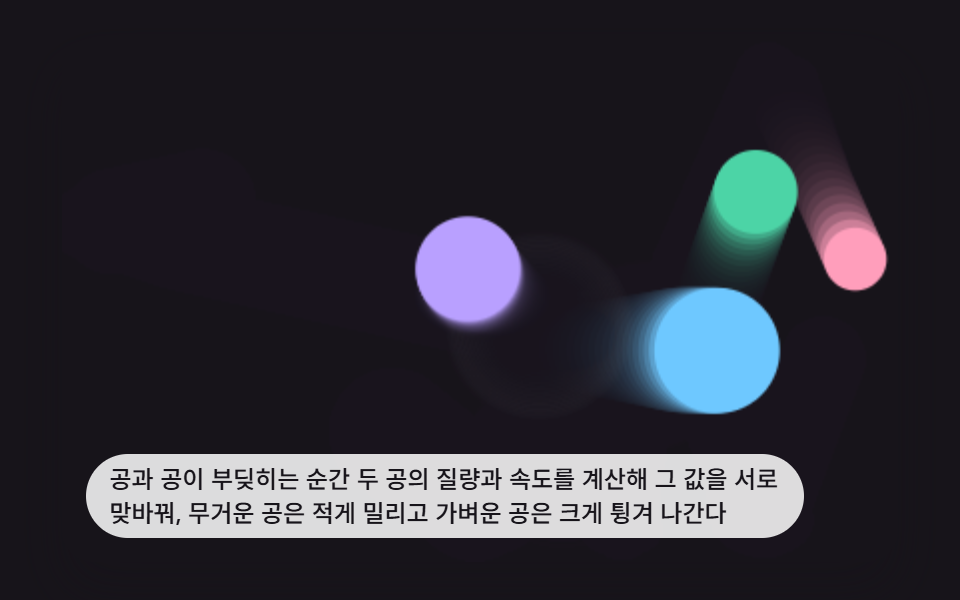 game跳ねるボール アニメーション 9選 — 衝突と重力の物理計算
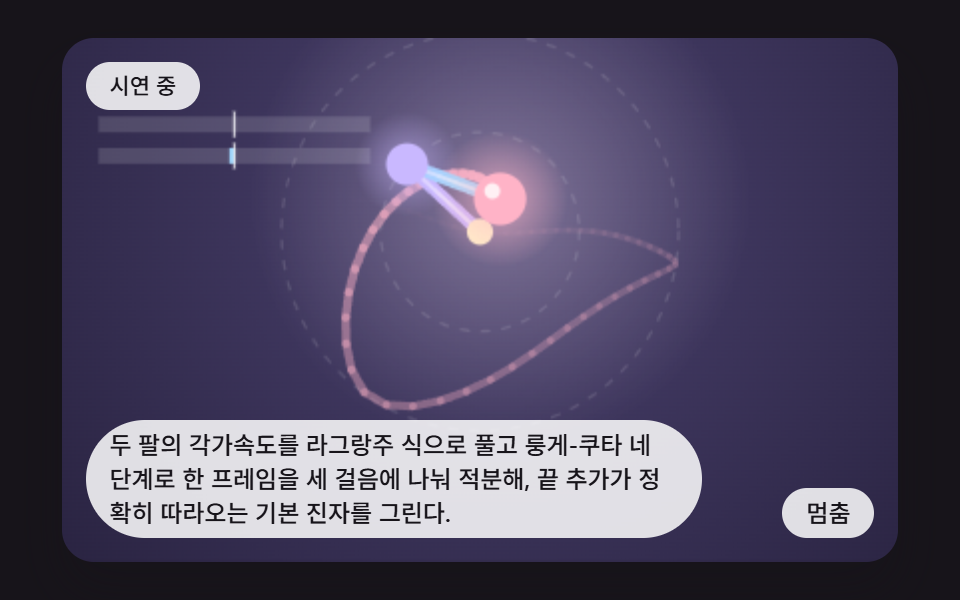 game二重振り子 シミュレーション 9パターン — 誤差ひとつが道を分けるカオス
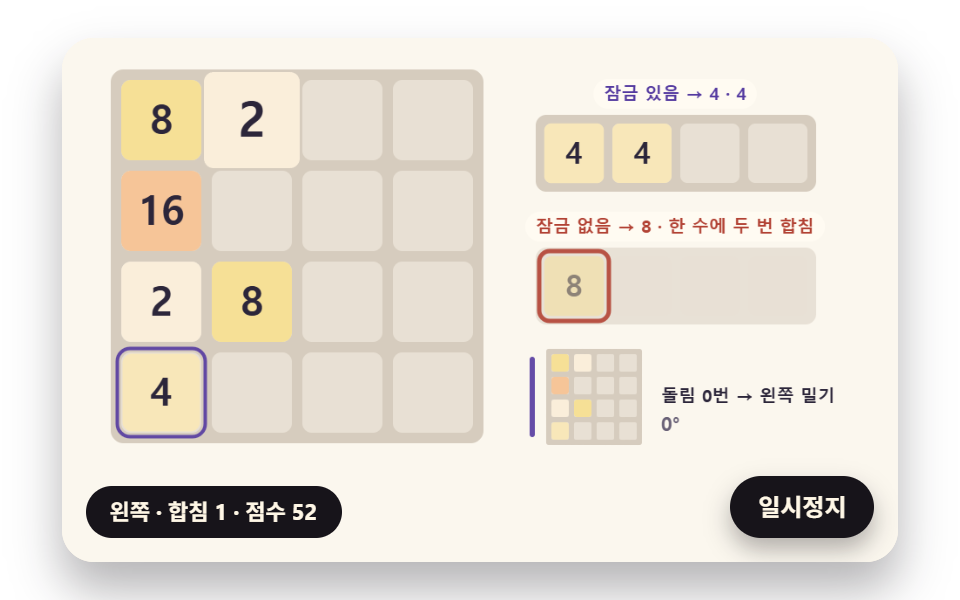 game2048 ゲーム 作り方 9種 — 合体の決まりから自動プレイまで
 gameソート アルゴリズム 可視化 9種 — 隣と入れ替わる棒から色相環を回して並べる円形ソートまで
 gameマインスイーパ 作り方 9種 — 広がって開くマスから確率マップの推理ヒントまで
 gameブロック崩しゲーム 9種 — パドルの反射角から高速球のスイープ衝突と連鎖爆発まで
 gameスライドパズル 9種 — 解ける盤の見分け方から最短手の探索まで
 game数独 9種 — 候補の絞り込みから解がひとつの盤づくりまで
 gameテトリス HTML コード — キャンバスで組む9ステップ
 gameweb ルーレット — 弾いて回し摩擦で止まる回転盤キャンバス9種