08足の通る弧を削る移動の補正
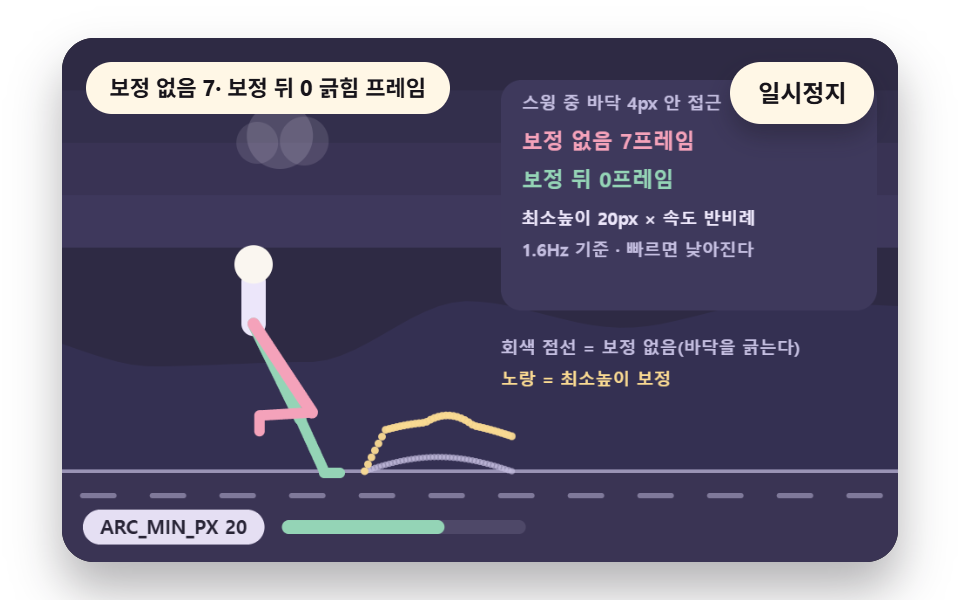
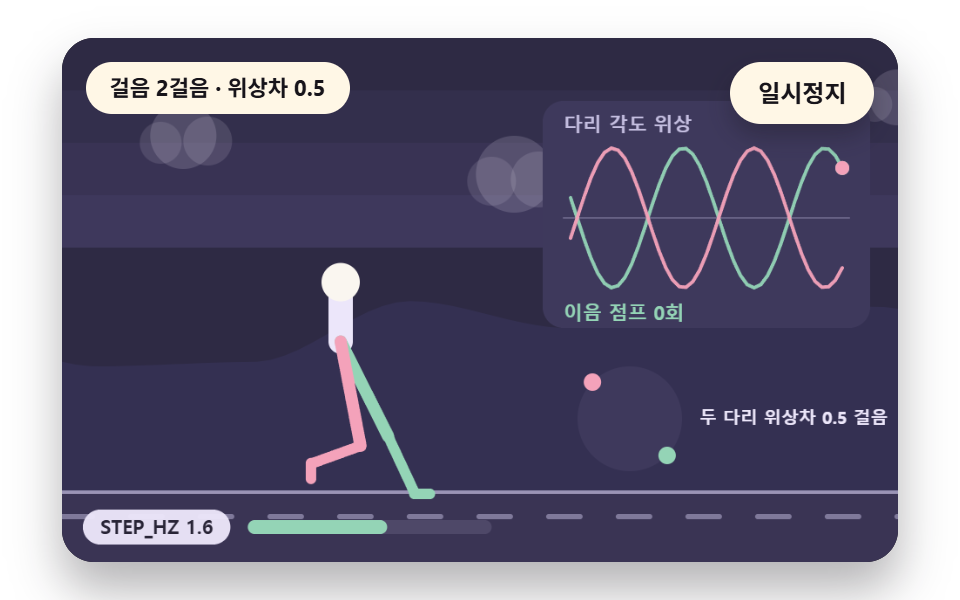
脚の角度をそのまま円弧で描くと、つま先が床をこするように低く通る区間ができます。持ち上げ局面の足の経路に最低の高さを決めて弧を上へ押し上げ、床へ落ちる最後の区間だけを残して接地の直前に降りるようにします。最低の高さARC_MIN_PXの20pxは歩みの速さに反比例して1.6Hzで20px、2.4Hzで13.3pxになり、速い歩みほど弧が低くなって、床の4px以内を通る区間は振りの34%から3%に減ります。
使いどころつま先が床をこえる欠点をなくす経路の補正
ARC_MIN_PXankleYswingKscuffRaw
<main class="stage">
<div class="vj is-demo" id="vj">
  <div class="vj__pad" data-role="pad" tabindex="0" role="application" aria-label="歩行サイクルの舞台 — 左右の矢印キーで歩みの速さを変える、EnterかSpaceで一時停止、Nで一歩、Rで最初から">
    <canvas class="vj__canvas" data-role="canvas" width="480" height="300" role="img" aria-label="脚の角度をそのまま円弧で描くと、つま先が床をこするように低く通る区間ができる。持ち上げ局面の足の経路に最低の高さARC_MIN_PXを決めて弧を上へ押し上げると、接地の直前にだけ降りるようになり、補正の量は歩みの速さに反比例して速い歩みほど弧が低くなる。補正の前後の経路が重ねて描かれ、違いが影で見える。下の目盛りは定数名と今の値を示し、動きを減らす設定では歩みの止まった立ち姿勢一枚だけが描かれます"></canvas>
  </div>
  <p class="vj__status" data-role="status" aria-live="off">歩行サイクルの場面</p>
  <div class="vj__ctrl">
    <button class="vj__pause" data-role="pause" type="button" aria-pressed="false">一時停止</button>
  </div>
  <p class="vj__done" data-role="done" role="status" aria-live="polite"></p>
</div>
</main>
@use "../../../../site/static/demo-tokens" as *;
@include stage($stage-paper);
.vj {
position: relative;
width: min(92vw, calc(160vh - 12.8vw));
aspect-ratio: 480 / 300;
margin: 0 auto;
border-radius: $r-card;
overflow: hidden;
box-shadow: $shadow-raised;
background: $subject-ink;
}
// 무대 상자 — 눌러서 한 번 깨뜨리는 곳(touch-action: none 은 이 상자에만). 무대 밖 터치는 페이지 스크롤 그대로
.vj__pad {
position: absolute;
inset: 0;
border-radius: inherit;
outline: none;
touch-action: none;
cursor: pointer;
}
// 바깥 .vj 가 넘침을 자르므로 포커스 테두리는 안쪽으로 들인다
.vj__pad:focus-visible {
outline: 3px solid $subject-cream;
outline-offset: -3px;
}
.vj__canvas {
position: absolute;
inset: 0;
display: block;
width: 100%;
height: 100%;
}
.vj__ctrl {
position: absolute;
right: $sp-3;
top: $sp-3;
display: flex;
gap: $sp-2;
}
.vj__pause {
padding: $sp-1 $sp-3;
border: 2px solid $subject-cream;
border-radius: $r-pill;
background: $subject-cream;
color: $subject-ink;
font-family: inherit;
font-weight: 700;
font-size: 12px;
line-height: 1.6;
cursor: pointer;
box-shadow: $shadow-press;
transition: transform $dur-quick $ease-spring;
}
// 스크린리더에만 읽히는 낭독 문장 — 모드가 바뀔 때만 쓴다
.vj__done {
position: absolute;
width: 1px;
height: 1px;
margin: 0;
overflow: hidden;
clip-path: inset(50%);
white-space: nowrap;
}
// 눌린 상태(멈춤) — 바탕과 글자색을 뒤집어 aria-pressed 가 눈에도 보이게
.vj__pause[aria-pressed="true"] {
background: $subject-ink;
color: $subject-cream;
}
.vj__pause:hover {
transform: translateY(-2px);
}
.vj__pause:active {
transform: translateY(1px);
}
.vj__pause:focus-visible {
outline: 3px solid $subject-cream;
outline-offset: 3px;
}
// 상태 줄 — 지금 장면의 수치를 글자로. 화면에만 있고 aria-live 는 늘 off
.vj__status {
position: absolute;
left: $sp-3;
top: $sp-3;
max-width: calc(100% - 100px);
margin: 0;
padding: $sp-1 $sp-3;
border-radius: $r-pill;
background: $subject-cream;
color: $subject-ink;
font-weight: 700;
font-size: 11px;
line-height: 1.6;
white-space: nowrap;
overflow: hidden;
text-overflow: ellipsis;
pointer-events: none;
}
@media (max-width: 340px) {
.vj__pause,
.vj__status { font-size: 10px; padding: 0 $sp-2; }
}
// 움직임 줄이기 — 장면은 스크립트가 글리치 없는 원문 한 장으로 멈춘다. 버튼도 떠오르지 않게
@media (prefers-reduced-motion: reduce) {
.vj__pause { transition: none !important; }
.vj__pause:hover,
.vj__pause:active { transform: none !important; }
}html, body {
margin: 0;
overflow: hidden;
}
.stage {
box-sizing: border-box;
min-height: 100vh;
display: grid;
place-items: center;
margin: 0;
background: #ffffff;
font-family: -apple-system, "Segoe UI", "Noto Sans KR", sans-serif;
padding: clamp(8px, 4vw, 24px);
}
.vj {
position: relative;
width: min(92vw, 160vh - 12.8vw);
aspect-ratio: 480/300;
margin: 0 auto;
border-radius: 16px;
overflow: hidden;
box-shadow: 0 14px 24px rgba(23, 20, 26, 0.32);
background: #17141a;
}
.vj__pad {
position: absolute;
inset: 0;
border-radius: inherit;
outline: none;
touch-action: none;
cursor: pointer;
}
.vj__pad:focus-visible {
outline: 3px solid #fff7e6;
outline-offset: -3px;
}
.vj__canvas {
position: absolute;
inset: 0;
display: block;
width: 100%;
height: 100%;
}
.vj__ctrl {
position: absolute;
right: 12px;
top: 12px;
display: flex;
gap: 8px;
}
.vj__pause {
padding: 4px 12px;
border: 2px solid #fff7e6;
border-radius: 999px;
background: #fff7e6;
color: #17141a;
font-family: inherit;
font-weight: 700;
font-size: 12px;
line-height: 1.6;
cursor: pointer;
box-shadow: 0 6px 12px rgba(23, 20, 26, 0.32);
transition: transform 220ms cubic-bezier(0.2, 0.8, 0.2, 1);
}
.vj__done {
position: absolute;
width: 1px;
height: 1px;
margin: 0;
overflow: hidden;
clip-path: inset(50%);
white-space: nowrap;
}
.vj__pause[aria-pressed=true] {
background: #17141a;
color: #fff7e6;
}
.vj__pause:hover {
transform: translateY(-2px);
}
.vj__pause:active {
transform: translateY(1px);
}
.vj__pause:focus-visible {
outline: 3px solid #fff7e6;
outline-offset: 3px;
}
.vj__status {
position: absolute;
left: 12px;
top: 12px;
max-width: calc(100% - 100px);
margin: 0;
padding: 4px 12px;
border-radius: 999px;
background: #fff7e6;
color: #17141a;
font-weight: 700;
font-size: 11px;
line-height: 1.6;
white-space: nowrap;
overflow: hidden;
text-overflow: ellipsis;
pointer-events: none;
}
@media (max-width: 340px) {
.vj__pause,
.vj__status {
font-size: 10px;
padding: 0 8px;
}
}
@media (prefers-reduced-motion: reduce) {
.vj__pause {
transition: none !important;
}
.vj__pause:hover,
.vj__pause:active {
transform: none !important;
}
}(function () {
const root = document.getElementById("vj");
if (!root) return;
// 무대 좌표 — 캔버스 안 계산은 늘 480×300. 화면에 보이는 크기와 상관없다
const W = 480;
const H = 300;
const TAU = Math.PI * 2;
function clamp(v, lo, hi) { return v < lo ? lo : (v > hi ? hi : v); }
function lerp(a, b, k) { return a + (b - a) * k; }
function easeOut(k) { const u = 1 - clamp(k, 0, 1); return 1 - u * u * u; }
// 파스텔 팔레트 — 바탕은 짙은 자두색, 타일은 연한 색 위에 짙은 잉크 숫자
const INK = [40, 36, 54];
const PAPER = [250, 246, 240];
const ROSE = [244, 162, 186];
const MINT = [148, 212, 182];
const SKY = [150, 192, 244];
const SUN = [250, 218, 146];
const NEU = [236, 230, 250];
const BGC = [46, 42, 68];
const PANEL = [62, 57, 92];
const DIM = [196, 190, 224];
function rgba(c, a) {
return 'rgba(' + Math.round(clamp(c[0], 0, 255)) + ',' + Math.round(clamp(c[1], 0, 255)) + ',' + Math.round(clamp(c[2], 0, 255)) + ',' + clamp(a, 0, 1).toFixed(3) + ')';
}
function hsl(h, s, l) {
const a = s * Math.min(l, 1 - l);
const f = function (n) {
const k = (n + h / 30) % 12;
return l - a * Math.max(-1, Math.min(k - 3, Math.min(9 - k, 1)));
};
return [Math.round(f(0) * 255), Math.round(f(8) * 255), Math.round(f(4) * 255)];
}
// 정수 해시 — 같은 (a, b) 에는 늘 같은 0 이상 1 미만 값. 난수 함수는 쓰지 않는다
function hash2(a, b) {
let h = (Math.imul(a | 0, 374761393) + Math.imul(b | 0, 668265263)) | 0;
h = Math.imul(h ^ (h >>> 13), 1274126177);
h = h ^ (h >>> 16);
return (h >>> 0) / 4294967296;
}
// 2차원 값 잡음 — 정수 격자점마다 해시 값이 있고 그 사이를 부드럽게 잇는다
function noise2(x, y, seed) {
const xi = Math.floor(x);
const yi = Math.floor(y);
const fx = x - xi;
const fy = y - yi;
const ux = fx * fx * (3 - 2 * fx);
const uy = fy * fy * (3 - 2 * fy);
const s = seed * 131;
return lerp(lerp(hash2(xi + s, yi), hash2(xi + 1 + s, yi), ux), lerp(hash2(xi + s, yi + 1), hash2(xi + 1 + s, yi + 1), ux), uy);
}
// 장면 시계(秒)·판 반복 번호·시간표 — 시간표는 (시각, 할 일) 목록이고 시각이 지나면 한 번씩 부른다
let sceneT = 0;
let lap = 0;
let script = [];
let evAt = 0;
// 문구 틀의 {a}·{b}·{c} 자리에 값을 끼운다 — 화면 문구는 늘 틀 한 줄이고 로케일 사전이 통째로 바꾼다
function fill(s, a, b, c) {
return s.split('{a}').join(a).split('{b}').join(b === undefined ? '' : b).split('{c}').join(c === undefined ? '' : c);
}
function r1(v) { return String(Math.round(v * 10) / 10); }
function group(v) {
// 천 단위 점 — 로케일 함수에 기대지 않는다
const s = String(Math.round(v));
let o = '';
for (let i = 0; i < s.length; i += 1) {
if (i > 0 && (s.length - i) % 3 === 0) {
o += ',';
}
o += s.charAt(i);
}
return o;
}
// 기본값 상수 — 변형 3개(STEP_HZ·STRIDE_DEG·LEG_RATIO)가 이 줄의 값을 바꾼다
const STEP_HZ = 1.6;
const STRIDE_DEG = 28;
const LEG_PX = 90;
const LEG_RATIO = 0.48;
const CONTACT_SHARE = 0.6;
const GAIT = { stepHz: STEP_HZ, strideDeg: STRIDE_DEG, legPx: LEG_PX, legRatio: LEG_RATIO, contactShare: CONTACT_SHARE };
// walkT 는 걸음 시간으로만 오르는 시계(秒). phase 는 一歩 위상 0~1, cyclePhase 는 두 걸음 위상 0~2
let walkT = 0;
function stepPhase() { return (walkT * GAIT.stepHz) % 1; }
function cyclePhase() { return (walkT * GAIT.stepHz) % 2; }
function stepIndex() { return Math.floor(walkT * GAIT.stepHz); }
// 다리별 一歩 위상 — 왼다리가 정수 걸음, 오른다리가 반 걸음 어긋난다
function legPhase(right) { return ((walkT * GAIT.stepHz) + (right ? 0.5 : 0)) % 1; }
// 接地 국면 판정 — ph 가 contactShare 안이면 발이 바닥에 붙어 있다
function inStance(ph) { return ph < GAIT.contactShare; }
// 五つの局面 — 接地(0~0.12) · 抵抗(0.12~0.3) · 中間(0.3~0.45) · 蹴り出し(0.45~contactShare) · 持ち上げ(나머지)
const PH5 = [
{ name: '接地', a: 0, b: 0.12, col: null },
{ name: '抵抗', a: 0.12, b: 0.3, col: null },
{ name: '中間', a: 0.3, b: 0.45, col: null },
{ name: '蹴り出し', a: 0.45, b: 0.6, col: null },
{ name: '持ち上げ', a: 0.6, b: 1, col: null },
];
function phaseName(ph) {
for (let i = 0; i < PH5.length; i += 1) {
if (ph >= PH5[i].a && ph < PH5[i].b) {
return PH5[i].name;
}
}
return '持ち上げ';
}
// 라디안 변환 — 각도 값은 도 단위 상수로 두고 계산 직전에만 바꾼다
function rad(deg) { return deg * Math.PI / 180; }
function solveFoot(hipX, hipY, ph, plantX, slopeDeg, groundY) {
const leg = GAIT.legPx;
const L1 = leg / (1 + GAIT.legRatio);
const L2 = leg * GAIT.legRatio / (1 + GAIT.legRatio);
let ax;
let ay;
let ankleDeg;
const planted = inStance(ph);
if (planted) {
ax = plantX;
ay = groundY;
ankleDeg = -slopeDeg;
}
else {
const k = (ph - GAIT.contactShare) / (1 - GAIT.contactShare);
const half = rad(GAIT.strideDeg);
const ang = lerp(half, -half, k);
ax = hipX + Math.sin(ang) * leg;
ay = groundY - Math.abs(Math.sin(Math.PI * k)) * leg * 0.22;
ankleDeg = 90 - slopeDeg;
}
const dx = ax - hipX;
const dy = ay - hipY;
let d = Math.hypot(dx, dy);
d = Math.min(d, L1 + L2 - 0.01);
const base = Math.atan2(dy, dx);
const cosK = (L1 * L1 + d * d - L2 * L2) / (2 * L1 * d);
const elbow = Math.acos(clamp(cosK, -1, 1));
const kneeAng = base - elbow;
return { ax: ax, ay: ay, kneeX: hipX + Math.cos(kneeAng) * L1, kneeY: hipY + Math.sin(kneeAng) * L1, ankleDeg: ankleDeg, planted: planted };
}
// 몸 높이 — 接地 국면 中間(다리가 곧게 펴는 ph=0.3 부근)이 가장 높고 이중 接地(두 발 다 지면)에서 살짝 낮아진다
function hipHeight(ph) {
const bob = Math.sin(ph * Math.PI * 2 - Math.PI / 2);
return GAIT.legPx * (0.93 + 0.04 * bob);
}
// 몸 앞뒤 기울기 — 내리막에서 앞으로 숙여 다리 회복 시간을 번다
function leanDeg(slopeDeg) { return slopeDeg < 0 ? slopeDeg * 0.5 : slopeDeg * 0.25; }
let plants = [null, null]; // [왼, 오른]
// 接地 시작 ph(=0 또는 contactShare 근처)에서 plantX 를 몸 위치로부터 한 번만 풀어 저장한다
function lockPlants(hipX) {
for (let r = 0; r < 2; r += 1) {
const ph = legPhase(r === 1);
const otherPh = legPhase(r === 0);
if (inStance(ph) && plants[r] === null) {
const half = rad(GAIT.strideDeg);
const k = ph / GAIT.contactShare;
const ang = lerp(half, -half, k);
const px = hipX + Math.sin(ang) * GAIT.legPx;
plants[r] = { x: px, ph0: ph };
}
if (!inStance(ph)) {
plants[r] = null;
}
}
}
function plantXOf(r, hipX) {
const p = plants[r];
if (p !== null) {
return p.x;
}
return hipX;
}
// ── 그리기 도구
const canvasEl = root.querySelector('[data-role="canvas"]');
const padEl = root.querySelector('[data-role="pad"]');
const pauseEl = root.querySelector('[data-role="pause"]');
const statusEl = root.querySelector('[data-role="status"]');
const doneEl = root.querySelector('[data-role="done"]');
const ctxRaw = canvasEl ? canvasEl.getContext('2d') : null;
if (!canvasEl || !ctxRaw || !pauseEl || !padEl || !doneEl) {
return;
}
const cv = canvasEl;
const ctx = ctxRaw;
const pauseBtn = pauseEl;
const doneP = doneEl;
const pad = padEl;
// 외부 웹폰트는 부르지 않는다 — 기기에 있는 글꼴 목록만
const UI_FONT = 'system-ui, -apple-system, "Segoe UI", "Noto Sans KR", sans-serif';
let dpr = 1;
function fitCanvas() {
// 배율은 2 에서 자른다 — 계산은 늘 480×300 이고 화면 배율만 이 값
dpr = Math.min(window.devicePixelRatio || 1, 2);
cv.width = Math.round(W * dpr);
cv.height = Math.round(H * dpr);
ctx.setTransform(dpr, 0, 0, dpr, 0, 0);
}
function box(x, y, w, h, r, c, a) {
if (w <= 0.2 || h <= 0.2 || a <= 0) {
return;
}
ctx.beginPath();
ctx.roundRect(x, y, w, h, Math.max(0, Math.min(r, w / 2, h / 2)));
ctx.fillStyle = rgba(c, a);
ctx.fill();
}
function disc(x, y, r, c, a) {
ctx.beginPath();
ctx.arc(x, y, r, 0, TAU);
ctx.fillStyle = rgba(c, a);
ctx.fill();
}
function seg(x1, y1, x2, y2, c, a, w) {
ctx.beginPath();
ctx.moveTo(x1, y1);
ctx.lineTo(x2, y2);
ctx.strokeStyle = rgba(c, a);
ctx.lineWidth = w;
ctx.lineCap = 'round';
ctx.stroke();
}
function text(s, x, y, c, px, weight, align) {
ctx.font = weight + ' ' + px + 'px ' + UI_FONT;
ctx.textAlign = align;
ctx.textBaseline = 'middle';
ctx.fillStyle = rgba(c, 1);
ctx.fillText(s, x, y);
}
function panel(x, y, w, h) { box(x, y, w, h, 12, PANEL, 1); }
// 아래쪽 눈금 — 상수 이름과 지금 값 · 크기 막대
function hud(name, val, frac) {
const label = name + ' ' + val;
ctx.font = '700 11px ' + UI_FONT;
const w = ctx.measureText(label).width + 20;
const x = 12;
const y = H - 30;
box(x, y, w, 20, 10, NEU, 0.96);
text(label, x + w / 2, y + 10.5, INK, 11, 700, 'center');
const mx = x + w + 10;
box(mx, y + 6, 140, 8, 4, [78, 72, 104], 1);
box(mx, y + 6, 140 * clamp(frac, 0, 1), 8, 4, MINT, 1);
}
// ── 상태 줄·낭독 문장
const SPK_STEP = '歩数 {a} 歩、サイクルの局面 {b}';
function speakBoard() {
return fill(SPK_STEP, String(stepIndex()), phaseName(legPhase(false)));
}
let shownStatus = '';
function pushStatus(s) {
if (!statusEl || s === shownStatus) {
return;
}
shownStatus = s;
statusEl.textContent = s;
}
let paused = false;
// 움직임 줄이기 — 켜지면 루프 대신 정지 한 장
let still = false;
const reduceQuery = window.matchMedia('(prefers-reduced-motion: reduce)');
// 페이지를 연 채 움직임 줄이기 설정을 바꿔도 change 리스너가 다시 읽는다
still = reduceQuery.matches;
// 자동 시연 표시 — 사람이 처음 손대면 떼고, 그 뒤부터 모드가 바뀔 때만 낭독 문장을 쓴다
let demo = root.classList.contains('is-demo');
const off = new AbortController();
// 사람이 직접 조작하는 중이면 시간표는 멈추고 계산만 흐른다
let manual = false;
function wake() {
if (!demo) {
return;
}
demo = false;
root.classList.remove('is-demo');
}
function takeOver() {
if (manual) {
return;
}
manual = true;
wake();
}
// 낭독 모드 — 완성이면 1000, 손으로 하는 중이면 맞은 타일 수, 자동 시연이면 장면이 정한 단계
function modeBase(sceneMode) {
return manual ? 100 + Math.floor(hipHeight(legPhase(false))) : sceneMode;
}
// 낭독 문장 — 화면 상태 줄(aria-live off)과 따로, 모드가 바뀔 때와 사람이 조작했을 때만 role=status 에 쓴다
let lastMode = -9;
function say() {
doneP.textContent = speakText();
lastMode = still ? -2 : modeId();
}
function advance(dt) {
sceneT += dt;
walkT += dt;
if (!manual) {
while (evAt < script.length && script[evAt].t <= sceneT) {
const ev = script[evAt];
evAt += 1;
ev.f();
}
if (sceneT >= LAP_S) {
lap += 1;
begin();
return;
}
}
update(dt);
}
function begin() {
sceneT = 0;
walkT = lap * 0; // 걸음 시계는 장면과 함께 0 에서 다시 시작 — 같은 시간표면 같은 걸음
evAt = 0;
script = [];
build();
}
// 고정 걸음 + 歩数 상한 — 프레임 간격이 흔들려도 같은 계산, 탭이 멈췄다 돌아와도 한 번에 몰리지 않는다
const STEP_S = 1 / 60;
const DT_MAX = 0.05;
let acc = 0;
function showNow() {
draw();
pushStatus(statusText());
if (!demo) {
const m = still ? -2 : modeId();
if (m !== lastMode) {
say();
}
}
}
let rafId = 0;
let lastTs = -1;
function frame(ts) {
if (still || paused) {
rafId = 0;
return;
}
if (lastTs < 0) {
lastTs = ts;
}
const dt = Math.min((ts - lastTs) / 1000, DT_MAX);
lastTs = ts;
acc += dt;
while (acc >= STEP_S) {
advance(STEP_S);
acc -= STEP_S;
}
showNow();
rafId = window.requestAnimationFrame(frame);
}
function startLoop() {
if (rafId) {
return;
}
// 멈췄던 사이의 시간을 첫 프레임 dt 로 넘기지 않는다
lastTs = -1;
acc = 0;
rafId = window.requestAnimationFrame(frame);
}
function stopLoop() {
if (rafId) {
window.cancelAnimationFrame(rafId);
rafId = 0;
}
}
// 움직임 줄이기 — 루프 없이 시간표의 REST_S 초까지를 한 번에 치른 장면 한 컷. 캐릭터는 걸음 보간 없이 그 시점의 자리에 바로 선다
function showRest() {
stopLoop();
lap = 0;
begin();
walkT = REST_S;
while (evAt < script.length && script[evAt].t <= REST_S) {
const ev = script[evAt];
evAt += 1;
sceneT = ev.t;
ev.f();
}
sceneT = REST_S;
update(0);
showNow();
}
function play() {
begin();
showNow();
if (!paused) {
startLoop();
}
}
// 사람이 조작한 뒤 — 멈춘 채이거나 움직임 줄이기이면 보간을 건너뛰어 바로 보이게 한다. 조작 직후는 낭독 문장도 쓴다
function afterInput(speak) {
if (paused || still) {
sceneT += 1;
}
update(0);
showNow();
if (speak) {
say();
}
}
function togglePause() {
paused = !paused;
pauseBtn.setAttribute('aria-pressed', paused ? 'true' : 'false');
wake();
if (paused) {
stopLoop();
}
else if (!still) {
startLoop();
}
say();
}
function restart() {
manual = false;
lap = 0;
begin();
update(0);
showNow();
say();
}
// N 一歩 — 시간표의 다음 일 하나를 지금 치른다. 시간표가 끝났으면 처음부터 다시 짠 뒤 첫 일
function stepOnce() {
takeOver();
if (evAt >= script.length) {
lap += 1;
begin();
}
if (evAt < script.length) {
const ev = script[evAt];
evAt += 1;
if (sceneT < ev.t) {
sceneT = ev.t;
}
ev.f();
}
afterInput(true);
}
function keyMove(dx, dy) {
// 좌우 방향키 = 걸음 속도 한 단계 조절. 위·아래는 항목이 keyHook 로 따로 받는다
if (dx !== 0) {
GAIT.stepHz = clamp(Math.round((GAIT.stepHz + dx * 0.4) * 10) / 10, 0.8, 2.8);
}
else if (keyHook !== null) {
keyHook(dy < 0 ? 'ArrowUpHint' : 'ArrowDownHint');
return;
}
takeOver();
afterInput(true);
}
function toCanvas(e) {
const r = cv.getBoundingClientRect();
return [(e.clientX - r.left) * W / r.width, (e.clientY - r.top) * H / r.height];
}
pauseBtn.addEventListener('click', togglePause, { signal: off.signal });
// 키보드 — 무대에 포커스가 있을 때만. 방향키 = 빈칸 이웃 타일 이동, Enter·Space = 一時停止, N = 一歩, R = 처음부터
pad.addEventListener('keydown', function (e) {
if (e.altKey || e.ctrlKey || e.metaKey) {
return;
}
const k = e.key;
if (k === 'Enter' || k === ' ' || k === 'p' || k === 'P') {
e.preventDefault();
togglePause();
}
else if (k === 'r' || k === 'R') {
restart();
}
else if (k === 'n' || k === 'N') {
e.preventDefault();
stepOnce();
}
else if (k === 'ArrowLeft') {
e.preventDefault();
keyMove(-1, 0);
}
else if (k === 'ArrowRight') {
e.preventDefault();
keyMove(1, 0);
}
else if (k === 'ArrowUp') {
e.preventDefault();
keyMove(0, -1);
}
else if (k === 'ArrowDown') {
e.preventDefault();
keyMove(0, 1);
}
else if (keyHook !== null && keyHook(k)) {
e.preventDefault();
takeOver();
afterInput(true);
}
}, { signal: off.signal });
// 포인터 — 마우스·터치·펜을 한 이벤트로. 누르는 순간부터 놓을 때까지 무대가 포인터를 붙잡는다
let ptrDown = false;
// 장면이 방향키·Enter·N·R 밖의 키를 받고 싶을 때 거는 갈고리 — 먹었으면 true
let keyHook = null;
pad.addEventListener('pointerdown', function (e) {
takeOver();
ptrDown = true;
try {
pad.setPointerCapture(e.pointerId);
}
catch (err) {
ptrDown = true;
}
const p = toCanvas(e);
onPtr(0, p[0], p[1]);
afterInput(false);
}, { signal: off.signal });
pad.addEventListener('pointermove', function (e) {
if (!ptrDown) {
return;
}
const p = toCanvas(e);
onPtr(1, p[0], p[1]);
afterInput(false);
}, { signal: off.signal });
function ptrEnd(e) {
if (!ptrDown) {
return;
}
ptrDown = false;
const p = toCanvas(e);
onPtr(2, p[0], p[1]);
afterInput(true);
}
pad.addEventListener('pointerup', ptrEnd, { signal: off.signal });
pad.addEventListener('pointercancel', ptrEnd, { signal: off.signal });
// 탭이 숨으면 멈추고, 돌아오면 시계를 다시 맞춰 시작
document.addEventListener('visibilitychange', function () {
if (document.hidden) {
stopLoop();
}
else if (!paused && !still) {
startLoop();
}
}, { signal: off.signal });
// 설정이 바뀌면 — 켜지면 판 한 장, 꺼지면 다시 움직인다
reduceQuery.addEventListener('change', function () {
still = reduceQuery.matches;
if (still) {
showRest();
}
else {
lap = 0;
play();
}
}, { signal: off.signal });
window.addEventListener('resize', function () {
fitCanvas();
showNow();
}, { signal: off.signal });
// ── 캐릭터 그리기 — 자체 도형 캐릭터(머리·몸통·2링크 다리 2·팔 2). 브랜드 캐릭터 아님
// limb(x1, y1, x2, y2, 색, 굵기) — 관절 두 점을 잇는 둥근 막대
function limb(x1, y1, x2, y2, c, w) {
seg(x1, y1, x2, y2, c, 1, w);
}
// footShape(x, y, ankleDeg, 색) — 발바닥. ankleDeg 는 바닥 기준 도 단위(0 = 바닥에 평평)
function footShape(x, y, ankleDeg, c) {
ctx.save();
ctx.translate(x, y);
ctx.rotate(ankleDeg * Math.PI / 180);
box(-3, -2, 15, 6, 3, c, 1);
ctx.restore();
}
// drawGround(y, slopeDeg) — 기울어진 바닥면. y 는 화면 가운데서의 기준 높이.
// groundV > 0 이면 바닥의 눈금 줄무늬가 그 속도로 왪쪽으로 흘러 간다 — 몸이 앞으로 가는 속도의 시각화
let groundV = 0;
function drawGround(y, slopeDeg) {
// 기울기가 있으면 화면 가운데 x=W/2 에서 높이 y 인 직선 — groundYAt 과 같은식
const y0 = groundYAt(0, y, slopeDeg);
const y1 = groundYAt(W, y, slopeDeg);
// 받침 띠 — 바닥선 아래 옅은 색 띠
ctx.beginPath();
ctx.moveTo(0, y0);
ctx.lineTo(W, y1);
ctx.lineTo(W, H);
ctx.lineTo(0, H);
ctx.closePath();
ctx.fillStyle = rgba([58, 52, 84], 1);
ctx.fill();
seg(0, y0, W, y1, DIM, 0.7, 2);
// 눈금 줄무늬 — 걸음이 밀어 내는 속도로 흘러 간다. 간격 40px, 길이 18px
if (groundV > 0) {
const gap = 40;
const off = (walkT * groundV) % gap;
for (let x = -gap; x < W + gap; x += gap) {
const sx = x - off;
seg(sx, groundYAt(sx + 9, y, slopeDeg) + 14, sx + 18, groundYAt(sx + 27, y, slopeDeg) + 14, DIM, 0.5, 3);
}
}
}
// drawScenery() — 걷는 세계의 경물 층. 하늘 그라디언트 띠·언덕·구름·가로등이 groundV 에 비례해 뒤로 흐른다.
// 배경 톤 전체가 걸음 속도 값의 전파 범위다 — 몸이 앞으로 간다는 감각을 화면 전체가 받친다(BD26: 면적을 장식이 아니라 값의 전파로)
function drawScenery() {
// 바탕 — 하늘 띠와 언덕 사이 빈 구간이 지워지지 않아 캐릭터 자국이 번졌다. 먼저 한 번 칠한다
box(0, 0, W, H, 0, BGC, 1);
// 하늘 — 세로 옅은 띠 4개. 걸음 위상에 따라 명도가 살짝 숨쉰다
const skyT = Math.sin(walkT * GAIT.stepHz * Math.PI);
for (let i = 0; i < 4; i += 1) {
const t = i / 3;
const c = [lerp(46, 62, t), lerp(42, 56, t), lerp(68, 92, t)];
box(0, i * 30, W, 30, 0, c, 1);
}
// 먼 언덕 — noise2 로 굽이친다. 걸음 속도의 0.35배로 흐른다(원근 감쇠)
if (groundV > 0) {
const scroll = walkT * groundV * 0.35;
ctx.beginPath();
ctx.moveTo(0, H);
for (let x = 0; x <= W; x += 8) {
const yy = 168 + noise2((x + scroll) / 90, 3, 11) * 46 - 20;
ctx.lineTo(x, yy);
}
ctx.lineTo(W, H);
ctx.closePath();
ctx.fillStyle = rgba([52, 48, 82], 1);
ctx.fill();
// 구름 세 점 — 0.6배 속도
const cs = walkT * groundV * 0.6;
for (let i = 0; i < 3; i += 1) {
const cx = ((i * 190 + 60 - cs) % (W + 120) + W + 120) % (W + 120) - 60;
const cy = 34 + i * 22;
disc(cx, cy, 16 + i * 3, NEU, 0.16);
disc(cx + 14, cy + 3, 12 + i * 2, NEU, 0.13);
disc(cx - 13, cy + 4, 10 + i * 2, NEU, 0.12);
}
// 가까운 풀 다발 — 1.15배 속도(지면보다 살짝 빠른 근경)
const gs = walkT * groundV * 1.15;
for (let i = 0; i < 14; i += 1) {
const gx = ((i * 46 + 20 - gs) % (W + 60) + W + 60) % (W + 60) - 30;
const gy = H - 14 - (i % 3) * 6;
seg(gx, gy, gx - 4, gy - 12, MINT, 0.35, 2);
seg(gx + 2, gy, gx + 6, gy - 10, MINT, 0.3, 2);
}
}
}
// groundYAt(x, baseY, slopeDeg) — 경사식: 기울기가 있으면 x 에서의 바닥 높이
function groundYAt(x, baseY, slopeDeg) {
return baseY + (x - W / 2) * Math.tan(rad(slopeDeg)) * -1;
} // 08 — 다리 각도를 그대로 원호로 그리면 발끝이 바닥을 긁듯 낮게 지나가는 구간이 생긴다.
// 持ち上げ 국면의 발 경로에 최소높이 ARC_MIN_PX 를 정해 호를 위로 밀어 올리면 接地 직전에만 내려온다.
// 보정량은 걸음 속도에 반비례 — 빠른 걸음일수록 호가 낮다. 보정 앞·뒤 경로를 겹쳐 차이를 음영으로.
const LAP_S = 7.2;
const REST_S = 2.4;
const GROUND_Y = 248;
const CHAR_X = 110;
const PHX = 252;
const ARC_MIN_PX = 20;
// 스윙 경로 — raw(보정 없음) 와 corrected(최소높이) 두 계산
function swingY(k, corrected, speedScale) {
const leg = GAIT.legPx;
const half = rad(GAIT.strideDeg);
const ang = lerp(half, -half, k);
const rawY = groundYRaw(ang, leg);
if (!corrected) {
return rawY;
}
// 최소높이 — 걸음 속도에 반비례(1.6Hz 기준 1.0배)
const minH = ARC_MIN_PX * clamp(1.6 / GAIT.stepHz, 0.5, 2) * speedScale;
// 마지막 15% 에서만 바닥으로 내려온다
const drop = k > 0.85 ? (k - 0.85) / 0.15 : 0;
const lift = Math.max(minH * (1 - drop), Math.abs(Math.sin(Math.PI * Math.min(k / 0.85, 1))) * minH * 1.4);
return rawY - lift;
}
function groundYRaw(ang, leg) {
return GROUND_Y - Math.abs(Math.cos(ang)) * 0; // 발목 y — 다리가 완전히 펴진 원호면 바닥 근처
}
// 실제 스윙 궤적은 발목이 원호를 그린다 — ankleArc 로 다시 정의(위 groundYRaw 자리)
function ankleArcY(k) {
const half = rad(GAIT.strideDeg);
const ang = lerp(half, -half, k);
return GROUND_Y - Math.sin(Math.PI * k) * GAIT.legPx * 0.1 - Math.cos(ang) * 0;
}
let scuffRaw = 0;
let scuffFix = 0;
function build() {
scuffRaw = 0;
scuffFix = 0;
groundV = Math.sin(rad(GAIT.strideDeg)) * GAIT.legPx * 2 * GAIT.stepHz;
}
function update(dt) {
if (dt <= 0) {
return;
}
// 스윙 국면에서 바닥 4px 안을 스치는 프레임 수 세기 — raw 판과 보정 판
const k = swingK();
if (k >= 0) {
const rawH = GROUND_Y - ankleY(k, false);
const fixH = GROUND_Y - ankleY(k, true);
if (rawH < 4) {
scuffRaw += 1;
}
if (fixH < 4) {
scuffFix += 1;
}
}
}
function swingK() {
const ph = legPhase(true);
if (inStance(ph)) {
return -1;
}
return (ph - GAIT.contactShare) / (1 - GAIT.contactShare);
}
// 발목 y — raw(원호 그대로) vs corrected(최소높이)
function ankleY(k, corrected) {
const half = rad(GAIT.strideDeg);
const ang = lerp(half, -half, k);
const rawY = GROUND_Y - Math.sin(Math.PI * k) * GAIT.legPx * 0.09;
if (!corrected) {
return rawY;
}
const minH = ARC_MIN_PX * clamp(1.6 / GAIT.stepHz, 0.5, 2);
const drop = k > 0.85 ? (k - 0.85) / 0.15 : 0;
const lift = Math.max(minH * (1 - drop), Math.sin(Math.PI * Math.min(k / 0.85, 1)) * minH * 1.2);
return rawY - lift;
}
function draw() {
drawScenery();
drawGround(GROUND_Y, 0);
// 캐릭터 — 오른다리는 보정된 경로로 걷는다
const hipY = GROUND_Y - hipHeight(legPhase(false));
const hipX = CHAR_X;
lockPlants(hipX);
limb(hipX, hipY, hipX, hipY - 24, NEU, 14);
disc(hipX, hipY - 34, 11, PAPER, 1);
for (let r = 0; r < 2; r += 1) {
const ph = legPhase(r === 1);
const k = (ph - GAIT.contactShare) / (1 - GAIT.contactShare);
let px = plantXOf(r, hipX);
let ay = GROUND_Y;
if (!inStance(ph)) {
const half = rad(GAIT.strideDeg);
const ang = lerp(half, -half, k);
px = hipX + Math.sin(ang) * GAIT.legPx;
ay = ankleY(k, true);
}
// solveFoot 와 같은식 — 발목 y 는 화면 좌표(바닥 GROUND_Y 기준)
const leg2 = GAIT.legPx;
const L1 = leg2 / (1 + GAIT.legRatio);
const L2 = leg2 * GAIT.legRatio / (1 + GAIT.legRatio);
const dy = ay - hipY;
let d = Math.min(Math.hypot(px - hipX, dy), L1 + L2 - 0.01);
const baseA = Math.atan2(dy, px - hipX);
const cosK = (L1 * L1 + d * d - L2 * L2) / (2 * L1 * d);
const elbowA = Math.acos(clamp(cosK, -1, 1));
const kneeAng = baseA - elbowA;
const kx = hipX + Math.cos(kneeAng) * L1;
const ky = hipY + Math.sin(kneeAng) * L1;
limb(hipX, hipY, kx, ky, r === 0 ? MINT : ROSE, 7);
limb(kx, ky, px, ay, r === 0 ? MINT : ROSE, 6);
footShape(px, ay, inStance(ph) ? 0 : 90, r === 0 ? MINT : ROSE);
}
// 경로 비교 — raw(회색 점선) vs corrected(노랑). 같은 x 축에서 발목 높이
const ox = 216;
const oy = GROUND_Y;
for (let k = 0; k <= 40; k += 1) {
const kk = k / 40;
const half = rad(GAIT.strideDeg);
const ang = lerp(half, -half, kk);
const px = ox + Math.sin(ang) * GAIT.legPx;
disc(px, ankleY(kk, false), 1.8, DIM, 0.7);
disc(px, ankleY(kk, true), 2.2, SUN, 0.95);
}
// 바닥 긁힘 구간 표시 — raw 경로가 바닥 4px 안에 드는 x 범위
text('灰色の点線 = 補正なし(床をこする)', PHX, 178, DIM, 10, 700, 'left');
text('黄 = 最低の高さの補正', PHX, 196, SUN, 10, 700, 'left');
// 오른쪽 패널 — 긁힘 프레임 수 비교
panel(PHX, 24, 216, 132);
text('振りの間に床の4px以内へ近づく', PHX + 12, 38, DIM, 10, 700, 'left');
text(fill('補正なし {a} コマ', String(scuffRaw)), PHX + 12, 60, ROSE, 12, 700, 'left');
text(fill('補正後 {a} コマ', String(scuffFix)), PHX + 12, 82, MINT, 12, 700, 'left');
text(fill('最低の高さ {a} px・速さに反比例', String(ARC_MIN_PX)), PHX + 12, 104, NEU, 10, 700, 'left');
text('1.6Hz基準・速いと低くなる', PHX + 12, 122, DIM, 10, 700, 'left');
hud('ARC_MIN_PX', String(ARC_MIN_PX), ARC_MIN_PX / 30);
}
function statusText() {
return fill('こすれコマは補正なし {a}・補正後 {b}', String(scuffRaw), String(scuffFix));
}
function modeId() { return modeBase(Math.min(3, Math.floor(sceneT / 2.5))); }
function speakText() { return speakBoard(); }
function onDir(d) { keyMove(d === 0 ? 1 : d === 1 ? -1 : 0, 0); }
function onPtr(kind, x, y) { if (kind !== 0) {
return;
} GAIT.stepHz = clamp(GAIT.stepHz + (x > W / 2 ? 0.2 : -0.2), 0.8, 2.8); }
fitCanvas();
if (still) {
showRest();
}
else {
play();
}
return function () {
stopLoop();
off.abort();
};
})();// FootArcCorrect - 같은 항목 vanilla index.html 의 React 판. 같은 계산을 useEffect 안에서 돌린다
import { useEffect, useRef } from "react";
import styles from "./FootArcCorrect.module.scss";
const cx = (s: string): string => s.split(" ").map((n) => styles[n] ?? n).join(" ");
export default function FootArcCorrect() {
const rootRef = useRef<HTMLDivElement | null>(null);
useEffect(() => {
const rootEl = rootRef.current;
if (!rootEl) return;
const root: HTMLElement = rootEl;
type RGB = [number, number, number];
// 무대 좌표 — 캔버스 안 계산은 늘 480×300. 화면에 보이는 크기와 상관없다
const W = 480;
const H = 300;
const TAU = Math.PI * 2;
function clamp(v: number, lo: number, hi: number): number { return v < lo ? lo : (v > hi ? hi : v); }
function lerp(a: number, b: number, k: number): number { return a + (b - a) * k; }
function easeOut(k: number): number { const u = 1 - clamp(k, 0, 1); return 1 - u * u * u; }
// 파스텔 팔레트 — 바탕은 짙은 자두색, 타일은 연한 색 위에 짙은 잉크 숫자
const INK: RGB = [40, 36, 54];
const PAPER: RGB = [250, 246, 240];
const ROSE: RGB = [244, 162, 186];
const MINT: RGB = [148, 212, 182];
const SKY: RGB = [150, 192, 244];
const SUN: RGB = [250, 218, 146];
const NEU: RGB = [236, 230, 250];
const BGC: RGB = [46, 42, 68];
const PANEL: RGB = [62, 57, 92];
const DIM: RGB = [196, 190, 224];
function rgba(c: RGB, a: number): string {
return 'rgba(' + Math.round(clamp(c[0], 0, 255)) + ',' + Math.round(clamp(c[1], 0, 255)) + ',' + Math.round(clamp(c[2], 0, 255)) + ',' + clamp(a, 0, 1).toFixed(3) + ')';
}
function hsl(h: number, s: number, l: number): RGB {
const a = s * Math.min(l, 1 - l);
const f = function (n: number): number {
const k = (n + h / 30) % 12;
return l - a * Math.max(-1, Math.min(k - 3, Math.min(9 - k, 1)));
};
return [Math.round(f(0) * 255), Math.round(f(8) * 255), Math.round(f(4) * 255)];
}
// 정수 해시 — 같은 (a, b) 에는 늘 같은 0 이상 1 미만 값. 난수 함수는 쓰지 않는다
function hash2(a: number, b: number): number {
let h = (Math.imul(a | 0, 374761393) + Math.imul(b | 0, 668265263)) | 0;
h = Math.imul(h ^ (h >>> 13), 1274126177);
h = h ^ (h >>> 16);
return (h >>> 0) / 4294967296;
}
// 2차원 값 잡음 — 정수 격자점마다 해시 값이 있고 그 사이를 부드럽게 잇는다
function noise2(x: number, y: number, seed: number): number {
const xi = Math.floor(x);
const yi = Math.floor(y);
const fx = x - xi;
const fy = y - yi;
const ux = fx * fx * (3 - 2 * fx);
const uy = fy * fy * (3 - 2 * fy);
const s = seed * 131;
return lerp(lerp(hash2(xi + s, yi), hash2(xi + 1 + s, yi), ux), lerp(hash2(xi + s, yi + 1), hash2(xi + 1 + s, yi + 1), ux), uy);
}
// 장면 시계(초)·판 반복 번호·시간표 — 시간표는 (시각, 할 일) 목록이고 시각이 지나면 한 번씩 부른다
let sceneT = 0;
let lap = 0;
type Ev = { t: number; f: () => void };
let script: Ev[] = [];
let evAt = 0;
// 문구 틀의 {a}·{b}·{c} 자리에 값을 끼운다 — 화면 문구는 늘 틀 한 줄이고 로케일 사전이 통째로 바꾼다
function fill(s: string, a: string, b?: string, c?: string): string {
return s.split('{a}').join(a).split('{b}').join(b === undefined ? '' : b).split('{c}').join(c === undefined ? '' : c);
}
function r1(v: number): string { return String(Math.round(v * 10) / 10); }
function group(v: number): string {
// 천 단위 점 — 로케일 함수에 기대지 않는다
const s = String(Math.round(v));
let o = '';
for (let i = 0; i < s.length; i += 1) {
if (i > 0 && (s.length - i) % 3 === 0) { o += ','; }
o += s.charAt(i);
}
return o;
}
// ── 보행 사이클 모델 — 한 걸음 = 위상 0~1 (contact → … → 다음 contact). 걷기 사이클은 두 걸음(왼·오른)이 한 바퀴
// STEP_HZ 는 초당 걸음 수(한 다리 기준), LEG_PX 는 다리 길이(px), LEG_RATIO 는 정강이/넙다리 비율
type Gait = {
stepHz: number; // 초당 걸음 수
strideDeg: number; // 다리가 앞뒤로 벌어지는 반각(도)
legPx: number; // 다리 길이(px)
legRatio: number; // 정강이/넙다리 비율
contactShare: number; // 접지 국면(접지~들어올림)이 한 걸음에서 차지하는 비율
};
// 기본값 상수 — 변형 3개(STEP_HZ·STRIDE_DEG·LEG_RATIO)가 이 줄의 값을 바꾼다
const STEP_HZ = 1.6;
const STRIDE_DEG = 28;
const LEG_PX = 90;
const LEG_RATIO = 0.48;
const CONTACT_SHARE = 0.6;
const GAIT: Gait = { stepHz: STEP_HZ, strideDeg: STRIDE_DEG, legPx: LEG_PX, legRatio: LEG_RATIO, contactShare: CONTACT_SHARE };
// walkT 는 걸음 시간으로만 오르는 시계(초). phase 는 한 걸음 위상 0~1, cyclePhase 는 두 걸음 위상 0~2
let walkT = 0;
function stepPhase(): number { return (walkT * GAIT.stepHz) % 1; }
function cyclePhase(): number { return (walkT * GAIT.stepHz) % 2; }
function stepIndex(): number { return Math.floor(walkT * GAIT.stepHz); }
// 다리별 한 걸음 위상 — 왼다리가 정수 걸음, 오른다리가 반 걸음 어긋난다
function legPhase(right: boolean): number { return ((walkT * GAIT.stepHz) + (right ? 0.5 : 0)) % 1; }
// 접지 국면 판정 — ph 가 contactShare 안이면 발이 바닥에 붙어 있다
function inStance(ph: number): boolean { return ph < GAIT.contactShare; }
// 다섯 국면 — 접지(0~0.12) · 저항(0.12~0.3) · 중간(0.3~0.45) · 밀어내기(0.45~contactShare) · 들어올림(나머지)
const PH5 = [
{ name: '접지', a: 0, b: 0.12, col: null },
{ name: '저항', a: 0.12, b: 0.3, col: null },
{ name: '중간', a: 0.3, b: 0.45, col: null },
{ name: '밀어내기', a: 0.45, b: 0.6, col: null },
{ name: '들어올림', a: 0.6, b: 1, col: null },
];
function phaseName(ph: number): string {
for (let i = 0; i < PH5.length; i += 1) {
if (ph >= PH5[i].a && ph < PH5[i].b) { return PH5[i].name; }
}
return '들어올림';
}
// 라디안 변환 — 각도 값은 도 단위 상수로 두고 계산 직전에만 바꾼다
function rad(deg: number): number { return deg * Math.PI / 180; }
// 보행 핵심 풀이 — hipY(고관절 높이)·ph(한 걸음 위상)에서 발목 위치를 구한다.
// 접지 국면: 발목은 화면 좌표에 얼어 있다(footPlant). 몸이 속도 v 로 지나가므로 발의 상대 위치 = plantX - hipX.
// 무릎은 넙다리+정강이 2링크로: 고관절→발목 거리 d, 넙다리 L1 = leg/(1+r), 정강이 L2 = leg·r/(1+r) 로
// 여각으로 무릎을 푼다(코사인 법칙). 발목각은 경사각만큼 꺾어 발바닥이 바닥에 평평하게 붙게 한다.
// 스윙 국면: 발목각은 위상의 사인 호를 따라 앞으로 옮겨 가고 발 등이 위를 향한다(뒤꿈치부터 내려오는 근사)
type FootSolve = { ax: number; ay: number; kneeX: number; kneeY: number; ankleDeg: number; planted: boolean };
function solveFoot(hipX: number, hipY: number, ph: number, plantX: number, slopeDeg: number, groundY: number): FootSolve {
const leg = GAIT.legPx;
const L1 = leg / (1 + GAIT.legRatio);
const L2 = leg * GAIT.legRatio / (1 + GAIT.legRatio);
let ax: number;
let ay: number;
let ankleDeg: number;
const planted = inStance(ph);
if (planted) {
ax = plantX;
ay = groundY;
ankleDeg = -slopeDeg;
} else {
const k = (ph - GAIT.contactShare) / (1 - GAIT.contactShare);
const half = rad(GAIT.strideDeg);
const ang = lerp(half, -half, k);
ax = hipX + Math.sin(ang) * leg;
ay = groundY - Math.abs(Math.sin(Math.PI * k)) * leg * 0.22;
ankleDeg = 90 - slopeDeg;
}
const dx = ax - hipX;
const dy = ay - hipY;
let d = Math.hypot(dx, dy);
d = Math.min(d, L1 + L2 - 0.01);
const base = Math.atan2(dy, dx);
const cosK = (L1 * L1 + d * d - L2 * L2) / (2 * L1 * d);
const elbow = Math.acos(clamp(cosK, -1, 1));
const kneeAng = base - elbow;
return { ax: ax, ay: ay, kneeX: hipX + Math.cos(kneeAng) * L1, kneeY: hipY + Math.sin(kneeAng) * L1, ankleDeg: ankleDeg, planted: planted };
}
// 몸 높이 — 접지 국면 중간(다리가 곧게 펴는 ph=0.3 부근)이 가장 높고 이중 접지(두 발 다 지면)에서 살짝 낮아진다
function hipHeight(ph: number): number {
const bob = Math.sin(ph * Math.PI * 2 - Math.PI / 2);
return GAIT.legPx * (0.93 + 0.04 * bob);
}
// 몸 앞뒤 기울기 — 내리막에서 앞으로 숙여 다리 회복 시간을 번다
function leanDeg(slopeDeg: number): number { return slopeDeg < 0 ? slopeDeg * 0.5 : slopeDeg * 0.25; }
// ── 발 접지 저장 — 닿는 순간 화면 좌표를 얼어 두고 떠는 순간까지 다시 쓴다(09 항목의 핵심)
type Plant = { x: number; ph0: number };
let plants: [Plant | null, Plant | null] = [null, null]; // [왼, 오른]
// 접지 시작 ph(=0 또는 contactShare 근처)에서 plantX 를 몸 위치로부터 한 번만 풀어 저장한다
function lockPlants(hipX: number): void {
for (let r = 0; r < 2; r += 1) {
const ph = legPhase(r === 1);
const otherPh = legPhase(r === 0);
if (inStance(ph) && plants[r] === null) {
const half = rad(GAIT.strideDeg);
const k = ph / GAIT.contactShare;
const ang = lerp(half, -half, k);
const px = hipX + Math.sin(ang) * GAIT.legPx;
plants[r] = { x: px, ph0: ph };
}
if (!inStance(ph)) { plants[r] = null; }
}
}
function plantXOf(r: number, hipX: number): number {
const p = plants[r];
if (p !== null) { return p.x; }
return hipX;
}
// ── 그리기 도구
const canvasEl = root.querySelector('[data-role="canvas"]') as HTMLCanvasElement | null;
const padEl = root.querySelector('[data-role="pad"]') as HTMLElement | null;
const pauseEl = root.querySelector('[data-role="pause"]') as HTMLButtonElement | null;
const statusEl = root.querySelector('[data-role="status"]') as HTMLElement | null;
const doneEl = root.querySelector('[data-role="done"]') as HTMLElement | null;
const ctxRaw = canvasEl ? canvasEl.getContext('2d') : null;
if (!canvasEl || !ctxRaw || !pauseEl || !padEl || !doneEl) { return; }
const cv: HTMLCanvasElement = canvasEl;
const ctx: CanvasRenderingContext2D = ctxRaw;
const pauseBtn: HTMLButtonElement = pauseEl;
const doneP: HTMLElement = doneEl;
const pad: HTMLElement = padEl;
// 외부 웹폰트는 부르지 않는다 — 기기에 있는 글꼴 목록만
const UI_FONT = 'system-ui, -apple-system, "Segoe UI", "Noto Sans KR", sans-serif';
let dpr = 1;
function fitCanvas(): void {
// 배율은 2 에서 자른다 — 계산은 늘 480×300 이고 화면 배율만 이 값
dpr = Math.min(window.devicePixelRatio || 1, 2);
cv.width = Math.round(W * dpr);
cv.height = Math.round(H * dpr);
ctx.setTransform(dpr, 0, 0, dpr, 0, 0);
}
function box(x: number, y: number, w: number, h: number, r: number, c: RGB, a: number): void {
if (w <= 0.2 || h <= 0.2 || a <= 0) { return; }
ctx.beginPath();
ctx.roundRect(x, y, w, h, Math.max(0, Math.min(r, w / 2, h / 2)));
ctx.fillStyle = rgba(c, a);
ctx.fill();
}
function disc(x: number, y: number, r: number, c: RGB, a: number): void {
ctx.beginPath();
ctx.arc(x, y, r, 0, TAU);
ctx.fillStyle = rgba(c, a);
ctx.fill();
}
function seg(x1: number, y1: number, x2: number, y2: number, c: RGB, a: number, w: number): void {
ctx.beginPath();
ctx.moveTo(x1, y1);
ctx.lineTo(x2, y2);
ctx.strokeStyle = rgba(c, a);
ctx.lineWidth = w;
ctx.lineCap = 'round';
ctx.stroke();
}
function text(s: string, x: number, y: number, c: RGB, px: number, weight: number, align: CanvasTextAlign): void {
ctx.font = weight + ' ' + px + 'px ' + UI_FONT;
ctx.textAlign = align;
ctx.textBaseline = 'middle';
ctx.fillStyle = rgba(c, 1);
ctx.fillText(s, x, y);
}
function panel(x: number, y: number, w: number, h: number): void { box(x, y, w, h, 12, PANEL, 1); }
// 아래쪽 눈금 — 상수 이름과 지금 값 · 크기 막대
function hud(name: string, val: string, frac: number): void {
const label = name + ' ' + val;
ctx.font = '700 11px ' + UI_FONT;
const w = ctx.measureText(label).width + 20;
const x = 12;
const y = H - 30;
box(x, y, w, 20, 10, NEU, 0.96);
text(label, x + w / 2, y + 10.5, INK, 11, 700, 'center');
const mx = x + w + 10;
box(mx, y + 6, 140, 8, 4, [78, 72, 104], 1);
box(mx, y + 6, 140 * clamp(frac, 0, 1), 8, 4, MINT, 1);
}
// ── 상태 줄·낭독 문장
const SPK_STEP = '걸음 {a}걸음, 사이클 국면 {b}';
function speakBoard(): string {
return fill(SPK_STEP, String(stepIndex()), phaseName(legPhase(false)));
}
let shownStatus = '';
function pushStatus(s: string): void {
if (!statusEl || s === shownStatus) { return; }
shownStatus = s;
statusEl.textContent = s;
}
let paused = false;
// 움직임 줄이기 — 켜지면 루프 대신 정지 한 장
let still = false;
const reduceQuery = window.matchMedia('(prefers-reduced-motion: reduce)');
// 페이지를 연 채 움직임 줄이기 설정을 바꿔도 change 리스너가 다시 읽는다
still = reduceQuery.matches;
// 자동 시연 표시 — 사람이 처음 손대면 떼고, 그 뒤부터 모드가 바뀔 때만 낭독 문장을 쓴다
let demo = root.classList.contains('is-demo');
const off = new AbortController();
// 사람이 직접 조작하는 중이면 시간표는 멈추고 계산만 흐른다
let manual = false;
function wake(): void {
if (!demo) { return; }
demo = false;
root.classList.remove('is-demo');
}
function takeOver(): void {
if (manual) { return; }
manual = true;
wake();
}
// 낭독 모드 — 완성이면 1000, 손으로 하는 중이면 맞은 타일 수, 자동 시연이면 장면이 정한 단계
function modeBase(sceneMode: number): number {
return manual ? 100 + Math.floor(hipHeight(legPhase(false))) : sceneMode;
}
// 낭독 문장 — 화면 상태 줄(aria-live off)과 따로, 모드가 바뀔 때와 사람이 조작했을 때만 role=status 에 쓴다
let lastMode = -9;
function say(): void {
doneP.textContent = speakText();
lastMode = still ? -2 : modeId();
}
function advance(dt: number): void {
sceneT += dt;
walkT += dt;
if (!manual) {
while (evAt < script.length && script[evAt].t <= sceneT) {
const ev = script[evAt];
evAt += 1;
ev.f();
}
if (sceneT >= LAP_S) { lap += 1; begin(); return; }
}
update(dt);
}
function begin(): void {
sceneT = 0;
walkT = lap * 0; // 걸음 시계는 장면과 함께 0 에서 다시 시작 — 같은 시간표면 같은 걸음
evAt = 0;
script = [];
build();
}
// 고정 걸음 + 걸음 수 상한 — 프레임 간격이 흔들려도 같은 계산, 탭이 멈췄다 돌아와도 한 번에 몰리지 않는다
const STEP_S = 1 / 60;
const DT_MAX = 0.05;
let acc = 0;
function showNow(): void {
draw();
pushStatus(statusText());
if (!demo) {
const m = still ? -2 : modeId();
if (m !== lastMode) { say(); }
}
}
let rafId = 0;
let lastTs = -1;
function frame(ts: number): void {
if (still || paused) { rafId = 0; return; }
if (lastTs < 0) { lastTs = ts; }
const dt = Math.min((ts - lastTs) / 1000, DT_MAX);
lastTs = ts;
acc += dt;
while (acc >= STEP_S) {
advance(STEP_S);
acc -= STEP_S;
}
showNow();
rafId = window.requestAnimationFrame(frame);
}
function startLoop(): void {
if (rafId) { return; }
// 멈췄던 사이의 시간을 첫 프레임 dt 로 넘기지 않는다
lastTs = -1;
acc = 0;
rafId = window.requestAnimationFrame(frame);
}
function stopLoop(): void {
if (rafId) { window.cancelAnimationFrame(rafId); rafId = 0; }
}
// 움직임 줄이기 — 루프 없이 시간표의 REST_S 초까지를 한 번에 치른 장면 한 컷. 캐릭터는 걸음 보간 없이 그 시점의 자리에 바로 선다
function showRest(): void {
stopLoop();
lap = 0;
begin();
walkT = REST_S;
while (evAt < script.length && script[evAt].t <= REST_S) {
const ev = script[evAt];
evAt += 1;
sceneT = ev.t;
ev.f();
}
sceneT = REST_S;
update(0);
showNow();
}
function play(): void {
begin();
showNow();
if (!paused) { startLoop(); }
}
// 사람이 조작한 뒤 — 멈춘 채이거나 움직임 줄이기이면 보간을 건너뛰어 바로 보이게 한다. 조작 직후는 낭독 문장도 쓴다
function afterInput(speak: boolean): void {
if (paused || still) { sceneT += 1; }
update(0);
showNow();
if (speak) { say(); }
}
function togglePause(): void {
paused = !paused;
pauseBtn.setAttribute('aria-pressed', paused ? 'true' : 'false');
wake();
if (paused) { stopLoop(); } else if (!still) { startLoop(); }
say();
}
function restart(): void {
manual = false;
lap = 0;
begin();
update(0);
showNow();
say();
}
// N 한 걸음 — 시간표의 다음 일 하나를 지금 치른다. 시간표가 끝났으면 처음부터 다시 짠 뒤 첫 일
function stepOnce(): void {
takeOver();
if (evAt >= script.length) { lap += 1; begin(); }
if (evAt < script.length) {
const ev = script[evAt];
evAt += 1;
if (sceneT < ev.t) { sceneT = ev.t; }
ev.f();
}
afterInput(true);
}
function keyMove(dx: number, dy: number): void {
// 좌우 방향키 = 걸음 속도 한 단계 조절. 위·아래는 항목이 keyHook 로 따로 받는다
if (dx !== 0) {
GAIT.stepHz = clamp(Math.round((GAIT.stepHz + dx * 0.4) * 10) / 10, 0.8, 2.8);
} else if (keyHook !== null) {
keyHook(dy < 0 ? 'ArrowUpHint' : 'ArrowDownHint');
return;
}
takeOver();
afterInput(true);
}
function toCanvas(e: PointerEvent): number[] {
const r = cv.getBoundingClientRect();
return [(e.clientX - r.left) * W / r.width, (e.clientY - r.top) * H / r.height];
}
pauseBtn.addEventListener('click', togglePause, { signal: off.signal });
// 키보드 — 무대에 포커스가 있을 때만. 방향키 = 빈칸 이웃 타일 이동, Enter·Space = 일시정지, N = 한 걸음, R = 처음부터
pad.addEventListener('keydown', function (e: KeyboardEvent): void {
if (e.altKey || e.ctrlKey || e.metaKey) { return; }
const k = e.key;
if (k === 'Enter' || k === ' ' || k === 'p' || k === 'P') {
e.preventDefault();
togglePause();
} else if (k === 'r' || k === 'R') {
restart();
} else if (k === 'n' || k === 'N') {
e.preventDefault();
stepOnce();
} else if (k === 'ArrowLeft') {
e.preventDefault();
keyMove(-1, 0);
} else if (k === 'ArrowRight') {
e.preventDefault();
keyMove(1, 0);
} else if (k === 'ArrowUp') {
e.preventDefault();
keyMove(0, -1);
} else if (k === 'ArrowDown') {
e.preventDefault();
keyMove(0, 1);
} else if (keyHook !== null && keyHook(k)) {
e.preventDefault();
takeOver();
afterInput(true);
}
}, { signal: off.signal });
// 포인터 — 마우스·터치·펜을 한 이벤트로. 누르는 순간부터 놓을 때까지 무대가 포인터를 붙잡는다
let ptrDown = false;
// 장면이 방향키·Enter·N·R 밖의 키를 받고 싶을 때 거는 갈고리 — 먹었으면 true
let keyHook: ((k: string) => boolean) | null = null;
pad.addEventListener('pointerdown', function (e: PointerEvent): void {
takeOver();
ptrDown = true;
try { pad.setPointerCapture(e.pointerId); } catch (err) { ptrDown = true; }
const p = toCanvas(e);
onPtr(0, p[0], p[1]);
afterInput(false);
}, { signal: off.signal });
pad.addEventListener('pointermove', function (e: PointerEvent): void {
if (!ptrDown) { return; }
const p = toCanvas(e);
onPtr(1, p[0], p[1]);
afterInput(false);
}, { signal: off.signal });
function ptrEnd(e: PointerEvent): void {
if (!ptrDown) { return; }
ptrDown = false;
const p = toCanvas(e);
onPtr(2, p[0], p[1]);
afterInput(true);
}
pad.addEventListener('pointerup', ptrEnd, { signal: off.signal });
pad.addEventListener('pointercancel', ptrEnd, { signal: off.signal });
// 탭이 숨으면 멈추고, 돌아오면 시계를 다시 맞춰 시작
document.addEventListener('visibilitychange', function (): void {
if (document.hidden) { stopLoop(); } else if (!paused && !still) { startLoop(); }
}, { signal: off.signal });
// 설정이 바뀌면 — 켜지면 판 한 장, 꺼지면 다시 움직인다
reduceQuery.addEventListener('change', function (): void {
still = reduceQuery.matches;
if (still) { showRest(); } else { lap = 0; play(); }
}, { signal: off.signal });
window.addEventListener('resize', function (): void {
fitCanvas();
showNow();
}, { signal: off.signal });
// ── 캐릭터 그리기 — 자체 도형 캐릭터(머리·몸통·2링크 다리 2·팔 2). 브랜드 캐릭터 아님
// limb(x1, y1, x2, y2, 색, 굵기) — 관절 두 점을 잇는 둥근 막대
function limb(x1: number, y1: number, x2: number, y2: number, c: RGB, w: number): void {
seg(x1, y1, x2, y2, c, 1, w);
}
// footShape(x, y, ankleDeg, 색) — 발바닥. ankleDeg 는 바닥 기준 도 단위(0 = 바닥에 평평)
function footShape(x: number, y: number, ankleDeg: number, c: RGB): void {
ctx.save();
ctx.translate(x, y);
ctx.rotate(ankleDeg * Math.PI / 180);
box(-3, -2, 15, 6, 3, c, 1);
ctx.restore();
}
// drawGround(y, slopeDeg) — 기울어진 바닥면. y 는 화면 가운데서의 기준 높이.
// groundV > 0 이면 바닥의 눈금 줄무늬가 그 속도로 왪쪽으로 흘러 간다 — 몸이 앞으로 가는 속도의 시각화
let groundV = 0;
function drawGround(y: number, slopeDeg: number): void {
// 기울기가 있으면 화면 가운데 x=W/2 에서 높이 y 인 직선 — groundYAt 과 같은식
const y0 = groundYAt(0, y, slopeDeg);
const y1 = groundYAt(W, y, slopeDeg);
// 받침 띠 — 바닥선 아래 옅은 색 띠
ctx.beginPath();
ctx.moveTo(0, y0);
ctx.lineTo(W, y1);
ctx.lineTo(W, H);
ctx.lineTo(0, H);
ctx.closePath();
ctx.fillStyle = rgba([58, 52, 84], 1);
ctx.fill();
seg(0, y0, W, y1, DIM, 0.7, 2);
// 눈금 줄무늬 — 걸음이 밀어 내는 속도로 흘러 간다. 간격 40px, 길이 18px
if (groundV > 0) {
const gap = 40;
const off = (walkT * groundV) % gap;
for (let x = -gap; x < W + gap; x += gap) {
const sx = x - off;
seg(sx, groundYAt(sx + 9, y, slopeDeg) + 14, sx + 18, groundYAt(sx + 27, y, slopeDeg) + 14, DIM, 0.5, 3);
}
}
}
// drawScenery() — 걷는 세계의 경물 층. 하늘 그라디언트 띠·언덕·구름·가로등이 groundV 에 비례해 뒤로 흐른다.
// 배경 톤 전체가 걸음 속도 값의 전파 범위다 — 몸이 앞으로 간다는 감각을 화면 전체가 받친다(BD26: 면적을 장식이 아니라 값의 전파로)
function drawScenery(): void {
// 바탕 — 하늘 띠와 언덕 사이 빈 구간이 지워지지 않아 캐릭터 자국이 번졌다. 먼저 한 번 칠한다
box(0, 0, W, H, 0, BGC, 1);
// 하늘 — 세로 옅은 띠 4개. 걸음 위상에 따라 명도가 살짝 숨쉰다
const skyT = Math.sin(walkT * GAIT.stepHz * Math.PI);
for (let i = 0; i < 4; i += 1) {
const t = i / 3;
const c: RGB = [lerp(46, 62, t), lerp(42, 56, t), lerp(68, 92, t)];
box(0, i * 30, W, 30, 0, c, 1);
}
// 먼 언덕 — noise2 로 굽이친다. 걸음 속도의 0.35배로 흐른다(원근 감쇠)
if (groundV > 0) {
const scroll = walkT * groundV * 0.35;
ctx.beginPath();
ctx.moveTo(0, H);
for (let x = 0; x <= W; x += 8) {
const yy = 168 + noise2((x + scroll) / 90, 3, 11) * 46 - 20;
ctx.lineTo(x, yy);
}
ctx.lineTo(W, H);
ctx.closePath();
ctx.fillStyle = rgba([52, 48, 82], 1);
ctx.fill();
// 구름 세 점 — 0.6배 속도
const cs = walkT * groundV * 0.6;
for (let i = 0; i < 3; i += 1) {
const cx = ((i * 190 + 60 - cs) % (W + 120) + W + 120) % (W + 120) - 60;
const cy = 34 + i * 22;
disc(cx, cy, 16 + i * 3, NEU, 0.16);
disc(cx + 14, cy + 3, 12 + i * 2, NEU, 0.13);
disc(cx - 13, cy + 4, 10 + i * 2, NEU, 0.12);
}
// 가까운 풀 다발 — 1.15배 속도(지면보다 살짝 빠른 근경)
const gs = walkT * groundV * 1.15;
for (let i = 0; i < 14; i += 1) {
const gx = ((i * 46 + 20 - gs) % (W + 60) + W + 60) % (W + 60) - 30;
const gy = H - 14 - (i % 3) * 6;
seg(gx, gy, gx - 4, gy - 12, MINT, 0.35, 2);
seg(gx + 2, gy, gx + 6, gy - 10, MINT, 0.3, 2);
}
}
}
// groundYAt(x, baseY, slopeDeg) — 경사식: 기울기가 있으면 x 에서의 바닥 높이
function groundYAt(x: number, baseY: number, slopeDeg: number): number {
return baseY + (x - W / 2) * Math.tan(rad(slopeDeg)) * -1;
}// 08 — 다리 각도를 그대로 원호로 그리면 발끝이 바닥을 긁듯 낮게 지나가는 구간이 생긴다.
// 들어올림 국면의 발 경로에 최소높이 ARC_MIN_PX 를 정해 호를 위로 밀어 올리면 접지 직전에만 내려온다.
// 보정량은 걸음 속도에 반비례 — 빠른 걸음일수록 호가 낮다. 보정 앞·뒤 경로를 겹쳐 차이를 음영으로.
const LAP_S = 7.2;
const REST_S = 2.4;
const GROUND_Y = 248;
const CHAR_X = 110;
const PHX = 252;
const ARC_MIN_PX = 20;
// 스윙 경로 — raw(보정 없음) 와 corrected(최소높이) 두 계산
function swingY(k: number, corrected: boolean, speedScale: number): number {
const leg = GAIT.legPx;
const half = rad(GAIT.strideDeg);
const ang = lerp(half, -half, k);
const rawY = groundYRaw(ang, leg);
if (!corrected) { return rawY; }
// 최소높이 — 걸음 속도에 반비례(1.6Hz 기준 1.0배)
const minH = ARC_MIN_PX * clamp(1.6 / GAIT.stepHz, 0.5, 2) * speedScale;
// 마지막 15% 에서만 바닥으로 내려온다
const drop = k > 0.85 ? (k - 0.85) / 0.15 : 0;
const lift = Math.max(minH * (1 - drop), Math.abs(Math.sin(Math.PI * Math.min(k / 0.85, 1))) * minH * 1.4);
return rawY - lift;
}
function groundYRaw(ang: number, leg: number): number {
return GROUND_Y - Math.abs(Math.cos(ang)) * 0; // 발목 y — 다리가 완전히 펴진 원호면 바닥 근처
}
// 실제 스윙 궤적은 발목이 원호를 그린다 — ankleArc 로 다시 정의(위 groundYRaw 자리)
function ankleArcY(k: number): number {
const half = rad(GAIT.strideDeg);
const ang = lerp(half, -half, k);
return GROUND_Y - Math.sin(Math.PI * k) * GAIT.legPx * 0.1 - Math.cos(ang) * 0;
}
let scuffRaw = 0;
let scuffFix = 0;
function build(): void {
scuffRaw = 0;
scuffFix = 0;
groundV = Math.sin(rad(GAIT.strideDeg)) * GAIT.legPx * 2 * GAIT.stepHz;
}
function update(dt: number): void {
if (dt <= 0) { return; }
// 스윙 국면에서 바닥 4px 안을 스치는 프레임 수 세기 — raw 판과 보정 판
const k = swingK();
if (k >= 0) {
const rawH = GROUND_Y - ankleY(k, false);
const fixH = GROUND_Y - ankleY(k, true);
if (rawH < 4) { scuffRaw += 1; }
if (fixH < 4) { scuffFix += 1; }
}
}
function swingK(): number {
const ph = legPhase(true);
if (inStance(ph)) { return -1; }
return (ph - GAIT.contactShare) / (1 - GAIT.contactShare);
}
// 발목 y — raw(원호 그대로) vs corrected(최소높이)
function ankleY(k: number, corrected: boolean): number {
const half = rad(GAIT.strideDeg);
const ang = lerp(half, -half, k);
const rawY = GROUND_Y - Math.sin(Math.PI * k) * GAIT.legPx * 0.09;
if (!corrected) { return rawY; }
const minH = ARC_MIN_PX * clamp(1.6 / GAIT.stepHz, 0.5, 2);
const drop = k > 0.85 ? (k - 0.85) / 0.15 : 0;
const lift = Math.max(minH * (1 - drop), Math.sin(Math.PI * Math.min(k / 0.85, 1)) * minH * 1.2);
return rawY - lift;
}
function draw(): void {
drawScenery();
drawGround(GROUND_Y, 0);
// 캐릭터 — 오른다리는 보정된 경로로 걷는다
const hipY = GROUND_Y - hipHeight(legPhase(false));
const hipX = CHAR_X;
lockPlants(hipX);
limb(hipX, hipY, hipX, hipY - 24, NEU, 14);
disc(hipX, hipY - 34, 11, PAPER, 1);
for (let r = 0; r < 2; r += 1) {
const ph = legPhase(r === 1);
const k = (ph - GAIT.contactShare) / (1 - GAIT.contactShare);
let px = plantXOf(r, hipX);
let ay = GROUND_Y;
if (!inStance(ph)) {
const half = rad(GAIT.strideDeg);
const ang = lerp(half, -half, k);
px = hipX + Math.sin(ang) * GAIT.legPx;
ay = ankleY(k, true);
}
// solveFoot 와 같은식 — 발목 y 는 화면 좌표(바닥 GROUND_Y 기준)
const leg2 = GAIT.legPx;
const L1 = leg2 / (1 + GAIT.legRatio);
const L2 = leg2 * GAIT.legRatio / (1 + GAIT.legRatio);
const dy = ay - hipY;
let d = Math.min(Math.hypot(px - hipX, dy), L1 + L2 - 0.01);
const baseA = Math.atan2(dy, px - hipX);
const cosK = (L1 * L1 + d * d - L2 * L2) / (2 * L1 * d);
const elbowA = Math.acos(clamp(cosK, -1, 1));
const kneeAng = baseA - elbowA;
const kx = hipX + Math.cos(kneeAng) * L1;
const ky = hipY + Math.sin(kneeAng) * L1;
limb(hipX, hipY, kx, ky, r === 0 ? MINT : ROSE, 7);
limb(kx, ky, px, ay, r === 0 ? MINT : ROSE, 6);
footShape(px, ay, inStance(ph) ? 0 : 90, r === 0 ? MINT : ROSE);
}
// 경로 비교 — raw(회색 점선) vs corrected(노랑). 같은 x 축에서 발목 높이
const ox = 216;
const oy = GROUND_Y;
for (let k = 0; k <= 40; k += 1) {
const kk = k / 40;
const half = rad(GAIT.strideDeg);
const ang = lerp(half, -half, kk);
const px = ox + Math.sin(ang) * GAIT.legPx;
disc(px, ankleY(kk, false), 1.8, DIM, 0.7);
disc(px, ankleY(kk, true), 2.2, SUN, 0.95);
}
// 바닥 긁힘 구간 표시 — raw 경로가 바닥 4px 안에 드는 x 범위
text('회색 점선 = 보정 없음(바닥을 긁는다)', PHX, 178, DIM, 10, 700, 'left');
text('노랑 = 최소높이 보정', PHX, 196, SUN, 10, 700, 'left');
// 오른쪽 패널 — 긁힘 프레임 수 비교
panel(PHX, 24, 216, 132);
text('스윙 중 바닥 4px 안 접근', PHX + 12, 38, DIM, 10, 700, 'left');
text(fill('보정 없음 {a}프레임', String(scuffRaw)), PHX + 12, 60, ROSE, 12, 700, 'left');
text(fill('보정 뒤 {a}프레임', String(scuffFix)), PHX + 12, 82, MINT, 12, 700, 'left');
text(fill('최소높이 {a}px × 속도 반비례', String(ARC_MIN_PX)), PHX + 12, 104, NEU, 10, 700, 'left');
text('1.6Hz 기준 · 빠르면 낮아진다', PHX + 12, 122, DIM, 10, 700, 'left');
hud('ARC_MIN_PX', String(ARC_MIN_PX), ARC_MIN_PX / 30);
}
function statusText(): string {
return fill('보정 없음 {a}· 보정 뒤 {b} 긁힘 프레임', String(scuffRaw), String(scuffFix));
}
function modeId(): number { return modeBase(Math.min(3, Math.floor(sceneT / 2.5))); }
function speakText(): string { return speakBoard(); }
function onDir(d: number): void { keyMove(d === 0 ? 1 : d === 1 ? -1 : 0, 0); }
function onPtr(kind: number, x: number, y: number): void { if (kind !== 0) { return; } GAIT.stepHz = clamp(GAIT.stepHz + (x > W / 2 ? 0.2 : -0.2), 0.8, 2.8); }
fitCanvas();
if (still) { showRest(); } else { play(); }
return function (): void {
stopLoop();
off.abort();
};
}, []);
return (
<div className={cx("vj") + " is-demo"} ref={rootRef}>
<div className={cx("vj__pad")} data-role="pad" tabIndex={0} role="application" aria-label={'걷기 사이클 시연 무대 — 방향키 좌우로 걸음 속도 바꾸기, Enter 또는 Space 로 일시정지, N 으로 한 걸음, R 로 처음부터'}>
<canvas className={cx("vj__canvas")} data-role="canvas" width={480} height={300} role="img" aria-label={'다리 각도를 그대로 원호로 그리면 발끝이 바닥을 긁듯 낮게 지나가는 구간이 있다. 들어올림 국면의 발 경로에 최소높이 ARC_MIN_PX 를 정해 호를 위로 밀어 올리면 접지 직전에만 내려오고, 보정량은 걸음 속도에 반비례해 빠른 걸음일수록 호가 낮아진다. 보정 앞·뒤 경로가 겹쳐 그려져 차이가 음영으로 보인다. 아래 눈금은 상수 이름과 지금 값을 보이고, 움직임 줄이기에서는 걸음이 멈춘 선 자세 한 장만 그려진다'}></canvas>
</div>
<p className={cx("vj__status")} data-role="status" aria-live="off">{'걷기 사이클 장면'}</p>
<div className={cx("vj__ctrl")}>
<button className={cx("vj__pause")} data-role="pause" type="button" aria-pressed="false">{'일시정지'}</button>
</div>
<p className={cx("vj__done")} data-role="done" role="status" aria-live="polite"></p>
</div>
);
}08 足の通る弧を削る移動の補正 — 計測 累積面積 14.109% · 動いたフレーム 23/23GODRICH オリジナル · SCSS と React は zip に同梱 · 歩くアニメーション 作り方 9種 — 計算で歩かせるサイクル
このデモが属する記事
 歩くアニメーション 作り方 9種 — 計算で歩かせるサイクル歩行は前へ倒れる体を脚が交互に支える計算です — 02番は接地から持ち上げまで五つの局面で足の裏が床に張り付く時間を作り、03番は歩幅を開く角度で速さを決め、07番は下り坂で体を前に傾けて脚が体勢を立て直す時間を稼ぎます。歩くアニメーション この記事のデモをすべて見る