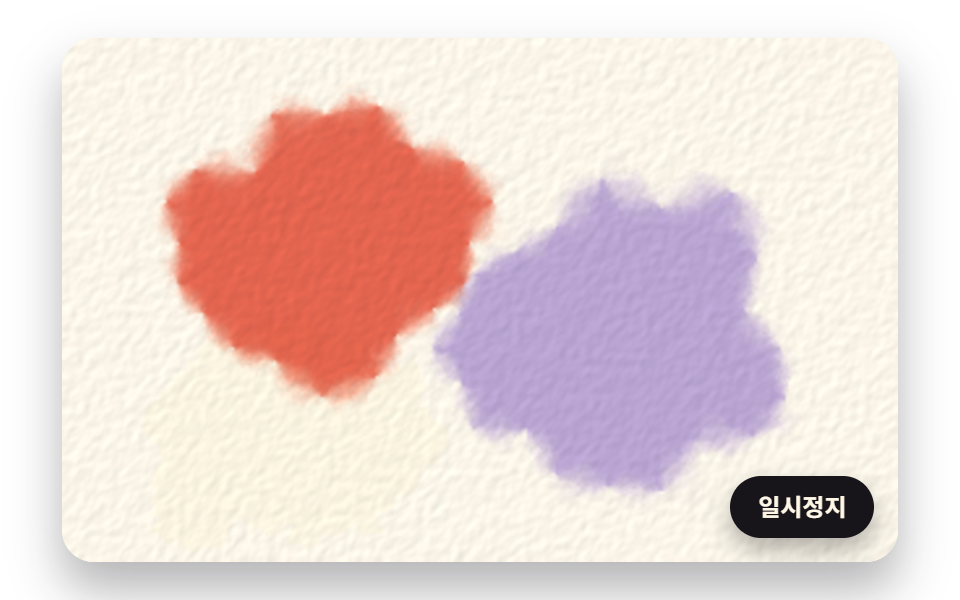
03濡れたマスにだけ広がり、二色が出会って混ざるにじみ
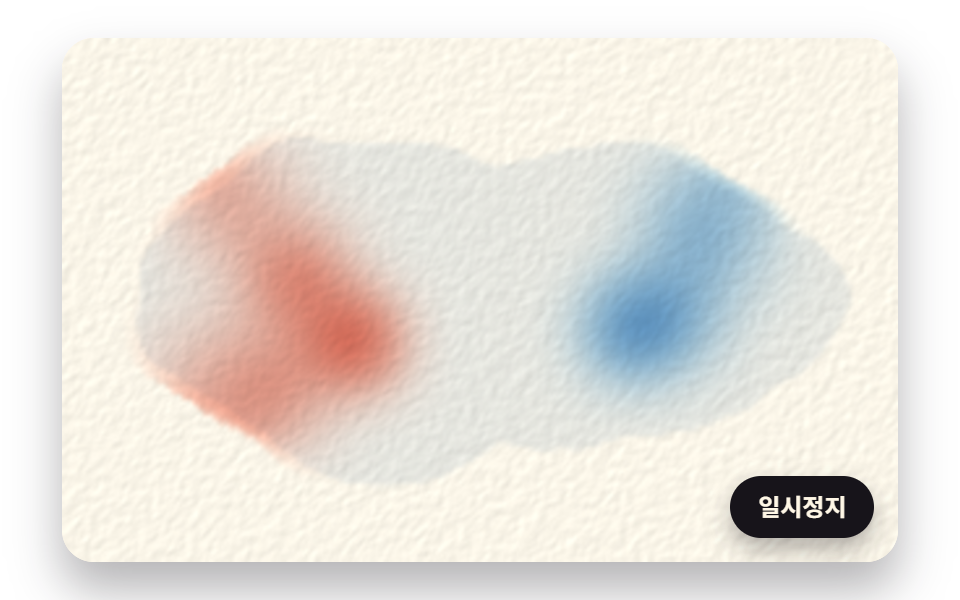
水の量と顔料の二枚の格子を持ち、マスごとに隣の四マスの平均へ少しずつ近づけますが、近づく度合いを隣の水の量でしばるので乾いたマスではにじみが止まり、二色が同じ濡れたマスに届くと混ざります。
使いどころ絵本紹介ページの表紙
DIFFUSE_RATEDIFFUSE_SUBSTEPSEVAPORATION
<main class="stage">
<div class="wc is-demo" id="wc">
  <canvas class="wc__canvas" data-role="canvas" width="480" height="300" role="img" aria-label="コーラルと空色の絵の具が濡れた所にだけ広がり、真ん中で出会って紫に混ざる絵。"></canvas>
  <button class="wc__pause" data-role="pause" type="button" aria-pressed="false">一時停止</button>
</div>
</main>
@use "../../../../site/static/demo-tokens" as *;
@include stage($stage-paper);
.wc {
position: relative;
width: min(92vw, calc(160vh - 12.8vw));
aspect-ratio: 480 / 300;
margin: 0 auto;
border-radius: $r-card;
overflow: hidden;
box-shadow: $shadow-raised;
background: $subject-cream;
}
.wc__canvas {
position: absolute;
inset: 0;
display: block;
width: 100%;
height: 100%;
}
.wc__pause {
position: absolute;
right: $sp-3;
bottom: $sp-3;
padding: $sp-1 $sp-3;
border: 2px solid $subject-ink;
border-radius: $r-pill;
background: $subject-ink;
color: $subject-cream;
font-family: inherit;
font-weight: 700;
font-size: 12px;
line-height: 1.6;
cursor: pointer;
box-shadow: $shadow-press;
transition: transform $dur-quick $ease-spring;
}
// 눌린 상태(멈춤) — 바탕과 글자색을 뒤집어 aria-pressed 가 눈에도 보이게
.wc__pause[aria-pressed="true"] {
background: $subject-cream;
color: $subject-ink;
}
.wc__pause:hover {
transform: translateY(-2px);
}
.wc__pause:active {
transform: translateY(1px);
}
.wc__pause:focus-visible {
outline: 3px solid $subject-ink;
outline-offset: 3px;
}
// 상태 줄 — 지금 어떤 행동 중인지 글자로. 시연 중에는 aria-live off, 사람이 처음 손대면 polite
.wc__status {
position: absolute;
left: $sp-3;
top: $sp-3;
margin: 0;
padding: $sp-1 $sp-3;
border-radius: $r-pill;
background: $subject-ink;
color: $subject-cream;
font-weight: 700;
font-size: 12px;
line-height: 1.6;
pointer-events: none;
}
@media (max-width: 340px) {
.wc__pause,
.wc__status { font-size: 11px; padding: $sp-1 $sp-2; }
}
// 동작 줄이기 — 장면은 스크립트가 쉬는 자세 한 장으로 멈춘다. 버튼도 떠오르지 않게
@media (prefers-reduced-motion: reduce) {
.wc__pause { transition: none !important; }
.wc__pause:hover,
.wc__pause:active { transform: none !important; }
}html, body {
margin: 0;
overflow: hidden;
}
.stage {
box-sizing: border-box;
min-height: 100vh;
display: grid;
place-items: center;
margin: 0;
background: #ffffff;
font-family: -apple-system, "Segoe UI", "Noto Sans KR", sans-serif;
padding: clamp(8px, 4vw, 24px);
}
.wc {
position: relative;
width: min(92vw, 160vh - 12.8vw);
aspect-ratio: 480/300;
margin: 0 auto;
border-radius: 16px;
overflow: hidden;
box-shadow: 0 14px 24px rgba(23, 20, 26, 0.32);
background: #fff7e6;
}
.wc__canvas {
position: absolute;
inset: 0;
display: block;
width: 100%;
height: 100%;
}
.wc__pause {
position: absolute;
right: 12px;
bottom: 12px;
padding: 4px 12px;
border: 2px solid #17141a;
border-radius: 999px;
background: #17141a;
color: #fff7e6;
font-family: inherit;
font-weight: 700;
font-size: 12px;
line-height: 1.6;
cursor: pointer;
box-shadow: 0 6px 12px rgba(23, 20, 26, 0.32);
transition: transform 220ms cubic-bezier(0.2, 0.8, 0.2, 1);
}
.wc__pause[aria-pressed=true] {
background: #fff7e6;
color: #17141a;
}
.wc__pause:hover {
transform: translateY(-2px);
}
.wc__pause:active {
transform: translateY(1px);
}
.wc__pause:focus-visible {
outline: 3px solid #17141a;
outline-offset: 3px;
}
.wc__status {
position: absolute;
left: 12px;
top: 12px;
margin: 0;
padding: 4px 12px;
border-radius: 999px;
background: #17141a;
color: #fff7e6;
font-weight: 700;
font-size: 12px;
line-height: 1.6;
pointer-events: none;
}
@media (max-width: 340px) {
.wc__pause,
.wc__status {
font-size: 11px;
padding: 4px 8px;
}
}
@media (prefers-reduced-motion: reduce) {
.wc__pause {
transition: none !important;
}
.wc__pause:hover,
.wc__pause:active {
transform: none !important;
}
}(function () {
const root = document.getElementById("wc");
if (!root) return;
// 판 좌표 — 캔버스 안은 늘 480×300. 화면에 보이는 크기와 상관없이 그리기 좌표는 이 판으로 한다
const W = 480;
const H = 300;
const TAU = Math.PI * 2;
// 화소 격자 — 픽셀 연산(색 합성·종이 결)은 320×200 에서 하고 화면에는 늘려 그린다
const OW = 320;
const OH = 200;
// 계산 격자 — 물·안료 확산처럼 무거운 계산은 가로 160 칸 격자에서 (한 칸 = 판 3px)
const GW = 160;
const GH = 100;
// 고정 걸음(초) — 같은 시드면 몇 번을 다시 그려도 같은 그림이 나오도록 계산은 1/30초씩 나아간다
const STEP = 1 / 30;
function clamp(v, lo, hi) { return v < lo ? lo : (v > hi ? hi : v); }
function lerp(a, b, k) { return a + (b - a) * k; }
function smooth(x) { const c = clamp(x, 0, 1); return c * c * (3 - 2 * c); }
// 시드 고정 난수 — 같은 시드면 같은 얼룩·물방울·붓털이 다시 나온다 (32비트 정수 섞기)
function makeRng(seed) {
let s = seed >>> 0;
return function () {
s = (s + 0x6d2b79f5) >>> 0;
let t = s;
t = Math.imul(t ^ (t >>> 15), t | 1);
t ^= t + Math.imul(t ^ (t >>> 7), t | 61);
return ((t ^ (t >>> 14)) >>> 0) / 4294967296;
};
}
// 종 모양 난수 — 균일 난수 넷의 합을 평균 0·표준편차 1 로 맞춘 값. 대부분 ±1 안, 가끔 ±2 를 넘는다
function normalRandom(rng) {
return (rng() + rng() + rng() + rng() - 2) * 1.7320508;
}
// 격자 점마다 정해진 값(0~1) — 정수 좌표 두 개와 시드를 섞는다
function hash2(ix, iy, seed) {
let h = Math.imul(ix, 374761393) ^ Math.imul(iy, 668265263) ^ Math.imul(seed, 1274126177);
h = Math.imul(h ^ (h >>> 13), 1103515245);
h ^= h >>> 16;
return (h >>> 0) / 4294967296;
}
// 2차원 값 노이즈 — 정수 격자 네 점의 값을 부드럽게 보간한 0~1. 종이 높이·경계 흔들기·꽃잎 반지름에 쓴다
function valueNoise(x, y, seed) {
const ix = Math.floor(x);
const iy = Math.floor(y);
const fx = x - ix;
const fy = y - iy;
const ux = fx * fx * (3 - 2 * fx);
const uy = fy * fy * (3 - 2 * fy);
const a = hash2(ix, iy, seed);
const b = hash2(ix + 1, iy, seed);
const c = hash2(ix, iy + 1, seed);
const d = hash2(ix + 1, iy + 1, seed);
return lerp(lerp(a, b, ux), lerp(c, d, ux), uy);
}
// 두 옥타브 — 굵은 결(0.65) 위에 두 배 촘촘한 결(0.35)을 겹친다
function noise2(x, y, seed) {
return valueNoise(x, y, seed) * 0.65 + valueNoise(x * 2 + 17.3, y * 2 + 5.1, seed + 101) * 0.35;
}
// 둘레를 따라 한 바퀴 이어지는 노이즈 — 각 θ 를 원 위의 점으로 바꿔 2차원 노이즈를 읽으므로 0 과 2π 에서 값이 같다
function ringNoise(theta, freq, seed) {
return noise2(Math.cos(theta) * freq + 50, Math.sin(theta) * freq + 50, seed);
}
// 파스텔 안료 — 흰 종이에 한 겹 칠했을 때 돌아오는 빛(0~255). 진하게 쌓이면 곱으로 깊어진다
const PAPER = [250, 245, 232];
const INK = [58, 50, 74];
const SKY = [146, 192, 230];
const BUTTER = [246, 214, 118];
const CORAL = [240, 148, 132];
const SAGE = [142, 192, 152];
const LAVENDER = [178, 158, 226];
const PINK = [240, 164, 194];
const INDIGO = [128, 136, 196];
// 순환 — 그리기 → 머묾 → 씻겨 지워짐 → 처음부터. 시간 t(초)가 어디쯤인지 0~1 로
function phaseOf(t, start, length) { return clamp((t - start) / length, 0, 1); }
function pigment(c) {
return { r: Math.log(Math.max(c[0], 1) / 255), g: Math.log(Math.max(c[1], 1) / 255), b: Math.log(Math.max(c[2], 1) / 255) };
}
// 젖은 물기 — 마르기 전의 색면을 살짝 어둡고 차갑게 보이게 하는 옅은 회청색 한 겹
const WATER = [214, 224, 236];
// 화면 버퍼 — 화소마다 RGB(0~1) 세 칸. 프레임마다 새 배열을 만들지 않고 이 한 벌을 다시 쓴다
const OUT = new Float32Array(OW * OH * 3);
// 종이 높이맵 — 0(골)~1(마루). 처음 한 번만 계산한다
const PAPER_HEIGHT = new Float32Array(OW * OH);
// 종이 요철 음영 — 비스듬한 빛이 결의 기울기에 닿아 생기는 밝기 배율
const PAPER_SHADE = new Float32Array(OW * OH);
// 종이 결 크기 — 노이즈 한 칸이 화소 몇 개인가 (작을수록 촘촘한 결)
const GRAIN_SIZE = 2.6;
// 결 음영 세기 — 왼쪽 위에서 든 빛 방향으로 오르막이면 밝게, 내리막이면 어둡게
const GRAIN_LIGHT = 0.36;
function buildPaper(seed, relief) {
let lo = 1;
let hi = 0;
for (let y = 0; y < OH; y += 1) {
for (let x = 0; x < OW; x += 1) {
const h = noise2(x / GRAIN_SIZE, y / GRAIN_SIZE, seed);
PAPER_HEIGHT[y * OW + x] = h;
lo = Math.min(lo, h);
hi = Math.max(hi, h);
}
}
// 높이를 0~1 로 다시 펴서 골과 마루가 끝까지 쓰이게 한다
const span = Math.max(hi - lo, 1e-6);
for (let i = 0; i < OW * OH; i += 1) {
PAPER_HEIGHT[i] = (PAPER_HEIGHT[i] - lo) / span;
}
for (let y = 0; y < OH; y += 1) {
for (let x = 0; x < OW; x += 1) {
const gx = PAPER_HEIGHT[y * OW + Math.min(x + 1, OW - 1)] - PAPER_HEIGHT[y * OW + Math.max(x - 1, 0)];
const gy = PAPER_HEIGHT[Math.min(y + 1, OH - 1) * OW + x] - PAPER_HEIGHT[Math.max(y - 1, 0) * OW + x];
// 빛은 왼쪽 위에서 — 기울기를 (−1, −1)/√2 방향에 내린 값이 양이면 빛을 마주 본다
const lit = -(gx + gy) * 0.7071;
PAPER_SHADE[y * OW + x] = clamp(1 + GRAIN_LIGHT * relief * lit * 0.25, 0.82, 1.08);
}
}
}
// 색 합성 — 진하기 격자 여러 장(gw×gh)을 화소 격자로 늘려 읽고, 안료마다 진하기 × 로그 비율을 더한 뒤 지수로 되돌려 종이 색에 곱한다
// gran 은 안료마다 종이 골에 고이는 정도: 진하기 × (1 + gran × (1 − 2 × 높이)) — 골(0)은 1 + gran 배, 마루(1)는 1 − gran 배
// over 가 true 면 종이부터 다시 칠하지 않고 지금 OUT 위에 곱으로 덧칠한다(격자 크기가 다른 층을 한 장면에 겹칠 때)
function compose(fields, gw, gh, pigs, gran, over) {
const sx = gw / OW;
const sy = gh / OH;
const n = fields.length;
const pr = PAPER[0] / 255;
const pg = PAPER[1] / 255;
const pb = PAPER[2] / 255;
for (let y = 0; y < OH; y += 1) {
const fy = clamp((y + 0.5) * sy - 0.5, 0, gh - 1);
const y0 = Math.min(Math.floor(fy), gh - 2 < 0 ? 0 : gh - 2);
const ty = fy - y0;
for (let x = 0; x < OW; x += 1) {
const fx = clamp((x + 0.5) * sx - 0.5, 0, gw - 1);
const x0 = Math.min(Math.floor(fx), gw - 2);
const tx = fx - x0;
const i00 = y0 * gw + x0;
const i10 = i00 + 1;
const i01 = i00 + gw;
const i11 = i01 + 1;
const p = y * OW + x;
const h = PAPER_HEIGHT[p];
let lr = 0;
let lg = 0;
let lb = 0;
for (let k = 0; k < n; k += 1) {
const f = fields[k];
let d = (f[i00] * (1 - tx) + f[i10] * tx) * (1 - ty) + (f[i01] * (1 - tx) + f[i11] * tx) * ty;
if (d <= 0) {
continue;
}
if (gran[k] !== 0) {
d *= Math.max(0, 1 + gran[k] * (1 - 2 * h));
}
const pk = pigs[k];
lr += pk.r * d;
lg += pk.g * d;
lb += pk.b * d;
}
if (over) {
if (lr !== 0 || lg !== 0 || lb !== 0) {
OUT[p * 3] *= Math.exp(lr);
OUT[p * 3 + 1] *= Math.exp(lg);
OUT[p * 3 + 2] *= Math.exp(lb);
}
continue;
}
const s = PAPER_SHADE[p];
OUT[p * 3] = pr * s * Math.exp(lr);
OUT[p * 3 + 1] = pg * s * Math.exp(lg);
OUT[p * 3 + 2] = pb * s * Math.exp(lb);
}
}
}
// 씻어 내기 앞머리 띠 폭(화소) — 물이 지나가는 가장자리가 이만큼 부드럽게 번진다
const WASH_SOFT = 26;
// 씻어 내기 — 물이 왼쪽에서 오른쪽으로 쓸고 지나간 자리는 종이로 돌아간다. 앞머리는 줄마다 노이즈로 흔들리고 젖은 띠가 살짝 어둡다
function washOver(p, seed) {
if (p <= 0) {
return;
}
const pr = PAPER[0] / 255;
const pg = PAPER[1] / 255;
const pb = PAPER[2] / 255;
for (let y = 0; y < OH; y += 1) {
const front = lerp(-WASH_SOFT - 50, OW + WASH_SOFT + 50, p) + (noise2(y / 46, p * 1.5, seed) - 0.5) * 70;
for (let x = 0; x < OW; x += 1) {
const k = smooth((front - x) / WASH_SOFT);
if (k <= 0) {
continue;
}
const i = y * OW + x;
const s = PAPER_SHADE[i];
const tint = 1 - 0.07 * (1 - Math.abs(2 * k - 1));
OUT[i * 3] = lerp(OUT[i * 3], pr * s, k) * tint;
OUT[i * 3 + 1] = lerp(OUT[i * 3 + 1], pg * s, k) * tint;
OUT[i * 3 + 2] = lerp(OUT[i * 3 + 2], pb * s, k) * (1 - 0.03 * (1 - Math.abs(2 * k - 1)));
}
}
}
// 순환 끝의 씻어 내기 — 그리기(PAINT_TIME)와 머묾(HOLD_TIME)이 지난 뒤 WASH_TIME 동안
function washAt(t, seed) {
washOver(phaseOf(t, PAINT_TIME + HOLD_TIME, WASH_TIME), seed);
}
// 젖은 칸 번짐 한 걸음 — 칸마다 이웃 네 칸의 평균 쪽으로 rate 만큼 다가가되, 이웃과 주고받는 몫에 두 칸의 물 가운데 적은 쪽을 곱한다
// 물이 0 인 칸과는 아무것도 주고받지 않으므로 마른 칸에서 번짐이 멈춘다. 주고받기라 안료 총량은 그대로이고, rate ≤ 1 이면 값이 튀지 않는다
function wetDiffuse(p, water, gw, gh, rate, before) {
before.set(p);
const k = rate * 0.25;
for (let y = 0; y < gh; y += 1) {
for (let x = 0; x < gw; x += 1) {
const i = y * gw + x;
const wi = water[i];
if (wi <= 0) {
continue;
}
if (x + 1 < gw) {
const j = i + 1;
const g = Math.min(wi, water[j]);
if (g > 0) {
const flow = k * g * (before[j] - before[i]);
p[i] += flow;
p[j] -= flow;
}
}
if (y + 1 < gh) {
const j = i + gw;
const g = Math.min(wi, water[j]);
if (g > 0) {
const flow = k * g * (before[j] - before[i]);
p[i] += flow;
p[j] -= flow;
}
}
}
}
}
// 붓 대기 — (cx, cy)(판 좌표) 둘레에 종 모양으로 안료를 넣는다. 젖은 칸에만 들어간다
function touchPigment(p, water, gw, gh, cx, cy, radius, amount) {
const kx = gw / W;
const gx = cx * kx;
const gy = cy * kx;
const rr = radius * kx;
const x0 = Math.max(0, Math.floor(gx - rr * 2.5));
const x1 = Math.min(gw - 1, Math.ceil(gx + rr * 2.5));
const y0 = Math.max(0, Math.floor(gy - rr * 2.5));
const y1 = Math.min(gh - 1, Math.ceil(gy + rr * 2.5));
for (let y = y0; y <= y1; y += 1) {
for (let x = x0; x <= x1; x += 1) {
const i = y * gw + x;
if (water[i] <= 0) {
continue;
}
const d2 = ((x + 0.5 - gx) * (x + 0.5 - gx) + (y + 0.5 - gy) * (y + 0.5 - gy)) / (rr * rr);
p[i] += amount * Math.exp(-d2 * 0.5);
}
}
}
const canvasEl = root.querySelector('[data-role="canvas"]');
const pauseEl = root.querySelector('[data-role="pause"]');
const statusEl = root.querySelector('[data-role="status"]');
const ctxRaw = canvasEl ? canvasEl.getContext('2d') : null;
// 화소 격자를 담는 바깥에 안 보이는 캔버스 — ImageData 한 장을 만들어 두고 프레임마다 내용만 바꿔 쓴다
const bufEl = document.createElement('canvas');
bufEl.width = OW;
bufEl.height = OH;
const bufRaw = bufEl.getContext('2d');
if (!canvasEl || !ctxRaw || !pauseEl || !bufRaw) {
return;
}
const cv = canvasEl;
const ctx = ctxRaw;
const pauseBtn = pauseEl;
const bufCtx = bufRaw;
const frameImage = bufCtx.createImageData(OW, OH);
function fitCanvas() {
// 배율은 2 에서 자른다 — 배율 3 기기에서 화소가 2.25배로 늘어 프레임마다 일이 그만큼 커지지 않게
const dpr = Math.min(window.devicePixelRatio || 1, 2);
cv.width = Math.round(W * dpr);
cv.height = Math.round(H * dpr);
ctx.setTransform(dpr, 0, 0, dpr, 0, 0);
}
// 화면 버퍼(OUT, 0~1)를 8비트로 옮겨 바깥 캔버스에 놓고, 판 크기로 부드럽게 늘려 그린다
function present() {
const px = frameImage.data;
for (let i = 0, j = 0; i < OW * OH; i += 1, j += 3) {
px[i * 4] = OUT[j] * 255;
px[i * 4 + 1] = OUT[j + 1] * 255;
px[i * 4 + 2] = OUT[j + 2] * 255;
px[i * 4 + 3] = 255;
}
bufCtx.putImageData(frameImage, 0, 0);
ctx.imageSmoothingEnabled = true;
ctx.imageSmoothingQuality = 'high';
ctx.drawImage(bufEl, 0, 0, W, H);
}
// 03 젖은 칸 번짐 — 물 격자 하나와 안료 격자 둘. 안료는 젖은 칸끼리만 이웃 평균 쪽으로 퍼지고, 두 색이 같은 젖은 칸에 닿으면 곱으로 섞인다
// 번짐 빠르기 — 한 번에 이웃 평균 쪽으로 다가가는 비율(물이 가득한 칸 기준)
const DIFFUSE_RATE = 0.18;
// 한 걸음(1/30초) 안에서 번짐을 되풀이하는 횟수
const DIFFUSE_SUBSTEPS = 14;
// 물이 마르는 빠르기(1초에 줄어드는 물 양) — 가장자리는 처음 물이 적어 먼저 마른다
const EVAPORATION = 0.2;
// 종이를 맑은 물로 적시는 시간(초)
const WET_TIME = 0.35;
// 붓 한 번에 넣는 안료 양과 퍼짐 반지름(판 px)
const TOUCH_INK = 1.05;
const TOUCH_RADIUS = 19;
// 자동 시연이 미리 그려 두고 시작하는 시각(초)
const DEMO_START = 1.0;
const PAINT_TIME = 4.6;
const HOLD_TIME = 2.0;
const WASH_TIME = 1.4;
const SEED = 4823;
// 붓 대기 차례 — 0.45초부터 TOUCH_GAP 초마다 한 번, 산호색(왼쪽)과 하늘색(오른쪽)을 번갈아 찍는다. 자리는 시드 난수로 정하고 뒤로 갈수록 가운데로 다가온다
const TOUCH_COUNT = 16;
const TOUCH_GAP = 0.16;
const TOUCHES = [];
const touchRng = makeRng(SEED);
for (let i = 0; i < TOUCH_COUNT; i += 1) {
const side = i % 2;
const inward = i / (TOUCH_COUNT - 1);
const x = (side === 0 ? lerp(96, 226, inward) : lerp(388, 254, inward)) + (touchRng() - 0.5) * 28;
// 가운데로 올수록 물이 많아 빨리 퍼져 옅어지므로 안료를 더 싣는다
TOUCHES.push({ x: x, y: 90 + touchRng() * 120, at: 0.45 + i * TOUCH_GAP, side: side, ink: TOUCH_INK * (0.6 + 1.2 * inward) });
}
// 맑은 물을 먼저 바르는 두 자리 — 가운데에서 겹쳐 한 젖은 판이 된다
const WET_AREAS = [
{ cx: 178, cy: 152, r: 112 },
{ cx: 306, cy: 148, r: 112 },
];
const waterInit = new Float32Array(GW * GH);
const water03 = new Float32Array(GW * GH);
const coralField = new Float32Array(GW * GH);
const skyField = new Float32Array(GW * GH);
const before03 = new Float32Array(GW * GH);
const sheen03 = new Float32Array(GW * GH);
const fields03 = [coralField, skyField, sheen03];
const pigs03 = [pigment(CORAL), pigment(SKY), pigment(WATER)];
const gran03 = [0, 0, 0];
let touched = 0;
buildPaper(SEED, 1);
// 처음 물 양 — 젖은 자리 가운데 1, 둘레로 갈수록 0. 둘레는 노이즈로 흔들린다
for (let y = 0; y < GH; y += 1) {
for (let x = 0; x < GW; x += 1) {
let w = 0;
for (let a = 0; a < WET_AREAS.length; a += 1) {
const c = WET_AREAS[a];
const dx = (x + 0.5) * W / GW - c.cx;
const dy = (y + 0.5) * W / GW - c.cy;
const edge = c.r * (0.82 + 0.36 * ringNoise(Math.atan2(dy, dx * 0.8), 1.5, SEED + a));
w = Math.max(w, clamp((1 - Math.hypot(dx * 0.8, dy * 1.1) / edge) * 5, 0, 1));
}
// 종이 결마다 물을 머금는 양이 달라 번짐이 고르지 않게 갈래진다
waterInit[y * GW + x] = w * (0.75 + 0.5 * noise2(x / 6, y / 6, SEED + 7));
}
}
function reset() {
water03.fill(0);
coralField.fill(0);
skyField.fill(0);
sheen03.fill(0);
touched = 0;
}
function update(dt, t) {
// 맑은 물 바르기 — 왼쪽부터 오른쪽으로 쓸며 적신다. 다 바른 뒤에는 칸마다 같은 빠르기로 마른다
const wetFront = phaseOf(t, 0.2, WET_TIME) * (GW + 20) - 10;
const dryBy = Math.max(0, t - 0.2 - WET_TIME) * EVAPORATION;
for (let y = 0; y < GH; y += 1) {
for (let x = 0; x < GW; x += 1) {
const i = y * GW + x;
water03[i] = x < wetFront ? Math.max(0, waterInit[i] - dryBy) : 0;
// 젖은 물기 — 물이 0.2 밑으로 줄면 막이 옅어지기 시작해 0.1 에서 사라진다. 마르는 앞머리가 가장자리에서 안쪽으로 움직이는 것이 보인다
sheen03[i] = 0.5 * smooth((water03[i] - 0.1) / 0.1);
}
}
while (touched < TOUCHES.length && t >= TOUCHES[touched].at) {
const tc = TOUCHES[touched];
touchPigment(tc.side === 0 ? coralField : skyField, water03, GW, GH, tc.x, tc.y, TOUCH_RADIUS, tc.ink);
touched += 1;
}
for (let s = 0; s < DIFFUSE_SUBSTEPS; s += 1) {
wetDiffuse(coralField, water03, GW, GH, DIFFUSE_RATE, before03);
wetDiffuse(skyField, water03, GW, GH, DIFFUSE_RATE, before03);
}
}
function render(t) {
compose(fields03, GW, GH, pigs03, gran03);
washAt(t, SEED);
}
// 03 그리기 — 진하기 격자를 색으로 합성해 화면에 놓는다
function draw() {
render(simTime);
present();
}
// 한 프레임에 넘기는 시간 상한(초) — 탭을 오래 숨겼다 돌아온 첫 프레임에도 50ms 까지만 계산에 넣는다
const DT_MAX = 0.05;
// 한 바퀴 — 그리기 → 머묾 → 씻겨 지워짐. 끝나면 같은 시드로 처음부터 다시 그린다
const CYCLE = PAINT_TIME + HOLD_TIME + WASH_TIME;
// 그림 시계(초)와 고정 걸음에 아직 못 넣은 나머지 시간
let simTime = 0;
let pending = 0;
let paused = false;
const reduceQuery = window.matchMedia('(prefers-reduced-motion: reduce)');
// 페이지를 연 채 동작 줄이기 설정을 바꿔도 change 리스너가 이 값을 다시 읽는다
let still = reduceQuery.matches;
// 자동 시연 중인가 — 사람이 처음 손대면 시연 표시를 떼고 상태 줄을 polite 로 켠다
let demo = root.classList.contains('is-demo');
// 리스너는 한 묶음으로 달고 정리할 때 한 번에 뗀다
const off = new AbortController();
function wake() {
if (!demo) {
return;
}
demo = false;
root.classList.remove('is-demo');
if (statusEl) {
statusEl.setAttribute('aria-live', 'polite');
}
}
// 고정 걸음 하나 — 그리는 동안만 계산을 나아가게 하고, 한 바퀴가 끝나면 처음 상태로 되돌린다
function stepOnce() {
simTime += STEP;
if (simTime >= CYCLE) {
simTime = 0;
reset();
return;
}
if (simTime <= PAINT_TIME) {
update(STEP, simTime);
}
}
let rafId = 0;
let lastTs = -1;
function frame(ts) {
if (still || paused) {
rafId = 0;
return;
}
if (lastTs < 0) {
lastTs = ts;
}
pending += Math.min((ts - lastTs) / 1000, DT_MAX);
lastTs = ts;
while (pending >= STEP) {
stepOnce();
pending -= STEP;
}
draw();
rafId = window.requestAnimationFrame(frame);
}
function startLoop() {
if (rafId) {
return;
}
// 시계 다시 맞추기 — 멈췄던 사이의 시간을 첫 프레임에 넘기지 않는다
lastTs = -1;
rafId = window.requestAnimationFrame(frame);
}
function stopLoop() {
if (rafId) {
window.cancelAnimationFrame(rafId);
rafId = 0;
}
}
// 동작 줄이기 — 루프를 돌리지 않고, 같은 시드로 그리기 끝까지 한 번에 계산한 完成 그림 한 장만 보여 준다
function showFinished() {
stopLoop();
reset();
simTime = 0;
while (simTime + STEP <= PAINT_TIME) {
simTime += STEP;
update(STEP, simTime);
}
simTime = PAINT_TIME;
draw();
}
function play() {
reset();
simTime = 0;
pending = 0;
// 자동 시연은 DEMO_START 초까지 미리 그려 둔 채 시작한다 — 페이지를 열자마자 빈 종이만 보이지 않게(사람이 다시 시작하면 0초부터)
if (demo) {
while (simTime + STEP <= DEMO_START) {
stepOnce();
}
}
draw();
if (!paused) {
startLoop();
}
}
pauseBtn.addEventListener('click', function () {
paused = !paused;
pauseBtn.setAttribute('aria-pressed', paused ? 'true' : 'false');
wake();
if (paused) {
stopLoop();
}
else if (!still) {
startLoop();
}
}, { signal: off.signal });
// 탭이 숨으면 그리기를 멈추고, 돌아오면 시계를 다시 맞춰 이어 그린다 — 숨은 동안의 몇 초가 한 프레임에 몰리지 않게
document.addEventListener('visibilitychange', function () {
if (document.hidden) {
stopLoop();
}
else if (!paused && !still) {
startLoop();
}
}, { signal: off.signal });
// 설정이 페이지를 연 채 바뀌면 — 켜지면 完成 그림으로 멈추고, 꺼지면 처음부터 다시 그린다
reduceQuery.addEventListener('change', function () {
still = reduceQuery.matches;
if (still) {
showFinished();
}
else {
play();
}
}, { signal: off.signal });
window.addEventListener('resize', function () {
fitCanvas();
draw();
}, { signal: off.signal });
fitCanvas();
if (still) {
showFinished();
}
else {
play();
}
return function () {
stopLoop();
off.abort();
};
})();// WetCellBleedMix - vanilla 판(03-watercolor-wet-cell-bleed-mix) 의 React 포트. 같은 계산을 useEffect 안에서 돌린다.
import { useEffect, useRef } from "react";
import styles from "./WetCellBleedMix.module.scss";
const cx = (s: string): string => s.split(" ").map((n) => styles[n] ?? n).join(" ");
export default function WetCellBleedMix() {
const rootRef = useRef<HTMLDivElement | null>(null);
useEffect(() => {
const rootEl = rootRef.current;
if (!rootEl) return;
const root: HTMLElement = rootEl;
type RGB = [number, number, number];
// 판 좌표 — 캔버스 안은 늘 480×300. 화면에 보이는 크기와 상관없이 그리기 좌표는 이 판으로 한다
const W = 480;
const H = 300;
const TAU = Math.PI * 2;
// 화소 격자 — 픽셀 연산(색 합성·종이 결)은 320×200 에서 하고 화면에는 늘려 그린다
const OW = 320;
const OH = 200;
// 계산 격자 — 물·안료 확산처럼 무거운 계산은 가로 160 칸 격자에서 (한 칸 = 판 3px)
const GW = 160;
const GH = 100;
// 고정 걸음(초) — 같은 시드면 몇 번을 다시 그려도 같은 그림이 나오도록 계산은 1/30초씩 나아간다
const STEP = 1 / 30;
function clamp(v: number, lo: number, hi: number): number { return v < lo ? lo : (v > hi ? hi : v); }
function lerp(a: number, b: number, k: number): number { return a + (b - a) * k; }
function smooth(x: number): number { const c = clamp(x, 0, 1); return c * c * (3 - 2 * c); }
// 시드 고정 난수 — 같은 시드면 같은 얼룩·물방울·붓털이 다시 나온다 (32비트 정수 섞기)
function makeRng(seed: number): () => number {
let s = seed >>> 0;
return function (): number {
s = (s + 0x6d2b79f5) >>> 0;
let t = s;
t = Math.imul(t ^ (t >>> 15), t | 1);
t ^= t + Math.imul(t ^ (t >>> 7), t | 61);
return ((t ^ (t >>> 14)) >>> 0) / 4294967296;
};
}
// 종 모양 난수 — 균일 난수 넷의 합을 평균 0·표준편차 1 로 맞춘 값. 대부분 ±1 안, 가끔 ±2 를 넘는다
function normalRandom(rng: () => number): number {
return (rng() + rng() + rng() + rng() - 2) * 1.7320508;
}
// 격자 점마다 정해진 값(0~1) — 정수 좌표 두 개와 시드를 섞는다
function hash2(ix: number, iy: number, seed: number): number {
let h = Math.imul(ix, 374761393) ^ Math.imul(iy, 668265263) ^ Math.imul(seed, 1274126177);
h = Math.imul(h ^ (h >>> 13), 1103515245);
h ^= h >>> 16;
return (h >>> 0) / 4294967296;
}
// 2차원 값 노이즈 — 정수 격자 네 점의 값을 부드럽게 보간한 0~1. 종이 높이·경계 흔들기·꽃잎 반지름에 쓴다
function valueNoise(x: number, y: number, seed: number): number {
const ix = Math.floor(x);
const iy = Math.floor(y);
const fx = x - ix;
const fy = y - iy;
const ux = fx * fx * (3 - 2 * fx);
const uy = fy * fy * (3 - 2 * fy);
const a = hash2(ix, iy, seed);
const b = hash2(ix + 1, iy, seed);
const c = hash2(ix, iy + 1, seed);
const d = hash2(ix + 1, iy + 1, seed);
return lerp(lerp(a, b, ux), lerp(c, d, ux), uy);
}
// 두 옥타브 — 굵은 결(0.65) 위에 두 배 촘촘한 결(0.35)을 겹친다
function noise2(x: number, y: number, seed: number): number {
return valueNoise(x, y, seed) * 0.65 + valueNoise(x * 2 + 17.3, y * 2 + 5.1, seed + 101) * 0.35;
}
// 둘레를 따라 한 바퀴 이어지는 노이즈 — 각 θ 를 원 위의 점으로 바꿔 2차원 노이즈를 읽으므로 0 과 2π 에서 값이 같다
function ringNoise(theta: number, freq: number, seed: number): number {
return noise2(Math.cos(theta) * freq + 50, Math.sin(theta) * freq + 50, seed);
}
// 파스텔 안료 — 흰 종이에 한 겹 칠했을 때 돌아오는 빛(0~255). 진하게 쌓이면 곱으로 깊어진다
const PAPER: RGB = [250, 245, 232];
const INK: RGB = [58, 50, 74];
const SKY: RGB = [146, 192, 230];
const BUTTER: RGB = [246, 214, 118];
const CORAL: RGB = [240, 148, 132];
const SAGE: RGB = [142, 192, 152];
const LAVENDER: RGB = [178, 158, 226];
const PINK: RGB = [240, 164, 194];
const INDIGO: RGB = [128, 136, 196];
// 순환 — 그리기 → 머묾 → 씻겨 지워짐 → 처음부터. 시간 t(초)가 어디쯤인지 0~1 로
function phaseOf(t: number, start: number, length: number): number { return clamp((t - start) / length, 0, 1); }
// 안료 — 한 겹이 채널마다 돌려보내는 빛의 비율을 로그로 들고 있다. 진하기 d 만큼 쌓이면 빛 = 종이 × 비율^d (곱이라 겹칠수록 깊어진다)
type Pigment = { r: number; g: number; b: number };
function pigment(c: RGB): Pigment {
return { r: Math.log(Math.max(c[0], 1) / 255), g: Math.log(Math.max(c[1], 1) / 255), b: Math.log(Math.max(c[2], 1) / 255) };
}
// 젖은 물기 — 마르기 전의 색면을 살짝 어둡고 차갑게 보이게 하는 옅은 회청색 한 겹
const WATER: RGB = [214, 224, 236];
// 화면 버퍼 — 화소마다 RGB(0~1) 세 칸. 프레임마다 새 배열을 만들지 않고 이 한 벌을 다시 쓴다
const OUT = new Float32Array(OW * OH * 3);
// 종이 높이맵 — 0(골)~1(마루). 처음 한 번만 계산한다
const PAPER_HEIGHT = new Float32Array(OW * OH);
// 종이 요철 음영 — 비스듬한 빛이 결의 기울기에 닿아 생기는 밝기 배율
const PAPER_SHADE = new Float32Array(OW * OH);
// 종이 결 크기 — 노이즈 한 칸이 화소 몇 개인가 (작을수록 촘촘한 결)
const GRAIN_SIZE = 2.6;
// 결 음영 세기 — 왼쪽 위에서 든 빛 방향으로 오르막이면 밝게, 내리막이면 어둡게
const GRAIN_LIGHT = 0.36;
function buildPaper(seed: number, relief: number): void {
let lo = 1;
let hi = 0;
for (let y = 0; y < OH; y += 1) {
for (let x = 0; x < OW; x += 1) {
const h = noise2(x / GRAIN_SIZE, y / GRAIN_SIZE, seed);
PAPER_HEIGHT[y * OW + x] = h;
lo = Math.min(lo, h);
hi = Math.max(hi, h);
}
}
// 높이를 0~1 로 다시 펴서 골과 마루가 끝까지 쓰이게 한다
const span = Math.max(hi - lo, 1e-6);
for (let i = 0; i < OW * OH; i += 1) { PAPER_HEIGHT[i] = (PAPER_HEIGHT[i] - lo) / span; }
for (let y = 0; y < OH; y += 1) {
for (let x = 0; x < OW; x += 1) {
const gx = PAPER_HEIGHT[y * OW + Math.min(x + 1, OW - 1)] - PAPER_HEIGHT[y * OW + Math.max(x - 1, 0)];
const gy = PAPER_HEIGHT[Math.min(y + 1, OH - 1) * OW + x] - PAPER_HEIGHT[Math.max(y - 1, 0) * OW + x];
// 빛은 왼쪽 위에서 — 기울기를 (−1, −1)/√2 방향에 내린 값이 양이면 빛을 마주 본다
const lit = -(gx + gy) * 0.7071;
PAPER_SHADE[y * OW + x] = clamp(1 + GRAIN_LIGHT * relief * lit * 0.25, 0.82, 1.08);
}
}
}
// 색 합성 — 진하기 격자 여러 장(gw×gh)을 화소 격자로 늘려 읽고, 안료마다 진하기 × 로그 비율을 더한 뒤 지수로 되돌려 종이 색에 곱한다
// gran 은 안료마다 종이 골에 고이는 정도: 진하기 × (1 + gran × (1 − 2 × 높이)) — 골(0)은 1 + gran 배, 마루(1)는 1 − gran 배
// over 가 true 면 종이부터 다시 칠하지 않고 지금 OUT 위에 곱으로 덧칠한다(격자 크기가 다른 층을 한 장면에 겹칠 때)
function compose(fields: Float32Array[], gw: number, gh: number, pigs: Pigment[], gran: number[], over?: boolean): void {
const sx = gw / OW;
const sy = gh / OH;
const n = fields.length;
const pr = PAPER[0] / 255;
const pg = PAPER[1] / 255;
const pb = PAPER[2] / 255;
for (let y = 0; y < OH; y += 1) {
const fy = clamp((y + 0.5) * sy - 0.5, 0, gh - 1);
const y0 = Math.min(Math.floor(fy), gh - 2 < 0 ? 0 : gh - 2);
const ty = fy - y0;
for (let x = 0; x < OW; x += 1) {
const fx = clamp((x + 0.5) * sx - 0.5, 0, gw - 1);
const x0 = Math.min(Math.floor(fx), gw - 2);
const tx = fx - x0;
const i00 = y0 * gw + x0;
const i10 = i00 + 1;
const i01 = i00 + gw;
const i11 = i01 + 1;
const p = y * OW + x;
const h = PAPER_HEIGHT[p];
let lr = 0;
let lg = 0;
let lb = 0;
for (let k = 0; k < n; k += 1) {
const f = fields[k];
let d = (f[i00] * (1 - tx) + f[i10] * tx) * (1 - ty) + (f[i01] * (1 - tx) + f[i11] * tx) * ty;
if (d <= 0) { continue; }
if (gran[k] !== 0) { d *= Math.max(0, 1 + gran[k] * (1 - 2 * h)); }
const pk = pigs[k];
lr += pk.r * d;
lg += pk.g * d;
lb += pk.b * d;
}
if (over) {
if (lr !== 0 || lg !== 0 || lb !== 0) {
OUT[p * 3] *= Math.exp(lr);
OUT[p * 3 + 1] *= Math.exp(lg);
OUT[p * 3 + 2] *= Math.exp(lb);
}
continue;
}
const s = PAPER_SHADE[p];
OUT[p * 3] = pr * s * Math.exp(lr);
OUT[p * 3 + 1] = pg * s * Math.exp(lg);
OUT[p * 3 + 2] = pb * s * Math.exp(lb);
}
}
}
// 씻어 내기 앞머리 띠 폭(화소) — 물이 지나가는 가장자리가 이만큼 부드럽게 번진다
const WASH_SOFT = 26;
// 씻어 내기 — 물이 왼쪽에서 오른쪽으로 쓸고 지나간 자리는 종이로 돌아간다. 앞머리는 줄마다 노이즈로 흔들리고 젖은 띠가 살짝 어둡다
function washOver(p: number, seed: number): void {
if (p <= 0) { return; }
const pr = PAPER[0] / 255;
const pg = PAPER[1] / 255;
const pb = PAPER[2] / 255;
for (let y = 0; y < OH; y += 1) {
const front = lerp(-WASH_SOFT - 50, OW + WASH_SOFT + 50, p) + (noise2(y / 46, p * 1.5, seed) - 0.5) * 70;
for (let x = 0; x < OW; x += 1) {
const k = smooth((front - x) / WASH_SOFT);
if (k <= 0) { continue; }
const i = y * OW + x;
const s = PAPER_SHADE[i];
const tint = 1 - 0.07 * (1 - Math.abs(2 * k - 1));
OUT[i * 3] = lerp(OUT[i * 3], pr * s, k) * tint;
OUT[i * 3 + 1] = lerp(OUT[i * 3 + 1], pg * s, k) * tint;
OUT[i * 3 + 2] = lerp(OUT[i * 3 + 2], pb * s, k) * (1 - 0.03 * (1 - Math.abs(2 * k - 1)));
}
}
}
// 순환 끝의 씻어 내기 — 그리기(PAINT_TIME)와 머묾(HOLD_TIME)이 지난 뒤 WASH_TIME 동안
function washAt(t: number, seed: number): void {
washOver(phaseOf(t, PAINT_TIME + HOLD_TIME, WASH_TIME), seed);
}
// 젖은 칸 번짐 한 걸음 — 칸마다 이웃 네 칸의 평균 쪽으로 rate 만큼 다가가되, 이웃과 주고받는 몫에 두 칸의 물 가운데 적은 쪽을 곱한다
// 물이 0 인 칸과는 아무것도 주고받지 않으므로 마른 칸에서 번짐이 멈춘다. 주고받기라 안료 총량은 그대로이고, rate ≤ 1 이면 값이 튀지 않는다
function wetDiffuse(p: Float32Array, water: Float32Array, gw: number, gh: number, rate: number, before: Float32Array): void {
before.set(p);
const k = rate * 0.25;
for (let y = 0; y < gh; y += 1) {
for (let x = 0; x < gw; x += 1) {
const i = y * gw + x;
const wi = water[i];
if (wi <= 0) { continue; }
if (x + 1 < gw) {
const j = i + 1;
const g = Math.min(wi, water[j]);
if (g > 0) {
const flow = k * g * (before[j] - before[i]);
p[i] += flow;
p[j] -= flow;
}
}
if (y + 1 < gh) {
const j = i + gw;
const g = Math.min(wi, water[j]);
if (g > 0) {
const flow = k * g * (before[j] - before[i]);
p[i] += flow;
p[j] -= flow;
}
}
}
}
}
// 붓 대기 — (cx, cy)(판 좌표) 둘레에 종 모양으로 안료를 넣는다. 젖은 칸에만 들어간다
function touchPigment(p: Float32Array, water: Float32Array, gw: number, gh: number, cx: number, cy: number, radius: number, amount: number): void {
const kx = gw / W;
const gx = cx * kx;
const gy = cy * kx;
const rr = radius * kx;
const x0 = Math.max(0, Math.floor(gx - rr * 2.5));
const x1 = Math.min(gw - 1, Math.ceil(gx + rr * 2.5));
const y0 = Math.max(0, Math.floor(gy - rr * 2.5));
const y1 = Math.min(gh - 1, Math.ceil(gy + rr * 2.5));
for (let y = y0; y <= y1; y += 1) {
for (let x = x0; x <= x1; x += 1) {
const i = y * gw + x;
if (water[i] <= 0) { continue; }
const d2 = ((x + 0.5 - gx) * (x + 0.5 - gx) + (y + 0.5 - gy) * (y + 0.5 - gy)) / (rr * rr);
p[i] += amount * Math.exp(-d2 * 0.5);
}
}
}
const canvasEl = root.querySelector('[data-role="canvas"]') as HTMLCanvasElement | null;
const pauseEl = root.querySelector('[data-role="pause"]') as HTMLButtonElement | null;
const statusEl = root.querySelector('[data-role="status"]') as HTMLElement | null;
const ctxRaw = canvasEl ? canvasEl.getContext('2d') : null;
// 화소 격자를 담는 바깥에 안 보이는 캔버스 — ImageData 한 장을 만들어 두고 프레임마다 내용만 바꿔 쓴다
const bufEl = document.createElement('canvas');
bufEl.width = OW;
bufEl.height = OH;
const bufRaw = bufEl.getContext('2d');
if (!canvasEl || !ctxRaw || !pauseEl || !bufRaw) { return; }
const cv: HTMLCanvasElement = canvasEl;
const ctx: CanvasRenderingContext2D = ctxRaw;
const pauseBtn: HTMLButtonElement = pauseEl;
const bufCtx: CanvasRenderingContext2D = bufRaw;
const frameImage: ImageData = bufCtx.createImageData(OW, OH);
function fitCanvas(): void {
// 배율은 2 에서 자른다 — 배율 3 기기에서 화소가 2.25배로 늘어 프레임마다 일이 그만큼 커지지 않게
const dpr = Math.min(window.devicePixelRatio || 1, 2);
cv.width = Math.round(W * dpr);
cv.height = Math.round(H * dpr);
ctx.setTransform(dpr, 0, 0, dpr, 0, 0);
}
// 화면 버퍼(OUT, 0~1)를 8비트로 옮겨 바깥 캔버스에 놓고, 판 크기로 부드럽게 늘려 그린다
function present(): void {
const px = frameImage.data;
for (let i = 0, j = 0; i < OW * OH; i += 1, j += 3) {
px[i * 4] = OUT[j] * 255;
px[i * 4 + 1] = OUT[j + 1] * 255;
px[i * 4 + 2] = OUT[j + 2] * 255;
px[i * 4 + 3] = 255;
}
bufCtx.putImageData(frameImage, 0, 0);
ctx.imageSmoothingEnabled = true;
ctx.imageSmoothingQuality = 'high';
ctx.drawImage(bufEl, 0, 0, W, H);
}
// 03 젖은 칸 번짐 — 물 격자 하나와 안료 격자 둘. 안료는 젖은 칸끼리만 이웃 평균 쪽으로 퍼지고, 두 색이 같은 젖은 칸에 닿으면 곱으로 섞인다
// 번짐 빠르기 — 한 번에 이웃 평균 쪽으로 다가가는 비율(물이 가득한 칸 기준)
const DIFFUSE_RATE = 0.18;
// 한 걸음(1/30초) 안에서 번짐을 되풀이하는 횟수
const DIFFUSE_SUBSTEPS = 14;
// 물이 마르는 빠르기(1초에 줄어드는 물 양) — 가장자리는 처음 물이 적어 먼저 마른다
const EVAPORATION = 0.2;
// 종이를 맑은 물로 적시는 시간(초)
const WET_TIME = 0.35;
// 붓 한 번에 넣는 안료 양과 퍼짐 반지름(판 px)
const TOUCH_INK = 1.05;
const TOUCH_RADIUS = 19;
// 자동 시연이 미리 그려 두고 시작하는 시각(초)
const DEMO_START = 1.0;
const PAINT_TIME = 4.6;
const HOLD_TIME = 2.0;
const WASH_TIME = 1.4;
const SEED = 4823;
type Touch = { x: number; y: number; at: number; side: number; ink: number };
// 붓 대기 차례 — 0.45초부터 TOUCH_GAP 초마다 한 번, 산호색(왼쪽)과 하늘색(오른쪽)을 번갈아 찍는다. 자리는 시드 난수로 정하고 뒤로 갈수록 가운데로 다가온다
const TOUCH_COUNT = 16;
const TOUCH_GAP = 0.16;
const TOUCHES: Touch[] = [];
const touchRng = makeRng(SEED);
for (let i = 0; i < TOUCH_COUNT; i += 1) {
const side = i % 2;
const inward = i / (TOUCH_COUNT - 1);
const x = (side === 0 ? lerp(96, 226, inward) : lerp(388, 254, inward)) + (touchRng() - 0.5) * 28;
// 가운데로 올수록 물이 많아 빨리 퍼져 옅어지므로 안료를 더 싣는다
TOUCHES.push({ x: x, y: 90 + touchRng() * 120, at: 0.45 + i * TOUCH_GAP, side: side, ink: TOUCH_INK * (0.6 + 1.2 * inward) });
}
type Wet = { cx: number; cy: number; r: number };
// 맑은 물을 먼저 바르는 두 자리 — 가운데에서 겹쳐 한 젖은 판이 된다
const WET_AREAS: Wet[] = [
{ cx: 178, cy: 152, r: 112 },
{ cx: 306, cy: 148, r: 112 },
];
const waterInit = new Float32Array(GW * GH);
const water03 = new Float32Array(GW * GH);
const coralField = new Float32Array(GW * GH);
const skyField = new Float32Array(GW * GH);
const before03 = new Float32Array(GW * GH);
const sheen03 = new Float32Array(GW * GH);
const fields03: Float32Array[] = [coralField, skyField, sheen03];
const pigs03: Pigment[] = [pigment(CORAL), pigment(SKY), pigment(WATER)];
const gran03: number[] = [0, 0, 0];
let touched = 0;
buildPaper(SEED, 1);
// 처음 물 양 — 젖은 자리 가운데 1, 둘레로 갈수록 0. 둘레는 노이즈로 흔들린다
for (let y = 0; y < GH; y += 1) {
for (let x = 0; x < GW; x += 1) {
let w = 0;
for (let a = 0; a < WET_AREAS.length; a += 1) {
const c = WET_AREAS[a];
const dx = (x + 0.5) * W / GW - c.cx;
const dy = (y + 0.5) * W / GW - c.cy;
const edge = c.r * (0.82 + 0.36 * ringNoise(Math.atan2(dy, dx * 0.8), 1.5, SEED + a));
w = Math.max(w, clamp((1 - Math.hypot(dx * 0.8, dy * 1.1) / edge) * 5, 0, 1));
}
// 종이 결마다 물을 머금는 양이 달라 번짐이 고르지 않게 갈래진다
waterInit[y * GW + x] = w * (0.75 + 0.5 * noise2(x / 6, y / 6, SEED + 7));
}
}
function reset(): void {
water03.fill(0);
coralField.fill(0);
skyField.fill(0);
sheen03.fill(0);
touched = 0;
}
function update(dt: number, t: number): void {
// 맑은 물 바르기 — 왼쪽부터 오른쪽으로 쓸며 적신다. 다 바른 뒤에는 칸마다 같은 빠르기로 마른다
const wetFront = phaseOf(t, 0.2, WET_TIME) * (GW + 20) - 10;
const dryBy = Math.max(0, t - 0.2 - WET_TIME) * EVAPORATION;
for (let y = 0; y < GH; y += 1) {
for (let x = 0; x < GW; x += 1) {
const i = y * GW + x;
water03[i] = x < wetFront ? Math.max(0, waterInit[i] - dryBy) : 0;
// 젖은 물기 — 물이 0.2 밑으로 줄면 막이 옅어지기 시작해 0.1 에서 사라진다. 마르는 앞머리가 가장자리에서 안쪽으로 움직이는 것이 보인다
sheen03[i] = 0.5 * smooth((water03[i] - 0.1) / 0.1);
}
}
while (touched < TOUCHES.length && t >= TOUCHES[touched].at) {
const tc = TOUCHES[touched];
touchPigment(tc.side === 0 ? coralField : skyField, water03, GW, GH, tc.x, tc.y, TOUCH_RADIUS, tc.ink);
touched += 1;
}
for (let s = 0; s < DIFFUSE_SUBSTEPS; s += 1) {
wetDiffuse(coralField, water03, GW, GH, DIFFUSE_RATE, before03);
wetDiffuse(skyField, water03, GW, GH, DIFFUSE_RATE, before03);
}
}
function render(t: number): void {
compose(fields03, GW, GH, pigs03, gran03);
washAt(t, SEED);
}
// 03 그리기 — 진하기 격자를 색으로 합성해 화면에 놓는다
function draw(): void {
render(simTime);
present();
}
// 한 프레임에 넘기는 시간 상한(초) — 탭을 오래 숨겼다 돌아온 첫 프레임에도 50ms 까지만 계산에 넣는다
const DT_MAX = 0.05;
// 한 바퀴 — 그리기 → 머묾 → 씻겨 지워짐. 끝나면 같은 시드로 처음부터 다시 그린다
const CYCLE = PAINT_TIME + HOLD_TIME + WASH_TIME;
// 그림 시계(초)와 고정 걸음에 아직 못 넣은 나머지 시간
let simTime = 0;
let pending = 0;
let paused = false;
const reduceQuery = window.matchMedia('(prefers-reduced-motion: reduce)');
// 페이지를 연 채 동작 줄이기 설정을 바꿔도 change 리스너가 이 값을 다시 읽는다
let still = reduceQuery.matches;
// 자동 시연 중인가 — 사람이 처음 손대면 시연 표시를 떼고 상태 줄을 polite 로 켠다
let demo = root.classList.contains('is-demo');
// 리스너는 한 묶음으로 달고 정리할 때 한 번에 뗀다
const off = new AbortController();
function wake(): void {
if (!demo) { return; }
demo = false;
root.classList.remove('is-demo');
if (statusEl) { statusEl.setAttribute('aria-live', 'polite'); }
}
// 고정 걸음 하나 — 그리는 동안만 계산을 나아가게 하고, 한 바퀴가 끝나면 처음 상태로 되돌린다
function stepOnce(): void {
simTime += STEP;
if (simTime >= CYCLE) {
simTime = 0;
reset();
return;
}
if (simTime <= PAINT_TIME) { update(STEP, simTime); }
}
let rafId = 0;
let lastTs = -1;
function frame(ts: number): void {
if (still || paused) { rafId = 0; return; }
if (lastTs < 0) { lastTs = ts; }
pending += Math.min((ts - lastTs) / 1000, DT_MAX);
lastTs = ts;
while (pending >= STEP) {
stepOnce();
pending -= STEP;
}
draw();
rafId = window.requestAnimationFrame(frame);
}
function startLoop(): void {
if (rafId) { return; }
// 시계 다시 맞추기 — 멈췄던 사이의 시간을 첫 프레임에 넘기지 않는다
lastTs = -1;
rafId = window.requestAnimationFrame(frame);
}
function stopLoop(): void {
if (rafId) { window.cancelAnimationFrame(rafId); rafId = 0; }
}
// 동작 줄이기 — 루프를 돌리지 않고, 같은 시드로 그리기 끝까지 한 번에 계산한 완성 그림 한 장만 보여 준다
function showFinished(): void {
stopLoop();
reset();
simTime = 0;
while (simTime + STEP <= PAINT_TIME) {
simTime += STEP;
update(STEP, simTime);
}
simTime = PAINT_TIME;
draw();
}
function play(): void {
reset();
simTime = 0;
pending = 0;
// 자동 시연은 DEMO_START 초까지 미리 그려 둔 채 시작한다 — 페이지를 열자마자 빈 종이만 보이지 않게(사람이 다시 시작하면 0초부터)
if (demo) {
while (simTime + STEP <= DEMO_START) { stepOnce(); }
}
draw();
if (!paused) { startLoop(); }
}
pauseBtn.addEventListener('click', function (): void {
paused = !paused;
pauseBtn.setAttribute('aria-pressed', paused ? 'true' : 'false');
wake();
if (paused) { stopLoop(); } else if (!still) { startLoop(); }
}, { signal: off.signal });
// 탭이 숨으면 그리기를 멈추고, 돌아오면 시계를 다시 맞춰 이어 그린다 — 숨은 동안의 몇 초가 한 프레임에 몰리지 않게
document.addEventListener('visibilitychange', function (): void {
if (document.hidden) { stopLoop(); } else if (!paused && !still) { startLoop(); }
}, { signal: off.signal });
// 설정이 페이지를 연 채 바뀌면 — 켜지면 완성 그림으로 멈추고, 꺼지면 처음부터 다시 그린다
reduceQuery.addEventListener('change', function (): void {
still = reduceQuery.matches;
if (still) { showFinished(); } else { play(); }
}, { signal: off.signal });
window.addEventListener('resize', function (): void {
fitCanvas();
draw();
}, { signal: off.signal });
fitCanvas();
if (still) { showFinished(); } else { play(); }
return function (): void {
stopLoop();
off.abort();
};
}, []);
return (
<div className={cx("wc") + " is-demo"} ref={rootRef}>
<canvas className={cx("wc__canvas")} data-role="canvas" width={480} height={300} role="img" aria-label="산호색과 하늘색 물감이 젖은 자리로만 번지다 가운데에서 만나 보랏빛으로 섞이는 그림."></canvas>
<button className={cx("wc__pause")} data-role="pause" type="button" aria-pressed="false">{'일시정지'}</button>
</div>
);
}03 濡れたマスにだけ広がり、二色が出会って混ざるにじみ — 計測 累積面積 29.567% · 動いたフレーム 11/23GODRICH オリジナル · SCSS と React は zip に同梱 · 水彩 エフェクト 9種 — にじみ・顔料だまり・紙の目を計算で描く
このデモが属する記事
 水彩 エフェクト 9種 — にじみ・顔料だまり・紙の目を計算で描く水彩 エフェクトは、水を含んだ絵の具が紙に染みて広がる様子を、画面の上で一画素ずつ計算して描く表現です。絵の具のにじみは筆ではなく、水が乾く順番が作ります。03番は濡れたマスにだけ顔料を広げ、02番は乾くあいだに縁へ色を集め、01番は辺を割 この記事のデモをすべて見る