07モアレ格子干渉
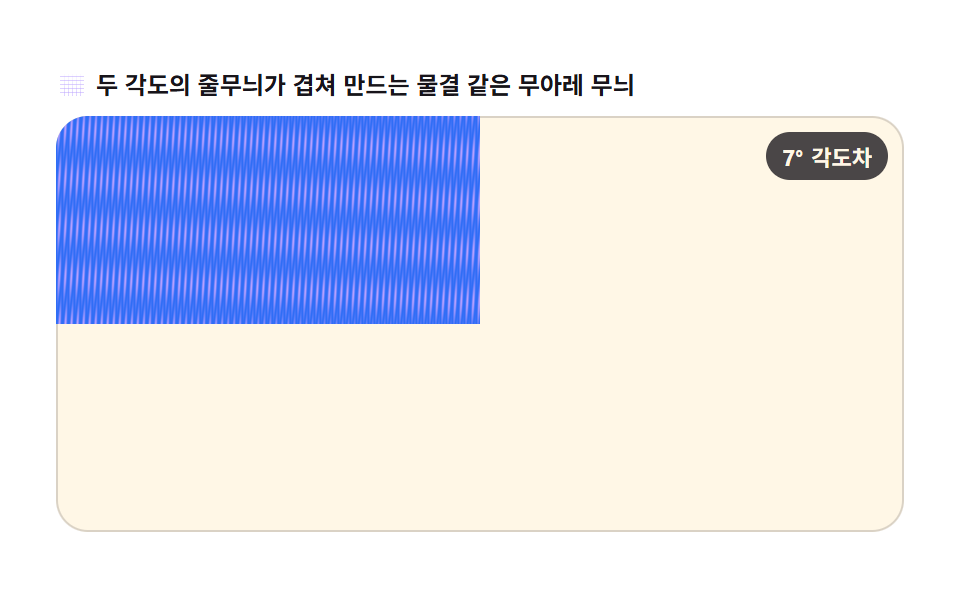
横縞の格子を2枚、異なる角度・位相で重ね、getImageData で読み取ったピクセルごとの明るさを掛け算してモアレ縞を作ります。putImageData で毎フレーム位相を Math.sin 分だけずらし、動く波のように見せます。
使いどころテクスチャ背景アニメーション、ホログラフィックカード表面効果
createImageDataputImageDataMath.sin
<main class="stage">
<div class="mo" id="mo">
  <p class="mo__hint">
    <svg class="mo__ico" viewBox="0 0 256 256" aria-hidden="true"><g fill="currentColor"><path d="M32 64h192v8H32zM32 96h192v8H32zM32 128h192v8H32zM32 160h192v8H32zM32 192h192v8H32z" opacity=".5"/><path d="M64 32l8 192h-8zM96 32l8 192h-8zM128 32l8 192h-8zM160 32l8 192h-8zM192 32l8 192h-8z" opacity=".5"/></g></svg>
    <span>2つの角度の縞が重なって波のようなモアレを作ります</span>
  </p>
  <div class="mo__field" id="field" role="application" aria-label="モアレ格子の実験盤">
    <canvas class="mo__cv" id="cv"></canvas>
    <b class="mo__badge" aria-hidden="true"><span class="mo__badgeNum">7°</span><span class="mo__badgeUnit">角度差</span></b>
  </div>
</div>
</main>
@use "../../../../site/static/demo-tokens" as *;
// 무아레 격자 간섭 — 두 줄무늬 층을 겹쳐 픽셀별 밝기를 곱해 무아레 무늬를 만든다.
// 움직임은 전부 캔버스 rAF 루프 안에 있다. @keyframes 0개.
$duration: $dur-loop;
$easing: $ease-spring;
$color: $subject-lilac;
@include stage($stage-paper);
.mo {
--line-a: #{$subject-blue};
--line-b: #{$subject-lilac};
--ink-fg: #{$subject-ink};
--badge-bg: #{rgba($subject-ink, .78)};
--badge-fg: #{$subject-cream};
display: flex; flex-direction: column; gap: $sp-2;
width: 100%; max-width: 424px;
}
.mo__hint {
display: flex; align-items: center; gap: $sp-1; margin: 0;
font-weight: 700; font-size: clamp(10px, 2.8vw, 12px); line-height: 1.35;
color: var(--ink-fg);
}
.mo__ico { width: 16px; height: 16px; flex: 0 0 auto; color: $subject-lilac; }
.mo__field {
position: relative; height: 208px;
border-radius: $r-card; overflow: hidden;
background: $subject-cream;
box-shadow: inset 0 0 0 1px rgba($subject-ink, .16);
}
.mo__cv { display: block; width: 100%; height: 100%; }
.mo__badge {
position: absolute; right: $sp-2; top: $sp-2;
display: flex; align-items: baseline; gap: $sp-1;
padding: $sp-1 $sp-2; border-radius: $r-pill;
background: var(--badge-bg);
color: var(--badge-fg); font-weight: 700; font-size: 11px;
}
@media (max-width: 340px) {
.mo__field { height: 124px; }
.mo__badge { font-size: 10px; padding: 0 $sp-1; }
}
@media (prefers-reduced-motion: reduce) {
.mo.is-still .mo__badge { opacity: .92 !important; }
}html, body {
margin: 0;
overflow: hidden;
}
.stage {
box-sizing: border-box;
min-height: 100vh;
display: grid;
place-items: center;
margin: 0;
background: #ffffff;
font-family: -apple-system, "Segoe UI", "Noto Sans KR", sans-serif;
padding: clamp(8px, 4vw, 24px);
}
.mo {
--line-a: #2f6df6;
--line-b: #b9a0ff;
--ink-fg: #17141a;
--badge-bg: rgba(23, 20, 26, 0.78);
--badge-fg: #fff7e6;
display: flex;
flex-direction: column;
gap: 8px;
width: 100%;
max-width: 424px;
}
.mo__hint {
display: flex;
align-items: center;
gap: 4px;
margin: 0;
font-weight: 700;
font-size: clamp(10px, 2.8vw, 12px);
line-height: 1.35;
color: var(--ink-fg);
}
.mo__ico {
width: 16px;
height: 16px;
flex: 0 0 auto;
color: #b9a0ff;
}
.mo__field {
position: relative;
height: 208px;
border-radius: 16px;
overflow: hidden;
background: #fff7e6;
box-shadow: inset 0 0 0 1px rgba(23, 20, 26, 0.16);
}
.mo__cv {
display: block;
width: 100%;
height: 100%;
}
.mo__badge {
position: absolute;
right: 8px;
top: 8px;
display: flex;
align-items: baseline;
gap: 4px;
padding: 4px 8px;
border-radius: 999px;
background: var(--badge-bg);
color: var(--badge-fg);
font-weight: 700;
font-size: 11px;
}
@media (max-width: 340px) {
.mo__field {
height: 124px;
}
.mo__badge {
font-size: 10px;
padding: 0 4px;
}
}
@media (prefers-reduced-motion: reduce) {
.mo.is-still .mo__badge {
opacity: 0.92 !important;
}
}// 무아레 격자 간섭 — 가로 줄무늬 두 장을 서로 다른 각도·위상으로 겹쳐 getImageData 로 읽은
// 픽셀별 밝기를 곱해 무아레 줄무늬를 만든다. putImageData 로 매 프레임 위상을 Math.sin 만큼
// 밀어 움직이는 물결처럼 보이게 한다.
var root = document.getElementById('mo');
var field = document.getElementById('field');
var cv = document.getElementById('cv');
var ctx = cv.getContext('2d', { willReadFrequently: true });
var css = getComputedStyle(root);
var A = css.getPropertyValue('--line-a').trim();
var B = css.getPropertyValue('--line-b').trim();
var ANGLE = 7 * Math.PI / 180; // 두 층의 角度差 — 작을수록 무늬 간격이 넓어진다
var PITCH = 6; // 줄무늬 한 칸(px)
var LOOP = 2;
var reduce = window.matchMedia('(prefers-reduced-motion: reduce)').matches;
var W = 0, H = 0, dpr = 1, raf = 0;
var img = null, buf = null;
function parse(c) {
var m = c.match(/^#([0-9a-f]{6})$/i);
if (!m) return [47, 109, 246];
return [parseInt(m[1].slice(0, 2), 16), parseInt(m[1].slice(2, 4), 16), parseInt(m[1].slice(4, 6), 16)];
}
var CA = parse(A), CB = parse(B);
function fit() {
var r = field.getBoundingClientRect();
dpr = window.devicePixelRatio || 1;
W = Math.round(r.width); H = Math.round(r.height);
cv.width = Math.round(W * dpr);
cv.height = Math.round(H * dpr);
ctx.setTransform(dpr, 0, 0, dpr, 0, 0);
img = ctx.createImageData(W, H);
buf = img.data;
}
// 줄무늬 층 하나의 밝기(0..1) — 회전된 좌표축을 따라 사인 줄무늬를 만든다
function stripe(x, y, angle, phase) {
var rx = x * Math.cos(angle) + y * Math.sin(angle);
var v = Math.sin(rx / PITCH * Math.PI * 2 + phase) * 0.5 + 0.5;
return v;
}
function draw(sec) {
var phase = (sec % LOOP) / LOOP * Math.PI * 2; // 위상을 Math.sin 인자로 밀어 물결처럼 흐르게 한다
for (var y = 0; y < H; y++) {
for (var x = 0; x < W; x++) {
var a = stripe(x, y, 0, phase);
var b = stripe(x, y, ANGLE, -phase * 0.6);
var v = a * b; // 두 층의 밝기를 곱해 겹침(무아레)을 만든다
var i = (y * W + x) * 4;
buf[i] = Math.round(CA[0] + (CB[0] - CA[0]) * v);
buf[i + 1] = Math.round(CA[1] + (CB[1] - CA[1]) * v);
buf[i + 2] = Math.round(CA[2] + (CB[2] - CA[2]) * v);
buf[i + 3] = 255;
}
}
ctx.putImageData(img, 0, 0);
}
function frame(now) {
draw(now / 1000);
raf = requestAnimationFrame(frame);
}
fit();
window.addEventListener('resize', function () { fit(); if (reduce) draw(0.35); });
if (reduce) {
// reduce — 루프 없이 위상 0.35 의 한 장만 그린다(빈 화면이 아니다)
root.classList.add('is-still');
draw(0.35);
} else {
raf = requestAnimationFrame(frame);
}// MoireGrating — vanilla 판(run/303/demo/07-wave-moire-grating/index.html) 의 React 포트.
// 두 줄무늬 층을 겹쳐 픽셀별 밝기를 곱해 무아레 무늬를 만든다. 움직임은 전부 캔버스 rAF 루프 안.
import { useEffect, useRef, useState } from "react";
import type { CSSProperties } from "react";
import styles from "./MoireGrating.module.scss";
export type MoireGratingProps = {
duration?: number;
easing?: string;
accentColor?: string;
};
type Vars = CSSProperties & { "--duration"?: string; "--easing"?: string; "--color"?: string };
const TITLE = "무아레 격자 간섭 데모";
const HINT_TEXT = "두 각도의 줄무늬가 겹쳐 만드는 물결 같은 무아레 무늬";
const FIELD_LABEL = "무아레 격자 실험판";
const BADGE_NUM = "7°";
const BADGE_UNIT = "각도차";
export default function MoireGrating({
duration = 2000,
easing = "cubic-bezier(.2, .8, .2, 1)",
accentColor = "#b9a0ff",
}: MoireGratingProps) {
const rootRef = useRef<HTMLDivElement>(null);
const fieldRef = useRef<HTMLDivElement>(null);
const cvRef = useRef<HTMLCanvasElement>(null);
const [still, setStill] = useState(false);
const vars: Vars = {
"--duration": `${duration}ms`,
"--easing": easing,
"--color": accentColor,
};
useEffect(() => {
const root0 = rootRef.current;
const field0 = fieldRef.current;
const cv0 = cvRef.current;
if (!root0 || !field0 || !cv0) return;
const ctx0 = cv0.getContext("2d", { willReadFrequently: true });
if (!ctx0) return;
// 중첩 함수(클로저) 안에서는 가드로 좁힌 널 타입이 전달되지 않는다 — 확인된 값으로 다시 상수를 묶는다
const root: HTMLDivElement = root0;
const field: HTMLDivElement = field0;
const cv: HTMLCanvasElement = cv0;
const ctx: CanvasRenderingContext2D = ctx0;
const css = getComputedStyle(root);
const lineA = css.getPropertyValue("--line-a").trim();
const lineB = css.getPropertyValue("--line-b").trim();
const ANGLE = 7 * Math.PI / 180; // 두 층의 각도차 — 작을수록 무늬 간격이 넓어진다
const PITCH = 6; // 줄무늬 한 칸(px)
const LOOP = 2;
const reduce = window.matchMedia("(prefers-reduced-motion: reduce)").matches;
let W = 0, H = 0, dpr = 1, raf = 0;
let img: ImageData | null = null;
let buf: Uint8ClampedArray | null = null;
function parse(c: string): [number, number, number] {
const m = c.match(/^#([0-9a-f]{6})$/i);
if (!m) return [47, 109, 246];
return [
parseInt(m[1].slice(0, 2), 16),
parseInt(m[1].slice(2, 4), 16),
parseInt(m[1].slice(4, 6), 16),
];
}
const CA = parse(lineA), CB = parse(lineB);
function fit() {
const r = field!.getBoundingClientRect();
dpr = window.devicePixelRatio || 1;
W = Math.round(r.width); H = Math.round(r.height);
cv!.width = Math.round(W * dpr);
cv!.height = Math.round(H * dpr);
ctx!.setTransform(dpr, 0, 0, dpr, 0, 0);
img = ctx!.createImageData(W, H);
buf = img.data;
}
// 줄무늬 층 하나의 밝기(0..1) — 회전된 좌표축을 따라 사인 줄무늬를 만든다
function stripe(x: number, y: number, angle: number, phase: number) {
const rx = x * Math.cos(angle) + y * Math.sin(angle);
return Math.sin(rx / PITCH * Math.PI * 2 + phase) * 0.5 + 0.5;
}
function draw(sec: number) {
if (!img || !buf) return;
const b = buf;
const phase = (sec % LOOP) / LOOP * Math.PI * 2; // 위상을 Math.sin 인자로 밀어 물결처럼 흐르게 한다
for (let y = 0; y < H; y++) {
for (let x = 0; x < W; x++) {
const a = stripe(x, y, 0, phase);
const c = stripe(x, y, ANGLE, -phase * 0.6);
const v = a * c; // 두 층의 밝기를 곱해 겹침(무아레)을 만든다
const i = (y * W + x) * 4;
b[i] = Math.round(CA[0] + (CB[0] - CA[0]) * v);
b[i + 1] = Math.round(CA[1] + (CB[1] - CA[1]) * v);
b[i + 2] = Math.round(CA[2] + (CB[2] - CA[2]) * v);
b[i + 3] = 255;
}
}
ctx.putImageData(img, 0, 0);
}
function frame(now: number) {
draw(now / 1000);
raf = requestAnimationFrame(frame);
}
function onResize() {
fit();
if (reduce) draw(0.35);
}
fit();
window.addEventListener("resize", onResize);
if (reduce) {
// reduce — 루프 없이 위상 0.35 의 한 장만 그린다(빈 화면이 아니다)
setStill(true);
draw(0.35);
} else {
raf = requestAnimationFrame(frame);
}
return () => {
cancelAnimationFrame(raf);
window.removeEventListener("resize", onResize);
};
}, []);
return (
<main className={styles.stage}>
<div
className={`${styles.mo}${still ? ` ${styles["is-still"]}` : ""}`}
ref={rootRef}
style={vars}
aria-label={TITLE}
>
<p className={styles["mo__hint"]}>
<svg className={styles["mo__ico"]} viewBox="0 0 256 256" aria-hidden="true">
<g fill="currentColor">
<path d="M32 64h192v8H32zM32 96h192v8H32zM32 128h192v8H32zM32 160h192v8H32zM32 192h192v8H32z" opacity=".5" />
<path d="M64 32l8 192h-8zM96 32l8 192h-8zM128 32l8 192h-8zM160 32l8 192h-8zM192 32l8 192h-8z" opacity=".5" />
</g>
</svg>
<span>{HINT_TEXT}</span>
</p>
<div
className={styles["mo__field"]}
ref={fieldRef}
role="application"
aria-label={FIELD_LABEL}
>
<canvas className={styles["mo__cv"]} ref={cvRef}></canvas>
<b className={styles["mo__badge"]} aria-hidden="true">
<span className={styles["mo__badgeNum"]}>{BADGE_NUM}</span>
<span className={styles["mo__badgeUnit"]}>{BADGE_UNIT}</span>
</b>
</div>
</div>
</main>
);
}07 モアレ格子干渉 — 計測 累積面積 60.433% · 動いたフレーム 23/23GODRICH オリジナル · SCSS と React は zip に同梱 · リサージュ曲線 作り方9選 — 波の干渉で描くキャンバス
このデモが属する記事
 リサージュ曲線 作り方9選 — 波の干渉で描くキャンバスリサージュ曲線とは、周波数の異なる二つのサイン波をX軸とY軸にそれぞれ与えたときにペンが描く閉曲線で、オシロスコープの画面で位相差を目で確かめるために使われる図形です。ここではその原理をMath.sinとキャンバスだけで九つの場面に広げ、す この記事のデモをすべて見る