02等高線マップ — 標高帯付きキャンバス
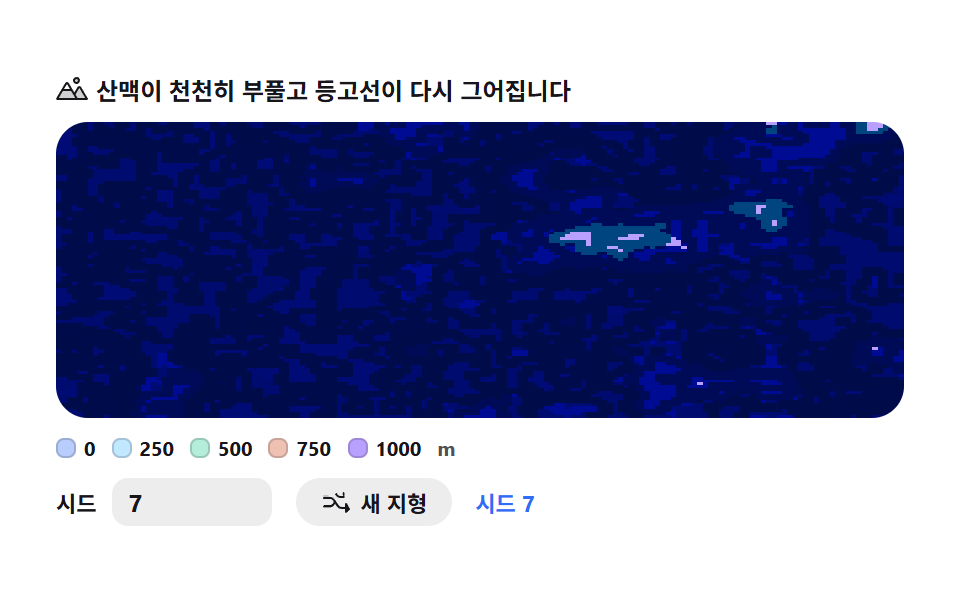
2次元fbm高さマップを createImageData でピクセルごとに塗り、標高帯5段に着色。putImageData で載せたあと同じ高さマップの閾値線を細く重ねて等高線地図に仕上げます。
使いどころ旅行・不動産・気象ダッシュボードの地図カード
createImageDataputImageDatafbm
<main class="stage">
<div class="cm" id="cm">
  <p class="cm__hint">
    <svg class="cm__ico" viewBox="0 0 256 256" aria-hidden="true"><g fill="currentColor"><path d="M144 52a20 20 0 1 1 20 20a20 20 0 0 1-20-20m49.44 55.92a8 8 0 0 0-13.77 0l-33 55.75l-21-35.67H50.35L8 200h240Z" opacity=".2"/><path d="M164 80a28 28 0 1 0-28-28a28 28 0 0 0 28 28m0-40a12 12 0 1 1-12 12a12 12 0 0 1 12-12m90.88 155.92l-54.56-92.08A15.87 15.87 0 0 0 186.55 96a15.85 15.85 0 0 0-13.76 7.84L146.63 148l-44.84-76.1a16 16 0 0 0-27.58 0L1.11 195.94A8 8 0 0 0 8 208h240a8 8 0 0 0 6.88-12.08M88 80l23.57 40H64.43ZM22 192l33-56h66l33 56Zm150.57 0l-16.66-28.28L186.55 112L234 192Z"/></g></svg>
    <span>山脈がゆっくり膨らみ、等高線が引き直されます</span>
  </p>
  <div class="cm__field" id="field" role="img" aria-label="5段の標高帯と等高線で描いた地形図">
    <canvas class="cm__cv" id="cv"></canvas>
  </div>
  <div class="cm__legend" aria-hidden="true">
    <div class="cm__lg"><i class="cm__sw" style="background:var(--c0)"></i>0</div>
    <div class="cm__lg"><i class="cm__sw" style="background:var(--c1)"></i>250</div>
    <div class="cm__lg"><i class="cm__sw" style="background:var(--c2)"></i>500</div>
    <div class="cm__lg"><i class="cm__sw" style="background:var(--c3)"></i>750</div>
    <div class="cm__lg"><i class="cm__sw" style="background:var(--c4)"></i>1000</div>
    <span class="cm__unit">m</span>
  </div>
  <div class="cm__bar">
    <label class="cm__dial">シード
      <input type="number" id="seed" min="1" max="9999" step="1" value="7" aria-label="シード番号">
    </label>
    <button class="cm__shuffle" id="shuffle" type="button">
      <svg class="cm__ico" viewBox="0 0 256 256" aria-hidden="true"><g fill="currentColor"><path d="M32 72h32l16 24-13 9-11-17H32a8 8 0 0 1 0-16" opacity=".2"/><path d="M237.66 178.34a8 8 0 0 1 0 11.32l-24 24A8 8 0 0 1 200 208V184h-29.41a40 40 0 0 1-33.94-18.75L102.71 115.5A24 24 0 0 0 82.75 104H32a8 8 0 0 1 0-16h50.75a40 40 0 0 1 33.94 18.75l33.94 49.75a24 24 0 0 0 19.96 11.5H200v-24a8 8 0 0 1 13.66-5.66ZM32 152h50.75a24 24 0 0 0 19.96-11.5l8.11-11.87 9.51 13.93-6.9 10.11a40 40 0 0 1-33.94 18.72H32a8 8 0 0 1 0-16m150.34-82.34a8 8 0 0 0 13.66 5.66V96h-34.46a40 40 0 0 1-33.94-18.75l-6.9-10.11 9.51-13.93 8.11 11.87A24 24 0 0 0 158.29 80H196V56a8 8 0 0 0-13.66-5.66" fill-rule="evenodd"/></g></svg>
      <span>新しい地形</span>
    </button>
    <b class="cm__val" id="seedOut">シード <span id="seedNum">7</span></b>
  </div>
</div>
</main>@use "../../../../site/static/demo-tokens" as *;
// 등고선 지도 — 움직임은 전부 캔버스 rAF 루프(2D fbm 높이맵을 createImageData 로 픽셀마다 채색).
// CSS 는 무대·판·범례·시드 컨트롤만. @keyframes 를 두지 않는다 — 렌더러가 시계를 고정하지 않고
// 실시간 프레임을 찍어야 지형이 부푸는 게 측정된다. 색은 파스텔 5단(hypsometric) — vivid 리터럴 0(BD26).
// 파스텔 — 토큰 그대로 쓰면 vivid(채도≥.55·명도.2~.8)라 BD26 이 잡는다. mix() 로 옅게 섞는다(브리프 실측 조합)
$terrain-blue: mix($subject-blue, $stage-paper, 34%);
$terrain-sky: mix($subject-sky, $stage-paper, 42%);
$terrain-mint: mix($subject-mint, $stage-paper, 42%);
$terrain-peach: mix($subject-orange-deep, $stage-paper, 30%);
$terrain-lilac: $subject-lilac; // 이미 명도 .81 이라 그대로 써도 통과
$duration: $dur-loop;
$easing: $ease-out;
$color: $terrain-blue;
@include stage($stage-paper);
.cm {
// 고도띠 5단 — 낮은 곳(물가)에서 높은 곳(봉우리)으로. JS 가 --c0~--c4 를 읽어 LUT 를 만든다
--c0: #{$terrain-blue};
--c1: #{$terrain-sky};
--c2: #{$terrain-mint};
--c3: #{$terrain-peach};
--c4: #{$terrain-lilac};
// 등고선 선 색 — 잉크를 종이 쪽으로 섞어 은은하게(순수 검정 리터럴 대신 토큰 mix)
--c-line: #{mix($subject-ink, $stage-paper, 74%)};
display: flex; flex-direction: column; gap: $sp-2;
width: 100%; max-width: 424px;
}
.cm__hint {
display: flex; align-items: center; gap: $sp-1; margin: 0;
font-weight: 700; font-size: clamp(10px, 2.8vw, 12px); line-height: 1.35;
color: $subject-ink;
}
.cm__ico { width: 16px; height: 16px; flex: 0 0 auto; color: $subject-ink; }
.cm__field {
position: relative; height: 148px;
border-radius: $r-card; overflow: hidden;
background: $stage-paper;
box-shadow: inset 0 0 0 1px rgba($subject-ink, .16);
}
.cm__cv { display: block; width: 100%; height: 100%; }
.cm__legend {
display: flex; align-items: center; gap: $sp-2;
font-weight: 700; font-size: 10px; color: $subject-ink;
}
.cm__lg { display: flex; align-items: center; gap: $sp-1; }
.cm__sw { width: 10px; height: 10px; border-radius: $r-xs; flex: 0 0 auto; box-shadow: inset 0 0 0 1px rgba($subject-ink, .18); }
.cm__unit { color: rgba($subject-ink, .74); font-weight: 700; }
.cm__bar { display: flex; align-items: center; gap: $sp-3; flex-wrap: wrap; }
.cm__dial {
display: flex; align-items: center; gap: $sp-2;
font-weight: 700; font-size: 11px; color: $subject-ink;
}
.cm__dial input {
width: 64px; margin: 0;
padding: $sp-1 $sp-2; border: 0; border-radius: $r-sm;
background: rgba($subject-ink, .08); color: $subject-ink;
font-weight: 700; font-size: 12px; font-family: inherit;
}
.cm__dial input:focus-visible { outline: 2px solid $subject-blue; outline-offset: 2px; }
.cm__shuffle {
display: flex; align-items: center; gap: $sp-1;
padding: $sp-1 $sp-3; border: 0; border-radius: $r-pill;
background: rgba($subject-ink, .08); color: $subject-ink;
font-weight: 700; font-size: 11px; font-family: inherit; cursor: pointer;
}
.cm__shuffle:hover { background: rgba($subject-ink, .16); }
.cm__shuffle:focus-visible { outline: 2px solid $subject-blue; outline-offset: 2px; }
.cm__val { color: $subject-blue; font-size: 11px; font-weight: 700; }
@media (max-width: 340px) {
.cm { gap: $sp-1; }
.cm__field { height: 92px; }
.cm__hint { font-size: 10px; }
.cm__legend { gap: $sp-1; font-size: 9px; }
.cm__bar { gap: $sp-2; }
.cm__dial input { width: 52px; }
}
// reduce — 루프가 안 돈다. 시드 입력은 여전히 결정적으로 한 장을 다시 그린다(is-still 만 표시)
@media (prefers-reduced-motion: reduce) {
.cm.is-still .cm__field { cursor: default !important; }
}html, body {
margin: 0;
overflow: hidden;
}
.stage {
box-sizing: border-box;
min-height: 100vh;
display: grid;
place-items: center;
margin: 0;
background: #ffffff;
font-family: -apple-system, "Segoe UI", "Noto Sans KR", sans-serif;
padding: clamp(8px, 4vw, 24px);
}
.cm {
--c0: rgb(72.2666666667%, 80.5333333333%, 98.8%);
--c1: rgb(76.1176470588%, 90.9411764706%, 100%);
--c2: rgb(70.5176470588%, 92.9176470588%, 85.3411764706%);
--c3: rgb(93.6470588235%, 75.6470588235%, 70%);
--c4: #b9a0ff;
--c-line: rgb(32.6745098039%, 31.8039215686%, 33.5450980392%);
display: flex;
flex-direction: column;
gap: 8px;
width: 100%;
max-width: 424px;
}
.cm__hint {
display: flex;
align-items: center;
gap: 4px;
margin: 0;
font-weight: 700;
font-size: clamp(10px, 2.8vw, 12px);
line-height: 1.35;
color: #17141a;
}
.cm__ico {
width: 16px;
height: 16px;
flex: 0 0 auto;
color: #17141a;
}
.cm__field {
position: relative;
height: 148px;
border-radius: 16px;
overflow: hidden;
background: #ffffff;
box-shadow: inset 0 0 0 1px rgba(23, 20, 26, 0.16);
}
.cm__cv {
display: block;
width: 100%;
height: 100%;
}
.cm__legend {
display: flex;
align-items: center;
gap: 8px;
font-weight: 700;
font-size: 10px;
color: #17141a;
}
.cm__lg {
display: flex;
align-items: center;
gap: 4px;
}
.cm__sw {
width: 10px;
height: 10px;
border-radius: 4px;
flex: 0 0 auto;
box-shadow: inset 0 0 0 1px rgba(23, 20, 26, 0.18);
}
.cm__unit {
color: rgba(23, 20, 26, 0.74);
font-weight: 700;
}
.cm__bar {
display: flex;
align-items: center;
gap: 12px;
flex-wrap: wrap;
}
.cm__dial {
display: flex;
align-items: center;
gap: 8px;
font-weight: 700;
font-size: 11px;
color: #17141a;
}
.cm__dial input {
width: 64px;
margin: 0;
padding: 4px 8px;
border: 0;
border-radius: 8px;
background: rgba(23, 20, 26, 0.08);
color: #17141a;
font-weight: 700;
font-size: 12px;
font-family: inherit;
}
.cm__dial input:focus-visible {
outline: 2px solid #2f6df6;
outline-offset: 2px;
}
.cm__shuffle {
display: flex;
align-items: center;
gap: 4px;
padding: 4px 12px;
border: 0;
border-radius: 999px;
background: rgba(23, 20, 26, 0.08);
color: #17141a;
font-weight: 700;
font-size: 11px;
font-family: inherit;
cursor: pointer;
}
.cm__shuffle:hover {
background: rgba(23, 20, 26, 0.16);
}
.cm__shuffle:focus-visible {
outline: 2px solid #2f6df6;
outline-offset: 2px;
}
.cm__val {
color: #2f6df6;
font-size: 11px;
font-weight: 700;
}
@media (max-width: 340px) {
.cm {
gap: 4px;
}
.cm__field {
height: 92px;
}
.cm__hint {
font-size: 10px;
}
.cm__legend {
gap: 4px;
font-size: 9px;
}
.cm__bar {
gap: 8px;
}
.cm__dial input {
width: 52px;
}
}
@media (prefers-reduced-motion: reduce) {
.cm.is-still .cm__field {
cursor: default !important;
}
}// 등고선 지도 — 2D fbm 높이맵을 createImageData 로 픽셀마다 채색한다.
// 1) 높이(0~1)를 5단으로 나눠 고도띠 색을 칠하고(hypsometric bands)
// 2) 같은 높이맵을 더 촘촘한 10단으로 다시 나눠, 인접 8칸과 등급이 다른 경계 픽셀만 진하게 찍어 등고선을 겹친다.
// 시간이 흐르면 fbm 의 z(셋째 인자)가 흘러 산맥이 서서히 부풀고 줄어든다 — 등고선도 같이 다시 그어진다.
var root = document.getElementById('cm');
var field = document.getElementById('field');
var cv = document.getElementById('cv');
var ctx = cv.getContext('2d');
var seedIn = document.getElementById('seed');
var shuffleBtn = document.getElementById('shuffle');
var seedNum = document.getElementById('seedNum');
var MW = 160, MH = 100; // 높이맵 버퍼 해상도 — 화면이 커져도 이 값은 그대로다
var small = document.createElement('canvas');
small.width = MW; small.height = MH;
var sctx = small.getContext('2d');
var buf = sctx.createImageData(MW, MH); // 한 번만 만들어 두고 프레임마다 같은 배열을 덮어쓴다
var px = buf.data;
var heights = new Float32Array(MW * MH); // 문턱선 검사에 다시 쓰려고 높이를 한 프레임만큼 남겨 둔다
// ── 결정적 난수 — mulberry32. シード 하나 → 같은 테이블 ────────────────────────────
function mulberry32(a) {
return function () {
a |= 0; a = (a + 0x6D2B79F5) | 0;
var t = Math.imul(a ^ (a >>> 15), 1 | a);
t = (t + Math.imul(t ^ (t >>> 7), 61 | t)) ^ t;
return ((t ^ (t >>> 14)) >>> 0) / 4294967296;
};
}
var PERM = new Uint8Array(512);
var VAL = new Float32Array(256);
function buildTables(seed) {
var rng = mulberry32(seed >>> 0);
var p = [], i, j, t;
for (i = 0; i < 256; i++) p[i] = i;
for (i = 255; i > 0; i--) { j = (rng() * (i + 1)) | 0; t = p[i]; p[i] = p[j]; p[j] = t; }
for (i = 0; i < 512; i++) PERM[i] = p[i & 255];
for (i = 0; i < 256; i++) VAL[i] = rng();
}
function fade(t) { return t * t * (3 - 2 * t); } // 스무스스텝 — 격자 경계에서 각이 안 지게
function vnoise(x, y, z) {
var xi = Math.floor(x), yi = Math.floor(y), zi = Math.floor(z);
var xf = x - xi, yf = y - yi, zf = z - zi;
xi &= 255; yi &= 255; zi &= 255;
var u = fade(xf), v = fade(yf), w = fade(zf);
var a = PERM[xi] + yi, b = PERM[xi + 1] + yi;
var aa = PERM[a] + zi, ab = PERM[a + 1] + zi;
var ba = PERM[b] + zi, bb = PERM[b + 1] + zi;
var c000 = VAL[PERM[aa]], c100 = VAL[PERM[ba]];
var c010 = VAL[PERM[ab]], c110 = VAL[PERM[bb]];
var c001 = VAL[PERM[aa + 1]], c101 = VAL[PERM[ba + 1]];
var c011 = VAL[PERM[ab + 1]], c111 = VAL[PERM[bb + 1]];
var x00 = c000 + (c100 - c000) * u, x10 = c010 + (c110 - c010) * u;
var x01 = c001 + (c101 - c001) * u, x11 = c011 + (c111 - c011) * u;
var y0 = x00 + (x10 - x00) * v, y1 = x01 + (x11 - x01) * v;
return y0 + (y1 - y0) * w;
}
// fbm — 옥타브를 겹쳐 산맥·골짜기 굴곡을 만든다. z 가 흐르면 지형 전체가 서서히 다시 태어난다
function fbm(x, y, z, oct) {
var sum = 0, amp = 0.5, norm = 0, f = 1;
for (var i = 0; i < oct; i++) {
sum += vnoise(x * f, y * f, z * f) * amp;
norm += amp;
amp *= 0.5;
f *= 2;
}
return sum / norm;
}
// ── 색 — 고도띠 5단을 CSS 커스텀 프로퍼티(파스텔 토큰)에서 읽어 온다 ────────────────
var css = getComputedStyle(root);
function rgbOf(name) {
var v = css.getPropertyValue(name).trim().replace('#', '');
if (v.length === 3) v = v.charAt(0) + v.charAt(0) + v.charAt(1) + v.charAt(1) + v.charAt(2) + v.charAt(2);
return [parseInt(v.slice(0, 2), 16), parseInt(v.slice(2, 4), 16), parseInt(v.slice(4, 6), 16)];
}
var BANDS = [rgbOf('--c0'), rgbOf('--c1'), rgbOf('--c2'), rgbOf('--c3'), rgbOf('--c4')];
var LINE = rgbOf('--c-line');
var SCALE = 0.052; // 격자 간격 — 작을수록 산과 골짜기가 굵어진다(실측 튜닝)
var FLOW = 0.5; // 시간축이 흐르는 속도 — 산맥이 부푸는 빠르기
var OCT = 5; // fbm 옥타브 수 — 많을수록 등고선이 촘촘해진다
var LINE_LEVELS = 11; // 등고선 문턱 칸 수(색 밴드 5단과 별개 — 더 촘촘해야 지도처럼 보인다)
var reduce = window.matchMedia('(prefers-reduced-motion: reduce)').matches;
var W = 0, H = 0, dpr = 1;
var raf = 0;
function fit() {
var r = field.getBoundingClientRect();
dpr = window.devicePixelRatio || 1;
W = r.width; H = r.height;
cv.width = Math.round(W * dpr);
cv.height = Math.round(H * dpr);
ctx.setTransform(dpr, 0, 0, dpr, 0, 0);
}
function paint(sec) {
var z = sec * FLOW;
var i = 0, hi = 0;
// 1차 — 높이를 구하고 고도띠 5단 색을 채운다
for (var y = 0; y < MH; y++) {
var ny = y * SCALE;
for (var x = 0; x < MW; x++) {
var n = fbm(x * SCALE, ny, z, OCT);
n = n * 1.5 - 0.25; // 값 노이즈는 가운데로 몰린다 — 대비를 펴 준다
if (n < 0) n = 0; else if (n > 1) n = 1;
heights[hi++] = n;
var band = (n * 5) | 0; if (band > 4) band = 4;
var c = BANDS[band];
px[i] = c[0]; px[i + 1] = c[1]; px[i + 2] = c[2]; px[i + 3] = 255;
i += 4;
}
}
// 2차 — 같은 높이맵을 더 촘촘한 문턱(LINE_LEVELS)으로 다시 나눠, 8-이웃과 등급이
// 다른 경계 픽셀만 등고선 색으로 덮는다(marching squares 없이 간단하게)
for (var yy = 0; yy < MH; yy++) {
for (var xx = 0; xx < MW; xx++) {
var idx = yy * MW + xx;
var li = (heights[idx] * LINE_LEVELS) | 0;
var edge = false;
for (var dy = -1; dy <= 1 && !edge; dy++) {
var ny2 = yy + dy; if (ny2 < 0 || ny2 >= MH) continue;
for (var dx = -1; dx <= 1; dx++) {
if (dx === 0 && dy === 0) continue;
var nx2 = xx + dx; if (nx2 < 0 || nx2 >= MW) continue;
var nli = (heights[ny2 * MW + nx2] * LINE_LEVELS) | 0;
if (nli !== li) { edge = true; break; }
}
}
if (edge) {
var p2 = idx * 4;
var k = 0.62; // 등고선 진하기 — 채움색 위에 얇게 얹는 정도
px[p2] = px[p2] * (1 - k) + LINE[0] * k;
px[p2 + 1] = px[p2 + 1] * (1 - k) + LINE[1] * k;
px[p2 + 2] = px[p2 + 2] * (1 - k) + LINE[2] * k;
}
}
}
sctx.putImageData(buf, 0, 0);
ctx.imageSmoothingEnabled = false; // 고도띠 경계를 또렷하게 — 지도다운 각진 결
ctx.drawImage(small, 0, 0, MW, MH, 0, 0, W, H);
}
function frame(now) {
paint(now / 1000);
raf = requestAnimationFrame(frame);
}
function applySeed(v) {
var s = Math.max(1, Math.min(9999, Math.floor(v) || 1));
seedIn.value = String(s);
seedNum.textContent = String(s);
buildTables(s);
if (reduce) paint(0);
}
seedIn.addEventListener('input', function () { applySeed(Number(seedIn.value)); });
seedIn.addEventListener('change', function () { applySeed(Number(seedIn.value)); });
shuffleBtn.addEventListener('click', function () {
applySeed(1 + Math.floor(Math.random() * 9999));
});
window.addEventListener('resize', function () { fit(); if (reduce) paint(0); });
fit();
buildTables(Number(seedIn.value));
if (reduce) {
// reduce — 루프를 시작하지 않고 지형이 멈춰 선 한 장만 그린다(빈 화면이 아니다)
root.classList.add('is-still');
paint(0);
} else {
raf = requestAnimationFrame(frame);
}// ContourMap — vanilla 판(run/309/demo/02-terrain-contour-map/index.html) 의 React 포트.
// 2D fbm 높이맵을 160x100 ImageData 에 픽셀 단위로 채색해 고도띠 5단(hypsometric bands)을 칠하고,
// 같은 높이맵을 더 촘촘한 문턱(LINE_LEVELS)으로 다시 나눠 8-이웃과 등급이 다른 경계 픽셀만
// 등고선 색으로 덮는다(marching squares 없이 간단하게). z(시간축)가 흐르면 산맥이 서서히 부푼다.
import { useEffect, useRef, useState } from "react";
import type { CSSProperties } from "react";
import styles from "./ContourMap.module.scss";
export type ContourMapProps = {
duration?: string;
easing?: string;
color?: string;
};
type Vars = CSSProperties & { "--duration"?: string; "--easing"?: string; "--color"?: string };
type Box<T> = { current: T };
type InputEvt = { target: { value: string } };
const MW = 160, MH = 100; // 높이맵 버퍼 해상도 — 화면이 커져도 이 값은 그대로다
const SCALE = 0.052; // 격자 간격 — 작을수록 산과 골짜기가 굵어진다(실측 튜닝)
const FLOW = 0.5; // 시간축이 흐르는 속도 — 산맥이 부푸는 빠르기
const OCT = 5; // fbm 옥타브 수 — 많을수록 등고선이 촘촘해진다
const LINE_LEVELS = 11; // 등고선 문턱 칸 수(색 밴드 5단과 별개 — 더 촘촘해야 지도처럼 보인다)
const FIELD_LABEL = "고도띠 5단과 등고선으로 그린 지형 지도";
function fade(t: number): number {
return t * t * (3 - 2 * t); // 스무스스텝 — 격자 경계에서 각이 안 지게
}
// ── 결정적 난수 — mulberry32. 시드 하나 → 같은 테이블 ────────────────────────────
class ValueNoise {
perm: Uint8Array;
val: Float32Array;
constructor(seed: number) {
const a0 = seed >>> 0;
let a = a0;
const rng = () => {
a = (a + 0x6d2b79f5) | 0;
let t = Math.imul(a ^ (a >>> 15), 1 | a);
t = (t + Math.imul(t ^ (t >>> 7), 61 | t)) ^ t;
return ((t ^ (t >>> 14)) >>> 0) / 4294967296;
};
const p: number[] = [];
for (let i = 0; i < 256; i++) p[i] = i;
for (let i = 255; i > 0; i--) {
const j = (rng() * (i + 1)) | 0;
const t = p[i]; p[i] = p[j]; p[j] = t;
}
this.perm = new Uint8Array(512);
for (let i = 0; i < 512; i++) this.perm[i] = p[i & 255];
this.val = new Float32Array(256);
for (let i = 0; i < 256; i++) this.val[i] = rng();
}
at(x: number, y: number, z: number): number {
const xi = Math.floor(x), yi = Math.floor(y), zi = Math.floor(z);
const xf = x - xi, yf = y - yi, zf = z - zi;
const X = xi & 255, Y = yi & 255, Z = zi & 255;
const u = fade(xf), v = fade(yf), w = fade(zf);
const a = this.perm[X] + Y, b = this.perm[X + 1] + Y;
const aa = this.perm[a] + Z, ab = this.perm[a + 1] + Z;
const ba = this.perm[b] + Z, bb = this.perm[b + 1] + Z;
const c000 = this.val[this.perm[aa]], c100 = this.val[this.perm[ba]];
const c010 = this.val[this.perm[ab]], c110 = this.val[this.perm[bb]];
const c001 = this.val[this.perm[aa + 1]], c101 = this.val[this.perm[ba + 1]];
const c011 = this.val[this.perm[ab + 1]], c111 = this.val[this.perm[bb + 1]];
const x00 = c000 + (c100 - c000) * u, x10 = c010 + (c110 - c010) * u;
const x01 = c001 + (c101 - c001) * u, x11 = c011 + (c111 - c011) * u;
const y0 = x00 + (x10 - x00) * v, y1 = x01 + (x11 - x01) * v;
return y0 + (y1 - y0) * w;
}
}
// fbm — 옥타브를 겹쳐 산맥·골짜기 굴곡을 만든다. z 가 흐르면 지형 전체가 서서히 다시 태어난다
function fbm(n: ValueNoise, x: number, y: number, z: number, oct: number): number {
let sum = 0, amp = 0.5, norm = 0, f = 1;
for (let i = 0; i < oct; i++) {
sum += n.at(x * f, y * f, z * f) * amp;
norm += amp;
amp *= 0.5;
f *= 2;
}
return sum / norm;
}
function hex3to6(v: string): string {
if (v.length === 3) return v.charAt(0) + v.charAt(0) + v.charAt(1) + v.charAt(1) + v.charAt(2) + v.charAt(2);
return v;
}
function rgbOf(root: HTMLElement, name: string): number[] {
const v = hex3to6(getComputedStyle(root).getPropertyValue(name).trim().replace("#", ""));
return [parseInt(v.slice(0, 2), 16), parseInt(v.slice(2, 4), 16), parseInt(v.slice(4, 6), 16)];
}
export default function ContourMap({
duration = "2s", // vanilla $duration: $dur-loop
easing = "ease-out", // vanilla $easing: $ease-out
color = "#82a9f8", // vanilla $color: $terrain-blue (mix($subject-blue,$stage-paper,34%) 근사값)
}: ContourMapProps) {
const rootRef = useRef<HTMLDivElement | null>(null);
const fieldRef = useRef<HTMLDivElement | null>(null);
const cvRef = useRef<HTMLCanvasElement | null>(null);
const ctxRef = useRef<CanvasRenderingContext2D | null>(null);
const smallRef = useRef<HTMLCanvasElement | null>(null);
const sctxRef = useRef<CanvasRenderingContext2D | null>(null);
const bufRef = useRef<ImageData | null>(null);
const heightsRef = useRef<Float32Array | null>(null);
const noiseRef = useRef<ValueNoise | null>(null);
const bandsRef = useRef<number[][] | null>(null);
const lineRef = useRef<number[] | null>(null);
const sizeRef = useRef({ w: 0, h: 0 }) as Box<{ w: number; h: number }>;
const rafRef = useRef(0) as Box<number>;
const [seed, setSeed] = useState(7);
const [still, setStill] = useState(false);
const vars: Vars = { "--duration": duration, "--easing": easing, "--color": color };
function reduced(): boolean {
return window.matchMedia("(prefers-reduced-motion: reduce)").matches;
}
// 고DPI 대응 — 배킹 스토어는 devicePixelRatio 배, 그리기 좌표계는 CSS 픽셀 그대로
function fit(): void {
const field = fieldRef.current;
const cv = cvRef.current;
if (!field || !cv) return;
const r = field.getBoundingClientRect();
const dpr = window.devicePixelRatio || 1;
sizeRef.current.w = r.width;
sizeRef.current.h = r.height;
cv.width = Math.round(r.width * dpr);
cv.height = Math.round(r.height * dpr);
const ctx = ctxRef.current;
if (ctx) ctx.setTransform(dpr, 0, 0, dpr, 0, 0);
}
function paint(sec: number): void {
const ctx = ctxRef.current, sctx = sctxRef.current, n = noiseRef.current;
const buf = bufRef.current, bands = bandsRef.current, line = lineRef.current;
const heights = heightsRef.current;
if (!ctx || !sctx || !n || !buf || !bands || !line || !heights) return;
const W = sizeRef.current.w, H = sizeRef.current.h;
const z = sec * FLOW;
const px = buf.data;
let i = 0, hi = 0;
// 1차 — 높이를 구하고 고도띠 5단 색을 채운다
for (let y = 0; y < MH; y++) {
const ny = y * SCALE;
for (let x = 0; x < MW; x++) {
let v = fbm(n, x * SCALE, ny, z, OCT);
v = v * 1.5 - 0.25; // 값 노이즈는 가운데로 몰린다 — 대비를 펴 준다
if (v < 0) v = 0; else if (v > 1) v = 1;
heights[hi++] = v;
let band = (v * 5) | 0; if (band > 4) band = 4;
const c = bands[band];
px[i] = c[0]; px[i + 1] = c[1]; px[i + 2] = c[2]; px[i + 3] = 255;
i += 4;
}
}
// 2차 — 같은 높이맵을 더 촘촘한 문턱으로 다시 나눠, 8-이웃과 등급이 다른
// 경계 픽셀만 등고선 색으로 덮는다(marching squares 없이 간단하게)
for (let yy = 0; yy < MH; yy++) {
for (let xx = 0; xx < MW; xx++) {
const idx = yy * MW + xx;
const li = (heights[idx] * LINE_LEVELS) | 0;
let edge = false;
for (let dy = -1; dy <= 1 && !edge; dy++) {
const ny2 = yy + dy; if (ny2 < 0 || ny2 >= MH) continue;
for (let dx = -1; dx <= 1; dx++) {
if (dx === 0 && dy === 0) continue;
const nx2 = xx + dx; if (nx2 < 0 || nx2 >= MW) continue;
const nli = (heights[ny2 * MW + nx2] * LINE_LEVELS) | 0;
if (nli !== li) { edge = true; break; }
}
}
if (edge) {
const p2 = idx * 4;
const k = 0.62; // 등고선 진하기 — 채움색 위에 얇게 얹는 정도
px[p2] = px[p2] * (1 - k) + line[0] * k;
px[p2 + 1] = px[p2 + 1] * (1 - k) + line[1] * k;
px[p2 + 2] = px[p2 + 2] * (1 - k) + line[2] * k;
}
}
}
sctx.putImageData(buf, 0, 0);
ctx.imageSmoothingEnabled = false; // 고도띠 경계를 또렷하게 — 지도다운 각진 결
ctx.drawImage(sctx.canvas, 0, 0, MW, MH, 0, 0, W, H);
}
function frame(now: number): void {
paint(now / 1000);
rafRef.current = requestAnimationFrame(frame);
}
function applySeed(v: number): void {
const s = Math.max(1, Math.min(9999, Math.floor(v) || 1));
setSeed(s);
noiseRef.current = new ValueNoise(s);
if (reduced()) paint(0);
}
function onInput(e: InputEvt): void {
applySeed(Number(e.target.value));
}
function onShuffle(): void {
applySeed(1 + Math.floor(Math.random() * 9999));
}
function onResize(): void {
fit();
if (reduced()) paint(0);
}
useEffect(() => {
const cv = cvRef.current;
const root = rootRef.current;
if (!cv || !root) return;
ctxRef.current = cv.getContext("2d");
if (!ctxRef.current) return;
const small = document.createElement("canvas");
small.width = MW;
small.height = MH;
smallRef.current = small;
sctxRef.current = small.getContext("2d");
if (!sctxRef.current) return;
bufRef.current = sctxRef.current.createImageData(MW, MH); // 한 번만 만들어 두고 프레임마다 같은 배열을 덮어쓴다
heightsRef.current = new Float32Array(MW * MH);
noiseRef.current = new ValueNoise(seed);
bandsRef.current = [
rgbOf(root, "--c0"), rgbOf(root, "--c1"), rgbOf(root, "--c2"), rgbOf(root, "--c3"), rgbOf(root, "--c4"),
];
lineRef.current = rgbOf(root, "--c-line");
fit();
window.addEventListener("resize", onResize);
if (reduced()) {
// reduce — 루프를 시작하지 않고 지형이 멈춰 선 한 장만 그린다(빈 화면이 아니다)
setStill(true);
paint(0);
} else {
rafRef.current = requestAnimationFrame(frame);
}
return () => {
window.removeEventListener("resize", onResize);
cancelAnimationFrame(rafRef.current);
};
// eslint-disable-next-line react-hooks/exhaustive-deps
}, []);
const cls = [styles.cm, still ? styles.isStill : ""].filter(Boolean).join(" ");
return (
<main className={styles.stage}>
<div className={cls} ref={rootRef} style={vars}>
<p className={styles.hint}>
<svg className={styles.ico} viewBox="0 0 256 256" aria-hidden="true"><g fill="currentColor"><path d="M144 52a20 20 0 1 1 20 20a20 20 0 0 1-20-20m49.44 55.92a8 8 0 0 0-13.77 0l-33 55.75l-21-35.67H50.35L8 200h240Z" opacity=".2"/><path d="M164 80a28 28 0 1 0-28-28a28 28 0 0 0 28 28m0-40a12 12 0 1 1-12 12a12 12 0 0 1 12-12m90.88 155.92l-54.56-92.08A15.87 15.87 0 0 0 186.55 96a15.85 15.85 0 0 0-13.76 7.84L146.63 148l-44.84-76.1a16 16 0 0 0-27.58 0L1.11 195.94A8 8 0 0 0 8 208h240a8 8 0 0 0 6.88-12.08M88 80l23.57 40H64.43ZM22 192l33-56h66l33 56Zm150.57 0l-16.66-28.28L186.55 112L234 192Z"/></g></svg>
<span>산맥이 천천히 부풀고 등고선이 다시 그어집니다</span>
</p>
<div className={styles.field} ref={fieldRef} role="img" aria-label={FIELD_LABEL}>
<canvas className={styles.cv} ref={cvRef}></canvas>
</div>
<div className={styles.legend} aria-hidden="true">
<div className={styles.lg}><i className={styles.sw} style={{ background: "var(--c0)" }} />0</div>
<div className={styles.lg}><i className={styles.sw} style={{ background: "var(--c1)" }} />250</div>
<div className={styles.lg}><i className={styles.sw} style={{ background: "var(--c2)" }} />500</div>
<div className={styles.lg}><i className={styles.sw} style={{ background: "var(--c3)" }} />750</div>
<div className={styles.lg}><i className={styles.sw} style={{ background: "var(--c4)" }} />1000</div>
<span className={styles.unit}>m</span>
</div>
<div className={styles.bar}>
<label className={styles.dial}>시드
<input type="number" min={1} max={9999} step={1} value={seed} aria-label="시드 번호" onChange={onInput} />
</label>
<button className={styles.shuffle} type="button" onClick={onShuffle}>
<svg className={styles.ico} viewBox="0 0 256 256" aria-hidden="true"><g fill="currentColor"><path d="M32 72h32l16 24-13 9-11-17H32a8 8 0 0 1 0-16" opacity=".2"/><path d="M237.66 178.34a8 8 0 0 1 0 11.32l-24 24A8 8 0 0 1 200 208V184h-29.41a40 40 0 0 1-33.94-18.75L102.71 115.5A24 24 0 0 0 82.75 104H32a8 8 0 0 1 0-16h50.75a40 40 0 0 1 33.94 18.75l33.94 49.75a24 24 0 0 0 19.96 11.5H200v-24a8 8 0 0 1 13.66-5.66ZM32 152h50.75a24 24 0 0 0 19.96-11.5l8.11-11.87 9.51 13.93-6.9 10.11a40 40 0 0 1-33.94 18.72H32a8 8 0 0 1 0-16m150.34-82.34a8 8 0 0 0 13.66 5.66V96h-34.46a40 40 0 0 1-33.94-18.75l-6.9-10.11 9.51-13.93 8.11 11.87A24 24 0 0 0 158.29 80H196V56a8 8 0 0 0-13.66-5.66" fillRule="evenodd"/></g></svg>
<span>새 지형</span>
</button>
<b className={styles.val}>시드 <span>{seed}</span></b>
</div>
</div>
</main>
);
}02 等高線マップ — 標高帯付きキャンバス — 計測 累積面積 42.324% · 動いたフレーム 23/23GODRICH オリジナル · SCSS と React は zip に同梱 · パーリンノイズ地形9選 — ライブラリなし、計算だけで
このデモが属する記事
 パーリンノイズ地形9選 — ライブラリなし、計算だけでパーリンノイズとは、隣り合う値がなめらかにつながる乱数のことで、山・雲・海・星空といった自然の形を数式だけで描き出す元になる素材です。この9種をノイズ用ライブラリを一切使わずCanvas 2Dに直接実装しました。実測では08の河川侵食が累積 この記事のデモをすべて見る