03ポモドーロリングタイマー
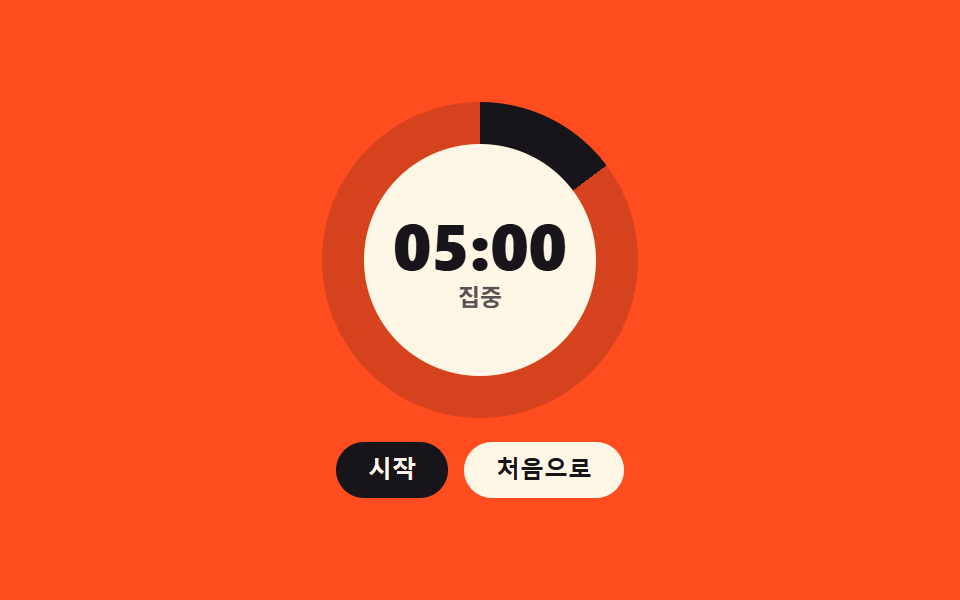
25分集中・5分休憩を巡る円形タイマー。残り時間は円盤が減っていき、リロードしても localStorage で続きから再開します。
使いどころ個人用作業タイマー、講義・自習コンテンツの進行盤
conic-gradientanimation-play-statearia-valuenow
<main class="stage">
<div class="pt is-demo" id="pt">
  <div class="pt__ring" id="ptRing" role="progressbar" aria-valuemin="0" aria-valuemax="100" aria-valuenow="100" aria-label="残り時間">
    <span class="pt__disc" id="ptDisc" aria-hidden="true"></span>
    <span class="pt__hole">
      <span class="pt__timeWrap">
        <b class="pt__time pt__time--cut1" id="ptTime">25:00</b>
        <b class="pt__time pt__time--cut2" aria-hidden="true">12:30</b>
        <b class="pt__time pt__time--cut3" aria-hidden="true">05:00</b>
      </span>
      <span class="pt__phaseWrap">
        <span class="pt__phase pt__phase--cut1" id="ptPhase">集中</span>
        <span class="pt__phase pt__phase--cut2" aria-hidden="true">休憩</span>
      </span>
    </span>
  </div>
  <div class="pt__ctrls">
    <button class="pt__btn pt__btn--go" type="button" id="ptPlay">開始</button>
    <button class="pt__btn" type="button" id="ptReset">リセット</button>
  </div>
</div>
</main>
@use "../../../../site/static/demo-tokens" as *;
// 포모도로 링 타이머 — 원판은 conic-gradient 한 장이고 각도만 커스텀 속성 --pt-angle 로 깎는다.
// @property 로 <angle> 등록을 해야 키프레임 사이가 보간된다(등록이 없으면 컷으로 튄다).
// --pt-angle 은 inherits: false 라 **원판 자신**에게 걸어야 한다 (262-08 교훈).
// 정지·재생은 animation-play-state 하나로 한다 — JS 는 시각을 다시 계산하지 않고 남은 초와 글자만 맡는다.
// 정적 상태(사람이 안 만진 첫 화면)는 원판이 가득 찬 25:00 이고, 격자 미리보기(.is-demo)는
// 그 위에 차고 비우는 루프 · 시간 컷 교체 · 페이즈 라벨 교체만 덧씌운다.
$duration: $dur-loop;
$easing: $ease-out;
$color: $subject-ink;
@include stage($stage-orange);
@property --pt-angle {
syntax: "<angle>";
inherits: false;
initial-value: 360deg;
}
.pt { display: flex; flex-direction: column; align-items: center; justify-content: center; gap: $sp-3; width: 100%; height: 100%; }
.pt__ring { position: relative; width: clamp(120px, 34vw, 158px); height: clamp(120px, 34vw, 158px); }
.pt__disc {
position: absolute; inset: 0; border-radius: 50%;
--pt-angle: 360deg;
--pt-fill: #{$color};
background-image: conic-gradient(var(--pt-fill) 0deg var(--pt-angle), rgba($subject-ink, .18) var(--pt-angle) 360deg);
animation-name: ptDrain;
animation-duration: 25s; // JS 가 페이즈 길이 ÷ SPEED 로 다시 넣는다
animation-timing-function: linear; // 진짜 타이머는 등속이어야 한다
animation-iteration-count: 1;
animation-fill-mode: both;
animation-play-state: paused;
}
.pt.is-running .pt__disc { animation-play-state: running; }
.pt.is-break .pt__disc { --pt-fill: #{$subject-blue-deep}; }
@keyframes ptDrain {
from { --pt-angle: 360deg; }
to { --pt-angle: 0deg; }
}
.pt__hole {
position: absolute; inset: 13%; border-radius: 50%;
background-color: $subject-cream;
display: grid; place-items: center; align-content: center;
}
.pt__timeWrap, .pt__phaseWrap { position: relative; display: grid; place-items: center; }
.pt__time {
font-weight: 800; font-size: clamp(24px, 7.2vw, 32px); line-height: 1.1; color: $subject-ink;
font-variant-numeric: tabular-nums;
}
.pt__phase { font-weight: 700; font-size: clamp(9px, 2.6vw, 12px); color: rgba($subject-ink, .72); } // 크림 면 위 흐린 잉크
.pt__ctrls { display: flex; gap: $sp-2; }
.pt__btn {
padding: $sp-2 $sp-4; border: 0; border-radius: $r-pill; cursor: pointer;
background-color: $subject-cream; color: $subject-ink; // 크림 면 위 잉크 글자
font-weight: 700; font-size: clamp(10px, 2.6vw, 12px); line-height: 1;
}
.pt__btn--go { background-color: $subject-ink; color: $subject-cream; } // 잉크 면 위 크림 글자
.pt__btn:focus-visible { outline: 2px solid $subject-ink; outline-offset: 2px; }
// ── 격자 미리보기 ────────────────────────────────────────────
// 시간·페이즈는 겹쳐 둔 장을 steps(1, end) 로 컷 교체한다 — 크로스페이드는 유령 프레임이 된다(237 교훈).
.pt__time--cut2, .pt__time--cut3, .pt__phase--cut2 { display: none; position: absolute; inset: 0; place-items: center; }
.pt.is-demo .pt__time--cut2,
.pt.is-demo .pt__time--cut3,
.pt.is-demo .pt__phase--cut2 { display: grid; }
.pt.is-demo .pt__time--cut1 { animation-name: ptCut1; }
.pt.is-demo .pt__time--cut2 { animation-name: ptCut2; }
.pt.is-demo .pt__time--cut3 { animation-name: ptCut3; }
.pt.is-demo .pt__phase--cut1 { animation-name: ptPhase1; }
.pt.is-demo .pt__phase--cut2 { animation-name: ptPhase2; }
.pt.is-demo .pt__time,
.pt.is-demo .pt__phase {
animation-duration: $duration; animation-timing-function: steps(1, end);
animation-iteration-count: infinite; animation-fill-mode: backwards;
}
@keyframes ptCut1 { 0% { opacity: 1; } 18% { opacity: 0; } 88% { opacity: 1; } 100% { opacity: 1; } }
@keyframes ptCut2 { 0% { opacity: 0; } 18% { opacity: 1; } 34% { opacity: 0; } 100% { opacity: 0; } }
@keyframes ptCut3 { 0% { opacity: 0; } 34% { opacity: 1; } 88% { opacity: 0; } 100% { opacity: 0; } }
@keyframes ptPhase1 { 0% { opacity: 1; } 50% { opacity: 0; } 88% { opacity: 1; } 100% { opacity: 1; } }
@keyframes ptPhase2 { 0% { opacity: 0; } 50% { opacity: 1; } 88% { opacity: 0; } 100% { opacity: 0; } }
// 원판 루프 — 집중 구간에 비고 쉼 구간에 다시 찬다. 복귀는 88% 안에 끝난다(뒤 프레임이 안 찍힌다)
.pt.is-demo .pt__disc {
animation-name: ptLoop;
animation-duration: $duration;
animation-timing-function: $easing;
animation-iteration-count: infinite;
animation-fill-mode: none;
animation-delay: 0s;
animation-play-state: running;
}
@keyframes ptLoop {
0% { --pt-angle: 360deg; animation-timing-function: linear; } // 줄어드는 구간은 진짜 타이머처럼 등속
44% { --pt-angle: 0deg; animation-timing-function: linear; }
50% { --pt-angle: 0deg; animation-timing-function: $easing; } // 다시 차는 구간만 이징
88%, 100% { --pt-angle: 360deg; }
}
@media (max-width: 340px) {
.pt { gap: $sp-2; }
.pt__btn { padding: $sp-1 $sp-3; }
.pt__ctrls { gap: $sp-1; }
}
@media (prefers-reduced-motion: reduce) {
.pt__disc { animation: none !important; }
.pt.is-demo .pt__disc,
.pt.is-demo .pt__time,
.pt.is-demo .pt__phase { animation: none !important; }
.pt.is-demo .pt__time--cut2,
.pt.is-demo .pt__time--cut3,
.pt.is-demo .pt__phase--cut2 { display: none !important; }
}html, body {
margin: 0;
overflow: hidden;
}
.stage {
box-sizing: border-box;
min-height: 100vh;
display: grid;
place-items: center;
margin: 0;
background: #ff4d1f;
font-family: -apple-system, "Segoe UI", "Noto Sans KR", sans-serif;
padding: clamp(8px, 4vw, 24px);
}
@property --pt-angle {
syntax: "<angle>";
inherits: false;
initial-value: 360deg;
}
.pt {
display: flex;
flex-direction: column;
align-items: center;
justify-content: center;
gap: 12px;
width: 100%;
height: 100%;
}
.pt__ring {
position: relative;
width: clamp(120px, 34vw, 158px);
height: clamp(120px, 34vw, 158px);
}
.pt__disc {
position: absolute;
inset: 0;
border-radius: 50%;
--pt-angle: 360deg;
--pt-fill: #17141a;
background-image: conic-gradient(var(--pt-fill) 0deg var(--pt-angle), rgba(23, 20, 26, 0.18) var(--pt-angle) 360deg);
animation-name: ptDrain;
animation-duration: 25s;
animation-timing-function: linear;
animation-iteration-count: 1;
animation-fill-mode: both;
animation-play-state: paused;
}
.pt.is-running .pt__disc {
animation-play-state: running;
}
.pt.is-break .pt__disc {
--pt-fill: #0a4fe8;
}
@keyframes ptDrain {
from {
--pt-angle: 360deg;
}
to {
--pt-angle: 0deg;
}
}
.pt__hole {
position: absolute;
inset: 13%;
border-radius: 50%;
background-color: #fff7e6;
display: grid;
place-items: center;
align-content: center;
}
.pt__timeWrap, .pt__phaseWrap {
position: relative;
display: grid;
place-items: center;
}
.pt__time {
font-weight: 800;
font-size: clamp(24px, 7.2vw, 32px);
line-height: 1.1;
color: #17141a;
font-variant-numeric: tabular-nums;
}
.pt__phase {
font-weight: 700;
font-size: clamp(9px, 2.6vw, 12px);
color: rgba(23, 20, 26, 0.72);
}
.pt__ctrls {
display: flex;
gap: 8px;
}
.pt__btn {
padding: 8px 16px;
border: 0;
border-radius: 999px;
cursor: pointer;
background-color: #fff7e6;
color: #17141a;
font-weight: 700;
font-size: clamp(10px, 2.6vw, 12px);
line-height: 1;
}
.pt__btn--go {
background-color: #17141a;
color: #fff7e6;
}
.pt__btn:focus-visible {
outline: 2px solid #17141a;
outline-offset: 2px;
}
.pt__time--cut2, .pt__time--cut3, .pt__phase--cut2 {
display: none;
position: absolute;
inset: 0;
place-items: center;
}
.pt.is-demo .pt__time--cut2,
.pt.is-demo .pt__time--cut3,
.pt.is-demo .pt__phase--cut2 {
display: grid;
}
.pt.is-demo .pt__time--cut1 {
animation-name: ptCut1;
}
.pt.is-demo .pt__time--cut2 {
animation-name: ptCut2;
}
.pt.is-demo .pt__time--cut3 {
animation-name: ptCut3;
}
.pt.is-demo .pt__phase--cut1 {
animation-name: ptPhase1;
}
.pt.is-demo .pt__phase--cut2 {
animation-name: ptPhase2;
}
.pt.is-demo .pt__time,
.pt.is-demo .pt__phase {
animation-duration: 2s;
animation-timing-function: steps(1, end);
animation-iteration-count: infinite;
animation-fill-mode: backwards;
}
@keyframes ptCut1 {
0% {
opacity: 1;
}
18% {
opacity: 0;
}
88% {
opacity: 1;
}
100% {
opacity: 1;
}
}
@keyframes ptCut2 {
0% {
opacity: 0;
}
18% {
opacity: 1;
}
34% {
opacity: 0;
}
100% {
opacity: 0;
}
}
@keyframes ptCut3 {
0% {
opacity: 0;
}
34% {
opacity: 1;
}
88% {
opacity: 0;
}
100% {
opacity: 0;
}
}
@keyframes ptPhase1 {
0% {
opacity: 1;
}
50% {
opacity: 0;
}
88% {
opacity: 1;
}
100% {
opacity: 1;
}
}
@keyframes ptPhase2 {
0% {
opacity: 0;
}
50% {
opacity: 1;
}
88% {
opacity: 0;
}
100% {
opacity: 0;
}
}
.pt.is-demo .pt__disc {
animation-name: ptLoop;
animation-duration: 2s;
animation-timing-function: ease-out;
animation-iteration-count: infinite;
animation-fill-mode: none;
animation-delay: 0s;
animation-play-state: running;
}
@keyframes ptLoop {
0% {
--pt-angle: 360deg;
animation-timing-function: linear;
}
44% {
--pt-angle: 0deg;
animation-timing-function: linear;
}
50% {
--pt-angle: 0deg;
animation-timing-function: ease-out;
}
88%, 100% {
--pt-angle: 360deg;
}
}
@media (max-width: 340px) {
.pt {
gap: 8px;
}
.pt__btn {
padding: 4px 12px;
}
.pt__ctrls {
gap: 4px;
}
}
@media (prefers-reduced-motion: reduce) {
.pt__disc {
animation: none !important;
}
.pt.is-demo .pt__disc,
.pt.is-demo .pt__time,
.pt.is-demo .pt__phase {
animation: none !important;
}
.pt.is-demo .pt__time--cut2,
.pt.is-demo .pt__time--cut3,
.pt.is-demo .pt__phase--cut2 {
display: none !important;
}
}// 포모도로 링 타이머 — 集中 25분 · 休憩 5분.
// 원판은 CSS 애니메이션(ptDrain)이 각도 변수 --pt-angle 을 360deg 에서 0deg 로 깎아 그린다.
// ストップ·재생은 animation-play-state 로만 한다 — JS 는 남은 초와 화면 글자·aria-valuenow 만 맡는다.
// SPEED 는 데모용 빠른 모드다: 1 초에 60 초씩 줄어 25분이 25초에 끝난다. 실제 서비스에선 1 로 둔다.
// 화면 라벨은 늘 25:00 스케일 그대로다.
(function () {
var KEY = 'pomodoro080';
var SPEED = 60;
var FOCUS = 1500, BREAK = 300;
var START = '開始', PAUSE = '一時停止';
var PHASE_FOCUS = '集中', PHASE_BREAK = '休憩';
var root = document.getElementById('pt');
var disc = document.getElementById('ptDisc');
var ring = document.getElementById('ptRing');
var timeEl = document.getElementById('ptTime');
var phaseEl = document.getElementById('ptPhase');
var playBtn = document.getElementById('ptPlay');
var phase = 'focus', left = FOCUS, running = false, last = 0, tick = 0;
function total() { return phase === 'focus' ? FOCUS : BREAK; }
function mmss(s) {
var m = Math.floor(s / 60), r = Math.floor(s % 60);
return (m < 10 ? '0' : '') + m + ':' + (r < 10 ? '0' : '') + r;
}
function save() {
try { window.localStorage.setItem(KEY, JSON.stringify({ phase: phase, left: left, running: running })); }
catch (e) { /* 저장소가 막힌 창은 건너뛴다 */ }
}
function paint() {
timeEl.textContent = mmss(left);
phaseEl.textContent = phase === 'focus' ? PHASE_FOCUS : PHASE_BREAK;
playBtn.textContent = running ? PAUSE : START;
ring.setAttribute('aria-valuenow', String(Math.round(left / total() * 100)));
root.classList.toggle('is-running', running);
root.classList.toggle('is-break', phase === 'break');
}
function syncDisc() {
disc.style.animationDuration = (total() / SPEED) + 's';
disc.style.animationDelay = '-' + ((total() - left) / SPEED) + 's';
disc.style.animationName = 'none';
void disc.offsetHeight;
disc.style.animationName = '';
}
function step() {
var now = Date.now();
left = Math.max(0, left - (now - last) / 1000 * SPEED);
last = now;
if (left <= 0) {
phase = phase === 'focus' ? 'break' : 'focus';
left = total();
syncDisc();
}
paint(); save();
}
function run(on) {
running = on;
window.clearInterval(tick);
if (on) { last = Date.now(); tick = window.setInterval(step, 200); }
paint(); save();
}
playBtn.addEventListener('click', function () { root.classList.remove('is-demo'); syncDisc(); run(!running); });
document.getElementById('ptReset').addEventListener('click', function () {
root.classList.remove('is-demo');
phase = 'focus'; left = FOCUS;
run(false); syncDisc();
});
try {
var saved = JSON.parse(window.localStorage.getItem(KEY) || 'null');
if (saved && typeof saved.left === 'number') {
root.classList.remove('is-demo');
phase = saved.phase === 'break' ? 'break' : 'focus';
left = Math.min(Math.max(saved.left, 0), total());
syncDisc();
run(!!saved.running);
}
} catch (e) { /* 깨진 값은 무시하고 처음 상태로 */ }
paint();
})();// PomodoroRingTimer — vanilla 판(run/080/demo/03-pomodoro-ring-timer/index.html) 의 React 포트.
// 원판은 CSS 애니메이션(ptDrain)이 각도 변수 --pt-angle 을 깎아 그리고, 정지·재생은
// animation-play-state 하나로 한다. React 는 남은 초와 글자·aria-valuenow 만 맡는다.
// SPEED 는 데모용 빠른 모드다: 1 초에 60 초씩 줄어 25분이 25초에 끝난다. 실제 서비스에선 1 로 둔다.
// 화면 라벨은 늘 25:00 스케일 그대로다.
import { useEffect, useRef, useState } from "react";
import type { CSSProperties } from "react";
import styles from "./PomodoroRingTimer.module.scss";
export type PomodoroRingTimerProps = {
duration?: number;
easing?: string;
accentColor?: string;
};
type Vars = CSSProperties & { "--duration"?: string; "--easing"?: string; "--color"?: string };
type Phase = "focus" | "break";
type Clock = { left: number; last: number; timer: number };
type ClockBox = { current: Clock }; // ambient 의 useRef 는 T|null 을 돌려주므로 단언용
type DiscBox = { current: { style: { [k: string]: string }; offsetHeight: number } | null };
const KEY = "pomodoro080";
const SPEED = 60;
const FOCUS = 1500;
const BREAK = 300;
const START = "시작";
const PAUSE = "일시정지";
const RESET_LABEL = "처음으로";
const PHASE_FOCUS = "집중";
const PHASE_BREAK = "쉼";
const RING_LABEL = "남은 시간";
function mmss(s: number): string {
const m = Math.floor(s / 60);
const r = Math.floor(s % 60);
return (m < 10 ? "0" : "") + m + ":" + (r < 10 ? "0" : "") + r;
}
export default function PomodoroRingTimer({
duration = 2000,
easing = "ease-out",
accentColor = "#17141a",
}: PomodoroRingTimerProps) {
const [phase, setPhase] = useState<Phase>("focus");
const [left, setLeft] = useState(FOCUS);
const [running, setRunning] = useState(false);
const [demo, setDemo] = useState(true);
const clock = useRef<Clock>({ left: FOCUS, last: 0, timer: 0 }) as ClockBox;
const disc = useRef<{ style: { [k: string]: string }; offsetHeight: number } | null>(null) as DiscBox;
const total = phase === "focus" ? FOCUS : BREAK;
function syncDisc(phaseTotal: number, rest: number) {
const el = disc.current;
if (!el) { return; }
el.style.animationDuration = phaseTotal / SPEED + "s";
el.style.animationDelay = "-" + (phaseTotal - rest) / SPEED + "s";
el.style.animationName = "none";
void el.offsetHeight;
el.style.animationName = "";
}
function save(p: Phase, rest: number, on: boolean) {
try { window.localStorage.setItem(KEY, JSON.stringify({ phase: p, left: rest, running: on })); }
catch (e) { /* 저장소가 막힌 창은 건너뛴다 */ }
}
// 흐르는 시간은 벽시계로 잰다 — 탭이 멈춰도 다음 틱에서 한 번에 따라잡는다
useEffect(() => {
if (!running) { return; }
clock.current.last = Date.now();
clock.current.timer = window.setInterval(() => {
const now = Date.now();
const c = clock.current;
c.left = Math.max(0, c.left - ((now - c.last) / 1000) * SPEED);
c.last = now;
if (c.left <= 0) {
setPhase((p) => {
const next: Phase = p === "focus" ? "break" : "focus";
c.left = next === "focus" ? FOCUS : BREAK;
syncDisc(c.left, c.left);
return next;
});
}
setLeft(c.left);
}, 200);
return () => window.clearInterval(clock.current.timer);
}, [running]);
useEffect(() => { save(phase, left, running); }, [phase, left, running]);
// 첫 렌더에서 저장된 상태를 되살린다
useEffect(() => {
try {
const saved = JSON.parse(window.localStorage.getItem(KEY) || "null");
if (saved && typeof saved.left === "number") {
const p: Phase = saved.phase === "break" ? "break" : "focus";
const cap = p === "focus" ? FOCUS : BREAK;
const rest = Math.min(Math.max(saved.left, 0), cap);
clock.current.left = rest;
setDemo(false);
setPhase(p);
setLeft(rest);
syncDisc(cap, rest);
setRunning(!!saved.running);
}
} catch (e) { /* 깨진 값은 무시하고 처음 상태로 */ }
}, []);
function toggle() {
setDemo(false);
syncDisc(total, clock.current.left);
setRunning((on) => !on);
}
function reset() {
setDemo(false);
setRunning(false);
clock.current.left = FOCUS;
setPhase("focus");
setLeft(FOCUS);
syncDisc(FOCUS, FOCUS);
}
const vars: Vars = { "--duration": `${duration}ms`, "--easing": easing, "--color": accentColor };
const rootCls = [
styles.root,
demo ? styles.isDemo : "",
running ? styles.isRunning : "",
phase === "break" ? styles.isBreak : "",
].filter(Boolean).join(" ");
return (
<main className={styles.stage}>
<div className={rootCls} style={vars}>
<div
className={styles.ring}
role="progressbar"
aria-valuemin={0}
aria-valuemax={100}
aria-valuenow={Math.round((left / total) * 100)}
aria-label={RING_LABEL}
>
<span className={styles.disc} ref={disc} aria-hidden="true" />
<span className={styles.hole}>
<span className={styles.timeWrap}>
<b className={`${styles.time} ${styles.cut1}`}>{mmss(left)}</b>
<b className={`${styles.time} ${styles.cut2}`} aria-hidden="true">12:30</b>
<b className={`${styles.time} ${styles.cut3}`} aria-hidden="true">05:00</b>
</span>
<span className={styles.phaseWrap}>
<span className={`${styles.phase} ${styles.phase1}`}>{phase === "focus" ? PHASE_FOCUS : PHASE_BREAK}</span>
<span className={`${styles.phase} ${styles.phase2}`} aria-hidden="true">{PHASE_BREAK}</span>
</span>
</span>
</div>
<div className={styles.ctrls}>
<button className={`${styles.btn} ${styles.btnGo}`} type="button" onClick={toggle}>
{running ? PAUSE : START}
</button>
<button className={styles.btn} type="button" onClick={reset}>{RESET_LABEL}</button>
</div>
</div>
</main>
);
}03 ポモドーロリングタイマー — 計測 累積面積 7.381% · 動いたフレーム 22/23GODRICH オリジナル · SCSS と React は zip に同梱 · HTML CSS JS ゲーム 9種 — 電卓・タイマー・パズルのコピペ
このデモが属する記事
 HTML CSS JS ゲーム 9種 — 電卓・タイマー・パズルのコピペhtml css js ゲームとは、ブラウザで動く小さな遊びと実務の道具を素の HTML・CSS・JS だけで組むことです。ライブラリなし、ファイル1つで動く9つをクイズ・電卓・タイマー・抽選の順に用意し、どれも下のグリッドでいますぐ動かせ この記事のデモをすべて見る