05グラス効果ジェネレーター
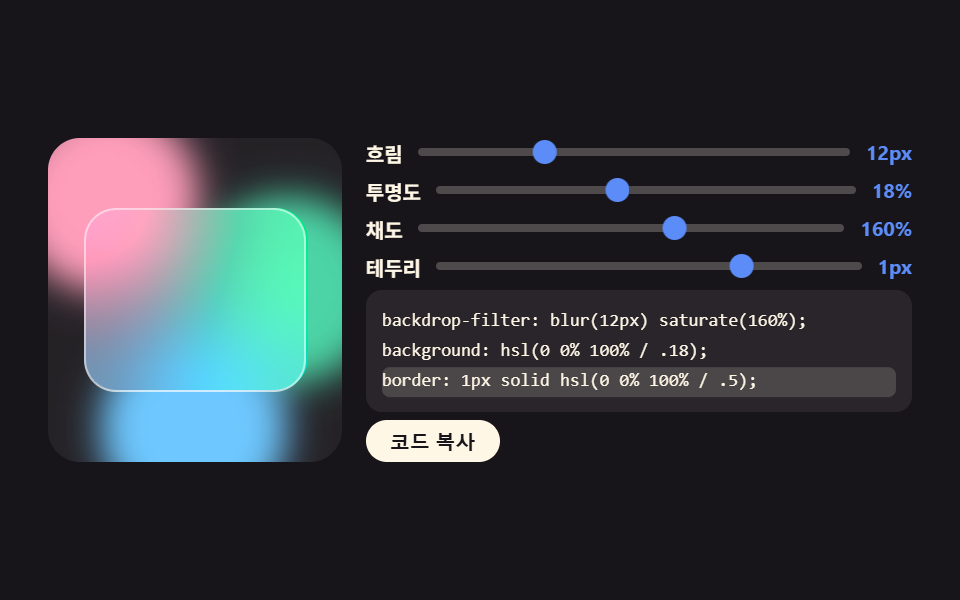
ぼかし・不透明度・彩度・境界のスライダーを動かすと、プレビューカードと下のコードが同時に変わり、コピーボタンまで1ファイルに入っています。
使いどころデザイン方針の抽出、コーディングなしでグラスカードの値を決める
backdrop-filterhslclamp
<main class="stage">
<section class="gg is-demo" id="gg">
  <div class="gg__scene">
    <span class="gg__blob gg__blob--a" aria-hidden="true"></span>
    <span class="gg__blob gg__blob--b" aria-hidden="true"></span>
    <span class="gg__blob gg__blob--c" aria-hidden="true"></span>
    <div class="gg__glass" id="ggGlass" aria-hidden="true"></div>
  </div>
  <div class="gg__panel">
    <label class="gg__row">
      <span class="gg__name">ぼかし</span>
      <span class="gg__track">
        <input class="gg__range" id="ggBlur" type="range" min="0" max="24" step="1" value="12" aria-label="ぼかし">
        <span class="gg__ghost gg__ghost--a" aria-hidden="true"><span class="gg__dot"></span></span>
      </span>
      <output class="gg__val" id="ggBlurOut">12px</output>
    </label>
    <label class="gg__row">
      <span class="gg__name">不透明度</span>
      <span class="gg__track">
        <input class="gg__range" id="ggOpacity" type="range" min="4" max="48" step="1" value="18" aria-label="不透明度">
        <span class="gg__ghost gg__ghost--b" aria-hidden="true"><span class="gg__dot"></span></span>
      </span>
      <output class="gg__val" id="ggOpacityOut">18%</output>
    </label>
    <label class="gg__row">
      <span class="gg__name">彩度</span>
      <span class="gg__track">
        <input class="gg__range" id="ggSaturate" type="range" min="100" max="260" step="10" value="160" aria-label="彩度">
        <span class="gg__ghost gg__ghost--c" aria-hidden="true"><span class="gg__dot"></span></span>
      </span>
      <output class="gg__val" id="ggSaturateOut">160%</output>
    </label>
    <label class="gg__row">
      <span class="gg__name">境界線</span>
      <span class="gg__track">
        <input class="gg__range" id="ggBorder" type="range" min="0" max="4" step="1" value="1" aria-label="境界線">
        <span class="gg__ghost gg__ghost--d" aria-hidden="true"><span class="gg__dot"></span></span>
      </span>
      <output class="gg__val" id="ggBorderOut">1px</output>
    </label>
    <pre class="gg__code"><span class="gg__mark" aria-hidden="true"></span><code class="gg__line" id="ggLine1">backdrop-filter: blur(12px) saturate(160%);</code><code class="gg__line" id="ggLine2">background: hsl(0 0% 100% / .18);</code><code class="gg__line" id="ggLine3">border: 1px solid hsl(0 0% 100% / .5);</code></pre>
    <div class="gg__foot">
      <button class="gg__copy" id="ggCopy" type="button">コードをコピー</button>
      <span class="gg__toast" id="ggToast" role="status" hidden>コピーしました</span>
    </div>
  </div>
</section>
</main>@use "../../../../site/static/demo-tokens" as *;
// 글래스 효과 제너레이터 — 왼쪽은 색 반점 위에 얹힌 글래스 카드(backdrop-filter), 오른쪽은 그 값을 만드는 도구다.
// 정적 표시: 카드의 값은 JS 가 인라인 스타일로 써 넣고 코드 줄도 같은 함수가 만든다.
// .is-demo 미리보기: 썸 자리 대역(고스트)이 미끄러지고, 카드의 글래스 값은 steps 컷으로 세 단계를 돌며,
// 코드 줄 하이라이트가 한 줄씩 내려간다. 사람이 슬라이더를 만지면 .is-demo 가 떨어져 인라인 값이 화면이 된다.
$duration: $dur-loop;
$easing: $ease-out;
$color: $subject-blue-light;
@include stage($stage-ink);
.gg {
display: grid; grid-template-columns: clamp(96px, 34%, 150px) minmax(0, 1fr);
gap: $sp-3; width: 100%; max-width: 432px;
}
.gg__scene { position: relative; overflow: hidden; border-radius: $r-card; background-color: rgba($subject-cream, .06); min-height: 120px; }
// 반점을 너무 흐리면 그 위 카드의 backdrop-filter 가 한 일이 안 보인다 — 반점은 덜 흐리게 둔다
.gg__blob { position: absolute; width: 64%; aspect-ratio: 1; border-radius: 50%; filter: blur(9px); }
.gg__blob--a { left: -12%; top: -10%; background-color: $subject-pink; }
.gg__blob--b { right: -14%; top: 18%; background-color: $subject-mint; }
.gg__blob--c { left: 18%; bottom: -18%; background-color: $subject-sky; }
.gg__glass {
position: absolute; inset: 22% 12%;
border-radius: $r-card;
border-style: solid; border-width: 1px; border-color: hsl(0 0% 100% / .5);
background-color: hsl(0 0% 100% / .18);
backdrop-filter: blur(12px) saturate(160%);
-webkit-backdrop-filter: blur(12px) saturate(160%);
}
.gg__panel { display: flex; flex-direction: column; gap: $sp-1; min-width: 0; }
.gg__row { display: grid; grid-template-columns: auto minmax(0, 1fr) auto; align-items: center; gap: $sp-2; }
.gg__name { font-weight: 700; font-size: clamp(8px, 2.2vw, 10px); color: $subject-cream; white-space: nowrap; }
.gg__val { font-weight: 700; font-size: clamp(8px, 2.2vw, 10px); color: $color; white-space: nowrap; }
.gg__track { position: relative; display: flex; align-items: center; height: 14px; min-width: 0; }
.gg__range {
-webkit-appearance: none; appearance: none;
width: 100%; height: 4px; margin: 0;
border-radius: $r-pill;
background-color: rgba($subject-cream, .24);
cursor: pointer;
}
.gg__range::-webkit-slider-thumb {
-webkit-appearance: none; appearance: none;
width: 12px; height: 12px; border: 0; border-radius: 50%;
background-color: $color; cursor: pointer;
}
.gg__range:focus-visible { outline: 2px solid $color; outline-offset: 3px; }
// 미리보기 전용 썸 대역 — 정적 경로에서는 아예 없고, .is-demo 동안에만 진짜 썸 대신 이것이 미끄러진다
.gg__ghost { display: none; position: absolute; left: 0; right: 0; top: 0; bottom: 0; }
.gg__dot { position: absolute; left: 0; top: 50%; width: 12px; height: 12px; border-radius: 50%; background-color: $color; translate: -50% -50%; }
.gg__code {
position: relative; overflow: hidden; margin: 0;
padding: $sp-2; border-radius: $r-sm;
background-color: rgba($subject-cream, .08);
font-family: ui-monospace, "Consolas", "Courier New", monospace;
font-size: clamp(6px, 1.9vw, 9px);
}
.gg__line { display: block; line-height: 1.7; color: $subject-cream; white-space: pre; }
.gg__mark {
position: absolute; left: $sp-2; right: $sp-2; top: $sp-2;
height: 1.7em; border-radius: $r-xs;
background-color: rgba($subject-cream, .16);
opacity: 0;
}
.gg__foot { display: flex; align-items: center; gap: $sp-2; }
.gg__copy {
padding: $sp-1 $sp-3; border: 0; border-radius: $r-pill;
background-color: $subject-cream; color: $subject-ink;
font-weight: 700; font-size: clamp(8px, 2.2vw, 10px); cursor: pointer;
}
.gg__copy:focus-visible { outline: 2px solid $color; outline-offset: 2px; }
.gg__toast { font-weight: 700; font-size: clamp(8px, 2.2vw, 10px); color: $color; }
.gg__toast[hidden] { display: none; }
// ── 격자 미리보기 ─────────────────────────────────────────────
.gg.is-demo .gg__range::-webkit-slider-thumb { visibility: hidden; }
.gg.is-demo .gg__ghost {
display: block;
animation-name: ggSlide;
animation-duration: $duration;
animation-timing-function: $easing;
animation-iteration-count: infinite;
animation-fill-mode: both;
}
.gg__ghost--a { animation-delay: 0ms; }
.gg__ghost--b { animation-delay: 160ms; }
.gg__ghost--c { animation-delay: 320ms; }
.gg__ghost--d { animation-delay: 480ms; }
@keyframes ggSlide {
0%, 8% { translate: 14% 0; }
42%, 50% { translate: 72% 0; }
88%, 100% { translate: 14% 0; }
}
// 글래스 값은 세 단계를 컷으로 돈다 — 중간값을 보이면 슬라이더가 아니라 안개처럼 보인다
.gg.is-demo .gg__glass {
animation-name: ggGlass;
animation-duration: $duration;
animation-timing-function: steps(1, end);
animation-iteration-count: infinite;
}
@keyframes ggGlass {
0% { backdrop-filter: blur(3px) saturate(110%); background-color: hsl(0 0% 100% / .08); }
34% { backdrop-filter: blur(12px) saturate(170%); background-color: hsl(0 0% 100% / .2); }
67% { backdrop-filter: blur(22px) saturate(240%); background-color: hsl(0 0% 100% / .34); }
100% { backdrop-filter: blur(3px) saturate(110%); background-color: hsl(0 0% 100% / .08); }
}
// 코드 줄 하이라이트도 같은 박자로 한 줄씩 내려간다(100% = 자기 높이 = 한 줄)
.gg.is-demo .gg__mark {
opacity: 1;
animation-name: ggMark;
animation-duration: $duration;
animation-timing-function: steps(1, end);
animation-iteration-count: infinite;
}
@keyframes ggMark {
0% { translate: 0 0; }
34% { translate: 0 100%; }
67% { translate: 0 200%; }
100% { translate: 0 0; }
}
@media (max-width: 340px) {
.gg { gap: $sp-2; }
.gg__row { gap: $sp-1; }
.gg__track { height: 12px; }
}
// reduce 에서는 미리보기 연출을 세우고 값만 보인다
@media (prefers-reduced-motion: reduce) {
.gg.is-demo .gg__ghost,
.gg.is-demo .gg__glass,
.gg.is-demo .gg__mark { animation: none !important; }
}html, body {
margin: 0;
overflow: hidden;
}
.stage {
box-sizing: border-box;
min-height: 100vh;
display: grid;
place-items: center;
margin: 0;
background: #17141a;
font-family: -apple-system, "Segoe UI", "Noto Sans KR", sans-serif;
padding: clamp(8px, 4vw, 24px);
}
.gg {
display: grid;
grid-template-columns: clamp(96px, 34%, 150px) minmax(0, 1fr);
gap: 12px;
width: 100%;
max-width: 432px;
}
.gg__scene {
position: relative;
overflow: hidden;
border-radius: 16px;
background-color: rgba(255, 247, 230, 0.06);
min-height: 120px;
}
.gg__blob {
position: absolute;
width: 64%;
aspect-ratio: 1;
border-radius: 50%;
filter: blur(9px);
}
.gg__blob--a {
left: -12%;
top: -10%;
background-color: #ff9ebb;
}
.gg__blob--b {
right: -14%;
top: 18%;
background-color: #4cd4a6;
}
.gg__blob--c {
left: 18%;
bottom: -18%;
background-color: #6ec8ff;
}
.gg__glass {
position: absolute;
inset: 22% 12%;
border-radius: 16px;
border-style: solid;
border-width: 1px;
border-color: hsla(0, 0%, 100%, 0.5);
background-color: hsla(0, 0%, 100%, 0.18);
backdrop-filter: blur(12px) saturate(160%);
-webkit-backdrop-filter: blur(12px) saturate(160%);
}
.gg__panel {
display: flex;
flex-direction: column;
gap: 4px;
min-width: 0;
}
.gg__row {
display: grid;
grid-template-columns: auto minmax(0, 1fr) auto;
align-items: center;
gap: 8px;
}
.gg__name {
font-weight: 700;
font-size: clamp(8px, 2.2vw, 10px);
color: #fff7e6;
white-space: nowrap;
}
.gg__val {
font-weight: 700;
font-size: clamp(8px, 2.2vw, 10px);
color: #5b8cf8;
white-space: nowrap;
}
.gg__track {
position: relative;
display: flex;
align-items: center;
height: 14px;
min-width: 0;
}
.gg__range {
-webkit-appearance: none;
appearance: none;
width: 100%;
height: 4px;
margin: 0;
border-radius: 999px;
background-color: rgba(255, 247, 230, 0.24);
cursor: pointer;
}
.gg__range::-webkit-slider-thumb {
-webkit-appearance: none;
appearance: none;
width: 12px;
height: 12px;
border: 0;
border-radius: 50%;
background-color: #5b8cf8;
cursor: pointer;
}
.gg__range:focus-visible {
outline: 2px solid #5b8cf8;
outline-offset: 3px;
}
.gg__ghost {
display: none;
position: absolute;
left: 0;
right: 0;
top: 0;
bottom: 0;
}
.gg__dot {
position: absolute;
left: 0;
top: 50%;
width: 12px;
height: 12px;
border-radius: 50%;
background-color: #5b8cf8;
translate: -50% -50%;
}
.gg__code {
position: relative;
overflow: hidden;
margin: 0;
padding: 8px;
border-radius: 8px;
background-color: rgba(255, 247, 230, 0.08);
font-family: ui-monospace, "Consolas", "Courier New", monospace;
font-size: clamp(6px, 1.9vw, 9px);
}
.gg__line {
display: block;
line-height: 1.7;
color: #fff7e6;
white-space: pre;
}
.gg__mark {
position: absolute;
left: 8px;
right: 8px;
top: 8px;
height: 1.7em;
border-radius: 4px;
background-color: rgba(255, 247, 230, 0.16);
opacity: 0;
}
.gg__foot {
display: flex;
align-items: center;
gap: 8px;
}
.gg__copy {
padding: 4px 12px;
border: 0;
border-radius: 999px;
background-color: #fff7e6;
color: #17141a;
font-weight: 700;
font-size: clamp(8px, 2.2vw, 10px);
cursor: pointer;
}
.gg__copy:focus-visible {
outline: 2px solid #5b8cf8;
outline-offset: 2px;
}
.gg__toast {
font-weight: 700;
font-size: clamp(8px, 2.2vw, 10px);
color: #5b8cf8;
}
.gg__toast[hidden] {
display: none;
}
.gg.is-demo .gg__range::-webkit-slider-thumb {
visibility: hidden;
}
.gg.is-demo .gg__ghost {
display: block;
animation-name: ggSlide;
animation-duration: 2s;
animation-timing-function: ease-out;
animation-iteration-count: infinite;
animation-fill-mode: both;
}
.gg__ghost--a {
animation-delay: 0ms;
}
.gg__ghost--b {
animation-delay: 160ms;
}
.gg__ghost--c {
animation-delay: 320ms;
}
.gg__ghost--d {
animation-delay: 480ms;
}
@keyframes ggSlide {
0%, 8% {
translate: 14% 0;
}
42%, 50% {
translate: 72% 0;
}
88%, 100% {
translate: 14% 0;
}
}
.gg.is-demo .gg__glass {
animation-name: ggGlass;
animation-duration: 2s;
animation-timing-function: steps(1, end);
animation-iteration-count: infinite;
}
@keyframes ggGlass {
0% {
backdrop-filter: blur(3px) saturate(110%);
background-color: hsla(0, 0%, 100%, 0.08);
}
34% {
backdrop-filter: blur(12px) saturate(170%);
background-color: hsla(0, 0%, 100%, 0.2);
}
67% {
backdrop-filter: blur(22px) saturate(240%);
background-color: hsla(0, 0%, 100%, 0.34);
}
100% {
backdrop-filter: blur(3px) saturate(110%);
background-color: hsla(0, 0%, 100%, 0.08);
}
}
.gg.is-demo .gg__mark {
opacity: 1;
animation-name: ggMark;
animation-duration: 2s;
animation-timing-function: steps(1, end);
animation-iteration-count: infinite;
}
@keyframes ggMark {
0% {
translate: 0 0;
}
34% {
translate: 0 100%;
}
67% {
translate: 0 200%;
}
100% {
translate: 0 0;
}
}
@media (max-width: 340px) {
.gg {
gap: 8px;
}
.gg__row {
gap: 4px;
}
.gg__track {
height: 12px;
}
}
@media (prefers-reduced-motion: reduce) {
.gg.is-demo .gg__ghost,
.gg.is-demo .gg__glass,
.gg.is-demo .gg__mark {
animation: none !important;
}
}// 글래스 효과 제너레이터 — 슬라이더 네 개가 미리보기 카드의 인라인 스타일과 아래 코드 줄을 한 번에 갱신한다.
// 값 하나가 두 곳(화면·코드)에 쓰이므로 만드는 곳은 한 함수뿐이다.
(function () {
var COPIED = 'コピーしました';
var root = document.getElementById('gg');
var glass = document.getElementById('ggGlass');
var toast = document.getElementById('ggToast');
var ranges = { blur: document.getElementById('ggBlur'), opacity: document.getElementById('ggOpacity'),
saturate: document.getElementById('ggSaturate'), border: document.getElementById('ggBorder') };
var outs = { blur: document.getElementById('ggBlurOut'), opacity: document.getElementById('ggOpacityOut'),
saturate: document.getElementById('ggSaturateOut'), border: document.getElementById('ggBorderOut') };
var lines = [document.getElementById('ggLine1'), document.getElementById('ggLine2'), document.getElementById('ggLine3')];
var toastTimer = 0;
function alpha() {
return String(Math.round(Number(ranges.opacity.value)) / 100).replace('0.', '.');
}
function code() {
return [
'backdrop-filter: blur(' + ranges.blur.value + 'px) saturate(' + ranges.saturate.value + '%);',
'background: hsl(0 0% 100% / ' + alpha() + ');',
'border: ' + ranges.border.value + 'px solid hsl(0 0% 100% / .5);'
];
}
function render() {
var rows = code();
glass.style.backdropFilter = 'blur(' + ranges.blur.value + 'px) saturate(' + ranges.saturate.value + '%)';
glass.style.backgroundColor = 'hsl(0 0% 100% / ' + alpha() + ')';
glass.style.borderWidth = ranges.border.value + 'px';
outs.blur.textContent = ranges.blur.value + 'px';
outs.opacity.textContent = ranges.opacity.value + '%';
outs.saturate.textContent = ranges.saturate.value + '%';
outs.border.textContent = ranges.border.value + 'px';
for (var i = 0; i < lines.length; i++) { lines[i].textContent = rows[i]; }
}
for (var key in ranges) {
ranges[key].addEventListener('input', function () { root.classList.remove('is-demo'); render(); });
}
document.getElementById('ggCopy').addEventListener('click', function () {
root.classList.remove('is-demo');
var text = code().join('\n');
var done = function () {
toast.textContent = COPIED;
toast.hidden = false;
window.clearTimeout(toastTimer);
toastTimer = window.setTimeout(function () { toast.hidden = true; }, 1600);
};
if (navigator.clipboard && navigator.clipboard.writeText) {
navigator.clipboard.writeText(text).then(done, done);
} else { done(); }
});
render();
})();// GlassEffectGenerator — vanilla 판(run/080/demo/05-glass-effect-generator/index.html) 의 React 포트.
// 값 네 개(흐림·투명도·채도·테두리)가 한 상태 객체에 있고, 미리보기 스타일과 코드 세 줄은
// 그 상태에서 **같은 함수로** 파생된다. 두 곳을 따로 만들면 언젠가 서로 다른 값을 말한다.
import { useEffect, useRef, useState } from "react";
import type { CSSProperties } from "react";
import styles from "./GlassEffectGenerator.module.scss";
export type GlassEffectGeneratorProps = {
duration?: number;
easing?: string;
accentColor?: string;
};
type Vars = CSSProperties & { "--duration"?: string; "--easing"?: string; "--color"?: string };
type RangeEvt = { target: { value: string } };
type TimerBox = { current: number };
type Knobs = { blur: number; opacity: number; saturate: number; border: number };
const COPIED = "복사했어요";
const COPY_LABEL = "코드 복사";
const NAMES = { blur: "흐림", opacity: "투명도", saturate: "채도", border: "테두리" };
function alphaText(opacity: number): string {
return String(Math.round(opacity) / 100).replace("0.", ".");
}
function codeLines(k: Knobs): string[] {
return [
`backdrop-filter: blur(${k.blur}px) saturate(${k.saturate}%);`,
`background: hsl(0 0% 100% / ${alphaText(k.opacity)});`,
`border: ${k.border}px solid hsl(0 0% 100% / .5);`,
];
}
export default function GlassEffectGenerator({
duration = 2000,
easing = "ease-out",
accentColor = "#5b8cf8",
}: GlassEffectGeneratorProps) {
const [knobs, setKnobs] = useState<Knobs>({ blur: 12, opacity: 18, saturate: 160, border: 1 });
const [demo, setDemo] = useState(true);
const [copied, setCopied] = useState(false);
const timerRef = useRef(0) as TimerBox;
const vars: Vars = { "--duration": `${duration}ms`, "--easing": easing, "--color": accentColor };
const lines = codeLines(knobs);
const glass: CSSProperties = {
backdropFilter: `blur(${knobs.blur}px) saturate(${knobs.saturate}%)`,
WebkitBackdropFilter: `blur(${knobs.blur}px) saturate(${knobs.saturate}%)`,
backgroundColor: `hsl(0 0% 100% / ${alphaText(knobs.opacity)})`,
borderWidth: `${knobs.border}px`,
};
useEffect(() => {
return () => { window.clearTimeout(timerRef.current); };
}, []);
function onKnob(key: keyof Knobs) {
return (e: RangeEvt) => {
const v = Number(e.target.value);
setDemo(false);
setKnobs((prev) => ({ ...prev, [key]: v }));
};
}
function onCopy() {
setDemo(false);
const text = lines.join("\n");
const done = () => {
setCopied(true);
window.clearTimeout(timerRef.current);
timerRef.current = window.setTimeout(() => setCopied(false), 1600);
};
if (navigator.clipboard && navigator.clipboard.writeText) {
navigator.clipboard.writeText(text).then(done, done);
} else { done(); }
}
const rows: { key: keyof Knobs; min: number; max: number; step: number; unit: string; ghost: string }[] = [
{ key: "blur", min: 0, max: 24, step: 1, unit: "px", ghost: styles.ghostA },
{ key: "opacity", min: 4, max: 48, step: 1, unit: "%", ghost: styles.ghostB },
{ key: "saturate", min: 100, max: 260, step: 10, unit: "%", ghost: styles.ghostC },
{ key: "border", min: 0, max: 4, step: 1, unit: "px", ghost: styles.ghostD },
];
const cls = [styles.root, demo ? styles.isDemo : ""].filter(Boolean).join(" ");
return (
<main className={styles.stage}>
<section className={cls} style={vars}>
<div className={styles.scene}>
<span className={`${styles.blob} ${styles.blobA}`} aria-hidden="true" />
<span className={`${styles.blob} ${styles.blobB}`} aria-hidden="true" />
<span className={`${styles.blob} ${styles.blobC}`} aria-hidden="true" />
<div className={styles.glass} style={glass} aria-hidden="true" />
</div>
<div className={styles.panel}>
{rows.map((r) => (
<label className={styles.row} key={r.key}>
<span className={styles.name}>{NAMES[r.key]}</span>
<span className={styles.track}>
<input
className={styles.range}
type="range"
min={r.min}
max={r.max}
step={r.step}
value={knobs[r.key]}
aria-label={NAMES[r.key]}
onChange={onKnob(r.key)}
/>
<span className={`${styles.ghost} ${r.ghost}`} aria-hidden="true">
<span className={styles.dot} />
</span>
</span>
<output className={styles.val}>{knobs[r.key]}{r.unit}</output>
</label>
))}
<pre className={styles.code}>
<span className={styles.mark} aria-hidden="true" />
{lines.map((line) => (<code className={styles.line} key={line.slice(0, 12)}>{line}</code>))}
</pre>
<div className={styles.foot}>
<button className={styles.copy} type="button" onClick={onCopy}>{COPY_LABEL}</button>
{copied ? <span className={styles.toast} role="status">{COPIED}</span> : null}
</div>
</div>
</section>
</main>
);
}05 グラス効果ジェネレーター — 計測 累積面積 17.794% · 動いたフレーム 22/23GODRICH オリジナル · SCSS と React は zip に同梱 · HTML CSS JS ゲーム 9種 — 電卓・タイマー・パズルのコピペ
このデモが属する記事
 HTML CSS JS ゲーム 9種 — 電卓・タイマー・パズルのコピペhtml css js ゲームとは、ブラウザで動く小さな遊びと実務の道具を素の HTML・CSS・JS だけで組むことです。ライブラリなし、ファイル1つで動く9つをクイズ・電卓・タイマー・抽選の順に用意し、どれも下のグリッドでいますぐ動かせ この記事のデモをすべて見る