05話題ごとに群れを作る色の雲
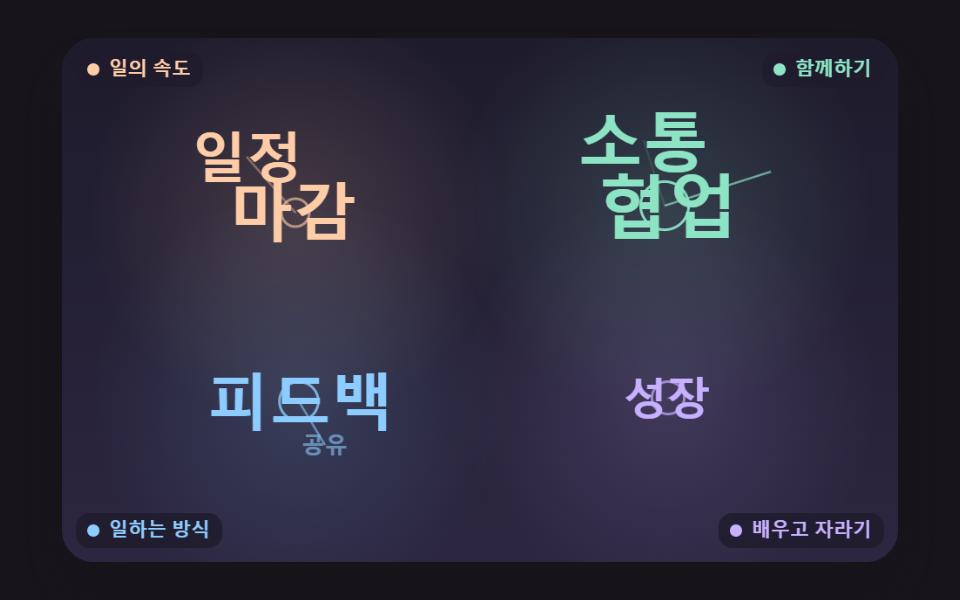
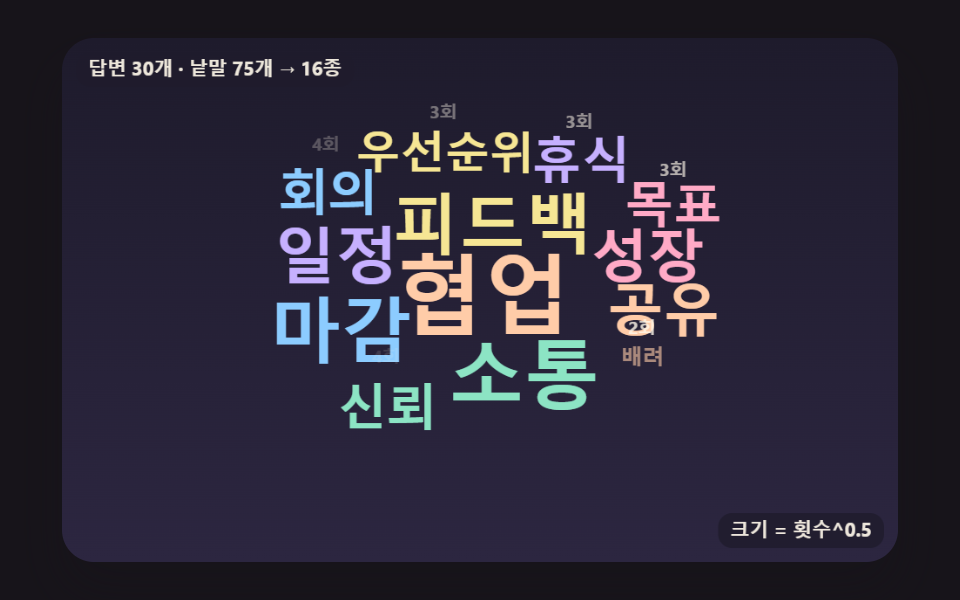
単語ごとに話題を付けて話題ごとの基準点のまわりの渦巻きで場所を探し、同じ話題は同じパステル色で塗って、島のように固まった群れの間に空いた道が見えるようにする。
使いどころ会議の振り返り意見の分類
THEME_ANCHORSTHEME_COLORSLINK_MS
<main class="stage">
<div class="wc is-demo" id="wc">
  <canvas class="wc__canvas" data-role="canvas" width="480" height="300" role="img" aria-label="話題ごとに色を変えて四つの群れを作るワードクラウド。"></canvas>
  <ol class="wc__list" data-role="list" aria-label="頻度順の単語リスト"></ol>
</div>
</main>
@use "../../../../site/static/demo-tokens" as *;
@include stage($stage-ink);
.wc {
position: relative;
width: min(92vw, calc(160vh - 12.8vw));
aspect-ratio: 480 / 300;
margin: 0 auto;
border-radius: $r-card;
overflow: hidden;
box-shadow: $shadow-raised;
background: $subject-ink;
}
.wc__canvas {
position: absolute;
inset: 0;
display: block;
width: 100%;
height: 100%;
}
// 화면에서는 숨기고 화면 낭독기는 읽는 빈도 순 목록·알림 줄 — display: none 이 아니라 1px 상자로 줄여 접근성 트리에 남긴다
.wc__list,
.wc__live {
position: absolute;
width: 1px;
height: 1px;
padding: 0;
overflow: hidden;
clip-path: inset(50%);
white-space: nowrap;
border: 0;
}
.wc__vote {
position: absolute;
right: $sp-3;
bottom: $sp-3;
padding: $sp-1 $sp-3;
border: 0;
border-radius: $r-pill;
background: $subject-cream;
color: $subject-ink;
font-family: inherit;
font-weight: 700;
font-size: 12px;
line-height: 1.6;
cursor: pointer;
box-shadow: $shadow-press;
transition: transform $dur-quick $ease-spring;
}
.wc__vote:hover {
transform: translateY(-2px);
}
.wc__vote:active {
transform: translateY(1px);
}
.wc__vote:focus-visible {
outline: 2px solid $subject-cream;
outline-offset: 2px;
}
@media (max-width: 340px) {
.wc__vote { font-size: 11px; padding: $sp-1 $sp-2; }
}
// 동작 줄이기 — 장면은 스크립트가 마지막 배치 한 장면으로 멈춘다. 버튼도 떠오르지 않게
@media (prefers-reduced-motion: reduce) {
.wc__vote { transition: none !important; }
.wc__vote:hover,
.wc__vote:active { transform: none !important; }
}html, body {
margin: 0;
overflow: hidden;
}
.stage {
box-sizing: border-box;
min-height: 100vh;
display: grid;
place-items: center;
margin: 0;
background: #17141a;
font-family: -apple-system, "Segoe UI", "Noto Sans KR", sans-serif;
padding: clamp(8px, 4vw, 24px);
}
.wc {
position: relative;
width: min(92vw, 160vh - 12.8vw);
aspect-ratio: 480/300;
margin: 0 auto;
border-radius: 16px;
overflow: hidden;
box-shadow: 0 14px 24px rgba(23, 20, 26, 0.32);
background: #17141a;
}
.wc__canvas {
position: absolute;
inset: 0;
display: block;
width: 100%;
height: 100%;
}
.wc__list,
.wc__live {
position: absolute;
width: 1px;
height: 1px;
padding: 0;
overflow: hidden;
clip-path: inset(50%);
white-space: nowrap;
border: 0;
}
.wc__vote {
position: absolute;
right: 12px;
bottom: 12px;
padding: 4px 12px;
border: 0;
border-radius: 999px;
background: #fff7e6;
color: #17141a;
font-family: inherit;
font-weight: 700;
font-size: 12px;
line-height: 1.6;
cursor: pointer;
box-shadow: 0 6px 12px rgba(23, 20, 26, 0.32);
transition: transform 220ms cubic-bezier(0.2, 0.8, 0.2, 1);
}
.wc__vote:hover {
transform: translateY(-2px);
}
.wc__vote:active {
transform: translateY(1px);
}
.wc__vote:focus-visible {
outline: 2px solid #fff7e6;
outline-offset: 2px;
}
@media (max-width: 340px) {
.wc__vote {
font-size: 11px;
padding: 4px 8px;
}
}
@media (prefers-reduced-motion: reduce) {
.wc__vote {
transition: none !important;
}
.wc__vote:hover,
.wc__vote:active {
transform: none !important;
}
}(function () {
const root = document.getElementById("wc");
if (!root) return;
const W = 480;
const H = 300;
const FIXED_DT = 16;
const TAU = Math.PI * 2;
// 파스텔 팔레트 — 어두운 판 위에 밝은 파스텔 글자를 얹어 명도 차로 글자가 읽힌다
const BG = [30, 27, 44];
const BG_LOW = [44, 38, 64];
const GUIDE = [104, 96, 140];
const CREAM = [255, 248, 234];
const PEACH = [255, 204, 168];
const MINT = [140, 228, 196];
const SKY = [140, 204, 255];
const LEMON = [246, 230, 148];
const LILAC = [198, 176, 255];
const PINK = [255, 170, 198];
const WORD_COLORS = [PEACH, MINT, SKY, LEMON, LILAC, PINK];
// 글꼴 — 기기에 이미 있는 시스템 글꼴 목록만. 바깥에서 글꼴 파일을 불러오지 않는다
const FONT_FAMILY = '"Segoe UI", "Malgun Gothic", "Hiragino Sans", "Noto Sans KR", sans-serif';
const FONT_WEIGHT = 700;
// 크기 = SIZE_MAX × (횟수 / 1위 횟수)^SIZE_EXPONENT. 0.5(제곱근)면 글자 넓이(크기의 제곱)가 횟수에 비례한다
const SIZE_EXPONENT = 0.5;
const SIZE_MAX = 50;
const SIZE_MIN = 10;
function sizeFor(count, top) {
return Math.max(SIZE_MIN, SIZE_MAX * Math.pow(count / top, SIZE_EXPONENT));
}
// 会議·설문에서 흔히 나오는 낱말과 횟수 — 많이 나온 순. theme 은 0 仕事のペース · 1 いっしょに · 2 働き方 · 3 学びと成長
const VOCAB = [
{ text: '協力', count: 24, theme: 1 },
{ text: '対話', count: 19, theme: 1 },
{ text: '締め切り', count: 16, theme: 0 },
{ text: 'フィードバック', count: 14, theme: 2 },
{ text: '日程', count: 12, theme: 0 },
{ text: '成長', count: 11, theme: 3 },
{ text: '共有', count: 10, theme: 2 },
{ text: '信頼', count: 9, theme: 1 },
{ text: '会議', count: 8, theme: 0 },
{ text: '優先順位', count: 8, theme: 0 },
{ text: '休憩', count: 7, theme: 3 },
{ text: '目標', count: 7, theme: 0 },
{ text: '気配り', count: 6, theme: 1 },
{ text: '資料', count: 6, theme: 2 },
{ text: '称賛', count: 6, theme: 1 },
{ text: '集中', count: 5, theme: 0 },
{ text: '自動化', count: 5, theme: 2 },
{ text: '学習', count: 5, theme: 3 },
{ text: 'レビュー', count: 4, theme: 2 },
{ text: '応援', count: 4, theme: 1 },
{ text: '挑戦', count: 4, theme: 3 },
{ text: '計画', count: 4, theme: 0 },
{ text: '質問', count: 3, theme: 2 },
{ text: 'バランス', count: 3, theme: 3 },
{ text: '感謝', count: 3, theme: 1 },
{ text: 'スピード', count: 3, theme: 0 },
{ text: 'データ', count: 3, theme: 2 },
{ text: '余裕', count: 3, theme: 3 },
{ text: '振り返り', count: 2, theme: 0 },
{ text: '支援', count: 2, theme: 1 },
{ text: '実験', count: 2, theme: 2 },
{ text: '習慣', count: 2, theme: 3 },
{ text: '品質', count: 2, theme: 2 },
{ text: '雰囲気', count: 2, theme: 1 },
{ text: '変化', count: 2, theme: 3 },
{ text: 'リリース', count: 2, theme: 0 },
{ text: '整理', count: 1, theme: 2 },
{ text: '役割', count: 1, theme: 1 },
{ text: '楽しさ', count: 1, theme: 1 },
{ text: '記録', count: 1, theme: 0 },
{ text: '効率', count: 1, theme: 0 },
{ text: 'オンボーディング', count: 1, theme: 2 },
{ text: 'つながり', count: 1, theme: 1 },
{ text: 'アイデア', count: 1, theme: 3 },
{ text: '安定', count: 1, theme: 3 },
{ text: '透明性', count: 1, theme: 2 },
{ text: '顧客', count: 1, theme: 2 },
{ text: '練習', count: 1, theme: 3 }
];
// 횟수 문구 — 1 은 따로 둔다(영어판의 단수형 자리)
const COUNT_LABEL = '{n}回';
const COUNT_ONE = '1回';
const TOP_LABEL = 'いちばん多い言葉:';
// 캔버스 요약에서 1~3위 앞에 붙는 말 — 09 투표판은 자기 말로 바꾼다
let rankHeading = TOP_LABEL;
function countText(n) { return n === 1 ? COUNT_ONE : COUNT_LABEL.replace('{n}', String(n)); }
function clamp(v, lo, hi) { return v < lo ? lo : (v > hi ? hi : v); }
function lerp(a, b, k) { return a + (b - a) * k; }
function smooth(x) { const c = clamp(x, 0, 1); return c * c * (3 - 2 * c); }
function rgba(c, a) {
return 'rgba(' + Math.round(clamp(c[0], 0, 255)) + ',' + Math.round(clamp(c[1], 0, 255)) + ',' + Math.round(clamp(c[2], 0, 255)) + ',' + clamp(a, 0, 1).toFixed(3) + ')';
}
function mixRGB(a, b, k) { return [lerp(a[0], b[0], k), lerp(a[1], b[1], k), lerp(a[2], b[2], k)]; }
// 시드 고정 난수 — 같은 시드면 같은 배치·일정표가 다시 나온다 (32비트 정수 섞기)
function makeRng(seed) {
let s = seed >>> 0;
return function () {
s = (s + 0x6d2b79f5) >>> 0;
let t = s;
t = Math.imul(t ^ (t >>> 15), t | 1);
t ^= t + Math.imul(t ^ (t >>> 7), t | 61);
return ((t ^ (t >>> 14)) >>> 0) / 4294967296;
};
}
// 튀어나오기 — 감쇠 진동 1 − e^(−POP_DAMP·t)·cos(POP_FREQ·t), t 는 초. 目標 크기를 한 번 넘겼다가 자리 잡는다
const POP_DAMP = 7;
const POP_FREQ = 11;
function popScale(t) {
if (t <= 0) {
return 0;
}
return 1 - Math.exp(-POP_DAMP * t) * Math.cos(POP_FREQ * t);
}
const canvasEl = root.querySelector('[data-role="canvas"]');
const listEl = root.querySelector('[data-role="list"]');
const ctxRaw = canvasEl ? canvasEl.getContext('2d') : null;
if (!canvasEl || !ctxRaw || !listEl) {
return;
}
const cv = canvasEl;
const ctx = ctxRaw;
const list = listEl;
// 캔버스 요약 — HTML 에 적힌 장면 설명 뒤에 지금 1~3위를 덧붙인다
const baseAria = cv.getAttribute('aria-label') || '';
const reduceQuery = window.matchMedia('(prefers-reduced-motion: reduce)');
// 페이지를 연 채 동작 줄이기 설정을 바꿔도 change 리스너가 이 값을 다시 읽는다
let still = reduceQuery.matches;
// 자동 시연 중인가 — 사람이 처음 손대면 시연 표시를 뗀다
let demo = root.classList.contains('is-demo');
// 리스너는 한 묶음으로 달고 정리할 때 한 번에 뗀다
const off = new AbortController();
// 포인터 자리(판 좌표) — 판 밖이면 -1
let hoverX = -1;
let hoverY = -1;
function fitCanvas() {
// 배율은 2 에서 자른다 — 배율 3 기기에서 화소가 2.25배로 늘어 프레임마다 일이 그만큼 커지지 않게
const dpr = Math.min(window.devicePixelRatio || 1, 2);
cv.width = Math.round(W * dpr);
cv.height = Math.round(H * dpr);
ctx.setTransform(dpr, 0, 0, dpr, 0, 0);
}
function clearStage() {
const g = ctx.createLinearGradient(0, 0, 0, H);
g.addColorStop(0, rgba(BG, 1));
g.addColorStop(1, rgba(BG_LOW, 1));
ctx.fillStyle = g;
ctx.fillRect(0, 0, W, H);
}
function fontOf(size) { return FONT_WEIGHT + ' ' + size.toFixed(1) + 'px ' + FONT_FAMILY; }
function roundRectPath(x, y, w, h, r) {
ctx.beginPath();
ctx.moveTo(x + r, y);
ctx.arcTo(x + w, y, x + w, y + h, r);
ctx.arcTo(x + w, y + h, x, y + h, r);
ctx.arcTo(x, y + h, x, y, r);
ctx.arcTo(x, y, x + w, y, r);
ctx.closePath();
}
// 놓인 낱말 그리기 — 상자 가운데를 중심으로 scale 배·angle 라디안 돌리고 lift 만큼 띄운다. 비트 칸을 만든 자리와 같은 기준선에 찍는다
function drawPlaced(p, alpha, scale, angle, lift, color) {
if (alpha <= 0.002 || scale <= 0.001) {
return;
}
const cx = p.x + p.w / 2;
const cy = p.y + p.h / 2;
ctx.save();
ctx.translate(cx, cy - lift);
if (angle !== 0) {
ctx.rotate(angle);
}
if (scale !== 1) {
ctx.scale(scale, scale);
}
ctx.font = fontOf(p.size);
ctx.textAlign = 'left';
ctx.textBaseline = 'alphabetic';
ctx.fillStyle = rgba(color, alpha);
ctx.fillText(p.text, p.x + p.dx - cx, p.y + p.dy - cy);
ctx.restore();
}
function hitPlaced(p) {
return hoverX >= p.x && hoverX <= p.x + p.w && hoverY >= p.y && hoverY <= p.y + p.h;
}
// 포인터 아래 낱말 — 뒤에 그린 것이 위에 있으니 뒤에서부터 찾는다. shown(i) 가 거짓인 낱말은 건너뛴다
function pickPlaced(ps, shown) {
if (hoverX < 0) {
return -1;
}
for (let i = ps.length - 1; i >= 0; i -= 1) {
if (shown(i) && hitPlaced(ps[i])) {
return i;
}
}
return -1;
}
function drawHalo(x, y, w, h) {
ctx.lineWidth = 1.5;
ctx.strokeStyle = rgba(CREAM, 0.9);
roundRectPath(x - 3, y - 2, w + 6, h + 4, 6);
ctx.stroke();
}
// 말풍선 — 낱말과 횟수를 크림 바탕에 진한 글자로
function drawTip(label, ax, ay) {
ctx.font = fontOf(11);
const bw = ctx.measureText(label).width + 16;
const bh = 22;
const bx = clamp(ax - bw / 2, 4, W - bw - 4);
const by = ay - bh - 8 < 4 ? ay + 10 : ay - bh - 8;
ctx.fillStyle = rgba(CREAM, 0.96);
roundRectPath(bx, by, bw, bh, 8);
ctx.fill();
ctx.fillStyle = rgba(BG, 1);
ctx.textAlign = 'center';
ctx.textBaseline = 'middle';
ctx.fillText(label, bx + bw / 2, by + bh / 2 + 0.5);
}
// 판 위 설명 글 — 어두운 알약 바탕에 작은 크림 글자. 돌려주는 값은 차지한 상자 [x, y, w, h]
function drawCaption(text, x, y, alignRight) {
ctx.font = fontOf(11);
const bw = ctx.measureText(text).width + 14;
const bh = 20;
const bx = alignRight ? x - bw : x;
ctx.fillStyle = rgba(BG, 0.82);
roundRectPath(bx, y, bw, bh, 8);
ctx.fill();
ctx.fillStyle = rgba(CREAM, 0.92);
ctx.textAlign = 'left';
ctx.textBaseline = 'middle';
ctx.fillText(text, bx + 7, y + bh / 2 + 0.5);
return [bx, y, bw, bh];
}
const SPRITE_PAD = 2;
const INK_ALPHA = 40;
// 판 비트 칸 — 한 줄에 BOARD_INTS 개 정수(480px = 정수 15개 + 밀려난 끝을 받을 余裕 2개)
const BOARD_INTS = (W >> 5) + 2;
const scratch = document.createElement('canvas');
const scratchRaw = scratch.getContext('2d', { willReadFrequently: true });
if (!scratchRaw) {
return;
}
const sctx = scratchRaw;
// 비트 AND 로 겹침을 잰 횟수 — 판 밖이라 바로 거른 자리는 세지 않는다
let bitTests = 0;
function makeSprite(text, size) {
sctx.font = fontOf(size);
const m = sctx.measureText(text);
const left = Math.ceil(m.actualBoundingBoxLeft);
const right = Math.ceil(m.actualBoundingBoxRight);
const asc = Math.ceil(m.actualBoundingBoxAscent);
const desc = Math.ceil(m.actualBoundingBoxDescent);
const w = Math.max(1, left + right) + SPRITE_PAD * 2;
const h = Math.max(1, asc + desc) + SPRITE_PAD * 2;
// 크기를 바꾸면 그리기 설정이 초기화되므로 글꼴은 그 뒤에 다시 준다
if (scratch.width < w) {
scratch.width = w;
}
if (scratch.height < h) {
scratch.height = h;
}
sctx.clearRect(0, 0, w, h);
sctx.font = fontOf(size);
sctx.textAlign = 'left';
sctx.textBaseline = 'alphabetic';
sctx.fillStyle = '#000';
const dx = SPRITE_PAD + left;
const dy = SPRITE_PAD + asc;
sctx.fillText(text, dx, dy);
const px = sctx.getImageData(0, 0, w, h).data;
const mw = (w >> 5) + 1;
const bits = new Uint32Array(mw * h);
for (let y = 0; y < h; y += 1) {
for (let x = 0; x < w; x += 1) {
if (px[(y * w + x) * 4 + 3] <= INK_ALPHA) {
continue;
}
// 한 픽셀 둘레(3×3)까지 칠해 두 글자 사이에 1px 틈이 남게 한다
for (let yy = Math.max(0, y - 1); yy <= Math.min(h - 1, y + 1); yy += 1) {
for (let xx = Math.max(0, x - 1); xx <= Math.min(w - 1, x + 1); xx += 1) {
bits[yy * mw + (xx >> 5)] |= (0x80000000 >>> (xx & 31));
}
}
}
}
return { w: w, h: h, mw: mw, bits: bits, dx: dx, dy: dy };
}
function makeBoard() { return new Uint32Array(BOARD_INTS * H); }
// 겹침 검사 — 글자 줄마다 정수를 판의 x 자리만큼 밀어(>>> s) 판 정수와 AND. 0 이 아니면 이미 칠해진 픽셀과 겹친다
function collides(board, sp, ox, oy) {
// 판 밖으로 한 픽셀이라도 나가면 겹친 것으로 친다 — 판 끝 긴 단어가 잘린 채 놓이지 않게
if (ox < 0 || oy < 0 || ox + sp.w > W || oy + sp.h > H) {
return true;
}
bitTests += 1;
const s = ox & 31;
const base = ox >> 5;
const inv = 32 - s;
for (let r = 0; r < sp.h; r += 1) {
const row = (oy + r) * BOARD_INTS + base;
const sr = r * sp.mw;
let carry = 0;
for (let k = 0; k < sp.mw; k += 1) {
const v = sp.bits[sr + k];
const part = s === 0 ? v : ((v >>> s) | carry);
if ((board[row + k] & part) !== 0) {
return true;
}
carry = s === 0 ? 0 : (v << inv);
}
if (carry !== 0 && (board[row + sp.mw] & carry) !== 0) {
return true;
}
}
return false;
}
// 찍기 — 겹침 검사와 같은 밀기로 글자 비트를 판에 OR 한다
function stamp(board, sp, ox, oy) {
const s = ox & 31;
const base = ox >> 5;
const inv = 32 - s;
for (let r = 0; r < sp.h; r += 1) {
const row = (oy + r) * BOARD_INTS + base;
const sr = r * sp.mw;
let carry = 0;
for (let k = 0; k < sp.mw; k += 1) {
const v = sp.bits[sr + k];
board[row + k] |= s === 0 ? v : ((v >>> s) | carry);
carry = s === 0 ? 0 : (v << inv);
}
if (carry !== 0) {
board[row + sp.mw] |= carry;
}
}
}
// 픽셀 하나 칠하기 — 설명 글 자리·모양 바깥처럼 낱말이 들어가면 안 되는 곳을 미리 막는다
function blockPixel(board, x, y) {
board[y * BOARD_INTS + (x >> 5)] |= (0x80000000 >>> (x & 31));
}
function blockRect(board, x, y, w, h) {
const x0 = Math.max(0, Math.floor(x));
const y0 = Math.max(0, Math.floor(y));
const x1 = Math.min(W, Math.ceil(x + w));
const y1 = Math.min(H, Math.ceil(y + h));
for (let yy = y0; yy < y1; yy += 1) {
for (let xx = x0; xx < x1; xx += 1) {
blockPixel(board, xx, yy);
}
}
}
// 칠해진 픽셀 수 — 판이 얼마나 찼는지(변형 비교용)
function inkCount(board) {
let n = 0;
for (let i = 0; i < board.length; i += 1) {
let v = board[i];
while (v !== 0) {
v &= v - 1;
n += 1;
}
}
return n;
}
// 반지름이 일정하게 늘어나는 나선 — 걸음 i 에서 각 = i × SPIRAL_TURN(라디안), 반지름 = i × SPIRAL_STEP(px).
// 한 바퀴(2π / SPIRAL_TURN 걸음)마다 반지름이 같은 폭만큼 커진다. 가로는 SPIRAL_ASPECT 배로 늘려 넓은 판을 고르게 훑는다
const SPIRAL_STEP = 0.35;
const SPIRAL_TURN = 0.1;
const SPIRAL_ASPECT = 1.6;
// 나선을 끝낼 걸음 — 반지름이 판 대각선 절반에 닿으면 그만 찾는다
const SPIRAL_LIMIT = Math.ceil(Math.hypot(W, H) / 2 / SPIRAL_STEP);
// 지금까지 나선에서 내디딘 걸음 수 — 자리 하나 찾는 데 든 일
let spiralSteps = 0;
function spiralAt(i) {
const a = i * SPIRAL_TURN;
const r = i * SPIRAL_STEP;
return [Math.cos(a) * r * SPIRAL_ASPECT, Math.sin(a) * r];
}
// 나선 탐색 — 기준점 (cx, cy) 에서 나선을 한 걸음씩 옮기며, 글자 상자 가운데를 그 점에 두고 비트 칸이 안 겹치는 첫 자리를 돌려준다.
// trail 을 주면 지나온 나선 점을 모두 적는다(02 가 그 자취를 그린다)
function searchSpiral(board, sp, cx, cy, trail) {
for (let i = 0; i < SPIRAL_LIMIT; i += 1) {
spiralSteps += 1;
const p = spiralAt(i);
const ox = Math.round(cx + p[0] - sp.w / 2);
const oy = Math.round(cy + p[1] - sp.h / 2);
if (trail) {
trail.push([cx + p[0], cy + p[1]]);
}
if (!collides(board, sp, ox, oy)) {
return [ox, oy];
}
}
return null;
}
// 판 끝 긴 단어 — 나선을 끝까지 돌아도 자리가 없으면 SHRINK_RATIO 배로 한 단계 작게 다시 놓는다. SIZE_FLOOR 보다 작아지면 버린다
const SHRINK_RATIO = 0.85;
const SIZE_FLOOR = 8;
let shrinkCount = 0;
let dropCount = 0;
function placeEntry(board, e, size, cx, cy, color, trail) {
let s = size;
let shrinks = 0;
while (s >= SIZE_FLOOR) {
const sp = makeSprite(e.text, s);
if (trail) {
trail.length = 0;
}
const at = searchSpiral(board, sp, cx, cy, trail);
if (at) {
stamp(board, sp, at[0], at[1]);
return { text: e.text, count: e.count, theme: e.theme, size: s, x: at[0], y: at[1], w: sp.w, h: sp.h, dx: sp.dx, dy: sp.dy, color: color, shrinks: shrinks };
}
s *= SHRINK_RATIO;
shrinks += 1;
shrinkCount += 1;
}
dropCount += 1;
return null;
}
// 주제 — 0 仕事のペース · 1 いっしょに · 2 働き方 · 3 学びと成長. 같은 주제는 같은 파스텔 색
const THEME_LABELS = ['仕事のペース', 'いっしょに', '働き方', '学びと成長'];
const THEME_COLORS = [PEACH, MINT, SKY, LILAC];
// 주제마다 기준점 — 그 주제 낱말의 나선은 여기서 시작한다. 판 하나를 같이 쓰므로 먼저 놓인 무리를 피해 섬처럼 뭉친다
const THEME_ANCHORS = [[134, 100], [346, 96], [136, 208], [348, 206]];
const SIZE_SCALE = 0.8;
// 시연 — START_MS 부터 GAP_MS 마다 한 낱말(많이 나온 순). 막 놓인 낱말에서 기준점까지 LINK_MS 동안 실이 보인다
const START_MS = 200;
const GAP_MS = 60;
const LINK_MS = 450;
const HOLD_MS = 1400;
const FADE_MS = 400;
let placed = [];
let labels = [];
let loopMs = 5000;
let t = 0;
// 이름표 자리 — 판 네 귀퉁이(왼쪽 위·오른쪽 위·왼쪽 아래·오른쪽 아래)
function labelBox(i) {
ctx.font = fontOf(11);
const w = ctx.measureText(THEME_LABELS[i]).width + 26;
const x = i % 2 === 0 ? 8 : W - 8 - w;
const y = i < 2 ? 8 : H - 28;
return [x, y, w, 20];
}
function build() {
const top = VOCAB[0].count;
const board = makeBoard();
labels = [];
for (let i = 0; i < THEME_LABELS.length; i += 1) {
const b = labelBox(i);
labels.push(b);
blockRect(board, b[0] - 2, b[1] - 2, b[2] + 4, b[3] + 4);
}
placed = [];
for (let i = 0; i < VOCAB.length; i += 1) {
const e = VOCAB[i];
const a = THEME_ANCHORS[e.theme];
const p = placeEntry(board, e, sizeFor(e.count, top) * SIZE_SCALE, a[0], a[1], THEME_COLORS[e.theme], null);
if (p) {
placed.push(p);
}
}
loopMs = START_MS + placed.length * GAP_MS + 300 + HOLD_MS + FADE_MS + 200;
}
function appearAt(i) { return START_MS + i * GAP_MS; }
function loopLength() { return loopMs; }
function step(ms) { t = ms; }
function holdEnd() { return loopMs - FADE_MS - 200; }
function finalScene() { t = holdEnd() - 1; }
function onWake() { }
function draw() {
clearStage();
const fade = 1 - smooth((t - holdEnd()) / FADE_MS);
const glowIn = smooth(t / 300) * fade;
// 무리 자리 — 기준점마다 그 주제 색으로 옅게 번지는 원
for (let i = 0; i < THEME_ANCHORS.length; i += 1) {
const a = THEME_ANCHORS[i];
const g = ctx.createRadialGradient(a[0], a[1], 0, a[0], a[1], 120);
g.addColorStop(0, rgba(THEME_COLORS[i], 0.16 * glowIn));
g.addColorStop(1, rgba(THEME_COLORS[i], 0));
ctx.fillStyle = g;
ctx.fillRect(a[0] - 120, a[1] - 120, 240, 240);
}
// 기준점 맥박 — 그 주제에 낱말이 막 놓이면 고리가 커졌다 줄어든다
const pulse = [0, 0, 0, 0];
for (let i = 0; i < placed.length; i += 1) {
const age = (t - appearAt(i)) / 1000;
if (age < 0) {
break;
}
const p = placed[i];
pulse[p.theme] = Math.max(pulse[p.theme], Math.exp(-age * 6));
drawPlaced(p, clamp(age * 9, 0, 1) * fade, popScale(age), 0, 0, p.color);
if (age * 1000 < LINK_MS) {
const a = THEME_ANCHORS[p.theme];
ctx.lineWidth = 1.2;
ctx.strokeStyle = rgba(p.color, (1 - age * 1000 / LINK_MS) * 0.7 * fade);
ctx.beginPath();
ctx.moveTo(a[0], a[1]);
ctx.lineTo(p.x + p.w / 2, p.y + p.h / 2);
ctx.stroke();
}
}
for (let i = 0; i < THEME_ANCHORS.length; i += 1) {
const a = THEME_ANCHORS[i];
ctx.lineWidth = 1.5;
ctx.strokeStyle = rgba(THEME_COLORS[i], (0.45 + pulse[i] * 0.5) * glowIn);
ctx.beginPath();
ctx.arc(a[0], a[1], 5 + pulse[i] * 9, 0, TAU);
ctx.stroke();
// 이름표 — 어두운 알약 위에 주제 색 점과 글자
const b = labels[i];
ctx.fillStyle = rgba(BG, 0.82 * glowIn);
roundRectPath(b[0], b[1], b[2], b[3], 8);
ctx.fill();
ctx.fillStyle = rgba(THEME_COLORS[i], glowIn);
ctx.beginPath();
ctx.arc(b[0] + 10, b[1] + b[3] / 2, 3.5, 0, TAU);
ctx.fill();
ctx.font = fontOf(11);
ctx.textAlign = 'left';
ctx.textBaseline = 'middle';
ctx.fillText(THEME_LABELS[i], b[0] + 19, b[1] + b[3] / 2 + 0.5);
}
const hi = pickPlaced(placed, function (i) { return t >= appearAt(i); });
if (hi >= 0 && fade > 0.5) {
const p = placed[hi];
drawHalo(p.x, p.y, p.w, p.h);
drawTip(p.text + ' · ' + THEME_LABELS[p.theme], p.x + p.w / 2, p.y);
}
}
function ranking() {
return placed.map(function (p) { return [p.text, p.count, countText(p.count) + ' · ' + THEME_LABELS[p.theme]]; });
}
// 글꼴 준비가 끝나 배치를 계산했는가
let ready = false;
// 整理 뒤(리액트 언마운트)에 늦게 온 글꼴 준비 알림이 일을 시작하지 않게
let alive = true;
// 시연 시계(ms) — 16ms 고정 스텝으로만 늘어난다
let clock = 0;
function wake() {
if (!demo) {
return;
}
demo = false;
root.classList.remove('is-demo');
onWake();
}
// 포인터 자리를 판 좌표(480×300)로 — 화면에 보이는 캔버스 크기와 상관없이
function toBoard(ev) {
const r = cv.getBoundingClientRect();
return [(ev.clientX - r.left) * W / Math.max(1, r.width), (ev.clientY - r.top) * H / Math.max(1, r.height)];
}
cv.addEventListener('pointermove', function (ev) {
const p = toBoard(ev);
hoverX = p[0];
hoverY = p[1];
wake();
if (still && ready) {
render();
}
}, { signal: off.signal });
cv.addEventListener('pointerleave', function () {
hoverX = -1;
hoverY = -1;
if (still && ready) {
render();
}
}, { signal: off.signal });
// 숨긴 목록 — 순위나 횟수가 바뀐 때만 다시 쓴다. 캔버스 요약에는 1~3위를 붙인다
let listKey = '';
function syncList() {
const rows = ranking();
const key = rows.map(function (r) { return r[0] + ':' + r[1]; }).join('|');
if (key === listKey) {
return;
}
listKey = key;
while (list.firstChild) {
list.removeChild(list.firstChild);
}
for (let i = 0; i < rows.length; i += 1) {
const li = document.createElement('li');
li.textContent = rows[i][0] + ' — ' + rows[i][2];
list.appendChild(li);
}
const top = rows.slice(0, 3).map(function (r) { return r[0] + ' ' + r[2]; }).join(', ');
cv.setAttribute('aria-label', baseAria + ' ' + rankHeading + ' ' + top);
}
function render() {
draw();
syncList();
}
let rafId = 0;
let lastTs = -1;
let acc = 0;
function frame(ts) {
if (still) {
rafId = 0;
return;
}
if (lastTs < 0) {
lastTs = ts;
}
// 탭이 숨었다 돌아와도 한 번에 100ms 까지만 따라잡는다
acc += Math.min(ts - lastTs, 100);
lastTs = ts;
let n = 0;
while (acc >= FIXED_DT && n < 6) {
clock += FIXED_DT;
step(clock % loopLength());
acc -= FIXED_DT;
n += 1;
}
render();
rafId = window.requestAnimationFrame(frame);
}
function startLoop() {
if (rafId) {
return;
}
lastTs = -1;
acc = 0;
rafId = window.requestAnimationFrame(frame);
}
function stopLoop() {
if (rafId) {
window.cancelAnimationFrame(rafId);
rafId = 0;
}
}
// 동작 줄이기 — 루프를 돌리지 않고 배치를 끝까지 계산한 마지막 한 장면만 그린다
function showStill() {
stopLoop();
finalScene();
render();
}
function play() {
clock = 0;
step(0);
render();
startLoop();
}
// 설정이 페이지를 연 채 바뀌면 — 켜지면 마지막 장면에서 멈추고, 꺼지면 시연을 처음부터
function onMotionPref() {
still = reduceQuery.matches;
if (!ready) {
return;
}
if (still) {
showStill();
}
else {
play();
}
}
reduceQuery.addEventListener('change', onMotionPref, { signal: off.signal });
window.addEventListener('resize', function () {
fitCanvas();
if (ready) {
render();
}
}, { signal: off.signal });
function begin() {
if (!alive) {
return;
}
fitCanvas();
build();
ready = true;
if (still) {
showStill();
}
else {
play();
}
}
// 글꼴 — 준비(document.fonts.ready)가 끝난 뒤에 글자 폭을 잰다. 준비 전에 재면 나중에 바뀐 글꼴과 비트 칸이 어긋난다
const fontSet = document.fonts;
// 늦게 도착한 글꼴 — 배치를 마친 뒤 글꼴이 새로 들어오면 글자 폭을 다시 재 배치를 다시 계산한다
fontSet.addEventListener('loadingdone', function () {
if (!ready || !alive) {
return;
}
build();
if (still) {
finalScene();
}
render();
}, { signal: off.signal });
fontSet.ready.then(begin);
return function () {
alive = false;
stopLoop();
off.abort();
};
})();// ThemeClusterAnchor - vanilla 판(05-wc-theme-cluster-anchor) 의 React 포트. 같은 계산을 useEffect 안에서 돌린다.
import { useEffect, useRef } from "react";
import styles from "./ThemeClusterAnchor.module.scss";
const cx = (s: string): string => s.split(" ").map((n) => styles[n] ?? n).join(" ");
export default function ThemeClusterAnchor() {
const rootRef = useRef<HTMLDivElement | null>(null);
useEffect(() => {
const rootEl = rootRef.current;
if (!rootEl) return;
const root: HTMLElement = rootEl;
type RGB = [number, number, number];
type Pt = [number, number];
// 낱말 하나 — 글자, 나온 횟수, 주제 번호(05 무리 색)
type Entry = { text: string; count: number; theme: number };
// 판에 놓인 낱말 — (x, y) 는 글자 상자 왼쪽 위, w·h 는 상자 크기, (dx, dy) 는 상자 왼쪽 위에서 글자 기준선 시작점까지
type Placed = { text: string; count: number; theme: number; size: number; x: number; y: number; w: number; h: number; dx: number; dy: number; color: RGB; shrinks: number };
// 숨긴 목록 한 줄 — 낱말, 횟수, 읽어 줄 횟수 문구
type Row = [string, number, string];
const W = 480;
const H = 300;
const FIXED_DT = 16;
const TAU = Math.PI * 2;
// 파스텔 팔레트 — 어두운 판 위에 밝은 파스텔 글자를 얹어 명도 차로 글자가 읽힌다
const BG: RGB = [30, 27, 44];
const BG_LOW: RGB = [44, 38, 64];
const GUIDE: RGB = [104, 96, 140];
const CREAM: RGB = [255, 248, 234];
const PEACH: RGB = [255, 204, 168];
const MINT: RGB = [140, 228, 196];
const SKY: RGB = [140, 204, 255];
const LEMON: RGB = [246, 230, 148];
const LILAC: RGB = [198, 176, 255];
const PINK: RGB = [255, 170, 198];
const WORD_COLORS: RGB[] = [PEACH, MINT, SKY, LEMON, LILAC, PINK];
// 글꼴 — 기기에 이미 있는 시스템 글꼴 목록만. 바깥에서 글꼴 파일을 불러오지 않는다
const FONT_FAMILY = '"Segoe UI", "Malgun Gothic", "Hiragino Sans", "Noto Sans KR", sans-serif';
const FONT_WEIGHT = 700;
// 크기 = SIZE_MAX × (횟수 / 1위 횟수)^SIZE_EXPONENT. 0.5(제곱근)면 글자 넓이(크기의 제곱)가 횟수에 비례한다
const SIZE_EXPONENT = 0.5;
const SIZE_MAX = 50;
const SIZE_MIN = 10;
function sizeFor(count: number, top: number): number {
return Math.max(SIZE_MIN, SIZE_MAX * Math.pow(count / top, SIZE_EXPONENT));
}
// 회의·설문에서 흔히 나오는 낱말과 횟수 — 많이 나온 순. theme 은 0 일의 속도 · 1 함께하기 · 2 일하는 방식 · 3 배우고 자라기
const VOCAB: Entry[] = [
{ text: '협업', count: 24, theme: 1 },
{ text: '소통', count: 19, theme: 1 },
{ text: '마감', count: 16, theme: 0 },
{ text: '피드백', count: 14, theme: 2 },
{ text: '일정', count: 12, theme: 0 },
{ text: '성장', count: 11, theme: 3 },
{ text: '공유', count: 10, theme: 2 },
{ text: '신뢰', count: 9, theme: 1 },
{ text: '회의', count: 8, theme: 0 },
{ text: '우선순위', count: 8, theme: 0 },
{ text: '휴식', count: 7, theme: 3 },
{ text: '목표', count: 7, theme: 0 },
{ text: '배려', count: 6, theme: 1 },
{ text: '문서', count: 6, theme: 2 },
{ text: '칭찬', count: 6, theme: 1 },
{ text: '집중', count: 5, theme: 0 },
{ text: '자동화', count: 5, theme: 2 },
{ text: '학습', count: 5, theme: 3 },
{ text: '리뷰', count: 4, theme: 2 },
{ text: '응원', count: 4, theme: 1 },
{ text: '도전', count: 4, theme: 3 },
{ text: '계획', count: 4, theme: 0 },
{ text: '질문', count: 3, theme: 2 },
{ text: '균형', count: 3, theme: 3 },
{ text: '감사', count: 3, theme: 1 },
{ text: '속도', count: 3, theme: 0 },
{ text: '데이터', count: 3, theme: 2 },
{ text: '여유', count: 3, theme: 3 },
{ text: '회고', count: 2, theme: 0 },
{ text: '지원', count: 2, theme: 1 },
{ text: '실험', count: 2, theme: 2 },
{ text: '습관', count: 2, theme: 3 },
{ text: '품질', count: 2, theme: 2 },
{ text: '분위기', count: 2, theme: 1 },
{ text: '변화', count: 2, theme: 3 },
{ text: '출시', count: 2, theme: 0 },
{ text: '정리', count: 1, theme: 2 },
{ text: '역할', count: 1, theme: 1 },
{ text: '재미', count: 1, theme: 1 },
{ text: '기록', count: 1, theme: 0 },
{ text: '효율', count: 1, theme: 0 },
{ text: '온보딩', count: 1, theme: 2 },
{ text: '연결', count: 1, theme: 1 },
{ text: '아이디어', count: 1, theme: 3 },
{ text: '안정', count: 1, theme: 3 },
{ text: '투명성', count: 1, theme: 2 },
{ text: '고객', count: 1, theme: 2 },
{ text: '연습', count: 1, theme: 3 }
];
// 횟수 문구 — 1 은 따로 둔다(영어판의 단수형 자리)
const COUNT_LABEL = '{n}회';
const COUNT_ONE = '1회';
const TOP_LABEL = '가장 많이 나온 말:';
// 캔버스 요약에서 1~3위 앞에 붙는 말 — 09 투표판은 자기 말로 바꾼다
let rankHeading = TOP_LABEL;
function countText(n: number): string { return n === 1 ? COUNT_ONE : COUNT_LABEL.replace('{n}', String(n)); }
function clamp(v: number, lo: number, hi: number): number { return v < lo ? lo : (v > hi ? hi : v); }
function lerp(a: number, b: number, k: number): number { return a + (b - a) * k; }
function smooth(x: number): number { const c = clamp(x, 0, 1); return c * c * (3 - 2 * c); }
function rgba(c: RGB, a: number): string {
return 'rgba(' + Math.round(clamp(c[0], 0, 255)) + ',' + Math.round(clamp(c[1], 0, 255)) + ',' + Math.round(clamp(c[2], 0, 255)) + ',' + clamp(a, 0, 1).toFixed(3) + ')';
}
function mixRGB(a: RGB, b: RGB, k: number): RGB { return [lerp(a[0], b[0], k), lerp(a[1], b[1], k), lerp(a[2], b[2], k)]; }
// 시드 고정 난수 — 같은 시드면 같은 배치·일정표가 다시 나온다 (32비트 정수 섞기)
function makeRng(seed: number): () => number {
let s = seed >>> 0;
return function (): number {
s = (s + 0x6d2b79f5) >>> 0;
let t = s;
t = Math.imul(t ^ (t >>> 15), t | 1);
t ^= t + Math.imul(t ^ (t >>> 7), t | 61);
return ((t ^ (t >>> 14)) >>> 0) / 4294967296;
};
}
// 튀어나오기 — 감쇠 진동 1 − e^(−POP_DAMP·t)·cos(POP_FREQ·t), t 는 초. 목표 크기를 한 번 넘겼다가 자리 잡는다
const POP_DAMP = 7;
const POP_FREQ = 11;
function popScale(t: number): number {
if (t <= 0) { return 0; }
return 1 - Math.exp(-POP_DAMP * t) * Math.cos(POP_FREQ * t);
}
const canvasEl = root.querySelector('[data-role="canvas"]') as HTMLCanvasElement | null;
const listEl = root.querySelector('[data-role="list"]') as HTMLElement | null;
const ctxRaw = canvasEl ? canvasEl.getContext('2d') : null;
if (!canvasEl || !ctxRaw || !listEl) { return; }
const cv: HTMLCanvasElement = canvasEl;
const ctx: CanvasRenderingContext2D = ctxRaw;
const list: HTMLElement = listEl;
// 캔버스 요약 — HTML 에 적힌 장면 설명 뒤에 지금 1~3위를 덧붙인다
const baseAria = cv.getAttribute('aria-label') || '';
const reduceQuery = window.matchMedia('(prefers-reduced-motion: reduce)');
// 페이지를 연 채 동작 줄이기 설정을 바꿔도 change 리스너가 이 값을 다시 읽는다
let still = reduceQuery.matches;
// 자동 시연 중인가 — 사람이 처음 손대면 시연 표시를 뗀다
let demo = root.classList.contains('is-demo');
// 리스너는 한 묶음으로 달고 정리할 때 한 번에 뗀다
const off = new AbortController();
// 포인터 자리(판 좌표) — 판 밖이면 -1
let hoverX = -1;
let hoverY = -1;
function fitCanvas(): void {
// 배율은 2 에서 자른다 — 배율 3 기기에서 화소가 2.25배로 늘어 프레임마다 일이 그만큼 커지지 않게
const dpr = Math.min(window.devicePixelRatio || 1, 2);
cv.width = Math.round(W * dpr);
cv.height = Math.round(H * dpr);
ctx.setTransform(dpr, 0, 0, dpr, 0, 0);
}
function clearStage(): void {
const g = ctx.createLinearGradient(0, 0, 0, H);
g.addColorStop(0, rgba(BG, 1));
g.addColorStop(1, rgba(BG_LOW, 1));
ctx.fillStyle = g;
ctx.fillRect(0, 0, W, H);
}
function fontOf(size: number): string { return FONT_WEIGHT + ' ' + size.toFixed(1) + 'px ' + FONT_FAMILY; }
function roundRectPath(x: number, y: number, w: number, h: number, r: number): void {
ctx.beginPath();
ctx.moveTo(x + r, y);
ctx.arcTo(x + w, y, x + w, y + h, r);
ctx.arcTo(x + w, y + h, x, y + h, r);
ctx.arcTo(x, y + h, x, y, r);
ctx.arcTo(x, y, x + w, y, r);
ctx.closePath();
}
// 놓인 낱말 그리기 — 상자 가운데를 중심으로 scale 배·angle 라디안 돌리고 lift 만큼 띄운다. 비트 칸을 만든 자리와 같은 기준선에 찍는다
function drawPlaced(p: Placed, alpha: number, scale: number, angle: number, lift: number, color: RGB): void {
if (alpha <= 0.002 || scale <= 0.001) { return; }
const cx = p.x + p.w / 2;
const cy = p.y + p.h / 2;
ctx.save();
ctx.translate(cx, cy - lift);
if (angle !== 0) { ctx.rotate(angle); }
if (scale !== 1) { ctx.scale(scale, scale); }
ctx.font = fontOf(p.size);
ctx.textAlign = 'left';
ctx.textBaseline = 'alphabetic';
ctx.fillStyle = rgba(color, alpha);
ctx.fillText(p.text, p.x + p.dx - cx, p.y + p.dy - cy);
ctx.restore();
}
function hitPlaced(p: Placed): boolean {
return hoverX >= p.x && hoverX <= p.x + p.w && hoverY >= p.y && hoverY <= p.y + p.h;
}
// 포인터 아래 낱말 — 뒤에 그린 것이 위에 있으니 뒤에서부터 찾는다. shown(i) 가 거짓인 낱말은 건너뛴다
function pickPlaced(ps: Placed[], shown: (i: number) => boolean): number {
if (hoverX < 0) { return -1; }
for (let i = ps.length - 1; i >= 0; i -= 1) {
if (shown(i) && hitPlaced(ps[i])) { return i; }
}
return -1;
}
function drawHalo(x: number, y: number, w: number, h: number): void {
ctx.lineWidth = 1.5;
ctx.strokeStyle = rgba(CREAM, 0.9);
roundRectPath(x - 3, y - 2, w + 6, h + 4, 6);
ctx.stroke();
}
// 말풍선 — 낱말과 횟수를 크림 바탕에 진한 글자로
function drawTip(label: string, ax: number, ay: number): void {
ctx.font = fontOf(11);
const bw = ctx.measureText(label).width + 16;
const bh = 22;
const bx = clamp(ax - bw / 2, 4, W - bw - 4);
const by = ay - bh - 8 < 4 ? ay + 10 : ay - bh - 8;
ctx.fillStyle = rgba(CREAM, 0.96);
roundRectPath(bx, by, bw, bh, 8);
ctx.fill();
ctx.fillStyle = rgba(BG, 1);
ctx.textAlign = 'center';
ctx.textBaseline = 'middle';
ctx.fillText(label, bx + bw / 2, by + bh / 2 + 0.5);
}
// 판 위 설명 글 — 어두운 알약 바탕에 작은 크림 글자. 돌려주는 값은 차지한 상자 [x, y, w, h]
function drawCaption(text: string, x: number, y: number, alignRight: boolean): [number, number, number, number] {
ctx.font = fontOf(11);
const bw = ctx.measureText(text).width + 14;
const bh = 20;
const bx = alignRight ? x - bw : x;
ctx.fillStyle = rgba(BG, 0.82);
roundRectPath(bx, y, bw, bh, 8);
ctx.fill();
ctx.fillStyle = rgba(CREAM, 0.92);
ctx.textAlign = 'left';
ctx.textBaseline = 'middle';
ctx.fillText(text, bx + 7, y + bh / 2 + 0.5);
return [bx, y, bw, bh];
}
// 글자 모양 비트 칸 — 글자를 작은 캔버스에 그려 알파가 INK_ALPHA 를 넘는 픽셀을 비트 1 로 두고, 한 줄을 32비트 정수 mw 개로 묶는다
// (dx, dy) 는 상자 왼쪽 위에서 글자 기준선 시작점까지 — 판에 찍을 때 같은 자리에 그린다
type Sprite = { w: number; h: number; mw: number; bits: Uint32Array; dx: number; dy: number };
const SPRITE_PAD = 2;
const INK_ALPHA = 40;
// 판 비트 칸 — 한 줄에 BOARD_INTS 개 정수(480px = 정수 15개 + 밀려난 끝을 받을 여유 2개)
const BOARD_INTS = (W >> 5) + 2;
const scratch = document.createElement('canvas');
const scratchRaw = scratch.getContext('2d', { willReadFrequently: true });
if (!scratchRaw) { return; }
const sctx: CanvasRenderingContext2D = scratchRaw;
// 비트 AND 로 겹침을 잰 횟수 — 판 밖이라 바로 거른 자리는 세지 않는다
let bitTests = 0;
function makeSprite(text: string, size: number): Sprite {
sctx.font = fontOf(size);
const m = sctx.measureText(text);
const left = Math.ceil(m.actualBoundingBoxLeft);
const right = Math.ceil(m.actualBoundingBoxRight);
const asc = Math.ceil(m.actualBoundingBoxAscent);
const desc = Math.ceil(m.actualBoundingBoxDescent);
const w = Math.max(1, left + right) + SPRITE_PAD * 2;
const h = Math.max(1, asc + desc) + SPRITE_PAD * 2;
// 크기를 바꾸면 그리기 설정이 초기화되므로 글꼴은 그 뒤에 다시 준다
if (scratch.width < w) { scratch.width = w; }
if (scratch.height < h) { scratch.height = h; }
sctx.clearRect(0, 0, w, h);
sctx.font = fontOf(size);
sctx.textAlign = 'left';
sctx.textBaseline = 'alphabetic';
sctx.fillStyle = '#000';
const dx = SPRITE_PAD + left;
const dy = SPRITE_PAD + asc;
sctx.fillText(text, dx, dy);
const px = sctx.getImageData(0, 0, w, h).data;
const mw = (w >> 5) + 1;
const bits = new Uint32Array(mw * h);
for (let y = 0; y < h; y += 1) {
for (let x = 0; x < w; x += 1) {
if (px[(y * w + x) * 4 + 3] <= INK_ALPHA) { continue; }
// 한 픽셀 둘레(3×3)까지 칠해 두 글자 사이에 1px 틈이 남게 한다
for (let yy = Math.max(0, y - 1); yy <= Math.min(h - 1, y + 1); yy += 1) {
for (let xx = Math.max(0, x - 1); xx <= Math.min(w - 1, x + 1); xx += 1) {
bits[yy * mw + (xx >> 5)] |= (0x80000000 >>> (xx & 31));
}
}
}
}
return { w: w, h: h, mw: mw, bits: bits, dx: dx, dy: dy };
}
function makeBoard(): Uint32Array { return new Uint32Array(BOARD_INTS * H); }
// 겹침 검사 — 글자 줄마다 정수를 판의 x 자리만큼 밀어(>>> s) 판 정수와 AND. 0 이 아니면 이미 칠해진 픽셀과 겹친다
function collides(board: Uint32Array, sp: Sprite, ox: number, oy: number): boolean {
// 판 밖으로 한 픽셀이라도 나가면 겹친 것으로 친다 — 판 끝 긴 단어가 잘린 채 놓이지 않게
if (ox < 0 || oy < 0 || ox + sp.w > W || oy + sp.h > H) { return true; }
bitTests += 1;
const s = ox & 31;
const base = ox >> 5;
const inv = 32 - s;
for (let r = 0; r < sp.h; r += 1) {
const row = (oy + r) * BOARD_INTS + base;
const sr = r * sp.mw;
let carry = 0;
for (let k = 0; k < sp.mw; k += 1) {
const v = sp.bits[sr + k];
const part = s === 0 ? v : ((v >>> s) | carry);
if ((board[row + k] & part) !== 0) { return true; }
carry = s === 0 ? 0 : (v << inv);
}
if (carry !== 0 && (board[row + sp.mw] & carry) !== 0) { return true; }
}
return false;
}
// 찍기 — 겹침 검사와 같은 밀기로 글자 비트를 판에 OR 한다
function stamp(board: Uint32Array, sp: Sprite, ox: number, oy: number): void {
const s = ox & 31;
const base = ox >> 5;
const inv = 32 - s;
for (let r = 0; r < sp.h; r += 1) {
const row = (oy + r) * BOARD_INTS + base;
const sr = r * sp.mw;
let carry = 0;
for (let k = 0; k < sp.mw; k += 1) {
const v = sp.bits[sr + k];
board[row + k] |= s === 0 ? v : ((v >>> s) | carry);
carry = s === 0 ? 0 : (v << inv);
}
if (carry !== 0) { board[row + sp.mw] |= carry; }
}
}
// 픽셀 하나 칠하기 — 설명 글 자리·모양 바깥처럼 낱말이 들어가면 안 되는 곳을 미리 막는다
function blockPixel(board: Uint32Array, x: number, y: number): void {
board[y * BOARD_INTS + (x >> 5)] |= (0x80000000 >>> (x & 31));
}
function blockRect(board: Uint32Array, x: number, y: number, w: number, h: number): void {
const x0 = Math.max(0, Math.floor(x));
const y0 = Math.max(0, Math.floor(y));
const x1 = Math.min(W, Math.ceil(x + w));
const y1 = Math.min(H, Math.ceil(y + h));
for (let yy = y0; yy < y1; yy += 1) {
for (let xx = x0; xx < x1; xx += 1) { blockPixel(board, xx, yy); }
}
}
// 칠해진 픽셀 수 — 판이 얼마나 찼는지(변형 비교용)
function inkCount(board: Uint32Array): number {
let n = 0;
for (let i = 0; i < board.length; i += 1) {
let v = board[i];
while (v !== 0) { v &= v - 1; n += 1; }
}
return n;
}
// 반지름이 일정하게 늘어나는 나선 — 걸음 i 에서 각 = i × SPIRAL_TURN(라디안), 반지름 = i × SPIRAL_STEP(px).
// 한 바퀴(2π / SPIRAL_TURN 걸음)마다 반지름이 같은 폭만큼 커진다. 가로는 SPIRAL_ASPECT 배로 늘려 넓은 판을 고르게 훑는다
const SPIRAL_STEP = 0.35;
const SPIRAL_TURN = 0.1;
const SPIRAL_ASPECT = 1.6;
// 나선을 끝낼 걸음 — 반지름이 판 대각선 절반에 닿으면 그만 찾는다
const SPIRAL_LIMIT = Math.ceil(Math.hypot(W, H) / 2 / SPIRAL_STEP);
// 지금까지 나선에서 내디딘 걸음 수 — 자리 하나 찾는 데 든 일
let spiralSteps = 0;
function spiralAt(i: number): Pt {
const a = i * SPIRAL_TURN;
const r = i * SPIRAL_STEP;
return [Math.cos(a) * r * SPIRAL_ASPECT, Math.sin(a) * r];
}
// 나선 탐색 — 기준점 (cx, cy) 에서 나선을 한 걸음씩 옮기며, 글자 상자 가운데를 그 점에 두고 비트 칸이 안 겹치는 첫 자리를 돌려준다.
// trail 을 주면 지나온 나선 점을 모두 적는다(02 가 그 자취를 그린다)
function searchSpiral(board: Uint32Array, sp: Sprite, cx: number, cy: number, trail: Pt[] | null): Pt | null {
for (let i = 0; i < SPIRAL_LIMIT; i += 1) {
spiralSteps += 1;
const p = spiralAt(i);
const ox = Math.round(cx + p[0] - sp.w / 2);
const oy = Math.round(cy + p[1] - sp.h / 2);
if (trail) { trail.push([cx + p[0], cy + p[1]]); }
if (!collides(board, sp, ox, oy)) { return [ox, oy]; }
}
return null;
}
// 판 끝 긴 단어 — 나선을 끝까지 돌아도 자리가 없으면 SHRINK_RATIO 배로 한 단계 작게 다시 놓는다. SIZE_FLOOR 보다 작아지면 버린다
const SHRINK_RATIO = 0.85;
const SIZE_FLOOR = 8;
let shrinkCount = 0;
let dropCount = 0;
function placeEntry(board: Uint32Array, e: Entry, size: number, cx: number, cy: number, color: RGB, trail: Pt[] | null): Placed | null {
let s = size;
let shrinks = 0;
while (s >= SIZE_FLOOR) {
const sp = makeSprite(e.text, s);
if (trail) { trail.length = 0; }
const at = searchSpiral(board, sp, cx, cy, trail);
if (at) {
stamp(board, sp, at[0], at[1]);
return { text: e.text, count: e.count, theme: e.theme, size: s, x: at[0], y: at[1], w: sp.w, h: sp.h, dx: sp.dx, dy: sp.dy, color: color, shrinks: shrinks };
}
s *= SHRINK_RATIO;
shrinks += 1;
shrinkCount += 1;
}
dropCount += 1;
return null;
}
// 주제 — 0 일의 속도 · 1 함께하기 · 2 일하는 방식 · 3 배우고 자라기. 같은 주제는 같은 파스텔 색
const THEME_LABELS: string[] = ['일의 속도', '함께하기', '일하는 방식', '배우고 자라기'];
const THEME_COLORS: RGB[] = [PEACH, MINT, SKY, LILAC];
// 주제마다 기준점 — 그 주제 낱말의 나선은 여기서 시작한다. 판 하나를 같이 쓰므로 먼저 놓인 무리를 피해 섬처럼 뭉친다
const THEME_ANCHORS: Pt[] = [[134, 100], [346, 96], [136, 208], [348, 206]];
const SIZE_SCALE = 0.8;
// 시연 — START_MS 부터 GAP_MS 마다 한 낱말(많이 나온 순). 막 놓인 낱말에서 기준점까지 LINK_MS 동안 실이 보인다
const START_MS = 200;
const GAP_MS = 60;
const LINK_MS = 450;
const HOLD_MS = 1400;
const FADE_MS = 400;
let placed: Placed[] = [];
let labels: [number, number, number, number][] = [];
let loopMs = 5000;
let t = 0;
// 이름표 자리 — 판 네 귀퉁이(왼쪽 위·오른쪽 위·왼쪽 아래·오른쪽 아래)
function labelBox(i: number): [number, number, number, number] {
ctx.font = fontOf(11);
const w = ctx.measureText(THEME_LABELS[i]).width + 26;
const x = i % 2 === 0 ? 8 : W - 8 - w;
const y = i < 2 ? 8 : H - 28;
return [x, y, w, 20];
}
function build(): void {
const top = VOCAB[0].count;
const board = makeBoard();
labels = [];
for (let i = 0; i < THEME_LABELS.length; i += 1) {
const b = labelBox(i);
labels.push(b);
blockRect(board, b[0] - 2, b[1] - 2, b[2] + 4, b[3] + 4);
}
placed = [];
for (let i = 0; i < VOCAB.length; i += 1) {
const e = VOCAB[i];
const a = THEME_ANCHORS[e.theme];
const p = placeEntry(board, e, sizeFor(e.count, top) * SIZE_SCALE, a[0], a[1], THEME_COLORS[e.theme], null);
if (p) { placed.push(p); }
}
loopMs = START_MS + placed.length * GAP_MS + 300 + HOLD_MS + FADE_MS + 200;
}
function appearAt(i: number): number { return START_MS + i * GAP_MS; }
function loopLength(): number { return loopMs; }
function step(ms: number): void { t = ms; }
function holdEnd(): number { return loopMs - FADE_MS - 200; }
function finalScene(): void { t = holdEnd() - 1; }
function onWake(): void { }
function draw(): void {
clearStage();
const fade = 1 - smooth((t - holdEnd()) / FADE_MS);
const glowIn = smooth(t / 300) * fade;
// 무리 자리 — 기준점마다 그 주제 색으로 옅게 번지는 원
for (let i = 0; i < THEME_ANCHORS.length; i += 1) {
const a = THEME_ANCHORS[i];
const g = ctx.createRadialGradient(a[0], a[1], 0, a[0], a[1], 120);
g.addColorStop(0, rgba(THEME_COLORS[i], 0.16 * glowIn));
g.addColorStop(1, rgba(THEME_COLORS[i], 0));
ctx.fillStyle = g;
ctx.fillRect(a[0] - 120, a[1] - 120, 240, 240);
}
// 기준점 맥박 — 그 주제에 낱말이 막 놓이면 고리가 커졌다 줄어든다
const pulse = [0, 0, 0, 0];
for (let i = 0; i < placed.length; i += 1) {
const age = (t - appearAt(i)) / 1000;
if (age < 0) { break; }
const p = placed[i];
pulse[p.theme] = Math.max(pulse[p.theme], Math.exp(-age * 6));
drawPlaced(p, clamp(age * 9, 0, 1) * fade, popScale(age), 0, 0, p.color);
if (age * 1000 < LINK_MS) {
const a = THEME_ANCHORS[p.theme];
ctx.lineWidth = 1.2;
ctx.strokeStyle = rgba(p.color, (1 - age * 1000 / LINK_MS) * 0.7 * fade);
ctx.beginPath();
ctx.moveTo(a[0], a[1]);
ctx.lineTo(p.x + p.w / 2, p.y + p.h / 2);
ctx.stroke();
}
}
for (let i = 0; i < THEME_ANCHORS.length; i += 1) {
const a = THEME_ANCHORS[i];
ctx.lineWidth = 1.5;
ctx.strokeStyle = rgba(THEME_COLORS[i], (0.45 + pulse[i] * 0.5) * glowIn);
ctx.beginPath();
ctx.arc(a[0], a[1], 5 + pulse[i] * 9, 0, TAU);
ctx.stroke();
// 이름표 — 어두운 알약 위에 주제 색 점과 글자
const b = labels[i];
ctx.fillStyle = rgba(BG, 0.82 * glowIn);
roundRectPath(b[0], b[1], b[2], b[3], 8);
ctx.fill();
ctx.fillStyle = rgba(THEME_COLORS[i], glowIn);
ctx.beginPath();
ctx.arc(b[0] + 10, b[1] + b[3] / 2, 3.5, 0, TAU);
ctx.fill();
ctx.font = fontOf(11);
ctx.textAlign = 'left';
ctx.textBaseline = 'middle';
ctx.fillText(THEME_LABELS[i], b[0] + 19, b[1] + b[3] / 2 + 0.5);
}
const hi = pickPlaced(placed, function (i: number): boolean { return t >= appearAt(i); });
if (hi >= 0 && fade > 0.5) {
const p = placed[hi];
drawHalo(p.x, p.y, p.w, p.h);
drawTip(p.text + ' · ' + THEME_LABELS[p.theme], p.x + p.w / 2, p.y);
}
}
function ranking(): Row[] {
return placed.map(function (p: Placed): Row { return [p.text, p.count, countText(p.count) + ' · ' + THEME_LABELS[p.theme]]; });
}
// 글꼴 준비가 끝나 배치를 계산했는가
let ready = false;
// 정리 뒤(리액트 언마운트)에 늦게 온 글꼴 준비 알림이 일을 시작하지 않게
let alive = true;
// 시연 시계(ms) — 16ms 고정 스텝으로만 늘어난다
let clock = 0;
function wake(): void {
if (!demo) { return; }
demo = false;
root.classList.remove('is-demo');
onWake();
}
// 포인터 자리를 판 좌표(480×300)로 — 화면에 보이는 캔버스 크기와 상관없이
function toBoard(ev: PointerEvent): Pt {
const r = cv.getBoundingClientRect();
return [(ev.clientX - r.left) * W / Math.max(1, r.width), (ev.clientY - r.top) * H / Math.max(1, r.height)];
}
cv.addEventListener('pointermove', function (ev: PointerEvent): void {
const p = toBoard(ev);
hoverX = p[0];
hoverY = p[1];
wake();
if (still && ready) { render(); }
}, { signal: off.signal });
cv.addEventListener('pointerleave', function (): void {
hoverX = -1;
hoverY = -1;
if (still && ready) { render(); }
}, { signal: off.signal });
// 숨긴 목록 — 순위나 횟수가 바뀐 때만 다시 쓴다. 캔버스 요약에는 1~3위를 붙인다
let listKey = '';
function syncList(): void {
const rows = ranking();
const key = rows.map(function (r: Row): string { return r[0] + ':' + r[1]; }).join('|');
if (key === listKey) { return; }
listKey = key;
while (list.firstChild) { list.removeChild(list.firstChild); }
for (let i = 0; i < rows.length; i += 1) {
const li = document.createElement('li');
li.textContent = rows[i][0] + ' — ' + rows[i][2];
list.appendChild(li);
}
const top = rows.slice(0, 3).map(function (r: Row): string { return r[0] + ' ' + r[2]; }).join(', ');
cv.setAttribute('aria-label', baseAria + ' ' + rankHeading + ' ' + top);
}
function render(): void {
draw();
syncList();
}
let rafId = 0;
let lastTs = -1;
let acc = 0;
function frame(ts: number): void {
if (still) { rafId = 0; return; }
if (lastTs < 0) { lastTs = ts; }
// 탭이 숨었다 돌아와도 한 번에 100ms 까지만 따라잡는다
acc += Math.min(ts - lastTs, 100);
lastTs = ts;
let n = 0;
while (acc >= FIXED_DT && n < 6) {
clock += FIXED_DT;
step(clock % loopLength());
acc -= FIXED_DT;
n += 1;
}
render();
rafId = window.requestAnimationFrame(frame);
}
function startLoop(): void {
if (rafId) { return; }
lastTs = -1;
acc = 0;
rafId = window.requestAnimationFrame(frame);
}
function stopLoop(): void {
if (rafId) { window.cancelAnimationFrame(rafId); rafId = 0; }
}
// 동작 줄이기 — 루프를 돌리지 않고 배치를 끝까지 계산한 마지막 한 장면만 그린다
function showStill(): void {
stopLoop();
finalScene();
render();
}
function play(): void {
clock = 0;
step(0);
render();
startLoop();
}
// 설정이 페이지를 연 채 바뀌면 — 켜지면 마지막 장면에서 멈추고, 꺼지면 시연을 처음부터
function onMotionPref(): void {
still = reduceQuery.matches;
if (!ready) { return; }
if (still) { showStill(); } else { play(); }
}
reduceQuery.addEventListener('change', onMotionPref, { signal: off.signal });
window.addEventListener('resize', function (): void {
fitCanvas();
if (ready) { render(); }
}, { signal: off.signal });
function begin(): void {
if (!alive) { return; }
fitCanvas();
build();
ready = true;
if (still) { showStill(); } else { play(); }
}
// 글꼴 — 준비(document.fonts.ready)가 끝난 뒤에 글자 폭을 잰다. 준비 전에 재면 나중에 바뀐 글꼴과 비트 칸이 어긋난다
const fontSet = document.fonts;
// 늦게 도착한 글꼴 — 배치를 마친 뒤 글꼴이 새로 들어오면 글자 폭을 다시 재 배치를 다시 계산한다
fontSet.addEventListener('loadingdone', function (): void {
if (!ready || !alive) { return; }
build();
if (still) { finalScene(); }
render();
}, { signal: off.signal });
fontSet.ready.then(begin);
return function (): void {
alive = false;
stopLoop();
off.abort();
};
}, []);
return (
<div className={cx("wc") + " is-demo"} ref={rootRef}>
<canvas className={cx("wc__canvas")} data-role="canvas" width={480} height={300} role="img" aria-label="주제마다 다른 색으로 네 무리를 이룬 워드 클라우드."></canvas>
<ol className={cx("wc__list")} data-role="list" aria-label="빈도 순 낱말 목록"></ol>
</div>
);
}05 話題ごとに群れを作る色の雲 — 計測 累積面積 18.234% · 動いたフレーム 23/23GODRICH オリジナル · SCSS と React は zip に同梱 · ワードクラウド 作り方 9種 — 渦巻き配置・形の中・3D球・リアルタイム投票
このデモが属する記事
 ワードクラウド 作り方 9種 — 渦巻き配置・形の中・3D球・リアルタイム投票ワードクラウド 作り方の要は、文章の単語を数えて多く出た語ほど大きく描き、互いに重ならない場所を一枚の盤の上で探すことです。投票が一つ届くたびに単語の場所が全部入れ替わると、誰も読めない。09番は元の場所を守って隣だけをばねで押しのけ、02 この記事のデモをすべて見る