04지문에서 방패로 갈리는 패스키 등록
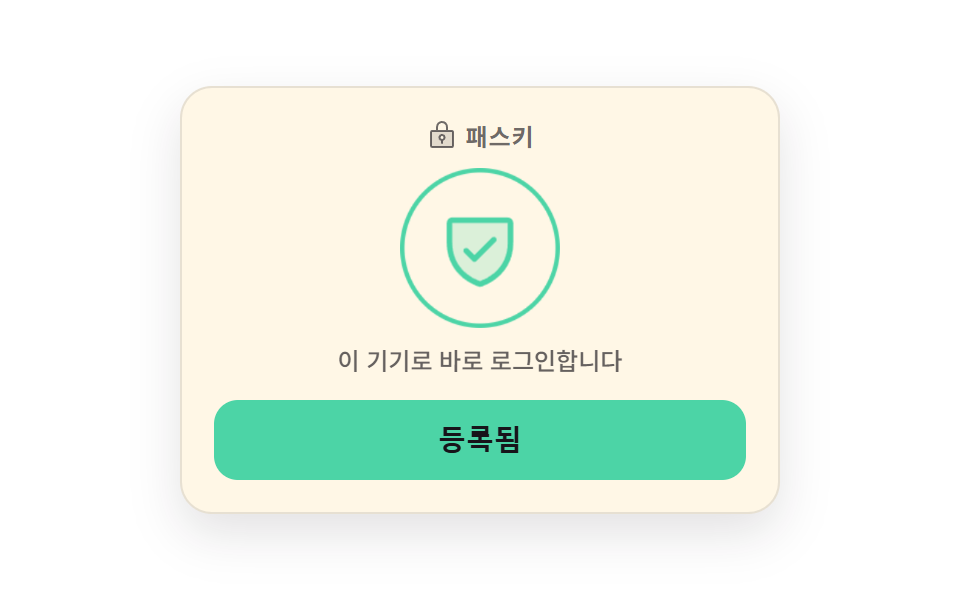
가운데 지문 그림이 부풀었다 줄기를 반복하며 기기가 손가락을 기다린다는 것을 보여 주고, 등록이 끝나면 방패 표시로 한 프레임에 끊겨 바뀝니다. 기다리는 동안 버튼은 잠기고 그 사실이 속성으로도 적힙니다.
쓰임비밀번호 없이 들어오도록 이 기기를 등록하는 보안 설정 카드
steps(1, end)aria-busyscale
<main class="stage">
  <section class="pk is-demo" data-state="idle">
    <div class="pk__card">
      <p class="pk__head">
        <span class="pk__head-ic" aria-hidden="true"><svg viewBox="0 0 256 256" width="16" height="16"><g fill="currentColor"><path d="M208 88H48a8 8 0 0 0-8 8v112a8 8 0 0 0 8 8h160a8 8 0 0 0 8-8V96a8 8 0 0 0-8-8m-80 72a20 20 0 1 1 20-20a20 20 0 0 1-20 20" opacity=".2"/><path d="M208 80h-32V56a48 48 0 0 0-96 0v24H48a16 16 0 0 0-16 16v112a16 16 0 0 0 16 16h160a16 16 0 0 0 16-16V96a16 16 0 0 0-16-16M96 56a32 32 0 0 1 64 0v24H96Zm112 152H48V96h160zm-80-96a28 28 0 0 0-8 54.83V184a8 8 0 0 0 16 0v-17.17a28 28 0 0 0-8-54.83m0 40a12 12 0 1 1 12-12a12 12 0 0 1-12 12"/></g></svg></span>
        <span class="pk__head-t">패스키</span>
      </p>

      <div class="pk__badge">
        <span class="pk__ring" aria-hidden="true"></span>
        <span class="pk__arc" aria-hidden="true"></span>
        <span class="pk__ic" data-ic="print" aria-hidden="true"><svg viewBox="0 0 256 256" width="40" height="40"><g fill="currentColor"><path d="M224 128a96 96 0 1 1-96-96a96 96 0 0 1 96 96" opacity=".2"/><path d="M72 128a134.6 134.6 0 0 1-14.16 60.47a8 8 0 1 1-14.32-7.12A118.8 118.8 0 0 0 56 128a71.73 71.73 0 0 1 27-56.2a8 8 0 1 1 10 12.49A55.76 55.76 0 0 0 72 128m56-8a8 8 0 0 0-8 8a184.1 184.1 0 0 1-23 89.1a8 8 0 0 0 14 7.76A200.2 200.2 0 0 0 136 128a8 8 0 0 0-8-8m0-32a40 40 0 0 0-40 40a8 8 0 0 0 16 0a24 24 0 0 1 48 0a214.1 214.1 0 0 1-20.51 92a8 8 0 1 0 14.51 6.83A230 230 0 0 0 168 128a40 40 0 0 0-40-40m0-64A104.11 104.11 0 0 0 24 128a87.8 87.8 0 0 1-5 29.33a8 8 0 0 0 15.09 5.33A103.9 103.9 0 0 0 40 128a88 88 0 0 1 176 0a282 282 0 0 1-5.29 54.45a8 8 0 0 0 6.3 9.4a8 8 0 0 0 1.55.15a8 8 0 0 0 7.84-6.45A298.4 298.4 0 0 0 232 128A104.12 104.12 0 0 0 128 24M94.4 152.17a8 8 0 0 0-9.4 6.25a151 151 0 0 1-17.21 45.44a8 8 0 0 0 13.86 8a166.7 166.7 0 0 0 19-50.25a8 8 0 0 0-6.25-9.44M128 56a73 73 0 0 0-9 .56a8 8 0 0 0 2 15.87A56.08 56.08 0 0 1 184 128a252 252 0 0 1-1.92 31a8 8 0 0 0 6.92 9a8 8 0 0 0 1 .06a8 8 0 0 0 7.92-7a267 267 0 0 0 2-33A72.08 72.08 0 0 0 128 56m57.93 128.25a8 8 0 0 0-9.75 5.75c-1.46 5.69-3.15 11.4-5 17a8 8 0 0 0 5 10.13a7.9 7.9 0 0 0 2.55.42a8 8 0 0 0 7.58-5.46c2-5.92 3.79-12 5.35-18.05a8 8 0 0 0-5.72-9.78Z"/></g></svg></span>
        <span class="pk__ic" data-ic="shield" aria-hidden="true"><svg viewBox="0 0 256 256" width="40" height="40"><g fill="currentColor"><path d="M216 56v56c0 96-88 120-88 120s-88-24-88-120V56a8 8 0 0 1 8-8h160a8 8 0 0 1 8 8" opacity=".2"/><path d="M208 40H48a16 16 0 0 0-16 16v56c0 52.72 25.52 84.67 46.93 102.19c23.06 18.86 46 25.26 47 25.53a8 8 0 0 0 4.2 0c1-.27 23.91-6.67 47-25.53C198.48 196.67 224 164.72 224 112V56a16 16 0 0 0-16-16m0 72c0 37.07-13.66 67.16-40.6 89.42a129.3 129.3 0 0 1-39.4 22.2a128.3 128.3 0 0 1-38.92-21.81C61.82 179.51 48 149.3 48 112V56h160ZM82.34 141.66a8 8 0 0 1 11.32-11.32L112 148.69l50.34-50.35a8 8 0 0 1 11.32 11.32l-56 56a8 8 0 0 1-11.32 0Z"/></g></svg></span>
      </div>

      <p class="pk__state" role="status" aria-live="polite">
        <span class="pk__word" data-word="idle">지문이나 화면 잠금으로 로그인합니다</span>
        <span class="pk__word" data-word="busy">기기를 확인하고 있습니다</span>
        <span class="pk__word" data-word="done">이 기기로 바로 로그인합니다</span>
      </p>

      <button class="pk__btn" id="pk-btn" type="button" aria-busy="false">
        <span class="pk__face" data-face="idle">이 기기 등록</span>
        <span class="pk__face" data-face="busy">확인 중</span>
        <span class="pk__face" data-face="done">등록됨</span>
      </button>
    </div>
  </section>
</main>@use "../../../../site/static/demo-tokens" as *;
$duration: $dur-base;
$easing: $ease-pop;
$color: $subject-blue;
@include stage($stage-paper);
.pk {
box-sizing: border-box;
width: min(300px, 88vw);
font-family: -apple-system, "Segoe UI", "Noto Sans KR", sans-serif;
color: $subject-ink;
}
.pk__card {
box-sizing: border-box;
display: flex;
flex-direction: column;
align-items: center;
gap: $sp-3;
padding: $sp-4;
border: 1px solid rgba($subject-ink, .1);
border-radius: $r-card;
background-color: $subject-cream;
box-shadow: 0 10px 24px rgba($subject-ink, .12);
}
.pk__head {
display: flex;
align-items: center;
gap: $sp-1;
margin: 0;
height: 16px;
color: rgba($subject-ink, .62);
}
.pk__head-ic { display: inline-flex; }
.pk__head-ic svg { display: block; }
.pk__head-t {
font-size: 12px;
line-height: 16px;
font-weight: 700;
letter-spacing: .04em;
}
// ── 배지: 고리 + 회전 호 + 지문/방패 두 장 ───────────────────
.pk__badge {
position: relative;
display: grid;
place-items: center;
width: 72px;
height: 72px;
}
.pk__ring {
position: absolute;
inset: 0;
border: 2px solid rgba($subject-ink, .14);
border-radius: 50%;
}
.pk__arc {
position: absolute;
inset: 0;
border: 3px solid transparent;
border-top-color: $color;
border-radius: 50%;
opacity: 0;
}
.pk__ic {
position: absolute;
display: inline-flex;
width: 40px;
height: 40px;
opacity: 0;
color: $color;
}
.pk__ic svg { display: block; width: 100%; height: 100%; }
.pk__ic[data-ic="shield"] { color: $subject-mint; }
// ── 상태 문구 ─────────────────────────────────────────────
.pk__state {
position: relative;
margin: 0;
width: 100%;
height: 16px;
}
.pk__word {
position: absolute;
left: 0;
right: 0;
top: 0;
text-align: center;
font-size: 12px;
line-height: 16px;
font-weight: 500;
color: rgba($subject-ink, .66);
white-space: nowrap;
opacity: 0;
}
// ── 버튼 ─────────────────────────────────────────────────
.pk__btn {
position: relative;
box-sizing: border-box;
margin: 0;
padding: 0;
width: 100%;
height: 40px;
overflow: hidden;
border: 0;
border-radius: $r-control;
background-color: $subject-blue-deep;
color: $subject-cream;
cursor: pointer;
transition: background-color $duration $easing;
}
.pk__btn:focus-visible { outline: 3px solid $subject-ink; outline-offset: 3px; }
.pk__face {
position: absolute;
left: 0;
right: 0;
top: 0;
bottom: 0;
display: flex;
align-items: center;
justify-content: center;
font-size: 14px;
line-height: 20px;
font-weight: 700;
white-space: nowrap;
opacity: 0;
}
// ── 사람이 조작한 정적 상태 — 루프를 껐을 때도 화면이 비지 않는다 ──
.pk:not(.is-demo)[data-state="idle"] .pk__face[data-face="idle"],
.pk:not(.is-demo)[data-state="busy"] .pk__face[data-face="busy"],
.pk:not(.is-demo)[data-state="done"] .pk__face[data-face="done"],
.pk:not(.is-demo)[data-state="idle"] .pk__word[data-word="idle"],
.pk:not(.is-demo)[data-state="busy"] .pk__word[data-word="busy"],
.pk:not(.is-demo)[data-state="done"] .pk__word[data-word="done"],
.pk:not(.is-demo)[data-state="idle"] .pk__ic[data-ic="print"],
.pk:not(.is-demo)[data-state="busy"] .pk__ic[data-ic="print"],
.pk:not(.is-demo)[data-state="done"] .pk__ic[data-ic="shield"],
.pk:not(.is-demo)[data-state="busy"] .pk__arc { opacity: 1; }
.pk:not(.is-demo)[data-state="busy"] .pk__btn { background-color: rgba($subject-ink, .14); color: rgba($subject-ink, .55); }
.pk:not(.is-demo)[data-state="done"] .pk__btn { background-color: $subject-mint; color: $subject-ink; }
.pk:not(.is-demo)[data-state="done"] .pk__ring { border-color: $subject-mint; }
// 호는 기다리는 동안 계속 돈다 — 컷 두 번만으로는 움직인 프레임이 안 찬다
.pk__arc {
animation-name: pk-spin;
animation-duration: 900ms;
animation-timing-function: linear;
animation-iteration-count: infinite;
}
@keyframes pk-spin {
from { transform: rotate(0deg); }
to { transform: rotate(360deg); }
}
// ── 자동 루프: idle → busy(16.67%) → done(66.67%). 등록됨은 되돌리지 않는다 ──
.pk.is-demo .pk__face,
.pk.is-demo .pk__word,
.pk.is-demo .pk__ic,
.pk.is-demo .pk__ring,
.pk.is-demo .pk__btn {
animation-duration: $dur-loop;
animation-timing-function: steps(1, end);
animation-iteration-count: infinite;
}
.pk.is-demo .pk__face[data-face="idle"],
.pk.is-demo .pk__word[data-word="idle"] { animation-name: pk-idle; }
.pk.is-demo .pk__face[data-face="busy"],
.pk.is-demo .pk__word[data-word="busy"] { animation-name: pk-busy; }
.pk.is-demo .pk__face[data-face="done"],
.pk.is-demo .pk__word[data-word="done"],
.pk.is-demo .pk__ic[data-ic="shield"] { animation-name: pk-done; }
.pk.is-demo .pk__ring { animation-name: pk-ring; }
.pk.is-demo .pk__btn { animation-name: pk-skin; }
@keyframes pk-idle {
0% { opacity: 1; }
16.67% { opacity: 0; }
100% { opacity: 0; }
}
@keyframes pk-busy {
0% { opacity: 0; }
16.67% { opacity: 1; }
66.67% { opacity: 0; }
100% { opacity: 0; }
}
@keyframes pk-done {
0% { opacity: 0; }
66.67% { opacity: 1; }
100% { opacity: 1; }
}
@keyframes pk-ring {
0% { border-color: rgba($subject-ink, .14); }
66.67% { border-color: $subject-mint; }
100% { border-color: $subject-mint; }
}
@keyframes pk-skin {
0% { background-color: $subject-blue-deep; color: $subject-cream; }
16.67% { background-color: rgba($subject-ink, .14); color: rgba($subject-ink, .55); }
66.67% { background-color: $subject-mint; color: $subject-ink; }
100% { background-color: $subject-mint; color: $subject-ink; }
}
// 호는 기다리는 구간에만 보인다 — 회전과 컷을 한 요소에 겹쳐 건다
.pk.is-demo .pk__arc {
animation-name: pk-spin, pk-busy;
animation-duration: 900ms, $dur-loop;
animation-timing-function: linear, steps(1, end);
animation-iteration-count: infinite, infinite;
}
// 지문은 기다리는 동안 부풀었다 줄기를 반복한다
.pk.is-demo .pk__ic[data-ic="print"] {
animation-name: pk-print, pk-pulse;
animation-duration: $dur-loop, $dur-loop;
animation-timing-function: steps(1, end), $ease-spring;
animation-iteration-count: infinite, infinite;
}
@keyframes pk-print {
0% { opacity: 1; }
66.67% { opacity: 0; }
100% { opacity: 0; }
}
@keyframes pk-pulse {
0% { transform: scale(1); }
16.67% { transform: scale(1); }
29.17% { transform: scale(1.16); }
41.67% { transform: scale(1); }
54.17% { transform: scale(1.16); }
66.67% { transform: scale(1); }
100% { transform: scale(1); }
}
// 등록됨으로 갈리는 순간 배지가 한 번 튄다 — 이 프레임이 대표 장면이 된다
.pk.is-demo .pk__badge {
animation-name: pk-pop;
animation-duration: $dur-loop;
animation-timing-function: $easing;
animation-iteration-count: infinite;
}
@keyframes pk-pop {
0% { transform: scale(1); }
66.67% { transform: scale(.9); }
75% { transform: scale(1.1); }
85% { transform: scale(1); }
100% { transform: scale(1); }
}
@media (max-width: 340px) {
.pk__card { gap: $sp-2; padding: $sp-2; }
.pk__head { height: 14px; }
.pk__head-t { font-size: 11px; line-height: 14px; }
.pk__badge { width: 52px; height: 52px; }
.pk__ic { width: 30px; height: 30px; }
.pk__state { height: 14px; }
.pk__word { font-size: 10px; line-height: 14px; }
.pk__btn { height: 30px; }
.pk__face { font-size: 12px; line-height: 16px; }
}
@media (prefers-reduced-motion: reduce) {
.pk.is-demo .pk__face,
.pk.is-demo .pk__word,
.pk.is-demo .pk__ic,
.pk.is-demo .pk__ring,
.pk.is-demo .pk__btn,
.pk.is-demo .pk__arc,
.pk.is-demo .pk__badge,
.pk__arc { animation: none !important; }
.pk.is-demo .pk__face[data-face="idle"],
.pk.is-demo .pk__word[data-word="idle"],
.pk.is-demo .pk__ic[data-ic="print"] { opacity: 1 !important; }
.pk.is-demo .pk__arc { opacity: 0 !important; }
.pk__btn { transition: none !important; }
}html, body {
margin: 0;
overflow: hidden;
}
.stage {
box-sizing: border-box;
min-height: 100vh;
display: grid;
place-items: center;
margin: 0;
background: #ffffff;
font-family: -apple-system, "Segoe UI", "Noto Sans KR", sans-serif;
padding: clamp(8px, 4vw, 24px);
}
.pk {
box-sizing: border-box;
width: min(300px, 88vw);
font-family: -apple-system, "Segoe UI", "Noto Sans KR", sans-serif;
color: #17141a;
}
.pk__card {
box-sizing: border-box;
display: flex;
flex-direction: column;
align-items: center;
gap: 12px;
padding: 16px;
border: 1px solid rgba(23, 20, 26, 0.1);
border-radius: 16px;
background-color: #fff7e6;
box-shadow: 0 10px 24px rgba(23, 20, 26, 0.12);
}
.pk__head {
display: flex;
align-items: center;
gap: 4px;
margin: 0;
height: 16px;
color: rgba(23, 20, 26, 0.62);
}
.pk__head-ic {
display: inline-flex;
}
.pk__head-ic svg {
display: block;
}
.pk__head-t {
font-size: 12px;
line-height: 16px;
font-weight: 700;
letter-spacing: 0.04em;
}
.pk__badge {
position: relative;
display: grid;
place-items: center;
width: 72px;
height: 72px;
}
.pk__ring {
position: absolute;
inset: 0;
border: 2px solid rgba(23, 20, 26, 0.14);
border-radius: 50%;
}
.pk__arc {
position: absolute;
inset: 0;
border: 3px solid transparent;
border-top-color: #2f6df6;
border-radius: 50%;
opacity: 0;
}
.pk__ic {
position: absolute;
display: inline-flex;
width: 40px;
height: 40px;
opacity: 0;
color: #2f6df6;
}
.pk__ic svg {
display: block;
width: 100%;
height: 100%;
}
.pk__ic[data-ic=shield] {
color: #4cd4a6;
}
.pk__state {
position: relative;
margin: 0;
width: 100%;
height: 16px;
}
.pk__word {
position: absolute;
left: 0;
right: 0;
top: 0;
text-align: center;
font-size: 12px;
line-height: 16px;
font-weight: 500;
color: rgba(23, 20, 26, 0.66);
white-space: nowrap;
opacity: 0;
}
.pk__btn {
position: relative;
box-sizing: border-box;
margin: 0;
padding: 0;
width: 100%;
height: 40px;
overflow: hidden;
border: 0;
border-radius: 12px;
background-color: #0a4fe8;
color: #fff7e6;
cursor: pointer;
transition: background-color 300ms cubic-bezier(0.2, 1.4, 0.4, 1);
}
.pk__btn:focus-visible {
outline: 3px solid #17141a;
outline-offset: 3px;
}
.pk__face {
position: absolute;
left: 0;
right: 0;
top: 0;
bottom: 0;
display: flex;
align-items: center;
justify-content: center;
font-size: 14px;
line-height: 20px;
font-weight: 700;
white-space: nowrap;
opacity: 0;
}
.pk:not(.is-demo)[data-state=idle] .pk__face[data-face=idle],
.pk:not(.is-demo)[data-state=busy] .pk__face[data-face=busy],
.pk:not(.is-demo)[data-state=done] .pk__face[data-face=done],
.pk:not(.is-demo)[data-state=idle] .pk__word[data-word=idle],
.pk:not(.is-demo)[data-state=busy] .pk__word[data-word=busy],
.pk:not(.is-demo)[data-state=done] .pk__word[data-word=done],
.pk:not(.is-demo)[data-state=idle] .pk__ic[data-ic=print],
.pk:not(.is-demo)[data-state=busy] .pk__ic[data-ic=print],
.pk:not(.is-demo)[data-state=done] .pk__ic[data-ic=shield],
.pk:not(.is-demo)[data-state=busy] .pk__arc {
opacity: 1;
}
.pk:not(.is-demo)[data-state=busy] .pk__btn {
background-color: rgba(23, 20, 26, 0.14);
color: rgba(23, 20, 26, 0.55);
}
.pk:not(.is-demo)[data-state=done] .pk__btn {
background-color: #4cd4a6;
color: #17141a;
}
.pk:not(.is-demo)[data-state=done] .pk__ring {
border-color: #4cd4a6;
}
.pk__arc {
animation-name: pk-spin;
animation-duration: 900ms;
animation-timing-function: linear;
animation-iteration-count: infinite;
}
@keyframes pk-spin {
from {
transform: rotate(0deg);
}
to {
transform: rotate(360deg);
}
}
.pk.is-demo .pk__face,
.pk.is-demo .pk__word,
.pk.is-demo .pk__ic,
.pk.is-demo .pk__ring,
.pk.is-demo .pk__btn {
animation-duration: 2s;
animation-timing-function: steps(1, end);
animation-iteration-count: infinite;
}
.pk.is-demo .pk__face[data-face=idle],
.pk.is-demo .pk__word[data-word=idle] {
animation-name: pk-idle;
}
.pk.is-demo .pk__face[data-face=busy],
.pk.is-demo .pk__word[data-word=busy] {
animation-name: pk-busy;
}
.pk.is-demo .pk__face[data-face=done],
.pk.is-demo .pk__word[data-word=done],
.pk.is-demo .pk__ic[data-ic=shield] {
animation-name: pk-done;
}
.pk.is-demo .pk__ring {
animation-name: pk-ring;
}
.pk.is-demo .pk__btn {
animation-name: pk-skin;
}
@keyframes pk-idle {
0% {
opacity: 1;
}
16.67% {
opacity: 0;
}
100% {
opacity: 0;
}
}
@keyframes pk-busy {
0% {
opacity: 0;
}
16.67% {
opacity: 1;
}
66.67% {
opacity: 0;
}
100% {
opacity: 0;
}
}
@keyframes pk-done {
0% {
opacity: 0;
}
66.67% {
opacity: 1;
}
100% {
opacity: 1;
}
}
@keyframes pk-ring {
0% {
border-color: rgba(23, 20, 26, 0.14);
}
66.67% {
border-color: #4cd4a6;
}
100% {
border-color: #4cd4a6;
}
}
@keyframes pk-skin {
0% {
background-color: #0a4fe8;
color: #fff7e6;
}
16.67% {
background-color: rgba(23, 20, 26, 0.14);
color: rgba(23, 20, 26, 0.55);
}
66.67% {
background-color: #4cd4a6;
color: #17141a;
}
100% {
background-color: #4cd4a6;
color: #17141a;
}
}
.pk.is-demo .pk__arc {
animation-name: pk-spin, pk-busy;
animation-duration: 900ms, 2s;
animation-timing-function: linear, steps(1, end);
animation-iteration-count: infinite, infinite;
}
.pk.is-demo .pk__ic[data-ic=print] {
animation-name: pk-print, pk-pulse;
animation-duration: 2s, 2s;
animation-timing-function: steps(1, end), cubic-bezier(0.2, 0.8, 0.2, 1);
animation-iteration-count: infinite, infinite;
}
@keyframes pk-print {
0% {
opacity: 1;
}
66.67% {
opacity: 0;
}
100% {
opacity: 0;
}
}
@keyframes pk-pulse {
0% {
transform: scale(1);
}
16.67% {
transform: scale(1);
}
29.17% {
transform: scale(1.16);
}
41.67% {
transform: scale(1);
}
54.17% {
transform: scale(1.16);
}
66.67% {
transform: scale(1);
}
100% {
transform: scale(1);
}
}
.pk.is-demo .pk__badge {
animation-name: pk-pop;
animation-duration: 2s;
animation-timing-function: cubic-bezier(0.2, 1.4, 0.4, 1);
animation-iteration-count: infinite;
}
@keyframes pk-pop {
0% {
transform: scale(1);
}
66.67% {
transform: scale(0.9);
}
75% {
transform: scale(1.1);
}
85% {
transform: scale(1);
}
100% {
transform: scale(1);
}
}
@media (max-width: 340px) {
.pk__card {
gap: 8px;
padding: 8px;
}
.pk__head {
height: 14px;
}
.pk__head-t {
font-size: 11px;
line-height: 14px;
}
.pk__badge {
width: 52px;
height: 52px;
}
.pk__ic {
width: 30px;
height: 30px;
}
.pk__state {
height: 14px;
}
.pk__word {
font-size: 10px;
line-height: 14px;
}
.pk__btn {
height: 30px;
}
.pk__face {
font-size: 12px;
line-height: 16px;
}
}
@media (prefers-reduced-motion: reduce) {
.pk.is-demo .pk__face,
.pk.is-demo .pk__word,
.pk.is-demo .pk__ic,
.pk.is-demo .pk__ring,
.pk.is-demo .pk__btn,
.pk.is-demo .pk__arc,
.pk.is-demo .pk__badge,
.pk__arc {
animation: none !important;
}
.pk.is-demo .pk__face[data-face=idle],
.pk.is-demo .pk__word[data-word=idle],
.pk.is-demo .pk__ic[data-ic=print] {
opacity: 1 !important;
}
.pk.is-demo .pk__arc {
opacity: 0 !important;
}
.pk__btn {
transition: none !important;
}
}// 실제 동작: 누르면 busy(잠김 + aria-busy) → done(등록됨). 등록된 뒤 한 번 더 누르면 처음으로 되돌린다
var root = document.querySelector('.pk');
var btn = document.getElementById('pk-btn');
var t = 0;
function setState(s) {
root.setAttribute('data-state', s);
btn.setAttribute('aria-busy', String(s === 'busy'));
btn.disabled = s === 'busy'; // 기다리는 동안만 잠근다
}
btn.addEventListener('click', function () {
root.classList.remove('is-demo'); // 사람이 만졌으니 자동 루프를 끈다
clearTimeout(t);
if (root.getAttribute('data-state') === 'done') { setState('idle'); return; }
setState('busy');
t = setTimeout(function () { setState('done'); }, 1400); // 기기가 답한 시점
});import { useState, useRef, useEffect } from "react";
import type { CSSProperties } from "react";
import styles from "./PasskeyEnrollCard.module.scss";
export type EnrollState = "idle" | "busy" | "done";
export type PasskeyEnrollCardProps = {
heading?: string;
labels?: Record<EnrollState, string>;
notes?: Record<EnrollState, string>;
/** 기기가 답하기까지 기다리는 시간 (ms) */
verifyMs?: number;
duration?: number;
easing?: string;
color?: string;
};
type Vars = CSSProperties & { "--duration"?: string; "--easing"?: string; "--color"?: string };
type Timer = ReturnType<typeof setTimeout>;
const LOCK = (
<g fill="currentColor">
<path d="M208 88H48a8 8 0 0 0-8 8v112a8 8 0 0 0 8 8h160a8 8 0 0 0 8-8V96a8 8 0 0 0-8-8m-80 72a20 20 0 1 1 20-20a20 20 0 0 1-20 20" opacity=".2" />
<path d="M208 80h-32V56a48 48 0 0 0-96 0v24H48a16 16 0 0 0-16 16v112a16 16 0 0 0 16 16h160a16 16 0 0 0 16-16V96a16 16 0 0 0-16-16M96 56a32 32 0 0 1 64 0v24H96Zm112 152H48V96h160zm-80-96a28 28 0 0 0-8 54.83V184a8 8 0 0 0 16 0v-17.17a28 28 0 0 0-8-54.83m0 40a12 12 0 1 1 12-12a12 12 0 0 1-12 12" />
</g>
);
const FINGERPRINT = (
<g fill="currentColor">
<path d="M224 128a96 96 0 1 1-96-96a96 96 0 0 1 96 96" opacity=".2" />
<path d="M72 128a134.6 134.6 0 0 1-14.16 60.47a8 8 0 1 1-14.32-7.12A118.8 118.8 0 0 0 56 128a71.73 71.73 0 0 1 27-56.2a8 8 0 1 1 10 12.49A55.76 55.76 0 0 0 72 128m56-8a8 8 0 0 0-8 8a184.1 184.1 0 0 1-23 89.1a8 8 0 0 0 14 7.76A200.2 200.2 0 0 0 136 128a8 8 0 0 0-8-8m0-32a40 40 0 0 0-40 40a8 8 0 0 0 16 0a24 24 0 0 1 48 0a214.1 214.1 0 0 1-20.51 92a8 8 0 1 0 14.51 6.83A230 230 0 0 0 168 128a40 40 0 0 0-40-40m0-64A104.11 104.11 0 0 0 24 128a87.8 87.8 0 0 1-5 29.33a8 8 0 0 0 15.09 5.33A103.9 103.9 0 0 0 40 128a88 88 0 0 1 176 0a282 282 0 0 1-5.29 54.45a8 8 0 0 0 6.3 9.4a8 8 0 0 0 1.55.15a8 8 0 0 0 7.84-6.45A298.4 298.4 0 0 0 232 128A104.12 104.12 0 0 0 128 24M94.4 152.17a8 8 0 0 0-9.4 6.25a151 151 0 0 1-17.21 45.44a8 8 0 0 0 13.86 8a166.7 166.7 0 0 0 19-50.25a8 8 0 0 0-6.25-9.44M128 56a73 73 0 0 0-9 .56a8 8 0 0 0 2 15.87A56.08 56.08 0 0 1 184 128a252 252 0 0 1-1.92 31a8 8 0 0 0 6.92 9a8 8 0 0 0 1 .06a8 8 0 0 0 7.92-7a267 267 0 0 0 2-33A72.08 72.08 0 0 0 128 56m57.93 128.25a8 8 0 0 0-9.75 5.75c-1.46 5.69-3.15 11.4-5 17a8 8 0 0 0 5 10.13a7.9 7.9 0 0 0 2.55.42a8 8 0 0 0 7.58-5.46c2-5.92 3.79-12 5.35-18.05a8 8 0 0 0-5.72-9.78Z" />
</g>
);
const SHIELD = (
<g fill="currentColor">
<path d="M216 56v56c0 96-88 120-88 120s-88-24-88-120V56a8 8 0 0 1 8-8h160a8 8 0 0 1 8 8" opacity=".2" />
<path d="M208 40H48a16 16 0 0 0-16 16v56c0 52.72 25.52 84.67 46.93 102.19c23.06 18.86 46 25.26 47 25.53a8 8 0 0 0 4.2 0c1-.27 23.91-6.67 47-25.53C198.48 196.67 224 164.72 224 112V56a16 16 0 0 0-16-16m0 72c0 37.07-13.66 67.16-40.6 89.42a129.3 129.3 0 0 1-39.4 22.2a128.3 128.3 0 0 1-38.92-21.81C61.82 179.51 48 149.3 48 112V56h160ZM82.34 141.66a8 8 0 0 1 11.32-11.32L112 148.69l50.34-50.35a8 8 0 0 1 11.32 11.32l-56 56a8 8 0 0 1-11.32 0Z" />
</g>
);
export default function PasskeyEnrollCard({
heading = "Passkey",
labels = { idle: "Enroll this device", busy: "Checking", done: "Enrolled" },
notes = {
idle: "Sign in with your fingerprint or screen lock",
busy: "Checking this device",
done: "You can sign in straight from this device",
},
verifyMs = 1400,
duration = 300,
easing = "cubic-bezier(.2,1.4,.4,1)",
color = "#2f6df6",
}: PasskeyEnrollCardProps) {
const [demo, setDemo] = useState(true);
const [state, setState] = useState<EnrollState>("idle");
const timer = useRef<Timer>(null);
const vars: Vars = { "--duration": `${duration}ms`, "--easing": easing, "--color": color };
function clear() {
if (timer.current !== null) clearTimeout(timer.current);
}
useEffect(() => clear, []); // 떠날 때 예약된 타이머를 버린다
// 누르면 busy(잠김 + aria-busy) → done. 등록된 뒤 한 번 더 누르면 처음으로
function run() {
setDemo(false); // 사람이 만졌으니 자동 루프를 끈다
clear();
if (state === "done") {
setState("idle");
return;
}
setState("busy");
timer.current = setTimeout(() => setState("done"), verifyMs);
}
return (
<section className={`${styles.pk} ${demo ? styles.isDemo : ""}`} data-state={state} style={vars}>
<div className={styles.card}>
<p className={styles.head}>
<span className={styles.headIc} aria-hidden="true">
<svg viewBox="0 0 256 256" width="16" height="16">{LOCK}</svg>
</span>
<span className={styles.headTxt}>{heading}</span>
</p>
<div className={styles.badge}>
<span className={styles.ring} aria-hidden="true" />
<span className={styles.arc} aria-hidden="true" />
<span className={styles.ic} data-ic="print" aria-hidden="true">
<svg viewBox="0 0 256 256" width="40" height="40">{FINGERPRINT}</svg>
</span>
<span className={styles.ic} data-ic="shield" aria-hidden="true">
<svg viewBox="0 0 256 256" width="40" height="40">{SHIELD}</svg>
</span>
</div>
<p className={styles.state} role="status" aria-live="polite">
<span className={styles.word} data-word="idle">{notes.idle}</span>
<span className={styles.word} data-word="busy">{notes.busy}</span>
<span className={styles.word} data-word="done">{notes.done}</span>
</p>
<button
className={styles.btn}
type="button"
aria-busy={state === "busy"}
disabled={state === "busy"}
onClick={run}
>
<span className={styles.face} data-face="idle">{labels.idle}</span>
<span className={styles.face} data-face="busy">{labels.busy}</span>
<span className={styles.face} data-face="done">{labels.done}</span>
</button>
</div>
</section>
);
}04 지문에서 방패로 갈리는 패스키 등록 — 측정 누적면적 10.955% · 움직인 프레임 21/23GODRICH 원작 · zip 에 SCSS·React 포함 · 계정 보안 설정 UI 9종 — 로그인한 뒤의 화면
이 데모가 속한 글
 계정 보안 설정 UI 9종 — 로그인한 뒤의 화면계정 보안 설정은 로그인을 통과한 사람이 마주하는, 접속 중인 기기와 2단계 인증, 비밀번호를 직접 만지는 화면입니다. 아홉 개는 전부 실제로 돌아갑니다. 기기 줄은 정말로 접히고, 백업 코드는 정말로 클립보드에 들 이 글의 데모 전부 보기