계정 보안 설정 UI 9종 — 로그인한 뒤의 화면
계정 보안 설정은 로그인을 통과한 사람이 마주하는, 접속 중인 기기와 2단계 인증, 비밀번호를 직접 만지는 화면입니다. 아홉 개는 전부 실제로 돌아갑니다. 기기 줄은 정말로 접히고, 백업 코드는 정말로 클립보드에 들어가고, 삭제 버튼은 DELETE 를 직접 쳐야 열립니다.
 01 acct-sec-active-sessions
 02 acct-sec-2fa-setup-steps
 03 acct-sec-backup-codes-card
 04 acct-sec-passkey-enroll
 05 acct-sec-password-change
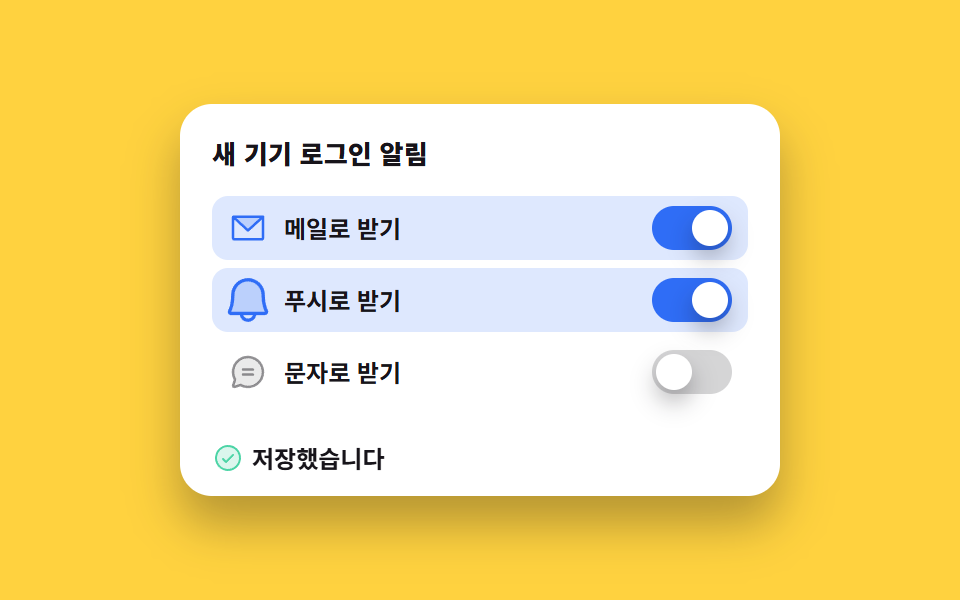 06 acct-sec-alert-toggles
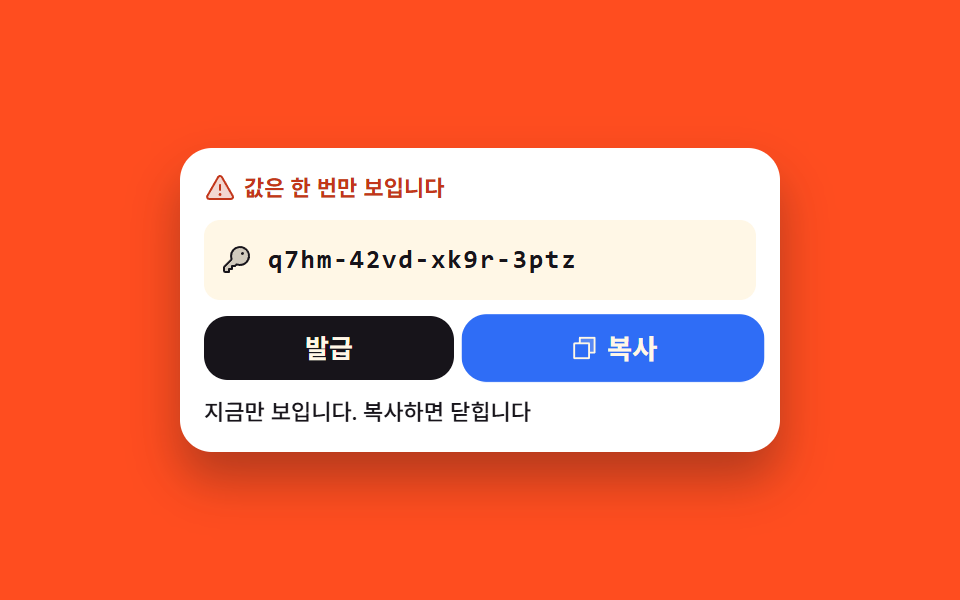 07 acct-sec-token-reveal-once
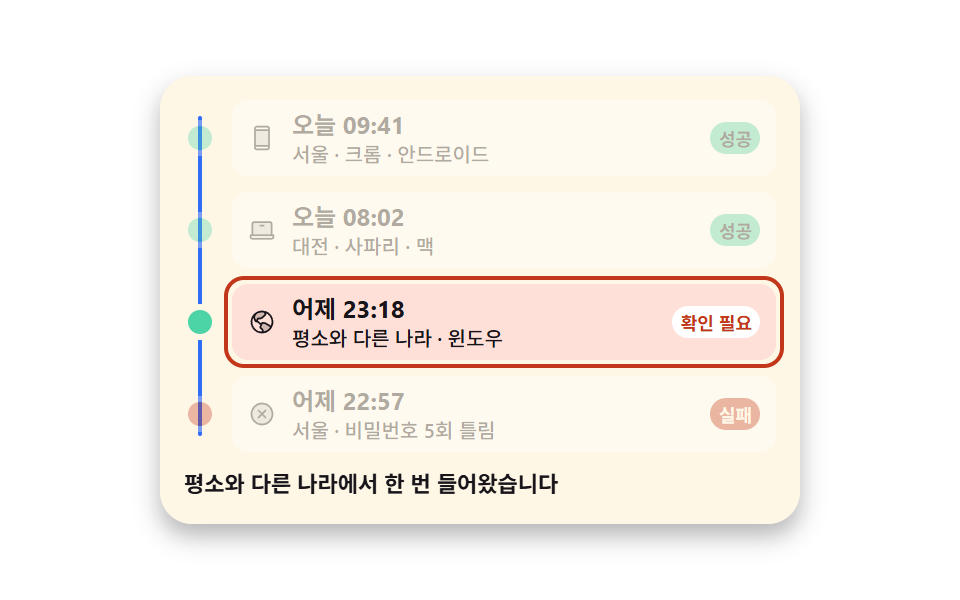 08 acct-sec-login-history
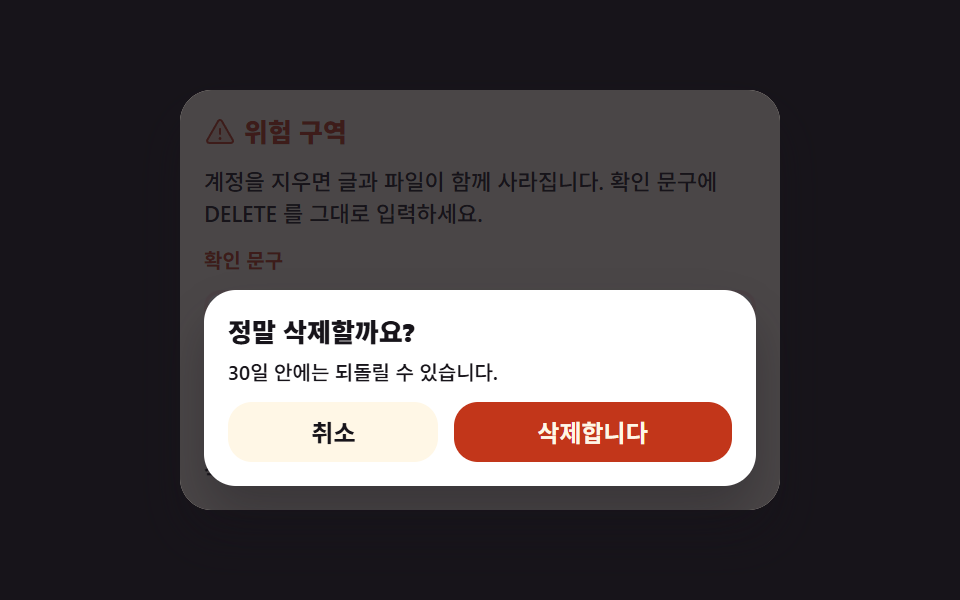 09 acct-sec-danger-delete
자동 재생 · 눌러서 해당 항목으로 · 전부 한 zip
- 01 지금 로그인된 기기 목록
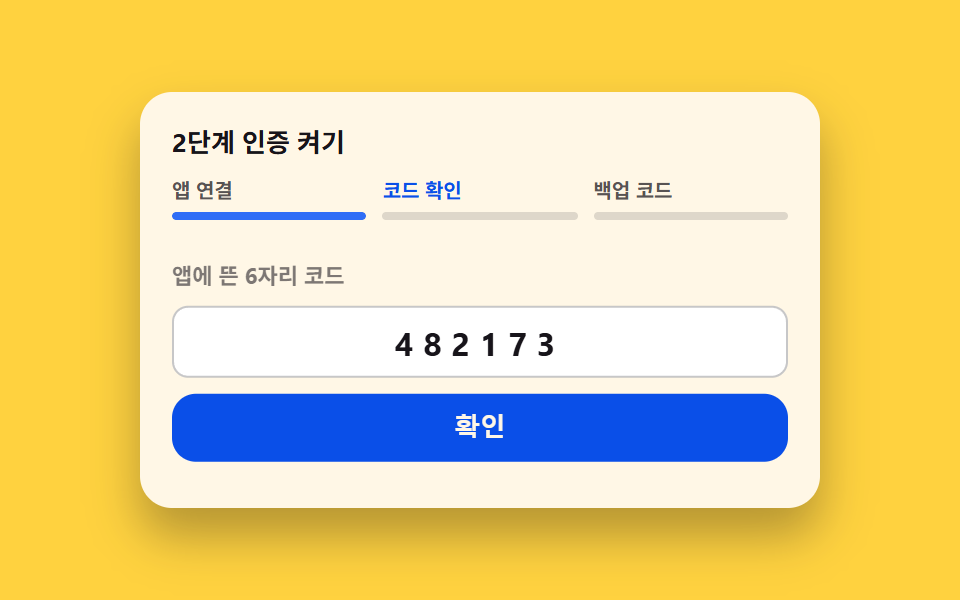
- 02 2단계 인증을 켜는 세 걸음
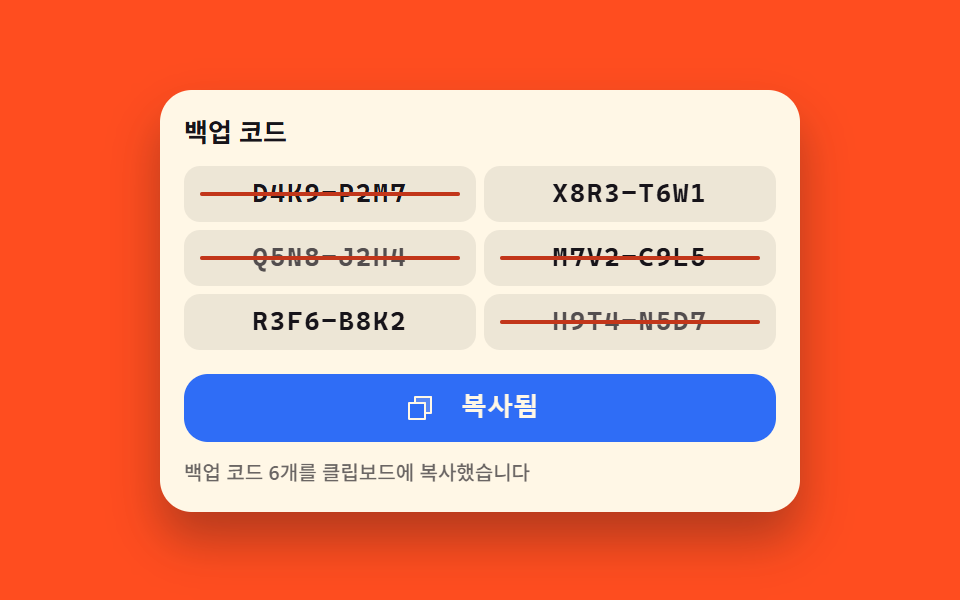
- 03 한 번 쓰면 줄이 그어지는 백업 코드
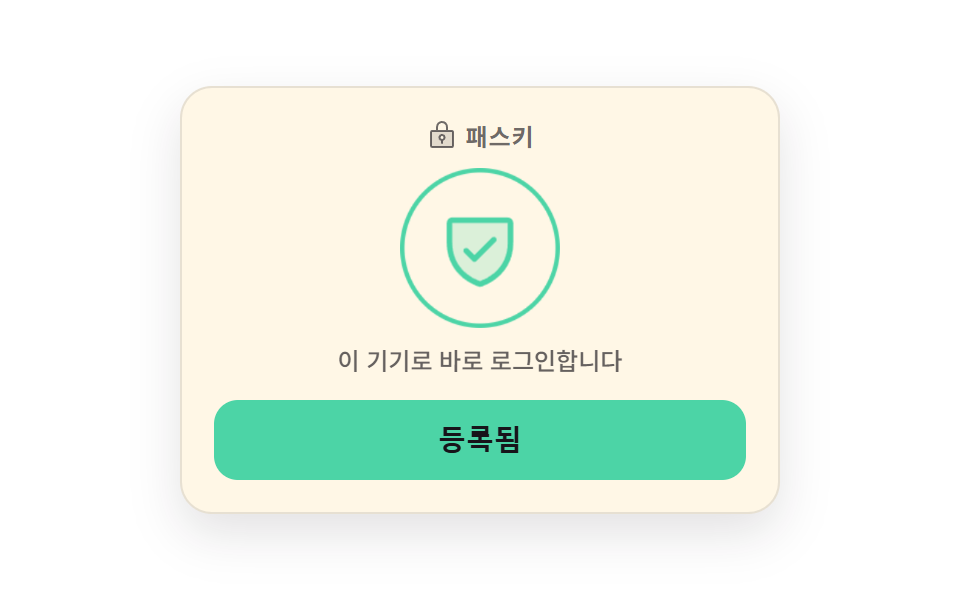
- 04 지문에서 방패로 갈리는 패스키 등록
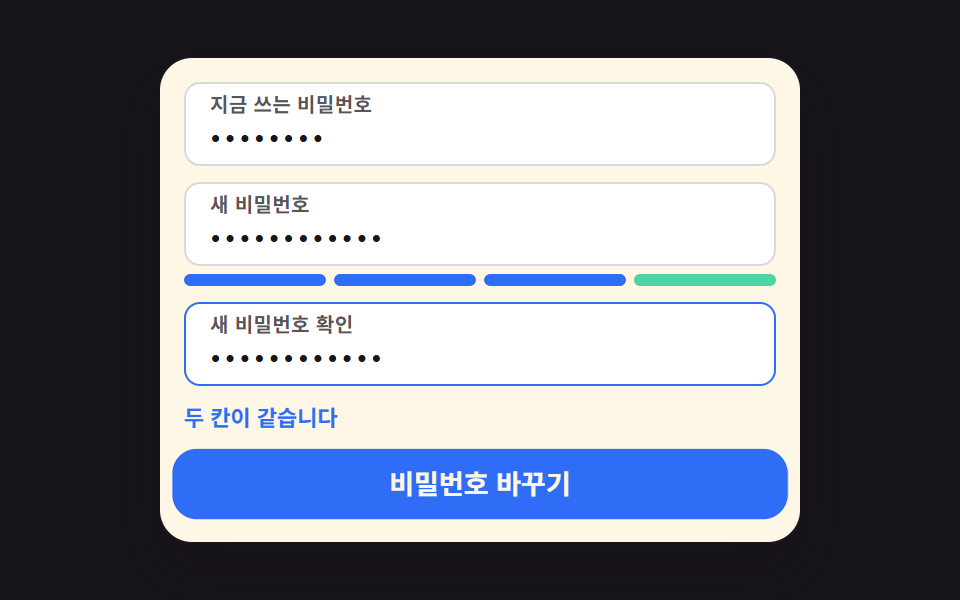
- 05 세 칸이 맞아야 열리는 비밀번호 변경
- 06 새 기기 로그인 알림 스위치 묶음
- 07 한 번만 보여 주는 앱 비밀번호
- 08 성공과 실패가 함께 놓인 로그인 기록
- 09 글자를 따라 쳐야 열리는 계정 삭제
순서는 보안 화면을 처음 여는 사람이 궁금해지는 순서입니다. 먼저 누가 들어와 있는지 봅니다(01). 2단계 인증을 켜려고 걸음을 밟고(02), 백업 코드를 받아 두고(03), 비밀번호 없이 들어올 수 있게 이 기기를 등록합니다(04). 다음은 비밀번호를 바꾸고(05), 낯선 기기가 들어오면 알림을 받도록 고르고(06), 메일 앱에 물릴 앱 비밀번호를 발급합니다(07). 마지막 둘은 지켜보는 쪽입니다. 지나간 로그인을 훑어 낯선 접속을 찾아내고(08), 되돌릴 수 없는 삭제 앞에 마지막 문구를 하나 둡니다(09). 구글 계정 보안 설정 같은 화면을 그대로 흉내 내는 것이 목적이 아니라, 그런 화면들이 공통으로 쓰는 부품 아홉 개를 따로 떼어 놓은 것입니다. 들어오는 문 앞의 화면은 본인인증 화면 UI가 맡고, 로그인한 뒤 얼굴을 표시하는 일은 아바타 UI가 이어받습니다. 세션 목록은 지금 접속한 기기를 맨 위에 두고 나머지는 마지막 활동 시각으로 정렬했으며, 2단계 인증의 세 걸음은 한 걸음이 끝나야 다음 걸음이 풀리도록 묶었습니다. 백업 코드는 한 번 쓰인 줄의 숫자를 다시 보여 주지 않고 취소선만 남깁니다. 비밀번호 규칙 판은 세우는 순간이 아니라 치는 내내 갱신되고, 로그아웃된 기기는 목록에서 사라지지 않고 회색으로 남겨 뒀습니다. 그래야 다른 기기에서 무엇을 지웠는지 다시 볼 수 있습니다.
01지금 로그인된 기기 목록
무엇이 보이나
기기 아이콘과 접속한 도시, 마지막으로 쓴 시각이 한 줄에 놓이고 지금 보고 있는 기기에는 따로 배지가 붙습니다.
<main class="stage">
  <section class="sd is-demo" id="sd">
    <h2 class="sd__title">로그인된 기기</h2>
    <ul class="sd__list">
      <li class="sd__row" data-row="1" data-name="크롬 · 윈도우">
        <span class="sd__ic" aria-hidden="true"><svg viewBox="0 0 256 256" width="20" height="20"><g fill="currentColor"><path d="M216 72v104H40V72a16 16 0 0 1 16-16h144a16 16 0 0 1 16 16" opacity=".2"/><path d="M232 168h-8V72a24 24 0 0 0-24-24H56a24 24 0 0 0-24 24v96h-8a8 8 0 0 0-8 8v16a24 24 0 0 0 24 24h176a24 24 0 0 0 24-24v-16a8 8 0 0 0-8-8M48 72a8 8 0 0 1 8-8h144a8 8 0 0 1 8 8v96H48Zm176 120a8 8 0 0 1-8 8H40a8 8 0 0 1-8-8v-8h192ZM152 88a8 8 0 0 1-8 8h-32a8 8 0 0 1 0-16h32a8 8 0 0 1 8 8"/></g></svg></span>
        <span class="sd__txt">
          <span class="sd__name">크롬 · 윈도우<span class="sd__badge">이 기기</span></span>
          <span class="sd__meta">서울 · 방금 전</span>
        </span>
        <button class="sd__out" type="button">로그아웃</button>
      </li>
      <li class="sd__row" data-row="2" data-name="모바일 앱 · 안드로이드">
        <span class="sd__ic" aria-hidden="true"><svg viewBox="0 0 256 256" width="20" height="20"><g fill="currentColor"><path d="M192 56v144H64V56Z" opacity=".2"/><path d="M176 16H80a24 24 0 0 0-24 24v176a24 24 0 0 0 24 24h96a24 24 0 0 0 24-24V40a24 24 0 0 0-24-24M72 64h112v128H72Zm8-32h96a8 8 0 0 1 8 8v8H72v-8a8 8 0 0 1 8-8m96 192H80a8 8 0 0 1-8-8v-8h112v8a8 8 0 0 1-8 8"/></g></svg></span>
        <span class="sd__txt">
          <span class="sd__name">모바일 앱 · 안드로이드</span>
          <span class="sd__meta">부산 · 2시간 전</span>
        </span>
        <button class="sd__out" type="button">로그아웃</button>
      </li>
      <li class="sd__row" data-row="3" data-name="웹 · 태블릿">
        <span class="sd__ic" aria-hidden="true"><svg viewBox="0 0 256 256" width="20" height="20"><g fill="currentColor"><path d="M213.09 172.48a96 96 0 0 1-80.41 51.41l3.17-16.44a8 8 0 0 0-2-6.95l-19.74-20.33a8 8 0 0 1-1.44-8.69l13.7-30.74a8 8 0 0 1 8.38-4.67l22.82 3.08a8.1 8.1 0 0 1 3.12 1.11ZM116.71 95L129 88.24a7.5 7.5 0 0 0 1.5-1.07l26.91-24.33A8 8 0 0 0 159 53l-10.5-18.81A96.6 96.6 0 0 0 128 32a95.6 95.6 0 0 0-60.22 21.23L56 81.08a8 8 0 0 0-.12 5.92l11.5 30.67a8 8 0 0 0 5.81 5l2.69.58L89.2 100a8 8 0 0 1 6.94-4h16.71a7.9 7.9 0 0 0 3.86-1" opacity=".2"/><path d="M128 24a104 104 0 1 0 104 104A104.11 104.11 0 0 0 128 24m88 104a87.6 87.6 0 0 1-6.4 32.94l-44.7-27.49a15.9 15.9 0 0 0-6.24-2.23l-22.82-3.08a16.11 16.11 0 0 0-16 7.86h-8.72l-3.8-7.86a15.91 15.91 0 0 0-11-8.67l-8-1.73L96.14 104h16.71a16.06 16.06 0 0 0 7.73-2l12.25-6.76a16.6 16.6 0 0 0 3-2.14l26.91-24.34A15.93 15.93 0 0 0 166 49.1l-.36-.65A88.11 88.11 0 0 1 216 128m-72.69-86.66L152 56.9l-26.91 24.34L112.85 88H96.14a16 16 0 0 0-13.88 8l-8.73 15.23l-10.15-27.04l10.94-25.87a87.87 87.87 0 0 1 69-17ZM40 128a87.5 87.5 0 0 1 8.54-37.8l11.34 30.27a16 16 0 0 0 11.62 10l21.43 4.61l3.81 7.92a16.09 16.09 0 0 0 14.4 9h1.48l-7.23 16.23a16 16 0 0 0 2.86 17.37l.14.14l19.61 20.2l-1.94 10A88.11 88.11 0 0 1 40 128m102.58 86.78l1.13-5.81a16.09 16.09 0 0 0-4-13.9a2 2 0 0 1-.14-.14L120 174.74L133.7 144l22.82 3.08l45.72 28.12a88.18 88.18 0 0 1-59.66 39.58"/></g></svg></span>
        <span class="sd__txt">
          <span class="sd__name">웹 · 태블릿</span>
          <span class="sd__meta">부산 · 어제</span>
        </span>
        <button class="sd__out" type="button">로그아웃</button>
      </li>
    </ul>
    <p class="sd__live" role="status" aria-live="polite"><span class="sd__say">웹 · 태블릿 기기를 로그아웃했습니다</span></p>
  </section>
</main>@use "../../../../site/static/demo-tokens" as *;
$duration: $dur-base;
$easing: $ease-spring;
$color: $subject-blue;
@include stage($stage-ink);
.sd {
--row-h: 48px;
box-sizing: border-box;
width: min(340px, 88vw);
padding: $sp-3;
border-radius: $r-card;
background-color: $subject-cream;
color: $subject-ink;
box-shadow: $shadow-raised;
overflow: hidden;
font-family: -apple-system, "Segoe UI", "Noto Sans KR", sans-serif;
}
.sd__title {
margin: 0 0 $sp-2;
font-size: 13px;
line-height: 18px;
font-weight: 700;
}
.sd__list {
// 줄이 접혀도 카드 높이가 변하지 않게 목록 높이를 고정한다 — 안 그러면 무대 가운데 정렬이 카드째 움직인다
height: calc(var(--row-h) * 3);
margin: 0;
padding: 0;
list-style: none;
overflow: hidden;
}
.sd__row {
position: relative;
box-sizing: border-box;
display: flex;
align-items: center;
gap: $sp-2;
height: var(--row-h);
max-height: var(--row-h);
overflow: hidden;
background-color: transparent;
transform: translateX(0);
transition: transform $duration $easing, max-height $duration $easing, background-color $duration $easing;
}
.sd__row::after {
content: "";
position: absolute;
left: 0;
right: 0;
bottom: 0;
height: 1px;
background-color: rgba($subject-ink, .12);
}
.sd__row:last-child::after { display: none; }
// 사람이 실제로 누른 경로 — 루프를 껐을 때도 규칙이 살아 있어야 한다
.sd:not(.is-demo) .sd__row[data-gone="1"] {
transform: translateX(112%);
max-height: 0;
background-color: $error-soft;
}
.sd__ic { display: inline-flex; flex: 0 0 auto; color: $color; }
.sd__ic svg { display: block; }
.sd__txt { display: flex; flex-direction: column; min-width: 0; flex: 1 1 auto; }
.sd__name {
display: flex;
align-items: center;
gap: $sp-1;
font-size: 13px;
line-height: 16px;
font-weight: 700;
white-space: nowrap;
}
.sd__badge {
padding-left: $sp-1;
padding-right: $sp-1;
border-radius: $r-pill;
background-color: $subject-blue-deep;
color: $subject-cream;
font-size: 10px;
line-height: 14px;
font-weight: 700;
}
.sd__meta {
font-size: 11px;
line-height: 14px;
font-weight: 500;
color: rgba($subject-ink, .72); // AA 4.5 (blog-design)
white-space: nowrap;
}
.sd__out {
flex: 0 0 auto;
box-sizing: border-box;
margin: 0;
padding: $sp-1 $sp-2;
border: 1px solid rgba($subject-ink, .2);
border-radius: $r-pill;
background-color: transparent;
color: $subject-ink;
font-size: 11px;
line-height: 14px;
font-weight: 700;
cursor: pointer;
}
.sd__out:focus-visible { outline: 3px solid $color; outline-offset: 2px; }
.sd__out:disabled { opacity: .4; cursor: default; }
.sd__live {
margin: $sp-2 0 0;
height: 16px;
font-size: 11px;
line-height: 16px;
font-weight: 500;
color: rgba($subject-ink, .64);
white-space: nowrap;
opacity: 0;
}
.sd:not(.is-demo)[data-said] .sd__live { opacity: 1; }
// ── 자동 루프: 셋째 줄이 밀려 나갔다(30~48%) 접히고(58%) 다시 펴져 제자리로(86%) ──
// 되돌아오는 길도 같은 이징으로 밀어 넣어 텔레포트로 보이지 않게 한다
.sd.is-demo .sd__row[data-row="3"] {
  animation-name: sd-out;
  animation-duration: $dur-loop;
  animation-timing-function: $easing;
  animation-iteration-count: infinite;
}
@keyframes sd-out {
  0%   { transform: translateX(0); max-height: var(--row-h); background-color: transparent; }
  28%  { transform: translateX(0); max-height: var(--row-h); background-color: transparent; }
  31%  { transform: translateX(0); max-height: var(--row-h); background-color: $error-soft; }
  48%  { transform: translateX(112%); max-height: var(--row-h); background-color: $error-soft; }
  58%  { transform: translateX(112%); max-height: 0; background-color: $error-soft; }
  68%  { transform: translateX(112%); max-height: var(--row-h); background-color: $error-soft; }
  84%  { transform: translateX(0); max-height: var(--row-h); background-color: $error-soft; }
  87%  { transform: translateX(0); max-height: var(--row-h); background-color: transparent; }
  100% { transform: translateX(0); max-height: var(--row-h); background-color: transparent; }
}
// 알림 줄은 컷으로 켜고 끈다 — 반투명 중간 프레임을 만들지 않는다
.sd.is-demo .sd__live {
animation-name: sd-say;
animation-duration: $dur-loop;
animation-timing-function: steps(1, end);
animation-iteration-count: infinite;
}
@keyframes sd-say {
0% { opacity: 0; }
46% { opacity: 0; }
48% { opacity: 1; }
84% { opacity: 1; }
86% { opacity: 0; }
100% { opacity: 0; }
}
@media (max-width: 340px) {
.sd {
--row-h: 36px;
padding: $sp-2;
}
.sd__title { margin: 0 0 $sp-1; font-size: 11px; line-height: 14px; }
.sd__name { font-size: 12px; line-height: 15px; }
.sd__meta { font-size: 10px; line-height: 13px; }
.sd__badge { font-size: 9px; line-height: 13px; }
.sd__out { padding: 0 $sp-1; font-size: 10px; line-height: 20px; }
.sd__live { margin: $sp-1 0 0; height: 14px; font-size: 10px; line-height: 14px; }
}
@media (prefers-reduced-motion: reduce) {
.sd.is-demo .sd__row[data-row="3"],
.sd.is-demo .sd__live { animation: none !important; }
.sd__row { transition: none !important; }
.sd.is-demo .sd__live { opacity: 1 !important; }
}html, body {
margin: 0;
overflow: hidden;
}
.stage {
box-sizing: border-box;
min-height: 100vh;
display: grid;
place-items: center;
margin: 0;
background: #17141a;
font-family: -apple-system, "Segoe UI", "Noto Sans KR", sans-serif;
padding: clamp(8px, 4vw, 24px);
}
.sd {
--row-h: 48px;
box-sizing: border-box;
width: min(340px, 88vw);
padding: 12px;
border-radius: 16px;
background-color: #fff7e6;
color: #17141a;
box-shadow: 0 14px 24px rgba(23, 20, 26, 0.32);
overflow: hidden;
font-family: -apple-system, "Segoe UI", "Noto Sans KR", sans-serif;
}
.sd__title {
margin: 0 0 8px;
font-size: 13px;
line-height: 18px;
font-weight: 700;
}
.sd__list {
height: calc(var(--row-h) * 3);
margin: 0;
padding: 0;
list-style: none;
overflow: hidden;
}
.sd__row {
position: relative;
box-sizing: border-box;
display: flex;
align-items: center;
gap: 8px;
height: var(--row-h);
max-height: var(--row-h);
overflow: hidden;
background-color: transparent;
transform: translateX(0);
transition: transform 300ms cubic-bezier(0.2, 0.8, 0.2, 1), max-height 300ms cubic-bezier(0.2, 0.8, 0.2, 1), background-color 300ms cubic-bezier(0.2, 0.8, 0.2, 1);
}
.sd__row::after {
content: "";
position: absolute;
left: 0;
right: 0;
bottom: 0;
height: 1px;
background-color: rgba(23, 20, 26, 0.12);
}
.sd__row:last-child::after {
display: none;
}
.sd:not(.is-demo) .sd__row[data-gone="1"] {
transform: translateX(112%);
max-height: 0;
background-color: #ffe0d8;
}
.sd__ic {
display: inline-flex;
flex: 0 0 auto;
color: #2f6df6;
}
.sd__ic svg {
display: block;
}
.sd__txt {
display: flex;
flex-direction: column;
min-width: 0;
flex: 1 1 auto;
}
.sd__name {
display: flex;
align-items: center;
gap: 4px;
font-size: 13px;
line-height: 16px;
font-weight: 700;
white-space: nowrap;
}
.sd__badge {
padding-left: 4px;
padding-right: 4px;
border-radius: 999px;
background-color: #0a4fe8;
color: #fff7e6;
font-size: 10px;
line-height: 14px;
font-weight: 700;
}
.sd__meta {
font-size: 11px;
line-height: 14px;
font-weight: 500;
color: rgba(23, 20, 26, 0.72);
white-space: nowrap;
}
.sd__out {
flex: 0 0 auto;
box-sizing: border-box;
margin: 0;
padding: 4px 8px;
border: 1px solid rgba(23, 20, 26, 0.2);
border-radius: 999px;
background-color: transparent;
color: #17141a;
font-size: 11px;
line-height: 14px;
font-weight: 700;
cursor: pointer;
}
.sd__out:focus-visible {
outline: 3px solid #2f6df6;
outline-offset: 2px;
}
.sd__out:disabled {
opacity: 0.4;
cursor: default;
}
.sd__live {
margin: 8px 0 0;
height: 16px;
font-size: 11px;
line-height: 16px;
font-weight: 500;
color: rgba(23, 20, 26, 0.64);
white-space: nowrap;
opacity: 0;
}
.sd:not(.is-demo)[data-said] .sd__live {
opacity: 1;
}
.sd.is-demo .sd__row[data-row="3"] {
animation-name: sd-out;
animation-duration: 2s;
animation-timing-function: cubic-bezier(0.2, 0.8, 0.2, 1);
animation-iteration-count: infinite;
}
@keyframes sd-out {
0% {
transform: translateX(0);
max-height: var(--row-h);
background-color: transparent;
}
28% {
transform: translateX(0);
max-height: var(--row-h);
background-color: transparent;
}
31% {
transform: translateX(0);
max-height: var(--row-h);
background-color: #ffe0d8;
}
48% {
transform: translateX(112%);
max-height: var(--row-h);
background-color: #ffe0d8;
}
58% {
transform: translateX(112%);
max-height: 0;
background-color: #ffe0d8;
}
68% {
transform: translateX(112%);
max-height: var(--row-h);
background-color: #ffe0d8;
}
84% {
transform: translateX(0);
max-height: var(--row-h);
background-color: #ffe0d8;
}
87% {
transform: translateX(0);
max-height: var(--row-h);
background-color: transparent;
}
100% {
transform: translateX(0);
max-height: var(--row-h);
background-color: transparent;
}
}
.sd.is-demo .sd__live {
animation-name: sd-say;
animation-duration: 2s;
animation-timing-function: steps(1, end);
animation-iteration-count: infinite;
}
@keyframes sd-say {
0% {
opacity: 0;
}
46% {
opacity: 0;
}
48% {
opacity: 1;
}
84% {
opacity: 1;
}
86% {
opacity: 0;
}
100% {
opacity: 0;
}
}
@media (max-width: 340px) {
.sd {
--row-h: 36px;
padding: 8px;
}
.sd__title {
margin: 0 0 4px;
font-size: 11px;
line-height: 14px;
}
.sd__name {
font-size: 12px;
line-height: 15px;
}
.sd__meta {
font-size: 10px;
line-height: 13px;
}
.sd__badge {
font-size: 9px;
line-height: 13px;
}
.sd__out {
padding: 0 4px;
font-size: 10px;
line-height: 20px;
}
.sd__live {
margin: 4px 0 0;
height: 14px;
font-size: 10px;
line-height: 14px;
}
}
@media (prefers-reduced-motion: reduce) {
.sd.is-demo .sd__row[data-row="3"],
.sd.is-demo .sd__live {
animation: none !important;
}
.sd__row {
transition: none !important;
}
.sd.is-demo .sd__live {
opacity: 1 !important;
}
}// 실제 동작: 버튼을 누르면 그 줄만 옆으로 밀려 나가며 높이가 접히고, 읽히는 영역으로 한 번 알린다
var root = document.getElementById('sd');
var live = root.querySelector('.sd__live');
function disconnect(btn) {
var row = btn.parentNode;
if (row.getAttribute('data-gone') === '1') return;
root.classList.remove('is-demo'); // 사람이 만졌으니 자동 루프를 끈다
row.setAttribute('data-gone', '1');
btn.disabled = true;
root.setAttribute('data-said', '1');
live.textContent = row.getAttribute('data-name') + ' 기기를 로그아웃했습니다';
}
var buttons = root.querySelectorAll('.sd__out');
for (var i = 0; i < buttons.length; i++) {
buttons[i].addEventListener('click', function () { disconnect(this); });
}import { useState } from "react";
import type { CSSProperties, ReactNode } from "react";
import styles from "./SessionDeviceList.module.scss";
export type SessionIcon = "laptop" | "phone" | "globe";
export type Session = { id: string; name: string; meta: string; icon: SessionIcon; current?: boolean };
export type SessionDeviceListProps = {
title?: string;
sessions?: Session[];
currentLabel?: string;
outLabel?: string;
sayTail?: string;
duration?: number;
easing?: string;
color?: string;
};
type Vars = CSSProperties & { "--duration"?: string; "--easing"?: string; "--color"?: string };
const LAPTOP: ReactNode = (
<g fill="currentColor">
<path d="M216 72v104H40V72a16 16 0 0 1 16-16h144a16 16 0 0 1 16 16" opacity=".2" />
<path d="M232 168h-8V72a24 24 0 0 0-24-24H56a24 24 0 0 0-24 24v96h-8a8 8 0 0 0-8 8v16a24 24 0 0 0 24 24h176a24 24 0 0 0 24-24v-16a8 8 0 0 0-8-8M48 72a8 8 0 0 1 8-8h144a8 8 0 0 1 8 8v96H48Zm176 120a8 8 0 0 1-8 8H40a8 8 0 0 1-8-8v-8h192ZM152 88a8 8 0 0 1-8 8h-32a8 8 0 0 1 0-16h32a8 8 0 0 1 8 8" />
</g>
);
const PHONE: ReactNode = (
<g fill="currentColor">
<path d="M192 56v144H64V56Z" opacity=".2" />
<path d="M176 16H80a24 24 0 0 0-24 24v176a24 24 0 0 0 24 24h96a24 24 0 0 0 24-24V40a24 24 0 0 0-24-24M72 64h112v128H72Zm8-32h96a8 8 0 0 1 8 8v8H72v-8a8 8 0 0 1 8-8m96 192H80a8 8 0 0 1-8-8v-8h112v8a8 8 0 0 1-8 8" />
</g>
);
const GLOBE: ReactNode = (
<g fill="currentColor">
<path d="M213.09 172.48a96 96 0 0 1-80.41 51.41l3.17-16.44a8 8 0 0 0-2-6.95l-19.74-20.33a8 8 0 0 1-1.44-8.69l13.7-30.74a8 8 0 0 1 8.38-4.67l22.82 3.08a8.1 8.1 0 0 1 3.12 1.11ZM116.71 95L129 88.24a7.5 7.5 0 0 0 1.5-1.07l26.91-24.33A8 8 0 0 0 159 53l-10.5-18.81A96.6 96.6 0 0 0 128 32a95.6 95.6 0 0 0-60.22 21.23L56 81.08a8 8 0 0 0-.12 5.92l11.5 30.67a8 8 0 0 0 5.81 5l2.69.58L89.2 100a8 8 0 0 1 6.94-4h16.71a7.9 7.9 0 0 0 3.86-1" opacity=".2" />
<path d="M128 24a104 104 0 1 0 104 104A104.11 104.11 0 0 0 128 24m88 104a87.6 87.6 0 0 1-6.4 32.94l-44.7-27.49a15.9 15.9 0 0 0-6.24-2.23l-22.82-3.08a16.11 16.11 0 0 0-16 7.86h-8.72l-3.8-7.86a15.91 15.91 0 0 0-11-8.67l-8-1.73L96.14 104h16.71a16.06 16.06 0 0 0 7.73-2l12.25-6.76a16.6 16.6 0 0 0 3-2.14l26.91-24.34A15.93 15.93 0 0 0 166 49.1l-.36-.65A88.11 88.11 0 0 1 216 128m-72.69-86.66L152 56.9l-26.91 24.34L112.85 88H96.14a16 16 0 0 0-13.88 8l-8.73 15.23l-10.15-27.04l10.94-25.87a87.87 87.87 0 0 1 69-17ZM40 128a87.5 87.5 0 0 1 8.54-37.8l11.34 30.27a16 16 0 0 0 11.62 10l21.43 4.61l3.81 7.92a16.09 16.09 0 0 0 14.4 9h1.48l-7.23 16.23a16 16 0 0 0 2.86 17.37l.14.14l19.61 20.2l-1.94 10A88.11 88.11 0 0 1 40 128m102.58 86.78l1.13-5.81a16.09 16.09 0 0 0-4-13.9a2 2 0 0 1-.14-.14L120 174.74L133.7 144l22.82 3.08l45.72 28.12a88.18 88.18 0 0 1-59.66 39.58" />
</g>
);
const ICONS: Record<SessionIcon, ReactNode> = { laptop: LAPTOP, phone: PHONE, globe: GLOBE };
const DEFAULT_SESSIONS: Session[] = [
{ id: "s1", name: "크롬 · 윈도우", meta: "서울 · 방금 전", icon: "laptop", current: true },
{ id: "s2", name: "모바일 앱 · 안드로이드", meta: "부산 · 2시간 전", icon: "phone" },
{ id: "s3", name: "웹 · 태블릿", meta: "부산 · 어제", icon: "globe" },
];
export default function SessionDeviceList({
title = "로그인된 기기",
sessions = DEFAULT_SESSIONS,
currentLabel = "이 기기",
outLabel = "로그아웃",
sayTail = " 기기를 로그아웃했습니다",
duration = 300,
easing = "cubic-bezier(.2,.8,.2,1)",
color = "#2f6df6",
}: SessionDeviceListProps) {
const [demo, setDemo] = useState(true);
const [gone, setGone] = useState<string[]>([]);
const [say, setSay] = useState("");
const vars: Vars = { "--duration": `${duration}ms`, "--easing": easing, "--color": color };
// 버튼을 누르면 그 줄만 옆으로 밀려 나가며 높이가 접히고, 읽히는 영역으로 한 번 알린다
function cut(s: Session) {
if (gone.indexOf(s.id) >= 0) return;
setDemo(false); // 사람이 만졌으니 자동 루프를 끈다
setGone((prev: string[]) => prev.concat([s.id]));
setSay(s.name + sayTail);
}
return (
<section
className={`${styles.sd} ${demo ? styles.isDemo : ""}`}
style={vars}
data-said={say ? "1" : undefined}
>
<h2 className={styles.title}>{title}</h2>
<ul className={styles.list}>
{sessions.map((s: Session, i: number) => (
<li
key={s.id}
className={styles.row}
data-row={String(i + 1)}
data-gone={gone.indexOf(s.id) >= 0 ? "1" : undefined}
>
<span className={styles.ic} aria-hidden="true">
<svg viewBox="0 0 256 256" width="20" height="20">{ICONS[s.icon]}</svg>
</span>
<span className={styles.txt}>
<span className={styles.name}>
{s.name}
{s.current ? <span className={styles.badge}>{currentLabel}</span> : null}
</span>
<span className={styles.meta}>{s.meta}</span>
</span>
<button
className={styles.out}
type="button"
disabled={gone.indexOf(s.id) >= 0}
onClick={() => cut(s)}
>
{outLabel}
</button>
</li>
))}
</ul>
<p className={styles.live} role="status" aria-live="polite">{say}</p>
</section>
);
}01 · 지금 로그인된 기기 목록 — 측정 누적면적 11.214% · 움직인 프레임 9/23GODRICH 원작 · zip 에 SCSS·React 포함 · 비밀번호 보기
코드에서 볼 곳
줄 오른쪽 버튼을 누르면 그 줄만 옆으로 밀려 나가면서 높이까지 같이 접혀 아래 줄이 튀지 않습니다.
.sd.is-demo .sd__row[data-row="3"] {
animation-name: sd-out;
animation-duration: $dur-loop;
animation-timing-function: $easing;
animation-iteration-count: infinite;
}
@keyframes sd-out {
0% { transform: translateX(0); max-height: var(--row-h); background-color: transparent; }
28% { transform: translateX(0); max-height: var(--row-h); background-color: transparent; }
31% { transform: translateX(0); max-height: var(--row-h); background-color: $error-soft; }
48% { transform: translateX(112%); max-height: var(--row-h); background-color: $error-soft; }
58% { transform: translateX(112%); max-height: 0; background-color: $error-soft; }
68% { transform: translateX(112%); max-height: var(--row-h); background-color: $error-soft; }
84% { transform: translateX(0); max-height: var(--row-h); background-color: $error-soft; }
87% { transform: translateX(0); max-height: var(--row-h); background-color: transparent; }
100% { transform: translateX(0); max-height: var(--row-h); background-color: transparent; }
}
022단계 인증을 켜는 세 걸음
설정 페이지 ui 에서 2단계 인증은 화면에서 어떻게 켜지나
앱으로 코드를 읽는 자리, 여섯 자리를 되돌려 넣는 자리, 백업 코드를 받아 두는 자리가 한 카드 안에서 순서대로 열립니다.
<main class="stage">
  <section class="tf is-demo" id="tf" data-step="1">
    <h2 class="tf__title">2단계 인증 켜기</h2>
    <ol class="tf__bar">
      <li class="tf__notch" data-notch="1" aria-current="step">
        <span class="tf__step">앱 연결</span>
        <span class="tf__track"><span class="tf__fill" data-fill="1"></span></span>
      </li>
      <li class="tf__notch" data-notch="2">
        <span class="tf__step">코드 확인</span>
        <span class="tf__track"><span class="tf__fill" data-fill="2"></span></span>
      </li>
      <li class="tf__notch" data-notch="3">
        <span class="tf__step">백업 코드</span>
        <span class="tf__track"><span class="tf__fill" data-fill="3"></span></span>
      </li>
    </ol>

    <div class="tf__body">
      <div class="tf__panel" data-panel="1">
        <span class="tf__qr" aria-hidden="true">
          <span class="tf__qrdot"><svg viewBox="0 0 256 256" width="22" height="22"><g fill="currentColor"><path d="M112 56v48a8 8 0 0 1-8 8H56a8 8 0 0 1-8-8V56a8 8 0 0 1 8-8h48a8 8 0 0 1 8 8m-8 88H56a8 8 0 0 0-8 8v48a8 8 0 0 0 8 8h48a8 8 0 0 0 8-8v-48a8 8 0 0 0-8-8m96-96h-48a8 8 0 0 0-8 8v48a8 8 0 0 0 8 8h48a8 8 0 0 0 8-8V56a8 8 0 0 0-8-8" opacity=".2"/><path d="M104 40H56a16 16 0 0 0-16 16v48a16 16 0 0 0 16 16h48a16 16 0 0 0 16-16V56a16 16 0 0 0-16-16m0 64H56V56h48zm0 32H56a16 16 0 0 0-16 16v48a16 16 0 0 0 16 16h48a16 16 0 0 0 16-16v-48a16 16 0 0 0-16-16m0 64H56v-48h48zm96-160h-48a16 16 0 0 0-16 16v48a16 16 0 0 0 16 16h48a16 16 0 0 0 16-16V56a16 16 0 0 0-16-16m0 64h-48V56h48zm-64 72v-32a8 8 0 0 1 16 0v32a8 8 0 0 1-16 0m80-16a8 8 0 0 1-8 8h-24v40a8 8 0 0 1-8 8h-32a8 8 0 0 1 0-16h24v-56a8 8 0 0 1 16 0v8h24a8 8 0 0 1 8 8m0 32v16a8 8 0 0 1-16 0v-16a8 8 0 0 1 16 0"/></g></svg></span>
        </span>
        <div class="tf__side">
          <p class="tf__lead">
            <span class="tf__ic" aria-hidden="true"><svg viewBox="0 0 256 256" width="18" height="18"><g fill="currentColor"><path d="M208 88H48a8 8 0 0 0-8 8v112a8 8 0 0 0 8 8h160a8 8 0 0 0 8-8V96a8 8 0 0 0-8-8m-80 72a20 20 0 1 1 20-20a20 20 0 0 1-20 20" opacity=".2"/><path d="M208 80h-32V56a48 48 0 0 0-96 0v24H48a16 16 0 0 0-16 16v112a16 16 0 0 0 16 16h160a16 16 0 0 0 16-16V96a16 16 0 0 0-16-16M96 56a32 32 0 0 1 64 0v24H96Zm112 152H48V96h160zm-80-96a28 28 0 0 0-8 54.83V184a8 8 0 0 0 16 0v-17.17a28 28 0 0 0-8-54.83m0 40a12 12 0 1 1 12-12a12 12 0 0 1-12 12"/></g></svg></span>
            인증 앱으로 스캔
          </p>
          <button class="tf__go" type="button" id="tf-next">다음</button>
        </div>
      </div>

      <div class="tf__panel" data-panel="2">
        <label class="tf__label" for="tf-code">앱에 뜬 6자리 코드</label>
        <input class="tf__input" id="tf-code" type="text" inputmode="numeric" maxlength="6" value="482173">
        <button class="tf__go tf__go--wide" type="button" id="tf-ok">확인</button>
      </div>

      <div class="tf__panel" data-panel="3">
        <span class="tf__shield" aria-hidden="true"><svg viewBox="0 0 256 256" width="30" height="30"><g fill="currentColor"><path d="M216 56v56c0 96-88 120-88 120s-88-24-88-120V56a8 8 0 0 1 8-8h160a8 8 0 0 1 8 8" opacity=".2"/><path d="M208 40H48a16 16 0 0 0-16 16v56c0 52.72 25.52 84.67 46.93 102.19c23.06 18.86 46 25.26 47 25.53a8 8 0 0 0 4.2 0c1-.27 23.91-6.67 47-25.53C198.48 196.67 224 164.72 224 112V56a16 16 0 0 0-16-16m0 72c0 37.07-13.66 67.16-40.6 89.42a129.3 129.3 0 0 1-39.4 22.2a128.3 128.3 0 0 1-38.92-21.81C61.82 179.51 48 149.3 48 112V56h160ZM82.34 141.66a8 8 0 0 1 11.32-11.32L112 148.69l50.34-50.35a8 8 0 0 1 11.32 11.32l-56 56a8 8 0 0 1-11.32 0Z"/></g></svg></span>
        <p class="tf__done">2단계 인증이 켜졌습니다</p>
        <ul class="tf__codes">
          <li class="tf__chip">7K4M</li>
          <li class="tf__chip">B3XR</li>
          <li class="tf__chip">9PL5</li>
          <li class="tf__chip">Z6HD</li>
          <li class="tf__chip">M2VK</li>
          <li class="tf__chip">Q8TN</li>
        </ul>
      </div>
    </div>
  </section>
</main>@use "../../../../site/static/demo-tokens" as *;
$duration: $dur-base;
$easing: $ease-spring;
$color: $subject-blue;
@include stage($stage-yellow);
.tf {
box-sizing: border-box;
width: min(340px, 88vw);
padding: $sp-4;
border-radius: $r-card;
background-color: $subject-cream;
color: $subject-ink;
box-shadow: $shadow-raised;
font-family: -apple-system, "Segoe UI", "Noto Sans KR", sans-serif;
}
.tf__title {
margin: 0 0 $sp-2;
font-size: 13px;
line-height: 18px;
font-weight: 700;
}
// 진행 눈금 — 칸 폭은 격자로 자른다 (flex 균등분배는 인디케이터 폭이 어긋난다)
.tf__bar {
display: grid;
grid-template-columns: repeat(3, 1fr);
gap: $sp-2;
margin: 0 0 $sp-3;
padding: 0;
list-style: none;
}
.tf__notch { display: flex; flex-direction: column; gap: $sp-1; }
.tf__step {
font-size: 10px;
line-height: 14px;
font-weight: 700;
color: rgba($subject-ink, .72); // AA 4.5 (.48 은 3.20:1 이었다)
}
.tf__notch[aria-current="step"] .tf__step { color: $subject-blue-deep; } // 밝은 면 위 파란 글자 — 5.98:1
.tf__track {
height: 4px;
border-radius: $r-pill;
background-color: rgba($subject-ink, .14);
overflow: hidden;
}
.tf__fill {
display: block;
height: 100%;
border-radius: $r-pill;
background-color: $color;
transform: scaleX(0);
transform-origin: left center; // 규칙8: 좌변서 차오름
transition: transform $duration $easing;
}
.tf__body { position: relative; height: 116px; }
.tf__panel {
position: absolute;
left: 0;
right: 0;
top: 0;
bottom: 0;
opacity: 0;
}
// 사람이 실제로 조작한 경로 — 루프를 껐을 때도 화면이 비지 않게 정적 규칙을 먼저 둔다
.tf:not(.is-demo)[data-step="1"] .tf__panel[data-panel="1"],
.tf:not(.is-demo)[data-step="2"] .tf__panel[data-panel="2"],
.tf:not(.is-demo)[data-step="3"] .tf__panel[data-panel="3"] { opacity: 1; }
.tf:not(.is-demo)[data-step="1"] .tf__fill[data-fill="1"],
.tf:not(.is-demo)[data-step="2"] .tf__fill[data-fill="1"],
.tf:not(.is-demo)[data-step="2"] .tf__fill[data-fill="2"],
.tf:not(.is-demo)[data-step="3"] .tf__fill[data-fill="1"],
.tf:not(.is-demo)[data-step="3"] .tf__fill[data-fill="2"],
.tf:not(.is-demo)[data-step="3"] .tf__fill[data-fill="3"] { transform: scaleX(1); }
// ── 걸음 1: QR 자리표시 ──
.tf__panel[data-panel="1"] {
display: flex;
align-items: center;
justify-content: center;
gap: $sp-4;
}
.tf__qr {
flex: 0 0 auto;
display: grid;
place-items: center;
width: 76px;
height: 76px;
border-radius: $r-sm;
color: $subject-ink;
background-color: rgba($subject-ink, .06);
background-image:
repeating-linear-gradient(90deg, rgba($subject-ink, .82) 0 6px, rgba($subject-ink, 0) 6px 12px),
repeating-linear-gradient(0deg, rgba($subject-ink, .82) 0 6px, rgba($subject-ink, 0) 6px 12px);
}
.tf__qrdot {
display: inline-flex;
padding: $sp-1;
border-radius: 50%;
background-color: $subject-cream;
color: $subject-ink;
}
.tf__qrdot svg { display: block; }
.tf__side { display: flex; flex-direction: column; gap: $sp-2; }
.tf__lead {
display: flex;
align-items: center;
gap: $sp-1;
margin: 0;
font-size: 13px;
line-height: 18px;
font-weight: 700;
}
.tf__ic { display: inline-flex; flex: 0 0 auto; color: $color; }
.tf__ic svg { display: block; }
.tf__go {
box-sizing: border-box;
margin: 0;
padding: 0 $sp-4;
height: 34px;
border: 0;
border-radius: $r-control;
background-color: $subject-blue-deep;
color: $subject-cream;
font-size: 13px;
line-height: 18px;
font-weight: 700;
cursor: pointer;
}
.tf__go--wide { width: 100%; padding: 0; }
.tf__go:focus-visible { outline: 3px solid $subject-ink; outline-offset: 2px; }
// ── 걸음 2: 6자리 코드 한 칸 ──
.tf__panel[data-panel="2"] {
display: flex;
flex-direction: column;
justify-content: center;
gap: $sp-2;
}
.tf__label {
font-size: 11px;
line-height: 14px;
font-weight: 700;
color: rgba($subject-ink, .56);
}
.tf__input {
box-sizing: border-box;
width: 100%;
height: 36px;
margin: 0;
padding: 0;
border: 1px solid rgba($subject-ink, .24);
border-radius: $r-sm;
background-color: $stage-paper;
color: $subject-ink;
text-align: center;
letter-spacing: 5px;
font-size: 16px;
line-height: 34px;
font-weight: 700;
font-family: inherit;
}
.tf__input:focus-visible { outline: 3px solid $color; outline-offset: 2px; }
// ── 걸음 3: 완료 방패와 백업 코드 요약 ──
.tf__panel[data-panel="3"] {
display: flex;
flex-direction: column;
align-items: center;
justify-content: center;
gap: $sp-2;
}
.tf__shield { display: inline-flex; color: $subject-mint; }
.tf__shield svg { display: block; }
.tf__done {
margin: 0;
font-size: 13px;
line-height: 18px;
font-weight: 700;
}
.tf__codes {
display: flex;
flex-wrap: wrap;
justify-content: center;
gap: $sp-1;
margin: 0;
padding: 0;
list-style: none;
}
.tf__chip {
padding-left: $sp-1;
padding-right: $sp-1;
border-radius: $r-xs;
background-color: rgba($subject-ink, .1);
font-size: 10px;
line-height: 16px;
font-weight: 700;
letter-spacing: 1px;
}
// ── 자동 루프: 1(0~30%) → 2(30~60%) → 3(60~86%) → 1(86%) ──
// 화면 교체는 steps(1, end) 로 한 프레임에 끊고, 그 옆에 translateY 팝과 scaleX 채우기를 함께 건다
.tf.is-demo .tf__panel {
  animation-duration: $dur-loop, $dur-loop;
  animation-timing-function: steps(1, end), $easing;
  animation-iteration-count: infinite, infinite;
}
.tf.is-demo .tf__panel[data-panel="1"] { animation-name: tf-cut1, tf-rise1; }
.tf.is-demo .tf__panel[data-panel="2"] { animation-name: tf-cut2, tf-rise2; }
.tf.is-demo .tf__panel[data-panel="3"] { animation-name: tf-cut3, tf-rise3; }

@keyframes tf-cut1 { 0% { opacity: 1; } 30% { opacity: 0; } 86% { opacity: 1; } 100% { opacity: 1; } }
@keyframes tf-cut2 { 0% { opacity: 0; } 30% { opacity: 1; } 60% { opacity: 0; } 100% { opacity: 0; } }
@keyframes tf-cut3 { 0% { opacity: 0; } 60% { opacity: 1; } 86% { opacity: 0; } 100% { opacity: 0; } }
@keyframes tf-rise1 {
0% { transform: translateY(0); }
30% { transform: translateY(0); }
31% { transform: translateY(10px); }
86% { transform: translateY(10px); }
94% { transform: translateY(0); }
100% { transform: translateY(0); }
}
@keyframes tf-rise2 {
0% { transform: translateY(10px); }
30% { transform: translateY(10px); }
38% { transform: translateY(0); }
60% { transform: translateY(0); }
61% { transform: translateY(10px); }
100% { transform: translateY(10px); }
}
@keyframes tf-rise3 {
0% { transform: translateY(10px); }
60% { transform: translateY(10px); }
68% { transform: translateY(0); }
86% { transform: translateY(0); }
87% { transform: translateY(10px); }
100% { transform: translateY(10px); }
}
.tf.is-demo .tf__fill {
animation-duration: $dur-loop;
animation-timing-function: $easing;
animation-iteration-count: infinite;
}
.tf.is-demo .tf__fill[data-fill="1"] { animation-name: tf-fill1; }
.tf.is-demo .tf__fill[data-fill="2"] { animation-name: tf-fill2; }
.tf.is-demo .tf__fill[data-fill="3"] { animation-name: tf-fill3; }
@keyframes tf-fill1 {
0% { transform: scaleX(0); }
4% { transform: scaleX(0); }
26% { transform: scaleX(1); }
84% { transform: scaleX(1); }
86% { transform: scaleX(0); }
100% { transform: scaleX(0); }
}
@keyframes tf-fill2 {
0% { transform: scaleX(0); }
34% { transform: scaleX(0); }
56% { transform: scaleX(1); }
84% { transform: scaleX(1); }
86% { transform: scaleX(0); }
100% { transform: scaleX(0); }
}
@keyframes tf-fill3 {
0% { transform: scaleX(0); }
64% { transform: scaleX(0); }
82% { transform: scaleX(1); }
84% { transform: scaleX(1); }
86% { transform: scaleX(0); }
100% { transform: scaleX(0); }
}
// 현재 걸음의 라벨도 루프에서 함께 짙어진다
.tf.is-demo .tf__notch .tf__step {
animation-duration: $dur-loop;
animation-timing-function: steps(1, end);
animation-iteration-count: infinite;
}
.tf.is-demo .tf__notch[data-notch="1"] .tf__step { animation-name: tf-cur1; }
.tf.is-demo .tf__notch[data-notch="2"] .tf__step { animation-name: tf-cur2; }
.tf.is-demo .tf__notch[data-notch="3"] .tf__step { animation-name: tf-cur3; }
@keyframes tf-cur1 { 0% { color: $subject-blue-deep; } 30% { color: rgba($subject-ink, .72); } 86% { color: $subject-blue-deep; } 100% { color: $subject-blue-deep; } }
@keyframes tf-cur2 { 0% { color: rgba($subject-ink, .72); } 30% { color: $subject-blue-deep; } 60% { color: rgba($subject-ink, .72); } 100% { color: rgba($subject-ink, .72); } }
@keyframes tf-cur3 { 0% { color: rgba($subject-ink, .72); } 60% { color: $subject-blue-deep; } 86% { color: rgba($subject-ink, .72); } 100% { color: rgba($subject-ink, .72); } }
@media (max-width: 340px) {
.tf { padding: $sp-2; }
.tf__title { margin: 0 0 $sp-1; font-size: 12px; line-height: 16px; }
.tf__bar { gap: $sp-1; margin: 0 0 $sp-2; }
.tf__step { font-size: 9px; line-height: 12px; }
.tf__body { height: 96px; }
.tf__panel[data-panel="1"] { gap: $sp-2; }
.tf__qr { width: 62px; height: 62px; }
.tf__lead { font-size: 12px; line-height: 16px; }
.tf__go { height: 28px; padding: 0 $sp-2; font-size: 12px; line-height: 16px; }
.tf__go--wide { padding: 0; }
.tf__panel[data-panel="2"] { gap: $sp-1; }
.tf__label { font-size: 10px; line-height: 12px; }
.tf__input { height: 30px; font-size: 14px; line-height: 28px; letter-spacing: 4px; }
.tf__panel[data-panel="3"] { gap: $sp-1; }
.tf__done { font-size: 12px; line-height: 15px; }
.tf__chip { font-size: 9px; line-height: 14px; }
}
@media (prefers-reduced-motion: reduce) {
.tf.is-demo .tf__panel,
.tf.is-demo .tf__fill,
.tf.is-demo .tf__notch .tf__step { animation: none !important; }
.tf__fill { transition: none !important; }
.tf.is-demo .tf__panel[data-panel="1"] { opacity: 1 !important; }
.tf.is-demo .tf__fill[data-fill="1"] { transform: scaleX(1) !important; }
}html, body {
margin: 0;
overflow: hidden;
}
.stage {
box-sizing: border-box;
min-height: 100vh;
display: grid;
place-items: center;
margin: 0;
background: #ffd23f;
font-family: -apple-system, "Segoe UI", "Noto Sans KR", sans-serif;
padding: clamp(8px, 4vw, 24px);
}
.tf {
box-sizing: border-box;
width: min(340px, 88vw);
padding: 16px;
border-radius: 16px;
background-color: #fff7e6;
color: #17141a;
box-shadow: 0 14px 24px rgba(23, 20, 26, 0.32);
font-family: -apple-system, "Segoe UI", "Noto Sans KR", sans-serif;
}
.tf__title {
margin: 0 0 8px;
font-size: 13px;
line-height: 18px;
font-weight: 700;
}
.tf__bar {
display: grid;
grid-template-columns: repeat(3, 1fr);
gap: 8px;
margin: 0 0 12px;
padding: 0;
list-style: none;
}
.tf__notch {
display: flex;
flex-direction: column;
gap: 4px;
}
.tf__step {
font-size: 10px;
line-height: 14px;
font-weight: 700;
color: rgba(23, 20, 26, 0.72);
}
.tf__notch[aria-current=step] .tf__step {
color: #0a4fe8;
}
.tf__track {
height: 4px;
border-radius: 999px;
background-color: rgba(23, 20, 26, 0.14);
overflow: hidden;
}
.tf__fill {
display: block;
height: 100%;
border-radius: 999px;
background-color: #2f6df6;
transform: scaleX(0);
transform-origin: left center;
transition: transform 300ms cubic-bezier(0.2, 0.8, 0.2, 1);
}
.tf__body {
position: relative;
height: 116px;
}
.tf__panel {
position: absolute;
left: 0;
right: 0;
top: 0;
bottom: 0;
opacity: 0;
}
.tf:not(.is-demo)[data-step="1"] .tf__panel[data-panel="1"],
.tf:not(.is-demo)[data-step="2"] .tf__panel[data-panel="2"],
.tf:not(.is-demo)[data-step="3"] .tf__panel[data-panel="3"] {
opacity: 1;
}
.tf:not(.is-demo)[data-step="1"] .tf__fill[data-fill="1"],
.tf:not(.is-demo)[data-step="2"] .tf__fill[data-fill="1"],
.tf:not(.is-demo)[data-step="2"] .tf__fill[data-fill="2"],
.tf:not(.is-demo)[data-step="3"] .tf__fill[data-fill="1"],
.tf:not(.is-demo)[data-step="3"] .tf__fill[data-fill="2"],
.tf:not(.is-demo)[data-step="3"] .tf__fill[data-fill="3"] {
transform: scaleX(1);
}
.tf__panel[data-panel="1"] {
display: flex;
align-items: center;
justify-content: center;
gap: 16px;
}
.tf__qr {
flex: 0 0 auto;
display: grid;
place-items: center;
width: 76px;
height: 76px;
border-radius: 8px;
color: #17141a;
background-color: rgba(23, 20, 26, 0.06);
background-image: repeating-linear-gradient(90deg, rgba(23, 20, 26, 0.82) 0 6px, rgba(23, 20, 26, 0) 6px 12px), repeating-linear-gradient(0deg, rgba(23, 20, 26, 0.82) 0 6px, rgba(23, 20, 26, 0) 6px 12px);
}
.tf__qrdot {
display: inline-flex;
padding: 4px;
border-radius: 50%;
background-color: #fff7e6;
color: #17141a;
}
.tf__qrdot svg {
display: block;
}
.tf__side {
display: flex;
flex-direction: column;
gap: 8px;
}
.tf__lead {
display: flex;
align-items: center;
gap: 4px;
margin: 0;
font-size: 13px;
line-height: 18px;
font-weight: 700;
}
.tf__ic {
display: inline-flex;
flex: 0 0 auto;
color: #2f6df6;
}
.tf__ic svg {
display: block;
}
.tf__go {
box-sizing: border-box;
margin: 0;
padding: 0 16px;
height: 34px;
border: 0;
border-radius: 12px;
background-color: #0a4fe8;
color: #fff7e6;
font-size: 13px;
line-height: 18px;
font-weight: 700;
cursor: pointer;
}
.tf__go--wide {
width: 100%;
padding: 0;
}
.tf__go:focus-visible {
outline: 3px solid #17141a;
outline-offset: 2px;
}
.tf__panel[data-panel="2"] {
display: flex;
flex-direction: column;
justify-content: center;
gap: 8px;
}
.tf__label {
font-size: 11px;
line-height: 14px;
font-weight: 700;
color: rgba(23, 20, 26, 0.56);
}
.tf__input {
box-sizing: border-box;
width: 100%;
height: 36px;
margin: 0;
padding: 0;
border: 1px solid rgba(23, 20, 26, 0.24);
border-radius: 8px;
background-color: #ffffff;
color: #17141a;
text-align: center;
letter-spacing: 5px;
font-size: 16px;
line-height: 34px;
font-weight: 700;
font-family: inherit;
}
.tf__input:focus-visible {
outline: 3px solid #2f6df6;
outline-offset: 2px;
}
.tf__panel[data-panel="3"] {
display: flex;
flex-direction: column;
align-items: center;
justify-content: center;
gap: 8px;
}
.tf__shield {
display: inline-flex;
color: #4cd4a6;
}
.tf__shield svg {
display: block;
}
.tf__done {
margin: 0;
font-size: 13px;
line-height: 18px;
font-weight: 700;
}
.tf__codes {
display: flex;
flex-wrap: wrap;
justify-content: center;
gap: 4px;
margin: 0;
padding: 0;
list-style: none;
}
.tf__chip {
padding-left: 4px;
padding-right: 4px;
border-radius: 4px;
background-color: rgba(23, 20, 26, 0.1);
font-size: 10px;
line-height: 16px;
font-weight: 700;
letter-spacing: 1px;
}
.tf.is-demo .tf__panel {
animation-duration: 2s, 2s;
animation-timing-function: steps(1, end), cubic-bezier(0.2, 0.8, 0.2, 1);
animation-iteration-count: infinite, infinite;
}
.tf.is-demo .tf__panel[data-panel="1"] {
animation-name: tf-cut1, tf-rise1;
}
.tf.is-demo .tf__panel[data-panel="2"] {
animation-name: tf-cut2, tf-rise2;
}
.tf.is-demo .tf__panel[data-panel="3"] {
animation-name: tf-cut3, tf-rise3;
}
@keyframes tf-cut1 {
0% {
opacity: 1;
}
30% {
opacity: 0;
}
86% {
opacity: 1;
}
100% {
opacity: 1;
}
}
@keyframes tf-cut2 {
0% {
opacity: 0;
}
30% {
opacity: 1;
}
60% {
opacity: 0;
}
100% {
opacity: 0;
}
}
@keyframes tf-cut3 {
0% {
opacity: 0;
}
60% {
opacity: 1;
}
86% {
opacity: 0;
}
100% {
opacity: 0;
}
}
@keyframes tf-rise1 {
0% {
transform: translateY(0);
}
30% {
transform: translateY(0);
}
31% {
transform: translateY(10px);
}
86% {
transform: translateY(10px);
}
94% {
transform: translateY(0);
}
100% {
transform: translateY(0);
}
}
@keyframes tf-rise2 {
0% {
transform: translateY(10px);
}
30% {
transform: translateY(10px);
}
38% {
transform: translateY(0);
}
60% {
transform: translateY(0);
}
61% {
transform: translateY(10px);
}
100% {
transform: translateY(10px);
}
}
@keyframes tf-rise3 {
0% {
transform: translateY(10px);
}
60% {
transform: translateY(10px);
}
68% {
transform: translateY(0);
}
86% {
transform: translateY(0);
}
87% {
transform: translateY(10px);
}
100% {
transform: translateY(10px);
}
}
.tf.is-demo .tf__fill {
animation-duration: 2s;
animation-timing-function: cubic-bezier(0.2, 0.8, 0.2, 1);
animation-iteration-count: infinite;
}
.tf.is-demo .tf__fill[data-fill="1"] {
animation-name: tf-fill1;
}
.tf.is-demo .tf__fill[data-fill="2"] {
animation-name: tf-fill2;
}
.tf.is-demo .tf__fill[data-fill="3"] {
animation-name: tf-fill3;
}
@keyframes tf-fill1 {
0% {
transform: scaleX(0);
}
4% {
transform: scaleX(0);
}
26% {
transform: scaleX(1);
}
84% {
transform: scaleX(1);
}
86% {
transform: scaleX(0);
}
100% {
transform: scaleX(0);
}
}
@keyframes tf-fill2 {
0% {
transform: scaleX(0);
}
34% {
transform: scaleX(0);
}
56% {
transform: scaleX(1);
}
84% {
transform: scaleX(1);
}
86% {
transform: scaleX(0);
}
100% {
transform: scaleX(0);
}
}
@keyframes tf-fill3 {
0% {
transform: scaleX(0);
}
64% {
transform: scaleX(0);
}
82% {
transform: scaleX(1);
}
84% {
transform: scaleX(1);
}
86% {
transform: scaleX(0);
}
100% {
transform: scaleX(0);
}
}
.tf.is-demo .tf__notch .tf__step {
animation-duration: 2s;
animation-timing-function: steps(1, end);
animation-iteration-count: infinite;
}
.tf.is-demo .tf__notch[data-notch="1"] .tf__step {
animation-name: tf-cur1;
}
.tf.is-demo .tf__notch[data-notch="2"] .tf__step {
animation-name: tf-cur2;
}
.tf.is-demo .tf__notch[data-notch="3"] .tf__step {
animation-name: tf-cur3;
}
@keyframes tf-cur1 {
0% {
color: #0a4fe8;
}
30% {
color: rgba(23, 20, 26, 0.72);
}
86% {
color: #0a4fe8;
}
100% {
color: #0a4fe8;
}
}
@keyframes tf-cur2 {
0% {
color: rgba(23, 20, 26, 0.72);
}
30% {
color: #0a4fe8;
}
60% {
color: rgba(23, 20, 26, 0.72);
}
100% {
color: rgba(23, 20, 26, 0.72);
}
}
@keyframes tf-cur3 {
0% {
color: rgba(23, 20, 26, 0.72);
}
60% {
color: #0a4fe8;
}
86% {
color: rgba(23, 20, 26, 0.72);
}
100% {
color: rgba(23, 20, 26, 0.72);
}
}
@media (max-width: 340px) {
.tf {
padding: 8px;
}
.tf__title {
margin: 0 0 4px;
font-size: 12px;
line-height: 16px;
}
.tf__bar {
gap: 4px;
margin: 0 0 8px;
}
.tf__step {
font-size: 9px;
line-height: 12px;
}
.tf__body {
height: 96px;
}
.tf__panel[data-panel="1"] {
gap: 8px;
}
.tf__qr {
width: 62px;
height: 62px;
}
.tf__lead {
font-size: 12px;
line-height: 16px;
}
.tf__go {
height: 28px;
padding: 0 8px;
font-size: 12px;
line-height: 16px;
}
.tf__go--wide {
padding: 0;
}
.tf__panel[data-panel="2"] {
gap: 4px;
}
.tf__label {
font-size: 10px;
line-height: 12px;
}
.tf__input {
height: 30px;
font-size: 14px;
line-height: 28px;
letter-spacing: 4px;
}
.tf__panel[data-panel="3"] {
gap: 4px;
}
.tf__done {
font-size: 12px;
line-height: 15px;
}
.tf__chip {
font-size: 9px;
line-height: 14px;
}
}
@media (prefers-reduced-motion: reduce) {
.tf.is-demo .tf__panel,
.tf.is-demo .tf__fill,
.tf.is-demo .tf__notch .tf__step {
animation: none !important;
}
.tf__fill {
transition: none !important;
}
.tf.is-demo .tf__panel[data-panel="1"] {
opacity: 1 !important;
}
.tf.is-demo .tf__fill[data-fill="1"] {
transform: scaleX(1) !important;
}
}// 실제 동작: 다음 → 코드 확인 → 완료. 걸음이 바뀌면 눈금의 aria-current 도 함께 옮긴다
var root = document.getElementById('tf');
var code = document.getElementById('tf-code');
function goStep(n) {
root.classList.remove('is-demo'); // 사람이 만졌으니 자동 루프를 끈다
root.setAttribute('data-step', String(n));
var ns = root.querySelectorAll('.tf__notch');
for (var i = 0; i < ns.length; i++) {
if (i + 1 === n) ns[i].setAttribute('aria-current', 'step');
else ns[i].removeAttribute('aria-current');
}
}
document.getElementById('tf-next').addEventListener('click', function () {
goStep(2);
code.focus({ preventScroll: true });
});
document.getElementById('tf-ok').addEventListener('click', function () { goStep(3); });
code.addEventListener('keydown', function (e) {
if (e.key === 'Enter') { e.preventDefault(); goStep(3); }
});import { useRef, useState } from "react";
import type { CSSProperties, ReactNode } from "react";
import styles from "./TwoFactorSetupSteps.module.scss";
export type TwoFactorSetupStepsProps = {
title?: string;
stepLabels?: [string, string, string];
scanText?: string;
nextLabel?: string;
codeLabel?: string;
okLabel?: string;
doneText?: string;
backupCodes?: string[];
duration?: number;
easing?: string;
color?: string;
};
type Vars = CSSProperties & { "--duration"?: string; "--easing"?: string; "--color"?: string };
type KeyEvt = { key: string; preventDefault(): void };
type ChangeEvt = { target: { value: string } };
const QR: ReactNode = (
<g fill="currentColor">
<path d="M112 56v48a8 8 0 0 1-8 8H56a8 8 0 0 1-8-8V56a8 8 0 0 1 8-8h48a8 8 0 0 1 8 8m-8 88H56a8 8 0 0 0-8 8v48a8 8 0 0 0 8 8h48a8 8 0 0 0 8-8v-48a8 8 0 0 0-8-8m96-96h-48a8 8 0 0 0-8 8v48a8 8 0 0 0 8 8h48a8 8 0 0 0 8-8V56a8 8 0 0 0-8-8" opacity=".2" />
<path d="M104 40H56a16 16 0 0 0-16 16v48a16 16 0 0 0 16 16h48a16 16 0 0 0 16-16V56a16 16 0 0 0-16-16m0 64H56V56h48zm0 32H56a16 16 0 0 0-16 16v48a16 16 0 0 0 16 16h48a16 16 0 0 0 16-16v-48a16 16 0 0 0-16-16m0 64H56v-48h48zm96-160h-48a16 16 0 0 0-16 16v48a16 16 0 0 0 16 16h48a16 16 0 0 0 16-16V56a16 16 0 0 0-16-16m0 64h-48V56h48zm-64 72v-32a8 8 0 0 1 16 0v32a8 8 0 0 1-16 0m80-16a8 8 0 0 1-8 8h-24v40a8 8 0 0 1-8 8h-32a8 8 0 0 1 0-16h24v-56a8 8 0 0 1 16 0v8h24a8 8 0 0 1 8 8m0 32v16a8 8 0 0 1-16 0v-16a8 8 0 0 1 16 0" />
</g>
);
const LOCK: ReactNode = (
<g fill="currentColor">
<path d="M208 88H48a8 8 0 0 0-8 8v112a8 8 0 0 0 8 8h160a8 8 0 0 0 8-8V96a8 8 0 0 0-8-8m-80 72a20 20 0 1 1 20-20a20 20 0 0 1-20 20" opacity=".2" />
<path d="M208 80h-32V56a48 48 0 0 0-96 0v24H48a16 16 0 0 0-16 16v112a16 16 0 0 0 16 16h160a16 16 0 0 0 16-16V96a16 16 0 0 0-16-16M96 56a32 32 0 0 1 64 0v24H96Zm112 152H48V96h160zm-80-96a28 28 0 0 0-8 54.83V184a8 8 0 0 0 16 0v-17.17a28 28 0 0 0-8-54.83m0 40a12 12 0 1 1 12-12a12 12 0 0 1-12 12" />
</g>
);
const SHIELD: ReactNode = (
<g fill="currentColor">
<path d="M216 56v56c0 96-88 120-88 120s-88-24-88-120V56a8 8 0 0 1 8-8h160a8 8 0 0 1 8 8" opacity=".2" />
<path d="M208 40H48a16 16 0 0 0-16 16v56c0 52.72 25.52 84.67 46.93 102.19c23.06 18.86 46 25.26 47 25.53a8 8 0 0 0 4.2 0c1-.27 23.91-6.67 47-25.53C198.48 196.67 224 164.72 224 112V56a16 16 0 0 0-16-16m0 72c0 37.07-13.66 67.16-40.6 89.42a129.3 129.3 0 0 1-39.4 22.2a128.3 128.3 0 0 1-38.92-21.81C61.82 179.51 48 149.3 48 112V56h160ZM82.34 141.66a8 8 0 0 1 11.32-11.32L112 148.69l50.34-50.35a8 8 0 0 1 11.32 11.32l-56 56a8 8 0 0 1-11.32 0Z" />
</g>
);
export default function TwoFactorSetupSteps({
title = "2단계 인증 켜기",
stepLabels = ["앱 연결", "코드 확인", "백업 코드"],
scanText = "인증 앱으로 스캔",
nextLabel = "다음",
codeLabel = "앱에 뜬 6자리 코드",
okLabel = "확인",
doneText = "2단계 인증이 켜졌습니다",
backupCodes = ["7K4M", "B3XR", "9PL5", "Z6HD", "M2VK", "Q8TN"],
duration = 300,
easing = "cubic-bezier(.2,.8,.2,1)",
color = "#2f6df6",
}: TwoFactorSetupStepsProps) {
const [demo, setDemo] = useState(true);
const [step, setStep] = useState(1);
const [code, setCode] = useState("482173");
const input = useRef<HTMLInputElement>(null);
const vars: Vars = { "--duration": `${duration}ms`, "--easing": easing, "--color": color };
// 걸음이 바뀌면 눈금의 aria-current 도 함께 옮긴다 (렌더에서 step 으로 계산)
function go(n: number) {
setDemo(false); // 사람이 만졌으니 자동 루프를 끈다
setStep(n);
if (n === 2 && input.current !== null) input.current.focus({ preventScroll: true });
}
return (
<section className={`${styles.tf} ${demo ? styles.isDemo : ""}`} style={vars} data-step={String(step)}>
<h2 className={styles.title}>{title}</h2>
<ol className={styles.bar}>
{stepLabels.map((label: string, i: number) => (
<li
key={label}
className={styles.notch}
data-notch={String(i + 1)}
aria-current={step === i + 1 ? "step" : undefined}
>
<span className={styles.step}>{label}</span>
<span className={styles.track}>
<span className={styles.fill} data-fill={String(i + 1)} />
</span>
</li>
))}
</ol>
<div className={styles.body}>
<div className={styles.panel} data-panel="1">
<span className={styles.qr} aria-hidden="true">
<span className={styles.qrdot}>
<svg viewBox="0 0 256 256" width="22" height="22">{QR}</svg>
</span>
</span>
<div className={styles.side}>
<p className={styles.lead}>
<span className={styles.ic} aria-hidden="true">
<svg viewBox="0 0 256 256" width="18" height="18">{LOCK}</svg>
</span>
{scanText}
</p>
<button className={styles.go} type="button" onClick={() => go(2)}>{nextLabel}</button>
</div>
</div>
<div className={styles.panel} data-panel="2">
<label className={styles.label} htmlFor="tf-code">{codeLabel}</label>
<input
ref={input}
className={styles.input}
id="tf-code"
type="text"
inputMode="numeric"
maxLength={6}
value={code}
onChange={(e: ChangeEvt) => setCode(e.target.value)}
onKeyDown={(e: KeyEvt) => {
if (e.key === "Enter") { e.preventDefault(); go(3); }
}}
/>
<button className={`${styles.go} ${styles.goWide}`} type="button" onClick={() => go(3)}>{okLabel}</button>
</div>
<div className={styles.panel} data-panel="3">
<span className={styles.shield} aria-hidden="true">
<svg viewBox="0 0 256 256" width="30" height="30">{SHIELD}</svg>
</span>
<p className={styles.done}>{doneText}</p>
<ul className={styles.codes}>
{backupCodes.map((c: string) => <li key={c} className={styles.chip}>{c}</li>)}
</ul>
</div>
</div>
</section>
);
}02 · 2단계 인증을 켜는 세 걸음 — 측정 누적면적 18.638% · 움직인 프레임 22/23GODRICH 원작 · zip 에 SCSS·React 포함 · 비밀번호 보기
코드 읽는 법
걸음마다 위쪽 눈금이 한 칸씩 차고 지나간 걸음은 다시 열리지 않습니다.
.tf.is-demo .tf__panel {
animation-duration: $dur-loop, $dur-loop;
animation-timing-function: steps(1, end), $easing;
animation-iteration-count: infinite, infinite;
}
.tf.is-demo .tf__panel[data-panel="1"] { animation-name: tf-cut1, tf-rise1; }
.tf.is-demo .tf__panel[data-panel="2"] { animation-name: tf-cut2, tf-rise2; }
.tf.is-demo .tf__panel[data-panel="3"] { animation-name: tf-cut3, tf-rise3; }
@keyframes tf-cut1 { 0% { opacity: 1; } 30% { opacity: 0; } 86% { opacity: 1; } 100% { opacity: 1; } }
@keyframes tf-cut2 { 0% { opacity: 0; } 30% { opacity: 1; } 60% { opacity: 0; } 100% { opacity: 0; } }
@keyframes tf-cut3 { 0% { opacity: 0; } 60% { opacity: 1; } 86% { opacity: 0; } 100% { opacity: 0; } }
03한 번 쓰면 줄이 그어지는 백업 코드
어떤 움직임인가
아홉 글자 코드 여섯 개가 카드 안에 두 칸씩 세 줄로 놓이고 이미 쓴 코드에는 가운데 줄이 그어져 흐리게 남습니다.
<main class="stage">
  <section class="bc is-demo" id="bc" data-copied="0">
    <h2 class="bc__title">백업 코드</h2>
    <ul class="bc__grid">
      <li class="bc__code" data-code="1">D4K9-P2M7<span class="bc__strike" data-strike="1"></span></li>
      <li class="bc__code" data-code="2">X8R3-T6W1<span class="bc__strike" data-strike="2"></span></li>
      <li class="bc__code bc__code--used" data-code="3">Q5N8-J2H4<span class="bc__strike" data-strike="3"></span></li>
      <li class="bc__code" data-code="4">M7V2-C9L5<span class="bc__strike" data-strike="4"></span></li>
      <li class="bc__code" data-code="5">R3F6-B8K2<span class="bc__strike" data-strike="5"></span></li>
      <li class="bc__code bc__code--used" data-code="6">H9T4-N5D7<span class="bc__strike" data-strike="6"></span></li>
    </ul>
    <button class="bc__copy" type="button" id="bc-copy">
      <span class="bc__ic" aria-hidden="true"><svg viewBox="0 0 256 256" width="16" height="16"><g fill="currentColor"><path d="M216 40v128h-48V88H88V40Z" opacity=".2"/><path d="M216 32H88a8 8 0 0 0-8 8v40H40a8 8 0 0 0-8 8v128a8 8 0 0 0 8 8h128a8 8 0 0 0 8-8v-40h40a8 8 0 0 0 8-8V40a8 8 0 0 0-8-8m-56 176H48V96h112Zm48-48h-32V88a8 8 0 0 0-8-8H96V48h112Z"/></g></svg></span>
      <span class="bc__labels">
        <span class="bc__label" data-label="copy">전체 복사</span>
        <span class="bc__label" data-label="done">복사됨</span>
      </span>
    </button>
    <p class="bc__live" role="status" aria-live="polite"><span class="bc__say">백업 코드 6개를 클립보드에 복사했습니다</span></p>
  </section>
</main>
@use "../../../../site/static/demo-tokens" as *;
$duration: $dur-quick;
$easing: $ease-spring;
$color: $subject-mint;
@include stage($stage-orange);
.bc {
box-sizing: border-box;
width: min(320px, 88vw);
padding: $sp-3;
border-radius: $r-card;
background-color: $subject-cream;
color: $subject-ink;
box-shadow: $shadow-raised;
font-family: -apple-system, "Segoe UI", "Noto Sans KR", sans-serif;
}
.bc__title {
margin: 0 0 $sp-2;
font-size: 13px;
line-height: 18px;
font-weight: 700;
}
// 코드 6개 — 2열 격자
.bc__grid {
display: grid;
grid-template-columns: repeat(2, 1fr);
gap: $sp-1;
margin: 0 0 $sp-3;
padding: 0;
list-style: none;
}
.bc__code {
position: relative;
box-sizing: border-box;
display: flex;
align-items: center;
justify-content: center;
height: 28px;
border-radius: $r-sm;
background-color: rgba($subject-ink, .08);
font-size: 13px;
line-height: 18px;
font-weight: 700;
letter-spacing: 1px;
font-family: ui-monospace, "Cascadia Mono", Consolas, monospace;
}
// 이미 쓴 코드 — 가운데 줄이 그어지고 흐려진다
.bc__code--used {
color: rgba($subject-ink, .72); // AA 4.5 (.38 은 6.50 기준 2.35:1 이었다)
text-decoration: line-through 2px rgba($subject-ink, .72);
}
// 취소선은 왼쪽부터 자라는 막대로도 덧얹는다 (scaleX)
.bc__strike {
position: absolute;
left: $sp-2;
right: $sp-2;
top: 50%;
height: 2px;
margin-top: -1px;
border-radius: $r-pill;
background-color: $error;
transform: scaleX(0);
transform-origin: left center; // 규칙8: 좌변서 그어짐
transition: transform $duration $easing;
}
.bc__copy {
position: relative;
box-sizing: border-box;
display: flex;
align-items: center;
justify-content: center;
gap: $sp-1;
width: 100%;
height: 34px;
margin: 0;
padding: 0;
border: 0;
border-radius: $r-control;
background-color: $color;
color: $subject-ink;
font-size: 13px;
line-height: 18px;
font-weight: 700;
cursor: pointer;
}
.bc__copy:focus-visible { outline: 3px solid $subject-cream; outline-offset: 2px; }
.bc__ic { display: inline-flex; flex: 0 0 auto; }
.bc__ic svg { display: block; }
// 두 라벨을 같은 격자 칸에 겹쳐 둔다 — 절대배치로 띄우면 복사 아이콘 위에 글자가 얹힌다
.bc__labels { display: grid; }
.bc__label { grid-area: 1 / 1; opacity: 0; }
// 사람이 실제로 누른 경로 — 복사되면 라벨이 갈렸다가 1.6초 뒤 돌아온다
.bc:not(.is-demo)[data-copied="1"] .bc__label[data-label="done"],
.bc:not(.is-demo)[data-copied="0"] .bc__label[data-label="copy"] { opacity: 1; }
.bc:not(.is-demo)[data-copied="1"] .bc__copy { background-color: $subject-blue; color: $subject-cream; }
.bc__live {
margin: $sp-2 0 0;
height: 15px;
font-size: 10px;
line-height: 15px;
font-weight: 500;
color: rgba($subject-ink, .64);
white-space: nowrap;
opacity: 0;
}
.bc:not(.is-demo)[data-copied="1"] .bc__live { opacity: 1; }
// ── 자동 루프 ──
// 취소선이 한 칸씩 자라다가(0~46%) 마지막 칸에서 복사 완료로 갈린다(52%). 복사 표시는 지우지 않고 86% 까지 유지한다
.bc.is-demo .bc__strike[data-strike="3"] {
animation-name: bc-grow3;
animation-duration: $dur-loop;
animation-timing-function: $easing;
animation-iteration-count: infinite;
}
@keyframes bc-grow3 {
0% { transform: scaleX(0); }
4% { transform: scaleX(0); }
14% { transform: scaleX(1); }
86% { transform: scaleX(1); }
92% { transform: scaleX(1); }
100% { transform: scaleX(1); }
}
.bc.is-demo .bc__strike[data-strike="6"] {
animation-name: bc-grow6;
animation-duration: $dur-loop;
animation-timing-function: $easing;
animation-iteration-count: infinite;
}
@keyframes bc-grow6 {
0% { transform: scaleX(0); }
16% { transform: scaleX(0); }
26% { transform: scaleX(1); }
86% { transform: scaleX(1); }
92% { transform: scaleX(1); }
100% { transform: scaleX(1); }
}
.bc.is-demo .bc__strike[data-strike="1"] {
animation-name: bc-grow1;
animation-duration: $dur-loop;
animation-timing-function: $easing;
animation-iteration-count: infinite;
animation-fill-mode: backwards;
animation-delay: 0s;
}
@keyframes bc-grow1 {
0% { transform: scaleX(0); }
28% { transform: scaleX(0); }
38% { transform: scaleX(1); }
86% { transform: scaleX(1); }
92% { transform: scaleX(1); }
100% { transform: scaleX(1); }
}
.bc.is-demo .bc__strike[data-strike="4"] {
animation-name: bc-grow4;
animation-duration: $dur-loop;
animation-timing-function: $easing;
animation-iteration-count: infinite;
}
@keyframes bc-grow4 {
0% { transform: scaleX(0); }
40% { transform: scaleX(0); }
46% { transform: scaleX(1); }
86% { transform: scaleX(1); }
92% { transform: scaleX(1); }
100% { transform: scaleX(1); }
}
// 복사 완료 컷 — 라벨과 알림 줄은 steps 로 한 프레임에 갈린다. 퇴장 재현 금지: 86% 이후로 끌어내리지 않는다
.bc.is-demo .bc__label,
.bc.is-demo .bc__live,
.bc.is-demo .bc__copy {
animation-duration: $dur-loop;
animation-timing-function: steps(1, end);
animation-iteration-count: infinite;
}
.bc.is-demo .bc__label[data-label="copy"] { animation-name: bc-label-copy; }
.bc.is-demo .bc__label[data-label="done"] { animation-name: bc-label-done; }
@keyframes bc-label-copy {
0% { opacity: 1; }
52% { opacity: 0; }
86% { opacity: 1; }
100% { opacity: 1; }
}
@keyframes bc-label-done {
0% { opacity: 0; }
52% { opacity: 1; }
86% { opacity: 1; }
100% { opacity: 0; }
}
.bc.is-demo .bc__live { animation-name: bc-say; }
@keyframes bc-say {
0% { opacity: 0; }
52% { opacity: 1; }
86% { opacity: 1; }
100% { opacity: 0; }
}
.bc.is-demo .bc__copy { animation-name: bc-skin; }
@keyframes bc-skin {
0% { background-color: $color; color: $subject-ink; }
52% { background-color: $subject-blue; color: $subject-cream; }
86% { background-color: $subject-blue; color: $subject-cream; }
100% { background-color: $color; color: $subject-ink; }
}
@media (max-width: 340px) {
.bc { padding: $sp-2; }
.bc__title { margin: 0 0 $sp-1; font-size: 12px; line-height: 16px; }
.bc__grid { gap: 4px; margin: 0 0 $sp-2; }
.bc__code { height: 22px; font-size: 11px; line-height: 16px; letter-spacing: 0; }
.bc__copy { height: 28px; font-size: 12px; line-height: 16px; }
.bc__live { margin: $sp-1 0 0; height: 14px; font-size: 9px; line-height: 14px; }
}
@media (prefers-reduced-motion: reduce) {
.bc.is-demo .bc__strike,
.bc.is-demo .bc__label,
.bc.is-demo .bc__live,
.bc.is-demo .bc__copy { animation: none !important; }
.bc__strike { transition: none !important; }
.bc.is-demo .bc__label[data-label="copy"] { opacity: 1 !important; }
.bc.is-demo .bc__strike[data-strike="3"],
.bc.is-demo .bc__strike[data-strike="6"] { transform: scaleX(1) !important; }
}html, body {
margin: 0;
overflow: hidden;
}
.stage {
box-sizing: border-box;
min-height: 100vh;
display: grid;
place-items: center;
margin: 0;
background: #ff4d1f;
font-family: -apple-system, "Segoe UI", "Noto Sans KR", sans-serif;
padding: clamp(8px, 4vw, 24px);
}
.bc {
box-sizing: border-box;
width: min(320px, 88vw);
padding: 12px;
border-radius: 16px;
background-color: #fff7e6;
color: #17141a;
box-shadow: 0 14px 24px rgba(23, 20, 26, 0.32);
font-family: -apple-system, "Segoe UI", "Noto Sans KR", sans-serif;
}
.bc__title {
margin: 0 0 8px;
font-size: 13px;
line-height: 18px;
font-weight: 700;
}
.bc__grid {
display: grid;
grid-template-columns: repeat(2, 1fr);
gap: 4px;
margin: 0 0 12px;
padding: 0;
list-style: none;
}
.bc__code {
position: relative;
box-sizing: border-box;
display: flex;
align-items: center;
justify-content: center;
height: 28px;
border-radius: 8px;
background-color: rgba(23, 20, 26, 0.08);
font-size: 13px;
line-height: 18px;
font-weight: 700;
letter-spacing: 1px;
font-family: ui-monospace, "Cascadia Mono", Consolas, monospace;
}
.bc__code--used {
color: rgba(23, 20, 26, 0.72);
text-decoration: line-through 2px rgba(23, 20, 26, 0.72);
}
.bc__strike {
position: absolute;
left: 8px;
right: 8px;
top: 50%;
height: 2px;
margin-top: -1px;
border-radius: 999px;
background-color: #c2361a;
transform: scaleX(0);
transform-origin: left center;
transition: transform 220ms cubic-bezier(0.2, 0.8, 0.2, 1);
}
.bc__copy {
position: relative;
box-sizing: border-box;
display: flex;
align-items: center;
justify-content: center;
gap: 4px;
width: 100%;
height: 34px;
margin: 0;
padding: 0;
border: 0;
border-radius: 12px;
background-color: #4cd4a6;
color: #17141a;
font-size: 13px;
line-height: 18px;
font-weight: 700;
cursor: pointer;
}
.bc__copy:focus-visible {
outline: 3px solid #fff7e6;
outline-offset: 2px;
}
.bc__ic {
display: inline-flex;
flex: 0 0 auto;
}
.bc__ic svg {
display: block;
}
.bc__labels {
display: grid;
}
.bc__label {
grid-area: 1/1;
opacity: 0;
}
.bc:not(.is-demo)[data-copied="1"] .bc__label[data-label=done],
.bc:not(.is-demo)[data-copied="0"] .bc__label[data-label=copy] {
opacity: 1;
}
.bc:not(.is-demo)[data-copied="1"] .bc__copy {
background-color: #2f6df6;
color: #fff7e6;
}
.bc__live {
margin: 8px 0 0;
height: 15px;
font-size: 10px;
line-height: 15px;
font-weight: 500;
color: rgba(23, 20, 26, 0.64);
white-space: nowrap;
opacity: 0;
}
.bc:not(.is-demo)[data-copied="1"] .bc__live {
opacity: 1;
}
.bc.is-demo .bc__strike[data-strike="3"] {
animation-name: bc-grow3;
animation-duration: 2s;
animation-timing-function: cubic-bezier(0.2, 0.8, 0.2, 1);
animation-iteration-count: infinite;
}
@keyframes bc-grow3 {
0% {
transform: scaleX(0);
}
4% {
transform: scaleX(0);
}
14% {
transform: scaleX(1);
}
86% {
transform: scaleX(1);
}
92% {
transform: scaleX(1);
}
100% {
transform: scaleX(1);
}
}
.bc.is-demo .bc__strike[data-strike="6"] {
animation-name: bc-grow6;
animation-duration: 2s;
animation-timing-function: cubic-bezier(0.2, 0.8, 0.2, 1);
animation-iteration-count: infinite;
}
@keyframes bc-grow6 {
0% {
transform: scaleX(0);
}
16% {
transform: scaleX(0);
}
26% {
transform: scaleX(1);
}
86% {
transform: scaleX(1);
}
92% {
transform: scaleX(1);
}
100% {
transform: scaleX(1);
}
}
.bc.is-demo .bc__strike[data-strike="1"] {
animation-name: bc-grow1;
animation-duration: 2s;
animation-timing-function: cubic-bezier(0.2, 0.8, 0.2, 1);
animation-iteration-count: infinite;
animation-fill-mode: backwards;
animation-delay: 0s;
}
@keyframes bc-grow1 {
0% {
transform: scaleX(0);
}
28% {
transform: scaleX(0);
}
38% {
transform: scaleX(1);
}
86% {
transform: scaleX(1);
}
92% {
transform: scaleX(1);
}
100% {
transform: scaleX(1);
}
}
.bc.is-demo .bc__strike[data-strike="4"] {
animation-name: bc-grow4;
animation-duration: 2s;
animation-timing-function: cubic-bezier(0.2, 0.8, 0.2, 1);
animation-iteration-count: infinite;
}
@keyframes bc-grow4 {
0% {
transform: scaleX(0);
}
40% {
transform: scaleX(0);
}
46% {
transform: scaleX(1);
}
86% {
transform: scaleX(1);
}
92% {
transform: scaleX(1);
}
100% {
transform: scaleX(1);
}
}
.bc.is-demo .bc__label,
.bc.is-demo .bc__live,
.bc.is-demo .bc__copy {
animation-duration: 2s;
animation-timing-function: steps(1, end);
animation-iteration-count: infinite;
}
.bc.is-demo .bc__label[data-label=copy] {
animation-name: bc-label-copy;
}
.bc.is-demo .bc__label[data-label=done] {
animation-name: bc-label-done;
}
@keyframes bc-label-copy {
0% {
opacity: 1;
}
52% {
opacity: 0;
}
86% {
opacity: 1;
}
100% {
opacity: 1;
}
}
@keyframes bc-label-done {
0% {
opacity: 0;
}
52% {
opacity: 1;
}
86% {
opacity: 1;
}
100% {
opacity: 0;
}
}
.bc.is-demo .bc__live {
animation-name: bc-say;
}
@keyframes bc-say {
0% {
opacity: 0;
}
52% {
opacity: 1;
}
86% {
opacity: 1;
}
100% {
opacity: 0;
}
}
.bc.is-demo .bc__copy {
animation-name: bc-skin;
}
@keyframes bc-skin {
0% {
background-color: #4cd4a6;
color: #17141a;
}
52% {
background-color: #2f6df6;
color: #fff7e6;
}
86% {
background-color: #2f6df6;
color: #fff7e6;
}
100% {
background-color: #4cd4a6;
color: #17141a;
}
}
@media (max-width: 340px) {
.bc {
padding: 8px;
}
.bc__title {
margin: 0 0 4px;
font-size: 12px;
line-height: 16px;
}
.bc__grid {
gap: 4px;
margin: 0 0 8px;
}
.bc__code {
height: 22px;
font-size: 11px;
line-height: 16px;
letter-spacing: 0;
}
.bc__copy {
height: 28px;
font-size: 12px;
line-height: 16px;
}
.bc__live {
margin: 4px 0 0;
height: 14px;
font-size: 9px;
line-height: 14px;
}
}
@media (prefers-reduced-motion: reduce) {
.bc.is-demo .bc__strike,
.bc.is-demo .bc__label,
.bc.is-demo .bc__live,
.bc.is-demo .bc__copy {
animation: none !important;
}
.bc__strike {
transition: none !important;
}
.bc.is-demo .bc__label[data-label=copy] {
opacity: 1 !important;
}
.bc.is-demo .bc__strike[data-strike="3"],
.bc.is-demo .bc__strike[data-strike="6"] {
transform: scaleX(1) !important;
}
}// 실제 동작: 전체 복사는 navigator.clipboard.writeText 로 실제로 쓰고, 라벨이 잠깐 갈렸다 돌아오며 같은 말이 읽힌다
var root = document.getElementById('bc');
var btn = document.getElementById('bc-copy');
var live = root.querySelector('.bc__live');
var t = 0;
var fullCode = function () {
var cs = root.querySelectorAll('.bc__code');
var out = [];
for (var i = 0; i < cs.length; i++) out.push(cs[i].firstChild.nodeValue);
return out.join('\n');
};
btn.addEventListener('click', function () {
  root.classList.remove('is-demo');        // 사람이 만졌으니 자동 루프를 끈다
  clearTimeout(t);
  root.setAttribute('data-copied', '1');
  var txt = fullCode();
  if (navigator.clipboard && navigator.clipboard.writeText) {
    navigator.clipboard.writeText(txt);
  }
  live.textContent = '백업 코드 6개를 클립보드에 복사했습니다';
  t = setTimeout(function () { root.setAttribute('data-copied', '0'); }, 1600);
});import { useRef, useState } from "react";
import type { CSSProperties, ReactNode } from "react";
import styles from "./BackupCodesCard.module.scss";
export type BackupCode = { id: string; value: string; used?: boolean };
export type BackupCodesCardProps = {
title?: string;
codes?: BackupCode[];
copyLabel?: string;
doneLabel?: string;
sayText?: string;
duration?: number;
easing?: string;
color?: string;
};
type Vars = CSSProperties & { "--duration"?: string; "--easing"?: string; "--color"?: string };
type Timer = ReturnType<typeof setTimeout>;
const COPY: ReactNode = (
<g fill="currentColor">
<path d="M216 40v128h-48V88H88V40Z" opacity=".2" />
<path d="M216 32H88a8 8 0 0 0-8 8v40H40a8 8 0 0 0-8 8v128a8 8 0 0 0 8 8h128a8 8 0 0 0 8-8v-40h40a8 8 0 0 0 8-8V40a8 8 0 0 0-8-8m-56 176H48V96h112Zm48-48h-32V88a8 8 0 0 0-8-8H96V48h112Z" />
</g>
);
const DEFAULT_CODES: BackupCode[] = [
{ id: "c1", value: "D4K9-P2M7" },
{ id: "c2", value: "X8R3-T6W1" },
{ id: "c3", value: "Q5N8-J2H4", used: true },
{ id: "c4", value: "M7V2-C9L5" },
{ id: "c5", value: "R3F6-B8K2" },
{ id: "c6", value: "H9T4-N5D7", used: true },
];
export default function BackupCodesCard({
title = "백업 코드",
codes = DEFAULT_CODES,
copyLabel = "전체 복사",
doneLabel = "복사됨",
sayText = "백업 코드 6개를 클립보드에 복사했습니다",
duration = 220,
easing = "cubic-bezier(.2,.8,.2,1)",
color = "#4cd4a6",
}: BackupCodesCardProps) {
const [demo, setDemo] = useState(true);
const [copied, setCopied] = useState(false);
const t = useRef<Timer>(null);
const vars: Vars = { "--duration": `${duration}ms`, "--easing": easing, "--color": color };
// 전체 복사는 navigator.clipboard.writeText 로 실제로 쓰고, 라벨이 잠깐 갈렸다 돌아오며 같은 말이 읽힌다
function copy() {
setDemo(false); // 사람이 만졌으니 자동 루프를 끈다
if (t.current !== null) clearTimeout(t.current);
setCopied(true);
if (typeof navigator !== "undefined" && navigator.clipboard && navigator.clipboard.writeText) {
navigator.clipboard.writeText(codes.map((c: BackupCode) => c.value).join("\n"));
}
t.current = setTimeout(() => setCopied(false), 1600);
}
return (
<section className={`${styles.bc} ${demo ? styles.isDemo : ""}`} style={vars} data-copied={copied ? "1" : "0"}>
<h2 className={styles.title}>{title}</h2>
<ul className={styles.grid}>
{codes.map((c: BackupCode) => (
<li key={c.id} className={`${styles.code} ${c.used ? styles.codeUsed : ""}`} data-code={c.id}>
{c.value}
<span className={styles.strike} data-strike={c.id} />
</li>
))}
</ul>
<button className={styles.copyBtn} type="button" onClick={copy}>
<span className={styles.ic} aria-hidden="true">
<svg viewBox="0 0 256 256" width="16" height="16">{COPY}</svg>
</span>
<span className={styles.labels}>
<span className={styles.label} data-label="copy">{copyLabel}</span>
<span className={styles.label} data-label="done">{doneLabel}</span>
</span>
</button>
<p className={styles.live} role="status" aria-live="polite">{sayText}</p>
</section>
);
}03 · 한 번 쓰면 줄이 그어지는 백업 코드 — 측정 누적면적 8.319% · 움직인 프레임 13/23GODRICH 원작 · zip 에 SCSS·React 포함 · 비밀번호 보기
어디를 바꾸면 되나
아래 버튼은 목록 전체를 클립보드로 넘기고 넘어간 순간을 읽히는 영역으로도 한 번 알립니다.
btn.addEventListener('click', function () {
root.classList.remove('is-demo'); // 사람이 만졌으니 자동 루프를 끈다
clearTimeout(t);
root.setAttribute('data-copied', '1');
var txt = fullCode();
if (navigator.clipboard && navigator.clipboard.writeText) {
navigator.clipboard.writeText(txt);
}
live.textContent = '백업 코드 6개를 클립보드에 복사했습니다';
t = setTimeout(function () { root.setAttribute('data-copied', '0'); }, 1600);
});
04지문에서 방패로 갈리는 패스키 등록
무엇이 보이나
가운데 지문 그림이 부풀었다 빠지기를 반복하며 기기가 손가락을 기다린다는 것을 보여 주고, 등록이 끝나면 방패 표시로 한 프레임에 끊겨 바뀝니다.
<main class="stage">
  <section class="pk is-demo" data-state="idle">
    <div class="pk__card">
      <p class="pk__head">
        <span class="pk__head-ic" aria-hidden="true"><svg viewBox="0 0 256 256" width="16" height="16"><g fill="currentColor"><path d="M208 88H48a8 8 0 0 0-8 8v112a8 8 0 0 0 8 8h160a8 8 0 0 0 8-8V96a8 8 0 0 0-8-8m-80 72a20 20 0 1 1 20-20a20 20 0 0 1-20 20" opacity=".2"/><path d="M208 80h-32V56a48 48 0 0 0-96 0v24H48a16 16 0 0 0-16 16v112a16 16 0 0 0 16 16h160a16 16 0 0 0 16-16V96a16 16 0 0 0-16-16M96 56a32 32 0 0 1 64 0v24H96Zm112 152H48V96h160zm-80-96a28 28 0 0 0-8 54.83V184a8 8 0 0 0 16 0v-17.17a28 28 0 0 0-8-54.83m0 40a12 12 0 1 1 12-12a12 12 0 0 1-12 12"/></g></svg></span>
        <span class="pk__head-t">패스키</span>
      </p>

      <div class="pk__badge">
        <span class="pk__ring" aria-hidden="true"></span>
        <span class="pk__arc" aria-hidden="true"></span>
        <span class="pk__ic" data-ic="print" aria-hidden="true"><svg viewBox="0 0 256 256" width="40" height="40"><g fill="currentColor"><path d="M224 128a96 96 0 1 1-96-96a96 96 0 0 1 96 96" opacity=".2"/><path d="M72 128a134.6 134.6 0 0 1-14.16 60.47a8 8 0 1 1-14.32-7.12A118.8 118.8 0 0 0 56 128a71.73 71.73 0 0 1 27-56.2a8 8 0 1 1 10 12.49A55.76 55.76 0 0 0 72 128m56-8a8 8 0 0 0-8 8a184.1 184.1 0 0 1-23 89.1a8 8 0 0 0 14 7.76A200.2 200.2 0 0 0 136 128a8 8 0 0 0-8-8m0-32a40 40 0 0 0-40 40a8 8 0 0 0 16 0a24 24 0 0 1 48 0a214.1 214.1 0 0 1-20.51 92a8 8 0 1 0 14.51 6.83A230 230 0 0 0 168 128a40 40 0 0 0-40-40m0-64A104.11 104.11 0 0 0 24 128a87.8 87.8 0 0 1-5 29.33a8 8 0 0 0 15.09 5.33A103.9 103.9 0 0 0 40 128a88 88 0 0 1 176 0a282 282 0 0 1-5.29 54.45a8 8 0 0 0 6.3 9.4a8 8 0 0 0 1.55.15a8 8 0 0 0 7.84-6.45A298.4 298.4 0 0 0 232 128A104.12 104.12 0 0 0 128 24M94.4 152.17a8 8 0 0 0-9.4 6.25a151 151 0 0 1-17.21 45.44a8 8 0 0 0 13.86 8a166.7 166.7 0 0 0 19-50.25a8 8 0 0 0-6.25-9.44M128 56a73 73 0 0 0-9 .56a8 8 0 0 0 2 15.87A56.08 56.08 0 0 1 184 128a252 252 0 0 1-1.92 31a8 8 0 0 0 6.92 9a8 8 0 0 0 1 .06a8 8 0 0 0 7.92-7a267 267 0 0 0 2-33A72.08 72.08 0 0 0 128 56m57.93 128.25a8 8 0 0 0-9.75 5.75c-1.46 5.69-3.15 11.4-5 17a8 8 0 0 0 5 10.13a7.9 7.9 0 0 0 2.55.42a8 8 0 0 0 7.58-5.46c2-5.92 3.79-12 5.35-18.05a8 8 0 0 0-5.72-9.78Z"/></g></svg></span>
        <span class="pk__ic" data-ic="shield" aria-hidden="true"><svg viewBox="0 0 256 256" width="40" height="40"><g fill="currentColor"><path d="M216 56v56c0 96-88 120-88 120s-88-24-88-120V56a8 8 0 0 1 8-8h160a8 8 0 0 1 8 8" opacity=".2"/><path d="M208 40H48a16 16 0 0 0-16 16v56c0 52.72 25.52 84.67 46.93 102.19c23.06 18.86 46 25.26 47 25.53a8 8 0 0 0 4.2 0c1-.27 23.91-6.67 47-25.53C198.48 196.67 224 164.72 224 112V56a16 16 0 0 0-16-16m0 72c0 37.07-13.66 67.16-40.6 89.42a129.3 129.3 0 0 1-39.4 22.2a128.3 128.3 0 0 1-38.92-21.81C61.82 179.51 48 149.3 48 112V56h160ZM82.34 141.66a8 8 0 0 1 11.32-11.32L112 148.69l50.34-50.35a8 8 0 0 1 11.32 11.32l-56 56a8 8 0 0 1-11.32 0Z"/></g></svg></span>
      </div>

      <p class="pk__state" role="status" aria-live="polite">
        <span class="pk__word" data-word="idle">지문이나 화면 잠금으로 로그인합니다</span>
        <span class="pk__word" data-word="busy">기기를 확인하고 있습니다</span>
        <span class="pk__word" data-word="done">이 기기로 바로 로그인합니다</span>
      </p>

      <button class="pk__btn" id="pk-btn" type="button" aria-busy="false">
        <span class="pk__face" data-face="idle">이 기기 등록</span>
        <span class="pk__face" data-face="busy">확인 중</span>
        <span class="pk__face" data-face="done">등록됨</span>
      </button>
    </div>
  </section>
</main>@use "../../../../site/static/demo-tokens" as *;
$duration: $dur-base;
$easing: $ease-pop;
$color: $subject-blue;
@include stage($stage-paper);
.pk {
box-sizing: border-box;
width: min(300px, 88vw);
font-family: -apple-system, "Segoe UI", "Noto Sans KR", sans-serif;
color: $subject-ink;
}
.pk__card {
box-sizing: border-box;
display: flex;
flex-direction: column;
align-items: center;
gap: $sp-3;
padding: $sp-4;
border: 1px solid rgba($subject-ink, .1);
border-radius: $r-card;
background-color: $subject-cream;
box-shadow: 0 10px 24px rgba($subject-ink, .12);
}
.pk__head {
display: flex;
align-items: center;
gap: $sp-1;
margin: 0;
height: 16px;
color: rgba($subject-ink, .62);
}
.pk__head-ic { display: inline-flex; }
.pk__head-ic svg { display: block; }
.pk__head-t {
font-size: 12px;
line-height: 16px;
font-weight: 700;
letter-spacing: .04em;
}
// ── 배지: 고리 + 회전 호 + 지문/방패 두 장 ───────────────────
.pk__badge {
position: relative;
display: grid;
place-items: center;
width: 72px;
height: 72px;
}
.pk__ring {
position: absolute;
inset: 0;
border: 2px solid rgba($subject-ink, .14);
border-radius: 50%;
}
.pk__arc {
position: absolute;
inset: 0;
border: 3px solid transparent;
border-top-color: $color;
border-radius: 50%;
opacity: 0;
}
.pk__ic {
position: absolute;
display: inline-flex;
width: 40px;
height: 40px;
opacity: 0;
color: $color;
}
.pk__ic svg { display: block; width: 100%; height: 100%; }
.pk__ic[data-ic="shield"] { color: $subject-mint; }
// ── 상태 문구 ─────────────────────────────────────────────
.pk__state {
position: relative;
margin: 0;
width: 100%;
height: 16px;
}
.pk__word {
position: absolute;
left: 0;
right: 0;
top: 0;
text-align: center;
font-size: 12px;
line-height: 16px;
font-weight: 500;
color: rgba($subject-ink, .66);
white-space: nowrap;
opacity: 0;
}
// ── 버튼 ─────────────────────────────────────────────────
.pk__btn {
position: relative;
box-sizing: border-box;
margin: 0;
padding: 0;
width: 100%;
height: 40px;
overflow: hidden;
border: 0;
border-radius: $r-control;
background-color: $subject-blue-deep;
color: $subject-cream;
cursor: pointer;
transition: background-color $duration $easing;
}
.pk__btn:focus-visible { outline: 3px solid $subject-ink; outline-offset: 3px; }
.pk__face {
position: absolute;
left: 0;
right: 0;
top: 0;
bottom: 0;
display: flex;
align-items: center;
justify-content: center;
font-size: 14px;
line-height: 20px;
font-weight: 700;
white-space: nowrap;
opacity: 0;
}
// ── 사람이 조작한 정적 상태 — 루프를 껐을 때도 화면이 비지 않는다 ──
.pk:not(.is-demo)[data-state="idle"] .pk__face[data-face="idle"],
.pk:not(.is-demo)[data-state="busy"] .pk__face[data-face="busy"],
.pk:not(.is-demo)[data-state="done"] .pk__face[data-face="done"],
.pk:not(.is-demo)[data-state="idle"] .pk__word[data-word="idle"],
.pk:not(.is-demo)[data-state="busy"] .pk__word[data-word="busy"],
.pk:not(.is-demo)[data-state="done"] .pk__word[data-word="done"],
.pk:not(.is-demo)[data-state="idle"] .pk__ic[data-ic="print"],
.pk:not(.is-demo)[data-state="busy"] .pk__ic[data-ic="print"],
.pk:not(.is-demo)[data-state="done"] .pk__ic[data-ic="shield"],
.pk:not(.is-demo)[data-state="busy"] .pk__arc { opacity: 1; }
.pk:not(.is-demo)[data-state="busy"] .pk__btn { background-color: rgba($subject-ink, .14); color: rgba($subject-ink, .55); }
.pk:not(.is-demo)[data-state="done"] .pk__btn { background-color: $subject-mint; color: $subject-ink; }
.pk:not(.is-demo)[data-state="done"] .pk__ring { border-color: $subject-mint; }
// 호는 기다리는 동안 계속 돈다 — 컷 두 번만으로는 움직인 프레임이 안 찬다
.pk__arc {
animation-name: pk-spin;
animation-duration: 900ms;
animation-timing-function: linear;
animation-iteration-count: infinite;
}
@keyframes pk-spin {
from { transform: rotate(0deg); }
to { transform: rotate(360deg); }
}
// ── 자동 루프: idle → busy(16.67%) → done(66.67%). 등록됨은 되돌리지 않는다 ──
.pk.is-demo .pk__face,
.pk.is-demo .pk__word,
.pk.is-demo .pk__ic,
.pk.is-demo .pk__ring,
.pk.is-demo .pk__btn {
animation-duration: $dur-loop;
animation-timing-function: steps(1, end);
animation-iteration-count: infinite;
}
.pk.is-demo .pk__face[data-face="idle"],
.pk.is-demo .pk__word[data-word="idle"] { animation-name: pk-idle; }
.pk.is-demo .pk__face[data-face="busy"],
.pk.is-demo .pk__word[data-word="busy"] { animation-name: pk-busy; }
.pk.is-demo .pk__face[data-face="done"],
.pk.is-demo .pk__word[data-word="done"],
.pk.is-demo .pk__ic[data-ic="shield"] { animation-name: pk-done; }
.pk.is-demo .pk__ring { animation-name: pk-ring; }
.pk.is-demo .pk__btn { animation-name: pk-skin; }
@keyframes pk-idle {
0% { opacity: 1; }
16.67% { opacity: 0; }
100% { opacity: 0; }
}
@keyframes pk-busy {
0% { opacity: 0; }
16.67% { opacity: 1; }
66.67% { opacity: 0; }
100% { opacity: 0; }
}
@keyframes pk-done {
0% { opacity: 0; }
66.67% { opacity: 1; }
100% { opacity: 1; }
}
@keyframes pk-ring {
0% { border-color: rgba($subject-ink, .14); }
66.67% { border-color: $subject-mint; }
100% { border-color: $subject-mint; }
}
@keyframes pk-skin {
0% { background-color: $subject-blue-deep; color: $subject-cream; }
16.67% { background-color: rgba($subject-ink, .14); color: rgba($subject-ink, .55); }
66.67% { background-color: $subject-mint; color: $subject-ink; }
100% { background-color: $subject-mint; color: $subject-ink; }
}
// 호는 기다리는 구간에만 보인다 — 회전과 컷을 한 요소에 겹쳐 건다
.pk.is-demo .pk__arc {
  animation-name: pk-spin, pk-busy;
  animation-duration: 900ms, $dur-loop;
  animation-timing-function: linear, steps(1, end);
  animation-iteration-count: infinite, infinite;
}

// 지문은 기다리는 동안 부풀었다 줄기를 반복한다
.pk.is-demo .pk__ic[data-ic="print"] {
  animation-name: pk-print, pk-pulse;
  animation-duration: $dur-loop, $dur-loop;
  animation-timing-function: steps(1, end), $ease-spring;
  animation-iteration-count: infinite, infinite;
}
@keyframes pk-print {
0% { opacity: 1; }
66.67% { opacity: 0; }
100% { opacity: 0; }
}
@keyframes pk-pulse {
0% { transform: scale(1); }
16.67% { transform: scale(1); }
29.17% { transform: scale(1.16); }
41.67% { transform: scale(1); }
54.17% { transform: scale(1.16); }
66.67% { transform: scale(1); }
100% { transform: scale(1); }
}
// 등록됨으로 갈리는 순간 배지가 한 번 튄다 — 이 프레임이 대표 장면이 된다
.pk.is-demo .pk__badge {
animation-name: pk-pop;
animation-duration: $dur-loop;
animation-timing-function: $easing;
animation-iteration-count: infinite;
}
@keyframes pk-pop {
0% { transform: scale(1); }
66.67% { transform: scale(.9); }
75% { transform: scale(1.1); }
85% { transform: scale(1); }
100% { transform: scale(1); }
}
@media (max-width: 340px) {
.pk__card { gap: $sp-2; padding: $sp-2; }
.pk__head { height: 14px; }
.pk__head-t { font-size: 11px; line-height: 14px; }
.pk__badge { width: 52px; height: 52px; }
.pk__ic { width: 30px; height: 30px; }
.pk__state { height: 14px; }
.pk__word { font-size: 10px; line-height: 14px; }
.pk__btn { height: 30px; }
.pk__face { font-size: 12px; line-height: 16px; }
}
@media (prefers-reduced-motion: reduce) {
.pk.is-demo .pk__face,
.pk.is-demo .pk__word,
.pk.is-demo .pk__ic,
.pk.is-demo .pk__ring,
.pk.is-demo .pk__btn,
.pk.is-demo .pk__arc,
.pk.is-demo .pk__badge,
.pk__arc { animation: none !important; }
.pk.is-demo .pk__face[data-face="idle"],
.pk.is-demo .pk__word[data-word="idle"],
.pk.is-demo .pk__ic[data-ic="print"] { opacity: 1 !important; }
.pk.is-demo .pk__arc { opacity: 0 !important; }
.pk__btn { transition: none !important; }
}html, body {
margin: 0;
overflow: hidden;
}
.stage {
box-sizing: border-box;
min-height: 100vh;
display: grid;
place-items: center;
margin: 0;
background: #ffffff;
font-family: -apple-system, "Segoe UI", "Noto Sans KR", sans-serif;
padding: clamp(8px, 4vw, 24px);
}
.pk {
box-sizing: border-box;
width: min(300px, 88vw);
font-family: -apple-system, "Segoe UI", "Noto Sans KR", sans-serif;
color: #17141a;
}
.pk__card {
box-sizing: border-box;
display: flex;
flex-direction: column;
align-items: center;
gap: 12px;
padding: 16px;
border: 1px solid rgba(23, 20, 26, 0.1);
border-radius: 16px;
background-color: #fff7e6;
box-shadow: 0 10px 24px rgba(23, 20, 26, 0.12);
}
.pk__head {
display: flex;
align-items: center;
gap: 4px;
margin: 0;
height: 16px;
color: rgba(23, 20, 26, 0.62);
}
.pk__head-ic {
display: inline-flex;
}
.pk__head-ic svg {
display: block;
}
.pk__head-t {
font-size: 12px;
line-height: 16px;
font-weight: 700;
letter-spacing: 0.04em;
}
.pk__badge {
position: relative;
display: grid;
place-items: center;
width: 72px;
height: 72px;
}
.pk__ring {
position: absolute;
inset: 0;
border: 2px solid rgba(23, 20, 26, 0.14);
border-radius: 50%;
}
.pk__arc {
position: absolute;
inset: 0;
border: 3px solid transparent;
border-top-color: #2f6df6;
border-radius: 50%;
opacity: 0;
}
.pk__ic {
position: absolute;
display: inline-flex;
width: 40px;
height: 40px;
opacity: 0;
color: #2f6df6;
}
.pk__ic svg {
display: block;
width: 100%;
height: 100%;
}
.pk__ic[data-ic=shield] {
color: #4cd4a6;
}
.pk__state {
position: relative;
margin: 0;
width: 100%;
height: 16px;
}
.pk__word {
position: absolute;
left: 0;
right: 0;
top: 0;
text-align: center;
font-size: 12px;
line-height: 16px;
font-weight: 500;
color: rgba(23, 20, 26, 0.66);
white-space: nowrap;
opacity: 0;
}
.pk__btn {
position: relative;
box-sizing: border-box;
margin: 0;
padding: 0;
width: 100%;
height: 40px;
overflow: hidden;
border: 0;
border-radius: 12px;
background-color: #0a4fe8;
color: #fff7e6;
cursor: pointer;
transition: background-color 300ms cubic-bezier(0.2, 1.4, 0.4, 1);
}
.pk__btn:focus-visible {
outline: 3px solid #17141a;
outline-offset: 3px;
}
.pk__face {
position: absolute;
left: 0;
right: 0;
top: 0;
bottom: 0;
display: flex;
align-items: center;
justify-content: center;
font-size: 14px;
line-height: 20px;
font-weight: 700;
white-space: nowrap;
opacity: 0;
}
.pk:not(.is-demo)[data-state=idle] .pk__face[data-face=idle],
.pk:not(.is-demo)[data-state=busy] .pk__face[data-face=busy],
.pk:not(.is-demo)[data-state=done] .pk__face[data-face=done],
.pk:not(.is-demo)[data-state=idle] .pk__word[data-word=idle],
.pk:not(.is-demo)[data-state=busy] .pk__word[data-word=busy],
.pk:not(.is-demo)[data-state=done] .pk__word[data-word=done],
.pk:not(.is-demo)[data-state=idle] .pk__ic[data-ic=print],
.pk:not(.is-demo)[data-state=busy] .pk__ic[data-ic=print],
.pk:not(.is-demo)[data-state=done] .pk__ic[data-ic=shield],
.pk:not(.is-demo)[data-state=busy] .pk__arc {
opacity: 1;
}
.pk:not(.is-demo)[data-state=busy] .pk__btn {
background-color: rgba(23, 20, 26, 0.14);
color: rgba(23, 20, 26, 0.55);
}
.pk:not(.is-demo)[data-state=done] .pk__btn {
background-color: #4cd4a6;
color: #17141a;
}
.pk:not(.is-demo)[data-state=done] .pk__ring {
border-color: #4cd4a6;
}
.pk__arc {
animation-name: pk-spin;
animation-duration: 900ms;
animation-timing-function: linear;
animation-iteration-count: infinite;
}
@keyframes pk-spin {
from {
transform: rotate(0deg);
}
to {
transform: rotate(360deg);
}
}
.pk.is-demo .pk__face,
.pk.is-demo .pk__word,
.pk.is-demo .pk__ic,
.pk.is-demo .pk__ring,
.pk.is-demo .pk__btn {
animation-duration: 2s;
animation-timing-function: steps(1, end);
animation-iteration-count: infinite;
}
.pk.is-demo .pk__face[data-face=idle],
.pk.is-demo .pk__word[data-word=idle] {
animation-name: pk-idle;
}
.pk.is-demo .pk__face[data-face=busy],
.pk.is-demo .pk__word[data-word=busy] {
animation-name: pk-busy;
}
.pk.is-demo .pk__face[data-face=done],
.pk.is-demo .pk__word[data-word=done],
.pk.is-demo .pk__ic[data-ic=shield] {
animation-name: pk-done;
}
.pk.is-demo .pk__ring {
animation-name: pk-ring;
}
.pk.is-demo .pk__btn {
animation-name: pk-skin;
}
@keyframes pk-idle {
0% {
opacity: 1;
}
16.67% {
opacity: 0;
}
100% {
opacity: 0;
}
}
@keyframes pk-busy {
0% {
opacity: 0;
}
16.67% {
opacity: 1;
}
66.67% {
opacity: 0;
}
100% {
opacity: 0;
}
}
@keyframes pk-done {
0% {
opacity: 0;
}
66.67% {
opacity: 1;
}
100% {
opacity: 1;
}
}
@keyframes pk-ring {
0% {
border-color: rgba(23, 20, 26, 0.14);
}
66.67% {
border-color: #4cd4a6;
}
100% {
border-color: #4cd4a6;
}
}
@keyframes pk-skin {
0% {
background-color: #0a4fe8;
color: #fff7e6;
}
16.67% {
background-color: rgba(23, 20, 26, 0.14);
color: rgba(23, 20, 26, 0.55);
}
66.67% {
background-color: #4cd4a6;
color: #17141a;
}
100% {
background-color: #4cd4a6;
color: #17141a;
}
}
.pk.is-demo .pk__arc {
animation-name: pk-spin, pk-busy;
animation-duration: 900ms, 2s;
animation-timing-function: linear, steps(1, end);
animation-iteration-count: infinite, infinite;
}
.pk.is-demo .pk__ic[data-ic=print] {
animation-name: pk-print, pk-pulse;
animation-duration: 2s, 2s;
animation-timing-function: steps(1, end), cubic-bezier(0.2, 0.8, 0.2, 1);
animation-iteration-count: infinite, infinite;
}
@keyframes pk-print {
0% {
opacity: 1;
}
66.67% {
opacity: 0;
}
100% {
opacity: 0;
}
}
@keyframes pk-pulse {
0% {
transform: scale(1);
}
16.67% {
transform: scale(1);
}
29.17% {
transform: scale(1.16);
}
41.67% {
transform: scale(1);
}
54.17% {
transform: scale(1.16);
}
66.67% {
transform: scale(1);
}
100% {
transform: scale(1);
}
}
.pk.is-demo .pk__badge {
animation-name: pk-pop;
animation-duration: 2s;
animation-timing-function: cubic-bezier(0.2, 1.4, 0.4, 1);
animation-iteration-count: infinite;
}
@keyframes pk-pop {
0% {
transform: scale(1);
}
66.67% {
transform: scale(0.9);
}
75% {
transform: scale(1.1);
}
85% {
transform: scale(1);
}
100% {
transform: scale(1);
}
}
@media (max-width: 340px) {
.pk__card {
gap: 8px;
padding: 8px;
}
.pk__head {
height: 14px;
}
.pk__head-t {
font-size: 11px;
line-height: 14px;
}
.pk__badge {
width: 52px;
height: 52px;
}
.pk__ic {
width: 30px;
height: 30px;
}
.pk__state {
height: 14px;
}
.pk__word {
font-size: 10px;
line-height: 14px;
}
.pk__btn {
height: 30px;
}
.pk__face {
font-size: 12px;
line-height: 16px;
}
}
@media (prefers-reduced-motion: reduce) {
.pk.is-demo .pk__face,
.pk.is-demo .pk__word,
.pk.is-demo .pk__ic,
.pk.is-demo .pk__ring,
.pk.is-demo .pk__btn,
.pk.is-demo .pk__arc,
.pk.is-demo .pk__badge,
.pk__arc {
animation: none !important;
}
.pk.is-demo .pk__face[data-face=idle],
.pk.is-demo .pk__word[data-word=idle],
.pk.is-demo .pk__ic[data-ic=print] {
opacity: 1 !important;
}
.pk.is-demo .pk__arc {
opacity: 0 !important;
}
.pk__btn {
transition: none !important;
}
}// 실제 동작: 누르면 busy(잠김 + aria-busy) → done(등록됨). 등록된 뒤 한 번 더 누르면 처음으로 되돌린다
var root = document.querySelector('.pk');
var btn = document.getElementById('pk-btn');
var t = 0;
function setState(s) {
root.setAttribute('data-state', s);
btn.setAttribute('aria-busy', String(s === 'busy'));
btn.disabled = s === 'busy'; // 기다리는 동안만 잠근다
}
btn.addEventListener('click', function () {
root.classList.remove('is-demo'); // 사람이 만졌으니 자동 루프를 끈다
clearTimeout(t);
if (root.getAttribute('data-state') === 'done') { setState('idle'); return; }
setState('busy');
t = setTimeout(function () { setState('done'); }, 1400); // 기기가 답한 시점
});import { useState, useRef, useEffect } from "react";
import type { CSSProperties } from "react";
import styles from "./PasskeyEnrollCard.module.scss";
export type EnrollState = "idle" | "busy" | "done";
export type PasskeyEnrollCardProps = {
heading?: string;
labels?: Record<EnrollState, string>;
notes?: Record<EnrollState, string>;
/** 기기가 답하기까지 기다리는 시간 (ms) */
verifyMs?: number;
duration?: number;
easing?: string;
color?: string;
};
type Vars = CSSProperties & { "--duration"?: string; "--easing"?: string; "--color"?: string };
type Timer = ReturnType<typeof setTimeout>;
const LOCK = (
<g fill="currentColor">
<path d="M208 88H48a8 8 0 0 0-8 8v112a8 8 0 0 0 8 8h160a8 8 0 0 0 8-8V96a8 8 0 0 0-8-8m-80 72a20 20 0 1 1 20-20a20 20 0 0 1-20 20" opacity=".2" />
<path d="M208 80h-32V56a48 48 0 0 0-96 0v24H48a16 16 0 0 0-16 16v112a16 16 0 0 0 16 16h160a16 16 0 0 0 16-16V96a16 16 0 0 0-16-16M96 56a32 32 0 0 1 64 0v24H96Zm112 152H48V96h160zm-80-96a28 28 0 0 0-8 54.83V184a8 8 0 0 0 16 0v-17.17a28 28 0 0 0-8-54.83m0 40a12 12 0 1 1 12-12a12 12 0 0 1-12 12" />
</g>
);
const FINGERPRINT = (
<g fill="currentColor">
<path d="M224 128a96 96 0 1 1-96-96a96 96 0 0 1 96 96" opacity=".2" />
<path d="M72 128a134.6 134.6 0 0 1-14.16 60.47a8 8 0 1 1-14.32-7.12A118.8 118.8 0 0 0 56 128a71.73 71.73 0 0 1 27-56.2a8 8 0 1 1 10 12.49A55.76 55.76 0 0 0 72 128m56-8a8 8 0 0 0-8 8a184.1 184.1 0 0 1-23 89.1a8 8 0 0 0 14 7.76A200.2 200.2 0 0 0 136 128a8 8 0 0 0-8-8m0-32a40 40 0 0 0-40 40a8 8 0 0 0 16 0a24 24 0 0 1 48 0a214.1 214.1 0 0 1-20.51 92a8 8 0 1 0 14.51 6.83A230 230 0 0 0 168 128a40 40 0 0 0-40-40m0-64A104.11 104.11 0 0 0 24 128a87.8 87.8 0 0 1-5 29.33a8 8 0 0 0 15.09 5.33A103.9 103.9 0 0 0 40 128a88 88 0 0 1 176 0a282 282 0 0 1-5.29 54.45a8 8 0 0 0 6.3 9.4a8 8 0 0 0 1.55.15a8 8 0 0 0 7.84-6.45A298.4 298.4 0 0 0 232 128A104.12 104.12 0 0 0 128 24M94.4 152.17a8 8 0 0 0-9.4 6.25a151 151 0 0 1-17.21 45.44a8 8 0 0 0 13.86 8a166.7 166.7 0 0 0 19-50.25a8 8 0 0 0-6.25-9.44M128 56a73 73 0 0 0-9 .56a8 8 0 0 0 2 15.87A56.08 56.08 0 0 1 184 128a252 252 0 0 1-1.92 31a8 8 0 0 0 6.92 9a8 8 0 0 0 1 .06a8 8 0 0 0 7.92-7a267 267 0 0 0 2-33A72.08 72.08 0 0 0 128 56m57.93 128.25a8 8 0 0 0-9.75 5.75c-1.46 5.69-3.15 11.4-5 17a8 8 0 0 0 5 10.13a7.9 7.9 0 0 0 2.55.42a8 8 0 0 0 7.58-5.46c2-5.92 3.79-12 5.35-18.05a8 8 0 0 0-5.72-9.78Z" />
</g>
);
const SHIELD = (
<g fill="currentColor">
<path d="M216 56v56c0 96-88 120-88 120s-88-24-88-120V56a8 8 0 0 1 8-8h160a8 8 0 0 1 8 8" opacity=".2" />
<path d="M208 40H48a16 16 0 0 0-16 16v56c0 52.72 25.52 84.67 46.93 102.19c23.06 18.86 46 25.26 47 25.53a8 8 0 0 0 4.2 0c1-.27 23.91-6.67 47-25.53C198.48 196.67 224 164.72 224 112V56a16 16 0 0 0-16-16m0 72c0 37.07-13.66 67.16-40.6 89.42a129.3 129.3 0 0 1-39.4 22.2a128.3 128.3 0 0 1-38.92-21.81C61.82 179.51 48 149.3 48 112V56h160ZM82.34 141.66a8 8 0 0 1 11.32-11.32L112 148.69l50.34-50.35a8 8 0 0 1 11.32 11.32l-56 56a8 8 0 0 1-11.32 0Z" />
</g>
);
export default function PasskeyEnrollCard({
heading = "Passkey",
labels = { idle: "Enroll this device", busy: "Checking", done: "Enrolled" },
notes = {
idle: "Sign in with your fingerprint or screen lock",
busy: "Checking this device",
done: "You can sign in straight from this device",
},
verifyMs = 1400,
duration = 300,
easing = "cubic-bezier(.2,1.4,.4,1)",
color = "#2f6df6",
}: PasskeyEnrollCardProps) {
const [demo, setDemo] = useState(true);
const [state, setState] = useState<EnrollState>("idle");
const timer = useRef<Timer>(null);
const vars: Vars = { "--duration": `${duration}ms`, "--easing": easing, "--color": color };
function clear() {
if (timer.current !== null) clearTimeout(timer.current);
}
useEffect(() => clear, []); // 떠날 때 예약된 타이머를 버린다
// 누르면 busy(잠김 + aria-busy) → done. 등록된 뒤 한 번 더 누르면 처음으로
function run() {
setDemo(false); // 사람이 만졌으니 자동 루프를 끈다
clear();
if (state === "done") {
setState("idle");
return;
}
setState("busy");
timer.current = setTimeout(() => setState("done"), verifyMs);
}
return (
<section className={`${styles.pk} ${demo ? styles.isDemo : ""}`} data-state={state} style={vars}>
<div className={styles.card}>
<p className={styles.head}>
<span className={styles.headIc} aria-hidden="true">
<svg viewBox="0 0 256 256" width="16" height="16">{LOCK}</svg>
</span>
<span className={styles.headTxt}>{heading}</span>
</p>
<div className={styles.badge}>
<span className={styles.ring} aria-hidden="true" />
<span className={styles.arc} aria-hidden="true" />
<span className={styles.ic} data-ic="print" aria-hidden="true">
<svg viewBox="0 0 256 256" width="40" height="40">{FINGERPRINT}</svg>
</span>
<span className={styles.ic} data-ic="shield" aria-hidden="true">
<svg viewBox="0 0 256 256" width="40" height="40">{SHIELD}</svg>
</span>
</div>
<p className={styles.state} role="status" aria-live="polite">
<span className={styles.word} data-word="idle">{notes.idle}</span>
<span className={styles.word} data-word="busy">{notes.busy}</span>
<span className={styles.word} data-word="done">{notes.done}</span>
</p>
<button
className={styles.btn}
type="button"
aria-busy={state === "busy"}
disabled={state === "busy"}
onClick={run}
>
<span className={styles.face} data-face="idle">{labels.idle}</span>
<span className={styles.face} data-face="busy">{labels.busy}</span>
<span className={styles.face} data-face="done">{labels.done}</span>
</button>
</div>
</section>
);
}04 · 지문에서 방패로 갈리는 패스키 등록 — 측정 누적면적 10.955% · 움직인 프레임 21/23GODRICH 원작 · zip 에 SCSS·React 포함 · 비밀번호 보기
코드에서 볼 곳
기다리는 동안 버튼은 잠기고 그 사실이 속성으로도 적힙니다.
// 호는 기다리는 구간에만 보인다 — 회전과 컷을 한 요소에 겹쳐 건다
.pk.is-demo .pk__arc {
animation-name: pk-spin, pk-busy;
animation-duration: 900ms, $dur-loop;
animation-timing-function: linear, steps(1, end);
animation-iteration-count: infinite, infinite;
}
// 지문은 기다리는 동안 부풀었다 줄기를 반복한다
.pk.is-demo .pk__ic[data-ic="print"] {
animation-name: pk-print, pk-pulse;
animation-duration: $dur-loop, $dur-loop;
animation-timing-function: steps(1, end), $ease-spring;
animation-iteration-count: infinite, infinite;
}
05세 칸이 맞아야 열리는 비밀번호 변경
화면에서 일어나는 일
지금 쓰는 비밀번호와 새 비밀번호, 확인 칸이 모두 조건을 채워야 저장이 열립니다.
<main class="stage">
  <section class="pw is-demo" data-strength="0" data-msg="idle" data-bad="false">
    <div class="pw__card">

      <div class="pw__row">
        <div class="pw__box">
          <label class="pw__lab" for="pw-cur">지금 쓰는 비밀번호</label>
          <div class="pw__field">
            <input class="pw__in" id="pw-cur" type="password" autocomplete="current-password">
            <span class="pw__ghost" data-g="cur" aria-hidden="true">••••••••</span>
          </div>
        </div>
      </div>

      <div class="pw__row">
        <div class="pw__box">
          <label class="pw__lab" for="pw-new">새 비밀번호</label>
          <div class="pw__field">
            <input class="pw__in" id="pw-new" type="password" autocomplete="new-password">
            <span class="pw__ghost" data-g="new" aria-hidden="true">••••••••••••</span>
          </div>
        </div>
        <div class="pw__meter" aria-hidden="true">
          <span class="pw__cell"><i class="pw__fill" data-n="1"></i></span>
          <span class="pw__cell"><i class="pw__fill" data-n="2"></i></span>
          <span class="pw__cell"><i class="pw__fill" data-n="3"></i></span>
          <span class="pw__cell"><i class="pw__fill" data-n="4"></i></span>
        </div>
      </div>

      <div class="pw__row">
        <div class="pw__box" data-box="confirm">
          <label class="pw__lab" for="pw-confirm">새 비밀번호 확인</label>
          <div class="pw__field">
            <input class="pw__in" id="pw-confirm" type="password" autocomplete="new-password" aria-describedby="pw-hint">
            <span class="pw__ghost" data-g="confirm" aria-hidden="true">••••••••••••</span>
          </div>
        </div>
      </div>

      <p class="pw__hint" id="pw-hint" role="status" aria-live="polite">
        <span class="pw__msg" data-msg="idle">여덟 자 이상, 숫자와 기호를 섞습니다</span>
        <span class="pw__msg" data-msg="bad">확인 칸이 새 비밀번호와 다릅니다</span>
        <span class="pw__msg" data-msg="ok">두 칸이 같습니다</span>
        <span class="pw__msg" data-msg="saved">비밀번호를 바꿨습니다</span>
      </p>

      <button class="pw__save" id="pw-save" type="button" aria-disabled="true">비밀번호 바꾸기</button>
    </div>
  </section>
</main>@use "../../../../site/static/demo-tokens" as *;
$duration: $dur-quick;
$easing: $ease-spring;
$color: $subject-blue;
@include stage($stage-ink);
.pw {
box-sizing: border-box;
width: min(320px, 90vw);
font-family: -apple-system, "Segoe UI", "Noto Sans KR", sans-serif;
color: $subject-ink;
}
.pw__card {
box-sizing: border-box;
display: flex;
flex-direction: column;
gap: $sp-2;
padding: $sp-3;
border-radius: $r-card;
background-color: $subject-cream;
box-shadow: $shadow-raised;
}
.pw__row { display: block; }
.pw__box {
box-sizing: border-box;
padding: $sp-1 $sp-3;
border: 1px solid rgba($subject-ink, .16);
border-radius: $r-sm;
background-color: $stage-paper;
transition: border-color $duration $easing;
}
.pw__box:focus-within { border-color: $color; }
.pw__lab {
display: block;
font-size: 10px;
line-height: 12px;
font-weight: 700;
letter-spacing: .02em;
color: rgba($subject-ink, .72); // AA 4.5 (blog-design)
}
.pw__field {
position: relative;
height: 20px;
}
.pw__in {
box-sizing: border-box;
margin: 0;
padding: 0;
width: 100%;
height: 20px;
border: 0;
border-radius: 0;
background-color: transparent;
color: $subject-ink;
font-family: inherit;
font-size: 13px;
line-height: 20px;
font-weight: 600;
letter-spacing: .1em;
}
.pw__in:focus { outline: none; }
.pw__box:focus-within { box-shadow: 0 0 0 3px rgba($subject-blue, .2); }
// 자동 루프에서만 보이는 「쳐 넣는 글자」 — 사람이 치기 시작하면 사라진다
.pw__ghost {
position: absolute;
left: 0;
top: 0;
display: block;
width: 100%;
font-size: 13px;
line-height: 20px;
font-weight: 700;
letter-spacing: .14em;
color: $subject-ink;
white-space: nowrap;
clip-path: inset(0 100% 0 0);
}
.pw:not(.is-demo) .pw__ghost { display: none; }
// ── 네 칸 강도 눈금 — 칸 폭은 grid 가 나눈다 (scaleX 는 칸 안쪽 채우기에만) ──
.pw__meter {
  display: grid;
  grid-template-columns: repeat(4, 1fr);
  gap: $sp-1;
  margin-top: $sp-1;
}
.pw__cell {
  display: block;
  overflow: hidden;
  height: 6px;
  border-radius: $r-pill;
  background-color: rgba($subject-ink, .14);
}
.pw__fill {
display: block;
width: 100%;
height: 100%;
border-radius: $r-pill;
background-color: $color;
transform: scaleX(0);
transform-origin: left center; // 규칙8: 좌변서 차오름
}
.pw__fill[data-n="4"] { background-color: $subject-mint; }
.pw:not(.is-demo)[data-strength="1"] .pw__cell:nth-child(-n + 1) .pw__fill,
.pw:not(.is-demo)[data-strength="2"] .pw__cell:nth-child(-n + 2) .pw__fill,
.pw:not(.is-demo)[data-strength="3"] .pw__cell:nth-child(-n + 3) .pw__fill,
.pw:not(.is-demo)[data-strength="4"] .pw__cell:nth-child(-n + 4) .pw__fill { transform: scaleX(1); }
// ── 이유 문구 (aria-describedby 가 가리키는 줄) ──
.pw__hint {
position: relative;
margin: 0;
height: 16px;
}
.pw__msg {
position: absolute;
left: 0;
right: 0;
top: 0;
font-size: 11px;
line-height: 16px;
font-weight: 600;
color: rgba($subject-ink, .6);
white-space: nowrap;
opacity: 0;
}
.pw__msg[data-msg="bad"] { color: $error; }
.pw__msg[data-msg="ok"],
.pw__msg[data-msg="saved"] { color: $color; }
// ── 저장 ──
.pw__save {
box-sizing: border-box;
margin: 0;
padding: 0;
width: 100%;
height: 34px;
border: 0;
border-radius: $r-control;
background-color: rgba($subject-ink, .14);
color: rgba($subject-ink, .8); // AA 4.5 (.45 는 2.76:1 이었다)
font-family: inherit;
font-size: 13px;
line-height: 20px;
font-weight: 700;
cursor: pointer;
transition: background-color $duration $easing, color $duration $easing;
}
.pw__save:focus-visible { outline: 3px solid $color; outline-offset: 3px; }
// ── 사람이 조작한 정적 상태 — 루프를 껐을 때도 화면이 비지 않는다 ──
.pw:not(.is-demo)[data-msg="idle"] .pw__msg[data-msg="idle"],
.pw:not(.is-demo)[data-msg="bad"] .pw__msg[data-msg="bad"],
.pw:not(.is-demo)[data-msg="ok"] .pw__msg[data-msg="ok"],
.pw:not(.is-demo)[data-msg="saved"] .pw__msg[data-msg="saved"] { opacity: 1; }
.pw:not(.is-demo)[data-bad="true"] .pw__box[data-box="confirm"] {
border-color: $error;
background-color: $error-soft;
}
.pw__save[aria-disabled="false"] { background-color: $color; color: $subject-cream; }
// ── 자동 루프 (2s): 현재 → 새 비밀번호 + 눈금 → 확인 어긋남 → 맞춤 → 저장 열림(79.17%) ──
.pw.is-demo .pw__ghost {
animation-duration: $dur-loop;
animation-iteration-count: infinite;
animation-timing-function: steps(10, end);
}
.pw.is-demo .pw__ghost[data-g="cur"] { animation-name: pw-type-cur; }
.pw.is-demo .pw__ghost[data-g="new"] { animation-name: pw-type-new; }
.pw.is-demo .pw__ghost[data-g="confirm"] { animation-name: pw-type-confirm; }
@keyframes pw-type-cur {
0% { clip-path: inset(0 100% 0 0); }
12.5% { clip-path: inset(0 0 0 0); }
100% { clip-path: inset(0 0 0 0); }
}
@keyframes pw-type-new {
0% { clip-path: inset(0 100% 0 0); }
16.67% { clip-path: inset(0 100% 0 0); }
39.58% { clip-path: inset(0 0 0 0); }
100% { clip-path: inset(0 0 0 0); }
}
@keyframes pw-type-confirm {
0% { clip-path: inset(0 100% 0 0); }
45.83% { clip-path: inset(0 100% 0 0); }
54.17% { clip-path: inset(0 46% 0 0); }
66.67% { clip-path: inset(0 46% 0 0); }
79.17% { clip-path: inset(0 0 0 0); }
100% { clip-path: inset(0 0 0 0); }
}
// 눈금은 한 칸씩 찬다 — 칸마다 자기 시각을 가진 keyframes (animation 단축은 delay 를 지운다)
.pw.is-demo .pw__fill {
animation-duration: $dur-loop;
animation-timing-function: $easing;
animation-iteration-count: infinite;
}
.pw.is-demo .pw__fill[data-n="1"] { animation-name: pw-fill-1; }
.pw.is-demo .pw__fill[data-n="2"] { animation-name: pw-fill-2; }
.pw.is-demo .pw__fill[data-n="3"] { animation-name: pw-fill-3; }
.pw.is-demo .pw__fill[data-n="4"] { animation-name: pw-fill-4; }
@keyframes pw-fill-1 {
0% { transform: scaleX(0); }
18.75% { transform: scaleX(0); }
25% { transform: scaleX(1); }
100% { transform: scaleX(1); }
}
@keyframes pw-fill-2 {
0% { transform: scaleX(0); }
25% { transform: scaleX(0); }
31.25% { transform: scaleX(1); }
100% { transform: scaleX(1); }
}
@keyframes pw-fill-3 {
0% { transform: scaleX(0); }
31.25% { transform: scaleX(0); }
37.5% { transform: scaleX(1); }
100% { transform: scaleX(1); }
}
@keyframes pw-fill-4 {
0% { transform: scaleX(0); }
37.5% { transform: scaleX(0); }
43.75% { transform: scaleX(1); }
100% { transform: scaleX(1); }
}
// 확인 칸은 어긋난 동안만 붉게 남는다
.pw.is-demo .pw__box[data-box="confirm"] {
animation-name: pw-confirm-skin;
animation-duration: $dur-loop;
animation-timing-function: steps(1, end);
animation-iteration-count: infinite;
}
@keyframes pw-confirm-skin {
0% { border-color: rgba($subject-ink, .16); background-color: $stage-paper; }
54.17% { border-color: $error; background-color: $error-soft; }
79.17% { border-color: $color; background-color: $stage-paper; }
100% { border-color: $color; background-color: $stage-paper; }
}
// 이유 문구도 한 프레임에 갈린다
.pw.is-demo .pw__msg {
animation-duration: $dur-loop;
animation-timing-function: steps(1, end);
animation-iteration-count: infinite;
}
.pw.is-demo .pw__msg[data-msg="idle"] { animation-name: pw-msg-idle; }
.pw.is-demo .pw__msg[data-msg="bad"] { animation-name: pw-msg-bad; }
.pw.is-demo .pw__msg[data-msg="ok"] { animation-name: pw-msg-ok; }
.pw.is-demo .pw__msg[data-msg="saved"] { animation-name: pw-msg-none; }
@keyframes pw-msg-idle {
0% { opacity: 1; }
54.17% { opacity: 0; }
100% { opacity: 0; }
}
@keyframes pw-msg-bad {
0% { opacity: 0; }
54.17% { opacity: 1; }
79.17% { opacity: 0; }
100% { opacity: 0; }
}
@keyframes pw-msg-ok {
0% { opacity: 0; }
79.17% { opacity: 1; }
100% { opacity: 1; }
}
@keyframes pw-msg-none {
0% { opacity: 0; }
100% { opacity: 0; }
}
// 저장이 열리는 순간이 이 루프의 최대 변화 — 색은 컷으로, 반동은 부드럽게
.pw.is-demo .pw__save {
animation-name: pw-save-skin, pw-save-pop;
animation-duration: $dur-loop, $dur-loop;
animation-timing-function: steps(1, end), $ease-pop;
animation-iteration-count: infinite, infinite;
}
@keyframes pw-save-skin {
0% { background-color: rgba($subject-ink, .14); color: rgba($subject-ink, .8); }
79.17% { background-color: $color; color: $subject-cream; }
100% { background-color: $color; color: $subject-cream; }
}
@keyframes pw-save-pop {
0% { transform: scale(1); }
79.17% { transform: scale(.96); }
83.33% { transform: scale(1.04); }
89.58% { transform: scale(1); }
100% { transform: scale(1); }
}
@media (max-width: 340px) {
.pw__card { gap: $sp-1; padding: $sp-2; }
.pw__box { padding: 0 $sp-2; }
.pw__lab { font-size: 9px; line-height: 12px; }
.pw__field { height: 18px; }
.pw__in { height: 18px; font-size: 11px; line-height: 18px; }
.pw__ghost { font-size: 11px; line-height: 18px; }
.pw__cell { height: 4px; }
.pw__hint { height: 12px; }
.pw__msg { font-size: 9px; line-height: 12px; }
.pw__save { height: 24px; font-size: 11px; line-height: 16px; }
}
@media (prefers-reduced-motion: reduce) {
.pw.is-demo .pw__ghost,
.pw.is-demo .pw__fill,
.pw.is-demo .pw__box[data-box="confirm"],
.pw.is-demo .pw__msg,
.pw.is-demo .pw__save { animation: none !important; }
.pw.is-demo .pw__ghost { clip-path: inset(0 0 0 0) !important; }
.pw.is-demo .pw__fill[data-n="1"],
.pw.is-demo .pw__fill[data-n="2"],
.pw.is-demo .pw__fill[data-n="3"],
.pw.is-demo .pw__fill[data-n="4"] { transform: scaleX(1) !important; }
.pw.is-demo .pw__msg[data-msg="ok"] { opacity: 1 !important; }
.pw.is-demo .pw__save { background-color: $color !important; color: $subject-cream !important; }
.pw__box,
.pw__save { transition: none !important; }
}html, body {
margin: 0;
overflow: hidden;
}
.stage {
box-sizing: border-box;
min-height: 100vh;
display: grid;
place-items: center;
margin: 0;
background: #17141a;
font-family: -apple-system, "Segoe UI", "Noto Sans KR", sans-serif;
padding: clamp(8px, 4vw, 24px);
}
.pw {
box-sizing: border-box;
width: min(320px, 90vw);
font-family: -apple-system, "Segoe UI", "Noto Sans KR", sans-serif;
color: #17141a;
}
.pw__card {
box-sizing: border-box;
display: flex;
flex-direction: column;
gap: 8px;
padding: 12px;
border-radius: 16px;
background-color: #fff7e6;
box-shadow: 0 14px 24px rgba(23, 20, 26, 0.32);
}
.pw__row {
display: block;
}
.pw__box {
box-sizing: border-box;
padding: 4px 12px;
border: 1px solid rgba(23, 20, 26, 0.16);
border-radius: 8px;
background-color: #ffffff;
transition: border-color 220ms cubic-bezier(0.2, 0.8, 0.2, 1);
}
.pw__box:focus-within {
border-color: #2f6df6;
}
.pw__lab {
display: block;
font-size: 10px;
line-height: 12px;
font-weight: 700;
letter-spacing: 0.02em;
color: rgba(23, 20, 26, 0.72);
}
.pw__field {
position: relative;
height: 20px;
}
.pw__in {
box-sizing: border-box;
margin: 0;
padding: 0;
width: 100%;
height: 20px;
border: 0;
border-radius: 0;
background-color: transparent;
color: #17141a;
font-family: inherit;
font-size: 13px;
line-height: 20px;
font-weight: 600;
letter-spacing: 0.1em;
}
.pw__in:focus {
outline: none;
}
.pw__box:focus-within {
box-shadow: 0 0 0 3px rgba(47, 109, 246, 0.2);
}
.pw__ghost {
position: absolute;
left: 0;
top: 0;
display: block;
width: 100%;
font-size: 13px;
line-height: 20px;
font-weight: 700;
letter-spacing: 0.14em;
color: #17141a;
white-space: nowrap;
clip-path: inset(0 100% 0 0);
}
.pw:not(.is-demo) .pw__ghost {
display: none;
}
.pw__meter {
display: grid;
grid-template-columns: repeat(4, 1fr);
gap: 4px;
margin-top: 4px;
}
.pw__cell {
display: block;
overflow: hidden;
height: 6px;
border-radius: 999px;
background-color: rgba(23, 20, 26, 0.14);
}
.pw__fill {
display: block;
width: 100%;
height: 100%;
border-radius: 999px;
background-color: #2f6df6;
transform: scaleX(0);
transform-origin: left center;
}
.pw__fill[data-n="4"] {
background-color: #4cd4a6;
}
.pw:not(.is-demo)[data-strength="1"] .pw__cell:nth-child(-n+1) .pw__fill,
.pw:not(.is-demo)[data-strength="2"] .pw__cell:nth-child(-n+2) .pw__fill,
.pw:not(.is-demo)[data-strength="3"] .pw__cell:nth-child(-n+3) .pw__fill,
.pw:not(.is-demo)[data-strength="4"] .pw__cell:nth-child(-n+4) .pw__fill {
transform: scaleX(1);
}
.pw__hint {
position: relative;
margin: 0;
height: 16px;
}
.pw__msg {
position: absolute;
left: 0;
right: 0;
top: 0;
font-size: 11px;
line-height: 16px;
font-weight: 600;
color: rgba(23, 20, 26, 0.6);
white-space: nowrap;
opacity: 0;
}
.pw__msg[data-msg=bad] {
color: #c2361a;
}
.pw__msg[data-msg=ok],
.pw__msg[data-msg=saved] {
color: #2f6df6;
}
.pw__save {
box-sizing: border-box;
margin: 0;
padding: 0;
width: 100%;
height: 34px;
border: 0;
border-radius: 12px;
background-color: rgba(23, 20, 26, 0.14);
color: rgba(23, 20, 26, 0.8);
font-family: inherit;
font-size: 13px;
line-height: 20px;
font-weight: 700;
cursor: pointer;
transition: background-color 220ms cubic-bezier(0.2, 0.8, 0.2, 1), color 220ms cubic-bezier(0.2, 0.8, 0.2, 1);
}
.pw__save:focus-visible {
outline: 3px solid #2f6df6;
outline-offset: 3px;
}
.pw:not(.is-demo)[data-msg=idle] .pw__msg[data-msg=idle],
.pw:not(.is-demo)[data-msg=bad] .pw__msg[data-msg=bad],
.pw:not(.is-demo)[data-msg=ok] .pw__msg[data-msg=ok],
.pw:not(.is-demo)[data-msg=saved] .pw__msg[data-msg=saved] {
opacity: 1;
}
.pw:not(.is-demo)[data-bad=true] .pw__box[data-box=confirm] {
border-color: #c2361a;
background-color: #ffe0d8;
}
.pw__save[aria-disabled=false] {
background-color: #2f6df6;
color: #fff7e6;
}
.pw.is-demo .pw__ghost {
animation-duration: 2s;
animation-iteration-count: infinite;
animation-timing-function: steps(10, end);
}
.pw.is-demo .pw__ghost[data-g=cur] {
animation-name: pw-type-cur;
}
.pw.is-demo .pw__ghost[data-g=new] {
animation-name: pw-type-new;
}
.pw.is-demo .pw__ghost[data-g=confirm] {
animation-name: pw-type-confirm;
}
@keyframes pw-type-cur {
0% {
clip-path: inset(0 100% 0 0);
}
12.5% {
clip-path: inset(0 0 0 0);
}
100% {
clip-path: inset(0 0 0 0);
}
}
@keyframes pw-type-new {
0% {
clip-path: inset(0 100% 0 0);
}
16.67% {
clip-path: inset(0 100% 0 0);
}
39.58% {
clip-path: inset(0 0 0 0);
}
100% {
clip-path: inset(0 0 0 0);
}
}
@keyframes pw-type-confirm {
0% {
clip-path: inset(0 100% 0 0);
}
45.83% {
clip-path: inset(0 100% 0 0);
}
54.17% {
clip-path: inset(0 46% 0 0);
}
66.67% {
clip-path: inset(0 46% 0 0);
}
79.17% {
clip-path: inset(0 0 0 0);
}
100% {
clip-path: inset(0 0 0 0);
}
}
.pw.is-demo .pw__fill {
animation-duration: 2s;
animation-timing-function: cubic-bezier(0.2, 0.8, 0.2, 1);
animation-iteration-count: infinite;
}
.pw.is-demo .pw__fill[data-n="1"] {
animation-name: pw-fill-1;
}
.pw.is-demo .pw__fill[data-n="2"] {
animation-name: pw-fill-2;
}
.pw.is-demo .pw__fill[data-n="3"] {
animation-name: pw-fill-3;
}
.pw.is-demo .pw__fill[data-n="4"] {
animation-name: pw-fill-4;
}
@keyframes pw-fill-1 {
0% {
transform: scaleX(0);
}
18.75% {
transform: scaleX(0);
}
25% {
transform: scaleX(1);
}
100% {
transform: scaleX(1);
}
}
@keyframes pw-fill-2 {
0% {
transform: scaleX(0);
}
25% {
transform: scaleX(0);
}
31.25% {
transform: scaleX(1);
}
100% {
transform: scaleX(1);
}
}
@keyframes pw-fill-3 {
0% {
transform: scaleX(0);
}
31.25% {
transform: scaleX(0);
}
37.5% {
transform: scaleX(1);
}
100% {
transform: scaleX(1);
}
}
@keyframes pw-fill-4 {
0% {
transform: scaleX(0);
}
37.5% {
transform: scaleX(0);
}
43.75% {
transform: scaleX(1);
}
100% {
transform: scaleX(1);
}
}
.pw.is-demo .pw__box[data-box=confirm] {
animation-name: pw-confirm-skin;
animation-duration: 2s;
animation-timing-function: steps(1, end);
animation-iteration-count: infinite;
}
@keyframes pw-confirm-skin {
0% {
border-color: rgba(23, 20, 26, 0.16);
background-color: #ffffff;
}
54.17% {
border-color: #c2361a;
background-color: #ffe0d8;
}
79.17% {
border-color: #2f6df6;
background-color: #ffffff;
}
100% {
border-color: #2f6df6;
background-color: #ffffff;
}
}
.pw.is-demo .pw__msg {
animation-duration: 2s;
animation-timing-function: steps(1, end);
animation-iteration-count: infinite;
}
.pw.is-demo .pw__msg[data-msg=idle] {
animation-name: pw-msg-idle;
}
.pw.is-demo .pw__msg[data-msg=bad] {
animation-name: pw-msg-bad;
}
.pw.is-demo .pw__msg[data-msg=ok] {
animation-name: pw-msg-ok;
}
.pw.is-demo .pw__msg[data-msg=saved] {
animation-name: pw-msg-none;
}
@keyframes pw-msg-idle {
0% {
opacity: 1;
}
54.17% {
opacity: 0;
}
100% {
opacity: 0;
}
}
@keyframes pw-msg-bad {
0% {
opacity: 0;
}
54.17% {
opacity: 1;
}
79.17% {
opacity: 0;
}
100% {
opacity: 0;
}
}
@keyframes pw-msg-ok {
0% {
opacity: 0;
}
79.17% {
opacity: 1;
}
100% {
opacity: 1;
}
}
@keyframes pw-msg-none {
0% {
opacity: 0;
}
100% {
opacity: 0;
}
}
.pw.is-demo .pw__save {
animation-name: pw-save-skin, pw-save-pop;
animation-duration: 2s, 2s;
animation-timing-function: steps(1, end), cubic-bezier(0.2, 1.4, 0.4, 1);
animation-iteration-count: infinite, infinite;
}
@keyframes pw-save-skin {
0% {
background-color: rgba(23, 20, 26, 0.14);
color: rgba(23, 20, 26, 0.8);
}
79.17% {
background-color: #2f6df6;
color: #fff7e6;
}
100% {
background-color: #2f6df6;
color: #fff7e6;
}
}
@keyframes pw-save-pop {
0% {
transform: scale(1);
}
79.17% {
transform: scale(0.96);
}
83.33% {
transform: scale(1.04);
}
89.58% {
transform: scale(1);
}
100% {
transform: scale(1);
}
}
@media (max-width: 340px) {
.pw__card {
gap: 4px;
padding: 8px;
}
.pw__box {
padding: 0 8px;
}
.pw__lab {
font-size: 9px;
line-height: 12px;
}
.pw__field {
height: 18px;
}
.pw__in {
height: 18px;
font-size: 11px;
line-height: 18px;
}
.pw__ghost {
font-size: 11px;
line-height: 18px;
}
.pw__cell {
height: 4px;
}
.pw__hint {
height: 12px;
}
.pw__msg {
font-size: 9px;
line-height: 12px;
}
.pw__save {
height: 24px;
font-size: 11px;
line-height: 16px;
}
}
@media (prefers-reduced-motion: reduce) {
.pw.is-demo .pw__ghost,
.pw.is-demo .pw__fill,
.pw.is-demo .pw__box[data-box=confirm],
.pw.is-demo .pw__msg,
.pw.is-demo .pw__save {
animation: none !important;
}
.pw.is-demo .pw__ghost {
clip-path: inset(0 0 0 0) !important;
}
.pw.is-demo .pw__fill[data-n="1"],
.pw.is-demo .pw__fill[data-n="2"],
.pw.is-demo .pw__fill[data-n="3"],
.pw.is-demo .pw__fill[data-n="4"] {
transform: scaleX(1) !important;
}
.pw.is-demo .pw__msg[data-msg=ok] {
opacity: 1 !important;
}
.pw.is-demo .pw__save {
background-color: #2f6df6 !important;
color: #fff7e6 !important;
}
.pw__box,
.pw__save {
transition: none !important;
}
}// 실제 동작: 세 칸이 조건을 채울 때까지 저장은 aria-disabled 로 잠겨 있고, 눌리면 이유를 읽어 준다
var root = document.querySelector('.pw');
var cur = document.getElementById('pw-cur');
var nw = document.getElementById('pw-new');
var cf = document.getElementById('pw-confirm');
var save = document.getElementById('pw-save');
function strength(v) {
var n = 0;
if (v.length >= 8) n++;
if (/[0-9]/.test(v)) n++;
if (/[^A-Za-z0-9]/.test(v)) n++;
if (/[A-Z]/.test(v) && /[a-z]/.test(v)) n++;
return n;
}
function refresh() {
root.classList.remove('is-demo'); // 사람이 치기 시작했으니 자동 루프를 끈다
var s = strength(nw.value);
var bad = cf.value.length > 0 && cf.value !== nw.value;
var ok = cur.value.length > 0 && s >= 3 && cf.value.length > 0 && !bad;
root.setAttribute('data-strength', String(s));
root.setAttribute('data-bad', String(bad));
root.setAttribute('data-msg', bad ? 'bad' : (ok ? 'ok' : 'idle'));
save.setAttribute('aria-disabled', String(!ok));
}
[cur, nw, cf].forEach(function (el) { el.addEventListener('input', refresh); });
save.addEventListener('click', function () {
root.classList.remove('is-demo');
if (save.getAttribute('aria-disabled') === 'true') { // 진짜 disabled 가 아니라 이유를 읽어 준다
root.setAttribute('data-msg', root.getAttribute('data-bad') === 'true' ? 'bad' : 'idle');
cf.focus({ preventScroll: true });
return;
}
root.setAttribute('data-msg', 'saved');
});import { useState } from "react";
import type { CSSProperties } from "react";
import styles from "./PasswordChangeForm.module.scss";
export type HintKey = "idle" | "bad" | "ok" | "saved";
export type PasswordChangeFormProps = {
labels?: { current: string; next: string; confirm: string; save: string };
hints?: Record<HintKey, string>;
/** 강도 눈금 네 칸 중 몇 칸이 차야 저장이 열리는가 */
need?: number;
duration?: number;
easing?: string;
color?: string;
};
type Vars = CSSProperties & { "--duration"?: string; "--easing"?: string; "--color"?: string };
type InputEvt = { target: { value: string } };
type Fields = { current: string; next: string; confirm: string };
// 네 칸 눈금과 같은 규칙 — 길이 · 숫자 · 기호 · 대소문자 섞임
function strength(v: string): number {
let n = 0;
if (v.length >= 8) n += 1;
if (/[0-9]/.test(v)) n += 1;
if (/[^A-Za-z0-9]/.test(v)) n += 1;
if (/[A-Z]/.test(v) && /[a-z]/.test(v)) n += 1;
return n;
}
export default function PasswordChangeForm({
labels = {
current: "Current password",
next: "New password",
confirm: "Confirm new password",
save: "Change password",
},
hints = {
idle: "Eight characters or more, mixed with digits and symbols",
bad: "The confirm field does not match the new password",
ok: "Both fields match",
saved: "Password changed",
},
need = 3,
duration = 220,
easing = "cubic-bezier(.2,.8,.2,1)",
color = "#2f6df6",
}: PasswordChangeFormProps) {
const [demo, setDemo] = useState(true);
const [v, setV] = useState<Fields>({ current: "", next: "", confirm: "" });
const [saved, setSaved] = useState(false);
const vars: Vars = { "--duration": `${duration}ms`, "--easing": easing, "--color": color };
const score = strength(v.next);
const bad = v.confirm.length > 0 && v.confirm !== v.next;
const ok = v.current.length > 0 && score >= need && v.confirm.length > 0 && !bad;
const msg: HintKey = saved && ok ? "saved" : bad ? "bad" : ok ? "ok" : "idle";
function set(key: keyof Fields) {
return (e: InputEvt) => {
setDemo(false); // 사람이 치기 시작했으니 자동 루프를 끈다
setSaved(false);
setV((p) => ({ ...p, [key]: e.target.value }));
};
}
// 진짜 disabled 가 아니라 aria-disabled — 눌리면 왜 잠겼는지 읽어 준다
function submit() {
setDemo(false);
setSaved(ok);
}
const ghost = (n: number) => "•".repeat(n);
return (
<section
className={`${styles.pw} ${demo ? styles.isDemo : ""}`}
data-strength={String(score)}
data-msg={msg}
data-bad={String(bad)}
style={vars}
>
<div className={styles.card}>
<div className={styles.row}>
<div className={styles.box}>
<label className={styles.lab} htmlFor="pw-cur">{labels.current}</label>
<div className={styles.field}>
<input
className={styles.in}
id="pw-cur"
type="password"
autoComplete="current-password"
value={v.current}
onChange={set("current")}
/>
<span className={styles.ghost} data-g="cur" aria-hidden="true">{ghost(8)}</span>
</div>
</div>
</div>
<div className={styles.row}>
<div className={styles.box}>
<label className={styles.lab} htmlFor="pw-new">{labels.next}</label>
<div className={styles.field}>
<input
className={styles.in}
id="pw-new"
type="password"
autoComplete="new-password"
value={v.next}
onChange={set("next")}
/>
<span className={styles.ghost} data-g="new" aria-hidden="true">{ghost(12)}</span>
</div>
</div>
<div className={styles.meter} aria-hidden="true">
{[1, 2, 3, 4].map((n) => (
<span className={styles.cell} key={n}>
<i className={styles.fill} data-n={String(n)} />
</span>
))}
</div>
</div>
<div className={styles.row}>
<div className={styles.box} data-box="confirm">
<label className={styles.lab} htmlFor="pw-confirm">{labels.confirm}</label>
<div className={styles.field}>
<input
className={styles.in}
id="pw-confirm"
type="password"
autoComplete="new-password"
aria-describedby="pw-hint"
value={v.confirm}
onChange={set("confirm")}
/>
<span className={styles.ghost} data-g="confirm" aria-hidden="true">{ghost(12)}</span>
</div>
</div>
</div>
<p className={styles.hint} id="pw-hint" role="status" aria-live="polite">
<span className={styles.msg} data-msg="idle">{hints.idle}</span>
<span className={styles.msg} data-msg="bad">{hints.bad}</span>
<span className={styles.msg} data-msg="ok">{hints.ok}</span>
<span className={styles.msg} data-msg="saved">{hints.saved}</span>
</p>
<button className={styles.save} type="button" aria-disabled={!ok} onClick={submit}>
{labels.save}
</button>
</div>
</section>
);
}05 · 세 칸이 맞아야 열리는 비밀번호 변경 — 측정 누적면적 18.794% · 움직인 프레임 19/23GODRICH 원작 · zip 에 SCSS·React 포함 · 비밀번호 보기
코드 읽는 법
새 비밀번호 아래 네 칸 눈금은 격자로 잘라 두어 칸 폭이 어긋나지 않고, 확인 칸이 다르면 그 줄만 붉게 남아 이유를 답니다.
// ── 네 칸 강도 눈금 — 칸 폭은 grid 가 나눈다 (scaleX 는 칸 안쪽 채우기에만) ──
.pw__meter {
display: grid;
grid-template-columns: repeat(4, 1fr);
gap: $sp-1;
margin-top: $sp-1;
}
.pw__cell {
display: block;
overflow: hidden;
height: 6px;
border-radius: $r-pill;
background-color: rgba($subject-ink, .14);
}
06새 기기 로그인 알림 스위치 묶음
어떤 움직임인가
메일과 푸시, 문자 세 줄이 스위치를 하나씩 쥐고 손잡이가 좌우로 미끄러집니다.
<main class="stage">
  <section class="al is-demo" data-saved="false">
    <div class="al__card">
      <p class="al__head">새 기기 로그인 알림</p>

      <ul class="al__list">
        <li class="al__row" data-row="mail">
          <span class="al__ic" aria-hidden="true"><svg viewBox="0 0 256 256" width="20" height="20"><g fill="currentColor"><path d="m224 56l-96 88l-96-88Z" opacity=".2"/><path d="M224 48H32a8 8 0 0 0-8 8v136a16 16 0 0 0 16 16h176a16 16 0 0 0 16-16V56a8 8 0 0 0-8-8m-20.57 16L128 133.15L52.57 64ZM216 192H40V74.19l82.59 75.71a8 8 0 0 0 10.82 0L216 74.19z"/></g></svg></span>
          <span class="al__lab" id="al-lab-mail">메일로 받기</span>
          <button class="al__sw" type="button" role="switch" aria-checked="true" aria-labelledby="al-lab-mail" data-sw="mail">
            <span class="al__knob" aria-hidden="true"></span>
          </button>
        </li>

        <li class="al__row" data-row="push">
          <span class="al__ic" aria-hidden="true"><svg viewBox="0 0 256 256" width="20" height="20"><g fill="currentColor"><path d="M208 192H48a8 8 0 0 1-6.88-12C47.71 168.6 56 139.81 56 104a72 72 0 0 1 144 0c0 35.82 8.3 64.6 14.9 76a8 8 0 0 1-6.9 12" opacity=".2"/><path d="M221.8 175.94c-5.55-9.56-13.8-36.61-13.8-71.94a80 80 0 1 0-160 0c0 35.34-8.26 62.38-13.81 71.94A16 16 0 0 0 48 200h40.81a40 40 0 0 0 78.38 0H208a16 16 0 0 0 13.8-24.06M128 216a24 24 0 0 1-22.62-16h45.24A24 24 0 0 1 128 216m-80-32c7.7-13.24 16-43.92 16-80a64 64 0 1 1 128 0c0 36.05 8.28 66.73 16 80Z"/></g></svg></span>
          <span class="al__lab" id="al-lab-push">푸시로 받기</span>
          <button class="al__sw" type="button" role="switch" aria-checked="false" aria-labelledby="al-lab-push" data-sw="push">
            <span class="al__knob" aria-hidden="true"></span>
          </button>
        </li>

        <li class="al__row" data-row="sms">
          <span class="al__ic" aria-hidden="true"><svg viewBox="0 0 256 256" width="20" height="20"><g fill="currentColor"><path d="M224 128a96 96 0 0 1-144.07 83.11l-37.39 12.47a8 8 0 0 1-10.12-10.12l12.47-37.39A96 96 0 1 1 224 128" opacity=".2"/><path d="M128 24a104 104 0 0 0-91.82 152.88l-11.35 34.05a16 16 0 0 0 20.24 20.24l34.05-11.35A104 104 0 1 0 128 24m0 192a87.87 87.87 0 0 1-44.06-11.81a8 8 0 0 0-4-1.08a7.9 7.9 0 0 0-2.53.42L40 216l12.47-37.4a8 8 0 0 0-.66-6.54A88 88 0 1 1 128 216m40-104a8 8 0 0 1-8 8H96a8 8 0 0 1 0-16h64a8 8 0 0 1 8 8m0 32a8 8 0 0 1-8 8H96a8 8 0 0 1 0-16h64a8 8 0 0 1 8 8"/></g></svg></span>
          <span class="al__lab" id="al-lab-sms">문자로 받기</span>
          <button class="al__sw" type="button" role="switch" aria-checked="false" aria-labelledby="al-lab-sms" data-sw="sms">
            <span class="al__knob" aria-hidden="true"></span>
          </button>
        </li>
      </ul>

      <p class="al__saved" id="al-saved" role="status" aria-live="polite">
        <span class="al__saved-ic" aria-hidden="true"><svg viewBox="0 0 256 256" width="16" height="16"><g fill="currentColor"><path d="M224 128a96 96 0 1 1-96-96a96 96 0 0 1 96 96" opacity=".2"/><path d="M173.66 98.34a8 8 0 0 1 0 11.32l-56 56a8 8 0 0 1-11.32 0l-24-24a8 8 0 0 1 11.32-11.32L112 148.69l50.34-50.35a8 8 0 0 1 11.32 0M232 128A104 104 0 1 1 128 24a104.11 104.11 0 0 1 104 104m-16 0a88 88 0 1 0-88 88a88.1 88.1 0 0 0 88-88"/></g></svg></span>
        <span class="al__saved-t">저장했습니다</span>
      </p>
    </div>
  </section>
</main>@use "../../../../site/static/demo-tokens" as *;
$duration: $dur-quick;
$easing: $ease-spring;
$color: $subject-blue;
@include stage($stage-yellow);
.al {
box-sizing: border-box;
width: min(300px, 88vw);
font-family: -apple-system, "Segoe UI", "Noto Sans KR", sans-serif;
color: $subject-ink;
}
.al__card {
box-sizing: border-box;
display: flex;
flex-direction: column;
gap: $sp-3;
padding: $sp-4;
border-radius: $r-card;
background-color: $stage-paper;
box-shadow: $shadow-raised;
}
.al__head {
margin: 0;
height: 18px;
font-size: 13px;
line-height: 18px;
font-weight: 800;
letter-spacing: .01em;
}
.al__list {
display: flex;
flex-direction: column;
gap: $sp-1;
margin: 0;
padding: 0;
list-style: none;
}
.al__row {
display: flex;
align-items: center;
gap: $sp-2;
padding: 0 $sp-2;
height: 32px;
border-radius: $r-sm;
background-color: transparent;
}
.al__ic {
display: inline-flex;
color: rgba($subject-ink, .45);
}
.al__ic svg { display: block; }
.al__lab {
flex-grow: 1;
font-size: 12px;
line-height: 18px;
font-weight: 600;
white-space: nowrap;
}
// ── 진짜 role="switch" 버튼 ──────────────────────────────
.al__sw {
position: relative;
box-sizing: border-box;
margin: 0;
padding: 0;
width: 40px;
height: 22px;
border: 0;
border-radius: $r-pill;
background-color: rgba($subject-ink, .18);
cursor: pointer;
transition: background-color $duration $easing;
}
.al__sw:focus-visible { outline: 3px solid $subject-ink; outline-offset: 2px; }
.al__knob {
position: absolute;
left: 2px;
top: 2px;
display: block;
width: 18px;
height: 18px;
border-radius: 50%;
background-color: $stage-paper;
box-shadow: $shadow-press;
transform: translateX(0);
transition: transform $duration $easing;
}
// ── 사람이 조작한 정적 상태 — 루프를 껐을 때도 화면이 비지 않는다 ──
.al__sw[aria-checked="true"] { background-color: $color; }
.al__sw[aria-checked="true"] .al__knob { transform: translateX(18px); }
.al:not(.is-demo) .al__row:has(.al__sw[aria-checked="true"]) { background-color: rgba($color, .16); }
.al:not(.is-demo) .al__row:has(.al__sw[aria-checked="true"]) .al__ic { color: $color; }
.al__saved {
display: flex;
align-items: center;
gap: $sp-1;
margin: 0;
height: 18px;
color: $subject-ink;
opacity: 0;
}
.al__saved-ic { display: inline-flex; color: $subject-mint; }
.al__saved-ic svg { display: block; }
.al__saved-t {
font-size: 12px;
line-height: 18px;
font-weight: 700;
}
.al:not(.is-demo)[data-saved="true"] .al__saved { opacity: 1; }
// ── 자동 루프 (2s): 메일은 켜진 채로, 푸시 20.83%, 문자 58.33%. 켠 것은 되돌리지 않는다 ──
.al.is-demo .al__sw,
.al.is-demo .al__row {
animation-duration: $dur-loop;
animation-timing-function: steps(1, end);
animation-iteration-count: infinite;
}
.al.is-demo .al__sw[data-sw="mail"] { animation-name: al-track-on; }
.al.is-demo .al__sw[data-sw="push"] { animation-name: al-track-push; }
.al.is-demo .al__sw[data-sw="sms"] { animation-name: al-track-sms; }
.al.is-demo .al__row[data-row="mail"] { animation-name: al-row-on; }
.al.is-demo .al__row[data-row="push"] { animation-name: al-row-push; }
.al.is-demo .al__row[data-row="sms"] { animation-name: al-row-sms; }
@keyframes al-track-on {
0% { background-color: $color; }
100% { background-color: $color; }
}
@keyframes al-track-push {
0% { background-color: rgba($subject-ink, .18); }
20.83% { background-color: $color; }
100% { background-color: $color; }
}
@keyframes al-track-sms {
0% { background-color: rgba($subject-ink, .18); }
58.33% { background-color: $color; }
100% { background-color: $color; }
}
@keyframes al-row-on {
0% { background-color: rgba($color, .16); }
100% { background-color: rgba($color, .16); }
}
// 푸시는 스위치가 먼저 켜지고(20.83%) 줄이 뒤따라 물든다(29.17%) — 두 프레임으로 나눠 문자 켜짐이 대표 장면이 되게
@keyframes al-row-push {
0% { background-color: transparent; }
29.17% { background-color: rgba($color, .16); }
100% { background-color: rgba($color, .16); }
}
@keyframes al-row-sms {
0% { background-color: transparent; }
58.33% { background-color: rgba($color, .16); }
100% { background-color: rgba($color, .16); }
}
// 손잡이는 미끄러진다 — 컷만으로는 움직인 프레임이 안 찬다
.al.is-demo .al__knob {
animation-duration: $dur-loop;
animation-timing-function: $easing;
animation-iteration-count: infinite;
}
.al.is-demo .al__sw[data-sw="mail"] .al__knob { animation-name: al-knob-on; }
.al.is-demo .al__sw[data-sw="push"] .al__knob { animation-name: al-knob-push; }
.al.is-demo .al__sw[data-sw="sms"] .al__knob { animation-name: al-knob-sms; }
@keyframes al-knob-on {
0% { transform: translateX(18px); }
100% { transform: translateX(18px); }
}
@keyframes al-knob-push {
0% { transform: translateX(0); }
20.83% { transform: translateX(0); }
33.33% { transform: translateX(18px); }
100% { transform: translateX(18px); }
}
@keyframes al-knob-sms {
0% { transform: translateX(0); }
58.33% { transform: translateX(0); }
70.83% { transform: translateX(18px); }
100% { transform: translateX(18px); }
}
// 켜진 줄은 아이콘이 브랜드 색으로 갈리고 한 번 튄다
.al.is-demo .al__ic {
animation-duration: $dur-loop, $dur-loop;
animation-iteration-count: infinite, infinite;
animation-timing-function: steps(1, end), $ease-pop;
}
.al.is-demo .al__row[data-row="mail"] .al__ic { animation-name: al-ic-on, al-pop-none; }
.al.is-demo .al__row[data-row="push"] .al__ic { animation-name: al-ic-push, al-pop-push; }
.al.is-demo .al__row[data-row="sms"] .al__ic { animation-name: al-ic-sms, al-pop-sms; }
@keyframes al-ic-on {
0% { color: $color; }
100% { color: $color; }
}
@keyframes al-ic-push {
0% { color: rgba($subject-ink, .45); }
29.17% { color: $color; }
100% { color: $color; }
}
@keyframes al-ic-sms {
0% { color: rgba($subject-ink, .45); }
58.33% { color: $color; }
100% { color: $color; }
}
@keyframes al-pop-none {
0% { transform: scale(1); }
100% { transform: scale(1); }
}
@keyframes al-pop-push {
0% { transform: scale(1); }
29.17% { transform: scale(1); }
33.33% { transform: scale(1.35); }
41.67% { transform: scale(1); }
100% { transform: scale(1); }
}
@keyframes al-pop-sms {
0% { transform: scale(1); }
58.33% { transform: scale(1); }
62.5% { transform: scale(1.35); }
70.83% { transform: scale(1); }
100% { transform: scale(1); }
}
// 저장 줄은 33.33% 에 켜지고 사라지지 않는다 — 나타남은 컷, 밀어올림만 부드럽게
.al.is-demo .al__saved {
animation-name: al-saved-cut, al-saved-lift;
animation-duration: $dur-loop, $dur-loop;
animation-timing-function: steps(1, end), $easing;
animation-iteration-count: infinite, infinite;
}
@keyframes al-saved-cut {
0% { opacity: 0; }
33.33% { opacity: 1; }
100% { opacity: 1; }
}
@keyframes al-saved-lift {
0% { transform: translateY(6px) scale(1); }
33.33% { transform: translateY(6px) scale(1); }
41.67% { transform: translateY(0) scale(1); }
58.33% { transform: translateY(0) scale(1); }
62.5% { transform: translateY(0) scale(1.08); }
70.83% { transform: translateY(0) scale(1); }
100% { transform: translateY(0) scale(1); }
}
@media (max-width: 340px) {
.al__card { gap: $sp-2; padding: $sp-2; }
.al__head { height: 14px; font-size: 11px; line-height: 14px; }
.al__row { height: 26px; padding: 0 $sp-1; gap: $sp-1; }
.al__lab { font-size: 10px; line-height: 14px; }
.al__sw { width: 32px; height: 18px; }
.al__knob { width: 14px; height: 14px; }
.al__sw[aria-checked="true"] .al__knob { transform: translateX(14px); }
.al__saved { height: 14px; }
.al__saved-t { font-size: 10px; line-height: 14px; }
// 좁은 폭에서는 트랙이 32px 이라 손잡이 이동거리도 같이 줄인다 (18 → 14)
@keyframes al-knob-on {
0% { transform: translateX(14px); }
100% { transform: translateX(14px); }
}
@keyframes al-knob-push {
0% { transform: translateX(0); }
20.83% { transform: translateX(0); }
33.33% { transform: translateX(14px); }
100% { transform: translateX(14px); }
}
@keyframes al-knob-sms {
0% { transform: translateX(0); }
58.33% { transform: translateX(0); }
70.83% { transform: translateX(14px); }
100% { transform: translateX(14px); }
}
}
@media (prefers-reduced-motion: reduce) {
.al.is-demo .al__sw,
.al.is-demo .al__row,
.al.is-demo .al__knob,
.al.is-demo .al__ic,
.al.is-demo .al__saved { animation: none !important; }
.al.is-demo .al__sw[data-sw="mail"] { background-color: $color !important; }
.al.is-demo .al__sw[data-sw="mail"] .al__knob { transform: translateX(18px) !important; }
.al.is-demo .al__row[data-row="mail"] { background-color: rgba($color, .16) !important; }
.al.is-demo .al__row[data-row="mail"] .al__ic { color: $color !important; }
.al.is-demo .al__saved { opacity: 1 !important; transform: translateY(0) !important; }
.al__sw,
.al__knob { transition: none !important; }
}
// 좁은 폭 + reduced-motion 이 겹치면 트랙은 32px 인데 위 블록의 18px 이 그대로 남는다 (2px 넘침)
@media (max-width: 340px) and (prefers-reduced-motion: reduce) {
.al.is-demo .al__sw[data-sw="mail"] .al__knob { transform: translateX(14px) !important; }
}html, body {
margin: 0;
overflow: hidden;
}
.stage {
box-sizing: border-box;
min-height: 100vh;
display: grid;
place-items: center;
margin: 0;
background: #ffd23f;
font-family: -apple-system, "Segoe UI", "Noto Sans KR", sans-serif;
padding: clamp(8px, 4vw, 24px);
}
.al {
box-sizing: border-box;
width: min(300px, 88vw);
font-family: -apple-system, "Segoe UI", "Noto Sans KR", sans-serif;
color: #17141a;
}
.al__card {
box-sizing: border-box;
display: flex;
flex-direction: column;
gap: 12px;
padding: 16px;
border-radius: 16px;
background-color: #ffffff;
box-shadow: 0 14px 24px rgba(23, 20, 26, 0.32);
}
.al__head {
margin: 0;
height: 18px;
font-size: 13px;
line-height: 18px;
font-weight: 800;
letter-spacing: 0.01em;
}
.al__list {
display: flex;
flex-direction: column;
gap: 4px;
margin: 0;
padding: 0;
list-style: none;
}
.al__row {
display: flex;
align-items: center;
gap: 8px;
padding: 0 8px;
height: 32px;
border-radius: 8px;
background-color: transparent;
}
.al__ic {
display: inline-flex;
color: rgba(23, 20, 26, 0.45);
}
.al__ic svg {
display: block;
}
.al__lab {
flex-grow: 1;
font-size: 12px;
line-height: 18px;
font-weight: 600;
white-space: nowrap;
}
.al__sw {
position: relative;
box-sizing: border-box;
margin: 0;
padding: 0;
width: 40px;
height: 22px;
border: 0;
border-radius: 999px;
background-color: rgba(23, 20, 26, 0.18);
cursor: pointer;
transition: background-color 220ms cubic-bezier(0.2, 0.8, 0.2, 1);
}
.al__sw:focus-visible {
outline: 3px solid #17141a;
outline-offset: 2px;
}
.al__knob {
position: absolute;
left: 2px;
top: 2px;
display: block;
width: 18px;
height: 18px;
border-radius: 50%;
background-color: #ffffff;
box-shadow: 0 6px 12px rgba(23, 20, 26, 0.32);
transform: translateX(0);
transition: transform 220ms cubic-bezier(0.2, 0.8, 0.2, 1);
}
.al__sw[aria-checked=true] {
background-color: #2f6df6;
}
.al__sw[aria-checked=true] .al__knob {
transform: translateX(18px);
}
.al:not(.is-demo) .al__row:has(.al__sw[aria-checked=true]) {
background-color: rgba(47, 109, 246, 0.16);
}
.al:not(.is-demo) .al__row:has(.al__sw[aria-checked=true]) .al__ic {
color: #2f6df6;
}
.al__saved {
display: flex;
align-items: center;
gap: 4px;
margin: 0;
height: 18px;
color: #17141a;
opacity: 0;
}
.al__saved-ic {
display: inline-flex;
color: #4cd4a6;
}
.al__saved-ic svg {
display: block;
}
.al__saved-t {
font-size: 12px;
line-height: 18px;
font-weight: 700;
}
.al:not(.is-demo)[data-saved=true] .al__saved {
opacity: 1;
}
.al.is-demo .al__sw,
.al.is-demo .al__row {
animation-duration: 2s;
animation-timing-function: steps(1, end);
animation-iteration-count: infinite;
}
.al.is-demo .al__sw[data-sw=mail] {
animation-name: al-track-on;
}
.al.is-demo .al__sw[data-sw=push] {
animation-name: al-track-push;
}
.al.is-demo .al__sw[data-sw=sms] {
animation-name: al-track-sms;
}
.al.is-demo .al__row[data-row=mail] {
animation-name: al-row-on;
}
.al.is-demo .al__row[data-row=push] {
animation-name: al-row-push;
}
.al.is-demo .al__row[data-row=sms] {
animation-name: al-row-sms;
}
@keyframes al-track-on {
0% {
background-color: #2f6df6;
}
100% {
background-color: #2f6df6;
}
}
@keyframes al-track-push {
0% {
background-color: rgba(23, 20, 26, 0.18);
}
20.83% {
background-color: #2f6df6;
}
100% {
background-color: #2f6df6;
}
}
@keyframes al-track-sms {
0% {
background-color: rgba(23, 20, 26, 0.18);
}
58.33% {
background-color: #2f6df6;
}
100% {
background-color: #2f6df6;
}
}
@keyframes al-row-on {
0% {
background-color: rgba(47, 109, 246, 0.16);
}
100% {
background-color: rgba(47, 109, 246, 0.16);
}
}
@keyframes al-row-push {
0% {
background-color: transparent;
}
29.17% {
background-color: rgba(47, 109, 246, 0.16);
}
100% {
background-color: rgba(47, 109, 246, 0.16);
}
}
@keyframes al-row-sms {
0% {
background-color: transparent;
}
58.33% {
background-color: rgba(47, 109, 246, 0.16);
}
100% {
background-color: rgba(47, 109, 246, 0.16);
}
}
.al.is-demo .al__knob {
animation-duration: 2s;
animation-timing-function: cubic-bezier(0.2, 0.8, 0.2, 1);
animation-iteration-count: infinite;
}
.al.is-demo .al__sw[data-sw=mail] .al__knob {
animation-name: al-knob-on;
}
.al.is-demo .al__sw[data-sw=push] .al__knob {
animation-name: al-knob-push;
}
.al.is-demo .al__sw[data-sw=sms] .al__knob {
animation-name: al-knob-sms;
}
@keyframes al-knob-on {
0% {
transform: translateX(18px);
}
100% {
transform: translateX(18px);
}
}
@keyframes al-knob-push {
0% {
transform: translateX(0);
}
20.83% {
transform: translateX(0);
}
33.33% {
transform: translateX(18px);
}
100% {
transform: translateX(18px);
}
}
@keyframes al-knob-sms {
0% {
transform: translateX(0);
}
58.33% {
transform: translateX(0);
}
70.83% {
transform: translateX(18px);
}
100% {
transform: translateX(18px);
}
}
.al.is-demo .al__ic {
animation-duration: 2s, 2s;
animation-iteration-count: infinite, infinite;
animation-timing-function: steps(1, end), cubic-bezier(0.2, 1.4, 0.4, 1);
}
.al.is-demo .al__row[data-row=mail] .al__ic {
animation-name: al-ic-on, al-pop-none;
}
.al.is-demo .al__row[data-row=push] .al__ic {
animation-name: al-ic-push, al-pop-push;
}
.al.is-demo .al__row[data-row=sms] .al__ic {
animation-name: al-ic-sms, al-pop-sms;
}
@keyframes al-ic-on {
0% {
color: #2f6df6;
}
100% {
color: #2f6df6;
}
}
@keyframes al-ic-push {
0% {
color: rgba(23, 20, 26, 0.45);
}
29.17% {
color: #2f6df6;
}
100% {
color: #2f6df6;
}
}
@keyframes al-ic-sms {
0% {
color: rgba(23, 20, 26, 0.45);
}
58.33% {
color: #2f6df6;
}
100% {
color: #2f6df6;
}
}
@keyframes al-pop-none {
0% {
transform: scale(1);
}
100% {
transform: scale(1);
}
}
@keyframes al-pop-push {
0% {
transform: scale(1);
}
29.17% {
transform: scale(1);
}
33.33% {
transform: scale(1.35);
}
41.67% {
transform: scale(1);
}
100% {
transform: scale(1);
}
}
@keyframes al-pop-sms {
0% {
transform: scale(1);
}
58.33% {
transform: scale(1);
}
62.5% {
transform: scale(1.35);
}
70.83% {
transform: scale(1);
}
100% {
transform: scale(1);
}
}
.al.is-demo .al__saved {
animation-name: al-saved-cut, al-saved-lift;
animation-duration: 2s, 2s;
animation-timing-function: steps(1, end), cubic-bezier(0.2, 0.8, 0.2, 1);
animation-iteration-count: infinite, infinite;
}
@keyframes al-saved-cut {
0% {
opacity: 0;
}
33.33% {
opacity: 1;
}
100% {
opacity: 1;
}
}
@keyframes al-saved-lift {
0% {
transform: translateY(6px) scale(1);
}
33.33% {
transform: translateY(6px) scale(1);
}
41.67% {
transform: translateY(0) scale(1);
}
58.33% {
transform: translateY(0) scale(1);
}
62.5% {
transform: translateY(0) scale(1.08);
}
70.83% {
transform: translateY(0) scale(1);
}
100% {
transform: translateY(0) scale(1);
}
}
@media (max-width: 340px) {
.al__card {
gap: 8px;
padding: 8px;
}
.al__head {
height: 14px;
font-size: 11px;
line-height: 14px;
}
.al__row {
height: 26px;
padding: 0 4px;
gap: 4px;
}
.al__lab {
font-size: 10px;
line-height: 14px;
}
.al__sw {
width: 32px;
height: 18px;
}
.al__knob {
width: 14px;
height: 14px;
}
.al__sw[aria-checked=true] .al__knob {
transform: translateX(14px);
}
.al__saved {
height: 14px;
}
.al__saved-t {
font-size: 10px;
line-height: 14px;
}
@keyframes al-knob-on {
0% {
transform: translateX(14px);
}
100% {
transform: translateX(14px);
}
}
@keyframes al-knob-push {
0% {
transform: translateX(0);
}
20.83% {
transform: translateX(0);
}
33.33% {
transform: translateX(14px);
}
100% {
transform: translateX(14px);
}
}
@keyframes al-knob-sms {
0% {
transform: translateX(0);
}
58.33% {
transform: translateX(0);
}
70.83% {
transform: translateX(14px);
}
100% {
transform: translateX(14px);
}
}
}
@media (prefers-reduced-motion: reduce) {
.al.is-demo .al__sw,
.al.is-demo .al__row,
.al.is-demo .al__knob,
.al.is-demo .al__ic,
.al.is-demo .al__saved {
animation: none !important;
}
.al.is-demo .al__sw[data-sw=mail] {
background-color: #2f6df6 !important;
}
.al.is-demo .al__sw[data-sw=mail] .al__knob {
transform: translateX(18px) !important;
}
.al.is-demo .al__row[data-row=mail] {
background-color: rgba(47, 109, 246, 0.16) !important;
}
.al.is-demo .al__row[data-row=mail] .al__ic {
color: #2f6df6 !important;
}
.al.is-demo .al__saved {
opacity: 1 !important;
transform: translateY(0) !important;
}
.al__sw,
.al__knob {
transition: none !important;
}
}
@media (max-width: 340px) and (prefers-reduced-motion: reduce) {
.al.is-demo .al__sw[data-sw=mail] .al__knob {
transform: translateX(14px) !important;
}
}// 실제 동작: role="switch" 인 <button> 이라 Space·Enter 가 그대로 click 으로 온다 — 따로 가로채지 않는다
var root = document.querySelector('.al');
var switches = root.querySelectorAll('.al__sw');
Array.prototype.forEach.call(switches, function (sw) {
sw.addEventListener('click', function () {
root.classList.remove('is-demo'); // 사람이 만졌으니 자동 루프를 끈다
var on = sw.getAttribute('aria-checked') !== 'true';
sw.setAttribute('aria-checked', String(on));
root.setAttribute('data-saved', 'true'); // 저장 줄은 사라지지 않고 다음 변경까지 남는다
});
});import { useState } from "react";
import type { CSSProperties, ReactNode } from "react";
import styles from "./LoginAlertSwitches.module.scss";
export type ChannelKey = "mail" | "push" | "sms";
export type LoginAlertSwitchesProps = {
heading?: string;
labels?: Record<ChannelKey, string>;
savedLabel?: string;
initial?: Record<ChannelKey, boolean>;
duration?: number;
easing?: string;
color?: string;
};
type Vars = CSSProperties & { "--duration"?: string; "--easing"?: string; "--color"?: string };
type KeyEvt = { key: string; preventDefault(): void };
const ENVELOPE: ReactNode = (
<g fill="currentColor">
<path d="m224 56l-96 88l-96-88Z" opacity=".2" />
<path d="M224 48H32a8 8 0 0 0-8 8v136a16 16 0 0 0 16 16h176a16 16 0 0 0 16-16V56a8 8 0 0 0-8-8m-20.57 16L128 133.15L52.57 64ZM216 192H40V74.19l82.59 75.71a8 8 0 0 0 10.82 0L216 74.19z" />
</g>
);
const BELL: ReactNode = (
<g fill="currentColor">
<path d="M208 192H48a8 8 0 0 1-6.88-12C47.71 168.6 56 139.81 56 104a72 72 0 0 1 144 0c0 35.82 8.3 64.6 14.9 76a8 8 0 0 1-6.9 12" opacity=".2" />
<path d="M221.8 175.94c-5.55-9.56-13.8-36.61-13.8-71.94a80 80 0 1 0-160 0c0 35.34-8.26 62.38-13.81 71.94A16 16 0 0 0 48 200h40.81a40 40 0 0 0 78.38 0H208a16 16 0 0 0 13.8-24.06M128 216a24 24 0 0 1-22.62-16h45.24A24 24 0 0 1 128 216m-80-32c7.7-13.24 16-43.92 16-80a64 64 0 1 1 128 0c0 36.05 8.28 66.73 16 80Z" />
</g>
);
const CHAT: ReactNode = (
<g fill="currentColor">
<path d="M224 128a96 96 0 0 1-144.07 83.11l-37.39 12.47a8 8 0 0 1-10.12-10.12l12.47-37.39A96 96 0 1 1 224 128" opacity=".2" />
<path d="M128 24a104 104 0 0 0-91.82 152.88l-11.35 34.05a16 16 0 0 0 20.24 20.24l34.05-11.35A104 104 0 1 0 128 24m0 192a87.87 87.87 0 0 1-44.06-11.81a8 8 0 0 0-4-1.08a7.9 7.9 0 0 0-2.53.42L40 216l12.47-37.4a8 8 0 0 0-.66-6.54A88 88 0 1 1 128 216m40-104a8 8 0 0 1-8 8H96a8 8 0 0 1 0-16h64a8 8 0 0 1 8 8m0 32a8 8 0 0 1-8 8H96a8 8 0 0 1 0-16h64a8 8 0 0 1 8 8" />
</g>
);
const CHECK: ReactNode = (
<g fill="currentColor">
<path d="M224 128a96 96 0 1 1-96-96a96 96 0 0 1 96 96" opacity=".2" />
<path d="M173.66 98.34a8 8 0 0 1 0 11.32l-56 56a8 8 0 0 1-11.32 0l-24-24a8 8 0 0 1 11.32-11.32L112 148.69l50.34-50.35a8 8 0 0 1 11.32 0M232 128A104 104 0 1 1 128 24a104.11 104.11 0 0 1 104 104m-16 0a88 88 0 1 0-88 88a88.1 88.1 0 0 0 88-88" />
</g>
);
const ROWS: { key: ChannelKey; icon: ReactNode }[] = [
{ key: "mail", icon: ENVELOPE },
{ key: "push", icon: BELL },
{ key: "sms", icon: CHAT },
];
export default function LoginAlertSwitches({
heading = "New device sign-in alerts",
labels = { mail: "Send by email", push: "Send by push", sms: "Send by text" },
savedLabel = "Saved",
initial = { mail: true, push: false, sms: false },
duration = 220,
easing = "cubic-bezier(.2,.8,.2,1)",
color = "#2f6df6",
}: LoginAlertSwitchesProps) {
const [demo, setDemo] = useState(true);
const [on, setOn] = useState<Record<ChannelKey, boolean>>(initial);
const [saved, setSaved] = useState(false);
const vars: Vars = { "--duration": `${duration}ms`, "--easing": easing, "--color": color };
function toggle(key: ChannelKey) {
setDemo(false); // 사람이 만졌으니 자동 루프를 끈다
setOn((p) => ({ ...p, [key]: !p[key] }));
setSaved(true); // 저장 줄은 사라지지 않고 다음 변경까지 남는다
}
// <button> 이라 Space·Enter 는 그대로 click 으로 온다 — Space 의 스크롤만 막는다
function onKeyDown(e: KeyEvt) {
if (e.key === " ") e.preventDefault();
}
return (
<section
className={`${styles.al} ${demo ? styles.isDemo : ""}`}
data-saved={String(saved)}
style={vars}
>
<div className={styles.card}>
<p className={styles.head}>{heading}</p>
<ul className={styles.list}>
{ROWS.map((row) => (
<li className={styles.row} data-row={row.key} key={row.key}>
<span className={styles.ic} aria-hidden="true">
<svg viewBox="0 0 256 256" width="20" height="20">{row.icon}</svg>
</span>
<span className={styles.lab} id={`al-lab-${row.key}`}>{labels[row.key]}</span>
<button
className={styles.sw}
type="button"
role="switch"
aria-checked={on[row.key]}
aria-labelledby={`al-lab-${row.key}`}
data-sw={row.key}
onClick={() => toggle(row.key)}
onKeyDown={onKeyDown}
>
<span className={styles.knob} aria-hidden="true" />
</button>
</li>
))}
</ul>
<p className={styles.saved} role="status" aria-live="polite">
<span className={styles.savedIc} aria-hidden="true">
<svg viewBox="0 0 256 256" width="16" height="16">{CHECK}</svg>
</span>
<span className={styles.savedTxt}>{savedLabel}</span>
</p>
</div>
</section>
);
}06 · 새 기기 로그인 알림 스위치 묶음 — 측정 누적면적 12.649% · 움직인 프레임 10/23GODRICH 원작 · zip 에 SCSS·React 포함 · 비밀번호 보기
어디를 바꾸면 되나
하나를 바꾸면 아래에 저장됐다는 줄이 켜지는데, 그 줄은 사라지지 않고 다음 변경까지 그대로 남아 대표 이미지가 빈 화면이 되지 않습니다.
// 실제 동작: role="switch" 인 <button> 이라 Space·Enter 가 그대로 click 으로 온다 — 따로 가로채지 않는다
var root = document.querySelector('.al');
var switches = root.querySelectorAll('.al__sw');
Array.prototype.forEach.call(switches, function (sw) {
  sw.addEventListener('click', function () {
    root.classList.remove('is-demo');   // 사람이 만졌으니 자동 루프를 끈다
    var on = sw.getAttribute('aria-checked') !== 'true';
    sw.setAttribute('aria-checked', String(on));
    root.setAttribute('data-saved', 'true');   // 저장 줄은 사라지지 않고 다음 변경까지 남는다
  });
});
07한 번만 보여 주는 앱 비밀번호
무엇이 보이나
발급을 누르면 가려져 있던 자리가 왼쪽부터 칸 단위로 걷히며 글자가 드러나고, 복사를 마치면 같은 자리가 점으로 덮여 다시 열리지 않습니다.
<main class="stage">
  <section class="tk is-demo" data-state="hidden">
    <p class="tk__warn">
      <span class="tk__ic" aria-hidden="true"><svg xmlns="http://www.w3.org/2000/svg" width="16" height="16" viewBox="0 0 256 256"><g fill="currentColor"><path d="M215.46 216H40.54c-12.62 0-20.54-13.21-14.41-23.91l87.46-151.87c6.3-11 22.52-11 28.82 0l87.46 151.87c6.13 10.7-1.79 23.91-14.41 23.91" opacity=".2"/><path d="M236.8 188.09L149.35 36.22a24.76 24.76 0 0 0-42.7 0L19.2 188.09a23.51 23.51 0 0 0 0 23.72A24.35 24.35 0 0 0 40.55 224h174.9a24.35 24.35 0 0 0 21.33-12.19a23.51 23.51 0 0 0 .02-23.72m-13.87 15.71a8.5 8.5 0 0 1-7.48 4.2H40.55a8.5 8.5 0 0 1-7.48-4.2a7.59 7.59 0 0 1 0-7.72l87.45-151.87a8.75 8.75 0 0 1 15 0l87.45 151.87a7.59 7.59 0 0 1-.04 7.72M120 144v-40a8 8 0 0 1 16 0v40a8 8 0 0 1-16 0m20 36a12 12 0 1 1-12-12a12 12 0 0 1 12 12"/></g></svg></span>
      값은 한 번만 보입니다
    </p>
    <div class="tk__field">
      <span class="tk__ic" aria-hidden="true"><svg xmlns="http://www.w3.org/2000/svg" width="16" height="16" viewBox="0 0 256 256"><g fill="currentColor"><path d="M232 98.36c-1.27 38.56-33.33 69.64-71.91 69.64a71.7 71.7 0 0 1-26.92-5.17L120 176H96v24H72v24H40a8 8 0 0 1-8-8v-28.69a8 8 0 0 1 2.34-5.65l58.83-58.83A71.7 71.7 0 0 1 88 95.91c0-38.58 31.08-70.64 69.64-71.87A72 72 0 0 1 232 98.36" opacity=".2"/><path d="M216.57 39.43a80 80 0 0 0-132.66 81.35L28.69 176A15.86 15.86 0 0 0 24 187.31V216a16 16 0 0 0 16 16h32a8 8 0 0 0 8-8v-16h16a8 8 0 0 0 8-8v-16h16a8 8 0 0 0 5.66-2.34l9.56-9.57A79.7 79.7 0 0 0 160 176h.1a80 80 0 0 0 56.47-136.57M224 98.1c-1.09 34.09-29.75 61.86-63.89 61.9H160a63.7 63.7 0 0 1-23.65-4.51a8 8 0 0 0-8.84 1.68L116.69 168H96a8 8 0 0 0-8 8v16H72a8 8 0 0 0-8 8v16H40v-28.69l58.83-58.82a8 8 0 0 0 1.68-8.84A63.7 63.7 0 0 1 96 95.92c0-34.14 27.81-62.8 61.9-63.89A64 64 0 0 1 224 98.1M192 76a12 12 0 1 1-12-12a12 12 0 0 1 12 12"/></g></svg></span>
      <span class="tk__slot">
        <span class="tk__val" id="tk-val">q7hm-42vd-xk9r-3ptz</span>
        <span class="tk__cover" aria-hidden="true"></span>
      </span>
    </div>
    <div class="tk__row">
      <button class="tk__btn tk__btn--issue" id="tk-issue" type="button">발급</button>
      <button class="tk__btn tk__btn--copy" id="tk-copy" type="button" aria-disabled="true">
        <span class="tk__ic" aria-hidden="true"><svg xmlns="http://www.w3.org/2000/svg" width="14" height="14" viewBox="0 0 256 256"><g fill="currentColor"><path d="M216 40v128h-48V88H88V40Z" opacity=".2"/><path d="M216 32H88a8 8 0 0 0-8 8v40H40a8 8 0 0 0-8 8v128a8 8 0 0 0 8 8h128a8 8 0 0 0 8-8v-40h40a8 8 0 0 0 8-8V40a8 8 0 0 0-8-8m-56 176H48V96h112Zm48-48h-32V88a8 8 0 0 0-8-8H96V48h112Z"/></g></svg></span>
        복사
      </button>
    </div>
    <p class="tk__live" role="status" aria-live="polite">
      <span class="tk__word" data-word="hidden">아직 발급하지 않았습니다</span>
      <span class="tk__word" data-word="shown">지금만 보입니다. 복사하면 닫힙니다</span>
      <span class="tk__word" data-word="burned">복사했습니다. 다시 볼 수 없습니다</span>
    </p>
  </section>
</main>@use "../../../../site/static/demo-tokens" as *;
$duration: $dur-base;
$easing: $ease-spring;
$color: $subject-blue;
@include stage($stage-orange);
.tk {
box-sizing: border-box;
display: flex;
flex-direction: column;
gap: $sp-2;
width: min(300px, 88vw);
padding: $sp-3;
border-radius: $r-card;
background-color: $stage-paper;
color: $subject-ink;
box-shadow: $shadow-raised;
font-family: -apple-system, "Segoe UI", "Noto Sans KR", sans-serif;
}
.tk__ic { display: inline-flex; flex: 0 0 auto; }
.tk__ic svg { display: block; }
// 「한 번만 보인다」 는 경고는 누르기 전부터 카드에 적혀 있다
.tk__warn {
display: flex;
align-items: center;
gap: $sp-1;
margin: 0;
font-size: 11px;
line-height: 16px;
font-weight: 700;
color: $error;
}
.tk__field {
display: flex;
align-items: center;
gap: $sp-2;
padding: $sp-2;
border-radius: $r-sm;
background-color: $subject-cream;
color: $subject-ink;
}
.tk__slot {
position: relative;
flex: 1 1 auto;
min-width: 0;
height: 24px;
}
.tk__val {
position: absolute;
left: 0;
top: 0;
white-space: nowrap;
font-family: ui-monospace, "Consolas", monospace;
font-size: 13px;
line-height: 24px;
font-weight: 700;
letter-spacing: 1px;
color: $subject-ink;
}
// 덮개는 오른쪽에 붙어 있고 폭만 줄어든다 — 왼쪽부터 칸 단위로 걷힌다
.tk__cover {
position: absolute;
top: 0;
right: 0;
bottom: 0;
width: 100%;
border-radius: $r-xs;
background-color: $subject-ink;
background-image: radial-gradient(circle, $subject-cream 2px, transparent 2.5px);
background-size: 12px 12px;
background-position: right center;
}
// 사람이 실제로 조작한 경로 — 루프를 껐을 때도 화면이 비지 않게 정적 규칙을 먼저 둔다
.tk:not(.is-demo)[data-state="shown"] .tk__cover { width: 0; }
.tk:not(.is-demo)[data-state="burned"] .tk__cover { width: 100%; }
.tk__row { display: flex; gap: $sp-2; }
.tk__btn {
flex: 1 1 auto;
box-sizing: border-box;
display: inline-flex;
align-items: center;
justify-content: center;
gap: $sp-1;
margin: 0;
padding: 0;
height: 32px;
border: 0;
border-radius: $r-control;
cursor: pointer;
font-family: inherit;
font-size: 13px;
line-height: 18px;
font-weight: 700;
transition-property: background-color, color;
transition-duration: $duration;
transition-timing-function: $easing;
}
.tk__btn:focus-visible { outline: 3px solid $color; outline-offset: 3px; }
.tk__btn--issue { background-color: $subject-ink; color: $subject-cream; }
.tk__btn--issue:disabled { opacity: .4; cursor: default; }
.tk__btn--copy { background-color: $color; color: $subject-cream; }
.tk__btn--copy[aria-disabled="true"] {
background-color: $subject-cream;
color: $subject-ink;
opacity: .45;
cursor: default;
}
.tk__live {
position: relative;
margin: 0;
height: 16px;
}
.tk__word {
position: absolute;
left: 0;
right: 0;
top: 0;
font-size: 11px;
line-height: 16px;
font-weight: 500;
color: $subject-ink;
opacity: 0;
}
.tk:not(.is-demo)[data-state="hidden"] .tk__word[data-word="hidden"],
.tk:not(.is-demo)[data-state="shown"] .tk__word[data-word="shown"],
.tk:not(.is-demo)[data-state="burned"] .tk__word[data-word="burned"] { opacity: 1; }
// ── 자동 루프: 덮개가 16칸으로 끊어지며 걷히고, 드러난 자리는 그대로 둔다 (퇴장을 재현하지 않는다) ──
.tk.is-demo .tk__cover {
  animation-name: tk-strip;
  animation-duration: $dur-loop;
  animation-timing-function: steps(16, end);
  animation-iteration-count: infinite;
}
@keyframes tk-strip {
  0%   { width: 100%; }
  10%  { width: 100%; }
  56%  { width: 0%; }
  100% { width: 0%; }
}
// 안내 문구는 한 프레임에 컷 — 크로스페이드는 유령 프레임을 만든다
.tk.is-demo .tk__word {
animation-duration: $dur-loop;
animation-timing-function: steps(1, end);
animation-iteration-count: infinite;
}
.tk.is-demo .tk__word[data-word="hidden"] { animation-name: tk-w-hidden; }
.tk.is-demo .tk__word[data-word="shown"] { animation-name: tk-w-shown; }
@keyframes tk-w-hidden {
0% { opacity: 1; }
56% { opacity: 0; }
100% { opacity: 0; }
}
@keyframes tk-w-shown {
0% { opacity: 0; }
56% { opacity: 1; }
100% { opacity: 1; }
}
// 덮개가 다 걷히는 56% 가 이 데모의 최대 변화 — 복사 버튼 껍질이 같은 프레임에 함께 열린다
.tk.is-demo .tk__btn--copy {
animation-name: tk-copy-skin, tk-copy-pop;
animation-duration: $dur-loop, $dur-loop;
animation-timing-function: steps(1, end), $easing;
animation-iteration-count: infinite, infinite;
}
@keyframes tk-copy-skin {
0% { background-color: $subject-cream; color: $subject-ink; opacity: .45; }
56% { background-color: $color; color: $subject-cream; opacity: 1; }
100% { background-color: $color; color: $subject-cream; opacity: 1; }
}
@keyframes tk-copy-pop {
0% { transform: scale(1); }
54% { transform: scale(1); }
60% { transform: scale(1.06); }
70% { transform: scale(1); }
100% { transform: scale(1); }
}
// 컷만으로는 움직인 프레임이 안 차서, 발급 버튼이 눌리는 반동을 옆에 함께 건다
.tk.is-demo .tk__btn--issue {
animation-name: tk-press;
animation-duration: $dur-loop;
animation-timing-function: $easing;
animation-iteration-count: infinite;
}
@keyframes tk-press {
0% { transform: translateY(0); }
6% { transform: translateY(0); }
10% { transform: translateY(3px); }
18% { transform: translateY(0); }
100% { transform: translateY(0); }
}
@media (max-width: 340px) {
.tk { gap: $sp-1; padding: $sp-2; }
.tk__field { padding: $sp-1; }
.tk__slot { height: 20px; }
.tk__val { font-size: 12px; line-height: 20px; letter-spacing: 0; }
.tk__btn { height: 28px; font-size: 12px; }
.tk__warn { font-size: 10px; }
}
@media (prefers-reduced-motion: reduce) {
.tk.is-demo .tk__cover,
.tk.is-demo .tk__word,
.tk.is-demo .tk__btn--copy,
.tk.is-demo .tk__btn--issue { animation: none !important; }
.tk.is-demo .tk__cover { width: 0 !important; }
.tk.is-demo .tk__word[data-word="shown"] { opacity: 1 !important; }
.tk.is-demo .tk__btn--copy { background-color: $color !important; color: $subject-cream !important; opacity: 1 !important; }
}html, body {
margin: 0;
overflow: hidden;
}
.stage {
box-sizing: border-box;
min-height: 100vh;
display: grid;
place-items: center;
margin: 0;
background: #ff4d1f;
font-family: -apple-system, "Segoe UI", "Noto Sans KR", sans-serif;
padding: clamp(8px, 4vw, 24px);
}
.tk {
box-sizing: border-box;
display: flex;
flex-direction: column;
gap: 8px;
width: min(300px, 88vw);
padding: 12px;
border-radius: 16px;
background-color: #ffffff;
color: #17141a;
box-shadow: 0 14px 24px rgba(23, 20, 26, 0.32);
font-family: -apple-system, "Segoe UI", "Noto Sans KR", sans-serif;
}
.tk__ic {
display: inline-flex;
flex: 0 0 auto;
}
.tk__ic svg {
display: block;
}
.tk__warn {
display: flex;
align-items: center;
gap: 4px;
margin: 0;
font-size: 11px;
line-height: 16px;
font-weight: 700;
color: #c2361a;
}
.tk__field {
display: flex;
align-items: center;
gap: 8px;
padding: 8px;
border-radius: 8px;
background-color: #fff7e6;
color: #17141a;
}
.tk__slot {
position: relative;
flex: 1 1 auto;
min-width: 0;
height: 24px;
}
.tk__val {
position: absolute;
left: 0;
top: 0;
white-space: nowrap;
font-family: ui-monospace, "Consolas", monospace;
font-size: 13px;
line-height: 24px;
font-weight: 700;
letter-spacing: 1px;
color: #17141a;
}
.tk__cover {
position: absolute;
top: 0;
right: 0;
bottom: 0;
width: 100%;
border-radius: 4px;
background-color: #17141a;
background-image: radial-gradient(circle, #fff7e6 2px, transparent 2.5px);
background-size: 12px 12px;
background-position: right center;
}
.tk:not(.is-demo)[data-state=shown] .tk__cover {
width: 0;
}
.tk:not(.is-demo)[data-state=burned] .tk__cover {
width: 100%;
}
.tk__row {
display: flex;
gap: 8px;
}
.tk__btn {
flex: 1 1 auto;
box-sizing: border-box;
display: inline-flex;
align-items: center;
justify-content: center;
gap: 4px;
margin: 0;
padding: 0;
height: 32px;
border: 0;
border-radius: 12px;
cursor: pointer;
font-family: inherit;
font-size: 13px;
line-height: 18px;
font-weight: 700;
transition-property: background-color, color;
transition-duration: 300ms;
transition-timing-function: cubic-bezier(0.2, 0.8, 0.2, 1);
}
.tk__btn:focus-visible {
outline: 3px solid #2f6df6;
outline-offset: 3px;
}
.tk__btn--issue {
background-color: #17141a;
color: #fff7e6;
}
.tk__btn--issue:disabled {
opacity: 0.4;
cursor: default;
}
.tk__btn--copy {
background-color: #2f6df6;
color: #fff7e6;
}
.tk__btn--copy[aria-disabled=true] {
background-color: #fff7e6;
color: #17141a;
opacity: 0.45;
cursor: default;
}
.tk__live {
position: relative;
margin: 0;
height: 16px;
}
.tk__word {
position: absolute;
left: 0;
right: 0;
top: 0;
font-size: 11px;
line-height: 16px;
font-weight: 500;
color: #17141a;
opacity: 0;
}
.tk:not(.is-demo)[data-state=hidden] .tk__word[data-word=hidden],
.tk:not(.is-demo)[data-state=shown] .tk__word[data-word=shown],
.tk:not(.is-demo)[data-state=burned] .tk__word[data-word=burned] {
opacity: 1;
}
.tk.is-demo .tk__cover {
animation-name: tk-strip;
animation-duration: 2s;
animation-timing-function: steps(16, end);
animation-iteration-count: infinite;
}
@keyframes tk-strip {
0% {
width: 100%;
}
10% {
width: 100%;
}
56% {
width: 0%;
}
100% {
width: 0%;
}
}
.tk.is-demo .tk__word {
animation-duration: 2s;
animation-timing-function: steps(1, end);
animation-iteration-count: infinite;
}
.tk.is-demo .tk__word[data-word=hidden] {
animation-name: tk-w-hidden;
}
.tk.is-demo .tk__word[data-word=shown] {
animation-name: tk-w-shown;
}
@keyframes tk-w-hidden {
0% {
opacity: 1;
}
56% {
opacity: 0;
}
100% {
opacity: 0;
}
}
@keyframes tk-w-shown {
0% {
opacity: 0;
}
56% {
opacity: 1;
}
100% {
opacity: 1;
}
}
.tk.is-demo .tk__btn--copy {
animation-name: tk-copy-skin, tk-copy-pop;
animation-duration: 2s, 2s;
animation-timing-function: steps(1, end), cubic-bezier(0.2, 0.8, 0.2, 1);
animation-iteration-count: infinite, infinite;
}
@keyframes tk-copy-skin {
0% {
background-color: #fff7e6;
color: #17141a;
opacity: 0.45;
}
56% {
background-color: #2f6df6;
color: #fff7e6;
opacity: 1;
}
100% {
background-color: #2f6df6;
color: #fff7e6;
opacity: 1;
}
}
@keyframes tk-copy-pop {
0% {
transform: scale(1);
}
54% {
transform: scale(1);
}
60% {
transform: scale(1.06);
}
70% {
transform: scale(1);
}
100% {
transform: scale(1);
}
}
.tk.is-demo .tk__btn--issue {
animation-name: tk-press;
animation-duration: 2s;
animation-timing-function: cubic-bezier(0.2, 0.8, 0.2, 1);
animation-iteration-count: infinite;
}
@keyframes tk-press {
0% {
transform: translateY(0);
}
6% {
transform: translateY(0);
}
10% {
transform: translateY(3px);
}
18% {
transform: translateY(0);
}
100% {
transform: translateY(0);
}
}
@media (max-width: 340px) {
.tk {
gap: 4px;
padding: 8px;
}
.tk__field {
padding: 4px;
}
.tk__slot {
height: 20px;
}
.tk__val {
font-size: 12px;
line-height: 20px;
letter-spacing: 0;
}
.tk__btn {
height: 28px;
font-size: 12px;
}
.tk__warn {
font-size: 10px;
}
}
@media (prefers-reduced-motion: reduce) {
.tk.is-demo .tk__cover,
.tk.is-demo .tk__word,
.tk.is-demo .tk__btn--copy,
.tk.is-demo .tk__btn--issue {
animation: none !important;
}
.tk.is-demo .tk__cover {
width: 0 !important;
}
.tk.is-demo .tk__word[data-word=shown] {
opacity: 1 !important;
}
.tk.is-demo .tk__btn--copy {
background-color: #2f6df6 !important;
color: #fff7e6 !important;
opacity: 1 !important;
}
}// 실제 동작: 발급 → 덮개가 걷히고, 복사하면 진짜로 클립보드에 넣은 뒤 같은 자리가 다시 덮인다
var root = document.querySelector('.tk');
var valueEl = document.getElementById('tk-val');
var issueBtn = document.getElementById('tk-issue');
var copyBtn = document.getElementById('tk-copy');
function setState(s) {
root.classList.remove('is-demo'); // 사람이 만졌으니 자동 루프를 끈다
root.setAttribute('data-state', s);
issueBtn.disabled = s !== 'hidden';
copyBtn.setAttribute('aria-disabled', String(s !== 'shown'));
}
issueBtn.addEventListener('click', function () { setState('shown'); });
copyBtn.addEventListener('click', function () {
if (root.getAttribute('data-state') !== 'shown') return; // 잠긴 버튼은 아무 일도 하지 않는다
if (navigator.clipboard && navigator.clipboard.writeText) {
navigator.clipboard.writeText(valueEl.textContent).catch(function () {});
}
setState('burned'); // 한 번 복사하면 다시는 안 열린다
});import { useState } from "react";
import type { CSSProperties } from "react";
import styles from "./AppPasswordReveal.module.scss";
export type RevealState = "hidden" | "shown" | "burned";
export type AppPasswordRevealProps = {
token?: string;
warn?: string;
labels?: { issue: string; copy: string };
logs?: Record<RevealState, string>;
duration?: number;
easing?: string;
color?: string;
};
type Vars = CSSProperties & { "--duration"?: string; "--easing"?: string; "--color"?: string };
const WARNING = (
<g fill="currentColor">
<path d="M215.46 216H40.54c-12.62 0-20.54-13.21-14.41-23.91l87.46-151.87c6.3-11 22.52-11 28.82 0l87.46 151.87c6.13 10.7-1.79 23.91-14.41 23.91" opacity=".2" />
<path d="M236.8 188.09L149.35 36.22a24.76 24.76 0 0 0-42.7 0L19.2 188.09a23.51 23.51 0 0 0 0 23.72A24.35 24.35 0 0 0 40.55 224h174.9a24.35 24.35 0 0 0 21.33-12.19a23.51 23.51 0 0 0 .02-23.72m-13.87 15.71a8.5 8.5 0 0 1-7.48 4.2H40.55a8.5 8.5 0 0 1-7.48-4.2a7.59 7.59 0 0 1 0-7.72l87.45-151.87a8.75 8.75 0 0 1 15 0l87.45 151.87a7.59 7.59 0 0 1-.04 7.72M120 144v-40a8 8 0 0 1 16 0v40a8 8 0 0 1-16 0m20 36a12 12 0 1 1-12-12a12 12 0 0 1 12 12" />
</g>
);
const KEY = (
<g fill="currentColor">
<path d="M232 98.36c-1.27 38.56-33.33 69.64-71.91 69.64a71.7 71.7 0 0 1-26.92-5.17L120 176H96v24H72v24H40a8 8 0 0 1-8-8v-28.69a8 8 0 0 1 2.34-5.65l58.83-58.83A71.7 71.7 0 0 1 88 95.91c0-38.58 31.08-70.64 69.64-71.87A72 72 0 0 1 232 98.36" opacity=".2" />
<path d="M216.57 39.43a80 80 0 0 0-132.66 81.35L28.69 176A15.86 15.86 0 0 0 24 187.31V216a16 16 0 0 0 16 16h32a8 8 0 0 0 8-8v-16h16a8 8 0 0 0 8-8v-16h16a8 8 0 0 0 5.66-2.34l9.56-9.57A79.7 79.7 0 0 0 160 176h.1a80 80 0 0 0 56.47-136.57M224 98.1c-1.09 34.09-29.75 61.86-63.89 61.9H160a63.7 63.7 0 0 1-23.65-4.51a8 8 0 0 0-8.84 1.68L116.69 168H96a8 8 0 0 0-8 8v16H72a8 8 0 0 0-8 8v16H40v-28.69l58.83-58.82a8 8 0 0 0 1.68-8.84A63.7 63.7 0 0 1 96 95.92c0-34.14 27.81-62.8 61.9-63.89A64 64 0 0 1 224 98.1M192 76a12 12 0 1 1-12-12a12 12 0 0 1 12 12" />
</g>
);
const COPY = (
<g fill="currentColor">
<path d="M216 40v128h-48V88H88V40Z" opacity=".2" />
<path d="M216 32H88a8 8 0 0 0-8 8v40H40a8 8 0 0 0-8 8v128a8 8 0 0 0 8 8h128a8 8 0 0 0 8-8v-40h40a8 8 0 0 0 8-8V40a8 8 0 0 0-8-8m-56 176H48V96h112Zm48-48h-32V88a8 8 0 0 0-8-8H96V48h112Z" />
</g>
);
export default function AppPasswordReveal({
token = "q7hm-42vd-xk9r-3ptz",
warn = "Shown only once",
labels = { issue: "Issue", copy: "Copy" },
logs = {
hidden: "Not issued yet",
shown: "Visible now only — copying closes it",
burned: "Copied. You cannot see it again",
},
duration = 300,
easing = "cubic-bezier(.2,.8,.2,1)",
color = "#2f6df6",
}: AppPasswordRevealProps) {
const [demo, setDemo] = useState(true);
const [state, setState] = useState<RevealState>("hidden");
const vars: Vars = { "--duration": `${duration}ms`, "--easing": easing, "--color": color };
// 사람이 만지면 자동 루프를 끈다
function applyState(s: RevealState) {
setDemo(false);
setState(s);
}
function copyToken() {
if (state !== "shown") return; // 잠긴 버튼은 아무 일도 하지 않는다
if (navigator.clipboard && navigator.clipboard.writeText) {
navigator.clipboard.writeText(token).catch(() => {});
}
applyState("burned"); // 한 번 복사하면 다시는 안 열린다
}
return (
<section className={`${styles.tk} ${demo ? styles.isDemo : ""}`} data-state={state} style={vars}>
<p className={styles.warn}>
<span className={styles.ic} aria-hidden="true">
<svg viewBox="0 0 256 256" width="16" height="16">{WARNING}</svg>
</span>
{warn}
</p>
<div className={styles.field}>
<span className={styles.ic} aria-hidden="true">
<svg viewBox="0 0 256 256" width="16" height="16">{KEY}</svg>
</span>
<span className={styles.slot}>
<span className={styles.val}>{token}</span>
<span className={styles.cover} aria-hidden="true" />
</span>
</div>
<div className={styles.row}>
<button
className={`${styles.btn} ${styles.btnIssue}`}
type="button"
disabled={state !== "hidden"}
onClick={() => applyState("shown")}
>
{labels.issue}
</button>
<button
className={`${styles.btn} ${styles.btnCopy}`}
type="button"
aria-disabled={state !== "shown"}
onClick={copyToken}
>
<span className={styles.ic} aria-hidden="true">
<svg viewBox="0 0 256 256" width="14" height="14">{COPY}</svg>
</span>
{labels.copy}
</button>
</div>
<p className={styles.live} role="status" aria-live="polite">
<span className={styles.word} data-word="hidden">{logs.hidden}</span>
<span className={styles.word} data-word="shown">{logs.shown}</span>
<span className={styles.word} data-word="burned">{logs.burned}</span>
</p>
</section>
);
}07 · 한 번만 보여 주는 앱 비밀번호 — 측정 누적면적 8.803% · 움직인 프레임 17/23GODRICH 원작 · zip 에 SCSS·React 포함 · 비밀번호 보기
코드에서 볼 곳
값이 한 번만 보인다는 경고는 드러나기 전부터 카드에 적혀 있습니다.
// ── 자동 루프: 덮개가 16칸으로 끊어지며 걷히고, 드러난 자리는 그대로 둔다 (퇴장을 재현하지 않는다) ──
.tk.is-demo .tk__cover {
animation-name: tk-strip;
animation-duration: $dur-loop;
animation-timing-function: steps(16, end);
animation-iteration-count: infinite;
}
@keyframes tk-strip {
0% { width: 100%; }
10% { width: 100%; }
56% { width: 0%; }
100% { width: 0%; }
}
08성공과 실패가 함께 놓인 로그인 기록
화면에서 일어나는 일
세로선을 따라 시각과 장소가 쌓이고 점 색으로 성공과 실패가 갈립니다.
<main class="stage">
  <section class="lh is-demo">
    <ul class="lh__list">
      <li class="lh__item" data-ok="yes" data-i="1">
        <span class="lh__dot" aria-hidden="true"></span>
        <button class="lh__row" type="button" aria-pressed="false">
          <span class="lh__ic" aria-hidden="true"><svg xmlns="http://www.w3.org/2000/svg" width="14" height="14" viewBox="0 0 256 256"><g fill="currentColor"><path d="M192 56v144H64V56Z" opacity=".2"/><path d="M176 16H80a24 24 0 0 0-24 24v176a24 24 0 0 0 24 24h96a24 24 0 0 0 24-24V40a24 24 0 0 0-24-24M72 64h112v128H72Zm8-32h96a8 8 0 0 1 8 8v8H72v-8a8 8 0 0 1 8-8m96 192H80a8 8 0 0 1-8-8v-8h112v8a8 8 0 0 1-8 8"/></g></svg></span>
          <span class="lh__body">
            <span class="lh__when">오늘 09:41</span>
            <span class="lh__where">서울 · 크롬 · 안드로이드</span>
          </span>
          <span class="lh__tag">성공</span>
        </button>
      </li>
      <li class="lh__item" data-ok="yes" data-i="2">
        <span class="lh__dot" aria-hidden="true"></span>
        <button class="lh__row" type="button" aria-pressed="false">
          <span class="lh__ic" aria-hidden="true"><svg xmlns="http://www.w3.org/2000/svg" width="14" height="14" viewBox="0 0 256 256"><g fill="currentColor"><path d="M216 72v104H40V72a16 16 0 0 1 16-16h144a16 16 0 0 1 16 16" opacity=".2"/><path d="M232 168h-8V72a24 24 0 0 0-24-24H56a24 24 0 0 0-24 24v96h-8a8 8 0 0 0-8 8v16a24 24 0 0 0 24 24h176a24 24 0 0 0 24-24v-16a8 8 0 0 0-8-8M48 72a8 8 0 0 1 8-8h144a8 8 0 0 1 8 8v96H48Zm176 120a8 8 0 0 1-8 8H40a8 8 0 0 1-8-8v-8h192ZM152 88a8 8 0 0 1-8 8h-32a8 8 0 0 1 0-16h32a8 8 0 0 1 8 8"/></g></svg></span>
          <span class="lh__body">
            <span class="lh__when">오늘 08:02</span>
            <span class="lh__where">대전 · 사파리 · 맥</span>
          </span>
          <span class="lh__tag">성공</span>
        </button>
      </li>
      <li class="lh__item" data-ok="yes" data-flag="yes" data-i="3">
        <span class="lh__dot" aria-hidden="true"></span>
        <button class="lh__row" type="button" aria-pressed="false">
          <span class="lh__ic" aria-hidden="true"><svg xmlns="http://www.w3.org/2000/svg" width="14" height="14" viewBox="0 0 256 256"><g fill="currentColor"><path d="M213.09 172.48a96 96 0 0 1-80.41 51.41l3.17-16.44a8 8 0 0 0-2-6.95l-19.74-20.33a8 8 0 0 1-1.44-8.69l13.7-30.74a8 8 0 0 1 8.38-4.67l22.82 3.08a8.1 8.1 0 0 1 3.12 1.11ZM116.71 95L129 88.24a7.5 7.5 0 0 0 1.5-1.07l26.91-24.33A8 8 0 0 0 159 53l-10.5-18.81A96.6 96.6 0 0 0 128 32a95.6 95.6 0 0 0-60.22 21.23L56 81.08a8 8 0 0 0-.12 5.92l11.5 30.67a8 8 0 0 0 5.81 5l2.69.58L89.2 100a8 8 0 0 1 6.94-4h16.71a7.9 7.9 0 0 0 3.86-1" opacity=".2"/><path d="M128 24a104 104 0 1 0 104 104A104.11 104.11 0 0 0 128 24m88 104a87.6 87.6 0 0 1-6.4 32.94l-44.7-27.49a15.9 15.9 0 0 0-6.24-2.23l-22.82-3.08a16.11 16.11 0 0 0-16 7.86h-8.72l-3.8-7.86a15.91 15.91 0 0 0-11-8.67l-8-1.73L96.14 104h16.71a16.06 16.06 0 0 0 7.73-2l12.25-6.76a16.6 16.6 0 0 0 3-2.14l26.91-24.34A15.93 15.93 0 0 0 166 49.1l-.36-.65A88.11 88.11 0 0 1 216 128m-72.69-86.66L152 56.9l-26.91 24.34L112.85 88H96.14a16 16 0 0 0-13.88 8l-8.73 15.23l-10.15-27.04l10.94-25.87a87.87 87.87 0 0 1 69-17ZM40 128a87.5 87.5 0 0 1 8.54-37.8l11.34 30.27a16 16 0 0 0 11.62 10l21.43 4.61l3.81 7.92a16.09 16.09 0 0 0 14.4 9h1.48l-7.23 16.23a16 16 0 0 0 2.86 17.37l.14.14l19.61 20.2l-1.94 10A88.11 88.11 0 0 1 40 128m102.58 86.78l1.13-5.81a16.09 16.09 0 0 0-4-13.9a2 2 0 0 1-.14-.14L120 174.74L133.7 144l22.82 3.08l45.72 28.12a88.18 88.18 0 0 1-59.66 39.58"/></g></svg></span>
          <span class="lh__body">
            <span class="lh__when">어제 23:18</span>
            <span class="lh__where">평소와 다른 나라 · 윈도우</span>
          </span>
          <span class="lh__tag">확인 필요</span>
        </button>
      </li>
      <li class="lh__item" data-ok="no" data-i="4">
        <span class="lh__dot" aria-hidden="true"></span>
        <button class="lh__row" type="button" aria-pressed="false">
          <span class="lh__ic" aria-hidden="true"><svg xmlns="http://www.w3.org/2000/svg" width="14" height="14" viewBox="0 0 256 256"><g fill="currentColor"><path d="M224 128a96 96 0 1 1-96-96a96 96 0 0 1 96 96" opacity=".2"/><path d="M165.66 101.66L139.31 128l26.35 26.34a8 8 0 0 1-11.32 11.32L128 139.31l-26.34 26.35a8 8 0 0 1-11.32-11.32L116.69 128l-26.35-26.34a8 8 0 0 1 11.32-11.32L128 116.69l26.34-26.35a8 8 0 0 1 11.32 11.32M232 128A104 104 0 1 1 128 24a104.11 104.11 0 0 1 104 104m-16 0a88 88 0 1 0-88 88a88.1 88.1 0 0 0 88-88"/></g></svg></span>
          <span class="lh__body">
            <span class="lh__when">어제 22:57</span>
            <span class="lh__where">서울 · 비밀번호 5회 틀림</span>
          </span>
          <span class="lh__tag">실패</span>
        </button>
      </li>
    </ul>
    <p class="lh__live" id="lh-live" role="status" aria-live="polite">
      <span class="lh__word" data-word="a">최근 로그인 기록 4건</span>
      <span class="lh__word" data-word="b">평소와 다른 나라에서 한 번 들어왔습니다</span>
    </p>
  </section>
</main>@use "../../../../site/static/demo-tokens" as *;
$duration: $dur-enter;
$easing: $ease-spring;
$color: $subject-blue;
@include stage($stage-paper);
.lh {
box-sizing: border-box;
display: flex;
flex-direction: column;
gap: $sp-2;
width: min(320px, 90vw);
padding: $sp-3;
border-radius: $r-card;
background-color: $subject-cream;
color: $subject-ink;
box-shadow: $shadow-press;
font-family: -apple-system, "Segoe UI", "Noto Sans KR", sans-serif;
}
.lh__list {
position: relative;
display: flex;
flex-direction: column;
gap: $sp-2;
margin: 0;
padding: 0;
list-style: none;
}
// 세로선은 ::before 한 줄 — 점들이 이 선 위에 얹힌다
.lh__list::before {
content: "";
position: absolute;
left: 7px;
top: 8px;
bottom: 8px;
width: 2px;
border-radius: $r-pill;
background-color: $color;
}
.lh__item {
position: relative;
padding-left: $sp-6;
}
.lh__dot {
position: absolute;
left: 2px;
top: 13px;
width: 12px;
height: 12px;
border-radius: 50%;
background-color: $subject-mint;
box-shadow: 0 0 0 3px $subject-cream;
}
.lh__item[data-ok="no"] .lh__dot { background-color: $error; }
.lh__row {
position: relative;
box-sizing: border-box;
display: flex;
align-items: center;
gap: $sp-2;
width: 100%;
margin: 0;
padding: $sp-1 $sp-2;
border: 0;
border-radius: $r-sm;
background-color: $stage-paper;
color: $subject-ink;
cursor: pointer;
text-align: left;
font-family: inherit;
}
.lh__row:focus-visible { outline: 3px solid $color; outline-offset: 2px; }
.lh__row[aria-pressed="true"] {
box-shadow: inset 0 0 0 2px $color;
opacity: .62;
}
.lh__ic { display: inline-flex; flex: 0 0 auto; color: $subject-ink; }
.lh__ic svg { display: block; }
.lh__body {
display: flex;
flex-direction: column;
flex: 1 1 auto;
min-width: 0;
}
.lh__when {
font-size: 12px;
line-height: 16px;
font-weight: 700;
}
.lh__where {
overflow: hidden;
white-space: nowrap;
text-overflow: ellipsis;
font-size: 10px;
line-height: 14px;
font-weight: 500;
}
.lh__tag {
flex: 0 0 auto;
padding: 0 $sp-1;
border-radius: $r-pill;
background-color: $subject-mint;
color: $subject-ink;
white-space: nowrap;
font-size: 9px;
line-height: 16px;
font-weight: 700;
}
.lh__item[data-ok="no"] .lh__tag { background-color: $error; color: $subject-cream; }
.lh__item[data-flag="yes"] .lh__tag { background-color: $stage-paper; color: $error; }
// 평소와 다른 나라 한 줄만 테두리가 한 겹 더 붙는다 — box-shadow 로 그린다
.lh__item[data-flag="yes"] .lh__row::after {
content: "";
position: absolute;
inset: -2px;
border-radius: $r-sm;
box-shadow: 0 0 0 2px $error;
opacity: 0;
pointer-events: none;
}
// 정적 상태 — 루프를 껐을 때도 네 줄이 다 보이고 테두리도 붙어 있다
.lh:not(.is-demo) .lh__item[data-flag="yes"] .lh__row { background-color: $error-soft; }
.lh:not(.is-demo) .lh__item[data-flag="yes"] .lh__row::after { opacity: 1; }
.lh__live {
position: relative;
margin: 0;
height: 16px;
font-size: 11px;
line-height: 16px;
font-weight: 600;
color: $subject-ink;
}
.lh__word {
position: absolute;
left: 0;
right: 0;
top: 0;
overflow: hidden;
white-space: nowrap;
text-overflow: ellipsis;
opacity: 0;
}
.lh:not(.is-demo) .lh__word[data-word="a"] { opacity: 1; }
// ── 자동 루프: 줄들이 translateY 시차로 하나씩 떠오른다. 단축 금지 · 지연에는 backwards 필수 ──
// 떠오름(transform)과 켜짐(opacity)을 갈라 건다 — opacity 를 같이 보간하면 반투명 유령 프레임이 생긴다
.lh.is-demo .lh__item {
  animation-name: lh-rise, lh-show;
  animation-duration: $dur-loop, $dur-loop;
  animation-timing-function: $easing, steps(1, end);
  animation-iteration-count: infinite, infinite;
  animation-fill-mode: backwards, backwards;
}
.lh.is-demo .lh__item[data-i="1"] { animation-delay: 40ms, 40ms; }
.lh.is-demo .lh__item[data-i="2"] { animation-delay: 200ms, 200ms; }
.lh.is-demo .lh__item[data-i="4"] { animation-delay: 360ms, 360ms; }
.lh.is-demo .lh__item[data-i="3"] { animation-delay: 520ms, 520ms; }

// 한 번 올라온 줄은 그대로 머문다 (퇴장을 재현하지 않는다). 22% × 2s = 440ms 만에 선다
@keyframes lh-rise {
  0%   { transform: translateY(16px); }
  22%  { transform: translateY(0); }
  100% { transform: translateY(0); }
}
@keyframes lh-show {
0% { opacity: 0; }
1% { opacity: 1; }
100% { opacity: 1; }
}
// 네 줄이 다 선 뒤 50% 에 나머지 세 줄이 한 프레임에 가라앉고 「다른 나라」 줄만 남는다.
// 줄 하나가 떠오르는 것보다 세 줄이 동시에 바뀌는 쪽이 커야 poster 가 이 순간을 고른다 (규칙 11)
.lh.is-demo .lh__item:not([data-flag="yes"]) .lh__row,
.lh.is-demo .lh__item:not([data-flag="yes"]) .lh__dot {
animation-name: lh-dim;
animation-duration: $dur-loop;
animation-timing-function: steps(1, end);
animation-iteration-count: infinite;
}
@keyframes lh-dim {
0% { opacity: 1; }
50% { opacity: .34; }
100% { opacity: .34; }
}
.lh.is-demo .lh__item[data-flag="yes"] .lh__row {
animation-name: lh-alarm;
animation-duration: $dur-loop;
animation-timing-function: steps(1, end);
animation-iteration-count: infinite;
}
@keyframes lh-alarm {
0% { background-color: $stage-paper; }
50% { background-color: $error-soft; }
100% { background-color: $error-soft; }
}
// 그 줄만 천천히 숨쉰다
.lh.is-demo .lh__item[data-flag="yes"] .lh__row::after {
animation-name: lh-ring, lh-breathe;
animation-duration: $dur-loop, $dur-loop;
animation-timing-function: steps(1, end), $ease-out;
animation-iteration-count: infinite, infinite;
}
@keyframes lh-ring {
0% { opacity: 0; }
50% { opacity: 1; }
100% { opacity: 1; }
}
@keyframes lh-breathe {
0% { transform: scale(1); }
50% { transform: scale(1); }
72% { transform: scale(1.045); }
90% { transform: scale(1); }
100% { transform: scale(1); }
}
.lh.is-demo .lh__word {
animation-duration: $dur-loop;
animation-timing-function: steps(1, end);
animation-iteration-count: infinite;
}
.lh.is-demo .lh__word[data-word="a"] { animation-name: lh-w-a; }
.lh.is-demo .lh__word[data-word="b"] { animation-name: lh-w-b; }
@keyframes lh-w-a {
0% { opacity: 1; }
50% { opacity: 0; }
100% { opacity: 0; }
}
@keyframes lh-w-b {
0% { opacity: 0; }
50% { opacity: 1; }
100% { opacity: 1; }
}
@media (max-width: 340px) {
.lh { gap: $sp-1; padding: $sp-2; }
.lh__list { gap: $sp-1; }
.lh__item { padding-left: $sp-5; }
.lh__dot { top: 7px; width: 10px; height: 10px; }
.lh__list::before { left: 6px; top: 4px; bottom: 4px; }
.lh__row { padding: 0 $sp-1; }
.lh__when { font-size: 11px; line-height: 14px; }
.lh__where { font-size: 9px; line-height: 12px; }
.lh__live { height: 14px; font-size: 10px; line-height: 14px; }
}
@media (prefers-reduced-motion: reduce) {
.lh.is-demo .lh__item,
.lh.is-demo .lh__item:not([data-flag="yes"]) .lh__row,
.lh.is-demo .lh__item:not([data-flag="yes"]) .lh__dot,
.lh.is-demo .lh__item[data-flag="yes"] .lh__row,
.lh.is-demo .lh__item[data-flag="yes"] .lh__row::after,
.lh.is-demo .lh__word { animation: none !important; }
.lh.is-demo .lh__item { transform: none !important; opacity: 1 !important; }
.lh.is-demo .lh__item[data-flag="yes"] .lh__row { background-color: $error-soft !important; }
.lh.is-demo .lh__item[data-flag="yes"] .lh__row::after { opacity: 1 !important; }
.lh.is-demo .lh__word[data-word="b"] { opacity: 1 !important; }
}html, body {
margin: 0;
overflow: hidden;
}
.stage {
box-sizing: border-box;
min-height: 100vh;
display: grid;
place-items: center;
margin: 0;
background: #ffffff;
font-family: -apple-system, "Segoe UI", "Noto Sans KR", sans-serif;
padding: clamp(8px, 4vw, 24px);
}
.lh {
box-sizing: border-box;
display: flex;
flex-direction: column;
gap: 8px;
width: min(320px, 90vw);
padding: 12px;
border-radius: 16px;
background-color: #fff7e6;
color: #17141a;
box-shadow: 0 6px 12px rgba(23, 20, 26, 0.32);
font-family: -apple-system, "Segoe UI", "Noto Sans KR", sans-serif;
}
.lh__list {
position: relative;
display: flex;
flex-direction: column;
gap: 8px;
margin: 0;
padding: 0;
list-style: none;
}
.lh__list::before {
content: "";
position: absolute;
left: 7px;
top: 8px;
bottom: 8px;
width: 2px;
border-radius: 999px;
background-color: #2f6df6;
}
.lh__item {
position: relative;
padding-left: 24px;
}
.lh__dot {
position: absolute;
left: 2px;
top: 13px;
width: 12px;
height: 12px;
border-radius: 50%;
background-color: #4cd4a6;
box-shadow: 0 0 0 3px #fff7e6;
}
.lh__item[data-ok=no] .lh__dot {
background-color: #c2361a;
}
.lh__row {
position: relative;
box-sizing: border-box;
display: flex;
align-items: center;
gap: 8px;
width: 100%;
margin: 0;
padding: 4px 8px;
border: 0;
border-radius: 8px;
background-color: #ffffff;
color: #17141a;
cursor: pointer;
text-align: left;
font-family: inherit;
}
.lh__row:focus-visible {
outline: 3px solid #2f6df6;
outline-offset: 2px;
}
.lh__row[aria-pressed=true] {
box-shadow: inset 0 0 0 2px #2f6df6;
opacity: 0.62;
}
.lh__ic {
display: inline-flex;
flex: 0 0 auto;
color: #17141a;
}
.lh__ic svg {
display: block;
}
.lh__body {
display: flex;
flex-direction: column;
flex: 1 1 auto;
min-width: 0;
}
.lh__when {
font-size: 12px;
line-height: 16px;
font-weight: 700;
}
.lh__where {
overflow: hidden;
white-space: nowrap;
text-overflow: ellipsis;
font-size: 10px;
line-height: 14px;
font-weight: 500;
}
.lh__tag {
flex: 0 0 auto;
padding: 0 4px;
border-radius: 999px;
background-color: #4cd4a6;
color: #17141a;
white-space: nowrap;
font-size: 9px;
line-height: 16px;
font-weight: 700;
}
.lh__item[data-ok=no] .lh__tag {
background-color: #c2361a;
color: #fff7e6;
}
.lh__item[data-flag=yes] .lh__tag {
background-color: #ffffff;
color: #c2361a;
}
.lh__item[data-flag=yes] .lh__row::after {
content: "";
position: absolute;
inset: -2px;
border-radius: 8px;
box-shadow: 0 0 0 2px #c2361a;
opacity: 0;
pointer-events: none;
}
.lh:not(.is-demo) .lh__item[data-flag=yes] .lh__row {
background-color: #ffe0d8;
}
.lh:not(.is-demo) .lh__item[data-flag=yes] .lh__row::after {
opacity: 1;
}
.lh__live {
position: relative;
margin: 0;
height: 16px;
font-size: 11px;
line-height: 16px;
font-weight: 600;
color: #17141a;
}
.lh__word {
position: absolute;
left: 0;
right: 0;
top: 0;
overflow: hidden;
white-space: nowrap;
text-overflow: ellipsis;
opacity: 0;
}
.lh:not(.is-demo) .lh__word[data-word=a] {
opacity: 1;
}
.lh.is-demo .lh__item {
animation-name: lh-rise, lh-show;
animation-duration: 2s, 2s;
animation-timing-function: cubic-bezier(0.2, 0.8, 0.2, 1), steps(1, end);
animation-iteration-count: infinite, infinite;
animation-fill-mode: backwards, backwards;
}
.lh.is-demo .lh__item[data-i="1"] {
animation-delay: 40ms, 40ms;
}
.lh.is-demo .lh__item[data-i="2"] {
animation-delay: 200ms, 200ms;
}
.lh.is-demo .lh__item[data-i="4"] {
animation-delay: 360ms, 360ms;
}
.lh.is-demo .lh__item[data-i="3"] {
animation-delay: 520ms, 520ms;
}
@keyframes lh-rise {
0% {
transform: translateY(16px);
}
22% {
transform: translateY(0);
}
100% {
transform: translateY(0);
}
}
@keyframes lh-show {
0% {
opacity: 0;
}
1% {
opacity: 1;
}
100% {
opacity: 1;
}
}
.lh.is-demo .lh__item:not([data-flag=yes]) .lh__row,
.lh.is-demo .lh__item:not([data-flag=yes]) .lh__dot {
animation-name: lh-dim;
animation-duration: 2s;
animation-timing-function: steps(1, end);
animation-iteration-count: infinite;
}
@keyframes lh-dim {
0% {
opacity: 1;
}
50% {
opacity: 0.34;
}
100% {
opacity: 0.34;
}
}
.lh.is-demo .lh__item[data-flag=yes] .lh__row {
animation-name: lh-alarm;
animation-duration: 2s;
animation-timing-function: steps(1, end);
animation-iteration-count: infinite;
}
@keyframes lh-alarm {
0% {
background-color: #ffffff;
}
50% {
background-color: #ffe0d8;
}
100% {
background-color: #ffe0d8;
}
}
.lh.is-demo .lh__item[data-flag=yes] .lh__row::after {
animation-name: lh-ring, lh-breathe;
animation-duration: 2s, 2s;
animation-timing-function: steps(1, end), ease-out;
animation-iteration-count: infinite, infinite;
}
@keyframes lh-ring {
0% {
opacity: 0;
}
50% {
opacity: 1;
}
100% {
opacity: 1;
}
}
@keyframes lh-breathe {
0% {
transform: scale(1);
}
50% {
transform: scale(1);
}
72% {
transform: scale(1.045);
}
90% {
transform: scale(1);
}
100% {
transform: scale(1);
}
}
.lh.is-demo .lh__word {
animation-duration: 2s;
animation-timing-function: steps(1, end);
animation-iteration-count: infinite;
}
.lh.is-demo .lh__word[data-word=a] {
animation-name: lh-w-a;
}
.lh.is-demo .lh__word[data-word=b] {
animation-name: lh-w-b;
}
@keyframes lh-w-a {
0% {
opacity: 1;
}
50% {
opacity: 0;
}
100% {
opacity: 0;
}
}
@keyframes lh-w-b {
0% {
opacity: 0;
}
50% {
opacity: 1;
}
100% {
opacity: 1;
}
}
@media (max-width: 340px) {
.lh {
gap: 4px;
padding: 8px;
}
.lh__list {
gap: 4px;
}
.lh__item {
padding-left: 20px;
}
.lh__dot {
top: 7px;
width: 10px;
height: 10px;
}
.lh__list::before {
left: 6px;
top: 4px;
bottom: 4px;
}
.lh__row {
padding: 0 4px;
}
.lh__when {
font-size: 11px;
line-height: 14px;
}
.lh__where {
font-size: 9px;
line-height: 12px;
}
.lh__live {
height: 14px;
font-size: 10px;
line-height: 14px;
}
}
@media (prefers-reduced-motion: reduce) {
.lh.is-demo .lh__item,
.lh.is-demo .lh__item:not([data-flag=yes]) .lh__row,
.lh.is-demo .lh__item:not([data-flag=yes]) .lh__dot,
.lh.is-demo .lh__item[data-flag=yes] .lh__row,
.lh.is-demo .lh__item[data-flag=yes] .lh__row::after,
.lh.is-demo .lh__word {
animation: none !important;
}
.lh.is-demo .lh__item {
transform: none !important;
opacity: 1 !important;
}
.lh.is-demo .lh__item[data-flag=yes] .lh__row {
background-color: #ffe0d8 !important;
}
.lh.is-demo .lh__item[data-flag=yes] .lh__row::after {
opacity: 1 !important;
}
.lh.is-demo .lh__word[data-word=b] {
opacity: 1 !important;
}
}// 실제 동작: 줄을 누르면 「확인함」 표시가 켜지고 알림 영역이 그 줄을 읽어 준다. 키보드로도 된다
var root = document.querySelector('.lh');
var live = document.getElementById('lh-live');
var rows = document.querySelectorAll('.lh__row');
Array.prototype.forEach.call(rows, function (row) {
row.addEventListener('click', function () {
root.classList.remove('is-demo'); // 사람이 만졌으니 자동 루프를 끈다
var isOn = row.getAttribute('aria-pressed') === 'true';
row.setAttribute('aria-pressed', String(!isOn));
var when = row.querySelector('.lh__when').textContent;
live.textContent = isOn ? when + ' 기록의 확인 표시를 지웠습니다' : when + ' 기록을 확인함으로 표시했습니다';
});
});import { useState } from "react";
import type { CSSProperties, ReactNode } from "react";
import styles from "./LoginHistoryTimeline.module.scss";
export type LoginEntry = {
when: string;
where: string;
tag: string;
ok: boolean;
flag?: boolean;
icon: "mobile" | "laptop" | "globe" | "fail";
};
export type LoginHistoryTimelineProps = {
entries?: LoginEntry[];
summary?: string;
alert?: string;
onMark?: (when: string, marked: boolean) => string;
duration?: number;
easing?: string;
color?: string;
};
type Vars = CSSProperties & { "--duration"?: string; "--easing"?: string; "--color"?: string };
const ICONS: Record<LoginEntry["icon"], ReactNode> = {
mobile: (
<g fill="currentColor">
<path d="M192 56v144H64V56Z" opacity=".2" />
<path d="M176 16H80a24 24 0 0 0-24 24v176a24 24 0 0 0 24 24h96a24 24 0 0 0 24-24V40a24 24 0 0 0-24-24M72 64h112v128H72Zm8-32h96a8 8 0 0 1 8 8v8H72v-8a8 8 0 0 1 8-8m96 192H80a8 8 0 0 1-8-8v-8h112v8a8 8 0 0 1-8 8" />
</g>
),
laptop: (
<g fill="currentColor">
<path d="M216 72v104H40V72a16 16 0 0 1 16-16h144a16 16 0 0 1 16 16" opacity=".2" />
<path d="M232 168h-8V72a24 24 0 0 0-24-24H56a24 24 0 0 0-24 24v96h-8a8 8 0 0 0-8 8v16a24 24 0 0 0 24 24h176a24 24 0 0 0 24-24v-16a8 8 0 0 0-8-8M48 72a8 8 0 0 1 8-8h144a8 8 0 0 1 8 8v96H48Zm176 120a8 8 0 0 1-8 8H40a8 8 0 0 1-8-8v-8h192ZM152 88a8 8 0 0 1-8 8h-32a8 8 0 0 1 0-16h32a8 8 0 0 1 8 8" />
</g>
),
globe: (
<g fill="currentColor">
<path d="M213.09 172.48a96 96 0 0 1-80.41 51.41l3.17-16.44a8 8 0 0 0-2-6.95l-19.74-20.33a8 8 0 0 1-1.44-8.69l13.7-30.74a8 8 0 0 1 8.38-4.67l22.82 3.08a8.1 8.1 0 0 1 3.12 1.11ZM116.71 95L129 88.24a7.5 7.5 0 0 0 1.5-1.07l26.91-24.33A8 8 0 0 0 159 53l-10.5-18.81A96.6 96.6 0 0 0 128 32a95.6 95.6 0 0 0-60.22 21.23L56 81.08a8 8 0 0 0-.12 5.92l11.5 30.67a8 8 0 0 0 5.81 5l2.69.58L89.2 100a8 8 0 0 1 6.94-4h16.71a7.9 7.9 0 0 0 3.86-1" opacity=".2" />
<path d="M128 24a104 104 0 1 0 104 104A104.11 104.11 0 0 0 128 24m88 104a87.6 87.6 0 0 1-6.4 32.94l-44.7-27.49a15.9 15.9 0 0 0-6.24-2.23l-22.82-3.08a16.11 16.11 0 0 0-16 7.86h-8.72l-3.8-7.86a15.91 15.91 0 0 0-11-8.67l-8-1.73L96.14 104h16.71a16.06 16.06 0 0 0 7.73-2l12.25-6.76a16.6 16.6 0 0 0 3-2.14l26.91-24.34A15.93 15.93 0 0 0 166 49.1l-.36-.65A88.11 88.11 0 0 1 216 128m-72.69-86.66L152 56.9l-26.91 24.34L112.85 88H96.14a16 16 0 0 0-13.88 8l-8.73 15.23l-10.15-27.04l10.94-25.87a87.87 87.87 0 0 1 69-17ZM40 128a87.5 87.5 0 0 1 8.54-37.8l11.34 30.27a16 16 0 0 0 11.62 10l21.43 4.61l3.81 7.92a16.09 16.09 0 0 0 14.4 9h1.48l-7.23 16.23a16 16 0 0 0 2.86 17.37l.14.14l19.61 20.2l-1.94 10A88.11 88.11 0 0 1 40 128m102.58 86.78l1.13-5.81a16.09 16.09 0 0 0-4-13.9a2 2 0 0 1-.14-.14L120 174.74L133.7 144l22.82 3.08l45.72 28.12a88.18 88.18 0 0 1-59.66 39.58" />
</g>
),
fail: (
<g fill="currentColor">
<path d="M224 128a96 96 0 1 1-96-96a96 96 0 0 1 96 96" opacity=".2" />
<path d="M165.66 101.66L139.31 128l26.35 26.34a8 8 0 0 1-11.32 11.32L128 139.31l-26.34 26.35a8 8 0 0 1-11.32-11.32L116.69 128l-26.35-26.34a8 8 0 0 1 11.32-11.32L128 116.69l26.34-26.35a8 8 0 0 1 11.32 11.32M232 128A104 104 0 1 1 128 24a104.11 104.11 0 0 1 104 104m-16 0a88 88 0 1 0-88 88a88.1 88.1 0 0 0 88-88" />
</g>
),
};
const DEFAULT_ENTRIES: LoginEntry[] = [
{ when: "Today 09:41", where: "Seoul · Chrome · Android", tag: "OK", ok: true, icon: "mobile" },
{ when: "Today 08:02", where: "Daejeon · Safari · Mac", tag: "OK", ok: true, icon: "laptop" },
{ when: "Yesterday 23:18", where: "Unusual country · Windows", tag: "Check", ok: true, flag: true, icon: "globe" },
{ when: "Yesterday 22:57", where: "Seoul · 5 wrong passwords", tag: "Failed", ok: false, icon: "fail" },
];
export default function LoginHistoryTimeline({
entries = DEFAULT_ENTRIES,
summary = "4 recent sign-ins",
alert = "One sign-in came from an unusual country",
onMark = (when: string, marked: boolean) =>
marked ? `${when} marked as reviewed` : `${when} review mark cleared`,
duration = 600,
easing = "cubic-bezier(.2,.8,.2,1)",
color = "#2f6df6",
}: LoginHistoryTimelineProps) {
const [demo, setDemo] = useState(true);
const [marked, setMarked] = useState<number[]>([]);
const [live, setLive] = useState("");
const vars: Vars = { "--duration": `${duration}ms`, "--easing": easing, "--color": color };
// 줄을 누르면 「확인함」 표시가 켜지고 알림 영역이 그 줄을 읽어 준다. 키보드로도 된다
function toggleMark(i: number) {
setDemo(false);
const isOn = marked.indexOf(i) >= 0;
setMarked(isOn ? marked.filter((n) => n !== i) : marked.concat([i]));
setLive(onMark(entries[i].when, !isOn));
}
// 떠오르는 차례는 DOM 순서가 아니라 지연값이 정한다 — 눈에 띄어야 할 줄이 마지막
const delayOf = (e: LoginEntry, i: number) => (e.flag ? 520 : [40, 200, 360, 360][i] || 360);
return (
<section className={`${styles.lh} ${demo ? styles.isDemo : ""}`} style={vars}>
<ul className={styles.list}>
{entries.map((e, i) => (
<li
className={styles.item}
key={e.when}
data-ok={e.ok ? "yes" : "no"}
data-flag={e.flag ? "yes" : undefined}
style={{ animationDelay: `${delayOf(e, i)}ms, ${delayOf(e, i)}ms` }}
>
<span className={styles.dot} aria-hidden="true" />
<button
className={styles.row}
type="button"
aria-pressed={marked.indexOf(i) >= 0}
onClick={() => toggleMark(i)}
>
<span className={styles.ic} aria-hidden="true">
<svg viewBox="0 0 256 256" width="14" height="14">{ICONS[e.icon]}</svg>
</span>
<span className={styles.body}>
<span className={styles.when}>{e.when}</span>
<span className={styles.where}>{e.where}</span>
</span>
<span className={styles.tag}>{e.tag}</span>
</button>
</li>
))}
</ul>
<p className={styles.live} role="status" aria-live="polite">
{live ? (
live
) : (
<>
<span className={styles.word} data-word="a">{summary}</span>
<span className={styles.word} data-word="b">{alert}</span>
</>
)}
</p>
</section>
);
}08 · 성공과 실패가 함께 놓인 로그인 기록 — 측정 누적면적 36.643% · 움직인 프레임 22/23GODRICH 원작 · zip 에 SCSS·React 포함 · 비밀번호 보기
코드 읽는 법
평소와 다른 나라에서 들어온 줄에는 테두리가 한 겹 더 붙고 그 줄만 천천히 숨을 쉬어 먼저 눈에 걸립니다.
// ── 자동 루프: 줄들이 translateY 시차로 하나씩 떠오른다. 단축 금지 · 지연에는 backwards 필수 ──
// 떠오름(transform)과 켜짐(opacity)을 갈라 건다 — opacity 를 같이 보간하면 반투명 유령 프레임이 생긴다
.lh.is-demo .lh__item {
animation-name: lh-rise, lh-show;
animation-duration: $dur-loop, $dur-loop;
animation-timing-function: $easing, steps(1, end);
animation-iteration-count: infinite, infinite;
animation-fill-mode: backwards, backwards;
}
.lh.is-demo .lh__item[data-i="1"] { animation-delay: 40ms, 40ms; }
.lh.is-demo .lh__item[data-i="2"] { animation-delay: 200ms, 200ms; }
.lh.is-demo .lh__item[data-i="4"] { animation-delay: 360ms, 360ms; }
.lh.is-demo .lh__item[data-i="3"] { animation-delay: 520ms, 520ms; }
// 한 번 올라온 줄은 그대로 머문다 (퇴장을 재현하지 않는다). 22% × 2s = 440ms 만에 선다
@keyframes lh-rise {
0% { transform: translateY(16px); }
22% { transform: translateY(0); }
100% { transform: translateY(0); }
}
09글자를 따라 쳐야 열리는 계정 삭제
어떤 움직임인가
붉은 구역 안 입력칸에 정해진 낱말을 그대로 쳐 넣기 전에는 삭제가 잠겨 있고, 글자가 맞는 순간에만 버튼이 열립니다.
<main class="stage">
  <section class="dz is-demo" data-open="no">
    <p class="dz__head">
      <span class="dz__ic" aria-hidden="true"><svg xmlns="http://www.w3.org/2000/svg" width="16" height="16" viewBox="0 0 256 256"><g fill="currentColor"><path d="M215.46 216H40.54c-12.62 0-20.54-13.21-14.41-23.91l87.46-151.87c6.3-11 22.52-11 28.82 0l87.46 151.87c6.13 10.7-1.79 23.91-14.41 23.91" opacity=".2"/><path d="M236.8 188.09L149.35 36.22a24.76 24.76 0 0 0-42.7 0L19.2 188.09a23.51 23.51 0 0 0 0 23.72A24.35 24.35 0 0 0 40.55 224h174.9a24.35 24.35 0 0 0 21.33-12.19a23.51 23.51 0 0 0 .02-23.72m-13.87 15.71a8.5 8.5 0 0 1-7.48 4.2H40.55a8.5 8.5 0 0 1-7.48-4.2a7.59 7.59 0 0 1 0-7.72l87.45-151.87a8.75 8.75 0 0 1 15 0l87.45 151.87a7.59 7.59 0 0 1-.04 7.72M120 144v-40a8 8 0 0 1 16 0v40a8 8 0 0 1-16 0m20 36a12 12 0 1 1-12-12a12 12 0 0 1 12 12"/></g></svg></span>
      위험 구역
    </p>
    <p class="dz__desc">계정을 지우면 글과 파일이 함께 사라집니다. 확인 문구에 DELETE 를 그대로 입력하세요.</p>
    <label class="dz__label" for="dz-input">확인 문구</label>
    <span class="dz__slot">
      <input class="dz__input" id="dz-input" type="text" autocomplete="off" spellcheck="false" placeholder="DELETE">
      <span class="dz__ghost" aria-hidden="true"><span class="dz__typed">DELETE</span></span>
    </span>
    <button class="dz__btn" id="dz-del" type="button" aria-disabled="true">
      <span class="dz__ic" aria-hidden="true"><svg xmlns="http://www.w3.org/2000/svg" width="14" height="14" viewBox="0 0 256 256"><g fill="currentColor"><path d="M200 56v152a8 8 0 0 1-8 8H64a8 8 0 0 1-8-8V56Z" opacity=".2"/><path d="M216 48h-40v-8a24 24 0 0 0-24-24h-48a24 24 0 0 0-24 24v8H40a8 8 0 0 0 0 16h8v144a16 16 0 0 0 16 16h128a16 16 0 0 0 16-16V64h8a8 8 0 0 0 0-16M96 40a8 8 0 0 1 8-8h48a8 8 0 0 1 8 8v8H96Zm96 168H64V64h128Zm-80-104v64a8 8 0 0 1-16 0v-64a8 8 0 0 1 16 0m48 0v64a8 8 0 0 1-16 0v-64a8 8 0 0 1 16 0"/></g></svg></span>
      계정 삭제
    </button>
    <p class="dz__live" id="dz-live" role="status" aria-live="polite">
      <span class="dz__word" data-word="lock">DELETE 를 정확히 입력해야 열립니다</span>
      <span class="dz__word" data-word="open">삭제 버튼이 열렸습니다</span>
    </p>
    <span class="dz__scrim" aria-hidden="true"></span>
    <div class="dz__dialog" id="dz-dialog" role="alertdialog" aria-modal="true" aria-labelledby="dz-dtitle" aria-describedby="dz-dbody">
      <p class="dz__dtitle" id="dz-dtitle">정말 삭제할까요?</p>
      <p class="dz__dbody" id="dz-dbody">30일 안에는 되돌릴 수 있습니다.</p>
      <span class="dz__drow">
        <button class="dz__dbtn dz__dbtn--no" id="dz-no" type="button">취소</button>
        <button class="dz__dbtn dz__dbtn--yes" id="dz-yes" type="button">삭제합니다</button>
      </span>
    </div>
  </section>
</main>@use "../../../../site/static/demo-tokens" as *;
$duration: $dur-quick;
$easing: $ease-pop;
$color: $subject-blue;
@include stage($stage-ink);
// 확인창은 position: absolute 로 카드 위에 띄운다. 카드 자체가 확인창보다 높아
// 뿌리가 이미 그 높이를 품고 있다 — 그래서 scrollHeight 가 무대를 넘지 않는다 (BD8·BD9)
.dz {
position: relative;
box-sizing: border-box;
display: flex;
flex-direction: column;
gap: $sp-2;
width: min(300px, 88vw);
padding: $sp-3;
border-radius: $r-card;
background-color: $subject-cream;
color: $subject-ink;
box-shadow: $shadow-raised;
font-family: -apple-system, "Segoe UI", "Noto Sans KR", sans-serif;
}
.dz__ic { display: inline-flex; flex: 0 0 auto; }
.dz__ic svg { display: block; }
.dz__head {
display: flex;
align-items: center;
gap: $sp-1;
margin: 0;
font-size: 13px;
line-height: 18px;
font-weight: 800;
color: $error;
}
.dz__desc {
margin: 0;
font-size: 11px;
line-height: 16px;
font-weight: 500;
color: $subject-ink;
}
.dz__label {
display: block;
font-size: 10px;
line-height: 14px;
font-weight: 700;
color: $error;
}
.dz__slot { position: relative; display: block; }
.dz__input {
box-sizing: border-box;
display: block;
width: 100%;
height: 32px;
margin: 0;
padding: 0 $sp-2;
border: 0;
border-radius: $r-sm;
background-color: $stage-paper;
color: $subject-ink;
font-family: ui-monospace, "Consolas", monospace;
font-size: 14px;
line-height: 32px;
font-weight: 700;
box-shadow: inset 0 0 0 2px $error-soft;
}
.dz__input:focus-visible { outline: 3px solid $color; outline-offset: 2px; }
// 자동 루프 동안만 한 자씩 찍히는 글자를 진짜 입력칸 위에 겹친다
.dz__ghost {
position: absolute;
left: $sp-2;
top: 0;
bottom: 0;
display: none;
align-items: center;
}
.dz.is-demo .dz__ghost { display: flex; }
.dz.is-demo .dz__input { color: transparent; }
.dz.is-demo .dz__input::placeholder { color: transparent; }
.dz__typed {
display: block;
overflow: hidden;
width: 0;
white-space: nowrap;
border-right: 2px solid $error;
font-family: ui-monospace, "Consolas", monospace;
font-size: 14px;
line-height: 22px;
font-weight: 700;
color: $subject-ink;
}
.dz__btn {
box-sizing: border-box;
display: inline-flex;
align-items: center;
justify-content: center;
gap: $sp-1;
width: 100%;
height: 34px;
margin: 0;
padding: 0;
border: 0;
border-radius: $r-control;
background-color: $error;
color: $subject-cream;
cursor: pointer;
font-family: inherit;
font-size: 13px;
line-height: 18px;
font-weight: 800;
transition-property: background-color, color;
transition-duration: $duration;
transition-timing-function: $easing;
}
// 낱말이 정확히 맞을 때까지 버튼은 잠긴 채다
.dz__btn[aria-disabled="true"] {
background-color: $error-soft;
color: $subject-ink; // $error 글자는 4.41:1 로 미달 — 밝은 면이라 잉크로 14.68:1
cursor: default;
}
.dz__btn:focus-visible { outline: 3px solid $color; outline-offset: 3px; }
.dz__live {
position: relative;
margin: 0;
height: 16px;
font-size: 10px;
line-height: 16px;
font-weight: 600;
color: $subject-ink;
}
.dz__word {
position: absolute;
left: 0;
right: 0;
top: 0;
overflow: hidden;
white-space: nowrap;
text-overflow: ellipsis;
opacity: 0;
}
.dz:not(.is-demo) .dz__word[data-word="lock"] { opacity: 1; }
.dz:not(.is-demo) .dz__btn[aria-disabled="false"] ~ .dz__live .dz__word[data-word="lock"] { opacity: 0; }
.dz:not(.is-demo) .dz__btn[aria-disabled="false"] ~ .dz__live .dz__word[data-word="open"] { opacity: 1; }
.dz__scrim {
position: absolute;
inset: 0;
border-radius: $r-card;
background-color: $subject-ink;
opacity: 0;
visibility: hidden;
}
.dz__dialog {
position: absolute;
left: $sp-3;
right: $sp-3;
bottom: $sp-3;
display: flex;
flex-direction: column;
gap: $sp-1;
padding: $sp-3;
border-radius: $r-card;
background-color: $stage-paper;
color: $subject-ink;
box-shadow: $shadow-raised;
opacity: 0;
visibility: hidden;
}
.dz:not(.is-demo)[data-open="yes"] .dz__scrim { opacity: .78; visibility: visible; }
.dz:not(.is-demo)[data-open="yes"] .dz__dialog { opacity: 1; visibility: visible; }
.dz__dtitle {
margin: 0;
font-size: 13px;
line-height: 18px;
font-weight: 800;
color: $subject-ink;
}
.dz__dbody {
margin: 0;
font-size: 10px;
line-height: 14px;
font-weight: 500;
color: $subject-ink;
}
.dz__drow {
display: flex;
gap: $sp-2;
margin-top: $sp-1;
}
.dz__dbtn {
box-sizing: border-box;
flex: 1 1 auto;
height: 30px;
margin: 0;
padding: 0;
border: 0;
border-radius: $r-control;
cursor: pointer;
font-family: inherit;
font-size: 12px;
line-height: 16px;
font-weight: 700;
}
.dz__dbtn:focus-visible { outline: 3px solid $color; outline-offset: 2px; }
.dz__dbtn--no { background-color: $subject-cream; color: $subject-ink; }
.dz__dbtn--yes { background-color: $error; color: $subject-cream; }
// ── 자동 루프: 한 자씩 찍힘(0~55%) → 버튼 열림(58%) → 확인창 열림(70%) → 열린 채로 머문다 ──
.dz.is-demo .dz__typed {
animation-name: dz-type, dz-caret;
animation-duration: $dur-loop, 400ms;
animation-timing-function: steps(6, end), steps(1, end);
animation-iteration-count: infinite, infinite;
}
@keyframes dz-type {
0% { width: 0ch; }
55% { width: 6ch; }
100% { width: 6ch; }
}
@keyframes dz-caret {
0% { border-right-color: $error; }
50% { border-right-color: transparent; }
100% { border-right-color: transparent; }
}
.dz.is-demo .dz__btn {
animation-name: dz-unlock, dz-nudge;
animation-duration: $dur-loop, $dur-loop;
animation-timing-function: steps(1, end), $easing;
animation-iteration-count: infinite, infinite;
}
@keyframes dz-unlock {
0% { background-color: $error-soft; color: $error; }
58% { background-color: $error; color: $subject-cream; }
100% { background-color: $error; color: $subject-cream; }
}
// 컷만으로는 움직인 프레임이 안 차서 버튼이 열리는 순간 한 번 들썩이게 한다
@keyframes dz-nudge {
0% { transform: translateY(0); }
56% { transform: translateY(0); }
60% { transform: translateY(-3px); }
66% { transform: translateY(0); }
69% { transform: translateY(2px); }
76% { transform: translateY(0); }
100% { transform: translateY(0); }
}
.dz.is-demo .dz__word {
animation-duration: $dur-loop;
animation-timing-function: steps(1, end);
animation-iteration-count: infinite;
}
.dz.is-demo .dz__word[data-word="lock"] { animation-name: dz-w-lock; }
.dz.is-demo .dz__word[data-word="open"] { animation-name: dz-w-open; }
@keyframes dz-w-lock {
0% { opacity: 1; }
58% { opacity: 0; }
100% { opacity: 0; }
}
@keyframes dz-w-open {
0% { opacity: 0; }
58% { opacity: 1; }
100% { opacity: 1; }
}
// 확인창은 한 프레임에 컷으로 열리고 루프가 끝날 때까지 닫지 않는다 (닫히는 프레임이 poster 로 뽑힌다)
.dz.is-demo .dz__scrim {
animation-name: dz-scrim;
animation-duration: $dur-loop;
animation-timing-function: steps(1, end);
animation-iteration-count: infinite;
}
@keyframes dz-scrim {
0% { opacity: 0; visibility: hidden; }
70% { opacity: .78; visibility: visible; }
100% { opacity: .78; visibility: visible; }
}
.dz.is-demo .dz__dialog {
animation-name: dz-open;
animation-duration: $dur-loop;
animation-timing-function: steps(1, end);
animation-iteration-count: infinite;
}
@keyframes dz-open {
0% { opacity: 0; visibility: hidden; }
70% { opacity: 1; visibility: visible; }
100% { opacity: 1; visibility: visible; }
}
.dz.is-demo .dz__dbtn--yes {
animation-name: dz-yes-pulse;
animation-duration: $dur-loop;
animation-timing-function: $ease-out;
animation-iteration-count: infinite;
}
@keyframes dz-yes-pulse {
0% { transform: scale(1); }
72% { transform: scale(1); }
82% { transform: scale(1.08); }
90% { transform: scale(1); }
100% { transform: scale(1); }
}
@media (max-width: 340px) {
.dz { gap: $sp-1; padding: $sp-2; }
.dz__head { font-size: 12px; line-height: 16px; }
.dz__desc { font-size: 10px; line-height: 13px; }
.dz__label { font-size: 9px; line-height: 12px; }
.dz__input { height: 28px; font-size: 12px; line-height: 28px; }
.dz__typed { font-size: 12px; line-height: 18px; }
.dz__btn { height: 28px; font-size: 12px; }
.dz__live { height: 14px; font-size: 9px; line-height: 14px; }
.dz__dialog { left: $sp-2; right: $sp-2; bottom: $sp-2; gap: 0; padding: $sp-2; }
.dz__dtitle { font-size: 12px; line-height: 16px; }
.dz__dbody { font-size: 9px; line-height: 12px; }
.dz__drow { margin-top: $sp-1; }
.dz__dbtn { height: 26px; font-size: 11px; }
}
@media (prefers-reduced-motion: reduce) {
.dz.is-demo .dz__typed,
.dz.is-demo .dz__btn,
.dz.is-demo .dz__word,
.dz.is-demo .dz__scrim,
.dz.is-demo .dz__dialog,
.dz.is-demo .dz__dbtn--yes { animation: none !important; }
.dz.is-demo .dz__typed { width: 6ch !important; }
.dz.is-demo .dz__btn { background-color: $error !important; color: $subject-cream !important; }
.dz.is-demo .dz__word[data-word="open"] { opacity: 1 !important; }
.dz.is-demo .dz__scrim { opacity: .78 !important; visibility: visible !important; }
.dz.is-demo .dz__dialog { opacity: 1 !important; visibility: visible !important; }
}html, body {
margin: 0;
overflow: hidden;
}
.stage {
box-sizing: border-box;
min-height: 100vh;
display: grid;
place-items: center;
margin: 0;
background: #17141a;
font-family: -apple-system, "Segoe UI", "Noto Sans KR", sans-serif;
padding: clamp(8px, 4vw, 24px);
}
.dz {
position: relative;
box-sizing: border-box;
display: flex;
flex-direction: column;
gap: 8px;
width: min(300px, 88vw);
padding: 12px;
border-radius: 16px;
background-color: #fff7e6;
color: #17141a;
box-shadow: 0 14px 24px rgba(23, 20, 26, 0.32);
font-family: -apple-system, "Segoe UI", "Noto Sans KR", sans-serif;
}
.dz__ic {
display: inline-flex;
flex: 0 0 auto;
}
.dz__ic svg {
display: block;
}
.dz__head {
display: flex;
align-items: center;
gap: 4px;
margin: 0;
font-size: 13px;
line-height: 18px;
font-weight: 800;
color: #c2361a;
}
.dz__desc {
margin: 0;
font-size: 11px;
line-height: 16px;
font-weight: 500;
color: #17141a;
}
.dz__label {
display: block;
font-size: 10px;
line-height: 14px;
font-weight: 700;
color: #c2361a;
}
.dz__slot {
position: relative;
display: block;
}
.dz__input {
box-sizing: border-box;
display: block;
width: 100%;
height: 32px;
margin: 0;
padding: 0 8px;
border: 0;
border-radius: 8px;
background-color: #ffffff;
color: #17141a;
font-family: ui-monospace, "Consolas", monospace;
font-size: 14px;
line-height: 32px;
font-weight: 700;
box-shadow: inset 0 0 0 2px #ffe0d8;
}
.dz__input:focus-visible {
outline: 3px solid #2f6df6;
outline-offset: 2px;
}
.dz__ghost {
position: absolute;
left: 8px;
top: 0;
bottom: 0;
display: none;
align-items: center;
}
.dz.is-demo .dz__ghost {
display: flex;
}
.dz.is-demo .dz__input {
color: transparent;
}
.dz.is-demo .dz__input::placeholder {
color: transparent;
}
.dz__typed {
display: block;
overflow: hidden;
width: 0;
white-space: nowrap;
border-right: 2px solid #c2361a;
font-family: ui-monospace, "Consolas", monospace;
font-size: 14px;
line-height: 22px;
font-weight: 700;
color: #17141a;
}
.dz__btn {
box-sizing: border-box;
display: inline-flex;
align-items: center;
justify-content: center;
gap: 4px;
width: 100%;
height: 34px;
margin: 0;
padding: 0;
border: 0;
border-radius: 12px;
background-color: #c2361a;
color: #fff7e6;
cursor: pointer;
font-family: inherit;
font-size: 13px;
line-height: 18px;
font-weight: 800;
transition-property: background-color, color;
transition-duration: 220ms;
transition-timing-function: cubic-bezier(0.2, 1.4, 0.4, 1);
}
.dz__btn[aria-disabled=true] {
background-color: #ffe0d8;
color: #17141a;
cursor: default;
}
.dz__btn:focus-visible {
outline: 3px solid #2f6df6;
outline-offset: 3px;
}
.dz__live {
position: relative;
margin: 0;
height: 16px;
font-size: 10px;
line-height: 16px;
font-weight: 600;
color: #17141a;
}
.dz__word {
position: absolute;
left: 0;
right: 0;
top: 0;
overflow: hidden;
white-space: nowrap;
text-overflow: ellipsis;
opacity: 0;
}
.dz:not(.is-demo) .dz__word[data-word=lock] {
opacity: 1;
}
.dz:not(.is-demo) .dz__btn[aria-disabled=false] ~ .dz__live .dz__word[data-word=lock] {
opacity: 0;
}
.dz:not(.is-demo) .dz__btn[aria-disabled=false] ~ .dz__live .dz__word[data-word=open] {
opacity: 1;
}
.dz__scrim {
position: absolute;
inset: 0;
border-radius: 16px;
background-color: #17141a;
opacity: 0;
visibility: hidden;
}
.dz__dialog {
position: absolute;
left: 12px;
right: 12px;
bottom: 12px;
display: flex;
flex-direction: column;
gap: 4px;
padding: 12px;
border-radius: 16px;
background-color: #ffffff;
color: #17141a;
box-shadow: 0 14px 24px rgba(23, 20, 26, 0.32);
opacity: 0;
visibility: hidden;
}
.dz:not(.is-demo)[data-open=yes] .dz__scrim {
opacity: 0.78;
visibility: visible;
}
.dz:not(.is-demo)[data-open=yes] .dz__dialog {
opacity: 1;
visibility: visible;
}
.dz__dtitle {
margin: 0;
font-size: 13px;
line-height: 18px;
font-weight: 800;
color: #17141a;
}
.dz__dbody {
margin: 0;
font-size: 10px;
line-height: 14px;
font-weight: 500;
color: #17141a;
}
.dz__drow {
display: flex;
gap: 8px;
margin-top: 4px;
}
.dz__dbtn {
box-sizing: border-box;
flex: 1 1 auto;
height: 30px;
margin: 0;
padding: 0;
border: 0;
border-radius: 12px;
cursor: pointer;
font-family: inherit;
font-size: 12px;
line-height: 16px;
font-weight: 700;
}
.dz__dbtn:focus-visible {
outline: 3px solid #2f6df6;
outline-offset: 2px;
}
.dz__dbtn--no {
background-color: #fff7e6;
color: #17141a;
}
.dz__dbtn--yes {
background-color: #c2361a;
color: #fff7e6;
}
.dz.is-demo .dz__typed {
animation-name: dz-type, dz-caret;
animation-duration: 2s, 400ms;
animation-timing-function: steps(6, end), steps(1, end);
animation-iteration-count: infinite, infinite;
}
@keyframes dz-type {
0% {
width: 0ch;
}
55% {
width: 6ch;
}
100% {
width: 6ch;
}
}
@keyframes dz-caret {
0% {
border-right-color: #c2361a;
}
50% {
border-right-color: transparent;
}
100% {
border-right-color: transparent;
}
}
.dz.is-demo .dz__btn {
animation-name: dz-unlock, dz-nudge;
animation-duration: 2s, 2s;
animation-timing-function: steps(1, end), cubic-bezier(0.2, 1.4, 0.4, 1);
animation-iteration-count: infinite, infinite;
}
@keyframes dz-unlock {
0% {
background-color: #ffe0d8;
color: #c2361a;
}
58% {
background-color: #c2361a;
color: #fff7e6;
}
100% {
background-color: #c2361a;
color: #fff7e6;
}
}
@keyframes dz-nudge {
0% {
transform: translateY(0);
}
56% {
transform: translateY(0);
}
60% {
transform: translateY(-3px);
}
66% {
transform: translateY(0);
}
69% {
transform: translateY(2px);
}
76% {
transform: translateY(0);
}
100% {
transform: translateY(0);
}
}
.dz.is-demo .dz__word {
animation-duration: 2s;
animation-timing-function: steps(1, end);
animation-iteration-count: infinite;
}
.dz.is-demo .dz__word[data-word=lock] {
animation-name: dz-w-lock;
}
.dz.is-demo .dz__word[data-word=open] {
animation-name: dz-w-open;
}
@keyframes dz-w-lock {
0% {
opacity: 1;
}
58% {
opacity: 0;
}
100% {
opacity: 0;
}
}
@keyframes dz-w-open {
0% {
opacity: 0;
}
58% {
opacity: 1;
}
100% {
opacity: 1;
}
}
.dz.is-demo .dz__scrim {
animation-name: dz-scrim;
animation-duration: 2s;
animation-timing-function: steps(1, end);
animation-iteration-count: infinite;
}
@keyframes dz-scrim {
0% {
opacity: 0;
visibility: hidden;
}
70% {
opacity: 0.78;
visibility: visible;
}
100% {
opacity: 0.78;
visibility: visible;
}
}
.dz.is-demo .dz__dialog {
animation-name: dz-open;
animation-duration: 2s;
animation-timing-function: steps(1, end);
animation-iteration-count: infinite;
}
@keyframes dz-open {
0% {
opacity: 0;
visibility: hidden;
}
70% {
opacity: 1;
visibility: visible;
}
100% {
opacity: 1;
visibility: visible;
}
}
.dz.is-demo .dz__dbtn--yes {
animation-name: dz-yes-pulse;
animation-duration: 2s;
animation-timing-function: ease-out;
animation-iteration-count: infinite;
}
@keyframes dz-yes-pulse {
0% {
transform: scale(1);
}
72% {
transform: scale(1);
}
82% {
transform: scale(1.08);
}
90% {
transform: scale(1);
}
100% {
transform: scale(1);
}
}
@media (max-width: 340px) {
.dz {
gap: 4px;
padding: 8px;
}
.dz__head {
font-size: 12px;
line-height: 16px;
}
.dz__desc {
font-size: 10px;
line-height: 13px;
}
.dz__label {
font-size: 9px;
line-height: 12px;
}
.dz__input {
height: 28px;
font-size: 12px;
line-height: 28px;
}
.dz__typed {
font-size: 12px;
line-height: 18px;
}
.dz__btn {
height: 28px;
font-size: 12px;
}
.dz__live {
height: 14px;
font-size: 9px;
line-height: 14px;
}
.dz__dialog {
left: 8px;
right: 8px;
bottom: 8px;
gap: 0;
padding: 8px;
}
.dz__dtitle {
font-size: 12px;
line-height: 16px;
}
.dz__dbody {
font-size: 9px;
line-height: 12px;
}
.dz__drow {
margin-top: 4px;
}
.dz__dbtn {
height: 26px;
font-size: 11px;
}
}
@media (prefers-reduced-motion: reduce) {
.dz.is-demo .dz__typed,
.dz.is-demo .dz__btn,
.dz.is-demo .dz__word,
.dz.is-demo .dz__scrim,
.dz.is-demo .dz__dialog,
.dz.is-demo .dz__dbtn--yes {
animation: none !important;
}
.dz.is-demo .dz__typed {
width: 6ch !important;
}
.dz.is-demo .dz__btn {
background-color: #c2361a !important;
color: #fff7e6 !important;
}
.dz.is-demo .dz__word[data-word=open] {
opacity: 1 !important;
}
.dz.is-demo .dz__scrim {
opacity: 0.78 !important;
visibility: visible !important;
}
.dz.is-demo .dz__dialog {
opacity: 1 !important;
visibility: visible !important;
}
}// 실제 동작: DELETE 를 정확히 쳐야 버튼이 열리고, 열린 확인창 안에 초점이 갇힌다 (Escape 로 닫는다)
var root = document.querySelector('.dz');
var input = document.getElementById('dz-input');
var delBtn = document.getElementById('dz-del');
var dialog = document.getElementById('dz-dialog');
var noBtn = document.getElementById('dz-no');
var yesBtn = document.getElementById('dz-yes');
var live = document.getElementById('dz-live');
var word = 'DELETE';
function isLocked() { return input.value !== word; }
function openDialog(on) {
root.setAttribute('data-open', on ? 'yes' : 'no');
(on ? noBtn : delBtn).focus({ preventScroll: true });
}
input.addEventListener('input', function () {
root.classList.remove('is-demo'); // 사람이 만졌으니 자동 루프를 끈다
delBtn.setAttribute('aria-disabled', String(isLocked()));
live.textContent = isLocked() ? 'DELETE 를 정확히 입력해야 열립니다' : '삭제 버튼이 열렸습니다';
});
delBtn.addEventListener('click', function () { if (!isLocked()) openDialog(true); });
noBtn.addEventListener('click', function () { openDialog(false); });
yesBtn.addEventListener('click', function () { openDialog(false); live.textContent = '삭제 요청을 보냈습니다'; });
dialog.addEventListener('keydown', function (e) {
  if (e.key === 'Escape') { openDialog(false); return; }
  if (e.key !== 'Tab') return;
  e.preventDefault();                            // 초점이 확인창 밖으로 못 나간다
  (document.activeElement === noBtn ? yesBtn : noBtn).focus({ preventScroll: true });
});import { useState, useRef, useEffect } from "react";
import type { CSSProperties } from "react";
import styles from "./DeleteAccountZone.module.scss";
export type DeleteAccountZoneProps = {
word?: string;
head?: string;
desc?: string;
label?: string;
action?: string;
logs?: { lock: string; open: string; sent: string };
dialog?: { title: string; body: string; no: string; yes: string };
duration?: number;
easing?: string;
color?: string;
};
// ambient d.ts 에 React 이벤트 제네릭이 없다 — 파일 안 로컬 타입으로 받는다
type KeyEvt = { key: string; preventDefault(): void };
type TextEvt = { target: { value: string } };
type Vars = CSSProperties & { "--duration"?: string; "--easing"?: string; "--color"?: string };
const WARNING = (
<g fill="currentColor">
<path d="M215.46 216H40.54c-12.62 0-20.54-13.21-14.41-23.91l87.46-151.87c6.3-11 22.52-11 28.82 0l87.46 151.87c6.13 10.7-1.79 23.91-14.41 23.91" opacity=".2" />
<path d="M236.8 188.09L149.35 36.22a24.76 24.76 0 0 0-42.7 0L19.2 188.09a23.51 23.51 0 0 0 0 23.72A24.35 24.35 0 0 0 40.55 224h174.9a24.35 24.35 0 0 0 21.33-12.19a23.51 23.51 0 0 0 .02-23.72m-13.87 15.71a8.5 8.5 0 0 1-7.48 4.2H40.55a8.5 8.5 0 0 1-7.48-4.2a7.59 7.59 0 0 1 0-7.72l87.45-151.87a8.75 8.75 0 0 1 15 0l87.45 151.87a7.59 7.59 0 0 1-.04 7.72M120 144v-40a8 8 0 0 1 16 0v40a8 8 0 0 1-16 0m20 36a12 12 0 1 1-12-12a12 12 0 0 1 12 12" />
</g>
);
const TRASH = (
<g fill="currentColor">
<path d="M200 56v152a8 8 0 0 1-8 8H64a8 8 0 0 1-8-8V56Z" opacity=".2" />
<path d="M216 48h-40v-8a24 24 0 0 0-24-24h-48a24 24 0 0 0-24 24v8H40a8 8 0 0 0 0 16h8v144a16 16 0 0 0 16 16h128a16 16 0 0 0 16-16V64h8a8 8 0 0 0 0-16M96 40a8 8 0 0 1 8-8h48a8 8 0 0 1 8 8v8H96Zm96 168H64V64h128Zm-80-104v64a8 8 0 0 1-16 0v-64a8 8 0 0 1 16 0m48 0v64a8 8 0 0 1-16 0v-64a8 8 0 0 1 16 0" />
</g>
);
export default function DeleteAccountZone({
word = "DELETE",
head = "Danger zone",
desc = "Deleting the account removes your posts and files with it. Type DELETE exactly to confirm.",
label = "Confirm phrase",
action = "Delete account",
logs = {
lock: "Type DELETE exactly to unlock",
open: "The delete button is unlocked",
sent: "Delete request sent",
},
dialog = {
title: "Delete for real?",
body: "You can undo this within 30 days.",
no: "Cancel",
yes: "Yes, delete",
},
duration = 220,
easing = "cubic-bezier(.2,1.4,.4,1)",
color = "#2f6df6",
}: DeleteAccountZoneProps) {
const [demo, setDemo] = useState(true);
const [typed, setTyped] = useState("");
const [open, setOpen] = useState(false);
const [live, setLive] = useState("");
const noRef = useRef<HTMLButtonElement>(null);
const yesRef = useRef<HTMLButtonElement>(null);
const delRef = useRef<HTMLButtonElement>(null);
const vars: Vars = { "--duration": `${duration}ms`, "--easing": easing, "--color": color };
const isLocked = typed !== word;
// 초점은 확인창이 열리면 안으로, 닫히면 삭제 버튼으로 돌아온다. 언제나 preventScroll
useEffect(() => {
if (!demo) {
const t = open ? noRef.current : delRef.current;
if (t !== null) t.focus({ preventScroll: true });
}
}, [open, demo]);
function handleInput(e: TextEvt) {
setDemo(false); // 사람이 만졌으니 자동 루프를 끈다
setTyped(e.target.value);
setLive(e.target.value !== word ? logs.lock : logs.open);
}
// 초점이 확인창 밖으로 못 나간다
function trapFocus(e: KeyEvt) {
if (e.key === "Escape") {
setOpen(false);
return;
}
if (e.key !== "Tab") return;
e.preventDefault();
const current = noRef.current;
const next = current !== null && document.activeElement === current ? yesRef.current : noRef.current;
if (next !== null) next.focus({ preventScroll: true });
}
return (
<section
className={`${styles.dz} ${demo ? styles.isDemo : ""}`}
data-open={open ? "yes" : "no"}
style={vars}
>
<p className={styles.head}>
<span className={styles.ic} aria-hidden="true">
<svg viewBox="0 0 256 256" width="16" height="16">{WARNING}</svg>
</span>
{head}
</p>
<p className={styles.desc}>{desc}</p>
<label className={styles.label} htmlFor="dz-input">{label}</label>
<span className={styles.slot}>
<input
className={styles.input}
id="dz-input"
type="text"
autoComplete="off"
spellCheck={false}
placeholder={word}
value={typed}
onChange={handleInput}
/>
<span className={styles.ghost} aria-hidden="true">
<span className={styles.typed}>{word}</span>
</span>
</span>
<button
className={styles.btn}
type="button"
ref={delRef}
aria-disabled={isLocked}
onClick={() => { if (!isLocked) setOpen(true); }}
>
<span className={styles.ic} aria-hidden="true">
<svg viewBox="0 0 256 256" width="14" height="14">{TRASH}</svg>
</span>
{action}
</button>
<p className={styles.live} role="status" aria-live="polite">
{live ? (
live
) : (
<>
<span className={styles.word} data-word="lock">{logs.lock}</span>
<span className={styles.word} data-word="open">{logs.open}</span>
</>
)}
</p>
<span className={styles.scrim} aria-hidden="true" />
<div
className={styles.dialog}
role="alertdialog"
aria-modal="true"
aria-labelledby="dz-dtitle"
aria-describedby="dz-dbody"
onKeyDown={trapFocus}
>
<p className={styles.dtitle} id="dz-dtitle">{dialog.title}</p>
<p className={styles.dbody} id="dz-dbody">{dialog.body}</p>
<span className={styles.drow}>
<button
className={`${styles.dbtn} ${styles.dbtnNo}`}
type="button"
ref={noRef}
onClick={() => setOpen(false)}
>
{dialog.no}
</button>
<button
className={`${styles.dbtn} ${styles.dbtnYes}`}
type="button"
ref={yesRef}
onClick={() => { setOpen(false); setLive(logs.sent); }}
>
{dialog.yes}
</button>
</span>
</div>
</section>
);
}09 · 글자를 따라 쳐야 열리는 계정 삭제 — 측정 누적면적 38.426% · 움직인 프레임 17/23GODRICH 원작 · zip 에 SCSS·React 포함 · 비밀번호 보기
어디를 바꾸면 되나
눌러서 뜨는 확인창은 경고를 읽어 주는 역할로 열려 초점이 먼저 그 안으로 들어갑니다.
dialog.addEventListener('keydown', function (e) {
if (e.key === 'Escape') { openDialog(false); return; }
if (e.key !== 'Tab') return;
e.preventDefault(); // 초점이 확인창 밖으로 못 나간다
(document.activeElement === noBtn ? yesBtn : noBtn).focus({ preventScroll: true });
});
어디서 깨지는가 — 함정 하나
상태가 바뀌는 장면을 opacity 로 부드럽게 넘기면 24프레임 미리보기에서 두 장면이 반투명하게 겹친 유령이 찍힙니다. 02 의 세 걸음 패널을 처음에는 페이드로 갈았다가, QR 과 여섯 자리 칸, 완료 방패가 한 화면에 세 겹으로 겹쳐 보이는 장면이 대표 이미지로 뽑히는 것을 보고 컷으로 갈았습니다. 화면 교체는 steps(1, end) 로 한 프레임에 끊고, 그 옆에 translateY 팝과 scaleX 눈금 채우기를 함께 걸어 움직이는 프레임 수를 채웠습니다. 이 결과 02 는 렌더 24장 중 22장이 움직이는 프레임으로 잡혔습니다. 같은 이유로 08 의 줄 떠오름도 이동은 스프링 이징으로, 켜짐은 steps(1, end) 로 갈라 걸었습니다.
좁은 화면은 규칙을 세워 두었습니다. 320px 폭에서 무대는 세로 200px 인데 아홉 부품의 실제 높이를 재니 116px(07)에서 172px(05) 사이였습니다. 세 칸과 눈금·안내 문구가 전부 들어가는 05 가 가장 컸고, 여유는 28px 였습니다. 그래서 좁은 화면에서는 값을 늘리지 않고 줄입니다. 06 은 스위치 트랙이 40×22px 에서 32×18px 로 줄어드는데, 키프레임 안의 손잡이 이동거리 18px 는 미디어쿼리 밖 값이라 그대로면 2px 넘칩니다. 그래서 좁은 폭 블록 안에서 al-knob-on·al-knob-push·al-knob-sms 세 키프레임을 이동거리 14px 로 통째로 다시 정의했습니다.
측정 관점에서도 이 묶음은 갈린 성격이 납니다. 09 는 누적면적 38.4% 에 강도 160.7 로 아홉 중 가장 크고 또렷하게 움직입니다. 확인창이 스크림째 한 프레임에 열리는 장면이 그만큼의 화면을 한꺼번에 바꾸기 때문입니다. 반대로 03 은 누적면적 8.3% 인데 강도는 152.6 으로 둘째로 높습니다. 취소선이 가는 막대라 면적은 작아도 밝은 카드 위 짙은 붉은 선의 대비는 큽니다. 08 은 네 줄이 시차로 떠오르다가 50% 지점에서 세 줄이 동시에 어두워지는 구간이 최대 변화라 36.6% 를 기록했습니다. 줄 하나가 떠오르는 것보다 세 줄이 한꺼번에 바뀌는 쪽이 면적을 크게 만든다는 규칙을 이 편에서도 그대로 썼습니다. 07 의 덮개는 16칸 steps 로 끊어 걷히는데, 폭이 변하는 구간이 10% 에서 56% 사이라 한 칸에 57.5ms 씩 떨어지고 그 사이 발급 버튼이 눌리는 반동을 옆에 걸어 움직이는 프레임 17장을 채웠습니다.
08 을 짜면서 지연을 다루는 규칙 하나를 정리했습니다. 네 줄이 40ms·200ms·360ms·520ms 씩 시차를 두고 떠오르는데, 이 지연은 animation-delay 로 주되 반드시 animation-fill-mode: backwards 와 짝을 이룹니다. fill-mode 가 없으면 지연 구간 동안 요소가 작성 상태 그대로 그려져 0 프레임에 완성된 목록이 한 번 떴다가 사라지는 번쩍임이 찍힙니다. 순서도 DOM 순서와 다르게 짰습니다. 평소와 다른 나라 줄이 DOM 에는 세 번째지만 지연은 520ms 로 가장 늦게 떠오릅니다. 마지막에 도착하는 줄이 곧 눈이 멈추는 줄이기 때문입니다. 또 05 의 네 칸 눈금은 animation-delay 를 쓰지 않고 칸마다 자기 시각표를 가진 키프레임 넷으로 짰습니다. 공통 규칙에 animation: 단축을 쓰면 delay 가 0 으로 리셋되어 240 편에서 다섯 칸이 동시에 움직였던 함정을 다시 밟게 됩니다.
04 를 만들 때는 회전하는 호 하나로 측정을 구했습니다. 상태 교체를 steps(1, end) 컷으로만 짜면 프레임이 두 장 남아 렌더 측정이 통과하지 못합니다. 그래서 기다리는 구간에만 900ms 주기로 도는 호를 같은 요소에 겹쳐 걸고, 컷은 지문에서 방패로 갈리는 순간에만 쓰게 했습니다. 애니메이션 이름을 쉼표로 둘 올리고 타이밍 함수를 회전하는 호에는 linear, steps(1, end) 를, 지문에는 steps(1, end), $ease-spring 을 각각 지정하는 방식입니다. 02 의 세 걸음 패널도 같은 결선으로 짰는데, 세 장의 패널을 겹쳐 두고 눈금 바는 84% 에서 86% 로 세 칸 동시에 리셋합니다. 걸음을 지나간 흔적이 한꺼번에 지워지는 쪽이 잔상이 덜 남습니다. 01 의 되돌아오는 길은 같은 스프링 이징으로 밀어 넣어 텔레포트로 보이지 않게 했고, 셋째 줄이 다시 펴진 뒤 87% 에 배경만 홀로 지웁니다. 로그아웃을 눌렀을 때의 알림 문구도 46% 에서 48% 로 두 퍼센트 사이에 컷으로 켜고 84% 까지 유지합니다. 반투명 중간 프레임을 만들지 않기 위해서입니다. 세 걸음의 여섯 자리 칸은 inputmode="numeric" 과 maxlength="6" 을 함께 두어 모바일 자판이 숫자판으로 먼저 뜨게 했고, 포커스를 옮길 때는 focus({ preventScroll: true }) 로 부모 페이지가 끌려가지 않게 막았습니다. 데모는 홈 목록에 iframe 으로 박혀 있으니 그 안에서 초점이 옮겨질 때마다 위 페이지가 스크롤되면 안 됩니다. 목록에서 행을 밀어 내는 동작이 필요해지면 스와이프 삭제 리스트 UI가 그 손을 그대로 씁니다. 아홉 벌의 규칙을 한 폴더에 모아 둔 압축 파일의 비밀번호는 eeu22zhr 이고 안에는 지금 보고 있는 같은 값으로 들어 있습니다.
접근성
이 모음에서 prefers-reduced-motion: reduce 를 켠 방문자에게는 아홉 벌의 반복 루프가 전부 멈추고 결과 상태만 남습니다. 이때 끄는 데서 끝내지 않고 도착 상태를 고정합니다. 05 는 눈금 네 칸이 전부 차고 저장 버튼이 활성 색인 끝난 상태로, 08 은 네 줄이 다 또렷한 채 위험 줄에만 붉은 테두리가 남고, 09 는 확인창이 열린 화면으로 멈춥니다. reduced-motion 블록의 선언에는 모두 !important 를 붙였습니다 — .al.is-demo .al__saved(0,3,0) 같은 높은 특이도에 animation: none 이 지면 260 편에서 실측했듯 애니메이션이 계속 돕니다.
스위치는 꾸며낸 <div> 가 아니라 role="switch" 를 가진 진짜 <button> 이라 Space 와 Enter 가 그대로 click 으로 옵니다. 잠금은 진짜 disabled 대신 aria-disabled 를 썼습니다(05·09 — 07 의 복사 버튼도). 버튼이 사라지면 키보드 사용자는 왜 갑자기 Tab 이 건너뛰는지 모릅니다. 포커스는 남겨 두고 눌렀을 때 이유 문구가 aria-describedby 가 가리키는 줄에 뜨게 했습니다. 삭제 확인창은 role="alertdialog" 에 aria-labelledby·aria-describedby 로 화면에 이미 있는 글을 가리키고, 열리면 초점이 그 안으로 들어가 Tab 은 두 버튼 사이만 돕니다.
| 항목 | 눈으로 | 낭독기로 | 조작 |
|---|---|---|---|
| 01 접속 기기 목록 | 줄이 밀려 나가며 접힘 | role="status" 가 로그아웃 문구를 읽음 |
버튼 클릭 |
| 02 인증 세 걸음 | 눈금이 한 칸씩 참 | aria-current="step" 이 걸음마다 이동 |
다음 · Enter |
| 03 백업 코드 | 쓴 코드에 줄 | role="status" 가 복사 순간을 읽음 |
전체 복사 |
| 04 패스키 등록 | 지문이 부풀고 방패로 컷 | aria-busy 가 기다림을 알림 |
등록 클릭 |
| 05 비밀번호 변경 | 눈금 4칸 · 어긋남 붉은 줄 | aria-describedby 줄이 이유를 답함 |
한 글자마다 |
| 06 알림 스위치 | 손잡이 미끄러짐 | role="switch" + aria-checked |
클릭 · Space |
| 07 앱 비밀번호 | 덮개가 16칸으로 걷힘 | role="status" 가 발급·복사를 읽음 |
발급 → 복사 |
| 08 로그인 기록 | 위험 줄 테두리·숨쉼 | 줄이 aria-pressed 로 확인 표시 |
줄 클릭 |
| 09 위험 구역 | DELETE 를 쳐야 열림 | role="alertdialog" + 초점 가두기 |
입력 · Escape |
스위치 역할을 어떻게 지정하는지는 MDN 의 switch 역할 문서에, 확인창을 경고로 여는 법은 alertdialog 역할 문서에 정리되어 있습니다. 로그인 화면 카드는 로그인 화면 디자인 9가지에, 본인인증 카드는 본인인증 화면 UI 9가지에 모여 있습니다.
FAQ
2단계 인증 걸음을 CSS 만으로 넘길 수는 없나요?
눈금 채우기까지는 됩니다. scaleX 로 한 칸씩 차게 하는 것은 순수 CSS 입니다. 다만 걸음이 올바르게 지나갔는지 판단하는 것은 CSS 가 못 합니다. 여섯 자리 코드가 진짜 맞는지 비교하고 그 결과를 다음 걸음 열림에 반영하는 일은 자바스크립트가 합니다. 02 가 aria-current="step" 을 JS 로 옮기는 이유입니다. 눈금은 화면이고, 걸음은 상태입니다. 값이 계속 바뀌는 판을 띄우고 싶다면 주식 앱 실시간 시세판이 같은 자리 채움을 보여 줍니다.
백업 코드 복사가 안 되는 브라우저가 있나요?
있습니다. navigator.clipboard 는 보안 컨텍스트가 아니면 없습니다. 그래서 03 은 복사를 부르기 전에 navigator.clipboard && navigator.clipboard.writeText 를 먼저 확인하고, 없으면 클립보드는 건드리지 않으면서 라벨과 읽히는 문구는 여전히 갈립니다. 사용자에게 에러를 던지는 대신 화면이 상태를 알리는 쪽을 택한 것입니다. 실제 서비스라면 여기에 임시 선택 복사 안내를 한 줄 더 두는 편이 안전합니다.
세션 관리 목록에서 기기 줄을 지울 때 왜 높이까지 접나요?
줄만 옆으로 밀고 자리를 비워 두면 목록 사이에 빈 공간이 남습니다. 줄의 height 는 내용에 따라 저절로 정해지는 값이라 목표 없이는 움직이지 못하니, max-height 를 줄 높이에서 0 으로 줄여 아래 줄이 부드럽게 올라오게 합니다. 01 은 transform 로 밀어내는 구간과 max-height 로 접는 구간을 한 키프레임 안에 나란히 두었고, 되돌아오는 길도 같은 이징으로 밀어 넣어 텔레포트로 보이지 않게 했습니다. 목록 전체 높이를 고정해 두었으므로 접혀도 카드의 다른 부분은 움직이지 않습니다.
이런 글이랑 어울려요
 로그인·인증 UI본인인증 화면 UI 9가지 — 그대로 복사하는 인증 카드
 로그인·인증 UI로그인 화면 디자인 9가지 — 복붙 가능한 카드 UI
 로그인·인증 UI아바타 UI 9종 — 사진 파일 없이 만드는 사용자 표시
 로그인·인증 UI로그인 실패 횟수 제한 9종 — 값이 계산으로 좁혀지는 잠금 아홉 가지
 로그인·인증 UIcss captcha 9가지 — 왜곡 글자·회전 맞추기·노이즈 속 글자 확인
 선택 UI시간 선택 ui 9종 — 시각 하나가 아니라 구간까지
 크리에이티브 UI서명 패드와 캔버스 드로잉 UI 9종 — 라이브러리 없이
 크리에이티브 UIcss generator 9종 — 슬라이더로 만드는 css 그림자 효과
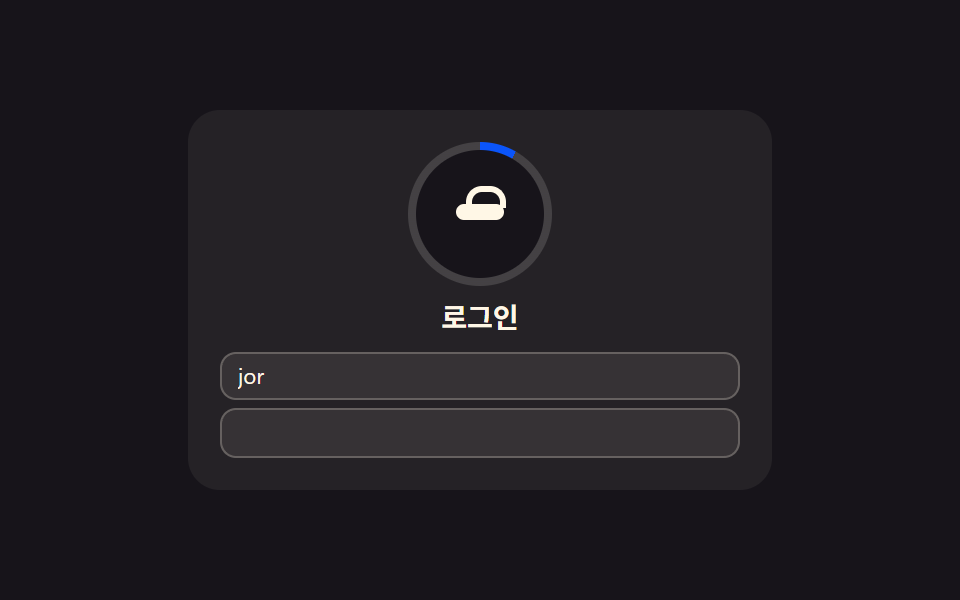 로그인·인증 UI로그인 UI 디자인 9종 — 회원가입부터 세션 만료까지
 로그인·인증 UI지문 인식 애니메이션 9종 — 스캔 진행률 값으로 갈리는 인증 버튼