06새 기기 로그인 알림 스위치 묶음
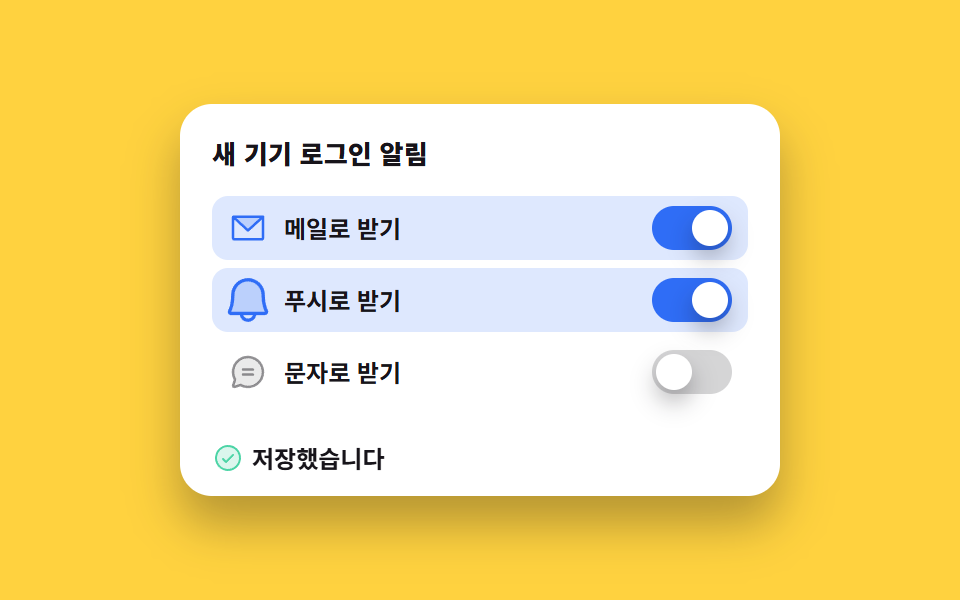
메일과 푸시, 문자 세 줄이 스위치를 하나씩 쥐고 손잡이가 좌우로 미끄러집니다. 하나를 바꾸면 아래에 저장됐다는 줄이 켜지는데, 그 줄은 사라지지 않고 다음 변경까지 그대로 남아 대표 이미지가 빈 화면이 되지 않습니다.
쓰임낯선 기기 로그인 알림을 어디로 받을지 고르는 보안 설정 묶음
role="switch"aria-checkedtranslateX
<main class="stage">
  <section class="al is-demo" data-saved="false">
    <div class="al__card">
      <p class="al__head">새 기기 로그인 알림</p>

      <ul class="al__list">
        <li class="al__row" data-row="mail">
          <span class="al__ic" aria-hidden="true"><svg viewBox="0 0 256 256" width="20" height="20"><g fill="currentColor"><path d="m224 56l-96 88l-96-88Z" opacity=".2"/><path d="M224 48H32a8 8 0 0 0-8 8v136a16 16 0 0 0 16 16h176a16 16 0 0 0 16-16V56a8 8 0 0 0-8-8m-20.57 16L128 133.15L52.57 64ZM216 192H40V74.19l82.59 75.71a8 8 0 0 0 10.82 0L216 74.19z"/></g></svg></span>
          <span class="al__lab" id="al-lab-mail">메일로 받기</span>
          <button class="al__sw" type="button" role="switch" aria-checked="true" aria-labelledby="al-lab-mail" data-sw="mail">
            <span class="al__knob" aria-hidden="true"></span>
          </button>
        </li>

        <li class="al__row" data-row="push">
          <span class="al__ic" aria-hidden="true"><svg viewBox="0 0 256 256" width="20" height="20"><g fill="currentColor"><path d="M208 192H48a8 8 0 0 1-6.88-12C47.71 168.6 56 139.81 56 104a72 72 0 0 1 144 0c0 35.82 8.3 64.6 14.9 76a8 8 0 0 1-6.9 12" opacity=".2"/><path d="M221.8 175.94c-5.55-9.56-13.8-36.61-13.8-71.94a80 80 0 1 0-160 0c0 35.34-8.26 62.38-13.81 71.94A16 16 0 0 0 48 200h40.81a40 40 0 0 0 78.38 0H208a16 16 0 0 0 13.8-24.06M128 216a24 24 0 0 1-22.62-16h45.24A24 24 0 0 1 128 216m-80-32c7.7-13.24 16-43.92 16-80a64 64 0 1 1 128 0c0 36.05 8.28 66.73 16 80Z"/></g></svg></span>
          <span class="al__lab" id="al-lab-push">푸시로 받기</span>
          <button class="al__sw" type="button" role="switch" aria-checked="false" aria-labelledby="al-lab-push" data-sw="push">
            <span class="al__knob" aria-hidden="true"></span>
          </button>
        </li>

        <li class="al__row" data-row="sms">
          <span class="al__ic" aria-hidden="true"><svg viewBox="0 0 256 256" width="20" height="20"><g fill="currentColor"><path d="M224 128a96 96 0 0 1-144.07 83.11l-37.39 12.47a8 8 0 0 1-10.12-10.12l12.47-37.39A96 96 0 1 1 224 128" opacity=".2"/><path d="M128 24a104 104 0 0 0-91.82 152.88l-11.35 34.05a16 16 0 0 0 20.24 20.24l34.05-11.35A104 104 0 1 0 128 24m0 192a87.87 87.87 0 0 1-44.06-11.81a8 8 0 0 0-4-1.08a7.9 7.9 0 0 0-2.53.42L40 216l12.47-37.4a8 8 0 0 0-.66-6.54A88 88 0 1 1 128 216m40-104a8 8 0 0 1-8 8H96a8 8 0 0 1 0-16h64a8 8 0 0 1 8 8m0 32a8 8 0 0 1-8 8H96a8 8 0 0 1 0-16h64a8 8 0 0 1 8 8"/></g></svg></span>
          <span class="al__lab" id="al-lab-sms">문자로 받기</span>
          <button class="al__sw" type="button" role="switch" aria-checked="false" aria-labelledby="al-lab-sms" data-sw="sms">
            <span class="al__knob" aria-hidden="true"></span>
          </button>
        </li>
      </ul>

      <p class="al__saved" id="al-saved" role="status" aria-live="polite">
        <span class="al__saved-ic" aria-hidden="true"><svg viewBox="0 0 256 256" width="16" height="16"><g fill="currentColor"><path d="M224 128a96 96 0 1 1-96-96a96 96 0 0 1 96 96" opacity=".2"/><path d="M173.66 98.34a8 8 0 0 1 0 11.32l-56 56a8 8 0 0 1-11.32 0l-24-24a8 8 0 0 1 11.32-11.32L112 148.69l50.34-50.35a8 8 0 0 1 11.32 0M232 128A104 104 0 1 1 128 24a104.11 104.11 0 0 1 104 104m-16 0a88 88 0 1 0-88 88a88.1 88.1 0 0 0 88-88"/></g></svg></span>
        <span class="al__saved-t">저장했습니다</span>
      </p>
    </div>
  </section>
</main>@use "../../../../site/static/demo-tokens" as *;
$duration: $dur-quick;
$easing: $ease-spring;
$color: $subject-blue;
@include stage($stage-yellow);
.al {
box-sizing: border-box;
width: min(300px, 88vw);
font-family: -apple-system, "Segoe UI", "Noto Sans KR", sans-serif;
color: $subject-ink;
}
.al__card {
box-sizing: border-box;
display: flex;
flex-direction: column;
gap: $sp-3;
padding: $sp-4;
border-radius: $r-card;
background-color: $stage-paper;
box-shadow: $shadow-raised;
}
.al__head {
margin: 0;
height: 18px;
font-size: 13px;
line-height: 18px;
font-weight: 800;
letter-spacing: .01em;
}
.al__list {
display: flex;
flex-direction: column;
gap: $sp-1;
margin: 0;
padding: 0;
list-style: none;
}
.al__row {
display: flex;
align-items: center;
gap: $sp-2;
padding: 0 $sp-2;
height: 32px;
border-radius: $r-sm;
background-color: transparent;
}
.al__ic {
display: inline-flex;
color: rgba($subject-ink, .45);
}
.al__ic svg { display: block; }
.al__lab {
flex-grow: 1;
font-size: 12px;
line-height: 18px;
font-weight: 600;
white-space: nowrap;
}
// ── 진짜 role="switch" 버튼 ──────────────────────────────
.al__sw {
position: relative;
box-sizing: border-box;
margin: 0;
padding: 0;
width: 40px;
height: 22px;
border: 0;
border-radius: $r-pill;
background-color: rgba($subject-ink, .18);
cursor: pointer;
transition: background-color $duration $easing;
}
.al__sw:focus-visible { outline: 3px solid $subject-ink; outline-offset: 2px; }
.al__knob {
position: absolute;
left: 2px;
top: 2px;
display: block;
width: 18px;
height: 18px;
border-radius: 50%;
background-color: $stage-paper;
box-shadow: $shadow-press;
transform: translateX(0);
transition: transform $duration $easing;
}
// ── 사람이 조작한 정적 상태 — 루프를 껐을 때도 화면이 비지 않는다 ──
.al__sw[aria-checked="true"] { background-color: $color; }
.al__sw[aria-checked="true"] .al__knob { transform: translateX(18px); }
.al:not(.is-demo) .al__row:has(.al__sw[aria-checked="true"]) { background-color: rgba($color, .16); }
.al:not(.is-demo) .al__row:has(.al__sw[aria-checked="true"]) .al__ic { color: $color; }
.al__saved {
display: flex;
align-items: center;
gap: $sp-1;
margin: 0;
height: 18px;
color: $subject-ink;
opacity: 0;
}
.al__saved-ic { display: inline-flex; color: $subject-mint; }
.al__saved-ic svg { display: block; }
.al__saved-t {
font-size: 12px;
line-height: 18px;
font-weight: 700;
}
.al:not(.is-demo)[data-saved="true"] .al__saved { opacity: 1; }
// ── 자동 루프 (2s): 메일은 켜진 채로, 푸시 20.83%, 문자 58.33%. 켠 것은 되돌리지 않는다 ──
.al.is-demo .al__sw,
.al.is-demo .al__row {
animation-duration: $dur-loop;
animation-timing-function: steps(1, end);
animation-iteration-count: infinite;
}
.al.is-demo .al__sw[data-sw="mail"] { animation-name: al-track-on; }
.al.is-demo .al__sw[data-sw="push"] { animation-name: al-track-push; }
.al.is-demo .al__sw[data-sw="sms"] { animation-name: al-track-sms; }
.al.is-demo .al__row[data-row="mail"] { animation-name: al-row-on; }
.al.is-demo .al__row[data-row="push"] { animation-name: al-row-push; }
.al.is-demo .al__row[data-row="sms"] { animation-name: al-row-sms; }
@keyframes al-track-on {
0% { background-color: $color; }
100% { background-color: $color; }
}
@keyframes al-track-push {
0% { background-color: rgba($subject-ink, .18); }
20.83% { background-color: $color; }
100% { background-color: $color; }
}
@keyframes al-track-sms {
0% { background-color: rgba($subject-ink, .18); }
58.33% { background-color: $color; }
100% { background-color: $color; }
}
@keyframes al-row-on {
0% { background-color: rgba($color, .16); }
100% { background-color: rgba($color, .16); }
}
// 푸시는 스위치가 먼저 켜지고(20.83%) 줄이 뒤따라 물든다(29.17%) — 두 프레임으로 나눠 문자 켜짐이 대표 장면이 되게
@keyframes al-row-push {
0% { background-color: transparent; }
29.17% { background-color: rgba($color, .16); }
100% { background-color: rgba($color, .16); }
}
@keyframes al-row-sms {
0% { background-color: transparent; }
58.33% { background-color: rgba($color, .16); }
100% { background-color: rgba($color, .16); }
}
// 손잡이는 미끄러진다 — 컷만으로는 움직인 프레임이 안 찬다
.al.is-demo .al__knob {
animation-duration: $dur-loop;
animation-timing-function: $easing;
animation-iteration-count: infinite;
}
.al.is-demo .al__sw[data-sw="mail"] .al__knob { animation-name: al-knob-on; }
.al.is-demo .al__sw[data-sw="push"] .al__knob { animation-name: al-knob-push; }
.al.is-demo .al__sw[data-sw="sms"] .al__knob { animation-name: al-knob-sms; }
@keyframes al-knob-on {
0% { transform: translateX(18px); }
100% { transform: translateX(18px); }
}
@keyframes al-knob-push {
0% { transform: translateX(0); }
20.83% { transform: translateX(0); }
33.33% { transform: translateX(18px); }
100% { transform: translateX(18px); }
}
@keyframes al-knob-sms {
0% { transform: translateX(0); }
58.33% { transform: translateX(0); }
70.83% { transform: translateX(18px); }
100% { transform: translateX(18px); }
}
// 켜진 줄은 아이콘이 브랜드 색으로 갈리고 한 번 튄다
.al.is-demo .al__ic {
animation-duration: $dur-loop, $dur-loop;
animation-iteration-count: infinite, infinite;
animation-timing-function: steps(1, end), $ease-pop;
}
.al.is-demo .al__row[data-row="mail"] .al__ic { animation-name: al-ic-on, al-pop-none; }
.al.is-demo .al__row[data-row="push"] .al__ic { animation-name: al-ic-push, al-pop-push; }
.al.is-demo .al__row[data-row="sms"] .al__ic { animation-name: al-ic-sms, al-pop-sms; }
@keyframes al-ic-on {
0% { color: $color; }
100% { color: $color; }
}
@keyframes al-ic-push {
0% { color: rgba($subject-ink, .45); }
29.17% { color: $color; }
100% { color: $color; }
}
@keyframes al-ic-sms {
0% { color: rgba($subject-ink, .45); }
58.33% { color: $color; }
100% { color: $color; }
}
@keyframes al-pop-none {
0% { transform: scale(1); }
100% { transform: scale(1); }
}
@keyframes al-pop-push {
0% { transform: scale(1); }
29.17% { transform: scale(1); }
33.33% { transform: scale(1.35); }
41.67% { transform: scale(1); }
100% { transform: scale(1); }
}
@keyframes al-pop-sms {
0% { transform: scale(1); }
58.33% { transform: scale(1); }
62.5% { transform: scale(1.35); }
70.83% { transform: scale(1); }
100% { transform: scale(1); }
}
// 저장 줄은 33.33% 에 켜지고 사라지지 않는다 — 나타남은 컷, 밀어올림만 부드럽게
.al.is-demo .al__saved {
animation-name: al-saved-cut, al-saved-lift;
animation-duration: $dur-loop, $dur-loop;
animation-timing-function: steps(1, end), $easing;
animation-iteration-count: infinite, infinite;
}
@keyframes al-saved-cut {
0% { opacity: 0; }
33.33% { opacity: 1; }
100% { opacity: 1; }
}
@keyframes al-saved-lift {
0% { transform: translateY(6px) scale(1); }
33.33% { transform: translateY(6px) scale(1); }
41.67% { transform: translateY(0) scale(1); }
58.33% { transform: translateY(0) scale(1); }
62.5% { transform: translateY(0) scale(1.08); }
70.83% { transform: translateY(0) scale(1); }
100% { transform: translateY(0) scale(1); }
}
@media (max-width: 340px) {
.al__card { gap: $sp-2; padding: $sp-2; }
.al__head { height: 14px; font-size: 11px; line-height: 14px; }
.al__row { height: 26px; padding: 0 $sp-1; gap: $sp-1; }
.al__lab { font-size: 10px; line-height: 14px; }
.al__sw { width: 32px; height: 18px; }
.al__knob { width: 14px; height: 14px; }
.al__sw[aria-checked="true"] .al__knob { transform: translateX(14px); }
.al__saved { height: 14px; }
.al__saved-t { font-size: 10px; line-height: 14px; }
// 좁은 폭에서는 트랙이 32px 이라 손잡이 이동거리도 같이 줄인다 (18 → 14)
@keyframes al-knob-on {
0% { transform: translateX(14px); }
100% { transform: translateX(14px); }
}
@keyframes al-knob-push {
0% { transform: translateX(0); }
20.83% { transform: translateX(0); }
33.33% { transform: translateX(14px); }
100% { transform: translateX(14px); }
}
@keyframes al-knob-sms {
0% { transform: translateX(0); }
58.33% { transform: translateX(0); }
70.83% { transform: translateX(14px); }
100% { transform: translateX(14px); }
}
}
@media (prefers-reduced-motion: reduce) {
.al.is-demo .al__sw,
.al.is-demo .al__row,
.al.is-demo .al__knob,
.al.is-demo .al__ic,
.al.is-demo .al__saved { animation: none !important; }
.al.is-demo .al__sw[data-sw="mail"] { background-color: $color !important; }
.al.is-demo .al__sw[data-sw="mail"] .al__knob { transform: translateX(18px) !important; }
.al.is-demo .al__row[data-row="mail"] { background-color: rgba($color, .16) !important; }
.al.is-demo .al__row[data-row="mail"] .al__ic { color: $color !important; }
.al.is-demo .al__saved { opacity: 1 !important; transform: translateY(0) !important; }
.al__sw,
.al__knob { transition: none !important; }
}
// 좁은 폭 + reduced-motion 이 겹치면 트랙은 32px 인데 위 블록의 18px 이 그대로 남는다 (2px 넘침)
@media (max-width: 340px) and (prefers-reduced-motion: reduce) {
.al.is-demo .al__sw[data-sw="mail"] .al__knob { transform: translateX(14px) !important; }
}html, body {
margin: 0;
overflow: hidden;
}
.stage {
box-sizing: border-box;
min-height: 100vh;
display: grid;
place-items: center;
margin: 0;
background: #ffd23f;
font-family: -apple-system, "Segoe UI", "Noto Sans KR", sans-serif;
padding: clamp(8px, 4vw, 24px);
}
.al {
box-sizing: border-box;
width: min(300px, 88vw);
font-family: -apple-system, "Segoe UI", "Noto Sans KR", sans-serif;
color: #17141a;
}
.al__card {
box-sizing: border-box;
display: flex;
flex-direction: column;
gap: 12px;
padding: 16px;
border-radius: 16px;
background-color: #ffffff;
box-shadow: 0 14px 24px rgba(23, 20, 26, 0.32);
}
.al__head {
margin: 0;
height: 18px;
font-size: 13px;
line-height: 18px;
font-weight: 800;
letter-spacing: 0.01em;
}
.al__list {
display: flex;
flex-direction: column;
gap: 4px;
margin: 0;
padding: 0;
list-style: none;
}
.al__row {
display: flex;
align-items: center;
gap: 8px;
padding: 0 8px;
height: 32px;
border-radius: 8px;
background-color: transparent;
}
.al__ic {
display: inline-flex;
color: rgba(23, 20, 26, 0.45);
}
.al__ic svg {
display: block;
}
.al__lab {
flex-grow: 1;
font-size: 12px;
line-height: 18px;
font-weight: 600;
white-space: nowrap;
}
.al__sw {
position: relative;
box-sizing: border-box;
margin: 0;
padding: 0;
width: 40px;
height: 22px;
border: 0;
border-radius: 999px;
background-color: rgba(23, 20, 26, 0.18);
cursor: pointer;
transition: background-color 220ms cubic-bezier(0.2, 0.8, 0.2, 1);
}
.al__sw:focus-visible {
outline: 3px solid #17141a;
outline-offset: 2px;
}
.al__knob {
position: absolute;
left: 2px;
top: 2px;
display: block;
width: 18px;
height: 18px;
border-radius: 50%;
background-color: #ffffff;
box-shadow: 0 6px 12px rgba(23, 20, 26, 0.32);
transform: translateX(0);
transition: transform 220ms cubic-bezier(0.2, 0.8, 0.2, 1);
}
.al__sw[aria-checked=true] {
background-color: #2f6df6;
}
.al__sw[aria-checked=true] .al__knob {
transform: translateX(18px);
}
.al:not(.is-demo) .al__row:has(.al__sw[aria-checked=true]) {
background-color: rgba(47, 109, 246, 0.16);
}
.al:not(.is-demo) .al__row:has(.al__sw[aria-checked=true]) .al__ic {
color: #2f6df6;
}
.al__saved {
display: flex;
align-items: center;
gap: 4px;
margin: 0;
height: 18px;
color: #17141a;
opacity: 0;
}
.al__saved-ic {
display: inline-flex;
color: #4cd4a6;
}
.al__saved-ic svg {
display: block;
}
.al__saved-t {
font-size: 12px;
line-height: 18px;
font-weight: 700;
}
.al:not(.is-demo)[data-saved=true] .al__saved {
opacity: 1;
}
.al.is-demo .al__sw,
.al.is-demo .al__row {
animation-duration: 2s;
animation-timing-function: steps(1, end);
animation-iteration-count: infinite;
}
.al.is-demo .al__sw[data-sw=mail] {
animation-name: al-track-on;
}
.al.is-demo .al__sw[data-sw=push] {
animation-name: al-track-push;
}
.al.is-demo .al__sw[data-sw=sms] {
animation-name: al-track-sms;
}
.al.is-demo .al__row[data-row=mail] {
animation-name: al-row-on;
}
.al.is-demo .al__row[data-row=push] {
animation-name: al-row-push;
}
.al.is-demo .al__row[data-row=sms] {
animation-name: al-row-sms;
}
@keyframes al-track-on {
0% {
background-color: #2f6df6;
}
100% {
background-color: #2f6df6;
}
}
@keyframes al-track-push {
0% {
background-color: rgba(23, 20, 26, 0.18);
}
20.83% {
background-color: #2f6df6;
}
100% {
background-color: #2f6df6;
}
}
@keyframes al-track-sms {
0% {
background-color: rgba(23, 20, 26, 0.18);
}
58.33% {
background-color: #2f6df6;
}
100% {
background-color: #2f6df6;
}
}
@keyframes al-row-on {
0% {
background-color: rgba(47, 109, 246, 0.16);
}
100% {
background-color: rgba(47, 109, 246, 0.16);
}
}
@keyframes al-row-push {
0% {
background-color: transparent;
}
29.17% {
background-color: rgba(47, 109, 246, 0.16);
}
100% {
background-color: rgba(47, 109, 246, 0.16);
}
}
@keyframes al-row-sms {
0% {
background-color: transparent;
}
58.33% {
background-color: rgba(47, 109, 246, 0.16);
}
100% {
background-color: rgba(47, 109, 246, 0.16);
}
}
.al.is-demo .al__knob {
animation-duration: 2s;
animation-timing-function: cubic-bezier(0.2, 0.8, 0.2, 1);
animation-iteration-count: infinite;
}
.al.is-demo .al__sw[data-sw=mail] .al__knob {
animation-name: al-knob-on;
}
.al.is-demo .al__sw[data-sw=push] .al__knob {
animation-name: al-knob-push;
}
.al.is-demo .al__sw[data-sw=sms] .al__knob {
animation-name: al-knob-sms;
}
@keyframes al-knob-on {
0% {
transform: translateX(18px);
}
100% {
transform: translateX(18px);
}
}
@keyframes al-knob-push {
0% {
transform: translateX(0);
}
20.83% {
transform: translateX(0);
}
33.33% {
transform: translateX(18px);
}
100% {
transform: translateX(18px);
}
}
@keyframes al-knob-sms {
0% {
transform: translateX(0);
}
58.33% {
transform: translateX(0);
}
70.83% {
transform: translateX(18px);
}
100% {
transform: translateX(18px);
}
}
.al.is-demo .al__ic {
animation-duration: 2s, 2s;
animation-iteration-count: infinite, infinite;
animation-timing-function: steps(1, end), cubic-bezier(0.2, 1.4, 0.4, 1);
}
.al.is-demo .al__row[data-row=mail] .al__ic {
animation-name: al-ic-on, al-pop-none;
}
.al.is-demo .al__row[data-row=push] .al__ic {
animation-name: al-ic-push, al-pop-push;
}
.al.is-demo .al__row[data-row=sms] .al__ic {
animation-name: al-ic-sms, al-pop-sms;
}
@keyframes al-ic-on {
0% {
color: #2f6df6;
}
100% {
color: #2f6df6;
}
}
@keyframes al-ic-push {
0% {
color: rgba(23, 20, 26, 0.45);
}
29.17% {
color: #2f6df6;
}
100% {
color: #2f6df6;
}
}
@keyframes al-ic-sms {
0% {
color: rgba(23, 20, 26, 0.45);
}
58.33% {
color: #2f6df6;
}
100% {
color: #2f6df6;
}
}
@keyframes al-pop-none {
0% {
transform: scale(1);
}
100% {
transform: scale(1);
}
}
@keyframes al-pop-push {
0% {
transform: scale(1);
}
29.17% {
transform: scale(1);
}
33.33% {
transform: scale(1.35);
}
41.67% {
transform: scale(1);
}
100% {
transform: scale(1);
}
}
@keyframes al-pop-sms {
0% {
transform: scale(1);
}
58.33% {
transform: scale(1);
}
62.5% {
transform: scale(1.35);
}
70.83% {
transform: scale(1);
}
100% {
transform: scale(1);
}
}
.al.is-demo .al__saved {
animation-name: al-saved-cut, al-saved-lift;
animation-duration: 2s, 2s;
animation-timing-function: steps(1, end), cubic-bezier(0.2, 0.8, 0.2, 1);
animation-iteration-count: infinite, infinite;
}
@keyframes al-saved-cut {
0% {
opacity: 0;
}
33.33% {
opacity: 1;
}
100% {
opacity: 1;
}
}
@keyframes al-saved-lift {
0% {
transform: translateY(6px) scale(1);
}
33.33% {
transform: translateY(6px) scale(1);
}
41.67% {
transform: translateY(0) scale(1);
}
58.33% {
transform: translateY(0) scale(1);
}
62.5% {
transform: translateY(0) scale(1.08);
}
70.83% {
transform: translateY(0) scale(1);
}
100% {
transform: translateY(0) scale(1);
}
}
@media (max-width: 340px) {
.al__card {
gap: 8px;
padding: 8px;
}
.al__head {
height: 14px;
font-size: 11px;
line-height: 14px;
}
.al__row {
height: 26px;
padding: 0 4px;
gap: 4px;
}
.al__lab {
font-size: 10px;
line-height: 14px;
}
.al__sw {
width: 32px;
height: 18px;
}
.al__knob {
width: 14px;
height: 14px;
}
.al__sw[aria-checked=true] .al__knob {
transform: translateX(14px);
}
.al__saved {
height: 14px;
}
.al__saved-t {
font-size: 10px;
line-height: 14px;
}
@keyframes al-knob-on {
0% {
transform: translateX(14px);
}
100% {
transform: translateX(14px);
}
}
@keyframes al-knob-push {
0% {
transform: translateX(0);
}
20.83% {
transform: translateX(0);
}
33.33% {
transform: translateX(14px);
}
100% {
transform: translateX(14px);
}
}
@keyframes al-knob-sms {
0% {
transform: translateX(0);
}
58.33% {
transform: translateX(0);
}
70.83% {
transform: translateX(14px);
}
100% {
transform: translateX(14px);
}
}
}
@media (prefers-reduced-motion: reduce) {
.al.is-demo .al__sw,
.al.is-demo .al__row,
.al.is-demo .al__knob,
.al.is-demo .al__ic,
.al.is-demo .al__saved {
animation: none !important;
}
.al.is-demo .al__sw[data-sw=mail] {
background-color: #2f6df6 !important;
}
.al.is-demo .al__sw[data-sw=mail] .al__knob {
transform: translateX(18px) !important;
}
.al.is-demo .al__row[data-row=mail] {
background-color: rgba(47, 109, 246, 0.16) !important;
}
.al.is-demo .al__row[data-row=mail] .al__ic {
color: #2f6df6 !important;
}
.al.is-demo .al__saved {
opacity: 1 !important;
transform: translateY(0) !important;
}
.al__sw,
.al__knob {
transition: none !important;
}
}
@media (max-width: 340px) and (prefers-reduced-motion: reduce) {
.al.is-demo .al__sw[data-sw=mail] .al__knob {
transform: translateX(14px) !important;
}
}// 실제 동작: role="switch" 인 <button> 이라 Space·Enter 가 그대로 click 으로 온다 — 따로 가로채지 않는다
var root = document.querySelector('.al');
var switches = root.querySelectorAll('.al__sw');
Array.prototype.forEach.call(switches, function (sw) {
sw.addEventListener('click', function () {
root.classList.remove('is-demo'); // 사람이 만졌으니 자동 루프를 끈다
var on = sw.getAttribute('aria-checked') !== 'true';
sw.setAttribute('aria-checked', String(on));
root.setAttribute('data-saved', 'true'); // 저장 줄은 사라지지 않고 다음 변경까지 남는다
});
});import { useState } from "react";
import type { CSSProperties, ReactNode } from "react";
import styles from "./LoginAlertSwitches.module.scss";
export type ChannelKey = "mail" | "push" | "sms";
export type LoginAlertSwitchesProps = {
heading?: string;
labels?: Record<ChannelKey, string>;
savedLabel?: string;
initial?: Record<ChannelKey, boolean>;
duration?: number;
easing?: string;
color?: string;
};
type Vars = CSSProperties & { "--duration"?: string; "--easing"?: string; "--color"?: string };
type KeyEvt = { key: string; preventDefault(): void };
const ENVELOPE: ReactNode = (
<g fill="currentColor">
<path d="m224 56l-96 88l-96-88Z" opacity=".2" />
<path d="M224 48H32a8 8 0 0 0-8 8v136a16 16 0 0 0 16 16h176a16 16 0 0 0 16-16V56a8 8 0 0 0-8-8m-20.57 16L128 133.15L52.57 64ZM216 192H40V74.19l82.59 75.71a8 8 0 0 0 10.82 0L216 74.19z" />
</g>
);
const BELL: ReactNode = (
<g fill="currentColor">
<path d="M208 192H48a8 8 0 0 1-6.88-12C47.71 168.6 56 139.81 56 104a72 72 0 0 1 144 0c0 35.82 8.3 64.6 14.9 76a8 8 0 0 1-6.9 12" opacity=".2" />
<path d="M221.8 175.94c-5.55-9.56-13.8-36.61-13.8-71.94a80 80 0 1 0-160 0c0 35.34-8.26 62.38-13.81 71.94A16 16 0 0 0 48 200h40.81a40 40 0 0 0 78.38 0H208a16 16 0 0 0 13.8-24.06M128 216a24 24 0 0 1-22.62-16h45.24A24 24 0 0 1 128 216m-80-32c7.7-13.24 16-43.92 16-80a64 64 0 1 1 128 0c0 36.05 8.28 66.73 16 80Z" />
</g>
);
const CHAT: ReactNode = (
<g fill="currentColor">
<path d="M224 128a96 96 0 0 1-144.07 83.11l-37.39 12.47a8 8 0 0 1-10.12-10.12l12.47-37.39A96 96 0 1 1 224 128" opacity=".2" />
<path d="M128 24a104 104 0 0 0-91.82 152.88l-11.35 34.05a16 16 0 0 0 20.24 20.24l34.05-11.35A104 104 0 1 0 128 24m0 192a87.87 87.87 0 0 1-44.06-11.81a8 8 0 0 0-4-1.08a7.9 7.9 0 0 0-2.53.42L40 216l12.47-37.4a8 8 0 0 0-.66-6.54A88 88 0 1 1 128 216m40-104a8 8 0 0 1-8 8H96a8 8 0 0 1 0-16h64a8 8 0 0 1 8 8m0 32a8 8 0 0 1-8 8H96a8 8 0 0 1 0-16h64a8 8 0 0 1 8 8" />
</g>
);
const CHECK: ReactNode = (
<g fill="currentColor">
<path d="M224 128a96 96 0 1 1-96-96a96 96 0 0 1 96 96" opacity=".2" />
<path d="M173.66 98.34a8 8 0 0 1 0 11.32l-56 56a8 8 0 0 1-11.32 0l-24-24a8 8 0 0 1 11.32-11.32L112 148.69l50.34-50.35a8 8 0 0 1 11.32 0M232 128A104 104 0 1 1 128 24a104.11 104.11 0 0 1 104 104m-16 0a88 88 0 1 0-88 88a88.1 88.1 0 0 0 88-88" />
</g>
);
const ROWS: { key: ChannelKey; icon: ReactNode }[] = [
{ key: "mail", icon: ENVELOPE },
{ key: "push", icon: BELL },
{ key: "sms", icon: CHAT },
];
export default function LoginAlertSwitches({
heading = "New device sign-in alerts",
labels = { mail: "Send by email", push: "Send by push", sms: "Send by text" },
savedLabel = "Saved",
initial = { mail: true, push: false, sms: false },
duration = 220,
easing = "cubic-bezier(.2,.8,.2,1)",
color = "#2f6df6",
}: LoginAlertSwitchesProps) {
const [demo, setDemo] = useState(true);
const [on, setOn] = useState<Record<ChannelKey, boolean>>(initial);
const [saved, setSaved] = useState(false);
const vars: Vars = { "--duration": `${duration}ms`, "--easing": easing, "--color": color };
function toggle(key: ChannelKey) {
setDemo(false); // 사람이 만졌으니 자동 루프를 끈다
setOn((p) => ({ ...p, [key]: !p[key] }));
setSaved(true); // 저장 줄은 사라지지 않고 다음 변경까지 남는다
}
// <button> 이라 Space·Enter 는 그대로 click 으로 온다 — Space 의 스크롤만 막는다
function onKeyDown(e: KeyEvt) {
if (e.key === " ") e.preventDefault();
}
return (
<section
className={`${styles.al} ${demo ? styles.isDemo : ""}`}
data-saved={String(saved)}
style={vars}
>
<div className={styles.card}>
<p className={styles.head}>{heading}</p>
<ul className={styles.list}>
{ROWS.map((row) => (
<li className={styles.row} data-row={row.key} key={row.key}>
<span className={styles.ic} aria-hidden="true">
<svg viewBox="0 0 256 256" width="20" height="20">{row.icon}</svg>
</span>
<span className={styles.lab} id={`al-lab-${row.key}`}>{labels[row.key]}</span>
<button
className={styles.sw}
type="button"
role="switch"
aria-checked={on[row.key]}
aria-labelledby={`al-lab-${row.key}`}
data-sw={row.key}
onClick={() => toggle(row.key)}
onKeyDown={onKeyDown}
>
<span className={styles.knob} aria-hidden="true" />
</button>
</li>
))}
</ul>
<p className={styles.saved} role="status" aria-live="polite">
<span className={styles.savedIc} aria-hidden="true">
<svg viewBox="0 0 256 256" width="16" height="16">{CHECK}</svg>
</span>
<span className={styles.savedTxt}>{savedLabel}</span>
</p>
</div>
</section>
);
}06 새 기기 로그인 알림 스위치 묶음 — 측정 누적면적 12.649% · 움직인 프레임 10/23GODRICH 원작 · zip 에 SCSS·React 포함 · 계정 보안 설정 UI 9종 — 로그인한 뒤의 화면
이 데모가 속한 글
 계정 보안 설정 UI 9종 — 로그인한 뒤의 화면계정 보안 설정은 로그인을 통과한 사람이 마주하는, 접속 중인 기기와 2단계 인증, 비밀번호를 직접 만지는 화면입니다. 아홉 개는 전부 실제로 돌아갑니다. 기기 줄은 정말로 접히고, 백업 코드는 정말로 클립보드에 들 이 글의 데모 전부 보기