02미끄러지는 오브 닷 내비
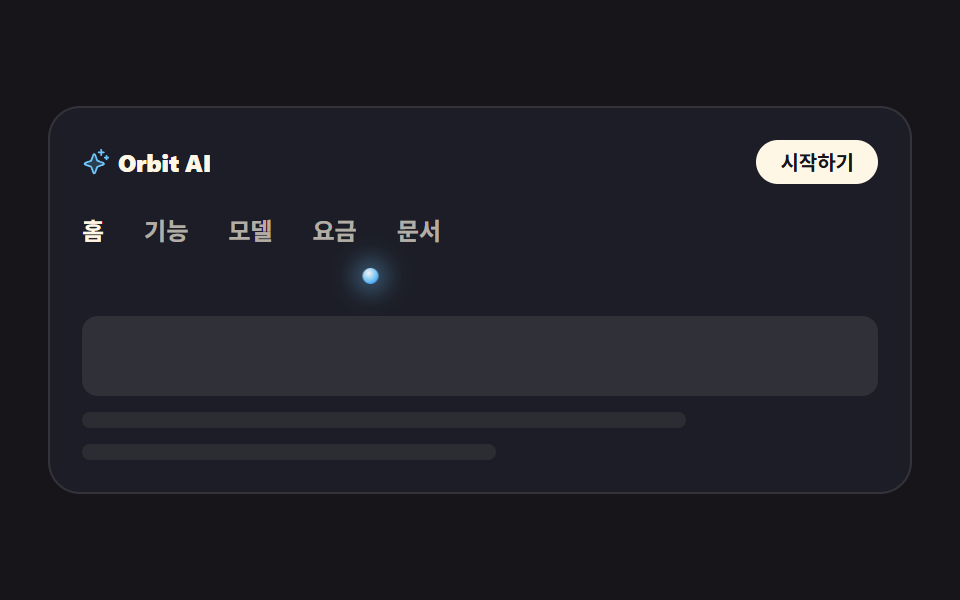
메뉴 다섯 항목 아래에 붙은 발광 점 하나가 활성 항목을 따라 translateX 로 옆으로 미끄러져 이동합니다. 활성 항목에는 aria-current 를 실어서 소리 내는 읽기로도 위치를 알 수 있습니다.
쓰임랜딩 상단바, 문서 탭 전환
translateXtransitionaria-current
<main class="stage">
<div class="nv is-demo" id="nv">
  <div class="nv__top">
    <span class="nv__brand">
      <span class="nv__mark" aria-hidden="true"><svg xmlns="http://www.w3.org/2000/svg" viewBox="0 0 256 256" fill="currentColor"><path d="M194.82,151.43l-55.09,20.3-20.3,55.09a7.92,7.92,0,0,1-14.86,0l-20.3-55.09-55.09-20.3a7.92,7.92,0,0,1,0-14.86l55.09-20.3,20.3-55.09a7.92,7.92,0,0,1,14.86,0l20.3,55.09,55.09,20.3A7.92,7.92,0,0,1,194.82,151.43Z" opacity="0.2"/><path d="M197.58,129.06,146,110l-19-51.62a15.92,15.92,0,0,0-29.88,0L78,110l-51.62,19a15.92,15.92,0,0,0,0,29.88L78,178l19,51.62a15.92,15.92,0,0,0,29.88,0L146,178l51.62-19a15.92,15.92,0,0,0,0-29.88ZM137,164.22a8,8,0,0,0-4.74,4.74L112,223.85,91.78,169A8,8,0,0,0,87,164.22L32.15,144,87,123.78A8,8,0,0,0,91.78,119L112,64.15,132.22,119a8,8,0,0,0,4.74,4.74L191.85,144ZM144,40a8,8,0,0,1,8-8h16V16a8,8,0,0,1,16,0V32h16a8,8,0,0,1,0,16H184V64a8,8,0,0,1-16,0V48H152A8,8,0,0,1,144,40ZM248,88a8,8,0,0,1-8,8h-8v8a8,8,0,0,1-16,0V96h-8a8,8,0,0,1,0-16h8V72a8,8,0,0,1,16,0v8h8A8,8,0,0,1,248,88Z"/></svg></span>
      Orbit AI
    </span>
    <a class="nv__cta" href="#" role="button">시작하기</a>
  </div>
  <nav class="nv__nav" aria-label="주요 메뉴">
    <ul class="nv__tabs" id="tabs">
      <li class="nv__item"><a class="nv__tab is-on" href="#" aria-current="page">홈</a></li>
      <li class="nv__item"><a class="nv__tab" href="#">기능</a></li>
      <li class="nv__item"><a class="nv__tab" href="#">모델</a></li>
      <li class="nv__item"><a class="nv__tab" href="#">요금</a></li>
      <li class="nv__item"><a class="nv__tab" href="#">문서</a></li>
    </ul>
    <span class="nv__dot" id="dot" aria-hidden="true"></span>
  </nav>
  <div class="nv__panel" aria-hidden="true">
    <span class="nv__block"></span>
    <span class="nv__line nv__line--a"></span>
    <span class="nv__line nv__line--b"></span>
  </div>
</div>
</main>@use "../../../../site/static/demo-tokens" as *;
// 변수 3개 — 변형은 이 셋만 바꾼다
$duration: $dur-base; // 실제 클릭에서 점이 옮겨가는 시간
$easing: $ease-spring; // 도착점에서 멎는 감속
$color: $subject-sky; // 발광 점의 빛 색
// 이 편 아홉 항목은 전부 잉크 무대다 — 빛나는 오브는 어두운 바탕에서만 빛으로 읽힌다
@include stage($stage-ink);
.nv {
box-sizing: border-box; width: min(100%, 432px); padding: $sp-4;
border: 1px solid rgba(255, 247, 230, .1); border-radius: $r-card;
background: rgba(110, 200, 255, .05);
}
// 대비 실측(WCAG 상대휘도 계산): 무대 $stage-ink 의 상대휘도 0.00757,
// 카드 바탕(잉크+하늘색 5%)은 0.0128 — 아래 값은 카드 바탕 기준이다
.nv__top { display: flex; align-items: center; justify-content: space-between; gap: $sp-3; }
.nv__brand {
display: inline-flex; align-items: center; gap: $sp-1;
font-weight: 800; font-size: 12px; line-height: 1; letter-spacing: -.01em;
color: $subject-cream; // $subject-cream 기준 15.7:1
}
.nv__mark { display: inline-flex; width: 14px; height: 14px; color: $color; }
.nv__mark svg { width: 100%; height: 100%; }
.nv__cta {
padding: $sp-1 $sp-3; border-radius: $r-pill; background: $subject-cream; color: $subject-ink;
font-weight: 700; font-size: 10px; line-height: 1.4; text-decoration: none; // 크림 위 잉크 = 17.11:1
}
// ── 탭 줄: 점이 고정 px 로 움직이므로 탭은 내용 폭이어야 한다 (BD19)
.nv__nav { position: relative; margin-top: $sp-4; padding-bottom: $sp-3; }
.nv__tabs { display: flex; gap: $sp-5; margin: 0; padding: 0 0 $sp-2; list-style: none; }
.nv__item { flex: 0 0 auto; }
.nv__tab {
flex: 0 0 auto; display: block; font-weight: 600; font-size: 12px; line-height: 1.2;
text-decoration: none; color: rgba(255, 247, 230, .66); // 카드 바탕 위 = 7.2:1
}
.nv__tab.is-on { font-weight: 700; color: $subject-cream; }
// 발광 점 — 활성 탭 중심에 서고, translateX 로 옆 탭으로 미끄러진다
.nv__dot {
// 다섯 자리는 짐작이 아니라 Playwright getBoundingClientRect 실측값 (480×300 렌더, 2026-09-12)
--p1: 1.5px; --p2: 38px; --p3: 80px; --p4: 122px; --p5: 164px;
position: absolute; left: 0; bottom: 0; width: 8px; height: 8px; border-radius: 50%;
background: radial-gradient(circle at 38% 32%, rgba(255, 255, 255, .95), rgba(110, 200, 255, .95) 58%, rgba(47, 109, 246, .9) 100%);
box-shadow: 0 0 12px 4px rgba(110, 200, 255, .45);
transform: translateX(var(--p1));
transition: transform $duration $easing; // 사람이 클릭했을 때의 이동
}
// 미리보기 루프: 2초 안에 1 → 3 → 5 → 1 세 자리를 돈다. 복귀는 86% 에 끝난다
// (라벨을 바꾸지 않고 점만 옮기므로 반투명 유령 프레임이 생기지 않는다)
.nv.is-demo .nv__dot {
animation-name: nvGlide; animation-duration: $dur-loop; animation-timing-function: $easing;
animation-iteration-count: infinite;
}
@keyframes nvGlide {
0%, 8% { transform: translateX(var(--p1)); }
24%, 34% { transform: translateX(var(--p3)); }
50%, 62% { transform: translateX(var(--p5)); }
86%, 100% { transform: translateX(var(--p1)); }
}
// ── 탭이 가리키는 화면 (정적 장식)
.nv__panel { display: grid; gap: $sp-2; margin-top: $sp-4; }
.nv__block { height: 40px; border-radius: $r-sm; background: rgba(255, 247, 230, .09); }
.nv__line { height: 8px; border-radius: $r-pill; background: rgba(255, 247, 230, .07); }
.nv__line--a { width: 76%; }
.nv__line--b { width: 52%; }
// ── 320×200 폰 실측 대비 압축 (BD9). 좁은 화면에서는 간격을 올리지 않는다
@media (max-width: 340px), (max-height: 220px) {
.nv { padding: $sp-2; }
.nv__brand { font-size: 11px; }
.nv__cta { font-size: 9px; padding: 0 $sp-2; }
.nv__nav { margin-top: $sp-2; padding-bottom: $sp-2; }
.nv__tabs { gap: $sp-3; padding-bottom: $sp-1; }
.nv__tab { font-size: 11px; }
.nv__dot { --p1: 1px; --p2: 28px; --p3: 60px; --p4: 93px; --p5: 125px; } // 320×200 실측값
.nv__panel { gap: $sp-1; margin-top: $sp-2; }
.nv__block { height: 28px; }
.nv__line { height: 6px; }
}
@media (prefers-reduced-motion: reduce) {
.nv__dot { transition: none !important; }
.nv.is-demo .nv__dot { animation: none !important; }
}html, body {
margin: 0;
overflow: hidden;
}
.stage {
box-sizing: border-box;
min-height: 100vh;
display: grid;
place-items: center;
margin: 0;
background: #17141a;
font-family: -apple-system, "Segoe UI", "Noto Sans KR", sans-serif;
padding: clamp(8px, 4vw, 24px);
}
.nv {
box-sizing: border-box;
width: min(100%, 432px);
padding: 16px;
border: 1px solid rgba(255, 247, 230, 0.1);
border-radius: 16px;
background: rgba(110, 200, 255, 0.05);
}
.nv__top {
display: flex;
align-items: center;
justify-content: space-between;
gap: 12px;
}
.nv__brand {
display: inline-flex;
align-items: center;
gap: 4px;
font-weight: 800;
font-size: 12px;
line-height: 1;
letter-spacing: -0.01em;
color: #fff7e6;
}
.nv__mark {
display: inline-flex;
width: 14px;
height: 14px;
color: #6ec8ff;
}
.nv__mark svg {
width: 100%;
height: 100%;
}
.nv__cta {
padding: 4px 12px;
border-radius: 999px;
background: #fff7e6;
color: #17141a;
font-weight: 700;
font-size: 10px;
line-height: 1.4;
text-decoration: none;
}
.nv__nav {
position: relative;
margin-top: 16px;
padding-bottom: 12px;
}
.nv__tabs {
display: flex;
gap: 20px;
margin: 0;
padding: 0 0 8px;
list-style: none;
}
.nv__item {
flex: 0 0 auto;
}
.nv__tab {
flex: 0 0 auto;
display: block;
font-weight: 600;
font-size: 12px;
line-height: 1.2;
text-decoration: none;
color: rgba(255, 247, 230, 0.66);
}
.nv__tab.is-on {
font-weight: 700;
color: #fff7e6;
}
.nv__dot {
--p1: 1.5px;
--p2: 38px;
--p3: 80px;
--p4: 122px;
--p5: 164px;
position: absolute;
left: 0;
bottom: 0;
width: 8px;
height: 8px;
border-radius: 50%;
background: radial-gradient(circle at 38% 32%, rgba(255, 255, 255, 0.95), rgba(110, 200, 255, 0.95) 58%, rgba(47, 109, 246, 0.9) 100%);
box-shadow: 0 0 12px 4px rgba(110, 200, 255, 0.45);
transform: translateX(var(--p1));
transition: transform 300ms cubic-bezier(0.2, 0.8, 0.2, 1);
}
.nv.is-demo .nv__dot {
animation-name: nvGlide;
animation-duration: 2s;
animation-timing-function: cubic-bezier(0.2, 0.8, 0.2, 1);
animation-iteration-count: infinite;
}
@keyframes nvGlide {
0%, 8% {
transform: translateX(var(--p1));
}
24%, 34% {
transform: translateX(var(--p3));
}
50%, 62% {
transform: translateX(var(--p5));
}
86%, 100% {
transform: translateX(var(--p1));
}
}
.nv__panel {
display: grid;
gap: 8px;
margin-top: 16px;
}
.nv__block {
height: 40px;
border-radius: 8px;
background: rgba(255, 247, 230, 0.09);
}
.nv__line {
height: 8px;
border-radius: 999px;
background: rgba(255, 247, 230, 0.07);
}
.nv__line--a {
width: 76%;
}
.nv__line--b {
width: 52%;
}
@media (max-width: 340px), (max-height: 220px) {
.nv {
padding: 8px;
}
.nv__brand {
font-size: 11px;
}
.nv__cta {
font-size: 9px;
padding: 0 8px;
}
.nv__nav {
margin-top: 8px;
padding-bottom: 8px;
}
.nv__tabs {
gap: 12px;
padding-bottom: 4px;
}
.nv__tab {
font-size: 11px;
}
.nv__dot {
--p1: 1px;
--p2: 28px;
--p3: 60px;
--p4: 93px;
--p5: 125px;
}
.nv__panel {
gap: 4px;
margin-top: 8px;
}
.nv__block {
height: 28px;
}
.nv__line {
height: 6px;
}
}
@media (prefers-reduced-motion: reduce) {
.nv__dot {
transition: none !important;
}
.nv.is-demo .nv__dot {
animation: none !important;
}
}var nav = document.getElementById('nv');
var dot = document.getElementById('dot');
var tabs = document.querySelectorAll('.nv__tab');
function dotLeft(tab) {
return tab.offsetLeft + tab.offsetWidth / 2 - dot.offsetWidth / 2;
}
function layoutDots() {
// --p1~--p5 의 기본값은 한국어 480×300 실측 px 이다. 라벨 폭은 언어마다 다르므로
// 실제 렌더 좌표로 한 번 덮어써 en·ja 에서도 점이 라벨 한가운데 선다
for (var k = 0; k < tabs.length; k++) {
dot.style.setProperty('--p' + (k + 1), dotLeft(tabs[k]) + 'px');
}
}
function moveDot(tab) {
// 클릭·키보드는 실제 렌더 좌표로 옮긴다 (미리보기 루프는 키프레임이 --p 값을 쓴다)
dot.style.transform = 'translateX(' + dotLeft(tab) + 'px)';
}
layoutDots();
window.addEventListener('resize', layoutDots);
for (var i = 0; i < tabs.length; i++) {
tabs[i].addEventListener('click', function (e) {
e.preventDefault();
nav.classList.remove('is-demo');
for (var j = 0; j < tabs.length; j++) {
tabs[j].classList.remove('is-on');
tabs[j].removeAttribute('aria-current');
}
this.classList.add('is-on');
this.setAttribute('aria-current', 'page');
moveDot(this);
});
}import { useEffect, useRef, useState } from "react";
import styles from "./NavOrb.module.scss";
export type NavOrbProps = { duration?: string; easing?: string; color?: string };
const TABS = ["홈", "기능", "모델", "요금", "문서"];
export default function NavOrb({ duration = "300ms", easing = "cubic-bezier(.2,.8,.2,1)", color = "#6ec8ff" }: NavOrbProps) {
// 변수 3개는 props 로 — 점이 옆 탭으로 옮겨가는 시간 · 그 이징 · 빛 색
const [demo, setDemo] = useState(true);
const [active, setActive] = useState(0);
const navRef = useRef<HTMLElement>(null);
// --p1~--p5 의 기본값은 한국어 480×300 실측 px 이다. 라벨 폭은 언어마다 다르므로
// 실제 렌더 좌표로 한 번 덮어써 en·ja 에서도 점이 라벨 한가운데 선다
useEffect(() => {
const root = navRef.current;
if (!root) return;
const dotEl = root.querySelector("[data-dot]") as HTMLElement | null;
if (!dotEl) return;
const tabEls = root.querySelectorAll("[data-tab]");
for (let i = 0; i < tabEls.length; i++) {
const t = tabEls[i] as HTMLElement;
dotEl.style.setProperty(`--p${i + 1}`, `${t.offsetLeft + t.offsetWidth / 2 - dotEl.offsetWidth / 2}px`);
}
}, []);
// 자리는 CSS 변수 --p1~--p5 (480×300·320×200 렌더 실측값). 클릭하면 그 자리로 미끄러진다
const dotStyle = demo
? { transitionDuration: duration, transitionTimingFunction: easing }
: { transform: `translateX(var(--p${active + 1}))`, transitionDuration: duration, transitionTimingFunction: easing };
return (
<main className={styles.stage}>
<div className={styles.nv}>
<div className={styles.top}>
<span className={styles.brand}>
<span className={styles.mark} aria-hidden="true" style={{ color }}>
<svg xmlns="http://www.w3.org/2000/svg" viewBox="0 0 256 256" fill="currentColor"><path d="M194.82,151.43l-55.09,20.3-20.3,55.09a7.92,7.92,0,0,1-14.86,0l-20.3-55.09-55.09-20.3a7.92,7.92,0,0,1,0-14.86l55.09-20.3,20.3-55.09a7.92,7.92,0,0,1,14.86,0l20.3,55.09,55.09,20.3A7.92,7.92,0,0,1,194.82,151.43Z" opacity="0.2"/><path d="M197.58,129.06,146,110l-19-51.62a15.92,15.92,0,0,0-29.88,0L78,110l-51.62,19a15.92,15.92,0,0,0,0,29.88L78,178l19,51.62a15.92,15.92,0,0,0,29.88,0L146,178l51.62-19a15.92,15.92,0,0,0,0-29.88ZM137,164.22a8,8,0,0,0-4.74,4.74L112,223.85,91.78,169A8,8,0,0,0,87,164.22L32.15,144,87,123.78A8,8,0,0,0,91.78,119L112,64.15,132.22,119a8,8,0,0,0,4.74,4.74L191.85,144ZM144,40a8,8,0,0,1,8-8h16V16a8,8,0,0,1,16,0V32h16a8,8,0,0,1,0,16H184V64a8,8,0,0,1-16,0V48H152A8,8,0,0,1,144,40ZM248,88a8,8,0,0,1-8,8h-8v8a8,8,0,0,1-16,0V96h-8a8,8,0,0,1,0-16h8V72a8,8,0,0,1,16,0v8h8A8,8,0,0,1,248,88Z"/></svg>
</span>
Orbit AI
</span>
<a className={styles.cta} href="#" role="button" onClick={(e: { preventDefault: () => void }) => { e.preventDefault(); }}>시작하기</a>
</div>
<nav className={styles.nav} aria-label="주요 메뉴" ref={navRef}>
<ul className={styles.tabs}>
{TABS.map((label, i) => (
<li className={styles.item} key={label}>
<a
className={`${styles.tab} ${active === i ? styles.isOn : ""}`}
href="#"
data-tab=""
aria-current={active === i ? "page" : undefined}
onClick={(e: { preventDefault: () => void }) => { e.preventDefault(); setDemo(false); setActive(i); }}
>
{label}
</a>
</li>
))}
</ul>
<span className={`${styles.dot} ${demo ? styles.isDemo : ""}`} aria-hidden="true" data-dot="" style={dotStyle} />
</nav>
<div className={styles.panel} aria-hidden="true">
<span className={styles.block} />
<span className={`${styles.line} ${styles.lineA}`} />
<span className={`${styles.line} ${styles.lineB}`} />
</div>
</div>
</main>
);
}02 미끄러지는 오브 닷 내비 — 측정 누적면적 2.107% · 움직인 프레임 16/23GODRICH 원작 · zip 에 SCSS·React 포함 · ai 랜딩페이지 오브 디자인 키트, 빛나는 섹션 9개
이 데모가 속한 글
 ai 랜딩페이지 오브 디자인 키트, 빛나는 섹션 9개ai 랜딩페이지 오브 디자인은 화면 전체를 물들이는 대신 짙은 단색 무대 위에 빛나는 구슬 하나만 올려 제품의 성격을 말하는 방식입니다. 배경 그라디언트 없이도 AI 다워 보인다는 이 계산을 섹션 아홉 개로 잘라 정 이 글의 데모 전부 보기