06오브 아바타 후기
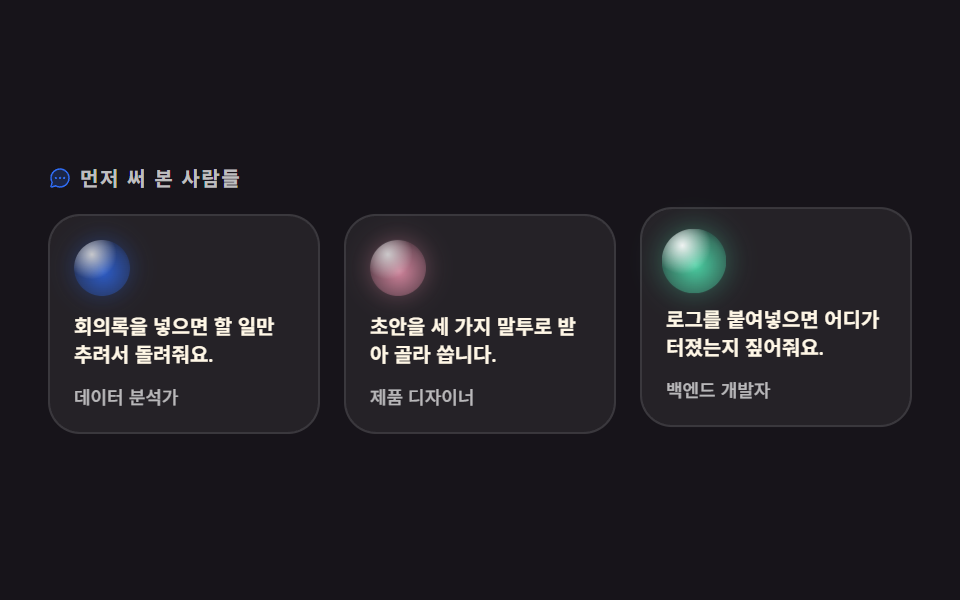
후기 세 장의 머리맡에 익명 사용자를 뜻하는 제각각 색의 오브 아바타가 얹히고, 카드에 마우스를 올리면 오브가 살짝 커지며 밝아집니다. 별점이나 로고 줄 없이 오브만으로 후기의 주인을 표시합니다.
쓰임사용자 후기, 도입 사례 인용
radial-gradientscaletranslateY
<main class="stage">
<section class="tm is-demo" id="tm">
  <p class="tm__eyebrow">
    <span class="tm__ico" aria-hidden="true"><svg xmlns="http://www.w3.org/2000/svg" viewBox="0 0 256 256" fill="currentColor"><path d="M224,128A96,96,0,0,1,79.93,211.11h0L42.54,223.58a8,8,0,0,1-10.12-10.12l12.47-37.39h0A96,96,0,1,1,224,128Z" opacity="0.2"/><path d="M128,24A104,104,0,0,0,36.18,176.88L24.83,210.93a16,16,0,0,0,20.24,20.24l34.05-11.35A104,104,0,1,0,128,24Zm0,192a87.87,87.87,0,0,1-44.06-11.81,8,8,0,0,0-4-1.08,7.85,7.85,0,0,0-2.53.42L40,216,52.47,178.6a8,8,0,0,0-.66-6.54A88,88,0,1,1,128,216Zm12-88a12,12,0,1,1-12-12A12,12,0,0,1,140,128Zm-44,0a12,12,0,1,1-12-12A12,12,0,0,1,96,128Zm88,0a12,12,0,1,1-12-12A12,12,0,0,1,184,128Z"/></svg></span>
    먼저 써 본 사람들
  </p>
  <div class="tm__grid">
    <article class="tm__card">
      <span class="tm__orb tm__orb--first" aria-hidden="true"></span>
      <p class="tm__quote">회의록을 넣으면 할 일만 추려서 돌려줘요.</p>
      <p class="tm__role">데이터 분석가</p>
    </article>
    <article class="tm__card">
      <span class="tm__orb tm__orb--second" aria-hidden="true"></span>
      <p class="tm__quote">초안을 세 가지 말투로 받아 골라 씁니다.</p>
      <p class="tm__role">제품 디자이너</p>
    </article>
    <article class="tm__card">
      <span class="tm__orb tm__orb--third" aria-hidden="true"></span>
      <p class="tm__quote">로그를 붙여넣으면 어디가 터졌는지 짚어줘요.</p>
      <p class="tm__role">백엔드 개발자</p>
    </article>
  </div>
</section>
</main>@use "../../../../site/static/demo-tokens" as *;
// 변형은 이 셋만 바꾼다
$duration: $dur-loop; // 2초 안에 카드 셋이 667ms 간격으로 한 번씩 반응한다
$easing: $ease-spring;
$color: $subject-blue;
@include stage($stage-ink);
// 오브 아바타 표면 — 하이라이트 한 겹 + 본체 한 겹. 색조만 바꿔 말하는 사람을 구분한다
@mixin orbSkin($hue) {
background:
radial-gradient(circle at 32% 26%, rgba(255, 255, 255, .95) 0%, rgba(255, 255, 255, 0) 44%),
radial-gradient(circle at 52% 56%, $hue 0%, rgba($hue, .5) 58%, rgba($subject-ink, .92) 100%);
box-shadow: 0 0 12px rgba($hue, .42); // 빛 무리. 오브 opacity 가 내려가면 무리도 같이 죽는다
}
.tm { width: min(100%, 432px); }
.tm__eyebrow {
display: flex; align-items: center; gap: $sp-1; margin: 0;
font-weight: 700; font-size: clamp(8px, 2.4vw, 10px); line-height: 1; letter-spacing: .08em;
color: rgba(255, 255, 255, .72); // 잉크 무대 위 9.81:1 — 계산 2026-09-12
}
.tm__ico { display: inline-flex; width: 12px; height: 12px; flex: 0 0 auto; color: $color; } // 장식, 잉크 위 4.03:1
.tm__ico svg { width: 100%; height: 100%; }
.tm__grid { display: grid; grid-template-columns: repeat(3, 1fr); gap: $sp-3; margin: $sp-3 0 0; }
.tm__card {
box-sizing: border-box; padding: $sp-3; border: 1px solid rgba(255, 255, 255, .1);
border-radius: $r-card; background: rgba(255, 255, 255, .06);
transition: transform $dur-quick $easing;
}
.tm__orb {
display: block; width: 28px; height: 28px; border-radius: 50%; opacity: .78;
transform-origin: 50% 50%; // 아바타는 제 중심에서 커진다 (모서리 origin 은 밀려 보인다)
transition: transform $dur-quick $easing, opacity $dur-quick $easing;
}
.tm__orb--first { @include orbSkin($subject-blue); }
.tm__orb--second { @include orbSkin($subject-pink); }
.tm__orb--third { @include orbSkin($subject-mint); }
.tm__quote {
margin: $sp-2 0 0; font-weight: 600; font-size: clamp(8px, 2.6vw, 10px); line-height: 1.45;
color: $subject-cream; // 카드 바탕(#252228) 위 14.72:1
}
.tm__role {
margin: $sp-2 0 0; font-weight: 500; font-size: clamp(7px, 2vw, 9px); line-height: 1.3;
color: rgba(255, 255, 255, .68); // 카드 바탕 위 7.99:1
}
// 실제 조작 — 손을 올리거나(터치는 :active) 하면 오브가 커지며 밝아지고 카드가 뜬다
.tm__card:hover, .tm__card:active { transform: translateY(-4px); }
.tm__card:hover .tm__orb, .tm__card:active .tm__orb { opacity: 1; transform: scale(1.18); }
// ── 미리보기 루프: 같은 반응을 카드 순서대로 강제한다
// animation 단축은 delay 를 0s 로 리셋하므로 낱개 속성으로. 지연이 걸린 쪽은 fill-mode: backwards 필수
.tm.is-demo .tm__card,
.tm.is-demo .tm__orb {
animation-duration: $duration; animation-timing-function: $easing;
animation-iteration-count: infinite; animation-fill-mode: backwards;
}
.tm.is-demo .tm__card { animation-name: tmLift; }
.tm.is-demo .tm__orb { animation-name: tmOrbPop; }
.tm.is-demo .tm__card:nth-child(2), .tm.is-demo .tm__card:nth-child(2) .tm__orb { animation-delay: 667ms; }
.tm.is-demo .tm__card:nth-child(3), .tm.is-demo .tm__card:nth-child(3) .tm__orb { animation-delay: 1334ms; }
@keyframes tmLift {
0% { transform: translateY(0); }
12% { transform: translateY(-4px); }
28% { transform: translateY(-4px); }
40% { transform: translateY(0); }
100% { transform: translateY(0); }
}
@keyframes tmOrbPop {
0% { opacity: .78; transform: scale(1); }
12% { opacity: 1; transform: scale(1.18); }
28% { opacity: 1; transform: scale(1.14); }
40% { opacity: .78; transform: scale(1); }
100% { opacity: .78; transform: scale(1); }
}
// ── 320×200 폰 압축 (BD9). 이 안에서는 간격을 올리지 않는다
@media (max-width: 340px), (max-height: 220px) {
.tm__eyebrow { font-size: 8px; }
.tm__ico { width: 10px; height: 10px; }
.tm__grid { gap: $sp-2; margin-top: $sp-2; }
.tm__card { padding: $sp-2; }
.tm__orb { width: 20px; height: 20px; }
.tm__quote { font-size: 8px; margin-top: $sp-1; }
.tm__role { font-size: 7px; margin-top: $sp-1; }
}
@media (prefers-reduced-motion: reduce) {
.tm.is-demo .tm__card,
.tm.is-demo .tm__orb { animation: none !important; transform: none !important; opacity: 1 !important; }
.tm__card, .tm__orb { transition: none !important; }
}html, body {
margin: 0;
overflow: hidden;
}
.stage {
box-sizing: border-box;
min-height: 100vh;
display: grid;
place-items: center;
margin: 0;
background: #17141a;
font-family: -apple-system, "Segoe UI", "Noto Sans KR", sans-serif;
padding: clamp(8px, 4vw, 24px);
}
.tm {
width: min(100%, 432px);
}
.tm__eyebrow {
display: flex;
align-items: center;
gap: 4px;
margin: 0;
font-weight: 700;
font-size: clamp(8px, 2.4vw, 10px);
line-height: 1;
letter-spacing: 0.08em;
color: rgba(255, 255, 255, 0.72);
}
.tm__ico {
display: inline-flex;
width: 12px;
height: 12px;
flex: 0 0 auto;
color: #2f6df6;
}
.tm__ico svg {
width: 100%;
height: 100%;
}
.tm__grid {
display: grid;
grid-template-columns: repeat(3, 1fr);
gap: 12px;
margin: 12px 0 0;
}
.tm__card {
box-sizing: border-box;
padding: 12px;
border: 1px solid rgba(255, 255, 255, 0.1);
border-radius: 16px;
background: rgba(255, 255, 255, 0.06);
transition: transform 220ms cubic-bezier(0.2, 0.8, 0.2, 1);
}
.tm__orb {
display: block;
width: 28px;
height: 28px;
border-radius: 50%;
opacity: 0.78;
transform-origin: 50% 50%;
transition: transform 220ms cubic-bezier(0.2, 0.8, 0.2, 1), opacity 220ms cubic-bezier(0.2, 0.8, 0.2, 1);
}
.tm__orb--first {
background: radial-gradient(circle at 32% 26%, rgba(255, 255, 255, 0.95) 0%, rgba(255, 255, 255, 0) 44%), radial-gradient(circle at 52% 56%, #2f6df6 0%, rgba(47, 109, 246, 0.5) 58%, rgba(23, 20, 26, 0.92) 100%);
box-shadow: 0 0 12px rgba(47, 109, 246, 0.42);
}
.tm__orb--second {
background: radial-gradient(circle at 32% 26%, rgba(255, 255, 255, 0.95) 0%, rgba(255, 255, 255, 0) 44%), radial-gradient(circle at 52% 56%, #ff9ebb 0%, rgba(255, 158, 187, 0.5) 58%, rgba(23, 20, 26, 0.92) 100%);
box-shadow: 0 0 12px rgba(255, 158, 187, 0.42);
}
.tm__orb--third {
background: radial-gradient(circle at 32% 26%, rgba(255, 255, 255, 0.95) 0%, rgba(255, 255, 255, 0) 44%), radial-gradient(circle at 52% 56%, #4cd4a6 0%, rgba(76, 212, 166, 0.5) 58%, rgba(23, 20, 26, 0.92) 100%);
box-shadow: 0 0 12px rgba(76, 212, 166, 0.42);
}
.tm__quote {
margin: 8px 0 0;
font-weight: 600;
font-size: clamp(8px, 2.6vw, 10px);
line-height: 1.45;
color: #fff7e6;
}
.tm__role {
margin: 8px 0 0;
font-weight: 500;
font-size: clamp(7px, 2vw, 9px);
line-height: 1.3;
color: rgba(255, 255, 255, 0.68);
}
.tm__card:hover, .tm__card:active {
transform: translateY(-4px);
}
.tm__card:hover .tm__orb, .tm__card:active .tm__orb {
opacity: 1;
transform: scale(1.18);
}
.tm.is-demo .tm__card,
.tm.is-demo .tm__orb {
animation-duration: 2s;
animation-timing-function: cubic-bezier(0.2, 0.8, 0.2, 1);
animation-iteration-count: infinite;
animation-fill-mode: backwards;
}
.tm.is-demo .tm__card {
animation-name: tmLift;
}
.tm.is-demo .tm__orb {
animation-name: tmOrbPop;
}
.tm.is-demo .tm__card:nth-child(2), .tm.is-demo .tm__card:nth-child(2) .tm__orb {
animation-delay: 667ms;
}
.tm.is-demo .tm__card:nth-child(3), .tm.is-demo .tm__card:nth-child(3) .tm__orb {
animation-delay: 1334ms;
}
@keyframes tmLift {
0% {
transform: translateY(0);
}
12% {
transform: translateY(-4px);
}
28% {
transform: translateY(-4px);
}
40% {
transform: translateY(0);
}
100% {
transform: translateY(0);
}
}
@keyframes tmOrbPop {
0% {
opacity: 0.78;
transform: scale(1);
}
12% {
opacity: 1;
transform: scale(1.18);
}
28% {
opacity: 1;
transform: scale(1.14);
}
40% {
opacity: 0.78;
transform: scale(1);
}
100% {
opacity: 0.78;
transform: scale(1);
}
}
@media (max-width: 340px), (max-height: 220px) {
.tm__eyebrow {
font-size: 8px;
}
.tm__ico {
width: 10px;
height: 10px;
}
.tm__grid {
gap: 8px;
margin-top: 8px;
}
.tm__card {
padding: 8px;
}
.tm__orb {
width: 20px;
height: 20px;
}
.tm__quote {
font-size: 8px;
margin-top: 4px;
}
.tm__role {
font-size: 7px;
margin-top: 4px;
}
}
@media (prefers-reduced-motion: reduce) {
.tm.is-demo .tm__card,
.tm.is-demo .tm__orb {
animation: none !important;
transform: none !important;
opacity: 1 !important;
}
.tm__card, .tm__orb {
transition: none !important;
}
}var tm = document.getElementById('tm');
function stopLoop() { tm.classList.remove('is-demo'); }
tm.addEventListener('pointerenter', stopLoop);
tm.addEventListener('click', stopLoop);import { useState } from "react";
import styles from "./TestimonialOrb.module.scss";
export type TestimonialOrbProps = {
/** 카드 셋이 한 바퀴 도는 시간(ms). 카드 수로 나눈 값이 카드 사이 간격이 된다 */
duration?: number;
easing?: string;
/** 오브 아바타 색조. 6자리 hex 로 준다 */
hues?: string[];
};
type Quote = { quote: string; role: string };
const QUOTES: Quote[] = [
{ quote: "회의록을 넣으면 할 일만 추려서 돌려줘요.", role: "데이터 분석가" },
{ quote: "초안을 세 가지 말투로 받아 골라 씁니다.", role: "제품 디자이너" },
{ quote: "로그를 붙여넣으면 어디가 터졌는지 짚어줘요.", role: "백엔드 개발자" },
];
// 6자리 hex 에 알파 두 자리를 붙인다 — #2f6df6 + "73" 꼴
function withAlpha(hex: string, alpha: number): string {
const n = Math.round(alpha * 255);
return hex + (n < 16 ? "0" : "") + n.toString(16);
}
export default function TestimonialOrb({
duration = 2000,
easing = "cubic-bezier(.2, .8, .2, 1)",
hues = ["#2f6df6", "#ff9ebb", "#4cd4a6"],
}: TestimonialOrbProps) {
const [demo, setDemo] = useState(true);
const stopLoop = () => { setDemo(false); };
const orbSkin = (hue: string) => ({
background:
"radial-gradient(circle at 32% 26%, rgba(255, 255, 255, 0.95) 0%, rgba(255, 255, 255, 0) 44%), " +
"radial-gradient(circle at 52% 56%, " + hue + " 0%, " + withAlpha(hue, 0.5) + " 58%, rgba(23, 20, 26, 0.92) 100%)",
boxShadow: "0 0 12px " + withAlpha(hue, 0.42),
});
// animation 단축을 쓰면 delay 가 0s 로 리셋된다 → 낱개로. 지연이 걸리므로 fill-mode 는 scss 쪽에서 backwards
const loop = (i: number) => ({
animationDuration: duration + "ms",
animationTimingFunction: easing,
animationDelay: Math.round((duration / QUOTES.length) * i) + "ms",
});
return (
<main className={styles.stage}>
<section
className={`${styles.tm} ${demo ? styles.demoLoop : ""}`}
onPointerEnter={stopLoop}
onClick={stopLoop}
>
<p className={styles.eyebrow}>
<span className={styles.ico} aria-hidden="true">
<svg xmlns="http://www.w3.org/2000/svg" viewBox="0 0 256 256" fill="currentColor"><path d="M224,128A96,96,0,0,1,79.93,211.11h0L42.54,223.58a8,8,0,0,1-10.12-10.12l12.47-37.39h0A96,96,0,1,1,224,128Z" opacity="0.2"/><path d="M128,24A104,104,0,0,0,36.18,176.88L24.83,210.93a16,16,0,0,0,20.24,20.24l34.05-11.35A104,104,0,1,0,128,24Zm0,192a87.87,87.87,0,0,1-44.06-11.81,8,8,0,0,0-4-1.08,7.85,7.85,0,0,0-2.53.42L40,216,52.47,178.6a8,8,0,0,0-.66-6.54A88,88,0,1,1,128,216Zm12-88a12,12,0,1,1-12-12A12,12,0,0,1,140,128Zm-44,0a12,12,0,1,1-12-12A12,12,0,0,1,96,128Zm88,0a12,12,0,1,1-12-12A12,12,0,0,1,184,128Z"/></svg>
</span>
먼저 써 본 사람들
</p>
<div className={styles.grid}>
{QUOTES.map((q, i) => (
<article key={q.role} className={styles.card} style={demo ? loop(i) : undefined}>
<span
className={styles.orb}
aria-hidden="true"
style={demo ? { ...orbSkin(hues[i % hues.length]), ...loop(i) } : orbSkin(hues[i % hues.length])}
/>
<p className={styles.quote}>{q.quote}</p>
<p className={styles.role}>{q.role}</p>
</article>
))}
</div>
</section>
</main>
);
}06 오브 아바타 후기 — 측정 누적면적 10.181% · 움직인 프레임 17/23GODRICH 원작 · zip 에 SCSS·React 포함 · ai 랜딩페이지 오브 디자인 키트, 빛나는 섹션 9개
이 데모가 속한 글
 ai 랜딩페이지 오브 디자인 키트, 빛나는 섹션 9개ai 랜딩페이지 오브 디자인은 화면 전체를 물들이는 대신 짙은 단색 무대 위에 빛나는 구슬 하나만 올려 제품의 성격을 말하는 방식입니다. 배경 그라디언트 없이도 AI 다워 보인다는 이 계산을 섹션 아홉 개로 잘라 정 이 글의 데모 전부 보기