09오브 버튼·챗 인풋
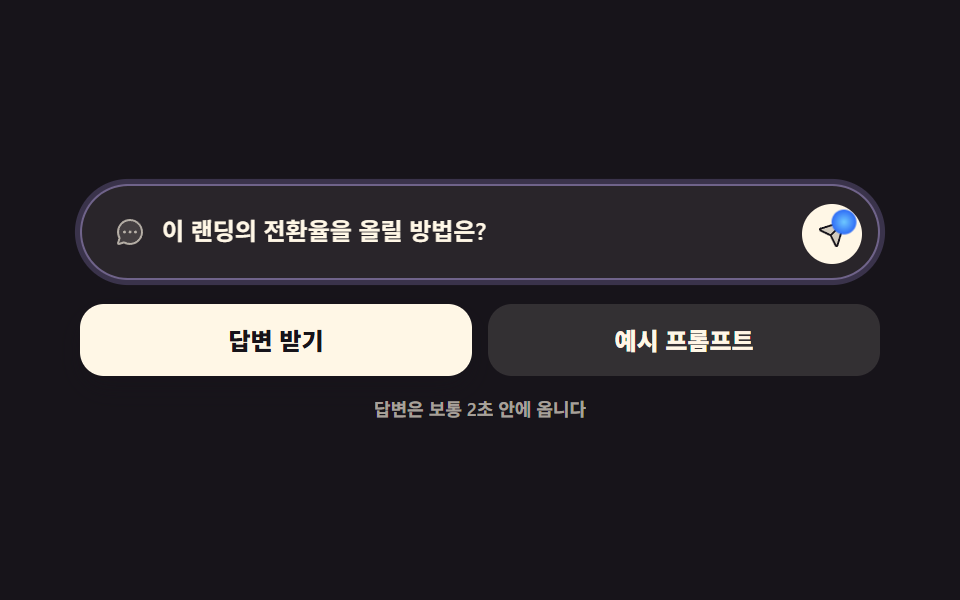
AI 에게 물어보는 둥근 챗 인풋과 솔리드 버튼 둘입니다. 인풋이 포커스를 받으면 얇은 빛 무리 링이 한 겹 생기고(box-shadow), 전송 버튼 안 작은 오브 점이 눌림을 표시합니다.
쓰임챗 위젯 하단 입력창, 폼 제출 버튼
box-shadowtransitionaria-label
<main class="stage">
<div class="ch is-demo" id="ch">
  <div class="ch__field">
    <span class="ch__lead" aria-hidden="true"><svg xmlns="http://www.w3.org/2000/svg" viewBox="0 0 256 256" fill="currentColor"><path d="M224,128A96,96,0,0,1,79.93,211.11h0L42.54,223.58a8,8,0,0,1-10.12-10.12l12.47-37.39h0A96,96,0,1,1,224,128Z" opacity="0.2"/><path d="M128,24A104,104,0,0,0,36.18,176.88L24.83,210.93a16,16,0,0,0,20.24,20.24l34.05-11.35A104,104,0,1,0,128,24Zm0,192a87.87,87.87,0,0,1-44.06-11.81,8,8,0,0,0-4-1.08,7.85,7.85,0,0,0-2.53.42L40,216,52.47,178.6a8,8,0,0,0-.66-6.54A88,88,0,1,1,128,216Zm12-88a12,12,0,1,1-12-12A12,12,0,0,1,140,128Zm-44,0a12,12,0,1,1-12-12A12,12,0,0,1,96,128Zm88,0a12,12,0,1,1-12-12A12,12,0,0,1,184,128Z"/></svg></span>
    <span class="ch__box">
      <input class="ch__input" id="chInput" type="text" placeholder="무엇이든 물어보세요" aria-label="AI에게 물어볼 내용">
      <!-- 미리보기용 고스트 글자. .is-demo 동안만 보이고 그때 placeholder 는 투명해진다 -->
      <span class="ch__ghost" aria-hidden="true">이 랜딩의 전환율을 올릴 방법은?</span>
    </span>
    <button type="button" class="ch__send" id="chSend" aria-label="보내기">
      <span class="ch__dot" aria-hidden="true"></span>
      <span class="ch__ico" aria-hidden="true"><svg xmlns="http://www.w3.org/2000/svg" viewBox="0 0 256 256" fill="currentColor"><path d="M223.69,42.18l-58.22,192a8,8,0,0,1-14.92,1.25L108,148,20.58,105.45a8,8,0,0,1,1.25-14.92l192-58.22A8,8,0,0,1,223.69,42.18Z" opacity="0.2"/><path d="M227.32,28.68a16,16,0,0,0-15.66-4.08l-.15,0L19.57,82.84a16,16,0,0,0-2.49,29.8L102,154l41.3,84.87A15.86,15.86,0,0,0,157.74,248q.69,0,1.38-.06a15.88,15.88,0,0,0,14-11.51l58.2-191.94c0-.05,0-.1,0-.15A16,16,0,0,0,227.32,28.68ZM157.83,231.85l-.05.14,0-.07-40.06-82.3,48-48a8,8,0,0,0-11.31-11.31l-48,48L24.08,98.25l-.07,0,.14,0L216,40Z"/></svg></span>
    </button>
  </div>
  <div class="ch__row">
    <button type="button" class="ch__btn ch__btn--solid">답변 받기</button>
    <button type="button" class="ch__btn ch__btn--quiet">예시 프롬프트</button>
  </div>
  <p class="ch__hint">답변은 보통 2초 안에 옵니다</p>
</div>
</main>
@use "../../../../site/static/demo-tokens" as *;
$duration: $dur-loop; // 묻고 → 보내고 → 돌아오는 한 바퀴
$easing: $ease-out; // 빛 무리가 번지는 이징
$color: $subject-lilac; // 빛 무리 색
@include stage($stage-ink);
.ch { box-sizing: border-box; width: min(100%, 400px); }
// ── 둥근 챗 입력창. 포커스 링은 box-shadow 한 겹뿐 — 두 겹 이상 쌓으면 "빛나는 입력창" 이 된다
.ch__field {
display: flex; align-items: center; gap: $sp-2;
padding: $sp-2 $sp-2 $sp-2 $sp-4;
border: 1px solid rgba($subject-cream, .18);
border-radius: $r-pill;
background: rgba($subject-cream, .08);
box-shadow: 0 0 0 0 rgba($color, 0);
transition: box-shadow $dur-base $easing, border-color $dur-base $easing;
}
.ch__field:focus-within {
border-color: rgba($color, .62);
box-shadow: 0 0 0 4px rgba($color, .34);
}
.ch__lead { display: inline-flex; width: 16px; height: 16px; flex: 0 0 auto; color: rgba($subject-cream, .62); }
.ch__lead svg { width: 100%; height: 100%; }
.ch__box { position: relative; display: block; flex: 1 1 auto; min-width: 0; }
.ch__input {
display: block; width: 100%; border: 0; background: none; padding: 0;
font-family: inherit; font-weight: 600; font-size: clamp(10px, 2.9vw, 12px); line-height: 1.6;
color: $subject-cream; // 13.96:1
}
.ch__input:focus { outline: none; } // 링을 field 가 그리므로 기본 아웃라인은 뺀다
.ch__input::placeholder { color: rgba($subject-cream, .62); opacity: 1; } // 6.29:1
.ch__ghost {
position: absolute; left: 0; top: 0; width: 100%; opacity: 0;
font-weight: 600; font-size: clamp(10px, 2.9vw, 12px); line-height: 1.6;
color: $subject-cream; white-space: nowrap; overflow: hidden; text-overflow: ellipsis;
pointer-events: none;
}
// 고스트 글자가 보일 땐 placeholder 를 투명하게 — 두 글자가 겹치면 둘 다 못 읽는다
.ch.is-demo .ch__input::placeholder { color: transparent; }
// ── 전송 버튼: 솔리드. 안의 작은 오브 점이 눌림을 표시한다
.ch__send {
position: relative; display: inline-flex; align-items: center; justify-content: center;
width: 30px; height: 30px; flex: 0 0 auto; border: 0; border-radius: 50%; cursor: pointer;
background: $subject-cream; color: $subject-ink; // 아이콘 17.11:1
transition: transform $dur-instant $easing;
}
.ch__ico { display: inline-flex; width: 15px; height: 15px; }
.ch__ico svg { width: 100%; height: 100%; }
.ch__dot {
position: absolute; right: 5px; top: 5px;
width: 8px; height: 8px; border-radius: 50%; opacity: .6;
background: radial-gradient(circle at 50% 50%, rgba($subject-sky, 1) 0%, rgba($subject-blue, 1) 70%);
transform-origin: 50% 50%; // 스스로 완결한 점 — 제 중심에서 커진다
transition: transform $dur-instant $easing, opacity $dur-instant $easing;
}
.ch__send:active { transform: translateY(1px); }
.ch__send:active .ch__dot { transform: scale(1.55); opacity: 1; }
.ch__send:focus-visible { outline: 2px solid rgba($color, .8); outline-offset: 2px; }
// ── 솔리드 버튼 둘
.ch__row { display: flex; gap: $sp-2; margin-top: $sp-3; }
.ch__btn {
flex: 1 1 0; padding: $sp-3 $sp-2; border: 0; border-radius: $r-control; cursor: pointer;
font-family: inherit; font-weight: 800; font-size: clamp(10px, 2.9vw, 12px); line-height: 1;
transition: transform $dur-quick $easing, box-shadow $dur-quick $easing;
}
.ch__btn--solid { background: $subject-cream; color: $subject-ink; box-shadow: $shadow-press; } // 17.11:1
.ch__btn--quiet { background: rgba($subject-cream, .12); color: $subject-cream; } // 12.33:1
.ch__btn:hover,
.ch__btn:focus-visible { transform: translateY(-1px); }
.ch__btn--solid:hover,
.ch__btn--solid:focus-visible { box-shadow: $shadow-raised; }
.ch__btn:active { transform: translateY(0); }
.ch__hint {
margin: $sp-3 0 0; text-align: center;
font-weight: 600; font-size: clamp(8px, 2.4vw, 9px); line-height: 1;
color: rgba($subject-cream, .62); // 7.12:1
}
// ── 미리보기 루프: 포커스 → 빛 무리 한 겹 → 전송 → 원래대로 (복귀 90% 안)
.ch.is-demo .ch__field {
animation-name: chRing;
animation-duration: $duration;
animation-timing-function: $easing;
animation-iteration-count: infinite;
}
.ch.is-demo .ch__ghost {
animation-name: chGhost;
animation-duration: $duration;
animation-timing-function: steps(1, end); // 글자 교체는 컷 — 반투명 유령 프레임을 만들지 않는다
animation-iteration-count: infinite;
}
.ch.is-demo .ch__send {
animation-name: chPress;
animation-duration: $duration;
animation-timing-function: $easing;
animation-iteration-count: infinite;
}
.ch.is-demo .ch__dot {
animation-name: chDot;
animation-duration: $duration;
animation-timing-function: $easing;
animation-iteration-count: infinite;
}
@keyframes chRing {
0%, 6% { border-color: rgba($subject-cream, .18); box-shadow: 0 0 0 0 rgba($color, 0); }
30%, 66% { border-color: rgba($color, .62); box-shadow: 0 0 0 4px rgba($color, .34); }
86%, 100% { border-color: rgba($subject-cream, .18); box-shadow: 0 0 0 0 rgba($color, 0); }
}
@keyframes chGhost {
0% { opacity: 0; }
12% { opacity: 1; }
86% { opacity: 0; }
100% { opacity: 0; }
}
@keyframes chPress {
0%, 62% { transform: translateY(0); }
66%, 74% { transform: translateY(1px); }
78%, 100% { transform: translateY(0); }
}
@keyframes chDot {
0%, 62% { transform: scale(1); opacity: .6; }
66%, 74% { transform: scale(1.55); opacity: 1; }
78%, 100% { transform: scale(1); opacity: .6; }
}
// ── 320×200 폰 실측 대비 압축 (BD9). 이 블록 안에서는 간격을 올리지 않는다
@media (max-width: 340px), (max-height: 220px) {
.ch__field { padding: $sp-1 $sp-1 $sp-1 $sp-3; }
.ch__lead { width: 14px; height: 14px; }
.ch__input, .ch__ghost { font-size: 10px; }
.ch__send { width: 26px; height: 26px; }
.ch__ico { width: 13px; height: 13px; }
.ch__row { margin-top: $sp-2; }
.ch__btn { padding: $sp-2; font-size: 10px; }
.ch__hint { margin-top: $sp-2; font-size: 7px; }
}
@media (prefers-reduced-motion: reduce) {
// 움직임만 뺀다 — 포커스 링과 고스트 글자라는 피드백은 그대로 남긴다
.ch.is-demo .ch__field,
.ch.is-demo .ch__ghost,
.ch.is-demo .ch__send,
.ch.is-demo .ch__dot { animation: none !important; }
.ch.is-demo .ch__field { border-color: rgba($color, .62) !important; box-shadow: 0 0 0 4px rgba($color, .34) !important; }
.ch.is-demo .ch__ghost { opacity: 1 !important; }
.ch__field, .ch__send, .ch__dot, .ch__btn { transition: none !important; }
}html, body {
margin: 0;
overflow: hidden;
}
.stage {
box-sizing: border-box;
min-height: 100vh;
display: grid;
place-items: center;
margin: 0;
background: #17141a;
font-family: -apple-system, "Segoe UI", "Noto Sans KR", sans-serif;
padding: clamp(8px, 4vw, 24px);
}
.ch {
box-sizing: border-box;
width: min(100%, 400px);
}
.ch__field {
display: flex;
align-items: center;
gap: 8px;
padding: 8px 8px 8px 16px;
border: 1px solid rgba(255, 247, 230, 0.18);
border-radius: 999px;
background: rgba(255, 247, 230, 0.08);
box-shadow: 0 0 0 0 rgba(185, 160, 255, 0);
transition: box-shadow 300ms ease-out, border-color 300ms ease-out;
}
.ch__field:focus-within {
border-color: rgba(185, 160, 255, 0.62);
box-shadow: 0 0 0 4px rgba(185, 160, 255, 0.34);
}
.ch__lead {
display: inline-flex;
width: 16px;
height: 16px;
flex: 0 0 auto;
color: rgba(255, 247, 230, 0.62);
}
.ch__lead svg {
width: 100%;
height: 100%;
}
.ch__box {
position: relative;
display: block;
flex: 1 1 auto;
min-width: 0;
}
.ch__input {
display: block;
width: 100%;
border: 0;
background: none;
padding: 0;
font-family: inherit;
font-weight: 600;
font-size: clamp(10px, 2.9vw, 12px);
line-height: 1.6;
color: #fff7e6;
}
.ch__input:focus {
outline: none;
}
.ch__input::placeholder {
color: rgba(255, 247, 230, 0.62);
opacity: 1;
}
.ch__ghost {
position: absolute;
left: 0;
top: 0;
width: 100%;
opacity: 0;
font-weight: 600;
font-size: clamp(10px, 2.9vw, 12px);
line-height: 1.6;
color: #fff7e6;
white-space: nowrap;
overflow: hidden;
text-overflow: ellipsis;
pointer-events: none;
}
.ch.is-demo .ch__input::placeholder {
color: transparent;
}
.ch__send {
position: relative;
display: inline-flex;
align-items: center;
justify-content: center;
width: 30px;
height: 30px;
flex: 0 0 auto;
border: 0;
border-radius: 50%;
cursor: pointer;
background: #fff7e6;
color: #17141a;
transition: transform 140ms ease-out;
}
.ch__ico {
display: inline-flex;
width: 15px;
height: 15px;
}
.ch__ico svg {
width: 100%;
height: 100%;
}
.ch__dot {
position: absolute;
right: 5px;
top: 5px;
width: 8px;
height: 8px;
border-radius: 50%;
opacity: 0.6;
background: radial-gradient(circle at 50% 50%, #6ec8ff 0%, #2f6df6 70%);
transform-origin: 50% 50%;
transition: transform 140ms ease-out, opacity 140ms ease-out;
}
.ch__send:active {
transform: translateY(1px);
}
.ch__send:active .ch__dot {
transform: scale(1.55);
opacity: 1;
}
.ch__send:focus-visible {
outline: 2px solid rgba(185, 160, 255, 0.8);
outline-offset: 2px;
}
.ch__row {
display: flex;
gap: 8px;
margin-top: 12px;
}
.ch__btn {
flex: 1 1 0;
padding: 12px 8px;
border: 0;
border-radius: 12px;
cursor: pointer;
font-family: inherit;
font-weight: 800;
font-size: clamp(10px, 2.9vw, 12px);
line-height: 1;
transition: transform 220ms ease-out, box-shadow 220ms ease-out;
}
.ch__btn--solid {
background: #fff7e6;
color: #17141a;
box-shadow: 0 6px 12px rgba(23, 20, 26, 0.32);
}
.ch__btn--quiet {
background: rgba(255, 247, 230, 0.12);
color: #fff7e6;
}
.ch__btn:hover,
.ch__btn:focus-visible {
transform: translateY(-1px);
}
.ch__btn--solid:hover,
.ch__btn--solid:focus-visible {
box-shadow: 0 14px 24px rgba(23, 20, 26, 0.32);
}
.ch__btn:active {
transform: translateY(0);
}
.ch__hint {
margin: 12px 0 0;
text-align: center;
font-weight: 600;
font-size: clamp(8px, 2.4vw, 9px);
line-height: 1;
color: rgba(255, 247, 230, 0.62);
}
.ch.is-demo .ch__field {
animation-name: chRing;
animation-duration: 2s;
animation-timing-function: ease-out;
animation-iteration-count: infinite;
}
.ch.is-demo .ch__ghost {
animation-name: chGhost;
animation-duration: 2s;
animation-timing-function: steps(1, end);
animation-iteration-count: infinite;
}
.ch.is-demo .ch__send {
animation-name: chPress;
animation-duration: 2s;
animation-timing-function: ease-out;
animation-iteration-count: infinite;
}
.ch.is-demo .ch__dot {
animation-name: chDot;
animation-duration: 2s;
animation-timing-function: ease-out;
animation-iteration-count: infinite;
}
@keyframes chRing {
0%, 6% {
border-color: rgba(255, 247, 230, 0.18);
box-shadow: 0 0 0 0 rgba(185, 160, 255, 0);
}
30%, 66% {
border-color: rgba(185, 160, 255, 0.62);
box-shadow: 0 0 0 4px rgba(185, 160, 255, 0.34);
}
86%, 100% {
border-color: rgba(255, 247, 230, 0.18);
box-shadow: 0 0 0 0 rgba(185, 160, 255, 0);
}
}
@keyframes chGhost {
0% {
opacity: 0;
}
12% {
opacity: 1;
}
86% {
opacity: 0;
}
100% {
opacity: 0;
}
}
@keyframes chPress {
0%, 62% {
transform: translateY(0);
}
66%, 74% {
transform: translateY(1px);
}
78%, 100% {
transform: translateY(0);
}
}
@keyframes chDot {
0%, 62% {
transform: scale(1);
opacity: 0.6;
}
66%, 74% {
transform: scale(1.55);
opacity: 1;
}
78%, 100% {
transform: scale(1);
opacity: 0.6;
}
}
@media (max-width: 340px), (max-height: 220px) {
.ch__field {
padding: 4px 4px 4px 12px;
}
.ch__lead {
width: 14px;
height: 14px;
}
.ch__input, .ch__ghost {
font-size: 10px;
}
.ch__send {
width: 26px;
height: 26px;
}
.ch__ico {
width: 13px;
height: 13px;
}
.ch__row {
margin-top: 8px;
}
.ch__btn {
padding: 8px;
font-size: 10px;
}
.ch__hint {
margin-top: 8px;
font-size: 7px;
}
}
@media (prefers-reduced-motion: reduce) {
.ch.is-demo .ch__field,
.ch.is-demo .ch__ghost,
.ch.is-demo .ch__send,
.ch.is-demo .ch__dot {
animation: none !important;
}
.ch.is-demo .ch__field {
border-color: rgba(185, 160, 255, 0.62) !important;
box-shadow: 0 0 0 4px rgba(185, 160, 255, 0.34) !important;
}
.ch.is-demo .ch__ghost {
opacity: 1 !important;
}
.ch__field, .ch__send, .ch__dot, .ch__btn {
transition: none !important;
}
}// 사람이 손을 대면 미리보기 루프를 끄고 진짜 포커스·누름에 넘긴다.
// 포커스를 코드로 강제하지 않는다 — iframe 안에서 강제 포커스는 부모 페이지를 끌어당긴다 (BD18)
var chat = document.getElementById('ch');
var input = document.getElementById('chInput');
var send = document.getElementById('chSend');
function stopPreview() { chat.classList.remove('is-demo'); }
input.addEventListener('focus', stopPreview);
input.addEventListener('pointerdown', stopPreview);
send.addEventListener('pointerdown', stopPreview);
send.addEventListener('focus', stopPreview);import { useState } from "react";
import styles from "./ButtonsInputsOrb.module.scss";
export type ButtonsInputsOrbProps = {
/** 묻고 → 보내고 → 돌아오는 한 바퀴 */
duration?: string;
/** 빛 무리가 번지는 이징 */
easing?: string;
/** 빛 무리 색 — --ringColor 로 내려간다 */
color?: string;
};
type Loop = {
animationName: string;
animationDuration: string;
animationTimingFunction: string;
animationIterationCount: string;
};
export default function ButtonsInputsOrb({
duration = "2s",
easing = "ease-out",
color = "#b9a0ff",
}: ButtonsInputsOrbProps) {
// 사람이 손을 대면 미리보기 루프를 끈다. 포커스를 코드로 강제하지 않는다 —
// iframe 안에서 강제 포커스는 부모 페이지를 끌어당긴다 (BD18)
const [preview, setPreview] = useState(true);
const [text, setText] = useState("");
const stopPreview = () => { setPreview(false); };
const loop = (name: string, timing: string): Loop | undefined =>
preview ? {
animationName: name,
animationDuration: duration,
animationTimingFunction: timing,
animationIterationCount: "infinite",
} : undefined;
return (
<main className={styles.stage}>
<div className={`${styles.ch} ${preview ? styles.isDemo : ""}`} style={{ "--ringColor": color }}>
<div className={styles.field} style={loop("chRing", easing)}>
<span className={styles.lead} aria-hidden="true"><svg xmlns="http://www.w3.org/2000/svg" viewBox="0 0 256 256" fill="currentColor"><path d="M224,128A96,96,0,0,1,79.93,211.11h0L42.54,223.58a8,8,0,0,1-10.12-10.12l12.47-37.39h0A96,96,0,1,1,224,128Z" opacity="0.2"/><path d="M128,24A104,104,0,0,0,36.18,176.88L24.83,210.93a16,16,0,0,0,20.24,20.24l34.05-11.35A104,104,0,1,0,128,24Zm0,192a87.87,87.87,0,0,1-44.06-11.81,8,8,0,0,0-4-1.08,7.85,7.85,0,0,0-2.53.42L40,216,52.47,178.6a8,8,0,0,0-.66-6.54A88,88,0,1,1,128,216Zm12-88a12,12,0,1,1-12-12A12,12,0,0,1,140,128Zm-44,0a12,12,0,1,1-12-12A12,12,0,0,1,96,128Zm88,0a12,12,0,1,1-12-12A12,12,0,0,1,184,128Z"/></svg></span>
<span className={styles.box}>
<input
className={styles.input}
type="text"
placeholder="무엇이든 물어보세요"
aria-label="AI에게 물어볼 내용"
value={text}
onChange={(e: { target: { value: string } }) => { setText(e.target.value); }}
onFocus={stopPreview}
onPointerDown={stopPreview}
/>
{/* 미리보기용 고스트 글자. 보일 때는 placeholder 가 투명해진다 */}
<span className={styles.ghost} aria-hidden="true" style={loop("chGhost", "steps(1, end)")}>
이 랜딩의 전환율을 올릴 방법은?
</span>
</span>
<button
type="button"
className={styles.send}
aria-label="보내기"
style={loop("chPress", easing)}
onPointerDown={stopPreview}
onFocus={stopPreview}
>
<span className={styles.dot} aria-hidden="true" style={loop("chDot", easing)} />
<span className={styles.ico} aria-hidden="true"><svg xmlns="http://www.w3.org/2000/svg" viewBox="0 0 256 256" fill="currentColor"><path d="M223.69,42.18l-58.22,192a8,8,0,0,1-14.92,1.25L108,148,20.58,105.45a8,8,0,0,1,1.25-14.92l192-58.22A8,8,0,0,1,223.69,42.18Z" opacity="0.2"/><path d="M227.32,28.68a16,16,0,0,0-15.66-4.08l-.15,0L19.57,82.84a16,16,0,0,0-2.49,29.8L102,154l41.3,84.87A15.86,15.86,0,0,0,157.74,248q.69,0,1.38-.06a15.88,15.88,0,0,0,14-11.51l58.2-191.94c0-.05,0-.1,0-.15A16,16,0,0,0,227.32,28.68ZM157.83,231.85l-.05.14,0-.07-40.06-82.3,48-48a8,8,0,0,0-11.31-11.31l-48,48L24.08,98.25l-.07,0,.14,0L216,40Z"/></svg></span>
</button>
</div>
<div className={styles.row}>
<button type="button" className={`${styles.btn} ${styles.btnSolid}`} onClick={stopPreview}>답변 받기</button>
<button type="button" className={`${styles.btn} ${styles.btnQuiet}`} onClick={stopPreview}>예시 프롬프트</button>
</div>
<p className={styles.hint}>답변은 보통 2초 안에 옵니다</p>
</div>
</main>
);
}09 오브 버튼·챗 인풋 — 측정 누적면적 4.223% · 움직인 프레임 12/23GODRICH 원작 · zip 에 SCSS·React 포함 · ai 랜딩페이지 오브 디자인 키트, 빛나는 섹션 9개
이 데모가 속한 글
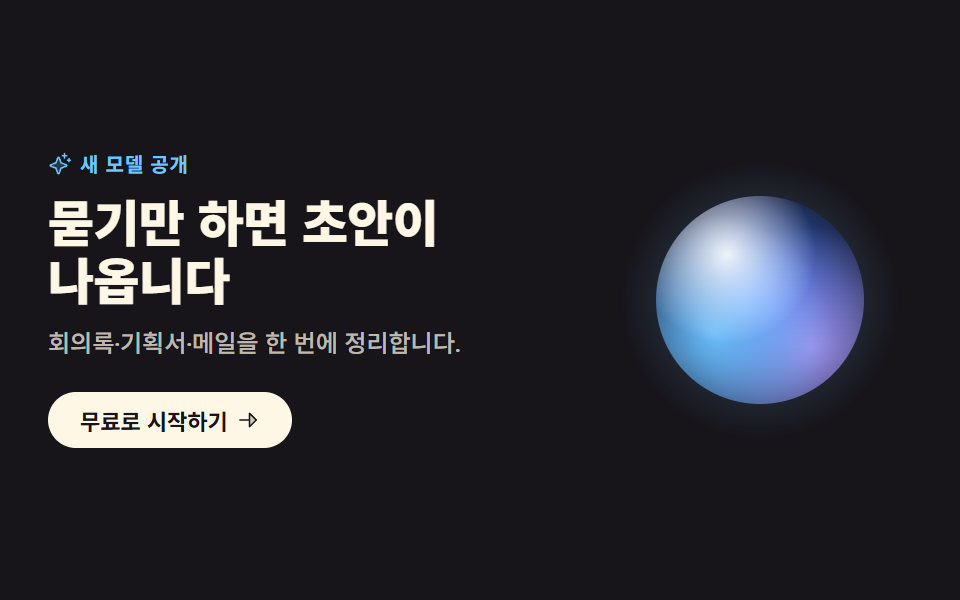 ai 랜딩페이지 오브 디자인 키트, 빛나는 섹션 9개ai 랜딩페이지 오브 디자인은 화면 전체를 물들이는 대신 짙은 단색 무대 위에 빛나는 구슬 하나만 올려 제품의 성격을 말하는 방식입니다. 배경 그라디언트 없이도 AI 다워 보인다는 이 계산을 섹션 아홉 개로 잘라 정 이 글의 데모 전부 보기