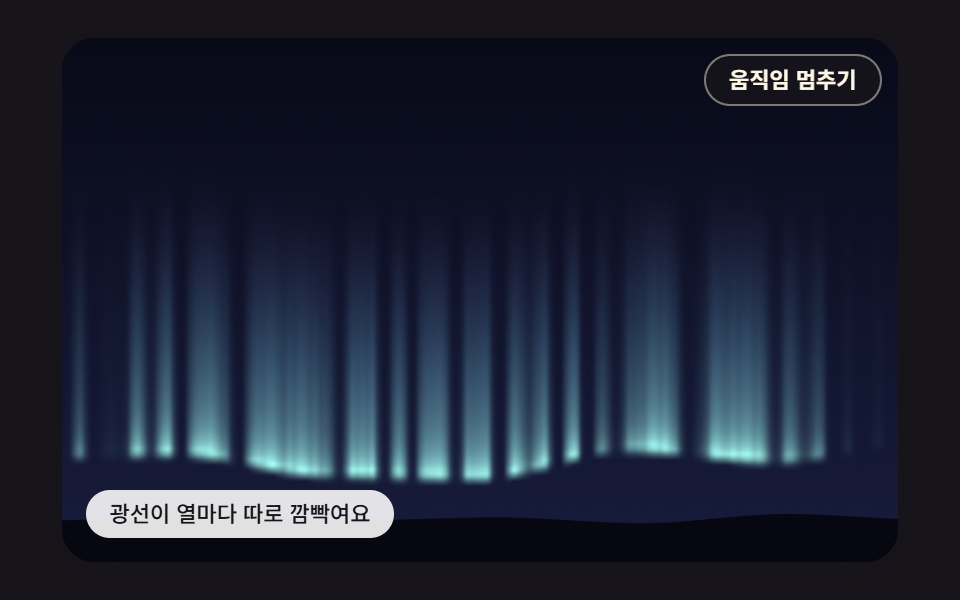
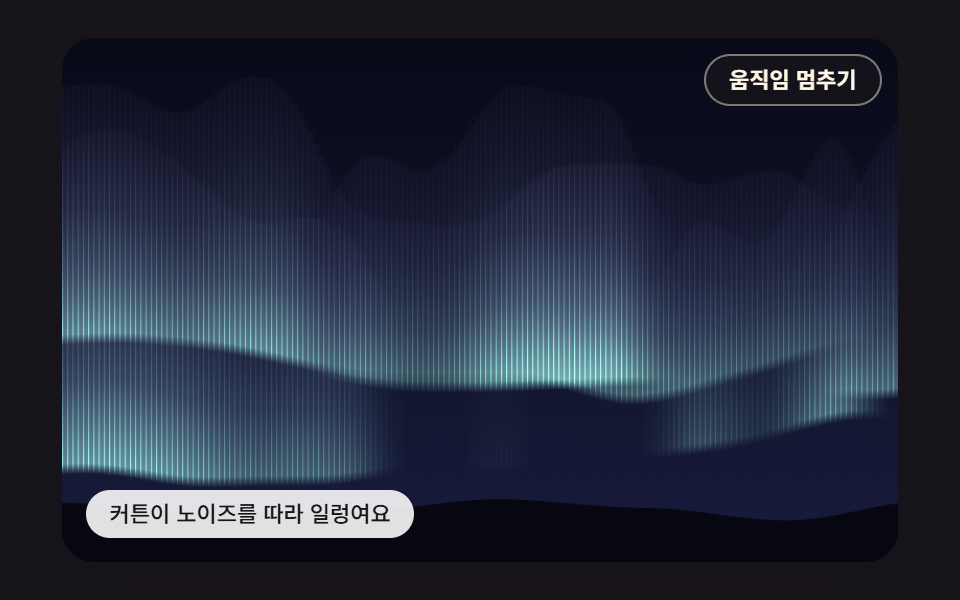
02픽셀마다 계산해 깜빡이는 세로 광선
작은 픽셀 버퍼에서 열마다 1차원 노이즈로 빛 세기를 정하고 높이 그라데이션과 시간 깜빡임을 곱해 색을 칠한 뒤 크게 늘려, 바늘 같은 광선이 제각각 밝아졌다 사라진다.
쓰임음악 앨범 소개 페이지
SHADER_WIDTHRAY_FLICKERBAND_HEIGHT
<main class="stage">
<div class="au is-demo" id="au">
  <canvas class="au__canvas" data-role="canvas" width="480" height="300" aria-hidden="true"></canvas>
  <button class="au__pause" data-role="pause" type="button" aria-pressed="false">움직임 멈추기</button>
  <p class="au__status" data-role="status" aria-live="off">광선이 열마다 따로 깜빡여요</p>
</div>
</main>
@use "../../../../site/static/demo-tokens" as *;
@include stage($stage-ink);
.au {
position: relative;
width: min(92vw, calc(160vh - 12.8vw));
aspect-ratio: 480 / 300;
margin: 0 auto;
border-radius: $r-card;
overflow: hidden;
box-shadow: $shadow-raised;
background: $subject-ink;
}
// 05·09 는 무대 자체가 초점을 받는다(화살표 키) — 고리는 크림색으로 어두운 하늘 위에서 보이게
.au:focus-visible {
outline: 2px solid $subject-cream;
outline-offset: 3px;
}
.au__canvas {
display: block;
width: 100%;
height: 100%;
// 손가락 세로 쓸기는 브라우저에 남겨 페이지 스크롤이 막히지 않게 한다
touch-action: pan-y;
}
.au__pause {
position: absolute;
top: $sp-2;
right: $sp-2;
margin: 0;
padding: $sp-1 $sp-3;
border: 1px solid rgba(255, 247, 230, .45);
border-radius: $r-pill;
background: rgba(23, 20, 26, .78);
color: $subject-cream;
font-family: inherit;
font-weight: 600;
font-size: 11px;
line-height: 1.4;
cursor: pointer;
}
.au__pause:hover {
background: rgba(23, 20, 26, .92);
}
.au__pause:focus-visible {
outline: 2px solid $subject-cream;
outline-offset: 2px;
}
.au__pause[hidden] {
display: none;
}
.au__status {
position: absolute;
left: $sp-3;
bottom: $sp-3;
box-sizing: border-box;
max-width: 54%;
margin: 0;
padding: $sp-1 $sp-3;
border-radius: $r-control;
background: rgba(255, 255, 255, .88);
color: $subject-ink;
font-weight: 500;
font-size: 11px;
line-height: 1.4;
pointer-events: none;
}
@media (max-width: 340px) {
.au__status { font-size: 10px; padding: $sp-1 $sp-2; }
.au__pause { font-size: 10px; padding: $sp-1 $sp-2; }
}
// 움직임은 스크립트가 matchMedia 로 멈춘다(노이즈 시간을 세운 한 장면). CSS 쪽은 멈춤 버튼을 감추는 hidden 만 쓴다
@media (prefers-reduced-motion: reduce) {
.au__pause { transition: none; }
}html, body {
margin: 0;
overflow: hidden;
}
.stage {
box-sizing: border-box;
min-height: 100vh;
display: grid;
place-items: center;
margin: 0;
background: #17141a;
font-family: -apple-system, "Segoe UI", "Noto Sans KR", sans-serif;
padding: clamp(8px, 4vw, 24px);
}
.au {
position: relative;
width: min(92vw, 160vh - 12.8vw);
aspect-ratio: 480/300;
margin: 0 auto;
border-radius: 16px;
overflow: hidden;
box-shadow: 0 14px 24px rgba(23, 20, 26, 0.32);
background: #17141a;
}
.au:focus-visible {
outline: 2px solid #fff7e6;
outline-offset: 3px;
}
.au__canvas {
display: block;
width: 100%;
height: 100%;
touch-action: pan-y;
}
.au__pause {
position: absolute;
top: 8px;
right: 8px;
margin: 0;
padding: 4px 12px;
border: 1px solid rgba(255, 247, 230, 0.45);
border-radius: 999px;
background: rgba(23, 20, 26, 0.78);
color: #fff7e6;
font-family: inherit;
font-weight: 600;
font-size: 11px;
line-height: 1.4;
cursor: pointer;
}
.au__pause:hover {
background: rgba(23, 20, 26, 0.92);
}
.au__pause:focus-visible {
outline: 2px solid #fff7e6;
outline-offset: 2px;
}
.au__pause[hidden] {
display: none;
}
.au__status {
position: absolute;
left: 12px;
bottom: 12px;
box-sizing: border-box;
max-width: 54%;
margin: 0;
padding: 4px 12px;
border-radius: 12px;
background: rgba(255, 255, 255, 0.88);
color: #17141a;
font-weight: 500;
font-size: 11px;
line-height: 1.4;
pointer-events: none;
}
@media (max-width: 340px) {
.au__status {
font-size: 10px;
padding: 4px 8px;
}
.au__pause {
font-size: 10px;
padding: 4px 8px;
}
}
@media (prefers-reduced-motion: reduce) {
.au__pause {
transition: none;
}
}(function () {
const root = document.getElementById("au");
if (!root) return;
// 장면 좌표 — 캔버스 내부는 이 크기 x 배율(dpr)로 잡고, 그림은 늘 480x300 좌표로 그린다
const W = 480;
const H = 300;
// 고정 틱(ms) — 화면 주사율과 상관없이 같은 빠르기로 흐른다
const FIXED_DT = 16;
const TAU = Math.PI * 2;
// 동작 줄이기에서 멈춰 둘 장면 시각(ms) — 이 시각의 한 장면만 그린다
const STILL_MS = 5200;
// 밤하늘 — 위는 짙은 남색, 지평선 쪽은 한 단계 밝은 남보라
const SKY_TOP = [8, 10, 24];
const SKY_LOW = [24, 28, 60];
// 오로라 빛 — 채도를 낮춘 파스텔이지만 어두운 하늘과의 명도 차는 크게 둔다
const MINT = [150, 240, 200];
const TEAL = [126, 214, 236];
const VIOLET = [192, 168, 255];
const PINK = [255, 178, 214];
function clamp(v, lo, hi) { return v < lo ? lo : (v > hi ? hi : v); }
function lerp(a, b, k) { return a + (b - a) * k; }
// 부드러운 계단 3x² - 2x³ — 0 과 1 에서 기울기가 0 이라 이음매가 보이지 않는다
function smooth(x) { const c = clamp(x, 0, 1); return c * c * (3 - 2 * c); }
function mix(a, b, k) { return [lerp(a[0], b[0], k), lerp(a[1], b[1], k), lerp(a[2], b[2], k)]; }
function rgba(c, a) {
return 'rgba(' + Math.round(clamp(c[0], 0, 255)) + ',' + Math.round(clamp(c[1], 0, 255)) + ',' + Math.round(clamp(c[2], 0, 255)) + ',' + clamp(a, 0, 1).toFixed(3) + ')';
}
// 시드 고정 난수 — 같은 시드면 같은 배치가 다시 나온다 (32비트 정수 섞기)
function makeRng(seed) {
let s = seed >>> 0;
return function () {
s = (s + 0x6d2b79f5) >>> 0;
let t = s;
t = Math.imul(t ^ (t >>> 15), t | 1);
t ^= t + Math.imul(t ^ (t >>> 7), t | 61);
return ((t ^ (t >>> 14)) >>> 0) / 4294967296;
};
}
// 격자점 해시 — 정수 좌표 (ix, iy) 와 시드에서 0..1 값 하나를 만든다. 같은 점은 언제나 같은 값
function hash2(ix, iy, seed) {
let h = (Math.imul(ix, 374761393) + Math.imul(iy, 668265263) + Math.imul(seed, 1013904223)) | 0;
h = Math.imul(h ^ (h >>> 13), 1274126177);
h ^= h >>> 16;
return (h >>> 0) / 4294967296;
}
// 값 노이즈 — 정수 격자점마다 해시 값을 두고, 칸 안에서는 네 모서리 값을 부드러운 계단으로 보간한다. 결과 0..1
function noise2(x, y, seed) {
const ix = Math.floor(x);
const iy = Math.floor(y);
const fx = x - ix;
const fy = y - iy;
const u = fx * fx * (3 - 2 * fx);
const v = fy * fy * (3 - 2 * fy);
const a = hash2(ix, iy, seed);
const b = hash2(ix + 1, iy, seed);
const c = hash2(ix, iy + 1, seed);
const d = hash2(ix + 1, iy + 1, seed);
return lerp(lerp(a, b, u), lerp(c, d, u), v);
}
// 옥타브 합 — 주파수를 두 배로, 세기를 절반으로 줄여 가며 n 겹 더한 뒤 세기 합으로 나눈다. 결과 0..1
function octaves(x, y, n, seed) {
let sum = 0;
let amp = 0.5;
let norm = 0;
let f = 1;
for (let k = 0; k < n; k += 1) {
sum += amp * noise2(x * f + k * 17.13, y * f + k * 9.71, seed + k * 31);
norm += amp;
amp *= 0.5;
f *= 2;
}
return sum / norm;
}
function textOf(el) { return (el.textContent || '').trim(); }
const canvasEl = root.querySelector('[data-role="canvas"]');
const statusEl = root.querySelector('[data-role="status"]');
const pauseEl = root.querySelector('[data-role="pause"]');
const ctxRaw = canvasEl ? canvasEl.getContext('2d') : null;
if (!canvasEl || !ctxRaw || !statusEl || !pauseEl) {
return;
}
const cv = canvasEl;
const ctx = ctxRaw;
const status = statusEl;
const pauseBtn = pauseEl;
// 화면 글자는 DOM 에 있다 — 문구를 바꾸면 버튼·상태 줄도 같이 바뀐다
const STATUS0 = textOf(status);
const PAUSE_LABEL = textOf(pauseBtn);
const RESUME_LABEL = '움직임 다시 켜기';
const TXT_PAUSED = '멈췄어요 — 버튼으로 다시 켜기';
const reduceQuery = window.matchMedia('(prefers-reduced-motion: reduce)');
// 페이지를 연 채 동작 줄이기 설정을 바꿔도 아래 change 리스너가 이 값을 다시 읽는다
let still = reduceQuery.matches;
// 사람이 멈춤 버튼을 눌렀는가
let paused = false;
// 자동 시연 중인가 — 사람이 처음 만지는 순간 시연을 멈추고 상태 줄을 읽어 주기 시작한다
let demo = root.classList.contains('is-demo');
function wake() {
if (!demo) {
return;
}
demo = false;
root.classList.remove('is-demo');
status.setAttribute('aria-live', 'polite');
}
function say(text) {
if (status.textContent !== text) {
status.textContent = text;
}
}
// 캔버스 배율 — 화면 배율을 따르되 2 에서 자른다(배율 3 기기에서 픽셀 일이 2.25배로 늘지 않게)
let dpr = 1;
function fitCanvas() {
dpr = Math.min(window.devicePixelRatio || 1, 2);
cv.width = Math.round(W * dpr);
cv.height = Math.round(H * dpr);
}
function begin() {
ctx.setTransform(dpr, 0, 0, dpr, 0, 0);
ctx.globalCompositeOperation = 'source-over';
ctx.globalAlpha = 1;
}
// 작은 픽셀 버퍼 — 계산은 이 크기에서 하고 화면에는 늘려 그린다
function makeBuffer(w, h) {
const b = document.createElement('canvas');
b.width = w;
b.height = h;
const c = b.getContext('2d');
return { cv: b, c: c, img: c.createImageData(w, h), w: w, h: h };
}
// 버퍼를 무대 크기로 키워 더한다 — 늘릴 때 브라우저의 이미지 보간이 칸 사이를 메우고, 'lighter' 는 밤하늘 위에 빛을 더한다
function blitBuffer(b, x, y, w, h) {
b.c.putImageData(b.img, 0, 0);
ctx.save();
ctx.imageSmoothingEnabled = true;
ctx.imageSmoothingQuality = 'high';
ctx.globalCompositeOperation = 'lighter';
ctx.drawImage(b.cv, x, y, w, h);
ctx.restore();
}
// 높이 y 에서 하늘 색 — 버퍼 계산에서 밝기를 잴 때도 같은 식을 쓴다
function skyAt(y, h) { return mix(SKY_TOP, SKY_LOW, clamp(y / h, 0, 1)); }
function drawSky(c, w, h) {
const g = c.createLinearGradient(0, 0, 0, h);
g.addColorStop(0, rgba(SKY_TOP, 1));
g.addColorStop(1, rgba(SKY_LOW, 1));
c.fillStyle = g;
c.fillRect(0, 0, w, h);
}
// 장면 시계(ms) — rAF 루프가 고정 틱으로만 늘린다. 동작 줄이기에서는 STILL_MS 에 멈춘다
let simMs = 0;
function nowS() { return simMs / 1000; }
function toScene(ev) {
const r = cv.getBoundingClientRect();
return [(ev.clientX - r.left) / Math.max(1, r.width) * W, (ev.clientY - r.top) / Math.max(1, r.height) * H];
}
// 겹치는 DOM 층의 자리 — 장면 좌표를 무대 백분율로 바꿔 넣는다
function place(el, r) {
el.style.left = (r.x / W * 100).toFixed(3) + '%';
el.style.top = (r.y / H * 100).toFixed(3) + '%';
el.style.width = (r.w / W * 100).toFixed(3) + '%';
el.style.height = (r.h / H * 100).toFixed(3) + '%';
}
// 땅 실루엣 — 값 노이즈 한 겹으로 낮은 언덕 선을 만들고 그 아래를 짙게 채운다
const GROUND = [6, 7, 16];
function drawGround(c, y0, rough, seed) {
c.beginPath();
c.moveTo(0, H);
for (let x = 0; x <= W; x += 8) {
c.lineTo(x, y0 + (noise2(x * 0.012, 0.5, seed) - 0.5) * rough);
}
c.lineTo(W, H);
c.closePath();
c.fillStyle = rgba(GROUND, 1);
c.fill();
}
// 픽셀 버퍼 가로 칸 수 — 화면 크기와 상관없이 이 폭에서 계산하고 drawImage 로 키운다
const SHADER_WIDTH = 160;
const SHADER_HEIGHT = Math.round(SHADER_WIDTH * H / W);
// 깜빡임 세기 — 열마다 위상이 다른 사인이 밝기를 (1 - RAY_FLICKER) 까지 눌렀다 놓는다
const RAY_FLICKER = 0.15;
// 띠 높이 — 버퍼 높이에 대한 비율. 광선은 아래 가장자리에서 이만큼 위로 뻗는다
const BAND_HEIGHT = 0.55;
// 열 노이즈 결 — 버퍼 한 칸 옆으로 갈 때 노이즈 좌표가 움직이는 양. 클수록 이웃 광선이 서로 다르다
const RAY_GRAIN = 0.36;
// 깜빡임 빠르기(rad/s) — 열마다 0.6~1.4배
const FLICKER_SPEED = 9;
const rayBuf = makeBuffer(SHADER_WIDTH, SHADER_HEIGHT);
const rng02 = makeRng(202);
const colPhase = new Float32Array(SHADER_WIDTH);
const colRate = new Float32Array(SHADER_WIDTH);
for (let i = 0; i < SHADER_WIDTH; i += 1) {
colPhase[i] = rng02() * TAU;
colRate[i] = 0.6 + rng02() * 0.8;
}
// 열 세기 — 빠른 1차원 노이즈(이웃 열마다 다름) x 느린 노이즈(어느 구간이 켜졌나) x 깜빡임
function rayColumn(col, t) {
const fast = noise2(col * RAY_GRAIN, t * 0.7, 211);
const slow = noise2(col * RAY_GRAIN * 0.12 + t * 0.12, 3.5, 223);
const lit = Math.pow(smooth((fast * 0.6 + slow * 0.7 - 0.42) / 0.5), 2);
const flick = 1 - RAY_FLICKER * (0.5 + 0.5 * Math.sin(t * FLICKER_SPEED * colRate[col] + colPhase[col]));
return lit * flick;
}
// 띠 아래 가장자리(버퍼 행) — 열을 따라 느리게 물결친다
function rayBottom(col, t) {
return SHADER_HEIGHT * (0.8 + (noise2(col * 0.035 + t * 0.15, 7.5, 229) - 0.5) * 0.22);
}
// 높이 그라데이션 — 가장자리 밑으로는 2칸 안에 꺼지고, 위로는 띠 높이에 걸쳐 (1 - u)^1.6 로 옅어진다
function heightProfile(row, bottom) {
const band = BAND_HEIGHT * SHADER_HEIGHT;
const d = bottom - row;
if (d < 0) {
return Math.max(0, 1 + d / 2);
}
const u = d / band;
return u >= 1 ? 0 : Math.pow(1 - u, 1.6) * (0.55 + 0.45 * Math.exp(-d / 3));
}
// 픽셀 셰이더 — 버퍼의 모든 칸에 열 세기 x 높이 그라데이션을 알파로, 높이에 따른 색을 RGB 로 쓴다
function shade(t) {
const data = rayBuf.img.data;
const band = BAND_HEIGHT * SHADER_HEIGHT;
for (let col = 0; col < SHADER_WIDTH; col += 1) {
const I = rayColumn(col, t);
const bottom = rayBottom(col, t);
for (let row = 0; row < SHADER_HEIGHT; row += 1) {
const i = (row * SHADER_WIDTH + col) * 4;
const v = I * heightProfile(row, bottom);
const k = clamp((bottom - row) / band, 0, 1);
const c = k < 0.5 ? mix(MINT, TEAL, k * 2) : mix(TEAL, VIOLET, (k - 0.5) * 2);
data[i] = c[0];
data[i + 1] = c[1];
data[i + 2] = c[2];
data[i + 3] = clamp(v * 255, 0, 255);
}
}
}
function itemInit() { }
function itemStep(dt) { }
function itemDraw() {
drawSky(ctx, W, H);
shade(nowS());
blitBuffer(rayBuf, 0, 0, W, H);
drawGround(ctx, 274, 12, 233);
}
function itemDemo(t) { }
function itemStatus() { return STATUS0; }
function itemSnap() { }
function itemPointer(p, on) { return false; }
function itemKey(key) { return false; }
function render() {
begin();
itemDraw();
if (!paused) {
say(itemStatus());
}
}
// 루프가 멈춰 있을 때(동작 줄이기·멈춤) 입력이 들어오면 — 움직이던 값을 목표로 바로 옮겨 한 장 그린다
function after() {
if (rafId) {
return;
}
itemSnap();
render();
}
function setPaused(p) {
paused = p;
pauseBtn.setAttribute('aria-pressed', p ? 'true' : 'false');
pauseBtn.textContent = p ? RESUME_LABEL : PAUSE_LABEL;
if (p) {
stopLoop();
say(TXT_PAUSED);
}
else {
say(itemStatus());
startLoop();
}
}
pauseBtn.addEventListener('click', function () { wake(); setPaused(!paused); });
cv.addEventListener('pointermove', function (ev) {
if (itemPointer(toScene(ev), true)) {
wake();
after();
}
});
cv.addEventListener('pointerdown', function (ev) {
wake();
if (itemPointer(toScene(ev), true)) {
after();
}
});
cv.addEventListener('pointerleave', function () { itemPointer([W / 2, H / 2], false); });
root.addEventListener('keydown', function (ev) {
if (ev.target !== root) {
return;
}
if (itemKey(ev.key)) {
ev.preventDefault();
wake();
after();
}
});
function onResize() {
fitCanvas();
render();
}
fitCanvas();
itemInit();
window.addEventListener('resize', onResize);
let rafId = 0;
let lastTs = -1;
let acc = 0;
function frame(ts) {
if (still || paused) {
rafId = 0;
return;
}
if (lastTs < 0) {
lastTs = ts;
}
// 탭이 숨었다 돌아와도 한 번에 100ms 까지만 따라잡는다 — 순간이동 대신 이어서 움직인다
acc += Math.min(ts - lastTs, 100);
lastTs = ts;
let n = 0;
while (acc >= FIXED_DT && n < 6) {
simMs += FIXED_DT;
if (demo) {
itemDemo(simMs);
}
itemStep(FIXED_DT);
acc -= FIXED_DT;
n += 1;
}
if (n === 6) {
acc = 0;
}
render();
rafId = window.requestAnimationFrame(frame);
}
function startLoop() {
if (rafId || still || paused) {
return;
}
lastTs = -1;
acc = 0;
rafId = window.requestAnimationFrame(frame);
}
function stopLoop() {
if (rafId) {
window.cancelAnimationFrame(rafId);
rafId = 0;
}
}
// 동작 줄이기 설정이 페이지를 연 채 바뀌면 — 켜지면 루프를 멈추고 그 순간 한 장면으로, 꺼지면 루프를 다시 돈다
function onMotionPref() {
still = reduceQuery.matches;
pauseBtn.hidden = still;
if (still) {
stopLoop();
itemSnap();
render();
}
else {
startLoop();
}
}
if (typeof reduceQuery.addEventListener === 'function') {
reduceQuery.addEventListener('change', onMotionPref);
}
pauseBtn.hidden = still;
if (still) {
// 동작 줄이기 — 노이즈 시간을 STILL_MS 에 세운 한 장면. 입력은 after() 가 그 자리에서 반영한다
simMs = STILL_MS;
itemSnap();
render();
}
else {
render();
startLoop();
}
return function () {
stopLoop();
window.removeEventListener('resize', onResize);
if (typeof reduceQuery.removeEventListener === 'function') {
reduceQuery.removeEventListener('change', onMotionPref);
}
};
})();// VerticalRayPixelShader - vanilla 판(02-aur-vertical-ray-pixel-shader) 의 React 포트. 같은 계산을 useEffect 안에서 돌린다.
import { useEffect, useRef } from "react";
import styles from "./VerticalRayPixelShader.module.scss";
const cx = (s: string): string => s.split(" ").map((n) => styles[n] ?? n).join(" ");
export default function VerticalRayPixelShader() {
const rootRef = useRef<HTMLDivElement | null>(null);
useEffect(() => {
const rootEl = rootRef.current;
if (!rootEl) return;
const root: HTMLElement = rootEl;
type RGB = [number, number, number];
type Pt = [number, number];
type Rect = { x: number; y: number; w: number; h: number };
type PixelBuffer = { cv: HTMLCanvasElement; c: CanvasRenderingContext2D; img: ImageData; w: number; h: number };
// 장면 좌표 — 캔버스 내부는 이 크기 x 배율(dpr)로 잡고, 그림은 늘 480x300 좌표로 그린다
const W = 480;
const H = 300;
// 고정 틱(ms) — 화면 주사율과 상관없이 같은 빠르기로 흐른다
const FIXED_DT = 16;
const TAU = Math.PI * 2;
// 동작 줄이기에서 멈춰 둘 장면 시각(ms) — 이 시각의 한 장면만 그린다
const STILL_MS = 5200;
// 밤하늘 — 위는 짙은 남색, 지평선 쪽은 한 단계 밝은 남보라
const SKY_TOP: RGB = [8, 10, 24];
const SKY_LOW: RGB = [24, 28, 60];
// 오로라 빛 — 채도를 낮춘 파스텔이지만 어두운 하늘과의 명도 차는 크게 둔다
const MINT: RGB = [150, 240, 200];
const TEAL: RGB = [126, 214, 236];
const VIOLET: RGB = [192, 168, 255];
const PINK: RGB = [255, 178, 214];
function clamp(v: number, lo: number, hi: number): number { return v < lo ? lo : (v > hi ? hi : v); }
function lerp(a: number, b: number, k: number): number { return a + (b - a) * k; }
// 부드러운 계단 3x² - 2x³ — 0 과 1 에서 기울기가 0 이라 이음매가 보이지 않는다
function smooth(x: number): number { const c = clamp(x, 0, 1); return c * c * (3 - 2 * c); }
function mix(a: RGB, b: RGB, k: number): RGB { return [lerp(a[0], b[0], k), lerp(a[1], b[1], k), lerp(a[2], b[2], k)]; }
function rgba(c: RGB, a: number): string {
return 'rgba(' + Math.round(clamp(c[0], 0, 255)) + ',' + Math.round(clamp(c[1], 0, 255)) + ',' + Math.round(clamp(c[2], 0, 255)) + ',' + clamp(a, 0, 1).toFixed(3) + ')';
}
// 시드 고정 난수 — 같은 시드면 같은 배치가 다시 나온다 (32비트 정수 섞기)
function makeRng(seed: number): () => number {
let s = seed >>> 0;
return function (): number {
s = (s + 0x6d2b79f5) >>> 0;
let t = s;
t = Math.imul(t ^ (t >>> 15), t | 1);
t ^= t + Math.imul(t ^ (t >>> 7), t | 61);
return ((t ^ (t >>> 14)) >>> 0) / 4294967296;
};
}
// 격자점 해시 — 정수 좌표 (ix, iy) 와 시드에서 0..1 값 하나를 만든다. 같은 점은 언제나 같은 값
function hash2(ix: number, iy: number, seed: number): number {
let h = (Math.imul(ix, 374761393) + Math.imul(iy, 668265263) + Math.imul(seed, 1013904223)) | 0;
h = Math.imul(h ^ (h >>> 13), 1274126177);
h ^= h >>> 16;
return (h >>> 0) / 4294967296;
}
// 값 노이즈 — 정수 격자점마다 해시 값을 두고, 칸 안에서는 네 모서리 값을 부드러운 계단으로 보간한다. 결과 0..1
function noise2(x: number, y: number, seed: number): number {
const ix = Math.floor(x);
const iy = Math.floor(y);
const fx = x - ix;
const fy = y - iy;
const u = fx * fx * (3 - 2 * fx);
const v = fy * fy * (3 - 2 * fy);
const a = hash2(ix, iy, seed);
const b = hash2(ix + 1, iy, seed);
const c = hash2(ix, iy + 1, seed);
const d = hash2(ix + 1, iy + 1, seed);
return lerp(lerp(a, b, u), lerp(c, d, u), v);
}
// 옥타브 합 — 주파수를 두 배로, 세기를 절반으로 줄여 가며 n 겹 더한 뒤 세기 합으로 나눈다. 결과 0..1
function octaves(x: number, y: number, n: number, seed: number): number {
let sum = 0;
let amp = 0.5;
let norm = 0;
let f = 1;
for (let k = 0; k < n; k += 1) {
sum += amp * noise2(x * f + k * 17.13, y * f + k * 9.71, seed + k * 31);
norm += amp;
amp *= 0.5;
f *= 2;
}
return sum / norm;
}
function textOf(el: HTMLElement): string { return (el.textContent || '').trim(); }
const canvasEl = root.querySelector('[data-role="canvas"]') as HTMLCanvasElement | null;
const statusEl = root.querySelector('[data-role="status"]') as HTMLElement | null;
const pauseEl = root.querySelector('[data-role="pause"]') as HTMLButtonElement | null;
const ctxRaw = canvasEl ? canvasEl.getContext('2d') : null;
if (!canvasEl || !ctxRaw || !statusEl || !pauseEl) { return; }
const cv: HTMLCanvasElement = canvasEl;
const ctx: CanvasRenderingContext2D = ctxRaw;
const status: HTMLElement = statusEl;
const pauseBtn: HTMLButtonElement = pauseEl;
// 화면 글자는 DOM 에 있다 — 문구를 바꾸면 버튼·상태 줄도 같이 바뀐다
const STATUS0 = textOf(status);
const PAUSE_LABEL = textOf(pauseBtn);
const RESUME_LABEL = '움직임 다시 켜기';
const TXT_PAUSED = '멈췄어요 — 버튼으로 다시 켜기';
const reduceQuery = window.matchMedia('(prefers-reduced-motion: reduce)');
// 페이지를 연 채 동작 줄이기 설정을 바꿔도 아래 change 리스너가 이 값을 다시 읽는다
let still = reduceQuery.matches;
// 사람이 멈춤 버튼을 눌렀는가
let paused = false;
// 자동 시연 중인가 — 사람이 처음 만지는 순간 시연을 멈추고 상태 줄을 읽어 주기 시작한다
let demo = root.classList.contains('is-demo');
function wake(): void {
if (!demo) { return; }
demo = false;
root.classList.remove('is-demo');
status.setAttribute('aria-live', 'polite');
}
function say(text: string): void {
if (status.textContent !== text) { status.textContent = text; }
}
// 캔버스 배율 — 화면 배율을 따르되 2 에서 자른다(배율 3 기기에서 픽셀 일이 2.25배로 늘지 않게)
let dpr = 1;
function fitCanvas(): void {
dpr = Math.min(window.devicePixelRatio || 1, 2);
cv.width = Math.round(W * dpr);
cv.height = Math.round(H * dpr);
}
function begin(): void {
ctx.setTransform(dpr, 0, 0, dpr, 0, 0);
ctx.globalCompositeOperation = 'source-over';
ctx.globalAlpha = 1;
}
// 작은 픽셀 버퍼 — 계산은 이 크기에서 하고 화면에는 늘려 그린다
function makeBuffer(w: number, h: number): PixelBuffer {
const b = document.createElement('canvas');
b.width = w;
b.height = h;
const c = b.getContext('2d') as CanvasRenderingContext2D;
return { cv: b, c: c, img: c.createImageData(w, h), w: w, h: h };
}
// 버퍼를 무대 크기로 키워 더한다 — 늘릴 때 브라우저의 이미지 보간이 칸 사이를 메우고, 'lighter' 는 밤하늘 위에 빛을 더한다
function blitBuffer(b: PixelBuffer, x: number, y: number, w: number, h: number): void {
b.c.putImageData(b.img, 0, 0);
ctx.save();
ctx.imageSmoothingEnabled = true;
ctx.imageSmoothingQuality = 'high';
ctx.globalCompositeOperation = 'lighter';
ctx.drawImage(b.cv, x, y, w, h);
ctx.restore();
}
// 높이 y 에서 하늘 색 — 버퍼 계산에서 밝기를 잴 때도 같은 식을 쓴다
function skyAt(y: number, h: number): RGB { return mix(SKY_TOP, SKY_LOW, clamp(y / h, 0, 1)); }
function drawSky(c: CanvasRenderingContext2D, w: number, h: number): void {
const g = c.createLinearGradient(0, 0, 0, h);
g.addColorStop(0, rgba(SKY_TOP, 1));
g.addColorStop(1, rgba(SKY_LOW, 1));
c.fillStyle = g;
c.fillRect(0, 0, w, h);
}
// 장면 시계(ms) — rAF 루프가 고정 틱으로만 늘린다. 동작 줄이기에서는 STILL_MS 에 멈춘다
let simMs = 0;
function nowS(): number { return simMs / 1000; }
function toScene(ev: PointerEvent): Pt {
const r = cv.getBoundingClientRect();
return [(ev.clientX - r.left) / Math.max(1, r.width) * W, (ev.clientY - r.top) / Math.max(1, r.height) * H];
}
// 겹치는 DOM 층의 자리 — 장면 좌표를 무대 백분율로 바꿔 넣는다
function place(el: HTMLElement, r: Rect): void {
el.style.left = (r.x / W * 100).toFixed(3) + '%';
el.style.top = (r.y / H * 100).toFixed(3) + '%';
el.style.width = (r.w / W * 100).toFixed(3) + '%';
el.style.height = (r.h / H * 100).toFixed(3) + '%';
}
// 땅 실루엣 — 값 노이즈 한 겹으로 낮은 언덕 선을 만들고 그 아래를 짙게 채운다
const GROUND: RGB = [6, 7, 16];
function drawGround(c: CanvasRenderingContext2D, y0: number, rough: number, seed: number): void {
c.beginPath();
c.moveTo(0, H);
for (let x = 0; x <= W; x += 8) {
c.lineTo(x, y0 + (noise2(x * 0.012, 0.5, seed) - 0.5) * rough);
}
c.lineTo(W, H);
c.closePath();
c.fillStyle = rgba(GROUND, 1);
c.fill();
}
// 픽셀 버퍼 가로 칸 수 — 화면 크기와 상관없이 이 폭에서 계산하고 drawImage 로 키운다
const SHADER_WIDTH = 160;
const SHADER_HEIGHT = Math.round(SHADER_WIDTH * H / W);
// 깜빡임 세기 — 열마다 위상이 다른 사인이 밝기를 (1 - RAY_FLICKER) 까지 눌렀다 놓는다
const RAY_FLICKER = 0.15;
// 띠 높이 — 버퍼 높이에 대한 비율. 광선은 아래 가장자리에서 이만큼 위로 뻗는다
const BAND_HEIGHT = 0.55;
// 열 노이즈 결 — 버퍼 한 칸 옆으로 갈 때 노이즈 좌표가 움직이는 양. 클수록 이웃 광선이 서로 다르다
const RAY_GRAIN = 0.36;
// 깜빡임 빠르기(rad/s) — 열마다 0.6~1.4배
const FLICKER_SPEED = 9;
const rayBuf = makeBuffer(SHADER_WIDTH, SHADER_HEIGHT);
const rng02 = makeRng(202);
const colPhase = new Float32Array(SHADER_WIDTH);
const colRate = new Float32Array(SHADER_WIDTH);
for (let i = 0; i < SHADER_WIDTH; i += 1) {
colPhase[i] = rng02() * TAU;
colRate[i] = 0.6 + rng02() * 0.8;
}
// 열 세기 — 빠른 1차원 노이즈(이웃 열마다 다름) x 느린 노이즈(어느 구간이 켜졌나) x 깜빡임
function rayColumn(col: number, t: number): number {
const fast = noise2(col * RAY_GRAIN, t * 0.7, 211);
const slow = noise2(col * RAY_GRAIN * 0.12 + t * 0.12, 3.5, 223);
const lit = Math.pow(smooth((fast * 0.6 + slow * 0.7 - 0.42) / 0.5), 2);
const flick = 1 - RAY_FLICKER * (0.5 + 0.5 * Math.sin(t * FLICKER_SPEED * colRate[col] + colPhase[col]));
return lit * flick;
}
// 띠 아래 가장자리(버퍼 행) — 열을 따라 느리게 물결친다
function rayBottom(col: number, t: number): number {
return SHADER_HEIGHT * (0.8 + (noise2(col * 0.035 + t * 0.15, 7.5, 229) - 0.5) * 0.22);
}
// 높이 그라데이션 — 가장자리 밑으로는 2칸 안에 꺼지고, 위로는 띠 높이에 걸쳐 (1 - u)^1.6 로 옅어진다
function heightProfile(row: number, bottom: number): number {
const band = BAND_HEIGHT * SHADER_HEIGHT;
const d = bottom - row;
if (d < 0) { return Math.max(0, 1 + d / 2); }
const u = d / band;
return u >= 1 ? 0 : Math.pow(1 - u, 1.6) * (0.55 + 0.45 * Math.exp(-d / 3));
}
// 픽셀 셰이더 — 버퍼의 모든 칸에 열 세기 x 높이 그라데이션을 알파로, 높이에 따른 색을 RGB 로 쓴다
function shade(t: number): void {
const data = rayBuf.img.data;
const band = BAND_HEIGHT * SHADER_HEIGHT;
for (let col = 0; col < SHADER_WIDTH; col += 1) {
const I = rayColumn(col, t);
const bottom = rayBottom(col, t);
for (let row = 0; row < SHADER_HEIGHT; row += 1) {
const i = (row * SHADER_WIDTH + col) * 4;
const v = I * heightProfile(row, bottom);
const k = clamp((bottom - row) / band, 0, 1);
const c = k < 0.5 ? mix(MINT, TEAL, k * 2) : mix(TEAL, VIOLET, (k - 0.5) * 2);
data[i] = c[0];
data[i + 1] = c[1];
data[i + 2] = c[2];
data[i + 3] = clamp(v * 255, 0, 255);
}
}
}
function itemInit(): void { }
function itemStep(dt: number): void { }
function itemDraw(): void {
drawSky(ctx, W, H);
shade(nowS());
blitBuffer(rayBuf, 0, 0, W, H);
drawGround(ctx, 274, 12, 233);
}
function itemDemo(t: number): void { }
function itemStatus(): string { return STATUS0; }
function itemSnap(): void { }
function itemPointer(p: Pt, on: boolean): boolean { return false; }
function itemKey(key: string): boolean { return false; }
function render(): void {
begin();
itemDraw();
if (!paused) { say(itemStatus()); }
}
// 루프가 멈춰 있을 때(동작 줄이기·멈춤) 입력이 들어오면 — 움직이던 값을 목표로 바로 옮겨 한 장 그린다
function after(): void {
if (rafId) { return; }
itemSnap();
render();
}
function setPaused(p: boolean): void {
paused = p;
pauseBtn.setAttribute('aria-pressed', p ? 'true' : 'false');
pauseBtn.textContent = p ? RESUME_LABEL : PAUSE_LABEL;
if (p) {
stopLoop();
say(TXT_PAUSED);
} else {
say(itemStatus());
startLoop();
}
}
pauseBtn.addEventListener('click', function (): void { wake(); setPaused(!paused); });
cv.addEventListener('pointermove', function (ev: PointerEvent): void {
if (itemPointer(toScene(ev), true)) { wake(); after(); }
});
cv.addEventListener('pointerdown', function (ev: PointerEvent): void {
wake();
if (itemPointer(toScene(ev), true)) { after(); }
});
cv.addEventListener('pointerleave', function (): void { itemPointer([W / 2, H / 2], false); });
root.addEventListener('keydown', function (ev: KeyboardEvent): void {
if (ev.target !== root) { return; }
if (itemKey(ev.key)) {
ev.preventDefault();
wake();
after();
}
});
function onResize(): void {
fitCanvas();
render();
}
fitCanvas();
itemInit();
window.addEventListener('resize', onResize);
let rafId = 0;
let lastTs = -1;
let acc = 0;
function frame(ts: number): void {
if (still || paused) { rafId = 0; return; }
if (lastTs < 0) { lastTs = ts; }
// 탭이 숨었다 돌아와도 한 번에 100ms 까지만 따라잡는다 — 순간이동 대신 이어서 움직인다
acc += Math.min(ts - lastTs, 100);
lastTs = ts;
let n = 0;
while (acc >= FIXED_DT && n < 6) {
simMs += FIXED_DT;
if (demo) { itemDemo(simMs); }
itemStep(FIXED_DT);
acc -= FIXED_DT;
n += 1;
}
if (n === 6) { acc = 0; }
render();
rafId = window.requestAnimationFrame(frame);
}
function startLoop(): void {
if (rafId || still || paused) { return; }
lastTs = -1;
acc = 0;
rafId = window.requestAnimationFrame(frame);
}
function stopLoop(): void {
if (rafId) { window.cancelAnimationFrame(rafId); rafId = 0; }
}
// 동작 줄이기 설정이 페이지를 연 채 바뀌면 — 켜지면 루프를 멈추고 그 순간 한 장면으로, 꺼지면 루프를 다시 돈다
function onMotionPref(): void {
still = reduceQuery.matches;
pauseBtn.hidden = still;
if (still) {
stopLoop();
itemSnap();
render();
} else {
startLoop();
}
}
if (typeof reduceQuery.addEventListener === 'function') { reduceQuery.addEventListener('change', onMotionPref); }
pauseBtn.hidden = still;
if (still) {
// 동작 줄이기 — 노이즈 시간을 STILL_MS 에 세운 한 장면. 입력은 after() 가 그 자리에서 반영한다
simMs = STILL_MS;
itemSnap();
render();
} else {
render();
startLoop();
}
return function (): void {
stopLoop();
window.removeEventListener('resize', onResize);
if (typeof reduceQuery.removeEventListener === 'function') { reduceQuery.removeEventListener('change', onMotionPref); }
};
}, []);
return (
<div className={cx("au") + " is-demo"} ref={rootRef}>
<canvas className={cx("au__canvas")} data-role="canvas" width={480} height={300} aria-hidden="true"></canvas>
<button className={cx("au__pause")} data-role="pause" type="button" aria-pressed="false">움직임 멈추기</button>
<p className={cx("au__status")} data-role="status" aria-live="off">광선이 열마다 따로 깜빡여요</p>
</div>
);
}02 픽셀마다 계산해 깜빡이는 세로 광선 — 측정 누적면적 26.675% · 움직인 프레임 23/23GODRICH 원작 · zip 에 SCSS·React 포함 · 오로라 배경 9종 — 커튼·세로 광선·호수 반사·산 능선 히어로
이 데모가 속한 글
 오로라 배경 9종 — 커튼·세로 광선·호수 반사·산 능선 히어로웹페이지 첫 화면에 까는 움직이는 오로라 배경은 이미지 파일 없이 캔버스가 매 프레임 빛의 띠를 전부 계산해 그리는 밤하늘이다. 오로라를 그라데이션 한 장으로 흉내 내면 벽지처럼 멈춰 보인다. 노이즈를 노이즈로 한 이 글의 데모 전부 보기