06비밀번호 재설정 요청 — 이메일 형식 점수를 계산해 버튼 상태를 정하는 폼
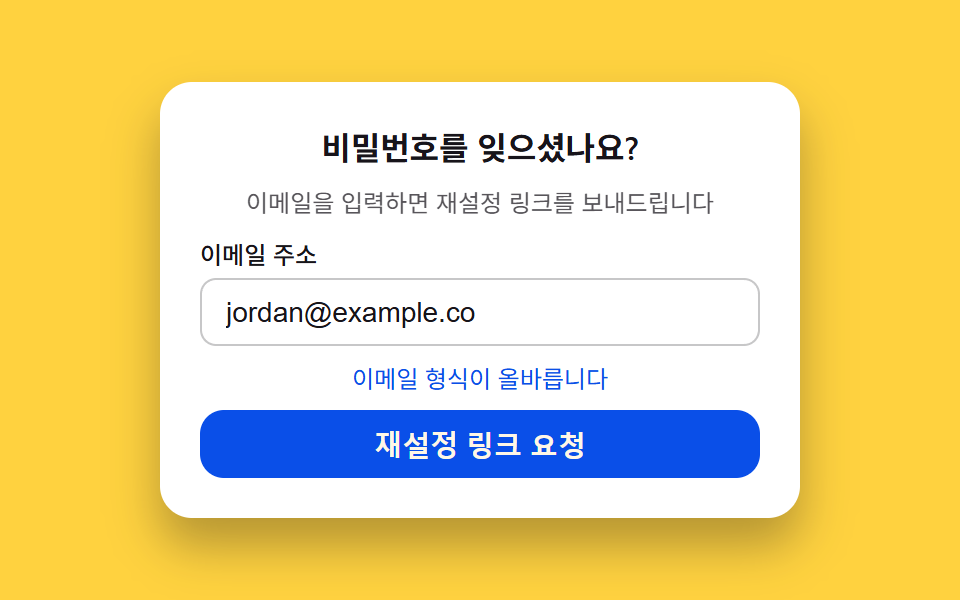
입력된 이메일의 글자 구성과 골뱅이·도메인 포함 여부를 검사해 유효성 점수를 직접 계산하고, 점수에 따라 요청 버튼의 활성화 여부와 안내 문구 색을 함께 정하는 비밀번호 재설정 요청 폼입니다.
쓰임비밀번호 찾기 폼, 계정 복구 첫 단계
aria-invalidaria-describedbyclassList
<main class="stage">
<section class="card">
  <p class="title">비밀번호를 잊으셨나요?</p>
  <p class="desc">이메일을 입력하면 재설정 링크를 보내드립니다</p>
  <div class="field">
    <label class="label" for="resetEmail">이메일 주소</label>
    <input class="input" type="email" id="resetEmail" autocomplete="email" aria-describedby="resetHint" aria-invalid="true" value="">
  </div>
  <p class="hint isNeutral" id="resetHint">이메일 형식을 입력해 주세요</p>
  <button class="submit" type="button" id="resetSubmit" disabled aria-disabled="true">재설정 링크 요청</button>
</section>
</main>
@use "../../../../site/static/demo-tokens" as *;
$duration: $dur-loop;
$easing: $ease-out;
$color: $subject-blue-deep;
@include stage($stage-yellow);
.card {
width: 100%;
max-width: 320px;
display: flex;
flex-direction: column;
align-items: stretch;
gap: $sp-2;
padding: $sp-5;
border-radius: $r-card;
background: $stage-paper;
box-shadow: $shadow-raised;
box-sizing: border-box;
}
.title {
margin: 0;
color: $subject-ink;
font-weight: 600;
font-size: 16px;
text-align: center;
}
.desc {
margin: 0;
color: $subject-ink;
opacity: .72;
font-weight: 400;
font-size: 12px;
line-height: 1.4;
text-align: center;
}
.field {
display: flex;
flex-direction: column;
gap: $sp-1;
}
.label {
color: $subject-ink;
font-weight: 500;
font-size: 12px;
}
.input {
padding: $sp-2 $sp-3;
border-radius: $r-sm;
border: 1px solid rgba($subject-ink, .24);
background: $stage-paper;
color: $subject-ink;
font-weight: 400;
font-size: 14px;
}
.hint {
margin: 0;
font-weight: 400;
font-size: 12px;
line-height: 1.4;
text-align: center;
}
.hint.isError { color: $error; }
.hint.isNeutral { color: $subject-ink; opacity: .72; }
.hint.isValid { color: $color; }
.submit {
padding: $sp-2 $sp-4;
border: 0;
border-radius: $r-control;
background: $color;
color: $subject-cream;
font-weight: 600;
font-size: 14px;
cursor: pointer;
}
.submit:disabled {
opacity: .55;
cursor: not-allowed;
}
@media (max-width: 340px) {
.card { max-width: 260px; padding: $sp-3; gap: $sp-1; }
.title { font-size: 13px; }
.desc { font-size: 10px; }
.label { font-size: 10px; }
.input { padding: $sp-1 $sp-2; font-size: 12px; }
.hint { font-size: 10px; }
.submit { padding: $sp-1 $sp-3; font-size: 12px; }
}
@media (prefers-reduced-motion: reduce) {
.submit { transition: none; }
}html, body {
margin: 0;
overflow: hidden;
}
.stage {
box-sizing: border-box;
min-height: 100vh;
display: grid;
place-items: center;
margin: 0;
background: #ffd23f;
font-family: -apple-system, "Segoe UI", "Noto Sans KR", sans-serif;
padding: clamp(8px, 4vw, 24px);
}
.card {
width: 100%;
max-width: 320px;
display: flex;
flex-direction: column;
align-items: stretch;
gap: 8px;
padding: 20px;
border-radius: 16px;
background: #ffffff;
box-shadow: 0 14px 24px rgba(23, 20, 26, 0.32);
box-sizing: border-box;
}
.title {
margin: 0;
color: #17141a;
font-weight: 600;
font-size: 16px;
text-align: center;
}
.desc {
margin: 0;
color: #17141a;
opacity: 0.72;
font-weight: 400;
font-size: 12px;
line-height: 1.4;
text-align: center;
}
.field {
display: flex;
flex-direction: column;
gap: 4px;
}
.label {
color: #17141a;
font-weight: 500;
font-size: 12px;
}
.input {
padding: 8px 12px;
border-radius: 8px;
border: 1px solid rgba(23, 20, 26, 0.24);
background: #ffffff;
color: #17141a;
font-weight: 400;
font-size: 14px;
}
.hint {
margin: 0;
font-weight: 400;
font-size: 12px;
line-height: 1.4;
text-align: center;
}
.hint.isError {
color: #c2361a;
}
.hint.isNeutral {
color: #17141a;
opacity: 0.72;
}
.hint.isValid {
color: #0a4fe8;
}
.submit {
padding: 8px 16px;
border: 0;
border-radius: 12px;
background: #0a4fe8;
color: #fff7e6;
font-weight: 600;
font-size: 14px;
cursor: pointer;
}
.submit:disabled {
opacity: 0.55;
cursor: not-allowed;
}
@media (max-width: 340px) {
.card {
max-width: 260px;
padding: 12px;
gap: 4px;
}
.title {
font-size: 13px;
}
.desc {
font-size: 10px;
}
.label {
font-size: 10px;
}
.input {
padding: 4px 8px;
font-size: 12px;
}
.hint {
font-size: 10px;
}
.submit {
padding: 4px 12px;
font-size: 12px;
}
}
@media (prefers-reduced-motion: reduce) {
.submit {
transition: none;
}
}// 비밀번호 재설정 요청(06) — 입력된 이메일의 글자 구성과 골뱅이·도메인 포함 여부를 매 프레임
// 다시 검사해 유효성 점수를 직접 계산하고, 그 점수로 요청 버튼의 활성화 여부와 힌트 색을 정한다.
// 이메일은 example.com 가상 주소가 타이핑되는 모습을 흉내낸 것이며 실제로 전송되지 않는다.
(function () {
var input = document.getElementById('resetEmail');
var hint = document.getElementById('resetHint');
var submit = document.getElementById('resetSubmit');
if (!input || !hint || !submit) return;
var reduce = window.matchMedia('(prefers-reduced-motion: reduce)').matches;
var SAMPLE = '[email protected]';
var TYPE_MS = 90;
var SCORE_THRESHOLD = .9;
var CYCLE_MS = 2000;
function currentText(t) {
var n = Math.min(Math.max(Math.floor(t / TYPE_MS), 0), SAMPLE.length);
return SAMPLE.slice(0, n);
}
function score(text) {
var domain = text.split('@')[1] || '';
var s = 0;
if (text.indexOf('@') !== -1) s += .4;
if (/\.[a-z]{2,}$/i.test(domain)) s += .4;
s += Math.min(text.length / 12, 1) * .2;
return s;
}
function apply(t) {
var text = currentText(t);
var sc = score(text);
var invalid = sc < SCORE_THRESHOLD;
input.value = text;
input.setAttribute('aria-invalid', String(invalid));
submit.disabled = invalid;
submit.setAttribute('aria-disabled', String(invalid));
hint.classList.remove('isError', 'isNeutral', 'isValid');
if (sc < .4) {
hint.classList.add('isError');
hint.textContent = '이메일 형식을 확인해 주세요';
} else if (sc < SCORE_THRESHOLD) {
hint.classList.add('isNeutral');
hint.textContent = '이메일 주소를 마저 입력해 주세요';
} else {
hint.classList.add('isValid');
hint.textContent = '이메일 형식이 올바릅니다';
}
}
var start = null;
function frame(ts) {
if (start === null) start = ts;
var t = (ts - start) % CYCLE_MS;
apply(t);
requestAnimationFrame(frame);
}
if (reduce) {
apply(0);
} else {
requestAnimationFrame(frame);
}
})();import { useEffect, useRef } from "react";
import styles from "./PasswordResetRequest.module.scss";
// 비밀번호 재설정 요청(06) — 입력된 이메일의 글자 구성과 골뱅이·도메인 포함 여부를 매 프레임
// 다시 검사해 유효성 점수를 직접 계산하고, 그 점수로 요청 버튼의 활성화 여부와 힌트 색을 정한다.
// 이메일은 example.com 가상 주소가 타이핑되는 모습을 흉내낸 것이며 실제로 전송되지 않는다.
const SAMPLE = "[email protected]";
const TYPE_MS = 90;
const SCORE_THRESHOLD = 0.9;
const CYCLE_MS = 2000;
function currentText(t: number): string {
const n = Math.min(Math.max(Math.floor(t / TYPE_MS), 0), SAMPLE.length);
return SAMPLE.slice(0, n);
}
function score(text: string): number {
const domain = text.split("@")[1] || "";
let s = 0;
if (text.indexOf("@") !== -1) s += 0.4;
if (/\.[a-z]{2,}$/i.test(domain)) s += 0.4;
s += Math.min(text.length / 12, 1) * 0.2;
return s;
}
export default function PasswordResetRequest() {
const inputRef = useRef<HTMLInputElement>(null);
const hintRef = useRef<HTMLParagraphElement>(null);
const submitRef = useRef<HTMLButtonElement>(null);
useEffect(() => {
const input = inputRef.current;
const hint = hintRef.current;
const submit = submitRef.current;
if (!input || !hint || !submit) return;
const reduce = window.matchMedia("(prefers-reduced-motion: reduce)").matches;
function apply(t: number) {
const text = currentText(t);
const sc = score(text);
const invalid = sc < SCORE_THRESHOLD;
if (input) {
input.value = text;
input.setAttribute("aria-invalid", String(invalid));
}
if (submit) {
submit.disabled = invalid;
submit.setAttribute("aria-disabled", String(invalid));
}
if (hint) {
hint.classList.remove(styles.isError, styles.isNeutral, styles.isValid);
if (sc < 0.4) {
hint.classList.add(styles.isError);
hint.textContent = "이메일 형식을 확인해 주세요";
} else if (sc < SCORE_THRESHOLD) {
hint.classList.add(styles.isNeutral);
hint.textContent = "이메일 주소를 마저 입력해 주세요";
} else {
hint.classList.add(styles.isValid);
hint.textContent = "이메일 형식이 올바릅니다";
}
}
}
let start: number | null = null;
let raf = 0;
function frame(ts: number) {
if (start === null) start = ts;
const t = (ts - start) % CYCLE_MS;
apply(t);
raf = requestAnimationFrame(frame);
}
if (reduce) {
apply(0);
} else {
raf = requestAnimationFrame(frame);
}
return () => {
if (raf) cancelAnimationFrame(raf);
};
}, []);
return (
<main className={styles.stage}>
<section className={styles.card}>
<p className={styles.title}>비밀번호를 잊으셨나요?</p>
<p className={styles.desc}>이메일을 입력하면 재설정 링크를 보내드립니다</p>
<div className={styles.field}>
<label className={styles.label} htmlFor="resetEmail">
이메일 주소
</label>
<input
ref={inputRef}
className={styles.input}
type="email"
id="resetEmail"
autoComplete="email"
aria-describedby="resetHint"
aria-invalid="true"
defaultValue=""
/>
</div>
<p ref={hintRef} className={styles.hint + " " + styles.isNeutral} id="resetHint">
이메일 형식을 입력해 주세요
</p>
<button ref={submitRef} className={styles.submit} type="button" disabled aria-disabled="true">
재설정 링크 요청
</button>
</section>
</main>
);
}06 비밀번호 재설정 요청 — 이메일 형식 점수를 계산해 버튼 상태를 정하는 폼 — 측정 누적면적 7.964% · 움직인 프레임 20/23GODRICH 원작 · zip 에 SCSS·React 포함 · 로그인 UI 디자인 9종 — 회원가입부터 세션 만료까지
이 데모가 속한 글
 로그인 UI 디자인 9종 — 회원가입부터 세션 만료까지입력 완성도로 진행 표시가 다시 채워지고, 남은 유효시간이 매초 다시 구해져 링 각도로 바뀌고, 스크롤 진행률이 특정 지점을 넘어야 동의 칸이 열리는 로그인·회원가입 UI 9종입니다. 로그인 UI 디자인을 계산 한 이 글의 데모 전부 보기