로그인 UI 디자인 9종 — 회원가입부터 세션 만료까지
입력 완성도로 진행 표시가 다시 채워지고, 남은 유효시간이 매초 다시 구해져 링 각도로 바뀌고, 스크롤 진행률이 특정 지점을 넘어야 동의 칸이 열리는 로그인·회원가입 UI 9종입니다.
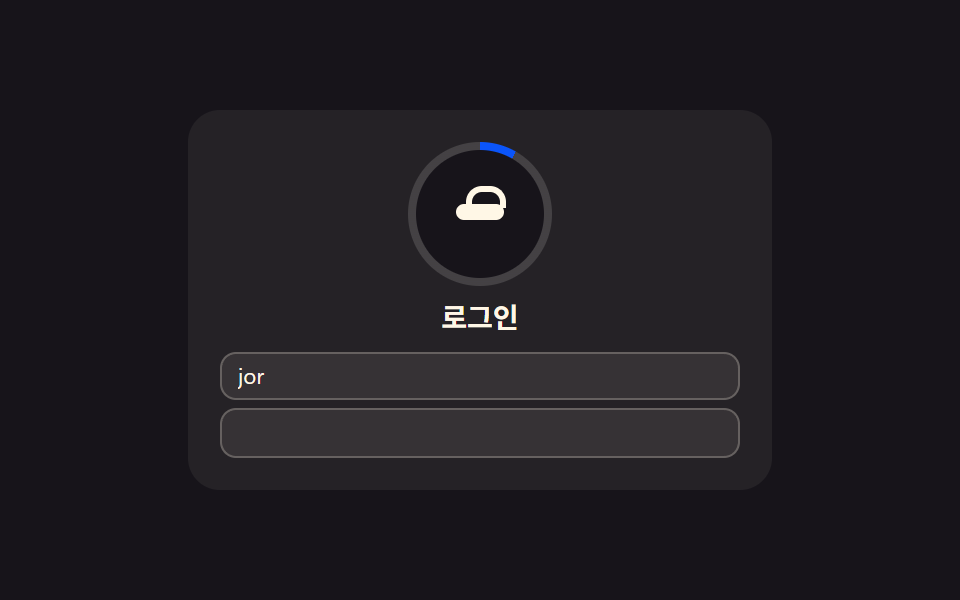 01 login-card
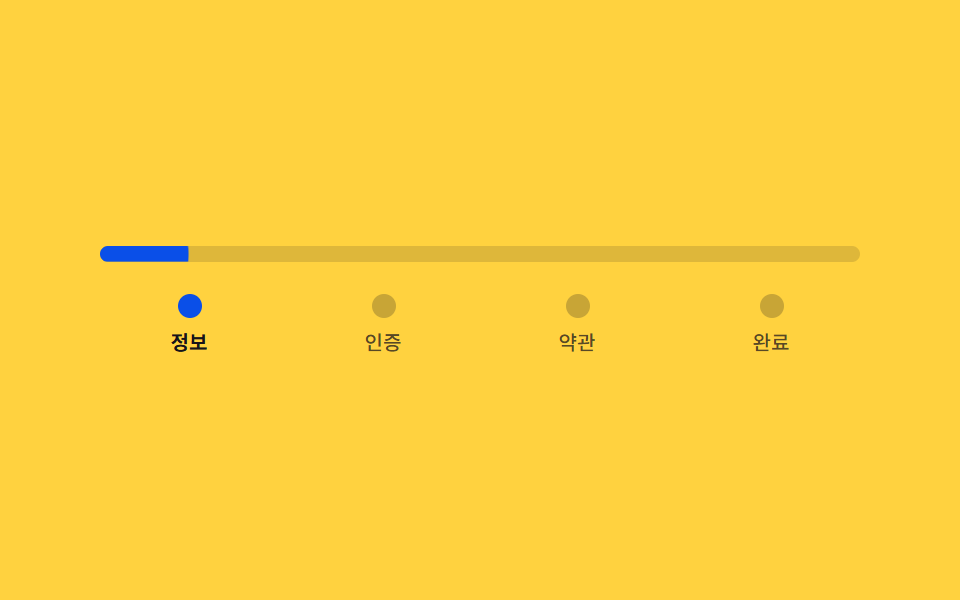 02 signup-steps
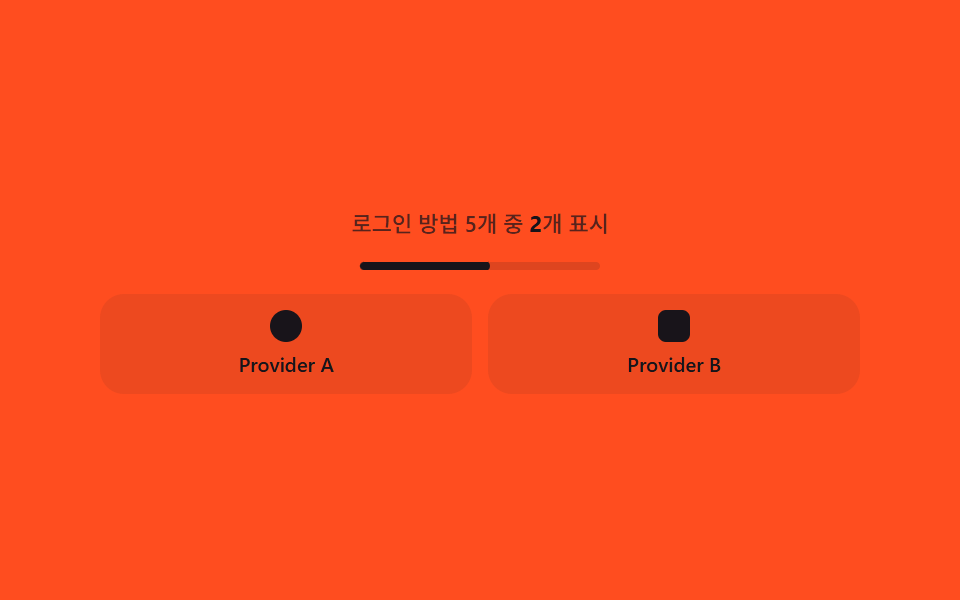 03 social-login
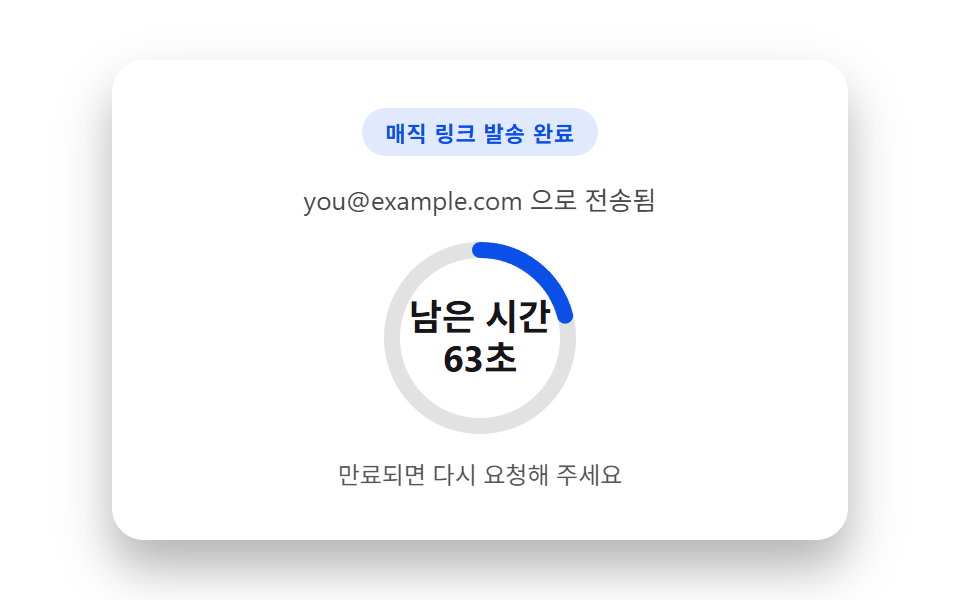 04 magic-link
 05 two-factor
 06 password-reset-request
 07 session-expired
 08 captcha-slot
 09 consent-checkbox
자동 재생 · 눌러서 해당 항목으로 · 전부 한 zip
- 01 로그인 카드 — 입력 완성도를 계산해 진행 표시를 채우는 카드
- 02 회원가입 단계 — 진행률을 직접 나눠 구해 막대 길이와 색을 정하는 단계형 폼
- 03 소셜 로그인 — 버튼 개수로 열 수를 다시 구해 항상 고르게 배분하는 묶음
- 04 매직 링크 — 남은 유효시간을 다시 구해 링의 호 길이로 보여주는 발송 완료 카드
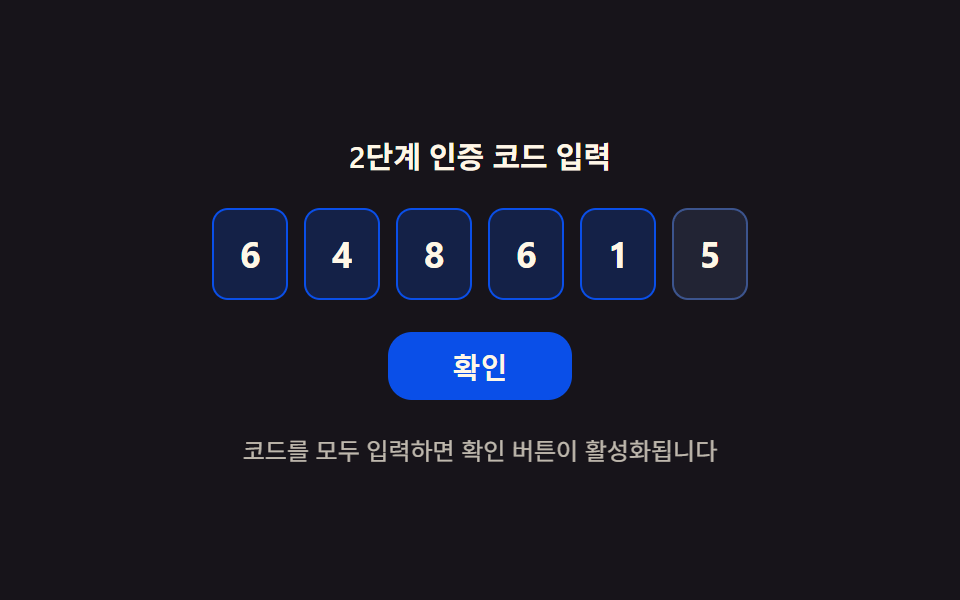
- 05 2단계 인증 — 채운 자리수 비율로 확인 버튼 상태를 정하는 코드 입력
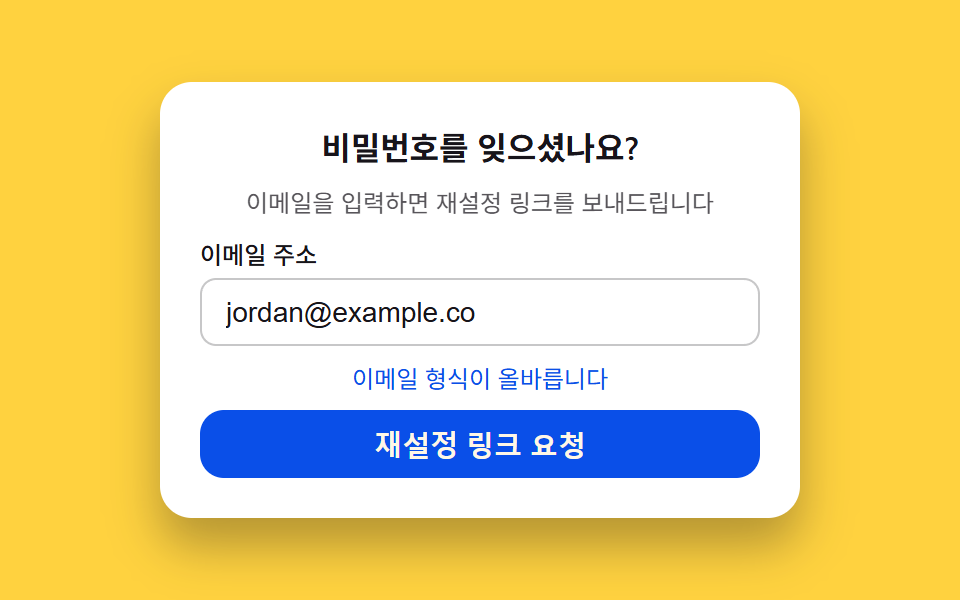
- 06 비밀번호 재설정 요청 — 이메일 형식 점수를 계산해 버튼 상태를 정하는 폼
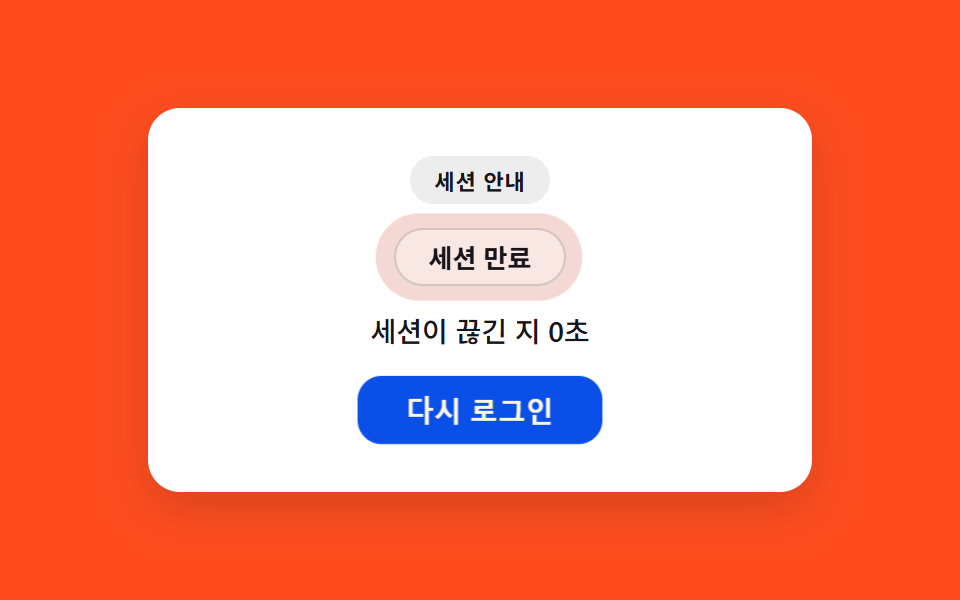
- 07 세션 만료 — 끊긴 뒤 흐른 시간으로 강조 농도를 다시 구하는 알림
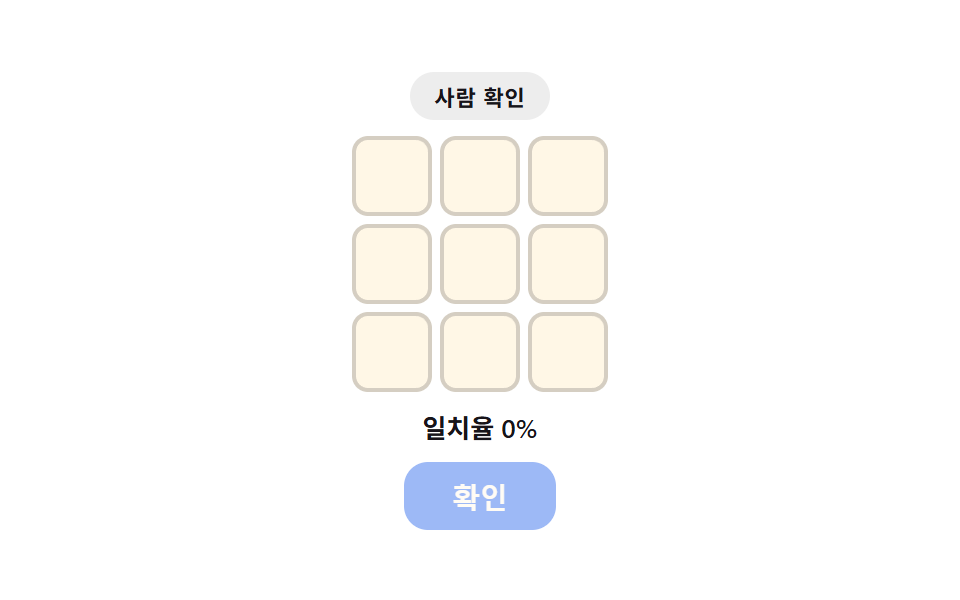
- 08 캡차 위젯 — 선택 일치율을 직접 구해 테두리 색과 버튼 상태를 정하는 자리
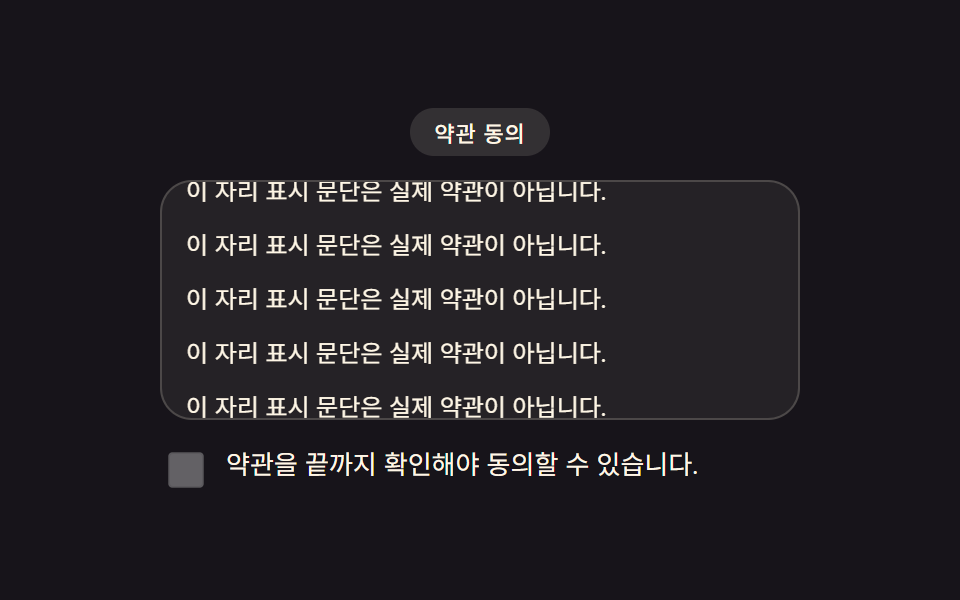
- 09 동의 체크박스 — 약관 스크롤 진행률을 재서 활성 시점을 정하는 UI
데모
아홉 화면은 이메일·비밀번호·인증 코드처럼 사람이 채워 넣는 값 대신, 그 값이 채워진 정도·흐른 시간·스크롤한 비율 같은 상태 하나를 계산해 화면을 바꿉니다. 09 동의 체크박스만 실제 스크롤에 반응하고, 나머지 여덟 개는 정해진 시나리오가 rAF 로 자동 재생되며 값이 바뀌는 과정을 반복해서 보여줍니다. 실키·실 서버 검증·실제 메일 발송은 어디에도 없고 전부 화면 안에서 끝나는 시뮬레이션입니다. 화면 크기는 480×300 으로 고정해 24장을 찍고, 그 장 사이 간격 23개를 실제 움직임의 기준으로 삼습니다.
실측 한눈에
| 항목 | 초점 | 누적면적(%) | 강도평균 | 움직인프레임(23 기준) |
|---|---|---|---|---|
| 01 로그인 카드 | 입력 완성도로 진행 표시 재계산 | 0.824 | 155.2 | 19 |
| 02 회원가입 단계 | 단계 진행률로 막대 길이 재계산 | 2.294 | 177.4 | 23 |
| 03 소셜 로그인 | 버튼 개수로 열 수 재계산 | 23.165 | 161.0 | 23 |
| 04 매직 링크 | 잔여시간으로 링 호 길이 재계산 | 2.65 | 153.0 | 23 |
| 05 2단계 인증 | 채운 자리수 비율로 버튼 상태 재계산 | 9.225 | 49.4 | 22 |
| 06 비밀번호 재설정 요청 | 이메일 점수로 버튼·색 재계산 | 7.964 | 159.4 | 20 |
| 07 세션 만료 | 경과 시간으로 강조 농도 재계산 | 4.845 | 31.8 | 23 |
| 08 캡차 위젯 | 선택 일치율로 테두리·버튼 재계산 | 4.765 | 71.6 | 7 |
| 09 동의 체크박스 | 스크롤 진행률로 활성 시점 재계산 | 15.528 | 144.1 | 23 |
면적이 작아도 계산이 쉬는 건 아니다
01 로그인 카드(0.824%)·02 회원가입 단계(2.294%)·04 매직 링크(2.65%)는 입력 칸 테두리·진행 막대·도넛 링처럼 원래 차지하는 면적이 작은 요소라 누적면적이 낮게 나오는 게 자연스러운 결과입니다. 08 캡차 위젯은 움직인프레임이 7로 다른 항목보다 적은데, 이는 결함이 아니라 자리 선택이 정해진 간격마다 한 번씩 일어나고 그 사이에는 값을 그대로 유지하는 시나리오 자체의 정지 구간입니다.
로그인·회원가입 UI 의 해부 — 아홉 화면이 계산하는 것
로그인·회원가입 화면은 흔히 칸이 채워졌는지, 몇 단계가 남았는지, 언제 만료되는지를 정적인 문구로 박아 두지만, 이 아홉 화면은 그 값 하나를 계산해 표시나 상태를 다시 정합니다. 클래스를 열고 닫는 전환이 아니라 완성 비율·잔여시간·일치율처럼 숫자를 다시 구하는 계산이 매번 화면을 채웁니다.
자동재생과 실사용자 반응이 갈리는 지점
01부터 08까지는 rAF 루프나 고정 시각을 기준으로 값이 저절로 흘러가는 시뮬레이션이고, 실제 스크롤에 반응해 값을 다시 재는 쪽은 09 동의 체크박스 하나뿐입니다. 09를 뺀 나머지 여덟 화면은 이메일을 입력하거나 코드를 채우는 실제 조작 대신, 미리 정한 시나리오가 그 과정을 그대로 재현합니다.
아홉 화면이 각자 구하는 값
01은 이메일·비밀번호 칸이 채워진 개수로 완성 비율을 구하고, 02는 현재 단계를 전체 단계로 나눠 진행률을 구하며, 03은 버튼 개수로 한 줄에 놓을 열 수를 다시 구합니다. 04는 남은 유효시간을 매초 다시 구해 링의 호 길이로 바꾸고, 05는 채운 자리수 비율로 확인 버튼 상태를 정하며, 06은 이메일 구성을 검사해 유효성 점수를 구합니다. 07은 세션이 끊긴 뒤 흐른 시간으로 강조 농도를 다시 구하고, 08은 선택 칸과 정답 칸의 일치율을 구하며, 09는 약관을 스크롤한 진행률로 읽음 판정 지점을 계산합니다.
아홉 화면이 공유하는 조건
아홉 화면 모두 지금까지 쌓인 흔적(채워진 글자 수·지난 단계·흐른 시간·스크롤한 거리) 하나를 입력으로 받아 그 값을 계산에 그대로 되먹인다는 점이 같습니다. 01·05·08은 채움·선택 개수를 세는 쪽이고, 04·07은 시간이 흐른 만큼 값을 다시 구하는 쪽이며, 03·09는 화면에 있는 요소의 실제 렌더 값(개수·스크롤 위치)을 재는 쪽입니다.
화면별 코드
아홉 화면 각각에서 계산 부분만 골라 담았고, 전체 마크업과 스타일시트는 압축 파일 안에 들어 있습니다.
01로그인 카드 — 입력 완성도를 계산해 진행 표시를 채우는 카드
웹 서비스 로그인 화면이나 앱 로그인 모달 같은 모바일 로그인 ui 에서, 이메일과 비밀번호 칸이 채워진 완성도를 눈으로 보여주고 싶을 때 쓰는 형태입니다.
채운 글자 수를 세어 완성 비율을 다시 구하는 계산
이메일·비밀번호 칸이 채워진 글자 수를 세어 전체 길이 대비 비율을 구하고, 그 비율을 카드 테두리의 conic-gradient 진행 표시에 그대로 반영합니다.
  function frameFor(t) {
    var emailChars = Math.min(Math.max(Math.floor(t / TYPE_MS), 0), EMAIL_LEN);
    var pwStart = EMAIL_LEN * TYPE_MS;
    var pwChars = t > pwStart
      ? Math.min(Math.max(Math.floor((t - pwStart) / TYPE_MS), 0), SAMPLE_PW_LEN)
      : 0;
    return { emailChars: emailChars, pwChars: pwChars };
  }

  function apply(t) {
    var f = frameFor(t);
    emailEl.value = SAMPLE_EMAIL.slice(0, f.emailChars);
    pwEl.value = PW_DOTS.slice(0, f.pwChars);
    var ratio = ((f.emailChars / EMAIL_LEN) + (f.pwChars / SAMPLE_PW_LEN)) / 2;
    ring.style.setProperty('--ratio', ratio.toFixed(4));
  }
<main class="stage">
<section class="card" id="card">
  <div class="ring" id="ring">
    <div class="ringHole"></div>
    <div class="avatar" aria-hidden="true">
      <span class="lockBody"></span>
      <span class="lockShackle"></span>
    </div>
  </div>
  <h2 class="title">로그인</h2>
  <div class="fields">
    <label class="srOnly" for="loginEmail">이메일</label>
    <input class="field" type="email" id="loginEmail" name="loginEmail" autocomplete="email" readonly value="" placeholder="[email protected]">
    <label class="srOnly" for="loginPw">비밀번호</label>
    <input class="field" type="password" id="loginPw" name="loginPw" autocomplete="current-password" readonly value="">
  </div>
</section>
</main>
@use "../../../../site/static/demo-tokens" as *;
$duration: $dur-loop;
$easing: $ease-out;
$color: $subject-blue-deep;
@include stage($stage-ink);
.card {
position: relative;
width: 100%;
max-width: 260px;
display: flex;
flex-direction: column;
align-items: center;
gap: $sp-2;
padding: $sp-4;
border-radius: $r-card;
background: rgba($subject-cream, .06);
}
.ring {
--ratio: 0;
position: relative;
width: 72px;
height: 72px;
border-radius: $r-pill;
display: grid;
place-items: center;
}
.ring::before {
content: "";
position: absolute;
inset: 0;
border-radius: $r-pill;
background: conic-gradient($color calc(var(--ratio, 0) * 360deg), rgba($subject-cream, .14) 0);
animation: halo $duration $easing infinite;
}
.ringHole {
position: absolute;
inset: $sp-1;
border-radius: $r-pill;
background: $stage-ink;
}
.avatar {
position: relative;
z-index: 1;
width: 24px;
height: 18px;
}
.lockBody {
position: absolute;
left: 0;
top: $sp-1;
width: 24px;
height: $sp-2;
border-radius: $r-xs;
background: $subject-cream;
}
.lockShackle {
position: absolute;
left: calc(50% - 7px);
top: -5px;
width: 14px;
height: $sp-2;
border: 3px solid $subject-cream;
border-bottom: none;
border-radius: $r-sm $r-sm 0 0;
}
.title {
margin: 0;
color: $subject-cream;
font-family: -apple-system, "Segoe UI", "Noto Sans KR", sans-serif;
font-weight: 700;
font-size: 14px;
line-height: 1.2;
}
.fields {
width: 100%;
display: flex;
flex-direction: column;
gap: $sp-1;
}
// 시각적으로 숨기되 스크린리더·label-input 연결은 유지 (BD9 세로 높이 예산 확보)
.srOnly {
position: absolute;
width: 1px;
height: 1px;
margin: -1px;
padding: 0;
overflow: hidden;
clip: rect(0, 0, 0, 0);
white-space: nowrap;
border: 0;
}
.field {
width: 100%;
box-sizing: border-box;
padding: $sp-1 $sp-2;
border-radius: $r-sm;
border: 1px solid rgba($subject-cream, .24);
background: rgba($subject-cream, .08);
color: $subject-cream;
font-family: -apple-system, "Segoe UI", "Noto Sans KR", sans-serif;
font-weight: 400;
font-size: 11px;
line-height: 1.3;
}
.field::placeholder {
color: rgba($subject-cream, .72);
}
@keyframes halo {
0%, 100% { filter: brightness(1); }
50% { filter: brightness(1.16); }
}
@media (max-width: 340px) {
.card { max-width: 200px; padding: $sp-2; gap: $sp-1; }
.ring { width: 56px; height: 56px; }
.ringHole { inset: $sp-1; }
.avatar { width: 20px; height: 15px; }
.lockBody { width: 20px; }
.title { font-size: 12px; }
.field { font-size: 10px; padding: $sp-1; }
}
@media (prefers-reduced-motion: reduce) {
.ring::before { animation: none; }
}html, body {
margin: 0;
overflow: hidden;
}
.stage {
box-sizing: border-box;
min-height: 100vh;
display: grid;
place-items: center;
margin: 0;
background: #17141a;
font-family: -apple-system, "Segoe UI", "Noto Sans KR", sans-serif;
padding: clamp(8px, 4vw, 24px);
}
.card {
position: relative;
width: 100%;
max-width: 260px;
display: flex;
flex-direction: column;
align-items: center;
gap: 8px;
padding: 16px;
border-radius: 16px;
background: rgba(255, 247, 230, 0.06);
}
.ring {
--ratio: 0;
position: relative;
width: 72px;
height: 72px;
border-radius: 999px;
display: grid;
place-items: center;
}
.ring::before {
content: "";
position: absolute;
inset: 0;
border-radius: 999px;
background: conic-gradient(#0a4fe8 calc(var(--ratio, 0) * 360deg), rgba(255, 247, 230, 0.14) 0);
animation: halo 2s ease-out infinite;
}
.ringHole {
position: absolute;
inset: 4px;
border-radius: 999px;
background: #17141a;
}
.avatar {
position: relative;
z-index: 1;
width: 24px;
height: 18px;
}
.lockBody {
position: absolute;
left: 0;
top: 4px;
width: 24px;
height: 8px;
border-radius: 4px;
background: #fff7e6;
}
.lockShackle {
position: absolute;
left: calc(50% - 7px);
top: -5px;
width: 14px;
height: 8px;
border: 3px solid #fff7e6;
border-bottom: none;
border-radius: 8px 8px 0 0;
}
.title {
margin: 0;
color: #fff7e6;
font-family: -apple-system, "Segoe UI", "Noto Sans KR", sans-serif;
font-weight: 700;
font-size: 14px;
line-height: 1.2;
}
.fields {
width: 100%;
display: flex;
flex-direction: column;
gap: 4px;
}
.srOnly {
position: absolute;
width: 1px;
height: 1px;
margin: -1px;
padding: 0;
overflow: hidden;
clip: rect(0, 0, 0, 0);
white-space: nowrap;
border: 0;
}
.field {
width: 100%;
box-sizing: border-box;
padding: 4px 8px;
border-radius: 8px;
border: 1px solid rgba(255, 247, 230, 0.24);
background: rgba(255, 247, 230, 0.08);
color: #fff7e6;
font-family: -apple-system, "Segoe UI", "Noto Sans KR", sans-serif;
font-weight: 400;
font-size: 11px;
line-height: 1.3;
}
.field::placeholder {
color: rgba(255, 247, 230, 0.72);
}
@keyframes halo {
0%, 100% {
filter: brightness(1);
}
50% {
filter: brightness(1.16);
}
}
@media (max-width: 340px) {
.card {
max-width: 200px;
padding: 8px;
gap: 4px;
}
.ring {
width: 56px;
height: 56px;
}
.ringHole {
inset: 4px;
}
.avatar {
width: 20px;
height: 15px;
}
.lockBody {
width: 20px;
}
.title {
font-size: 12px;
}
.field {
font-size: 10px;
padding: 4px;
}
}
@media (prefers-reduced-motion: reduce) {
.ring::before {
animation: none;
}
}// 로그인 카드(01) — 가짜 이메일·비밀번호를 시드 없이 고정 시나리오로 자동 타이핑하고,
// 채운 비율(이메일 진행 + 비밀번호 진행의 평균)을 매 프레임 카드 진행 링(conic-gradient)에 반영한다.
// 실키·실서버 요청 없음 — 전부 클라이언트 시뮬레이션.
(function () {
var card = document.getElementById('card');
var ring = document.getElementById('ring');
var emailEl = document.getElementById('loginEmail');
var pwEl = document.getElementById('loginPw');
if (!card || !ring || !emailEl || !pwEl) return;
var reduce = window.matchMedia('(prefers-reduced-motion: reduce)').matches;
var SAMPLE_EMAIL = '[email protected]';
var EMAIL_LEN = SAMPLE_EMAIL.length;
var SAMPLE_PW_LEN = 10;
var PW_DOTS = '••••••••••';
var TYPE_MS = 70;
var CYCLE_MS = 2000;
function frameFor(t) {
var emailChars = Math.min(Math.max(Math.floor(t / TYPE_MS), 0), EMAIL_LEN);
var pwStart = EMAIL_LEN * TYPE_MS;
var pwChars = t > pwStart
? Math.min(Math.max(Math.floor((t - pwStart) / TYPE_MS), 0), SAMPLE_PW_LEN)
: 0;
return { emailChars: emailChars, pwChars: pwChars };
}
function apply(t) {
var f = frameFor(t);
emailEl.value = SAMPLE_EMAIL.slice(0, f.emailChars);
pwEl.value = PW_DOTS.slice(0, f.pwChars);
var ratio = ((f.emailChars / EMAIL_LEN) + (f.pwChars / SAMPLE_PW_LEN)) / 2;
ring.style.setProperty('--ratio', ratio.toFixed(4));
}
if (reduce) {
apply(CYCLE_MS);
return;
}
var start = null;
function loop(ts) {
if (start === null) start = ts;
var t = (ts - start) % CYCLE_MS;
apply(t);
requestAnimationFrame(loop);
}
requestAnimationFrame(loop);
})();import { useEffect, useRef } from "react";
import styles from "./LoginCard.module.scss";
// 로그인 카드 — 가짜 이메일·비밀번호를 고정 시나리오로 자동 타이핑하고
// 채운 비율을 카드 진행 링(conic-gradient)에 반영한다. 실키·실서버 요청 없음.
const SAMPLE_EMAIL = "[email protected]";
const EMAIL_LEN = SAMPLE_EMAIL.length;
const SAMPLE_PW_LEN = 10;
const PW_DOTS = "••••••••••";
const TYPE_MS = 70;
const CYCLE_MS = 2000;
export default function LoginCard() {
const ringRef = useRef<HTMLDivElement>(null);
const emailRef = useRef<HTMLInputElement>(null);
const pwRef = useRef<HTMLInputElement>(null);
useEffect(() => {
const ring = ringRef.current;
const emailEl = emailRef.current;
const pwEl = pwRef.current;
if (!ring || !emailEl || !pwEl) return;
const reduce = window.matchMedia("(prefers-reduced-motion: reduce)").matches;
function frameFor(t: number) {
const emailChars = Math.min(Math.max(Math.floor(t / TYPE_MS), 0), EMAIL_LEN);
const pwStart = EMAIL_LEN * TYPE_MS;
const pwChars = t > pwStart
? Math.min(Math.max(Math.floor((t - pwStart) / TYPE_MS), 0), SAMPLE_PW_LEN)
: 0;
return { emailChars, pwChars };
}
function apply(t: number) {
const f = frameFor(t);
emailEl!.value = SAMPLE_EMAIL.slice(0, f.emailChars);
pwEl!.value = PW_DOTS.slice(0, f.pwChars);
const ratio = (f.emailChars / EMAIL_LEN + f.pwChars / SAMPLE_PW_LEN) / 2;
ring!.style.setProperty("--ratio", ratio.toFixed(4));
}
if (reduce) {
apply(CYCLE_MS);
return;
}
let start: number | null = null;
let raf = 0;
function loop(ts: number) {
if (start === null) start = ts;
const t = (ts - start) % CYCLE_MS;
apply(t);
raf = requestAnimationFrame(loop);
}
raf = requestAnimationFrame(loop);
return () => cancelAnimationFrame(raf);
}, []);
return (
<div className={styles.stage}>
<section className={styles.card}>
<div className={styles.ring} ref={ringRef}>
<div className={styles.ringHole} />
<div className={styles.avatar} aria-hidden="true">
<span className={styles.lockBody} />
<span className={styles.lockShackle} />
</div>
</div>
<h2 className={styles.title}>로그인</h2>
<div className={styles.fields}>
<label className={styles.srOnly} htmlFor="loginEmail">이메일</label>
<input
className={styles.field}
type="email"
id="loginEmail"
name="loginEmail"
autoComplete="email"
readOnly
defaultValue=""
placeholder="[email protected]"
ref={emailRef}
/>
<label className={styles.srOnly} htmlFor="loginPw">비밀번호</label>
<input
className={styles.field}
type="password"
id="loginPw"
name="loginPw"
autoComplete="current-password"
readOnly
defaultValue=""
ref={pwRef}
/>
</div>
</section>
</div>
);
}01 · 로그인 카드 — 입력 완성도를 계산해 진행 표시를 채우는 카드 — 측정 누적면적 0.824% · 움직인 프레임 19/23GODRICH 원작 · zip 에 SCSS·React 포함 · 비밀번호 보기
02회원가입 단계 — 진행률을 직접 나눠 구해 막대 길이와 색을 정하는 단계형 폼
여러 단계로 나뉜 회원가입 화면 디자인에서 지금 몇 번째 단계인지 막대 하나로 보여주는 형태입니다.
단계 경계와 단계 안 경과분을 함께 더하는 계산
현재 단계 번호를 전체 단계 수로 나눈 값에 그 단계 안에서 흐른 경과분을 더해, 막대가 정수 단계마다 뚝뚝 끊기지 않고 조금씩 자라도록 진행률을 다시 구합니다.
  function apply(t) {
    var tt = t % CYCLE_MS;
    var idx = Math.min(Math.max(Math.floor(tt / STEP_MS), 0), STEP_TOTAL - 1);
    var current = idx + 1;
    // 단계 경계는 정수(1~4)로 딱딱 끊어 aria·라벨에 반영하되, 막대 자체는 단계 안의 경과분(0~1)을
    // 더해 매 프레임 조금씩 자라게 한다 — 계산 한 겹(보간)으로 실제 회원가입 진행바처럼 부드럽다.
    var within = (tt % STEP_MS) / STEP_MS;
    var ratio = (idx + within) / STEP_TOTAL;
    track.style.setProperty('--ratio', ratio.toFixed(4));
    track.setAttribute('aria-valuenow', String(current));
    steps.forEach(function (el, i) {
      if (i === idx) {
        el.classList.add('is-active');
      } else {
        el.classList.remove('is-active');
      }
    });
  }
<main class="stage">
<section class="wrap" id="wrap">
  <div class="track" id="track" role="progressbar" aria-valuemin="1" aria-valuemax="4" aria-valuenow="1" aria-label="회원가입 진행 단계">
    <div class="bar" id="bar"></div>
  </div>
  <ol class="steps" id="steps">
    <li class="step is-active" id="step1"><span class="dot"></span><span class="label">정보</span></li>
    <li class="step" id="step2"><span class="dot"></span><span class="label">인증</span></li>
    <li class="step" id="step3"><span class="dot"></span><span class="label">약관</span></li>
    <li class="step" id="step4"><span class="dot"></span><span class="label">완료</span></li>
  </ol>
</section>
</main>
@use "../../../../site/static/demo-tokens" as *;
$duration: $dur-loop;
$easing: $ease-out;
$color: $subject-blue-deep;
@include stage($stage-yellow);
.wrap {
width: 100%;
max-width: 380px;
display: flex;
flex-direction: column;
align-items: stretch;
gap: $sp-4;
}
.track {
--ratio: .25;
position: relative;
width: 100%;
height: $sp-2;
border-radius: $r-pill;
background: rgba($subject-ink, .14);
overflow: hidden;
}
.bar {
position: absolute;
inset: 0;
border-radius: $r-pill;
background: $color;
transform: scaleX(var(--ratio, .25));
transform-origin: left;
animation: barGlow $duration $easing infinite;
}
.steps {
margin: 0;
padding: 0;
list-style: none;
display: flex;
justify-content: space-between;
gap: $sp-2;
}
.step {
display: flex;
flex-direction: column;
align-items: center;
gap: $sp-1;
flex: 1;
}
.dot {
width: $sp-3;
height: $sp-3;
border-radius: $r-pill;
background: rgba($subject-ink, .24);
}
.label {
color: rgba($subject-ink, .72);
font-family: -apple-system, "Segoe UI", "Noto Sans KR", sans-serif;
font-weight: 500;
font-size: 10px;
letter-spacing: .01em;
}
.step.is-active .dot {
background: $color;
}
.step.is-active .label {
color: $subject-ink;
font-weight: 700;
}
@keyframes barGlow {
0%, 100% { filter: brightness(1); }
50% { filter: brightness(1.14); }
}
@media (max-width: 340px) {
.wrap { max-width: 280px; gap: $sp-3; }
.label { font-size: 9px; }
.dot { width: $sp-2; height: $sp-2; }
}
@media (prefers-reduced-motion: reduce) {
.bar { animation: none; }
}html, body {
margin: 0;
overflow: hidden;
}
.stage {
box-sizing: border-box;
min-height: 100vh;
display: grid;
place-items: center;
margin: 0;
background: #ffd23f;
font-family: -apple-system, "Segoe UI", "Noto Sans KR", sans-serif;
padding: clamp(8px, 4vw, 24px);
}
.wrap {
width: 100%;
max-width: 380px;
display: flex;
flex-direction: column;
align-items: stretch;
gap: 16px;
}
.track {
--ratio: .25;
position: relative;
width: 100%;
height: 8px;
border-radius: 999px;
background: rgba(23, 20, 26, 0.14);
overflow: hidden;
}
.bar {
position: absolute;
inset: 0;
border-radius: 999px;
background: #0a4fe8;
transform: scaleX(var(--ratio, 0.25));
transform-origin: left;
animation: barGlow 2s ease-out infinite;
}
.steps {
margin: 0;
padding: 0;
list-style: none;
display: flex;
justify-content: space-between;
gap: 8px;
}
.step {
display: flex;
flex-direction: column;
align-items: center;
gap: 4px;
flex: 1;
}
.dot {
width: 12px;
height: 12px;
border-radius: 999px;
background: rgba(23, 20, 26, 0.24);
}
.label {
color: rgba(23, 20, 26, 0.72);
font-family: -apple-system, "Segoe UI", "Noto Sans KR", sans-serif;
font-weight: 500;
font-size: 10px;
letter-spacing: 0.01em;
}
.step.is-active .dot {
background: #0a4fe8;
}
.step.is-active .label {
color: #17141a;
font-weight: 700;
}
@keyframes barGlow {
0%, 100% {
filter: brightness(1);
}
50% {
filter: brightness(1.14);
}
}
@media (max-width: 340px) {
.wrap {
max-width: 280px;
gap: 12px;
}
.label {
font-size: 9px;
}
.dot {
width: 8px;
height: 8px;
}
}
@media (prefers-reduced-motion: reduce) {
.bar {
animation: none;
}
}// 회원가입 단계(02) — 4단계 진행률을 계산해 막대 길이(scaleX)로 표시한다.
// STEP_TOTAL*STEP_MS = 2000ms 로 캡처창과 정확히 일치시켜 4단계가 전부 보이게 한다.
(function () {
var track = document.getElementById('track');
var bar = document.getElementById('bar');
var stepIds = ['step1', 'step2', 'step3', 'step4'];
var steps = stepIds.map(function (id) { return document.getElementById(id); });
if (!track || !bar || steps.some(function (s) { return !s; })) return;
var reduce = window.matchMedia('(prefers-reduced-motion: reduce)').matches;
var STEP_TOTAL = 4;
var STEP_MS = 500;
var CYCLE_MS = STEP_TOTAL * STEP_MS;
function apply(t) {
var tt = t % CYCLE_MS;
var idx = Math.min(Math.max(Math.floor(tt / STEP_MS), 0), STEP_TOTAL - 1);
var current = idx + 1;
// 단계 경계는 정수(1~4)로 딱딱 끊어 aria·라벨에 반영하되, 막대 자체는 단계 안의 경과분(0~1)을
// 더해 매 프레임 조금씩 자라게 한다 — 계산 한 겹(보간)으로 실제 회원가입 진행바처럼 부드럽다.
var within = (tt % STEP_MS) / STEP_MS;
var ratio = (idx + within) / STEP_TOTAL;
track.style.setProperty('--ratio', ratio.toFixed(4));
track.setAttribute('aria-valuenow', String(current));
steps.forEach(function (el, i) {
if (i === idx) {
el.classList.add('is-active');
} else {
el.classList.remove('is-active');
}
});
}
if (reduce) {
apply(CYCLE_MS - 1);
return;
}
var start = null;
function loop(ts) {
if (start === null) start = ts;
apply(ts - start);
requestAnimationFrame(loop);
}
requestAnimationFrame(loop);
})();import { useEffect, useRef } from "react";
import styles from "./SignupSteps.module.scss";
// 회원가입 단계 — 4단계 진행률을 계산해 막대 길이(scaleX)로 표시한다.
// STEP_TOTAL*STEP_MS = 2000ms 로 캡처창과 정확히 일치시켜 4단계가 전부 보이게 한다.
const STEP_TOTAL = 4;
const STEP_MS = 500;
const CYCLE_MS = STEP_TOTAL * STEP_MS;
const STEP_LABELS = ["정보", "인증", "약관", "완료"];
export default function SignupSteps() {
const trackRef = useRef<HTMLDivElement>(null);
const stepRefs = [
useRef<HTMLLIElement>(null),
useRef<HTMLLIElement>(null),
useRef<HTMLLIElement>(null),
useRef<HTMLLIElement>(null),
];
useEffect(() => {
const track = trackRef.current;
const steps = stepRefs.map((r) => r.current);
if (!track || steps.some((s) => !s)) return;
const reduce = window.matchMedia("(prefers-reduced-motion: reduce)").matches;
function apply(t: number) {
const tt = t % CYCLE_MS;
const idx = Math.min(Math.max(Math.floor(tt / STEP_MS), 0), STEP_TOTAL - 1);
const current = idx + 1;
// 단계 경계는 정수(1~4)로 딱딱 끊어 aria·라벨에 반영하되, 막대 자체는 단계 안의
// 경과분(0~1)을 더해 매 프레임 조금씩 자라게 한다 — 계산 한 겹(보간).
const within = (tt % STEP_MS) / STEP_MS;
const ratio = (idx + within) / STEP_TOTAL;
track!.style.setProperty("--ratio", ratio.toFixed(4));
track!.setAttribute("aria-valuenow", String(current));
steps.forEach((el, i) => {
if (!el) return;
if (i === idx) {
el.classList.add(styles.isActive);
} else {
el.classList.remove(styles.isActive);
}
});
}
if (reduce) {
apply(CYCLE_MS - 1);
return;
}
let start: number | null = null;
let raf = 0;
function loop(ts: number) {
if (start === null) start = ts;
apply(ts - start);
raf = requestAnimationFrame(loop);
}
raf = requestAnimationFrame(loop);
return () => cancelAnimationFrame(raf);
}, []);
return (
<div className={styles.stage}>
<section className={styles.wrap}>
<div
className={styles.track}
ref={trackRef}
role="progressbar"
aria-valuemin={1}
aria-valuemax={4}
aria-valuenow={1}
aria-label="회원가입 진행 단계"
>
<div className={styles.bar} />
</div>
<ol className={styles.steps}>
{STEP_LABELS.map((label, i) => (
<li
className={`${styles.step} ${i === 0 ? styles.isActive : ""}`}
ref={stepRefs[i]}
key={label}
>
<span className={styles.dot} />
<span className={styles.label}>{label}</span>
</li>
))}
</ol>
</section>
</div>
);
}02 · 회원가입 단계 — 진행률을 직접 나눠 구해 막대 길이와 색을 정하는 단계형 폼 — 측정 누적면적 2.294% · 움직인 프레임 23/23GODRICH 원작 · zip 에 SCSS·React 포함 · 비밀번호 보기
03소셜 로그인 — 버튼 개수로 열 수를 다시 구해 항상 고르게 배분하는 묶음
가입 옵션이 늘었다 줄었다 하는 소셜 로그인 ui 영역에서 버튼 배치가 흐트러지지 않게 만드는 형태입니다.
버튼 개수로 열 수와 남은 구간을 다시 재는 계산
제공자 버튼 개수를 세어 한 줄에 놓을 열 수를 다시 구하고, 다음 개수 전환까지 남은 구간도 매 프레임 함께 계산해 그리드 재배치가 갑자기 튀지 않게 만듭니다.
  function colsFor(n) {
    return n <= 3 ? n : Math.ceil(n / 2);
  }

  function apply(t) {
    var tt = t % CYCLE_MS;
    var idx = Math.min(Math.max(Math.floor(tt / STEP_MS), 0), COUNTS.length - 1);
    var n = COUNTS[idx];
    var cols = colsFor(n);
    row.style.setProperty('--cols', String(cols));
    hintCount.textContent = String(n);
    btns.forEach(function (btn, i) {
      if (i < n) {
        btn.classList.remove('is-hidden');
      } else {
        btn.classList.add('is-hidden');
      }
    });
    // 다음 개수 전환까지 남은 구간을 매 프레임 다시 계산해 가는 줄(계산 한 겹) —
    // 그리드 재배치가 갑자기 튀지 않고 다음 변화가 다가옴을 예고한다.
    var within = (tt % STEP_MS) / STEP_MS;
    tickBar.style.setProperty('--within', within.toFixed(4));
  }
<main class="stage">
<section class="wrap" id="wrap">
  <p class="hint" id="hint">로그인 방법 5개 중 <span id="hintCount">2</span>개 표시</p>
  <div class="tick" id="tick" aria-hidden="true"><div class="tickBar" id="tickBar"></div></div>
  <div class="row" id="row" style="--cols:2">
    <button type="button" class="btn" id="btn0">
      <span class="icon iconCircle" aria-hidden="true"></span>
      <span class="label">Provider A</span>
    </button>
    <button type="button" class="btn" id="btn1">
      <span class="icon iconSquare" aria-hidden="true"></span>
      <span class="label">Provider B</span>
    </button>
    <button type="button" class="btn is-hidden" id="btn2">
      <span class="icon iconTriangle" aria-hidden="true"></span>
      <span class="label">Provider C</span>
    </button>
    <button type="button" class="btn is-hidden" id="btn3">
      <span class="icon iconDiamond" aria-hidden="true"></span>
      <span class="label">Provider D</span>
    </button>
    <button type="button" class="btn is-hidden" id="btn4">
      <span class="icon iconStar" aria-hidden="true"></span>
      <span class="label">Provider E</span>
    </button>
  </div>
</section>
</main>@use "../../../../site/static/demo-tokens" as *;
$duration: $dur-loop;
$easing: $ease-out;
$color: $subject-ink;
@include stage($stage-orange);
.wrap {
width: 100%;
max-width: 380px;
display: flex;
flex-direction: column;
align-items: center;
gap: $sp-3;
text-align: center;
}
.hint {
margin: 0;
color: rgba($subject-ink, .72);
font-family: -apple-system, "Segoe UI", "Noto Sans KR", sans-serif;
font-weight: 500;
font-size: 11px;
}
.hint span {
color: $subject-ink;
font-weight: 700;
}
.tick {
width: 100%;
max-width: 120px;
height: $sp-1;
border-radius: $r-pill;
background: rgba($subject-ink, .14);
overflow: hidden;
}
.tickBar {
--within: 0;
width: 100%;
height: 100%;
border-radius: $r-pill;
background: $subject-ink;
transform: scaleX(var(--within, 0));
transform-origin: left;
}
.row {
--cols: 2;
width: 100%;
display: grid;
grid-template-columns: repeat(var(--cols), 1fr);
gap: $sp-2;
}
.btn {
display: flex;
flex-direction: column;
align-items: center;
justify-content: center;
gap: $sp-1;
padding: $sp-2 $sp-1;
border: 0;
border-radius: $r-control;
background: rgba($subject-ink, .08);
cursor: default;
}
.btn.is-hidden {
display: none;
}
.icon {
width: $sp-4;
height: $sp-4;
animation: iconPulse $duration $easing infinite;
}
.iconCircle {
border-radius: $r-pill;
background: $subject-ink;
}
.iconSquare {
border-radius: $r-xs;
background: $subject-ink;
}
.iconTriangle {
width: 0;
height: 0;
border-left: $sp-2 solid transparent;
border-right: $sp-2 solid transparent;
border-bottom: $sp-4 solid $subject-ink;
}
.iconDiamond {
background: $subject-ink;
border-radius: $r-xs;
transform: rotate(45deg);
}
.iconStar {
background: $subject-ink;
clip-path: polygon(50% 0%, 61% 35%, 98% 35%, 68% 57%, 79% 91%, 50% 70%, 21% 91%, 32% 57%, 2% 35%, 39% 35%);
}
.label {
color: $subject-ink;
font-family: -apple-system, "Segoe UI", "Noto Sans KR", sans-serif;
font-weight: 500;
font-size: 10px;
}
@keyframes iconPulse {
0%, 100% { opacity: .82; }
50% { opacity: 1; }
}
@media (max-width: 340px) {
.wrap { max-width: 280px; }
.label { font-size: 9px; }
.btn { padding: $sp-1; }
}
@media (prefers-reduced-motion: reduce) {
.icon { animation: none; }
}html, body {
margin: 0;
overflow: hidden;
}
.stage {
box-sizing: border-box;
min-height: 100vh;
display: grid;
place-items: center;
margin: 0;
background: #ff4d1f;
font-family: -apple-system, "Segoe UI", "Noto Sans KR", sans-serif;
padding: clamp(8px, 4vw, 24px);
}
.wrap {
width: 100%;
max-width: 380px;
display: flex;
flex-direction: column;
align-items: center;
gap: 12px;
text-align: center;
}
.hint {
margin: 0;
color: rgba(23, 20, 26, 0.72);
font-family: -apple-system, "Segoe UI", "Noto Sans KR", sans-serif;
font-weight: 500;
font-size: 11px;
}
.hint span {
color: #17141a;
font-weight: 700;
}
.tick {
width: 100%;
max-width: 120px;
height: 4px;
border-radius: 999px;
background: rgba(23, 20, 26, 0.14);
overflow: hidden;
}
.tickBar {
--within: 0;
width: 100%;
height: 100%;
border-radius: 999px;
background: #17141a;
transform: scaleX(var(--within, 0));
transform-origin: left;
}
.row {
--cols: 2;
width: 100%;
display: grid;
grid-template-columns: repeat(var(--cols), 1fr);
gap: 8px;
}
.btn {
display: flex;
flex-direction: column;
align-items: center;
justify-content: center;
gap: 4px;
padding: 8px 4px;
border: 0;
border-radius: 12px;
background: rgba(23, 20, 26, 0.08);
cursor: default;
}
.btn.is-hidden {
display: none;
}
.icon {
width: 16px;
height: 16px;
animation: iconPulse 2s ease-out infinite;
}
.iconCircle {
border-radius: 999px;
background: #17141a;
}
.iconSquare {
border-radius: 4px;
background: #17141a;
}
.iconTriangle {
width: 0;
height: 0;
border-left: 8px solid transparent;
border-right: 8px solid transparent;
border-bottom: 16px solid #17141a;
}
.iconDiamond {
background: #17141a;
border-radius: 4px;
transform: rotate(45deg);
}
.iconStar {
background: #17141a;
clip-path: polygon(50% 0%, 61% 35%, 98% 35%, 68% 57%, 79% 91%, 50% 70%, 21% 91%, 32% 57%, 2% 35%, 39% 35%);
}
.label {
color: #17141a;
font-family: -apple-system, "Segoe UI", "Noto Sans KR", sans-serif;
font-weight: 500;
font-size: 10px;
}
@keyframes iconPulse {
0%, 100% {
opacity: 0.82;
}
50% {
opacity: 1;
}
}
@media (max-width: 340px) {
.wrap {
max-width: 280px;
}
.label {
font-size: 9px;
}
.btn {
padding: 4px;
}
}
@media (prefers-reduced-motion: reduce) {
.icon {
animation: none;
}
}// 소셜 로그인(03) — 제공자 개수가 시나리오에 따라 바뀔 때 그리드 열 수를 재계산한다.
// 브랜드 로고·브랜드명 없이 순수 CSS 도형 아이콘 + 가상명("Provider A" 류)만 사용.
(function () {
var row = document.getElementById('row');
var hintCount = document.getElementById('hintCount');
var tickBar = document.getElementById('tickBar');
var btnIds = ['btn0', 'btn1', 'btn2', 'btn3', 'btn4'];
var btns = btnIds.map(function (id) { return document.getElementById(id); });
if (!row || !hintCount || !tickBar || btns.some(function (b) { return !b; })) return;
var reduce = window.matchMedia('(prefers-reduced-motion: reduce)').matches;
var COUNTS = [2, 3, 4, 5, 3];
var STEP_MS = 400;
var CYCLE_MS = COUNTS.length * STEP_MS;
function colsFor(n) {
return n <= 3 ? n : Math.ceil(n / 2);
}
function apply(t) {
var tt = t % CYCLE_MS;
var idx = Math.min(Math.max(Math.floor(tt / STEP_MS), 0), COUNTS.length - 1);
var n = COUNTS[idx];
var cols = colsFor(n);
row.style.setProperty('--cols', String(cols));
hintCount.textContent = String(n);
btns.forEach(function (btn, i) {
if (i < n) {
btn.classList.remove('is-hidden');
} else {
btn.classList.add('is-hidden');
}
});
// 다음 개수 전환까지 남은 구간을 매 프레임 다시 계산해 가는 줄(계산 한 겹) —
// 그리드 재배치가 갑자기 튀지 않고 다음 변화가 다가옴을 예고한다.
var within = (tt % STEP_MS) / STEP_MS;
tickBar.style.setProperty('--within', within.toFixed(4));
}
if (reduce) {
apply(0);
return;
}
var start = null;
function loop(ts) {
if (start === null) start = ts;
apply(ts - start);
requestAnimationFrame(loop);
}
requestAnimationFrame(loop);
})();import { useEffect, useRef } from "react";
import styles from "./SocialLogin.module.scss";
// 소셜 로그인 — 제공자 개수가 시나리오에 따라 바뀔 때 그리드 열 수를 재계산한다.
// 브랜드 로고·브랜드명 없이 순수 CSS 도형 아이콘 + 가상명("Provider A" 류)만 사용.
const COUNTS = [2, 3, 4, 5, 3];
const STEP_MS = 400;
const CYCLE_MS = COUNTS.length * STEP_MS;
const PROVIDERS = [
{ id: "btn0", icon: "iconCircle", label: "Provider A" },
{ id: "btn1", icon: "iconSquare", label: "Provider B" },
{ id: "btn2", icon: "iconTriangle", label: "Provider C" },
{ id: "btn3", icon: "iconDiamond", label: "Provider D" },
{ id: "btn4", icon: "iconStar", label: "Provider E" },
] as const;
function colsFor(n: number) {
return n <= 3 ? n : Math.ceil(n / 2);
}
export default function SocialLogin() {
const rowRef = useRef<HTMLDivElement>(null);
const hintCountRef = useRef<HTMLSpanElement>(null);
const tickBarRef = useRef<HTMLDivElement>(null);
const btnRefs = [
useRef<HTMLButtonElement>(null),
useRef<HTMLButtonElement>(null),
useRef<HTMLButtonElement>(null),
useRef<HTMLButtonElement>(null),
useRef<HTMLButtonElement>(null),
];
useEffect(() => {
const row = rowRef.current;
const hintCount = hintCountRef.current;
const tickBar = tickBarRef.current;
const btns = btnRefs.map((r) => r.current);
if (!row || !hintCount || !tickBar || btns.some((b) => !b)) return;
const reduce = window.matchMedia("(prefers-reduced-motion: reduce)").matches;
function apply(t: number) {
const tt = t % CYCLE_MS;
const idx = Math.min(Math.max(Math.floor(tt / STEP_MS), 0), COUNTS.length - 1);
const n = COUNTS[idx];
const cols = colsFor(n);
row!.style.setProperty("--cols", String(cols));
hintCount!.textContent = String(n);
btns.forEach((btn, i) => {
if (!btn) return;
if (i < n) {
btn.classList.remove(styles.isHidden);
} else {
btn.classList.add(styles.isHidden);
}
});
// 다음 개수 전환까지 남은 구간을 매 프레임 다시 계산해 가는 줄(계산 한 겹) —
// 그리드 재배치가 갑자기 튀지 않고 다음 변화가 다가옴을 예고한다.
const within = (tt % STEP_MS) / STEP_MS;
tickBar!.style.setProperty("--within", within.toFixed(4));
}
if (reduce) {
apply(0);
return;
}
let start: number | null = null;
let raf = 0;
function loop(ts: number) {
if (start === null) start = ts;
apply(ts - start);
raf = requestAnimationFrame(loop);
}
raf = requestAnimationFrame(loop);
return () => cancelAnimationFrame(raf);
// eslint-disable-next-line react-hooks/exhaustive-deps
}, []);
return (
<div className={styles.stage}>
<section className={styles.wrap}>
<p className={styles.hint}>
로그인 방법 5개 중 <span ref={hintCountRef}>2</span>개 표시
</p>
<div className={styles.tick} aria-hidden="true">
<div className={styles.tickBar} ref={tickBarRef} />
</div>
<div className={styles.row} ref={rowRef}>
{PROVIDERS.map((p, i) => (
<button
type="button"
className={i >= 2 ? `${styles.btn} ${styles.isHidden}` : styles.btn}
ref={btnRefs[i]}
key={p.id}
>
<span className={`${styles.icon} ${styles[p.icon]}`} aria-hidden="true" />
<span className={styles.label}>{p.label}</span>
</button>
))}
</div>
</section>
</div>
);
}03 · 소셜 로그인 — 버튼 개수로 열 수를 다시 구해 항상 고르게 배분하는 묶음 — 측정 누적면적 23.165% · 움직인 프레임 23/23GODRICH 원작 · zip 에 SCSS·React 포함 · 비밀번호 보기
04매직 링크 — 남은 유효시간을 다시 구해 링의 호 길이로 보여주는 발송 완료 카드
비밀번호 없는 로그인 안내 화면에서 링크가 아직 살아있는지를 숫자 대신 링 하나로 보여주는 형태입니다.
경과 비율을 유효시간과 호 길이로 함께 환산하는 계산
주기 안에서 흐른 비율을 구하고, 그 비율을 전체 유효시간(VALID_SEC)에 곱해 남은 초를 표시하는 동시에 도넛 링의 둘레(CIRCUMFERENCE)에서 뺀 값으로 stroke-dashoffset을 다시 그립니다.
  var VALID_SEC = 300; // 변형: 300 → 900
  var CIRCUMFERENCE = 276.46;
  var CYCLE_MS = 2000;

  function ratio(t) {
    return 1 - Math.min(Math.max(t / CYCLE_MS, 0), 1);
  }

  function apply(t) {
    var r = ratio(t);
    var remainingDisplaySec = Math.ceil(r * VALID_SEC);
    ring.style.strokeDashoffset = String(CIRCUMFERENCE * (1 - r));
    timeText.textContent = '남은 시간' + ' ' + remainingDisplaySec + '초';
  }
<main class="stage">
<section class="card">
  <p class="eyebrow">매직 링크 발송 완료</p>
  <p class="recipient">[email protected] 으로 전송됨</p>
  <div class="ringWrap">
    <svg class="ringSvg" viewBox="0 0 96 96" aria-hidden="true">
      <circle class="ringTrack" cx="48" cy="48" r="44"></circle>
      <circle class="ringProgress" id="magicRing" cx="48" cy="48" r="44" stroke-dasharray="276.46" stroke-dashoffset="0"></circle>
    </svg>
    <p class="time" id="magicTime">남은 시간 300초</p>
  </div>
  <p class="hint">만료되면 다시 요청해 주세요</p>
</section>
</main>
@use "../../../../site/static/demo-tokens" as *;
$duration: $dur-loop;
$easing: $ease-out;
$color: $subject-blue-deep;
@include stage($stage-paper);
.card {
position: relative;
width: 100%;
max-width: 320px;
display: flex;
flex-direction: column;
align-items: center;
gap: $sp-3;
text-align: center;
padding: $sp-6;
border-radius: $r-card;
background: $stage-paper;
box-shadow: $shadow-raised;
}
.eyebrow {
margin: 0;
padding: $sp-1 $sp-3;
border-radius: $r-pill;
background: rgba($color, .12);
color: $color;
font-weight: 600;
font-size: 11px;
letter-spacing: .04em;
}
.recipient {
margin: 0;
color: $subject-ink;
font-weight: 400;
font-size: 13px;
opacity: .78;
}
.ringWrap {
position: relative;
width: 96px;
height: 96px;
display: grid;
place-items: center;
}
.ringSvg {
width: 96px;
height: 96px;
// 12시 방향에서 시작하도록 회전한다 — scale 이 아니라 rotate 라 transform-origin 기본(center)으로 충분
transform: rotate(-90deg);
}
.ringTrack {
fill: none;
stroke: rgba($subject-ink, .12);
stroke-width: 8px;
}
.ringProgress {
fill: none;
stroke: $color;
stroke-width: 8px;
stroke-linecap: round;
}
.time {
position: absolute;
inset: 0;
display: grid;
place-items: center;
margin: 0;
color: $subject-ink;
font-weight: 700;
font-size: 18px;
line-height: 1.2;
}
.hint {
margin: 0;
color: $subject-ink;
opacity: .72;
font-weight: 400;
font-size: 12px;
line-height: 1.4;
}
@media (max-width: 340px) {
.card { max-width: 240px; padding: $sp-3; gap: $sp-1; }
.eyebrow { font-size: 10px; padding: $sp-1 $sp-2; }
.recipient { font-size: 11px; }
.ringWrap, .ringSvg { width: 64px; height: 64px; }
.ringTrack, .ringProgress { stroke-width: 6px; }
.time { font-size: 12px; }
.hint { font-size: 10px; }
}
@media (prefers-reduced-motion: reduce) {
.ringProgress { transition: none; }
}html, body {
margin: 0;
overflow: hidden;
}
.stage {
box-sizing: border-box;
min-height: 100vh;
display: grid;
place-items: center;
margin: 0;
background: #ffffff;
font-family: -apple-system, "Segoe UI", "Noto Sans KR", sans-serif;
padding: clamp(8px, 4vw, 24px);
}
.card {
position: relative;
width: 100%;
max-width: 320px;
display: flex;
flex-direction: column;
align-items: center;
gap: 12px;
text-align: center;
padding: 24px;
border-radius: 16px;
background: #ffffff;
box-shadow: 0 14px 24px rgba(23, 20, 26, 0.32);
}
.eyebrow {
margin: 0;
padding: 4px 12px;
border-radius: 999px;
background: rgba(10, 79, 232, 0.12);
color: #0a4fe8;
font-weight: 600;
font-size: 11px;
letter-spacing: 0.04em;
}
.recipient {
margin: 0;
color: #17141a;
font-weight: 400;
font-size: 13px;
opacity: 0.78;
}
.ringWrap {
position: relative;
width: 96px;
height: 96px;
display: grid;
place-items: center;
}
.ringSvg {
width: 96px;
height: 96px;
transform: rotate(-90deg);
}
.ringTrack {
fill: none;
stroke: rgba(23, 20, 26, 0.12);
stroke-width: 8px;
}
.ringProgress {
fill: none;
stroke: #0a4fe8;
stroke-width: 8px;
stroke-linecap: round;
}
.time {
position: absolute;
inset: 0;
display: grid;
place-items: center;
margin: 0;
color: #17141a;
font-weight: 700;
font-size: 18px;
line-height: 1.2;
}
.hint {
margin: 0;
color: #17141a;
opacity: 0.72;
font-weight: 400;
font-size: 12px;
line-height: 1.4;
}
@media (max-width: 340px) {
.card {
max-width: 240px;
padding: 12px;
gap: 4px;
}
.eyebrow {
font-size: 10px;
padding: 4px 8px;
}
.recipient {
font-size: 11px;
}
.ringWrap, .ringSvg {
width: 64px;
height: 64px;
}
.ringTrack, .ringProgress {
stroke-width: 6px;
}
.time {
font-size: 12px;
}
.hint {
font-size: 10px;
}
}
@media (prefers-reduced-motion: reduce) {
.ringProgress {
transition: none;
}
}// 매직 링크(04) — 발송 시각으로부터 남은 유효시간을 매 프레임 새로 구해(누적하지 않음)
// 그 비율만큼 SVG 링의 stroke-dashoffset 을 다시 그린다. CSS keyframes 없이 rAF 로만 진행해
// 캡처 창(2초) 전체가 실제 경과 시간대로 기록되게 한다.
(function () {
var ring = document.getElementById('magicRing');
var timeText = document.getElementById('magicTime');
if (!ring || !timeText) return;
var reduce = window.matchMedia('(prefers-reduced-motion: reduce)').matches;
var VALID_SEC = 300; // 변형: 300 → 900
var CIRCUMFERENCE = 276.46;
var CYCLE_MS = 2000;
function ratio(t) {
return 1 - Math.min(Math.max(t / CYCLE_MS, 0), 1);
}
function apply(t) {
var r = ratio(t);
var remainingDisplaySec = Math.ceil(r * VALID_SEC);
ring.style.strokeDashoffset = String(CIRCUMFERENCE * (1 - r));
timeText.textContent = '남은 시간' + ' ' + remainingDisplaySec + '초';
}
var start = null;
function frame(ts) {
if (start === null) start = ts;
var t = (ts - start) % CYCLE_MS;
apply(t);
requestAnimationFrame(frame);
}
if (reduce) {
apply(0);
} else {
requestAnimationFrame(frame);
}
})();import { useEffect, useRef } from "react";
import styles from "./MagicLink.module.scss";
// 매직 링크(04) — 발송 시각으로부터 남은 유효시간을 매 프레임 새로 구해(누적하지 않음)
// 그 비율만큼 SVG 링의 stroke-dashoffset 을 다시 그린다. CSS keyframes 없이 rAF 로만 진행한다.
const VALID_SEC = 300; // 변형: 300 → 900
const CIRCUMFERENCE = 276.46;
const CYCLE_MS = 2000;
function ratio(t: number): number {
return 1 - Math.min(Math.max(t / CYCLE_MS, 0), 1);
}
export default function MagicLink() {
const ringRef = useRef<SVGCircleElement>(null);
const timeRef = useRef<HTMLParagraphElement>(null);
useEffect(() => {
const ring = ringRef.current;
const timeText = timeRef.current;
if (!ring || !timeText) return;
const reduce = window.matchMedia("(prefers-reduced-motion: reduce)").matches;
function apply(t: number) {
const r = ratio(t);
const remainingDisplaySec = Math.ceil(r * VALID_SEC);
if (ring) ring.style.strokeDashoffset = String(CIRCUMFERENCE * (1 - r));
if (timeText) timeText.textContent = "남은 시간" + " " + remainingDisplaySec + "초";
}
let start: number | null = null;
let raf = 0;
function frame(ts: number) {
if (start === null) start = ts;
const t = (ts - start) % CYCLE_MS;
apply(t);
raf = requestAnimationFrame(frame);
}
if (reduce) {
apply(0);
} else {
raf = requestAnimationFrame(frame);
}
return () => {
if (raf) cancelAnimationFrame(raf);
};
}, []);
return (
<main className={styles.stage}>
<section className={styles.card}>
<p className={styles.eyebrow}>매직 링크 발송 완료</p>
<p className={styles.recipient}>[email protected] 으로 전송됨</p>
<div className={styles.ringWrap}>
<svg className={styles.ringSvg} viewBox="0 0 96 96" aria-hidden="true">
<circle className={styles.ringTrack} cx={48} cy={48} r={44} />
<circle
ref={ringRef}
className={styles.ringProgress}
cx={48}
cy={48}
r={44}
strokeDasharray={276.46}
strokeDashoffset={0}
/>
</svg>
<p className={styles.time} ref={timeRef}>
남은 시간 300초
</p>
</div>
<p className={styles.hint}>만료되면 다시 요청해 주세요</p>
</section>
</main>
);
}04 · 매직 링크 — 남은 유효시간을 다시 구해 링의 호 길이로 보여주는 발송 완료 카드 — 측정 누적면적 2.65% · 움직인 프레임 23/23GODRICH 원작 · zip 에 SCSS·React 포함 · 비밀번호 보기
052단계 인증 — 채운 자리수 비율로 확인 버튼 상태를 정하는 코드 입력
OTP 인증 코드 입력처럼 여섯 자리를 하나씩 채워 나가는 화면에서 마지막 자리까지 채워야 확인 버튼이 열리는 형태입니다.
결정적 난수로 자리마다 채워지는 시점을 미리 정하는 계산
mulberry32(42)로 만든 결정적 난수로 여섯 자리 코드를 미리 정해 두고, 자리마다 DIGIT_MS 간격으로 채워지는 시점을 계산해 채운 자리수 비율이 100%에 닿을 때만 확인 버튼의 불투명도와 눌림 가능 여부를 함께 바꿉니다.
  function mulberry32(seed) {
    return function () {
      seed |= 0; seed = (seed + 0x6D2B79F5) | 0;
      var t = Math.imul(seed ^ (seed >>> 15), 1 | seed);
      t = (t + Math.imul(t ^ (t >>> 7), 61 | t)) ^ t;
      return ((t ^ (t >>> 14)) >>> 0) / 4294967296;
    };
  }

  var rand = mulberry32(42);
  var code = [];
  for (var i = 0; i < DIGITS; i++) code.push(Math.floor(rand() * 10));

  function filled(t) {
    return Math.min(Math.max(Math.floor(t / DIGIT_MS), 0), DIGITS);
  }
<main class="stage">
<section class="panel">
  <p class="title" id="tfaTitle">2단계 인증 코드 입력</p>
  <div class="digitGroup" role="group" aria-labelledby="tfaTitle">
    <span class="digitBox" data-index="0"></span>
    <span class="digitBox" data-index="1"></span>
    <span class="digitBox" data-index="2"></span>
    <span class="digitBox" data-index="3"></span>
    <span class="digitBox" data-index="4"></span>
    <span class="digitBox" data-index="5"></span>
  </div>
  <label class="srOnly" for="otpProxy">인증 코드 6자리</label>
  <input class="srOnly" type="text" id="otpProxy" inputmode="numeric" autocomplete="one-time-code" tabindex="-1" value="">
  <button class="submit" type="button" id="confirmBtn" disabled aria-disabled="true">확인</button>
  <p class="hint">코드를 모두 입력하면 확인 버튼이 활성화됩니다</p>
</section>
</main>
@use "../../../../site/static/demo-tokens" as *;
$duration: $dur-loop;
$easing: $ease-out;
$color: $subject-blue-deep;
@include stage($stage-ink);
.panel {
width: 100%;
max-width: 340px;
display: flex;
flex-direction: column;
align-items: center;
gap: $sp-4;
text-align: center;
}
.title {
margin: 0;
color: $subject-cream;
font-weight: 600;
font-size: 15px;
}
.digitGroup {
display: flex;
gap: $sp-2;
}
.digitBox {
width: 36px;
height: 44px;
display: grid;
place-items: center;
border-radius: $r-sm;
background: rgba($subject-cream, .08);
border: 1px solid rgba($subject-cream, .24);
color: $subject-cream;
font-weight: 700;
font-size: 18px;
transition: border-color $dur-quick $easing, background $dur-quick $easing;
}
.digitBox.filled {
border-color: $color;
background: rgba($color, .22);
}
.srOnly {
position: absolute;
width: 1px;
height: 1px;
padding: 0;
margin: -1px;
overflow: hidden;
clip: rect(0, 0, 0, 0);
white-space: nowrap;
border: 0;
}
.submit {
padding: $sp-2 $sp-8;
border: 0;
border-radius: $r-control;
background: $color;
color: $subject-cream;
font-weight: 600;
font-size: 14px;
cursor: pointer;
}
.submit:disabled {
cursor: not-allowed;
}
.hint {
margin: 0;
color: $subject-cream;
opacity: .72;
font-weight: 400;
font-size: 12px;
}
@media (max-width: 340px) {
.panel { max-width: 280px; gap: $sp-3; }
.digitBox { width: 30px; height: 38px; font-size: 16px; }
.submit { padding: $sp-2 $sp-6; }
}
@media (prefers-reduced-motion: reduce) {
.digitBox { transition: none; }
}html, body {
margin: 0;
overflow: hidden;
}
.stage {
box-sizing: border-box;
min-height: 100vh;
display: grid;
place-items: center;
margin: 0;
background: #17141a;
font-family: -apple-system, "Segoe UI", "Noto Sans KR", sans-serif;
padding: clamp(8px, 4vw, 24px);
}
.panel {
width: 100%;
max-width: 340px;
display: flex;
flex-direction: column;
align-items: center;
gap: 16px;
text-align: center;
}
.title {
margin: 0;
color: #fff7e6;
font-weight: 600;
font-size: 15px;
}
.digitGroup {
display: flex;
gap: 8px;
}
.digitBox {
width: 36px;
height: 44px;
display: grid;
place-items: center;
border-radius: 8px;
background: rgba(255, 247, 230, 0.08);
border: 1px solid rgba(255, 247, 230, 0.24);
color: #fff7e6;
font-weight: 700;
font-size: 18px;
transition: border-color 220ms ease-out, background 220ms ease-out;
}
.digitBox.filled {
border-color: #0a4fe8;
background: rgba(10, 79, 232, 0.22);
}
.srOnly {
position: absolute;
width: 1px;
height: 1px;
padding: 0;
margin: -1px;
overflow: hidden;
clip: rect(0, 0, 0, 0);
white-space: nowrap;
border: 0;
}
.submit {
padding: 8px 32px;
border: 0;
border-radius: 12px;
background: #0a4fe8;
color: #fff7e6;
font-weight: 600;
font-size: 14px;
cursor: pointer;
}
.submit:disabled {
cursor: not-allowed;
}
.hint {
margin: 0;
color: #fff7e6;
opacity: 0.72;
font-weight: 400;
font-size: 12px;
}
@media (max-width: 340px) {
.panel {
max-width: 280px;
gap: 12px;
}
.digitBox {
width: 30px;
height: 38px;
font-size: 16px;
}
.submit {
padding: 8px 24px;
}
}
@media (prefers-reduced-motion: reduce) {
.digitBox {
transition: none;
}
}// 2단계 인증(05) — 여섯 자리 칸 중 채워진 자리수를 매 프레임 다시 세어 전체 대비 채움 비율을
// 직접 구하고, 그 비율이 100%에 닿아야 확인 버튼의 불투명도와 눌림 가능 여부가 함께 바뀐다.
// 코드 자체는 mulberry32 고정 시드로 만든 데모용 가짜 값이며 실제 인증 서버와 무관하다.
(function () {
var boxes = document.querySelectorAll('.digitBox');
var proxy = document.getElementById('otpProxy');
var confirmBtn = document.getElementById('confirmBtn');
if (!boxes.length || !proxy || !confirmBtn) return;
var reduce = window.matchMedia('(prefers-reduced-motion: reduce)').matches;
var DIGITS = 6;
var DIGIT_MS = 250; // 6 * 250 = 1500, 남는 500ms 는 완료 상태 유지
var CYCLE_MS = 2000;
function mulberry32(seed) {
return function () {
seed |= 0; seed = (seed + 0x6D2B79F5) | 0;
var t = Math.imul(seed ^ (seed >>> 15), 1 | seed);
t = (t + Math.imul(t ^ (t >>> 7), 61 | t)) ^ t;
return ((t ^ (t >>> 14)) >>> 0) / 4294967296;
};
}
var rand = mulberry32(42);
var code = [];
for (var i = 0; i < DIGITS; i++) code.push(Math.floor(rand() * 10));
function filled(t) {
return Math.min(Math.max(Math.floor(t / DIGIT_MS), 0), DIGITS);
}
function apply(t) {
var n = filled(t);
var ratio = n / DIGITS;
for (var i = 0; i < DIGITS; i++) {
var box = boxes[i];
if (i < n) {
box.textContent = String(code[i]);
box.classList.add('filled');
} else {
box.textContent = '';
box.classList.remove('filled');
}
}
proxy.value = code.slice(0, n).join('');
var ready = ratio >= 1;
confirmBtn.disabled = !ready;
confirmBtn.setAttribute('aria-disabled', String(!ready));
confirmBtn.style.opacity = ready ? '1' : '.4';
}
var start = null;
function frame(ts) {
if (start === null) start = ts;
var t = (ts - start) % CYCLE_MS;
apply(t);
requestAnimationFrame(frame);
}
if (reduce) {
apply(0);
} else {
requestAnimationFrame(frame);
}
})();import { useEffect, useRef } from "react";
import styles from "./TwoFactor.module.scss";
// 2단계 인증(05) — 여섯 자리 칸 중 채워진 자리수를 매 프레임 다시 세어 전체 대비 채움 비율을
// 직접 구하고, 그 비율이 100%에 닿아야 확인 버튼의 불투명도와 눌림 가능 여부가 함께 바뀐다.
// 코드 자체는 mulberry32 고정 시드로 만든 데모용 가짜 값이며 실제 인증 서버와 무관하다.
const DIGITS = 6;
const DIGIT_MS = 250; // 6 * 250 = 1500, 남는 500ms 는 완료 상태 유지
const CYCLE_MS = 2000;
function mulberry32(seed: number) {
let s = seed;
return function () {
s |= 0; s = (s + 0x6D2B79F5) | 0;
let t = Math.imul(s ^ (s >>> 15), 1 | s);
t = (t + Math.imul(t ^ (t >>> 7), 61 | t)) ^ t;
return ((t ^ (t >>> 14)) >>> 0) / 4294967296;
};
}
function filled(t: number): number {
return Math.min(Math.max(Math.floor(t / DIGIT_MS), 0), DIGITS);
}
export default function TwoFactor() {
const groupRef = useRef<HTMLDivElement>(null);
const proxyRef = useRef<HTMLInputElement>(null);
const confirmRef = useRef<HTMLButtonElement>(null);
useEffect(() => {
const group = groupRef.current;
const proxy = proxyRef.current;
const confirmBtn = confirmRef.current;
if (!group || !proxy || !confirmBtn) return;
const boxes = group.querySelectorAll<HTMLSpanElement>("." + styles.digitBox);
if (boxes.length !== DIGITS) return;
const reduce = window.matchMedia("(prefers-reduced-motion: reduce)").matches;
const rand = mulberry32(42);
const code: number[] = [];
for (let i = 0; i < DIGITS; i++) code.push(Math.floor(rand() * 10));
function apply(t: number) {
const n = filled(t);
const ratio = n / DIGITS;
for (let i = 0; i < DIGITS; i++) {
const box = boxes[i];
if (i < n) {
box.textContent = String(code[i]);
box.classList.add(styles.filled);
} else {
box.textContent = "";
box.classList.remove(styles.filled);
}
}
if (proxy) proxy.value = code.slice(0, n).join("");
const ready = ratio >= 1;
if (confirmBtn) {
confirmBtn.disabled = !ready;
confirmBtn.setAttribute("aria-disabled", String(!ready));
confirmBtn.style.opacity = ready ? "1" : ".4";
}
}
let start: number | null = null;
let raf = 0;
function frame(ts: number) {
if (start === null) start = ts;
const t = (ts - start) % CYCLE_MS;
apply(t);
raf = requestAnimationFrame(frame);
}
if (reduce) {
apply(0);
} else {
raf = requestAnimationFrame(frame);
}
return () => {
if (raf) cancelAnimationFrame(raf);
};
}, []);
return (
<main className={styles.stage}>
<section className={styles.panel}>
<p className={styles.title} id="tfaTitle">
2단계 인증 코드 입력
</p>
<div className={styles.digitGroup} role="group" aria-labelledby="tfaTitle" ref={groupRef}>
<span className={styles.digitBox} />
<span className={styles.digitBox} />
<span className={styles.digitBox} />
<span className={styles.digitBox} />
<span className={styles.digitBox} />
<span className={styles.digitBox} />
</div>
<label className={styles.srOnly} htmlFor="otpProxy">
인증 코드 6자리
</label>
<input
ref={proxyRef}
className={styles.srOnly}
type="text"
id="otpProxy"
inputMode="numeric"
autoComplete="one-time-code"
tabIndex={-1}
defaultValue=""
/>
<button ref={confirmRef} className={styles.submit} type="button" disabled aria-disabled="true">
확인
</button>
<p className={styles.hint}>코드를 모두 입력하면 확인 버튼이 활성화됩니다</p>
</section>
</main>
);
}05 · 2단계 인증 — 채운 자리수 비율로 확인 버튼 상태를 정하는 코드 입력 — 측정 누적면적 9.225% · 움직인 프레임 22/23GODRICH 원작 · zip 에 SCSS·React 포함 · 비밀번호 보기
06비밀번호 재설정 요청 — 이메일 형식 점수를 계산해 버튼 상태를 정하는 폼
비밀번호 찾기 폼처럼 이메일 한 칸만 있는 화면에서 형식이 맞는지를 미리 점수로 계산해 보여주는 형태입니다.
골뱅이·도메인·길이 세 조각을 더해 점수를 구하는 계산
골뱅이 포함 여부에 .4점, 도메인 형식에 .4점, 전체 길이 비율에 .2점을 더해 유효성 점수를 직접 구하고, 그 점수 구간에 따라 요청 버튼의 활성화 여부와 안내 문구 색을 함께 정합니다.
  function currentText(t) {
    var n = Math.min(Math.max(Math.floor(t / TYPE_MS), 0), SAMPLE.length);
    return SAMPLE.slice(0, n);
  }

  function score(text) {
    var domain = text.split('@')[1] || '';
    var s = 0;
    if (text.indexOf('@') !== -1) s += .4;
    if (/\.[a-z]{2,}$/i.test(domain)) s += .4;
    s += Math.min(text.length / 12, 1) * .2;
    return s;
  }
<main class="stage">
<section class="card">
  <p class="title">비밀번호를 잊으셨나요?</p>
  <p class="desc">이메일을 입력하면 재설정 링크를 보내드립니다</p>
  <div class="field">
    <label class="label" for="resetEmail">이메일 주소</label>
    <input class="input" type="email" id="resetEmail" autocomplete="email" aria-describedby="resetHint" aria-invalid="true" value="">
  </div>
  <p class="hint isNeutral" id="resetHint">이메일 형식을 입력해 주세요</p>
  <button class="submit" type="button" id="resetSubmit" disabled aria-disabled="true">재설정 링크 요청</button>
</section>
</main>
@use "../../../../site/static/demo-tokens" as *;
$duration: $dur-loop;
$easing: $ease-out;
$color: $subject-blue-deep;
@include stage($stage-yellow);
.card {
width: 100%;
max-width: 320px;
display: flex;
flex-direction: column;
align-items: stretch;
gap: $sp-2;
padding: $sp-5;
border-radius: $r-card;
background: $stage-paper;
box-shadow: $shadow-raised;
box-sizing: border-box;
}
.title {
margin: 0;
color: $subject-ink;
font-weight: 600;
font-size: 16px;
text-align: center;
}
.desc {
margin: 0;
color: $subject-ink;
opacity: .72;
font-weight: 400;
font-size: 12px;
line-height: 1.4;
text-align: center;
}
.field {
display: flex;
flex-direction: column;
gap: $sp-1;
}
.label {
color: $subject-ink;
font-weight: 500;
font-size: 12px;
}
.input {
padding: $sp-2 $sp-3;
border-radius: $r-sm;
border: 1px solid rgba($subject-ink, .24);
background: $stage-paper;
color: $subject-ink;
font-weight: 400;
font-size: 14px;
}
.hint {
margin: 0;
font-weight: 400;
font-size: 12px;
line-height: 1.4;
text-align: center;
}
.hint.isError { color: $error; }
.hint.isNeutral { color: $subject-ink; opacity: .72; }
.hint.isValid { color: $color; }
.submit {
padding: $sp-2 $sp-4;
border: 0;
border-radius: $r-control;
background: $color;
color: $subject-cream;
font-weight: 600;
font-size: 14px;
cursor: pointer;
}
.submit:disabled {
opacity: .55;
cursor: not-allowed;
}
@media (max-width: 340px) {
.card { max-width: 260px; padding: $sp-3; gap: $sp-1; }
.title { font-size: 13px; }
.desc { font-size: 10px; }
.label { font-size: 10px; }
.input { padding: $sp-1 $sp-2; font-size: 12px; }
.hint { font-size: 10px; }
.submit { padding: $sp-1 $sp-3; font-size: 12px; }
}
@media (prefers-reduced-motion: reduce) {
.submit { transition: none; }
}html, body {
margin: 0;
overflow: hidden;
}
.stage {
box-sizing: border-box;
min-height: 100vh;
display: grid;
place-items: center;
margin: 0;
background: #ffd23f;
font-family: -apple-system, "Segoe UI", "Noto Sans KR", sans-serif;
padding: clamp(8px, 4vw, 24px);
}
.card {
width: 100%;
max-width: 320px;
display: flex;
flex-direction: column;
align-items: stretch;
gap: 8px;
padding: 20px;
border-radius: 16px;
background: #ffffff;
box-shadow: 0 14px 24px rgba(23, 20, 26, 0.32);
box-sizing: border-box;
}
.title {
margin: 0;
color: #17141a;
font-weight: 600;
font-size: 16px;
text-align: center;
}
.desc {
margin: 0;
color: #17141a;
opacity: 0.72;
font-weight: 400;
font-size: 12px;
line-height: 1.4;
text-align: center;
}
.field {
display: flex;
flex-direction: column;
gap: 4px;
}
.label {
color: #17141a;
font-weight: 500;
font-size: 12px;
}
.input {
padding: 8px 12px;
border-radius: 8px;
border: 1px solid rgba(23, 20, 26, 0.24);
background: #ffffff;
color: #17141a;
font-weight: 400;
font-size: 14px;
}
.hint {
margin: 0;
font-weight: 400;
font-size: 12px;
line-height: 1.4;
text-align: center;
}
.hint.isError {
color: #c2361a;
}
.hint.isNeutral {
color: #17141a;
opacity: 0.72;
}
.hint.isValid {
color: #0a4fe8;
}
.submit {
padding: 8px 16px;
border: 0;
border-radius: 12px;
background: #0a4fe8;
color: #fff7e6;
font-weight: 600;
font-size: 14px;
cursor: pointer;
}
.submit:disabled {
opacity: 0.55;
cursor: not-allowed;
}
@media (max-width: 340px) {
.card {
max-width: 260px;
padding: 12px;
gap: 4px;
}
.title {
font-size: 13px;
}
.desc {
font-size: 10px;
}
.label {
font-size: 10px;
}
.input {
padding: 4px 8px;
font-size: 12px;
}
.hint {
font-size: 10px;
}
.submit {
padding: 4px 12px;
font-size: 12px;
}
}
@media (prefers-reduced-motion: reduce) {
.submit {
transition: none;
}
}// 비밀번호 재설정 요청(06) — 입력된 이메일의 글자 구성과 골뱅이·도메인 포함 여부를 매 프레임
// 다시 검사해 유효성 점수를 직접 계산하고, 그 점수로 요청 버튼의 활성화 여부와 힌트 색을 정한다.
// 이메일은 example.com 가상 주소가 타이핑되는 모습을 흉내낸 것이며 실제로 전송되지 않는다.
(function () {
var input = document.getElementById('resetEmail');
var hint = document.getElementById('resetHint');
var submit = document.getElementById('resetSubmit');
if (!input || !hint || !submit) return;
var reduce = window.matchMedia('(prefers-reduced-motion: reduce)').matches;
var SAMPLE = '[email protected]';
var TYPE_MS = 90;
var SCORE_THRESHOLD = .9;
var CYCLE_MS = 2000;
function currentText(t) {
var n = Math.min(Math.max(Math.floor(t / TYPE_MS), 0), SAMPLE.length);
return SAMPLE.slice(0, n);
}
function score(text) {
var domain = text.split('@')[1] || '';
var s = 0;
if (text.indexOf('@') !== -1) s += .4;
if (/\.[a-z]{2,}$/i.test(domain)) s += .4;
s += Math.min(text.length / 12, 1) * .2;
return s;
}
function apply(t) {
var text = currentText(t);
var sc = score(text);
var invalid = sc < SCORE_THRESHOLD;
input.value = text;
input.setAttribute('aria-invalid', String(invalid));
submit.disabled = invalid;
submit.setAttribute('aria-disabled', String(invalid));
hint.classList.remove('isError', 'isNeutral', 'isValid');
if (sc < .4) {
hint.classList.add('isError');
hint.textContent = '이메일 형식을 확인해 주세요';
} else if (sc < SCORE_THRESHOLD) {
hint.classList.add('isNeutral');
hint.textContent = '이메일 주소를 마저 입력해 주세요';
} else {
hint.classList.add('isValid');
hint.textContent = '이메일 형식이 올바릅니다';
}
}
var start = null;
function frame(ts) {
if (start === null) start = ts;
var t = (ts - start) % CYCLE_MS;
apply(t);
requestAnimationFrame(frame);
}
if (reduce) {
apply(0);
} else {
requestAnimationFrame(frame);
}
})();import { useEffect, useRef } from "react";
import styles from "./PasswordResetRequest.module.scss";
// 비밀번호 재설정 요청(06) — 입력된 이메일의 글자 구성과 골뱅이·도메인 포함 여부를 매 프레임
// 다시 검사해 유효성 점수를 직접 계산하고, 그 점수로 요청 버튼의 활성화 여부와 힌트 색을 정한다.
// 이메일은 example.com 가상 주소가 타이핑되는 모습을 흉내낸 것이며 실제로 전송되지 않는다.
const SAMPLE = "[email protected]";
const TYPE_MS = 90;
const SCORE_THRESHOLD = 0.9;
const CYCLE_MS = 2000;
function currentText(t: number): string {
const n = Math.min(Math.max(Math.floor(t / TYPE_MS), 0), SAMPLE.length);
return SAMPLE.slice(0, n);
}
function score(text: string): number {
const domain = text.split("@")[1] || "";
let s = 0;
if (text.indexOf("@") !== -1) s += 0.4;
if (/\.[a-z]{2,}$/i.test(domain)) s += 0.4;
s += Math.min(text.length / 12, 1) * 0.2;
return s;
}
export default function PasswordResetRequest() {
const inputRef = useRef<HTMLInputElement>(null);
const hintRef = useRef<HTMLParagraphElement>(null);
const submitRef = useRef<HTMLButtonElement>(null);
useEffect(() => {
const input = inputRef.current;
const hint = hintRef.current;
const submit = submitRef.current;
if (!input || !hint || !submit) return;
const reduce = window.matchMedia("(prefers-reduced-motion: reduce)").matches;
function apply(t: number) {
const text = currentText(t);
const sc = score(text);
const invalid = sc < SCORE_THRESHOLD;
if (input) {
input.value = text;
input.setAttribute("aria-invalid", String(invalid));
}
if (submit) {
submit.disabled = invalid;
submit.setAttribute("aria-disabled", String(invalid));
}
if (hint) {
hint.classList.remove(styles.isError, styles.isNeutral, styles.isValid);
if (sc < 0.4) {
hint.classList.add(styles.isError);
hint.textContent = "이메일 형식을 확인해 주세요";
} else if (sc < SCORE_THRESHOLD) {
hint.classList.add(styles.isNeutral);
hint.textContent = "이메일 주소를 마저 입력해 주세요";
} else {
hint.classList.add(styles.isValid);
hint.textContent = "이메일 형식이 올바릅니다";
}
}
}
let start: number | null = null;
let raf = 0;
function frame(ts: number) {
if (start === null) start = ts;
const t = (ts - start) % CYCLE_MS;
apply(t);
raf = requestAnimationFrame(frame);
}
if (reduce) {
apply(0);
} else {
raf = requestAnimationFrame(frame);
}
return () => {
if (raf) cancelAnimationFrame(raf);
};
}, []);
return (
<main className={styles.stage}>
<section className={styles.card}>
<p className={styles.title}>비밀번호를 잊으셨나요?</p>
<p className={styles.desc}>이메일을 입력하면 재설정 링크를 보내드립니다</p>
<div className={styles.field}>
<label className={styles.label} htmlFor="resetEmail">
이메일 주소
</label>
<input
ref={inputRef}
className={styles.input}
type="email"
id="resetEmail"
autoComplete="email"
aria-describedby="resetHint"
aria-invalid="true"
defaultValue=""
/>
</div>
<p ref={hintRef} className={styles.hint + " " + styles.isNeutral} id="resetHint">
이메일 형식을 입력해 주세요
</p>
<button ref={submitRef} className={styles.submit} type="button" disabled aria-disabled="true">
재설정 링크 요청
</button>
</section>
</main>
);
}06 · 비밀번호 재설정 요청 — 이메일 형식 점수를 계산해 버튼 상태를 정하는 폼 — 측정 누적면적 7.964% · 움직인 프레임 20/23GODRICH 원작 · zip 에 SCSS·React 포함 · 비밀번호 보기
07세션 만료 — 끊긴 뒤 흐른 시간으로 강조 농도를 다시 구하는 알림
장시간 미사용 세션 알림처럼 방치된 시간이 길수록 다급함을 더 강하게 보여줘야 하는 형태입니다.
색을 섞는 비율에 거듭제곱을 걸어 농도를 구하는 계산
세션이 끊긴 뒤 흐른 시간을 RAMP_MS 대비 비율로 구하고, 그 비율에 INTENSITY_POW 거듭제곱을 걸어 만든 강도값으로 바탕색과 강조색 사이 RGB를 섞어 배지 색과 버튼 확대율을 함께 정합니다.
  function elapsedRatio(t) { return clamp(t / RAMP_MS, 0, 1); }

  var cs = getComputedStyle(badge);
  var paperRgb = hexToRgb(cs.getPropertyValue('--paper'));
  var errorRgb = hexToRgb(cs.getPropertyValue('--error'));

  function apply(t) {
    var ratio = elapsedRatio(t);
    var intensity = Math.pow(ratio, INTENSITY_POW);

    var r = Math.round(paperRgb[0] + (errorRgb[0] - paperRgb[0]) * intensity);
    var g = Math.round(paperRgb[1] + (errorRgb[1] - paperRgb[1]) * intensity);
    var b = Math.round(paperRgb[2] + (errorRgb[2] - paperRgb[2]) * intensity);
    badge.style.backgroundColor = 'rgb(' + r + ',' + g + ',' + b + ')';
    badge.classList.toggle('isHot', intensity > 0.5);

    btn.style.transform = 'scale(' + (1 + intensity * 0.04) + ')';

    elapsedSeconds.textContent = String(Math.round(ratio * (RAMP_MS / 1000)));
  }
<main class="stage">
<section class="card" id="card">
  <p class="eyebrow">세션 안내</p>
  <span class="badgeWrap">
    <span class="badge" id="badge" role="status">세션 만료</span>
  </span>
  <p class="message">세션이 끊긴 지 <span id="elapsedSeconds">0</span>초</p>
  <button type="button" class="btn" id="reloginBtn">다시 로그인</button>
</section>
</main>
@use "../../../../site/static/demo-tokens" as *;
$duration: $dur-loop;
$easing: $ease-out;
$color: $subject-blue-deep;
@include stage($stage-orange);
.card {
position: relative;
width: 100%;
max-width: 300px;
display: flex;
flex-direction: column;
align-items: center;
gap: $sp-3;
padding: $sp-6 $sp-4;
border-radius: $r-card;
background: $stage-paper;
box-shadow: 0 $sp-2 $sp-6 rgba($subject-ink, .18);
text-align: center;
}
.eyebrow {
margin: 0;
padding: $sp-1 $sp-3;
border-radius: $r-pill;
background: rgba($subject-ink, .08);
color: $subject-ink;
font-weight: 600;
font-size: 11px;
letter-spacing: .04em;
}
.badgeWrap {
position: relative;
display: inline-flex;
}
.badgeWrap::before {
content: "";
position: absolute;
inset: -6px;
border-radius: $r-pill;
background: rgba($error, .28);
animation: badgeHalo $duration $easing infinite;
}
.badge {
--paper: #{$stage-paper};
--error: #{$error};
position: relative;
display: inline-flex;
align-items: center;
padding: $sp-1 $sp-4;
border: 1px solid rgba($subject-ink, .16);
border-radius: $r-pill;
background: $stage-paper;
color: $subject-ink;
font-weight: 700;
font-size: 13px;
transition: color .2s $easing;
}
.badge.isHot {
color: $subject-cream;
}
.message {
margin: 0;
color: $subject-ink;
font-weight: 500;
font-size: 14px;
line-height: 1.5;
}
.btn {
border: none;
border-radius: $r-control;
padding: $sp-2 $sp-6;
background: $subject-blue-deep;
color: $subject-cream;
font-weight: 600;
font-size: 14px;
cursor: pointer;
transform-origin: center;
transition: transform .2s $easing;
}
@keyframes badgeHalo {
0%, 100% { transform: scale(.9); opacity: .4; }
50% { transform: scale(1.18); opacity: .9; }
}
@media (max-width: 340px) {
.card { max-width: 264px; padding: $sp-4 $sp-3; gap: $sp-2; }
.message { font-size: 12px; }
.badge { font-size: 12px; padding: $sp-1 $sp-3; }
.btn { font-size: 12px; padding: $sp-2 $sp-4; }
}
@media (prefers-reduced-motion: reduce) {
.badgeWrap::before { animation: none; opacity: .55; }
}html, body {
margin: 0;
overflow: hidden;
}
.stage {
box-sizing: border-box;
min-height: 100vh;
display: grid;
place-items: center;
margin: 0;
background: #ff4d1f;
font-family: -apple-system, "Segoe UI", "Noto Sans KR", sans-serif;
padding: clamp(8px, 4vw, 24px);
}
.card {
position: relative;
width: 100%;
max-width: 300px;
display: flex;
flex-direction: column;
align-items: center;
gap: 12px;
padding: 24px 16px;
border-radius: 16px;
background: #ffffff;
box-shadow: 0 8px 24px rgba(23, 20, 26, 0.18);
text-align: center;
}
.eyebrow {
margin: 0;
padding: 4px 12px;
border-radius: 999px;
background: rgba(23, 20, 26, 0.08);
color: #17141a;
font-weight: 600;
font-size: 11px;
letter-spacing: 0.04em;
}
.badgeWrap {
position: relative;
display: inline-flex;
}
.badgeWrap::before {
content: "";
position: absolute;
inset: -6px;
border-radius: 999px;
background: rgba(194, 54, 26, 0.28);
animation: badgeHalo 2s ease-out infinite;
}
.badge {
--paper: #ffffff;
--error: #c2361a;
position: relative;
display: inline-flex;
align-items: center;
padding: 4px 16px;
border: 1px solid rgba(23, 20, 26, 0.16);
border-radius: 999px;
background: #ffffff;
color: #17141a;
font-weight: 700;
font-size: 13px;
transition: color 0.2s ease-out;
}
.badge.isHot {
color: #fff7e6;
}
.message {
margin: 0;
color: #17141a;
font-weight: 500;
font-size: 14px;
line-height: 1.5;
}
.btn {
border: none;
border-radius: 12px;
padding: 8px 24px;
background: #0a4fe8;
color: #fff7e6;
font-weight: 600;
font-size: 14px;
cursor: pointer;
transform-origin: center;
transition: transform 0.2s ease-out;
}
@keyframes badgeHalo {
0%, 100% {
transform: scale(0.9);
opacity: 0.4;
}
50% {
transform: scale(1.18);
opacity: 0.9;
}
}
@media (max-width: 340px) {
.card {
max-width: 264px;
padding: 16px 12px;
gap: 8px;
}
.message {
font-size: 12px;
}
.badge {
font-size: 12px;
padding: 4px 12px;
}
.btn {
font-size: 12px;
padding: 8px 16px;
}
}
@media (prefers-reduced-motion: reduce) {
.badgeWrap::before {
animation: none;
opacity: 0.55;
}
}// 세션 만료(07) — 세션이 끊긴 뒤 흐른 시간을 매 프레임 다시 구해(elapsedRatio),
// 그 값을 강조 곡선(INTENSITY_POW)에 태워 배지 배경을 paper 에서 error 로 채널 보간하고
// 재로그인 버튼을 중심에서 살짝 키운다. 실키·실서버 요청 없음 — 전부 클라이언트 시뮬레이션.
(function () {
var INTENSITY_POW = 1; // 변형: 1 → 3
var RAMP_MS = 1800;
var CYCLE_MS = 2000;
var badge = document.getElementById('badge');
var elapsedSeconds = document.getElementById('elapsedSeconds');
var btn = document.getElementById('reloginBtn');
if (!badge || !elapsedSeconds || !btn) return;
function clamp(v, min, max) { return Math.max(min, Math.min(max, v)); }
function hexToRgb(hex) {
hex = String(hex).trim().replace('#', '');
return [
parseInt(hex.substring(0, 2), 16),
parseInt(hex.substring(2, 4), 16),
parseInt(hex.substring(4, 6), 16)
];
}
function elapsedRatio(t) { return clamp(t / RAMP_MS, 0, 1); }
var cs = getComputedStyle(badge);
var paperRgb = hexToRgb(cs.getPropertyValue('--paper'));
var errorRgb = hexToRgb(cs.getPropertyValue('--error'));
function apply(t) {
var ratio = elapsedRatio(t);
var intensity = Math.pow(ratio, INTENSITY_POW);
var r = Math.round(paperRgb[0] + (errorRgb[0] - paperRgb[0]) * intensity);
var g = Math.round(paperRgb[1] + (errorRgb[1] - paperRgb[1]) * intensity);
var b = Math.round(paperRgb[2] + (errorRgb[2] - paperRgb[2]) * intensity);
badge.style.backgroundColor = 'rgb(' + r + ',' + g + ',' + b + ')';
badge.classList.toggle('isHot', intensity > 0.5);
btn.style.transform = 'scale(' + (1 + intensity * 0.04) + ')';
elapsedSeconds.textContent = String(Math.round(ratio * (RAMP_MS / 1000)));
}
var reduce = window.matchMedia('(prefers-reduced-motion: reduce)').matches;
if (reduce) {
apply(RAMP_MS);
return;
}
var start = null;
function loop(ts) {
if (start === null) start = ts;
var t = (ts - start) % CYCLE_MS;
apply(t);
requestAnimationFrame(loop);
}
requestAnimationFrame(loop);
})();import { useEffect, useRef } from "react";
import styles from "./SessionExpired.module.scss";
// 세션 만료(07) — 세션이 끊긴 뒤 흐른 시간을 매 프레임 다시 구해(elapsedRatio),
// 그 값을 강조 곡선(INTENSITY_POW)에 태워 배지 배경을 paper 에서 error 로 채널 보간하고
// 재로그인 버튼을 중심에서 살짝 키운다. 실키·실서버 요청 없음 — 전부 클라이언트 시뮬레이션.
const INTENSITY_POW = 1; // 변형: 1 → 3
const RAMP_MS = 1800;
const CYCLE_MS = 2000;
function clamp(v: number, min: number, max: number) {
return Math.max(min, Math.min(max, v));
}
function hexToRgb(hex: string): [number, number, number] {
const h = hex.trim().replace("#", "");
return [
parseInt(h.substring(0, 2), 16),
parseInt(h.substring(2, 4), 16),
parseInt(h.substring(4, 6), 16),
];
}
export default function SessionExpired() {
const badgeRef = useRef<HTMLSpanElement>(null);
const elapsedRef = useRef<HTMLSpanElement>(null);
const btnRef = useRef<HTMLButtonElement>(null);
useEffect(() => {
const badge = badgeRef.current;
const elapsedEl = elapsedRef.current;
const btn = btnRef.current;
if (!badge || !elapsedEl || !btn) return;
const cs = getComputedStyle(badge);
const paperRgb = hexToRgb(cs.getPropertyValue("--paper"));
const errorRgb = hexToRgb(cs.getPropertyValue("--error"));
function apply(t: number) {
const ratio = clamp(t / RAMP_MS, 0, 1);
const intensity = Math.pow(ratio, INTENSITY_POW);
const r = Math.round(paperRgb[0] + (errorRgb[0] - paperRgb[0]) * intensity);
const g = Math.round(paperRgb[1] + (errorRgb[1] - paperRgb[1]) * intensity);
const b = Math.round(paperRgb[2] + (errorRgb[2] - paperRgb[2]) * intensity);
badge!.style.backgroundColor = "rgb(" + r + "," + g + "," + b + ")";
badge!.classList.toggle(styles.isHot, intensity > 0.5);
btn!.style.transform = "scale(" + (1 + intensity * 0.04) + ")";
elapsedEl!.textContent = String(Math.round(ratio * (RAMP_MS / 1000)));
}
const reduce = window.matchMedia("(prefers-reduced-motion: reduce)").matches;
if (reduce) {
apply(RAMP_MS);
return;
}
let start: number | null = null;
let raf = 0;
function loop(ts: number) {
if (start === null) start = ts;
const t = (ts - start) % CYCLE_MS;
apply(t);
raf = requestAnimationFrame(loop);
}
raf = requestAnimationFrame(loop);
return () => cancelAnimationFrame(raf);
}, []);
return (
<main className={styles.stage}>
<section className={styles.card}>
<p className={styles.eyebrow}>세션 안내</p>
<span className={styles.badgeWrap}>
<span className={styles.badge} ref={badgeRef} role="status">세션 만료</span>
</span>
<p className={styles.message}>
세션이 끊긴 지 <span ref={elapsedRef}>0</span>초
</p>
<button type="button" className={styles.btn} ref={btnRef}>다시 로그인</button>
</section>
</main>
);
}07 · 세션 만료 — 끊긴 뒤 흐른 시간으로 강조 농도를 다시 구하는 알림 — 측정 누적면적 4.845% · 움직인 프레임 23/23GODRICH 원작 · zip 에 SCSS·React 포함 · 비밀번호 보기
08캡차 위젯 — 선택 일치율을 직접 구해 테두리 색과 버튼 상태를 정하는 자리
회원가입 전 사람 확인 단계에서 정답 칸과 선택한 칸이 얼마나 겹치는지를 직접 계산해 보여주는 형태입니다.
정답 배열과 선택 배열을 대조해 일치율을 구하는 계산
정해진 순서대로 하나씩 선택되는 칸을 정답 배열과 대조해 겹치는 개수를 세고, 그 일치율이 기준(MATCH_THRESHOLD)을 넘어야만 확인 버튼이 활성화되도록 계산합니다.
  function selectedSoFar(t) {
    var count = clamp(Math.floor(t / PICK_MS), 0, PICK_ORDER.length);
    return PICK_ORDER.slice(0, count);
  }

  function matchRatioOf(selected) {
    var hit = 0;
    for (var i = 0; i < ANSWER.length; i++) {
      if (selected.indexOf(ANSWER[i]) !== -1) hit += 1;
    }
    return clamp(hit / ANSWER.length, 0, 1);
  }

  function apply(t) {
    var selected = selectedSoFar(t);
    tiles.forEach(function (tile) {
      var idx = Number(tile.getAttribute('data-index'));
      tile.classList.toggle('isPicked', selected.indexOf(idx) !== -1);
    });
    var ratio = matchRatioOf(selected);
    matchPercent.textContent = String(Math.round(ratio * 100));
    submitBtn.disabled = ratio < MATCH_THRESHOLD;
  }
<main class="stage">
<section class="wrap" id="wrap">
  <p class="eyebrow">사람 확인</p>
  <div class="grid" id="grid">
    <div class="tile" data-index="0"></div>
    <div class="tile" data-index="1"></div>
    <div class="tile" data-index="2"></div>
    <div class="tile" data-index="3"></div>
    <div class="tile" data-index="4"></div>
    <div class="tile" data-index="5"></div>
    <div class="tile" data-index="6"></div>
    <div class="tile" data-index="7"></div>
    <div class="tile" data-index="8"></div>
  </div>
  <p class="hint">일치율 <span id="matchPercent">0</span>%</p>
  <button type="button" class="btn" id="submitBtn" disabled>확인</button>
</section>
</main>
@use "../../../../site/static/demo-tokens" as *;
$duration: $dur-loop;
$easing: $ease-out;
$color: $subject-blue-deep;
@include stage($stage-paper);
.wrap {
position: relative;
display: flex;
flex-direction: column;
align-items: center;
gap: $sp-2;
}
.wrap::before {
content: "";
position: absolute;
inset: -$sp-3;
border-radius: $r-card;
background: radial-gradient(circle, rgba($color, .14), transparent 70%);
animation: scanPulse $duration $easing infinite;
z-index: -1;
}
.eyebrow {
margin: 0;
padding: $sp-1 $sp-3;
border-radius: $r-pill;
background: rgba($subject-ink, .08);
color: $subject-ink;
font-weight: 600;
font-size: 11px;
letter-spacing: .04em;
}
.grid {
display: grid;
grid-template-columns: repeat(3, 40px);
grid-template-rows: repeat(3, 40px);
gap: $sp-1;
}
.tile {
border-radius: $r-sm;
border: 2px solid rgba($subject-ink, .18);
background: $subject-cream;
transition: border-color .15s $easing, background-color .15s $easing;
}
.tile.isPicked {
border-color: $color;
background: rgba($color, .12);
}
.hint {
margin: 0;
color: $subject-ink;
font-weight: 600;
font-size: 13px;
}
.btn {
border: none;
border-radius: $r-control;
padding: $sp-2 $sp-6;
background: $color;
color: $subject-cream;
font-weight: 600;
font-size: 14px;
cursor: pointer;
transition: opacity .15s $easing;
}
.btn:disabled {
opacity: .4;
cursor: not-allowed;
}
@keyframes scanPulse {
0%, 100% { opacity: .35; transform: scale(.92); }
50% { opacity: .8; transform: scale(1.05); }
}
@media (max-width: 340px) {
.wrap { gap: $sp-1; }
.grid { grid-template-columns: repeat(3, 28px); grid-template-rows: repeat(3, 28px); }
.hint { font-size: 11px; }
.btn { font-size: 11px; padding: $sp-1 $sp-4; }
}
@media (prefers-reduced-motion: reduce) {
.wrap::before { animation: none; opacity: .5; }
}html, body {
margin: 0;
overflow: hidden;
}
.stage {
box-sizing: border-box;
min-height: 100vh;
display: grid;
place-items: center;
margin: 0;
background: #ffffff;
font-family: -apple-system, "Segoe UI", "Noto Sans KR", sans-serif;
padding: clamp(8px, 4vw, 24px);
}
.wrap {
position: relative;
display: flex;
flex-direction: column;
align-items: center;
gap: 8px;
}
.wrap::before {
content: "";
position: absolute;
inset: -12px;
border-radius: 16px;
background: radial-gradient(circle, rgba(10, 79, 232, 0.14), transparent 70%);
animation: scanPulse 2s ease-out infinite;
z-index: -1;
}
.eyebrow {
margin: 0;
padding: 4px 12px;
border-radius: 999px;
background: rgba(23, 20, 26, 0.08);
color: #17141a;
font-weight: 600;
font-size: 11px;
letter-spacing: 0.04em;
}
.grid {
display: grid;
grid-template-columns: repeat(3, 40px);
grid-template-rows: repeat(3, 40px);
gap: 4px;
}
.tile {
border-radius: 8px;
border: 2px solid rgba(23, 20, 26, 0.18);
background: #fff7e6;
transition: border-color 0.15s ease-out, background-color 0.15s ease-out;
}
.tile.isPicked {
border-color: #0a4fe8;
background: rgba(10, 79, 232, 0.12);
}
.hint {
margin: 0;
color: #17141a;
font-weight: 600;
font-size: 13px;
}
.btn {
border: none;
border-radius: 12px;
padding: 8px 24px;
background: #0a4fe8;
color: #fff7e6;
font-weight: 600;
font-size: 14px;
cursor: pointer;
transition: opacity 0.15s ease-out;
}
.btn:disabled {
opacity: 0.4;
cursor: not-allowed;
}
@keyframes scanPulse {
0%, 100% {
opacity: 0.35;
transform: scale(0.92);
}
50% {
opacity: 0.8;
transform: scale(1.05);
}
}
@media (max-width: 340px) {
.wrap {
gap: 4px;
}
.grid {
grid-template-columns: repeat(3, 28px);
grid-template-rows: repeat(3, 28px);
}
.hint {
font-size: 11px;
}
.btn {
font-size: 11px;
padding: 4px 16px;
}
}
@media (prefers-reduced-motion: reduce) {
.wrap::before {
animation: none;
opacity: 0.5;
}
}// 캡차 위젯(08, 아이디어형) — 정답 칸(ANSWER)과 시간이 흐르며 자동으로 골라지는 칸(PICK_ORDER)을
// 매 프레임 다시 비교해 일치율(matchRatio)을 구하고, 그 값이 기준(MATCH_THRESHOLD)을
// 넘어야 확인 버튼을 실제로 활성화한다. 실제 클릭 리스너는 넣지 않는다 — 자동 선택 시뮬레이션만.
// 실키·실서버 요청 없음.
(function () {
var ANSWER = [1, 3, 5, 7];
var PICK_ORDER = [1, 4, 3, 7, 5]; // 일부러 오답 4 를 포함한 고정 순서
var PICK_MS = 350; // 5 * 350 = 1750
var MATCH_THRESHOLD = 1; // 100% 일치해야 활성화
var CYCLE_MS = 2000;
function clamp(v, min, max) { return Math.max(min, Math.min(max, v)); }
var tiles = Array.prototype.slice.call(document.querySelectorAll('.tile'));
var matchPercent = document.getElementById('matchPercent');
var submitBtn = document.getElementById('submitBtn');
if (!tiles.length || !matchPercent || !submitBtn) return;
function selectedSoFar(t) {
var count = clamp(Math.floor(t / PICK_MS), 0, PICK_ORDER.length);
return PICK_ORDER.slice(0, count);
}
function matchRatioOf(selected) {
var hit = 0;
for (var i = 0; i < ANSWER.length; i++) {
if (selected.indexOf(ANSWER[i]) !== -1) hit += 1;
}
return clamp(hit / ANSWER.length, 0, 1);
}
function apply(t) {
var selected = selectedSoFar(t);
tiles.forEach(function (tile) {
var idx = Number(tile.getAttribute('data-index'));
tile.classList.toggle('isPicked', selected.indexOf(idx) !== -1);
});
var ratio = matchRatioOf(selected);
matchPercent.textContent = String(Math.round(ratio * 100));
submitBtn.disabled = ratio < MATCH_THRESHOLD;
}
var reduce = window.matchMedia('(prefers-reduced-motion: reduce)').matches;
if (reduce) {
apply(PICK_ORDER.length * PICK_MS);
return;
}
var start = null;
function loop(ts) {
if (start === null) start = ts;
var t = (ts - start) % CYCLE_MS;
apply(t);
requestAnimationFrame(loop);
}
requestAnimationFrame(loop);
})();import { useEffect, useRef } from "react";
import styles from "./CaptchaSlot.module.scss";
// 캡차 위젯(08, 아이디어형) — 정답 칸(ANSWER)과 시간이 흐르며 자동으로 골라지는 칸(PICK_ORDER)을
// 매 프레임 다시 비교해 일치율(matchRatio)을 구하고, 그 값이 기준(MATCH_THRESHOLD)을
// 넘어야 확인 버튼을 실제로 활성화한다. 실제 클릭 리스너는 넣지 않는다 — 자동 선택 시뮬레이션만.
// 실키·실서버 요청 없음.
const ANSWER = [1, 3, 5, 7];
const PICK_ORDER = [1, 4, 3, 7, 5]; // 일부러 오답 4 를 포함한 고정 순서
const PICK_MS = 350; // 5 * 350 = 1750
const MATCH_THRESHOLD = 1; // 100% 일치해야 활성화
const CYCLE_MS = 2000;
const TILE_INDEXES = [0, 1, 2, 3, 4, 5, 6, 7, 8];
function clamp(v: number, min: number, max: number) {
return Math.max(min, Math.min(max, v));
}
function selectedSoFar(t: number) {
const count = clamp(Math.floor(t / PICK_MS), 0, PICK_ORDER.length);
return PICK_ORDER.slice(0, count);
}
function matchRatioOf(selected: number[]) {
let hit = 0;
for (let i = 0; i < ANSWER.length; i++) {
if (selected.indexOf(ANSWER[i]) !== -1) hit += 1;
}
return clamp(hit / ANSWER.length, 0, 1);
}
export default function CaptchaSlot() {
const tileRefs = [
useRef<HTMLDivElement>(null),
useRef<HTMLDivElement>(null),
useRef<HTMLDivElement>(null),
useRef<HTMLDivElement>(null),
useRef<HTMLDivElement>(null),
useRef<HTMLDivElement>(null),
useRef<HTMLDivElement>(null),
useRef<HTMLDivElement>(null),
useRef<HTMLDivElement>(null),
];
const matchRef = useRef<HTMLSpanElement>(null);
const submitRef = useRef<HTMLButtonElement>(null);
useEffect(() => {
const tiles = tileRefs.map((r) => r.current);
const matchEl = matchRef.current;
const submitEl = submitRef.current;
if (tiles.some((t) => !t) || !matchEl || !submitEl) return;
function apply(t: number) {
const selected = selectedSoFar(t);
tiles.forEach((tile, idx) => {
if (!tile) return;
tile.classList.toggle(styles.isPicked, selected.indexOf(idx) !== -1);
});
const ratio = matchRatioOf(selected);
matchEl!.textContent = String(Math.round(ratio * 100));
submitEl!.disabled = ratio < MATCH_THRESHOLD;
}
const reduce = window.matchMedia("(prefers-reduced-motion: reduce)").matches;
if (reduce) {
apply(PICK_ORDER.length * PICK_MS);
return;
}
let start: number | null = null;
let raf = 0;
function loop(ts: number) {
if (start === null) start = ts;
const t = (ts - start) % CYCLE_MS;
apply(t);
raf = requestAnimationFrame(loop);
}
raf = requestAnimationFrame(loop);
return () => cancelAnimationFrame(raf);
// eslint-disable-next-line react-hooks/exhaustive-deps
}, []);
return (
<main className={styles.stage}>
<section className={styles.wrap}>
<p className={styles.eyebrow}>사람 확인</p>
<div className={styles.grid}>
{TILE_INDEXES.map((idx) => (
<div key={idx} className={styles.tile} ref={tileRefs[idx]} />
))}
</div>
<p className={styles.hint}>
일치율 <span ref={matchRef}>0</span>%
</p>
<button type="button" className={styles.btn} ref={submitRef} disabled>확인</button>
</section>
</main>
);
}08 · 캡차 위젯 — 선택 일치율을 직접 구해 테두리 색과 버튼 상태를 정하는 자리 — 측정 누적면적 4.765% · 움직인 프레임 7/23GODRICH 원작 · zip 에 SCSS·React 포함 · 비밀번호 보기
09동의 체크박스 — 약관 스크롤 진행률을 재서 활성 시점을 정하는 UI
약관 동의 모달처럼 끝까지 읽었다는 근거가 필요한 화면에서 스크롤 위치만으로 그 근거를 계산하는 형태입니다.
실제 스크롤 값을 재 임계값과 비교하는 계산 — 09만의 실사용자 반응
패널의 scrollHeight와 clientHeight 차이로 최대 스크롤량을 구하고, 지금 스크롤한 위치를 그 값으로 나눈 진행률이 SCROLL_THRESHOLD를 넘어서는 순간에만 체크박스를 눌림 가능한 상태로 바꿉니다. 아홉 화면 중 실제 스크롤 이벤트로 값을 다시 재는 쪽은 이 화면 하나뿐입니다.
  function onScroll() {
    var maxScroll = panel.scrollHeight - panel.clientHeight;
    var progress = maxScroll > 0 ? clamp(panel.scrollTop / maxScroll, 0, 1) : 1;
    if (progress >= SCROLL_THRESHOLD && !unlocked) {
      unlocked = true;
      checkbox.disabled = false;
      checkbox.setAttribute('aria-disabled', 'false');
      label.textContent = DONE_TEXT;
    } else if (progress < SCROLL_THRESHOLD && unlocked) {
      unlocked = false;
      checkbox.disabled = true;
      checkbox.checked = false;
      checkbox.setAttribute('aria-disabled', 'true');
      label.textContent = lockedText;
    }
  }
<main class="stage">
<section class="wrap">
  <p class="eyebrow">약관 동의</p>
  <div class="panel" id="panel" role="region" aria-label="약관 내용" tabindex="0">
    <p>이 자리 표시 문단은 실제 약관이 아닙니다.</p>
    <p>이 자리 표시 문단은 실제 약관이 아닙니다.</p>
    <p>이 자리 표시 문단은 실제 약관이 아닙니다.</p>
    <p>이 자리 표시 문단은 실제 약관이 아닙니다.</p>
    <p>이 자리 표시 문단은 실제 약관이 아닙니다.</p>
    <p>이 자리 표시 문단은 실제 약관이 아닙니다.</p>
    <p>이 자리 표시 문단은 실제 약관이 아닙니다.</p>
    <p>이 자리 표시 문단은 실제 약관이 아닙니다.</p>
  </div>
  <div class="consentRow">
    <input type="checkbox" id="consent" class="checkbox" disabled aria-disabled="true">
    <label for="consent" id="consentLabel" class="label">약관을 끝까지 확인해야 동의할 수 있습니다.</label>
  </div>
</section>
</main>
@use "../../../../site/static/demo-tokens" as *;
$duration: $dur-loop;
$easing: $ease-out;
$color: $subject-blue-deep;
@include stage($stage-ink);
.wrap {
width: 100%;
max-width: 320px;
display: flex;
flex-direction: column;
align-items: stretch;
gap: $sp-3;
}
.eyebrow {
align-self: center;
margin: 0;
padding: $sp-1 $sp-3;
border-radius: $r-pill;
background: rgba($subject-cream, .12);
color: $subject-cream;
font-weight: 500;
font-size: 11px;
letter-spacing: .04em;
}
.panel {
box-sizing: border-box;
height: 120px;
overflow-y: auto;
border-radius: $r-card;
border: 1px solid rgba($subject-cream, .18);
background: rgba($subject-cream, .06);
padding: $sp-3;
}
.panel p {
margin: 0 0 $sp-2;
color: $subject-cream;
font-size: 12px;
line-height: 1.6;
}
.panel p:last-child {
margin-bottom: 0;
}
.consentRow {
position: relative;
display: flex;
align-items: flex-start;
gap: $sp-2;
}
.consentRow::before {
content: "";
position: absolute;
inset: -$sp-2;
border-radius: $r-control;
background: rgba($color, .18);
opacity: 0;
animation: consentGlow $duration $easing infinite;
z-index: -1;
}
.checkbox {
margin-top: $sp-1;
width: 18px;
height: 18px;
accent-color: $color;
}
.checkbox:disabled {
opacity: .5;
}
.label {
margin: 0;
color: $subject-cream;
font-size: 13px;
line-height: 1.5;
text-align: left;
}
@keyframes consentGlow {
0%, 60% { opacity: 0; }
75%, 100% { opacity: .9; }
}
@media (max-width: 340px) {
.wrap { max-width: 280px; }
.panel { height: 100px; }
.panel p, .label { font-size: 11px; }
}
@media (prefers-reduced-motion: reduce) {
.consentRow::before { animation: none; opacity: 0; }
}html, body {
margin: 0;
overflow: hidden;
}
.stage {
box-sizing: border-box;
min-height: 100vh;
display: grid;
place-items: center;
margin: 0;
background: #17141a;
font-family: -apple-system, "Segoe UI", "Noto Sans KR", sans-serif;
padding: clamp(8px, 4vw, 24px);
}
.wrap {
width: 100%;
max-width: 320px;
display: flex;
flex-direction: column;
align-items: stretch;
gap: 12px;
}
.eyebrow {
align-self: center;
margin: 0;
padding: 4px 12px;
border-radius: 999px;
background: rgba(255, 247, 230, 0.12);
color: #fff7e6;
font-weight: 500;
font-size: 11px;
letter-spacing: 0.04em;
}
.panel {
box-sizing: border-box;
height: 120px;
overflow-y: auto;
border-radius: 16px;
border: 1px solid rgba(255, 247, 230, 0.18);
background: rgba(255, 247, 230, 0.06);
padding: 12px;
}
.panel p {
margin: 0 0 8px;
color: #fff7e6;
font-size: 12px;
line-height: 1.6;
}
.panel p:last-child {
margin-bottom: 0;
}
.consentRow {
position: relative;
display: flex;
align-items: flex-start;
gap: 8px;
}
.consentRow::before {
content: "";
position: absolute;
inset: -8px;
border-radius: 12px;
background: rgba(10, 79, 232, 0.18);
opacity: 0;
animation: consentGlow 2s ease-out infinite;
z-index: -1;
}
.checkbox {
margin-top: 4px;
width: 18px;
height: 18px;
accent-color: #0a4fe8;
}
.checkbox:disabled {
opacity: 0.5;
}
.label {
margin: 0;
color: #fff7e6;
font-size: 13px;
line-height: 1.5;
text-align: left;
}
@keyframes consentGlow {
0%, 60% {
opacity: 0;
}
75%, 100% {
opacity: 0.9;
}
}
@media (max-width: 340px) {
.wrap {
max-width: 280px;
}
.panel {
height: 100px;
}
.panel p, .label {
font-size: 11px;
}
}
@media (prefers-reduced-motion: reduce) {
.consentRow::before {
animation: none;
opacity: 0;
}
}// 동의 체크박스(09, 아이디어형) — 약관 패널의 실제 scroll 이벤트로 진행률(progress)을 구해
// 기준(SCROLL_THRESHOLD)을 넘으면 체크박스를 활성화한다. 자동 재생 루프는 panel.scrollTop 을
// 매 프레임 직접 대입할 뿐이고, 그 대입이 브라우저의 진짜 scroll 이벤트를 발생시키므로
// 실사용자 스크롤과 이 onScroll 하나의 경로를 그대로 통과한다 — 별도 분기 없음.
// 실키·실서버 요청 없음.
(function () {
var SCROLL_THRESHOLD = .7; // 변형: .7 → 1
var RAMP_MS = 1500;
var CYCLE_MS = 2000;
var DONE_TEXT = '약관을 끝까지 확인했습니다.';
function clamp(v, min, max) { return Math.max(min, Math.min(max, v)); }
var panel = document.getElementById('panel');
var checkbox = document.getElementById('consent');
var label = document.getElementById('consentLabel');
if (!panel || !checkbox || !label) return;
var lockedText = label.textContent;
var unlocked = false;
function onScroll() {
var maxScroll = panel.scrollHeight - panel.clientHeight;
var progress = maxScroll > 0 ? clamp(panel.scrollTop / maxScroll, 0, 1) : 1;
if (progress >= SCROLL_THRESHOLD && !unlocked) {
unlocked = true;
checkbox.disabled = false;
checkbox.setAttribute('aria-disabled', 'false');
label.textContent = DONE_TEXT;
} else if (progress < SCROLL_THRESHOLD && unlocked) {
unlocked = false;
checkbox.disabled = true;
checkbox.checked = false;
checkbox.setAttribute('aria-disabled', 'true');
label.textContent = lockedText;
}
}
panel.addEventListener('scroll', onScroll);
var reduce = window.matchMedia('(prefers-reduced-motion: reduce)').matches;
if (reduce) {
panel.scrollTop = panel.scrollHeight;
onScroll();
return;
}
var start = null;
function loop(ts) {
if (start === null) start = ts;
var t = (ts - start) % CYCLE_MS;
var maxScroll = panel.scrollHeight - panel.clientHeight;
panel.scrollTop = maxScroll * clamp(t / RAMP_MS, 0, 1);
requestAnimationFrame(loop);
}
requestAnimationFrame(loop);
})();import { useEffect, useRef } from "react";
import styles from "./ConsentCheckbox.module.scss";
// 동의 체크박스(09, 아이디어형) — 약관 패널의 실제 scroll 이벤트로 진행률(progress)을 구해
// 기준(SCROLL_THRESHOLD)을 넘으면 체크박스를 활성화한다. 자동 재생 루프는 panel.scrollTop 을
// 매 프레임 직접 대입할 뿐이고, 그 대입이 브라우저의 진짜 scroll 이벤트를 발생시키므로
// 실사용자 스크롤과 이 onScroll 하나의 경로를 그대로 통과한다 — 별도 분기 없음.
// 실키·실서버 요청 없음.
const SCROLL_THRESHOLD = 0.7; // 변형: .7 → 1
const RAMP_MS = 1500;
const CYCLE_MS = 2000;
const LOCKED_TEXT = "약관을 끝까지 확인해야 동의할 수 있습니다.";
const DONE_TEXT = "약관을 끝까지 확인했습니다.";
const PLACEHOLDER_PARAGRAPHS = [0, 1, 2, 3, 4, 5, 6, 7];
function clamp(v: number, min: number, max: number) {
return Math.max(min, Math.min(max, v));
}
export default function ConsentCheckbox() {
const panelRef = useRef<HTMLDivElement>(null);
const checkboxRef = useRef<HTMLInputElement>(null);
const labelRef = useRef<HTMLLabelElement>(null);
useEffect(() => {
const panel = panelRef.current;
const checkbox = checkboxRef.current;
const label = labelRef.current;
if (!panel || !checkbox || !label) return;
let unlocked = false;
function onScroll() {
const maxScroll = panel!.scrollHeight - panel!.clientHeight;
const progress = maxScroll > 0 ? clamp(panel!.scrollTop / maxScroll, 0, 1) : 1;
if (progress >= SCROLL_THRESHOLD && !unlocked) {
unlocked = true;
checkbox!.disabled = false;
checkbox!.setAttribute("aria-disabled", "false");
label!.textContent = DONE_TEXT;
} else if (progress < SCROLL_THRESHOLD && unlocked) {
unlocked = false;
checkbox!.disabled = true;
checkbox!.checked = false;
checkbox!.setAttribute("aria-disabled", "true");
label!.textContent = LOCKED_TEXT;
}
}
panel.addEventListener("scroll", onScroll);
const reduce = window.matchMedia("(prefers-reduced-motion: reduce)").matches;
if (reduce) {
panel.scrollTop = panel.scrollHeight;
onScroll();
return () => panel.removeEventListener("scroll", onScroll);
}
let start: number | null = null;
let raf = 0;
function loop(ts: number) {
if (start === null) start = ts;
const t = (ts - start) % CYCLE_MS;
const maxScroll = panel!.scrollHeight - panel!.clientHeight;
panel!.scrollTop = maxScroll * clamp(t / RAMP_MS, 0, 1);
raf = requestAnimationFrame(loop);
}
raf = requestAnimationFrame(loop);
return () => {
cancelAnimationFrame(raf);
panel.removeEventListener("scroll", onScroll);
};
}, []);
return (
<main className={styles.stage}>
<section className={styles.wrap}>
<p className={styles.eyebrow}>약관 동의</p>
<div className={styles.panel} ref={panelRef} role="region" aria-label="약관 내용" tabIndex={0}>
{PLACEHOLDER_PARAGRAPHS.map((i) => (
<p key={i}>이 자리 표시 문단은 실제 약관이 아닙니다.</p>
))}
</div>
<div className={styles.consentRow}>
<input
type="checkbox"
id="consent"
className={styles.checkbox}
ref={checkboxRef}
disabled
aria-disabled="true"
readOnly
/>
<label htmlFor="consent" ref={labelRef} className={styles.label}>
{LOCKED_TEXT}
</label>
</div>
</section>
</main>
);
}09 · 동의 체크박스 — 약관 스크롤 진행률을 재서 활성 시점을 정하는 UI — 측정 누적면적 15.528% · 움직인 프레임 23/23GODRICH 원작 · zip 에 SCSS·React 포함 · 비밀번호 보기
어디에 쓰는 화면인가 — 로그인·회원가입 폼을 새로 짜는 팀
로그인 폼을 다시 짜는 팀이 이 아홉 화면을 찾는 이유는 대체로 하나입니다. 01 처럼 입력 완성도를 진행 표시로 보여주는 카드를 붙이고 싶은데, 그 진행률을 어떤 기준으로 계산해야 할지가 막막하기 때문입니다.
비밀번호 재설정 화면을 맡은 사람은 06 처럼 이메일 형식만 보고 버튼 상태를 미리 켤지 결정하는 판단을 자주 마주칩니다. 형식 검사와 실제 발송 성공 여부를 같은 화면에서 어떻게 구분해 보여줄지가 그 다음 문제입니다.
약관 동의 화면을 만드는 사람에게는 09 의 스크롤 진행률 계산이 곧 화면의 전부입니다. 스크롤을 끝까지 밀어야 동의 버튼이 켜지는 조건을 어느 시점에서 판정할지에 따라 사용자가 느끼는 답답함이 달라집니다.
reduced-motion 을 포함한 세 가지 변형
값 하나를 바꾸면 화면 세 곳에서 느낌이 서로 다르게 갈립니다.
| 이름 | 바꾼 값 | 느낌 |
|---|---|---|
| 매직 링크 유효시간 | 04 VALID_SEC 300 → 900 | 유효시간을 300초(5분)로 두면 링이 빠르게 줄어들어 서두르게 되지만 보안엔 유리하고, 900초(15분)로 늘리면 여유는 생기지만 링이 거의 안 줄어드는 것처럼 보여 링크가 살아있다는 감각이 흐려진다 |
| 세션 만료 강조 곡선 | 07 INTENSITY_POW 1 → 3 | 지수를 1로 두면 경과 시간에 비례해 배지 색이 완만하게 짙어져 다급함이 덜 느껴지고, 3으로 올리면 초반엔 거의 그대로 있다가 막판에 갑자기 진해져 오래 방치했다는 경고가 강하게 온다 |
| 동의 체크박스 스크롤 임계값 | 09 SCROLL_THRESHOLD .7 → 1 | 임계값을 .7로 두면 약관을 70%만 훑어도 체크박스가 열려 가입은 빨라지지만 다 읽었다는 보장이 약하고, 1로 두면 끝까지 스크롤해야 열려 확실하지만 긴 약관에서는 지루하게 느껴질 수 있다 |
접근성 — 계산은 남기고 애니메이션만 끈다
아홉 화면은 prefers-reduced-motion을 읽으면 자동 시나리오를 돌리는 rAF 루프 자체를 걸지 않고, 정해진 한 지점의 상태만 계산해 고정합니다. 05 2단계 인증은 애니메이션이 꺼지면 여섯 자리가 채워지는 과정 없이 곧바로 빈 칸에 확인 버튼이 비활성화된 초기 상태로 고정되고, 09 동의 체크박스는 자동 스크롤 시뮬레이션만 멈출 뿐 실제 스크롤에 따른 진행률 계산은 그대로 동작합니다. aria-valuenow·aria-invalid·aria-disabled 같은 속성은 애니메이션 여부와 무관하게 항상 실제 상태를 반영합니다.
값이 화면을 바꾸는 곳 — 완성도·잔여시간·읽은 비율
로그인·회원가입 UI 를 만들 때 이 세 축(완성도·잔여시간·읽은 비율)을 데이터로 다루면, 칸 개수나 유효시간이 바뀌어도 표시 로직을 다시 짤 필요가 없어집니다.
완성도가 바꾸는 것
01은 이메일·비밀번호 칸이 채워진 글자 수를 전체 길이와 비교해 완성 비율을 구하고, 05는 여섯 자리 중 채워진 자리수 비율을 구합니다. 두 값 모두 100%에 닿기 전까지는 진행 표시나 확인 버튼이 그 비율만큼만 반응하다가, 100%가 되는 순간에야 버튼이 완전히 열립니다.
잔여시간이 바꾸는 것
04는 주기 안에서 흐른 비율을 유효시간(VALID_SEC)과 곱해 남은 초를 구하고 동시에 링의 호 길이로 환산하며, 07은 세션이 끊긴 뒤 흐른 시간을 RAMP_MS 대비 비율로 구해 배지 색 농도에 거듭제곱을 걸어 반영합니다. 두 화면 다 시간이라는 값 하나가 숫자 표시와 시각 강도 두 곳을 동시에 바꿉니다.
읽은 비율이 바꾸는 것
09는 패널을 스크롤한 위치를 최대 스크롤량으로 나눈 진행률을 실시간으로 구하고, 그 진행률이 SCROLL_THRESHOLD를 넘는지 아닌지만으로 체크박스의 눌림 가능 여부와 안내 문구를 함께 바꿉니다. 임계값을 넘기 전까지는 스크롤을 오래 해도 값이 매끄럽게 이어지다가, 넘는 순간에만 상태가 뒤집힙니다.
무엇이 먼저 깨지는가 — 빈 이메일·만료 직전·정답 칸 0개
세 지점 다 계산 자체는 멈추지 않고 끝까지 돌지만, 입력값의 경계를 미리 잡아 두지 않으면 화면에는 그 어색한 결과가 그대로 드러납니다.
이메일 칸이 비어 있는 경우
06의 score 함수는 빈 문자열을 넘겨받으면 골뱅이도 도메인도 없어 세 조각 점수가 전부 0이 되므로, 요청 버튼은 비활성 상태를 유지하고 안내 문구도 "이메일 형식을 확인해 주세요"로 고정됩니다. 다만 이 계산은 글자가 하나도 없는 빈 칸과 골뱅이 없이 아무 글자만 채운 경우를 값 하나로 구분하지 못해(골뱅이가 없으면 두 경우 모두 .4점 아래에 머물러 같은 문구로 묶입니다), 실제 서비스에서는 빈 칸과 형식 오류에 서로 다른 안내 문구를 얹는 처리가 앞단에 있어야 합니다.
만료 직전인 경우
04의 ratio 함수는 주기(CYCLE_MS)를 다 채운 순간 0을 돌려주는데, 이 0은 "유효시간이 다 됐다"는 뜻과 "막 새로 발송됐다"는 뜻을 값 하나로 구분하지 못합니다. ydncqy9n 안 소스에는 이 CYCLE_MS 주기를 VALID_SEC 실제 초 단위로 한 번만 환산해 만료 뒤에는 링 갱신 자체를 멈추는 조건 분기가 비어 있어, 실제로 붙일 때는 만료 시점 이후를 걸러내는 조건 하나를 더해야 합니다.
정답 칸이 0개인 경우
08의 matchRatioOf는 ANSWER 배열의 길이로 나누는 계산이라 정답 칸이 하나도 없게 설정되면 나눗셈 자체가 성립하지 않아, 실제로 쓸 때는 정답 배열이 비어 있지 않은지부터 검사한 뒤 이 함수를 불러야 합니다.
로그인 폼을 붙이기 전에 자주 확인하는 것들
아홉 화면을 전부 한 로그인 페이지에 붙여야 하나요?
아닙니다. 01 로그인 카드와 04 매직 링크는 서로 다른 로그인 방식이라 하나만 골라 쓰면 되고, 02·03·09처럼 회원가입 흐름에서만 필요한 화면은 로그인 화면에는 붙이지 않아도 됩니다. 아홉 종은 각자 독립된 계산이라 필요한 화면만 골라 붙일 수 있습니다.
소셜 로그인 버튼에 실제 구글·카카오 같은 프로바이더가 연동돼 있나요?
아닙니다. 03 소셜 로그인은 버튼 개수로 열 수를 다시 구하는 배치 계산만 담당하는 가상 프로바이더 묶음이고, 실제 OAuth 연동이나 실키는 어디에도 들어 있지 않습니다. 실제 서비스에 붙이려면 각 프로바이더의 인증 절차를 서버 쪽에 별도로 구현해야 합니다.
실제 서버 인증과 연결하려면 무엇을 더해야 하나요?
이 데모는 화면 표시 계산만 담당하므로, 실제 인증 서버와 연결하려면 이메일 검증·인증 코드 발급·세션 발급 같은 로직을 서버 쪽에 구현하고 그 응답 값으로 SAMPLE_EMAIL·code·VALID_SEC 같은 자리표시자를 채워 넣는 코드만 더하면 됩니다. 화면에 값을 채워 넣는 계산 부분은 그대로 두고 데이터 출처만 바꿔 붙이면 됩니다.
더 읽을거리
- 카드 스타일 변주로 갈아타고 싶다면 — 로그인 화면 디자인 9가지
- 발송 완료 화면 다음엔 실제 메일 틀도 필요하다면 — 이메일 템플릿 디자인 9종
- 이메일 입력칸 옆에 검색창을 놓는다면 — input 자동완성 검색창
- 완성 비율을 재는 근거, getBoundingClientRect 명세 — MDN
- 스크롤 진행률 계산에 쓰는 Intersection Observer API — MDN
- 값이 스스로 흘러가는 rAF 루프의 근거, requestAnimationFrame — MDN
- 자동 재생 시나리오를 멈추는 prefers-reduced-motion 판정 — MDN
- 체크박스 상태 변경을 알리는 aria-live — MDN
이런 글이랑 어울려요
 로그인·인증 UI본인인증 화면 UI 9가지 — 그대로 복사하는 인증 카드
 로그인·인증 UI계정 보안 설정 UI 9종 — 로그인한 뒤의 화면
 로그인·인증 UI로그인 화면 디자인 9가지 — 복붙 가능한 카드 UI
 로그인·인증 UI로그인 실패 횟수 제한 9종 — 값이 계산으로 좁혀지는 잠금 아홉 가지
 로그인·인증 UI지문 인식 애니메이션 9종 — 스캔 진행률 값으로 갈리는 인증 버튼
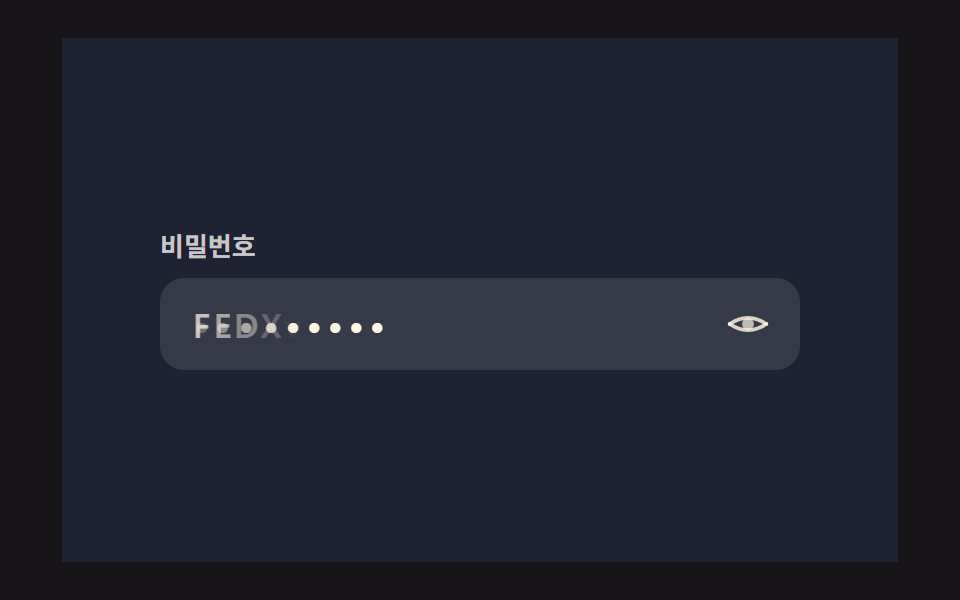 로그인·인증 UI비밀번호 표시 아이콘 9가지 — 입력창 속 문자가 도트로 바뀌는 계산
 로그인·인증 UIcss captcha 9가지 — 왜곡 글자·회전 맞추기·노이즈 속 글자 확인
 로그인·인증 UI아바타 UI 9종 — 사진 파일 없이 만드는 사용자 표시
 크리에이티브 UI서명 패드와 캔버스 드로잉 UI 9종 — 라이브러리 없이
 입력 UI컬러피커 UI 디자인 9종 — 휠부터 최근 색상까지