케이스 스터디 사이트 UI 9종 — 성과 수치까지 계산해 보여주는
화면에 들어오는 순간 성과 수치가 매 프레임 다시 구해지며 카운트업되고, 사례마다 계산한 임팩트 점수로 그리드 타일 크기가 정해지며, 인용문 길이에 맞춰 폰트 크기가 거꾸로 구해지는 사례 연구 페이지 섹션 9종입니다.
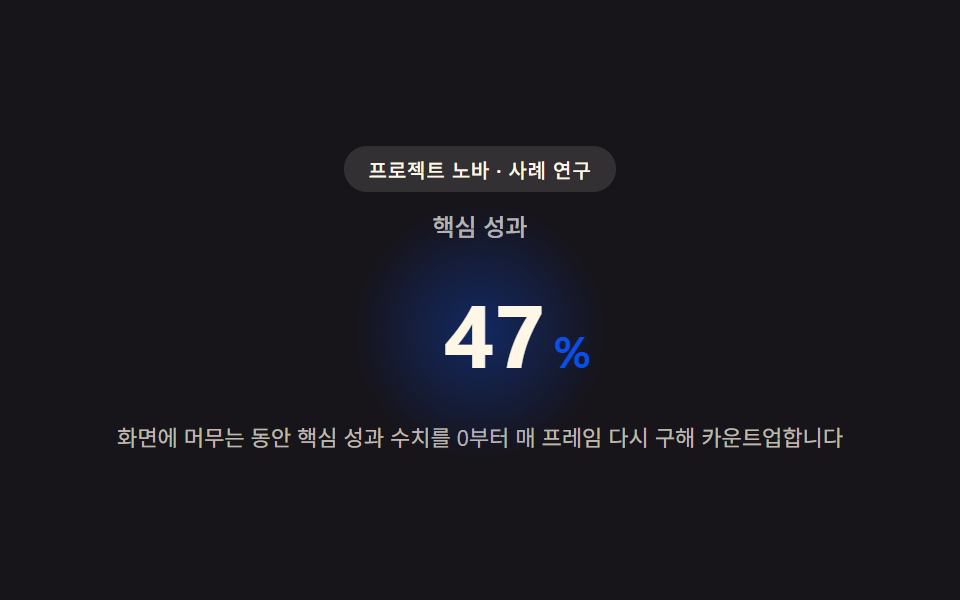 01 case-hero
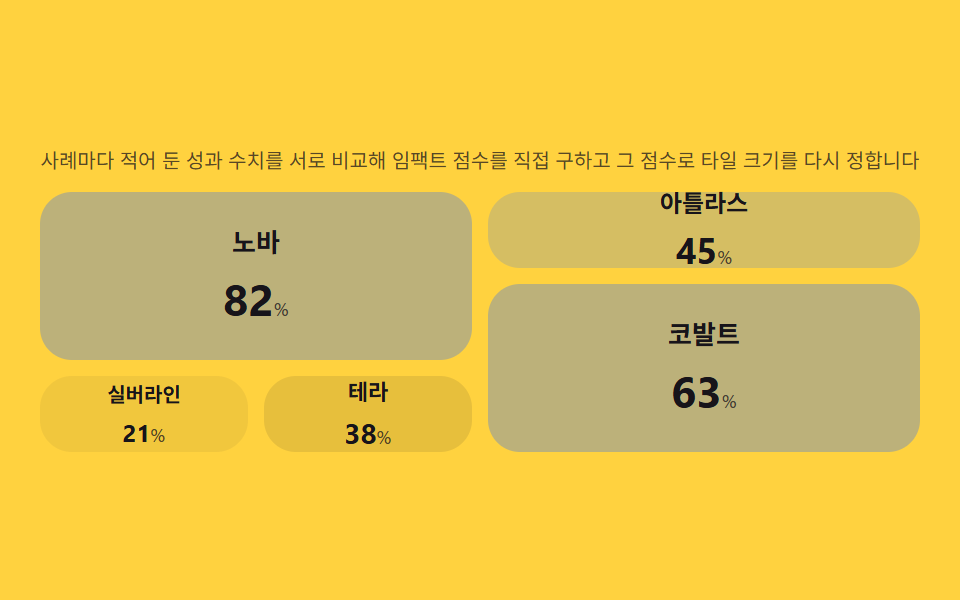 02 case-story-grid
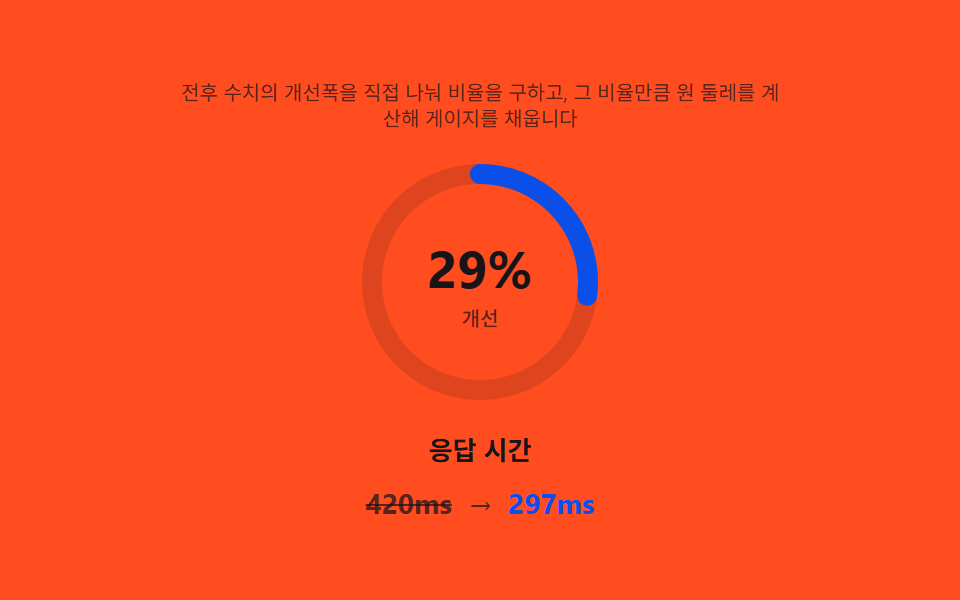 03 case-metric-highlight
 04 case-quote-block
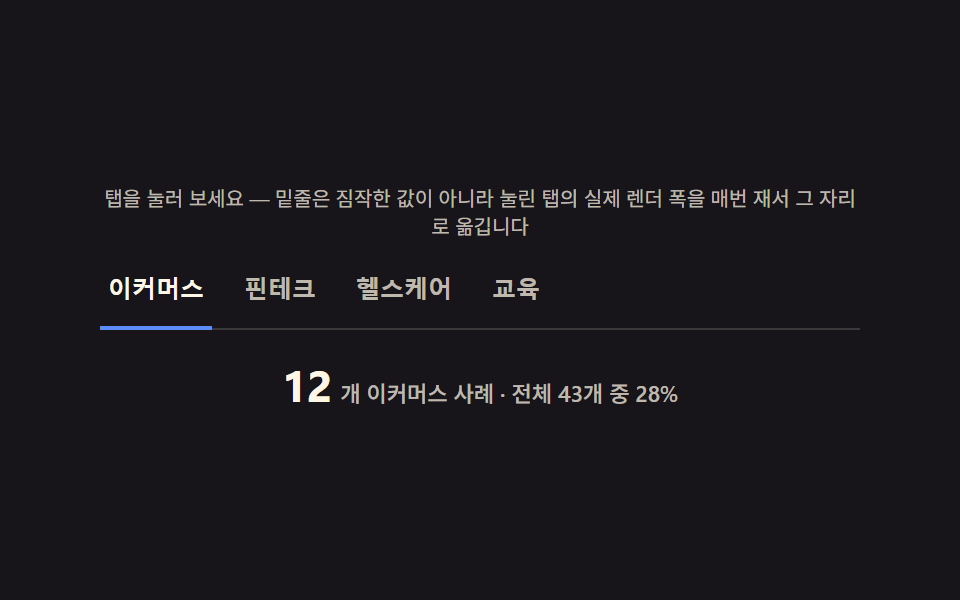 05 case-industry-tabs
 06 case-video-card
 07 case-related-cta
 08 case-logo-bar
 09 case-footer
자동 재생 · 눌러서 해당 항목으로 · 전부 한 zip
- 01 사례 히어로 — 성과 수치를 매 프레임 다시 구해 카운트업하는 상단
- 02 스토리 그리드 — 임팩트 점수를 직접 구해 타일 크기를 정하는 그리드
- 03 메트릭 하이라이트 — 이전·이후 비율을 직접 나눠 구하는 강조 카드
- 04 인용 블록 — 글자 길이로 폰트 크기를 거꾸로 구하는 인용 카드
- 05 업종 탭 — 전환마다 업종별 개수를 다시 세는 탭
- 06 비디오 카드 — 노출 비율로 재생을, 스크롤량으로 위치를 구하는 카드
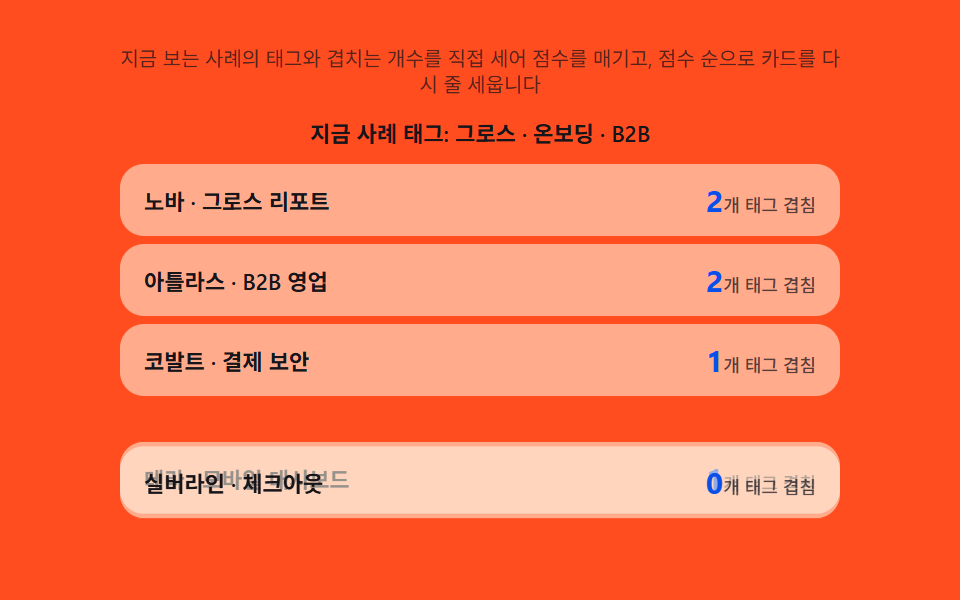
- 07 관련 CTA — 공통 태그 수로 관련도를 직접 구하는 추천
- 08 로고 바 — 개수에 비례해 속도를 다시 구해 루프 시간을 맞추는 바
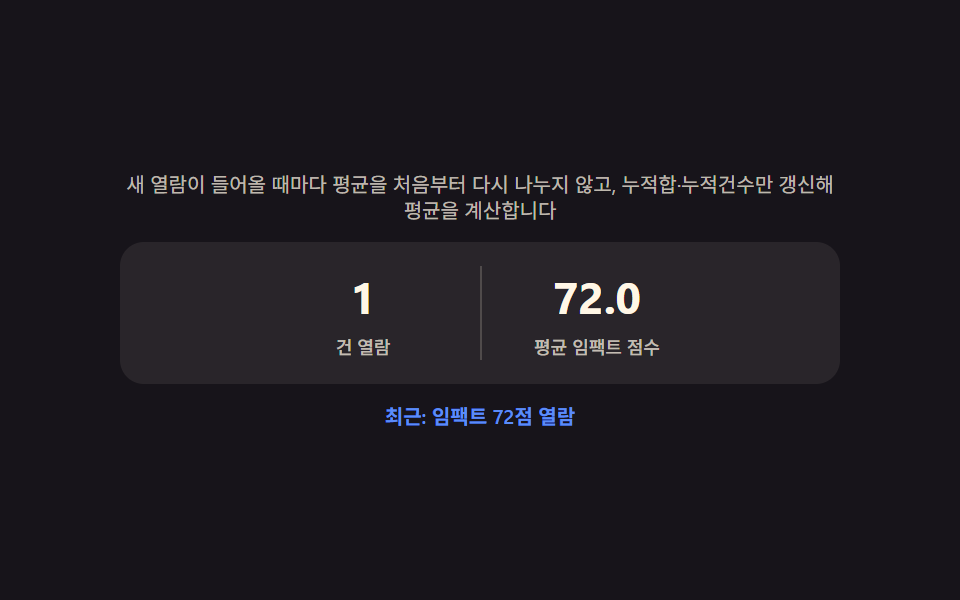
- 09 사례 푸터 — 지금까지 본 사례들의 평균을 직접 구하는 요약 배지
데모
아홉 섹션은 사례(스토리)의 성과 수치·태그·인용문 같은 데이터를 계산해 그 결과로 화면을 채웁니다. 05 업종 탭과 06 비디오 카드만 실제 클릭·스크롤에 반응하고, 나머지 일곱 개는 정해진 시나리오가 자동으로 돌며 값이 바뀌는 과정을 반복 재생합니다. 측정 무대는 480×300, 캡처는 24장이며 실제 움직임은 그 사이 간격 23개로 셉니다.
실측 한눈에
| 항목 | 초점 | 누적면적(%) | 강도평균 | 움직인프레임(23 기준) |
|---|---|---|---|---|
| 01 사례 히어로 | 목표값까지 카운트업 재계산 | 6.476 | 165.7 | 17 |
| 02 스토리 그리드 | 임팩트 점수로 타일 크기 재계산 | 52.497 | 46.9 | 7 |
| 03 메트릭 하이라이트 | 전후 비율로 게이지 재계산 | 2.328 | 128.3 | 17 |
| 04 인용 블록 | 글자 길이로 폰트 크기 역산 | 7.081 | 77.7 | 10 |
| 05 업종 탭 | 전환마다 업종별 개수 재계산 | 2.14 | 143.3 | 9 |
| 06 비디오 카드 | 노출 비율로 재생 여부 재계산 | 31.472 | 103.1 | 23 |
| 07 관련 CTA | 공통 태그 수로 관련도 재계산 | 18.349 | 59.7 | 8 |
| 08 로고 바 | 로고 개수로 루프 시간 재계산 | 3.005 | 130.8 | 23 |
| 09 사례 푸터 | 누적 평균 재계산 | 0.79 | 108.2 | 8 |
면적이 작아도 계산이 쉬는 건 아니다
03 메트릭 하이라이트(2.328%)·05 업종 탭(2.14%)·08 로고 바(3.005%)·09 사례 푸터(0.79%)는 게이지·밑줄·마퀴 줄·통계 숫자처럼 원래 차지하는 면적이 작은 요소라 누적면적이 낮게 나오는 게 자연스러운 결과입니다. 그중 08은 로고 줄 자체는 얇지만 23/23 프레임 내내 흐르고 있어 화면이 쉬는 순간이 없고, 02 스토리 그리드(52.497%)와 07 관련 CTA(18.349%)는 오히려 면적은 크면서도 시나리오가 바뀐 뒤 다음 전환까지 값을 유지하는 정지 구간이 있어 움직인 프레임이 각각 7·8로 적게 나옵니다.
사례 연구 페이지의 해부 — 아홉 섹션이 계산하는 것
사례 연구 페이지는 흔히 로고·인용문·성과 수치를 정적 텍스트로 박아 두지만, 이 아홉 섹션은 그 값 하나를 계산해 표시나 배치를 다시 정합니다. 속성을 켜고 끄는 트랜지션이 아니라 카운트업 목표값·정규화 점수·역산한 폰트 크기처럼 숫자를 다시 구하는 계산이 매번 화면을 채웁니다.
아홉 섹션이 각자 구하는 값
01은 목표 성과 수치를 프레임마다 0부터 다시 구하고, 02는 사례별 성과를 서로 비교해 임팩트 점수로 정규화하며, 03은 전후 두 숫자의 비율을 나눠 게이지 값을 만듭니다. 04는 인용문 글자 수로 폰트 크기를 거꾸로 풀고, 05는 전환마다 업종별 개수와 밑줄 위치를 다시 재며, 06은 뷰포트에 걸친 비율로 재생 여부와 진행 프레임을 정합니다. 07은 태그 겹침 수로 관련도 점수를 매기고, 08은 로고 총 폭을 재 루프 시간을 계산하며, 09는 지금까지 본 값의 누적합과 누적건수만으로 평균을 갱신합니다.
아홉 섹션이 공유하는 조건
아홉 섹션 모두 사례 하나(또는 사례 묶음)의 수치·태그·글자 수 같은 데이터 하나를 입력으로 받는다는 점이 같습니다. 01·03은 그 사례의 목표·전후 값이고, 02·07은 사례들 사이의 상대 비교이며, 05·08은 화면에 있는 요소의 실제 렌더 값(개수·폭)을 다시 잰 결과입니다.
섹션별 코드
아홉 섹션 각각에서 계산 부분만 골라 담았고, 전체 마크업과 스타일시트는 압축 파일 안에 들어 있습니다.
01사례 히어로 — 성과 수치를 매 프레임 다시 구해 카운트업하는 상단
에이전시 사례 연구 페이지 최상단에서 클라이언트 성과 하이라이트로 자주 쓰는 형태입니다. 화면에 들어오는 순간부터 핵심 성과 수치를 0에서 목표값까지 매 프레임 다시 구해 자연스럽게 올라가는 숫자로 보여주고, 자릿수가 늘어나는 순간도 값에 맞춰 폭을 다시 잽니다.
자릿수가 늘어나는 순간마다 canvas로 폭을 다시 재는 계산
숫자가 두 자리에서 세 자리로 넘어가는 순간에만 measureText로 실제 렌더 폭을 재 --num-w 변수를 갱신해, 다음 문자가 밀리지 않고 자리에 맞춰 넓어집니다.
  var measureCv = document.createElement('canvas');
  var measureCtx = measureCv.getContext('2d');

  function measureWidth(text, px) {
    if (!measureCtx) return text.length * px * 0.62;
    measureCtx.font = '700 ' + px + 'px -apple-system, "Segoe UI", sans-serif';
    return measureCtx.measureText(text).width;
  }

  var lastDigits = -1;

  function applyValue(v) {
    numEl.textContent = String(v);
    var digits = String(v).length;
    if (digits !== lastDigits) {
      lastDigits = digits;
      var px = parseFloat(getComputedStyle(numEl).fontSize) || 44;
      var w = measureWidth(String(v), px);
      wrapEl.style.setProperty('--num-w', Math.ceil(w) + 'px');
    }
  }
<main class="stage">
<section class="hero" id="hero">
  <p class="eyebrow" id="eyebrow">프로젝트 노바 · 사례 연구</p>
  <p class="metricLabel" id="metricLabel">핵심 성과</p>
  <p class="metricRow">
    <span class="metricNum" id="metricNum">0</span><span class="metricUnit" id="metricUnit">%</span>
  </p>
  <p class="hint" id="hint">화면에 머무는 동안 핵심 성과 수치를 0부터 매 프레임 다시 구해 카운트업합니다</p>
</section>
</main>
@use "../../../../site/static/demo-tokens" as *;
$duration: $dur-loop;
$easing: $ease-out;
$color: $subject-blue-deep;
@include stage($stage-ink);
.hero {
position: relative;
width: 100%;
max-width: 420px;
display: flex;
flex-direction: column;
align-items: center;
gap: $sp-2;
text-align: center;
}
.eyebrow {
margin: 0;
padding: $sp-1 $sp-3;
border-radius: $r-pill;
background: rgba($subject-cream, .12);
color: $subject-cream;
font-weight: 500;
font-size: 10px;
letter-spacing: .04em;
}
.metricLabel {
margin: 0;
color: rgba($subject-cream, .72);
font-weight: 500;
font-size: 12px;
}
.metricRow {
position: relative;
margin: 0;
display: flex;
align-items: baseline;
justify-content: center;
gap: $sp-1;
padding: $sp-2 $sp-6;
}
.metricRow::before {
content: "";
position: absolute;
inset: 0;
margin: auto;
width: 120px;
height: 120px;
border-radius: $r-pill;
background: radial-gradient(circle, rgba($color, .38), rgba($color, 0) 70%);
animation: halo $duration $easing infinite;
z-index: 0;
}
.metricNum {
--num-w: 88px;
position: relative;
z-index: 1;
display: inline-block;
min-width: var(--num-w);
text-align: right;
font-weight: 700;
font-size: 44px;
font-variant-numeric: tabular-nums;
color: $subject-cream;
}
.metricUnit {
position: relative;
z-index: 1;
font-weight: 700;
font-size: 22px;
color: $color;
}
.hint {
margin: 0;
padding: 0 $sp-2;
color: rgba($subject-cream, .72);
font-weight: 400;
font-size: 11px;
line-height: 1.4;
}
@keyframes halo {
0%, 100% { transform: scale(.86); opacity: .5; }
50% { transform: scale(1.12); opacity: 1; }
}
@media (max-width: 340px) {
.hero { max-width: 300px; gap: $sp-1; }
.metricNum { font-size: 32px; }
.metricUnit { font-size: 16px; }
.hint { font-size: 9px; }
.metricRow { padding: $sp-1 $sp-4; }
}
@media (prefers-reduced-motion: reduce) {
.metricRow::before {
animation: none;
opacity: .7;
}
}html, body {
margin: 0;
overflow: hidden;
}
.stage {
box-sizing: border-box;
min-height: 100vh;
display: grid;
place-items: center;
margin: 0;
background: #17141a;
font-family: -apple-system, "Segoe UI", "Noto Sans KR", sans-serif;
padding: clamp(8px, 4vw, 24px);
}
.hero {
position: relative;
width: 100%;
max-width: 420px;
display: flex;
flex-direction: column;
align-items: center;
gap: 8px;
text-align: center;
}
.eyebrow {
margin: 0;
padding: 4px 12px;
border-radius: 999px;
background: rgba(255, 247, 230, 0.12);
color: #fff7e6;
font-weight: 500;
font-size: 10px;
letter-spacing: 0.04em;
}
.metricLabel {
margin: 0;
color: rgba(255, 247, 230, 0.72);
font-weight: 500;
font-size: 12px;
}
.metricRow {
position: relative;
margin: 0;
display: flex;
align-items: baseline;
justify-content: center;
gap: 4px;
padding: 8px 24px;
}
.metricRow::before {
content: "";
position: absolute;
inset: 0;
margin: auto;
width: 120px;
height: 120px;
border-radius: 999px;
background: radial-gradient(circle, rgba(10, 79, 232, 0.38), rgba(10, 79, 232, 0) 70%);
animation: halo 2s ease-out infinite;
z-index: 0;
}
.metricNum {
--num-w: 88px;
position: relative;
z-index: 1;
display: inline-block;
min-width: var(--num-w);
text-align: right;
font-weight: 700;
font-size: 44px;
font-variant-numeric: tabular-nums;
color: #fff7e6;
}
.metricUnit {
position: relative;
z-index: 1;
font-weight: 700;
font-size: 22px;
color: #0a4fe8;
}
.hint {
margin: 0;
padding: 0 8px;
color: rgba(255, 247, 230, 0.72);
font-weight: 400;
font-size: 11px;
line-height: 1.4;
}
@keyframes halo {
0%, 100% {
transform: scale(0.86);
opacity: 0.5;
}
50% {
transform: scale(1.12);
opacity: 1;
}
}
@media (max-width: 340px) {
.hero {
max-width: 300px;
gap: 4px;
}
.metricNum {
font-size: 32px;
}
.metricUnit {
font-size: 16px;
}
.hint {
font-size: 9px;
}
.metricRow {
padding: 4px 16px;
}
}
@media (prefers-reduced-motion: reduce) {
.metricRow::before {
animation: none;
opacity: 0.7;
}
}// 사례 히어로(01) — 값을 누적하지 않고, 매 애니메이션 프레임마다 경과 비율(t)로부터
// 목표값까지의 값을 공식(eased(t) * target)으로 처음부터 다시 구해 카운트업한다(계산 한 겹).
// 자릿수가 늘어나는 순간에는 canvas measureText 로 그 시점 문자열의 실제 렌더 폭을 다시 재
// 숫자 칸의 폭(--num-w)을 갱신해, 다음 문자가 밀리지 않고 자리에 맞춰 넓어지게 한다.
(function () {
var numEl = document.getElementById('metricNum');
var wrapEl = numEl ? numEl.parentElement : null;
if (!numEl || !wrapEl) return;
var reduce = window.matchMedia('(prefers-reduced-motion: reduce)').matches;
var TARGET = 128;
var EASE_POW = 2; // 변형: 2 → 4
var ANIM_MS = 1300;
var CYCLE_MS = 1900;
var measureCv = document.createElement('canvas');
var measureCtx = measureCv.getContext('2d');
function measureWidth(text, px) {
if (!measureCtx) return text.length * px * 0.62;
measureCtx.font = '700 ' + px + 'px -apple-system, "Segoe UI", sans-serif';
return measureCtx.measureText(text).width;
}
var lastDigits = -1;
function applyValue(v) {
numEl.textContent = String(v);
var digits = String(v).length;
if (digits !== lastDigits) {
lastDigits = digits;
var px = parseFloat(getComputedStyle(numEl).fontSize) || 44;
var w = measureWidth(String(v), px);
wrapEl.style.setProperty('--num-w', Math.ceil(w) + 'px');
}
}
function runCycle() {
if (reduce) { applyValue(TARGET); return; }
var start = null;
function frame(ts) {
if (start === null) start = ts;
var t = Math.min((ts - start) / ANIM_MS, 1);
var eased = 1 - Math.pow(1 - t, EASE_POW);
var val = Math.round(TARGET * eased);
applyValue(val);
if (t < 1) requestAnimationFrame(frame);
}
applyValue(0);
requestAnimationFrame(frame);
}
runCycle();
if (!reduce) setInterval(runCycle, CYCLE_MS);
})();// CaseHero — vanilla 판(run/340/demo/01-case-hero/index.html) 의 React 포트.
// 값을 누적하지 않고 매 프레임 경과 비율(t)로부터 목표값까지의 값을 공식으로 처음부터 다시 구해
// 카운트업하고, 자릿수가 늘어나는 순간엔 canvas measureText 로 실제 렌더 폭을 다시 재 숫자 칸 폭을 갱신한다.
import { useEffect, useRef } from "react";
import styles from "./CaseHero.module.scss";
export type CaseHeroProps = {
duration?: string;
easing?: string;
color?: string;
};
const EYEBROW = "프로젝트 노바 · 사례 연구";
const METRIC_LABEL = "핵심 성과";
const HINT = "화면에 머무는 동안 핵심 성과 수치를 0부터 매 프레임 다시 구해 카운트업합니다";
const TARGET = 128;
const EASE_POW = 2;
const ANIM_MS = 1300;
const CYCLE_MS = 1900;
export default function CaseHero({
duration = "2s",
easing = "ease-out",
color = "#0a4fe8"
}: CaseHeroProps) {
const numRef = useRef<HTMLSpanElement | null>(null);
const wrapRef = useRef<HTMLParagraphElement | null>(null);
useEffect(() => {
const numEl = numRef.current;
const wrapEl = wrapRef.current;
if (!numEl || !wrapEl) return;
const reduce = window.matchMedia("(prefers-reduced-motion: reduce)").matches;
const measureCv = document.createElement("canvas");
const measureCtx = measureCv.getContext("2d");
function measureWidth(text: string, px: number): number {
if (!measureCtx) return text.length * px * 0.62;
measureCtx.font = "700 " + px + 'px -apple-system, "Segoe UI", sans-serif';
return measureCtx.measureText(text).width;
}
let lastDigits = -1;
function applyValue(v: number): void {
numEl!.textContent = String(v);
const digits = String(v).length;
if (digits !== lastDigits) {
lastDigits = digits;
const px = parseFloat(getComputedStyle(numEl!).fontSize) || 44;
const w = measureWidth(String(v), px);
wrapEl!.style.setProperty("--num-w", Math.ceil(w) + "px");
}
}
function runCycle(): void {
if (reduce) { applyValue(TARGET); return; }
let start: number | null = null;
function frame(ts: number): void {
if (start === null) start = ts;
const t = Math.min((ts - start) / ANIM_MS, 1);
const eased = 1 - Math.pow(1 - t, EASE_POW);
const val = Math.round(TARGET * eased);
applyValue(val);
if (t < 1) requestAnimationFrame(frame);
}
applyValue(0);
requestAnimationFrame(frame);
}
runCycle();
let timer = 0;
if (!reduce) timer = window.setInterval(runCycle, CYCLE_MS);
return () => {
if (timer) window.clearInterval(timer);
};
// eslint-disable-next-line react-hooks/exhaustive-deps
}, []);
return (
<main className={styles.stage}>
<section className={styles.hero}>
<p className={styles.eyebrow}>{EYEBROW}</p>
<p className={styles.metricLabel}>{METRIC_LABEL}</p>
<p className={styles.metricRow} ref={wrapRef}>
<span className={styles.metricNum} ref={numRef}>0</span>
<span className={styles.metricUnit}>%</span>
</p>
<p className={styles.hint}>{HINT}</p>
</section>
</main>
);
}01 · 사례 히어로 — 성과 수치를 매 프레임 다시 구해 카운트업하는 상단 — 측정 누적면적 6.476% · 움직인 프레임 17/23GODRICH 원작 · zip 에 SCSS·React 포함 · 비밀번호 보기
02스토리 그리드 — 임팩트 점수를 직접 구해 타일 크기를 정하는 그리드
사례 연구 목록 페이지나 포트폴리오 그리드 섹션에서 여러 사례를 한눈에 비교하는 형태입니다. 사례마다 적어 둔 성과 수치의 크기를 서로 비교해 임팩트 점수를 직접 구하고, 점수가 큰 사례일수록 타일이 더 넓은 자리를 차지하도록 그리드 배치를 다시 정합니다.
정규화한 값에 거듭제곱을 걸어 등급을 나누는 계산
이번 데이터셋의 최댓값으로 각 사례 값을 0~1로 정규화한 뒤 IMPACT_WEIGHT 거듭제곱을 적용해, 점수 구간마다 grid-column·grid-row span과 글자 크기를 다시 정합니다.
  function apply(values) {
    var max = Math.max.apply(null, values);
    tiles.forEach(function (tile, i) {
      var value = values[i];
      var normalized = max > 0 ? value / max : 0;
      var weighted = Math.pow(normalized, IMPACT_WEIGHT);
      var tier = tierFor(weighted);
      tile.style.gridColumn = 'span ' + tier.col;
      tile.style.gridRow = 'span ' + tier.row;
      tile.dataset.pad = tier.pad;
      tile.dataset.font = tier.font;
      var valEl = tile.querySelector('.tileVal');
      if (valEl) valEl.textContent = String(value);
      if (!reduce) {
        tile.classList.remove('tile--pulse');
        void tile.offsetWidth;
        tile.classList.add('tile--pulse');
      }
    });
  }
<main class="stage">
<section class="panel">
  <p class="hint" id="hint">사례마다 적어 둔 성과 수치를 서로 비교해 임팩트 점수를 직접 구하고 그 점수로 타일 크기를 다시 정합니다</p>
  <div class="grid" id="grid" role="list" aria-label="사례 목록">
    <article class="tile" role="listitem"><p class="tileName">노바</p><p class="tileNum"><span class="tileVal">0</span><span class="tileUnit">%</span></p></article>
    <article class="tile" role="listitem"><p class="tileName">아틀라스</p><p class="tileNum"><span class="tileVal">0</span><span class="tileUnit">%</span></p></article>
    <article class="tile" role="listitem"><p class="tileName">코발트</p><p class="tileNum"><span class="tileVal">0</span><span class="tileUnit">%</span></p></article>
    <article class="tile" role="listitem"><p class="tileName">실버라인</p><p class="tileNum"><span class="tileVal">0</span><span class="tileUnit">%</span></p></article>
    <article class="tile" role="listitem"><p class="tileName">테라</p><p class="tileNum"><span class="tileVal">0</span><span class="tileUnit">%</span></p></article>
  </div>
</section>
</main>
@use "../../../../site/static/demo-tokens" as *;
$duration: $dur-base;
$easing: $ease-pop;
$color: $subject-blue;
@include stage($stage-yellow);
.panel {
width: 100%;
max-width: 440px;
display: flex;
flex-direction: column;
gap: $sp-2;
}
.hint {
margin: 0;
text-align: center;
color: rgba($subject-ink, .72);
font-weight: 400;
font-size: 10px;
line-height: 1.35;
}
.grid {
display: grid;
grid-template-columns: repeat(4, 1fr);
grid-auto-rows: 38px;
grid-auto-flow: dense;
gap: $sp-2;
}
.tile {
border-radius: $r-card;
background: rgba($subject-ink, .06);
display: flex;
flex-direction: column;
align-items: center;
justify-content: center;
gap: $sp-1;
padding: $sp-1;
transform-origin: center;
transition: background $duration $easing, transform $duration $easing, opacity $duration $easing;
&[data-pad="p0"] { background: rgba($subject-ink, .06); }
&[data-pad="p1"] { padding: $sp-2; background: rgba($subject-ink, .10); }
&[data-pad="p2"] { padding: $sp-3; background: rgba($color, .20); }
&[data-pad="p3"] { padding: $sp-4; background: rgba($color, .32); }
}
.tile--pulse {
animation: pulse $duration $easing;
}
.tileName {
margin: 0;
color: $subject-ink;
font-weight: 600;
font-size: 10px;
[data-font="f1"] & { font-size: 11px; }
[data-font="f2"] & { font-size: 12px; }
[data-font="f3"] & { font-size: 13px; }
}
.tileNum {
margin: 0;
display: flex;
align-items: baseline;
gap: 0;
}
.tileVal {
color: $subject-ink;
font-weight: 700;
font-size: 12px;
[data-font="f1"] & { font-size: 14px; }
[data-font="f2"] & { font-size: 18px; }
[data-font="f3"] & { font-size: 22px; }
}
.tileUnit {
color: rgba($subject-ink, .72);
font-weight: 500;
font-size: 9px;
}
@keyframes pulse {
0% { transform: scale(1.1); opacity: .55; }
100% { transform: scale(1); opacity: 1; }
}
@media (max-width: 340px) {
.panel { max-width: 300px; gap: $sp-1; }
.hint { font-size: 9px; }
.grid { grid-auto-rows: 30px; gap: $sp-1; }
.tileName { font-size: 9px; }
.tileVal { font-size: 11px; }
.tileUnit { font-size: 8px; }
}
@media (prefers-reduced-motion: reduce) {
.tile, .tile--pulse {
transition: none;
animation: none;
}
}html, body {
margin: 0;
overflow: hidden;
}
.stage {
box-sizing: border-box;
min-height: 100vh;
display: grid;
place-items: center;
margin: 0;
background: #ffd23f;
font-family: -apple-system, "Segoe UI", "Noto Sans KR", sans-serif;
padding: clamp(8px, 4vw, 24px);
}
.panel {
width: 100%;
max-width: 440px;
display: flex;
flex-direction: column;
gap: 8px;
}
.hint {
margin: 0;
text-align: center;
color: rgba(23, 20, 26, 0.72);
font-weight: 400;
font-size: 10px;
line-height: 1.35;
}
.grid {
display: grid;
grid-template-columns: repeat(4, 1fr);
grid-auto-rows: 38px;
grid-auto-flow: dense;
gap: 8px;
}
.tile {
border-radius: 16px;
background: rgba(23, 20, 26, 0.06);
display: flex;
flex-direction: column;
align-items: center;
justify-content: center;
gap: 4px;
padding: 4px;
transform-origin: center;
transition: background 300ms cubic-bezier(0.2, 1.4, 0.4, 1), transform 300ms cubic-bezier(0.2, 1.4, 0.4, 1), opacity 300ms cubic-bezier(0.2, 1.4, 0.4, 1);
}
.tile[data-pad=p0] {
background: rgba(23, 20, 26, 0.06);
}
.tile[data-pad=p1] {
padding: 8px;
background: rgba(23, 20, 26, 0.1);
}
.tile[data-pad=p2] {
padding: 12px;
background: rgba(47, 109, 246, 0.2);
}
.tile[data-pad=p3] {
padding: 16px;
background: rgba(47, 109, 246, 0.32);
}
.tile--pulse {
animation: pulse 300ms cubic-bezier(0.2, 1.4, 0.4, 1);
}
.tileName {
margin: 0;
color: #17141a;
font-weight: 600;
font-size: 10px;
}
[data-font=f1] .tileName {
font-size: 11px;
}
[data-font=f2] .tileName {
font-size: 12px;
}
[data-font=f3] .tileName {
font-size: 13px;
}
.tileNum {
margin: 0;
display: flex;
align-items: baseline;
gap: 0;
}
.tileVal {
color: #17141a;
font-weight: 700;
font-size: 12px;
}
[data-font=f1] .tileVal {
font-size: 14px;
}
[data-font=f2] .tileVal {
font-size: 18px;
}
[data-font=f3] .tileVal {
font-size: 22px;
}
.tileUnit {
color: rgba(23, 20, 26, 0.72);
font-weight: 500;
font-size: 9px;
}
@keyframes pulse {
0% {
transform: scale(1.1);
opacity: 0.55;
}
100% {
transform: scale(1);
opacity: 1;
}
}
@media (max-width: 340px) {
.panel {
max-width: 300px;
gap: 4px;
}
.hint {
font-size: 9px;
}
.grid {
grid-auto-rows: 30px;
gap: 4px;
}
.tileName {
font-size: 9px;
}
.tileVal {
font-size: 11px;
}
.tileUnit {
font-size: 8px;
}
}
@media (prefers-reduced-motion: reduce) {
.tile, .tile--pulse {
transition: none;
animation: none;
}
}// 스토리 그리드(02) — 사례별 성과 수치를 이번 데이터셋의 최댓값과 비교해 0~1 로 정규화하고,
// IMPACT_WEIGHT 거듭제곱을 적용해 임팩트 점수를 직접 구한다. 점수 구간마다 grid-column/grid-row
// span·패딩·숫자 크기를 다시 정해 타일 배치를 매번 다시 계산한다(계산 한 겹).
// 자동 시연은 두 데이터셋을 번갈아 넣어 점수와 배치가 매번 다시 구해지는 것을 보여준다.
(function () {
var grid = document.getElementById('grid');
if (!grid) return;
var tiles = Array.prototype.slice.call(grid.querySelectorAll('.tile'));
var reduce = window.matchMedia('(prefers-reduced-motion: reduce)').matches;
var IMPACT_WEIGHT = 1; // 변형: .5 → 1.5
var DATASETS = [
[82, 45, 63, 21, 38],
[30, 71, 55, 90, 24]
];
function tierFor(weighted) {
if (weighted >= .75) return { col: 2, row: 2, pad: 'p3', font: 'f3' };
if (weighted >= .5) return { col: 2, row: 1, pad: 'p2', font: 'f2' };
if (weighted >= .28) return { col: 1, row: 1, pad: 'p1', font: 'f1' };
return { col: 1, row: 1, pad: 'p0', font: 'f0' };
}
function apply(values) {
var max = Math.max.apply(null, values);
tiles.forEach(function (tile, i) {
var value = values[i];
var normalized = max > 0 ? value / max : 0;
var weighted = Math.pow(normalized, IMPACT_WEIGHT);
var tier = tierFor(weighted);
tile.style.gridColumn = 'span ' + tier.col;
tile.style.gridRow = 'span ' + tier.row;
tile.dataset.pad = tier.pad;
tile.dataset.font = tier.font;
var valEl = tile.querySelector('.tileVal');
if (valEl) valEl.textContent = String(value);
if (!reduce) {
tile.classList.remove('tile--pulse');
void tile.offsetWidth;
tile.classList.add('tile--pulse');
}
});
}
var idx = 0;
apply(DATASETS[0]);
if (!reduce) {
setInterval(function () {
idx = (idx + 1) % DATASETS.length;
apply(DATASETS[idx]);
}, 600);
}
})();// CaseStoryGrid — vanilla 판(run/340/demo/02-case-story-grid/index.html) 의 React 포트.
// 사례별 성과 수치를 이번 데이터셋의 최댓값과 비교해 정규화하고 IMPACT_WEIGHT 거듭제곱으로
// 임팩트 점수를 구해, 점수 구간마다 grid-column/grid-row span·패딩·숫자 크기를 다시 정한다.
import { useEffect, useRef } from "react";
import styles from "./CaseStoryGrid.module.scss";
export type CaseStoryGridProps = {
duration?: string;
easing?: string;
color?: string;
};
const HINT = "사례마다 적어 둔 성과 수치를 서로 비교해 임팩트 점수를 직접 구하고 그 점수로 타일 크기를 다시 정합니다";
const NAMES = ["노바", "아틀라스", "코발트", "실버라인", "테라"];
const IMPACT_WEIGHT = 1;
const DATASETS: number[][] = [
[82, 45, 63, 21, 38],
[30, 71, 55, 90, 24]
];
type Tier = { col: number; row: number; pad: string; font: string };
function tierFor(weighted: number): Tier {
if (weighted >= 0.75) return { col: 2, row: 2, pad: "p3", font: "f3" };
if (weighted >= 0.5) return { col: 2, row: 1, pad: "p2", font: "f2" };
if (weighted >= 0.28) return { col: 1, row: 1, pad: "p1", font: "f1" };
return { col: 1, row: 1, pad: "p0", font: "f0" };
}
export default function CaseStoryGrid({
duration = "220ms",
easing = "cubic-bezier(.2,1.4,.4,1)",
color = "#2f6df6"
}: CaseStoryGridProps) {
const tileRefs = useRef<(HTMLElement | null)[]>([]);
const valRefs = useRef<(HTMLSpanElement | null)[]>([]);
useEffect(() => {
const reduce = window.matchMedia("(prefers-reduced-motion: reduce)").matches;
function apply(values: number[]): void {
const max = Math.max.apply(null, values);
values.forEach((value, i) => {
const tile = tileRefs.current![i];
const valEl = valRefs.current![i];
if (!tile) return;
const normalized = max > 0 ? value / max : 0;
const weighted = Math.pow(normalized, IMPACT_WEIGHT);
const tier = tierFor(weighted);
tile.style.gridColumn = "span " + tier.col;
tile.style.gridRow = "span " + tier.row;
tile.dataset.pad = tier.pad;
tile.dataset.font = tier.font;
if (valEl) valEl.textContent = String(value);
if (!reduce) {
tile.classList.remove(styles.tilePulse);
void tile.offsetWidth;
tile.classList.add(styles.tilePulse);
}
});
}
let idx = 0;
apply(DATASETS[0]);
let timer = 0;
if (!reduce) {
timer = window.setInterval(() => {
idx = (idx + 1) % DATASETS.length;
apply(DATASETS[idx]);
}, 600);
}
return () => {
if (timer) window.clearInterval(timer);
};
// eslint-disable-next-line react-hooks/exhaustive-deps
}, []);
return (
<main className={styles.stage}>
<section className={styles.panel}>
<p className={styles.hint}>{HINT}</p>
<div className={styles.grid}>
{NAMES.map((name, i) => (
<article
key={name}
className={styles.tile}
ref={(el: HTMLElement | null) => {
tileRefs.current![i] = el;
}}
>
<p className={styles.tileName}>{name}</p>
<p className={styles.tileNum}>
<span
className={styles.tileVal}
ref={(el: HTMLSpanElement | null) => {
valRefs.current![i] = el;
}}
>
0
</span>
<span className={styles.tileUnit}>%</span>
</p>
</article>
))}
</div>
</section>
</main>
);
}02 · 스토리 그리드 — 임팩트 점수를 직접 구해 타일 크기를 정하는 그리드 — 측정 누적면적 52.497% · 움직인 프레임 7/23GODRICH 원작 · zip 에 SCSS·React 포함 · 비밀번호 보기
03메트릭 하이라이트 — 이전·이후 비율을 직접 나눠 구하는 강조 카드
성과 지표 강조 카드나 before/after 수치 배지에서 쓰는 형태입니다. 이전 값과 이후 값의 비율을 직접 나눠 계산해 게이지 바늘의 각도나 막대 길이를 그 비율에 맞춰 구하고, 비율이 클수록 강조 색을 진하게 바꿉니다.
원 둘레를 계산해 stroke-dashoffset을 역산하는 방식
원 둘레(2×π×반지름)를 미리 구해 두고, 전후 비율만큼 채워야 할 길이를 둘레에서 빼는 값으로 dashoffset을 매 사이클 다시 계산합니다.
  function computeRatio(metric) {
    var delta = metric.lowerIsBetter ? (metric.before - metric.after) : (metric.after - metric.before);
    var improvement = delta / metric.before;
    return Math.max(0, Math.min(1, improvement / MAX_IMPROVEMENT));
  }

  function computePercent(metric) {
    var delta = metric.lowerIsBetter ? (metric.before - metric.after) : (metric.after - metric.before);
    return Math.round((delta / metric.before) * 100);
  }

  function applyGauge(ratio) {
    var offset = CIRC * (1 - ratio);
    fill.style.strokeDashoffset = String(offset);
  }
<main class="stage">
<section class="panel" id="panel">
  <p class="hint" id="hint">전후 수치의 개선폭을 직접 나눠 비율을 구하고, 그 비율만큼 원 둘레를 계산해 게이지를 채웁니다</p>
  <div class="gaugeWrap">
    <svg class="gaugeSvg" width="132" height="132" viewBox="0 0 132 132" aria-hidden="true">
      <circle class="gaugeTrack" cx="66" cy="66" r="54"></circle>
      <circle class="gaugeFill" id="gaugeFill" cx="66" cy="66" r="54"></circle>
    </svg>
    <div class="gaugeCenter">
      <span class="gaugePercent" id="gaugePercent">0%</span>
      <span class="gaugeCaption" id="gaugeCaption">개선</span>
    </div>
  </div>
  <p class="metricName" id="metricName">응답 시간</p>
  <p class="metricPair">
    <span class="metricBefore" id="metricBefore">420ms</span>
    <span class="metricArrow" aria-hidden="true">→</span>
    <span class="metricAfter" id="metricAfter">420ms</span>
  </p>
</section>
</main>
@use "../../../../site/static/demo-tokens" as *;
$duration: $dur-enter;
$easing: $ease-spring;
$color: $subject-blue-deep;
@include stage($stage-orange);
.panel {
width: 100%;
max-width: 300px;
display: flex;
flex-direction: column;
align-items: center;
gap: $sp-2;
text-align: center;
}
.hint {
margin: 0;
color: rgba($subject-ink, .72);
font-weight: 400;
font-size: 10px;
line-height: 1.35;
}
.gaugeWrap {
position: relative;
width: 132px;
height: 132px;
}
.gaugeSvg {
transform: rotate(-90deg);
}
.gaugeTrack {
fill: none;
stroke: rgba($subject-ink, .14);
stroke-width: 10px;
}
.gaugeFill {
fill: none;
stroke: $color;
stroke-width: 10px;
stroke-linecap: round;
transition: stroke-dashoffset $duration $easing;
}
.gaugeCenter {
position: absolute;
inset: 0;
display: flex;
flex-direction: column;
align-items: center;
justify-content: center;
gap: 0;
}
.gaugePercent {
font-weight: 700;
font-size: 26px;
color: $subject-ink;
font-variant-numeric: tabular-nums;
}
.gaugeCaption {
font-weight: 500;
font-size: 10px;
color: rgba($subject-ink, .72);
}
.metricName {
margin: 0;
font-weight: 600;
font-size: 13px;
color: $subject-ink;
}
.metricPair {
margin: 0;
display: flex;
align-items: baseline;
gap: $sp-2;
font-weight: 700;
font-size: 14px;
font-variant-numeric: tabular-nums;
}
.metricBefore {
color: rgba($subject-ink, .72);
text-decoration: line-through;
text-decoration-thickness: 1px;
}
.metricArrow {
color: rgba($subject-ink, .72);
font-weight: 400;
}
.metricAfter {
color: $color;
}
@media (max-width: 340px) {
.panel { max-width: 260px; gap: $sp-1; }
.gaugeWrap { width: 84px; height: 84px; }
.gaugePercent { font-size: 17px; }
.gaugeCaption { font-size: 8px; }
.metricName { font-size: 11px; }
.metricPair { font-size: 11px; gap: $sp-1; }
.hint { font-size: 8px; line-height: 1.25; }
}
@media (prefers-reduced-motion: reduce) {
.gaugeFill {
transition: none;
}
}html, body {
margin: 0;
overflow: hidden;
}
.stage {
box-sizing: border-box;
min-height: 100vh;
display: grid;
place-items: center;
margin: 0;
background: #ff4d1f;
font-family: -apple-system, "Segoe UI", "Noto Sans KR", sans-serif;
padding: clamp(8px, 4vw, 24px);
}
.panel {
width: 100%;
max-width: 300px;
display: flex;
flex-direction: column;
align-items: center;
gap: 8px;
text-align: center;
}
.hint {
margin: 0;
color: rgba(23, 20, 26, 0.72);
font-weight: 400;
font-size: 10px;
line-height: 1.35;
}
.gaugeWrap {
position: relative;
width: 132px;
height: 132px;
}
.gaugeSvg {
transform: rotate(-90deg);
}
.gaugeTrack {
fill: none;
stroke: rgba(23, 20, 26, 0.14);
stroke-width: 10px;
}
.gaugeFill {
fill: none;
stroke: #0a4fe8;
stroke-width: 10px;
stroke-linecap: round;
transition: stroke-dashoffset 600ms cubic-bezier(0.2, 0.8, 0.2, 1);
}
.gaugeCenter {
position: absolute;
inset: 0;
display: flex;
flex-direction: column;
align-items: center;
justify-content: center;
gap: 0;
}
.gaugePercent {
font-weight: 700;
font-size: 26px;
color: #17141a;
font-variant-numeric: tabular-nums;
}
.gaugeCaption {
font-weight: 500;
font-size: 10px;
color: rgba(23, 20, 26, 0.72);
}
.metricName {
margin: 0;
font-weight: 600;
font-size: 13px;
color: #17141a;
}
.metricPair {
margin: 0;
display: flex;
align-items: baseline;
gap: 8px;
font-weight: 700;
font-size: 14px;
font-variant-numeric: tabular-nums;
}
.metricBefore {
color: rgba(23, 20, 26, 0.72);
text-decoration: line-through;
text-decoration-thickness: 1px;
}
.metricArrow {
color: rgba(23, 20, 26, 0.72);
font-weight: 400;
}
.metricAfter {
color: #0a4fe8;
}
@media (max-width: 340px) {
.panel {
max-width: 260px;
gap: 4px;
}
.gaugeWrap {
width: 84px;
height: 84px;
}
.gaugePercent {
font-size: 17px;
}
.gaugeCaption {
font-size: 8px;
}
.metricName {
font-size: 11px;
}
.metricPair {
font-size: 11px;
gap: 4px;
}
.hint {
font-size: 8px;
line-height: 1.25;
}
}
@media (prefers-reduced-motion: reduce) {
.gaugeFill {
transition: none;
}
}// 메트릭 하이라이트(03) — 전/후 두 수치만 데이터로 두고, 개선율을 매 사이클 직접 나눠 구한 뒤
// 원 둘레(2*PI*R)를 계산해 그 비율만큼 stroke-dashoffset 을 역산한다. 게이지 값은 어디에도
// 미리 적어두지 않고, 전/후 수치로부터 매번 다시 계산된다(계산 한 겹).
(function () {
var fill = document.getElementById('gaugeFill');
var percentEl = document.getElementById('gaugePercent');
var captionEl = document.getElementById('gaugeCaption');
var nameEl = document.getElementById('metricName');
var beforeEl = document.getElementById('metricBefore');
var afterEl = document.getElementById('metricAfter');
if (!fill || !percentEl || !nameEl || !beforeEl || !afterEl) return;
var reduce = window.matchMedia('(prefers-reduced-motion: reduce)').matches;
var RADIUS = 54;
var CIRC = 2 * Math.PI * RADIUS;
fill.style.strokeDasharray = String(CIRC);
var METRICS = [
{ label: '응답 시간', before: 420, after: 180, unit: 'ms', lowerIsBetter: true, caption: '개선' },
{ label: '전환율', before: 2.1, after: 5.8, unit: '%', lowerIsBetter: false, caption: '상승' },
{ label: '이탈률', before: 61, after: 34, unit: '%', lowerIsBetter: true, caption: '개선' }
];
var MAX_IMPROVEMENT = 0.7; // 게이지가 항상 꽉 차지 않도록 잡은 정규화 상한
var ANIM_MS = 1100;
var CYCLE_MS = 2200;
function computeRatio(metric) {
var delta = metric.lowerIsBetter ? (metric.before - metric.after) : (metric.after - metric.before);
var improvement = delta / metric.before;
return Math.max(0, Math.min(1, improvement / MAX_IMPROVEMENT));
}
function computePercent(metric) {
var delta = metric.lowerIsBetter ? (metric.before - metric.after) : (metric.after - metric.before);
return Math.round((delta / metric.before) * 100);
}
function applyGauge(ratio) {
var offset = CIRC * (1 - ratio);
fill.style.strokeDashoffset = String(offset);
}
function fmt(metric, value) {
if (metric.unit === 'ms') return Math.round(value) + 'ms';
return (Math.round(value * 10) / 10) + '%';
}
var idx = 0;
function runMetric(metric) {
nameEl.textContent = metric.label;
captionEl.textContent = metric.caption;
beforeEl.textContent = fmt(metric, metric.before);
var targetPercent = computePercent(metric);
var targetRatio = computeRatio(metric);
if (reduce) {
afterEl.textContent = fmt(metric, metric.after);
percentEl.textContent = targetPercent + '%';
applyGauge(targetRatio);
return;
}
var start = null;
function frame(ts) {
if (start === null) start = ts;
var t = Math.min((ts - start) / ANIM_MS, 1);
var eased = 1 - Math.pow(1 - t, 3);
var curAfter = metric.before + (metric.after - metric.before) * eased;
var curRatio = targetRatio * eased;
var curPercent = Math.round(targetPercent * eased);
afterEl.textContent = fmt(metric, curAfter);
percentEl.textContent = curPercent + '%';
applyGauge(curRatio);
if (t < 1) requestAnimationFrame(frame);
}
applyGauge(0);
percentEl.textContent = '0%';
afterEl.textContent = fmt(metric, metric.before);
requestAnimationFrame(frame);
}
runMetric(METRICS[0]);
if (!reduce) {
setInterval(function () {
idx = (idx + 1) % METRICS.length;
runMetric(METRICS[idx]);
}, CYCLE_MS);
}
})();// CaseMetricHighlight — vanilla 판(run/340/demo/03-case-metric-highlight/index.html) 의 React 포트.
// 전/후 수치만 데이터로 두고 개선율을 매 사이클 직접 나눠 구한 뒤, 원 둘레(2*PI*R)를 계산해
// 그 비율만큼 stroke-dashoffset 을 역산한다. 게이지 값은 미리 적어두지 않고 매번 다시 계산한다.
import { useEffect, useRef } from "react";
import styles from "./CaseMetricHighlight.module.scss";
export type CaseMetricHighlightProps = {
duration?: string;
easing?: string;
color?: string;
};
const HINT = "전후 수치의 개선폭을 직접 나눠 비율을 구하고, 그 비율만큼 원 둘레를 계산해 게이지를 채웁니다";
type Metric = {
label: string;
before: number;
after: number;
unit: "ms" | "%";
lowerIsBetter: boolean;
caption: string;
};
const METRICS: Metric[] = [
{ label: "응답 시간", before: 420, after: 180, unit: "ms", lowerIsBetter: true, caption: "개선" },
{ label: "전환율", before: 2.1, after: 5.8, unit: "%", lowerIsBetter: false, caption: "상승" },
{ label: "이탈률", before: 61, after: 34, unit: "%", lowerIsBetter: true, caption: "개선" }
];
const RADIUS = 54;
const CIRC = 2 * Math.PI * RADIUS;
const MAX_IMPROVEMENT = 0.7;
const ANIM_MS = 1100;
const CYCLE_MS = 2200;
function computeRatio(metric: Metric): number {
const delta = metric.lowerIsBetter ? metric.before - metric.after : metric.after - metric.before;
const improvement = delta / metric.before;
return Math.max(0, Math.min(1, improvement / MAX_IMPROVEMENT));
}
function computePercent(metric: Metric): number {
const delta = metric.lowerIsBetter ? metric.before - metric.after : metric.after - metric.before;
return Math.round((delta / metric.before) * 100);
}
function fmt(metric: Metric, value: number): string {
if (metric.unit === "ms") return Math.round(value) + "ms";
return Math.round(value * 10) / 10 + "%";
}
export default function CaseMetricHighlight({
duration = "600ms",
easing = "cubic-bezier(.2,.8,.2,1)",
color = "#0a4fe8"
}: CaseMetricHighlightProps) {
const fillRef = useRef<SVGCircleElement | null>(null);
const percentRef = useRef<HTMLSpanElement | null>(null);
const captionRef = useRef<HTMLSpanElement | null>(null);
const nameRef = useRef<HTMLParagraphElement | null>(null);
const beforeRef = useRef<HTMLSpanElement | null>(null);
const afterRef = useRef<HTMLSpanElement | null>(null);
useEffect(() => {
const fill = fillRef.current;
const percentEl = percentRef.current;
const captionEl = captionRef.current;
const nameEl = nameRef.current;
const beforeEl = beforeRef.current;
const afterEl = afterRef.current;
if (!fill || !percentEl || !captionEl || !nameEl || !beforeEl || !afterEl) return;
const reduce = window.matchMedia("(prefers-reduced-motion: reduce)").matches;
fill.style.strokeDasharray = String(CIRC);
function applyGauge(ratio: number): void {
const offset = CIRC * (1 - ratio);
fill!.style.strokeDashoffset = String(offset);
}
let raf = 0;
function runMetric(metric: Metric): void {
nameEl!.textContent = metric.label;
captionEl!.textContent = metric.caption;
beforeEl!.textContent = fmt(metric, metric.before);
const targetPercent = computePercent(metric);
const targetRatio = computeRatio(metric);
if (reduce) {
afterEl!.textContent = fmt(metric, metric.after);
percentEl!.textContent = targetPercent + "%";
applyGauge(targetRatio);
return;
}
let start: number | null = null;
function frame(ts: number): void {
if (start === null) start = ts;
const t = Math.min((ts - start) / ANIM_MS, 1);
const eased = 1 - Math.pow(1 - t, 3);
const curAfter = metric.before + (metric.after - metric.before) * eased;
const curRatio = targetRatio * eased;
const curPercent = Math.round(targetPercent * eased);
afterEl!.textContent = fmt(metric, curAfter);
percentEl!.textContent = curPercent + "%";
applyGauge(curRatio);
if (t < 1) raf = requestAnimationFrame(frame);
}
applyGauge(0);
percentEl!.textContent = "0%";
afterEl!.textContent = fmt(metric, metric.before);
raf = requestAnimationFrame(frame);
}
let idx = 0;
runMetric(METRICS[0]);
let timer = 0;
if (!reduce) {
timer = window.setInterval(() => {
idx = (idx + 1) % METRICS.length;
runMetric(METRICS[idx]);
}, CYCLE_MS);
}
return () => {
if (timer) window.clearInterval(timer);
if (raf) cancelAnimationFrame(raf);
};
// eslint-disable-next-line react-hooks/exhaustive-deps
}, []);
return (
<main className={styles.stage}>
<section className={styles.panel}>
<p className={styles.hint}>{HINT}</p>
<div className={styles.gaugeWrap}>
<svg className={styles.gaugeSvg} width="132" height="132" viewBox="0 0 132 132" aria-hidden="true">
<circle className={styles.gaugeTrack} cx="66" cy="66" r="54" />
<circle className={styles.gaugeFill} ref={fillRef} cx="66" cy="66" r="54" />
</svg>
<div className={styles.gaugeCenter}>
<span className={styles.gaugePercent} ref={percentRef}>0%</span>
<span className={styles.gaugeCaption} ref={captionRef}>개선</span>
</div>
</div>
<p className={styles.metricName} ref={nameRef}>응답 시간</p>
<p className={styles.metricPair}>
<span className={styles.metricBefore} ref={beforeRef}>420ms</span>
<span className={styles.metricArrow} aria-hidden="true">→</span>
<span className={styles.metricAfter} ref={afterRef}>420ms</span>
</p>
</section>
</main>
);
}03 · 메트릭 하이라이트 — 이전·이후 비율을 직접 나눠 구하는 강조 카드 — 측정 누적면적 2.328% · 움직인 프레임 17/23GODRICH 원작 · zip 에 SCSS·React 포함 · 비밀번호 보기
04인용 블록 — 글자 길이로 폰트 크기를 거꾸로 구하는 인용 카드
클라이언트 인용 카드나 후기 강조 섹션에서 쓰는 형태입니다. 인용문의 글자 수를 세어 한 줄에 넘치지 않는 폰트 크기를 거꾸로 구하고, 문장이 길수록 줄 간격도 함께 좁혀 카드 안에 맞춥니다.
이분 탐색으로 목표 폭에 맞는 크기를 찾는 계산
케이스 스터디 예시 인용문마다 길이가 다르므로, 최소·최대 폰트 크기 사이를 14번 이분 탐색하며 canvas로 실제 렌더 폭을 재 목표 폭 안에 들어가는 가장 큰 크기를 찾습니다.
  // 목표 폭 안에 들어가는 가장 큰 글자 크기를 이분 탐색으로 거꾸로 푼다.
  function solveFontSize(text, targetWidth) {
    var lo = MIN_PX, hi = MAX_PX, best = MIN_PX;
    for (var i = 0; i < 14; i++) {
      var mid = (lo + hi) / 2;
      var w = widthAt(text, mid);
      if (w <= targetWidth - TOLERANCE) {
        best = mid;
        lo = mid;
      } else {
        hi = mid;
      }
    }
    return best;
  }
<main class="stage">
<section class="panel">
  <p class="hint" id="hint">인용문을 실제 캔버스로 재 보고, 목표 폭에 맞는 글자 크기를 거꾸로 풀어서 매번 다시 구합니다</p>
  <blockquote class="quote">
    <p class="quoteText" id="quoteText">이 카드 컴포넌트 하나로 디자인 검토 시간이 절반으로 줄었습니다.</p>
  </blockquote>
  <p class="quoteAuthor" id="quoteAuthor">— 김서연, 아틀라스 프로덕트 리드</p>
</section>
</main>
@use "../../../../site/static/demo-tokens" as *;
$duration: $dur-base;
$easing: $ease-pop;
$color: $subject-blue-deep;
@include stage($stage-paper);
.panel {
position: relative;
width: 100%;
max-width: 340px;
display: flex;
flex-direction: column;
align-items: center;
gap: $sp-3;
text-align: center;
}
.hint {
margin: 0;
color: rgba($subject-ink, .72);
font-weight: 400;
font-size: 10px;
line-height: 1.35;
}
.quote {
position: relative;
margin: 0;
padding: $sp-4 $sp-3;
border-radius: $r-card;
background: rgba($color, .06);
}
.quote::before {
content: "\201C";
position: absolute;
top: -$sp-2;
left: $sp-3;
font-size: 40px;
font-weight: 700;
line-height: 1;
color: rgba($color, .72);
}
.quoteText {
position: relative;
z-index: 1;
margin: 0;
color: $subject-ink;
font-weight: 600;
line-height: 1.5;
font-size: 16px;
transform-origin: center;
}
.quoteText--swap {
animation: quotePop $duration $easing;
}
.quoteAuthor {
margin: 0;
color: $color;
font-weight: 600;
font-size: 11px;
}
@keyframes quotePop {
0% { opacity: 0; transform: scale(.96); }
100% { opacity: 1; transform: scale(1); }
}
@media (max-width: 340px) {
.panel { max-width: 280px; gap: $sp-2; }
.quote { padding: $sp-3 $sp-2; }
.quoteText { font-size: 13px; }
.quoteAuthor { font-size: 10px; }
.hint { font-size: 9px; }
}
@media (prefers-reduced-motion: reduce) {
.quoteText--swap {
animation: none;
}
}@charset "UTF-8";
html, body {
margin: 0;
overflow: hidden;
}
.stage {
box-sizing: border-box;
min-height: 100vh;
display: grid;
place-items: center;
margin: 0;
background: #ffffff;
font-family: -apple-system, "Segoe UI", "Noto Sans KR", sans-serif;
padding: clamp(8px, 4vw, 24px);
}
.panel {
position: relative;
width: 100%;
max-width: 340px;
display: flex;
flex-direction: column;
align-items: center;
gap: 12px;
text-align: center;
}
.hint {
margin: 0;
color: rgba(23, 20, 26, 0.72);
font-weight: 400;
font-size: 10px;
line-height: 1.35;
}
.quote {
position: relative;
margin: 0;
padding: 16px 12px;
border-radius: 16px;
background: rgba(10, 79, 232, 0.06);
}
.quote::before {
content: "“";
position: absolute;
top: -8px;
left: 12px;
font-size: 40px;
font-weight: 700;
line-height: 1;
color: rgba(10, 79, 232, 0.72);
}
.quoteText {
position: relative;
z-index: 1;
margin: 0;
color: #17141a;
font-weight: 600;
line-height: 1.5;
font-size: 16px;
transform-origin: center;
}
.quoteText--swap {
animation: quotePop 300ms cubic-bezier(0.2, 1.4, 0.4, 1);
}
.quoteAuthor {
margin: 0;
color: #0a4fe8;
font-weight: 600;
font-size: 11px;
}
@keyframes quotePop {
0% {
opacity: 0;
transform: scale(0.96);
}
100% {
opacity: 1;
transform: scale(1);
}
}
@media (max-width: 340px) {
.panel {
max-width: 280px;
gap: 8px;
}
.quote {
padding: 12px 8px;
}
.quoteText {
font-size: 13px;
}
.quoteAuthor {
font-size: 10px;
}
.hint {
font-size: 9px;
}
}
@media (prefers-reduced-motion: reduce) {
.quoteText--swap {
animation: none;
}
}// 인용 블록(04) — 인용문 길이가 매번 다르므로, 목표 폭(카드 안쪽 폭)에 맞는 글자 크기를
// canvas measureText 로 실제 렌더 폭을 재보며 이분 탐색으로 거꾸로 풀어 찾는다(계산 한 겹).
// 최대 크기에서 시작해 넘치면 줄이고, 남으면 최대치까지 다시 키운다 — 고정 크기 하드코딩이 아니다.
(function () {
var textEl = document.getElementById('quoteText');
var authorEl = document.getElementById('quoteAuthor');
if (!textEl || !authorEl) return;
var reduce = window.matchMedia('(prefers-reduced-motion: reduce)').matches;
var QUOTES = [
{ text: '이 카드 컴포넌트 하나로 디자인 검토 시간이 절반으로 줄었습니다.', author: '— 김서연, 아틀라스 프로덕트 리드' },
{ text: '온보딩 화면을 새로 짜고 나서 첫 주 이탈이 눈에 띄게 줄었어요.', author: '— 박도윤, 코발트 그로스팀' },
{ text: '팀 전체가 같은 컴포넌트를 쓰니 리뷰에서 다툴 일이 사라졌습니다.', author: '— 이하은, 실버라인 디자인 시스템' }
];
var MIN_PX = 12;
var MAX_PX = 20;
var TOLERANCE = 1;
var cv = document.createElement('canvas');
var ctx = cv.getContext('2d');
function widthAt(text, px) {
if (!ctx) return text.length * px * 0.56;
ctx.font = '600 ' + px + 'px -apple-system, "Segoe UI", "Noto Sans KR", sans-serif';
return ctx.measureText(text).width;
}
// 목표 폭 안에 들어가는 가장 큰 글자 크기를 이분 탐색으로 거꾸로 푼다.
function solveFontSize(text, targetWidth) {
var lo = MIN_PX, hi = MAX_PX, best = MIN_PX;
for (var i = 0; i < 14; i++) {
var mid = (lo + hi) / 2;
var w = widthAt(text, mid);
if (w <= targetWidth - TOLERANCE) {
best = mid;
lo = mid;
} else {
hi = mid;
}
}
return best;
}
function applyQuote(quote) {
var targetWidth = textEl.clientWidth * 2.6; // 두 줄 남짓으로 접힐 총 글자폭 예산
var px = solveFontSize(quote.text, targetWidth);
textEl.style.fontSize = px.toFixed(1) + 'px';
textEl.textContent = quote.text;
authorEl.textContent = quote.author;
}
var idx = 0;
applyQuote(QUOTES[0]);
if (!reduce) {
setInterval(function () {
idx = (idx + 1) % QUOTES.length;
textEl.classList.remove('quoteText--swap');
void textEl.offsetWidth;
applyQuote(QUOTES[idx]);
textEl.classList.add('quoteText--swap');
}, 700);
}
})();// CaseQuoteBlock — vanilla 판(run/340/demo/04-case-quote-block/index.html) 의 React 포트.
// 인용문 길이가 매번 다르므로 목표 폭에 맞는 글자 크기를 canvas measureText 로 실측하며
// 이분 탐색으로 거꾸로 풀어 찾는다(고정 크기 하드코딩이 아니다).
import { useEffect, useRef } from "react";
import styles from "./CaseQuoteBlock.module.scss";
export type CaseQuoteBlockProps = {
duration?: string;
easing?: string;
color?: string;
};
const HINT = "인용문을 실제 캔버스로 재 보고, 목표 폭에 맞는 글자 크기를 거꾸로 풀어서 매번 다시 구합니다";
type Quote = { text: string; author: string };
const QUOTES: Quote[] = [
{ text: "이 카드 컴포넌트 하나로 디자인 검토 시간이 절반으로 줄었습니다.", author: "— 김서연, 아틀라스 프로덕트 리드" },
{ text: "온보딩 화면을 새로 짜고 나서 첫 주 이탈이 눈에 띄게 줄었어요.", author: "— 박도윤, 코발트 그로스팀" },
{ text: "팀 전체가 같은 컴포넌트를 쓰니 리뷰에서 다툴 일이 사라졌습니다.", author: "— 이하은, 실버라인 디자인 시스템" }
];
const MIN_PX = 12;
const MAX_PX = 20;
const TOLERANCE = 1;
export default function CaseQuoteBlock({
duration = "300ms",
easing = "cubic-bezier(.2,1.4,.4,1)",
color = "#0a4fe8"
}: CaseQuoteBlockProps) {
const textRef = useRef<HTMLParagraphElement | null>(null);
const authorRef = useRef<HTMLParagraphElement | null>(null);
useEffect(() => {
const textEl = textRef.current;
const authorEl = authorRef.current;
if (!textEl || !authorEl) return;
const reduce = window.matchMedia("(prefers-reduced-motion: reduce)").matches;
const cv = document.createElement("canvas");
const ctx = cv.getContext("2d");
function widthAt(text: string, px: number): number {
if (!ctx) return text.length * px * 0.56;
ctx.font = "600 " + px + 'px -apple-system, "Segoe UI", "Noto Sans KR", sans-serif';
return ctx.measureText(text).width;
}
function solveFontSize(text: string, targetWidth: number): number {
let lo = MIN_PX;
let hi = MAX_PX;
let best = MIN_PX;
for (let i = 0; i < 14; i++) {
const mid = (lo + hi) / 2;
const w = widthAt(text, mid);
if (w <= targetWidth - TOLERANCE) {
best = mid;
lo = mid;
} else {
hi = mid;
}
}
return best;
}
function applyQuote(quote: Quote): void {
const targetWidth = textEl!.clientWidth * 2.6;
const px = solveFontSize(quote.text, targetWidth);
textEl!.style.fontSize = px.toFixed(1) + "px";
textEl!.textContent = quote.text;
authorEl!.textContent = quote.author;
}
let idx = 0;
applyQuote(QUOTES[0]);
let timer = 0;
if (!reduce) {
timer = window.setInterval(() => {
idx = (idx + 1) % QUOTES.length;
textEl!.classList.remove(styles.quoteTextSwap);
void textEl!.offsetWidth;
applyQuote(QUOTES[idx]);
textEl!.classList.add(styles.quoteTextSwap);
}, 700);
}
return () => {
if (timer) window.clearInterval(timer);
};
// eslint-disable-next-line react-hooks/exhaustive-deps
}, []);
return (
<main className={styles.stage}>
<section className={styles.panel}>
<p className={styles.hint}>{HINT}</p>
<blockquote className={styles.quote}>
<p className={styles.quoteText} ref={textRef}>이 카드 컴포넌트 하나로 디자인 검토 시간이 절반으로 줄었습니다.</p>
</blockquote>
<p className={styles.quoteAuthor} ref={authorRef}>— 김서연, 아틀라스 프로덕트 리드</p>
</section>
</main>
);
}04 · 인용 블록 — 글자 길이로 폰트 크기를 거꾸로 구하는 인용 카드 — 측정 누적면적 7.081% · 움직인 프레임 10/23GODRICH 원작 · zip 에 SCSS·React 포함 · 비밀번호 보기
05업종 탭 — 전환마다 업종별 개수를 다시 세는 탭
업종별 사례 필터 탭이나 카테고리 전환 내비게이션에서 쓰는 형태입니다. 탭을 눌러 업종을 옮기면 그 업종에 속한 사례 개수를 다시 세어 배지 숫자를 갱신하고, 밑줄의 위치와 너비를 선택된 탭의 실제 너비로 다시 구해 옮깁니다.
실제 렌더 폭을 재서 밑줄을 옮기는 계산
밑줄 좌표를 미리 정해 두지 않고 getBoundingClientRect로 눌린 탭의 실제 위치와 폭을 매번 재 translateX·scaleX로 옮기므로, 탭 글자 수가 바뀌어도 밑줄이 어긋나지 않습니다.
  function measureAndMove(idx) {
    var btn = buttons[idx];
    var wrapRect = tabsEl.getBoundingClientRect();
    var btnRect = btn.getBoundingClientRect();
    var x = btnRect.left - wrapRect.left;
    var w = btnRect.width;
    underlineEl.style.transform = 'translateX(' + x.toFixed(2) + 'px) scaleX(' + w.toFixed(2) + ')';
  }

  function selectTab(idx) {
    current = idx;
    buttons.forEach(function (b, i) {
      b.setAttribute('aria-selected', i === idx ? 'true' : 'false');
    });
    var tab = TABS[idx];
    var percent = Math.round((tab.count / TOTAL) * 100);
    countNumEl.textContent = String(tab.count);
    countLabelEl.textContent = '개 ' + tab.label + ' 사례 · 전체 ' + TOTAL + '개 중 ' + percent + '%';
    measureAndMove(idx);
  }
<main class="stage">
<section class="panel">
  <p class="hint" id="hint">탭을 눌러 보세요 — 밑줄은 짐작한 값이 아니라 눌린 탭의 실제 렌더 폭을 매번 재서 그 자리로 옮깁니다</p>
  <div class="tabsWrap">
    <div class="tabs" id="tabs" role="tablist" aria-label="업종">
      <button class="tab" id="tab-0" role="tab" aria-selected="true" data-idx="0">이커머스</button>
      <button class="tab" id="tab-1" role="tab" aria-selected="false" data-idx="1">핀테크</button>
      <button class="tab" id="tab-2" role="tab" aria-selected="false" data-idx="2">헬스케어</button>
      <button class="tab" id="tab-3" role="tab" aria-selected="false" data-idx="3">교육</button>
    </div>
    <div class="underline" id="underline"></div>
  </div>
  <p class="countRow">
    <span class="countNum" id="countNum">12</span>
    <span class="countLabel" id="countLabel">개 이커머스 사례 · 전체 43개 중 28%</span>
  </p>
</section>
</main>
@use "../../../../site/static/demo-tokens" as *;
$duration: $dur-base;
$easing: $ease-spring;
$color: $subject-blue-light;
@include stage($stage-ink);
.panel {
width: 100%;
max-width: 380px;
display: flex;
flex-direction: column;
align-items: center;
gap: $sp-3;
text-align: center;
}
.hint {
margin: 0;
color: rgba($subject-cream, .72);
font-weight: 400;
font-size: 10px;
line-height: 1.35;
}
.tabsWrap {
position: relative;
width: 100%;
}
.tabs {
position: relative;
display: flex;
gap: $sp-3;
padding-bottom: $sp-2;
border-bottom: 1px solid rgba($subject-cream, .16);
}
.tab {
flex: 0 0 auto;
appearance: none;
border: 0;
background: transparent;
padding: $sp-1 $sp-1;
color: rgba($subject-cream, .72);
font-weight: 600;
font-size: 12px;
cursor: pointer;
&[aria-selected="true"] {
color: $subject-cream;
}
&:focus-visible {
outline: 2px solid $color;
outline-offset: 2px;
}
}
.underline {
position: absolute;
left: 0;
bottom: 0;
height: 2px;
width: 1px;
background: $color;
transform: translateX(0) scaleX(1);
transition: transform $duration $easing;
}
.countRow {
margin: 0;
display: flex;
align-items: baseline;
gap: $sp-1;
}
.countNum {
color: $subject-cream;
font-weight: 700;
font-size: 22px;
font-variant-numeric: tabular-nums;
}
.countLabel {
color: rgba($subject-cream, .72);
font-weight: 500;
font-size: 11px;
}
@media (max-width: 340px) {
.panel { max-width: 300px; gap: $sp-2; }
.tabs { gap: $sp-2; }
.tab { font-size: 10px; }
.countNum { font-size: 18px; }
.countLabel { font-size: 9px; }
.hint { font-size: 9px; }
}
@media (prefers-reduced-motion: reduce) {
.underline {
transition: none;
}
}html, body {
margin: 0;
overflow: hidden;
}
.stage {
box-sizing: border-box;
min-height: 100vh;
display: grid;
place-items: center;
margin: 0;
background: #17141a;
font-family: -apple-system, "Segoe UI", "Noto Sans KR", sans-serif;
padding: clamp(8px, 4vw, 24px);
}
.panel {
width: 100%;
max-width: 380px;
display: flex;
flex-direction: column;
align-items: center;
gap: 12px;
text-align: center;
}
.hint {
margin: 0;
color: rgba(255, 247, 230, 0.72);
font-weight: 400;
font-size: 10px;
line-height: 1.35;
}
.tabsWrap {
position: relative;
width: 100%;
}
.tabs {
position: relative;
display: flex;
gap: 12px;
padding-bottom: 8px;
border-bottom: 1px solid rgba(255, 247, 230, 0.16);
}
.tab {
flex: 0 0 auto;
appearance: none;
border: 0;
background: transparent;
padding: 4px 4px;
color: rgba(255, 247, 230, 0.72);
font-weight: 600;
font-size: 12px;
cursor: pointer;
}
.tab[aria-selected=true] {
color: #fff7e6;
}
.tab:focus-visible {
outline: 2px solid #5b8cf8;
outline-offset: 2px;
}
.underline {
position: absolute;
left: 0;
bottom: 0;
height: 2px;
width: 1px;
background: #5b8cf8;
transform: translateX(0) scaleX(1);
transition: transform 300ms cubic-bezier(0.2, 0.8, 0.2, 1);
}
.countRow {
margin: 0;
display: flex;
align-items: baseline;
gap: 4px;
}
.countNum {
color: #fff7e6;
font-weight: 700;
font-size: 22px;
font-variant-numeric: tabular-nums;
}
.countLabel {
color: rgba(255, 247, 230, 0.72);
font-weight: 500;
font-size: 11px;
}
@media (max-width: 340px) {
.panel {
max-width: 300px;
gap: 8px;
}
.tabs {
gap: 8px;
}
.tab {
font-size: 10px;
}
.countNum {
font-size: 18px;
}
.countLabel {
font-size: 9px;
}
.hint {
font-size: 9px;
}
}
@media (prefers-reduced-motion: reduce) {
.underline {
transition: none;
}
}// 업종 탭(05) — 실제 클릭 이벤트로 탭을 바꾼다. 밑줄은 고정 px 를 미리 적어두지 않고,
// 눌린 탭을 getBoundingClientRect 로 매번 실측해 translateX/scaleX 로 옮긴다(BD19).
// 사례 수도 매번 전체 대비 비율을 다시 나눠 구한다(계산 한 겹).
(function () {
var tabsEl = document.getElementById('tabs');
var underlineEl = document.getElementById('underline');
var countNumEl = document.getElementById('countNum');
var countLabelEl = document.getElementById('countLabel');
if (!tabsEl || !underlineEl || !countNumEl || !countLabelEl) return;
var reduce = window.matchMedia('(prefers-reduced-motion: reduce)').matches;
var TABS = [
{ label: '이커머스', count: 12 },
{ label: '핀테크', count: 9 },
{ label: '헬스케어', count: 15 },
{ label: '교육', count: 7 }
];
var TOTAL = TABS.reduce(function (sum, t) { return sum + t.count; }, 0);
var buttons = Array.prototype.slice.call(tabsEl.querySelectorAll('.tab'));
var current = 0;
function measureAndMove(idx) {
var btn = buttons[idx];
var wrapRect = tabsEl.getBoundingClientRect();
var btnRect = btn.getBoundingClientRect();
var x = btnRect.left - wrapRect.left;
var w = btnRect.width;
underlineEl.style.transform = 'translateX(' + x.toFixed(2) + 'px) scaleX(' + w.toFixed(2) + ')';
}
function selectTab(idx) {
current = idx;
buttons.forEach(function (b, i) {
b.setAttribute('aria-selected', i === idx ? 'true' : 'false');
});
var tab = TABS[idx];
var percent = Math.round((tab.count / TOTAL) * 100);
countNumEl.textContent = String(tab.count);
countLabelEl.textContent = '개 ' + tab.label + ' 사례 · 전체 ' + TOTAL + '개 중 ' + percent + '%';
measureAndMove(idx);
}
buttons.forEach(function (btn, i) {
btn.addEventListener('click', function () {
selectTab(i);
});
});
underlineEl.style.transformOrigin = 'left center';
requestAnimationFrame(function () { selectTab(0); });
if (!reduce) {
setInterval(function () {
selectTab((current + 1) % TABS.length);
}, 500);
}
window.addEventListener('resize', function () { measureAndMove(current); });
})();// CaseIndustryTabs — vanilla 판(run/340/demo/05-case-industry-tabs/index.html) 의 React 포트.
// 실제 클릭 이벤트로 탭을 바꾼다. 밑줄은 고정 px 를 미리 적어두지 않고 눌린 탭을
// getBoundingClientRect 로 매번 실측해 translateX/scaleX 로 옮긴다(BD19). 사례 수도
// 매번 전체 대비 비율을 다시 나눠 구한다.
import { useEffect, useRef } from "react";
import styles from "./CaseIndustryTabs.module.scss";
export type CaseIndustryTabsProps = {
duration?: string;
easing?: string;
color?: string;
};
const HINT = "탭을 눌러 보세요 — 밑줄은 짐작한 값이 아니라 눌린 탭의 실제 렌더 폭을 매번 재서 그 자리로 옮깁니다";
type Tab = { label: string; count: number };
const TABS: Tab[] = [
{ label: "이커머스", count: 12 },
{ label: "핀테크", count: 9 },
{ label: "헬스케어", count: 15 },
{ label: "교육", count: 7 }
];
const TOTAL = TABS.reduce((sum, t) => sum + t.count, 0);
export default function CaseIndustryTabs({
duration = "220ms",
easing = "cubic-bezier(.2,.8,.2,1)",
color = "#5b8cf8"
}: CaseIndustryTabsProps) {
const tabsRef = useRef<HTMLDivElement | null>(null);
const underlineRef = useRef<HTMLDivElement | null>(null);
const countNumRef = useRef<HTMLSpanElement | null>(null);
const countLabelRef = useRef<HTMLSpanElement | null>(null);
const btnRefs = useRef<(HTMLButtonElement | null)[]>([]);
const currentRef = useRef(0);
useEffect(() => {
const tabsEl = tabsRef.current;
const underlineEl = underlineRef.current;
const countNumEl = countNumRef.current;
const countLabelEl = countLabelRef.current;
if (!tabsEl || !underlineEl || !countNumEl || !countLabelEl) return;
const reduce = window.matchMedia("(prefers-reduced-motion: reduce)").matches;
function measureAndMove(idx: number): void {
const btn = btnRefs.current![idx];
if (!btn) return;
const wrapRect = tabsEl!.getBoundingClientRect();
const btnRect = btn.getBoundingClientRect();
const x = btnRect.left - wrapRect.left;
const w = btnRect.width;
underlineEl!.style.transform = "translateX(" + x.toFixed(2) + "px) scaleX(" + w.toFixed(2) + ")";
}
function selectTab(idx: number): void {
currentRef.current = idx;
btnRefs.current!.forEach((b, i) => {
if (b) b.setAttribute("aria-selected", i === idx ? "true" : "false");
});
const tab = TABS[idx];
const percent = Math.round((tab.count / TOTAL) * 100);
countNumEl!.textContent = String(tab.count);
countLabelEl!.textContent = "개 " + tab.label + " 사례 · 전체 " + TOTAL + "개 중 " + percent + "%";
measureAndMove(idx);
}
const handlers: Array<() => void> = [];
btnRefs.current!.forEach((btn, i) => {
if (!btn) return;
const handler = () => selectTab(i);
handlers[i] = handler;
btn.addEventListener("click", handler);
});
underlineEl.style.transformOrigin = "left center";
const raf = requestAnimationFrame(() => selectTab(0));
let timer = 0;
if (!reduce) {
timer = window.setInterval(() => {
selectTab((currentRef.current! + 1) % TABS.length);
}, 500);
}
const onResize = () => measureAndMove(currentRef.current!);
window.addEventListener("resize", onResize);
return () => {
cancelAnimationFrame(raf);
if (timer) window.clearInterval(timer);
window.removeEventListener("resize", onResize);
btnRefs.current!.forEach((btn, i) => {
if (btn && handlers[i]) btn.removeEventListener("click", handlers[i]);
});
};
// eslint-disable-next-line react-hooks/exhaustive-deps
}, []);
return (
<main className={styles.stage}>
<section className={styles.panel}>
<p className={styles.hint}>{HINT}</p>
<div className={styles.tabsWrap}>
<div className={styles.tabs} ref={tabsRef} role="tablist" aria-label="업종">
{TABS.map((tab, i) => (
<button
key={tab.label}
className={styles.tab}
role="tab"
aria-selected={i === 0}
ref={(el: HTMLButtonElement | null) => {
btnRefs.current![i] = el;
}}
>
{tab.label}
</button>
))}
</div>
<div className={styles.underline} ref={underlineRef} />
</div>
<p className={styles.countRow}>
<span className={styles.countNum} ref={countNumRef}>12</span>
<span className={styles.countLabel} ref={countLabelRef}>개 이커머스 사례 · 전체 43개 중 28%</span>
</p>
</section>
</main>
);
}05 · 업종 탭 — 전환마다 업종별 개수를 다시 세는 탭 — 측정 누적면적 2.14% · 움직인 프레임 9/23GODRICH 원작 · zip 에 SCSS·React 포함 · 비밀번호 보기
06비디오 카드 — 노출 비율로 재생을, 스크롤량으로 위치를 구하는 카드
사례 영상 썸네일 카드나 프로젝트 하이라이트 릴에서 쓰는 형태입니다. 카드가 화면에 걸쳐 있는 비율을 실제로 재서 그 값이 기준을 넘으면 재생 버튼이 눌리도록 활성화하고, 스크롤이 진행된 만큼 미리보기 프레임을 다시 구해 스크롤로 영상을 넘기듯 보여줍니다.
뷰포트에 걸친 비율이 재생 가능 여부와 진행 프레임을 정하는 계산
실제 영상 파일은 없고 시드 난수로 매번 다시 그리는 캔버스 패턴이 미리보기 역할을 하며, 노출 비율이 기준(62%)을 넘을 때만 재생 아이콘이 눌리게 바뀝니다.
  function update(ratio) {
    var percent = Math.round(ratio * 100);
    readyLabel.textContent = '준비율 ' + percent + '%';
    var frameIndex = Math.min(FRAME_COUNT - 1, Math.floor(ratio * (FRAME_COUNT - 1)));
    if (frameIndex !== lastFrame) {
      lastFrame = frameIndex;
      drawFrame(frameIndex);
    }
    if (ratio >= READY_THRESHOLD) {
      playBtn.classList.add('playBtn--ready');
      playBtn.disabled = false;
    } else {
      playBtn.classList.remove('playBtn--ready');
      playBtn.disabled = true;
    }
  }
<main class="stage">
<section class="panel">
  <p class="hint" id="hint">카드를 스크롤해 보세요 — 실제 뷰포트에 걸친 비율만큼 준비율을 재계산하고, 그 비율만큼 미리보기 프레임을 넘깁니다</p>
  <div class="scrollStage" id="scrollStage">
    <div class="scrollSpacer" aria-hidden="true"></div>
    <article class="card" id="card">
      <canvas class="thumb" id="thumb" width="240" height="135" aria-hidden="true"></canvas>
      <button class="playBtn" id="playBtn" type="button" aria-label="사례 영상 미리보기 재생">
        <svg class="playIcon" xmlns="http://www.w3.org/2000/svg" width="22" height="22" viewBox="0 0 256 256"><g fill="currentColor"><path d="M228.23 134.69L84.15 222.81A8 8 0 0 1 72 216.12V39.88a8 8 0 0 1 12.15-6.69l144.08 88.12a7.82 7.82 0 0 1 0 13.38" opacity=".2"/><path d="M232.4 114.49L88.32 26.35a16 16 0 0 0-16.2-.3A15.86 15.86 0 0 0 64 39.87v176.26A15.94 15.94 0 0 0 80 232a16.07 16.07 0 0 0 8.36-2.35l144.04-88.14a15.81 15.81 0 0 0 0-27ZM80 215.94V40l143.83 88Z"/></g></svg>
      </button>
      <p class="readyLabel" id="readyLabel">준비율 0%</p>
    </article>
    <div class="scrollSpacer" aria-hidden="true"></div>
  </div>
</section>
</main>
@use "../../../../site/static/demo-tokens" as *;
$duration: $dur-quick;
$easing: $ease-pop;
$color: $subject-blue;
@include stage($stage-yellow);
.panel {
width: 100%;
max-width: 320px;
display: flex;
flex-direction: column;
align-items: center;
gap: $sp-2;
text-align: center;
}
.hint {
margin: 0;
color: rgba($subject-ink, .72);
font-weight: 400;
font-size: 10px;
line-height: 1.35;
}
.scrollStage {
position: relative;
width: 100%;
height: 168px;
overflow-y: auto;
overscroll-behavior: contain;
border-radius: $r-card;
background: rgba($subject-ink, .06);
}
.scrollSpacer {
height: 130px;
}
.card {
position: relative;
margin: 0 $sp-3;
padding: $sp-2;
border-radius: $r-control;
background: $subject-ink;
display: flex;
flex-direction: column;
align-items: center;
gap: $sp-1;
}
.thumb {
width: 100%;
height: auto;
border-radius: $r-sm;
display: block;
}
.playBtn {
position: absolute;
top: 50%;
left: 50%;
transform: translate(-50%, -50%) scale(.86);
transform-origin: center;
width: 40px;
height: 40px;
border-radius: $r-pill;
border: 0;
display: grid;
place-items: center;
background: rgba($subject-cream, .22);
color: $subject-cream;
opacity: .72;
cursor: not-allowed;
transition: transform $duration $easing, opacity $duration $easing, background $duration $easing;
&.playBtn--ready {
opacity: 1;
cursor: pointer;
background: $color;
transform: translate(-50%, -50%) scale(1);
}
&.playBtn--pressed {
transform: translate(-50%, -50%) scale(.9);
}
&:focus-visible {
outline: 2px solid $subject-cream;
outline-offset: 2px;
}
}
.playIcon {
width: 18px;
height: 18px;
}
.readyLabel {
margin: 0;
color: $subject-cream;
font-weight: 600;
font-size: 10px;
font-variant-numeric: tabular-nums;
}
@media (max-width: 340px) {
.panel { max-width: 280px; gap: $sp-1; }
.scrollStage { height: 108px; }
.scrollSpacer { height: 80px; }
.hint { font-size: 8px; line-height: 1.25; }
.readyLabel { font-size: 9px; }
.playBtn { width: 32px; height: 32px; }
.playIcon { width: 14px; height: 14px; }
}
@media (prefers-reduced-motion: reduce) {
.playBtn {
transition: none;
}
}html, body {
margin: 0;
overflow: hidden;
}
.stage {
box-sizing: border-box;
min-height: 100vh;
display: grid;
place-items: center;
margin: 0;
background: #ffd23f;
font-family: -apple-system, "Segoe UI", "Noto Sans KR", sans-serif;
padding: clamp(8px, 4vw, 24px);
}
.panel {
width: 100%;
max-width: 320px;
display: flex;
flex-direction: column;
align-items: center;
gap: 8px;
text-align: center;
}
.hint {
margin: 0;
color: rgba(23, 20, 26, 0.72);
font-weight: 400;
font-size: 10px;
line-height: 1.35;
}
.scrollStage {
position: relative;
width: 100%;
height: 168px;
overflow-y: auto;
overscroll-behavior: contain;
border-radius: 16px;
background: rgba(23, 20, 26, 0.06);
}
.scrollSpacer {
height: 130px;
}
.card {
position: relative;
margin: 0 12px;
padding: 8px;
border-radius: 12px;
background: #17141a;
display: flex;
flex-direction: column;
align-items: center;
gap: 4px;
}
.thumb {
width: 100%;
height: auto;
border-radius: 8px;
display: block;
}
.playBtn {
position: absolute;
top: 50%;
left: 50%;
transform: translate(-50%, -50%) scale(0.86);
transform-origin: center;
width: 40px;
height: 40px;
border-radius: 999px;
border: 0;
display: grid;
place-items: center;
background: rgba(255, 247, 230, 0.22);
color: #fff7e6;
opacity: 0.72;
cursor: not-allowed;
transition: transform 220ms cubic-bezier(0.2, 1.4, 0.4, 1), opacity 220ms cubic-bezier(0.2, 1.4, 0.4, 1), background 220ms cubic-bezier(0.2, 1.4, 0.4, 1);
}
.playBtn.playBtn--ready {
opacity: 1;
cursor: pointer;
background: #2f6df6;
transform: translate(-50%, -50%) scale(1);
}
.playBtn.playBtn--pressed {
transform: translate(-50%, -50%) scale(0.9);
}
.playBtn:focus-visible {
outline: 2px solid #fff7e6;
outline-offset: 2px;
}
.playIcon {
width: 18px;
height: 18px;
}
.readyLabel {
margin: 0;
color: #fff7e6;
font-weight: 600;
font-size: 10px;
font-variant-numeric: tabular-nums;
}
@media (max-width: 340px) {
.panel {
max-width: 280px;
gap: 4px;
}
.scrollStage {
height: 108px;
}
.scrollSpacer {
height: 80px;
}
.hint {
font-size: 8px;
line-height: 1.25;
}
.readyLabel {
font-size: 9px;
}
.playBtn {
width: 32px;
height: 32px;
}
.playIcon {
width: 14px;
height: 14px;
}
}
@media (prefers-reduced-motion: reduce) {
.playBtn {
transition: none;
}
}// 영상 카드(06) — 실제 스크롤 컨테이너 안에서 카드가 뷰포트에 걸친 비율을 IntersectionObserver 로
// 실측해 준비율(%)을 매번 다시 구하고, 그 비율로 미리보기 프레임 인덱스를 정해 캔버스에 다시 그린다
// (계산 한 겹). 진짜 영상 파일은 없다 — 프레임은 mulberry32 시드 난수로 매번 다시 그리는 절차적 패턴이다.
(function () {
var scrollStage = document.getElementById('scrollStage');
var card = document.getElementById('card');
var thumb = document.getElementById('thumb');
var playBtn = document.getElementById('playBtn');
var readyLabel = document.getElementById('readyLabel');
if (!scrollStage || !card || !thumb || !playBtn || !readyLabel) return;
var ctx = thumb.getContext('2d');
var reduce = window.matchMedia('(prefers-reduced-motion: reduce)').matches;
var FRAME_COUNT = 12;
var READY_THRESHOLD = 0.62;
var lastFrame = -1;
function mulberry32(a) {
return function () {
a |= 0; a = (a + 0x6D2B79F5) | 0;
var t = Math.imul(a ^ (a >>> 15), 1 | a);
t = (t + Math.imul(t ^ (t >>> 7), 61 | t)) ^ t;
return ((t ^ (t >>> 14)) >>> 0) / 4294967296;
};
}
function drawFrame(frameIndex) {
if (!ctx) return;
var rnd = mulberry32(frameIndex * 7919 + 11);
var w = thumb.width, h = thumb.height;
var cols = 8, rows = 5;
var cw = w / cols, ch = h / rows;
for (var r = 0; r < rows; r++) {
for (var c = 0; c < cols; c++) {
var v = rnd();
var lightness = 22 + v * 34;
var hue = 214 + rnd() * 18;
ctx.fillStyle = 'hsl(' + hue.toFixed(0) + ', 38%, ' + lightness.toFixed(0) + '%)';
ctx.fillRect(c * cw, r * ch, cw + 1, ch + 1);
}
}
ctx.fillStyle = 'rgba(255,255,255,.06)';
for (var i = 0; i < 3; i++) {
var bx = rnd() * w, by = rnd() * h, br = 8 + rnd() * 18;
ctx.beginPath();
ctx.arc(bx, by, br, 0, Math.PI * 2);
ctx.fill();
}
}
function update(ratio) {
var percent = Math.round(ratio * 100);
readyLabel.textContent = '준비율 ' + percent + '%';
var frameIndex = Math.min(FRAME_COUNT - 1, Math.floor(ratio * (FRAME_COUNT - 1)));
if (frameIndex !== lastFrame) {
lastFrame = frameIndex;
drawFrame(frameIndex);
}
if (ratio >= READY_THRESHOLD) {
playBtn.classList.add('playBtn--ready');
playBtn.disabled = false;
} else {
playBtn.classList.remove('playBtn--ready');
playBtn.disabled = true;
}
}
drawFrame(0);
update(0);
var io = new IntersectionObserver(function (entries) {
var entry = entries[0];
if (!entry) return;
update(entry.intersectionRatio);
}, {
root: scrollStage,
threshold: Array.from({ length: 51 }, function (_, i) { return i / 50; })
});
io.observe(card);
playBtn.addEventListener('click', function () {
if (playBtn.disabled) return;
playBtn.classList.add('playBtn--pressed');
setTimeout(function () { playBtn.classList.remove('playBtn--pressed'); }, 260);
});
if (!reduce) {
var max = 0;
requestAnimationFrame(function tick() {
max = scrollStage.scrollHeight - scrollStage.clientHeight;
var t = performance.now() / 1400;
var wave = (Math.sin(t) + 1) / 2;
scrollStage.scrollTop = wave * max;
requestAnimationFrame(tick);
});
}
})();// CaseVideoCard — vanilla 판(run/340/demo/06-case-video-card/index.html) 의 React 포트.
// 실제 스크롤 컨테이너 안에서 카드가 뷰포트에 걸친 비율을 IntersectionObserver 로 실측해
// 준비율(%)을 매번 다시 구하고, 그 비율로 미리보기 프레임 인덱스를 정해 캔버스에 다시 그린다.
// 진짜 영상 파일은 없다 — 프레임은 mulberry32 시드 난수로 매번 다시 그리는 절차적 패턴이다.
import { useEffect, useRef } from "react";
import styles from "./CaseVideoCard.module.scss";
export type CaseVideoCardProps = {
duration?: string;
easing?: string;
color?: string;
};
const HINT = "카드를 스크롤해 보세요 — 실제 뷰포트에 걸친 비율만큼 준비율을 재계산하고, 그 비율만큼 미리보기 프레임을 넘깁니다";
const FRAME_COUNT = 12;
const READY_THRESHOLD = 0.62;
function mulberry32(a: number): () => number {
return function () {
a |= 0;
a = (a + 0x6d2b79f5) | 0;
let t = Math.imul(a ^ (a >>> 15), 1 | a);
t = (t + Math.imul(t ^ (t >>> 7), 61 | t)) ^ t;
return ((t ^ (t >>> 14)) >>> 0) / 4294967296;
};
}
export default function CaseVideoCard({
duration = "220ms",
easing = "cubic-bezier(.2,1.4,.4,1)",
color = "#2f6df6"
}: CaseVideoCardProps) {
const scrollStageRef = useRef<HTMLDivElement | null>(null);
const cardRef = useRef<HTMLElement | null>(null);
const thumbRef = useRef<HTMLCanvasElement | null>(null);
const playBtnRef = useRef<HTMLButtonElement | null>(null);
const readyLabelRef = useRef<HTMLParagraphElement | null>(null);
useEffect(() => {
const scrollStage = scrollStageRef.current;
const card = cardRef.current;
const thumb = thumbRef.current;
const playBtn = playBtnRef.current;
const readyLabel = readyLabelRef.current;
if (!scrollStage || !card || !thumb || !playBtn || !readyLabel) return;
const ctx = thumb.getContext("2d");
const reduce = window.matchMedia("(prefers-reduced-motion: reduce)").matches;
let lastFrame = -1;
function drawFrame(frameIndex: number): void {
if (!ctx) return;
const rnd = mulberry32(frameIndex * 7919 + 11);
const w = thumb!.width;
const h = thumb!.height;
const cols = 8;
const rows = 5;
const cw = w / cols;
const ch = h / rows;
for (let r = 0; r < rows; r++) {
for (let c = 0; c < cols; c++) {
const v = rnd();
const lightness = 22 + v * 34;
const hue = 214 + rnd() * 18;
ctx.fillStyle = "hsl(" + hue.toFixed(0) + ", 38%, " + lightness.toFixed(0) + "%)";
ctx.fillRect(c * cw, r * ch, cw + 1, ch + 1);
}
}
ctx.fillStyle = "rgba(255,255,255,.06)";
for (let i = 0; i < 3; i++) {
const bx = rnd() * w;
const by = rnd() * h;
const br = 8 + rnd() * 18;
ctx.beginPath();
ctx.arc(bx, by, br, 0, Math.PI * 2);
ctx.fill();
}
}
function update(ratio: number): void {
const percent = Math.round(ratio * 100);
readyLabel!.textContent = "준비율 " + percent + "%";
const frameIndex = Math.min(FRAME_COUNT - 1, Math.floor(ratio * (FRAME_COUNT - 1)));
if (frameIndex !== lastFrame) {
lastFrame = frameIndex;
drawFrame(frameIndex);
}
if (ratio >= READY_THRESHOLD) {
playBtn!.classList.add(styles.playBtnReady);
playBtn!.disabled = false;
} else {
playBtn!.classList.remove(styles.playBtnReady);
playBtn!.disabled = true;
}
}
drawFrame(0);
update(0);
const io = new IntersectionObserver(
(entries) => {
const entry = entries[0];
if (!entry) return;
update(entry.intersectionRatio);
},
{
root: scrollStage,
threshold: Array.from({ length: 51 }, (_, i) => i / 50)
}
);
io.observe(card);
function onPlayClick(): void {
if (playBtn!.disabled) return;
playBtn!.classList.add(styles.playBtnPressed);
window.setTimeout(() => playBtn!.classList.remove(styles.playBtnPressed), 260);
}
playBtn.addEventListener("click", onPlayClick);
let raf = 0;
if (!reduce) {
const tick = () => {
const max = scrollStage!.scrollHeight - scrollStage!.clientHeight;
const t = performance.now() / 1400;
const wave = (Math.sin(t) + 1) / 2;
scrollStage!.scrollTop = wave * max;
raf = requestAnimationFrame(tick);
};
raf = requestAnimationFrame(tick);
}
return () => {
io.disconnect();
playBtn.removeEventListener("click", onPlayClick);
if (raf) cancelAnimationFrame(raf);
};
// eslint-disable-next-line react-hooks/exhaustive-deps
}, []);
return (
<main className={styles.stage}>
<section className={styles.panel}>
<p className={styles.hint}>{HINT}</p>
<div className={styles.scrollStage} ref={scrollStageRef}>
<div className={styles.scrollSpacer} aria-hidden="true" />
<article className={styles.card} ref={cardRef}>
<canvas className={styles.thumb} ref={thumbRef} width={240} height={135} aria-hidden="true" />
<button className={styles.playBtn} type="button" aria-label="사례 영상 미리보기 재생" ref={playBtnRef}>
<svg className={styles.playIcon} xmlns="http://www.w3.org/2000/svg" width="22" height="22" viewBox="0 0 256 256">
<g fill="currentColor">
<path d="M228.23 134.69L84.15 222.81A8 8 0 0 1 72 216.12V39.88a8 8 0 0 1 12.15-6.69l144.08 88.12a7.82 7.82 0 0 1 0 13.38" opacity=".2" />
<path d="M232.4 114.49L88.32 26.35a16 16 0 0 0-16.2-.3A15.86 15.86 0 0 0 64 39.87v176.26A15.94 15.94 0 0 0 80 232a16.07 16.07 0 0 0 8.36-2.35l144.04-88.14a15.81 15.81 0 0 0 0-27ZM80 215.94V40l143.83 88Z" />
</g>
</svg>
</button>
<p className={styles.readyLabel} ref={readyLabelRef}>준비율 0%</p>
</article>
<div className={styles.scrollSpacer} aria-hidden="true" />
</div>
</section>
</main>
);
}06 · 비디오 카드 — 노출 비율로 재생을, 스크롤량으로 위치를 구하는 카드 — 측정 누적면적 31.472% · 움직인 프레임 23/23GODRICH 원작 · zip 에 SCSS·React 포함 · 비밀번호 보기
07관련 CTA — 공통 태그 수로 관련도를 직접 구하는 추천
사례 상세 하단 관련 콘텐츠 추천이나 다음 사례 유도 섹션에서 쓰는 형태입니다. 지금 보는 사례와 다른 사례들이 같은 태그를 몇 개나 공유하는지 세어 관련도 점수를 직접 구하고, 점수가 가장 높은 사례부터 추천 카드로 늘어놓습니다.
FLIP 방식으로 순서 변화를 transform만으로 보여주는 계산
케이스 스터디 양식마다 붙은 태그 배열을 서로 대조해 점수를 매긴 뒤, 이동 전 위치를 먼저 기록하고 DOM을 다시 쌓은 다음 이동 후 위치와의 차이만큼 역보정해 transform으로만 되돌립니다.
    if (reduce) return;

    // Last: 이동 후 위치를 재고, Invert: 차이를 계산해 transform 으로 되돌린 뒤 Play: 0 으로 애니메이션.
    CARDS.forEach(function (card) {
      var el = cardEls[card.id];
      var first = firstRects[card.id];
      var last = el.getBoundingClientRect();
      var dx = first.left - last.left;
      var dy = first.top - last.top;
      if (dx === 0 && dy === 0) return;
      el.style.transition = 'none';
      el.style.transform = 'translate(' + dx + 'px, ' + dy + 'px)';
      el.getBoundingClientRect();
      el.style.transition = '';
      requestAnimationFrame(function () {
        el.classList.add('card--flip');
        el.style.transform = '';
      });
      el.addEventListener('transitionend', function handler() {
        el.classList.remove('card--flip');
        el.removeEventListener('transitionend', handler);
      });
    });
<main class="stage">
<section class="panel">
  <p class="hint" id="hint">지금 보는 사례의 태그와 겹치는 개수를 직접 세어 점수를 매기고, 점수 순으로 카드를 다시 줄 세웁니다</p>
  <p class="baseTagRow" id="baseTagRow">지금 사례 태그: <span id="baseTags">그로스 · 온보딩 · B2B</span></p>
  <div class="list" id="list" role="list" aria-label="관련 사례"></div>
</section>
</main>
@use "../../../../site/static/demo-tokens" as *;
$duration: $dur-enter;
$easing: $ease-spring;
$color: $subject-blue-deep;
@include stage($stage-orange);
.panel {
width: 100%;
max-width: 360px;
display: flex;
flex-direction: column;
gap: $sp-2;
}
.hint {
margin: 0;
text-align: center;
color: rgba($subject-ink, .72);
font-weight: 400;
font-size: 10px;
line-height: 1.35;
}
.baseTagRow {
margin: 0;
text-align: center;
color: $subject-ink;
font-weight: 600;
font-size: 11px;
}
.list {
display: flex;
flex-direction: column;
gap: $sp-1;
}
.card {
border-radius: $r-control;
background: rgba($subject-cream, .55);
padding: $sp-2 $sp-3;
display: flex;
align-items: center;
justify-content: space-between;
gap: $sp-2;
transform-origin: center;
}
.card--flip {
transition: transform $duration $easing;
}
.cardName {
margin: 0;
color: $subject-ink;
font-weight: 600;
font-size: 11px;
}
.cardScore {
margin: 0;
display: flex;
align-items: baseline;
gap: 0;
flex: 0 0 auto;
}
.cardScoreNum {
color: $color;
font-weight: 700;
font-size: 15px;
font-variant-numeric: tabular-nums;
}
.cardScoreLabel {
color: rgba($subject-ink, .72);
font-weight: 500;
font-size: 9px;
}
@media (max-width: 340px) {
.panel { max-width: 280px; gap: $sp-1; }
.list { gap: 0; }
.card { padding: $sp-1 $sp-2; }
.baseTagRow { font-size: 9px; }
.cardName { font-size: 9px; }
.cardScoreNum { font-size: 12px; }
.cardScoreLabel { font-size: 8px; }
.hint { font-size: 8px; line-height: 1.2; }
}
@media (prefers-reduced-motion: reduce) {
.card--flip {
transition: none;
}
}html, body {
margin: 0;
overflow: hidden;
}
.stage {
box-sizing: border-box;
min-height: 100vh;
display: grid;
place-items: center;
margin: 0;
background: #ff4d1f;
font-family: -apple-system, "Segoe UI", "Noto Sans KR", sans-serif;
padding: clamp(8px, 4vw, 24px);
}
.panel {
width: 100%;
max-width: 360px;
display: flex;
flex-direction: column;
gap: 8px;
}
.hint {
margin: 0;
text-align: center;
color: rgba(23, 20, 26, 0.72);
font-weight: 400;
font-size: 10px;
line-height: 1.35;
}
.baseTagRow {
margin: 0;
text-align: center;
color: #17141a;
font-weight: 600;
font-size: 11px;
}
.list {
display: flex;
flex-direction: column;
gap: 4px;
}
.card {
border-radius: 12px;
background: rgba(255, 247, 230, 0.55);
padding: 8px 12px;
display: flex;
align-items: center;
justify-content: space-between;
gap: 8px;
transform-origin: center;
}
.card--flip {
transition: transform 600ms cubic-bezier(0.2, 0.8, 0.2, 1);
}
.cardName {
margin: 0;
color: #17141a;
font-weight: 600;
font-size: 11px;
}
.cardScore {
margin: 0;
display: flex;
align-items: baseline;
gap: 0;
flex: 0 0 auto;
}
.cardScoreNum {
color: #0a4fe8;
font-weight: 700;
font-size: 15px;
font-variant-numeric: tabular-nums;
}
.cardScoreLabel {
color: rgba(23, 20, 26, 0.72);
font-weight: 500;
font-size: 9px;
}
@media (max-width: 340px) {
.panel {
max-width: 280px;
gap: 4px;
}
.list {
gap: 0;
}
.card {
padding: 4px 8px;
}
.baseTagRow {
font-size: 9px;
}
.cardName {
font-size: 9px;
}
.cardScoreNum {
font-size: 12px;
}
.cardScoreLabel {
font-size: 8px;
}
.hint {
font-size: 8px;
line-height: 1.2;
}
}
@media (prefers-reduced-motion: reduce) {
.card--flip {
transition: none;
}
}// 관련 사례 CTA(07) — 카드마다 태그 목록을 갖고, 지금 보는 사례 태그와 겹치는 개수를 매번
// 직접 세어 관련도 점수로 삼는다. 점수 내림차순으로 다시 정렬하고, FLIP(측정 전 위치 기록 →
// DOM 갱신 → 측정 후 위치와의 차이만큼 역보정 이동)으로 순서 변화를 transform 만으로 보여준다.
(function () {
var list = document.getElementById('list');
var baseTagsEl = document.getElementById('baseTags');
if (!list || !baseTagsEl) return;
var reduce = window.matchMedia('(prefers-reduced-motion: reduce)').matches;
var BASE_SETS = [
['그로스', '온보딩', 'B2B'],
['핀테크', '보안', '대시보드'],
['이커머스', '체크아웃', '모바일']
];
var CARDS = [
{ id: 'nova', name: '노바 · 그로스 리포트', tags: ['그로스', '온보딩', 'SaaS'] },
{ id: 'atlas', name: '아틀라스 · B2B 영업', tags: ['B2B', '온보딩', '대시보드'] },
{ id: 'cobalt', name: '코발트 · 결제 보안', tags: ['핀테크', '보안', 'B2B'] },
{ id: 'silverline', name: '실버라인 · 체크아웃', tags: ['이커머스', '체크아웃', '모바일'] },
{ id: 'terra', name: '테라 · 모바일 대시보드', tags: ['대시보드', '모바일', '그로스'] }
];
var cardEls = {};
CARDS.forEach(function (card) {
var el = document.createElement('article');
el.className = 'card';
el.setAttribute('role', 'listitem');
el.dataset.id = card.id;
el.innerHTML =
'<p class="cardName">' + card.name + '</p>' +
'<p class="cardScore"><span class="cardScoreNum">0</span><span class="cardScoreLabel">개 태그 겹침</span></p>';
list.appendChild(el);
cardEls[card.id] = el;
});
function scoreFor(card, baseTags) {
var overlap = 0;
for (var i = 0; i < card.tags.length; i++) {
if (baseTags.indexOf(card.tags[i]) !== -1) overlap++;
}
return overlap;
}
function applyBase(baseTags) {
baseTagsEl.textContent = baseTags.join(' · ');
var scored = CARDS.map(function (card) {
return { card: card, score: scoreFor(card, baseTags) };
});
scored.sort(function (a, b) { return b.score - a.score; });
// FLIP: 이동 전 위치를 먼저 기록한다.
var firstRects = {};
CARDS.forEach(function (card) {
firstRects[card.id] = cardEls[card.id].getBoundingClientRect();
});
scored.forEach(function (entry) {
var el = cardEls[entry.card.id];
list.appendChild(el);
var numEl = el.querySelector('.cardScoreNum');
if (numEl) numEl.textContent = String(entry.score);
});
if (reduce) return;
// Last: 이동 후 위치를 재고, Invert: 차이를 계산해 transform 으로 되돌린 뒤 Play: 0 으로 애니메이션.
CARDS.forEach(function (card) {
var el = cardEls[card.id];
var first = firstRects[card.id];
var last = el.getBoundingClientRect();
var dx = first.left - last.left;
var dy = first.top - last.top;
if (dx === 0 && dy === 0) return;
el.style.transition = 'none';
el.style.transform = 'translate(' + dx + 'px, ' + dy + 'px)';
el.getBoundingClientRect();
el.style.transition = '';
requestAnimationFrame(function () {
el.classList.add('card--flip');
el.style.transform = '';
});
el.addEventListener('transitionend', function handler() {
el.classList.remove('card--flip');
el.removeEventListener('transitionend', handler);
});
});
}
var idx = 0;
applyBase(BASE_SETS[0]);
if (!reduce) {
setInterval(function () {
idx = (idx + 1) % BASE_SETS.length;
applyBase(BASE_SETS[idx]);
}, 1600);
}
})();// CaseRelatedCta — vanilla 판(run/340/demo/07-case-related-cta/index.html) 의 React 포트.
// 카드마다 태그 목록을 갖고, 지금 보는 사례 태그와 겹치는 개수를 매번 직접 세어 관련도 점수로
// 삼는다. 점수 내림차순으로 다시 정렬하고 FLIP(이동 전 위치 기록 → 갱신 → 이동 후 위치와의
// 차이만큼 역보정 이동)으로 순서 변화를 transform 만으로 보여준다.
import { useEffect, useRef, useState } from "react";
import styles from "./CaseRelatedCta.module.scss";
export type CaseRelatedCtaProps = {
duration?: string;
easing?: string;
color?: string;
};
const HINT = "지금 보는 사례의 태그와 겹치는 개수를 직접 세어 점수를 매기고, 점수 순으로 카드를 다시 줄 세웁니다";
type Card = { id: string; name: string; tags: string[] };
const BASE_SETS: string[][] = [
["그로스", "온보딩", "B2B"],
["핀테크", "보안", "대시보드"],
["이커머스", "체크아웃", "모바일"]
];
const CARDS: Card[] = [
{ id: "nova", name: "노바 · 그로스 리포트", tags: ["그로스", "온보딩", "SaaS"] },
{ id: "atlas", name: "아틀라스 · B2B 영업", tags: ["B2B", "온보딩", "대시보드"] },
{ id: "cobalt", name: "코발트 · 결제 보안", tags: ["핀테크", "보안", "B2B"] },
{ id: "silverline", name: "실버라인 · 체크아웃", tags: ["이커머스", "체크아웃", "모바일"] },
{ id: "terra", name: "테라 · 모바일 대시보드", tags: ["대시보드", "모바일", "그로스"] }
];
function scoreFor(card: Card, baseTags: string[]): number {
let overlap = 0;
for (let i = 0; i < card.tags.length; i++) {
if (baseTags.indexOf(card.tags[i]) !== -1) overlap++;
}
return overlap;
}
export default function CaseRelatedCta({
duration = "600ms",
easing = "cubic-bezier(.2,.8,.2,1)",
color = "#0a4fe8"
}: CaseRelatedCtaProps) {
const [baseIdx, setBaseIdx] = useState(0);
const elRefs = useRef<Record<string, HTMLElement | null>>({});
const rectsBeforeRef = useRef<Record<string, DOMRect>>({});
const reduceRef = useRef(false);
const baseTags = BASE_SETS[baseIdx];
const scored = CARDS.map((card) => ({ card, score: scoreFor(card, baseTags) })).sort(
(a, b) => b.score - a.score
);
useEffect(() => {
if (reduceRef.current) return;
const before = rectsBeforeRef.current!;
CARDS.forEach((card) => {
const el = elRefs.current![card.id];
if (!el) return;
const first = before[card.id];
if (!first) return;
const last = el.getBoundingClientRect();
const dx = first.left - last.left;
const dy = first.top - last.top;
if (dx === 0 && dy === 0) return;
el.style.transition = "none";
el.style.transform = "translate(" + dx + "px, " + dy + "px)";
el.getBoundingClientRect();
el.style.transition = "";
requestAnimationFrame(() => {
el.classList.add(styles.cardFlip);
el.style.transform = "";
});
const handler = () => {
el.classList.remove(styles.cardFlip);
el.removeEventListener("transitionend", handler);
};
el.addEventListener("transitionend", handler);
});
// eslint-disable-next-line react-hooks/exhaustive-deps
}, [baseIdx]);
useEffect(() => {
reduceRef.current = window.matchMedia("(prefers-reduced-motion: reduce)").matches;
if (reduceRef.current) return;
function cycle(): void {
const rects: Record<string, DOMRect> = {};
CARDS.forEach((card) => {
const el = elRefs.current![card.id];
if (el) rects[card.id] = el.getBoundingClientRect();
});
rectsBeforeRef.current = rects;
setBaseIdx((i) => (i + 1) % BASE_SETS.length);
}
const timer = window.setInterval(cycle, 1600);
return () => window.clearInterval(timer);
}, []);
return (
<main className={styles.stage}>
<section className={styles.panel}>
<p className={styles.hint}>{HINT}</p>
<p className={styles.baseTagRow}>지금 사례 태그: <span>{baseTags.join(" · ")}</span></p>
<div className={styles.list} role="list" aria-label="관련 사례">
{scored.map(({ card, score }) => (
<article
key={card.id}
className={styles.card}
role="listitem"
ref={(el: HTMLElement | null) => {
elRefs.current![card.id] = el;
}}
>
<p className={styles.cardName}>{card.name}</p>
<p className={styles.cardScore}>
<span className={styles.cardScoreNum}>{score}</span>
<span className={styles.cardScoreLabel}>개 태그 겹침</span>
</p>
</article>
))}
</div>
</section>
</main>
);
}07 · 관련 CTA — 공통 태그 수로 관련도를 직접 구하는 추천 — 측정 누적면적 18.349% · 움직인 프레임 8/23GODRICH 원작 · zip 에 SCSS·React 포함 · 비밀번호 보기
08로고 바 — 개수에 비례해 속도를 다시 구해 루프 시간을 맞추는 바
클라이언트 로고 마퀴나 협업사 신뢰 바에서 쓰는 형태입니다. 로고 개수를 세어 한 바퀴를 도는 데 걸리는 시간이 항상 같아지도록 흐르는 속도를 그 개수에 비례해 다시 구하고, 로고가 늘어도 줄어도 한 바퀴 재생 시간은 똑같이 유지합니다.
렌더 폭을 기준 폭과 비교해 재생 시간을 구하는 계산
로고 줄의 실제 렌더 폭을 getBoundingClientRect로 재 기준 폭(560px)과 비교한 비율만큼 LOOP_SEC을 곱해 --marquee-duration을 다시 정하고, 그 값을 CSS 애니메이션이 그대로 읽습니다.
  function recompute() {
    var setA = track.querySelectorAll('.logo[data-set="a"]');
    var halfWidth = 0;
    setA.forEach(function (el) {
      var rect = el.getBoundingClientRect();
      var style = getComputedStyle(el);
      halfWidth += rect.width + parseFloat(style.marginRight || '0');
    });
    var duration = LOOP_SEC * (halfWidth / BASE_WIDTH);
    duration = Math.max(MIN_SEC, Math.min(MAX_SEC, duration));
    track.style.setProperty('--marquee-duration', duration.toFixed(2) + 's');
    var pxPerSec = halfWidth / duration;
    speedNote.textContent = '로고 ' + setA.length + '개 · 계산된 한 바퀴 ' + duration.toFixed(1) + '초 · 초당 ' + Math.round(pxPerSec) + 'px';
  }
<main class="stage">
<section class="panel">
  <p class="hint" id="hint">로고 개수가 바뀌어도 흐르는 속도(초당 픽셀)는 같도록, 실제 렌더 폭을 재서 한 바퀴 시간을 매번 계산합니다</p>
  <div class="marqueeWrap">
    <div class="marqueeTrack" id="track">
      <span class="logo" data-set="a">NOVA</span>
      <span class="logo" data-set="a">ATLAS</span>
      <span class="logo" data-set="a">COBALT</span>
      <span class="logo" data-set="a">SILVERLINE</span>
      <span class="logo" data-set="a">TERRA</span>
      <span class="logo" data-set="a">PRISM</span>
      <span class="logo" data-set="b" aria-hidden="true">NOVA</span>
      <span class="logo" data-set="b" aria-hidden="true">ATLAS</span>
      <span class="logo" data-set="b" aria-hidden="true">COBALT</span>
      <span class="logo" data-set="b" aria-hidden="true">SILVERLINE</span>
      <span class="logo" data-set="b" aria-hidden="true">TERRA</span>
      <span class="logo" data-set="b" aria-hidden="true">PRISM</span>
    </div>
  </div>
  <p class="speedNote" id="speedNote">계산된 한 바퀴 0.0초</p>
</section>
</main>
@use "../../../../site/static/demo-tokens" as *;
$duration: $dur-loop;
$easing: linear;
$color: $subject-ink;
@include stage($stage-paper);
.panel {
width: 100%;
max-width: 400px;
display: flex;
flex-direction: column;
gap: $sp-2;
}
.hint {
margin: 0;
text-align: center;
color: rgba($subject-ink, .72);
font-weight: 400;
font-size: 10px;
line-height: 1.35;
}
.marqueeWrap {
overflow: hidden;
border-radius: $r-control;
background: rgba($subject-cream, .55);
padding: $sp-3 0;
-webkit-mask-image: linear-gradient(90deg, transparent, #000 12%, #000 88%, transparent);
mask-image: linear-gradient(90deg, transparent, #000 12%, #000 88%, transparent);
}
.marqueeTrack {
display: flex;
width: max-content;
--marquee-duration: #{$dur-loop};
animation: marquee var(--marquee-duration) $easing infinite;
}
@keyframes marquee {
from { transform: translateX(0); }
to { transform: translateX(-50%); }
}
.logo {
flex: 0 0 auto;
margin-right: $sp-6;
color: $color;
font-weight: 700;
font-size: 15px;
letter-spacing: .04em;
white-space: nowrap;
}
.speedNote {
margin: 0;
text-align: center;
color: rgba($subject-ink, .72);
font-weight: 500;
font-size: 9px;
font-variant-numeric: tabular-nums;
}
@media (max-width: 340px) {
.panel { max-width: 280px; gap: $sp-1; }
.logo { font-size: 13px; margin-right: $sp-4; }
.hint { font-size: 9px; }
}
@media (prefers-reduced-motion: reduce) {
.marqueeTrack {
animation-play-state: paused;
}
}html, body {
margin: 0;
overflow: hidden;
}
.stage {
box-sizing: border-box;
min-height: 100vh;
display: grid;
place-items: center;
margin: 0;
background: #ffffff;
font-family: -apple-system, "Segoe UI", "Noto Sans KR", sans-serif;
padding: clamp(8px, 4vw, 24px);
}
.panel {
width: 100%;
max-width: 400px;
display: flex;
flex-direction: column;
gap: 8px;
}
.hint {
margin: 0;
text-align: center;
color: rgba(23, 20, 26, 0.72);
font-weight: 400;
font-size: 10px;
line-height: 1.35;
}
.marqueeWrap {
overflow: hidden;
border-radius: 12px;
background: rgba(255, 247, 230, 0.55);
padding: 12px 0;
-webkit-mask-image: linear-gradient(90deg, transparent, #000 12%, #000 88%, transparent);
mask-image: linear-gradient(90deg, transparent, #000 12%, #000 88%, transparent);
}
.marqueeTrack {
display: flex;
width: max-content;
--marquee-duration: 2s;
animation: marquee var(--marquee-duration) linear infinite;
}
@keyframes marquee {
from {
transform: translateX(0);
}
to {
transform: translateX(-50%);
}
}
.logo {
flex: 0 0 auto;
margin-right: 24px;
color: #17141a;
font-weight: 700;
font-size: 15px;
letter-spacing: 0.04em;
white-space: nowrap;
}
.speedNote {
margin: 0;
text-align: center;
color: rgba(23, 20, 26, 0.72);
font-weight: 500;
font-size: 9px;
font-variant-numeric: tabular-nums;
}
@media (max-width: 340px) {
.panel {
max-width: 280px;
gap: 4px;
}
.logo {
font-size: 13px;
margin-right: 16px;
}
.hint {
font-size: 9px;
}
}
@media (prefers-reduced-motion: reduce) {
.marqueeTrack {
animation-play-state: paused;
}
}// 로고 바(08) — 로고 개수가 바뀌어도 체감 속도(초당 픽셀)가 같도록, 실제 렌더 폭을 재서
// 한 바퀴 시간을 매번 계산한다(계산 한 겹). 트랙을 통째로 2벌 두고 -50% 만큼 옮기는
// 무한 루프라 flex gap 대신 margin-right 로 간격을 준다(BD15).
(function () {
var track = document.getElementById('track');
var speedNote = document.getElementById('speedNote');
if (!track || !speedNote) return;
var reduce = window.matchMedia('(prefers-reduced-motion: reduce)').matches;
var LOOP_SEC = 15; // 변형: 15 → 30 (기준 폭에서의 한 바퀴 시간)
var BASE_WIDTH = 560; // 기준 렌더 폭(px) — 이 폭일 때 LOOP_SEC 이 그대로 적용된다
var MIN_SEC = 8;
var MAX_SEC = 40;
function recompute() {
var setA = track.querySelectorAll('.logo[data-set="a"]');
var halfWidth = 0;
setA.forEach(function (el) {
var rect = el.getBoundingClientRect();
var style = getComputedStyle(el);
halfWidth += rect.width + parseFloat(style.marginRight || '0');
});
var duration = LOOP_SEC * (halfWidth / BASE_WIDTH);
duration = Math.max(MIN_SEC, Math.min(MAX_SEC, duration));
track.style.setProperty('--marquee-duration', duration.toFixed(2) + 's');
var pxPerSec = halfWidth / duration;
speedNote.textContent = '로고 ' + setA.length + '개 · 계산된 한 바퀴 ' + duration.toFixed(1) + '초 · 초당 ' + Math.round(pxPerSec) + 'px';
}
recompute();
window.addEventListener('resize', recompute);
if (reduce) {
track.style.animationPlayState = 'paused';
}
})();// CaseLogoBar — vanilla 판(run/340/demo/08-case-logo-bar/index.html) 의 React 포트.
// 로고 개수가 바뀌어도 체감 속도(초당 픽셀)가 같도록, 실제 렌더 폭을 재서 한 바퀴 시간을
// 매번 계산한다. 트랙을 통째로 2벌 두고 -50% 만큼 옮기는 무한 루프라 flex gap 대신
// margin-right 로 간격을 준다(BD15).
import { useEffect, useRef, useState } from "react";
import styles from "./CaseLogoBar.module.scss";
export type CaseLogoBarProps = {
duration?: string;
easing?: string;
color?: string;
};
const HINT = "로고 개수가 바뀌어도 흐르는 속도(초당 픽셀)는 같도록, 실제 렌더 폭을 재서 한 바퀴 시간을 매번 계산합니다";
const LOGOS = ["NOVA", "ATLAS", "COBALT", "SILVERLINE", "TERRA", "PRISM"];
const LOOP_SEC = 15; // 변형: 15 → 30 (기준 폭에서의 한 바퀴 시간)
const BASE_WIDTH = 560; // 기준 렌더 폭(px) — 이 폭일 때 LOOP_SEC 이 그대로 적용된다
const MIN_SEC = 8;
const MAX_SEC = 40;
export default function CaseLogoBar({
duration = "2s",
easing = "linear",
color = "#17141a"
}: CaseLogoBarProps) {
const trackRef = useRef<HTMLDivElement | null>(null);
const [speedNote, setSpeedNote] = useState("계산된 한 바퀴 0.0초");
useEffect(() => {
const track = trackRef.current;
if (!track) return;
function recompute(): void {
if (!track) return;
const setA = track.querySelectorAll<HTMLElement>('[data-set="a"]');
let halfWidth = 0;
setA.forEach((el) => {
const rect = el.getBoundingClientRect();
const style = getComputedStyle(el);
halfWidth += rect.width + parseFloat(style.marginRight || "0");
});
let dur = LOOP_SEC * (halfWidth / BASE_WIDTH);
dur = Math.max(MIN_SEC, Math.min(MAX_SEC, dur));
track.style.setProperty("--marquee-duration", dur.toFixed(2) + "s");
const pxPerSec = halfWidth / dur;
setSpeedNote(
"로고 " + setA.length + "개 · 계산된 한 바퀴 " + dur.toFixed(1) + "초 · 초당 " + Math.round(pxPerSec) + "px"
);
}
recompute();
window.addEventListener("resize", recompute);
return () => window.removeEventListener("resize", recompute);
}, []);
return (
<main className={styles.stage}>
<section className={styles.panel}>
<p className={styles.hint}>{HINT}</p>
<div className={styles.marqueeWrap}>
<div className={styles.marqueeTrack} ref={trackRef}>
{LOGOS.map((name) => (
<span key={"a-" + name} className={styles.logo} data-set="a">
{name}
</span>
))}
{LOGOS.map((name) => (
<span key={"b-" + name} className={styles.logo} data-set="b" aria-hidden="true">
{name}
</span>
))}
</div>
</div>
<p className={styles.speedNote}>{speedNote}</p>
</section>
</main>
);
}08 · 로고 바 — 개수에 비례해 속도를 다시 구해 루프 시간을 맞추는 바 — 측정 누적면적 3.005% · 움직인 프레임 23/23GODRICH 원작 · zip 에 SCSS·React 포함 · 비밀번호 보기
09사례 푸터 — 지금까지 본 사례들의 평균을 직접 구하는 요약 배지
사례 연구 페이지 하단 요약 섹션이나 CTA 앞 마무리 배지에서 쓰는 형태입니다. 지금까지 살펴본 사례들의 완료 기간이나 성과 수치를 모아 평균을 직접 구해 마지막 배지에 요약으로 보여주고, 새 사례가 더해지면 그 평균을 다시 계산합니다.
전체를 다시 나누지 않고 누적합만 갱신하는 계산
열람 이벤트가 들어올 때마다 누적합(sum)과 누적건수(count)만 갱신해 sum을 count로 나누므로, 사례가 몇 건이 쌓이든 매번 배열 전체를 다시 훑지 않습니다.
  function step() {
    if (idx >= EVENTS.length) idx = 0;
    var value = EVENTS[idx];
    sum += value;
    count += 1;
    idx += 1;

    var average = sum / count;

    countNum.textContent = String(count);
    avgNum.textContent = average.toFixed(1);
    feedNote.textContent = '최근: 임팩트 ' + value + '점 열람';

    if (!reduce) {
      countNum.classList.remove('statNum--bump');
      avgNum.classList.remove('statNum--bump');
      // 리플로우를 강제해 같은 클래스를 다시 걸어도 애니메이션이 재시작되게 한다.
      void countNum.offsetWidth;
      countNum.classList.add('statNum--bump');
      avgNum.classList.add('statNum--bump');
    }
  }
<main class="stage">
<section class="panel">
  <p class="hint" id="hint">새 열람이 들어올 때마다 평균을 처음부터 다시 나누지 않고, 누적합·누적건수만 갱신해 평균을 계산합니다</p>
  <div class="footerBar">
    <div class="stat">
      <p class="statNum" id="countNum">0</p>
      <p class="statLabel">건 열람</p>
    </div>
    <div class="divider" aria-hidden="true"></div>
    <div class="stat">
      <p class="statNum" id="avgNum">0.0</p>
      <p class="statLabel">평균 임팩트 점수</p>
    </div>
  </div>
  <p class="feedNote" id="feedNote">최근: —</p>
</section>
</main>
@use "../../../../site/static/demo-tokens" as *;
$duration: $dur-base;
$easing: $ease-pop;
$color: $subject-blue-light;
@include stage($stage-ink);
.panel {
width: 100%;
max-width: 360px;
display: flex;
flex-direction: column;
gap: $sp-2;
}
.hint {
margin: 0;
text-align: center;
color: rgba($subject-cream, .72);
font-weight: 400;
font-size: 10px;
line-height: 1.35;
}
.footerBar {
border-radius: $r-control;
background: rgba($subject-cream, .08);
padding: $sp-3 $sp-4;
display: flex;
align-items: center;
justify-content: center;
gap: $sp-4;
}
.stat {
display: flex;
flex-direction: column;
align-items: center;
gap: $sp-1;
min-width: 84px;
}
.statNum {
margin: 0;
color: $subject-cream;
font-weight: 700;
font-size: 22px;
font-variant-numeric: tabular-nums;
transform-origin: center;
}
.statNum--bump {
animation: bump $duration $easing;
}
@keyframes bump {
0% { transform: scale(1); }
40% { transform: scale(1.16); color: $color; }
100% { transform: scale(1); }
}
.statLabel {
margin: 0;
color: rgba($subject-cream, .72);
font-weight: 500;
font-size: 9px;
}
.divider {
width: 1px;
align-self: stretch;
background: rgba($subject-cream, .18);
}
.feedNote {
margin: 0;
text-align: center;
color: $color;
font-weight: 600;
font-size: 10px;
font-variant-numeric: tabular-nums;
}
@media (max-width: 340px) {
.panel { max-width: 280px; gap: $sp-1; }
.footerBar { padding: $sp-2 $sp-3; gap: $sp-3; }
.stat { min-width: 68px; }
.statNum { font-size: 18px; }
.hint { font-size: 9px; }
}
@media (prefers-reduced-motion: reduce) {
.statNum--bump {
animation: none;
}
}html, body {
margin: 0;
overflow: hidden;
}
.stage {
box-sizing: border-box;
min-height: 100vh;
display: grid;
place-items: center;
margin: 0;
background: #17141a;
font-family: -apple-system, "Segoe UI", "Noto Sans KR", sans-serif;
padding: clamp(8px, 4vw, 24px);
}
.panel {
width: 100%;
max-width: 360px;
display: flex;
flex-direction: column;
gap: 8px;
}
.hint {
margin: 0;
text-align: center;
color: rgba(255, 247, 230, 0.72);
font-weight: 400;
font-size: 10px;
line-height: 1.35;
}
.footerBar {
border-radius: 12px;
background: rgba(255, 247, 230, 0.08);
padding: 12px 16px;
display: flex;
align-items: center;
justify-content: center;
gap: 16px;
}
.stat {
display: flex;
flex-direction: column;
align-items: center;
gap: 4px;
min-width: 84px;
}
.statNum {
margin: 0;
color: #fff7e6;
font-weight: 700;
font-size: 22px;
font-variant-numeric: tabular-nums;
transform-origin: center;
}
.statNum--bump {
animation: bump 300ms cubic-bezier(0.2, 1.4, 0.4, 1);
}
@keyframes bump {
0% {
transform: scale(1);
}
40% {
transform: scale(1.16);
color: #5b8cf8;
}
100% {
transform: scale(1);
}
}
.statLabel {
margin: 0;
color: rgba(255, 247, 230, 0.72);
font-weight: 500;
font-size: 9px;
}
.divider {
width: 1px;
align-self: stretch;
background: rgba(255, 247, 230, 0.18);
}
.feedNote {
margin: 0;
text-align: center;
color: #5b8cf8;
font-weight: 600;
font-size: 10px;
font-variant-numeric: tabular-nums;
}
@media (max-width: 340px) {
.panel {
max-width: 280px;
gap: 4px;
}
.footerBar {
padding: 8px 12px;
gap: 12px;
}
.stat {
min-width: 68px;
}
.statNum {
font-size: 18px;
}
.hint {
font-size: 9px;
}
}
@media (prefers-reduced-motion: reduce) {
.statNum--bump {
animation: none;
}
}// 사례 푸터(09) — 새 열람 이벤트가 들어올 때마다 평균을 처음부터 다시 나누지 않고,
// 누적합(sum)과 누적건수(count)만 갱신해 running average 를 계산한다(계산 한 겹).
(function () {
var countNum = document.getElementById('countNum');
var avgNum = document.getElementById('avgNum');
var feedNote = document.getElementById('feedNote');
if (!countNum || !avgNum || !feedNote) return;
var reduce = window.matchMedia('(prefers-reduced-motion: reduce)').matches;
// 가상 열람 이벤트: 임팩트 점수(0~100)가 하나씩 도착한다.
var EVENTS = [72, 55, 88, 61, 94, 47, 76, 83, 59, 68, 91, 64];
var sum = 0;
var count = 0;
var idx = 0;
function step() {
if (idx >= EVENTS.length) idx = 0;
var value = EVENTS[idx];
sum += value;
count += 1;
idx += 1;
var average = sum / count;
countNum.textContent = String(count);
avgNum.textContent = average.toFixed(1);
feedNote.textContent = '최근: 임팩트 ' + value + '점 열람';
if (!reduce) {
countNum.classList.remove('statNum--bump');
avgNum.classList.remove('statNum--bump');
// 리플로우를 강제해 같은 클래스를 다시 걸어도 애니메이션이 재시작되게 한다.
void countNum.offsetWidth;
countNum.classList.add('statNum--bump');
avgNum.classList.add('statNum--bump');
}
}
step();
if (!reduce) {
setInterval(step, 550);
}
})();// CaseFooter — vanilla 판(run/340/demo/09-case-footer/index.html) 의 React 포트.
// 새 열람 이벤트가 들어올 때마다 평균을 처음부터 다시 나누지 않고, 누적합(sum)과
// 누적건수(count)만 갱신해 running average 를 계산한다.
import { useEffect, useRef, useState } from "react";
import styles from "./CaseFooter.module.scss";
export type CaseFooterProps = {
duration?: string;
easing?: string;
color?: string;
};
const HINT = "새 열람이 들어올 때마다 평균을 처음부터 다시 나누지 않고, 누적합·누적건수만 갱신해 평균을 계산합니다";
const EVENTS = [72, 55, 88, 61, 94, 47, 76, 83, 59, 68, 91, 64];
export default function CaseFooter({
duration = "300ms",
easing = "cubic-bezier(.2,1.4,.4,1)",
color = "#5b8cf8"
}: CaseFooterProps) {
const [count, setCount] = useState(0);
const [average, setAverage] = useState(0);
const [feedNote, setFeedNote] = useState("최근: —");
const [bump, setBump] = useState(false);
const sumRef = useRef(0);
const countRef = useRef(0);
const idxRef = useRef(0);
const reduceRef = useRef(false);
useEffect(() => {
reduceRef.current = window.matchMedia("(prefers-reduced-motion: reduce)").matches;
function step(): void {
if (idxRef.current! >= EVENTS.length) idxRef.current = 0;
const value = EVENTS[idxRef.current!];
sumRef.current = sumRef.current! + value;
countRef.current = countRef.current! + 1;
idxRef.current = idxRef.current! + 1;
const nextAverage = sumRef.current! / countRef.current!;
setCount(countRef.current!);
setAverage(nextAverage);
setFeedNote("최근: 임팩트 " + value + "점 열람");
if (!reduceRef.current) {
setBump(false);
requestAnimationFrame(() => setBump(true));
}
}
step();
if (reduceRef.current) return;
const timer = window.setInterval(step, 550);
return () => window.clearInterval(timer);
}, []);
const bumpClass = bump ? " " + styles.statNumBump : "";
return (
<main className={styles.stage}>
<section className={styles.panel}>
<p className={styles.hint}>{HINT}</p>
<div className={styles.footerBar}>
<div className={styles.stat}>
<p className={styles.statNum + bumpClass}>{count}</p>
<p className={styles.statLabel}>건 열람</p>
</div>
<div className={styles.divider} aria-hidden="true" />
<div className={styles.stat}>
<p className={styles.statNum + bumpClass}>{average.toFixed(1)}</p>
<p className={styles.statLabel}>평균 임팩트 점수</p>
</div>
</div>
<p className={styles.feedNote}>{feedNote}</p>
</section>
</main>
);
}09 · 사례 푸터 — 지금까지 본 사례들의 평균을 직접 구하는 요약 배지 — 측정 누적면적 0.79% · 움직인 프레임 8/23GODRICH 원작 · zip 에 SCSS·React 포함 · 비밀번호 보기
이런 화면에서 쓴다 — 케이스 스터디 페이지를 새로 짜는 팀
포트폴리오나 세일즈 페이지에 사례 연구 섹션을 새로 넣는 팀이 이 아홉 섹션을 찾는 이유는 보통 하나입니다. 01 처럼 성과 수치를 카운트업으로 보여주고 싶은데, 숫자가 몇 자리까지 늘어나든 레이아웃이 안 깨지게 하는 계산을 어디서부터 손대야 할지 막막하기 때문입니다.
여러 업종의 사례를 한 페이지에 묶어 보여주는 사람은 05 처럼 탭을 전환할 때마다 업종별 개수를 다시 세어 보여주는 문제를 자주 마주칩니다. 업종이 늘어나거나 사례가 빠질 때도 그 숫자가 항상 맞아야 하는 게 다음 문제입니다.
사례 연구 페이지 맨 아래에 지금까지 본 사례들의 평균 성과를 요약해 보여주고 싶은 사람에게는 09 의 누적합 계산이 곧 그 배지의 전부입니다. 사례를 하나씩 더 볼 때마다 전체를 다시 계산하지 않고 값을 갱신하는 방식이 페이지 성능을 가릅니다.
접근성까지 포함한 변형 세 가지
숫자 하나가 세 섹션 각각에서 카운트업·타일 크기·마퀴 속도로 다르게 드러납니다.
| 이름 | 바꾼 값 | 느낌 |
|---|---|---|
| 히어로 카운트업 이징 지수 | 01 EASE_POW 2 → 4 | 지수를 2로 두면 숫자가 거의 일정한 속도로 목표값까지 올라가 차분하지만 임팩트가 약하고, 4로 올리면 초반은 빠르게 튀어 오르다 막판에 급격히 느려져 마지막 자리가 착지하는 느낌이 강해지지만 어지러울 수 있다 |
| 스토리 그리드 임팩트 가중치 | 02 IMPACT_WEIGHT .5 → 1.5 | 가중치를 .5로 낮추면 점수 차이가 완만해 타일 크기가 고르게 나뉘어 안정적이지만 어떤 사례가 성과가 큰지 눈에 덜 띄고, 1.5로 올리면 점수가 큰 사례의 타일이 확 커져 시선을 확실히 끌지만 작은 타일들이 지나치게 눌려 보인다 |
| 로고 바 루프 시간 | 08 LOOP_SEC 15 → 30 | 한 바퀴를 15초로 맞추면 로고가 빠르게 지나가 짧은 체류에도 여러 클라이언트를 다 보여주지만 읽기엔 바쁘고, 30초로 늘리면 로고 하나하나를 여유 있게 읽을 수 있지만 전체를 다 보려면 오래 머물러야 한다 |
접근성 — 계산은 남기고 애니메이션만 끈다
아홉 섹션은 prefers-reduced-motion을 읽으면 예시 시나리오를 자동으로 돌리는 setInterval 호출 자체를 걸지 않고, 첫 상태 하나만 계산해 고정합니다. 01 히어로의 카운트업은 애니메이션이 꺼지면 rAF 루프 없이 목표값을 바로 표시하고, 06 비디오 카드는 자동 스크롤 시뮬레이션만 멈출 뿐 실제 스크롤에 따른 노출 비율 계산은 그대로 동작합니다. aria-selected·aria-label 같은 속성은 애니메이션 여부와 무관하게 항상 실제 상태를 반영합니다.
빈 인용문과 0건 업종에서 무엇이 먼저 깨지는가
세 지점 모두 계산 자체는 끝까지 돌아가지만, 값의 범위를 미리 정해 두지 않으면 화면에 어색한 결과를 그대로 보여줍니다.
인용문이 비어 있는 경우
04의 widthAt은 빈 문자열의 렌더 폭을 0으로 재므로, 이분 탐색은 항상 목표 폭 안에 들어간다고 판단해 폰트 크기를 최댓값(20px)까지 그대로 키웁니다. 결과적으로 인용문 없이 큰 글자 자리만 비어 있고 인용자 표기만 남는 카드가 되므로, 인용문이 없는 사례는 이 카드 대신 다른 레이아웃으로 건너뛰는 처리가 앞단에 있어야 합니다.
업종 사례가 0건인 경우
05의 TOTAL은 로드 시점에 TABS 배열의 count를 모두 더해 한 번만 구하므로, 특정 업종의 count를 0으로 바꿔도 탭 자체는 눌리고 밑줄도 정상적으로 옮겨집니다. 다만 배지에는 "0개 ○○ 사례 · 전체 43개 중 0%"라는 문구가 그대로 나와, 사례가 없다는 뜻을 숫자만으로는 알아채기 어려워 별도의 안내 문구가 필요합니다.
사례 성과가 전부 같거나 0인 경우
02의 normalized는 사례 성과 값이 전부 같으면 그 값 자체가 max와 같아져 모든 값이 1이 되고, max 자체가 0이면 모든 값이 0이 되어 tierFor가 같은 등급만 돌려줍니다. 두 경우 다 타일 크기가 전부 똑같아져 어떤 사례가 더 나은 성과인지 그리드만 보고는 구분할 수 없습니다. h4mdyx3h 안 코드에는 이 정규화 계산과 tierFor 등급 경계가 그대로 남아 있어, 실제 사례 성과 값에 맞게 경곗값만 조정하면 됩니다.
숫자가 배치를 바꾸는 곳 — 임팩트 점수·인용 길이·업종별 개수
사례 연구 페이지 양식을 만들 때 이 세 축(임팩트 점수·인용 길이·업종별 개수)을 데이터로 다루면, 사례 구성이 바뀌어도 표시 로직을 다시 짤 필요가 없어집니다.
임팩트 점수가 바꾸는 것
02는 사례별 성과 값을 이번 데이터셋의 최댓값과 비교해 정규화하고 IMPACT_WEIGHT 거듭제곱을 걸어 임팩트 점수를 만듭니다. 점수가 .75 이상이면 타일이 2×2 칸을 차지하고 .28 밑이면 가장 작은 칸에 머물러, 성과가 큰 사례일수록 눈에 먼저 들어옵니다.
인용 길이가 바꾸는 것
04는 인용문 글자 수가 늘어날수록 이분 탐색으로 찾는 폰트 크기가 작아지고, 목표 폭 계산에 쓰는 배수(2.6배)는 그대로라 짧은 인용문은 크게, 긴 인용문은 작게 나옵니다. 같은 카드 틀 안에서 인용문 길이가 서로 달라도 줄이 어색하게 끊기지 않습니다.
업종별 개수가 바꾸는 것
05는 탭을 옮길 때마다 그 업종에 속한 사례 개수를 전체 합계로 나눠 퍼센트 배지를 다시 구하고, 밑줄 위치도 선택된 탭의 실제 렌더 폭으로 다시 잽니다. 업종별 사례 수가 바뀌어도 코드를 고칠 필요 없이 TABS 배열의 count 값만 바꾸면 배지와 퍼센트가 따라 움직입니다.
사례 연구 섹션을 쓰기 전 자주 나오는 질문
케이스 스터디 목차 순서대로 아홉 섹션을 전부 한 페이지에 둬야 하나요?
아닙니다. 01·02·03만으로도 히어로와 성과 요약은 끝나고, 06·07처럼 영상이나 추천 콘텐츠가 없는 사례 페이지라면 빼도 됩니다. 아홉 종은 각자 독립된 계산이라 필요한 섹션만 골라 붙일 수 있습니다.
빈 인용문이나 0건 업종처럼 데이터가 부족할 때는 어떻게 하나요?
위 함정 절에서 다룬 대로 계산 자체는 끝까지 돌지만 결과가 어색해질 수 있어, 인용문이 없는 사례는 04 대신 다른 카드로 건너뛰고 업종 count가 0이면 탭 자체를 숨기거나 안내 문구로 바꾸는 처리를 앞단에 추가하는 편이 안전합니다.
실제 방문자 데이터와 연결하려면 무엇을 더해야 하나요?
이 데모는 화면 표시 계산만 담당하므로, 실제 사례 데이터베이스와 연결하려면 TARGET·DATASETS·CARDS 같은 배열을 서버에서 받아온 값으로 채워 넣는 코드만 더하면 됩니다. 계산 로직 자체는 값이 바뀌어도 그대로 재사용할 수 있습니다.
더 읽을거리
이런 글이랑 어울려요
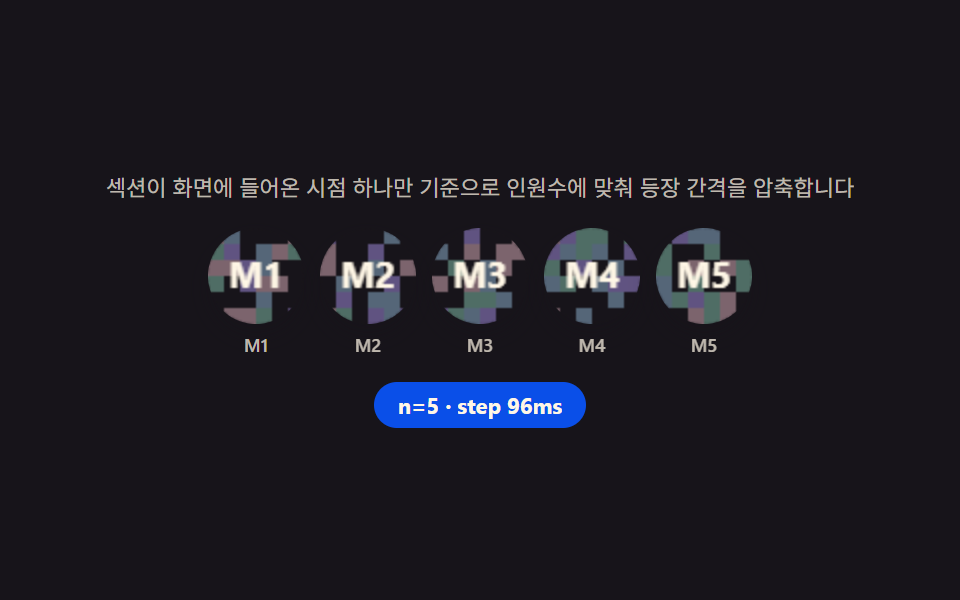 랜딩 섹션팀 소개 페이지 UI 9종 — 인원수·소개글 길이·시차까지 계산해서 보여주는
 랜딩 섹션랜딩페이지 히어로섹션 디자인 9종 — 통계 카운터까지
 랜딩 섹션CSS 카드 디자인 9종 — 도시·팀원·바로가기부터
 랜딩 섹션가격표 디자인 UI 9종 — 연/월 전환·할인율까지 계산해서 보여주는
 랜딩 섹션프로필 카드 디자인 9종 — 복붙하면 되는 스타일 모음
 랜딩 섹션요금제 디자인 인터랙션 9종 — 토글부터 결제 버튼까지
 랜딩 섹션랜딩페이지 전환율을 끌어올리는 섹션 9종
 랜딩 섹션웹사이트 푸터 디자인 패턴 9종, 복사해서 바로 쓰는
 랜딩 섹션히어로 섹션 디자인 패턴 9종 — JS 라이브러리 없이
 랜딩 섹션고객 후기 디자인 패턴 9종, 신뢰를 보여 주는