CSS 카드 디자인 9종 — 도시·팀원·바로가기부터
CSS 카드 디자인은 화면에 내용을 담아 나열하는 가장 기본적인 그릇을 짜는 일입니다. 클릭은 카드 전체가 아니라 링크에 맡기는 게 이 편의 원칙이고, 도시 소개·팀원·바로가기·자기소개 탭·후기·제품 스펙·이벤트·인트로·블로그 목록까지 아홉 가지 콘텐츠 카드를 라이브러리 없이
 01 content-card-city-guide
 02 content-card-team-member
 03 content-card-shortcut-tile
 04 content-card-about-tabs
 05 content-card-review-pinboard
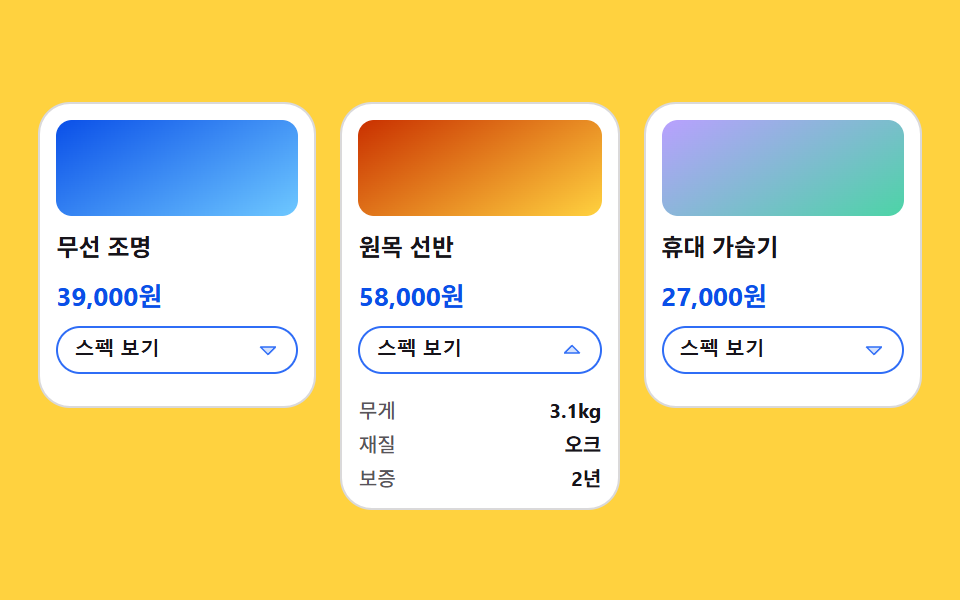 06 content-card-spec-grow
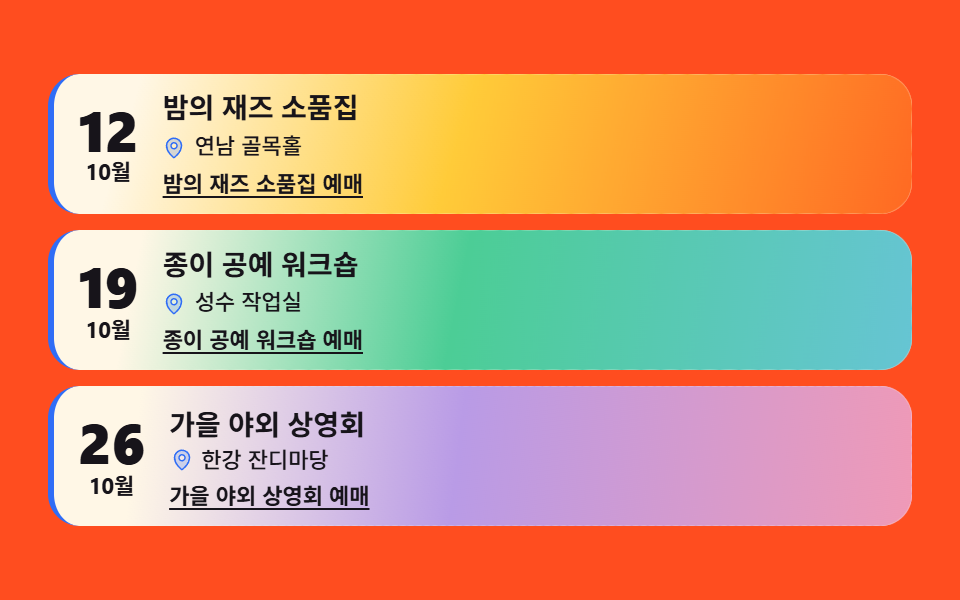 07 content-card-event-mood
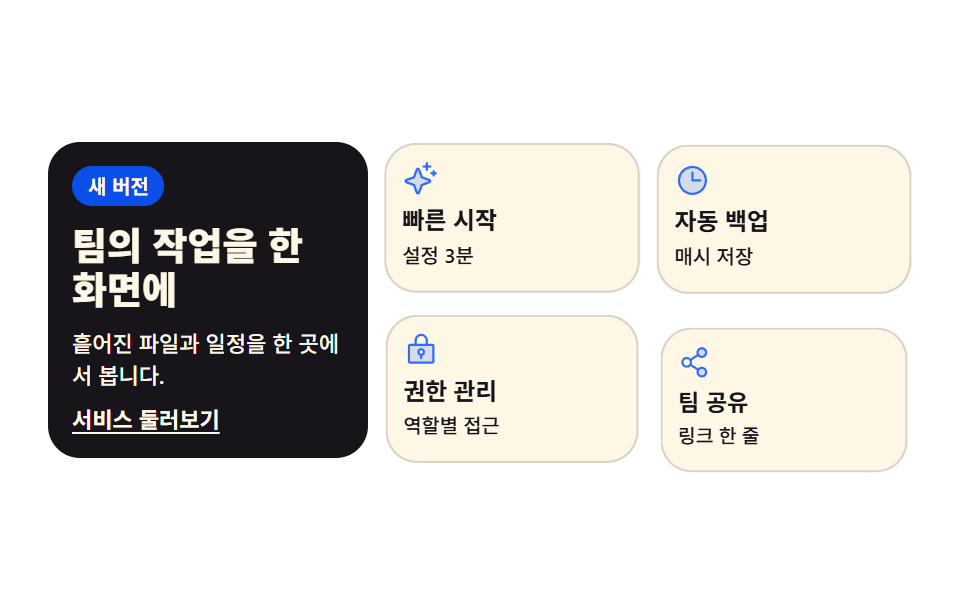 08 content-card-intro-grid
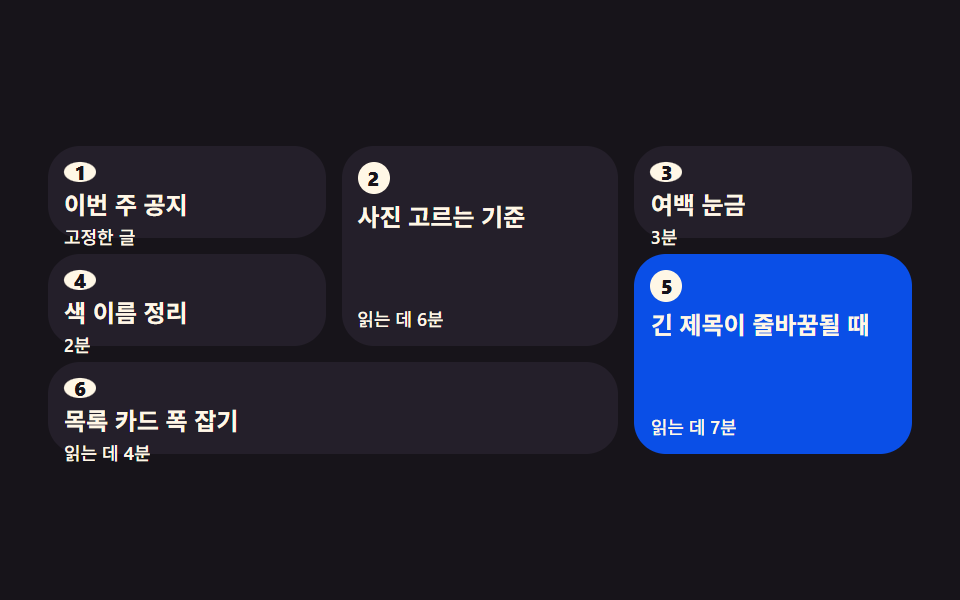 09 content-card-waterfall-order
자동 재생 · 눌러서 해당 항목으로 · 전부 한 zip
- 01 도시 소개 그리드 카드
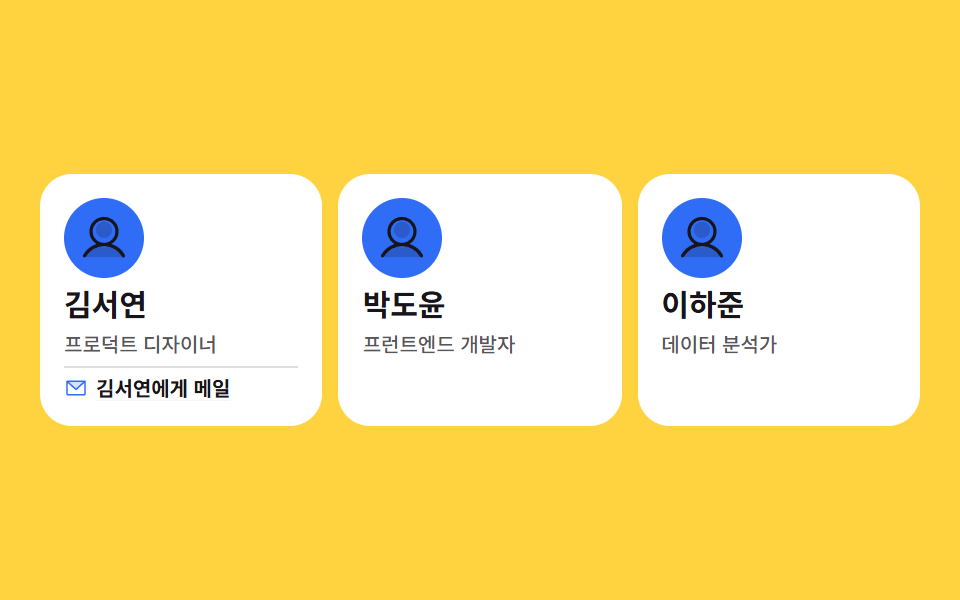
- 02 팀원 소개 카드
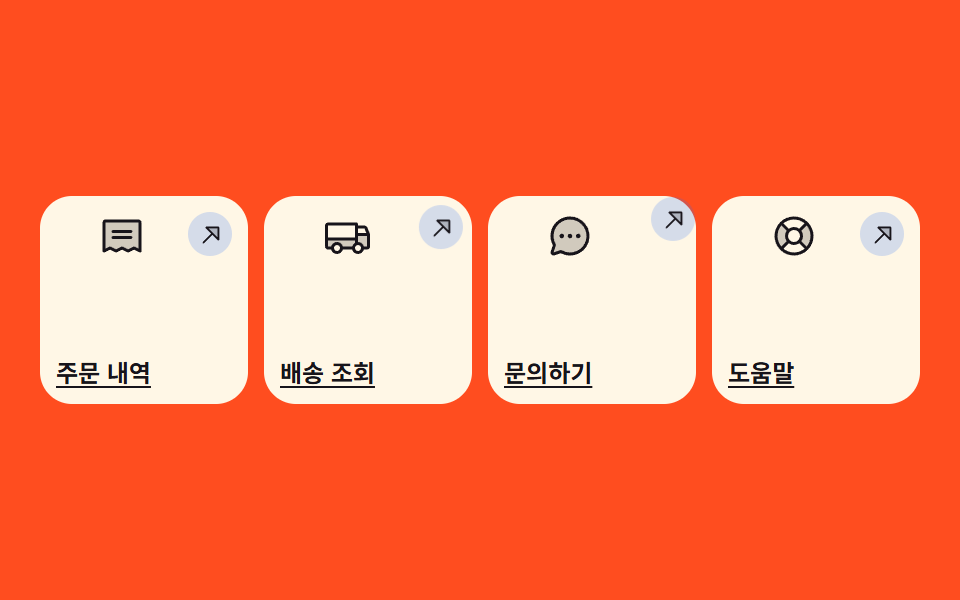
- 03 바로가기 타일 카드
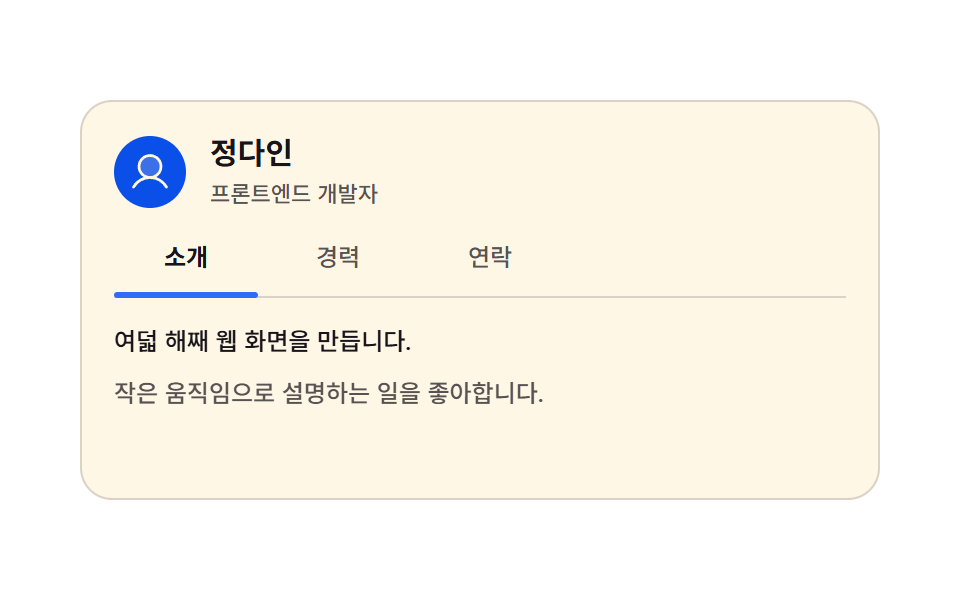
- 04 탭으로 넘기는 자기소개 카드
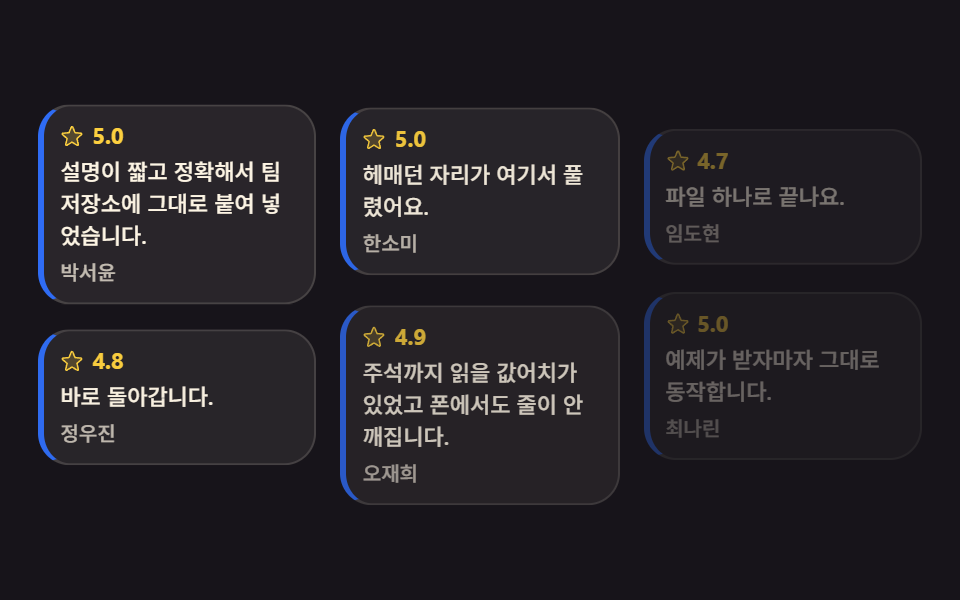
- 05 핀 보드 후기 카드
- 06 스펙이 자라는 제품 카드
- 07 분위기를 먼저 보이는 이벤트 카드
- 08 인트로 그리드 섹션 카드
- 09 읽는 순서를 지키는 워터폴
순서는 인기순이 아니라 내용이 카드가 되어 가는 순서입니다. 한 장이 여러 장이 되고(01, 02), 그 카드가 안내판 구실을 하다가(03), 한 장 안에서 본문이 갈라지고(04, 05, 06), 카드에 분위기가 얹히고(07), 카드들이 한 덩어리로 짜이고(08), 마지막에는 카드가 많아져도 읽는 차례까지 지키게 됩니다(09). 이 편 전체의 축은 효과가 아니라 배치와 링크입니다 — 카드 전체가 아니라 링크에 클릭을 맡기는 원칙은 아홉 개 전부에 겹쳐 있습니다. 같은 맥락의 이웃으로 CSS 버튼 디자인과 탭 메뉴 만들기가 있습니다.
01도시 소개 그리드 카드
도시 이름과 한 줄 소개를 담은 카드 셋이 grid-template-columns 로 나란히 서고, 카드마다 라벨 띠가 위로 올라오며 자기 순서에 등장하는, 여행·지역 서비스 소개 섹션용 카드입니다.
<main class="stage">
<ul class="cg is-demo" id="cg">
  <li class="cg__card">
    <div class="cg__shot cg__shot--a">
      <span class="cg__band">
        <span class="cg__ic" aria-hidden="true"><svg xmlns="http://www.w3.org/2000/svg" width="1em" height="1em" viewBox="0 0 256 256"><g fill="currentColor"><path d="M128 24a80 80 0 0 0-80 80c0 72 80 128 80 128s80-56 80-128a80 80 0 0 0-80-80m0 112a32 32 0 1 1 32-32a32 32 0 0 1-32 32" opacity=".2"/><path d="M128 64a40 40 0 1 0 40 40a40 40 0 0 0-40-40m0 64a24 24 0 1 1 24-24a24 24 0 0 1-24 24m0-112a88.1 88.1 0 0 0-88 88c0 31.4 14.51 64.68 42 96.25a254.2 254.2 0 0 0 41.45 38.3a8 8 0 0 0 9.18 0a254.2 254.2 0 0 0 41.37-38.3c27.45-31.57 42-64.85 42-96.25a88.1 88.1 0 0 0-88-88m0 206c-16.53-13-72-60.75-72-118a72 72 0 0 1 144 0c0 57.23-55.47 105-72 118"/></g></svg></span>당일치기</span>
    </div>
    <h3 class="cg__name">부산</h3>
    <p class="cg__line">바다와 시장이 한 정류장</p>
    <a class="cg__link" href="#busan">부산 가이드 열기</a>
  </li>
  <li class="cg__card">
    <div class="cg__shot cg__shot--b">
      <span class="cg__band">
        <span class="cg__ic" aria-hidden="true"><svg xmlns="http://www.w3.org/2000/svg" width="1em" height="1em" viewBox="0 0 256 256"><g fill="currentColor"><path d="M128 24a80 80 0 0 0-80 80c0 72 80 128 80 128s80-56 80-128a80 80 0 0 0-80-80m0 112a32 32 0 1 1 32-32a32 32 0 0 1-32 32" opacity=".2"/><path d="M128 64a40 40 0 1 0 40 40a40 40 0 0 0-40-40m0 64a24 24 0 1 1 24-24a24 24 0 0 1-24 24m0-112a88.1 88.1 0 0 0-88 88c0 31.4 14.51 64.68 42 96.25a254.2 254.2 0 0 0 41.45 38.3a8 8 0 0 0 9.18 0a254.2 254.2 0 0 0 41.37-38.3c27.45-31.57 42-64.85 42-96.25a88.1 88.1 0 0 0-88-88m0 206c-16.53-13-72-60.75-72-118a72 72 0 0 1 144 0c0 57.23-55.47 105-72 118"/></g></svg></span>1박 2일</span>
    </div>
    <h3 class="cg__name">전주</h3>
    <p class="cg__line">골목마다 다른 밥집</p>
    <a class="cg__link" href="#jeonju">전주 가이드 열기</a>
  </li>
  <li class="cg__card">
    <div class="cg__shot cg__shot--c">
      <span class="cg__band">
        <span class="cg__ic" aria-hidden="true"><svg xmlns="http://www.w3.org/2000/svg" width="1em" height="1em" viewBox="0 0 256 256"><g fill="currentColor"><path d="M128 24a80 80 0 0 0-80 80c0 72 80 128 80 128s80-56 80-128a80 80 0 0 0-80-80m0 112a32 32 0 1 1 32-32a32 32 0 0 1-32 32" opacity=".2"/><path d="M128 64a40 40 0 1 0 40 40a40 40 0 0 0-40-40m0 64a24 24 0 1 1 24-24a24 24 0 0 1-24 24m0-112a88.1 88.1 0 0 0-88 88c0 31.4 14.51 64.68 42 96.25a254.2 254.2 0 0 0 41.45 38.3a8 8 0 0 0 9.18 0a254.2 254.2 0 0 0 41.37-38.3c27.45-31.57 42-64.85 42-96.25a88.1 88.1 0 0 0-88-88m0 206c-16.53-13-72-60.75-72-118a72 72 0 0 1 144 0c0 57.23-55.47 105-72 118"/></g></svg></span>주말 코스</span>
    </div>
    <h3 class="cg__name">속초</h3>
    <p class="cg__line">바다와 산을 한 번에</p>
    <a class="cg__link" href="#sokcho">속초 가이드 열기</a>
  </li>
</ul>
</main>@use "sass:math";
@use "../../../../site/static/demo-tokens" as *;
// 도시 소개 그리드 카드 — 이 편의 주인공은 효과가 아니라 **배치**다.
// grid-template-columns 로 세 칸을 먼저 정하고, 카드는 자기 순서(animation-delay)에만 올라온다.
// 지연이 걸린 루프에는 animation-fill-mode: backwards 가 반드시 함께 간다 —
// 없으면 지연 구간에 요소의 작성 상태(= 도착 상태)가 0프레임에 한 번 번쩍인다.
// 호버 리프트·그림자 확대 같은 카드 효과는 이 편의 축이 아니라서 쓰지 않는다.
$duration: $dur-enter;
$easing: $ease-spring;
$color: $subject-blue;
// 잉크 무대 위에서 한 단계 밝은 카드 면 (토큰 밖 실측값 — 크림 글자 15.1:1)
$panel: #241f2a;
$rise: 14px;
// 2초 루프 안에서 "카드가 올라오는" 구간의 길이. $duration 을 절반으로 줄이면 구간도 절반이 된다
$enter: math.div($duration, $dur-loop) * 100%;
@include stage($stage-ink);
.cg {
  display: grid;
  grid-template-columns: repeat(3, 1fr);
  gap: $sp-2;
  box-sizing: border-box; width: min(100%, 440px);
  margin: 0; padding: 0; list-style: none;
}
.cg__card {
display: flex; flex-direction: column; gap: $sp-1;
box-sizing: border-box;
padding: $sp-2;
border-radius: $r-card;
background: $panel;
border-top: 2px solid $color;
// 미리보기 루프를 뗀 순간 카드가 제자리로 부드럽게 앉는다 (애니메이션이 사라진 자리를 transition 이 받는다)
transition: transform $duration $easing;
}
// 사진이 들어갈 자리. 지금은 토큰 그라디언트 (run/081/_이미지후보.A.json 에 기록)
.cg__shot {
position: relative; overflow: hidden;
height: clamp(40px, 13vw, 62px);
border-radius: $r-sm;
background:
radial-gradient(circle at 28% 22%, rgba(255, 255, 255, .26), rgba(255, 255, 255, 0) 62%),
linear-gradient(152deg, $color, rgba($color, .22));
}
.cg__shot--b { background-position: 70% 30%, 0 0; }
.cg__shot--c { background-position: 45% 70%, 0 0; }
// 라벨 띠 — 사진 아래에서 위로 올라온다. 글자는 크림 면 위 잉크(17.1:1)라 $color 가 바뀌어도 안전하다
.cg__band {
position: absolute; left: 6px; bottom: 6px;
display: inline-flex; align-items: center; gap: $sp-1;
padding: $sp-1 $sp-2;
border-radius: $r-pill;
background: $subject-cream; color: $subject-ink;
font-weight: 700; font-size: clamp(9px, 2.4vw, 10px); line-height: 1.2;
white-space: nowrap;
}
.cg__ic { display: inline-grid; place-items: center; color: $color; font-size: 11px; }
.cg__name {
margin: 0;
color: $subject-cream;
font-weight: 700; font-size: clamp(12px, 3.4vw, 15px); line-height: 1.25;
}
.cg__line {
margin: 0;
color: rgba($subject-cream, .78);
font-weight: 500; font-size: clamp(9px, 2.6vw, 11px); line-height: 1.35;
}
// 카드 전체가 아니라 링크가 목적지 이름을 말한다 (WCAG 2.4.4 link purpose)
.cg__link {
margin-top: auto;
color: $subject-cream;
font-weight: 700; font-size: clamp(9px, 2.6vw, 11px); line-height: 1.3;
text-decoration: underline; text-underline-offset: 2px;
}
.cg__link:focus-visible { outline: 2px solid $subject-cream; outline-offset: 2px; border-radius: $r-xs; }
// ── 격자 미리보기 루프 (2초). 카드는 0 / .16 / .32초 순서로 올라오고 띠가 뒤따른다.
// 복귀(다시 내려감)는 88% 안에 끝난다 — 24프레임의 마지막 샘플은 95.8% 지점이다.
.cg.is-demo .cg__card {
animation-name: cgRise;
animation-duration: $dur-loop;
animation-timing-function: $easing;
animation-iteration-count: infinite;
animation-fill-mode: backwards;
}
.cg.is-demo .cg__card:nth-child(2) { animation-delay: .16s; }
.cg.is-demo .cg__card:nth-child(3) { animation-delay: .32s; }
.cg.is-demo .cg__band {
animation-name: cgBand;
animation-duration: $dur-loop;
animation-timing-function: $easing;
animation-iteration-count: infinite;
animation-fill-mode: backwards;
}
.cg.is-demo .cg__card:nth-child(2) .cg__band { animation-delay: .16s; }
.cg.is-demo .cg__card:nth-child(3) .cg__band { animation-delay: .32s; }
@keyframes cgRise {
0% { transform: translateY($rise); }
#{$enter} { transform: translateY(0); }
74% { transform: translateY(0); }
88%, 100% { transform: translateY($rise); }
}
@keyframes cgBand {
0%, #{$enter * .4} { transform: translateY(180%); }
#{$enter * 1.4} { transform: translateY(0); }
74% { transform: translateY(0); }
86%, 100% { transform: translateY(180%); }
}
// ── 좁은 화면: 320×200 무대에서도 세 칸을 지킨다 (열을 줄이지 않는 게 이 항목의 요점)
@media (max-width: 340px) {
.cg { gap: $sp-1; }
.cg__card { gap: 0; padding: $sp-1; }
.cg__band { padding: 0 $sp-1; left: 4px; bottom: 4px; }
.cg__ic { font-size: 9px; }
}
@media (prefers-reduced-motion: reduce) {
.cg.is-demo .cg__card,
.cg.is-demo .cg__band {
animation: none !important;
transform: none !important;
}
}html, body {
margin: 0;
overflow: hidden;
}
.stage {
box-sizing: border-box;
min-height: 100vh;
display: grid;
place-items: center;
margin: 0;
background: #17141a;
font-family: -apple-system, "Segoe UI", "Noto Sans KR", sans-serif;
padding: clamp(8px, 4vw, 24px);
}
.cg {
display: grid;
grid-template-columns: repeat(3, 1fr);
gap: 8px;
box-sizing: border-box;
width: min(100%, 440px);
margin: 0;
padding: 0;
list-style: none;
}
.cg__card {
display: flex;
flex-direction: column;
gap: 4px;
box-sizing: border-box;
padding: 8px;
border-radius: 16px;
background: #241f2a;
border-top: 2px solid #2f6df6;
transition: transform 600ms cubic-bezier(0.2, 0.8, 0.2, 1);
}
.cg__shot {
position: relative;
overflow: hidden;
height: clamp(40px, 13vw, 62px);
border-radius: 8px;
background: radial-gradient(circle at 28% 22%, rgba(255, 255, 255, 0.26), rgba(255, 255, 255, 0) 62%), linear-gradient(152deg, #2f6df6, rgba(47, 109, 246, 0.22));
}
.cg__shot--b {
background-position: 70% 30%, 0 0;
}
.cg__shot--c {
background-position: 45% 70%, 0 0;
}
.cg__band {
position: absolute;
left: 6px;
bottom: 6px;
display: inline-flex;
align-items: center;
gap: 4px;
padding: 4px 8px;
border-radius: 999px;
background: #fff7e6;
color: #17141a;
font-weight: 700;
font-size: clamp(9px, 2.4vw, 10px);
line-height: 1.2;
white-space: nowrap;
}
.cg__ic {
display: inline-grid;
place-items: center;
color: #2f6df6;
font-size: 11px;
}
.cg__name {
margin: 0;
color: #fff7e6;
font-weight: 700;
font-size: clamp(12px, 3.4vw, 15px);
line-height: 1.25;
}
.cg__line {
margin: 0;
color: rgba(255, 247, 230, 0.78);
font-weight: 500;
font-size: clamp(9px, 2.6vw, 11px);
line-height: 1.35;
}
.cg__link {
margin-top: auto;
color: #fff7e6;
font-weight: 700;
font-size: clamp(9px, 2.6vw, 11px);
line-height: 1.3;
text-decoration: underline;
text-underline-offset: 2px;
}
.cg__link:focus-visible {
outline: 2px solid #fff7e6;
outline-offset: 2px;
border-radius: 4px;
}
.cg.is-demo .cg__card {
animation-name: cgRise;
animation-duration: 2s;
animation-timing-function: cubic-bezier(0.2, 0.8, 0.2, 1);
animation-iteration-count: infinite;
animation-fill-mode: backwards;
}
.cg.is-demo .cg__card:nth-child(2) {
animation-delay: 0.16s;
}
.cg.is-demo .cg__card:nth-child(3) {
animation-delay: 0.32s;
}
.cg.is-demo .cg__band {
animation-name: cgBand;
animation-duration: 2s;
animation-timing-function: cubic-bezier(0.2, 0.8, 0.2, 1);
animation-iteration-count: infinite;
animation-fill-mode: backwards;
}
.cg.is-demo .cg__card:nth-child(2) .cg__band {
animation-delay: 0.16s;
}
.cg.is-demo .cg__card:nth-child(3) .cg__band {
animation-delay: 0.32s;
}
@keyframes cgRise {
0% {
transform: translateY(14px);
}
30% {
transform: translateY(0);
}
74% {
transform: translateY(0);
}
88%, 100% {
transform: translateY(14px);
}
}
@keyframes cgBand {
0%, 12% {
transform: translateY(180%);
}
42% {
transform: translateY(0);
}
74% {
transform: translateY(0);
}
86%, 100% {
transform: translateY(180%);
}
}
@media (max-width: 340px) {
.cg {
gap: 4px;
}
.cg__card {
gap: 0;
padding: 4px;
}
.cg__band {
padding: 0 4px;
left: 4px;
bottom: 4px;
}
.cg__ic {
font-size: 9px;
}
}
@media (prefers-reduced-motion: reduce) {
.cg.is-demo .cg__card,
.cg.is-demo .cg__band {
animation: none !important;
transform: none !important;
}
}// 사람이 만지면 미리보기 루프를 뗀다 — 뗀 뒤에도 카드는 제자리에 그대로 선다
var cityGrid = document.getElementById('cg');
['pointerdown', 'focusin'].forEach(function (evt) {
cityGrid.addEventListener(evt, function () { cityGrid.classList.remove('is-demo'); });
});// CityGuideGrid — vanilla 판(run/081/demo/01-content-card-city-guide/index.html) 의 React 포트.
// grid-template-columns 로 세 칸을 먼저 정하고, 카드는 animation-delay 로 자기 순서에만 올라온다.
// 카드 전체가 아니라 링크가 목적지 이름을 말한다 (WCAG 2.4.4).
import { useState } from "react";
import type { CSSProperties } from "react";
import styles from "./CityGuideGrid.module.scss";
export type CityGuideGridProps = {
duration?: number;
easing?: string;
color?: string;
};
type Vars = CSSProperties & { "--duration"?: string; "--easing"?: string; "--color"?: string };
type City = { band: string; name: string; line: string; link: string; href: string; shot: string };
// 링크 글자는 조각으로 잇지 않는다 — 언어팩 사전의 키가 문장 전체여야 en·ja 판이 반쪽으로 안 나간다
const CITIES: City[] = [
{ band: "당일치기", name: "부산", line: "바다와 시장이 한 정류장", link: "부산 가이드 열기", href: "#busan", shot: "shot--a" },
{ band: "1박 2일", name: "전주", line: "골목마다 다른 밥집", link: "전주 가이드 열기", href: "#jeonju", shot: "shot--b" },
{ band: "주말 코스", name: "속초", line: "바다와 산을 한 번에", link: "속초 가이드 열기", href: "#sokcho", shot: "shot--c" },
];
function MapPin() {
return (
<svg xmlns="http://www.w3.org/2000/svg" width="1em" height="1em" viewBox="0 0 256 256">
<g fill="currentColor">
<path d="M128 24a80 80 0 0 0-80 80c0 72 80 128 80 128s80-56 80-128a80 80 0 0 0-80-80m0 112a32 32 0 1 1 32-32a32 32 0 0 1-32 32" opacity=".2" />
<path d="M128 64a40 40 0 1 0 40 40a40 40 0 0 0-40-40m0 64a24 24 0 1 1 24-24a24 24 0 0 1-24 24m0-112a88.1 88.1 0 0 0-88 88c0 31.4 14.51 64.68 42 96.25a254.2 254.2 0 0 0 41.45 38.3a8 8 0 0 0 9.18 0a254.2 254.2 0 0 0 41.37-38.3c27.45-31.57 42-64.85 42-96.25a88.1 88.1 0 0 0-88-88m0 206c-16.53-13-72-60.75-72-118a72 72 0 0 1 144 0c0 57.23-55.47 105-72 118" />
</g>
</svg>
);
}
export default function CityGuideGrid(props: CityGuideGridProps) {
const duration = props.duration ?? 600;
const easing = props.easing ?? "cubic-bezier(.2, .8, .2, 1)";
const color = props.color ?? "#2f6df6";
const [preview, setPreview] = useState<boolean>(true);
const vars: Vars = { "--duration": duration + "ms", "--easing": easing, "--color": color };
const stop = () => setPreview(false);
return (
<main className={styles.stage}>
<ul
className={styles.cg + (preview ? " " + styles.isDemo : "")}
style={vars}
onPointerDown={stop}
onFocus={stop}
>
{CITIES.map((city) => (
<li className={styles.card} key={city.name}>
<div className={styles.shot + " " + styles[city.shot]}>
<span className={styles.band}>
<span className={styles.ic} aria-hidden="true"><MapPin /></span>
{city.band}
</span>
</div>
<h3 className={styles.name}>{city.name}</h3>
<p className={styles.line}>{city.line}</p>
<a className={styles.link} href={city.href}>{city.link}</a>
</li>
))}
</ul>
</main>
);
}01 · 도시 소개 그리드 카드 — 측정 누적면적 34.122% · 움직인 프레임 20/23GODRICH 원작 · zip 에 SCSS·React 포함 · 비밀번호 보기
세 칸은 그리드가 정하고 등장은 순서가 정한다
.cg {
display: grid;
grid-template-columns: repeat(3, 1fr);
gap: $sp-2;
box-sizing: border-box; width: min(100%, 440px);
margin: 0; padding: 0; list-style: none;
}
카드 하나하나에 폭을 주지 않고 칸 세 개를 먼저 못 박았기 때문에, 카드를 넷으로 늘릴 때는 repeat(3, 1fr) 만 repeat(4, 1fr) 로 바꾸면 카드 안은 손대지 않아도 됩니다.
지연이 걸린 등장에는 fill-mode 를 함께
// 지연 구간에도 시작 상태가 보이도록 — 없으면 첫 프레임에 완성 상태가 한 번 번쩍인다
.cg.is-demo .cg__card { animation-fill-mode: backwards; }
.cg.is-demo .cg__card:nth-child(2) { animation-delay: .12s; }
.cg.is-demo .cg__card:nth-child(3) { animation-delay: .24s; }
animation-delay 로 시차를 준 카드는 지연 구간에도 "올라오기 전 상태"를 보여야 자연스러운데, backwards 가 없으면 지연 동안 완성 상태가 그대로 보였다가 사라졌다가 다시 올라옵니다.
02팀원 소개 카드
이름과 직함 아래 숨어 있던 연락 줄이 카드에 초점이 가면 clip-path 로 펼쳐지고, 링크에는 사람 이름이 그대로 들어 있는, 회사 소개 팀 섹션용 카드입니다.
<main class="stage">
<ul class="tm is-demo" id="tm">
  <li class="tm__card">
    <span class="tm__face" aria-hidden="true"><svg xmlns="http://www.w3.org/2000/svg" width="1em" height="1em" viewBox="0 0 256 256"><g fill="currentColor"><path d="M230.14 219.93a8 8 0 0 1-6.14 2.07H32a8 8 0 0 1-6.14-2.07a8 8 0 0 1-1.63-8.28C33.79 187.16 55 168.51 80.6 159.86a4 4 0 0 1 3.38.31a75.24 75.24 0 0 0 88 0a4 4 0 0 1 3.43-.31c25.62 8.65 46.81 27.3 56.37 51.79a8 8 0 0 1-1.64 8.28M168 88a40 40 0 1 1-40-40a40 40 0 0 1 40 40" opacity=".2"/><path d="M230.92 212c-15.23-26.33-38.7-45.21-66.09-54.16a72 72 0 1 0-73.66 0c-27.39 8.94-50.86 27.82-66.09 54.16a8 8 0 1 0 13.85 8c18.84-32.56 52.14-52 89.07-52s70.23 19.44 89.07 52a8 8 0 1 0 13.85-8M72 96a56 56 0 1 1 56 56a56.06 56.06 0 0 1-56-56"/></g></svg></span>
    <h3 class="tm__name">김서연</h3>
    <p class="tm__role">프로덕트 디자이너</p>
    <p class="tm__contact">
      <span class="tm__ic" aria-hidden="true"><svg xmlns="http://www.w3.org/2000/svg" width="1em" height="1em" viewBox="0 0 256 256"><g fill="currentColor"><path d="m224 56l-96 88l-96-88Z" opacity=".2"/><path d="M224 48H32a8 8 0 0 0-8 8v136a16 16 0 0 0 16 16h176a16 16 0 0 0 16-16V56a8 8 0 0 0-8-8m-20.57 16L128 133.15L52.57 64ZM216 192H40V74.19l82.59 75.71a8 8 0 0 0 10.82 0L216 74.19z"/></g></svg></span>
      <a class="tm__link" href="#seoyeon">김서연에게 메일</a>
    </p>
  </li>
  <li class="tm__card">
    <span class="tm__face" aria-hidden="true"><svg xmlns="http://www.w3.org/2000/svg" width="1em" height="1em" viewBox="0 0 256 256"><g fill="currentColor"><path d="M230.14 219.93a8 8 0 0 1-6.14 2.07H32a8 8 0 0 1-6.14-2.07a8 8 0 0 1-1.63-8.28C33.79 187.16 55 168.51 80.6 159.86a4 4 0 0 1 3.38.31a75.24 75.24 0 0 0 88 0a4 4 0 0 1 3.43-.31c25.62 8.65 46.81 27.3 56.37 51.79a8 8 0 0 1-1.64 8.28M168 88a40 40 0 1 1-40-40a40 40 0 0 1 40 40" opacity=".2"/><path d="M230.92 212c-15.23-26.33-38.7-45.21-66.09-54.16a72 72 0 1 0-73.66 0c-27.39 8.94-50.86 27.82-66.09 54.16a8 8 0 1 0 13.85 8c18.84-32.56 52.14-52 89.07-52s70.23 19.44 89.07 52a8 8 0 1 0 13.85-8M72 96a56 56 0 1 1 56 56a56.06 56.06 0 0 1-56-56"/></g></svg></span>
    <h3 class="tm__name">박도윤</h3>
    <p class="tm__role">프런트엔드 개발자</p>
    <p class="tm__contact">
      <span class="tm__ic" aria-hidden="true"><svg xmlns="http://www.w3.org/2000/svg" width="1em" height="1em" viewBox="0 0 256 256"><g fill="currentColor"><path d="m224 56l-96 88l-96-88Z" opacity=".2"/><path d="M224 48H32a8 8 0 0 0-8 8v136a16 16 0 0 0 16 16h176a16 16 0 0 0 16-16V56a8 8 0 0 0-8-8m-20.57 16L128 133.15L52.57 64ZM216 192H40V74.19l82.59 75.71a8 8 0 0 0 10.82 0L216 74.19z"/></g></svg></span>
      <a class="tm__link" href="#doyun">박도윤에게 메일</a>
    </p>
  </li>
  <li class="tm__card">
    <span class="tm__face" aria-hidden="true"><svg xmlns="http://www.w3.org/2000/svg" width="1em" height="1em" viewBox="0 0 256 256"><g fill="currentColor"><path d="M230.14 219.93a8 8 0 0 1-6.14 2.07H32a8 8 0 0 1-6.14-2.07a8 8 0 0 1-1.63-8.28C33.79 187.16 55 168.51 80.6 159.86a4 4 0 0 1 3.38.31a75.24 75.24 0 0 0 88 0a4 4 0 0 1 3.43-.31c25.62 8.65 46.81 27.3 56.37 51.79a8 8 0 0 1-1.64 8.28M168 88a40 40 0 1 1-40-40a40 40 0 0 1 40 40" opacity=".2"/><path d="M230.92 212c-15.23-26.33-38.7-45.21-66.09-54.16a72 72 0 1 0-73.66 0c-27.39 8.94-50.86 27.82-66.09 54.16a8 8 0 1 0 13.85 8c18.84-32.56 52.14-52 89.07-52s70.23 19.44 89.07 52a8 8 0 1 0 13.85-8M72 96a56 56 0 1 1 56 56a56.06 56.06 0 0 1-56-56"/></g></svg></span>
    <h3 class="tm__name">이하준</h3>
    <p class="tm__role">데이터 분석가</p>
    <p class="tm__contact">
      <span class="tm__ic" aria-hidden="true"><svg xmlns="http://www.w3.org/2000/svg" width="1em" height="1em" viewBox="0 0 256 256"><g fill="currentColor"><path d="m224 56l-96 88l-96-88Z" opacity=".2"/><path d="M224 48H32a8 8 0 0 0-8 8v136a16 16 0 0 0 16 16h176a16 16 0 0 0 16-16V56a8 8 0 0 0-8-8m-20.57 16L128 133.15L52.57 64ZM216 192H40V74.19l82.59 75.71a8 8 0 0 0 10.82 0L216 74.19z"/></g></svg></span>
      <a class="tm__link" href="#hajun">이하준에게 메일</a>
    </p>
  </li>
</ul>
</main>@use "../../../../site/static/demo-tokens" as *;
// 팀원 소개 카드 — 숨은 연락 줄을 clip-path 로 아래에서 위로 걷어낸다.
// 자리는 처음부터 잡혀 있고(높이가 변하지 않는다) 보이는 범위만 바뀌므로 옆 카드가 밀리지 않는다.
// 여는 조건은 :hover 와 :focus-within 둘 다 — 키보드로 링크에 닿아도 같은 상태가 보인다.
// 카드 전체를 클릭 영역으로 만들지 않는다. 링크 글자가 "누구에게" 가는 길인지 스스로 말한다.
$duration: $dur-enter;
$easing: $ease-spring;
$color: $subject-blue;
$edge: rgba($subject-ink, .14);
@include stage($stage-yellow);
.tm {
display: grid;
grid-template-columns: repeat(3, 1fr);
gap: $sp-2;
box-sizing: border-box; width: min(100%, 440px);
margin: 0; padding: 0; list-style: none;
}
.tm__card {
display: flex; flex-direction: column; align-items: flex-start; gap: $sp-1;
box-sizing: border-box;
padding: $sp-3;
border-radius: $r-card;
background: $stage-paper;
}
// 인물 사진이 들어갈 자리. 지금은 토큰 색 원 + 아이콘 (run/081/_이미지후보.A.json 에 기록)
.tm__face {
display: grid; place-items: center;
width: clamp(28px, 9vw, 40px); height: clamp(28px, 9vw, 40px);
border-radius: 50%;
background: $color; color: $subject-ink;
font-size: clamp(18px, 6vw, 26px);
}
.tm__name {
margin: 0;
color: $subject-ink;
font-weight: 700; font-size: clamp(12px, 3.4vw, 15px); line-height: 1.25;
}
.tm__role {
margin: 0;
color: rgba($subject-ink, .72);
font-weight: 500; font-size: clamp(8px, 2.4vw, 10px); line-height: 1.3;
}
// ── 숨은 연락 줄. 높이는 늘 차지하고 clip-path 만 움직인다
.tm__contact {
  display: flex; align-items: center; gap: $sp-1;
  width: 100%; margin: 0; padding-top: $sp-1;
  border-top: 1px solid $edge;
  clip-path: inset(0 0 100% 0);
  transition: clip-path $duration $easing;
}
.tm__card:hover .tm__contact,
.tm__card:focus-within .tm__contact { clip-path: inset(0 0 0 0); }
.tm__ic { display: inline-grid; place-items: center; flex: 0 0 auto; color: $color; font-size: 12px; }
.tm__link {
color: $subject-ink;
font-weight: 700; font-size: clamp(8px, 2.4vw, 10px); line-height: 1.3;
text-decoration: underline; text-underline-offset: 2px;
}
.tm__link:focus-visible { outline: 2px solid $subject-ink; outline-offset: 2px; border-radius: $r-xs; }
// ── 격자 미리보기 루프 (2초). 한 장씩 열렸다 닫히며 세 장을 다 보여준다.
// 같은 키프레임을 0 / .6 / 1.2초로 물려 세 카드가 차례를 나눠 쓴다 —
// animation-delay 를 쓰면 animation-fill-mode: backwards 가 반드시 함께 간다.
.tm.is-demo .tm__contact {
animation-name: tmOpen;
animation-duration: $dur-loop;
animation-timing-function: $easing;
animation-iteration-count: infinite;
animation-fill-mode: backwards;
}
.tm.is-demo .tm__card:nth-child(2) .tm__contact { animation-delay: .6s; }
.tm.is-demo .tm__card:nth-child(3) .tm__contact { animation-delay: 1.2s; }
// clip-path 위프는 이징 짝으로 둔다 — steps 타이밍과 섞으면 보간이 죽어 컷이 된다
@keyframes tmOpen {
0% { clip-path: inset(0 0 100% 0); }
8% { clip-path: inset(0 0 0 0); }
22% { clip-path: inset(0 0 0 0); }
30%, 100% { clip-path: inset(0 0 100% 0); }
}
// ── 좁은 화면: 세 칸을 지키고 여백만 줄인다
@media (max-width: 340px) {
.tm { gap: $sp-1; }
.tm__card { padding: $sp-1; }
.tm__ic { font-size: 10px; }
}
@media (prefers-reduced-motion: reduce) {
.tm.is-demo .tm__contact {
animation: none !important;
clip-path: inset(0 0 0 0) !important;
transition: none !important;
}
}html, body {
margin: 0;
overflow: hidden;
}
.stage {
box-sizing: border-box;
min-height: 100vh;
display: grid;
place-items: center;
margin: 0;
background: #ffd23f;
font-family: -apple-system, "Segoe UI", "Noto Sans KR", sans-serif;
padding: clamp(8px, 4vw, 24px);
}
.tm {
display: grid;
grid-template-columns: repeat(3, 1fr);
gap: 8px;
box-sizing: border-box;
width: min(100%, 440px);
margin: 0;
padding: 0;
list-style: none;
}
.tm__card {
display: flex;
flex-direction: column;
align-items: flex-start;
gap: 4px;
box-sizing: border-box;
padding: 12px;
border-radius: 16px;
background: #ffffff;
}
.tm__face {
display: grid;
place-items: center;
width: clamp(28px, 9vw, 40px);
height: clamp(28px, 9vw, 40px);
border-radius: 50%;
background: #2f6df6;
color: #17141a;
font-size: clamp(18px, 6vw, 26px);
}
.tm__name {
margin: 0;
color: #17141a;
font-weight: 700;
font-size: clamp(12px, 3.4vw, 15px);
line-height: 1.25;
}
.tm__role {
margin: 0;
color: rgba(23, 20, 26, 0.72);
font-weight: 500;
font-size: clamp(8px, 2.4vw, 10px);
line-height: 1.3;
}
.tm__contact {
display: flex;
align-items: center;
gap: 4px;
width: 100%;
margin: 0;
padding-top: 4px;
border-top: 1px solid rgba(23, 20, 26, 0.14);
clip-path: inset(0 0 100% 0);
transition: clip-path 600ms cubic-bezier(0.2, 0.8, 0.2, 1);
}
.tm__card:hover .tm__contact,
.tm__card:focus-within .tm__contact {
clip-path: inset(0 0 0 0);
}
.tm__ic {
display: inline-grid;
place-items: center;
flex: 0 0 auto;
color: #2f6df6;
font-size: 12px;
}
.tm__link {
color: #17141a;
font-weight: 700;
font-size: clamp(8px, 2.4vw, 10px);
line-height: 1.3;
text-decoration: underline;
text-underline-offset: 2px;
}
.tm__link:focus-visible {
outline: 2px solid #17141a;
outline-offset: 2px;
border-radius: 4px;
}
.tm.is-demo .tm__contact {
animation-name: tmOpen;
animation-duration: 2s;
animation-timing-function: cubic-bezier(0.2, 0.8, 0.2, 1);
animation-iteration-count: infinite;
animation-fill-mode: backwards;
}
.tm.is-demo .tm__card:nth-child(2) .tm__contact {
animation-delay: 0.6s;
}
.tm.is-demo .tm__card:nth-child(3) .tm__contact {
animation-delay: 1.2s;
}
@keyframes tmOpen {
0% {
clip-path: inset(0 0 100% 0);
}
8% {
clip-path: inset(0 0 0 0);
}
22% {
clip-path: inset(0 0 0 0);
}
30%, 100% {
clip-path: inset(0 0 100% 0);
}
}
@media (max-width: 340px) {
.tm {
gap: 4px;
}
.tm__card {
padding: 4px;
}
.tm__ic {
font-size: 10px;
}
}
@media (prefers-reduced-motion: reduce) {
.tm.is-demo .tm__contact {
animation: none !important;
clip-path: inset(0 0 0 0) !important;
transition: none !important;
}
}// 사람이 만지면 미리보기 루프를 뗀다 — 그 뒤로는 hover 와 :focus-within 이 연락 줄을 연다
var teamList = document.getElementById('tm');
['pointerdown', 'focusin', 'pointerover'].forEach(function (evt) {
teamList.addEventListener(evt, function () { teamList.classList.remove('is-demo'); });
});// TeamMemberCard — vanilla 판(run/081/demo/02-content-card-team-member/index.html) 의 React 포트.
// 숨은 연락 줄을 clip-path 로 걷어낸다. 높이는 늘 차지하므로 옆 카드가 밀리지 않는다.
// 여는 조건은 :hover 와 :focus-within 둘 다 — 키보드로 링크에 닿아도 같은 상태가 보인다.
import { useState } from "react";
import type { CSSProperties } from "react";
import styles from "./TeamMemberCard.module.scss";
export type TeamMemberCardProps = {
duration?: number;
easing?: string;
color?: string;
};
type Vars = CSSProperties & { "--duration"?: string; "--easing"?: string; "--color"?: string };
type Member = { name: string; role: string; mail: string; href: string };
// 링크 글자는 조각으로 잇지 않는다 — 언어팩 사전의 키가 문장 전체여야 en·ja 판이 반쪽으로 안 나간다
const MEMBERS: Member[] = [
{ name: "김서연", role: "프로덕트 디자이너", mail: "김서연에게 메일", href: "#seoyeon" },
{ name: "박도윤", role: "프런트엔드 개발자", mail: "박도윤에게 메일", href: "#doyun" },
{ name: "이하준", role: "데이터 분석가", mail: "이하준에게 메일", href: "#hajun" },
];
function UserMark() {
return (
<svg xmlns="http://www.w3.org/2000/svg" width="1em" height="1em" viewBox="0 0 256 256">
<g fill="currentColor">
<path d="M230.14 219.93a8 8 0 0 1-6.14 2.07H32a8 8 0 0 1-6.14-2.07a8 8 0 0 1-1.63-8.28C33.79 187.16 55 168.51 80.6 159.86a4 4 0 0 1 3.38.31a75.24 75.24 0 0 0 88 0a4 4 0 0 1 3.43-.31c25.62 8.65 46.81 27.3 56.37 51.79a8 8 0 0 1-1.64 8.28M168 88a40 40 0 1 1-40-40a40 40 0 0 1 40 40" opacity=".2" />
<path d="M230.92 212c-15.23-26.33-38.7-45.21-66.09-54.16a72 72 0 1 0-73.66 0c-27.39 8.94-50.86 27.82-66.09 54.16a8 8 0 1 0 13.85 8c18.84-32.56 52.14-52 89.07-52s70.23 19.44 89.07 52a8 8 0 1 0 13.85-8M72 96a56 56 0 1 1 56 56a56.06 56.06 0 0 1-56-56" />
</g>
</svg>
);
}
function EnvelopeMark() {
return (
<svg xmlns="http://www.w3.org/2000/svg" width="1em" height="1em" viewBox="0 0 256 256">
<g fill="currentColor">
<path d="m224 56l-96 88l-96-88Z" opacity=".2" />
<path d="M224 48H32a8 8 0 0 0-8 8v136a16 16 0 0 0 16 16h176a16 16 0 0 0 16-16V56a8 8 0 0 0-8-8m-20.57 16L128 133.15L52.57 64ZM216 192H40V74.19l82.59 75.71a8 8 0 0 0 10.82 0L216 74.19z" />
</g>
</svg>
);
}
export default function TeamMemberCard(props: TeamMemberCardProps) {
const duration = props.duration ?? 600;
const easing = props.easing ?? "cubic-bezier(.2, .8, .2, 1)";
const color = props.color ?? "#2f6df6";
const [preview, setPreview] = useState<boolean>(true);
const vars: Vars = { "--duration": duration + "ms", "--easing": easing, "--color": color };
const stop = () => setPreview(false);
return (
<main className={styles.stage}>
<ul
className={styles.tm + (preview ? " " + styles.isDemo : "")}
style={vars}
onPointerDown={stop}
onPointerOver={stop}
onFocus={stop}
>
{MEMBERS.map((member) => (
<li className={styles.card} key={member.name}>
<span className={styles.face} aria-hidden="true"><UserMark /></span>
<h3 className={styles.name}>{member.name}</h3>
<p className={styles.role}>{member.role}</p>
<p className={styles.contact}>
<span className={styles.ic} aria-hidden="true"><EnvelopeMark /></span>
<a className={styles.link} href={member.href}>{member.mail}</a>
</p>
</li>
))}
</ul>
</main>
);
}02 · 팀원 소개 카드 — 측정 누적면적 1.531% · 움직인 프레임 13/23GODRICH 원작 · zip 에 SCSS·React 포함 · 비밀번호 보기
자리는 잡아 두고 보이는 범위만 바꾼다
.tm__contact {
display: flex; align-items: center; gap: $sp-1;
width: 100%; margin: 0; padding-top: $sp-1;
border-top: 1px solid $edge;
clip-path: inset(0 0 100% 0);
transition: clip-path $duration $easing;
}
.tm__card:hover .tm__contact,
.tm__card:focus-within .tm__contact { clip-path: inset(0 0 0 0); }
연락 줄은 처음부터 높이를 차지하고 clip-path 로 아래쪽만 가려 두는 것이라, 높이가 변하지 않으니 펼쳐질 때 옆 카드가 밀리지 않고, 다시 접힐 때 레이아웃이 새로 계산되지도 않습니다.
여는 조건은 호버와 초점 둘 다
:focus-within 을 함께 걸었으므로 마우스 없이 키보드만 쓰는 사용자가 링크에 초점을 옮겨도 같은 상태가 펼쳐지는데, 호버용 인터랙션의 초점 버전을 늘 짝으로 두는 게 이 편의 관례입니다.
03바로가기 타일 카드
정사각 타일 네 개가 aspect-ratio 로 크기를 맞추고, 화살표가 타일 모서리를 향해 밀려 나가며 어디로 가는 길인지 가리키는, 홈 화면 빠른 메뉴용 카드입니다.
<main class="stage">
<ul class="st is-demo" id="st">
  <li class="st__tile">
    <span class="st__ic" aria-hidden="true"><svg xmlns="http://www.w3.org/2000/svg" width="1em" height="1em" viewBox="0 0 256 256"><g fill="currentColor"><path d="M224 56v152l-32-16l-32 16l-32-16l-32 16l-32-16l-32 16V56a8 8 0 0 1 8-8h176a8 8 0 0 1 8 8" opacity=".2"/><path d="M72 104a8 8 0 0 1 8-8h96a8 8 0 0 1 0 16H80a8 8 0 0 1-8-8m8 40h96a8 8 0 0 0 0-16H80a8 8 0 0 0 0 16m152-88v152a8 8 0 0 1-11.58 7.15L192 200.94l-28.42 14.21a8 8 0 0 1-7.16 0L128 200.94l-28.42 14.21a8 8 0 0 1-7.16 0L64 200.94l-28.42 14.21A8 8 0 0 1 24 208V56a16 16 0 0 1 16-16h176a16 16 0 0 1 16 16m-16 0H40v139.06l20.42-10.22a8 8 0 0 1 7.16 0L96 199.06l28.42-14.22a8 8 0 0 1 7.16 0L160 199.06l28.42-14.22a8 8 0 0 1 7.16 0L216 195.06Z"/></g></svg></span>
    <span class="st__go" aria-hidden="true"><svg xmlns="http://www.w3.org/2000/svg" width="1em" height="1em" viewBox="0 0 256 256"><g fill="currentColor"><path d="M192 64v104L88 64Z" opacity=".2"/><path d="M192 56H88a8 8 0 0 0-5.66 13.66L128.69 116l-70.35 70.34a8 8 0 0 0 11.32 11.32L140 127.31l46.34 46.35A8 8 0 0 0 200 168V64a8 8 0 0 0-8-8m-8 92.69l-38.34-38.34L107.31 72H184Z"/></g></svg></span>
    <a class="st__link" href="#orders">주문 내역</a>
  </li>
  <li class="st__tile">
    <span class="st__ic" aria-hidden="true"><svg xmlns="http://www.w3.org/2000/svg" width="1em" height="1em" viewBox="0 0 256 256"><g fill="currentColor"><path d="M248 120v64a8 8 0 0 1-8 8h-24a24 24 0 0 0-48 0h-64a24 24 0 0 0-48 0H32a8 8 0 0 1-8-8v-40h160v-24Z" opacity=".2"/><path d="m255.42 117l-14-35a15.93 15.93 0 0 0-14.84-10H192v-8a8 8 0 0 0-8-8H32a16 16 0 0 0-16 16v112a16 16 0 0 0 16 16h17a32 32 0 0 0 62 0h50a32 32 0 0 0 62 0h17a16 16 0 0 0 16-16v-64a7.9 7.9 0 0 0-.58-3M192 88h34.58l9.6 24H192ZM32 72h144v64H32Zm48 136a16 16 0 1 1 16-16a16 16 0 0 1-16 16m81-24h-50a32 32 0 0 0-62 0H32v-32h144v12.31A32.1 32.1 0 0 0 161 184m31 24a16 16 0 1 1 16-16a16 16 0 0 1-16 16m48-24h-17a32.06 32.06 0 0 0-31-24v-32h48Z"/></g></svg></span>
    <span class="st__go" aria-hidden="true"><svg xmlns="http://www.w3.org/2000/svg" width="1em" height="1em" viewBox="0 0 256 256"><g fill="currentColor"><path d="M192 64v104L88 64Z" opacity=".2"/><path d="M192 56H88a8 8 0 0 0-5.66 13.66L128.69 116l-70.35 70.34a8 8 0 0 0 11.32 11.32L140 127.31l46.34 46.35A8 8 0 0 0 200 168V64a8 8 0 0 0-8-8m-8 92.69l-38.34-38.34L107.31 72H184Z"/></g></svg></span>
    <a class="st__link" href="#delivery">배송 조회</a>
  </li>
  <li class="st__tile">
    <span class="st__ic" aria-hidden="true"><svg xmlns="http://www.w3.org/2000/svg" width="1em" height="1em" viewBox="0 0 256 256"><g fill="currentColor"><path d="M224 128a96 96 0 0 1-144.07 83.11l-37.39 12.47a8 8 0 0 1-10.12-10.12l12.47-37.39A96 96 0 1 1 224 128" opacity=".2"/><path d="M128 24a104 104 0 0 0-91.82 152.88l-11.35 34.05a16 16 0 0 0 20.24 20.24l34.05-11.35A104 104 0 1 0 128 24m0 192a87.87 87.87 0 0 1-44.06-11.81a8 8 0 0 0-4-1.08a7.9 7.9 0 0 0-2.53.42L40 216l12.47-37.4a8 8 0 0 0-.66-6.54A88 88 0 1 1 128 216m12-88a12 12 0 1 1-12-12a12 12 0 0 1 12 12m-44 0a12 12 0 1 1-12-12a12 12 0 0 1 12 12m88 0a12 12 0 1 1-12-12a12 12 0 0 1 12 12"/></g></svg></span>
    <span class="st__go" aria-hidden="true"><svg xmlns="http://www.w3.org/2000/svg" width="1em" height="1em" viewBox="0 0 256 256"><g fill="currentColor"><path d="M192 64v104L88 64Z" opacity=".2"/><path d="M192 56H88a8 8 0 0 0-5.66 13.66L128.69 116l-70.35 70.34a8 8 0 0 0 11.32 11.32L140 127.31l46.34 46.35A8 8 0 0 0 200 168V64a8 8 0 0 0-8-8m-8 92.69l-38.34-38.34L107.31 72H184Z"/></g></svg></span>
    <a class="st__link" href="#support">문의하기</a>
  </li>
  <li class="st__tile">
    <span class="st__ic" aria-hidden="true"><svg xmlns="http://www.w3.org/2000/svg" width="1em" height="1em" viewBox="0 0 256 256"><g fill="currentColor"><path d="m195.88 195.88l-39.6-39.6a40 40 0 0 0 0-56.56l39.6-39.6a96 96 0 0 1 0 135.76M60.12 60.12a96 96 0 0 0 0 135.76l39.6-39.6a40 40 0 0 1 0-56.56Z" opacity=".2"/><path d="M128 24a104 104 0 1 0 104 104A104.11 104.11 0 0 0 128 24m39.1 131.79a47.84 47.84 0 0 0 0-55.58l28.5-28.49a87.83 87.83 0 0 1 0 112.56ZM96 128a32 32 0 1 1 32 32a32 32 0 0 1-32-32m88.28-67.6l-28.49 28.5a47.84 47.84 0 0 0-55.58 0L71.72 60.4a87.83 87.83 0 0 1 112.56 0M60.4 71.72l28.5 28.49a47.84 47.84 0 0 0 0 55.58l-28.5 28.49a87.83 87.83 0 0 1 0-112.56M71.72 195.6l28.49-28.5a47.84 47.84 0 0 0 55.58 0l28.49 28.5a87.83 87.83 0 0 1-112.56 0"/></g></svg></span>
    <span class="st__go" aria-hidden="true"><svg xmlns="http://www.w3.org/2000/svg" width="1em" height="1em" viewBox="0 0 256 256"><g fill="currentColor"><path d="M192 64v104L88 64Z" opacity=".2"/><path d="M192 56H88a8 8 0 0 0-5.66 13.66L128.69 116l-70.35 70.34a8 8 0 0 0 11.32 11.32L140 127.31l46.34 46.35A8 8 0 0 0 200 168V64a8 8 0 0 0-8-8m-8 92.69l-38.34-38.34L107.31 72H184Z"/></g></svg></span>
    <a class="st__link" href="#help">도움말</a>
  </li>
</ul>
</main>
@use "../../../../site/static/demo-tokens" as *;
// 바로가기 타일 — 폭이 얼마든 aspect-ratio 로 정사각을 지키는 게 이 항목의 뼈대다.
// 높이를 px 로 박지 않으니 열 수가 바뀌어도(4열 → 2열) 타일은 늘 정사각이다.
// 움직이는 건 화살표 하나뿐 — transform 이 아니라 독립 속성 translate 를 쓴다.
// 타일 전체가 링크가 아니라 라벨이 링크다. 그래서 링크 글자만 읽어도 어디로 가는지 안다.
$duration: $dur-quick;
$easing: $ease-spring;
$color: $subject-blue;
$reach: 8px;
@include stage($stage-orange);
.st {
display: grid;
grid-template-columns: repeat(4, 1fr);
gap: $sp-2;
box-sizing: border-box; width: min(100%, 440px);
margin: 0; padding: 0; list-style: none;
}
.st__tile {
  display: grid;
  grid-template-columns: 1fr auto;
  grid-template-rows: auto 1fr auto;
  aspect-ratio: 1 / 1;
  box-sizing: border-box;
  padding: $sp-2;
  border-radius: $r-card;
  background: $subject-cream;
}
.st__ic {
grid-column: 1; grid-row: 1;
display: inline-grid; place-items: center;
color: $subject-ink;
font-size: clamp(16px, 5.5vw, 24px);
}
// 화살표 칩. 모서리 쪽(오른쪽 위)으로 밀려 나가며 행선지를 가리킨다
.st__go {
grid-column: 2; grid-row: 1;
display: inline-grid; place-items: center;
width: clamp(16px, 5.5vw, 22px); height: clamp(16px, 5.5vw, 22px);
border-radius: 50%;
background: rgba($color, .20); color: $subject-ink;
font-size: clamp(10px, 3.6vw, 15px);
translate: 0 0;
transition: translate $duration $easing;
}
.st__tile:hover .st__go,
.st__tile:focus-within .st__go { translate: $reach (-$reach); }
.st__link {
grid-column: 1 / -1; grid-row: 3;
color: $subject-ink;
font-weight: 700; font-size: clamp(9px, 3vw, 12px); line-height: 1.25;
text-decoration: underline; text-underline-offset: 2px;
}
.st__link:focus-visible { outline: 2px solid $subject-ink; outline-offset: 2px; border-radius: $r-xs; }
// ── 격자 미리보기 루프 (2초). 네 타일이 0 / .4 / .8 / 1.2초 차례로 화살표를 내보낸다.
// animation-delay 를 쓰면 animation-fill-mode: backwards 가 반드시 함께 간다 (첫 프레임 번쩍임).
.st.is-demo .st__go {
animation-name: stGo;
animation-duration: $dur-loop;
animation-timing-function: $easing;
animation-iteration-count: infinite;
animation-fill-mode: backwards;
}
.st.is-demo .st__tile:nth-child(2) .st__go { animation-delay: .4s; }
.st.is-demo .st__tile:nth-child(3) .st__go { animation-delay: .8s; }
.st.is-demo .st__tile:nth-child(4) .st__go { animation-delay: 1.2s; }
@keyframes stGo {
0% { translate: 0 0; }
12% { translate: $reach (-$reach); }
24% { translate: $reach (-$reach); }
36%, 100% { translate: 0 0; }
}
// ── 좁은 화면: 네 칸과 정사각을 그대로 두고 여백만 줄인다
@media (max-width: 340px) {
.st { gap: $sp-1; }
.st__tile { padding: $sp-1; }
}
@media (prefers-reduced-motion: reduce) {
.st.is-demo .st__go {
animation: none !important;
translate: 0 0 !important;
transition: none !important;
}
}html, body {
margin: 0;
overflow: hidden;
}
.stage {
box-sizing: border-box;
min-height: 100vh;
display: grid;
place-items: center;
margin: 0;
background: #ff4d1f;
font-family: -apple-system, "Segoe UI", "Noto Sans KR", sans-serif;
padding: clamp(8px, 4vw, 24px);
}
.st {
display: grid;
grid-template-columns: repeat(4, 1fr);
gap: 8px;
box-sizing: border-box;
width: min(100%, 440px);
margin: 0;
padding: 0;
list-style: none;
}
.st__tile {
display: grid;
grid-template-columns: 1fr auto;
grid-template-rows: auto 1fr auto;
aspect-ratio: 1/1;
box-sizing: border-box;
padding: 8px;
border-radius: 16px;
background: #fff7e6;
}
.st__ic {
grid-column: 1;
grid-row: 1;
display: inline-grid;
place-items: center;
color: #17141a;
font-size: clamp(16px, 5.5vw, 24px);
}
.st__go {
grid-column: 2;
grid-row: 1;
display: inline-grid;
place-items: center;
width: clamp(16px, 5.5vw, 22px);
height: clamp(16px, 5.5vw, 22px);
border-radius: 50%;
background: rgba(47, 109, 246, 0.2);
color: #17141a;
font-size: clamp(10px, 3.6vw, 15px);
translate: 0 0;
transition: translate 220ms cubic-bezier(0.2, 0.8, 0.2, 1);
}
.st__tile:hover .st__go,
.st__tile:focus-within .st__go {
translate: 8px -8px;
}
.st__link {
grid-column: 1/-1;
grid-row: 3;
color: #17141a;
font-weight: 700;
font-size: clamp(9px, 3vw, 12px);
line-height: 1.25;
text-decoration: underline;
text-underline-offset: 2px;
}
.st__link:focus-visible {
outline: 2px solid #17141a;
outline-offset: 2px;
border-radius: 4px;
}
.st.is-demo .st__go {
animation-name: stGo;
animation-duration: 2s;
animation-timing-function: cubic-bezier(0.2, 0.8, 0.2, 1);
animation-iteration-count: infinite;
animation-fill-mode: backwards;
}
.st.is-demo .st__tile:nth-child(2) .st__go {
animation-delay: 0.4s;
}
.st.is-demo .st__tile:nth-child(3) .st__go {
animation-delay: 0.8s;
}
.st.is-demo .st__tile:nth-child(4) .st__go {
animation-delay: 1.2s;
}
@keyframes stGo {
0% {
translate: 0 0;
}
12% {
translate: 8px -8px;
}
24% {
translate: 8px -8px;
}
36%, 100% {
translate: 0 0;
}
}
@media (max-width: 340px) {
.st {
gap: 4px;
}
.st__tile {
padding: 4px;
}
}
@media (prefers-reduced-motion: reduce) {
.st.is-demo .st__go {
animation: none !important;
translate: 0 0 !important;
transition: none !important;
}
}// 사람이 만지면 미리보기 루프를 뗀다 — 그 뒤로는 링크에 닿은 타일의 화살표만 밀려 나간다
var shortcutGrid = document.getElementById('st');
['pointerdown', 'focusin', 'pointerover'].forEach(function (evt) {
shortcutGrid.addEventListener(evt, function () { shortcutGrid.classList.remove('is-demo'); });
});// ShortcutTileGrid — vanilla 판(run/081/demo/03-content-card-shortcut-tile/index.html) 의 React 포트.
// 폭이 얼마든 aspect-ratio 로 정사각을 지키고, 화살표만 독립 속성 translate 로 모서리 쪽으로 밀려 나간다.
// 타일 전체가 링크가 아니라 라벨이 링크다 — 링크 글자만 읽어도 어디로 가는지 안다.
import { useState } from "react";
import type { CSSProperties } from "react";
import styles from "./ShortcutTileGrid.module.scss";
export type ShortcutTileGridProps = {
duration?: number;
easing?: string;
color?: string;
};
type Vars = CSSProperties & { "--duration"?: string; "--easing"?: string; "--color"?: string };
type Tile = { label: string; href: string; mark: string };
const TILES: Tile[] = [
{ label: "주문 내역", href: "#orders", mark: "receipt" },
{ label: "배송 조회", href: "#delivery", mark: "truck" },
{ label: "문의하기", href: "#support", mark: "chat" },
{ label: "도움말", href: "#help", mark: "help" },
];
function TileMark(props: { mark: string }) {
if (props.mark === "receipt") {
return (
<svg xmlns="http://www.w3.org/2000/svg" width="1em" height="1em" viewBox="0 0 256 256">
<g fill="currentColor">
<path d="M224 56v152l-32-16l-32 16l-32-16l-32 16l-32-16l-32 16V56a8 8 0 0 1 8-8h176a8 8 0 0 1 8 8" opacity=".2" />
<path d="M72 104a8 8 0 0 1 8-8h96a8 8 0 0 1 0 16H80a8 8 0 0 1-8-8m8 40h96a8 8 0 0 0 0-16H80a8 8 0 0 0 0 16m152-88v152a8 8 0 0 1-11.58 7.15L192 200.94l-28.42 14.21a8 8 0 0 1-7.16 0L128 200.94l-28.42 14.21a8 8 0 0 1-7.16 0L64 200.94l-28.42 14.21A8 8 0 0 1 24 208V56a16 16 0 0 1 16-16h176a16 16 0 0 1 16 16m-16 0H40v139.06l20.42-10.22a8 8 0 0 1 7.16 0L96 199.06l28.42-14.22a8 8 0 0 1 7.16 0L160 199.06l28.42-14.22a8 8 0 0 1 7.16 0L216 195.06Z" />
</g>
</svg>
);
}
if (props.mark === "truck") {
return (
<svg xmlns="http://www.w3.org/2000/svg" width="1em" height="1em" viewBox="0 0 256 256">
<g fill="currentColor">
<path d="M248 120v64a8 8 0 0 1-8 8h-24a24 24 0 0 0-48 0h-64a24 24 0 0 0-48 0H32a8 8 0 0 1-8-8v-40h160v-24Z" opacity=".2" />
<path d="m255.42 117l-14-35a15.93 15.93 0 0 0-14.84-10H192v-8a8 8 0 0 0-8-8H32a16 16 0 0 0-16 16v112a16 16 0 0 0 16 16h17a32 32 0 0 0 62 0h50a32 32 0 0 0 62 0h17a16 16 0 0 0 16-16v-64a7.9 7.9 0 0 0-.58-3M192 88h34.58l9.6 24H192ZM32 72h144v64H32Zm48 136a16 16 0 1 1 16-16a16 16 0 0 1-16 16m81-24h-50a32 32 0 0 0-62 0H32v-32h144v12.31A32.1 32.1 0 0 0 161 184m31 24a16 16 0 1 1 16-16a16 16 0 0 1-16 16m48-24h-17a32.06 32.06 0 0 0-31-24v-32h48Z" />
</g>
</svg>
);
}
if (props.mark === "chat") {
return (
<svg xmlns="http://www.w3.org/2000/svg" width="1em" height="1em" viewBox="0 0 256 256">
<g fill="currentColor">
<path d="M224 128a96 96 0 0 1-144.07 83.11l-37.39 12.47a8 8 0 0 1-10.12-10.12l12.47-37.39A96 96 0 1 1 224 128" opacity=".2" />
<path d="M128 24a104 104 0 0 0-91.82 152.88l-11.35 34.05a16 16 0 0 0 20.24 20.24l34.05-11.35A104 104 0 1 0 128 24m0 192a87.87 87.87 0 0 1-44.06-11.81a8 8 0 0 0-4-1.08a7.9 7.9 0 0 0-2.53.42L40 216l12.47-37.4a8 8 0 0 0-.66-6.54A88 88 0 1 1 128 216m12-88a12 12 0 1 1-12-12a12 12 0 0 1 12 12m-44 0a12 12 0 1 1-12-12a12 12 0 0 1 12 12m88 0a12 12 0 1 1-12-12a12 12 0 0 1 12 12" />
</g>
</svg>
);
}
return (
<svg xmlns="http://www.w3.org/2000/svg" width="1em" height="1em" viewBox="0 0 256 256">
<g fill="currentColor">
<path d="m195.88 195.88l-39.6-39.6a40 40 0 0 0 0-56.56l39.6-39.6a96 96 0 0 1 0 135.76M60.12 60.12a96 96 0 0 0 0 135.76l39.6-39.6a40 40 0 0 1 0-56.56Z" opacity=".2" />
<path d="M128 24a104 104 0 1 0 104 104A104.11 104.11 0 0 0 128 24m39.1 131.79a47.84 47.84 0 0 0 0-55.58l28.5-28.49a87.83 87.83 0 0 1 0 112.56ZM96 128a32 32 0 1 1 32 32a32 32 0 0 1-32-32m88.28-67.6l-28.49 28.5a47.84 47.84 0 0 0-55.58 0L71.72 60.4a87.83 87.83 0 0 1 112.56 0M60.4 71.72l28.5 28.49a47.84 47.84 0 0 0 0 55.58l-28.5 28.49a87.83 87.83 0 0 1 0-112.56M71.72 195.6l28.49-28.5a47.84 47.84 0 0 0 55.58 0l28.49 28.5a87.83 87.83 0 0 1-112.56 0" />
</g>
</svg>
);
}
function ArrowMark() {
return (
<svg xmlns="http://www.w3.org/2000/svg" width="1em" height="1em" viewBox="0 0 256 256">
<g fill="currentColor">
<path d="M192 64v104L88 64Z" opacity=".2" />
<path d="M192 56H88a8 8 0 0 0-5.66 13.66L128.69 116l-70.35 70.34a8 8 0 0 0 11.32 11.32L140 127.31l46.34 46.35A8 8 0 0 0 200 168V64a8 8 0 0 0-8-8m-8 92.69l-38.34-38.34L107.31 72H184Z" />
</g>
</svg>
);
}
export default function ShortcutTileGrid(props: ShortcutTileGridProps) {
const duration = props.duration ?? 220;
const easing = props.easing ?? "cubic-bezier(.2, .8, .2, 1)";
const color = props.color ?? "#2f6df6";
const [preview, setPreview] = useState<boolean>(true);
const vars: Vars = { "--duration": duration + "ms", "--easing": easing, "--color": color };
const stop = () => setPreview(false);
return (
<main className={styles.stage}>
<ul
className={styles.st + (preview ? " " + styles.isDemo : "")}
style={vars}
onPointerDown={stop}
onPointerOver={stop}
onFocus={stop}
>
{TILES.map((tile) => (
<li className={styles.tile} key={tile.href}>
<span className={styles.ic} aria-hidden="true"><TileMark mark={tile.mark} /></span>
<span className={styles.go} aria-hidden="true"><ArrowMark /></span>
<a className={styles.link} href={tile.href}>{tile.label}</a>
</li>
))}
</ul>
</main>
);
}03 · 바로가기 타일 카드 — 측정 누적면적 1.637% · 움직인 프레임 19/23GODRICH 원작 · zip 에 SCSS·React 포함 · 비밀번호 보기
정사각은 높이가 아니라 비율로
.st__tile {
display: grid;
grid-template-columns: 1fr auto;
grid-template-rows: auto 1fr auto;
aspect-ratio: 1 / 1;
box-sizing: border-box;
padding: $sp-2;
border-radius: $r-card;
background: $subject-cream;
}
높이를 px로 고정하지 않고 aspect-ratio: 1 / 1 로 못 박았기 때문에, 4열이 좁은 화면에서 2열로 바뀌어도 타일은 늘 정사각이고 라벨이 길어질 때 늘어나는 쪽은 줄바꿈뿐입니다.
화살표는 translate 속성으로 민다
.st__go {
  translate: 0 0;
  transition: translate $duration $easing;
}
.st__tile:hover .st__go,
.st__tile:focus-within .st__go { translate: $reach (-$reach); }
transform 단축 속성이 아니라 독립 속성 translate 를 썼기 때문에, 나중에 다른 효과가 scale 이나 rotate 를 얹어도 서로 덮어쓰지 않고 transition 도 그 속성 하나만 정확히 지켜봅니다.
04탭으로 넘기는 자기소개 카드
소개·경력·연락 세 탭을 누르면 본문이 한 프레임에 바뀌고 밑줄 표시가 라디오 입력만으로 그 탭 자리로 미끄러지는, 개인 소개 페이지용 카드입니다.
<main class="stage">
<div class="ab is-demo" id="ab">
  <div class="ab__head">
    <span class="ab__face" aria-hidden="true"><svg xmlns="http://www.w3.org/2000/svg" width="1em" height="1em" viewBox="0 0 256 256"><g fill="currentColor"><path d="M192 96a64 64 0 1 1-64-64a64 64 0 0 1 64 64" opacity=".2"/><path d="M230.92 212c-15.23-26.33-38.7-45.21-66.09-54.16a72 72 0 1 0-73.66 0c-27.39 8.94-50.86 27.82-66.09 54.16a8 8 0 1 0 13.85 8c18.84-32.56 52.14-52 89.07-52s70.23 19.44 89.07 52a8 8 0 1 0 13.85-8M72 96a56 56 0 1 1 56 56a56.06 56.06 0 0 1-56-56"/></g></svg></span>
    <span class="ab__who">
      <span class="ab__name">정다인</span>
      <span class="ab__role">프론트엔드 개발자</span>
    </span>
  </div>

  <div class="ab__tabs">
    <input class="ab__radio" type="radio" name="abTab" id="abT1" checked>
    <label class="ab__tab" for="abT1">소개</label>
    <input class="ab__radio" type="radio" name="abTab" id="abT2">
    <label class="ab__tab" for="abT2">경력</label>
    <input class="ab__radio" type="radio" name="abTab" id="abT3">
    <label class="ab__tab" for="abT3">연락</label>
    <span class="ab__ink" aria-hidden="true"></span>
  </div>

  <div class="ab__body">
    <div class="ab__panel ab__panel--a">
      <p class="ab__line">여덟 해째 웹 화면을 만듭니다.</p>
      <p class="ab__line ab__line--dim">작은 움직임으로 설명하는 일을 좋아합니다.</p>
    </div>

    <div class="ab__panel ab__panel--b">
      <p class="ab__row"><b class="ab__year">2021 — 지금</b><span class="ab__job">Studio On · 프론트엔드 리드</span></p>
      <p class="ab__row"><b class="ab__year">2018 — 2021</b><span class="ab__job">Lightup · UI 개발</span></p>
    </div>

    <div class="ab__panel ab__panel--c">
      <a class="ab__mail" href="#dain-mail">
        <span class="ab__ico" aria-hidden="true"><svg xmlns="http://www.w3.org/2000/svg" width="1em" height="1em" viewBox="0 0 256 256"><g fill="currentColor"><path d="m224 56l-96 88l-96-88Z" opacity=".2"/><path d="M224 48H32a8 8 0 0 0-8 8v136a16 16 0 0 0 16 16h176a16 16 0 0 0 16-16V56a8 8 0 0 0-8-8m-20.57 16L128 133.15L52.57 64ZM216 192H40V74.19l82.59 75.71a8 8 0 0 0 10.82 0L216 74.19z"/></g></svg></span>
        정다인에게 메일 보내기
      </a>
      <p class="ab__line ab__line--dim">평일 낮에 가장 빨리 답합니다.</p>
    </div>
  </div>
</div>
</main>@use "../../../../site/static/demo-tokens" as *;
// 탭으로 넘기는 자기소개 카드 — 라디오 입력 세 개가 상태를 들고 있고, 카드는 :has() 로 그 상태를 읽는다.
// 본문 세 장은 한 격자 칸에 포개 두어 어느 장이 보이든 카드 높이가 변하지 않는다.
// 본문 교체는 한 프레임에 컷(steps(1, end))하고, 프레임을 채우는 움직임은 밑줄의 translate 하나뿐이다 —
// 투명도 교차를 쓰면 중간 프레임이 두 장 겹친 유령이 된다.
// 탭 폭은 짐작하지 않는다: 라벨이 언어마다 길어져도 자리가 안 밀리도록 칸 폭을 72px 로 못 박고
// 실제 렌더 폭을 Playwright getBoundingClientRect 로 확인했다 (run/081/_probeB).
$duration: $dur-enter;
$easing: $ease-spring;
$color: $subject-blue;
$tab-w: 72px; // 탭 한 칸의 고정 폭 — 밑줄 폭과 같은 값
$tab-gap: $sp-1; // 칸 사이 간격
$step: $tab-w + $tab-gap; // 밑줄이 한 칸 옮겨 가는 거리 76px
$dim: rgba($subject-ink, .72);
$hair: rgba($subject-ink, .16);
// 크림 글자를 얹는 파란 면은 한 단계 진한 쪽이다 — $subject-blue 위 크림은 4.25:1 로 AA 미달,
// 이 면 위 크림은 실측 5.98:1 (run/081/_대비실측.B.json). 별칭으로 두는 건 ~BD25-정적 의
// 부분일치 오탐($subject-blue 가 $subject-blue-deep 의 앞부분이다)을 피하려는 이유도 있다
$face-blue: $subject-blue-deep;
@include stage($stage-paper);
.ab {
box-sizing: border-box; width: min(100%, 400px);
display: flex; flex-direction: column; gap: $sp-3;
padding: $sp-4; border: 1px solid $hair; border-radius: $r-card;
background: $subject-cream;
}
// ── 머리 줄
.ab__head { display: flex; align-items: center; gap: $sp-3; }
.ab__face {
flex: 0 0 auto; display: grid; place-items: center;
width: 36px; height: 36px; border-radius: 50%;
background: $face-blue; color: $subject-cream; font-size: 22px;
}
.ab__who { display: flex; flex-direction: column; gap: $sp-1; min-width: 0; }
.ab__name { color: $subject-ink; font-weight: 700; font-size: 15px; line-height: 1.3; }
.ab__role { color: $dim; font-weight: 500; font-size: 11px; line-height: 1.3; }
// ── 탭 줄. 라디오는 화면에서 숨기되 초점은 받는다 (키보드 좌우 이동이 그대로 산다)
.ab__tabs {
position: relative; display: flex; gap: $tab-gap;
padding-bottom: $sp-2; border-bottom: 1px solid $hair;
}
.ab__radio {
position: absolute; top: 0; left: 0;
width: 1px; height: 1px; margin: 0; opacity: 0; pointer-events: none;
}
.ab__tab {
flex: 0 0 auto; width: $tab-w;
padding-top: $sp-1; padding-bottom: $sp-1;
color: $dim; font-weight: 500; font-size: 12px; line-height: 1.3;
text-align: center; cursor: pointer;
}
.ab__radio:checked + .ab__tab { color: $subject-ink; font-weight: 700; }
.ab__radio:focus-visible + .ab__tab {
outline: 2px solid $subject-blue-deep; outline-offset: 2px; border-radius: $r-xs;
}
.ab__ink {
position: absolute; left: 0; bottom: -1px;
width: $tab-w; height: 3px; border-radius: $r-pill;
background: $color;
translate: 0 0;
transition: translate $duration $easing;
}
// 상태는 라디오가 들고 있고 카드가 :has() 로 읽는다 — JS 없이 밑줄과 본문이 같은 값을 따른다
.ab:has(#abT2:checked) .ab__ink { translate: $step 0; }
.ab:has(#abT3:checked) .ab__ink { translate: $step * 2 0; }
// ── 본문 세 장을 한 칸에 포갠다
.ab__body { display: grid; min-height: 72px; }
.ab__body > * { grid-area: 1 / 1; }
.ab__panel {
display: flex; flex-direction: column; gap: $sp-2;
opacity: 0; visibility: hidden;
}
.ab:has(#abT1:checked) .ab__panel--a,
.ab:has(#abT2:checked) .ab__panel--b,
.ab:has(#abT3:checked) .ab__panel--c { opacity: 1; visibility: visible; }
.ab__line { margin: 0; color: $subject-ink; font-weight: 500; font-size: 12px; line-height: 1.5; }
.ab__line--dim { color: $dim; }
.ab__row { display: flex; align-items: baseline; gap: $sp-2; margin: 0; }
.ab__year { flex: 0 0 auto; color: $subject-ink; font-weight: 700; font-size: 11px; line-height: 1.5; }
.ab__job { color: $dim; font-weight: 500; font-size: 11px; line-height: 1.5; }
// 링크에 목적지 이름이 들어 있다 — 카드 전체를 클릭 영역으로 만들지 않는다
.ab__mail {
align-self: flex-start; display: inline-flex; align-items: center; gap: $sp-2;
padding: $sp-2 $sp-3; border-radius: $r-pill;
background: $face-blue; color: $subject-cream;
font-weight: 700; font-size: 12px; line-height: 1.2; text-decoration: none;
}
.ab__mail:focus-visible { outline: 2px solid $subject-ink; outline-offset: 2px; }
.ab__ico { display: grid; place-items: center; font-size: 14px; }
// ── 격자 미리보기: 사람이 누르지 않아도 세 탭을 한 바퀴 돈다
// 본문은 컷(steps), 밑줄은 미끄러짐 — 컷만 있으면 움직인 프레임이 두세 장으로 떨어진다
.ab.is-demo .ab__ink {
animation-name: abInk;
animation-duration: $dur-loop;
animation-timing-function: $easing;
animation-iteration-count: infinite;
}
.ab.is-demo .ab__panel,
.ab.is-demo .ab__tab {
animation-duration: $dur-loop;
animation-timing-function: steps(1, end);
animation-iteration-count: infinite;
}
.ab.is-demo .ab__panel--a { animation-name: abCutA; }
.ab.is-demo .ab__panel--b { animation-name: abCutB; }
.ab.is-demo .ab__panel--c { animation-name: abCutC; }
.ab.is-demo .ab__tab[for="abT1"] { animation-name: abTabA; }
.ab.is-demo .ab__tab[for="abT2"] { animation-name: abTabB; }
.ab.is-demo .ab__tab[for="abT3"] { animation-name: abTabC; }
// 밑줄이 **다음 탭에 닿아 선 뒤에** 본문·굵기가 컷된다 — 컷 지점(33·66·91%)이 곧 미끄러짐의 끝이다.
// 컷을 미끄러짐 **앞**에 두면(첫 판) 대표 이미지가 늘 "밑줄은 가는 중, 본문은 이전 탭" 으로 어긋난다:
// 24프레임 중 프레임당 변화가 가장 큰 장이 poster 인데 그게 이동 중간 장이었다.
// 이제 가장 크게 달라지는 장은 본문이 통째로 바뀌는 컷 프레임이고, 그 순간 밑줄은 이미 서 있다.
// 미끄러짐 구간은 한 번에 8% (160ms) 로 짧게 둬 어긋난 프레임이 한두 장을 넘지 않게 했다.
@keyframes abInk {
0%, 25% { translate: 0 0; }
33%, 58% { translate: $step 0; }
66%, 83% { translate: $step * 2 0; }
91%, 100% { translate: 0 0; }
}
@keyframes abCutA {
0% { opacity: 1; visibility: visible; }
33% { opacity: 0; visibility: hidden; }
66% { opacity: 0; visibility: hidden; }
91% { opacity: 1; visibility: visible; }
100% { opacity: 1; visibility: visible; }
}
@keyframes abCutB {
0% { opacity: 0; visibility: hidden; }
33% { opacity: 1; visibility: visible; }
66% { opacity: 0; visibility: hidden; }
100% { opacity: 0; visibility: hidden; }
}
@keyframes abCutC {
0% { opacity: 0; visibility: hidden; }
66% { opacity: 1; visibility: visible; }
91% { opacity: 0; visibility: hidden; }
100% { opacity: 0; visibility: hidden; }
}
@keyframes abTabA {
0% { color: $subject-ink; font-weight: 700; }
33% { color: $dim; font-weight: 500; }
91% { color: $subject-ink; font-weight: 700; }
100% { color: $subject-ink; font-weight: 700; }
}
@keyframes abTabB {
0% { color: $dim; font-weight: 500; }
33% { color: $subject-ink; font-weight: 700; }
66% { color: $dim; font-weight: 500; }
100% { color: $dim; font-weight: 500; }
}
@keyframes abTabC {
0% { color: $dim; font-weight: 500; }
66% { color: $subject-ink; font-weight: 700; }
91% { color: $dim; font-weight: 500; }
100% { color: $dim; font-weight: 500; }
}
// ── 좁은 화면: 여백과 글자를 줄여 320×200 안에 들어오게 한다
@media (max-width: 340px) {
.ab { gap: $sp-2; padding: $sp-2; }
.ab__head { gap: $sp-2; }
.ab__face { width: 28px; height: 28px; font-size: 17px; }
.ab__name { font-size: 13px; }
.ab__role { font-size: 10px; }
.ab__tabs { padding-bottom: $sp-1; }
.ab__tab { padding-top: 0; padding-bottom: 0; font-size: 11px; }
.ab__body { min-height: 56px; }
.ab__panel { gap: $sp-1; }
.ab__line { font-size: 11px; }
.ab__year, .ab__job { font-size: 10px; }
.ab__mail { padding: $sp-1 $sp-2; font-size: 11px; }
}
@media (prefers-reduced-motion: reduce) {
.ab.is-demo .ab__ink,
.ab.is-demo .ab__panel,
.ab.is-demo .ab__tab {
animation: none !important;
transition: none !important;
}
}html, body {
margin: 0;
overflow: hidden;
}
.stage {
box-sizing: border-box;
min-height: 100vh;
display: grid;
place-items: center;
margin: 0;
background: #ffffff;
font-family: -apple-system, "Segoe UI", "Noto Sans KR", sans-serif;
padding: clamp(8px, 4vw, 24px);
}
.ab {
box-sizing: border-box;
width: min(100%, 400px);
display: flex;
flex-direction: column;
gap: 12px;
padding: 16px;
border: 1px solid rgba(23, 20, 26, 0.16);
border-radius: 16px;
background: #fff7e6;
}
.ab__head {
display: flex;
align-items: center;
gap: 12px;
}
.ab__face {
flex: 0 0 auto;
display: grid;
place-items: center;
width: 36px;
height: 36px;
border-radius: 50%;
background: #0a4fe8;
color: #fff7e6;
font-size: 22px;
}
.ab__who {
display: flex;
flex-direction: column;
gap: 4px;
min-width: 0;
}
.ab__name {
color: #17141a;
font-weight: 700;
font-size: 15px;
line-height: 1.3;
}
.ab__role {
color: rgba(23, 20, 26, 0.72);
font-weight: 500;
font-size: 11px;
line-height: 1.3;
}
.ab__tabs {
position: relative;
display: flex;
gap: 4px;
padding-bottom: 8px;
border-bottom: 1px solid rgba(23, 20, 26, 0.16);
}
.ab__radio {
position: absolute;
top: 0;
left: 0;
width: 1px;
height: 1px;
margin: 0;
opacity: 0;
pointer-events: none;
}
.ab__tab {
flex: 0 0 auto;
width: 72px;
padding-top: 4px;
padding-bottom: 4px;
color: rgba(23, 20, 26, 0.72);
font-weight: 500;
font-size: 12px;
line-height: 1.3;
text-align: center;
cursor: pointer;
}
.ab__radio:checked + .ab__tab {
color: #17141a;
font-weight: 700;
}
.ab__radio:focus-visible + .ab__tab {
outline: 2px solid #0a4fe8;
outline-offset: 2px;
border-radius: 4px;
}
.ab__ink {
position: absolute;
left: 0;
bottom: -1px;
width: 72px;
height: 3px;
border-radius: 999px;
background: #2f6df6;
translate: 0 0;
transition: translate 600ms cubic-bezier(0.2, 0.8, 0.2, 1);
}
.ab:has(#abT2:checked) .ab__ink {
translate: 76px 0;
}
.ab:has(#abT3:checked) .ab__ink {
translate: 152px 0;
}
.ab__body {
display: grid;
min-height: 72px;
}
.ab__body > * {
grid-area: 1/1;
}
.ab__panel {
display: flex;
flex-direction: column;
gap: 8px;
opacity: 0;
visibility: hidden;
}
.ab:has(#abT1:checked) .ab__panel--a,
.ab:has(#abT2:checked) .ab__panel--b,
.ab:has(#abT3:checked) .ab__panel--c {
opacity: 1;
visibility: visible;
}
.ab__line {
margin: 0;
color: #17141a;
font-weight: 500;
font-size: 12px;
line-height: 1.5;
}
.ab__line--dim {
color: rgba(23, 20, 26, 0.72);
}
.ab__row {
display: flex;
align-items: baseline;
gap: 8px;
margin: 0;
}
.ab__year {
flex: 0 0 auto;
color: #17141a;
font-weight: 700;
font-size: 11px;
line-height: 1.5;
}
.ab__job {
color: rgba(23, 20, 26, 0.72);
font-weight: 500;
font-size: 11px;
line-height: 1.5;
}
.ab__mail {
align-self: flex-start;
display: inline-flex;
align-items: center;
gap: 8px;
padding: 8px 12px;
border-radius: 999px;
background: #0a4fe8;
color: #fff7e6;
font-weight: 700;
font-size: 12px;
line-height: 1.2;
text-decoration: none;
}
.ab__mail:focus-visible {
outline: 2px solid #17141a;
outline-offset: 2px;
}
.ab__ico {
display: grid;
place-items: center;
font-size: 14px;
}
.ab.is-demo .ab__ink {
animation-name: abInk;
animation-duration: 2s;
animation-timing-function: cubic-bezier(0.2, 0.8, 0.2, 1);
animation-iteration-count: infinite;
}
.ab.is-demo .ab__panel,
.ab.is-demo .ab__tab {
animation-duration: 2s;
animation-timing-function: steps(1, end);
animation-iteration-count: infinite;
}
.ab.is-demo .ab__panel--a {
animation-name: abCutA;
}
.ab.is-demo .ab__panel--b {
animation-name: abCutB;
}
.ab.is-demo .ab__panel--c {
animation-name: abCutC;
}
.ab.is-demo .ab__tab[for=abT1] {
animation-name: abTabA;
}
.ab.is-demo .ab__tab[for=abT2] {
animation-name: abTabB;
}
.ab.is-demo .ab__tab[for=abT3] {
animation-name: abTabC;
}
@keyframes abInk {
0%, 25% {
translate: 0 0;
}
33%, 58% {
translate: 76px 0;
}
66%, 83% {
translate: 152px 0;
}
91%, 100% {
translate: 0 0;
}
}
@keyframes abCutA {
0% {
opacity: 1;
visibility: visible;
}
33% {
opacity: 0;
visibility: hidden;
}
66% {
opacity: 0;
visibility: hidden;
}
91% {
opacity: 1;
visibility: visible;
}
100% {
opacity: 1;
visibility: visible;
}
}
@keyframes abCutB {
0% {
opacity: 0;
visibility: hidden;
}
33% {
opacity: 1;
visibility: visible;
}
66% {
opacity: 0;
visibility: hidden;
}
100% {
opacity: 0;
visibility: hidden;
}
}
@keyframes abCutC {
0% {
opacity: 0;
visibility: hidden;
}
66% {
opacity: 1;
visibility: visible;
}
91% {
opacity: 0;
visibility: hidden;
}
100% {
opacity: 0;
visibility: hidden;
}
}
@keyframes abTabA {
0% {
color: #17141a;
font-weight: 700;
}
33% {
color: rgba(23, 20, 26, 0.72);
font-weight: 500;
}
91% {
color: #17141a;
font-weight: 700;
}
100% {
color: #17141a;
font-weight: 700;
}
}
@keyframes abTabB {
0% {
color: rgba(23, 20, 26, 0.72);
font-weight: 500;
}
33% {
color: #17141a;
font-weight: 700;
}
66% {
color: rgba(23, 20, 26, 0.72);
font-weight: 500;
}
100% {
color: rgba(23, 20, 26, 0.72);
font-weight: 500;
}
}
@keyframes abTabC {
0% {
color: rgba(23, 20, 26, 0.72);
font-weight: 500;
}
66% {
color: #17141a;
font-weight: 700;
}
91% {
color: rgba(23, 20, 26, 0.72);
font-weight: 500;
}
100% {
color: rgba(23, 20, 26, 0.72);
font-weight: 500;
}
}
@media (max-width: 340px) {
.ab {
gap: 8px;
padding: 8px;
}
.ab__head {
gap: 8px;
}
.ab__face {
width: 28px;
height: 28px;
font-size: 17px;
}
.ab__name {
font-size: 13px;
}
.ab__role {
font-size: 10px;
}
.ab__tabs {
padding-bottom: 4px;
}
.ab__tab {
padding-top: 0;
padding-bottom: 0;
font-size: 11px;
}
.ab__body {
min-height: 56px;
}
.ab__panel {
gap: 4px;
}
.ab__line {
font-size: 11px;
}
.ab__year, .ab__job {
font-size: 10px;
}
.ab__mail {
padding: 4px 8px;
font-size: 11px;
}
}
@media (prefers-reduced-motion: reduce) {
.ab.is-demo .ab__ink,
.ab.is-demo .ab__panel,
.ab.is-demo .ab__tab {
animation: none !important;
transition: none !important;
}
}// 사람이 탭을 만지면 미리보기 루프를 끄고 라디오 입력의 :checked 경로로 넘긴다.
var ab = document.getElementById('ab');
function abHand() { ab.classList.remove('is-demo'); }
ab.addEventListener('pointerdown', abHand);
ab.addEventListener('keydown', abHand);
ab.addEventListener('change', abHand);
ab.addEventListener('focusin', abHand);// AboutTabsCard — vanilla 판(run/081/demo/04-content-card-about-tabs/index.html) 의 React 포트.
// 바닐라는 라디오 입력의 :checked 를 카드가 :has() 로 읽어 상태를 잡는다. React 판은 그 상태를
// useState 하나로 들고, 밑줄의 자리는 CSS 변수 --tab(0·1·2)에 넘겨 같은 $step 값으로 계산한다.
// 미리보기 루프(@keyframes)는 vanilla 와 같은 글자다 (값을 다시 타이핑하지 않는다).
import { useState } from "react";
import type { CSSProperties } from "react";
import styles from "./AboutTabsCard.module.scss";
export type AboutTabsCardProps = {
duration?: number;
easing?: string;
color?: string;
};
type Vars = CSSProperties & {
"--duration"?: string;
"--easing"?: string;
"--color"?: string;
"--tab"?: string;
};
const NAME = "정다인";
const ROLE = "프론트엔드 개발자";
const TABS = ["소개", "경력", "연락"];
const INTRO = ["여덟 해째 웹 화면을 만듭니다.", "작은 움직임으로 설명하는 일을 좋아합니다."];
const CAREER = [
{ year: "2021 — 지금", job: "Studio On · 프론트엔드 리드" },
{ year: "2018 — 2021", job: "Lightup · UI 개발" },
];
const MAIL = "정다인에게 메일 보내기";
const REPLY = "평일 낮에 가장 빨리 답합니다.";
export default function AboutTabsCard({
duration = 600,
easing = "cubic-bezier(.2, .8, .2, 1)",
color = "#2f6df6",
}: AboutTabsCardProps) {
const [tab, setTab] = useState(0);
const [preview, setPreview] = useState(true);
const vars: Vars = {
"--duration": duration + "ms",
"--easing": easing,
"--color": color,
"--tab": String(tab),
};
const pick = (i: number) => {
setPreview(false);
setTab(i);
};
const panelClass = (i: number) => styles.panel + (tab === i ? " " + styles.isOn : "");
return (
<main className={styles.stage}>
<div className={styles.card + (preview ? " " + styles.isDemo : "")} style={vars}>
<div className={styles.head}>
<span className={styles.face} aria-hidden="true">
<svg xmlns="http://www.w3.org/2000/svg" width="1em" height="1em" viewBox="0 0 256 256">
<g fill="currentColor">
<path d="M192 96a64 64 0 1 1-64-64a64 64 0 0 1 64 64" opacity=".2" />
<path d="M230.92 212c-15.23-26.33-38.7-45.21-66.09-54.16a72 72 0 1 0-73.66 0c-27.39 8.94-50.86 27.82-66.09 54.16a8 8 0 1 0 13.85 8c18.84-32.56 52.14-52 89.07-52s70.23 19.44 89.07 52a8 8 0 1 0 13.85-8M72 96a56 56 0 1 1 56 56a56.06 56.06 0 0 1-56-56" />
</g>
</svg>
</span>
<span className={styles.who}>
<span className={styles.name}>{NAME}</span>
<span className={styles.role}>{ROLE}</span>
</span>
</div>
<div className={styles.tabs}>
{TABS.map((label, i) => (
<span className={styles.slot} key={label}>
<input
className={styles.radio}
type="radio"
name="aboutTab"
id={"aboutTab" + i}
checked={tab === i}
onChange={() => pick(i)}
/>
<label className={styles.tab + (tab === i ? " " + styles.isPick : "")} htmlFor={"aboutTab" + i}>
{label}
</label>
</span>
))}
<span className={styles.ink} aria-hidden="true" />
</div>
<div className={styles.body}>
<div className={panelClass(0) + " " + styles.panelA}>
<p className={styles.line}>{INTRO[0]}</p>
<p className={styles.line + " " + styles.lineDim}>{INTRO[1]}</p>
</div>
<div className={panelClass(1) + " " + styles.panelB}>
{CAREER.map((row) => (
<p className={styles.row} key={row.year}>
<b className={styles.year}>{row.year}</b>
<span className={styles.job}>{row.job}</span>
</p>
))}
</div>
<div className={panelClass(2) + " " + styles.panelC}>
<a className={styles.mail} href="#dain-mail">
<span className={styles.ico} aria-hidden="true">
<svg xmlns="http://www.w3.org/2000/svg" width="1em" height="1em" viewBox="0 0 256 256">
<g fill="currentColor">
<path d="m224 56l-96 88l-96-88Z" opacity=".2" />
<path d="M224 48H32a8 8 0 0 0-8 8v136a16 16 0 0 0 16 16h176a16 16 0 0 0 16-16V56a8 8 0 0 0-8-8m-20.57 16L128 133.15L52.57 64ZM216 192H40V74.19l82.59 75.71a8 8 0 0 0 10.82 0L216 74.19z" />
</g>
</svg>
</span>
{MAIL}
</a>
<p className={styles.line + " " + styles.lineDim}>{REPLY}</p>
</div>
</div>
</div>
</main>
);
}04 · 탭으로 넘기는 자기소개 카드 — 측정 누적면적 5.933% · 움직인 프레임 8/23GODRICH 원작 · zip 에 SCSS·React 포함 · 비밀번호 보기
상태는 라디오가 들고 카드가 :has() 로 읽는다
.ab__ink {
  position: absolute; left: 0; bottom: -1px;
  width: $tab-w; height: 3px; border-radius: $r-pill;
  background: $color;
  translate: 0 0;
  transition: translate $duration $easing;
}
.ab:has(#abT2:checked) .ab__ink { translate: $step 0; }
.ab:has(#abT3:checked) .ab__ink { translate: $step * 2 0; }
라디오가 상태를 저장하고 카드가 :has() 로 그 상태를 읽어 밑줄을 옮기고 본문을 바꾸는, JS 없이 두 요소가 같은 값을 따르게 하는 장치입니다.
밑줄 폭은 실측한 칸 폭과 같은 값
밑줄이 고정 px로 움직이므로 탭 칸도 고정 폭(flex: 0 0 auto, 72px)인데, 칸 폭은 짐작하지 않고 getBoundingClientRect 로 실측한 값이라 라벨이 언어마다 길어져도 자리가 밀리지 않습니다.
05핀 보드 후기 카드
길이가 제각각인 후기 카드가 column-count 로 흘러 붙고, 카드가 한 장씩 자리를 잡으며 빈틈 없는 벽을 만드는, 후기 모음 페이지용 카드입니다.
<main class="stage">
<svg class="pin__defs" aria-hidden="true" xmlns="http://www.w3.org/2000/svg"><symbol id="pinStar" viewBox="0 0 256 256"><g fill="currentColor"><path d="m229.06 108.79l-48.7 42l14.88 62.79a8.4 8.4 0 0 1-12.52 9.17L128 189.09l-54.72 33.65a8.4 8.4 0 0 1-12.52-9.17l14.88-62.79l-48.7-42A8.46 8.46 0 0 1 31.73 94l63.91-5.2l24.62-59.6a8.36 8.36 0 0 1 15.48 0l24.62 59.6l63.91 5.2a8.46 8.46 0 0 1 4.79 14.79" opacity=".2"/><path d="M239.18 97.26A16.38 16.38 0 0 0 224.92 86l-59-4.76l-22.78-55.09a16.36 16.36 0 0 0-30.27 0L90.11 81.23L31.08 86a16.46 16.46 0 0 0-9.37 28.86l45 38.83L53 211.75a16.38 16.38 0 0 0 24.5 17.82l50.5-31.08l50.53 31.08A16.4 16.4 0 0 0 203 211.75l-13.76-58.07l45-38.83a16.43 16.43 0 0 0 4.94-17.59m-15.34 5.47l-48.7 42a8 8 0 0 0-2.56 7.91l14.88 62.8a.37.37 0 0 1-.17.48c-.18.14-.23.11-.38 0l-54.72-33.65a8 8 0 0 0-8.38 0l-54.72 33.67c-.15.09-.19.12-.38 0a.37.37 0 0 1-.17-.48l14.88-62.8a8 8 0 0 0-2.56-7.91l-48.7-42c-.12-.1-.23-.19-.13-.5s.18-.27.33-.29l63.92-5.16a8 8 0 0 0 6.72-4.94l24.62-59.61c.08-.17.11-.25.35-.25s.27.08.35.25L153 91.86a8 8 0 0 0 6.75 4.92l63.92 5.16c.15 0 .24 0 .33.29s0 .4-.16.5"/></g></symbol></svg>

<div class="pin is-demo" id="pin">
  <article class="pin__card">
    <p class="pin__top"><svg class="pin__star" aria-hidden="true"><use href="#pinStar"/></svg><b class="pin__rate">5.0</b></p>
    <p class="pin__say">설명이 짧고 정확해서 팀 저장소에 그대로 붙여 넣었습니다.</p>
    <p class="pin__by">박서윤</p>
  </article>
  <article class="pin__card">
    <p class="pin__top"><svg class="pin__star" aria-hidden="true"><use href="#pinStar"/></svg><b class="pin__rate">4.8</b></p>
    <p class="pin__say">바로 돌아갑니다.</p>
    <p class="pin__by">정우진</p>
  </article>
  <article class="pin__card">
    <p class="pin__top"><svg class="pin__star" aria-hidden="true"><use href="#pinStar"/></svg><b class="pin__rate">5.0</b></p>
    <p class="pin__say">헤매던 자리가 여기서 풀렸어요.</p>
    <p class="pin__by">한소미</p>
  </article>
  <article class="pin__card">
    <p class="pin__top"><svg class="pin__star" aria-hidden="true"><use href="#pinStar"/></svg><b class="pin__rate">4.9</b></p>
    <p class="pin__say">주석까지 읽을 값어치가 있었고 폰에서도 줄이 안 깨집니다.</p>
    <p class="pin__by">오재희</p>
  </article>
  <article class="pin__card">
    <p class="pin__top"><svg class="pin__star" aria-hidden="true"><use href="#pinStar"/></svg><b class="pin__rate">4.7</b></p>
    <p class="pin__say">파일 하나로 끝나요.</p>
    <p class="pin__by">임도현</p>
  </article>
  <article class="pin__card">
    <p class="pin__top"><svg class="pin__star" aria-hidden="true"><use href="#pinStar"/></svg><b class="pin__rate">5.0</b></p>
    <p class="pin__say">예제가 받자마자 그대로 동작합니다.</p>
    <p class="pin__by">최나린</p>
  </article>
</div>
</main>@use "../../../../site/static/demo-tokens" as *;
// 핀 보드 후기 카드 — 길이가 제각각인 카드를 column-count 로 흘려 붙인다.
// 다단은 글줄을 칸에서 칸으로 넘기는 조판이라, 아무것도 안 하면 카드 한 장이 두 칸에 걸쳐 잘린다.
// break-inside: avoid 가 "이 상자는 쪼개지 말라"는 한 줄이고, 그래서 카드가 통째로 다음 칸으로 넘어간다.
// 자리를 잡는 순서는 animation-delay 의 시차 — 지연 구간에도 시작 상태가 보이도록
// animation-fill-mode: backwards 를 반드시 함께 쓴다(없으면 첫 프레임에 완성 상태가 한 번 번쩍인다).
// 카드는 흐려질 뿐 사라지지 않는다 — 루프 어느 순간에도 벽에 구멍이 없어야 poster 가 성립한다.
$duration: $dur-enter;
$easing: $ease-spring;
$color: $subject-blue;
$stagger: 100ms; // 카드 한 장씩의 시차
$card-bg: rgba($subject-cream, .08);
$card-line: rgba($subject-cream, .14);
$dim: rgba($subject-cream, .72);
@include stage($stage-ink);
.pin__defs { position: absolute; width: 0; height: 0; }
.pin {
box-sizing: border-box; width: 100%;
column-count: 3;
column-gap: $sp-3;
}
.pin__card {
// 카드가 칸 경계에서 잘리지 않게 — 다단 조판의 핵심 한 줄
break-inside: avoid;
box-sizing: border-box;
margin-top: 0; margin-bottom: $sp-3;
padding: $sp-2;
border: 1px solid $card-line;
border-left: 3px solid $color;
border-radius: $r-card;
background: $card-bg;
}
.pin__top { display: flex; align-items: center; gap: $sp-1; margin: 0; }
.pin__star { width: 12px; height: 12px; color: $stage-yellow; }
.pin__rate { color: $stage-yellow; font-weight: 700; font-size: 11px; line-height: 1.2; }
.pin__say {
margin-top: $sp-1; margin-bottom: $sp-1;
color: $subject-cream; font-weight: 500; font-size: 11px; line-height: 1.45;
}
.pin__by { margin: 0; color: $dim; font-weight: 500; font-size: 10px; line-height: 1.3; }
// ── 격자 미리보기: 카드가 한 장씩 시차로 자리를 잡는다
// 등장 구간은 $duration(600ms) = 2초 루프의 30% 다 — 키프레임 퍼센트와 토큰이 같은 값을 가리킨다
.pin.is-demo .pin__card {
animation-name: pinRise;
animation-duration: $dur-loop;
animation-timing-function: $easing;
animation-iteration-count: infinite;
animation-fill-mode: backwards;
}
.pin.is-demo .pin__card:nth-child(1) { animation-delay: 0ms; }
.pin.is-demo .pin__card:nth-child(2) { animation-delay: $stagger; }
.pin.is-demo .pin__card:nth-child(3) { animation-delay: $stagger * 2; }
.pin.is-demo .pin__card:nth-child(4) { animation-delay: $stagger * 3; }
.pin.is-demo .pin__card:nth-child(5) { animation-delay: $stagger * 4; }
.pin.is-demo .pin__card:nth-child(6) { animation-delay: $stagger * 5; }
@keyframes pinRise {
0% { opacity: .35; translate: 0 14px; }
30% { opacity: 1; translate: 0 0; }
100% { opacity: 1; translate: 0 0; }
}
// ── 좁은 화면: 칸은 그대로 셋, 글자와 여백만 줄인다
@media (max-width: 340px) {
.pin { column-gap: $sp-2; }
// en 사본은 ko 보다 줄이 길어져 칸 높이가 3px 넘쳤다 (실측) — 좁은 화면에서는 카드 사이를 4px 로
.pin__card { margin-bottom: $sp-1; padding: $sp-1; }
.pin__star { width: 10px; height: 10px; }
.pin__rate { font-size: 10px; }
.pin__say { font-size: 9px; line-height: 1.35; }
.pin__by { font-size: 9px; }
}
@media (prefers-reduced-motion: reduce) {
.pin.is-demo .pin__card {
animation: none !important;
opacity: 1 !important;
translate: none !important;
}
}html, body {
margin: 0;
overflow: hidden;
}
.stage {
box-sizing: border-box;
min-height: 100vh;
display: grid;
place-items: center;
margin: 0;
background: #17141a;
font-family: -apple-system, "Segoe UI", "Noto Sans KR", sans-serif;
padding: clamp(8px, 4vw, 24px);
}
.pin__defs {
position: absolute;
width: 0;
height: 0;
}
.pin {
box-sizing: border-box;
width: 100%;
column-count: 3;
column-gap: 12px;
}
.pin__card {
break-inside: avoid;
box-sizing: border-box;
margin-top: 0;
margin-bottom: 12px;
padding: 8px;
border: 1px solid rgba(255, 247, 230, 0.14);
border-left: 3px solid #2f6df6;
border-radius: 16px;
background: rgba(255, 247, 230, 0.08);
}
.pin__top {
display: flex;
align-items: center;
gap: 4px;
margin: 0;
}
.pin__star {
width: 12px;
height: 12px;
color: #ffd23f;
}
.pin__rate {
color: #ffd23f;
font-weight: 700;
font-size: 11px;
line-height: 1.2;
}
.pin__say {
margin-top: 4px;
margin-bottom: 4px;
color: #fff7e6;
font-weight: 500;
font-size: 11px;
line-height: 1.45;
}
.pin__by {
margin: 0;
color: rgba(255, 247, 230, 0.72);
font-weight: 500;
font-size: 10px;
line-height: 1.3;
}
.pin.is-demo .pin__card {
animation-name: pinRise;
animation-duration: 2s;
animation-timing-function: cubic-bezier(0.2, 0.8, 0.2, 1);
animation-iteration-count: infinite;
animation-fill-mode: backwards;
}
.pin.is-demo .pin__card:nth-child(1) {
animation-delay: 0ms;
}
.pin.is-demo .pin__card:nth-child(2) {
animation-delay: 100ms;
}
.pin.is-demo .pin__card:nth-child(3) {
animation-delay: 200ms;
}
.pin.is-demo .pin__card:nth-child(4) {
animation-delay: 300ms;
}
.pin.is-demo .pin__card:nth-child(5) {
animation-delay: 400ms;
}
.pin.is-demo .pin__card:nth-child(6) {
animation-delay: 500ms;
}
@keyframes pinRise {
0% {
opacity: 0.35;
translate: 0 14px;
}
30% {
opacity: 1;
translate: 0 0;
}
100% {
opacity: 1;
translate: 0 0;
}
}
@media (max-width: 340px) {
.pin {
column-gap: 8px;
}
.pin__card {
margin-bottom: 4px;
padding: 4px;
}
.pin__star {
width: 10px;
height: 10px;
}
.pin__rate {
font-size: 10px;
}
.pin__say {
font-size: 9px;
line-height: 1.35;
}
.pin__by {
font-size: 9px;
}
}
@media (prefers-reduced-motion: reduce) {
.pin.is-demo .pin__card {
animation: none !important;
opacity: 1 !important;
translate: none !important;
}
}// 사람이 보드를 만지면 시차 루프를 끄고 다 자리 잡은 정적 상태로 남긴다.
var pin = document.getElementById('pin');
function pinHand() { pin.classList.remove('is-demo'); }
pin.addEventListener('pointerdown', pinHand);
pin.addEventListener('focusin', pinHand);// ReviewPinboard — vanilla 판(run/081/demo/05-content-card-review-pinboard/index.html) 의 React 포트.
// 다단(column-count)에 길이가 제각각인 카드를 흘려 넣고, break-inside: avoid 로 칸 경계에서 안 잘리게 한다.
// 자리를 잡는 순서는 animation-delay 의 시차 — 지연 구간에도 시작 상태가 보이도록 fill-mode: backwards.
// @keyframes 본문은 vanilla 와 같은 글자다 (값을 다시 타이핑하지 않는다).
import { useState } from "react";
import type { CSSProperties } from "react";
import styles from "./ReviewPinboard.module.scss";
export type ReviewPinboardProps = {
duration?: number;
easing?: string;
color?: string;
};
type Vars = CSSProperties & {
"--duration"?: string;
"--easing"?: string;
"--color"?: string;
};
type Review = { rate: string; say: string; by: string };
const REVIEWS: Review[] = [
{ rate: "5.0", say: "설명이 짧고 정확해서 팀 저장소에 그대로 붙여 넣었습니다.", by: "박서윤" },
{ rate: "4.8", say: "바로 돌아갑니다.", by: "정우진" },
{ rate: "5.0", say: "헤매던 자리가 여기서 풀렸어요.", by: "한소미" },
{ rate: "4.9", say: "주석까지 읽을 값어치가 있었고 폰에서도 줄이 안 깨집니다.", by: "오재희" },
{ rate: "4.7", say: "파일 하나로 끝나요.", by: "임도현" },
{ rate: "5.0", say: "예제가 받자마자 그대로 동작합니다.", by: "최나린" },
];
const STAGGER = [styles.d0, styles.d1, styles.d2, styles.d3, styles.d4, styles.d5];
export default function ReviewPinboard({
duration = 600,
easing = "cubic-bezier(.2, .8, .2, 1)",
color = "#2f6df6",
}: ReviewPinboardProps) {
const [preview, setPreview] = useState(true);
const vars: Vars = {
"--duration": duration + "ms",
"--easing": easing,
"--color": color,
};
return (
<main className={styles.stage}>
<svg className={styles.defs} aria-hidden="true" xmlns="http://www.w3.org/2000/svg">
<symbol id="pinStar" viewBox="0 0 256 256">
<g fill="currentColor">
<path d="m229.06 108.79l-48.7 42l14.88 62.79a8.4 8.4 0 0 1-12.52 9.17L128 189.09l-54.72 33.65a8.4 8.4 0 0 1-12.52-9.17l14.88-62.79l-48.7-42A8.46 8.46 0 0 1 31.73 94l63.91-5.2l24.62-59.6a8.36 8.36 0 0 1 15.48 0l24.62 59.6l63.91 5.2a8.46 8.46 0 0 1 4.79 14.79" opacity=".2" />
<path d="M239.18 97.26A16.38 16.38 0 0 0 224.92 86l-59-4.76l-22.78-55.09a16.36 16.36 0 0 0-30.27 0L90.11 81.23L31.08 86a16.46 16.46 0 0 0-9.37 28.86l45 38.83L53 211.75a16.38 16.38 0 0 0 24.5 17.82l50.5-31.08l50.53 31.08A16.4 16.4 0 0 0 203 211.75l-13.76-58.07l45-38.83a16.43 16.43 0 0 0 4.94-17.59m-15.34 5.47l-48.7 42a8 8 0 0 0-2.56 7.91l14.88 62.8a.37.37 0 0 1-.17.48c-.18.14-.23.11-.38 0l-54.72-33.65a8 8 0 0 0-8.38 0l-54.72 33.67c-.15.09-.19.12-.38 0a.37.37 0 0 1-.17-.48l14.88-62.8a8 8 0 0 0-2.56-7.91l-48.7-42c-.12-.1-.23-.19-.13-.5s.18-.27.33-.29l63.92-5.16a8 8 0 0 0 6.72-4.94l24.62-59.61c.08-.17.11-.25.35-.25s.27.08.35.25L153 91.86a8 8 0 0 0 6.75 4.92l63.92 5.16c.15 0 .24 0 .33.29s0 .4-.16.5" />
</g>
</symbol>
</svg>
<div
className={styles.board + (preview ? " " + styles.isDemo : "")}
style={vars}
onPointerDown={() => setPreview(false)}
>
{REVIEWS.map((r, i) => (
<article className={styles.card + " " + STAGGER[i]} key={r.by}>
<p className={styles.top}>
<svg className={styles.star} aria-hidden="true">
<use href="#pinStar" />
</svg>
<b className={styles.rate}>{r.rate}</b>
</p>
<p className={styles.say}>{r.say}</p>
<p className={styles.by}>{r.by}</p>
</article>
))}
</div>
</main>
);
}05 · 핀 보드 후기 카드 — 측정 누적면적 28.106% · 움직인 프레임 12/23GODRICH 원작 · zip 에 SCSS·React 포함 · 비밀번호 보기
다단에서 카드가 잘리지 않는 한 줄
.pin {
  box-sizing: border-box; width: 100%;
  column-count: 3;
  column-gap: $sp-3;
}
.pin__card {
  // 카드가 칸 경계에서 잘리지 않게 — 다단 조판의 핵심 한 줄
  break-inside: avoid;
  box-sizing: border-box;
  margin-bottom: $sp-3;
  padding: $sp-2;
  border-left: 3px solid $color;
  background: $card-bg;
}
다단 조판은 글줄을 칸에서 칸으로 넘기기 때문에 아무것도 하지 않으면 후기 카드 한 장이 두 칸에 걸쳐 아래쪽에서 잘리는데, break-inside: avoid 한 줄로 "이 상자는 쪼개지 말라"고 못 박으면 카드가 통째로 다음 칸으로 넘어갑니다.
칸 안 기준의 빈틈없음
빈틈 없는 벽은 칸 안에서 카드 사이에 틈이 없다는 뜻이고 칸 아래쪽은 마지막 카드의 길이에 따라 자연히 남습니다 — 다단 조판에서 칸 아래 끝까지 억지로 채우면 카드가 늘어나거나 잘리므로, 칸을 끝까지 채우고 싶다면 09 의 그리드 배치가 맞는 도구입니다.
06스펙이 자라는 제품 카드
제품 카드 한 장이 grid-template-rows 0fr 에서 1fr 로 열리며 숨어 있던 스펙 표가 밀려 내려오고, 옆 카드는 밀리지 않는 제품 비교 목록용 카드입니다.
<main class="stage">
<svg class="sg__defs" aria-hidden="true" xmlns="http://www.w3.org/2000/svg"><symbol id="sgCaret" viewBox="0 0 256 256"><g fill="currentColor"><path d="m208 96l-80 80l-80-80Z" opacity=".2"/><path d="M215.39 92.94A8 8 0 0 0 208 88H48a8 8 0 0 0-5.66 13.66l80 80a8 8 0 0 0 11.32 0l80-80a8 8 0 0 0 1.73-8.72M128 164.69L67.31 104h121.38Z"/></g></symbol></svg>

<div class="sg is-demo" id="sg">
  <article class="sg__card">
    <span class="sg__thumb sg__thumb--a" aria-hidden="true"></span>
    <p class="sg__name">무선 조명</p>
    <p class="sg__price">39,000원</p>
    <button class="sg__more" type="button" aria-expanded="false" aria-label="무선 조명 스펙 보기">
      <span class="sg__label">스펙 보기</span>
      <svg class="sg__caret" aria-hidden="true"><use href="#sgCaret"/></svg>
    </button>
    <div class="sg__grow">
      <div class="sg__inner">
        <dl class="sg__spec">
          <div class="sg__pair"><dt class="sg__key">무게</dt><dd class="sg__val">420g</dd></div>
          <div class="sg__pair"><dt class="sg__key">전원</dt><dd class="sg__val">USB-C</dd></div>
          <div class="sg__pair"><dt class="sg__key">보증</dt><dd class="sg__val">1년</dd></div>
        </dl>
      </div>
    </div>
  </article>

  <article class="sg__card sg__card--pick">
    <span class="sg__thumb sg__thumb--b" aria-hidden="true"></span>
    <p class="sg__name">원목 선반</p>
    <p class="sg__price">58,000원</p>
    <button class="sg__more" type="button" aria-expanded="false" aria-label="원목 선반 스펙 보기">
      <span class="sg__label">스펙 보기</span>
      <svg class="sg__caret" aria-hidden="true"><use href="#sgCaret"/></svg>
    </button>
    <div class="sg__grow">
      <div class="sg__inner">
        <dl class="sg__spec">
          <div class="sg__pair"><dt class="sg__key">무게</dt><dd class="sg__val">3.1kg</dd></div>
          <div class="sg__pair"><dt class="sg__key">재질</dt><dd class="sg__val">오크</dd></div>
          <div class="sg__pair"><dt class="sg__key">보증</dt><dd class="sg__val">2년</dd></div>
        </dl>
      </div>
    </div>
  </article>

  <article class="sg__card">
    <span class="sg__thumb sg__thumb--c" aria-hidden="true"></span>
    <p class="sg__name">휴대 가습기</p>
    <p class="sg__price">27,000원</p>
    <button class="sg__more" type="button" aria-expanded="false" aria-label="휴대 가습기 스펙 보기">
      <span class="sg__label">스펙 보기</span>
      <svg class="sg__caret" aria-hidden="true"><use href="#sgCaret"/></svg>
    </button>
    <div class="sg__grow">
      <div class="sg__inner">
        <dl class="sg__spec">
          <div class="sg__pair"><dt class="sg__key">무게</dt><dd class="sg__val">260g</dd></div>
          <div class="sg__pair"><dt class="sg__key">용량</dt><dd class="sg__val">300ml</dd></div>
          <div class="sg__pair"><dt class="sg__key">보증</dt><dd class="sg__val">1년</dd></div>
        </dl>
      </div>
    </div>
  </article>
</div>
</main>@use "../../../../site/static/demo-tokens" as *;
// 스펙이 자라는 제품 카드 — 숨은 표를 max-height 로 여닫으면 늘 "적당히 큰 값"을 짐작해야 하고
// 내용이 길어지면 잘린다. 여기서는 칸 자체를 grid-template-rows: 0fr → 1fr 로 키운다.
// 0fr 칸은 높이가 0 이지만 자식은 자기 크기를 그대로 들고 있으므로, 자식 쪽에
// overflow: hidden + min-height: 0 이 없으면 접혀도 내용이 삐져나온다.
// 칸이 세로로만 자라고 옆 카드가 안 밀리는 건 바깥 격자의 align-items: start 덕이다 —
// stretch 였다면 한 줄의 카드 높이가 같이 늘어난다.
$duration: $dur-enter;
$easing: $ease-spring;
$color: $subject-blue;
$hair: rgba($subject-ink, .16);
$dim: rgba($subject-ink, .72);
@include stage($stage-yellow);
.sg__defs { position: absolute; width: 0; height: 0; }
.sg {
box-sizing: border-box; width: 100%;
// 무대가 가운데 정렬이라, 보드 높이가 변하면 열 때마다 세 칸이 통째로 위로 올라간다
// (실측 -25.5px — 옆 카드가 안 밀린다는 이 항목의 주장이 화면에서는 거짓이 된다).
// 보드를 무대 높이만큼 늘려 놓고 줄은 위에서부터 쌓으면, 자라는 건 가운데 칸 하나뿐이다.
align-self: stretch; align-content: start;
padding-top: $sp-8;
display: grid;
// minmax(0, 1fr) — 0 을 최소로 못 박지 않으면 칸의 최소 크기가 내용 폭이라 긴 이름 하나가 칸을 넓힌다
grid-template-columns: repeat(3, minmax(0, 1fr));
gap: $sp-3;
align-items: start;
}
.sg__card {
box-sizing: border-box;
display: flex; flex-direction: column; gap: $sp-2;
padding: $sp-2; border: 1px solid $hair; border-radius: $r-card;
background: $stage-paper;
}
.sg__thumb { display: block; height: 48px; border-radius: $r-sm; }
.sg__thumb--a { background: linear-gradient(150deg, $subject-blue-deep, $subject-sky); }
.sg__thumb--b { background: linear-gradient(150deg, $subject-orange-deep, $stage-yellow); }
.sg__thumb--c { background: linear-gradient(150deg, $subject-lilac, $subject-mint); }
.sg__name { margin: 0; color: $subject-ink; font-weight: 700; font-size: 12px; line-height: 1.3; }
.sg__price { margin: 0; color: $subject-blue-deep; font-weight: 700; font-size: 13px; line-height: 1.2; }
// 버튼에 제품 이름이 들어 있다(aria-label) — 카드 전체를 클릭 영역으로 만들지 않는다
.sg__more {
width: 100%; box-sizing: border-box;
display: flex; align-items: center; justify-content: space-between; gap: $sp-1;
padding: $sp-1 $sp-2; border: 1px solid $color; border-radius: $r-control;
background: $stage-paper; color: $subject-ink; cursor: pointer;
}
.sg__more:focus-visible { outline: 2px solid $subject-ink; outline-offset: 2px; }
.sg__label { font-weight: 700; font-size: 10px; line-height: 1.4; }
.sg__caret {
flex: 0 0 auto; width: 12px; height: 12px; color: $color;
rotate: 0deg;
transition: rotate $duration $easing;
}
// ── 여닫는 칸. 0fr 에서 1fr 로 자란다
.sg__grow {
  display: grid;
  grid-template-rows: 0fr;
  transition: grid-template-rows $duration $easing;
}
// 0fr 칸에서 실제로 접히게 하는 두 줄 — 이게 없으면 표가 그대로 보인다
.sg__inner { overflow: hidden; min-height: 0; }
.sg__card.is-open .sg__grow { grid-template-rows: 1fr; }
.sg__card.is-open .sg__caret { rotate: 180deg; }
.sg__spec { display: flex; flex-direction: column; gap: $sp-1; margin: 0; padding-top: $sp-1; }
.sg__pair { display: flex; align-items: baseline; justify-content: space-between; gap: $sp-1; }
.sg__key { color: $dim; font-weight: 500; font-size: 10px; line-height: 1.3; }
.sg__val { margin: 0; color: $subject-ink; font-weight: 700; font-size: 10px; line-height: 1.3; }
// ── 격자 미리보기: 가운데 카드만 열린다. 옆 두 칸이 제자리인 것이 이 항목의 주제다
// 열림은 **13~16% 한 칸에 컷**한다(24프레임 샘플은 12.5% 와 16.67% 이므로 그 사이에 통째로 들어간다).
// 부드럽게 열면 poster 로 뽑히는 장이 늘 "24px 만 열린 중간" 이라 스펙 둘째 줄이 잘린 채 대표 이미지가
// 된다 — 프레임당 변화가 가장 큰 장이 poster 이고, 스프링 이징은 앞쪽에서 제일 크게 움직이기 때문이다
// (실측: 열림을 8~30% 로 두면 poster 가 프레임 3, 패널 높이 24.3/51.0). 컷으로 바꾸면 그 장이
// **완전히 열린 카드**가 된다. 닫힘(58~90%)만 느리게 흘려 표가 다시 말려 올라가는 걸 보인다.
// ⛔ 이건 미리보기 전용이다 — 사람이 버튼을 누르는 실제 경로는 위 .sg__grow 의 transition 그대로 부드럽다
.sg.is-demo .sg__card--pick .sg__grow,
.sg.is-demo .sg__card--pick .sg__caret {
animation-duration: $dur-loop;
animation-timing-function: $easing;
animation-iteration-count: infinite;
}
.sg.is-demo .sg__card--pick .sg__grow { animation-name: sgGrow; }
.sg.is-demo .sg__card--pick .sg__caret { animation-name: sgTurn; }
@keyframes sgGrow {
0%, 13% { grid-template-rows: 0fr; }
16%, 58% { grid-template-rows: 1fr; }
90%, 100% { grid-template-rows: 0fr; }
}
@keyframes sgTurn {
0%, 13% { rotate: 0deg; }
16%, 58% { rotate: 180deg; }
90%, 100% { rotate: 0deg; }
}
// ── 좁은 화면: 칸은 셋 그대로, 썸네일과 글자만 줄인다
@media (max-width: 340px) {
.sg { gap: $sp-2; padding-top: 0; }
.sg__card { gap: $sp-1; padding: $sp-1; }
.sg__thumb { height: 32px; }
.sg__name { font-size: 10px; }
.sg__price { font-size: 11px; }
.sg__more { padding-top: 0; padding-bottom: 0; padding-left: $sp-1; padding-right: $sp-1; }
.sg__label { font-size: 9px; }
.sg__caret { width: 10px; height: 10px; }
.sg__key, .sg__val { font-size: 9px; }
}
@media (prefers-reduced-motion: reduce) {
.sg.is-demo .sg__card--pick .sg__grow,
.sg.is-demo .sg__card--pick .sg__caret {
animation: none !important;
}
.sg__grow, .sg__caret { transition: none !important; }
}html, body {
margin: 0;
overflow: hidden;
}
.stage {
box-sizing: border-box;
min-height: 100vh;
display: grid;
place-items: center;
margin: 0;
background: #ffd23f;
font-family: -apple-system, "Segoe UI", "Noto Sans KR", sans-serif;
padding: clamp(8px, 4vw, 24px);
}
.sg__defs {
position: absolute;
width: 0;
height: 0;
}
.sg {
box-sizing: border-box;
width: 100%;
align-self: stretch;
align-content: start;
padding-top: 32px;
display: grid;
grid-template-columns: repeat(3, minmax(0, 1fr));
gap: 12px;
align-items: start;
}
.sg__card {
box-sizing: border-box;
display: flex;
flex-direction: column;
gap: 8px;
padding: 8px;
border: 1px solid rgba(23, 20, 26, 0.16);
border-radius: 16px;
background: #ffffff;
}
.sg__thumb {
display: block;
height: 48px;
border-radius: 8px;
}
.sg__thumb--a {
background: linear-gradient(150deg, #0a4fe8, #6ec8ff);
}
.sg__thumb--b {
background: linear-gradient(150deg, #c93000, #ffd23f);
}
.sg__thumb--c {
background: linear-gradient(150deg, #b9a0ff, #4cd4a6);
}
.sg__name {
margin: 0;
color: #17141a;
font-weight: 700;
font-size: 12px;
line-height: 1.3;
}
.sg__price {
margin: 0;
color: #0a4fe8;
font-weight: 700;
font-size: 13px;
line-height: 1.2;
}
.sg__more {
width: 100%;
box-sizing: border-box;
display: flex;
align-items: center;
justify-content: space-between;
gap: 4px;
padding: 4px 8px;
border: 1px solid #2f6df6;
border-radius: 12px;
background: #ffffff;
color: #17141a;
cursor: pointer;
}
.sg__more:focus-visible {
outline: 2px solid #17141a;
outline-offset: 2px;
}
.sg__label {
font-weight: 700;
font-size: 10px;
line-height: 1.4;
}
.sg__caret {
flex: 0 0 auto;
width: 12px;
height: 12px;
color: #2f6df6;
rotate: 0deg;
transition: rotate 600ms cubic-bezier(0.2, 0.8, 0.2, 1);
}
.sg__grow {
display: grid;
grid-template-rows: 0fr;
transition: grid-template-rows 600ms cubic-bezier(0.2, 0.8, 0.2, 1);
}
.sg__inner {
overflow: hidden;
min-height: 0;
}
.sg__card.is-open .sg__grow {
grid-template-rows: 1fr;
}
.sg__card.is-open .sg__caret {
rotate: 180deg;
}
.sg__spec {
display: flex;
flex-direction: column;
gap: 4px;
margin: 0;
padding-top: 4px;
}
.sg__pair {
display: flex;
align-items: baseline;
justify-content: space-between;
gap: 4px;
}
.sg__key {
color: rgba(23, 20, 26, 0.72);
font-weight: 500;
font-size: 10px;
line-height: 1.3;
}
.sg__val {
margin: 0;
color: #17141a;
font-weight: 700;
font-size: 10px;
line-height: 1.3;
}
.sg.is-demo .sg__card--pick .sg__grow,
.sg.is-demo .sg__card--pick .sg__caret {
animation-duration: 2s;
animation-timing-function: cubic-bezier(0.2, 0.8, 0.2, 1);
animation-iteration-count: infinite;
}
.sg.is-demo .sg__card--pick .sg__grow {
animation-name: sgGrow;
}
.sg.is-demo .sg__card--pick .sg__caret {
animation-name: sgTurn;
}
@keyframes sgGrow {
0%, 13% {
grid-template-rows: 0fr;
}
16%, 58% {
grid-template-rows: 1fr;
}
90%, 100% {
grid-template-rows: 0fr;
}
}
@keyframes sgTurn {
0%, 13% {
rotate: 0deg;
}
16%, 58% {
rotate: 180deg;
}
90%, 100% {
rotate: 0deg;
}
}
@media (max-width: 340px) {
.sg {
gap: 8px;
padding-top: 0;
}
.sg__card {
gap: 4px;
padding: 4px;
}
.sg__thumb {
height: 32px;
}
.sg__name {
font-size: 10px;
}
.sg__price {
font-size: 11px;
}
.sg__more {
padding-top: 0;
padding-bottom: 0;
padding-left: 4px;
padding-right: 4px;
}
.sg__label {
font-size: 9px;
}
.sg__caret {
width: 10px;
height: 10px;
}
.sg__key, .sg__val {
font-size: 9px;
}
}
@media (prefers-reduced-motion: reduce) {
.sg.is-demo .sg__card--pick .sg__grow,
.sg.is-demo .sg__card--pick .sg__caret {
animation: none !important;
}
.sg__grow, .sg__caret {
transition: none !important;
}
}// 버튼 하나가 자기 카드만 연다 — 격자가 align-items: start 라 옆 칸은 그대로 있는다.
var sg = document.getElementById('sg');
sg.addEventListener('click', function (ev) {
var btn = ev.target.closest('.sg__more');
if (!btn) return;
sg.classList.remove('is-demo');
var open = btn.parentElement.classList.toggle('is-open');
btn.setAttribute('aria-expanded', open ? 'true' : 'false');
});// SpecGrowCard — vanilla 판(run/081/demo/06-content-card-spec-grow/index.html) 의 React 포트.
// 여닫이 칸은 grid-template-rows 0fr → 1fr 로 자라고, 자식의 overflow: hidden + min-height: 0 이
// 접힌 상태를 실제로 0 높이로 만든다. 옆 카드가 안 밀리는 건 바깥 격자의 align-items: start 덕이다.
// @keyframes 본문은 vanilla 와 같은 글자다 (값을 다시 타이핑하지 않는다).
import { useState } from "react";
import type { CSSProperties } from "react";
import styles from "./SpecGrowCard.module.scss";
export type SpecGrowCardProps = {
duration?: number;
easing?: string;
color?: string;
};
type Vars = CSSProperties & {
"--duration"?: string;
"--easing"?: string;
"--color"?: string;
};
type Spec = { key: string; val: string };
type Product = { name: string; price: string; more: string; thumb: string; spec: Spec[] };
const PRODUCTS: Product[] = [
{
name: "무선 조명",
price: "39,000원",
more: "무선 조명 스펙 보기",
thumb: "thumbA",
spec: [{ key: "무게", val: "420g" }, { key: "전원", val: "USB-C" }, { key: "보증", val: "1년" }],
},
{
name: "원목 선반",
price: "58,000원",
more: "원목 선반 스펙 보기",
thumb: "thumbB",
spec: [{ key: "무게", val: "3.1kg" }, { key: "재질", val: "오크" }, { key: "보증", val: "2년" }],
},
{
name: "휴대 가습기",
price: "27,000원",
more: "휴대 가습기 스펙 보기",
thumb: "thumbC",
spec: [{ key: "무게", val: "260g" }, { key: "용량", val: "300ml" }, { key: "보증", val: "1년" }],
},
];
const LABEL = "스펙 보기";
const PICK = 1; // 미리보기 루프에서 열리는 칸 — 가운데여야 양옆이 제자리인 게 보인다
export default function SpecGrowCard({
duration = 600,
easing = "cubic-bezier(.2, .8, .2, 1)",
color = "#2f6df6",
}: SpecGrowCardProps) {
const [open, setOpen] = useState<number[]>([]);
const [preview, setPreview] = useState(true);
const vars: Vars = {
"--duration": duration + "ms",
"--easing": easing,
"--color": color,
};
const toggle = (i: number) => {
setPreview(false);
setOpen((prev) => (prev.indexOf(i) >= 0 ? prev.filter((x) => x !== i) : prev.concat([i])));
};
return (
<main className={styles.stage}>
<svg className={styles.defs} aria-hidden="true" xmlns="http://www.w3.org/2000/svg">
<symbol id="sgCaret" viewBox="0 0 256 256">
<g fill="currentColor">
<path d="m208 96l-80 80l-80-80Z" opacity=".2" />
<path d="M215.39 92.94A8 8 0 0 0 208 88H48a8 8 0 0 0-5.66 13.66l80 80a8 8 0 0 0 11.32 0l80-80a8 8 0 0 0 1.73-8.72M128 164.69L67.31 104h121.38Z" />
</g>
</symbol>
</svg>
<div className={styles.board + (preview ? " " + styles.isDemo : "")} style={vars}>
{PRODUCTS.map((p, i) => {
const isOpen = open.indexOf(i) >= 0;
return (
<article
className={
styles.card + (isOpen ? " " + styles.isOpen : "") + (i === PICK ? " " + styles.isPick : "")
}
key={p.name}
>
<span className={styles.thumb + " " + styles[p.thumb]} aria-hidden="true" />
<p className={styles.name}>{p.name}</p>
<p className={styles.price}>{p.price}</p>
<button
className={styles.more}
type="button"
aria-expanded={isOpen}
aria-label={p.more}
onClick={() => toggle(i)}
>
<span className={styles.label}>{LABEL}</span>
<svg className={styles.caret} aria-hidden="true">
<use href="#sgCaret" />
</svg>
</button>
<div className={styles.grow}>
<div className={styles.inner}>
<dl className={styles.spec}>
{p.spec.map((s) => (
<div className={styles.pair} key={s.key}>
<dt className={styles.key}>{s.key}</dt>
<dd className={styles.val}>{s.val}</dd>
</div>
))}
</dl>
</div>
</div>
</article>
);
})}
</div>
</main>
);
}06 · 스펙이 자라는 제품 카드 — 측정 누적면적 5.152% · 움직인 프레임 9/23GODRICH 원작 · zip 에 SCSS·React 포함 · 비밀번호 보기
max-height 대신 칸을 자라게 한다
.sg__grow {
display: grid;
grid-template-rows: 0fr;
transition: grid-template-rows $duration $easing;
}
// 0fr 칸에서 실제로 접히게 하는 두 줄 — 이게 없으면 표가 그대로 보인다
.sg__inner { overflow: hidden; min-height: 0; }
.sg__card.is-open .sg__grow { grid-template-rows: 1fr; }
max-height 로 여닫으면 늘 "적당히 큰 값"을 짐작해야 하고 내용이 길어지면 잘리지만, 0fr → 1fr 전환은 칸의 실제 내용 높이까지만 자라므로 값을 짐작할 일이 없습니다.
접히는 두 줄과 옆 카드가 안 밀리는 까닭
0fr 칸의 자식은 자기 크기를 그대로 들고 있으므로 overflow: hidden + min-height: 0 두 줄이 없으면 접혀도 표가 삐져나오고, 바깥 격자가 align-items: start 가 아니라 기본값 stretch 라면 한 카드가 자라는 순간 같은 줄의 나머지 카드 높이가 같이 늘어납니다.
07분위기를 먼저 보이는 이벤트 카드
날짜 숫자가 카드 한쪽을 크게 차지하고 제목 줄이 아래에서 올라오며, 카드 배경의 색 띠가 천천히 기울어 행사 분위기를 내는, 공연·전시 일정 목록용 카드입니다.
<main class="stage">
<svg class="em__defs" aria-hidden="true" xmlns="http://www.w3.org/2000/svg"><symbol id="emPin" viewBox="0 0 256 256"><g fill="currentColor"><path d="M128 24a80 80 0 0 0-80 80c0 72 80 128 80 128s80-56 80-128a80 80 0 0 0-80-80m0 112a32 32 0 1 1 32-32a32 32 0 0 1-32 32" opacity=".2"/><path d="M128 64a40 40 0 1 0 40 40a40 40 0 0 0-40-40m0 64a24 24 0 1 1 24-24a24 24 0 0 1-24 24m0-112a88.1 88.1 0 0 0-88 88c0 31.4 14.51 64.68 42 96.25a254.2 254.2 0 0 0 41.45 38.3a8 8 0 0 0 9.18 0a254.2 254.2 0 0 0 41.37-38.3c27.45-31.57 42-64.85 42-96.25a88.1 88.1 0 0 0-88-88m0 206c-16.53-13-72-60.75-72-118a72 72 0 0 1 144 0c0 57.23-55.47 105-72 118"/></g></symbol></svg>

<ul class="em is-demo" id="em">
  <li class="em__card">
    <span class="em__mood em__mood--a" aria-hidden="true"></span>
    <div class="em__day">
      <b class="em__num">12</b>
      <span class="em__mon">10월</span>
    </div>
    <div class="em__body">
      <div class="em__line"><h3 class="em__title">밤의 재즈 소품집</h3></div>
      <p class="em__place"><svg class="em__ic" aria-hidden="true"><use href="#emPin"/></svg>연남 골목홀</p>
      <a class="em__link" href="#jazz">밤의 재즈 소품집 예매</a>
    </div>
  </li>
  <li class="em__card">
    <span class="em__mood em__mood--b" aria-hidden="true"></span>
    <div class="em__day">
      <b class="em__num">19</b>
      <span class="em__mon">10월</span>
    </div>
    <div class="em__body">
      <div class="em__line"><h3 class="em__title">종이 공예 워크숍</h3></div>
      <p class="em__place"><svg class="em__ic" aria-hidden="true"><use href="#emPin"/></svg>성수 작업실</p>
      <a class="em__link" href="#paper">종이 공예 워크숍 예매</a>
    </div>
  </li>
  <li class="em__card">
    <span class="em__mood em__mood--c" aria-hidden="true"></span>
    <div class="em__day">
      <b class="em__num">26</b>
      <span class="em__mon">10월</span>
    </div>
    <div class="em__body">
      <div class="em__line"><h3 class="em__title">가을 야외 상영회</h3></div>
      <p class="em__place"><svg class="em__ic" aria-hidden="true"><use href="#emPin"/></svg>한강 잔디마당</p>
      <a class="em__link" href="#screen">가을 야외 상영회 예매</a>
    </div>
  </li>
</ul>
</main>@use "sass:math";
@use "../../../../site/static/demo-tokens" as *;
// 분위기를 먼저 보이는 이벤트 카드 — 날짜가 카드 한쪽을 크게 차지하고, 제목 줄은 아래에서 올라오고,
// 색 띠 하나가 카드 안에서 천천히 기운다. 띠는 이미지가 아니라 mix-blend-mode: multiply 로
// 카드 면과 곱해진 색이라 카드 배경이 바뀌면 띠의 색도 따라 바뀐다.
//
// 세 가지가 맞물려야 이 배치가 성립한다
// rotate — 띠를 기울인다. transform 단축이 아닌 낱개 속성이라 translate·scale 과 안 싸운다
// mix-blend-mode — 띠가 카드 면과 곱해진다. 카드에 isolation: isolate 가 없으면 무대(주황)까지 뚫고 섞인다
// animation-delay — 카드마다 띠와 제목이 자기 순서에 움직인다 (fill-mode: backwards 를 늘 함께)
//
// 글자는 전부 잉크 한 색이다. 띠가 지나가면 면색이 크림 → 곱해진 색으로 바뀌는데,
// 가장 어두워지는 조합(크림 x 주황 = #ff4b1c)에서도 잉크 글자가 5.50:1 이라 AA 를 지킨다.
// 흐린 글자(알파)를 쓰면 이 계산이 띠 위에서 무너진다 — 그래서 굵기와 크기로만 층을 나눴다.
$duration: $dur-enter;
$easing: $ease-spring;
$color: $subject-blue;
// 2초 루프 안에서 "제목이 올라오는" 구간. $duration 을 절반으로 줄이면 구간도 절반이 된다
$enter: math.div($duration, $dur-loop) * 100%;
$tilt: 9deg;
@include stage($stage-orange);
.em__defs { position: absolute; width: 0; height: 0; }
.em {
display: grid;
gap: $sp-2;
box-sizing: border-box; width: min(100%, 432px);
margin: 0; padding: 0; list-style: none;
}
.em__card {
position: relative;
// 카드가 자기 합성 그룹이 된다 — 이게 없으면 띠가 카드 면이 아니라 무대(주황)와 곱해진다
isolation: isolate;
overflow: hidden;
box-sizing: border-box;
display: grid;
// 날짜 칸은 내용 폭, 나머지 전부가 본문 — 날짜가 카드 한쪽을 크게 차지한다
grid-template-columns: auto minmax(0, 1fr);
align-items: center;
gap: $sp-3;
padding: $sp-2 $sp-3;
border-radius: $r-card;
border-left: 3px solid $color;
background: $subject-cream;
}
// ── 분위기 띠. 카드보다 크게 깔아 두고 기울이므로 모서리에 빈자리가 생기지 않는다
.em__mood {
position: absolute; inset: -60% -20%;
z-index: 0;
mix-blend-mode: multiply;
rotate: -#{$tilt};
}
// 곱셈이라 밝은 색만 쓴다 — 어두운 색을 곱하면 그 위 글자가 읽히지 않는다
.em__mood--a { background: linear-gradient(104deg, rgba($stage-yellow, 0) 22%, $stage-yellow 48%, $stage-orange 96%); }
.em__mood--b { background: linear-gradient(104deg, rgba($subject-mint, 0) 22%, $subject-mint 48%, $subject-sky 96%); }
.em__mood--c { background: linear-gradient(104deg, rgba($subject-lilac, 0) 22%, $subject-lilac 48%, $subject-pink 96%); }
.em__day, .em__body { position: relative; z-index: 1; }
.em__day { display: grid; justify-items: center; gap: 0; }
.em__num {
color: $subject-ink;
font-weight: 800; font-size: clamp(20px, 6.4vw, 28px); line-height: 1.05;
font-variant-numeric: tabular-nums;
}
.em__mon {
color: $subject-ink;
font-weight: 700; font-size: clamp(9px, 2.6vw, 11px); line-height: 1.3;
}
.em__body { display: grid; gap: $sp-1; }
// 제목 줄은 잘라 두고 그 안에서 올라온다 — 카드 밖으로 새지 않는다
.em__line { overflow: hidden; }
.em__title {
margin: 0;
color: $subject-ink;
font-weight: 700; font-size: clamp(11px, 3.2vw, 14px); line-height: 1.25;
}
.em__place {
display: flex; align-items: center; gap: $sp-1;
margin: 0;
color: $subject-ink;
font-weight: 500; font-size: clamp(9px, 2.6vw, 11px); line-height: 1.3;
}
.em__ic { flex: 0 0 auto; width: 12px; height: 12px; color: $color; }
// 카드 전체가 아니라 링크가 무슨 행사인지 말한다 (WCAG 2.4.4 link purpose)
.em__link {
justify-self: start;
color: $subject-ink;
font-weight: 700; font-size: clamp(9px, 2.6vw, 11px); line-height: 1.3;
text-decoration: underline; text-underline-offset: 2px;
}
.em__link:focus-visible { outline: 2px solid $subject-ink; outline-offset: 2px; border-radius: $r-xs; }
// ── 격자 미리보기 루프 (2초). 띠는 내내 기울고, 제목은 카드 순서대로 올라온다
.em.is-demo .em__mood {
animation-name: emTilt;
animation-duration: $dur-loop;
animation-timing-function: ease-in-out;
animation-iteration-count: infinite;
animation-fill-mode: backwards;
}
.em.is-demo .em__card:nth-child(2) .em__mood { animation-delay: .18s; }
.em.is-demo .em__card:nth-child(3) .em__mood { animation-delay: .36s; }
.em.is-demo .em__title {
animation-name: emRise;
animation-duration: $dur-loop;
animation-timing-function: $easing;
animation-iteration-count: infinite;
// 지연 구간에 요소의 작성 상태(= 도착 상태)가 0프레임에 번쩍이는 걸 막는다
animation-fill-mode: backwards;
}
.em.is-demo .em__card:nth-child(2) .em__title { animation-delay: .18s; }
.em.is-demo .em__card:nth-child(3) .em__title { animation-delay: .36s; }
@keyframes emTilt {
0% { rotate: -#{$tilt}; }
50% { rotate: $tilt; }
100% { rotate: -#{$tilt}; }
}
// 복귀(다시 내려감)는 88% 안에 끝난다 — 24프레임의 마지막 샘플이 95.8% 지점이다
@keyframes emRise {
0% { transform: translateY(120%); }
#{$enter} { transform: translateY(0); }
74% { transform: translateY(0); }
88%, 100% { transform: translateY(120%); }
}
// ── 좁은 화면: 카드 셋을 그대로 쌓는다. 날짜와 글자만 줄인다
@media (max-width: 340px) {
.em { gap: $sp-1; }
.em__card { gap: $sp-2; padding-top: $sp-1; padding-bottom: $sp-1; padding-left: $sp-2; padding-right: $sp-2; }
.em__body { gap: 0; }
.em__ic { width: 10px; height: 10px; }
}
@media (prefers-reduced-motion: reduce) {
.em.is-demo .em__mood,
.em.is-demo .em__title {
animation: none !important;
transform: none !important;
}
}html, body {
margin: 0;
overflow: hidden;
}
.stage {
box-sizing: border-box;
min-height: 100vh;
display: grid;
place-items: center;
margin: 0;
background: #ff4d1f;
font-family: -apple-system, "Segoe UI", "Noto Sans KR", sans-serif;
padding: clamp(8px, 4vw, 24px);
}
.em__defs {
position: absolute;
width: 0;
height: 0;
}
.em {
display: grid;
gap: 8px;
box-sizing: border-box;
width: min(100%, 432px);
margin: 0;
padding: 0;
list-style: none;
}
.em__card {
position: relative;
isolation: isolate;
overflow: hidden;
box-sizing: border-box;
display: grid;
grid-template-columns: auto minmax(0, 1fr);
align-items: center;
gap: 12px;
padding: 8px 12px;
border-radius: 16px;
border-left: 3px solid #2f6df6;
background: #fff7e6;
}
.em__mood {
position: absolute;
inset: -60% -20%;
z-index: 0;
mix-blend-mode: multiply;
rotate: -9deg;
}
.em__mood--a {
background: linear-gradient(104deg, rgba(255, 210, 63, 0) 22%, #ffd23f 48%, #ff4d1f 96%);
}
.em__mood--b {
background: linear-gradient(104deg, rgba(76, 212, 166, 0) 22%, #4cd4a6 48%, #6ec8ff 96%);
}
.em__mood--c {
background: linear-gradient(104deg, rgba(185, 160, 255, 0) 22%, #b9a0ff 48%, #ff9ebb 96%);
}
.em__day, .em__body {
position: relative;
z-index: 1;
}
.em__day {
display: grid;
justify-items: center;
gap: 0;
}
.em__num {
color: #17141a;
font-weight: 800;
font-size: clamp(20px, 6.4vw, 28px);
line-height: 1.05;
font-variant-numeric: tabular-nums;
}
.em__mon {
color: #17141a;
font-weight: 700;
font-size: clamp(9px, 2.6vw, 11px);
line-height: 1.3;
}
.em__body {
display: grid;
gap: 4px;
}
.em__line {
overflow: hidden;
}
.em__title {
margin: 0;
color: #17141a;
font-weight: 700;
font-size: clamp(11px, 3.2vw, 14px);
line-height: 1.25;
}
.em__place {
display: flex;
align-items: center;
gap: 4px;
margin: 0;
color: #17141a;
font-weight: 500;
font-size: clamp(9px, 2.6vw, 11px);
line-height: 1.3;
}
.em__ic {
flex: 0 0 auto;
width: 12px;
height: 12px;
color: #2f6df6;
}
.em__link {
justify-self: start;
color: #17141a;
font-weight: 700;
font-size: clamp(9px, 2.6vw, 11px);
line-height: 1.3;
text-decoration: underline;
text-underline-offset: 2px;
}
.em__link:focus-visible {
outline: 2px solid #17141a;
outline-offset: 2px;
border-radius: 4px;
}
.em.is-demo .em__mood {
animation-name: emTilt;
animation-duration: 2s;
animation-timing-function: ease-in-out;
animation-iteration-count: infinite;
animation-fill-mode: backwards;
}
.em.is-demo .em__card:nth-child(2) .em__mood {
animation-delay: 0.18s;
}
.em.is-demo .em__card:nth-child(3) .em__mood {
animation-delay: 0.36s;
}
.em.is-demo .em__title {
animation-name: emRise;
animation-duration: 2s;
animation-timing-function: cubic-bezier(0.2, 0.8, 0.2, 1);
animation-iteration-count: infinite;
animation-fill-mode: backwards;
}
.em.is-demo .em__card:nth-child(2) .em__title {
animation-delay: 0.18s;
}
.em.is-demo .em__card:nth-child(3) .em__title {
animation-delay: 0.36s;
}
@keyframes emTilt {
0% {
rotate: -9deg;
}
50% {
rotate: 9deg;
}
100% {
rotate: -9deg;
}
}
@keyframes emRise {
0% {
transform: translateY(120%);
}
30% {
transform: translateY(0);
}
74% {
transform: translateY(0);
}
88%, 100% {
transform: translateY(120%);
}
}
@media (max-width: 340px) {
.em {
gap: 4px;
}
.em__card {
gap: 8px;
padding-top: 4px;
padding-bottom: 4px;
padding-left: 8px;
padding-right: 8px;
}
.em__body {
gap: 0;
}
.em__ic {
width: 10px;
height: 10px;
}
}
@media (prefers-reduced-motion: reduce) {
.em.is-demo .em__mood,
.em.is-demo .em__title {
animation: none !important;
transform: none !important;
}
}// 사람이 만지면 미리보기 루프를 뗀다 — 뗀 뒤에도 색 띠는 기울어진 자리에 그대로 선다
var eventMood = document.getElementById('em');
['pointerdown', 'focusin'].forEach(function (evt) {
eventMood.addEventListener(evt, function () { eventMood.classList.remove('is-demo'); });
});// EventMoodCard — vanilla 판(run/081/demo/07-content-card-event-mood/index.html) 의 React 포트.
// 색 띠는 rotate 로 기울고 mix-blend-mode: multiply 로 카드 면과 곱해진다 — 카드에 isolation: isolate 가
// 없으면 무대(주황)까지 뚫고 섞인다. 제목 줄은 animation-delay 로 카드 순서에 올라온다.
// @keyframes 본문은 vanilla 와 같은 글자다 (값을 다시 타이핑하지 않는다).
import { useState } from "react";
import type { CSSProperties } from "react";
import styles from "./EventMoodCard.module.scss";
export type EventMoodCardProps = {
duration?: number;
easing?: string;
color?: string;
};
type Vars = CSSProperties & {
"--duration"?: string;
"--easing"?: string;
"--color"?: string;
};
type Event = { num: string; mon: string; title: string; place: string; link: string; href: string; mood: string };
// 링크 글자는 조각으로 잇지 않는다 — 언어팩 사전의 키가 문장 전체여야 en·ja 판이 반쪽으로 안 나간다
const EVENTS: Event[] = [
{ num: "12", mon: "10월", title: "밤의 재즈 소품집", place: "연남 골목홀", link: "밤의 재즈 소품집 예매", href: "#jazz", mood: "moodA" },
{ num: "19", mon: "10월", title: "종이 공예 워크숍", place: "성수 작업실", link: "종이 공예 워크숍 예매", href: "#paper", mood: "moodB" },
{ num: "26", mon: "10월", title: "가을 야외 상영회", place: "한강 잔디마당", link: "가을 야외 상영회 예매", href: "#screen", mood: "moodC" },
];
function MapPin() {
return (
<svg xmlns="http://www.w3.org/2000/svg" width="1em" height="1em" viewBox="0 0 256 256">
<g fill="currentColor">
<path d="M128 24a80 80 0 0 0-80 80c0 72 80 128 80 128s80-56 80-128a80 80 0 0 0-80-80m0 112a32 32 0 1 1 32-32a32 32 0 0 1-32 32" opacity=".2" />
<path d="M128 64a40 40 0 1 0 40 40a40 40 0 0 0-40-40m0 64a24 24 0 1 1 24-24a24 24 0 0 1-24 24m0-112a88.1 88.1 0 0 0-88 88c0 31.4 14.51 64.68 42 96.25a254.2 254.2 0 0 0 41.45 38.3a8 8 0 0 0 9.18 0a254.2 254.2 0 0 0 41.37-38.3c27.45-31.57 42-64.85 42-96.25a88.1 88.1 0 0 0-88-88m0 206c-16.53-13-72-60.75-72-118a72 72 0 0 1 144 0c0 57.23-55.47 105-72 118" />
</g>
</svg>
);
}
export default function EventMoodCard({
duration = 600,
easing = "cubic-bezier(.2, .8, .2, 1)",
color = "#2f6df6",
}: EventMoodCardProps) {
const [preview, setPreview] = useState(true);
const vars: Vars = {
"--duration": duration + "ms",
"--easing": easing,
"--color": color,
};
const stop = () => setPreview(false);
return (
<main className={styles.stage}>
<ul
className={styles.em + (preview ? " " + styles.isDemo : "")}
style={vars}
onPointerDown={stop}
onFocus={stop}
>
{EVENTS.map((ev) => (
<li className={styles.card} key={ev.href}>
<span className={styles.mood + " " + styles[ev.mood]} aria-hidden="true" />
<div className={styles.day}>
<b className={styles.num}>{ev.num}</b>
<span className={styles.mon}>{ev.mon}</span>
</div>
<div className={styles.body}>
<div className={styles.line}>
<h3 className={styles.title}>{ev.title}</h3>
</div>
<p className={styles.place}>
<span className={styles.ic} aria-hidden="true"><MapPin /></span>
{ev.place}
</p>
<a className={styles.link} href={ev.href}>{ev.link}</a>
</div>
</li>
))}
</ul>
</main>
);
}07 · 분위기를 먼저 보이는 이벤트 카드 — 측정 누적면적 7.618% · 움직인 프레임 23/23GODRICH 원작 · zip 에 SCSS·React 포함 · 비밀번호 보기
띠는 이미지가 아니라 곱해진 색이다
.em__card {
  position: relative;
  // 카드가 자기 합성 그룹이 된다 — 이게 없으면 띠가 카드 면이 아니라 무대(주황)와 곱해진다
  isolation: isolate;
  overflow: hidden;
}
.em__mood {
  mix-blend-mode: multiply;
  rotate: -#{$tilt};
}
색 띠는 mix-blend-mode: multiply 로 카드 면과 곱해진 색이라 카드 배경색을 바꾸면 띠 색도 따라 바뀌는데, 카드에 isolation: isolate 가 없으면 곱셈이 카드를 뚫고 무대(주황)까지 가서 띠가 무대색과 섞여 버립니다.
띠가 지나가도 글자 대비는 지킨다
띠가 지나가면 면색이 크림에서 곱해진 색으로 바뀌는데 가장 어두워지는 조합(크림 × 주황 = #ff4b1c)에서도 잉크 글자가 5.50:1 이라 WCAG AA 를 지키고, 글자는 전부 잉크 한 색으로 두어 흐린 글자(알파) 대신 굵기와 크기로만 층을 나눴습니다.
08인트로 그리드 섹션 카드
큰 카드 하나와 작은 카드 넷이 grid-area 로 짜인 자리에 놓이고, 큰 카드의 제목이 먼저 뜬 뒤 작은 카드가 시차를 두고 따라 올라오는, 서비스 첫 화면 요약용 카드입니다.
<main class="stage">
<svg class="ig__defs" aria-hidden="true" xmlns="http://www.w3.org/2000/svg"><symbol id="igsparkle" viewBox="0 0 256 256"><g fill="currentColor"><path d="m194.82 151.43l-55.09 20.3l-20.3 55.09a7.92 7.92 0 0 1-14.86 0l-20.3-55.09l-55.09-20.3a7.92 7.92 0 0 1 0-14.86l55.09-20.3l20.3-55.09a7.92 7.92 0 0 1 14.86 0l20.3 55.09l55.09 20.3a7.92 7.92 0 0 1 0 14.86" opacity=".2"/><path d="M197.58 129.06L146 110l-19-51.62a15.92 15.92 0 0 0-29.88 0L78 110l-51.62 19a15.92 15.92 0 0 0 0 29.88L78 178l19 51.62a15.92 15.92 0 0 0 29.88 0L146 178l51.62-19a15.92 15.92 0 0 0 0-29.88ZM137 164.22a8 8 0 0 0-4.74 4.74L112 223.85L91.78 169a8 8 0 0 0-4.78-4.78L32.15 144L87 123.78a8 8 0 0 0 4.78-4.78L112 64.15L132.22 119a8 8 0 0 0 4.74 4.74L191.85 144ZM144 40a8 8 0 0 1 8-8h16V16a8 8 0 0 1 16 0v16h16a8 8 0 0 1 0 16h-16v16a8 8 0 0 1-16 0V48h-16a8 8 0 0 1-8-8m104 48a8 8 0 0 1-8 8h-8v8a8 8 0 0 1-16 0v-8h-8a8 8 0 0 1 0-16h8v-8a8 8 0 0 1 16 0v8h8a8 8 0 0 1 8 8"/></g></symbol><symbol id="igclock" viewBox="0 0 256 256"><g fill="currentColor"><path d="M224 128a96 96 0 1 1-96-96a96 96 0 0 1 96 96" opacity=".2"/><path d="M128 24a104 104 0 1 0 104 104A104.11 104.11 0 0 0 128 24m0 192a88 88 0 1 1 88-88a88.1 88.1 0 0 1-88 88m64-88a8 8 0 0 1-8 8h-56a8 8 0 0 1-8-8V72a8 8 0 0 1 16 0v48h48a8 8 0 0 1 8 8"/></g></symbol><symbol id="iglockkey" viewBox="0 0 256 256"><g fill="currentColor"><path d="M208 88H48a8 8 0 0 0-8 8v112a8 8 0 0 0 8 8h160a8 8 0 0 0 8-8V96a8 8 0 0 0-8-8m-80 72a20 20 0 1 1 20-20a20 20 0 0 1-20 20" opacity=".2"/><path d="M208 80h-32V56a48 48 0 0 0-96 0v24H48a16 16 0 0 0-16 16v112a16 16 0 0 0 16 16h160a16 16 0 0 0 16-16V96a16 16 0 0 0-16-16M96 56a32 32 0 0 1 64 0v24H96Zm112 152H48V96h160zm-80-96a28 28 0 0 0-8 54.83V184a8 8 0 0 0 16 0v-17.17a28 28 0 0 0-8-54.83m0 40a12 12 0 1 1 12-12a12 12 0 0 1-12 12"/></g></symbol><symbol id="igsharenetwork" viewBox="0 0 256 256"><g fill="currentColor"><path d="M208 200a32 32 0 1 1-32-32a32 32 0 0 1 32 32M176 88a32 32 0 1 0-32-32a32 32 0 0 0 32 32" opacity=".2"/><path d="M176 160a39.9 39.9 0 0 0-28.62 12.09l-46.1-29.63a39.8 39.8 0 0 0 0-28.92l46.1-29.63a40 40 0 1 0-8.66-13.45l-46.1 29.63a40 40 0 1 0 0 55.82l46.1 29.63A40 40 0 1 0 176 160m0-128a24 24 0 1 1-24 24a24 24 0 0 1 24-24M64 152a24 24 0 1 1 24-24a24 24 0 0 1-24 24m112 72a24 24 0 1 1 24-24a24 24 0 0 1-24 24"/></g></symbol></svg>

<section class="ig is-demo" id="ig" aria-label="서비스 소개">
  <article class="ig__hero">
    <span class="ig__tag">새 버전</span>
    <div class="ig__line"><h2 class="ig__title">팀의 작업을 한 화면에</h2></div>
    <p class="ig__lede">흩어진 파일과 일정을 한 곳에서 봅니다.</p>
    <a class="ig__link" href="#tour">서비스 둘러보기</a>
  </article>

  <article class="ig__cell ig__cell--a">
    <svg class="ig__ic" aria-hidden="true"><use href="#igsparkle"/></svg>
    <h3 class="ig__name">빠른 시작</h3>
    <p class="ig__note">설정 3분</p>
  </article>
  <article class="ig__cell ig__cell--b">
    <svg class="ig__ic" aria-hidden="true"><use href="#igclock"/></svg>
    <h3 class="ig__name">자동 백업</h3>
    <p class="ig__note">매시 저장</p>
  </article>
  <article class="ig__cell ig__cell--c">
    <svg class="ig__ic" aria-hidden="true"><use href="#iglockkey"/></svg>
    <h3 class="ig__name">권한 관리</h3>
    <p class="ig__note">역할별 접근</p>
  </article>
  <article class="ig__cell ig__cell--d">
    <svg class="ig__ic" aria-hidden="true"><use href="#igsharenetwork"/></svg>
    <h3 class="ig__name">팀 공유</h3>
    <p class="ig__note">링크 한 줄</p>
  </article>
</section>
</main>@use "sass:math";
@use "../../../../site/static/demo-tokens" as *;
// 인트로 그리드 섹션 카드 — 자리를 먼저 그리고 카드를 그 자리에 보낸다.
// grid-template-areas 가 도면이고 grid-area 가 "이 카드는 저 칸" 이라는 이름표다.
// 도면이 글자로 보이니 좁은 화면 도면을 한 줄씩 다시 그리는 것만으로 배치가 통째로 바뀐다 —
// 카드의 순서(HTML)나 클래스는 손대지 않는다.
//
// grid-template-areas — 넓은 화면 "hero a b" / "hero c d", 좁은 화면 "hero hero" / "a b" / "c d"
// grid-area — 카드마다 자기 칸 이름 하나. 번호(1 / 3 / 2 / 4)를 세지 않아도 된다
// animation-delay — 큰 카드의 제목이 먼저, 작은 카드 넷이 시차를 두고 따라 올라온다
//
// 지연이 걸린 루프에는 animation-fill-mode: backwards 가 반드시 함께 간다 —
// 없으면 지연 구간에 카드의 작성 상태(= 도착 상태)가 0프레임에 한 번 번쩍인다.
$duration: $dur-enter;
$easing: $ease-spring;
$color: $subject-blue;
// 라벨 띠 면 — 코발트보다 짙은 남색($subject-blue-deep). 크림 글자와 5.98:1
$tag-face: $subject-blue-deep;
// 2초 루프 안에서 "올라오는" 구간의 길이. $duration 을 절반으로 줄이면 구간도 절반이 된다
$enter: math.div($duration, $dur-loop) * 100%;
$rise: 14px;
// 흰 무대 위에서 카드 경계를 세우는 실선 (토큰 밖 실측값 — 잉크 16%)
$hair: rgba($subject-ink, .16);
@include stage($stage-paper);
.ig__defs { position: absolute; width: 0; height: 0; }
.ig {
box-sizing: border-box; width: min(100%, 432px);
display: grid;
grid-template-columns: 1.25fr 1fr 1fr;
grid-template-areas:
"hero a b"
"hero c d";
// 두 줄을 같은 높이로 못박는다 — 내용이 짧은 줄이 얇아지면 큰 카드 옆이 어긋나 보인다
grid-template-rows: repeat(2, 1fr);
gap: $sp-2;
}
// 칸 이름표 — 카드가 HTML 어디에 있든 자기 칸으로 간다
.ig__hero { grid-area: hero; }
.ig__cell--a { grid-area: a; }
.ig__cell--b { grid-area: b; }
.ig__cell--c { grid-area: c; }
.ig__cell--d { grid-area: d; }
.ig__hero {
box-sizing: border-box;
display: flex; flex-direction: column; gap: $sp-2;
padding: $sp-3;
border-radius: $r-card;
background: $subject-ink;
}
.ig__tag {
align-self: start;
padding: $sp-1 $sp-2;
border-radius: $r-pill;
background: $tag-face; color: $subject-cream;
font-weight: 700; font-size: clamp(9px, 2.4vw, 10px); line-height: 1.2;
}
// 제목 줄은 잘라 두고 그 안에서 올라온다 — 카드 밖으로 새지 않는다
.ig__line { overflow: hidden; }
.ig__title {
margin: 0;
color: $subject-cream;
font-weight: 800; font-size: clamp(14px, 4.2vw, 19px); line-height: 1.2;
}
.ig__lede {
margin: 0;
color: $subject-cream;
font-weight: 500; font-size: clamp(9px, 2.6vw, 11px); line-height: 1.4;
}
// 섹션 전체가 아니라 링크가 어디로 가는 길인지 말한다 (WCAG 2.4.4 link purpose)
.ig__link {
margin-top: auto; align-self: start;
color: $subject-cream;
font-weight: 700; font-size: clamp(9px, 2.6vw, 11px); line-height: 1.3;
text-decoration: underline; text-underline-offset: 2px;
}
.ig__link:focus-visible { outline: 2px solid $subject-cream; outline-offset: 2px; border-radius: $r-xs; }
.ig__cell {
box-sizing: border-box;
display: flex; flex-direction: column; gap: $sp-1;
padding: $sp-2;
border: 1px solid $hair; border-radius: $r-card;
background: $subject-cream;
}
.ig__ic { width: 18px; height: 18px; color: $color; }
.ig__name {
margin: 0;
color: $subject-ink;
font-weight: 700; font-size: clamp(10px, 3vw, 12px); line-height: 1.25;
}
.ig__note {
margin: 0;
color: $subject-ink;
font-weight: 500; font-size: clamp(9px, 2.4vw, 10px); line-height: 1.3;
}
// ── 격자 미리보기 루프 (2초). 큰 카드 제목이 먼저, 작은 카드가 a → b → c → d 순으로
.ig.is-demo .ig__title,
.ig.is-demo .ig__cell {
animation-duration: $dur-loop;
animation-timing-function: $easing;
animation-iteration-count: infinite;
animation-fill-mode: backwards;
}
.ig.is-demo .ig__title { animation-name: igTitle; }
.ig.is-demo .ig__cell { animation-name: igCell; }
.ig.is-demo .ig__cell--a { animation-delay: .14s; }
.ig.is-demo .ig__cell--b { animation-delay: .24s; }
.ig.is-demo .ig__cell--c { animation-delay: .34s; }
.ig.is-demo .ig__cell--d { animation-delay: .44s; }
// 복귀(다시 내려감)는 88% 안에 끝난다 — 24프레임의 마지막 샘플이 95.8% 지점이다
@keyframes igTitle {
0% { transform: translateY(120%); }
#{$enter} { transform: translateY(0); }
74% { transform: translateY(0); }
88%, 100% { transform: translateY(120%); }
}
@keyframes igCell {
0% { transform: translateY($rise) scale(.94); }
#{$enter} { transform: translateY(0) scale(1); }
74% { transform: translateY(0) scale(1); }
88%, 100% { transform: translateY($rise) scale(.94); }
}
// ── 좁은 화면: 도면만 다시 그린다. 카드도 클래스도 그대로다
// 320×200 은 세로가 174px(여백 12.8px x 2)뿐이라 도면을 두 단으로 압축한다 —
// 히어로는 가로로 길게, 작은 칸 넷은 2x2 로. 글자는 clamp 하한이 이미 폰 크기다
@media (max-width: 340px) {
.ig {
grid-template-columns: repeat(4, minmax(0, 1fr));
grid-template-areas:
"hero hero hero hero"
"a a b b"
"c c d d";
grid-template-rows: auto auto auto;
gap: $sp-1;
}
.ig__hero { gap: 0; padding: $sp-1; }
.ig__cell { gap: 0; padding: $sp-1; }
.ig__ic { width: 14px; height: 14px; }
}
@media (prefers-reduced-motion: reduce) {
.ig.is-demo .ig__title,
.ig.is-demo .ig__cell {
animation: none !important;
transform: none !important;
}
}html, body {
margin: 0;
overflow: hidden;
}
.stage {
box-sizing: border-box;
min-height: 100vh;
display: grid;
place-items: center;
margin: 0;
background: #ffffff;
font-family: -apple-system, "Segoe UI", "Noto Sans KR", sans-serif;
padding: clamp(8px, 4vw, 24px);
}
.ig__defs {
position: absolute;
width: 0;
height: 0;
}
.ig {
box-sizing: border-box;
width: min(100%, 432px);
display: grid;
grid-template-columns: 1.25fr 1fr 1fr;
grid-template-areas: "hero a b" "hero c d";
grid-template-rows: repeat(2, 1fr);
gap: 8px;
}
.ig__hero {
grid-area: hero;
}
.ig__cell--a {
grid-area: a;
}
.ig__cell--b {
grid-area: b;
}
.ig__cell--c {
grid-area: c;
}
.ig__cell--d {
grid-area: d;
}
.ig__hero {
box-sizing: border-box;
display: flex;
flex-direction: column;
gap: 8px;
padding: 12px;
border-radius: 16px;
background: #17141a;
}
.ig__tag {
align-self: start;
padding: 4px 8px;
border-radius: 999px;
background: #0a4fe8;
color: #fff7e6;
font-weight: 700;
font-size: clamp(9px, 2.4vw, 10px);
line-height: 1.2;
}
.ig__line {
overflow: hidden;
}
.ig__title {
margin: 0;
color: #fff7e6;
font-weight: 800;
font-size: clamp(14px, 4.2vw, 19px);
line-height: 1.2;
}
.ig__lede {
margin: 0;
color: #fff7e6;
font-weight: 500;
font-size: clamp(9px, 2.6vw, 11px);
line-height: 1.4;
}
.ig__link {
margin-top: auto;
align-self: start;
color: #fff7e6;
font-weight: 700;
font-size: clamp(9px, 2.6vw, 11px);
line-height: 1.3;
text-decoration: underline;
text-underline-offset: 2px;
}
.ig__link:focus-visible {
outline: 2px solid #fff7e6;
outline-offset: 2px;
border-radius: 4px;
}
.ig__cell {
box-sizing: border-box;
display: flex;
flex-direction: column;
gap: 4px;
padding: 8px;
border: 1px solid rgba(23, 20, 26, 0.16);
border-radius: 16px;
background: #fff7e6;
}
.ig__ic {
width: 18px;
height: 18px;
color: #2f6df6;
}
.ig__name {
margin: 0;
color: #17141a;
font-weight: 700;
font-size: clamp(10px, 3vw, 12px);
line-height: 1.25;
}
.ig__note {
margin: 0;
color: #17141a;
font-weight: 500;
font-size: clamp(9px, 2.4vw, 10px);
line-height: 1.3;
}
.ig.is-demo .ig__title,
.ig.is-demo .ig__cell {
animation-duration: 2s;
animation-timing-function: cubic-bezier(0.2, 0.8, 0.2, 1);
animation-iteration-count: infinite;
animation-fill-mode: backwards;
}
.ig.is-demo .ig__title {
animation-name: igTitle;
}
.ig.is-demo .ig__cell {
animation-name: igCell;
}
.ig.is-demo .ig__cell--a {
animation-delay: 0.14s;
}
.ig.is-demo .ig__cell--b {
animation-delay: 0.24s;
}
.ig.is-demo .ig__cell--c {
animation-delay: 0.34s;
}
.ig.is-demo .ig__cell--d {
animation-delay: 0.44s;
}
@keyframes igTitle {
0% {
transform: translateY(120%);
}
30% {
transform: translateY(0);
}
74% {
transform: translateY(0);
}
88%, 100% {
transform: translateY(120%);
}
}
@keyframes igCell {
0% {
transform: translateY(14px) scale(0.94);
}
30% {
transform: translateY(0) scale(1);
}
74% {
transform: translateY(0) scale(1);
}
88%, 100% {
transform: translateY(14px) scale(0.94);
}
}
@media (max-width: 340px) {
.ig {
grid-template-columns: repeat(4, minmax(0, 1fr));
grid-template-areas: "hero hero hero hero" "a a b b" "c c d d";
grid-template-rows: auto auto auto;
gap: 4px;
}
.ig__hero {
gap: 0;
padding: 4px;
}
.ig__cell {
gap: 0;
padding: 4px;
}
.ig__ic {
width: 14px;
height: 14px;
}
}
@media (prefers-reduced-motion: reduce) {
.ig.is-demo .ig__title,
.ig.is-demo .ig__cell {
animation: none !important;
transform: none !important;
}
}// 사람이 만지면 미리보기 루프를 뗀다 — 뗀 뒤에도 다섯 칸은 grid-area 가 정한 자리에 그대로 있는다
var introGrid = document.getElementById('ig');
['pointerdown', 'focusin'].forEach(function (evt) {
introGrid.addEventListener(evt, function () { introGrid.classList.remove('is-demo'); });
});// IntroGridSection — vanilla 판(run/081/demo/08-content-card-intro-grid/index.html) 의 React 포트.
// grid-template-areas 가 도면이고 grid-area 가 카드마다 붙는 칸 이름표다 — 좁은 화면에서는
// 도면만 다시 그린다. 큰 카드 제목이 먼저 뜨고 작은 카드 넷이 animation-delay 시차로 따라 올라온다.
// @keyframes 본문은 vanilla 와 같은 글자다 (값을 다시 타이핑하지 않는다).
import { useState } from "react";
import type { CSSProperties } from "react";
import styles from "./IntroGridSection.module.scss";
export type IntroGridSectionProps = {
duration?: number;
easing?: string;
color?: string;
};
type Vars = CSSProperties & {
"--duration"?: string;
"--easing"?: string;
"--color"?: string;
};
type Cell = { area: string; icon: string; name: string; note: string };
const CELLS: Cell[] = [
{ area: "a", icon: "sparkle", name: "빠른 시작", note: "설정 3분" },
{ area: "b", icon: "clock", name: "자동 백업", note: "매시 저장" },
{ area: "c", icon: "lock", name: "권한 관리", note: "역할별 접근" },
{ area: "d", icon: "share", name: "팀 공유", note: "링크 한 줄" },
];
function DuotoneIcon({ id }: { id: string }) {
return (
<svg className={styles[id]} aria-hidden="true">
<use href={"#ig" + id} />
</svg>
);
}
export default function IntroGridSection({
duration = 600,
easing = "cubic-bezier(.2, .8, .2, 1)",
color = "#2f6df6",
}: IntroGridSectionProps) {
const [preview, setPreview] = useState(true);
const vars: Vars = {
"--duration": duration + "ms",
"--easing": easing,
"--color": color,
};
const stop = () => setPreview(false);
return (
<main className={styles.stage}>
<svg className={styles.defs} aria-hidden="true" xmlns="http://www.w3.org/2000/svg">
<symbol id="igsparkle" viewBox="0 0 256 256"><g fill="currentColor"><path d="m194.82 151.43l-55.09 20.3l-20.3 55.09a7.92 7.92 0 0 1-14.86 0l-20.3-55.09l-55.09-20.3a7.92 7.92 0 0 1 0-14.86l55.09-20.3l20.3-55.09a7.92 7.92 0 0 1 14.86 0l20.3 55.09l55.09 20.3a7.92 7.92 0 0 1 0 14.86" opacity=".2"/><path d="M197.58 129.06L146 110l-19-51.62a15.92 15.92 0 0 0-29.88 0L78 110l-51.62 19a15.92 15.92 0 0 0 0 29.88L78 178l19 51.62a15.92 15.92 0 0 0 29.88 0L146 178l51.62-19a15.92 15.92 0 0 0 0-29.88ZM137 164.22a8 8 0 0 0-4.74 4.74L112 223.85L91.78 169a8 8 0 0 0-4.78-4.78L32.15 144L87 123.78a8 8 0 0 0 4.78-4.78L112 64.15L132.22 119a8 8 0 0 0 4.74 4.74L191.85 144ZM144 40a8 8 0 0 1 8-8h16V16a8 8 0 0 1 16 0v16h16a8 8 0 0 1 0 16h-16v16a8 8 0 0 1-16 0V48h-16a8 8 0 0 1-8-8m104 48a8 8 0 0 1-8 8h-8v8a8 8 0 0 1-16 0v-8h-8a8 8 0 0 1 0-16h8v-8a8 8 0 0 1 16 0v8h8a8 8 0 0 1 8 8"/></g></symbol>
<symbol id="igclock" viewBox="0 0 256 256"><g fill="currentColor"><path d="M224 128a96 96 0 1 1-96-96a96 96 0 0 1 96 96" opacity=".2"/><path d="M128 24a104 104 0 1 0 104 104A104.11 104.11 0 0 0 128 24m0 192a88 88 0 1 1 88-88a88.1 88.1 0 0 1-88 88m64-88a8 8 0 0 1-8 8h-56a8 8 0 0 1-8-8V72a8 8 0 0 1 16 0v48h48a8 8 0 0 1 8 8"/></g></symbol>
<symbol id="iglock" viewBox="0 0 256 256"><g fill="currentColor"><path d="M208 88H48a8 8 0 0 0-8 8v112a8 8 0 0 0 8 8h160a8 8 0 0 0 8-8V96a8 8 0 0 0-8-8m-80 72a20 20 0 1 1 20-20a20 20 0 0 1-20 20" opacity=".2"/><path d="M208 80h-32V56a48 48 0 0 0-96 0v24H48a16 16 0 0 0-16 16v112a16 16 0 0 0 16 16h160a16 16 0 0 0 16-16V96a16 16 0 0 0-16-16M96 56a32 32 0 0 1 64 0v24H96Zm112 152H48V96h160zm-80-96a28 28 0 0 0-8 54.83V184a8 8 0 0 0 16 0v-17.17a28 28 0 0 0-8-54.83m0 40a12 12 0 1 1 12-12a12 12 0 0 1-12 12"/></g></symbol>
<symbol id="igshare" viewBox="0 0 256 256"><g fill="currentColor"><path d="M208 200a32 32 0 1 1-32-32a32 32 0 0 1 32 32M176 88a32 32 0 1 0-32-32a32 32 0 0 0 32 32" opacity=".2"/><path d="M176 160a39.9 39.9 0 0 0-28.62 12.09l-46.1-29.63a39.8 39.8 0 0 0 0-28.92l46.1-29.63a40 40 0 1 0-8.66-13.45l-46.1 29.63a40 40 0 1 0 0 55.82l46.1 29.63A40 40 0 1 0 176 160m0-128a24 24 0 1 1-24 24a24 24 0 0 1 24-24M64 152a24 24 0 1 1 24-24a24 24 0 0 1-24 24m112 72a24 24 0 1 1 24-24a24 24 0 0 1-24 24"/></g></symbol>
</svg>
<section
className={styles.ig + (preview ? " " + styles.isDemo : "")}
style={vars}
aria-label="서비스 소개"
onPointerDown={stop}
onFocus={stop}
>
<article className={styles.hero}>
<span className={styles.tag}>새 버전</span>
<div className={styles.line}>
<h2 className={styles.title}>팀의 작업을 한 화면에</h2>
</div>
<p className={styles.lede}>흩어진 파일과 일정을 한 곳에서 봅니다.</p>
<a className={styles.link} href="#tour">서비스 둘러보기</a>
</article>
{CELLS.map((cell) => (
<article className={styles.cell + " " + styles["cell" + cell.area.toUpperCase()]} key={cell.area}>
<DuotoneIcon id={cell.icon} />
<h3 className={styles.name}>{cell.name}</h3>
<p className={styles.note}>{cell.note}</p>
</article>
))}
</section>
</main>
);
}08 · 인트로 그리드 섹션 카드 — 측정 누적면적 18.81% · 움직인 프레임 18/23GODRICH 원작 · zip 에 SCSS·React 포함 · 비밀번호 보기
도면을 먼저 그리고 카드에 이름표를 단다
.ig {
  display: grid;
  grid-template-columns: 1.25fr 1fr 1fr;
  grid-template-areas:
    "hero a b"
    "hero c d";
  grid-template-rows: repeat(2, 1fr);
  gap: $sp-2;
}
// 칸 이름표 — 카드가 HTML 어디에 있든 자기 칸으로 간다
.ig__hero { grid-area: hero; }
.ig__cell--a { grid-area: a; }
grid-template-areas 가 도면이고 grid-area 가 "이 카드는 저 칸"이라는 이름표라, 도면이 글자로 보이니 좁은 화면용 도면을 한 줄씩 다시 그리는 것만으로 배치가 통째로 바뀌고 카드의 순서(HTML)나 클래스는 손대지 않아도 됩니다.
큰 카드가 먼저, 작은 카드가 시차로
.ig.is-demo .ig__title { animation-name: igTitle; animation-fill-mode: backwards; }
.ig.is-demo .ig__cell--a { animation-delay: .14s; }
.ig.is-demo .ig__cell--b { animation-delay: .24s; }
.ig.is-demo .ig__cell--c { animation-delay: .34s; }
.ig.is-demo .ig__cell--d { animation-delay: .44s; }
시선이 가야 할 곳(큰 카드의 제목)이 먼저 뜨고 딸리는 정보가 시차를 두고 따라오는데, 시차를 준 요소 전부에 animation-fill-mode: backwards 가 함께 있어야 지연 구간에 완성 상태가 번쩍이지 않습니다.
09읽는 순서를 지키는 워터폴
높이가 다른 카드를 grid-auto-flow dense 로 채워 빈칸을 없애면서도 번호 순서를 지켜, 화면에서 읽는 차례와 코드 차례가 어긋나지 않게 하는 블로그 목록용 카드입니다.
<main class="stage">
<ol class="wf is-demo" id="wf">
  <li class="wf__card wf__card--tall wf__card--s2">
    <span class="wf__no">2</span>
    <h3 class="wf__title">사진 고르는 기준</h3>
    <p class="wf__meta">읽는 데 6분</p>
  </li>
  <li class="wf__card wf__card--s3">
    <span class="wf__no">3</span>
    <h3 class="wf__title">여백 눈금</h3>
    <p class="wf__meta">3분</p>
  </li>
  <li class="wf__card wf__card--s4">
    <span class="wf__no">4</span>
    <h3 class="wf__title">색 이름 정리</h3>
    <p class="wf__meta">2분</p>
  </li>
  <li class="wf__card wf__card--tall wf__card--s5">
    <span class="wf__no">5</span>
    <h3 class="wf__title">긴 제목이 줄바꿈될 때</h3>
    <p class="wf__meta">읽는 데 7분</p>
  </li>
  <li class="wf__card wf__card--wide wf__card--s6">
    <span class="wf__no">6</span>
    <h3 class="wf__title">목록 카드 폭 잡기</h3>
    <p class="wf__meta">읽는 데 4분</p>
  </li>
  <li class="wf__card wf__card--pin wf__card--s1">
    <span class="wf__no">1</span>
    <h3 class="wf__title">이번 주 공지</h3>
    <p class="wf__meta">고정한 글</p>
  </li>
</ol>
</main>@use "../../../../site/static/demo-tokens" as *;
// 읽는 순서를 지키는 워터폴 — 높이가 다른 카드를 빈칸 없이 채우면서 번호 순서도 지킨다.
// 세 속성이 각자 다른 일을 한다.
//
// grid-auto-flow: row dense — 자동 배치가 앞에 남은 칸을 되짚어 채운다. 빈칸이 안 남는다.
// 다만 그 칸을 채우는 건 언제나 **뒤 카드**라, dense 만 켜면
// 화면에서 읽는 차례가 번호와 어긋난다. 그래서 다음 줄이 필요하다.
// grid-row — 키 큰 카드(2·5)의 줄을 손으로 못 박는다. 명시 배치는 자동 배치보다
// 먼저 자리를 잡으므로, 자동으로 흐르는 카드들이 남은 칸에 번호 순서
// 그대로 떨어진다 — 애초에 되짚을 빈칸이 생기지 않는다.
// 2는 1행부터 두 줄, 5는 2행부터 두 줄이니 나머지 카드는
// (1,3)(2,1)(3,2)(4,1-2) 에 번호순으로 앉는다.
// order — 고정 글(1번)은 HTML 맨 **끝**에 붙는다(나중에 붙인 공지다).
// order: -1 하나로 배치 순서만 맨 앞으로 보낸다. 마크업은 그대로다.
//
// 미리보기는 읽는 눈을 흉내 낸다 — 1 → 6 순서로 카드가 하나씩 물든다.
// 화면에서 물드는 차례가 번호와 같다는 것이 이 항목이 보여주려는 전부다.
$duration: $dur-enter;
$easing: $ease-spring;
$color: $subject-blue-deep;
// 잉크 무대 위에서 한 단계 밝은 카드 면 (토큰 밖 실측값 — 크림 글자 15.1:1)
$panel: #241f2a;
// 카드 하나가 물들어 있는 시간 = 2초 / 6장
$beat: 0.3333s;
@include stage($stage-ink);
.wf {
box-sizing: border-box; width: min(100%, 432px);
display: grid;
grid-template-columns: repeat(3, minmax(0, 1fr));
grid-auto-rows: 46px;
// 남는 칸을 되짚어 채운다. 아래 grid-row 명시 배치와 짝이어야 순서가 안 어긋난다
grid-auto-flow: row dense;
gap: $sp-2;
margin: 0; padding: 0; list-style: none;
}
.wf__card {
position: relative;
box-sizing: border-box;
display: flex; flex-direction: column; gap: $sp-1;
padding: $sp-2;
border-radius: $r-card;
background: $panel;
// 미리보기 루프를 뗀 순간 색이 부드럽게 돌아온다
transition: background-color $duration $easing;
}
// 키 큰 카드는 줄을 손으로 못 박는다 — 자동 배치가 이 자리를 피해 번호 순서대로 흐른다
// (줄·칸 번호: 1행이 맨 위. 2 는 1행 2칸부터 두 줄, 5 는 2행 3칸부터 두 줄)
.wf__card--tall { grid-row: span 2; }
.wf__card--s2 { grid-row: 1 / span 2; grid-column: 2; }
.wf__card--s5 { grid-row: 2 / span 2; grid-column: 3; }
// 두 칸짜리 카드는 마지막 줄을 통째로 받는다
.wf__card--wide { grid-column: span 2; }
// 나중에 붙은 공지가 배치에서만 맨 앞으로 온다 (HTML 은 맨 끝 그대로)
.wf__card--pin { order: -1; }
.wf__no {
display: grid; place-items: center;
width: 16px; height: 16px;
border-radius: 50%;
background: $subject-cream; color: $subject-ink;
font-weight: 800; font-size: 10px; line-height: 1;
font-variant-numeric: tabular-nums;
}
.wf__title {
margin: 0;
color: $subject-cream;
font-weight: 700; font-size: clamp(10px, 2.8vw, 12px); line-height: 1.2;
}
.wf__meta {
margin: 0; margin-top: auto;
color: $subject-cream;
font-weight: 500; font-size: clamp(8px, 2.2vw, 9px); line-height: 1.2;
}
// ── 격자 미리보기 루프 (2초). 읽는 눈이 1 → 6 으로 옮겨 간다.
// 물드는 색은 $color(진한 파랑) — 크림 글자가 그 위에서 5.98:1 이라 물들어도 계속 읽힌다.
.wf.is-demo .wf__card {
animation-name: wfRead;
animation-duration: $dur-loop;
animation-timing-function: $easing;
animation-iteration-count: infinite;
// 지연 구간에 카드의 작성 상태가 0프레임에 번쩍이는 걸 막는다
animation-fill-mode: backwards;
}
.wf__card--s2 { animation-delay: $beat; }
.wf__card--s3 { animation-delay: $beat * 2; }
.wf__card--s4 { animation-delay: $beat * 3; }
.wf__card--s5 { animation-delay: $beat * 4; }
.wf__card--s6 { animation-delay: $beat * 5; }
@keyframes wfRead {
0% { background-color: $panel; }
5% { background-color: $color; }
13% { background-color: $color; }
18%, 100% { background-color: $panel; }
}
// ── 좁은 화면: 세 칸과 줄 배치는 그대로 두고 줄 높이와 글자만 줄인다
@media (max-width: 340px) {
.wf { grid-auto-rows: 40px; gap: $sp-1; }
.wf__card { gap: 0; padding: $sp-1; }
.wf__no { width: 14px; height: 14px; font-size: 9px; }
}
@media (prefers-reduced-motion: reduce) {
.wf.is-demo .wf__card {
animation: none !important;
}
.wf__card { transition: none !important; }
}html, body {
margin: 0;
overflow: hidden;
}
.stage {
box-sizing: border-box;
min-height: 100vh;
display: grid;
place-items: center;
margin: 0;
background: #17141a;
font-family: -apple-system, "Segoe UI", "Noto Sans KR", sans-serif;
padding: clamp(8px, 4vw, 24px);
}
.wf {
box-sizing: border-box;
width: min(100%, 432px);
display: grid;
grid-template-columns: repeat(3, minmax(0, 1fr));
grid-auto-rows: 46px;
grid-auto-flow: row dense;
gap: 8px;
margin: 0;
padding: 0;
list-style: none;
}
.wf__card {
position: relative;
box-sizing: border-box;
display: flex;
flex-direction: column;
gap: 4px;
padding: 8px;
border-radius: 16px;
background: #241f2a;
transition: background-color 600ms cubic-bezier(0.2, 0.8, 0.2, 1);
}
.wf__card--tall {
grid-row: span 2;
}
.wf__card--s2 {
grid-row: 1/span 2;
grid-column: 2;
}
.wf__card--s5 {
grid-row: 2/span 2;
grid-column: 3;
}
.wf__card--wide {
grid-column: span 2;
}
.wf__card--pin {
order: -1;
}
.wf__no {
display: grid;
place-items: center;
width: 16px;
height: 16px;
border-radius: 50%;
background: #fff7e6;
color: #17141a;
font-weight: 800;
font-size: 10px;
line-height: 1;
font-variant-numeric: tabular-nums;
}
.wf__title {
margin: 0;
color: #fff7e6;
font-weight: 700;
font-size: clamp(10px, 2.8vw, 12px);
line-height: 1.2;
}
.wf__meta {
margin: 0;
margin-top: auto;
color: #fff7e6;
font-weight: 500;
font-size: clamp(8px, 2.2vw, 9px);
line-height: 1.2;
}
.wf.is-demo .wf__card {
animation-name: wfRead;
animation-duration: 2s;
animation-timing-function: cubic-bezier(0.2, 0.8, 0.2, 1);
animation-iteration-count: infinite;
animation-fill-mode: backwards;
}
.wf__card--s2 {
animation-delay: 0.3333s;
}
.wf__card--s3 {
animation-delay: 0.6666s;
}
.wf__card--s4 {
animation-delay: 0.9999s;
}
.wf__card--s5 {
animation-delay: 1.3332s;
}
.wf__card--s6 {
animation-delay: 1.6665s;
}
@keyframes wfRead {
0% {
background-color: #241f2a;
}
5% {
background-color: #0a4fe8;
}
13% {
background-color: #0a4fe8;
}
18%, 100% {
background-color: #241f2a;
}
}
@media (max-width: 340px) {
.wf {
grid-auto-rows: 40px;
gap: 4px;
}
.wf__card {
gap: 0;
padding: 4px;
}
.wf__no {
width: 14px;
height: 14px;
font-size: 9px;
}
}
@media (prefers-reduced-motion: reduce) {
.wf.is-demo .wf__card {
animation: none !important;
}
.wf__card {
transition: none !important;
}
}// 사람이 만지면 미리보기 루프를 뗀다 — 뗀 뒤에도 여섯 칸은 dense 가 채운 자리에 그대로 있는다
var waterfall = document.getElementById('wf');
['pointerdown', 'focusin'].forEach(function (evt) {
waterfall.addEventListener(evt, function () { waterfall.classList.remove('is-demo'); });
});// WaterfallOrderGrid — vanilla 판(run/081/demo/09-content-card-waterfall-order/index.html) 의 React 포트.
// grid-auto-flow: row dense 가 남는 칸을 되짚어 채우고, 키 큰 카드의 grid-row 명시 배치가
// 번호 순서를 지킨다. 나중에 붙은 공지는 order: -1 로 배치에서만 맨 앞으로 보낸다.
// @keyframes 본문은 vanilla 와 같은 글자다 (값을 다시 타이핑하지 않는다).
import { useState } from "react";
import type { CSSProperties } from "react";
import styles from "./WaterfallOrderGrid.module.scss";
export type WaterfallOrderGridProps = {
duration?: number;
easing?: string;
color?: string;
};
type Vars = CSSProperties & {
"--duration"?: string;
"--easing"?: string;
"--color"?: string;
};
type Card = { no: string; title: string; meta: string; cls: string[] };
// HTML 순서가 곧 자동 배치 순서다. 공지(1번)는 마지막에 붙는다 — order 로 앞으로 보낸다
const CARDS: Card[] = [
{ no: "2", title: "사진 고르는 기준", meta: "읽는 데 6분", cls: ["tall", "s2"] },
{ no: "3", title: "여백 눈금", meta: "3분", cls: ["s3"] },
{ no: "4", title: "색 이름 정리", meta: "2분", cls: ["s4"] },
{ no: "5", title: "긴 제목이 줄바꿈될 때", meta: "읽는 데 7분", cls: ["tall", "s5"] },
{ no: "6", title: "목록 카드 폭 잡기", meta: "읽는 데 4분", cls: ["wide", "s6"] },
{ no: "1", title: "이번 주 공지", meta: "고정한 글", cls: ["pin", "s1"] },
];
export default function WaterfallOrderGrid({
duration = 600,
easing = "cubic-bezier(.2, .8, .2, 1)",
color = "#0a4fe8",
}: WaterfallOrderGridProps) {
const [preview, setPreview] = useState(true);
const vars: Vars = {
"--duration": duration + "ms",
"--easing": easing,
"--color": color,
};
const stop = () => setPreview(false);
return (
<main className={styles.stage}>
<ol
className={styles.wf + (preview ? " " + styles.isDemo : "")}
style={vars}
onPointerDown={stop}
onFocus={stop}
>
{CARDS.map((card) => (
<li className={[styles.card].concat(card.cls.map((c) => styles[c])).join(" ")} key={card.no}>
<span className={styles.no}>{card.no}</span>
<h3 className={styles.title}>{card.title}</h3>
<p className={styles.meta}>{card.meta}</p>
</li>
))}
</ol>
</main>
);
}09 · 읽는 순서를 지키는 워터폴 — 측정 누적면적 39.506% · 움직인 프레임 11/23GODRICH 원작 · zip 에 SCSS·React 포함 · 비밀번호 보기
세 속성이 각자 다른 일을 한다
.wf {
  display: grid;
  grid-template-columns: repeat(3, minmax(0, 1fr));
  grid-auto-rows: 46px;
  // 남는 칸을 되짚어 채운다. 아래 grid-row 명시 배치와 짝이어야 순서가 안 어긋난다
  grid-auto-flow: row dense;
  gap: $sp-2;
}
.wf__card--s2 { grid-row: 1 / span 2; grid-column: 2; }
.wf__card--tall { grid-row: span 2; }
.wf__card--pin { order: -1; }
dense 는 자동 배치가 앞에 남은 칸을 되짚어 채우므로 빈칸이 안 남지만 그 칸을 채우는 건 언제나 뒤 카드라 화면에서 읽는 차례가 번호와 어긋나는데, 키 큰 카드의 줄을 grid-row 로 명시 배치하면 자동으로 흐르는 카드들이 남은 칸에 번호 순서 그대로 떨어집니다 — 애초에 되짚을 빈칸이 생기지 않는 것입니다.
고정 글은 order 로만 앞으로
고정한 글(1번)은 HTML 맨 끝에 붙는데 order: -1 하나로 배치 순서만 맨 앞으로 보내면 되므로, 마크업은 그대로 두고 화면 차례만 바꿀 수 있습니다.
카드 디자인 UI 는 무엇부터 정해야 하나?
카드를 만들 때 무엇부터 정할지에는 순서가 있습니다. 먼저 칸의 수와 폭(grid-template-columns)을 정하고, 다음 카드의 면(배경·모서리·테두리), 그 다음 링크의 주인(카드 전체인가, 제목 링크인가)을 정합니다. 순서가 바뀌면 앞의 결정이 뒤에서 무너집니다 — 링크를 먼저 카드 전체로 정하면 나중에 카드 안에 두 번째 링크를 넣는 순간 클릭 영역이 겹칩니다.
이 아홉 개는 모두 칸 먼저였습니다. 01 은 repeat(3, 1fr), 03 은 정사각 aspect-ratio, 08 은 grid-template-areas 도면, 09 는 dense 배치 — 배치가 먼저 서니 카드 안의 효과(라벨 띠·연락 줄·색 띠)는 자리가 흔들리지 않는 범위 안에서만 움직일 수 있었습니다. css 카드 효과나 css 카드 애니메이션을 찾아 온 분에게도 답은 같습니다 — 효과는 배치 위에 얹히는 것이지 배치를 대신하지 못합니다.
링크의 주인에 대한 원칙도 이 편 전체에 겹쳐 있습니다. 카드 전체가 아니라 링크에 클릭을 맡기면 링크 글자만 읽어도 어디로 가는지 알 수 있습니다(02 의 "김서연에게 메일", 03 의 "주문 내역", 08 의 "서비스 둘러보기"). 스크린 리더는 카드 덩어리를 한 줄로 읽지 않고 링크를 하나씩 거치므로, 링크가 자기 목적지를 말하는지가 접근성의 절반입니다.
어디서 깨지는가 — dense 가 순서를 바꾸고 0fr 이 내용을 삐져낸다
dense 만 켜면 읽는 차례가 깨진다
09 를 만들면서 실측한 함정입니다. grid-auto-flow: row dense 만 넣고 키 큰 카드의 줄을 못 박지 않으면, 2번 카드가 두 줄을 차지하느라 다음 줄로 밀리고 그 빈칸을 뒤의 3번이 되짚어 채웁니다. 눈은 번호를 따라가는데 화면의 배열은 1, 3, 4, 2 순서가 되어 있었습니다. 명시 배치(grid-row: 1 / span 2)를 짝으로 넣어야 되짚을 빈칸 자체가 없어집니다. 자동 배치 규칙의 원문은 MDN grid-auto-flow 문서에 있습니다.
0fr 칸은 혼자 접히지 않는다
06 의 표가 처음에는 접혀 있어야 하는데 그대로 보였습니다. grid-template-rows: 0fr 은 칸의 높이를 0 으로 만들 뿐 자식의 크기를 바꾸지 않습니다. 자식에 overflow: hidden 과 min-height: 0 을 함께 주고 나서야 표가 칸 안으로 들어갔습니다. 이 두 줄이 없는 0fr 은 접히는 게 아니라 내용이 삐져나온 채로 쌓여 있는 상태입니다.
카드가 가운데 정렬이면 열 때마다 통째로 뛴다
06 에서 한 번 더 겪은 일입니다. 무대가 place-items: center 라 보드가 자라는 순간 세 카드가 통째로 위로 올라갔습니다 — "옆 카드가 안 밀린다"는 이 카드의 주장이 화면에서 거짓이 되는 순간이었습니다. 보드를 무대 높이만큼 늘려 두고(align-self: stretch) 줄을 위에서부터 쌓아서(align-content: start) 자라는 칸이 가운데 하나뿐이게 만들었습니다. 실측에서 열림 전후 보드 위치 변화가 0px로 닫혔습니다.
아홉 개 데모와 글 원문 전체를 암호로 묶었습니다. 카드 아홉 종의 HTML·SCSS·React 판과 이 글 전체의 압축 비밀번호는 75rkpw3y 이고, 격자에서 본 그대로를 파일로 받아 붙여 쓸 수 있습니다. 위의 함정 세 가지는 전부 이 zip 안 소스에서 그대로 확인할 수 있습니다 — 09 의 grid-row 명시 배치 줄을 지우면 순서가 깨지고, 06 의 overflow: hidden 두 줄을 지우면 표가 삐져나오는 걸 직접 재현할 수 있습니다.
접근성 — 움직임을 뺐을 때 남는 것
아홉 개 전부 prefers-reduced-motion: reduce 에서는 애니메이션이 꺼지고 카드가 제자리에 그대로 있습니다. 01 의 라벨 띠는 이미 올라온 상태로 보이고, 02 의 연락 줄은 clip-path 트랜지션만 끊길 뿐 호버하면 그대로 펼쳐지며, 04 는 밑줄이 컷으로 옮겨가고 본문 교체는 원래 컷이라 차이가 없습니다. 05 의 시차 등장도 사라질 뿐 후기 전부가 처음부터 보입니다. 움직임이 정보를 설명하는 유일한 수단이 되지 않도록, 어느 카드든 정지 상태만으로 누가 어디로 가는지 다 읽히게 짰습니다. 초점 링은 아홉 개 전부 :focus-visible 로 따로 두었고, 색 띠가 지나가는 07 의 글자 대비(5.50:1)도 위에서 이미 계산해 두었습니다.
FAQ
CSS 카드 디자인 예제를 그대로 복사해도 되나요?
네. 위 코드는 전부 그대로 복사해 쓰도록 짜여 있습니다. 단 03 의 타일 라벨과 07 의 행사 이름처럼 화면 문구는 한국어로 적혀 있으니 본인 문구로 바꾸고, 칩 아이콘은 각자 쓰는 아이콘 세트로 교체하면 됩니다.
카드형 레이아웃에서 카드 높이가 제각각인데 어떻게 맞추나요?
높이를 맞추는 게 아니라 어긋나도 좋게 두는 방법을 먼저 보세요. 05 는 다단(column-count)으로 어긋난 높이를 그대로 쓰고, 09 는 dense 배치로 어긋난 카드가 빈칸을 메웁니다. 반듯하게 맞춰야 한다면 08 처럼 grid-template-rows 로 줄 높이를 못 박거나 01 처럼 1fr 칸으로 균등 분할하는 것이 답입니다.
grid-template-areas 는 오래된 브라우저에서도 되나요?
grid-template-areas 와 grid-area 는 2017년 이후 그리드를 지원하는 모든 브라우저에서 됩니다. 이 편에서 상대적으로 새로운 것은 04 의 :has()(2023년부터 주요 브라우저 전부)와 03 의 aspect-ratio(2021년)이니, 이 두 항목은 대상 브라우저를 확인하고 쓰세요.
이런 글이랑 어울려요
 랜딩 섹션인용구 디자인 CSS 9종 — 블로그에 바로 붙이는 인용구 박스 코드
 랜딩 섹션프로젝트 포트폴리오 템플릿 9종 — 쇼케이스 섹션 모음
 랜딩 섹션프로필 카드 디자인 9종 — 복붙하면 되는 스타일 모음
 랜딩 섹션쿠폰 디자인 9종 — 도장부터 돌림판까지 복붙 코드
 랜딩 섹션팀 소개 페이지 UI 9종 — 인원수·소개글 길이·시차까지 계산해서 보여주는
 랜딩 섹션가격표 디자인 UI 9종 — 연/월 전환·할인율까지 계산해서 보여주는
 랜딩 섹션케이스 스터디 사이트 UI 9종 — 성과 수치까지 계산해 보여주는
 랜딩 섹션랜딩페이지 히어로섹션 디자인 9종 — 통계 카운터까지
 랜딩 섹션이벤트 페이지 템플릿 9종 — 그대로 붙이는 섹션
 랜딩 섹션언론보도 페이지 템플릿 9종 — 프레스룸 섹션 모음