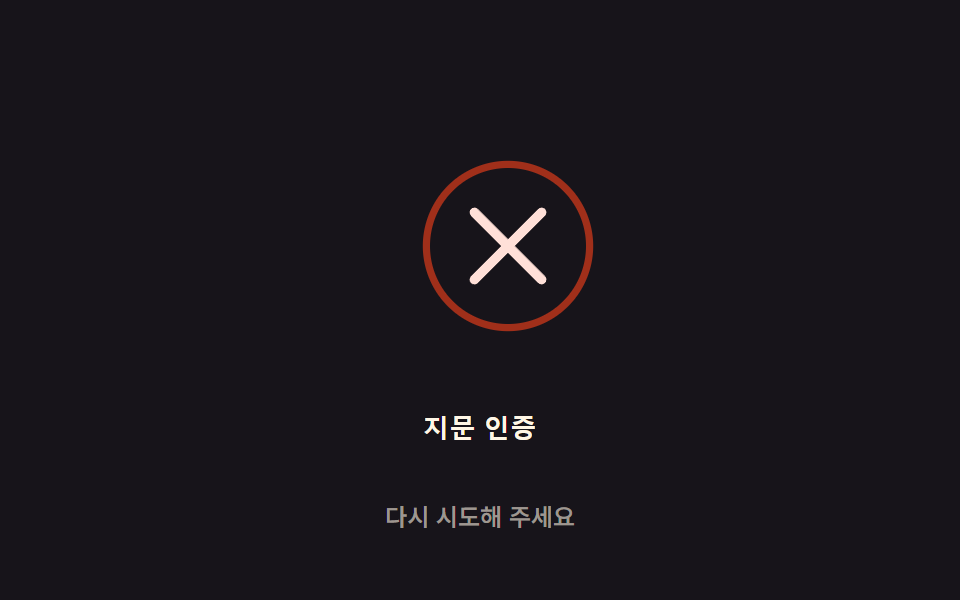
03실패 진동 감쇠 — 인증 실패 시 아이콘이 스프링 감쇠 값을 따라 좌우로 흔들리다 값이 0에 가까워지며 멈추는 방식
인증이 실패하면 아이콘의 진동 값이 스프링 감쇠 공식을 따라 점점 줄어들어, 처음엔 크게 흔들리다 자연스럽게 멈춥니다.
쓰임생체 인증 실패 피드백, 잠금 해제 실패 화면
SETTLE_MS$subject-creamSHAKE_DAMP
<main class="stage">
<div class="fail-wrap">
<button type="button" class="fail is-demo" id="fail" aria-pressed="false">
  <svg class="fail__icon" id="icon" viewBox="0 0 120 120" aria-hidden="true">
    <circle class="fail__ring" cx="60" cy="60" r="34"></circle>
    <path class="fail__mark" id="mark" d="M46,46 L74,74 M74,46 L46,74"></path>
  </svg>
  <span class="fail__label">지문 인증</span>
</button>
<p class="fail__status" id="status">다시 시도해 주세요</p>
</div>
</main>
@use "../../../../site/static/demo-tokens" as *;
// 계산 겹은 index.html 의 apply() 에 있다 — 감쇠 스프링 진동식(지수 감쇠 × 코사인)을 매 프레임
// 다시 계산해 아이콘 translateX 오프셋에 쓴다. 여기는 무대·모양만 맡는다.
@include stage($stage-ink);
.fail-wrap {
display: flex;
flex-direction: column;
align-items: center;
gap: $sp-3;
}
.fail {
appearance: none;
border: none;
background: transparent;
display: flex;
flex-direction: column;
align-items: center;
gap: $sp-3;
cursor: pointer;
padding: $sp-4;
border-radius: $r-card;
&:focus-visible { outline: 2px solid $error; outline-offset: 4px; }
}
.fail__icon {
width: clamp(120px, 30vw, 160px);
height: auto;
overflow: visible;
}
.fail__ring {
fill: none;
stroke: $error;
stroke-width: 3;
opacity: .8;
}
.fail__mark {
fill: none;
stroke: $error-soft;
stroke-width: 4;
stroke-linecap: round;
}
.fail__label {
color: $subject-cream;
font-weight: 600;
font-size: 13px;
line-height: 1.2;
letter-spacing: .02em;
}
.fail__status {
margin: 0;
color: rgba($subject-cream, .58);
font-weight: 500;
font-size: 12px;
line-height: 1.2;
}
@media (max-width: 340px) {
.stage { padding: $sp-2; }
.fail-wrap { gap: $sp-2; }
.fail { padding: $sp-2 $sp-3; gap: $sp-2; }
.fail__icon { width: 104px; }
.fail__label { font-size: 12px; }
.fail__status { font-size: 11px; }
}
@media (prefers-reduced-motion: reduce) {
.fail__icon { transition: none; }
}html, body {
margin: 0;
overflow: hidden;
}
.stage {
box-sizing: border-box;
min-height: 100vh;
display: grid;
place-items: center;
margin: 0;
background: #17141a;
font-family: -apple-system, "Segoe UI", "Noto Sans KR", sans-serif;
padding: clamp(8px, 4vw, 24px);
}
.fail-wrap {
display: flex;
flex-direction: column;
align-items: center;
gap: 12px;
}
.fail {
appearance: none;
border: none;
background: transparent;
display: flex;
flex-direction: column;
align-items: center;
gap: 12px;
cursor: pointer;
padding: 16px;
border-radius: 16px;
}
.fail:focus-visible {
outline: 2px solid #c2361a;
outline-offset: 4px;
}
.fail__icon {
width: clamp(120px, 30vw, 160px);
height: auto;
overflow: visible;
}
.fail__ring {
fill: none;
stroke: #c2361a;
stroke-width: 3;
opacity: 0.8;
}
.fail__mark {
fill: none;
stroke: #ffe0d8;
stroke-width: 4;
stroke-linecap: round;
}
.fail__label {
color: #fff7e6;
font-weight: 600;
font-size: 13px;
line-height: 1.2;
letter-spacing: 0.02em;
}
.fail__status {
margin: 0;
color: rgba(255, 247, 230, 0.58);
font-weight: 500;
font-size: 12px;
line-height: 1.2;
}
@media (max-width: 340px) {
.stage {
padding: 8px;
}
.fail-wrap {
gap: 8px;
}
.fail {
padding: 8px 12px;
gap: 8px;
}
.fail__icon {
width: 104px;
}
.fail__label {
font-size: 12px;
}
.fail__status {
font-size: 11px;
}
}
@media (prefers-reduced-motion: reduce) {
.fail__icon {
transition: none;
}
}(function () {
// 계산 겹: 감쇠 스프링 진동 — x(t) = AMPLITUDE * e^(-t/decayMs) * cos(t*FREQ). 트윈 이징이 아니라
// 매 프레임 이 식으로 오프셋을 계산해 아이콘을 흔든다. SHAKE_DAMP 가 클수록 decayMs 가 커져
// 진동이 오래 남고, 작을수록 빨리 잦아든다.
var AMPLITUDE = 14; // 최대 흔들림 폭(px)
var FREQ = 0.028; // 각속도(rad/ms)
var SHAKE_DAMP = 18; // 변형 03: SHAKE_DAMP 18 → 8 (댐핑 — 작을수록 빨리 잦아든다)
var SETTLE_MS = 900; // 이 시간이 지나면 진동을 멈추고 0 으로 고정한다
var GAP_MS = 900; // 다음 자동 실패 시연까지 대기 시간
var reduce = window.matchMedia('(prefers-reduced-motion: reduce)').matches;
var decayMs = reduce ? 1 : SHAKE_DAMP * 40;
var root = document.getElementById('fail');
var icon = document.getElementById('icon');
var status = document.getElementById('status');
var STRINGS = { idle: '다시 시도해 주세요', failed: '인증 실패' };
var isDemo = true;
var running = false;
var startTs = 0;
function apply(t) {
var offset = AMPLITUDE * Math.exp(-t / decayMs) * Math.cos(t * FREQ);
icon.style.transform = 'translateX(' + offset.toFixed(2) + 'px)';
}
function runShake(ts) {
if (!startTs) startTs = ts;
var t = ts - startTs;
if (t <= SETTLE_MS) {
apply(t);
requestAnimationFrame(runShake);
} else {
apply(0);
status.textContent = STRINGS.idle;
running = false;
root.setAttribute('aria-pressed', 'false');
}
}
function trigger() {
if (running) return;
running = true;
startTs = 0;
status.textContent = STRINGS.failed;
root.setAttribute('aria-pressed', 'true');
requestAnimationFrame(runShake);
}
function human() { if (isDemo) { root.classList.remove('is-demo'); isDemo = false; } }
root.addEventListener('click', function () { human(); trigger(); });
root.addEventListener('keydown', function (e) {
if (e.key === ' ' || e.key === 'Enter') { human(); }
});
apply(0);
var cycleStart = 0;
var PERIOD = SETTLE_MS + GAP_MS;
function loop(ts) {
if (isDemo && !reduce) {
if (!cycleStart) cycleStart = ts;
var phase = (ts - cycleStart) % PERIOD;
if (phase < 16 && !running) trigger();
}
requestAnimationFrame(loop);
}
requestAnimationFrame(loop);
})();// FailShake — vanilla 판(run/371/demo/03-biometric-scan-fail-shake/index.html) 의 React 포트.
// 계산 겹(감쇠 스프링 진동)은 useFailShake 훅 안에 있다: x(t) = AMPLITUDE * e^(-t/decayMs) * cos(t*FREQ)
// 을 매 프레임 다시 계산해 아이콘 translateX 오프셋에 쓴다.
import { useEffect, useRef, useState } from "react";
import styles from "./FailShake.module.scss";
type Box<T> = { current: T };
const STRINGS: Record<string, string> = { idle: "다시 시도해 주세요", failed: "인증 실패" };
function useFailShake(
rootRef: Box<HTMLButtonElement>,
iconRef: Box<SVGSVGElement>,
setStatus: (s: string) => void,
setPressed: (b: boolean) => void
) {
useEffect(() => {
const AMPLITUDE = 14;
const FREQ = 0.028;
const SHAKE_DAMP = 18; // 변형 03: SHAKE_DAMP 18 → 8
const SETTLE_MS = 900;
const GAP_MS = 900;
const reduce = window.matchMedia("(prefers-reduced-motion: reduce)").matches;
const decayMs = reduce ? 1 : SHAKE_DAMP * 40;
const root = rootRef.current;
const icon = iconRef.current;
if (!root || !icon) return;
let isDemo = true;
let running = false;
let startTs = 0;
let rafId = 0;
function apply(t: number) {
const offset = AMPLITUDE * Math.exp(-t / decayMs) * Math.cos(t * FREQ);
icon.style.transform = "translateX(" + offset.toFixed(2) + "px)";
}
function runShake(ts: number) {
if (!startTs) startTs = ts;
const t = ts - startTs;
if (t <= SETTLE_MS) {
apply(t);
rafId = requestAnimationFrame(runShake);
} else {
apply(0);
setStatus(STRINGS.idle);
running = false;
setPressed(false);
}
}
function trigger() {
if (running) return;
running = true;
startTs = 0;
setStatus(STRINGS.failed);
setPressed(true);
rafId = requestAnimationFrame(runShake);
}
function human() { if (isDemo) { root.classList.remove(styles.isDemo); isDemo = false; } }
function onClick() { human(); trigger(); }
function onKeyDown(e: KeyboardEvent) { if (e.key === " " || e.key === "Enter") human(); }
root.addEventListener("click", onClick);
root.addEventListener("keydown", onKeyDown);
apply(0);
let cycleStart = 0;
const PERIOD = SETTLE_MS + GAP_MS;
function loop(ts: number) {
if (isDemo && !reduce) {
if (!cycleStart) cycleStart = ts;
const phase = (ts - cycleStart) % PERIOD;
if (phase < 16 && !running) trigger();
}
rafId = requestAnimationFrame(loop);
}
rafId = requestAnimationFrame(loop);
return () => {
root.removeEventListener("click", onClick);
root.removeEventListener("keydown", onKeyDown);
cancelAnimationFrame(rafId);
};
}, []);
}
export default function FailShake() {
const rootRef = useRef(null) as unknown as Box<HTMLButtonElement>;
const iconRef = useRef(null) as unknown as Box<SVGSVGElement>;
const [status, setStatus] = useState(STRINGS.idle);
const [pressed, setPressed] = useState(false);
useFailShake(rootRef, iconRef, setStatus, setPressed);
return (
<main className={styles.stage}>
<div className={styles.failWrap}>
<button
type="button"
className={styles.fail + " " + styles.isDemo}
ref={rootRef}
aria-pressed={pressed}
>
<svg className={styles.failIcon} viewBox="0 0 120 120" aria-hidden="true" ref={iconRef}>
<circle className={styles.failRing} cx={60} cy={60} r={34} />
<path className={styles.failMark} d="M46,46 L74,74 M74,46 L46,74" />
</svg>
<span className={styles.failLabel}>지문 인증</span>
</button>
<p className={styles.failStatus}>{status}</p>
</div>
</main>
);
}03 실패 진동 감쇠 — 인증 실패 시 아이콘이 스프링 감쇠 값을 따라 좌우로 흔들리다 값이 0에 가까워지며 멈추는 방식 — 측정 누적면적 5.362% · 움직인 프레임 16/23GODRICH 원작 · zip 에 SCSS·React 포함 · 지문 인식 애니메이션 9종 — 스캔 진행률 값으로 갈리는 인증 버튼
이 데모가 속한 글
 지문 인식 애니메이션 9종 — 스캔 진행률 값으로 갈리는 인증 버튼아홉 가지 지문 인식 애니메이션 중 하나는 스캔 진행률 값이 지문 능선을 순서대로 밝히고, 하나는 실패 시 스프링 감쇠 값으로 흔들리다 멈추며, 하나는 압력 값이 커질수록 리플 반경과 진폭 값이 함께 커집니다. 이 글의 데모 전부 보기