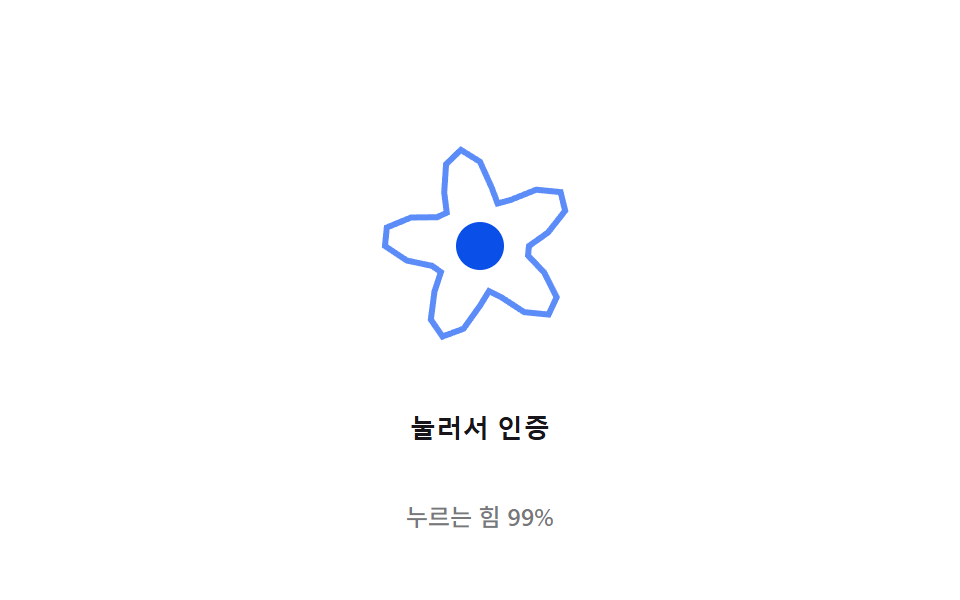
05압력 리플 — 스캔 표면을 누르는 압력 값이 커질수록 동심원 리플의 반경과 진폭 값이 함께 커지는 방식
압력 값이 낮으면 리플이 작고 얕게 퍼지고, 압력 값이 높아질수록 반경과 진폭 값이 비례해 커져 물결이 뚜렷해집니다.
쓰임지문 센서 인터랙션 데모, 터치 압력 피드백 배경
PRESS_CYCLE_MS$subject-blue-lightWAVE_K
<main class="stage">
<div class="ripple-wrap">
<button type="button" class="ripple is-demo" id="ripple" aria-pressed="false">
  <svg class="ripple__icon" viewBox="0 0 120 120" aria-hidden="true">
    <path class="ripple__wave" id="wave"></path>
    <circle class="ripple__core" cx="60" cy="60" r="10"></circle>
  </svg>
  <span class="ripple__label">눌러서 인증</span>
</button>
<p class="ripple__status" id="status">누르는 힘 0%</p>
</div>
</main>
@use "../../../../site/static/demo-tokens" as *;
// 계산 겹은 index.html 의 buildPath() 에 있다 — 각도마다 반지름을 사인 함수로 계산해(물결 진폭)
// 매 프레임 점을 다시 찍는다. 진폭은 포인터 압력(pointerPressure) 에 비례한다.
@include stage($stage-paper);
.ripple-wrap {
display: flex;
flex-direction: column;
align-items: center;
gap: $sp-3;
}
.ripple {
appearance: none;
border: none;
background: transparent;
display: flex;
flex-direction: column;
align-items: center;
gap: $sp-3;
cursor: pointer;
padding: $sp-4;
border-radius: $r-card;
touch-action: none;
&:focus-visible { outline: 2px solid $subject-blue-light; outline-offset: 4px; }
}
.ripple__icon {
width: clamp(120px, 30vw, 160px);
height: auto;
overflow: visible;
}
.ripple__wave {
fill: none;
stroke: $subject-blue-light;
stroke-width: 2.5;
}
.ripple__core {
fill: $subject-blue-deep;
}
.ripple__label {
color: $stage-ink;
font-weight: 600;
font-size: 13px;
line-height: 1.2;
letter-spacing: .02em;
}
.ripple__status {
margin: 0;
color: rgba($stage-ink, .58);
font-weight: 500;
font-size: 12px;
line-height: 1.2;
}
@media (max-width: 340px) {
.stage { padding: $sp-2; }
.ripple-wrap { gap: $sp-2; }
.ripple { padding: $sp-2 $sp-3; gap: $sp-2; }
.ripple__icon { width: 104px; }
.ripple__label { font-size: 12px; }
.ripple__status { font-size: 11px; }
}
@media (prefers-reduced-motion: reduce) {
.ripple__wave { transition: none; }
}html, body {
margin: 0;
overflow: hidden;
}
.stage {
box-sizing: border-box;
min-height: 100vh;
display: grid;
place-items: center;
margin: 0;
background: #ffffff;
font-family: -apple-system, "Segoe UI", "Noto Sans KR", sans-serif;
padding: clamp(8px, 4vw, 24px);
}
.ripple-wrap {
display: flex;
flex-direction: column;
align-items: center;
gap: 12px;
}
.ripple {
appearance: none;
border: none;
background: transparent;
display: flex;
flex-direction: column;
align-items: center;
gap: 12px;
cursor: pointer;
padding: 16px;
border-radius: 16px;
touch-action: none;
}
.ripple:focus-visible {
outline: 2px solid #5b8cf8;
outline-offset: 4px;
}
.ripple__icon {
width: clamp(120px, 30vw, 160px);
height: auto;
overflow: visible;
}
.ripple__wave {
fill: none;
stroke: #5b8cf8;
stroke-width: 2.5;
}
.ripple__core {
fill: #0a4fe8;
}
.ripple__label {
color: #17141a;
font-weight: 600;
font-size: 13px;
line-height: 1.2;
letter-spacing: 0.02em;
}
.ripple__status {
margin: 0;
color: rgba(23, 20, 26, 0.58);
font-weight: 500;
font-size: 12px;
line-height: 1.2;
}
@media (max-width: 340px) {
.stage {
padding: 8px;
}
.ripple-wrap {
gap: 8px;
}
.ripple {
padding: 8px 12px;
gap: 8px;
}
.ripple__icon {
width: 104px;
}
.ripple__label {
font-size: 12px;
}
.ripple__status {
font-size: 11px;
}
}
@media (prefers-reduced-motion: reduce) {
.ripple__wave {
transition: none;
}
}(function () {
// 계산 겹: 물결 진폭 — 각도(θ)마다 반지름을 BASE_R + AMPLITUDE*pressure*sin(WAVE_K*θ - t*WAVE_SPEED)
// 로 계산해 M 개 점을 매 프레임 다시 찍는다. pressure 는 실 포인터 압력(e.pressure) 또는
// 자동 루프의 누르기-떼기 사인 곡선에서 온다 — 눌린 힘이 셀수록 물결의 진폭이 커진다.
var BASE_R = 30;
var AMPLITUDE = 11; // 최대 압력일 때 물결이 흔들리는 폭
var WAVE_K = 5; // 물결 마루 개수
var WAVE_SPEED = 0.0032; // 물결이 도는 각속도(rad/ms)
var M = 32; // 원둘레를 따라 찍는 점 개수
var PRESS_CYCLE_MS = 1400; // 자동 루프에서 누르기→떼기 한 번의 시간
var GAP_MS = 500;
var reduce = window.matchMedia('(prefers-reduced-motion: reduce)').matches;
var root = document.getElementById('ripple');
var wave = document.getElementById('wave');
var status = document.getElementById('status');
var isDemo = true;
var pointerPressure = 0;
var pointerDown = false;
var autoStart = 0;
function buildPath(t, pressure) {
var d = '';
for (var i = 0; i <= M; i++) {
var theta = (i / M) * Math.PI * 2;
var r = BASE_R + AMPLITUDE * pressure * Math.sin(WAVE_K * theta - t * WAVE_SPEED);
var x = 60 + r * Math.cos(theta);
var y = 60 + r * Math.sin(theta);
d += (i === 0 ? 'M' : 'L') + x.toFixed(2) + ',' + y.toFixed(2) + ' ';
}
return d + 'Z';
}
function autoPressure(now) {
if (!autoStart) autoStart = now;
var phase = (now - autoStart) % (PRESS_CYCLE_MS + GAP_MS);
if (phase > PRESS_CYCLE_MS) return 0;
return Math.max(0, Math.sin((phase / PRESS_CYCLE_MS) * Math.PI));
}
function human() { if (isDemo) { root.classList.remove('is-demo'); isDemo = false; } }
root.addEventListener('pointerdown', function (e) {
human();
pointerDown = true;
pointerPressure = e.pressure > 0 ? e.pressure : 0.6;
root.setAttribute('aria-pressed', 'true');
});
root.addEventListener('pointermove', function (e) {
if (!pointerDown) return;
pointerPressure = e.pressure > 0 ? e.pressure : pointerPressure;
});
window.addEventListener('pointerup', function () {
if (!pointerDown) return;
pointerDown = false;
pointerPressure = 0;
root.setAttribute('aria-pressed', 'false');
});
root.addEventListener('keydown', function (e) {
if (e.key === ' ' || e.key === 'Enter') { human(); }
});
function loop(ts) {
var reduceNow = reduce && isDemo;
var pressure = pointerDown ? pointerPressure : (isDemo && !reduce ? autoPressure(ts) : 0);
if (reduceNow) { pressure = 0; }
wave.setAttribute('d', buildPath(ts, pressure));
status.textContent = '누르는 힘 ' + Math.round(pressure * 100) + '%';
requestAnimationFrame(loop);
}
requestAnimationFrame(loop);
})();// PressureRipple — vanilla 판(run/371/demo/05-biometric-scan-pressure-ripple/index.html) 의 React 포트.
// 계산 겹(물결 진폭)은 usePressureRipple 훅 안에 있다: 각도(θ)마다 반지름을
// BASE_R + AMPLITUDE*pressure*sin(WAVE_K*θ - t*WAVE_SPEED) 로 계산해 매 프레임 점을 다시 찍는다.
// pressure 는 실 포인터 압력(e.pressure) 또는 자동 루프의 누르기-떼기 사인 곡선에서 온다.
import { useEffect, useRef, useState } from "react";
import styles from "./PressureRipple.module.scss";
type Box<T> = { current: T };
function usePressureRipple(
rootRef: Box<HTMLButtonElement>,
waveRef: Box<SVGPathElement>,
setPressure: (p: number) => void,
setPressed: (b: boolean) => void
) {
useEffect(() => {
const BASE_R = 30;
const AMPLITUDE = 11;
const WAVE_K = 5;
const WAVE_SPEED = 0.0032;
const M = 32;
const PRESS_CYCLE_MS = 1400;
const GAP_MS = 500;
const reduce = window.matchMedia("(prefers-reduced-motion: reduce)").matches;
const root = rootRef.current;
const wave = waveRef.current;
if (!root || !wave) return;
let isDemo = true;
let pointerPressure = 0;
let pointerDown = false;
let autoStart = 0;
let rafId = 0;
function buildPath(t: number, pressure: number) {
let d = "";
for (let i = 0; i <= M; i++) {
const theta = (i / M) * Math.PI * 2;
const r = BASE_R + AMPLITUDE * pressure * Math.sin(WAVE_K * theta - t * WAVE_SPEED);
const x = 60 + r * Math.cos(theta);
const y = 60 + r * Math.sin(theta);
d += (i === 0 ? "M" : "L") + x.toFixed(2) + "," + y.toFixed(2) + " ";
}
return d + "Z";
}
function autoPressure(now: number) {
if (!autoStart) autoStart = now;
const phase = (now - autoStart) % (PRESS_CYCLE_MS + GAP_MS);
if (phase > PRESS_CYCLE_MS) return 0;
return Math.max(0, Math.sin((phase / PRESS_CYCLE_MS) * Math.PI));
}
function human() { if (isDemo) { root.classList.remove(styles.isDemo); isDemo = false; } }
function onPointerDown(e: PointerEvent) {
human();
pointerDown = true;
pointerPressure = e.pressure > 0 ? e.pressure : 0.6;
setPressed(true);
}
function onPointerMove(e: PointerEvent) {
if (!pointerDown) return;
pointerPressure = e.pressure > 0 ? e.pressure : pointerPressure;
}
function onPointerUp() {
if (!pointerDown) return;
pointerDown = false;
pointerPressure = 0;
setPressed(false);
}
function onKeyDown(e: KeyboardEvent) { if (e.key === " " || e.key === "Enter") human(); }
root.addEventListener("pointerdown", onPointerDown);
root.addEventListener("pointermove", onPointerMove);
window.addEventListener("pointerup", onPointerUp);
root.addEventListener("keydown", onKeyDown);
function loop(ts: number) {
const reduceNow = reduce && isDemo;
let pressure = pointerDown ? pointerPressure : (isDemo && !reduce ? autoPressure(ts) : 0);
if (reduceNow) pressure = 0;
wave.setAttribute("d", buildPath(ts, pressure));
setPressure(pressure);
rafId = requestAnimationFrame(loop);
}
rafId = requestAnimationFrame(loop);
return () => {
root.removeEventListener("pointerdown", onPointerDown);
root.removeEventListener("pointermove", onPointerMove);
window.removeEventListener("pointerup", onPointerUp);
root.removeEventListener("keydown", onKeyDown);
cancelAnimationFrame(rafId);
};
}, []);
}
export default function PressureRipple() {
const rootRef = useRef(null) as unknown as Box<HTMLButtonElement>;
const waveRef = useRef(null) as unknown as Box<SVGPathElement>;
const [pressure, setPressure] = useState(0);
const [pressed, setPressed] = useState(false);
usePressureRipple(rootRef, waveRef, setPressure, setPressed);
return (
<main className={styles.stage}>
<div className={styles.rippleWrap}>
<button
type="button"
className={styles.ripple + " " + styles.isDemo}
ref={rootRef}
aria-pressed={pressed}
>
<svg className={styles.rippleIcon} viewBox="0 0 120 120" aria-hidden="true">
<path className={styles.rippleWave} ref={waveRef} />
<circle className={styles.rippleCore} cx={60} cy={60} r={10} />
</svg>
<span className={styles.rippleLabel}>눌러서 인증</span>
</button>
<p className={styles.rippleStatus}>{"누르는 힘 " + Math.round(pressure * 100) + "%"}</p>
</div>
</main>
);
}05 압력 리플 — 스캔 표면을 누르는 압력 값이 커질수록 동심원 리플의 반경과 진폭 값이 함께 커지는 방식 — 측정 누적면적 3.583% · 움직인 프레임 19/23GODRICH 원작 · zip 에 SCSS·React 포함 · 지문 인식 애니메이션 9종 — 스캔 진행률 값으로 갈리는 인증 버튼
이 데모가 속한 글
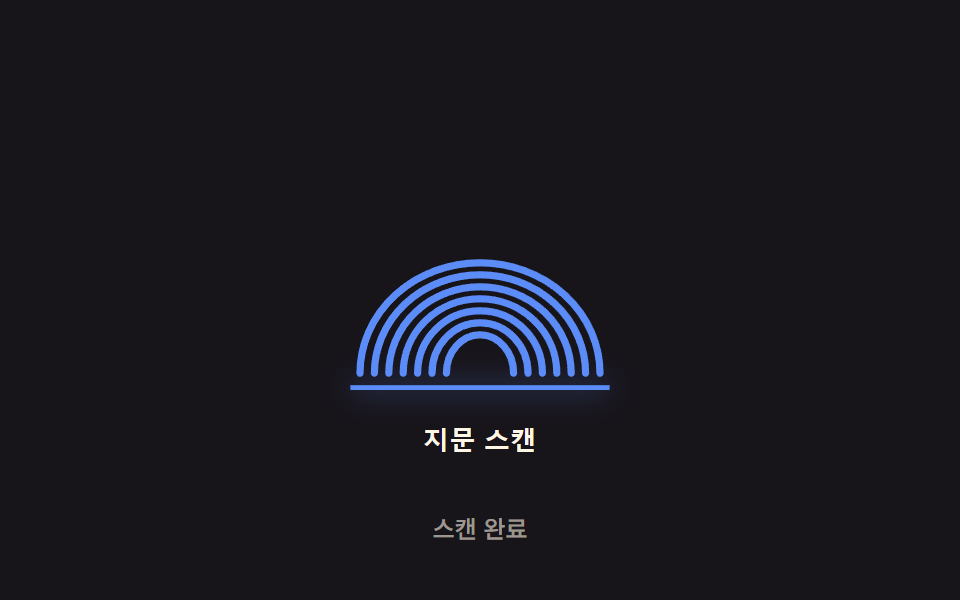 지문 인식 애니메이션 9종 — 스캔 진행률 값으로 갈리는 인증 버튼아홉 가지 지문 인식 애니메이션 중 하나는 스캔 진행률 값이 지문 능선을 순서대로 밝히고, 하나는 실패 시 스프링 감쇠 값으로 흔들리다 멈추며, 하나는 압력 값이 커질수록 리플 반경과 진폭 값이 함께 커집니다. 이 글의 데모 전부 보기