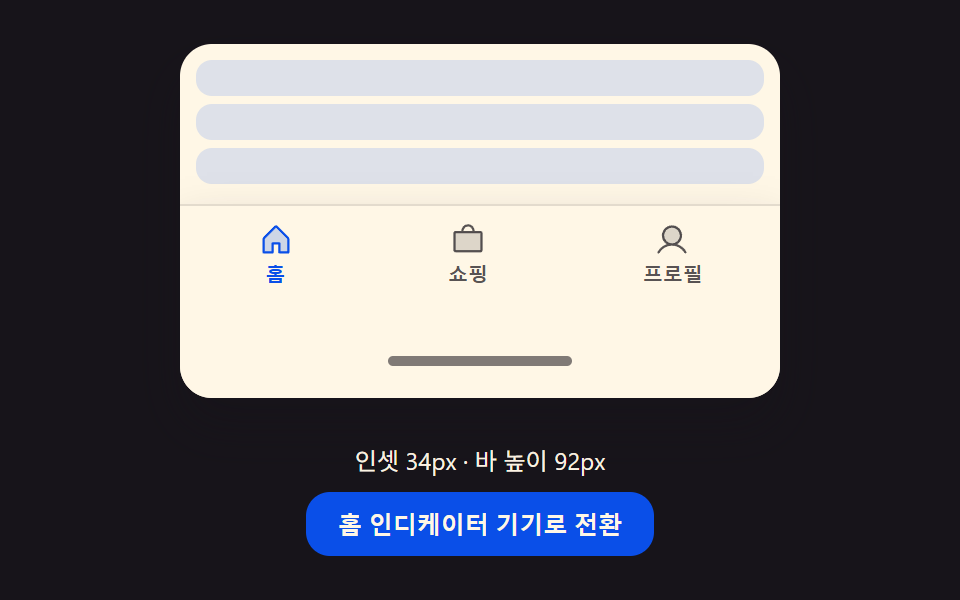
08여백 값 대응 전환 — 화면 아래쪽 여백 값이 커지면 바의 전체 높이와 안쪽 여백 값이 그 차이만큼 함께 늘어나는 방식
아래쪽 여백 값이 커지는 순간 바의 전체 높이 값과 안쪽 여백 값이 그 차이만큼 함께 늘어납니다.
쓰임기기마다 다른 하단 여백에 맞추는 내비게이션, 화면 하단 시스템 여백이 있는 앱
INSET_ONBASE_HmatchMedia
<main class="stage">
<div class="ai is-demo" id="ai">
  <div class="ai__phone">
    <div class="ai__screen">
      <div class="ai__row"></div>
      <div class="ai__row"></div>
      <div class="ai__row"></div>
    </div>
    <div class="ai__nav" id="aiNav">
      <button type="button" class="ai__tab is-active" data-idx="0">
        <svg class="ai__icon" viewBox="0 0 256 256" aria-hidden="true"><g fill="currentColor"><path d="M216 120v96h-64v-64h-48v64H40v-96a8 8 0 0 1 2.34-5.66l80-80a8 8 0 0 1 11.32 0l80 80A8 8 0 0 1 216 120" opacity=".2"/><path d="m219.31 108.68l-80-80a16 16 0 0 0-22.62 0l-80 80A15.87 15.87 0 0 0 32 120v96a8 8 0 0 0 8 8h64a8 8 0 0 0 8-8v-56h32v56a8 8 0 0 0 8 8h64a8 8 0 0 0 8-8v-96a15.87 15.87 0 0 0-4.69-11.32M208 208h-48v-56a8 8 0 0 0-8-8h-48a8 8 0 0 0-8 8v56H48v-88l80-80l80 80Z"/></g></svg>
        <span class="ai__label">홈</span>
      </button>
      <button type="button" class="ai__tab" data-idx="1">
        <svg class="ai__icon" viewBox="0 0 256 256" aria-hidden="true"><g fill="currentColor"><path d="M224 80v120a8 8 0 0 1-8 8H40a8 8 0 0 1-8-8V80a8 8 0 0 1 8-8h176a8 8 0 0 1 8 8" opacity=".2"/><path d="M216 64h-40a48 48 0 0 0-96 0H40a16 16 0 0 0-16 16v120a16 16 0 0 0 16 16h176a16 16 0 0 0 16-16V80a16 16 0 0 0-16-16m-88-32a32 32 0 0 1 32 32H96a32 32 0 0 1 32-32m88 168H40V80h176Z"/></g></svg>
        <span class="ai__label">쇼핑</span>
      </button>
      <button type="button" class="ai__tab" data-idx="2">
        <svg class="ai__icon" viewBox="0 0 256 256" aria-hidden="true"><g fill="currentColor"><path d="M192 96a64 64 0 1 1-64-64a64 64 0 0 1 64 64" opacity=".2"/><path d="M230.92 212c-15.23-26.33-38.7-45.21-66.09-54.16a72 72 0 1 0-73.66 0c-27.39 8.94-50.86 27.82-66.09 54.16a8 8 0 1 0 13.85 8c18.84-32.56 52.14-52 89.07-52s70.23 19.44 89.07 52a8 8 0 1 0 13.85-8M72 96a56 56 0 1 1 56 56a56.06 56.06 0 0 1-56-56"/></g></svg>
        <span class="ai__label">프로필</span>
      </button>
      <div class="ai__inset" id="aiInset">
        <span class="ai__homeIndicator" id="aiIndicator"></span>
      </div>
    </div>
  </div>
  <div class="ai__info">
    <span id="aiReadout">인셋 0px · 바 높이 58px</span>
    <button type="button" class="ai__toggle" id="aiToggle">홈 인디케이터 기기로 전환</button>
  </div>
</div>
</main>@use "../../../../site/static/demo-tokens" as *;
// 계산 겹: 안전영역 인셋 값(0↔34px)을 지수 평활로 따라가며, 바의 총 높이를
// "콘텐츠 높이 + 인셋" 으로 매 프레임 다시 계산해 style.height 에 직접 쓴다.
@include stage($stage-ink);
// .ai 는 is-demo 클래스만 들고 있는 래퍼 — display:contents 로 트리에서 지워
// .stage 그리드의 직계 아이템이 되게 한다(367-05 실측 버그 회피).
.ai { display: contents; }
.ai__phone {
width: 100%; max-width: 300px; position: relative;
border-radius: $r-card; overflow: hidden; box-shadow: $shadow-raised; background: $subject-cream;
display: flex; flex-direction: column;
}
.ai__screen {
flex: 0 0 64px; padding: $sp-2; display: flex; flex-direction: column; gap: $sp-1;
}
.ai__row {
flex: 0 0 auto; height: 18px; border-radius: $r-sm; background: rgba($subject-blue, .16);
}
.ai__nav {
flex: 0 0 auto; position: relative; display: flex; justify-content: space-around;
align-items: flex-start; padding-top: $sp-1; background: $subject-cream;
border-top: 1px solid rgba($subject-ink, .12); box-shadow: $shadow-raised; will-change: height;
}
.ai__tab {
flex: 0 0 auto; display: flex; flex-direction: column; align-items: center; gap: $sp-1;
border: none; background: transparent; cursor: pointer; padding: $sp-1 $sp-3;
color: rgba($subject-ink, .72);
}
.ai__tab.is-active { color: $subject-blue-deep; }
.ai__icon { width: 18px; height: 18px; }
.ai__label { font-size: 10px; font-weight: 700; line-height: 1; }
.ai__inset {
position: absolute; left: 0; right: 0; bottom: 0; display: flex; align-items: center;
justify-content: center; will-change: height; overflow: hidden;
}
.ai__homeIndicator {
width: 92px; height: 5px; border-radius: $r-pill; background: rgba($subject-ink, .55);
margin-bottom: $sp-1;
}
.ai__info {
display: flex; flex-direction: column; align-items: center; gap: $sp-2; margin-top: $sp-4;
color: $subject-cream; font-size: 12px; text-align: center;
}
.ai__toggle {
border: none; border-radius: $r-control; background: $subject-blue-deep; color: $subject-cream;
padding: $sp-2 $sp-4; font-size: 12px; font-weight: 700; cursor: pointer;
}
@media (max-width: 340px) {
// .ai 는 display:contents 로 .ai__phone·.ai__info 둘 다 .stage 의 직계 그리드 아이템이라
// 두 블록 높이 합이 320px 예산(174.4px) 안에 들어와야 한다. .ai__nav 의 최대 높이(BASE_H+INSET_ON
// 실측 약 97px, JS 실측값이라 안 줄인다)는 고정이므로 .ai__screen·.ai__info 를 인셋 최대 상태로
// Playwright 실측해 더 줄였다 — 패딩·행간격 0, 행 높이 8px, info 는 세로 2줄 대신 가로 1줄 (BD9 재실측).
.ai__phone { max-width: 230px; }
.ai__screen { flex: 0 0 auto; padding: 0; gap: 0; }
.ai__row { height: 8px; }
.ai__info {
flex-direction: row; align-items: center; justify-content: center;
margin-top: $sp-1; gap: $sp-1; font-size: 10px;
}
.ai__toggle { padding: $sp-1 $sp-2; font-size: 10px; }
}
@media (prefers-reduced-motion: reduce) {
.ai__nav, .ai__inset, .ai__homeIndicator { transition: none; }
}html, body {
margin: 0;
overflow: hidden;
}
.stage {
box-sizing: border-box;
min-height: 100vh;
display: grid;
place-items: center;
margin: 0;
background: #17141a;
font-family: -apple-system, "Segoe UI", "Noto Sans KR", sans-serif;
padding: clamp(8px, 4vw, 24px);
}
.ai {
display: contents;
}
.ai__phone {
width: 100%;
max-width: 300px;
position: relative;
border-radius: 16px;
overflow: hidden;
box-shadow: 0 14px 24px rgba(23, 20, 26, 0.32);
background: #fff7e6;
display: flex;
flex-direction: column;
}
.ai__screen {
flex: 0 0 64px;
padding: 8px;
display: flex;
flex-direction: column;
gap: 4px;
}
.ai__row {
flex: 0 0 auto;
height: 18px;
border-radius: 8px;
background: rgba(47, 109, 246, 0.16);
}
.ai__nav {
flex: 0 0 auto;
position: relative;
display: flex;
justify-content: space-around;
align-items: flex-start;
padding-top: 4px;
background: #fff7e6;
border-top: 1px solid rgba(23, 20, 26, 0.12);
box-shadow: 0 14px 24px rgba(23, 20, 26, 0.32);
will-change: height;
}
.ai__tab {
flex: 0 0 auto;
display: flex;
flex-direction: column;
align-items: center;
gap: 4px;
border: none;
background: transparent;
cursor: pointer;
padding: 4px 12px;
color: rgba(23, 20, 26, 0.72);
}
.ai__tab.is-active {
color: #0a4fe8;
}
.ai__icon {
width: 18px;
height: 18px;
}
.ai__label {
font-size: 10px;
font-weight: 700;
line-height: 1;
}
.ai__inset {
position: absolute;
left: 0;
right: 0;
bottom: 0;
display: flex;
align-items: center;
justify-content: center;
will-change: height;
overflow: hidden;
}
.ai__homeIndicator {
width: 92px;
height: 5px;
border-radius: 999px;
background: rgba(23, 20, 26, 0.55);
margin-bottom: 4px;
}
.ai__info {
display: flex;
flex-direction: column;
align-items: center;
gap: 8px;
margin-top: 16px;
color: #fff7e6;
font-size: 12px;
text-align: center;
}
.ai__toggle {
border: none;
border-radius: 12px;
background: #0a4fe8;
color: #fff7e6;
padding: 8px 16px;
font-size: 12px;
font-weight: 700;
cursor: pointer;
}
@media (max-width: 340px) {
.ai__phone {
max-width: 230px;
}
.ai__screen {
flex: 0 0 auto;
padding: 0;
gap: 0;
}
.ai__row {
height: 8px;
}
.ai__info {
flex-direction: row;
align-items: center;
justify-content: center;
margin-top: 4px;
gap: 4px;
font-size: 10px;
}
.ai__toggle {
padding: 4px 8px;
font-size: 10px;
}
}
@media (prefers-reduced-motion: reduce) {
.ai__nav, .ai__inset, .ai__homeIndicator {
transition: none;
}
}(function () {
var BASE_H = 58; // px, 인셋 0일 때 바 콘텐츠 높이 — 계산 겹의 기준값
var INSET_ON = 34; // px, 계산 겹: 홈 인디케이터가 있는 기기의 안전영역 인셋(데모용 가정값)
var LERP_RATE = 10; // 인셋 값이 목표로 지수 평활되는 속도(1/s)
var CYCLE_MS = 2600; // 자동 루프 왕복 주기
var reduce = window.matchMedia('(prefers-reduced-motion: reduce)').matches;
var ai = document.getElementById('ai');
var nav = document.getElementById('aiNav');
var inset = document.getElementById('aiInset');
var indicator = document.getElementById('aiIndicator');
var readout = document.getElementById('aiReadout');
var toggle = document.getElementById('aiToggle');
var tabs = Array.prototype.slice.call(document.querySelectorAll('.ai__tab'));
var isDemo = true;
var manualOn = false;
var insetTarget = 0;
var insetPx = 0;
var lastTs = 0;
var cycleStart = 0;
function human() {
if (isDemo) { ai.classList.remove('is-demo'); isDemo = false; }
}
function render() {
// 계산 겹: 바 전체 높이는 콘텐츠 높이(BASE_H) + 실시간 인셋 값을 더해 매번 다시 계산한다
var totalH = BASE_H + insetPx;
nav.style.height = totalH.toFixed(1) + 'px';
inset.style.height = insetPx.toFixed(1) + 'px';
var t = insetPx / INSET_ON;
indicator.style.opacity = t.toFixed(3);
indicator.style.transform = 'translateY(' + ((1 - t) * 6).toFixed(1) + 'px) scaleX(' + (0.6 + 0.4 * t).toFixed(3) + ')';
readout.textContent = '인셋 ' + Math.round(insetPx) + 'px · 바 높이 ' + Math.round(totalH) + 'px';
}
toggle.addEventListener('click', function () {
human();
manualOn = !manualOn;
insetTarget = manualOn ? INSET_ON : 0;
toggle.textContent = manualOn ? '홈 버튼 기기로 전환' : '홈 인디케이터 기기로 전환';
});
toggle.addEventListener('keydown', function (e) {
if (e.key === 'Enter' || e.key === ' ') { e.preventDefault(); toggle.click(); }
});
tabs.forEach(function (t) {
t.addEventListener('click', function () {
human();
tabs.forEach(function (o) { o.classList.remove('is-active'); });
t.classList.add('is-active');
});
});
function tick(ts) {
if (!lastTs) { lastTs = ts; cycleStart = ts; }
var dt = Math.min(0.05, (ts - lastTs) / 1000);
lastTs = ts;
if (isDemo && !reduce) {
var cycleT = (ts - cycleStart) % CYCLE_MS;
insetTarget = cycleT < CYCLE_MS / 2 ? INSET_ON : 0;
}
insetPx += (insetTarget - insetPx) * (1 - Math.exp(-LERP_RATE * dt));
render();
requestAnimationFrame(tick);
}
render();
requestAnimationFrame(tick);
})();// SafeAreaInsetResize — vanilla 판(run/367/demo/08-bottom-nav-bar-safe-area-inset-resize/index.html) 의
// React 포트. 계산 겹: 안전영역 인셋 값(0↔34px)을 지수 평활로 따라가며, 바의 총 높이를
// "콘텐츠 높이 + 인셋" 으로 매 프레임 다시 계산해 style.height 에 직접 쓴다.
import { useEffect, useRef } from "react";
import styles from "./SafeAreaInsetResize.module.scss";
type Box<T> = { current: T };
const BASE_H = 58; // px, 인셋 0일 때 바 콘텐츠 높이 — 계산 겹의 기준값
const INSET_ON = 34; // px, 계산 겹: 홈 인디케이터가 있는 기기의 안전영역 인셋(데모용 가정값)
const LERP_RATE = 10; // 인셋 값이 목표로 지수 평활되는 속도(1/s)
const CYCLE_MS = 2600; // 자동 루프 왕복 주기
const TABS = [
{ label: "홈", d: "M216 120v96h-64v-64h-48v64H40v-96a8 8 0 0 1 2.34-5.66l80-80a8 8 0 0 1 11.32 0l80 80A8 8 0 0 1 216 120|.2#m219.31 108.68l-80-80a16 16 0 0 0-22.62 0l-80 80A15.87 15.87 0 0 0 32 120v96a8 8 0 0 0 8 8h64a8 8 0 0 0 8-8v-56h32v56a8 8 0 0 0 8 8h64a8 8 0 0 0 8-8v-96a15.87 15.87 0 0 0-4.69-11.32M208 208h-48v-56a8 8 0 0 0-8-8h-48a8 8 0 0 0-8 8v56H48v-88l80-80l80 80Z" },
{ label: "쇼핑", d: "M224 80v120a8 8 0 0 1-8 8H40a8 8 0 0 1-8-8V80a8 8 0 0 1 8-8h176a8 8 0 0 1 8 8|.2#M216 64h-40a48 48 0 0 0-96 0H40a16 16 0 0 0-16 16v120a16 16 0 0 0 16 16h176a16 16 0 0 0 16-16V80a16 16 0 0 0-16-16m-88-32a32 32 0 0 1 32 32H96a32 32 0 0 1 32-32m88 168H40V80h176Z" },
{ label: "프로필", d: "M192 96a64 64 0 1 1-64-64a64 64 0 0 1 64 64|.2#M230.92 212c-15.23-26.33-38.7-45.21-66.09-54.16a72 72 0 1 0-73.66 0c-27.39 8.94-50.86 27.82-66.09 54.16a8 8 0 1 0 13.85 8c18.84-32.56 52.14-52 89.07-52s70.23 19.44 89.07 52a8 8 0 1 0 13.85-8M72 96a56 56 0 1 1 56 56a56.06 56.06 0 0 1-56-56" },
];
function Icon({ spec }: { spec: string }) {
const [a, b] = spec.split("#");
const [pathA, opacity] = a.split("|");
return (
<svg className={styles.icon} viewBox="0 0 256 256" aria-hidden="true">
<g fill="currentColor">
<path d={pathA} opacity={opacity} />
<path d={b} />
</g>
</svg>
);
}
export default function SafeAreaInsetResize() {
const rootRef = useRef(null) as unknown as Box<HTMLDivElement>;
const navRef = useRef(null) as unknown as Box<HTMLDivElement>;
const insetRef = useRef(null) as unknown as Box<HTMLDivElement>;
const indicatorRef = useRef(null) as unknown as Box<HTMLSpanElement>;
const readoutRef = useRef(null) as unknown as Box<HTMLSpanElement>;
const toggleRef = useRef(null) as unknown as Box<HTMLButtonElement>;
const tabRefs = useRef([null, null, null]) as unknown as Box<(HTMLButtonElement | null)[]>;
const rafRef = useRef(0) as unknown as Box<number>;
useEffect(() => {
const reduce = window.matchMedia("(prefers-reduced-motion: reduce)").matches;
let isDemo = true;
let manualOn = false;
let insetTarget = 0;
let insetPx = 0;
let lastTs = 0, cycleStart = 0;
function human() {
if (isDemo) { rootRef.current?.classList.remove(styles.isDemo); isDemo = false; }
}
function render() {
const nav = navRef.current, inset = insetRef.current;
const indicator = indicatorRef.current, readout = readoutRef.current;
if (!nav || !inset || !indicator || !readout) return;
const totalH = BASE_H + insetPx;
nav.style.height = totalH.toFixed(1) + "px";
inset.style.height = insetPx.toFixed(1) + "px";
const t = insetPx / INSET_ON;
indicator.style.opacity = t.toFixed(3);
indicator.style.transform = "translateY(" + ((1 - t) * 6).toFixed(1) + "px) scaleX(" + (0.6 + 0.4 * t).toFixed(3) + ")";
readout.textContent = "인셋 " + Math.round(insetPx) + "px · 바 높이 " + Math.round(totalH) + "px";
}
function onToggleClick() {
human();
manualOn = !manualOn;
insetTarget = manualOn ? INSET_ON : 0;
if (toggleRef.current) {
toggleRef.current.textContent = manualOn ? "홈 버튼 기기로 전환" : "홈 인디케이터 기기로 전환";
}
}
function onToggleKeydown(e: KeyboardEvent) {
if (e.key === "Enter" || e.key === " ") { e.preventDefault(); toggleRef.current?.click(); }
}
toggleRef.current?.addEventListener("click", onToggleClick);
toggleRef.current?.addEventListener("keydown", onToggleKeydown);
const tabHandlers = tabRefs.current.map((_, i) => () => {
human();
tabRefs.current.forEach((o) => o?.classList.remove(styles.isActive));
tabRefs.current[i]?.classList.add(styles.isActive);
});
tabRefs.current.forEach((t, i) => t?.addEventListener("click", tabHandlers[i]));
function tick(ts: number) {
if (!lastTs) { lastTs = ts; cycleStart = ts; }
const dt = Math.min(0.05, (ts - lastTs) / 1000);
lastTs = ts;
if (isDemo && !reduce) {
const cycleT = (ts - cycleStart) % CYCLE_MS;
insetTarget = cycleT < CYCLE_MS / 2 ? INSET_ON : 0;
}
insetPx += (insetTarget - insetPx) * (1 - Math.exp(-LERP_RATE * dt));
render();
rafRef.current = requestAnimationFrame(tick);
}
render();
rafRef.current = requestAnimationFrame(tick);
return () => {
cancelAnimationFrame(rafRef.current);
toggleRef.current?.removeEventListener("click", onToggleClick);
toggleRef.current?.removeEventListener("keydown", onToggleKeydown);
tabRefs.current.forEach((t, i) => t?.removeEventListener("click", tabHandlers[i]));
};
}, []);
return (
<main className={styles.stage}>
<div className={styles.root + " " + styles.isDemo} ref={rootRef}>
<div className={styles.phone}>
<div className={styles.screen}>
<div className={styles.row} />
<div className={styles.row} />
<div className={styles.row} />
</div>
<div className={styles.nav} ref={navRef}>
{TABS.map((t, i) => (
<button key={t.label} type="button"
className={styles.tab + (i === 0 ? " " + styles.isActive : "")}
aria-current={i === 0 ? "true" : undefined}
ref={(el: HTMLButtonElement | null) => { tabRefs.current[i] = el; }}>
<Icon spec={t.d} />
<span className={styles.label}>{t.label}</span>
</button>
))}
<div className={styles.inset} ref={insetRef}>
<span className={styles.homeIndicator} ref={indicatorRef} />
</div>
</div>
</div>
<div className={styles.info}>
<span ref={readoutRef}>인셋 0px · 바 높이 58px</span>
<button type="button" className={styles.toggle} ref={toggleRef}>홈 인디케이터 기기로 전환</button>
</div>
</div>
</main>
);
}08 여백 값 대응 전환 — 화면 아래쪽 여백 값이 커지면 바의 전체 높이와 안쪽 여백 값이 그 차이만큼 함께 늘어나는 방식 — 측정 누적면적 22.792% · 움직인 프레임 17/23GODRICH 원작 · zip 에 SCSS·React 포함 · 모바일 하단 탭바 9종 — 상태 값으로 바뀌는 아홉 가지 전환
이 데모가 속한 글
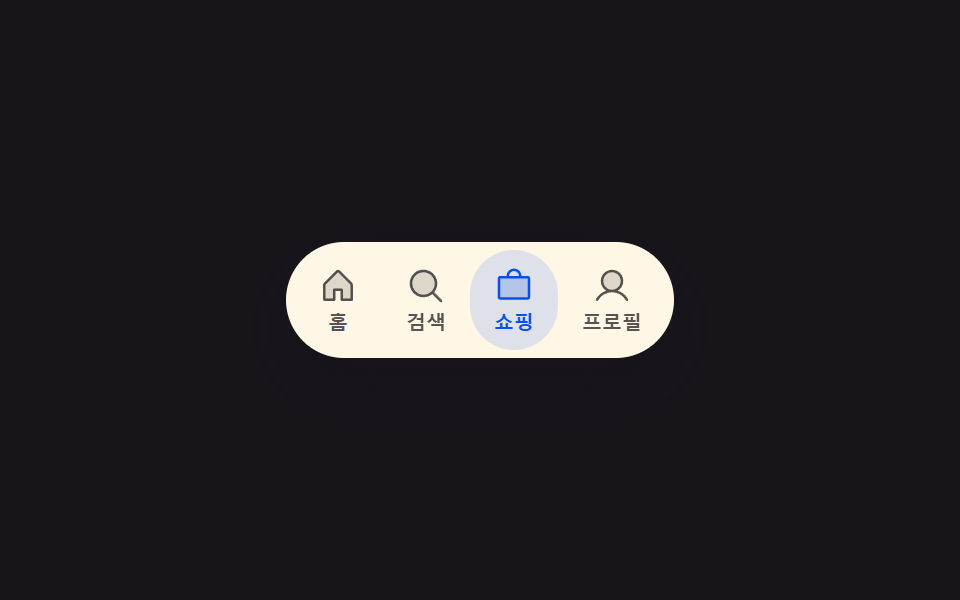 모바일 하단 탭바 9종 — 상태 값으로 바뀌는 아홉 가지 전환모바일 하단 탭바는 화면 아래 고정된 채 상태 값 하나로 다시 계산해 그리는 자리인데, 아홉 가지 중 하나는 선택 값이 바뀌면 강조 표시의 위치와 너비 값이 새 자리로 함께 옮겨가고, 하나는 알림 수량 값이 올라가면 이 글의 데모 전부 보기