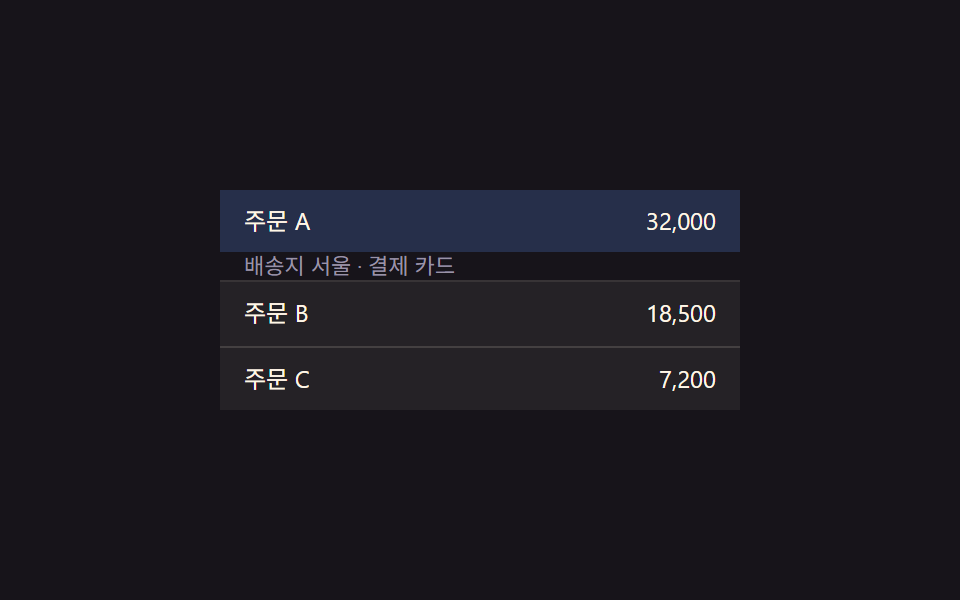
01행 확장 값 전환 — 항목의 확장 값이 바뀌면 그 아래 상세 영역의 높이 값이 함께 늘어나거나 줄어드는 방식
행의 확장 값이 열림으로 바뀌면 그 아래 영역의 높이 값이 늘어나고, 닫힘으로 바뀌면 다시 줄어듭니다.
쓰임관리자 대시보드 상세 정보 펼침, 주문 내역 상세 보기
scrollHeightLERP 0.22.tre__detail

<main class="stage">
<table class="tre is-demo" id="tre">
  <tbody>
    <tr class="tre__row" data-idx="0" id="treRow0">
      <td class="tre__cell">주문 A</td>
      <td class="tre__cell tre__cell--num">32,000</td>
    </tr>
    <tr class="tre__detail-row" id="treDetailRow0">
      <td colspan="2">
        <div class="tre__detail" id="treDetail0">배송지 서울 · 결제 카드</div>
      </td>
    </tr>
    <tr class="tre__row" data-idx="1" id="treRow1">
      <td class="tre__cell">주문 B</td>
      <td class="tre__cell tre__cell--num">18,500</td>
    </tr>
    <tr class="tre__detail-row" id="treDetailRow1">
      <td colspan="2">
        <div class="tre__detail" id="treDetail1">배송지 부산 · 결제 계좌</div>
      </td>
    </tr>
    <tr class="tre__row" data-idx="2" id="treRow2">
      <td class="tre__cell">주문 C</td>
      <td class="tre__cell tre__cell--num">7,200</td>
    </tr>
    <tr class="tre__detail-row" id="treDetailRow2">
      <td colspan="2">
        <div class="tre__detail" id="treDetail2">배송지 대전 · 결제 카드</div>
      </td>
    </tr>
  </tbody>
</table>
</main>@use "../../../../site/static/demo-tokens" as *;
// 계산 겹: 행의 열림 값이 바뀌면 상세 영역 높이를 scrollHeight 로 실측해 목표로 삼고,
// 매 프레임 남은 거리의 22%씩 다가가는 보간(lerp) — index.html retarget()/tick() 참조
@include stage($stage-ink);
.tre {
width: 100%;
max-width: 260px;
border-collapse: collapse;
font: 400 12px/1.3 -apple-system, "Segoe UI", "Noto Sans KR", sans-serif;
color: $subject-cream;
}
.tre__row {
cursor: pointer;
}
.tre__row:not(:first-child) .tre__cell {
border-top: 1px solid rgba(255, 247, 230, .14);
}
.tre__cell {
padding: $sp-2 $sp-3;
background: rgba(255, 247, 230, .06);
transition: background $dur-quick $ease-out;
}
.tre__row--open .tre__cell {
background: rgba(91, 140, 248, .22);
}
.tre__cell--num {
text-align: right;
font-variant-numeric: tabular-nums;
}
.tre__detail-row td {
padding: 0;
}
.tre__detail {
overflow: hidden;
height: 0;
box-sizing: border-box;
padding: 0 $sp-3;
background: rgba(23, 20, 26, .5);
color: $tick-mute;
font-size: 11px;
display: flex;
align-items: center;
}
@media (max-width: 340px) {
.tre { max-width: 220px; font-size: 11px; }
.tre__cell { padding: $sp-1 $sp-2; }
}
@media (prefers-reduced-motion: reduce) {
.tre__cell { transition: none; }
}html, body {
margin: 0;
overflow: hidden;
}
.stage {
box-sizing: border-box;
min-height: 100vh;
display: grid;
place-items: center;
margin: 0;
background: #17141a;
font-family: -apple-system, "Segoe UI", "Noto Sans KR", sans-serif;
padding: clamp(8px, 4vw, 24px);
}
.tre {
width: 100%;
max-width: 260px;
border-collapse: collapse;
font: 400 12px/1.3 -apple-system, "Segoe UI", "Noto Sans KR", sans-serif;
color: #fff7e6;
}
.tre__row {
cursor: pointer;
}
.tre__row:not(:first-child) .tre__cell {
border-top: 1px solid rgba(255, 247, 230, 0.14);
}
.tre__cell {
padding: 8px 12px;
background: rgba(255, 247, 230, 0.06);
transition: background 220ms ease-out;
}
.tre__row--open .tre__cell {
background: rgba(91, 140, 248, 0.22);
}
.tre__cell--num {
text-align: right;
font-variant-numeric: tabular-nums;
}
.tre__detail-row td {
padding: 0;
}
.tre__detail {
overflow: hidden;
height: 0;
box-sizing: border-box;
padding: 0 12px;
background: rgba(23, 20, 26, 0.5);
color: #9a93a6;
font-size: 11px;
display: flex;
align-items: center;
}
@media (max-width: 340px) {
.tre {
max-width: 220px;
font-size: 11px;
}
.tre__cell {
padding: 4px 8px;
}
}
@media (prefers-reduced-motion: reduce) {
.tre__cell {
transition: none;
}
}(function () {
var root = document.getElementById('tre');
var rows = [0, 1, 2].map(function (i) { return document.getElementById('treRow' + i); });
var details = [0, 1, 2].map(function (i) { return document.getElementById('treDetail' + i); });
// 상수: 상세 영역 진입 상한(px, 넉넉히 잡고 실측 scrollHeight 로 대체) · 보간 속도 · 자동 루프 간격
var MAX_H = 80;
var LERP = 0.22;
var AUTO_TOGGLE_MS = 1100;
var openIdx = [false, false, false];
var h = [0, 0, 0]; // 각 상세 영역의 현재(보간 중) 높이값
var target = [0, 0, 0];
// 계산 겹: 열림 값이 바뀌면 목표 높이를 그 행의 실측 scrollHeight 로 다시 잰다
function retarget(i) {
if (openIdx[i]) {
details[i].style.height = 'auto';
var natural = Math.min(MAX_H, details[i].scrollHeight);
details[i].style.height = h[i].toFixed(1) + 'px';
target[i] = natural;
} else {
target[i] = 0;
}
}
function tick() {
for (var i = 0; i < 3; i++) {
h[i] += (target[i] - h[i]) * LERP;
if (Math.abs(target[i] - h[i]) < 0.3) h[i] = target[i];
details[i].style.height = h[i].toFixed(1) + 'px';
details[i].style.opacity = String(Math.min(1, h[i] / Math.max(1, target[i] || MAX_H)));
}
requestAnimationFrame(tick);
}
requestAnimationFrame(tick);
function toggle(i) {
openIdx[i] = !openIdx[i];
rows[i].classList.toggle('tre__row--open', openIdx[i]);
retarget(i);
}
rows.forEach(function (el, i) {
el.addEventListener('click', function () {
root.classList.remove('is-demo');
toggle(i);
});
});
// 자동 루프: 행의 확장 값을 순서대로 열고 닫는다
var autoI = 0;
function autoStep() {
if (root.classList.contains('is-demo')) {
toggle(autoI % 3);
}
autoI++;
setTimeout(autoStep, AUTO_TOGGLE_MS);
}
setTimeout(autoStep, AUTO_TOGGLE_MS);
})();import { useEffect, useRef } from "react";
import styles from "./TableRowExpandDetail.module.scss";
type Box<T> = { current: T };
export default function TableRowExpandDetail() {
const rootRef = useRef(null) as unknown as Box<HTMLTableElement | null>;
useEffect(() => {
const root = rootRef.current;
if (!root) return;
const rows = [0, 1, 2].map((i) => root.querySelector(`.${styles["row" + i]}`) as HTMLElement | null);
const details = [0, 1, 2].map((i) => root.querySelector(`.${styles["detail" + i]}`) as HTMLElement | null);
if (rows.some((el) => !el) || details.some((el) => !el)) return;
// 상수: 상세 영역 진입 상한(px, 넉넉히 잡고 실측 scrollHeight 로 대체) · 보간 속도 · 자동 루프 간격
const MAX_H = 80;
const LERP = 0.22;
const AUTO_TOGGLE_MS = 1100;
const openIdx = [false, false, false];
const h = [0, 0, 0];
const target = [0, 0, 0];
let stopped = false;
let rafId = 0;
let autoTimer = 0;
function retarget(i: number) {
const d = details[i]!;
if (openIdx[i]) {
d.style.height = "auto";
const natural = Math.min(MAX_H, d.scrollHeight);
d.style.height = h[i].toFixed(1) + "px";
target[i] = natural;
} else {
target[i] = 0;
}
}
function tick() {
if (stopped) return;
for (let i = 0; i < 3; i++) {
h[i] += (target[i] - h[i]) * LERP;
if (Math.abs(target[i] - h[i]) < 0.3) h[i] = target[i];
details[i]!.style.height = h[i].toFixed(1) + "px";
details[i]!.style.opacity = String(Math.min(1, h[i] / Math.max(1, target[i] || MAX_H)));
}
rafId = requestAnimationFrame(tick);
}
rafId = requestAnimationFrame(tick);
function toggle(i: number) {
openIdx[i] = !openIdx[i];
rows[i]!.classList.toggle(styles["row--open"], openIdx[i]);
retarget(i);
}
const cleanups: Array<() => void> = [];
rows.forEach((el, i) => {
function onClick() {
root!.classList.remove(styles["is-demo"]);
toggle(i);
}
el!.addEventListener("click", onClick);
cleanups.push(() => el!.removeEventListener("click", onClick));
});
let autoI = 0;
function autoStep() {
if (stopped) return;
if (root!.classList.contains(styles["is-demo"])) {
toggle(autoI % 3);
}
autoI++;
autoTimer = window.setTimeout(autoStep, AUTO_TOGGLE_MS);
}
autoTimer = window.setTimeout(autoStep, AUTO_TOGGLE_MS);
return () => {
stopped = true;
cancelAnimationFrame(rafId);
window.clearTimeout(autoTimer);
cleanups.forEach((fn) => fn());
};
}, []);
return (
<table ref={rootRef} className={`${styles.stage} ${styles.tre} ${styles["is-demo"]}`}>
<tbody>
<tr className={`${styles.row} ${styles.row0}`}>
<td className={styles.cell}>주문 A</td>
<td className={`${styles.cell} ${styles.cellNum}`}>32,000</td>
</tr>
<tr className={styles.detailRow}>
<td colSpan={2}>
<div className={`${styles.detail} ${styles.detail0}`}>배송지 서울 · 결제 카드</div>
</td>
</tr>
<tr className={`${styles.row} ${styles.row1}`}>
<td className={styles.cell}>주문 B</td>
<td className={`${styles.cell} ${styles.cellNum}`}>18,500</td>
</tr>
<tr className={styles.detailRow}>
<td colSpan={2}>
<div className={`${styles.detail} ${styles.detail1}`}>배송지 부산 · 결제 계좌</div>
</td>
</tr>
<tr className={`${styles.row} ${styles.row2}`}>
<td className={styles.cell}>주문 C</td>
<td className={`${styles.cell} ${styles.cellNum}`}>7,200</td>
</tr>
<tr className={styles.detailRow}>
<td colSpan={2}>
<div className={`${styles.detail} ${styles.detail2}`}>배송지 대전 · 결제 카드</div>
</td>
</tr>
</tbody>
</table>
);
}01 행 확장 값 전환 — 항목의 확장 값이 바뀌면 그 아래 상세 영역의 높이 값이 함께 늘어나거나 줄어드는 방식 — 측정 누적면적 19.903% · 움직인 프레임 6/23GODRICH 원작 · zip 에 SCSS·React 포함 · 아코디언 테이블 9종 — 행이 펼쳐지고 접히는 아홉 가지 방식
이 데모가 속한 글
 아코디언 테이블 9종 — 행이 펼쳐지고 접히는 아홉 가지 방식아코디언 테이블은 표의 행 하나가 열리고 닫히는 상태에 따라 주변 값이 함께 바뀌는 인터랙션인데, 아홉 개 중 하나는 행의 확장 값이 바뀌면 그 아래 상세 영역의 높이 값이 함께 늘어나고, 하나는 행의 존재 값이 사 이 글의 데모 전부 보기