아코디언 테이블 9종 — 행이 펼쳐지고 접히는 아홉 가지 방식
아코디언 테이블은 표의 행 하나가 열리고 닫히는 상태에 따라 주변 값이 함께 바뀌는 인터랙션인데, 아홉 개 중 하나는 행의 확장 값이 바뀌면 그 아래 상세 영역의 높이 값이 함께 늘어나고, 하나는 행의 존재 값이 사라지는 순간 그 행의 높이 값이 0으로 줄며 아래 행들의 위치 값이
아홉 항목 모두 자동 시연 루프가 도는 중에도 클릭(01·02·03·04·05·06·07·08, 06은 키보드·블러도 함께), 스크롤(09) 같은 실사용자 입력에 반응해 값을 다시 계산하는 결정론적 계산입니다 — Math.random 은 0이라 같은 순서로 조작하면 항상 같은 값이 나옵니다. 표 안의 상품명·주문명·수치는 전부 가상 예시라 실 fetch·서버 저장·특정 브랜드나 회사명은 하나도 담지 않습니다.
 01 table-row-expand-detail
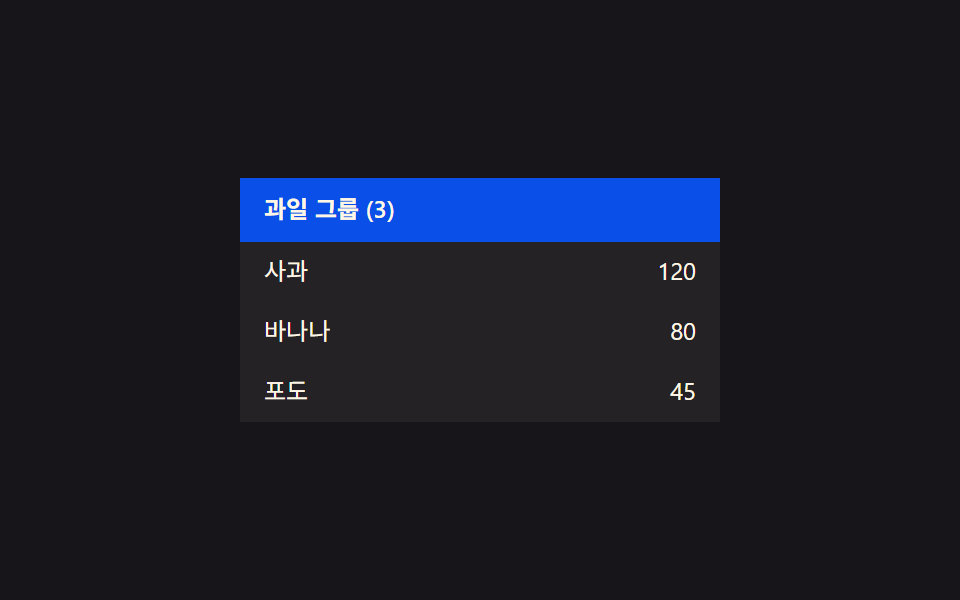 02 table-row-group-collapse
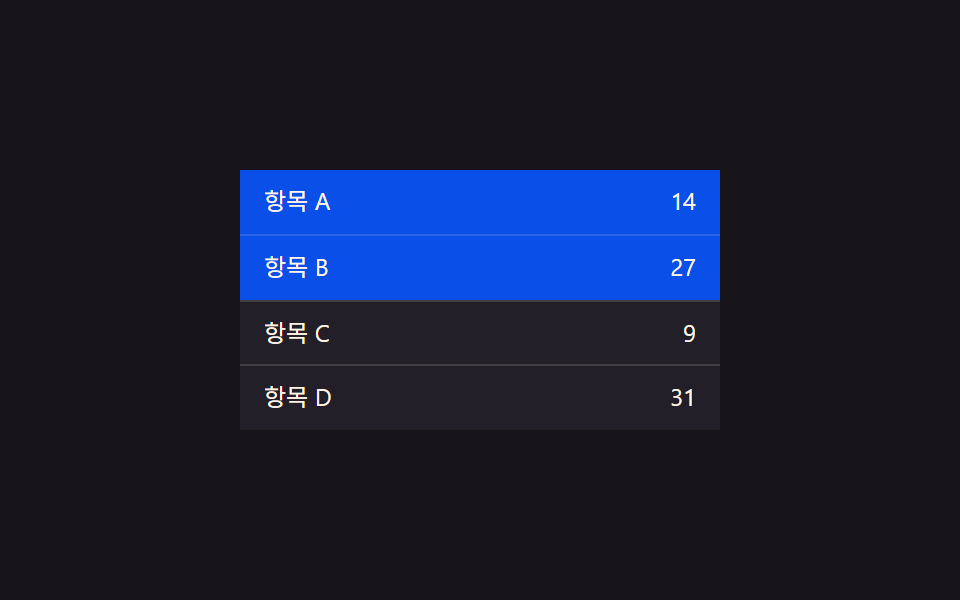 03 table-row-select-highlight
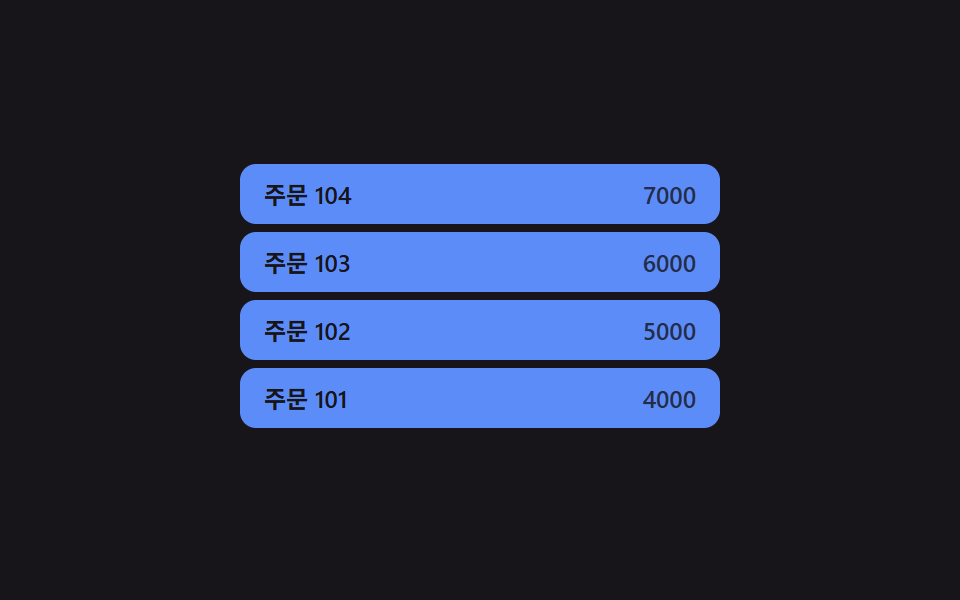 04 table-row-insert-slide-in
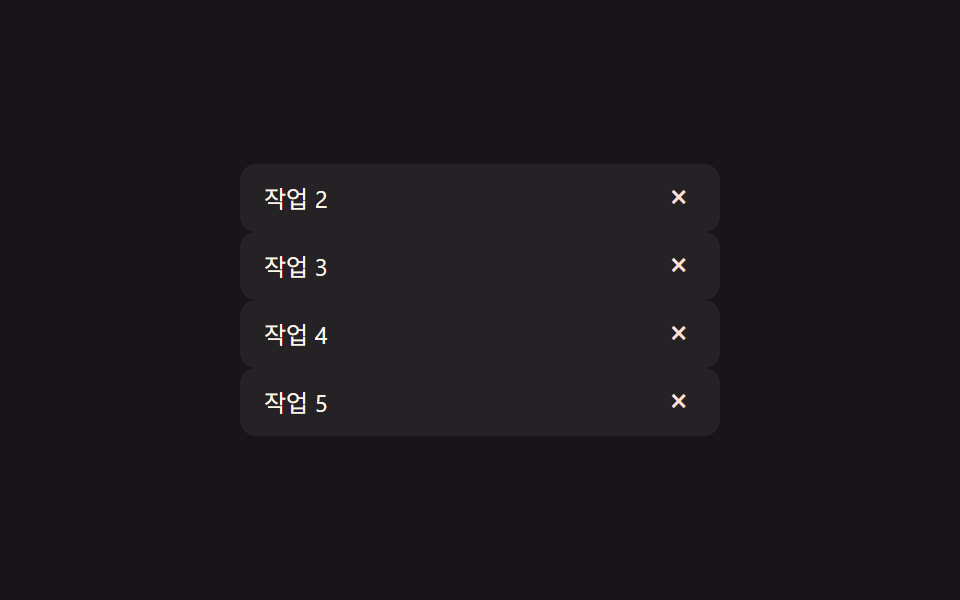 05 table-row-delete-collapse
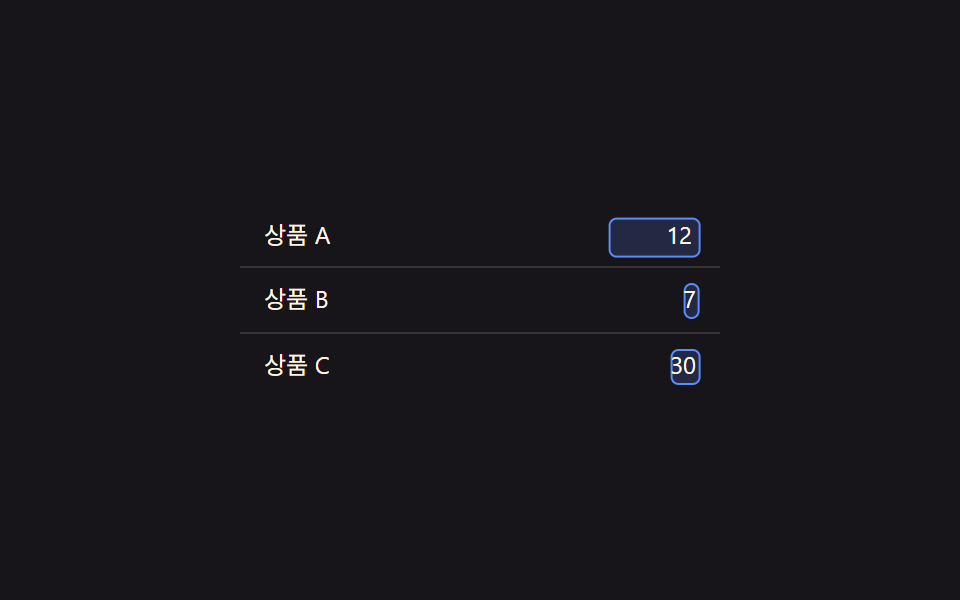 06 table-row-inline-edit-morph
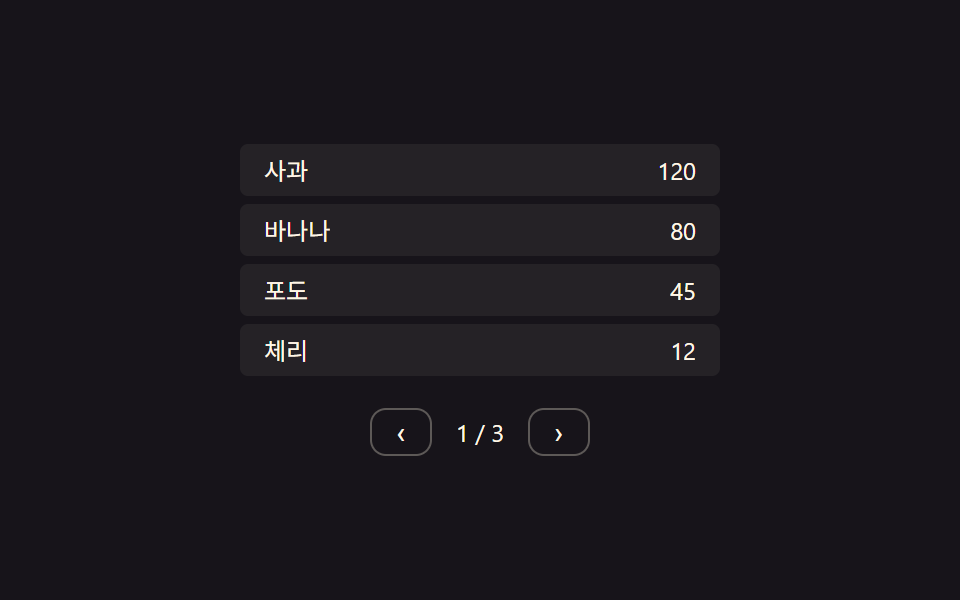 07 table-row-pagination-slide
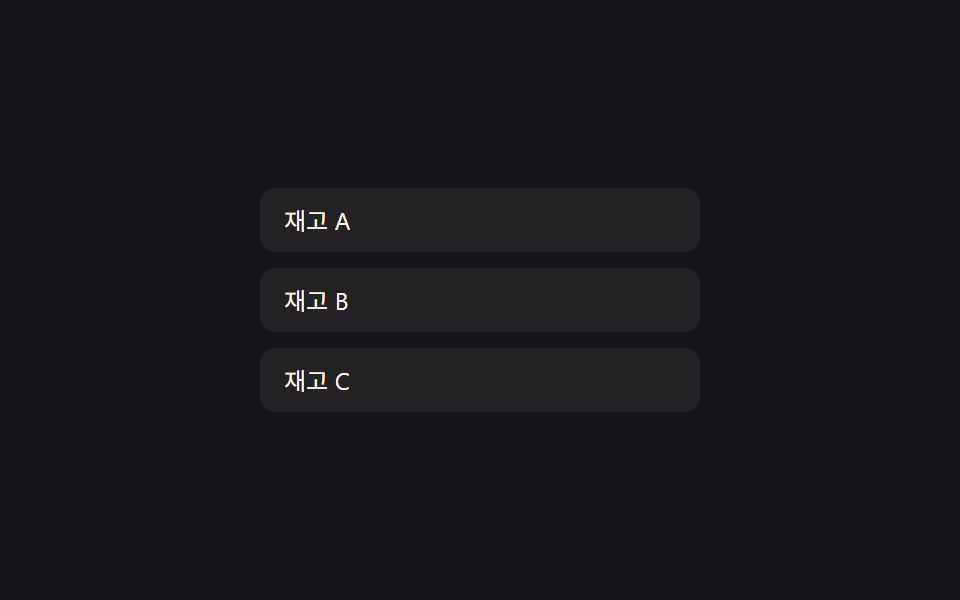 08 table-row-empty-state-fade
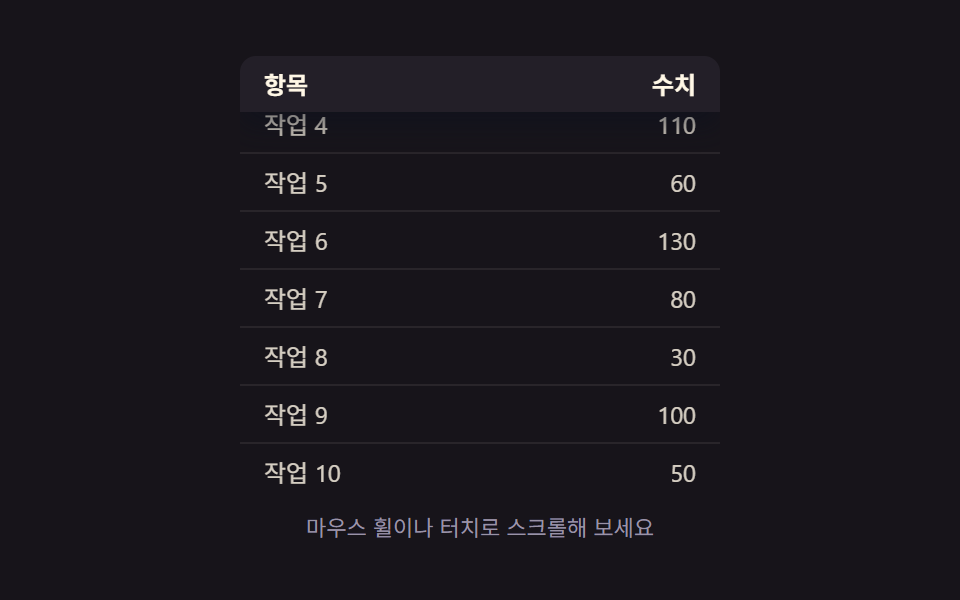 09 table-row-sticky-header-shadow
자동 재생 · 눌러서 해당 항목으로 · 전부 한 zip
- 01 행 확장 값 전환 — 항목의 확장 값이 바뀌면 그 아래 상세 영역의 높이 값이 함께 늘어나거나 줄어드는 방식
- 02 그룹 접힘 값 전환 — 그룹 머리글의 접힘 값이 바뀌면 그 그룹에 속한 여러 행의 표시 값이 한꺼번에 바뀌는 방식
- 03 선택 값 강조 전환 — 행의 선택 값이 켜지면 그 행의 강조 색 값이 짙어지고 꺼지면 원래 값으로 돌아가는 방식
- 04 행 추가 값과 위치 값 함께 변화 — 새 행이 더해지면 그 행의 위치 값이 자리를 잡는 동안 아래 행들의 위치 값도 함께 밀리는 방식
- 05 행 삭제 값과 높이 값 동시 변화 — 행의 존재 값이 사라지면 그 행의 높이 값이 0으로 줄며 아래 행들의 위치 값이 빈자리를 채우는 방식
- 06 편집 상태 값 전환 — 셀의 편집 상태 값이 바뀌면 문구 값이 입력 칸 값으로 자리를 바꾸는 방식
- 07 페이지 값 전환과 행 위치 값 이동 — 페이지 값이 바뀌면 이전 행들의 위치 값이 빠져나가고 새 행들의 위치 값이 들어오는 방식
- 08 빈 목록 상태 값 전환 — 표시할 행이 하나도 없다는 상태 값이 켜지면 빈 화면 문구의 등장 값이 서서히 올라가는 방식
- 09 스크롤 위치 값과 그림자 값 연동 — 스크롤 위치 값이 기준을 넘으면 머리글이 고정되며 그림자 값이 짙어지는 방식
아홉 개의 해부 — 어떤 값이 언제 바뀌는가
아홉 항목 모두 각 데모 화면의 실사용자 입력(01~08은 클릭, 06은 키보드·블러도 포함, 09는 스크롤)으로 값을 재설정·전환할 수 있고, 로드 즉시 도는 자동 시연 루프는 값을 미리 보여주는 보조 장치일 뿐 리스너 자체를 대신하지 않습니다.
| 번호 | 이름 | 리스너 | 누적면적% | 강도 | 움직인 프레임/23 |
|---|---|---|---|---|---|
| 01 | 행 확장 값 전환 | click(행 클릭) | 19.90 | 48.9 | 6 |
| 02 | 그룹 접힘 값 전환 | click(그룹 머리글 클릭) | 17.35 | 77.3 | 7 |
| 03 | 선택 값 강조 전환 | click(행 클릭) | 21.54 | 117.9 | 8 |
| 04 | 행 추가 값과 위치 값 함께 변화 | click(표 영역 클릭) | 11.48 | 103.8 | 10 |
| 05 | 행 삭제 값과 높이 값 동시 변화 | click(삭제 버튼) | 5.46 | 75.5 | 6 |
| 06 | 편집 상태 값 전환 | click+keydown+blur(편집 셀) | 1.25 | 68.3 | 8 |
| 07 | 페이지 값 전환과 행 위치 값 이동 | click(이전·다음 버튼) | 2.21 | 91.9 | 6 |
| 08 | 빈 목록 상태 값 전환 | click(표 영역 클릭) | 17.01 | 33.6 | 9 |
| 09 | 스크롤 위치 값과 그림자 값 연동 | scroll(뷰포트) | 22.13 | 78.0 | 23 |
06은 셀 하나 안에서 문구 값과 입력 칸 값의 자리를 바꾸는 좁은 범위의 계산이라 면적이 작은 게 정상입니다 — 06은 면적이 아니라 두 요소의 위치·크기를 실측해 겹치는 정교함으로 재는 항목입니다. 나머지 여덟 항목도 값을 계산하는 방식이 같은 것끼리 아래 여섯 무리로 나뉩니다.
목표까지 남은 거리의 일정 비율만큼 다가가는 값 — 01·04·06·08
01의 tick() 함수는 LERP(0.22)로 상세 영역의 현재 높이에서 목표 높이까지 남은 거리를 매 프레임 22%씩 좁히고, 04는 LERP(0.24)로 새 행이 슬롯 자리로 미끄러지는 y 값을, 06은 LERP(0.25)로 문구 값과 입력 칸 값 사이 박스 크기를, 08은 LERP(0.2)로 빈 화면 문구의 등장 값을 같은 방식으로 다가가게 합니다. 넷 다 같은 lerp 공식을 쓰지만 대상이 높이·위치·크기·투명도로 각각 다릅니다.
서로 다른 두 속도로 위치와 높이를 나누어 보간하는 값 — 05
05는 위치 값과 높이 값을 하나의 LERP 로 묶지 않고 POS_LERP(0.22)와 H_LERP(0.26) 두 상수로 따로 계산합니다. 행이 삭제되면 아래 행들의 순서(order) 값이 먼저 당겨지고, 그 순서를 따라가는 위치 이동과 사라지는 행 자체의 높이 축소가 각자 다른 속도로 동시에 진행됩니다.
임계 구간으로 걸러낸 값을 다시 보간하는 값 — 09
09는 스크롤 위치 값을 그대로 쓰지 않고 scrollTop 을 maxScroll 로 나눈 비율(ratio)에서 0.18~0.5 구간만 0에서 1로 다시 매핑한 뒤, 그 결과(pinTarget)를 LERP(0.18)로 한 번 더 보간해 그림자 값(shadow)을 만듭니다. 구간 밖에서는 값이 0 또는 1로 고정되고, 구간 안에서만 스크롤에 비례해 서서히 짙어집니다.
자식 행마다 전환 시작 시각을 미리 걸어두는 값 — 02
02의 apply() 함수는 자식 행 인덱스 × STAGGER_MS(70ms)로 각 행의 transitionDelay 값을 미리 정해두고 height·opacity·transform 목표값만 한 번에 바꿉니다. 값을 매 프레임 계산하는 rAF 루프 없이, 나머지 애니메이션은 style.scss 에 걸린 CSS transition 이 그 지연 시각 이후부터 대신 진행합니다.
가속도와 속도를 적분해 오버슛을 만드는 값 — 03
03의 tick() 함수는 목표(0 또는 1)와 현재 진행 값(pos)의 차이에 강성 K(0.26)를 곱하고 속도(vel)에 감쇠 D(0.62)를 곱해 가속도(acc)를 구한 뒤, 그 가속도를 매 프레임 속도와 위치에 그대로 더하는 적분 방식입니다. 이 계산 덕분에 진행 값이 1을 살짝 넘겼다 되돌아오는 오버슛이 생기고, 색상은 그 넘친 만큼(over) 흰 하이라이트로 따로 표시됩니다.
위치 보간과 시차 지연을 함께 쓰는 값 — 07
07의 goTo() 함수는 나가는 행·들어오는 행 각각에 행 순서 × STAGGER_MS(60ms)만큼 다른 delayUntil 시각을 찍어두고, tick() 이 그 시각이 지난 행만 LERP(0.28)로 목표 x 값까지 이동시킵니다. 페이지 전체가 한 번에 밀리지 않고 위쪽 행부터 순서대로 빠져나가고 들어오는 이유가 이 시차 값입니다.
패턴별 코드
아래 아홉 조각은 각 항목의 index.html 계산부를 그대로 옮긴 것으로, 자리표시자 하나 없이 지금 데모에서 실제로 도는 코드입니다.
01행 확장 값 전환 — 항목의 확장 값이 바뀌면 그 아래 상세 영역의 높이 값이 함께 늘어나거나 줄어드는 방식
행을 클릭하면 retarget() 함수가 그 행의 확장 값을 뒤집어 상세 영역을 scrollHeight 로 실측한 자연 높이(최대 MAX_H 80px)를 목표로 잡고, tick() 이 LERP(0.22)로 현재 높이를 그 목표까지 매 프레임 22%씩 좁혀 늘어나거나 줄어듭니다. 관리자 대시보드에서 주문 한 건의 배송지·결제 수단 같은 상세 정보를 펼쳐 보는 화면에 맞는 계산입니다.
  // 상수: 상세 영역 진입 상한(px, 넉넉히 잡고 실측 scrollHeight 로 대체) · 보간 속도 · 자동 루프 간격
  var MAX_H = 80;
  var LERP = 0.22;
  var AUTO_TOGGLE_MS = 1100;

  var openIdx = [false, false, false];
  var h = [0, 0, 0]; // 각 상세 영역의 현재(보간 중) 높이값
  var target = [0, 0, 0];

  // 계산 겹: 열림 값이 바뀌면 목표 높이를 그 행의 실측 scrollHeight 로 다시 잰다
  function retarget(i) {
    if (openIdx[i]) {
      details[i].style.height = 'auto';
      var natural = Math.min(MAX_H, details[i].scrollHeight);
      details[i].style.height = h[i].toFixed(1) + 'px';
      target[i] = natural;
    } else {
      target[i] = 0;
    }
  }
<main class="stage">
<table class="tre is-demo" id="tre">
  <tbody>
    <tr class="tre__row" data-idx="0" id="treRow0">
      <td class="tre__cell">주문 A</td>
      <td class="tre__cell tre__cell--num">32,000</td>
    </tr>
    <tr class="tre__detail-row" id="treDetailRow0">
      <td colspan="2">
        <div class="tre__detail" id="treDetail0">배송지 서울 · 결제 카드</div>
      </td>
    </tr>
    <tr class="tre__row" data-idx="1" id="treRow1">
      <td class="tre__cell">주문 B</td>
      <td class="tre__cell tre__cell--num">18,500</td>
    </tr>
    <tr class="tre__detail-row" id="treDetailRow1">
      <td colspan="2">
        <div class="tre__detail" id="treDetail1">배송지 부산 · 결제 계좌</div>
      </td>
    </tr>
    <tr class="tre__row" data-idx="2" id="treRow2">
      <td class="tre__cell">주문 C</td>
      <td class="tre__cell tre__cell--num">7,200</td>
    </tr>
    <tr class="tre__detail-row" id="treDetailRow2">
      <td colspan="2">
        <div class="tre__detail" id="treDetail2">배송지 대전 · 결제 카드</div>
      </td>
    </tr>
  </tbody>
</table>
</main>@use "../../../../site/static/demo-tokens" as *;
// 계산 겹: 행의 열림 값이 바뀌면 상세 영역 높이를 scrollHeight 로 실측해 목표로 삼고,
// 매 프레임 남은 거리의 22%씩 다가가는 보간(lerp) — index.html retarget()/tick() 참조
@include stage($stage-ink);
.tre {
width: 100%;
max-width: 260px;
border-collapse: collapse;
font: 400 12px/1.3 -apple-system, "Segoe UI", "Noto Sans KR", sans-serif;
color: $subject-cream;
}
.tre__row {
cursor: pointer;
}
.tre__row:not(:first-child) .tre__cell {
border-top: 1px solid rgba(255, 247, 230, .14);
}
.tre__cell {
padding: $sp-2 $sp-3;
background: rgba(255, 247, 230, .06);
transition: background $dur-quick $ease-out;
}
.tre__row--open .tre__cell {
background: rgba(91, 140, 248, .22);
}
.tre__cell--num {
text-align: right;
font-variant-numeric: tabular-nums;
}
.tre__detail-row td {
padding: 0;
}
.tre__detail {
overflow: hidden;
height: 0;
box-sizing: border-box;
padding: 0 $sp-3;
background: rgba(23, 20, 26, .5);
color: $tick-mute;
font-size: 11px;
display: flex;
align-items: center;
}
@media (max-width: 340px) {
.tre { max-width: 220px; font-size: 11px; }
.tre__cell { padding: $sp-1 $sp-2; }
}
@media (prefers-reduced-motion: reduce) {
.tre__cell { transition: none; }
}html, body {
margin: 0;
overflow: hidden;
}
.stage {
box-sizing: border-box;
min-height: 100vh;
display: grid;
place-items: center;
margin: 0;
background: #17141a;
font-family: -apple-system, "Segoe UI", "Noto Sans KR", sans-serif;
padding: clamp(8px, 4vw, 24px);
}
.tre {
width: 100%;
max-width: 260px;
border-collapse: collapse;
font: 400 12px/1.3 -apple-system, "Segoe UI", "Noto Sans KR", sans-serif;
color: #fff7e6;
}
.tre__row {
cursor: pointer;
}
.tre__row:not(:first-child) .tre__cell {
border-top: 1px solid rgba(255, 247, 230, 0.14);
}
.tre__cell {
padding: 8px 12px;
background: rgba(255, 247, 230, 0.06);
transition: background 220ms ease-out;
}
.tre__row--open .tre__cell {
background: rgba(91, 140, 248, 0.22);
}
.tre__cell--num {
text-align: right;
font-variant-numeric: tabular-nums;
}
.tre__detail-row td {
padding: 0;
}
.tre__detail {
overflow: hidden;
height: 0;
box-sizing: border-box;
padding: 0 12px;
background: rgba(23, 20, 26, 0.5);
color: #9a93a6;
font-size: 11px;
display: flex;
align-items: center;
}
@media (max-width: 340px) {
.tre {
max-width: 220px;
font-size: 11px;
}
.tre__cell {
padding: 4px 8px;
}
}
@media (prefers-reduced-motion: reduce) {
.tre__cell {
transition: none;
}
}(function () {
var root = document.getElementById('tre');
var rows = [0, 1, 2].map(function (i) { return document.getElementById('treRow' + i); });
var details = [0, 1, 2].map(function (i) { return document.getElementById('treDetail' + i); });
// 상수: 상세 영역 진입 상한(px, 넉넉히 잡고 실측 scrollHeight 로 대체) · 보간 속도 · 자동 루프 간격
var MAX_H = 80;
var LERP = 0.22;
var AUTO_TOGGLE_MS = 1100;
var openIdx = [false, false, false];
var h = [0, 0, 0]; // 각 상세 영역의 현재(보간 중) 높이값
var target = [0, 0, 0];
// 계산 겹: 열림 값이 바뀌면 목표 높이를 그 행의 실측 scrollHeight 로 다시 잰다
function retarget(i) {
if (openIdx[i]) {
details[i].style.height = 'auto';
var natural = Math.min(MAX_H, details[i].scrollHeight);
details[i].style.height = h[i].toFixed(1) + 'px';
target[i] = natural;
} else {
target[i] = 0;
}
}
function tick() {
for (var i = 0; i < 3; i++) {
h[i] += (target[i] - h[i]) * LERP;
if (Math.abs(target[i] - h[i]) < 0.3) h[i] = target[i];
details[i].style.height = h[i].toFixed(1) + 'px';
details[i].style.opacity = String(Math.min(1, h[i] / Math.max(1, target[i] || MAX_H)));
}
requestAnimationFrame(tick);
}
requestAnimationFrame(tick);
function toggle(i) {
openIdx[i] = !openIdx[i];
rows[i].classList.toggle('tre__row--open', openIdx[i]);
retarget(i);
}
rows.forEach(function (el, i) {
el.addEventListener('click', function () {
root.classList.remove('is-demo');
toggle(i);
});
});
// 자동 루프: 행의 확장 값을 순서대로 열고 닫는다
var autoI = 0;
function autoStep() {
if (root.classList.contains('is-demo')) {
toggle(autoI % 3);
}
autoI++;
setTimeout(autoStep, AUTO_TOGGLE_MS);
}
setTimeout(autoStep, AUTO_TOGGLE_MS);
})();import { useEffect, useRef } from "react";
import styles from "./TableRowExpandDetail.module.scss";
type Box<T> = { current: T };
export default function TableRowExpandDetail() {
const rootRef = useRef(null) as unknown as Box<HTMLTableElement | null>;
useEffect(() => {
const root = rootRef.current;
if (!root) return;
const rows = [0, 1, 2].map((i) => root.querySelector(`.${styles["row" + i]}`) as HTMLElement | null);
const details = [0, 1, 2].map((i) => root.querySelector(`.${styles["detail" + i]}`) as HTMLElement | null);
if (rows.some((el) => !el) || details.some((el) => !el)) return;
// 상수: 상세 영역 진입 상한(px, 넉넉히 잡고 실측 scrollHeight 로 대체) · 보간 속도 · 자동 루프 간격
const MAX_H = 80;
const LERP = 0.22;
const AUTO_TOGGLE_MS = 1100;
const openIdx = [false, false, false];
const h = [0, 0, 0];
const target = [0, 0, 0];
let stopped = false;
let rafId = 0;
let autoTimer = 0;
function retarget(i: number) {
const d = details[i]!;
if (openIdx[i]) {
d.style.height = "auto";
const natural = Math.min(MAX_H, d.scrollHeight);
d.style.height = h[i].toFixed(1) + "px";
target[i] = natural;
} else {
target[i] = 0;
}
}
function tick() {
if (stopped) return;
for (let i = 0; i < 3; i++) {
h[i] += (target[i] - h[i]) * LERP;
if (Math.abs(target[i] - h[i]) < 0.3) h[i] = target[i];
details[i]!.style.height = h[i].toFixed(1) + "px";
details[i]!.style.opacity = String(Math.min(1, h[i] / Math.max(1, target[i] || MAX_H)));
}
rafId = requestAnimationFrame(tick);
}
rafId = requestAnimationFrame(tick);
function toggle(i: number) {
openIdx[i] = !openIdx[i];
rows[i]!.classList.toggle(styles["row--open"], openIdx[i]);
retarget(i);
}
const cleanups: Array<() => void> = [];
rows.forEach((el, i) => {
function onClick() {
root!.classList.remove(styles["is-demo"]);
toggle(i);
}
el!.addEventListener("click", onClick);
cleanups.push(() => el!.removeEventListener("click", onClick));
});
let autoI = 0;
function autoStep() {
if (stopped) return;
if (root!.classList.contains(styles["is-demo"])) {
toggle(autoI % 3);
}
autoI++;
autoTimer = window.setTimeout(autoStep, AUTO_TOGGLE_MS);
}
autoTimer = window.setTimeout(autoStep, AUTO_TOGGLE_MS);
return () => {
stopped = true;
cancelAnimationFrame(rafId);
window.clearTimeout(autoTimer);
cleanups.forEach((fn) => fn());
};
}, []);
return (
<table ref={rootRef} className={`${styles.stage} ${styles.tre} ${styles["is-demo"]}`}>
<tbody>
<tr className={`${styles.row} ${styles.row0}`}>
<td className={styles.cell}>주문 A</td>
<td className={`${styles.cell} ${styles.cellNum}`}>32,000</td>
</tr>
<tr className={styles.detailRow}>
<td colSpan={2}>
<div className={`${styles.detail} ${styles.detail0}`}>배송지 서울 · 결제 카드</div>
</td>
</tr>
<tr className={`${styles.row} ${styles.row1}`}>
<td className={styles.cell}>주문 B</td>
<td className={`${styles.cell} ${styles.cellNum}`}>18,500</td>
</tr>
<tr className={styles.detailRow}>
<td colSpan={2}>
<div className={`${styles.detail} ${styles.detail1}`}>배송지 부산 · 결제 계좌</div>
</td>
</tr>
<tr className={`${styles.row} ${styles.row2}`}>
<td className={styles.cell}>주문 C</td>
<td className={`${styles.cell} ${styles.cellNum}`}>7,200</td>
</tr>
<tr className={styles.detailRow}>
<td colSpan={2}>
<div className={`${styles.detail} ${styles.detail2}`}>배송지 대전 · 결제 카드</div>
</td>
</tr>
</tbody>
</table>
);
}01 · 행 확장 값 전환 — 항목의 확장 값이 바뀌면 그 아래 상세 영역의 높이 값이 함께 늘어나거나 줄어드는 방식 — 측정 누적면적 19.903% · 움직인 프레임 6/23GODRICH 원작 · zip 에 SCSS·React 포함 · 비밀번호 보기
02그룹 접힘 값 전환 — 그룹 머리글의 접힘 값이 바뀌면 그 그룹에 속한 여러 행의 표시 값이 한꺼번에 바뀌는 방식
그룹 머리글을 클릭하면 apply() 함수가 자식 행 인덱스마다 STAGGER_MS(70ms)씩 다른 transitionDelay 값을 걸어두고 height·opacity·transform 목표값만 한 번에 바꾸는데, 실제 변화는 rAF 가 아니라 style.scss 의 CSS transition 이 그 지연 시각 이후부터 진행합니다. 카테고리별로 묶은 재고 목록이나 피벗 테이블 접기처럼 그룹 단위로 여러 행을 한꺼번에 숨기는 화면에 맞는 계산입니다.
  // 상수: 자식 행 높이(px) · 자식 사이 stagger 간격(ms) · 자동 루프 간격
  var CHILD_H = 30;
  var STAGGER_MS = 70;
  var AUTO_TOGGLE_MS = 1300;

  var collapsed = false;

  // 계산 겹: 접힘 값이 켜지면 자식 행 수 × stagger 로 각 행의 표시 값 전환 시각을 다르게 건다
  function apply() {
    children.forEach(function (el, i) {
      var delay = i * STAGGER_MS;
      el.style.transitionDelay = delay + 'ms';
      if (collapsed) {
        el.style.height = '0px';
        el.style.opacity = '0';
        el.style.transform = 'translateY(-' + (CHILD_H * 0.3).toFixed(1) + 'px)';
      } else {
        el.style.height = CHILD_H + 'px';
        el.style.opacity = '1';
        el.style.transform = 'translateY(0px)';
      }
    });
    group.classList.toggle('tgc__group--collapsed', collapsed);
  }
<main class="stage">
<table class="tgc is-demo" id="tgc">
  <tbody>
    <tr class="tgc__group" id="tgcGroup">
      <td colspan="2">과일 그룹 (3)</td>
    </tr>
    <tr class="tgc__child" data-i="0" id="tgcChild0">
      <td class="tgc__cell">사과</td>
      <td class="tgc__cell tgc__cell--num">120</td>
    </tr>
    <tr class="tgc__child" data-i="1" id="tgcChild1">
      <td class="tgc__cell">바나나</td>
      <td class="tgc__cell tgc__cell--num">80</td>
    </tr>
    <tr class="tgc__child" data-i="2" id="tgcChild2">
      <td class="tgc__cell">포도</td>
      <td class="tgc__cell tgc__cell--num">45</td>
    </tr>
  </tbody>
</table>
</main>
@use "../../../../site/static/demo-tokens" as *;
// 계산 겹: 접힘 값이 바뀌면 자식 행 개수만큼 stagger(70ms×i)로 전환 시각을 나눠 건다 — index.html apply() 참조
@include stage($stage-ink);
.tgc {
width: 100%;
max-width: 240px;
border-collapse: collapse;
font: 400 12px/1.3 -apple-system, "Segoe UI", "Noto Sans KR", sans-serif;
color: $subject-cream;
}
.tgc__group {
cursor: pointer;
background: $subject-blue-deep;
color: $subject-cream;
font-weight: 600;
}
.tgc__group td {
padding: $sp-2 $sp-3;
}
.tgc__group--collapsed {
border-radius: $r-xs;
}
.tgc__child {
overflow: hidden;
height: 30px;
opacity: 1;
transition: height $dur-base $ease-out, opacity $dur-base $ease-out, transform $dur-base $ease-out;
}
.tgc__cell {
padding: $sp-1 $sp-3;
background: rgba(255, 247, 230, .06);
box-sizing: border-box;
}
.tgc__cell--num {
text-align: right;
font-variant-numeric: tabular-nums;
}
@media (max-width: 340px) {
.tgc { max-width: 200px; font-size: 11px; }
.tgc__cell, .tgc__group td { padding: $sp-1 $sp-2; }
}
@media (prefers-reduced-motion: reduce) {
.tgc__child { transition: none; }
}html, body {
margin: 0;
overflow: hidden;
}
.stage {
box-sizing: border-box;
min-height: 100vh;
display: grid;
place-items: center;
margin: 0;
background: #17141a;
font-family: -apple-system, "Segoe UI", "Noto Sans KR", sans-serif;
padding: clamp(8px, 4vw, 24px);
}
.tgc {
width: 100%;
max-width: 240px;
border-collapse: collapse;
font: 400 12px/1.3 -apple-system, "Segoe UI", "Noto Sans KR", sans-serif;
color: #fff7e6;
}
.tgc__group {
cursor: pointer;
background: #0a4fe8;
color: #fff7e6;
font-weight: 600;
}
.tgc__group td {
padding: 8px 12px;
}
.tgc__group--collapsed {
border-radius: 4px;
}
.tgc__child {
overflow: hidden;
height: 30px;
opacity: 1;
transition: height 300ms ease-out, opacity 300ms ease-out, transform 300ms ease-out;
}
.tgc__cell {
padding: 4px 12px;
background: rgba(255, 247, 230, 0.06);
box-sizing: border-box;
}
.tgc__cell--num {
text-align: right;
font-variant-numeric: tabular-nums;
}
@media (max-width: 340px) {
.tgc {
max-width: 200px;
font-size: 11px;
}
.tgc__cell, .tgc__group td {
padding: 4px 8px;
}
}
@media (prefers-reduced-motion: reduce) {
.tgc__child {
transition: none;
}
}(function () {
var root = document.getElementById('tgc');
var group = document.getElementById('tgcGroup');
var children = [0, 1, 2].map(function (i) { return document.getElementById('tgcChild' + i); });
// 상수: 자식 행 높이(px) · 자식 사이 stagger 간격(ms) · 자동 루프 간격
var CHILD_H = 30;
var STAGGER_MS = 70;
var AUTO_TOGGLE_MS = 1300;
var collapsed = false;
// 계산 겹: 접힘 값이 켜지면 자식 행 수 × stagger 로 각 행의 표시 값 전환 시각을 다르게 건다
function apply() {
children.forEach(function (el, i) {
var delay = i * STAGGER_MS;
el.style.transitionDelay = delay + 'ms';
if (collapsed) {
el.style.height = '0px';
el.style.opacity = '0';
el.style.transform = 'translateY(-' + (CHILD_H * 0.3).toFixed(1) + 'px)';
} else {
el.style.height = CHILD_H + 'px';
el.style.opacity = '1';
el.style.transform = 'translateY(0px)';
}
});
group.classList.toggle('tgc__group--collapsed', collapsed);
}
apply();
function toggle() {
collapsed = !collapsed;
apply();
}
group.addEventListener('click', function () {
root.classList.remove('is-demo');
toggle();
});
// 자동 루프: 그룹의 접힘 값을 주기적으로 켜고 끈다
function autoStep() {
if (root.classList.contains('is-demo')) toggle();
setTimeout(autoStep, AUTO_TOGGLE_MS);
}
setTimeout(autoStep, AUTO_TOGGLE_MS);
})();import { useEffect, useRef } from "react";
import styles from "./TableRowGroupCollapse.module.scss";
type Box<T> = { current: T };
export default function TableRowGroupCollapse() {
const rootRef = useRef(null) as unknown as Box<HTMLTableElement | null>;
useEffect(() => {
const root = rootRef.current;
if (!root) return;
const group = root.querySelector(`.${styles.group}`) as HTMLElement | null;
const children = [0, 1, 2].map((i) => root.querySelector(`.${styles["child" + i]}`) as HTMLElement | null);
if (!group || children.some((el) => !el)) return;
// 상수: 자식 행 높이(px) · 자식 사이 stagger 간격(ms) · 자동 루프 간격
const CHILD_H = 30;
const STAGGER_MS = 70;
const AUTO_TOGGLE_MS = 1300;
let collapsed = false;
let stopped = false;
let autoTimer = 0;
function apply() {
children.forEach((el, i) => {
const delay = i * STAGGER_MS;
el!.style.transitionDelay = delay + "ms";
if (collapsed) {
el!.style.height = "0px";
el!.style.opacity = "0";
el!.style.transform = "translateY(-" + (CHILD_H * 0.3).toFixed(1) + "px)";
} else {
el!.style.height = CHILD_H + "px";
el!.style.opacity = "1";
el!.style.transform = "translateY(0px)";
}
});
group!.classList.toggle(styles["group--collapsed"], collapsed);
}
apply();
function toggle() {
collapsed = !collapsed;
apply();
}
function onClick() {
root!.classList.remove(styles["is-demo"]);
toggle();
}
group.addEventListener("click", onClick);
function autoStep() {
if (stopped) return;
if (root!.classList.contains(styles["is-demo"])) toggle();
autoTimer = window.setTimeout(autoStep, AUTO_TOGGLE_MS);
}
autoTimer = window.setTimeout(autoStep, AUTO_TOGGLE_MS);
return () => {
stopped = true;
window.clearTimeout(autoTimer);
group.removeEventListener("click", onClick);
};
}, []);
return (
<table ref={rootRef} className={`${styles.stage} ${styles.tgc} ${styles["is-demo"]}`}>
<tbody>
<tr className={styles.group}>
<td colSpan={2}>과일 그룹 (3)</td>
</tr>
<tr className={`${styles.child} ${styles.child0}`}>
<td className={styles.cell}>사과</td>
<td className={`${styles.cell} ${styles.cellNum}`}>120</td>
</tr>
<tr className={`${styles.child} ${styles.child1}`}>
<td className={styles.cell}>바나나</td>
<td className={`${styles.cell} ${styles.cellNum}`}>80</td>
</tr>
<tr className={`${styles.child} ${styles.child2}`}>
<td className={styles.cell}>포도</td>
<td className={`${styles.cell} ${styles.cellNum}`}>45</td>
</tr>
</tbody>
</table>
);
}02 · 그룹 접힘 값 전환 — 그룹 머리글의 접힘 값이 바뀌면 그 그룹에 속한 여러 행의 표시 값이 한꺼번에 바뀌는 방식 — 측정 누적면적 17.353% · 움직인 프레임 7/23GODRICH 원작 · zip 에 SCSS·React 포함 · 비밀번호 보기
03선택 값 강조 전환 — 행의 선택 값이 켜지면 그 행의 강조 색 값이 짙어지고 꺼지면 원래 값으로 돌아가는 방식
행을 클릭하면 선택 값이 뒤집히고, tick() 함수가 목표(0 또는 1)와 현재 진행 값의 차이에 강성 K(0.26)를 곱하고 속도에 감쇠 D(0.62)를 곱해 가속도를 구해 매 프레임 속도·위치에 더하는 스프링 방정식으로 배경색을 계산합니다. 여러 항목을 골라 일괄 처리하는 관리 화면에서 값이 1을 살짝 넘겼다 되돌아오는 오버슛이 선택했다는 느낌을 분명하게 만듭니다.
  // 계산 겹: 목표(0 또는 1)로 스프링 방정식(가속도 = -k*(pos-target) - d*vel)을 매 프레임 적분해
  // 값이 1을 살짝 넘겼다 되돌아오는 오버슛을 만든다(단순 트윈이 아니다)
  function tick() {
    for (var i = 0; i < 4; i++) {
      var target = selected[i] ? 1 : 0;
      var acc = -K * (pos[i] - target) - D * vel[i];
      vel[i] += acc * DT;
      pos[i] += vel[i] * DT;
      var clampedForColor = Math.max(0, Math.min(1, pos[i]));
      var over = Math.max(0, pos[i] - 1);
      var b = baseColor(), h = hiColor();
      var r = b[0] + (h[0] - b[0]) * clampedForColor;
      var g = b[1] + (h[1] - b[1]) * clampedForColor;
      var bl = b[2] + (h[2] - b[2]) * clampedForColor;
      rows[i].style.background = 'rgb(' + r.toFixed(0) + ',' + g.toFixed(0) + ',' + bl.toFixed(0) + ')';
      rows[i].style.boxShadow = over > 0.001 ? ('inset 0 0 0 ' + (over * 6).toFixed(1) + 'px rgba(255,255,255,' + Math.min(0.6, over).toFixed(2) + ')') : 'none';
    }
    requestAnimationFrame(tick);
  }
  requestAnimationFrame(tick);
<main class="stage">
<table class="tsh is-demo" id="tsh">
  <tbody>
    <tr class="tsh__row" id="tshRow0"><td class="tsh__cell">항목 A</td><td class="tsh__cell tsh__cell--num">14</td></tr>
    <tr class="tsh__row" id="tshRow1"><td class="tsh__cell">항목 B</td><td class="tsh__cell tsh__cell--num">27</td></tr>
    <tr class="tsh__row" id="tshRow2"><td class="tsh__cell">항목 C</td><td class="tsh__cell tsh__cell--num">9</td></tr>
    <tr class="tsh__row" id="tshRow3"><td class="tsh__cell">항목 D</td><td class="tsh__cell tsh__cell--num">31</td></tr>
  </tbody>
</table>
</main>
@use "../../../../site/static/demo-tokens" as *;
// 계산 겹: 선택 값 → 목표(0/1), 실제 강조 값은 스프링 방정식(k=.26·d=.62)을 매 프레임 적분해
// 1을 살짝 넘겼다 되돌아오는 오버슛으로 색을 섞는다 — index.html tick() 참조. reduce 시 k=d=1(오버슛 없음)
@include stage($stage-ink);
.tsh {
width: 100%;
max-width: 240px;
border-collapse: collapse;
font: 400 12px/1.3 -apple-system, "Segoe UI", "Noto Sans KR", sans-serif;
color: $subject-cream;
}
.tsh__row {
cursor: pointer;
}
.tsh__row:not(:first-child) .tsh__cell {
border-top: 1px solid rgba(255, 247, 230, .14);
}
.tsh__cell {
padding: $sp-2 $sp-3;
box-sizing: border-box;
}
.tsh__cell--num {
text-align: right;
font-variant-numeric: tabular-nums;
}
@media (max-width: 340px) {
.tsh { max-width: 200px; font-size: 11px; }
.tsh__cell { padding: $sp-1 $sp-2; }
}
@media (prefers-reduced-motion: reduce) {
.tsh__row { transition: none; }
}html, body {
margin: 0;
overflow: hidden;
}
.stage {
box-sizing: border-box;
min-height: 100vh;
display: grid;
place-items: center;
margin: 0;
background: #17141a;
font-family: -apple-system, "Segoe UI", "Noto Sans KR", sans-serif;
padding: clamp(8px, 4vw, 24px);
}
.tsh {
width: 100%;
max-width: 240px;
border-collapse: collapse;
font: 400 12px/1.3 -apple-system, "Segoe UI", "Noto Sans KR", sans-serif;
color: #fff7e6;
}
.tsh__row {
cursor: pointer;
}
.tsh__row:not(:first-child) .tsh__cell {
border-top: 1px solid rgba(255, 247, 230, 0.14);
}
.tsh__cell {
padding: 8px 12px;
box-sizing: border-box;
}
.tsh__cell--num {
text-align: right;
font-variant-numeric: tabular-nums;
}
@media (max-width: 340px) {
.tsh {
max-width: 200px;
font-size: 11px;
}
.tsh__cell {
padding: 4px 8px;
}
}
@media (prefers-reduced-motion: reduce) {
.tsh__row {
transition: none;
}
}(function () {
var root = document.getElementById('tsh');
var rows = [0, 1, 2, 3].map(function (i) { return document.getElementById('tshRow' + i); });
// 상수: 스프링 강성(k) · 감쇠(d) · 프레임당 시간 스텝 · 자동 루프 간격
var REDUCE = !!(window.matchMedia && window.matchMedia('(prefers-reduced-motion: reduce)').matches);
var K = REDUCE ? 1 : 0.26;
var D = REDUCE ? 1 : 0.62;
var DT = 1;
var AUTO_SELECT_MS = 550;
var selected = [false, false, false, false];
var pos = [0, 0, 0, 0]; // 강조 진행 값(0~1+overshoot)
var vel = [0, 0, 0, 0];
function baseColor() { return [35, 31, 40]; } // tick-panel
function hiColor() { return [10, 79, 232]; } // subject-blue-deep
// 계산 겹: 목표(0 또는 1)로 스프링 방정식(가속도 = -k*(pos-target) - d*vel)을 매 프레임 적분해
// 값이 1을 살짝 넘겼다 되돌아오는 오버슛을 만든다(단순 트윈이 아니다)
function tick() {
for (var i = 0; i < 4; i++) {
var target = selected[i] ? 1 : 0;
var acc = -K * (pos[i] - target) - D * vel[i];
vel[i] += acc * DT;
pos[i] += vel[i] * DT;
var clampedForColor = Math.max(0, Math.min(1, pos[i]));
var over = Math.max(0, pos[i] - 1);
var b = baseColor(), h = hiColor();
var r = b[0] + (h[0] - b[0]) * clampedForColor;
var g = b[1] + (h[1] - b[1]) * clampedForColor;
var bl = b[2] + (h[2] - b[2]) * clampedForColor;
rows[i].style.background = 'rgb(' + r.toFixed(0) + ',' + g.toFixed(0) + ',' + bl.toFixed(0) + ')';
rows[i].style.boxShadow = over > 0.001 ? ('inset 0 0 0 ' + (over * 6).toFixed(1) + 'px rgba(255,255,255,' + Math.min(0.6, over).toFixed(2) + ')') : 'none';
}
requestAnimationFrame(tick);
}
requestAnimationFrame(tick);
function select(i) {
selected[i] = !selected[i];
}
rows.forEach(function (el, i) {
el.addEventListener('click', function () {
root.classList.remove('is-demo');
select(i);
});
});
// 자동 루프: 선택 값을 순서대로 켜고 끈다
var autoI = 0;
var autoSeq = [0, 1, 2, 3, 0, 1, 2, 3];
function autoStep() {
if (root.classList.contains('is-demo')) {
select(autoSeq[autoI % autoSeq.length]);
}
autoI++;
setTimeout(autoStep, AUTO_SELECT_MS);
}
setTimeout(autoStep, AUTO_SELECT_MS);
})();import { useEffect, useRef } from "react";
import styles from "./TableRowSelectHighlight.module.scss";
type Box<T> = { current: T };
export default function TableRowSelectHighlight() {
const rootRef = useRef(null) as unknown as Box<HTMLTableElement | null>;
useEffect(() => {
const root = rootRef.current;
if (!root) return;
const rows = [0, 1, 2, 3].map((i) => root.querySelector(`.${styles["row" + i]}`) as HTMLElement | null);
if (rows.some((el) => !el)) return;
// 상수: 스프링 강성(k) · 감쇠(d) · 프레임당 시간 스텝 · 자동 루프 간격
const REDUCE = !!(window.matchMedia && window.matchMedia("(prefers-reduced-motion: reduce)").matches);
const K = REDUCE ? 1 : 0.26;
const D = REDUCE ? 1 : 0.62;
const DT = 1;
const AUTO_SELECT_MS = 550;
const selected = [false, false, false, false];
const pos = [0, 0, 0, 0];
const vel = [0, 0, 0, 0];
let stopped = false;
let rafId = 0;
let autoTimer = 0;
function baseColor() { return [35, 31, 40]; }
function hiColor() { return [10, 79, 232]; }
function tick() {
if (stopped) return;
for (let i = 0; i < 4; i++) {
const target = selected[i] ? 1 : 0;
const acc = -K * (pos[i] - target) - D * vel[i];
vel[i] += acc * DT;
pos[i] += vel[i] * DT;
const clampedForColor = Math.max(0, Math.min(1, pos[i]));
const over = Math.max(0, pos[i] - 1);
const b = baseColor(), h = hiColor();
const r = b[0] + (h[0] - b[0]) * clampedForColor;
const g = b[1] + (h[1] - b[1]) * clampedForColor;
const bl = b[2] + (h[2] - b[2]) * clampedForColor;
rows[i]!.style.background = "rgb(" + r.toFixed(0) + "," + g.toFixed(0) + "," + bl.toFixed(0) + ")";
rows[i]!.style.boxShadow = over > 0.001 ? ("inset 0 0 0 " + (over * 6).toFixed(1) + "px rgba(255,255,255," + Math.min(0.6, over).toFixed(2) + ")") : "none";
}
rafId = requestAnimationFrame(tick);
}
rafId = requestAnimationFrame(tick);
function select(i: number) {
selected[i] = !selected[i];
}
const cleanups: Array<() => void> = [];
rows.forEach((el, i) => {
function onClick() {
root!.classList.remove(styles["is-demo"]);
select(i);
}
el!.addEventListener("click", onClick);
cleanups.push(() => el!.removeEventListener("click", onClick));
});
let autoI = 0;
const autoSeq = [0, 1, 2, 3, 0, 1, 2, 3];
function autoStep() {
if (stopped) return;
if (root!.classList.contains(styles["is-demo"])) {
select(autoSeq[autoI % autoSeq.length]);
}
autoI++;
autoTimer = window.setTimeout(autoStep, AUTO_SELECT_MS);
}
autoTimer = window.setTimeout(autoStep, AUTO_SELECT_MS);
return () => {
stopped = true;
cancelAnimationFrame(rafId);
window.clearTimeout(autoTimer);
cleanups.forEach((fn) => fn());
};
}, []);
return (
<table ref={rootRef} className={`${styles.stage} ${styles.tsh} ${styles["is-demo"]}`}>
<tbody>
<tr className={`${styles.row} ${styles.row0}`}><td className={styles.cell}>항목 A</td><td className={`${styles.cell} ${styles.cellNum}`}>14</td></tr>
<tr className={`${styles.row} ${styles.row1}`}><td className={styles.cell}>항목 B</td><td className={`${styles.cell} ${styles.cellNum}`}>27</td></tr>
<tr className={`${styles.row} ${styles.row2}`}><td className={styles.cell}>항목 C</td><td className={`${styles.cell} ${styles.cellNum}`}>9</td></tr>
<tr className={`${styles.row} ${styles.row3}`}><td className={styles.cell}>항목 D</td><td className={`${styles.cell} ${styles.cellNum}`}>31</td></tr>
</tbody>
</table>
);
}03 · 선택 값 강조 전환 — 행의 선택 값이 켜지면 그 행의 강조 색 값이 짙어지고 꺼지면 원래 값으로 돌아가는 방식 — 측정 누적면적 21.536% · 움직인 프레임 8/23GODRICH 원작 · zip 에 SCSS·React 포함 · 비밀번호 보기
04행 추가 값과 위치 값 함께 변화 — 새 행이 더해지면 그 행의 위치 값이 자리를 잡는 동안 아래 행들의 위치 값도 함께 밀리는 방식
표 영역을 클릭하면 insert() 함수가 기존 행들의 슬롯(order) 값을 하나씩 뒤로 미루고 새 행을 order 0으로 넣은 뒤, tick() 이 LERP(0.24)로 각 행을 목표 y = order × ROW_H 까지 옮기며 SLOTS(4)를 넘어간 행은 서서히 투명해지다 사라집니다. 실시간으로 새 항목이 추가되는 주문 목록에서 새 행이 순간이동하지 않고 자리를 밀며 들어오는 계산입니다.
  function tick() {
    rows.forEach(function (r) {
      var target = r.order * ROW_H;
      r.y += (target - r.y) * LERP;
      var opacity = r.order >= SLOTS ? Math.max(0, 1 - (r.y - (SLOTS - 1) * ROW_H) / ROW_H) : 1;
      r.el.style.transform = 'translateY(' + r.y.toFixed(1) + 'px)';
      r.el.style.opacity = opacity.toFixed(2);
    });
    for (var i = rows.length - 1; i >= 0; i--) {
      var r = rows[i];
      if (r.order >= SLOTS && Math.abs(r.order * ROW_H - r.y) < 1) {
        r.el.remove();
        rows.splice(i, 1);
      }
    }
    requestAnimationFrame(tick);
  }
<main class="stage">
<div class="tis is-demo" id="tis" role="table" aria-label="신규 주문 표"></div>
</main>
@use "../../../../site/static/demo-tokens" as *;
// 계산 겹: 새 행이 더해지면 기존 행의 슬롯(순서) 값을 하나씩 밀어 목표 y 를 다시 계산하고,
// 실제 위치는 매 프레임 남은 거리의 24%씩 다가가는 보간(lerp) — index.html tick() 참조
@include stage($stage-ink);
.tis {
position: relative;
width: 100%;
max-width: 240px;
overflow: hidden;
}
.tis__row {
position: absolute;
top: 0;
left: 0;
width: 100%;
height: 30px;
box-sizing: border-box;
display: flex;
align-items: center;
justify-content: space-between;
padding: 0 $sp-3;
border-radius: $r-sm;
background: $subject-blue-light;
color: $stage-ink;
font: 600 12px/1 -apple-system, "Segoe UI", "Noto Sans KR", sans-serif;
}
.tis__cell--num {
font-variant-numeric: tabular-nums;
opacity: .8;
}
@media (max-width: 340px) {
.tis { max-width: 200px; }
.tis__row { height: 28px; font-size: 11px; }
}
@media (prefers-reduced-motion: reduce) {
.tis__row { transition: none; }
}html, body {
margin: 0;
overflow: hidden;
}
.stage {
box-sizing: border-box;
min-height: 100vh;
display: grid;
place-items: center;
margin: 0;
background: #17141a;
font-family: -apple-system, "Segoe UI", "Noto Sans KR", sans-serif;
padding: clamp(8px, 4vw, 24px);
}
.tis {
position: relative;
width: 100%;
max-width: 240px;
overflow: hidden;
}
.tis__row {
position: absolute;
top: 0;
left: 0;
width: 100%;
height: 30px;
box-sizing: border-box;
display: flex;
align-items: center;
justify-content: space-between;
padding: 0 12px;
border-radius: 8px;
background: #5b8cf8;
color: #17141a;
font: 600 12px/1 -apple-system, "Segoe UI", "Noto Sans KR", sans-serif;
}
.tis__cell--num {
font-variant-numeric: tabular-nums;
opacity: 0.8;
}
@media (max-width: 340px) {
.tis {
max-width: 200px;
}
.tis__row {
height: 28px;
font-size: 11px;
}
}
@media (prefers-reduced-motion: reduce) {
.tis__row {
transition: none;
}
}(function () {
var root = document.getElementById('tis');
// 상수: 행 높이(px) · 보간 속도 · 표시 슬롯 수 · 자동 삽입 간격
var ROW_H = 34;
var LERP = 0.24;
var SLOTS = 4;
var AUTO_INSERT_MS = 1200;
var seq = 100;
var rows = []; // {el, order(현재 슬롯 index, SLOTS 이상=아래로 퇴장 중), y}
function makeRow(label, amount) {
var el = document.createElement('div');
el.className = 'tis__row';
el.setAttribute('role', 'row');
var c1 = document.createElement('span');
c1.className = 'tis__cell';
c1.setAttribute('role', 'cell');
c1.textContent = '주문 ' + label;
var c2 = document.createElement('span');
c2.className = 'tis__cell tis__cell--num';
c2.setAttribute('role', 'cell');
c2.textContent = amount;
el.appendChild(c1);
el.appendChild(c2);
root.appendChild(el);
return el;
}
function insert() {
seq++;
var el = makeRow(seq, ((seq % 7) + 1) * 1000);
var entry = { el: el, order: -1, y: -ROW_H };
// 계산 겹: 기존 행의 슬롯(순서) 값을 하나씩 뒤로 밀어 목표 y 를 다시 계산한다
rows.forEach(function (r) { r.order += 1; });
rows.unshift(entry);
entry.order = 0;
el.style.transform = 'translateY(' + entry.y.toFixed(1) + 'px)';
}
function tick() {
rows.forEach(function (r) {
var target = r.order * ROW_H;
r.y += (target - r.y) * LERP;
var opacity = r.order >= SLOTS ? Math.max(0, 1 - (r.y - (SLOTS - 1) * ROW_H) / ROW_H) : 1;
r.el.style.transform = 'translateY(' + r.y.toFixed(1) + 'px)';
r.el.style.opacity = opacity.toFixed(2);
});
for (var i = rows.length - 1; i >= 0; i--) {
var r = rows[i];
if (r.order >= SLOTS && Math.abs(r.order * ROW_H - r.y) < 1) {
r.el.remove();
rows.splice(i, 1);
}
}
requestAnimationFrame(tick);
}
requestAnimationFrame(tick);
insert(); insert(); insert(); insert();
// 초기 4행은 진입 애니메이션 없이 바로 자리에
rows.forEach(function (r) { r.y = r.order * ROW_H; r.el.style.transform = 'translateY(' + r.y + 'px)'; });
root.style.height = (SLOTS * ROW_H) + 'px';
root.addEventListener('click', function () {
root.classList.remove('is-demo');
insert();
});
// 자동 루프: 새 행을 주기적으로 추가한다
function autoStep() {
if (root.classList.contains('is-demo')) insert();
setTimeout(autoStep, AUTO_INSERT_MS);
}
setTimeout(autoStep, AUTO_INSERT_MS);
})();import { useEffect, useRef } from "react";
import styles from "./TableRowInsertSlideIn.module.scss";
type Box<T> = { current: T };
type Row = { el: HTMLDivElement; order: number; y: number };
export default function TableRowInsertSlideIn() {
const rootRef = useRef(null) as unknown as Box<HTMLDivElement | null>;
useEffect(() => {
const root = rootRef.current;
if (!root) return;
// 상수: 행 높이(px) · 보간 속도 · 표시 슬롯 수 · 자동 삽입 간격
const ROW_H = 34;
const LERP = 0.24;
const SLOTS = 4;
const AUTO_INSERT_MS = 1200;
let seq = 100;
const rows: Row[] = [];
let stopped = false;
let rafId = 0;
let autoTimer = 0;
function makeRow(label: number, amount: number) {
const el = document.createElement("div");
el.className = styles.row;
el.setAttribute("role", "row");
const c1 = document.createElement("span");
c1.className = styles.cell;
c1.setAttribute("role", "cell");
c1.textContent = "주문 " + label;
const c2 = document.createElement("span");
c2.className = `${styles.cell} ${styles.cellNum}`;
c2.setAttribute("role", "cell");
c2.textContent = String(amount);
el.appendChild(c1);
el.appendChild(c2);
root!.appendChild(el);
return el;
}
function insert() {
seq++;
const el = makeRow(seq, ((seq % 7) + 1) * 1000);
const entry: Row = { el, order: -1, y: -ROW_H };
// 계산 겹: 기존 행의 슬롯(순서) 값을 하나씩 뒤로 밀어 목표 y 를 다시 계산한다
rows.forEach((r) => { r.order += 1; });
rows.unshift(entry);
entry.order = 0;
el.style.transform = "translateY(" + entry.y.toFixed(1) + "px)";
}
function tick() {
if (stopped) return;
rows.forEach((r) => {
const target = r.order * ROW_H;
r.y += (target - r.y) * LERP;
const opacity = r.order >= SLOTS ? Math.max(0, 1 - (r.y - (SLOTS - 1) * ROW_H) / ROW_H) : 1;
r.el.style.transform = "translateY(" + r.y.toFixed(1) + "px)";
r.el.style.opacity = opacity.toFixed(2);
});
for (let i = rows.length - 1; i >= 0; i--) {
const r = rows[i];
if (r.order >= SLOTS && Math.abs(r.order * ROW_H - r.y) < 1) {
r.el.remove();
rows.splice(i, 1);
}
}
rafId = requestAnimationFrame(tick);
}
rafId = requestAnimationFrame(tick);
insert(); insert(); insert(); insert();
rows.forEach((r) => { r.y = r.order * ROW_H; r.el.style.transform = "translateY(" + r.y + "px)"; });
root.style.height = (SLOTS * ROW_H) + "px";
function onClick() {
root!.classList.remove(styles["is-demo"]);
insert();
}
root.addEventListener("click", onClick);
function autoStep() {
if (stopped) return;
if (root!.classList.contains(styles["is-demo"])) insert();
autoTimer = window.setTimeout(autoStep, AUTO_INSERT_MS);
}
autoTimer = window.setTimeout(autoStep, AUTO_INSERT_MS);
return () => {
stopped = true;
cancelAnimationFrame(rafId);
window.clearTimeout(autoTimer);
root!.removeEventListener("click", onClick);
rows.forEach((r) => r.el.remove());
};
}, []);
return <div ref={rootRef} className={`${styles.stage} ${styles.tis} ${styles["is-demo"]}`} role="table" aria-label="신규 주문 표" />;
}04 · 행 추가 값과 위치 값 함께 변화 — 새 행이 더해지면 그 행의 위치 값이 자리를 잡는 동안 아래 행들의 위치 값도 함께 밀리는 방식 — 측정 누적면적 11.482% · 움직인 프레임 10/23GODRICH 원작 · zip 에 SCSS·React 포함 · 비밀번호 보기
05행 삭제 값과 높이 값 동시 변화 — 행의 존재 값이 사라지면 그 행의 높이 값이 0으로 줄며 아래 행들의 위치 값이 빈자리를 채우는 방식
삭제 버튼을 누르면 remove() 함수가 그 행보다 아래 있던 행들의 순서(order) 값을 하나씩 당기고, tick() 이 위치는 POS_LERP(0.22)로 높이는 H_LERP(0.26)로 각각 다른 속도로 목표에 다가가게 합니다. 항목을 지울 수 있는 관리자 표에서 지워지는 행과 그 자리를 메우는 행이 서로 다른 리듬으로 움직이는 이유가 이 두 상수입니다.
  function tick() {
    for (var i = rows.length - 1; i >= 0; i--) {
      var r = rows[i];
      var targetY = r.order * ROW_H;
      r.y += (targetY - r.y) * POS_LERP;
      var targetH = r.removing ? 0 : ROW_H;
      r.h += (targetH - r.h) * H_LERP;
      r.el.style.transform = 'translateY(' + r.y.toFixed(1) + 'px)';
      r.inner.style.height = Math.max(0, r.h).toFixed(1) + 'px';
      r.inner.style.opacity = (r.h / ROW_H).toFixed(2);
      if (r.removing && r.h < 0.5) {
        r.el.remove();
        rows.splice(i, 1);
      }
    }
    requestAnimationFrame(tick);
  }
  requestAnimationFrame(tick);
<main class="stage">
<div class="tdc is-demo" id="tdc" role="table" aria-label="삭제 가능한 작업 표"></div>
</main>
@use "../../../../site/static/demo-tokens" as *;
// 계산 겹: 삭제 값이 켜지면 그 행의 높이 값이 0으로 줄고(H_LERP), 아래 행들의 순서(슬롯) 값이
// 하나씩 당겨져 목표 y 가 다시 계산되어 위치 값이 보간(POS_LERP)으로 채운다 — index.html remove()/tick() 참조
@include stage($stage-ink);
.tdc {
position: relative;
width: 100%;
max-width: 240px;
overflow: hidden;
}
.tdc__row {
position: absolute;
top: 0;
left: 0;
width: 100%;
}
.tdc__inner {
overflow: hidden;
box-sizing: border-box;
height: 34px;
display: flex;
align-items: center;
justify-content: space-between;
padding: 0 $sp-3;
background: rgba(255, 247, 230, .06);
border-radius: $r-sm;
color: $subject-cream;
font: 400 12px/1 -apple-system, "Segoe UI", "Noto Sans KR", sans-serif;
}
.tdc__x {
border: 0;
background: transparent;
color: $error-soft;
font-size: 16px;
line-height: 1;
cursor: pointer;
padding: $sp-1;
}
@media (max-width: 340px) {
.tdc { max-width: 200px; }
.tdc__inner { height: 30px; font-size: 11px; }
}
@media (prefers-reduced-motion: reduce) {
.tdc__row { transition: none; }
}html, body {
margin: 0;
overflow: hidden;
}
.stage {
box-sizing: border-box;
min-height: 100vh;
display: grid;
place-items: center;
margin: 0;
background: #17141a;
font-family: -apple-system, "Segoe UI", "Noto Sans KR", sans-serif;
padding: clamp(8px, 4vw, 24px);
}
.tdc {
position: relative;
width: 100%;
max-width: 240px;
overflow: hidden;
}
.tdc__row {
position: absolute;
top: 0;
left: 0;
width: 100%;
}
.tdc__inner {
overflow: hidden;
box-sizing: border-box;
height: 34px;
display: flex;
align-items: center;
justify-content: space-between;
padding: 0 12px;
background: rgba(255, 247, 230, 0.06);
border-radius: 8px;
color: #fff7e6;
font: 400 12px/1 -apple-system, "Segoe UI", "Noto Sans KR", sans-serif;
}
.tdc__x {
border: 0;
background: transparent;
color: #ffe0d8;
font-size: 16px;
line-height: 1;
cursor: pointer;
padding: 4px;
}
@media (max-width: 340px) {
.tdc {
max-width: 200px;
}
.tdc__inner {
height: 30px;
font-size: 11px;
}
}
@media (prefers-reduced-motion: reduce) {
.tdc__row {
transition: none;
}
}(function () {
var root = document.getElementById('tdc');
// 상수: 행 높이(px) · 위치 보간 속도 · 높이 보간 속도 · 슬롯 수 · 자동 삭제 간격
var ROW_H = 34;
var POS_LERP = 0.22;
var H_LERP = 0.26;
var SLOTS = 4;
var AUTO_DELETE_MS = 1300;
var seq = 0;
var rows = []; // {el, inner, order, y, h, removing, entering}
function makeRow(label) {
var el = document.createElement('div');
el.className = 'tdc__row';
var inner = document.createElement('div');
inner.className = 'tdc__inner';
var cell = document.createElement('span');
cell.className = 'tdc__cell';
cell.textContent = '작업 ' + label;
var btn = document.createElement('button');
btn.className = 'tdc__x';
btn.type = 'button';
btn.setAttribute('aria-label', '삭제');
btn.textContent = '×';
inner.appendChild(cell);
inner.appendChild(btn);
el.appendChild(inner);
root.appendChild(el);
return { el: el, inner: inner };
}
function addRow(entering) {
seq++;
var made = makeRow(seq);
var order = rows.filter(function (r) { return !r.removing; }).length;
var entry = { el: made.el, inner: made.inner, order: order, y: order * ROW_H, h: entering ? 0 : ROW_H, removing: false, entering: !!entering };
made.inner.querySelector('.tdc__x').addEventListener('click', function (e) {
e.stopPropagation();
root.classList.remove('is-demo');
remove(entry);
});
rows.push(entry);
return entry;
}
// 계산 겹: 삭제 값이 켜지면 그 행의 높이 값이 0으로 줄고, 아래 행들의 순서(슬롯) 값이 하나씩 당겨져
// 목표 y 가 다시 계산된다
function remove(entry) {
if (entry.removing) return;
entry.removing = true;
rows.forEach(function (r) {
if (!r.removing && r.order > entry.order) r.order -= 1;
});
}
function tick() {
for (var i = rows.length - 1; i >= 0; i--) {
var r = rows[i];
var targetY = r.order * ROW_H;
r.y += (targetY - r.y) * POS_LERP;
var targetH = r.removing ? 0 : ROW_H;
r.h += (targetH - r.h) * H_LERP;
r.el.style.transform = 'translateY(' + r.y.toFixed(1) + 'px)';
r.inner.style.height = Math.max(0, r.h).toFixed(1) + 'px';
r.inner.style.opacity = (r.h / ROW_H).toFixed(2);
if (r.removing && r.h < 0.5) {
r.el.remove();
rows.splice(i, 1);
}
}
requestAnimationFrame(tick);
}
requestAnimationFrame(tick);
addRow(false); addRow(false); addRow(false); addRow(false);
root.style.height = (SLOTS * ROW_H) + 'px';
// 자동 루프: 맨 위 행을 지우고 새 행을 아래에 채운다
function autoStep() {
if (root.classList.contains('is-demo') && rows.length) {
remove(rows[0]);
addRow(true);
}
setTimeout(autoStep, AUTO_DELETE_MS);
}
setTimeout(autoStep, AUTO_DELETE_MS);
})();import { useEffect, useRef } from "react";
import styles from "./TableRowDeleteCollapse.module.scss";
type Box<T> = { current: T };
type Row = { el: HTMLDivElement; inner: HTMLDivElement; order: number; y: number; h: number; removing: boolean };
export default function TableRowDeleteCollapse() {
const rootRef = useRef(null) as unknown as Box<HTMLDivElement | null>;
useEffect(() => {
const root = rootRef.current;
if (!root) return;
// 상수: 행 높이(px) · 위치 보간 속도 · 높이 보간 속도 · 슬롯 수 · 자동 삭제 간격
const ROW_H = 34;
const POS_LERP = 0.22;
const H_LERP = 0.26;
const SLOTS = 4;
const AUTO_DELETE_MS = 1300;
let seq = 0;
const rows: Row[] = [];
let stopped = false;
let rafId = 0;
let autoTimer = 0;
const cleanups: Array<() => void> = [];
function makeRow(label: number) {
const el = document.createElement("div");
el.className = styles.row;
const inner = document.createElement("div");
inner.className = styles.inner;
const cell = document.createElement("span");
cell.className = styles.cell;
cell.textContent = "작업 " + label;
const btn = document.createElement("button");
btn.className = styles.x;
btn.type = "button";
btn.setAttribute("aria-label", "삭제");
btn.textContent = "×";
inner.appendChild(cell);
inner.appendChild(btn);
el.appendChild(inner);
root!.appendChild(el);
return { el, inner };
}
function remove(entry: Row) {
if (entry.removing) return;
entry.removing = true;
rows.forEach((r) => {
if (!r.removing && r.order > entry.order) r.order -= 1;
});
}
function addRow(entering: boolean) {
seq++;
const made = makeRow(seq);
const order = rows.filter((r) => !r.removing).length;
const entry: Row = { el: made.el, inner: made.inner, order, y: order * ROW_H, h: entering ? 0 : ROW_H, removing: false };
const btn = made.inner.querySelector(`.${styles.x}`) as HTMLButtonElement;
function onClick(e: Event) {
e.stopPropagation();
root!.classList.remove(styles["is-demo"]);
remove(entry);
}
btn.addEventListener("click", onClick);
cleanups.push(() => btn.removeEventListener("click", onClick));
rows.push(entry);
return entry;
}
function tick() {
if (stopped) return;
for (let i = rows.length - 1; i >= 0; i--) {
const r = rows[i];
const targetY = r.order * ROW_H;
r.y += (targetY - r.y) * POS_LERP;
const targetH = r.removing ? 0 : ROW_H;
r.h += (targetH - r.h) * H_LERP;
r.el.style.transform = "translateY(" + r.y.toFixed(1) + "px)";
r.inner.style.height = Math.max(0, r.h).toFixed(1) + "px";
r.inner.style.opacity = (r.h / ROW_H).toFixed(2);
if (r.removing && r.h < 0.5) {
r.el.remove();
rows.splice(i, 1);
}
}
rafId = requestAnimationFrame(tick);
}
rafId = requestAnimationFrame(tick);
addRow(false); addRow(false); addRow(false); addRow(false);
root.style.height = (SLOTS * ROW_H) + "px";
function autoStep() {
if (stopped) return;
if (root!.classList.contains(styles["is-demo"]) && rows.length) {
remove(rows[0]);
addRow(true);
}
autoTimer = window.setTimeout(autoStep, AUTO_DELETE_MS);
}
autoTimer = window.setTimeout(autoStep, AUTO_DELETE_MS);
return () => {
stopped = true;
cancelAnimationFrame(rafId);
window.clearTimeout(autoTimer);
cleanups.forEach((fn) => fn());
rows.forEach((r) => r.el.remove());
};
}, []);
return <div ref={rootRef} className={`${styles.stage} ${styles.tdc} ${styles["is-demo"]}`} role="table" aria-label="삭제 가능한 작업 표" />;
}05 · 행 삭제 값과 높이 값 동시 변화 — 행의 존재 값이 사라지면 그 행의 높이 값이 0으로 줄며 아래 행들의 위치 값이 빈자리를 채우는 방식 — 측정 누적면적 5.46% · 움직인 프레임 6/23GODRICH 원작 · zip 에 SCSS·React 포함 · 비밀번호 보기
06편집 상태 값 전환 — 셀의 편집 상태 값이 바뀌면 문구 값이 입력 칸 값으로 자리를 바꾸는 방식
셀을 클릭하면 편집 상태 값이 켜지고, measure() 함수가 문구 요소와 입력 칸 요소 각각의 위치·크기를 getBoundingClientRect() 로 실측한 뒤 tick() 이 LERP(0.25)로 두 사각형 사이를 보간한 박스를 그립니다. 입력을 마치고 포커스를 벗어나면(blur) 다시 문구 값으로 돌아가고, 표 안에서 바로 재고 수량을 고치는 관리자 화면에 맞는 계산입니다.
  // 계산 겹: 문구 값의 자연 크기와 입력 칸 값의 자연 크기를 실측(offsetWidth/Height)해
  // 편집 상태 값의 진행도(prog)만큼 두 크기 사이를 보간한 박스를 그린다
  function measure(c) {
    var tr = c.text.getBoundingClientRect();
    var ir = c.input.getBoundingClientRect();
    var pr = c.cell.getBoundingClientRect();
    return {
      textRect: { l: tr.left - pr.left, t: tr.top - pr.top, w: tr.width, h: tr.height },
      inputRect: { l: ir.left - pr.left, t: ir.top - pr.top, w: ir.width, h: ir.height }
    };
  }
<main class="stage">
<table class="tie is-demo" id="tie">
  <tbody>
    <tr class="tie__row">
      <td class="tie__label">상품 A</td>
      <td class="tie__editcell" id="tieCell0">
        <span class="tie__box" id="tieBox0"></span>
        <span class="tie__text" id="tieText0">12</span>
        <input class="tie__input" id="tieInput0" type="text" value="12">
      </td>
    </tr>
    <tr class="tie__row">
      <td class="tie__label">상품 B</td>
      <td class="tie__editcell" id="tieCell1">
        <span class="tie__box" id="tieBox1"></span>
        <span class="tie__text" id="tieText1">7</span>
        <input class="tie__input" id="tieInput1" type="text" value="7">
      </td>
    </tr>
    <tr class="tie__row">
      <td class="tie__label">상품 C</td>
      <td class="tie__editcell" id="tieCell2">
        <span class="tie__box" id="tieBox2"></span>
        <span class="tie__text" id="tieText2">30</span>
        <input class="tie__input" id="tieInput2" type="text" value="30">
      </td>
    </tr>
  </tbody>
</table>
</main>@use "../../../../site/static/demo-tokens" as *;
// 계산 겹: 문구·입력 칸의 자연 크기를 getBoundingClientRect 로 실측해 편집 상태 값의 진행도만큼
// 두 크기 사이를 보간한 박스를 그린다(속성 트윈이 아니라 계산) — index.html measure()/tick() 참조
@include stage($stage-ink);
.tie {
width: 100%;
max-width: 240px;
border-collapse: collapse;
font: 400 12px/1.3 -apple-system, "Segoe UI", "Noto Sans KR", sans-serif;
color: $subject-cream;
}
.tie__row:not(:first-child) td {
border-top: 1px solid rgba(255, 247, 230, .14);
}
.tie__label {
padding: $sp-2 $sp-3;
}
.tie__editcell {
position: relative;
padding: $sp-2 $sp-3;
text-align: right;
cursor: pointer;
}
.tie__box {
position: absolute;
top: 0;
left: 0;
background: rgba(91, 140, 248, .18);
border: 1px solid $subject-blue-light;
border-radius: $r-xs;
pointer-events: none;
}
.tie__text {
position: relative;
font-variant-numeric: tabular-nums;
}
.tie__input {
position: absolute;
right: $sp-3;
top: 50%;
transform: translateY(-50%);
width: 44px;
box-sizing: border-box;
background: transparent;
border: 0;
color: $subject-cream;
font: 400 12px/1 -apple-system, "Segoe UI", "Noto Sans KR", sans-serif;
text-align: right;
font-variant-numeric: tabular-nums;
}
.tie__input:focus {
outline: none;
}
@media (max-width: 340px) {
.tie { max-width: 200px; font-size: 11px; }
.tie__label, .tie__editcell { padding: $sp-1 $sp-2; }
}
@media (prefers-reduced-motion: reduce) {
.tie__box { transition: none; }
}html, body {
margin: 0;
overflow: hidden;
}
.stage {
box-sizing: border-box;
min-height: 100vh;
display: grid;
place-items: center;
margin: 0;
background: #17141a;
font-family: -apple-system, "Segoe UI", "Noto Sans KR", sans-serif;
padding: clamp(8px, 4vw, 24px);
}
.tie {
width: 100%;
max-width: 240px;
border-collapse: collapse;
font: 400 12px/1.3 -apple-system, "Segoe UI", "Noto Sans KR", sans-serif;
color: #fff7e6;
}
.tie__row:not(:first-child) td {
border-top: 1px solid rgba(255, 247, 230, 0.14);
}
.tie__label {
padding: 8px 12px;
}
.tie__editcell {
position: relative;
padding: 8px 12px;
text-align: right;
cursor: pointer;
}
.tie__box {
position: absolute;
top: 0;
left: 0;
background: rgba(91, 140, 248, 0.18);
border: 1px solid #5b8cf8;
border-radius: 4px;
pointer-events: none;
}
.tie__text {
position: relative;
font-variant-numeric: tabular-nums;
}
.tie__input {
position: absolute;
right: 12px;
top: 50%;
transform: translateY(-50%);
width: 44px;
box-sizing: border-box;
background: transparent;
border: 0;
color: #fff7e6;
font: 400 12px/1 -apple-system, "Segoe UI", "Noto Sans KR", sans-serif;
text-align: right;
font-variant-numeric: tabular-nums;
}
.tie__input:focus {
outline: none;
}
@media (max-width: 340px) {
.tie {
max-width: 200px;
font-size: 11px;
}
.tie__label, .tie__editcell {
padding: 4px 8px;
}
}
@media (prefers-reduced-motion: reduce) {
.tie__box {
transition: none;
}
}(function () {
var root = document.getElementById('tie');
// 상수: 모프 보간 속도 · 자동 루프 간격
var LERP = 0.25;
var AUTO_TOGGLE_MS = 1200;
var cells = [0, 1, 2].map(function (i) {
return {
cell: document.getElementById('tieCell' + i),
box: document.getElementById('tieBox' + i),
text: document.getElementById('tieText' + i),
input: document.getElementById('tieInput' + i),
editing: false,
prog: 0
};
});
// 계산 겹: 문구 값의 자연 크기와 입력 칸 값의 자연 크기를 실측(offsetWidth/Height)해
// 편집 상태 값의 진행도(prog)만큼 두 크기 사이를 보간한 박스를 그린다
function measure(c) {
var tr = c.text.getBoundingClientRect();
var ir = c.input.getBoundingClientRect();
var pr = c.cell.getBoundingClientRect();
return {
textRect: { l: tr.left - pr.left, t: tr.top - pr.top, w: tr.width, h: tr.height },
inputRect: { l: ir.left - pr.left, t: ir.top - pr.top, w: ir.width, h: ir.height }
};
}
function tick() {
cells.forEach(function (c) {
var target = c.editing ? 1 : 0;
c.prog += (target - c.prog) * LERP;
if (Math.abs(target - c.prog) < 0.01) c.prog = target;
var m = measure(c);
var t = m.textRect, i = m.inputRect;
var l = t.l + (i.l - t.l) * c.prog;
var top = t.t + (i.t - t.t) * c.prog;
var w = t.w + (i.w - t.w) * c.prog;
var h = t.h + (i.h - t.h) * c.prog;
c.box.style.transform = 'translate(' + l.toFixed(1) + 'px,' + top.toFixed(1) + 'px)';
c.box.style.width = w.toFixed(1) + 'px';
c.box.style.height = h.toFixed(1) + 'px';
c.text.style.opacity = (1 - c.prog).toFixed(2);
c.input.style.opacity = c.prog.toFixed(2);
c.input.style.pointerEvents = c.prog > 0.6 ? 'auto' : 'none';
});
requestAnimationFrame(tick);
}
requestAnimationFrame(tick);
cells.forEach(function (c) {
c.cell.addEventListener('click', function (e) {
if (c.editing) return;
root.classList.remove('is-demo');
c.editing = true;
});
c.input.addEventListener('blur', function () { c.editing = false; });
c.input.addEventListener('keydown', function (e) {
if (e.key === 'Enter') c.input.blur();
});
});
// 자동 루프: 편집 상태 값을 순서대로 켜고 끈다
var autoI = 0;
function autoStep() {
if (root.classList.contains('is-demo')) {
var c = cells[autoI % cells.length];
c.editing = !c.editing;
}
autoI++;
setTimeout(autoStep, AUTO_TOGGLE_MS);
}
setTimeout(autoStep, AUTO_TOGGLE_MS);
})();import { useEffect, useRef } from "react";
import styles from "./TableRowInlineEditMorph.module.scss";
type Box<T> = { current: T };
export default function TableRowInlineEditMorph() {
const rootRef = useRef(null) as unknown as Box<HTMLTableElement | null>;
useEffect(() => {
const root = rootRef.current;
if (!root) return;
// 상수: 모프 보간 속도 · 자동 루프 간격
const LERP = 0.25;
const AUTO_TOGGLE_MS = 1200;
const cells = [0, 1, 2].map((i) => ({
cell: root.querySelector(`.${styles["cell" + i]}`) as HTMLElement,
box: root.querySelector(`.${styles["box" + i]}`) as HTMLElement,
text: root.querySelector(`.${styles["text" + i]}`) as HTMLElement,
input: root.querySelector(`.${styles["input" + i]}`) as HTMLInputElement,
editing: false,
prog: 0,
}));
if (cells.some((c) => !c.cell || !c.box || !c.text || !c.input)) return;
let stopped = false;
let rafId = 0;
let autoTimer = 0;
const cleanups: Array<() => void> = [];
// 계산 겹: 문구 값의 자연 크기와 입력 칸 값의 자연 크기를 실측(getBoundingClientRect)해
// 편집 상태 값의 진행도(prog)만큼 두 크기 사이를 보간한 박스를 그린다
function measure(c: typeof cells[number]) {
const tr = c.text.getBoundingClientRect();
const ir = c.input.getBoundingClientRect();
const pr = c.cell.getBoundingClientRect();
return {
textRect: { l: tr.left - pr.left, t: tr.top - pr.top, w: tr.width, h: tr.height },
inputRect: { l: ir.left - pr.left, t: ir.top - pr.top, w: ir.width, h: ir.height },
};
}
function tick() {
if (stopped) return;
cells.forEach((c) => {
const target = c.editing ? 1 : 0;
c.prog += (target - c.prog) * LERP;
if (Math.abs(target - c.prog) < 0.01) c.prog = target;
const m = measure(c);
const t = m.textRect, i = m.inputRect;
const l = t.l + (i.l - t.l) * c.prog;
const top = t.t + (i.t - t.t) * c.prog;
const w = t.w + (i.w - t.w) * c.prog;
const h = t.h + (i.h - t.h) * c.prog;
c.box.style.transform = "translate(" + l.toFixed(1) + "px," + top.toFixed(1) + "px)";
c.box.style.width = w.toFixed(1) + "px";
c.box.style.height = h.toFixed(1) + "px";
c.text.style.opacity = (1 - c.prog).toFixed(2);
c.input.style.opacity = c.prog.toFixed(2);
c.input.style.pointerEvents = c.prog > 0.6 ? "auto" : "none";
});
rafId = requestAnimationFrame(tick);
}
rafId = requestAnimationFrame(tick);
cells.forEach((c) => {
function onCellClick() {
if (c.editing) return;
root!.classList.remove(styles["is-demo"]);
c.editing = true;
}
function onBlur() { c.editing = false; }
function onKeydown(e: KeyboardEvent) {
if (e.key === "Enter") c.input.blur();
}
c.cell.addEventListener("click", onCellClick);
c.input.addEventListener("blur", onBlur);
c.input.addEventListener("keydown", onKeydown);
cleanups.push(() => {
c.cell.removeEventListener("click", onCellClick);
c.input.removeEventListener("blur", onBlur);
c.input.removeEventListener("keydown", onKeydown);
});
});
let autoI = 0;
function autoStep() {
if (stopped) return;
if (root!.classList.contains(styles["is-demo"])) {
const c = cells[autoI % cells.length];
c.editing = !c.editing;
}
autoI++;
autoTimer = window.setTimeout(autoStep, AUTO_TOGGLE_MS);
}
autoTimer = window.setTimeout(autoStep, AUTO_TOGGLE_MS);
return () => {
stopped = true;
cancelAnimationFrame(rafId);
window.clearTimeout(autoTimer);
cleanups.forEach((fn) => fn());
};
}, []);
return (
<table ref={rootRef} className={`${styles.stage} ${styles.tie} ${styles["is-demo"]}`}>
<tbody>
<tr className={styles.row}>
<td className={styles.label}>상품 A</td>
<td className={`${styles.editcell} ${styles.cell0}`}>
<span className={`${styles.box} ${styles.box0}`} />
<span className={`${styles.text} ${styles.text0}`}>12</span>
<input className={`${styles.input} ${styles.input0}`} type="text" defaultValue="12" />
</td>
</tr>
<tr className={styles.row}>
<td className={styles.label}>상품 B</td>
<td className={`${styles.editcell} ${styles.cell1}`}>
<span className={`${styles.box} ${styles.box1}`} />
<span className={`${styles.text} ${styles.text1}`}>7</span>
<input className={`${styles.input} ${styles.input1}`} type="text" defaultValue="7" />
</td>
</tr>
<tr className={styles.row}>
<td className={styles.label}>상품 C</td>
<td className={`${styles.editcell} ${styles.cell2}`}>
<span className={`${styles.box} ${styles.box2}`} />
<span className={`${styles.text} ${styles.text2}`}>30</span>
<input className={`${styles.input} ${styles.input2}`} type="text" defaultValue="30" />
</td>
</tr>
</tbody>
</table>
);
}06 · 편집 상태 값 전환 — 셀의 편집 상태 값이 바뀌면 문구 값이 입력 칸 값으로 자리를 바꾸는 방식 — 측정 누적면적 1.251% · 움직인 프레임 8/23GODRICH 원작 · zip 에 SCSS·React 포함 · 비밀번호 보기
07페이지 값 전환과 행 위치 값 이동 — 페이지 값이 바뀌면 이전 행들의 위치 값이 빠져나가고 새 행들의 위치 값이 들어오는 방식
이전·다음 버튼을 누르면 goTo() 함수가 나가는 행과 들어오는 행 각각에 행 순서 × STAGGER_MS(60ms)만큼 다른 delayUntil 시각을 매기고, tick() 이 그 시각이 지난 행만 LERP(0.28)로 목표 x 값까지 옮깁니다. 페이지 단위로 나뉜 데이터 표에서 화면 위 행들이 한 번에 밀리지 않고 위에서부터 순서대로 빠져나가는 이유가 이 시차 값입니다.
  // 계산 겹: 페이지 값이 바뀌면 방향 값(dir)에 따라 나가는 행·들어오는 행에 행 순서 × STAGGER_MS 만큼
  // 시작 시각을 다르게 걸어(stagger) 목표 x 로 보간한다
  function goTo(newIndex) {
    if (transitioning || newIndex < 0 || newIndex >= pages.length || newIndex === pageIndex) return;
    transitioning = true;
    var dir = newIndex > pageIndex ? 1 : -1;
    var now = performance.now();
    var outgoing = live.slice();
    outgoing.forEach(function (r, i) {
      r.role = 'out';
      r.targetX = -dir * W;
      r.delayUntil = now + i * STAGGER_MS;
    });
    var incoming = pages[newIndex].map(function (item, i) {
      var el = makeRow(item);
      el.style.top = (i * ROW_H) + 'px';
      el.style.transform = 'translateX(' + (dir * W) + 'px)';
      return { el: el, x: dir * W, targetX: 0, delayUntil: now + i * STAGGER_MS, role: 'in' };
    });
    live = outgoing.concat(incoming);
    pageIndex = newIndex;
    pageLabel.textContent = (pageIndex + 1) + ' / ' + pages.length;
<main class="stage">
<div class="tps">
  <div class="tps__viewport is-demo" id="tpsViewport"></div>
  <div class="tps__nav">
    <button class="tps__btn" id="tpsPrev" type="button" aria-label="이전 페이지">‹</button>
    <span class="tps__page" id="tpsPageLabel">1 / 3</span>
    <button class="tps__btn" id="tpsNext" type="button" aria-label="다음 페이지">›</button>
  </div>
</div>
</main>
@use "../../../../site/static/demo-tokens" as *;
// 계산 겹: 페이지 전환 방향(dir) 값에 따라 나가는/들어오는 행에 순서×STAGGER_MS 시작 지연을 걸고
// 남은 거리의 28%씩 다가가는 보간(lerp)으로 x 를 움직인다 — index.html goTo()/tick() 참조
@include stage($stage-ink);
.tps {
width: 100%;
max-width: 240px;
}
.tps__viewport {
position: relative;
overflow: hidden;
width: 100%;
}
.tps__row {
position: absolute;
left: 0;
width: 100%;
height: 26px;
box-sizing: border-box;
display: flex;
align-items: center;
justify-content: space-between;
padding: 0 $sp-3;
background: rgba(255, 247, 230, .06);
border-radius: $r-xs;
color: $subject-cream;
font: 400 12px/1 -apple-system, "Segoe UI", "Noto Sans KR", sans-serif;
}
.tps__cell--num {
font-variant-numeric: tabular-nums;
}
.tps__nav {
display: flex;
align-items: center;
justify-content: center;
gap: $sp-3;
margin-top: $sp-3;
}
.tps__btn {
border: 1px solid rgba(255, 247, 230, .3);
background: transparent;
color: $subject-cream;
border-radius: $r-sm;
padding: $sp-1 $sp-3;
cursor: pointer;
font-size: 14px;
line-height: 1;
}
.tps__page {
color: $subject-cream;
font-size: 12px;
font-variant-numeric: tabular-nums;
}
@media (max-width: 340px) {
.tps { max-width: 200px; }
.tps__row { height: 24px; font-size: 11px; }
}
@media (prefers-reduced-motion: reduce) {
.tps__row { transition: none; }
}html, body {
margin: 0;
overflow: hidden;
}
.stage {
box-sizing: border-box;
min-height: 100vh;
display: grid;
place-items: center;
margin: 0;
background: #17141a;
font-family: -apple-system, "Segoe UI", "Noto Sans KR", sans-serif;
padding: clamp(8px, 4vw, 24px);
}
.tps {
width: 100%;
max-width: 240px;
}
.tps__viewport {
position: relative;
overflow: hidden;
width: 100%;
}
.tps__row {
position: absolute;
left: 0;
width: 100%;
height: 26px;
box-sizing: border-box;
display: flex;
align-items: center;
justify-content: space-between;
padding: 0 12px;
background: rgba(255, 247, 230, 0.06);
border-radius: 4px;
color: #fff7e6;
font: 400 12px/1 -apple-system, "Segoe UI", "Noto Sans KR", sans-serif;
}
.tps__cell--num {
font-variant-numeric: tabular-nums;
}
.tps__nav {
display: flex;
align-items: center;
justify-content: center;
gap: 12px;
margin-top: 12px;
}
.tps__btn {
border: 1px solid rgba(255, 247, 230, 0.3);
background: transparent;
color: #fff7e6;
border-radius: 8px;
padding: 4px 12px;
cursor: pointer;
font-size: 14px;
line-height: 1;
}
.tps__page {
color: #fff7e6;
font-size: 12px;
font-variant-numeric: tabular-nums;
}
@media (max-width: 340px) {
.tps {
max-width: 200px;
}
.tps__row {
height: 24px;
font-size: 11px;
}
}
@media (prefers-reduced-motion: reduce) {
.tps__row {
transition: none;
}
}(function () {
var root = document.querySelector('.tps');
var viewport = document.getElementById('tpsViewport');
var pageLabel = document.getElementById('tpsPageLabel');
// 상수: 컨테이너 폭(px) · 행 높이(px) · stagger 간격(ms) · 보간 속도 · 자동 전환 간격
var W = 240;
var ROW_H = 30;
var STAGGER_MS = 60;
var LERP = 0.28;
var AUTO_PAGE_MS = 1600;
var pages = [
[['사과', 120], ['바나나', 80], ['포도', 45], ['체리', 12]],
[['배', 33], ['자두', 21], ['수박', 5], ['참외', 18]],
[['키위', 60], ['망고', 40], ['딸기', 90], ['블루베리', 27]]
];
var pageIndex = 0;
var live = []; // 현재 화면에 존재하는 모든 행 {el, x, targetX, delayUntil}
var transitioning = false;
function makeRow(item) {
var el = document.createElement('div');
el.className = 'tps__row';
el.innerHTML = '<span class="tps__cell">' + item[0] + '</span><span class="tps__cell tps__cell--num">' + item[1] + '</span>';
viewport.appendChild(el);
return el;
}
function renderInitial() {
pages[pageIndex].forEach(function (item) {
var el = makeRow(item);
live.push({ el: el, x: 0, targetX: 0, delayUntil: 0, role: 'stay' });
});
layoutStay();
pageLabel.textContent = (pageIndex + 1) + ' / ' + pages.length;
}
function layoutStay() {
var i = 0;
live.forEach(function (r) {
r.el.style.top = (i * ROW_H) + 'px';
i++;
});
}
// 계산 겹: 페이지 값이 바뀌면 방향 값(dir)에 따라 나가는 행·들어오는 행에 행 순서 × STAGGER_MS 만큼
// 시작 시각을 다르게 걸어(stagger) 목표 x 로 보간한다
function goTo(newIndex) {
if (transitioning || newIndex < 0 || newIndex >= pages.length || newIndex === pageIndex) return;
transitioning = true;
var dir = newIndex > pageIndex ? 1 : -1;
var now = performance.now();
var outgoing = live.slice();
outgoing.forEach(function (r, i) {
r.role = 'out';
r.targetX = -dir * W;
r.delayUntil = now + i * STAGGER_MS;
});
var incoming = pages[newIndex].map(function (item, i) {
var el = makeRow(item);
el.style.top = (i * ROW_H) + 'px';
el.style.transform = 'translateX(' + (dir * W) + 'px)';
return { el: el, x: dir * W, targetX: 0, delayUntil: now + i * STAGGER_MS, role: 'in' };
});
live = outgoing.concat(incoming);
pageIndex = newIndex;
pageLabel.textContent = (pageIndex + 1) + ' / ' + pages.length;
setTimeout(function () {
outgoing.forEach(function (r) { r.el.remove(); });
live = live.filter(function (r) { return r.role !== 'out'; });
live.forEach(function (r) { r.role = 'stay'; });
transitioning = false;
}, 900);
}
function tick() {
var now = performance.now();
live.forEach(function (r) {
if (now < r.delayUntil) return;
r.x += (r.targetX - r.x) * LERP;
r.el.style.transform = 'translateX(' + r.x.toFixed(1) + 'px)';
r.el.style.opacity = String(Math.max(0, 1 - Math.abs(r.x) / W));
});
requestAnimationFrame(tick);
}
requestAnimationFrame(tick);
renderInitial();
viewport.style.height = (4 * ROW_H) + 'px';
document.getElementById('tpsPrev').addEventListener('click', function () {
viewport.classList.remove('is-demo');
goTo(pageIndex - 1);
});
document.getElementById('tpsNext').addEventListener('click', function () {
viewport.classList.remove('is-demo');
goTo(pageIndex + 1);
});
// 자동 루프: 페이지 값을 순환하며 다음으로 넘긴다
function autoStep() {
if (viewport.classList.contains('is-demo')) {
goTo((pageIndex + 1) % pages.length);
}
setTimeout(autoStep, AUTO_PAGE_MS);
}
setTimeout(autoStep, AUTO_PAGE_MS);
})();import { useEffect, useRef } from "react";
import styles from "./TableRowPaginationSlide.module.scss";
type Box<T> = { current: T };
type LiveRow = { el: HTMLDivElement; x: number; targetX: number; delayUntil: number; role: "stay" | "out" | "in" };
export default function TableRowPaginationSlide() {
const rootRef = useRef(null) as unknown as Box<HTMLDivElement | null>;
const viewportRef = useRef(null) as unknown as Box<HTMLDivElement | null>;
const labelRef = useRef(null) as unknown as Box<HTMLSpanElement | null>;
useEffect(() => {
const root = rootRef.current;
const viewport = viewportRef.current;
const pageLabel = labelRef.current;
if (!root || !viewport || !pageLabel) return;
// 상수: 컨테이너 폭(px) · 행 높이(px) · stagger 간격(ms) · 보간 속도 · 자동 전환 간격
const W = 240;
const ROW_H = 30;
const STAGGER_MS = 60;
const LERP = 0.28;
const AUTO_PAGE_MS = 1600;
const pages: [string, number][][] = [
[["사과", 120], ["바나나", 80], ["포도", 45], ["체리", 12]],
[["배", 33], ["자두", 21], ["수박", 5], ["참외", 18]],
[["키위", 60], ["망고", 40], ["딸기", 90], ["블루베리", 27]],
];
let pageIndex = 0;
let live: LiveRow[] = [];
let transitioning = false;
let stopped = false;
let rafId = 0;
const timers: number[] = [];
function makeRow(item: [string, number]) {
const el = document.createElement("div");
el.className = styles.row;
el.innerHTML = `<span class="${styles.cell}">${item[0]}</span><span class="${styles.cell} ${styles.cellNum}">${item[1]}</span>`;
viewport!.appendChild(el);
return el;
}
function renderInitial() {
pages[pageIndex].forEach((item) => {
const el = makeRow(item);
live.push({ el, x: 0, targetX: 0, delayUntil: 0, role: "stay" });
});
layoutStay();
pageLabel!.textContent = (pageIndex + 1) + " / " + pages.length;
}
function layoutStay() {
let i = 0;
live.forEach((r) => {
r.el.style.top = (i * ROW_H) + "px";
i++;
});
}
// 계산 겹: 페이지 값이 바뀌면 방향 값(dir)에 따라 나가는 행·들어오는 행에 행 순서 × STAGGER_MS 만큼
// 시작 시각을 다르게 걸어(stagger) 목표 x 로 보간한다
function goTo(newIndex: number) {
if (transitioning || newIndex < 0 || newIndex >= pages.length || newIndex === pageIndex) return;
transitioning = true;
const dir = newIndex > pageIndex ? 1 : -1;
const now = performance.now();
const outgoing = live.slice();
outgoing.forEach((r, i) => {
r.role = "out";
r.targetX = -dir * W;
r.delayUntil = now + i * STAGGER_MS;
});
const incoming: LiveRow[] = pages[newIndex].map((item, i) => {
const el = makeRow(item);
el.style.top = (i * ROW_H) + "px";
el.style.transform = "translateX(" + (dir * W) + "px)";
return { el, x: dir * W, targetX: 0, delayUntil: now + i * STAGGER_MS, role: "in" };
});
live = outgoing.concat(incoming);
pageIndex = newIndex;
pageLabel!.textContent = (pageIndex + 1) + " / " + pages.length;
const tid = window.setTimeout(() => {
outgoing.forEach((r) => r.el.remove());
live = live.filter((r) => r.role !== "out");
live.forEach((r) => { r.role = "stay"; });
transitioning = false;
}, 900);
timers.push(tid);
}
function tick() {
if (stopped) return;
const now = performance.now();
live.forEach((r) => {
if (now < r.delayUntil) return;
r.x += (r.targetX - r.x) * LERP;
r.el.style.transform = "translateX(" + r.x.toFixed(1) + "px)";
r.el.style.opacity = String(Math.max(0, 1 - Math.abs(r.x) / W));
});
rafId = requestAnimationFrame(tick);
}
rafId = requestAnimationFrame(tick);
renderInitial();
viewport.style.height = (4 * ROW_H) + "px";
const prevBtn = root.querySelector(`.${styles.btn}[data-dir="prev"]`) as HTMLButtonElement;
const nextBtn = root.querySelector(`.${styles.btn}[data-dir="next"]`) as HTMLButtonElement;
function onPrev() {
viewport!.classList.remove(styles["is-demo"]);
goTo(pageIndex - 1);
}
function onNext() {
viewport!.classList.remove(styles["is-demo"]);
goTo(pageIndex + 1);
}
prevBtn.addEventListener("click", onPrev);
nextBtn.addEventListener("click", onNext);
function autoStep() {
if (stopped) return;
if (viewport!.classList.contains(styles["is-demo"])) {
goTo((pageIndex + 1) % pages.length);
}
const tid = window.setTimeout(autoStep, AUTO_PAGE_MS);
timers.push(tid);
}
const firstTid = window.setTimeout(autoStep, AUTO_PAGE_MS);
timers.push(firstTid);
return () => {
stopped = true;
cancelAnimationFrame(rafId);
timers.forEach((t) => window.clearTimeout(t));
prevBtn.removeEventListener("click", onPrev);
nextBtn.removeEventListener("click", onNext);
live.forEach((r) => r.el.remove());
};
}, []);
return (
<div className={styles.stage}>
<div ref={rootRef} className={styles.tps}>
<div ref={viewportRef} className={`${styles.viewport} ${styles["is-demo"]}`} />
<div className={styles.nav}>
<button className={styles.btn} data-dir="prev" type="button" aria-label="이전 페이지">‹</button>
<span ref={labelRef} className={styles.page}>1 / 3</span>
<button className={styles.btn} data-dir="next" type="button" aria-label="다음 페이지">›</button>
</div>
</div>
</div>
);
}07 · 페이지 값 전환과 행 위치 값 이동 — 페이지 값이 바뀌면 이전 행들의 위치 값이 빠져나가고 새 행들의 위치 값이 들어오는 방식 — 측정 누적면적 2.208% · 움직인 프레임 6/23GODRICH 원작 · zip 에 SCSS·React 포함 · 비밀번호 보기
08빈 목록 상태 값 전환 — 표시할 행이 하나도 없다는 상태 값이 켜지면 빈 화면 문구의 등장 값이 서서히 올라가는 방식
표 영역을 클릭해 행을 하나씩 지우다 마지막 행까지 사라지면 tick() 이 rows.length === 0 을 확인해 빈 화면 문구의 등장 값(emptyProg)을 LERP(0.2)로 0에서 1까지 서서히 올립니다. 검색 결과가 없는 관리자 표에서 화면이 갑자기 텅 비지 않고 문구가 떠오르며 그 자리를 대신합니다.
  // 계산 겹: 행이 하나도 없는 상태 값이 켜지면 빈 화면 문구의 등장 값(emptyProg)이 0에서
  // 매 프레임 남은 거리의 20%씩 올라간다 — index.html tick() 참조
  function tick() {
    for (var i = rows.length - 1; i >= 0; i--) {
      var r = rows[i];
      var targetH = r.removing ? 0 : ROW_H;
      r.h += (targetH - r.h) * LERP;
      r.el.style.height = Math.max(0, r.h).toFixed(1) + 'px';
      r.el.style.opacity = (r.h / ROW_H).toFixed(2);
      if (r.removing && r.h < 0.5) {
        r.el.remove();
        rows.splice(i, 1);
      }
    }
    var noRows = rows.length === 0;
    var target = noRows ? 1 : 0;
    emptyProg += (target - emptyProg) * LERP;
    empty.style.opacity = emptyProg.toFixed(2);
    empty.style.transform = 'translateY(' + ((1 - emptyProg) * 10).toFixed(1) + 'px)';
    requestAnimationFrame(tick);
  }
<main class="stage">
<div class="tef is-demo" id="tef">
  <div class="tef__list" id="tefList"></div>
  <div class="tef__empty" id="tefEmpty">표시할 항목이 없습니다</div>
</div>
</main>
@use "../../../../site/static/demo-tokens" as *;
// 계산 겹: 행이 하나도 없는 상태 값이 켜지면 빈 화면 문구의 등장 값(emptyProg)이 0에서
// 매 프레임 남은 거리의 20%씩 올라간다 — index.html tick() 참조
@include stage($stage-ink);
.tef {
position: relative;
width: 100%;
max-width: 220px;
cursor: pointer;
}
.tef__list {
display: flex;
flex-direction: column;
gap: $sp-2;
}
.tef__row {
overflow: hidden;
box-sizing: border-box;
height: 32px;
display: flex;
align-items: center;
padding: 0 $sp-3;
background: rgba(255, 247, 230, .06);
border-radius: $r-sm;
color: $subject-cream;
font: 400 12px/1 -apple-system, "Segoe UI", "Noto Sans KR", sans-serif;
}
.tef__empty {
position: absolute;
top: 0;
left: 0;
width: 100%;
text-align: center;
padding: $sp-6 $sp-3;
color: $tick-mute;
font: 400 12px/1.4 -apple-system, "Segoe UI", "Noto Sans KR", sans-serif;
opacity: 0;
pointer-events: none;
}
@media (max-width: 340px) {
.tef { max-width: 190px; }
.tef__row { height: 28px; font-size: 11px; }
}
@media (prefers-reduced-motion: reduce) {
.tef__row, .tef__empty { transition: none; }
}html, body {
margin: 0;
overflow: hidden;
}
.stage {
box-sizing: border-box;
min-height: 100vh;
display: grid;
place-items: center;
margin: 0;
background: #17141a;
font-family: -apple-system, "Segoe UI", "Noto Sans KR", sans-serif;
padding: clamp(8px, 4vw, 24px);
}
.tef {
position: relative;
width: 100%;
max-width: 220px;
cursor: pointer;
}
.tef__list {
display: flex;
flex-direction: column;
gap: 8px;
}
.tef__row {
overflow: hidden;
box-sizing: border-box;
height: 32px;
display: flex;
align-items: center;
padding: 0 12px;
background: rgba(255, 247, 230, 0.06);
border-radius: 8px;
color: #fff7e6;
font: 400 12px/1 -apple-system, "Segoe UI", "Noto Sans KR", sans-serif;
}
.tef__empty {
position: absolute;
top: 0;
left: 0;
width: 100%;
text-align: center;
padding: 24px 12px;
color: #9a93a6;
font: 400 12px/1.4 -apple-system, "Segoe UI", "Noto Sans KR", sans-serif;
opacity: 0;
pointer-events: none;
}
@media (max-width: 340px) {
.tef {
max-width: 190px;
}
.tef__row {
height: 28px;
font-size: 11px;
}
}
@media (prefers-reduced-motion: reduce) {
.tef__row, .tef__empty {
transition: none;
}
}(function () {
var root = document.getElementById('tef');
var list = document.getElementById('tefList');
var empty = document.getElementById('tefEmpty');
// 상수: 행 높이(px) · 등장 값 보간 속도 · 자동 루프 간격
var ROW_H = 32;
var LERP = 0.2;
var AUTO_STEP_MS = 900;
var REFILL_LABELS = ['재고 A', '재고 B', '재고 C'];
var rows = [];
var emptyProg = 0; // 빈 상태 등장 값(0~1)
function makeRow(label) {
var el = document.createElement('div');
el.className = 'tef__row';
el.textContent = label;
list.appendChild(el);
return { el: el, removing: false, h: ROW_H };
}
function refill() {
REFILL_LABELS.forEach(function (label) { rows.push(makeRow(label)); });
}
refill();
function removeLast() {
for (var i = rows.length - 1; i >= 0; i--) {
if (!rows[i].removing) { rows[i].removing = true; return; }
}
}
// 계산 겹: 행이 하나도 없는 상태 값이 켜지면 빈 화면 문구의 등장 값(emptyProg)이 0에서
// 매 프레임 남은 거리의 20%씩 올라간다 — index.html tick() 참조
function tick() {
for (var i = rows.length - 1; i >= 0; i--) {
var r = rows[i];
var targetH = r.removing ? 0 : ROW_H;
r.h += (targetH - r.h) * LERP;
r.el.style.height = Math.max(0, r.h).toFixed(1) + 'px';
r.el.style.opacity = (r.h / ROW_H).toFixed(2);
if (r.removing && r.h < 0.5) {
r.el.remove();
rows.splice(i, 1);
}
}
var noRows = rows.length === 0;
var target = noRows ? 1 : 0;
emptyProg += (target - emptyProg) * LERP;
empty.style.opacity = emptyProg.toFixed(2);
empty.style.transform = 'translateY(' + ((1 - emptyProg) * 10).toFixed(1) + 'px)';
requestAnimationFrame(tick);
}
requestAnimationFrame(tick);
root.addEventListener('click', function () {
root.classList.remove('is-demo');
if (rows.length) removeLast(); else refill();
});
// 자동 루프: 행을 하나씩 지우다가 비면 잠시 뒤 다시 채운다
function autoStep() {
if (root.classList.contains('is-demo')) {
if (rows.length) removeLast();
else refill();
}
setTimeout(autoStep, AUTO_STEP_MS);
}
setTimeout(autoStep, AUTO_STEP_MS);
})();import { useEffect, useRef } from "react";
import styles from "./TableRowEmptyStateFade.module.scss";
type Box<T> = { current: T };
type Row = { el: HTMLDivElement; removing: boolean; h: number };
export default function TableRowEmptyStateFade() {
const rootRef = useRef(null) as unknown as Box<HTMLDivElement | null>;
const listRef = useRef(null) as unknown as Box<HTMLDivElement | null>;
const emptyRef = useRef(null) as unknown as Box<HTMLDivElement | null>;
useEffect(() => {
const root = rootRef.current;
const list = listRef.current;
const empty = emptyRef.current;
if (!root || !list || !empty) return;
// 상수: 행 높이(px) · 등장 값 보간 속도 · 자동 루프 간격
const ROW_H = 32;
const LERP = 0.2;
const AUTO_STEP_MS = 900;
const REFILL_LABELS = ["재고 A", "재고 B", "재고 C"];
let rows: Row[] = [];
let emptyProg = 0;
let stopped = false;
let rafId = 0;
let autoTimer = 0;
function makeRow(label: string): Row {
const el = document.createElement("div");
el.className = styles.row;
el.textContent = label;
list!.appendChild(el);
return { el, removing: false, h: ROW_H };
}
function refill() {
REFILL_LABELS.forEach((label) => rows.push(makeRow(label)));
}
refill();
function removeLast() {
for (let i = rows.length - 1; i >= 0; i--) {
if (!rows[i].removing) { rows[i].removing = true; return; }
}
}
// 계산 겹: 행이 하나도 없는 상태 값이 켜지면 빈 화면 문구의 등장 값(emptyProg)이 0에서
// 매 프레임 남은 거리의 20%씩 올라간다
function tick() {
if (stopped) return;
for (let i = rows.length - 1; i >= 0; i--) {
const r = rows[i];
const targetH = r.removing ? 0 : ROW_H;
r.h += (targetH - r.h) * LERP;
r.el.style.height = Math.max(0, r.h).toFixed(1) + "px";
r.el.style.opacity = (r.h / ROW_H).toFixed(2);
if (r.removing && r.h < 0.5) {
r.el.remove();
rows.splice(i, 1);
}
}
const noRows = rows.length === 0;
const target = noRows ? 1 : 0;
emptyProg += (target - emptyProg) * LERP;
empty!.style.opacity = emptyProg.toFixed(2);
empty!.style.transform = "translateY(" + ((1 - emptyProg) * 10).toFixed(1) + "px)";
rafId = requestAnimationFrame(tick);
}
rafId = requestAnimationFrame(tick);
function onClick() {
root!.classList.remove(styles["is-demo"]);
if (rows.length) removeLast(); else refill();
}
root.addEventListener("click", onClick);
function autoStep() {
if (stopped) return;
if (root!.classList.contains(styles["is-demo"])) {
if (rows.length) removeLast();
else refill();
}
autoTimer = window.setTimeout(autoStep, AUTO_STEP_MS);
}
autoTimer = window.setTimeout(autoStep, AUTO_STEP_MS);
return () => {
stopped = true;
cancelAnimationFrame(rafId);
window.clearTimeout(autoTimer);
root!.removeEventListener("click", onClick);
rows.forEach((r) => r.el.remove());
};
}, []);
return (
<div ref={rootRef} className={`${styles.stage} ${styles.tef} ${styles["is-demo"]}`}>
<div ref={listRef} className={styles.list} />
<div ref={emptyRef} className={styles.empty}>표시할 항목이 없습니다</div>
</div>
);
}08 · 빈 목록 상태 값 전환 — 표시할 행이 하나도 없다는 상태 값이 켜지면 빈 화면 문구의 등장 값이 서서히 올라가는 방식 — 측정 누적면적 17.008% · 움직인 프레임 9/23GODRICH 원작 · zip 에 SCSS·React 포함 · 비밀번호 보기
09스크롤 위치 값과 그림자 값 연동 — 스크롤 위치 값이 기준을 넘으면 머리글이 고정되며 그림자 값이 짙어지는 방식
프레임 안 표를 스크롤하면 tick() 이 scrollTop 을 maxScroll 로 나눈 비율(ratio)에서 0.18~0.5 구간만 0~1로 다시 매핑한 값을 LERP(0.18)로 보간해 머리글의 그림자 번짐·내림·배경 불투명도를 계산합니다. 긴 데이터 표에서 머리글을 고정할 때 그림자가 갑자기 나타나지 않고 스크롤에 비례해 서서히 짙어지는 이유입니다.
  // 계산 겹: 스크롤 위치 값(scrollTop / maxScroll)에서 0.18~0.5 구간만 걸러 머리글 고정 값(pin)을
  // 만들고, 그 값으로 그림자 번짐·내림을 매 프레임 남은 거리의 18%씩 보간한다
  function tick() {
    measure();
    var ratio = viewport.scrollTop / maxScroll;
    var pinTarget = ratio < 0.18 ? 0 : ratio > 0.5 ? 1 : (ratio - 0.18) / 0.32;
    shadow += (pinTarget - shadow) * LERP;
    var blur = (shadow * 14).toFixed(1);
    var drop = (shadow * 6).toFixed(1);
    var alpha = (shadow * 0.5).toFixed(2);
    head.style.boxShadow = '0 ' + drop + 'px ' + blur + 'px rgba(10, 15, 30, ' + alpha + ')';
    head.style.backgroundColor = 'rgba(35, 31, 40, ' + (0.94 + shadow * 0.06).toFixed(2) + ')';
    requestAnimationFrame(tick);
  }
<main class="stage">
<div class="tss is-demo" id="tss">
  <div class="tss__viewport" id="tssViewport">
    <table class="tss__table">
      <thead class="tss__head" id="tssHead">
        <tr><th class="tss__th">항목</th><th class="tss__th tss__th--num">수치</th></tr>
      </thead>
      <tbody id="tssBody"></tbody>
    </table>
  </div>
  <p class="tss__hint">마우스 휠이나 터치로 스크롤해 보세요</p>
</div>
</main>
@use "../../../../site/static/demo-tokens" as *;
// 계산 겹: 스크롤 위치 값(scrollTop / maxScroll)에서 0.18~0.5 구간만 걸러 머리글 고정 값(pin)을
// 만들고 그 값으로 그림자를 보간한다 — index.html tick() 참조
@include stage($stage-ink);
.tss {
width: 100%;
max-width: 240px;
}
.tss__viewport {
overflow-y: auto;
height: 216px;
border-radius: $r-sm;
scrollbar-width: none;
&::-webkit-scrollbar { display: none; }
}
.tss__table {
width: 100%;
border-collapse: collapse;
}
.tss__head {
position: sticky;
top: 0;
background: rgba(35, 31, 40, .94);
}
.tss__th {
padding: $sp-2 $sp-3;
text-align: left;
color: $subject-cream;
font: 600 12px/1 -apple-system, "Segoe UI", "Noto Sans KR", sans-serif;
border-bottom: 1px solid rgba(91, 140, 248, .35);
}
.tss__th--num {
text-align: right;
}
.tss__td {
padding: $sp-2 $sp-3;
color: rgba(255, 247, 230, .82);
font: 400 12px/1 -apple-system, "Segoe UI", "Noto Sans KR", sans-serif;
border-bottom: 1px solid rgba(255, 247, 230, .08);
}
.tss__td--num {
text-align: right;
font-variant-numeric: tabular-nums;
}
.tss__hint {
margin: $sp-3 0 0;
text-align: center;
color: $tick-mute;
font: 400 11px/1.4 -apple-system, "Segoe UI", "Noto Sans KR", sans-serif;
}
@media (max-width: 340px) {
.tss { max-width: 200px; }
.tss__viewport { height: 140px; }
.tss__th, .tss__td { font-size: 11px; }
}
@media (prefers-reduced-motion: reduce) {
.tss__head { transition: none; }
}html, body {
margin: 0;
overflow: hidden;
}
.stage {
box-sizing: border-box;
min-height: 100vh;
display: grid;
place-items: center;
margin: 0;
background: #17141a;
font-family: -apple-system, "Segoe UI", "Noto Sans KR", sans-serif;
padding: clamp(8px, 4vw, 24px);
}
.tss {
width: 100%;
max-width: 240px;
}
.tss__viewport {
overflow-y: auto;
height: 216px;
border-radius: 8px;
scrollbar-width: none;
}
.tss__viewport::-webkit-scrollbar {
display: none;
}
.tss__table {
width: 100%;
border-collapse: collapse;
}
.tss__head {
position: sticky;
top: 0;
background: rgba(35, 31, 40, 0.94);
}
.tss__th {
padding: 8px 12px;
text-align: left;
color: #fff7e6;
font: 600 12px/1 -apple-system, "Segoe UI", "Noto Sans KR", sans-serif;
border-bottom: 1px solid rgba(91, 140, 248, 0.35);
}
.tss__th--num {
text-align: right;
}
.tss__td {
padding: 8px 12px;
color: rgba(255, 247, 230, 0.82);
font: 400 12px/1 -apple-system, "Segoe UI", "Noto Sans KR", sans-serif;
border-bottom: 1px solid rgba(255, 247, 230, 0.08);
}
.tss__td--num {
text-align: right;
font-variant-numeric: tabular-nums;
}
.tss__hint {
margin: 12px 0 0;
text-align: center;
color: #9a93a6;
font: 400 11px/1.4 -apple-system, "Segoe UI", "Noto Sans KR", sans-serif;
}
@media (max-width: 340px) {
.tss {
max-width: 200px;
}
.tss__viewport {
height: 140px;
}
.tss__th, .tss__td {
font-size: 11px;
}
}
@media (prefers-reduced-motion: reduce) {
.tss__head {
transition: none;
}
}(function () {
var root = document.getElementById('tss');
var viewport = document.getElementById('tssViewport');
var head = document.getElementById('tssHead');
var body = document.getElementById('tssBody');
// 상수: 표시할 행 수 · 그림자 보간 속도 · 자동 스크롤 속도(px/초)
var N_ROWS = 10;
var LERP = 0.18;
var AUTO_SPEED = 46;
var names = [];
for (var ni = 1; ni <= N_ROWS; ni++) names.push('작업 ' + ni);
for (var i = 0; i < N_ROWS; i++) {
var tr = document.createElement('tr');
var tdName = document.createElement('td');
tdName.className = 'tss__td';
tdName.textContent = names[i];
var tdVal = document.createElement('td');
tdVal.className = 'tss__td tss__td--num';
tdVal.textContent = ((i * 7) % 12 + 2) * 10;
tr.appendChild(tdName);
tr.appendChild(tdVal);
body.appendChild(tr);
}
var shadow = 0; // 그림자 값(0~1) — 스크롤 위치에 반응해 보간된다
var maxScroll = 1;
function measure() {
maxScroll = Math.max(1, viewport.scrollHeight - viewport.clientHeight);
}
measure();
// 계산 겹: 스크롤 위치 값(scrollTop / maxScroll)에서 0.18~0.5 구간만 걸러 머리글 고정 값(pin)을
// 만들고, 그 값으로 그림자 번짐·내림을 매 프레임 남은 거리의 18%씩 보간한다
function tick() {
measure();
var ratio = viewport.scrollTop / maxScroll;
var pinTarget = ratio < 0.18 ? 0 : ratio > 0.5 ? 1 : (ratio - 0.18) / 0.32;
shadow += (pinTarget - shadow) * LERP;
var blur = (shadow * 14).toFixed(1);
var drop = (shadow * 6).toFixed(1);
var alpha = (shadow * 0.5).toFixed(2);
head.style.boxShadow = '0 ' + drop + 'px ' + blur + 'px rgba(10, 15, 30, ' + alpha + ')';
head.style.backgroundColor = 'rgba(35, 31, 40, ' + (0.94 + shadow * 0.06).toFixed(2) + ')';
requestAnimationFrame(tick);
}
requestAnimationFrame(tick);
// 자동 루프가 viewport.scrollTop 을 바꿀 때도 scroll 이벤트는 발생한다(비동기 디스패치).
// 자동 스크롤 프레임마다 가드 스탬프(autoUntil)를 찍고, 이벤트가 그 짧은 창 안에서 오면
// 무시한다 — 사용자 스크롤만 is-demo 를 끊는다
var autoUntil = 0;
viewport.addEventListener('scroll', function () {
if (performance.now() < autoUntil) return;
root.classList.remove('is-demo');
});
// 자동 루프: 사용자가 손을 대기 전까지 왕복 스크롤로 고정→해제를 반복한다
var dir = 1;
var lastT = performance.now();
function autoTick(now) {
var dt = Math.min(0.05, (now - lastT) / 1000);
lastT = now;
if (root.classList.contains('is-demo')) {
autoUntil = now + 80;
viewport.scrollTop += AUTO_SPEED * dt * dir;
if (viewport.scrollTop >= maxScroll - 1) dir = -1;
if (viewport.scrollTop <= 1) dir = 1;
}
requestAnimationFrame(autoTick);
}
requestAnimationFrame(autoTick);
})();import { useEffect, useRef } from "react";
import styles from "./TableRowStickyHeaderShadow.module.scss";
type Box<T> = { current: T };
export default function TableRowStickyHeaderShadow() {
const rootRef = useRef(null) as unknown as Box<HTMLDivElement | null>;
const viewportRef = useRef(null) as unknown as Box<HTMLDivElement | null>;
const headRef = useRef(null) as unknown as Box<HTMLTableSectionElement | null>;
const bodyRef = useRef(null) as unknown as Box<HTMLTableSectionElement | null>;
useEffect(() => {
const root = rootRef.current;
const viewport = viewportRef.current;
const head = headRef.current;
const body = bodyRef.current;
if (!root || !viewport || !head || !body) return;
// 상수: 표시할 행 수 · 그림자 보간 속도 · 자동 스크롤 속도(px/초)
const N_ROWS = 10;
const LERP = 0.18;
const AUTO_SPEED = 46;
const names: string[] = [];
for (let ni = 1; ni <= N_ROWS; ni++) names.push("작업 " + ni);
for (let i = 0; i < N_ROWS; i++) {
const tr = document.createElement("tr");
const tdName = document.createElement("td");
tdName.className = styles.td;
tdName.textContent = names[i];
const tdVal = document.createElement("td");
tdVal.className = `${styles.td} ${styles.tdNum}`;
tdVal.textContent = String(((i * 7) % 12 + 2) * 10);
tr.appendChild(tdName);
tr.appendChild(tdVal);
body!.appendChild(tr);
}
let shadow = 0; // 그림자 값(0~1) — 스크롤 위치에 반응해 보간된다
let maxScroll = 1;
function measure() {
maxScroll = Math.max(1, viewport!.scrollHeight - viewport!.clientHeight);
}
measure();
// 계산 겹: 스크롤 위치 값(scrollTop / maxScroll)에서 0.18~0.5 구간만 걸러 머리글 고정 값(pin)을
// 만들고, 그 값으로 그림자 번짐·내림을 매 프레임 남은 거리의 18%씩 보간한다
function tick() {
measure();
const ratio = viewport!.scrollTop / maxScroll;
const pinTarget = ratio < 0.18 ? 0 : ratio > 0.5 ? 1 : (ratio - 0.18) / 0.32;
shadow += (pinTarget - shadow) * LERP;
const blur = (shadow * 14).toFixed(1);
const drop = (shadow * 6).toFixed(1);
const alpha = (shadow * 0.5).toFixed(2);
head!.style.boxShadow = "0 " + drop + "px " + blur + "px rgba(10, 15, 30, " + alpha + ")";
head!.style.backgroundColor = "rgba(35, 31, 40, " + (0.94 + shadow * 0.06).toFixed(2) + ")";
rafId = requestAnimationFrame(tick);
}
let rafId = requestAnimationFrame(tick);
// 자동 루프가 viewport.scrollTop 을 바꿀 때도 scroll 이벤트는 발생한다(비동기 디스패치).
// 자동 스크롤 프레임마다 가드 스탬프(autoUntil)를 찍고, 이벤트가 그 짧은 창 안에서 오면
// 무시한다 — 사용자 스크롤만 is-demo 를 끊는다
let autoUntil = 0;
function onScroll() {
if (performance.now() < autoUntil) return;
root!.classList.remove(styles["is-demo"]);
}
viewport!.addEventListener("scroll", onScroll);
// 자동 루프: 사용자가 손을 대기 전까지 왕복 스크롤로 고정→해제를 반복한다
let dir = 1;
let lastT = performance.now();
function autoTick(now: number) {
const dt = Math.min(0.05, (now - lastT) / 1000);
lastT = now;
if (root!.classList.contains(styles["is-demo"])) {
autoUntil = now + 80;
viewport!.scrollTop += AUTO_SPEED * dt * dir;
if (viewport!.scrollTop >= maxScroll - 1) dir = -1;
if (viewport!.scrollTop <= 1) dir = 1;
}
rafId = requestAnimationFrame(autoTick);
}
rafId = requestAnimationFrame(autoTick);
return () => {
cancelAnimationFrame(rafId);
viewport!.removeEventListener("scroll", onScroll);
};
}, []);
return (
<div className={styles.stage}>
<div ref={rootRef} className={`${styles.tss} ${styles["is-demo"]}`}>
<div ref={viewportRef} className={styles.viewport}>
<table className={styles.table}>
<thead ref={headRef} className={styles.head}>
<tr>
<th className={styles.th}>항목</th>
<th className={`${styles.th} ${styles.thNum}`}>수치</th>
</tr>
</thead>
<tbody ref={bodyRef} />
</table>
</div>
<p className={styles.hint}>마우스 휠이나 터치로 스크롤해 보세요</p>
</div>
</div>
);
}09 · 스크롤 위치 값과 그림자 값 연동 — 스크롤 위치 값이 기준을 넘으면 머리글이 고정되며 그림자 값이 짙어지는 방식 — 측정 누적면적 22.126% · 움직인 프레임 23/23GODRICH 원작 · zip 에 SCSS·React 포함 · 비밀번호 보기
값이 패턴을 바꾸는 곳 — 확장 높이·삭제 지속시간·스크롤 임계의 기준
확장 높이의 기준은 01의 MAX_H(80px)가 정합니다 — 실제 목표값은 이 상한과 그 행의 실측 scrollHeight 중 작은 쪽이라, 상세 문구가 짧으면 80px 보다 낮은 값에서 멈추고 길면 80px 에서 잘립니다. html 테이블 디자인을 처음부터 새로 짜지 않고 이 상수 하나만 조정해도 상세 영역이 얼마나 늘어날지 통제할 수 있습니다.
삭제가 끝나는 기준은 고정된 ms 값이 아니라 05의 H_LERP(0.26)가 만드는 비율입니다 — 높이 값이 목표(0)와 0.5px 미만으로 가까워지는 순간(r.h < 0.5) 그 행이 DOM 에서 완전히 제거됩니다. 08의 LERP(0.2)로 채워지는 빈 화면 문구의 등장 값도 같은 방식이라, 지속시간을 정하는 건 시간이 아니라 남은 거리를 좁히는 비율입니다.
스크롤 임계의 기준은 09의 0.18~0.5 구간이 정합니다 — 스크롤 위치 값이 전체의 18% 아래면 그림자 값이 0으로 고정되고, 50%를 넘으면 1로 고정되며, 그 사이에서만 스크롤한 만큼 그림자가 짙어집니다. 02·07의 STAGGER_MS(각각 70ms·60ms)는 이 임계와 무관하게 여러 행이 동시에 움직이지 않도록 순서만 어긋나게 미루는 값입니다.
어디서 깨지는가 — 빈 목록으로 바뀌는 순간·좁은 화면·모션 감소
빈 목록으로 바뀌는 순간을 다루는 방식이 항목마다 다릅니다. 08은 rows.length 가 0이 되면 emptyProg 값을 올려 빈 화면 문구를 대신 띄우지만, 05는 같은 삭제 로직(remove·tick)을 쓰면서도 빈 상태 문구 요소 자체가 소스에 없어 행을 전부 지우면 아무 문구도 없이 빈 공간만 남습니다. 아홉 항목의 html·scss·js 원본은 비번 r3p62vhd 으로 열리는 압축 파일 안에 그대로 들어 있어, 05에 08의 emptyProg 계산을 그대로 옮겨 빈 상태 문구를 추가하는 수리를 코드로 직접 맞춰볼 수 있습니다.
좁은 화면에서는 CSS 값과 JS 값이 서로 다른 상수를 쓰는 항목이 깨지기 쉽습니다. 07은 style.scss 의 340px 이하 구간에서 컨테이너 폭을 200px 로 줄이지만 JS 의 W(240)는 그대로라 목표 x 값이 실제 폭보다 커져 행이 화면 밖으로 밀려날 수 있고, 04도 같은 구간에서 CSS 행 높이를 28px 로 줄이면서 JS 의 ROW_H(34)는 그대로 두어 계산된 y 값과 실제 행 높이 사이에 틈이 생길 수 있습니다. 아코디언 테이블 ui 를 좁은 화면에 그대로 옮길 때는 이렇게 CSS 값과 JS 상수를 같이 맞춰야 합니다.
모션 감소는 아홉 항목 모두 style.scss 의 prefers-reduced-motion 규칙으로 각 요소의 transition: none 을 걸어 두지만, 실제로 화면 표현이 달라지는 항목은 갈립니다. 02는 apply() 가 height·opacity·transform 목표값만 한 번 바꾸고 나머지는 CSS transition 이 대신 진행하는 구조라 reduce 가 켜지면 그 전환 자체가 즉시 끝나고, 01은 상세 영역 높이는 rAF 로 그대로 움직이되 행이 열릴 때 셀 배경이 옅게 번지던 transition 만 사라집니다. 04·05·06·07·08은 값을 그리는 요소에 애초에 transition 이 걸려 있지 않아 reduce 여부와 무관하게 rAF 계산과 화면 표시가 그대로 돌아가며, 03만 추가로 matchMedia로 감지해 K·D 를 1로 바꿔 스프링 방정식 자체의 오버슛을 없앱니다.
변형 세 가지와 접근성
| 이름 | 값 | 느낌 |
|---|---|---|
| 행 펼침 보간 속도 | 01 LERP 0.22 → 0.08 | 펼침이 늘어져서 세부 행이 한참 뒤에야 다 열립니다 — 무겁고 진지한 느낌입니다 |
| 묶음 지우기 stagger 간격 | 02 STAGGER_MS 70 → 220 | 자식 행들이 하나씩 순서대로 사라져 폭포처럼 흘러 내려갑니다 |
| 강조 스프링 감쇠 | 03 D 0.62 → 0.18 | 오버슛이 커져 강조가 튕겨 올라갔다 여러 번 흔들립니다 — 통통 튀는 인상입니다 |
접근성은 항목마다 남기는 값이 다릅니다. 02는 reduce 가 켜지면 값 계산(transitionDelay) 자체는 그대로 두고 CSS transition 이 꺼져 전환이 즉시 끝나며, 01은 상세 영역 높이를 rAF 로 계산하는 로직은 그대로 두고 행이 열릴 때 셀 배경이 옅게 번지던 표현만 사라집니다. 04·05·06·07·08은 값을 그리는 요소에 애초에 transition 이 걸려 있지 않아 reduce 여부와 무관하게 rAF 계산과 화면 표시가 그대로 유지되고, 03만 K·D 를 1로 바꿔 계산 자체에서 스프링 오버슛을 없앱니다. 09는 스크롤이라는 실제 입력 위치 값을 그대로 쓰기 때문에 reduce 여부와 무관하게 그림자 값이 스크롤한 만큼만 움직입니다.
FAQ
05에서 행을 지우면 왜 즉시 사라지지 않고 서서히 줄어드나요?
remove() 가 그 행의 removing 값을 켜기만 하고, 실제 높이는 tick() 이 H_LERP(0.26)로 목표(0)까지 남은 거리를 매 프레임 26%씩 좁히기 때문입니다. 높이 값이 0.5px 미만으로 줄어드는 순간에야 r.el.remove()로 DOM 에서 완전히 지워지므로, 클릭한 순간과 실제로 사라지는 순간 사이에 짧은 간격이 생깁니다.
08의 빈 상태 문구는 04·05에도 똑같이 적용되나요?
아니요. 08은 rows.length === 0 을 확인해 emptyProg 값을 올리는 로직과 빈 화면 문구 요소가 소스에 함께 있지만, 04와 05는 같은 구조의 tick() 을 쓰면서도 빈 상태 문구 요소 자체가 없습니다. 04는 삽입만 반복해 목록이 비지 않도록 설계됐고, 05는 전부 지우면 아무 문구 없이 빈 공간만 남는 차이가 있습니다.
테이블 디자인 css 를 이 아홉 가지 코드에 그대로 적용해도 되나요?
값 몇 개(LERP·STAGGER_MS·K·D)만 바꾸면 되므로 기존 테이블 디자인 css 위에 얹기는 쉽지만, ROW_H·MAX_H 처럼 픽셀 단위 상수는 실제 셀 크기·글자 크기에 맞춰 다시 재야 합니다. 04·07처럼 JS 상수와 CSS 값이 어긋나면 좁은 화면에서 행이 겹치거나 밀려날 수 있어, 값을 옮길 때는 CSS 쪽 크기도 같이 확인하는 편이 안전합니다.
더 읽을거리
여러 열을 정렬·리사이즈·재배치하는 데이터 표는 열 단위로 순서·너비 값을 계산하는 데 비해, 이 편은 행 하나의 생애주기 안에서 높이·위치 값이 어떻게 변하는지를 다룬다는 점에서 계산 축이 다릅니다. 여러 위젯을 배치하는 대시보드 구성은 카드 단위 레이아웃 값을 계산하는 반면, 이 편은 표 행 안의 확장·삭제·선택 같은 상태 값 변화를 다룹니다. 드래그로 순서를 바꾸는 UI는 사용자가 직접 끄는 위치 값으로 순서를 바꾸는데, 이 편의 04·05·07은 드래그 없이 삽입·삭제·페이지 전환이라는 상태 값 변화만으로 순서·위치가 다시 계산된다는 점에서 다릅니다.
이런 글이랑 어울려요
 전환메가 메뉴 ui 9종 — 링크 나열이 아니라 사이트 지도
 전환필터 UI 9종 — 패널 슬라이드부터 칩 제거까지
 전환컨텍스트 메뉴 UI 9종 — 클릭 좌표 값이 메뉴 위치를 정하는 방식
 전환CSS 모달 팝업 애니메이션 9종 — JS 최소, @starting-style로
 전환웹 토스트 알림 CSS 애니메이션 9종 — JS 없이, CSS만으로
 전환CSS 탭 메뉴 전환 애니메이션 9종 — JS 없이, CSS만으로
 전환장바구니 담기 UI 9종 — 스프링부터 배지 관성까지
 전환모바일 하단 탭바 9종 — 상태 값으로 바뀌는 아홉 가지 전환
 전환캐러셀 슬라이드 예제 9종 — 관성 드래그부터 3D 원근까지
 전환이미지 전환 효과 9종 — 캔버스 픽셀 계산으로 완성되는 리빌