05캔버스 미니맵
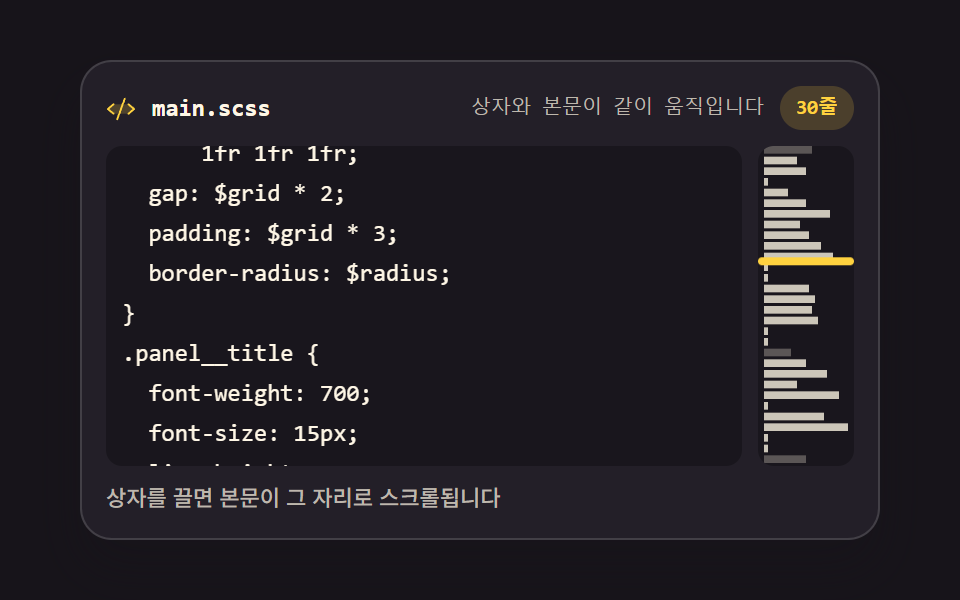
오른쪽 좁은 캔버스가 글자 대신 줄 길이를 픽셀 띠로 그려 문서 전체 모양을 보여 줍니다. 뷰포트 상자를 끌면 본문이 그 자리로 스크롤됩니다.
쓰임긴 파일에서 위치를 잡는 편집기
fillRectgetContextscrollHeight
<main class="stage">
<div class="mm is-demo" id="mm">
  <div class="mm__bar">
    <span class="mm__ico" aria-hidden="true"><svg xmlns="http://www.w3.org/2000/svg" width="1em" height="1em" viewBox="0 0 256 256"><g fill="currentColor"><path d="m240 128l-48 40H64l-48-40l48-40h128Z" opacity=".2"/><path d="M69.12 94.15L28.5 128l40.62 33.85a8 8 0 1 1-10.24 12.29l-48-40a8 8 0 0 1 0-12.29l48-40a8 8 0 0 1 10.24 12.3m176 27.7l-48-40a8 8 0 1 0-10.24 12.3L227.5 128l-40.62 33.85a8 8 0 1 0 10.24 12.29l48-40a8 8 0 0 0 0-12.29m-82.39-89.37a8 8 0 0 0-10.25 4.79l-64 176a8 8 0 0 0 4.79 10.26A8.1 8.1 0 0 0 96 224a8 8 0 0 0 7.52-5.27l64-176a8 8 0 0 0-4.79-10.25"/></g></svg></span>
    <span class="mm__name">main.scss</span>
    <span class="mm__status" id="status" data-t="{p}번째 줄 보는 중"><span class="mm__stTop">1번째 줄 보는 중</span><span class="mm__stMid">상자와 본문이 같이 움직입니다</span></span>
    <span class="mm__count" id="count" data-t="{n}줄">30줄</span>
  </div>
  <div class="mm__body">
    <div class="mm__view" id="view" tabindex="0">
      <pre class="mm__track" id="track"></pre>
    </div>
    <div class="mm__map" id="map" aria-label="미니맵 — 끌어서 문서 위치를 바꿉니다">
      <canvas class="mm__cv" id="cv"></canvas>
      <span class="mm__box" id="box"></span>
    </div>
  </div>
  <p class="mm__note">상자를 끌면 본문이 그 자리로 스크롤됩니다</p>
</div>
</main>
@use "../../../../site/static/demo-tokens" as *;
// 캔버스 미니맵 — 오른쪽 좁은 canvas 가 줄 길이를 픽셀 띠(fillRect)로 그려 문서 전체 모양을 보여 준다.
// 캔버스는 로드 시 한 번만 그린다(렌더는 CSS 시계로 프레임을 뽑으므로 rAF 다시 그리기는 측정에 안 잡힌다).
// 상자 드래그와 본문 스크롤은 JS(Pointer Events + scroll)로 양방향으로 이어진다.
// 격자 미리보기(.is-demo)는 본문 트랙과 상자를 같은 리듬의 CSS 키프레임으로 움직인다 —
// 스크롤 상자(view)와 트랙(track)을 분리하고 transform 은 track 에만 건다(051 실측 함정 회피).
$duration: $dur-quick;
$easing: $ease-spring;
$color: $stage-yellow;
$mono: ui-monospace, SFMono-Regular, "SF Mono", Consolas, "Liberation Mono", monospace;
$line: rgba(255, 255, 255, .14);
$dim: #beb7ad;
$fs: clamp(10px, 2.6vw, 12px);
$lh: 20px;
@include stage($stage-ink);
.mm {
// 미리보기 루프의 이동거리 — JS 가 실제 스크롤 범위에서 계산해 넣는다
--mm-track-y: -200px;
--mm-thumb-y: 53px;
display: flex; flex-direction: column; gap: $sp-2;
box-sizing: border-box; width: min(100%, 400px);
padding: $sp-3; border: 1px solid $line; border-radius: $r-card;
background: $tick-panel;
box-shadow: $shadow-raised;
}
// ── 파일 이름 줄
.mm__bar { display: flex; align-items: center; gap: $sp-2; }
.mm__ico { display: grid; place-items: center; color: $color; font-size: 15px; }
.mm__name {
flex: 0 0 auto; color: $subject-cream;
font-family: $mono; font-weight: 700; font-size: 12px; line-height: 1.4;
}
.mm__status {
flex: 1 1 auto; color: $dim;
font-family: $mono; font-weight: 500; font-size: 10px; line-height: 1.4;
text-align: right;
}
.mm__count {
flex: 0 0 auto; padding: $sp-1 $sp-2; border-radius: $r-pill;
background: rgba(255, 210, 63, .18); color: $stage-yellow;
font-family: $mono; font-weight: 700; font-size: 10px; line-height: 1.4;
}
// ── 본문(실제 스크롤) + 미니맵
.mm__body { display: flex; gap: $sp-2; }
.mm__view {
flex: 1 1 auto; height: $lh * 8;
overflow: auto; overscroll-behavior: contain;
border-radius: $r-sm; background: rgba(0, 0, 0, .28);
scrollbar-width: thin;
}
.mm__track {
box-sizing: border-box; margin: 0; padding: $sp-2;
color: $subject-cream;
font-family: $mono; font-weight: 500; font-size: $fs; line-height: $lh;
letter-spacing: 0; tab-size: 2;
white-space: pre;
}
.mm__ln { display: block; }
.mm__ln--dim { color: $dim; }
.mm__ln--tok { color: $subject-sky; }
.mm__map {
position: relative; flex: 0 0 48px; height: $lh * 8;
border-radius: $r-sm; background: rgba(0, 0, 0, .28);
overflow: hidden; cursor: grab; touch-action: none;
}
.mm__map:active { cursor: grabbing; }
.mm__cv { position: absolute; inset: 0; display: block; width: 100%; height: 100%; }
.mm__box {
position: absolute; left: 0; right: 0; top: 0; box-sizing: border-box;
border: 2px solid $stage-yellow; border-radius: $r-xs;
background: rgba(255, 210, 63, .12);
}
.mm__note {
margin: 0; color: $dim;
font-weight: 500; font-size: 11px; line-height: 1.4;
}
// ── 격자 미리보기 루프 (2초)
// 본문 트랙이 10→50% 에 위로 스크롤되고 60→88% 에 제자리로 돌아온다(복귀는 90% 안에).
// 상자는 같은 키프레임 지점·같은 이징으로 따라 내려가고 올라온다 — 두 애니메이션이 같은 리듬으로 묶인다.
// 미리보기 동안에는 실제 스크롤 대신 트랙 transform 이 움직이게 뷰의 스크롤을 잠근다.
// 미리보기 문장에는 **줄 번호를 쓰지 않는다**. 트랙은 이징으로 연속 이동하는데 문장은 컷이라
// 어느 시점을 골라도 「1번째 줄」과 화면이 어긋난 장면이 poster 로 뽑힌다 (실측 2026-09-13).
// 숫자가 없는 문장으로 바꾸면 이동 중 어느 프레임에서도 참이다. 실제 조작 때는 JS 가 줄 번호를 쓴다
.mm__status { display: inline-grid; }
.mm__stTop, .mm__stMid { grid-area: 1 / 1; }
.mm__stMid { visibility: hidden; }
.mm.is-demo .mm__stTop {
animation-name: mmStTop; animation-duration: $dur-loop; animation-timing-function: steps(1, end);
animation-iteration-count: infinite; animation-fill-mode: backwards;
}
.mm.is-demo .mm__stMid {
animation-name: mmStMid; animation-duration: $dur-loop; animation-timing-function: steps(1, end);
animation-iteration-count: infinite; animation-fill-mode: backwards;
}
@keyframes mmStTop {
0%, 100% { visibility: hidden; }
}
@keyframes mmStMid {
0%, 100% { visibility: visible; }
}
.mm.is-demo .mm__view { overflow: hidden; }
.mm.is-demo .mm__track {
animation-name: mmScroll;
animation-duration: $dur-loop; animation-timing-function: $easing;
animation-iteration-count: infinite; animation-fill-mode: backwards;
}
.mm.is-demo .mm__box {
animation-name: mmThumb;
animation-duration: $dur-loop; animation-timing-function: $easing;
animation-iteration-count: infinite; animation-fill-mode: backwards;
}
@keyframes mmScroll {
0%, 10% { transform: translateY(0); }
50%, 60% { transform: translateY(var(--mm-track-y)); }
88%, 100% { transform: translateY(0); }
}
@keyframes mmThumb {
0%, 10% { transform: translateY(0); }
50%, 60% { transform: translateY(var(--mm-thumb-y)); }
88%, 100% { transform: translateY(0); }
}
// ── 좁은 화면: 행간과 여백을 줄여 무대 안에 들어오게 한다 (2·3px 는 0 으로 내린다)
@media (max-width: 340px) {
.mm { gap: $sp-1; padding: $sp-2; }
.mm__view, .mm__map { height: 104px; }
.mm__map { flex-basis: 40px; }
.mm__track { font-size: 10px; line-height: 16px; padding: $sp-1; }
.mm__name { font-size: 11px; }
.mm__ico { font-size: 13px; }
.mm__status, .mm__count, .mm__note { font-size: 10px; }
}
@media (prefers-reduced-motion: reduce) {
.mm.is-demo .mm__stTop,
.mm.is-demo .mm__stMid,
.mm.is-demo .mm__track,
.mm.is-demo .mm__box {
animation: none !important;
transform: none !important;
}
}html, body {
margin: 0;
overflow: hidden;
}
.stage {
box-sizing: border-box;
min-height: 100vh;
display: grid;
place-items: center;
margin: 0;
background: #17141a;
font-family: -apple-system, "Segoe UI", "Noto Sans KR", sans-serif;
padding: clamp(8px, 4vw, 24px);
}
.mm {
--mm-track-y: -200px;
--mm-thumb-y: 53px;
display: flex;
flex-direction: column;
gap: 8px;
box-sizing: border-box;
width: min(100%, 400px);
padding: 12px;
border: 1px solid rgba(255, 255, 255, 0.14);
border-radius: 16px;
background: #231f28;
box-shadow: 0 14px 24px rgba(23, 20, 26, 0.32);
}
.mm__bar {
display: flex;
align-items: center;
gap: 8px;
}
.mm__ico {
display: grid;
place-items: center;
color: #ffd23f;
font-size: 15px;
}
.mm__name {
flex: 0 0 auto;
color: #fff7e6;
font-family: ui-monospace, SFMono-Regular, "SF Mono", Consolas, "Liberation Mono", monospace;
font-weight: 700;
font-size: 12px;
line-height: 1.4;
}
.mm__status {
flex: 1 1 auto;
color: #beb7ad;
font-family: ui-monospace, SFMono-Regular, "SF Mono", Consolas, "Liberation Mono", monospace;
font-weight: 500;
font-size: 10px;
line-height: 1.4;
text-align: right;
}
.mm__count {
flex: 0 0 auto;
padding: 4px 8px;
border-radius: 999px;
background: rgba(255, 210, 63, 0.18);
color: #ffd23f;
font-family: ui-monospace, SFMono-Regular, "SF Mono", Consolas, "Liberation Mono", monospace;
font-weight: 700;
font-size: 10px;
line-height: 1.4;
}
.mm__body {
display: flex;
gap: 8px;
}
.mm__view {
flex: 1 1 auto;
height: 160px;
overflow: auto;
overscroll-behavior: contain;
border-radius: 8px;
background: rgba(0, 0, 0, 0.28);
scrollbar-width: thin;
}
.mm__track {
box-sizing: border-box;
margin: 0;
padding: 8px;
color: #fff7e6;
font-family: ui-monospace, SFMono-Regular, "SF Mono", Consolas, "Liberation Mono", monospace;
font-weight: 500;
font-size: clamp(10px, 2.6vw, 12px);
line-height: 20px;
letter-spacing: 0;
tab-size: 2;
white-space: pre;
}
.mm__ln {
display: block;
}
.mm__ln--dim {
color: #beb7ad;
}
.mm__ln--tok {
color: #6ec8ff;
}
.mm__map {
position: relative;
flex: 0 0 48px;
height: 160px;
border-radius: 8px;
background: rgba(0, 0, 0, 0.28);
overflow: hidden;
cursor: grab;
touch-action: none;
}
.mm__map:active {
cursor: grabbing;
}
.mm__cv {
position: absolute;
inset: 0;
display: block;
width: 100%;
height: 100%;
}
.mm__box {
position: absolute;
left: 0;
right: 0;
top: 0;
box-sizing: border-box;
border: 2px solid #ffd23f;
border-radius: 4px;
background: rgba(255, 210, 63, 0.12);
}
.mm__note {
margin: 0;
color: #beb7ad;
font-weight: 500;
font-size: 11px;
line-height: 1.4;
}
.mm__status {
display: inline-grid;
}
.mm__stTop, .mm__stMid {
grid-area: 1/1;
}
.mm__stMid {
visibility: hidden;
}
.mm.is-demo .mm__stTop {
animation-name: mmStTop;
animation-duration: 2s;
animation-timing-function: steps(1, end);
animation-iteration-count: infinite;
animation-fill-mode: backwards;
}
.mm.is-demo .mm__stMid {
animation-name: mmStMid;
animation-duration: 2s;
animation-timing-function: steps(1, end);
animation-iteration-count: infinite;
animation-fill-mode: backwards;
}
@keyframes mmStTop {
0%, 100% {
visibility: hidden;
}
}
@keyframes mmStMid {
0%, 100% {
visibility: visible;
}
}
.mm.is-demo .mm__view {
overflow: hidden;
}
.mm.is-demo .mm__track {
animation-name: mmScroll;
animation-duration: 2s;
animation-timing-function: cubic-bezier(0.2, 0.8, 0.2, 1);
animation-iteration-count: infinite;
animation-fill-mode: backwards;
}
.mm.is-demo .mm__box {
animation-name: mmThumb;
animation-duration: 2s;
animation-timing-function: cubic-bezier(0.2, 0.8, 0.2, 1);
animation-iteration-count: infinite;
animation-fill-mode: backwards;
}
@keyframes mmScroll {
0%, 10% {
transform: translateY(0);
}
50%, 60% {
transform: translateY(var(--mm-track-y));
}
88%, 100% {
transform: translateY(0);
}
}
@keyframes mmThumb {
0%, 10% {
transform: translateY(0);
}
50%, 60% {
transform: translateY(var(--mm-thumb-y));
}
88%, 100% {
transform: translateY(0);
}
}
@media (max-width: 340px) {
.mm {
gap: 4px;
padding: 8px;
}
.mm__view, .mm__map {
height: 104px;
}
.mm__map {
flex-basis: 40px;
}
.mm__track {
font-size: 10px;
line-height: 16px;
padding: 4px;
}
.mm__name {
font-size: 11px;
}
.mm__ico {
font-size: 13px;
}
.mm__status, .mm__count, .mm__note {
font-size: 10px;
}
}
@media (prefers-reduced-motion: reduce) {
.mm.is-demo .mm__stTop,
.mm.is-demo .mm__stMid,
.mm.is-demo .mm__track,
.mm.is-demo .mm__box {
animation: none !important;
transform: none !important;
}
}var mm = document.getElementById('mm');
var view = document.getElementById('view');
var track = document.getElementById('track');
var map = document.getElementById('map');
var box = document.getElementById('box');
var cv = document.getElementById('cv');
var statusEl = document.getElementById('status');
var countEl = document.getElementById('count');
var TPL_VIEW = statusEl.getAttribute('data-t');
var TPL_LINES = countEl.getAttribute('data-t');
// 문서 30줄 — 미니맵 띠와 본문이 같은 배열에서 나온다
var LINES = [
'// layout tokens',
'$grid: 4px;',
'$radius: 12px;',
'',
'.panel {',
' display: grid;',
' grid-template-columns:',
' 1fr 1fr 1fr;',
' gap: $grid * 2;',
' padding: $grid * 3;',
' border-radius: $radius;',
'}',
'',
'.panel__title {',
' font-weight: 700;',
' font-size: 15px;',
' line-height: 20px;',
'}',
'',
'// motion',
'.panel__item {',
' transition: transform',
' 220ms ease;',
' transform: translateY(0);',
'}',
'.panel__item:hover {',
' transform: translateY(-4px);',
'}',
'',
'// end of file'
];
function esc(t) { return t.replace(/&/g, '&').replace(/</g, '<').replace(/>/g, '>'); }
function fillTrack() {
track.innerHTML = LINES.map(function (ln) {
var cls = ln.indexOf('//') === 0 ? ' mm__ln--dim' : (ln.trim().charAt(0) === '$' ? ' mm__ln--tok' : '');
return '<span class="mm__ln' + cls + '">' + esc(ln) + '</span>';
}).join('');
countEl.textContent = TPL_LINES.replace('{n}', LINES.length);
}
// 미니맵은 로드 시 한 번 그린다 — 렌더가 프레임을 뽑는 시계는 CSS 애니메이션이므로
// 캔버스를 매 프레임 다시 그리는 연출은 측정에 잡히지 않는다 (지시 299).
// devicePixelRatio 를 곱해 물리 픽셀에 맞춰 그려야 흐려지지 않는다.
function drawMap() {
var ctx = cv.getContext('2d');
var dpr = window.devicePixelRatio || 1;
var w = map.clientWidth, h = map.clientHeight;
cv.width = Math.max(1, Math.round(w * dpr));
cv.height = Math.max(1, Math.round(h * dpr));
ctx.setTransform(dpr, 0, 0, dpr, 0, 0);
ctx.clearRect(0, 0, w, h);
var maxLen = 1;
LINES.forEach(function (ln) { maxLen = Math.max(maxLen, ln.trim().length); });
var pitch = h / LINES.length;
var barH = Math.max(1.5, pitch - 1.5);
LINES.forEach(function (ln, i) {
var bw = Math.max(2, (ln.trim().length / maxLen) * (w - 6));
ctx.fillStyle = ln.indexOf('//') === 0 ? 'rgba(190,183,173,.40)' : 'rgba(255,247,230,.78)';
ctx.fillRect(3, i * pitch, bw, barH);
});
}
function lineHeightPx() { return parseFloat(getComputedStyle(track).lineHeight) || 20; }
// 본문을 스크롤하면 상자가 따라온다 — 상자 위치는 scrollHeight 대비 비율로 계산한다
function placeBox() {
// 미리보기 루프 중에는 상태 칸을 건드리지 않는다 — 겹쳐 둔 두 문장을 textContent 가 통째로 지운다
if (mm.classList.contains('is-demo')) return;
var total = view.scrollHeight;
var shown = view.clientHeight;
var ratio = total > shown ? view.scrollTop / (total - shown) : 0;
box.style.height = Math.max(16, (shown / total) * map.clientHeight) + 'px';
var travel = Math.max(0, map.clientHeight - box.offsetHeight);
box.style.transform = 'translateY(' + (ratio * travel).toFixed(1) + 'px)';
var line = Math.min(LINES.length, Math.round(view.scrollTop / lineHeightPx()) + 1);
statusEl.textContent = TPL_VIEW.replace('{p}', line);
}
// 미리보기 루프의 이동거리도 실제 스크롤 범위에서 계산해 상자와 본문이 같은 비율로 움직이게 한다
function tuneLoop() {
var span = (view.scrollHeight - view.clientHeight) * 0.45;
var travel = Math.max(0, map.clientHeight - box.offsetHeight);
mm.style.setProperty('--mm-track-y', (-span).toFixed(0) + 'px');
mm.style.setProperty('--mm-thumb-y', (Math.abs(span) / Math.max(1, view.scrollHeight - view.clientHeight) * travel).toFixed(0) + 'px');
}
// 상자를 끌면(Pointer Events) 본문이 그 자리로 스크롤된다
var dragging = false;
function jumpTo(ev) {
var r = map.getBoundingClientRect();
var bh = box.offsetHeight;
var y = ev.clientY - r.top - bh / 2;
var k = Math.max(0, Math.min(1, y / Math.max(1, r.height - bh)));
view.scrollTop = k * (view.scrollHeight - view.clientHeight); // scroll 이벤트가 placeBox 를 부른다
}
map.addEventListener('pointerdown', function (ev) {
mm.classList.remove('is-demo');
dragging = true;
map.setPointerCapture(ev.pointerId);
jumpTo(ev);
ev.preventDefault();
});
map.addEventListener('pointermove', function (ev) { if (dragging) jumpTo(ev); });
function endDrag(ev) {
dragging = false;
try { map.releasePointerCapture(ev.pointerId); } catch (err) { /* 이미 풀린 포인터 */ }
}
map.addEventListener('pointerup', endDrag);
map.addEventListener('pointercancel', endDrag);
view.addEventListener('scroll', function () { mm.classList.remove('is-demo'); placeBox(); });
view.addEventListener('wheel', function () { mm.classList.remove('is-demo'); }, { passive: true });
view.addEventListener('focus', function () { mm.classList.remove('is-demo'); });
window.addEventListener('resize', function () { drawMap(); placeBox(); tuneLoop(); });
fillTrack();
drawMap();
placeBox();
tuneLoop();// MinimapEditor — vanilla 판(run/299/demo/05-editor-minimap-canvas/index.html) 의 React 포트.
// 오른쪽 좁은 canvas 가 줄 길이를 픽셀 띠(fillRect)로 그려 문서 전체 모양을 보여 준다.
// 캔버스는 마운트 때 한 번만 그린다 (매 프레임 다시 그리는 연출은 CSS 시계로 뽑는 측정에 안 잡힌다).
// 상자 드래그와 본문 스크롤은 Pointer Events + scroll 로 양방향으로 이어진다.
import { useEffect, useRef, useState } from "react";
import type { CSSProperties } from "react";
import styles from "./MinimapEditor.module.scss";
export type MinimapEditorProps = {
duration?: number;
easing?: string;
color?: string;
lines?: string[];
};
type Vars = CSSProperties & { "--duration"?: string; "--easing"?: string; "--color"?: string };
// useRef<T> 는 T | null 을 돌려준다 — ambient 타입에 맞춰 상자 타입을 따로 둔다
type Box<T> = { current: T | null };
// ambient 에 React 이벤트 제네릭이 없다 — 쓰는 속성만 적은 로컬 타입을 파일 안에 둔다
type PtrEvt = { clientY: number; pointerId: number; preventDefault(): void };
const FILE_NAME = "main.scss";
const MAP_LABEL = "미니맵 — 끌어서 문서 위치를 바꿉니다";
const NOTE = "상자를 끌면 본문이 그 자리로 스크롤됩니다";
// 문구 템플릿은 화면 글자와 같은 근원에서 읽는다 — 언어팩이 값을 바꿔도 조립 규칙이 함께 바뀐다
const TPL_VIEW = "{p}번째 줄 보는 중";
const TPL_LINES = "{n}줄";
// 미리보기에 겹쳐 두는 두 문장. 아래 문장에는 줄 번호를 쓰지 않는다 —
// 트랙은 이징으로 연속 이동하는데 문장은 컷이라 어느 시점을 골라도 숫자와 화면이 어긋난다
const PREVIEW_TOP = "1번째 줄 보는 중";
const PREVIEW_MID = "상자와 본문이 같이 움직입니다";
// 문서 30줄 — 미니맵 띠와 본문이 같은 배열에서 나온다
const LINES = [
"// layout tokens",
"$grid: 4px;",
"$radius: 12px;",
"",
".panel {",
" display: grid;",
" grid-template-columns:",
" 1fr 1fr 1fr;",
" gap: $grid * 2;",
" padding: $grid * 3;",
" border-radius: $radius;",
"}",
"",
".panel__title {",
" font-weight: 700;",
" font-size: 15px;",
" line-height: 20px;",
"}",
"",
"// motion",
".panel__item {",
" transition: transform",
" 220ms ease;",
" transform: translateY(0);",
"}",
".panel__item:hover {",
" transform: translateY(-4px);",
"}",
"",
"// end of file",
];
export default function MinimapEditor(props: MinimapEditorProps) {
const duration = props.duration ?? 220;
const easing = props.easing ?? "cubic-bezier(.2, .8, .2, 1)";
const color = props.color ?? "#ffd23f";
const lines = props.lines ?? LINES;
const [preview, setPreview] = useState<boolean>(true);
const [viewLine, setViewLine] = useState<number>(1);
const rootRef = useRef<HTMLDivElement>(null) as Box<HTMLDivElement>;
const viewRef = useRef<HTMLDivElement>(null) as Box<HTMLDivElement>;
const trackRef = useRef<HTMLPreElement>(null) as Box<HTMLPreElement>;
const mapRef = useRef<HTMLDivElement>(null) as Box<HTMLDivElement>;
const boxRef = useRef<HTMLSpanElement>(null) as Box<HTMLSpanElement>;
const cvRef = useRef<HTMLCanvasElement>(null) as Box<HTMLCanvasElement>;
const dragging = useRef<boolean>(false) as Box<boolean>;
// 미리보기 여부를 이벤트 안에서도 읽어야 한다 — resize·scroll 리스너가 낡은 값을 보지 않게 상자로 둔다
const previewRef = useRef<boolean>(true) as Box<boolean>;
const stopPreview = () => {
previewRef.current = false;
setPreview(false);
};
// devicePixelRatio 를 곱해 물리 픽셀에 맞춰 그려야 흐려지지 않는다
const drawMap = () => {
const cv = cvRef.current;
const map = mapRef.current;
if (!cv || !map) return;
const ctx = cv.getContext("2d");
if (!ctx) return;
const dpr = window.devicePixelRatio || 1;
const w = map.clientWidth;
const h = map.clientHeight;
cv.width = Math.max(1, Math.round(w * dpr));
cv.height = Math.max(1, Math.round(h * dpr));
ctx.setTransform(dpr, 0, 0, dpr, 0, 0);
ctx.clearRect(0, 0, w, h);
let maxLen = 1;
lines.forEach((ln) => {
maxLen = Math.max(maxLen, ln.trim().length);
});
const pitch = h / lines.length;
const barH = Math.max(1.5, pitch - 1.5);
lines.forEach((ln, i) => {
const bw = Math.max(2, (ln.trim().length / maxLen) * (w - 6));
ctx.fillStyle = ln.indexOf("//") === 0 ? "rgba(190,183,173,.40)" : "rgba(255,247,230,.78)";
ctx.fillRect(3, i * pitch, bw, barH);
});
};
const lineHeightPx = () => {
const track = trackRef.current;
if (!track) return 20;
return parseFloat(getComputedStyle(track).lineHeight) || 20;
};
// 본문을 스크롤하면 상자가 따라온다 — 상자 위치는 scrollHeight 대비 비율로 계산한다
const placeBox = () => {
// 미리보기 루프 중에는 상태 칸을 건드리지 않는다 — 겹쳐 둔 두 문장을 덮어쓰지 않게
if (previewRef.current) return;
const view = viewRef.current;
const map = mapRef.current;
const box = boxRef.current;
if (!view || !map || !box) return;
const total = view.scrollHeight;
const shown = view.clientHeight;
const ratio = total > shown ? view.scrollTop / (total - shown) : 0;
box.style.height = Math.max(16, (shown / total) * map.clientHeight) + "px";
const travel = Math.max(0, map.clientHeight - box.offsetHeight);
box.style.transform = "translateY(" + (ratio * travel).toFixed(1) + "px)";
setViewLine(Math.min(lines.length, Math.round(view.scrollTop / lineHeightPx()) + 1));
};
// 미리보기 루프의 이동거리도 실제 스크롤 범위에서 계산해 상자와 본문이 같은 비율로 움직이게 한다
const tuneLoop = () => {
const root = rootRef.current;
const view = viewRef.current;
const map = mapRef.current;
const box = boxRef.current;
if (!root || !view || !map || !box) return;
const span = (view.scrollHeight - view.clientHeight) * 0.45;
const travel = Math.max(0, map.clientHeight - box.offsetHeight);
root.style.setProperty("--mm-track-y", (-span).toFixed(0) + "px");
root.style.setProperty(
"--mm-thumb-y",
((Math.abs(span) / Math.max(1, view.scrollHeight - view.clientHeight)) * travel).toFixed(0) + "px",
);
};
useEffect(() => {
drawMap();
placeBox();
tuneLoop();
const onResize = () => {
drawMap();
placeBox();
tuneLoop();
};
window.addEventListener("resize", onResize);
return () => window.removeEventListener("resize", onResize);
}, []);
// 상자를 끌면 본문이 그 자리로 스크롤된다
const jumpTo = (ev: PtrEvt) => {
const map = mapRef.current;
const view = viewRef.current;
const box = boxRef.current;
if (!map || !view || !box) return;
const r = map.getBoundingClientRect();
const bh = box.offsetHeight;
const y = ev.clientY - r.top - bh / 2;
const k = Math.max(0, Math.min(1, y / Math.max(1, r.height - bh)));
view.scrollTop = k * (view.scrollHeight - view.clientHeight); // scroll 이벤트가 placeBox 를 부른다
};
const onMapDown = (ev: PtrEvt) => {
stopPreview();
dragging.current = true;
const map = mapRef.current;
if (map) map.setPointerCapture(ev.pointerId);
jumpTo(ev);
ev.preventDefault();
};
const endDrag = (ev: PtrEvt) => {
dragging.current = false;
const map = mapRef.current;
if (!map) return;
try {
map.releasePointerCapture(ev.pointerId);
} catch (err) {
/* 이미 풀린 포인터 */
}
};
const vars: Vars = { "--duration": duration + "ms", "--easing": easing, "--color": color };
return (
<main className={styles.stage}>
<div className={styles.root + (preview ? " " + styles.isDemo : "")} style={vars} ref={rootRef}>
<div className={styles.bar}>
<span className={styles.ico} aria-hidden="true">
<svg xmlns="http://www.w3.org/2000/svg" width="1em" height="1em" viewBox="0 0 256 256">
<g fill="currentColor">
<path d="m240 128l-48 40H64l-48-40l48-40h128Z" opacity=".2" />
<path d="M69.12 94.15L28.5 128l40.62 33.85a8 8 0 1 1-10.24 12.29l-48-40a8 8 0 0 1 0-12.29l48-40a8 8 0 0 1 10.24 12.3m176 27.7l-48-40a8 8 0 1 0-10.24 12.3L227.5 128l-40.62 33.85a8 8 0 1 0 10.24 12.29l48-40a8 8 0 0 0 0-12.29m-82.39-89.37a8 8 0 0 0-10.25 4.79l-64 176a8 8 0 0 0 4.79 10.26A8.1 8.1 0 0 0 96 224a8 8 0 0 0 7.52-5.27l64-176a8 8 0 0 0-4.79-10.25" />
</g>
</svg>
</span>
<span className={styles.name}>{FILE_NAME}</span>
<span className={styles.status}>
{preview ? (
<>
<span className={styles.stTop}>{PREVIEW_TOP}</span>
<span className={styles.stMid}>{PREVIEW_MID}</span>
</>
) : (
TPL_VIEW.replace("{p}", String(viewLine))
)}
</span>
<span className={styles.count}>{TPL_LINES.replace("{n}", String(lines.length))}</span>
</div>
<div className={styles.body}>
<div
className={styles.view}
ref={viewRef}
tabIndex={0}
onScroll={() => {
stopPreview();
placeBox();
}}
onWheel={stopPreview}
onFocus={stopPreview}
>
<pre className={styles.track} ref={trackRef}>
{lines.map((ln, i) => (
<span
key={i}
className={
styles.ln +
(ln.indexOf("//") === 0
? " " + styles.lnDim
: ln.trim().charAt(0) === "$"
? " " + styles.lnTok
: "")
}
>
{ln}
</span>
))}
</pre>
</div>
<div
className={styles.map}
ref={mapRef}
aria-label={MAP_LABEL}
onPointerDown={onMapDown}
onPointerMove={(ev: PtrEvt) => {
if (dragging.current) jumpTo(ev);
}}
onPointerUp={endDrag}
onPointerCancel={endDrag}
>
<canvas className={styles.cv} ref={cvRef} />
<span className={styles.box} ref={boxRef} />
</div>
</div>
<p className={styles.note}>{NOTE}</p>
</div>
</main>
);
}05 캔버스 미니맵 — 측정 누적면적 15.017% · 움직인 프레임 17/23GODRICH 원작 · zip 에 SCSS·React 포함 · 코드 에디터 만들기 9종 — 온라인 코드 편집기 핵심 기법
이 데모가 속한 글
 코드 에디터 만들기 9종 — 온라인 코드 편집기 핵심 기법코드 에디터 만들기는 웹 페이지 안에서 코드를 치면 색이 입고 줄 번호가 붙고 괄호가 저절로 닫히는 입력칸을 짜는 일입니다. 아홉 개를 라이브러리 없이 textarea 하나로 만들었고, 아래 격자에서 지금 돌아갑니다 이 글의 데모 전부 보기