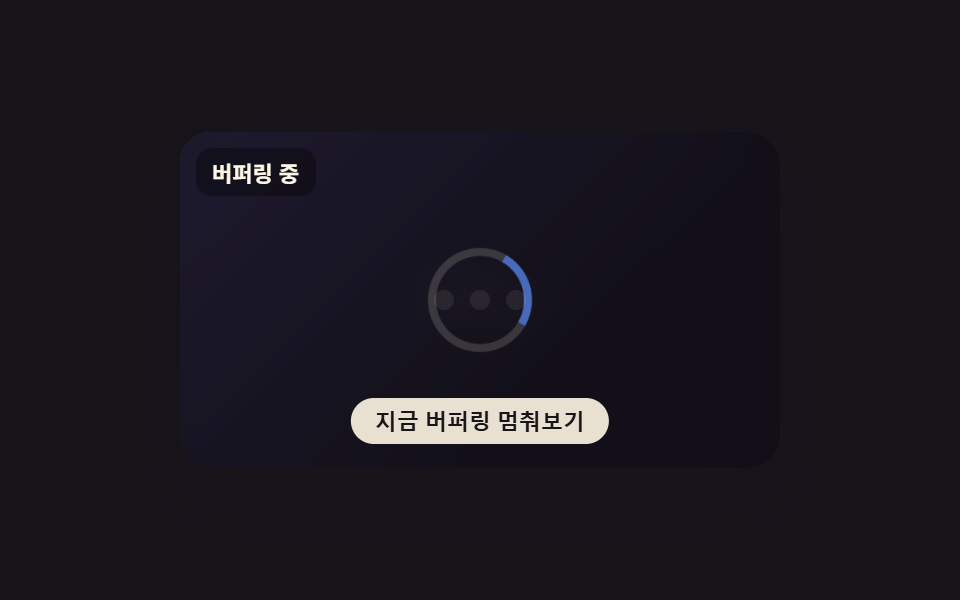
09동작 줄이기 켜짐·꺼짐 나란히 비교
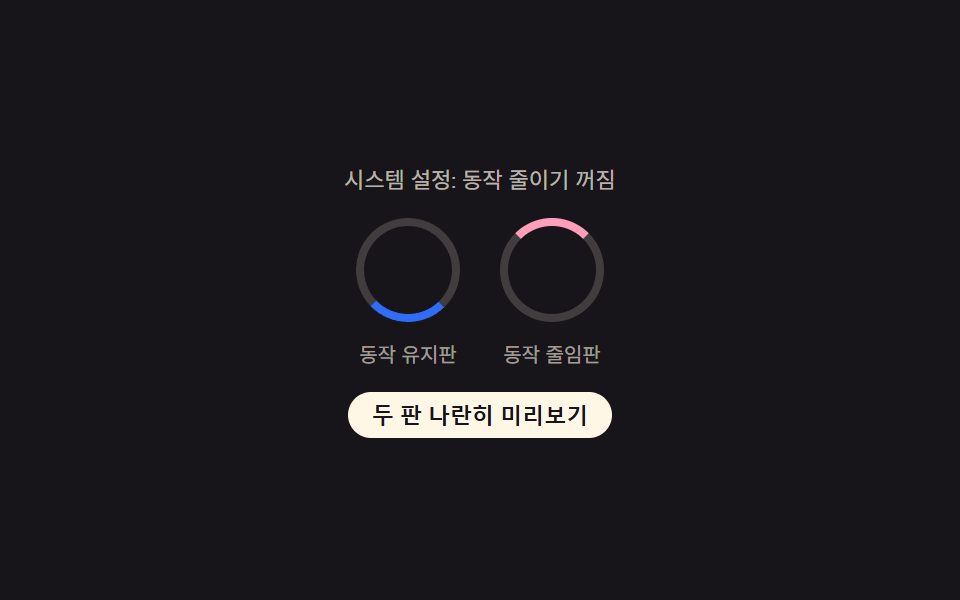
왼쪽 판은 tickMotion()으로 각도를 연속 계산해 링을 계속 회전시키고 오른쪽 판은 같은 경과 시간을 REDUCED_STEP_MS(900ms) 단위로 끊은 tickReduced()로 계단식으로만 바꿔, 실제 시스템의 동작 줄이기 설정 변화까지 matchMedia로 실시간 반영해 두 판을 나란히 비교한다.
쓰임접근성 대응이 필요한 모든 버퍼링 화면
prefers-reduced-motionaria-livetextContent
<main class="stage">
<div class="compareWrap is-demo" id="compareWrap">
  <p class="sysStatus" id="sysStatus" aria-live="polite">시스템 설정 확인 중</p>
  <div class="panels">
    <div class="panel">
      <span class="ring ringMotion" id="ringMotion" aria-hidden="true"></span>
      <p class="panelLabel">동작 유지판</p>
    </div>
    <div class="panel">
      <span class="ring ringReduced" id="ringReduced" aria-hidden="true"></span>
      <p class="panelLabel">동작 줄임판</p>
    </div>
  </div>
  <button class="previewBtn" id="previewBtn" type="button" aria-pressed="false">두 판 나란히 미리보기</button>
</div>
</main>
@use "../../../../site/static/demo-tokens" as *;
// 변수 3개
$duration: $dur-loop;
$easing: linear;
$color: $subject-blue;
// 계산 겹: index.html 의 tickMotion()·tickReduced() 가 같은 경과 시간(ms)을 두 갈래로 계산한다 —
// 하나는 연속 각도(회전), 하나는 REDUCED_STEP_MS 로 끊은 계단식 값. 그 차이 자체가 이 편의 주제다.
@include stage($stage-ink);
.compareWrap {
display: flex;
flex-direction: column;
align-items: center;
gap: $sp-3;
}
.sysStatus {
margin: 0;
font-size: 11px;
color: rgba($subject-cream, .7);
}
.panels {
display: flex;
gap: $sp-5;
}
.panel {
display: flex;
flex-direction: column;
align-items: center;
gap: $sp-2;
}
.ring {
display: block;
width: 44px;
height: 44px;
border-radius: 50%;
border: 4px solid rgba($subject-cream, .18);
}
.ringMotion {
border-top-color: $color;
}
.ringReduced {
--dim: 1;
border-top-color: $subject-pink;
opacity: var(--dim);
}
.panelLabel {
margin: 0;
font-size: 10px;
color: rgba($subject-cream, .6);
}
.single-panel .panels .panel:first-child {
display: none;
}
.previewBtn {
appearance: none;
border: none;
border-radius: $r-pill;
padding: $sp-1 $sp-3;
font-size: 11px;
font-weight: 600;
color: $subject-ink;
background: $subject-cream;
cursor: pointer;
&:focus-visible { outline: 2px solid $subject-blue-light; outline-offset: 2px; }
}
@media (max-width: 340px) {
.panels { gap: $sp-3; }
.ring { width: 34px; height: 34px; border-width: 3px; }
.sysStatus, .panelLabel, .previewBtn { font-size: 10px; }
}
// reduce: 실사용 경로 적용 — 동작 유지판(왼쪽)의 실제 회전을 강제로 멈춘다(!important 로 인라인 transform 을 덮는다).
// 동작 줄임판(오른쪽)은 원래도 계단식이라 손댈 전환이 없다. 시연 비교 토글 자체는 시연 게이트만이라 이 블록과 무관하다.
@media (prefers-reduced-motion: reduce) {
.ringMotion { transform: none !important; }
}html, body {
margin: 0;
overflow: hidden;
}
.stage {
box-sizing: border-box;
min-height: 100vh;
display: grid;
place-items: center;
margin: 0;
background: #17141a;
font-family: -apple-system, "Segoe UI", "Noto Sans KR", sans-serif;
padding: clamp(8px, 4vw, 24px);
}
.compareWrap {
display: flex;
flex-direction: column;
align-items: center;
gap: 12px;
}
.sysStatus {
margin: 0;
font-size: 11px;
color: rgba(255, 247, 230, 0.7);
}
.panels {
display: flex;
gap: 20px;
}
.panel {
display: flex;
flex-direction: column;
align-items: center;
gap: 8px;
}
.ring {
display: block;
width: 44px;
height: 44px;
border-radius: 50%;
border: 4px solid rgba(255, 247, 230, 0.18);
}
.ringMotion {
border-top-color: #2f6df6;
}
.ringReduced {
--dim: 1;
border-top-color: #ff9ebb;
opacity: var(--dim);
}
.panelLabel {
margin: 0;
font-size: 10px;
color: rgba(255, 247, 230, 0.6);
}
.single-panel .panels .panel:first-child {
display: none;
}
.previewBtn {
appearance: none;
border: none;
border-radius: 999px;
padding: 4px 12px;
font-size: 11px;
font-weight: 600;
color: #17141a;
background: #fff7e6;
cursor: pointer;
}
.previewBtn:focus-visible {
outline: 2px solid #5b8cf8;
outline-offset: 2px;
}
@media (max-width: 340px) {
.panels {
gap: 12px;
}
.ring {
width: 34px;
height: 34px;
border-width: 3px;
}
.sysStatus, .panelLabel, .previewBtn {
font-size: 10px;
}
}
@media (prefers-reduced-motion: reduce) {
.ringMotion {
transform: none !important;
}
}(function () {
var SPIN_MS = 1600;
var TICK_MS = 40;
var REDUCED_STEP_MS = 900; // 동작 줄임판은 이 간격마다 한 번씩만 상태를 바꾼다(연속 회전 없음)
var wrap = document.getElementById('compareWrap');
var sysStatus = document.getElementById('sysStatus');
var ringMotion = document.getElementById('ringMotion');
var ringReduced = document.getElementById('ringReduced');
var previewBtn = document.getElementById('previewBtn');
var mq = window.matchMedia('(prefers-reduced-motion: reduce)');
// 실사용 경로 적용 — 실제 OS 환경설정이 바뀌면 이 리스너가 즉시 문구를 다시 쓴다(새로고침 불필요)
function updateSystemStatus() {
sysStatus.textContent = '시스템 설정: 동작 줄이기 ' + (mq.matches ? '켜짐' : '꺼짐');
}
mq.addEventListener('change', updateSystemStatus);
updateSystemStatus();
// 왼쪽(동작 유지)은 각도를 연속으로 계산해 회전시키고, 오른쪽(동작 줄임)은 같은 시간 입력을
// REDUCED_STEP_MS 단위로 끊어(정수 나눗셈) 계단식으로만 바꾼다 — 두 분기를 같은 시계로 비교하는 계산.
function tickMotion(ms) {
var deg = (ms % SPIN_MS) / SPIN_MS * 360;
ringMotion.style.transform = 'rotate(' + deg.toFixed(1) + 'deg)';
}
function tickReduced(ms) {
var step = Math.floor(ms / REDUCED_STEP_MS) % 2;
ringReduced.style.setProperty('--dim', step === 0 ? '1' : '.45');
}
var timer = null;
var start = 0;
function loop() {
var ms = performance.now() - start;
tickMotion(ms);
tickReduced(ms);
}
function human() {
if (wrap.classList.contains('is-demo')) {
wrap.classList.remove('is-demo');
window.clearInterval(timer);
timer = null;
}
}
// 시연 게이트만 — 실제 시스템 설정과 무관하게, 이 데모 안에서만 두 판을 동시에 보여주는 비교 토글이다
var comparing = true;
previewBtn.addEventListener('click', function () {
human();
comparing = !comparing;
previewBtn.setAttribute('aria-pressed', comparing ? 'true' : 'false');
previewBtn.textContent = comparing ? '동작 유지판 숨기기' : '두 판 나란히 미리보기';
wrap.classList.toggle('single-panel', !comparing);
});
start = performance.now();
tickMotion(0);
tickReduced(0);
timer = window.setInterval(loop, TICK_MS);
})();import { useEffect, useRef } from 'react';
import styles from './BufferingReducedMotion.module.scss';
const SPIN_MS = 1600;
const TICK_MS = 40;
const REDUCED_STEP_MS = 900; // 동작 줄임판은 이 간격마다 한 번씩만 상태를 바꾼다(연속 회전 없음)
// 왼쪽(동작 유지)은 각도를 연속으로 계산해 회전시키고, 오른쪽(동작 줄임)은 같은 시간 입력을
// REDUCED_STEP_MS 단위로 끊어(정수 나눗셈) 계단식으로만 바꾼다 — 두 분기를 같은 시계로 비교하는 계산.
function tickMotion(ms: number) {
return (ms % SPIN_MS) / SPIN_MS * 360;
}
function tickReduced(ms: number) {
return Math.floor(ms / REDUCED_STEP_MS) % 2;
}
export default function BufferingReducedMotion() {
const wrapRef = useRef<HTMLDivElement>(null);
const sysStatusRef = useRef<HTMLParagraphElement>(null);
const ringMotionRef = useRef<HTMLSpanElement>(null);
const ringReducedRef = useRef<HTMLSpanElement>(null);
const previewBtnRef = useRef<HTMLButtonElement>(null);
useEffect(() => {
const wrap = wrapRef.current;
const sysStatus = sysStatusRef.current;
const ringMotion = ringMotionRef.current;
const ringReduced = ringReducedRef.current;
const previewBtn = previewBtnRef.current;
if (!wrap || !sysStatus || !ringMotion || !ringReduced || !previewBtn) return undefined;
const mq = window.matchMedia('(prefers-reduced-motion: reduce)');
// 실사용 경로 적용 — 실제 OS 환경설정이 바뀌면 이 리스너가 즉시 문구를 다시 쓴다(새로고침 불필요)
function updateSystemStatus() {
if (!sysStatus) return;
sysStatus.textContent = '시스템 설정: 동작 줄이기 ' + (mq.matches ? '켜짐' : '꺼짐');
}
mq.addEventListener('change', updateSystemStatus);
updateSystemStatus();
function paintMotion(ms: number) {
if (!ringMotion) return;
const deg = tickMotion(ms);
ringMotion.style.transform = 'rotate(' + deg.toFixed(1) + 'deg)';
}
function paintReduced(ms: number) {
if (!ringReduced) return;
const step = tickReduced(ms);
ringReduced.style.setProperty('--dim', step === 0 ? '1' : '.45');
}
let timer: ReturnType<typeof window.setInterval> | null = null;
let start = 0;
function loop() {
const ms = performance.now() - start;
paintMotion(ms);
paintReduced(ms);
}
function human() {
if (wrap && wrap.classList.contains(styles['is-demo'])) {
wrap.classList.remove(styles['is-demo']);
if (timer !== null) window.clearInterval(timer);
timer = null;
}
}
// 시연 게이트만 — 실제 시스템 설정과 무관하게, 이 데모 안에서만 두 판을 동시에 보여주는 비교 토글이다
let comparing = true;
function onPreview() {
human();
if (!wrap || !previewBtn) return;
comparing = !comparing;
previewBtn.setAttribute('aria-pressed', comparing ? 'true' : 'false');
previewBtn.textContent = comparing ? '동작 유지판 숨기기' : '두 판 나란히 미리보기';
wrap.classList.toggle(styles['single-panel'], !comparing);
}
previewBtn.addEventListener('click', onPreview);
start = performance.now();
paintMotion(0);
paintReduced(0);
timer = window.setInterval(loop, TICK_MS);
return () => {
if (timer !== null) window.clearInterval(timer);
previewBtn.removeEventListener('click', onPreview);
mq.removeEventListener('change', updateSystemStatus);
};
}, []);
return (
<div className={`${styles.compareWrap} ${styles['is-demo']}`} ref={wrapRef}>
<p className={styles.sysStatus} ref={sysStatusRef} aria-live="polite">시스템 설정 확인 중</p>
<div className={styles.panels}>
<div className={styles.panel}>
<span className={`${styles.ring} ${styles.ringMotion}`} ref={ringMotionRef} aria-hidden="true" />
<p className={styles.panelLabel}>동작 유지판</p>
</div>
<div className={styles.panel}>
<span className={`${styles.ring} ${styles.ringReduced}`} ref={ringReducedRef} aria-hidden="true" />
<p className={styles.panelLabel}>동작 줄임판</p>
</div>
</div>
<button className={styles.previewBtn} ref={previewBtnRef} type="button" aria-pressed="false">두 판 나란히 미리보기</button>
</div>
);
}09 동작 줄이기 켜짐·꺼짐 나란히 비교 — 측정 누적면적 0.961% · 움직인 프레임 23/23GODRICH 원작 · zip 에 SCSS·React 포함 · 버퍼링 표시 애니메이션 9종 — 스피너부터 화질 배지까지
이 데모가 속한 글
 버퍼링 표시 애니메이션 9종 — 스피너부터 화질 배지까지버퍼링 표시 아홉 가지 중 하나는 재생 위치와 버퍼링 위치를 두 겹의 링으로 함께 그리고, 하나는 오디오 파형이 버퍼된 만큼만 밝게 채워지며, 하나는 버퍼가 부족해지면 화질이 자동으로 낮아졌다는 배지가 뜹니다. 이 글의 데모 전부 보기